Home › Photo & Video

 DO
DO
 CNzh-Hans-CN
 THen-GB
 USen-USDOes-MX
 JMen-GB
 MYen-GB
 IDen-GB
 GBen-GB
 CAen-CA
 BRpt-BR
 AUen-AU
 COes-MX
 LAen-GB
 BBen-GB
 RUru
RUru ESes-ES
 SGen-GB
 NLnl
NLnl INen-GB
 SAen-GB
 FRfr-FR
 NGen-GB
 VNen-GB
 HKzh-Hant-HK
 PHen-GB
 ITit
ITit MLen-GB
 MXes-MX
 CHde-CH
 ZAen-GB
 DEde-DE
 NZen-AU
 HUen-GB
 TRen-GB
 BEen-GB
 GYen-GB
 IEen-GB
 ILen-GB
 NOen-GB
 PTpt-PT
 AEen-GB
 CLes-MX
 DMen-GB
 GRen-GB
 KWen-GB
 MOzh-Hant-HK
 PKen-GB
 JOen-GB
 KHen-GB
 KYen-GB
 KZen-GB
 LRen-GB
 TTen-GB
 TZen-GB
 UAen-GB
 ARes-MX
 ATde-DE
 BHen-GB
 BMen-GB
 BYen-GB
 CZen-GB
 GTes-MX
 KRko
KRko LBen-GB
 LKen-GB
 LTen-GB
 MKen-GB
 OMen-GB
 QAen-GB
 ROen-GB
 SLen-GB
 VEes-MX
 AFen-GB
 AGen-GB
 ALen-GB
 BGen-GB
 BOes-MX
 BSen-GB
 CIfr-FR
 CYen-GB
 DKen-GB
 ECes-MX
 EGen-GB
 GDen-GB
 GEen-GB
 GMen-GB
 KEen-GB
 MMen-GB
 MTen-GB
 PAes-MX
 PYes-MX
 RSen-GB
 RWen-GB
 SKen-GB
 TJen-GB
 UGen-GB
 VGen-GB
 ZMen-GB
 AIen-GB
 AOen-GB
 AZen-GB
 BAen-GB
 BFen-GB
 BJen-GB
 BNen-GB
 BTen-GB
 BWen-GB
 BZen-GB
 CDen-GB
 CGen-GB
 CMfr-FR
 CRes-MX
 CVen-GB
 DZen-GB
 EEen-GB
 FJen-GB
 FMen-GB
 GAfr-FR
 GHen-GB
 GWen-GB
 HNes-MX
 HRen-GB
 IQen-GB
 ISen-GB
 KGen-GB
 KNen-GB
 LCen-GB
 LUen-GB
 LVen-GB
 LYen-GB
 MAen-GB
 MDen-GB
 MEen-GB
 MGen-GB
 MNen-GB
 MRen-GB
 MSen-GB
 MUen-GB
 MVen-GB
 MWen-GB
 MZen-GB
 NAen-GB
 NEen-GB
 NIes-MX
 NPen-GB
 NRen-GB
 PEes-MX
 PGen-GB
 PWen-GB
 SBen-GB
 SCen-GB
 SIen-GB
 SNen-GB
 SRen-GB
 STen-GB
 SVes-MX
 SZen-GB
 TCen-GB
 TDen-GB
 TMen-GB
 TNen-GB
 TOen-GB
 UYen-GB
 UZen-GB
 VCen-GB
 VUen-GB
 XKen-GB
 ZWen-GB
168 of 168 storefronts
Content in en-US
Content in en-US
Information
Preview 1 platform
iPhone 10 images






What’s New Version 2.7.3
User-interface enhancements (improved photo picker).
Description
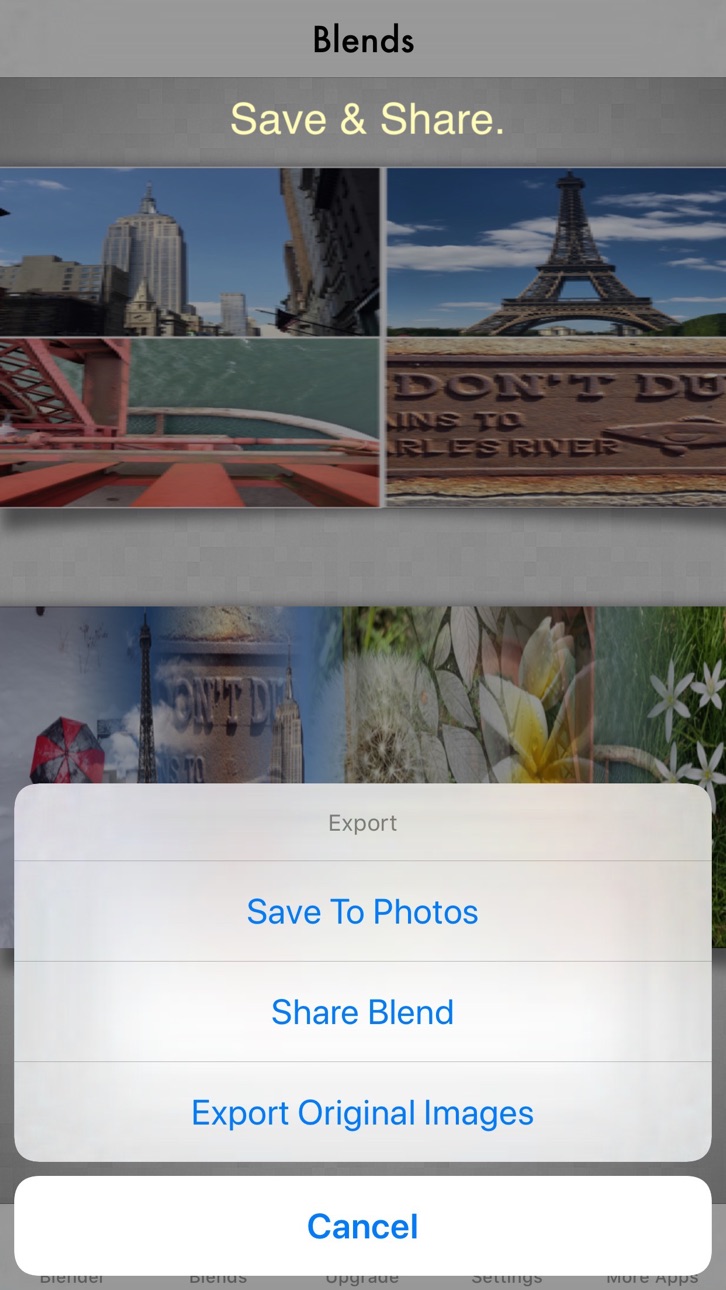
Photo Blender is a simple app that merely joins photos vertically, horizontally or in 2D by either blending or abutting them at their edges. Photos can be prepped in the image editor, as can the blended output. The app supports up to 16 photos.
____________________________
• Create stunning high resolution photo montages.
• Edit the individual photos or the whole blend in the image editor: enhance, filter, rotate, draw, add text, much more.
• Supports 4 blend types: horizontal, vertical, 4 square and 9 square.
• Since a blend can consist of just one photo you can to apply special effects using image editor
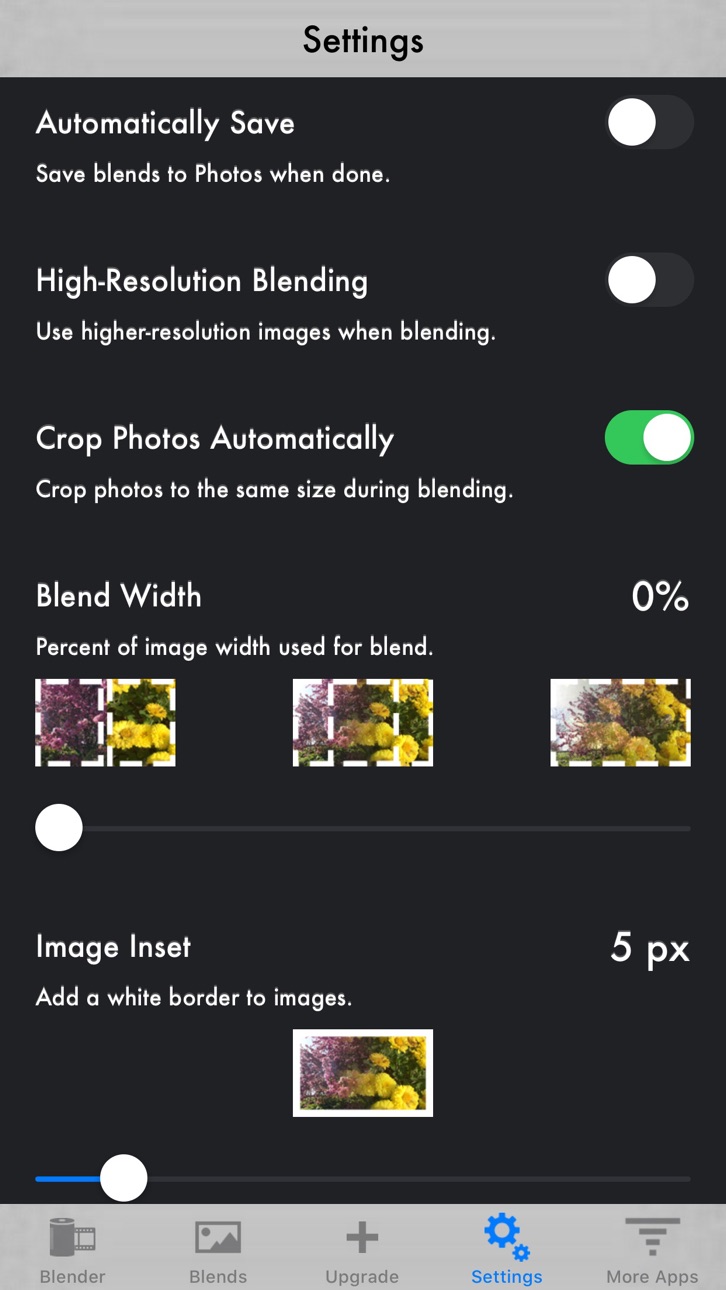
• Image insetting onto a white background.
• Use your iPhone, iPod or iPad camera from within the app to produce beautiful photo blends.
• Create blends of selected images directly from your Photos library.
• Blend recursively to create larger blended arrays of photos.
• Combine photos using a gradient blend at the seams where they are joined.
• The blending margin width is adjustable for special effects.
• Set the blending margin width to zero to merely join photos at their edges.
• Set the blending margin width to higher values to achieve gradual transitions.
• Save all your blends in one place in your gallery.
• In the gallery you can export and view blends, among other options.
• Share your blends in the usual manner: email, messages etc.
Enjoy.
In-App Purchases DO pricing
One-Time Purchases
Upgrade to Pro—
Capabilities
In-App Purchases
Accessibility
ipadiphonemacrealityDevicetvoswatch
Version history 21 versions
Build 838163453v2.7.32020-10-12 22:12:54
User-interface enhancements (improved photo picker).
Build 838049669v2.7.22020-10-08 07:49:52
Framework updates
Bug fixes
Build 837922498v2.7.12020-09-24 16:09:09
Updated for iOS 14
Build 832905968v2.72019-09-27 18:49:45
Updated for iOS 13
Build 825300110v2.62017-12-14 08:00:55
Updated for iPhone X
Build 821794578v2.5.22017-04-18 18:39:59
Fixes bug when blending images with very different widths.
Fixes bug when using insets during blending.
Build 821693246v2.5.12017-04-11 18:59:12
Restored ability to turn off automatic cropping.
Minor bug fixes.
Build 821447968v2.52017-03-23 23:08:57
Improved user interface
Bug fixes and enhancements
Build 818283654v2.4.32016-07-28 23:27:38
- Minor bug fixes
Build 817903561v2.4.22016-06-27 20:45:15
- Fixes crashing bug
Build 812537907v2.4.12015-06-08 15:52:36
• Fixed an issue with the photo picker not being able to access photos in iCloud.
• Updated the Aviary image editor to latest version (accessible by tapping on a photo after you add it in the build view)
Build 811804704v2.42015-02-24 01:36:04
• New built-in blender type: 9 square - automatic 3x3 blend.
• New option to uniformly crop all photos to the same size - on by default.
• App now registers to send notifications in iOS 8 so that when you merge in the background you can be notified when a blend has completed.
• Fixed a bug that prevented the ability to re-blend a blend that was "undone" in the Blends Gallery.
Build 784112864v2.32015-01-28 17:33:45
Fixed adding location data to photos for iOS 8. If you choose to add location data, then the location of the panorama will appear in the Gallery, and you will also be able to access a map showing the location the panorama was taken. Tap on the location's name on a panorama in the Gallery to display the map.
Build 667112981v2.12014-11-04 18:48:50
Updated the Aviary photo editor.
Build 60732773v2.0.12013-10-02 19:35:07
Fixed an issue with the status bar not hiding in some views.
Build 16167044v2.02013-08-21 08:22:17
• Added Aviary image editor to the gallery and blender.
• Supports 3 blend types: horizontal, vertical and 4 square
• Image insetting onto a white background.
Build 15515349v1.0.42013-06-08 23:15:58
Fixes bug preventing old blends from appearing in the Gallery when upgrading app.
Build 15060883v1.0.32013-04-15 20:09:16
• Updated for iPhone 5 display
• Fixed an issue on iPod Touch where snapshots had the wrong orientation.
• Improved the Tips displayed in the blender pane.
• Added a "restart" button to the camera options pane.
Build 13580920v1.0.22013-01-21 22:31:20
• Fixed a bug that was causing the app to crash for some users, notably on iPhone devices.
• Blends are now stored in the Documents directory of your iOS device, rather than the Library. In this way blends are not lost when upgrading to a new version.
Build 11771724v1.0.12012-12-07 02:56:55
iAd enabled
Build 10729638v1.02012-10-23 21:21:44
Price history by region
Currency
Show
Columns
Search
Availability 168 of 168 storefronts
| Region | Language | Price | Ratings | Avg | Version |
|---|---|---|---|---|---|
| CN | zh-Hans-CN | Free | 1.8k | 4.9 | 2.7.3 |
| TH | en-GB | Free | 1.7k | 4.8 | 2.7.3 |
| US | en-US | Free | 1.2k | 4.6 | 2.7.3 |
| DO | es-MX | Free | 462 | 4.6 | 2.7.3 |
| JM | en-GB | Free | 222 | 4.5 | 2.7.3 |
| MY | en-GB | Free | 172 | 4.7 | 2.7.3 |
| ID | en-GB | Free | 157 | 4.8 | 2.7.3 |
| GB | en-GB | Free | 104 | 4.3 | 2.7.3 |
| CA | en-CA | Free | 66 | 4.3 | 2.7.3 |
| BR | pt-BR | Free | 54 | 4.6 | 2.7.3 |
| AU | en-AU | Free | 53 | 4.6 | 2.7.3 |
| CO | es-MX | Free | 42 | 4.6 | 2.7.3 |
| LA | en-GB | Free | 41 | 4.5 | 2.7.3 |
| BB | en-GB | Free | 30 | 4.5 | 2.7.3 |
| RU | ru | Free | 26 | 4.3 | 2.7.3 |
| ES | es-ES | Free | 25 | 4.6 | 2.7.3 |
| SG | en-GB | Free | 23 | 4.8 | 2.7.3 |
| NL | nl | Free | 22 | 4.4 | 2.7.3 |
| IN | en-GB | Free | 21 | 4.2 | 2.7.3 |
| SA | en-GB | Free | 18 | 4.4 | 2.7.3 |
| FR | fr-FR | Free | 17 | 4.4 | 2.7.3 |
| NG | en-GB | Free | 17 | 4.2 | 2.7.3 |
| VN | en-GB | Free | 17 | 4.9 | 2.7.3 |
| HK | zh-Hant-HK | Free | 16 | 4.9 | 2.7.3 |
| PH | en-GB | Free | 15 | 4.8 | 2.7.3 |
| IT | it | Free | 14 | 4.8 | 2.7.3 |
| ML | en-GB | Free | 13 | 4.5 | 2.7.3 |
| MX | es-MX | Free | 13 | 4.2 | 2.7.3 |
| CH | de-CH | Free | 11 | 5.0 | 2.7.3 |
| ZA | en-GB | Free | 11 | 3.7 | 2.7.3 |
| DE | de-DE | Free | 9 | 4.2 | 2.7.3 |
| NZ | en-AU | Free | 9 | 4.6 | 2.7.3 |
| HU | en-GB | Free | 7 | 3.7 | 2.7.3 |
| TR | en-GB | Free | 7 | 3.9 | 2.7.3 |
| BE | en-GB | Free | 6 | 4.2 | 2.7.3 |
| GY | en-GB | Free | 6 | 4.2 | 2.7.3 |
| IE | en-GB | Free | 5 | 5.0 | 2.7.3 |
| IL | en-GB | Free | 5 | 4.2 | 2.7.3 |
| NO | en-GB | Free | 5 | 3.4 | 2.7.3 |
| PT | pt-PT | Free | 5 | 4.2 | 2.7.3 |
| AE | en-GB | Free | 4 | 4.3 | 2.7.3 |
| CL | es-MX | Free | 4 | 5.0 | 2.7.3 |
| DM | en-GB | Free | 4 | 5.0 | 2.7.3 |
| GR | en-GB | Free | 4 | 5.0 | 2.7.3 |
| KW | en-GB | Free | 4 | 4.8 | 2.7.3 |
| MO | zh-Hant-HK | Free | 4 | 4.8 | 2.7.3 |
| PK | en-GB | Free | 4 | 4.5 | 2.7.3 |
| JO | en-GB | Free | 3 | 5.0 | 2.7.3 |
| KH | en-GB | Free | 3 | 3.0 | 2.7.3 |
| KY | en-GB | Free | 3 | 4.7 | 2.7.3 |
| KZ | en-GB | Free | 3 | 5.0 | 2.7.3 |
| LR | en-GB | Free | 3 | 5.0 | 2.7.3 |
| TT | en-GB | Free | 3 | 4.7 | 2.7.3 |
| TZ | en-GB | Free | 3 | 5.0 | 2.7.3 |
| UA | en-GB | Free | 3 | 4.3 | 2.7.3 |
| AR | es-MX | Free | 2 | 3.0 | 2.7.3 |
| AT | de-DE | Free | 2 | 5.0 | 2.7.3 |
| BH | en-GB | Free | 2 | 5.0 | 2.7.3 |
| BM | en-GB | Free | 2 | 4.5 | 2.7.3 |
| BY | en-GB | Free | 2 | 5.0 | 2.7.3 |
| CZ | en-GB | Free | 2 | 5.0 | 2.7.3 |
| GT | es-MX | Free | 2 | 4.0 | 2.7.3 |
| KR | ko | Free | 2 | 4.5 | 2.7.3 |
| LB | en-GB | Free | 2 | 5.0 | 2.7.3 |
| LK | en-GB | Free | 2 | 5.0 | 2.7.3 |
| LT | en-GB | Free | 2 | 5.0 | 2.7.3 |
| MK | en-GB | Free | 2 | 3.0 | 2.7.3 |
| OM | en-GB | Free | 2 | 4.5 | 2.7.3 |
| QA | en-GB | Free | 2 | 3.0 | 2.7.3 |
| RO | en-GB | Free | 2 | 3.0 | 2.7.3 |
| SL | en-GB | Free | 2 | 4.5 | 2.7.3 |
| VE | es-MX | Free | 2 | 5.0 | 2.7.3 |
| AF | en-GB | Free | 1 | 5.0 | 2.7.3 |
| AG | en-GB | Free | 1 | 3.0 | 2.7.3 |
| AL | en-GB | Free | 1 | 5.0 | 2.7.3 |
| BG | en-GB | Free | 1 | 5.0 | 2.7.3 |
| BO | es-MX | Free | 1 | 5.0 | 2.7.3 |
| BS | en-GB | Free | 1 | 1.0 | 2.7.3 |
| CI | fr-FR | Free | 1 | 5.0 | 2.7.3 |
| CY | en-GB | Free | 1 | 5.0 | 2.7.3 |
| DK | en-GB | Free | 1 | 5.0 | 2.7.3 |
| EC | es-MX | Free | 1 | 5.0 | 2.7.3 |
| EG | en-GB | Free | 1 | 1.0 | 2.7.3 |
| GD | en-GB | Free | 1 | 5.0 | 2.7.3 |
| GE | en-GB | Free | 1 | 5.0 | 2.7.3 |
| GM | en-GB | Free | 1 | 5.0 | 2.7.3 |
| KE | en-GB | Free | 1 | 2.0 | 2.7.3 |
| MM | en-GB | Free | 1 | 5.0 | 2.7.3 |
| MT | en-GB | Free | 1 | 4.0 | 2.7.3 |
| PA | es-MX | Free | 1 | 1.0 | 2.7.3 |
| PY | es-MX | Free | 1 | 5.0 | 2.7.3 |
| RS | en-GB | Free | 1 | 5.0 | 2.7.3 |
| RW | en-GB | Free | 1 | 5.0 | 2.7.3 |
| SK | en-GB | Free | 1 | 5.0 | 2.7.3 |
| TJ | en-GB | Free | 1 | 5.0 | 2.7.3 |
| UG | en-GB | Free | 1 | 5.0 | 2.7.3 |
| VG | en-GB | Free | 1 | 5.0 | 2.7.3 |
| ZM | en-GB | Free | 1 | 5.0 | 2.7.3 |
| AI | en-GB | Free | 0 | — | 2.7.3 |
| AO | en-GB | Free | 0 | — | 2.7.3 |
| AZ | en-GB | Free | 0 | — | 2.7.3 |
| BA | en-GB | Free | 0 | — | 2.7.3 |
| BF | en-GB | Free | 0 | — | 2.7.3 |
| BJ | en-GB | Free | 0 | — | 2.7.3 |
| BN | en-GB | Free | 0 | — | 2.7.3 |
| BT | en-GB | Free | 0 | — | 2.7.3 |
| BW | en-GB | Free | 0 | — | 2.7.3 |
| BZ | en-GB | Free | 0 | — | 2.7.3 |
| CD | en-GB | Free | 0 | — | 2.7.3 |
| CG | en-GB | Free | 0 | — | 2.7.3 |
| CM | fr-FR | Free | 0 | — | 2.7.3 |
| CR | es-MX | Free | 0 | — | 2.7.3 |
| CV | en-GB | Free | 0 | — | 2.7.3 |
| DZ | en-GB | Free | 0 | — | 2.7.3 |
| EE | en-GB | Free | 0 | — | 2.7.3 |
| FJ | en-GB | Free | 0 | — | 2.7.3 |
| FM | en-GB | Free | 0 | — | 2.7.3 |
| GA | fr-FR | Free | 0 | — | 2.7.3 |
| GH | en-GB | Free | 0 | — | 2.7.3 |
| GW | en-GB | Free | 0 | — | 2.7.3 |
| HN | es-MX | Free | 0 | — | 2.7.3 |
| HR | en-GB | Free | 0 | — | 2.7.3 |
| IQ | en-GB | Free | 0 | — | 2.7.3 |
| IS | en-GB | Free | 0 | — | 2.7.3 |
| KG | en-GB | Free | 0 | — | 2.7.3 |
| KN | en-GB | Free | 0 | — | 2.7.3 |
| LC | en-GB | Free | 0 | — | 2.7.3 |
| LU | en-GB | Free | 0 | — | 2.7.3 |
| LV | en-GB | Free | 0 | — | 2.7.3 |
| LY | en-GB | Free | 0 | — | 2.7.3 |
| MA | en-GB | Free | 0 | — | 2.7.3 |
| MD | en-GB | Free | 0 | — | 2.7.3 |
| ME | en-GB | Free | 0 | — | 2.7.3 |
| MG | en-GB | Free | 0 | — | 2.7.3 |
| MN | en-GB | Free | 0 | — | 2.7.3 |
| MR | en-GB | Free | 0 | — | 2.7.3 |
| MS | en-GB | Free | 0 | — | 2.7.3 |
| MU | en-GB | Free | 0 | — | 2.7.3 |
| MV | en-GB | Free | 0 | — | 2.7.3 |
| MW | en-GB | Free | 0 | — | 2.7.3 |
| MZ | en-GB | Free | 0 | — | 2.7.3 |
| NA | en-GB | Free | 0 | — | 2.7.3 |
| NE | en-GB | Free | 0 | — | 2.7.3 |
| NI | es-MX | Free | 0 | — | 2.7.3 |
| NP | en-GB | Free | 0 | — | 2.7.3 |
| NR | en-GB | Free | 0 | — | 2.7.3 |
| PE | es-MX | Free | 0 | — | 2.7.3 |
| PG | en-GB | Free | 0 | — | 2.7.3 |
| PW | en-GB | Free | 0 | — | 2.7.3 |
| SB | en-GB | Free | 0 | — | 2.7.3 |
| SC | en-GB | Free | 0 | — | 2.7.3 |
| SI | en-GB | Free | 0 | — | 2.7.3 |
| SN | en-GB | Free | 0 | — | 2.7.3 |
| SR | en-GB | Free | 0 | — | 2.7.3 |
| ST | en-GB | Free | 0 | — | 2.7.3 |
| SV | es-MX | Free | 0 | — | 2.7.3 |
| SZ | en-GB | Free | 0 | — | 2.7.3 |
| TC | en-GB | Free | 0 | — | 2.7.3 |
| TD | en-GB | Free | 0 | — | 2.7.3 |
| TM | en-GB | Free | 0 | — | 2.7.3 |
| TN | en-GB | Free | 0 | — | 2.7.3 |
| TO | en-GB | Free | 0 | — | 2.7.3 |
| UY | en-GB | Free | 0 | — | 2.7.3 |
| UZ | en-GB | Free | 0 | — | 2.7.3 |
| VC | en-GB | Free | 0 | — | 2.7.3 |
| VU | en-GB | Free | 0 | — | 2.7.3 |
| XK | en-GB | Free | 0 | — | 2.7.3 |
| ZW | en-GB | Free | 0 | — | 2.7.3 |
Change log 25 changes · DO
✎
releaseNotes updated
User-interface enhancements (improved photo picker).
✎
description updated
Photo Blender is a simple app that merely joins photos vertically, horizontally or in 2D by either blending or abutting them at their edges. Photos can be prepp
✎
subtitle updated
Blend up to 16 photos together
✎
name updated
Photo Blender
◆
Version 2.7.3 released
User-interface enhancements (improved photo picker).
◆
Version 2.7.2 released
Framework updates
Bug fixes
◆
Version 2.7.1 released
Updated for iOS 14
◆
Version 2.7 released
Updated for iOS 13
◆
Version 2.6 released
Updated for iPhone X
◆
Version 2.5.2 released
Fixes bug when blending images with very different widths.
Fixes bug when using insets during blending.
◆
Version 2.5.1 released
Restored ability to turn off automatic cropping.
Minor bug fixes.
◆
Version 2.5 released
Improved user interface
Bug fixes and enhancements
◆
Version 2.4.3 released
- Minor bug fixes
◆
Version 2.4.2 released
- Fixes crashing bug
◆
Version 2.4.1 released
• Fixed an issue with the photo picker not being able to access photos in iCloud.
• Updated the Aviary image editor to latest version (accessible by tapping on a photo after you add it in the build view)
◆
Version 2.4 released
• New built-in blender type: 9 square - automatic 3x3 blend.
• New option to uniformly crop all photos to the same size - on by default.
• App now registers to send notifications in iOS 8 so that when you merge in the background you can be
◆
Version 2.3 released
Fixed adding location data to photos for iOS 8. If you choose to add location data, then the location of the panorama will appear in the Gallery, and you will also be able to access a map showing the location the panorama was taken. Tap on
◆
Version 2.1 released
Updated the Aviary photo editor.
◆
Version 2.0.1 released
Fixed an issue with the status bar not hiding in some views.
◆
Version 2.0 released
• Added Aviary image editor to the gallery and blender.
• Supports 3 blend types: horizontal, vertical and 4 square
• Image insetting onto a white background.
◆
Version 1.0.4 released
Fixes bug preventing old blends from appearing in the Gallery when upgrading app.
◆
Version 1.0.3 released
• Updated for iPhone 5 display
• Fixed an issue on iPod Touch where snapshots had the wrong orientation.
• Improved the Tips displayed in the blender pane.
• Added a "restart" button to the camera options pane.
◆
Version 1.0.2 released
• Fixed a bug that was causing the app to crash for some users, notably on iPhone devices.
• Blends are now stored in the Documents directory of your iOS device, rather than the Library. In this way blends are not lost when upgrading to
◆
Version 1.0.1 released
iAd enabled
◆
Version 1.0 released