Home › Utilities

 PY
PY
 USen-US
 DEde-DE
 GBen-GB
 NLnl
NLnl CAen-CA
 AUen-AU
 CHde-CH
 BRpt-BR
 JPja
JPja ITit
ITit FRfr-FR
 MXes-MX
 SEsv
SEsv ESes-ES
 DKen-GB
 BEen-GB
 PLen-GB
 ATde-DE
 CZen-GB
 NOen-GB
 ZAen-GB
 THen-GB
 CNzh-Hans-CN
 HUen-GB
 NZen-AU
 SKen-GB
 GRen-GB
 PTpt-PT
 ROen-GB
 FIen-GB
 UAen-GB
 VNen-GB
 TWzh-Hant-TW
 COes-MX
 IEen-GB
 IDen-GB
 ILen-GB
 ARes-MX
 CLes-MX
 HKzh-Hant-HK
 TRen-GB
 BGen-GB
 INen-GB
 SGen-GB
 HRen-GB
 KRko
KRko MYen-GB
 PHen-GB
 ECes-MX
 PEes-MX
 CRes-MX
 SIen-GB
 LUen-GB
 AEen-GB
 SAen-GB
 PAes-MX
 CYen-GB
 EGen-GB
 UYen-GB
 LTen-GB
 LVen-GB
 EEen-GB
 BYen-GB
 DOes-MX
 HNes-MX
 BOes-MX
 GTes-MX
 ISen-GB
 LBen-GB
 JOen-GBPYes-MX
 AZen-GB
 KEen-GB
 KWen-GB
 MTen-GB
 AMen-GB
 DZen-GB
 KZen-GB
 MDen-GB
 AGen-GB
 AOen-GB
 KHen-GB
 LKen-GB
 MKen-GB
 NIes-MX
 SVes-MX
 TTen-GB
 ALen-GB
 BAen-GB
 CGen-GB
 GEen-GB
 GYen-GB
 KGen-GB
 MUen-GB
 NGen-GB
 PKen-GB
 QAen-GB
 RSen-GB
 TZen-GB
 VEes-MX
 BBen-GB
 BHen-GB
 BNen-GB
 CDen-GB
 GHen-GB
 GMen-GB
 JMen-GB
 KYen-GB
 MNen-GB
 MOzh-Hant-HK
 MZen-GB
 OMen-GB
 PGen-GB
 PWen-GB
 SCen-GB
 SNen-GB
 TJen-GB
 TNen-GB
 UGen-GB
 UZen-GB
 XKen-GB
 AFen-GB
 AIen-GB
 BFen-GB
 BJen-GB
 BMen-GB
 BSen-GB
 BTen-GB
 BWen-GB
 BZen-GB
 CIfr-FR
 CMfr-FR
 CVen-GB
 DMen-GB
 FJen-GB
 FMen-GB
 GAfr-FR
 GDen-GB
 GWen-GB
 IQen-GB
 KNen-GB
 LAen-GB
 LCen-GB
 LRen-GB
 LYen-GB
 MAen-GB
 MEen-GB
 MGen-GB
 MLen-GB
 MMen-GB
 MRen-GB
 MSen-GB
 MVen-GB
 MWen-GB
 NAen-GB
 NEen-GB
 NPen-GB
 NRen-GB
 RWen-GB
 SBen-GB
 SLen-GB
 SRen-GB
 STen-GB
 SZen-GB
 TCen-GB
 TDen-GB
 TMen-GB
 TOen-GB
 VCen-GB
 VGen-GB
 VUen-GB
 YEen-GB
 ZMen-GB
 ZWen-GB
 RUNot Available
174 of 175 storefronts
Content in en-US
Content in en-US
Information
Preview 2 platforms
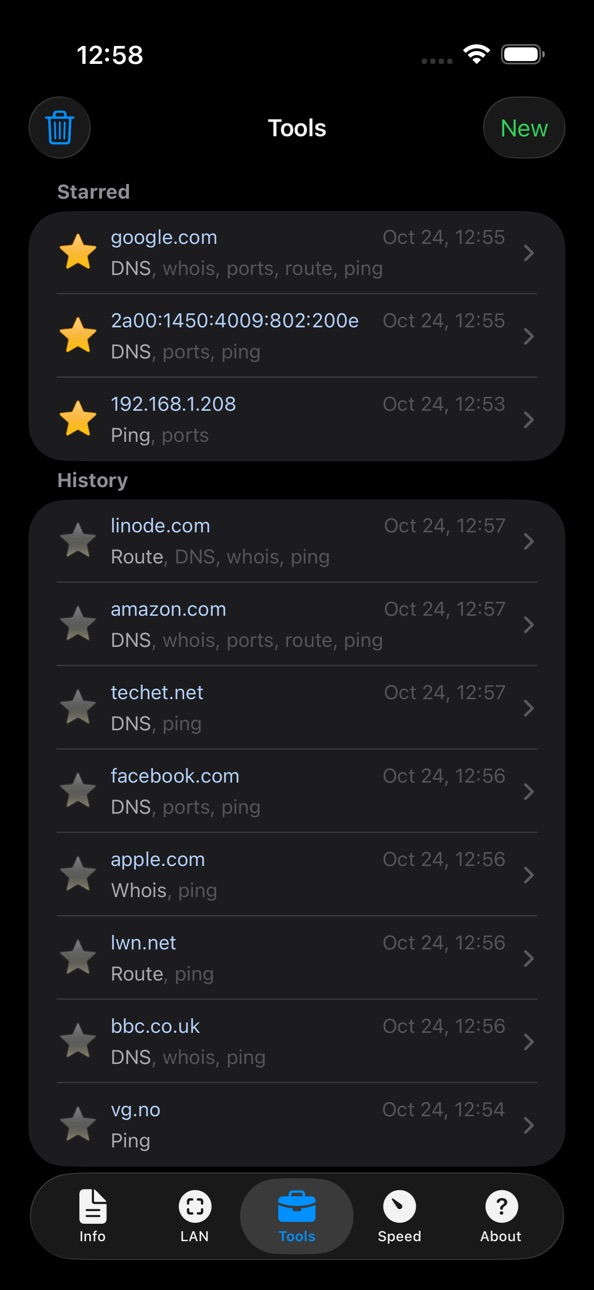
iPhone 10 images


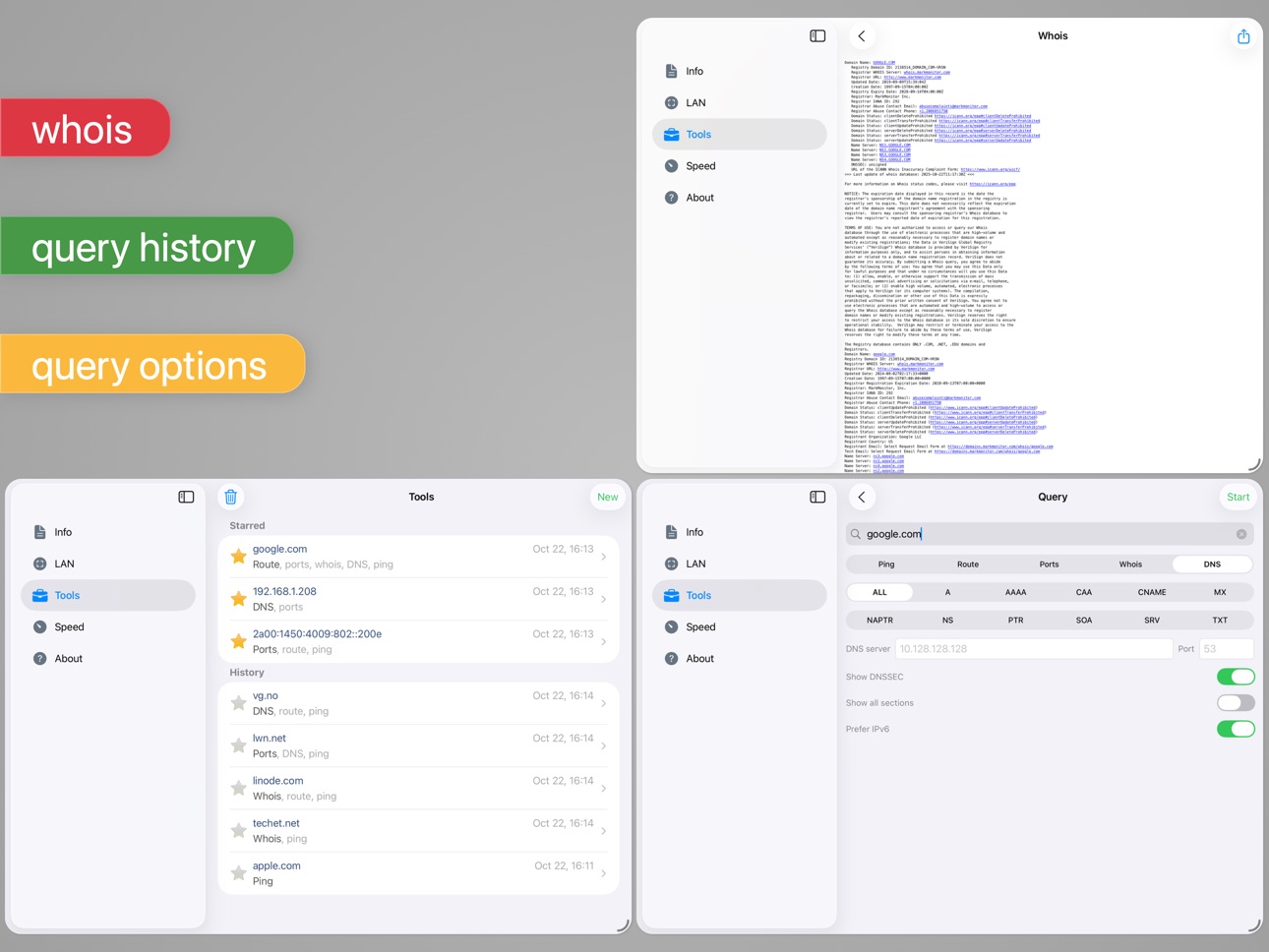
iPad 10 images




What’s New Version 9.0.2
• fix SSID not appearing in speed history under some conditions
• minor fixes and improvements
Description
An advanced tool for network diagnostics, LAN scanning, and problem detection.
Network Analyzer can help you diagnose various problems in your wifi network setup, Internet connectivity, and also detect various issues on remote servers thanks to the wide range of tools it provides.
It is equipped with a fast wifi device discovery tool, including all the LAN device's addresses and names, together with the Bonjour/DLNA services they provide. Further, Network Analyzer contains standard diagnostic tools such as ping, traceroute, port scanner, DNS lookup, whois, and Internet speed tester. Finally, it displays various useful information related to your wifi/cell connection.
WIFI LAN SCANNER
• Detection of all connected network devices (wifi & VPN)
• IP addresses of all discovered devices
• NetBIOS, mDNS (Bonjour), LLMNR, and DNS name where available
• Pingability test of discovered devices
• IPv6 availability and discovered IPv6 addresses
• Wake on LAN (WOL) including remote WOL
• Scan of custom IP ranges
• Filtering and search in the discovered device list
PING & TRACEROUTE
• Round trip delay including IP address and hostname for every network node
• Geolocation data including latitude, longitude, country, city, and time zone
• AS number and network name information
• Complete trace route visualization on the map
• Graphical ping statistics updated in real time
• Configurable ICMP/UDP probes for traceroute
• Configurable ping payload size
• Both IPv4 and IPv6 - selectable
PORT SCANNER
• Scanning the most common ports or user-specified port ranges
• Detection of closed, firewalled, and open ports
• Description of the known open port services
• Scan of complete port range or user-editable common ports
• Both IPv4 and IPv6 - selectable
WHOIS
• Whois of domains, IP addresses and AS numbers
DNS LOOKUP
• Functionality similar to nslookup or dig
• Support of A, AAAA, CAA, CNAME, HINFO, MX, NS, PTR, SOA, SPF, SRV, SSHFP, TXT records
• Decoding and showing DNSSEC records such as DNSKEY, CDNSKEY, RRSIG, NSEC3PARAM, NSEC, NSEC3, DS, CDS, TLSA
INTERNET SPEED
• Test of both download and upload speeds
• Graphical speed test view
• Speed test history
NETWORK INFORMATION
• Default gateway, external IP (v4 and v6), DNS server, HTTP proxy
• Wifi network information such as SSID, BSSID, IP address, and subnet mask
• Cell network information such as network type
• Monitor of wifi, cell and VPN data usage (both sent and received data since the last boot)
LOCAL SERVICE DISCOVERY
• Bonjour service browser
• UPnP/DLNA service and device browser
MORE
• Full IPv6 support everywhere
• History of all performed tasks with the possibility to star the favorite ones
• Export by email, AirPrint, and AirDrop for most tools
• Light/dark theme
• Copy/paste support
• Detailed help
• Regular updates
Accessibility
ipadiphonemacrealityDevicetvoswatch
Version history 25 versions
Build 883519477v9.0.22026-03-18 21:24:32
• fix SSID not appearing in speed history under some conditions
• minor fixes and improvements
Build 879454285v9.0.12025-11-06 07:18:57
• various fixes related to LAN scan and WOL history
• various fixes related to IP->MAC assignment
• fix received/sent cell data update
• minor UI updates and fixes
• various minor fixes
Build 878632710v9.02025-10-28 16:47:58
• modernize UI to match iOS 26 appearance
• minor fixes and improvements
Build 874596658v8.2.12025-05-08 02:55:33
• fix IP range when scanning VPN network
• fix various UI-related problems
Build 873996810v8.22025-04-14 11:49:20
• rework network interface detection to fix incorrect wi-fi or VPN interface reporting
• show lost packet percentage in ping statistics
• show localized dates and times at various places in the app
• add date to export title
• workaround a problem with whois.nic.ad.jp
• support sending user feedback from other email clients
• various fixes and improvements
Build 872055880v8.1.12025-01-29 19:38:00
• Fix Bonjour and UPnP names not appearing in scan under some situations
• Stability fixes and minor improvements
Build 871752126v8.12025-01-15 17:08:15
• workaround for wrong color of navigation bar under iOS 18 (the title has to stay dark until the problem is fixed in iOS)
• iOS 18 compatibility improvements
• various bugfixes and improvements
Build 857006515v8.02023-05-14 14:27:11
• dark theme support!
• app theme can be changed independently of the system theme in the iOS Settings app
• since ANY is deprecated by many DNS servers, new ALL query has been added to query all known DNS records
• new legend explaining the LAN scanner flags
• some cell connection information has been removed as it is no longer reported by iOS
---
In this release, the whole user interface code has been rewritten from scratch. Please report any bugs you experience.
Build 842875586v7.7.62021-06-30 09:01:27
• updated speed tester to better adjust to very low and very high speeds
Build 842745220v7.7.52021-06-21 22:58:44
• minor stability fixes and improvements
Build 842711148v7.7.42021-06-18 12:13:46
• minor stability fixes and improvements
Build 842550997v7.7.22021-06-08 16:16:51
7.7.2
• fix app freeze when Bonjour not available on LAN
7.7.1
• display information about second SIM if present
• support 5G network type
• use new iOS 14 "local network" permission and warn if permission not granted
• minor bug fixes and improvements
Build 842532160v7.7.12021-06-06 18:40:10
• display information about second SIM if present
• support 5G network type
• use new iOS 14 "local network" permission and warn if permission not granted
• minor bug fixes and improvements
Build 835691094v7.72020-05-03 08:24:32
• Added explanation regarding the location permission which is required to access SSID/BSSID since iOS 13
• Various fixes and improvements
• TODO: dark mode will be supported in the upcoming release
Build 828823053v7.6.22018-10-04 22:41:34
7.6.2
• Stability fixes and minor improvements
7.6
• Allow showing additional details related to external IP (location, AS number, hostname, etc.)
• iOS 12 compatibility improvements
• Minor app icon improvements
• Lots of internal changes and cleanups
• Various UI updates, minor improvements and fixes
Build 828704038v7.6.12018-09-25 16:49:52
7.6.1
• Fix crash of Bonjour on some networks
• Fix crash when querying CAA DNS records
7.6
• Allow showing additional details related to external IP (location, AS number, hostname, etc.)
• iOS 12 compatibility improvements
• Minor app icon improvements
• Lots of internal changes and cleanups
• Various UI updates, minor improvements and fixes
Build 828621767v7.62018-09-24 18:53:54
• Allow showing additional details related to external IP (location, AS number, hostname, etc.)
• iOS 12 compatibility improvements
• Minor app icon improvements
• Lots of internal changes and cleanups
• Various UI updates, minor improvements and fixes
Build 826050786v7.52018-02-21 12:40:50
• Add export to CSV
• Add the possibility to show all DNS sections (answer, authority, additional) in DNS query
• Add the possibility to configure custom whois server
• Show information about all available network interfaces on the Information page
• Show IPv6 prefix lengths on the Information page
• Many minor fixes and stability improvements
Build 826060617v7.5.12018-02-21 20:16:37
7.5.1
• Fix crash when performing export on iPad
7.5
• Add export to CSV
• Add the possibility to show all DNS sections (answer, authority, additional) in DNS query
• Add the possibility to configure custom whois server
• Show information about all available network interfaces on the Information page
• Show IPv6 prefix lengths on the Information page
• Many minor fixes and stability improvements
Build 824739685v7.4.22017-11-23 09:35:18
• improve detection of public domain suffixes in whois
• stability fixes
• various minor fixes and improvements
Build 824300263v7.4.12017-11-07 00:43:53
• Fix crash when entering background
• Fix crash when decoding certain DNS record types
Build 823679608v7.42017-10-28 08:35:15
LAN Scanner Improvements
• allow assigning custom names to IP addresses - be careful when using this feature and use it only when you are absolutely sure IP addresses are assigned statically and cannot change
• allow filtering scanner results based on flag availability - prefix the flag character with # so e.g. #P will show all pingable devices
• you can use special value #name to show all devices where device name can be obtained using some naming service such as DNS, NetBIOS, mDNS etc.
Improved DNS Query
• allow querying CAA records
• allow showing DNSSEC records (DNSKEY, CDNSKEY, RRSIG, NSEC3PARAM, NSEC, NSEC3, DS, CDS)
• decode SSHFP, TLSA
• show all records, even currently unsupported ones, in the generic RFC3597 format
Various Improvements
• improve support of iPhone X
• various minor improvements and stability fixes
Build 823121060v7.3.12017-08-04 19:41:42
7.3.1
• fix occasional crash when filtering LAN scan results
7.3
• add configuration option to set ping probe payload size
• add configuration option to use UDP probes for traceroute
• show all DNS servers on the Information page
• improved iOS 11 support
• improved support of iPad Pro 10.5 and split screen mode
• stability improvements
• lots of fixes and minor user interface improvements
*** Important: Starting with iOS 11 apps won't be able to access MAC addresses in the ARP table which is used by the LAN scanner. As a result, MAC addresses, vendor names and custom names cannot be shown for scanned devices on iOS 11. For more information see https://goo.gl/3XM7b9 or visit the app's FAQ.
Build 822946725v7.32017-08-01 20:13:29
• add configuration option to set ping probe payload size
• add configuration option to use UDP probes for traceroute
• show all DNS servers on the Information page
• improved iOS 11 support
• improved support of iPad Pro 10.5 and split screen mode
• stability improvements
• lots of fixes and minor user interface improvements
*** Important: Starting with iOS 11 apps won't be able to access MAC addresses in the ARP table which is used by the LAN scanner. As a result, MAC addresses, vendor names and custom names cannot be shown for scanned devices on iOS 11. For more information see https://goo.gl/3XM7b9
Build 820817529v7.22017-02-07 11:42:56
• make it possible to scan for devices connected to personal hotspot
• make ping delay slider semi-logarithmic so it is possible to enter both low (0.2s) and high (120s) values
• add new cyan "W" flag to the LAN scanner to indicate web interface availability
• lots of minor fixes and improvements
*** If you like the app, please consider rating it on the App Store. It really helps. Thanks!
Price history by region
Currency
Show
Columns
Search
Availability 174 of 175 storefronts
| Region | Language | Price | Ratings | Avg | Version |
|---|---|---|---|---|---|
| US | en-US | USD 3.99 | 9.0k | 4.8 | 9.0.2 |
| DE | de-DE | EUR 3.99 | 2.0k | 4.8 | 9.0.2 |
| GB | en-GB | GBP 3.99 | 1.8k | 4.8 | 9.0.2 |
| NL | nl | EUR 3.99 | 1.1k | 4.6 | 9.0.2 |
| CA | en-CA | CAD 4.99 | 821 | 4.7 | 9.0.2 |
| AU | en-AU | AUD 5.99 | 662 | 4.8 | 9.0.2 |
| CH | de-CH | CHF 3 | 551 | 4.6 | 9.0.2 |
| BR | pt-BR | BRL 24.9 | 486 | 4.8 | 9.0.2 |
| JP | ja | JPY 600 | 443 | 4.6 | 9.0.2 |
| IT | it | EUR 3.99 | 396 | 4.7 | 9.0.2 |
| FR | fr-FR | EUR 3.99 | 380 | 4.7 | 9.0.2 |
| MX | es-MX | MXN 89 | 342 | 4.8 | 9.0.2 |
| SE | sv | SEK 49 | 292 | 4.6 | 9.0.2 |
| ES | es-ES | EUR 3.99 | 291 | 4.7 | 9.0.2 |
| DK | en-GB | DKK 39 | 259 | 4.6 | 9.0.2 |
| BE | en-GB | EUR 3.99 | 258 | 4.6 | 9.0.2 |
| PL | en-GB | PLN 19.99 | 245 | 4.8 | 9.0.2 |
| AT | de-DE | EUR 3.99 | 244 | 4.7 | 9.0.2 |
| CZ | en-GB | CZK 99 | 236 | 4.8 | 9.0.2 |
| NO | en-GB | NOK 49 | 162 | 4.6 | 9.0.2 |
| ZA | en-GB | ZAR 79.99 | 132 | 4.8 | 9.0.2 |
| TH | en-GB | THB 149 | 115 | 4.8 | 9.0.2 |
| CN | zh-Hans-CN | CNY 28 | 113 | 4.8 | 9.0.2 |
| HU | en-GB | HUF 1790 | 108 | 4.8 | 9.0.2 |
| NZ | en-AU | NZD 6.99 | 106 | 4.7 | 9.0.2 |
| SK | en-GB | EUR 3.99 | 105 | 4.8 | 9.0.2 |
| GR | en-GB | EUR 3.99 | 87 | 4.8 | 9.0.2 |
| PT | pt-PT | EUR 3.99 | 86 | 4.8 | 9.0.2 |
| RO | en-GB | RON 19.99 | 84 | 4.7 | 9.0.2 |
| FI | en-GB | EUR 3.99 | 76 | 4.6 | 9.0.2 |
| UA | en-GB | USD 4.99 | 66 | 4.9 | 9.0.2 |
| VN | en-GB | VND 119000 | 63 | 4.6 | 9.0.2 |
| TW | zh-Hant-TW | TWD 120 | 61 | 5.0 | 9.0.2 |
| CO | es-MX | COP 19900 | 60 | 4.7 | 9.0.2 |
| IE | en-GB | EUR 3.99 | 59 | 4.7 | 9.0.2 |
| ID | en-GB | IDR 69000 | 55 | 4.8 | 9.0.2 |
| IL | en-GB | ILS 14.9 | 55 | 4.8 | 9.0.2 |
| AR | es-MX | USD 3.99 | 54 | 4.7 | 9.0.2 |
| CL | es-MX | CLP 4990 | 54 | 4.7 | 9.0.2 |
| HK | zh-Hant-HK | HKD 32 | 54 | 4.8 | 9.0.2 |
| TR | en-GB | TRY 199.99 | 52 | 4.6 | 9.0.2 |
| BG | en-GB | EUR 3.99 | 48 | 4.8 | 9.0.2 |
| IN | en-GB | INR 399 | 43 | 4.6 | 9.0.2 |
| SG | en-GB | SGD 5.98 | 42 | 4.7 | 9.0.2 |
| HR | en-GB | EUR 3.99 | 37 | 4.6 | 9.0.2 |
| KR | ko | KRW 6600 | 33 | 4.7 | 9.0.2 |
| MY | en-GB | MYR 19.9 | 33 | 4.8 | 9.0.2 |
| PH | en-GB | PHP 249 | 33 | 4.9 | 9.0.2 |
| EC | es-MX | USD 3.99 | 31 | 4.8 | 9.0.2 |
| PE | es-MX | PEN 17.9 | 28 | 4.9 | 9.0.2 |
| CR | es-MX | USD 3.99 | 26 | 4.9 | 9.0.2 |
| SI | en-GB | EUR 3.99 | 26 | 4.9 | 9.0.2 |
| LU | en-GB | EUR 3.99 | 24 | 4.8 | 9.0.2 |
| AE | en-GB | AED 14.99 | 22 | 4.7 | 9.0.2 |
| SA | en-GB | SAR 17.99 | 22 | 4.8 | 9.0.2 |
| PA | es-MX | USD 3.99 | 18 | 4.7 | 9.0.2 |
| CY | en-GB | EUR 3.99 | 16 | 4.9 | 9.0.2 |
| EG | en-GB | EGP 199.99 | 14 | 4.4 | 9.0.2 |
| UY | en-GB | USD 3.99 | 14 | 5.0 | 9.0.2 |
| LT | en-GB | EUR 3.99 | 13 | 4.8 | 9.0.2 |
| LV | en-GB | EUR 3.99 | 12 | 4.6 | 9.0.2 |
| EE | en-GB | EUR 3.99 | 10 | 4.9 | 9.0.2 |
| BY | en-GB | USD 4.99 | 9 | 4.9 | 9.0.2 |
| DO | es-MX | USD 3.99 | 9 | 4.8 | 9.0.2 |
| HN | es-MX | USD 3.99 | 9 | 4.8 | 9.0.2 |
| BO | es-MX | USD 3.99 | 8 | 4.9 | 9.0.2 |
| GT | es-MX | USD 3.99 | 7 | 4.7 | 9.0.2 |
| IS | en-GB | USD 4.99 | 7 | 4.9 | 9.0.2 |
| LB | en-GB | USD 3.99 | 7 | 5.0 | 9.0.2 |
| JO | en-GB | USD 3.99 | 6 | 5.0 | 9.0.2 |
| PY | es-MX | USD 3.99 | 6 | 4.7 | 9.0.2 |
| AZ | en-GB | USD 4.99 | 5 | 5.0 | 9.0.2 |
| KE | en-GB | USD 4.99 | 5 | 4.8 | 9.0.2 |
| KW | en-GB | USD 3.99 | 5 | 4.6 | 9.0.2 |
| MT | en-GB | EUR 3.99 | 5 | 4.8 | 9.0.2 |
| AM | en-GB | USD 4.99 | 4 | 5.0 | 9.0.2 |
| DZ | en-GB | USD 3.99 | 4 | 3.8 | 9.0.2 |
| KZ | en-GB | KZT 2490 | 4 | 4.8 | 9.0.2 |
| MD | en-GB | USD 4.99 | 4 | 3.8 | 9.0.2 |
| AG | en-GB | USD 3.99 | 3 | 4.0 | 9.0.2 |
| AO | en-GB | USD 3.99 | 3 | 4.7 | 9.0.2 |
| KH | en-GB | USD 3.99 | 3 | 4.7 | 9.0.2 |
| LK | en-GB | USD 3.99 | 3 | 5.0 | 9.0.2 |
| MK | en-GB | USD 3.99 | 3 | 4.7 | 9.0.2 |
| NI | es-MX | USD 3.99 | 3 | 5.0 | 9.0.2 |
| SV | es-MX | USD 3.99 | 3 | 4.3 | 9.0.2 |
| TT | en-GB | USD 3.99 | 3 | 4.7 | 9.0.2 |
| AL | en-GB | USD 4.99 | 2 | 5.0 | 9.0.2 |
| BA | en-GB | EUR 3.99 | 2 | 5.0 | 9.0.2 |
| CG | en-GB | USD 3.99 | 2 | 5.0 | 9.0.2 |
| GE | en-GB | USD 4.99 | 2 | 5.0 | 9.0.2 |
| GY | en-GB | USD 3.99 | 2 | 5.0 | 9.0.2 |
| KG | en-GB | USD 3.99 | 2 | 5.0 | 9.0.2 |
| MU | en-GB | USD 4.99 | 2 | 5.0 | 9.0.2 |
| NG | en-GB | NGN 6900 | 2 | 5.0 | 9.0.2 |
| PK | en-GB | PKR 1100 | 2 | 4.5 | 9.0.2 |
| QA | en-GB | QAR 14.99 | 2 | 4.5 | 9.0.2 |
| RS | en-GB | EUR 3.99 | 2 | 5.0 | 9.0.2 |
| TZ | en-GB | TZS 11900 | 2 | 5.0 | 9.0.2 |
| VE | es-MX | USD 3.99 | 2 | 5.0 | 9.0.2 |
| BB | en-GB | USD 4.99 | 1 | 5.0 | 9.0.2 |
| BH | en-GB | USD 3.99 | 1 | 5.0 | 9.0.2 |
| BN | en-GB | USD 3.99 | 1 | 5.0 | 9.0.2 |
| CD | en-GB | USD 3.99 | 1 | 5.0 | 9.0.2 |
| GH | en-GB | USD 4.99 | 1 | 5.0 | 9.0.2 |
| GM | en-GB | USD 3.99 | 1 | 5.0 | 9.0.2 |
| JM | en-GB | USD 3.99 | 1 | 5.0 | 9.0.2 |
| KY | en-GB | USD 3.99 | 1 | 5.0 | 9.0.2 |
| MN | en-GB | USD 3.99 | 1 | 4.0 | 9.0.2 |
| MO | zh-Hant-HK | USD 3.99 | 1 | 5.0 | 9.0.2 |
| MZ | en-GB | USD 3.99 | 1 | 5.0 | 9.0.2 |
| OM | en-GB | USD 3.99 | 1 | 5.0 | 9.0.2 |
| PG | en-GB | USD 3.99 | 1 | 5.0 | 9.0.2 |
| PW | en-GB | USD 3.99 | 1 | 5.0 | 9.0.2 |
| SC | en-GB | USD 3.99 | 1 | 4.0 | 9.0.2 |
| SN | en-GB | USD 4.99 | 1 | 5.0 | 9.0.2 |
| TJ | en-GB | USD 3.99 | 1 | 5.0 | 9.0.2 |
| TN | en-GB | USD 3.99 | 1 | 5.0 | 9.0.2 |
| UG | en-GB | USD 4.99 | 1 | 5.0 | 9.0.2 |
| UZ | en-GB | USD 3.99 | 1 | 5.0 | 9.0.2 |
| XK | en-GB | EUR 3.99 | 1 | 5.0 | 9.0.2 |
| AF | en-GB | USD 3.99 | 0 | — | 9.0.2 |
| AI | en-GB | USD 3.99 | 0 | — | 9.0.2 |
| BF | en-GB | USD 3.99 | 0 | — | 9.0.2 |
| BJ | en-GB | USD 4.99 | 0 | — | 9.0.2 |
| BM | en-GB | USD 3.99 | 0 | — | 9.0.2 |
| BS | en-GB | USD 3.99 | 0 | — | 9.0.2 |
| BT | en-GB | USD 3.99 | 0 | — | 9.0.2 |
| BW | en-GB | USD 3.99 | 0 | — | 9.0.2 |
| BZ | en-GB | USD 3.99 | 0 | — | 9.0.2 |
| CI | fr-FR | USD 4.99 | 0 | — | 9.0.2 |
| CM | fr-FR | USD 4.99 | 0 | — | 9.0.2 |
| CV | en-GB | USD 3.99 | 0 | — | 9.0.2 |
| DM | en-GB | USD 3.99 | 0 | — | 9.0.2 |
| FJ | en-GB | USD 3.99 | 0 | — | 9.0.2 |
| FM | en-GB | USD 3.99 | 0 | — | 9.0.2 |
| GA | fr-FR | USD 3.99 | 0 | — | 9.0.2 |
| GD | en-GB | USD 3.99 | 0 | — | 9.0.2 |
| GW | en-GB | USD 3.99 | 0 | — | 9.0.2 |
| IQ | en-GB | USD 3.99 | 0 | — | 9.0.2 |
| KN | en-GB | USD 3.99 | 0 | — | 9.0.2 |
| LA | en-GB | USD 3.99 | 0 | — | 9.0.2 |
| LC | en-GB | USD 3.99 | 0 | — | 9.0.2 |
| LR | en-GB | USD 3.99 | 0 | — | 9.0.2 |
| LY | en-GB | USD 3.99 | 0 | — | 9.0.2 |
| MA | en-GB | USD 3.99 | 0 | — | 9.0.2 |
| ME | en-GB | EUR 3.99 | 0 | — | 9.0.2 |
| MG | en-GB | USD 3.99 | 0 | — | 9.0.2 |
| ML | en-GB | USD 3.99 | 0 | — | 9.0.2 |
| MM | en-GB | USD 3.99 | 0 | — | 9.0.2 |
| MR | en-GB | USD 3.99 | 0 | — | 9.0.2 |
| MS | en-GB | USD 3.99 | 0 | — | 9.0.2 |
| MV | en-GB | USD 3.99 | 0 | — | 9.0.2 |
| MW | en-GB | USD 3.99 | 0 | — | 9.0.2 |
| NA | en-GB | USD 3.99 | 0 | — | 9.0.2 |
| NE | en-GB | USD 3.99 | 0 | — | 9.0.2 |
| NP | en-GB | USD 4.99 | 0 | — | 9.0.2 |
| NR | en-GB | USD 3.99 | 0 | — | 9.0.2 |
| RW | en-GB | USD 3.99 | 0 | — | 9.0.2 |
| SB | en-GB | USD 3.99 | 0 | — | 9.0.2 |
| SL | en-GB | USD 3.99 | 0 | — | 9.0.2 |
| SR | en-GB | USD 3.99 | 0 | — | 9.0.2 |
| ST | en-GB | USD 3.99 | 0 | — | 9.0.2 |
| SZ | en-GB | USD 3.99 | 0 | — | 9.0.2 |
| TC | en-GB | USD 3.99 | 0 | — | 9.0.2 |
| TD | en-GB | USD 3.99 | 0 | — | 9.0.2 |
| TM | en-GB | USD 3.99 | 0 | — | 9.0.2 |
| TO | en-GB | USD 3.99 | 0 | — | 9.0.2 |
| VC | en-GB | USD 3.99 | 0 | — | 9.0.2 |
| VG | en-GB | USD 3.99 | 0 | — | 9.0.2 |
| VU | en-GB | USD 3.99 | 0 | — | 9.0.2 |
| YE | en-GB | USD 3.99 | 0 | — | 9.0.2 |
| ZM | en-GB | USD 4.99 | 0 | — | 9.0.2 |
| ZW | en-GB | USD 4.99 | 0 | — | 9.0.2 |
Not available in: RU
Change log 29 changes · PY
✎
releaseNotes updated
• fix SSID not appearing in speed history under some conditions
• minor fixes and improvements
✎
description updated
An advanced tool for network diagnostics, LAN scanning, and problem detection.
Network Analyzer can help you diagnose various problems in your wifi network set
✎
subtitle updated
Net scanner, wifi info & tools
✎
name updated
Network Analyzer Pro
◆
Version 9.0.2 released
• fix SSID not appearing in speed history under some conditions
• minor fixes and improvements
◆
Version 9.0.1 released
• various fixes related to LAN scan and WOL history
• various fixes related to IP->MAC assignment
• fix received/sent cell data update
• minor UI updates and fixes
• various minor fixes
◆
Version 9.0 released
• modernize UI to match iOS 26 appearance
• minor fixes and improvements
◆
Version 8.2.1 released
• fix IP range when scanning VPN network
• fix various UI-related problems
◆
Version 8.2 released
• rework network interface detection to fix incorrect wi-fi or VPN interface reporting
• show lost packet percentage in ping statistics
• show localized dates and times at various places in the app
• add date to export title
• workaround a
◆
Version 8.1.1 released
• Fix Bonjour and UPnP names not appearing in scan under some situations
• Stability fixes and minor improvements
◆
Version 8.1 released
• workaround for wrong color of navigation bar under iOS 18 (the title has to stay dark until the problem is fixed in iOS)
• iOS 18 compatibility improvements
• various bugfixes and improvements
◆
Version 8.0 released
• dark theme support!
• app theme can be changed independently of the system theme in the iOS Settings app
• since ANY is deprecated by many DNS servers, new ALL query has been added to query all known DNS records
• new legend explaining th
◆
Version 7.7.6 released
• updated speed tester to better adjust to very low and very high speeds
◆
Version 7.7.5 released
• minor stability fixes and improvements
◆
Version 7.7.4 released
• minor stability fixes and improvements
◆
Version 7.7.2 released
7.7.2
• fix app freeze when Bonjour not available on LAN
7.7.1
• display information about second SIM if present
• support 5G network type
• use new iOS 14 "local network" permission and warn if permission not granted
• minor bug fixes and
◆
Version 7.7.1 released
• display information about second SIM if present
• support 5G network type
• use new iOS 14 "local network" permission and warn if permission not granted
• minor bug fixes and improvements
◆
Version 7.7 released
• Added explanation regarding the location permission which is required to access SSID/BSSID since iOS 13
• Various fixes and improvements
• TODO: dark mode will be supported in the upcoming release
◆
Version 7.6.2 released
7.6.2
• Stability fixes and minor improvements
7.6
• Allow showing additional details related to external IP (location, AS number, hostname, etc.)
• iOS 12 compatibility improvements
• Minor app icon improvements
• Lots of internal changes
◆
Version 7.6.1 released
7.6.1
• Fix crash of Bonjour on some networks
• Fix crash when querying CAA DNS records
7.6
• Allow showing additional details related to external IP (location, AS number, hostname, etc.)
• iOS 12 compatibility improvements
• Minor app ico
◆
Version 7.6 released
• Allow showing additional details related to external IP (location, AS number, hostname, etc.)
• iOS 12 compatibility improvements
• Minor app icon improvements
• Lots of internal changes and cleanups
• Various UI updates, minor improvemen
◆
Version 7.5.1 released
7.5.1
• Fix crash when performing export on iPad
7.5
• Add export to CSV
• Add the possibility to show all DNS sections (answer, authority, additional) in DNS query
• Add the possibility to configure custom whois server
• Show information
◆
Version 7.5 released
• Add export to CSV
• Add the possibility to show all DNS sections (answer, authority, additional) in DNS query
• Add the possibility to configure custom whois server
• Show information about all available network interfaces on the Informat
◆
Version 7.4.2 released
• improve detection of public domain suffixes in whois
• stability fixes
• various minor fixes and improvements
◆
Version 7.4.1 released
• Fix crash when entering background
• Fix crash when decoding certain DNS record types
◆
Version 7.4 released
LAN Scanner Improvements
• allow assigning custom names to IP addresses - be careful when using this feature and use it only when you are absolutely sure IP addresses are assigned statically and cannot change
• allow filtering scanner resul
◆
Version 7.3.1 released
7.3.1
• fix occasional crash when filtering LAN scan results
7.3
• add configuration option to set ping probe payload size
• add configuration option to use UDP probes for traceroute
• show all DNS servers on the Information page
• improve
◆
Version 7.3 released
• add configuration option to set ping probe payload size
• add configuration option to use UDP probes for traceroute
• show all DNS servers on the Information page
• improved iOS 11 support
• improved support of iPad Pro 10.5 and split scr
◆
Version 7.2 released
• make it possible to scan for devices connected to personal hotspot
• make ping delay slider semi-logarithmic so it is possible to enter both low (0.2s) and high (120s) values
• add new cyan "W" flag to the LAN scanner to indicate web inte