Home › Photo & Video

Lapse It Pro
Professional time lapse editor
 BE
BE
 USen-US
 GBen-GB
 DEde-DE
 CAen-CA
 FRfr-FR
 RUru
RUru CNzh-Hans-CN
 AUen-AU
 ESes-ES
 NLnl
NLnl ITit
ITit TRen-GB
 SEsv
SEsv INen-GB
 IDen-GB
 NOen-GB
 TWzh-Hant-TW
 CHde-CH
 THen-GB
 DKen-GB
 PHen-GB
 HKzh-Hant-HK
 CZen-GB
 JPja
JPja PLen-GB
 SGen-GB
 FIen-GB
 PTpt-PTBEen-GB
 MYen-GB
 GRen-GB
 ATde-DE
 NZen-AU
 SAen-GB
 AEen-GB
 HUen-GB
 IEen-GB
 KRko
KRko ROen-GB
 UAen-GB
 HRen-GB
 SKen-GB
 ZAen-GB
 BYen-GB
 ILen-GB
 LVen-GB
 VNen-GB
 OMen-GB
 BGen-GB
 BNen-GB
 KWen-GB
 LTen-GB
 QAen-GB
 ALen-GB
 AZen-GB
 CYen-GB
 EEen-GB
 ISen-GB
 KEen-GB
 LKen-GB
 LUen-GB
 MDen-GB
 MKen-GB
 PYes-MX
 AFen-GB
 AOen-GB
 BAen-GB
 BHen-GB
 BMen-GB
 BTen-GB
 BWen-GB
 CIfr-FR
 CVen-GB
 FJen-GB
 FMen-GB
 GEen-GB
 GHen-GB
 GMen-GB
 KGen-GB
 KHen-GB
 KZen-GB
 LAen-GB
 LRen-GB
 MEen-GB
 MMen-GB
 MNen-GB
 MOzh-Hant-HK
 MRen-GB
 MSen-GB
 MTen-GB
 MUen-GB
 MVen-GB
 MWen-GB
 MZen-GB
 NAen-GB
 NPen-GB
 NRen-GB
 PGen-GB
 PKen-GB
 PWen-GB
 RSen-GB
 RWen-GB
 SBen-GB
 SLen-GB
 SNen-GB
 TCen-GB
 TJen-GB
 TMen-GB
 TOen-GB
 UZen-GB
 VGen-GB
 VUen-GB
 XKen-GB
113 of 113 storefronts
Content in en-US
Content in en-US
Information
Preview 2 platforms
iPhone 6 images


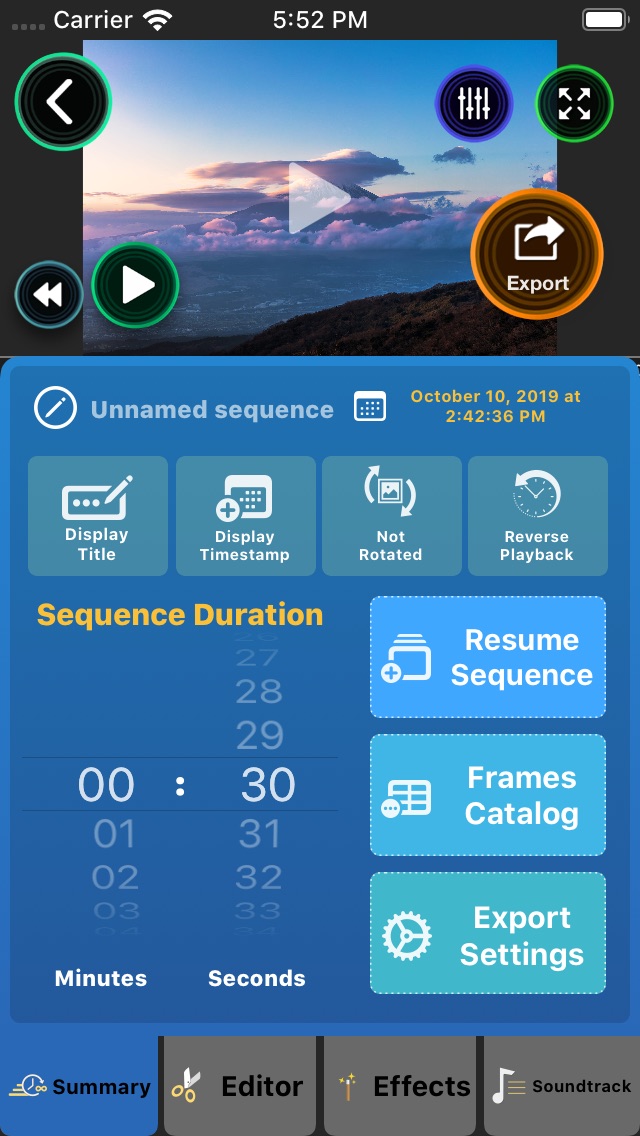
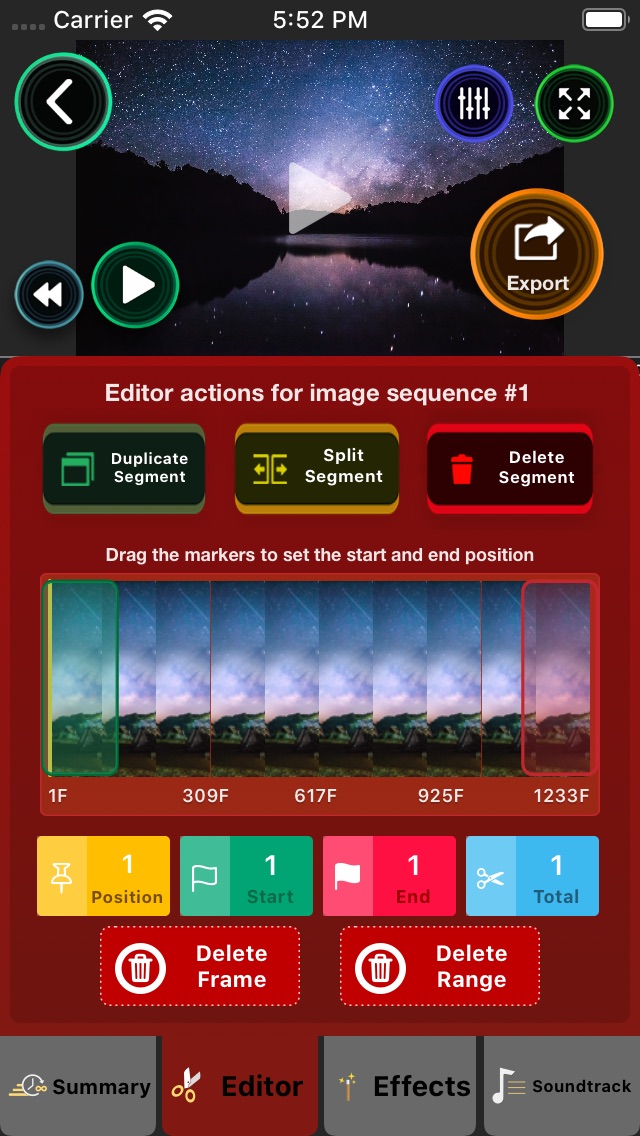


iPad 6 images
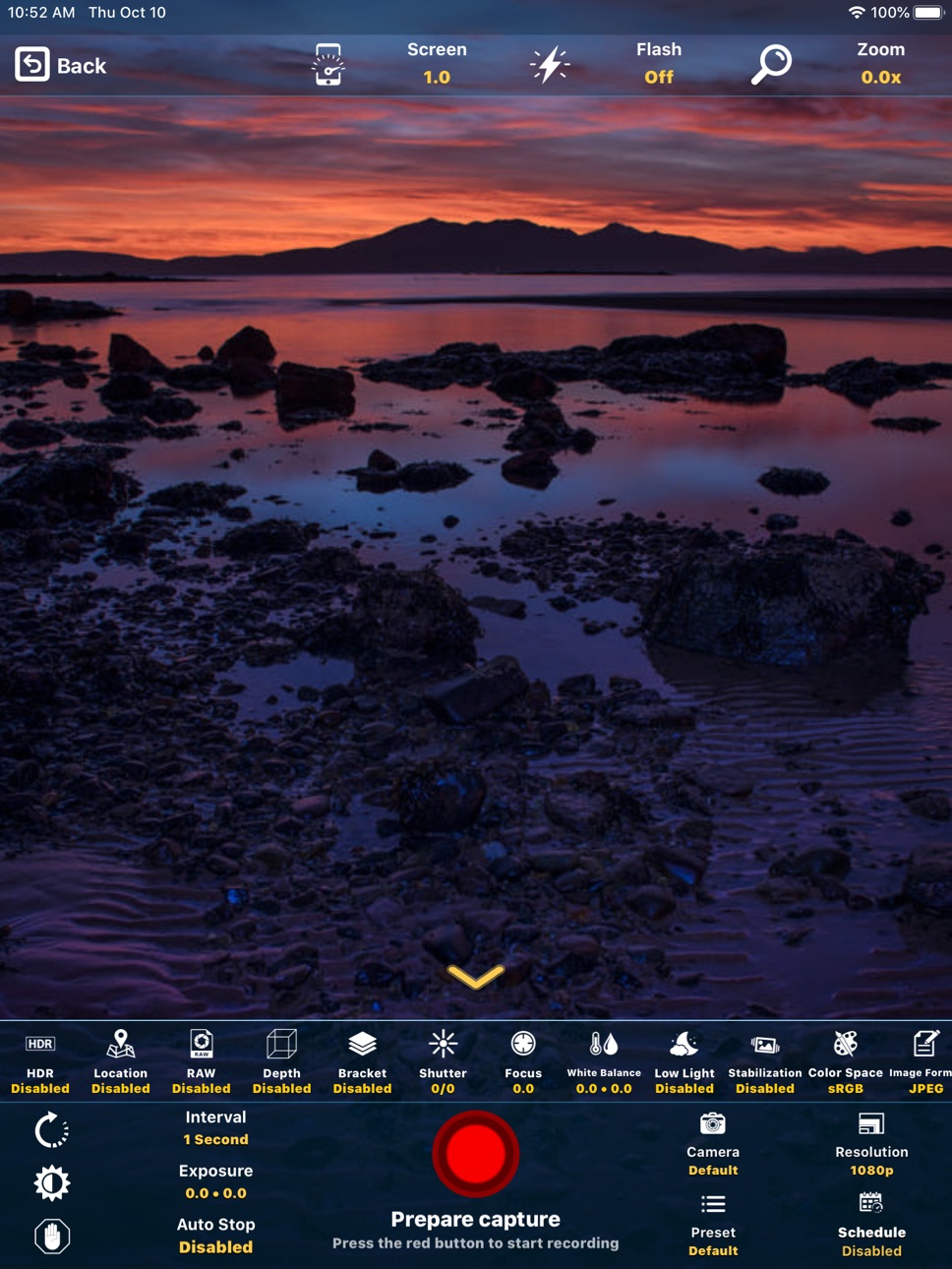


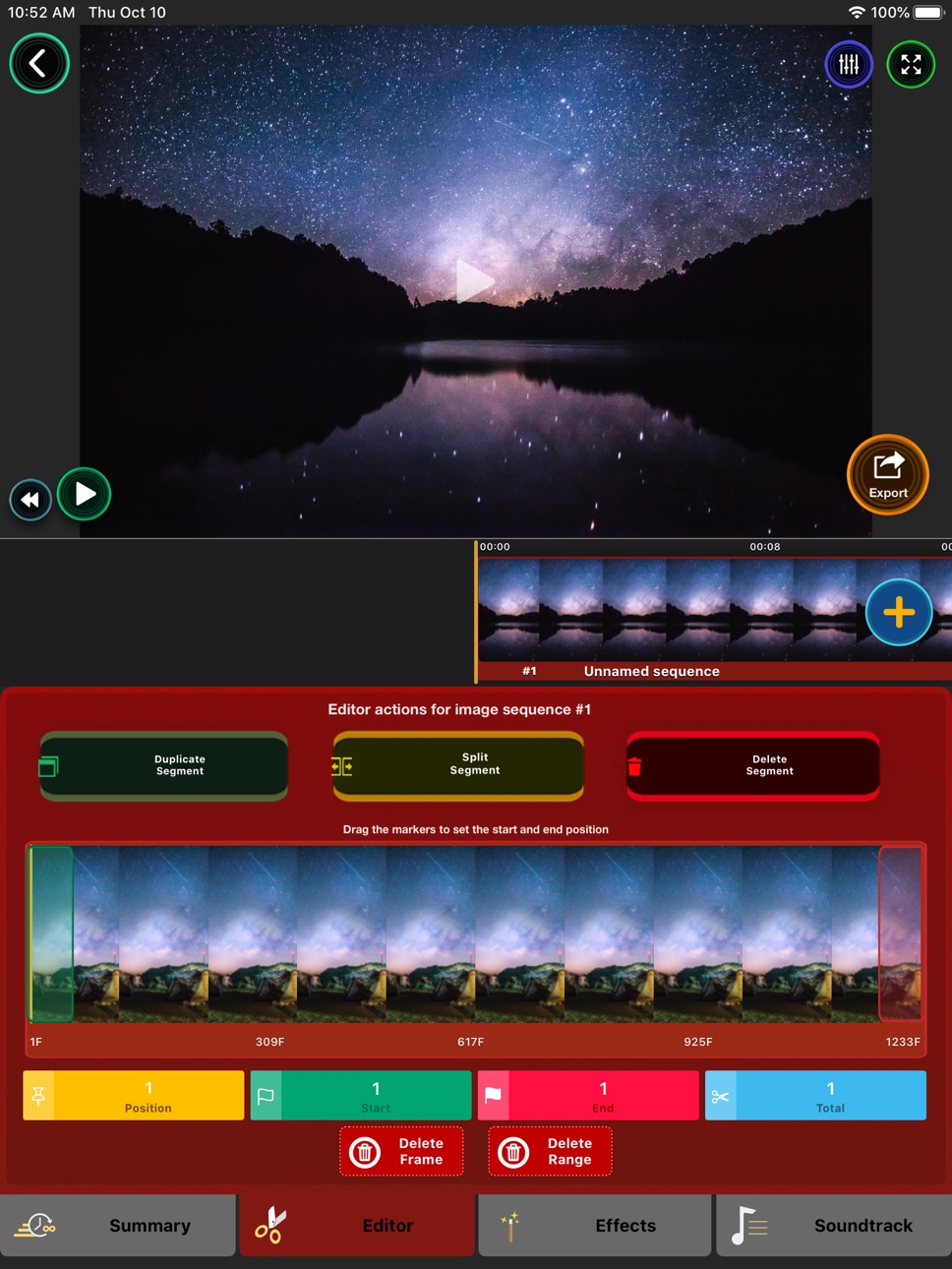

What’s New Version 5.02
CAMERA NEW FEATURES:
• Support for capturing images in 4K Ultra High Definition ( 3840x2160 pixels )
• New camera modes including RAW, HDR, Depth Map, Location.
• RAW will capture images without any post-processing maintaining the full quality and editing possibilities.
• Depth Map will generate a 3D map of the scene, you can use different effects for what is on the front or in the background.
• Bracket mode will capture multiple shots using different exposures at once.
• Location will collect the GPS information for every captured image, can be used to generate a moving map of the recorded scene.
• Presets can be created for your favorite camera configurations and used later on different ocasions.
• Schedule a capture to start in a future time.
• Support for the newest cameras available on modern devices.
• Save your captures directly to iCloud so you can use the images in real time without having to move the capturing device.
• Support for the modern image format HEIC that uses less space in disk maintaning quality.
It also includes: low lightning boost, image stabilization, color space and more.
EDITOR NEW FEATURES:
• Import any video or image sequence captured with your iOS device or any other camera.
• Projects now support multiple segments, each with it's own configuration for effects and other settings.
• Image frames can now be easily exported using different methods including AirDrop, useful if you captured with your iOS device and want edit your project on the Mac for example.
• Duplicate or split your captures in multiple parts, exclude a single frame or a range of frames that are not useful for your project.
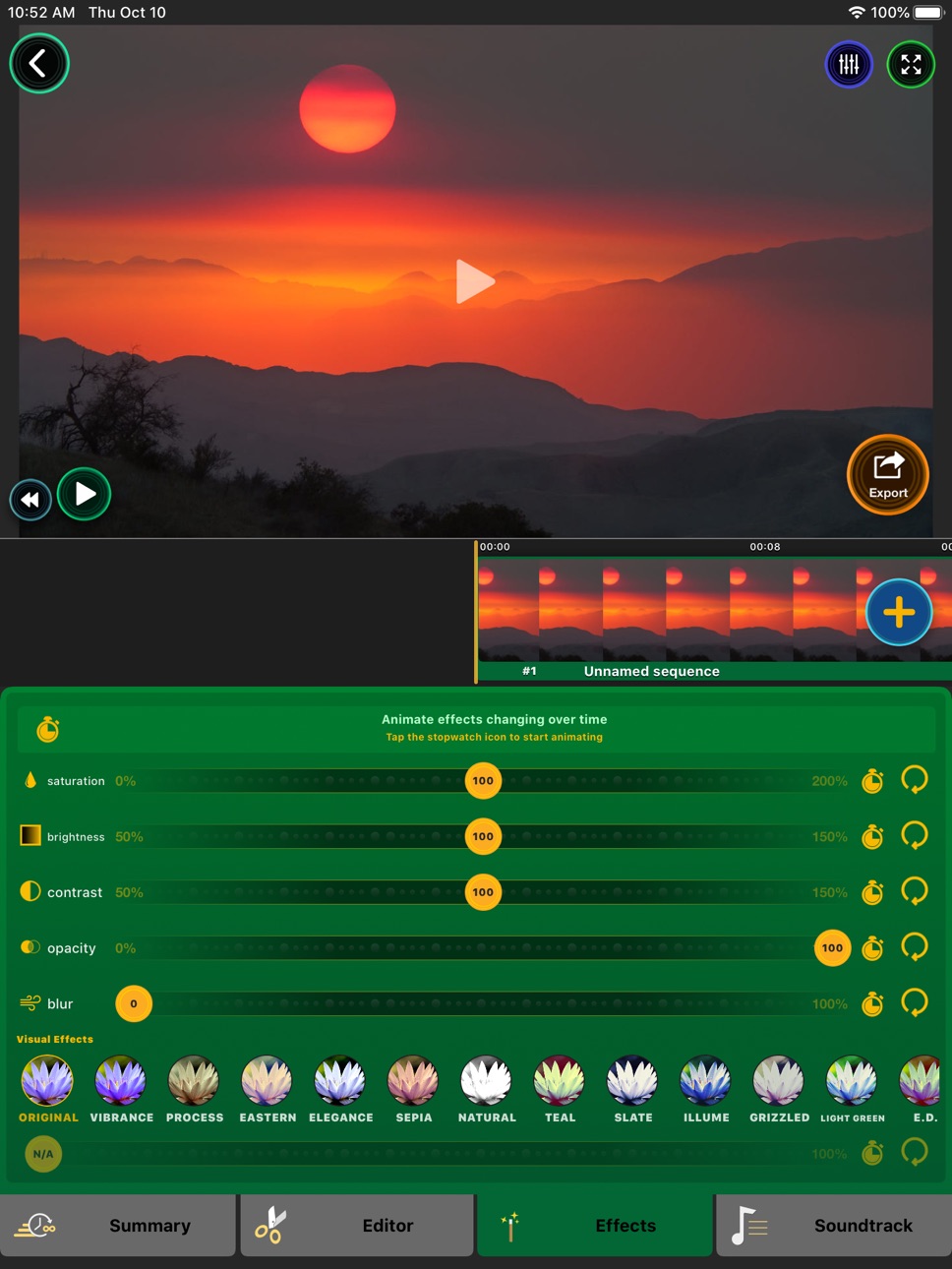
• Animate effects over time like a professional video editor.
• Professional color grading features including animatable saturation, brightness, constrant, opacity and blur.
• Multiple soundtrack supporting audio files from any source using Files or from your music library.
• Include a voice recorder so you can add a voice-over to your projects.
• Thousands of soundtracks you can use in your projects for free, included advanced search for content on Jamendo.
• Modern render engine using Metal ( Apple most advanced image processing for your device ). Previews now are in real-time and exporting is super fast.
OTHER FEATURES:
• New friendly and intuitive interface, you can do more than professional photographers ever could in a very simple and easy way.
• Lapse It is now available for Mac, you can edit your projects with the full power of this machine.
• How to use video tutorials demonstrate all the features so you can make the most use of Lapse It.
Description
FEATURED IN THE MEDIA:
• Featured on the English TV Show "The Gadget Show" http://youtu.be/QjjayQVHnrk
• You can watch a great video review at http://youtu.be/8jhIyDYcumM
••••••••••••••••••••••••••••••••••
Lapse It is intuitive and simple to use, you will be able to capture and edit your time-lapse or stop-motion projects powered by unique features available in your device.
No need for expensive photography equipment, you just need Lapse It.
POWERFUL AND UNIQUE FEATURES:
• Create time lapse and stop motion projects using the full potential of your device
• Import multiple images and videos from multiple sources to compose a new project using many editing tools
• Instant preview and fast export of your compositions creating gorgeous UHD 4K+ videos
CAMERA FEATURES:
• Capture sequences of pictures using powerful camera and timings features.
• Camera can be easily adjusted to capture images using all the powerful features your device has to offer.
• Include capturing in HDR ( High Dynamic Range ), GPS ( Location ), RAW ( Unprocessed image ), Depth ( 3D Map ), Bracket ( Multiple instant shots )
• Schedule a time for the capture to start automatically
• Define when the capture should stop ( after a number of frames or a time length )
• Manual camera controls for exposure, focus, ISO and white balance
• Remote live access to the captured images while recording using iCloud
• Zoom can be adjusted over time while recording including remotely using Apple Watch
• Stop motion mode with extra features: onion skin ( previous image as 'ghost' for the next ) and touch-less capture using sound ( for example a 'clap' )
• Resume previous captures for multiple days recording or to continue a project on a different location
• Other options are low-lightning mode, color space, image format, onion skin and grid
EDITING FEATURES:
• Play and export sequences of images as videos including advanced editor tools
• Define the duration of your time lapse with millisecond precision, easily making it play slower or faster
• Stylize your compositon choosing from the unique 50 stunning filters, including the miniaturization tilt-shift effect
• Image color post-processing controls for saturation, brightness, contrast, opacity, blur and more
• Duplicate or exclude single or a range of images and just export the shots that are perfect
• The order of the images that compose can be changed and easily time reversed
• Every frame that compose your video is editable and exportable as single image
• Advanced render modes include customized resolution, frame rate, bitrate and format ( H.264 MP4 or H.265 HEIC )
• Share directly to Instagram, Messenger, Whatsapp, YouTube, Facebook, Vimeo and many others
• Add multiple audio tracks for a more immersive result, use any song from your Music library or any MP3 or WAVE using Files, search from a free music online catalog, there is even a voice recorder included, that will serve for multiple purposes
MORE FEATURES:
• The only time lapse and stop motion app that you will ever need
• Image sequence real time lapse and not just accelerated videos
• Video tutorials are included so you learn to make use of all the features
• Can use all the cameras on your device and captures from multiple cameras at once
• Real-time capture information on the screen during capture
• No restrictions for capture length or frames
• Tested and approved by more than 10.000.000 people with 4.5+ rating
• Some features may just available on the Professional version
••••••••••••••••••••••••••••••••••
WHAT IS TIME LAPSE ?
Time Lapse is a photography technique that gives an accelerated view of slowly changing events.
Events such as movement of clouds, the rising and setting of the sun, animal life, a party with your friends, even individual activities like drawing or playing sports or anything else that you can imagine.
You will see them in a new way and otherwise undetectable patterns will emerge.
Accessibility
ipadiphonemacrealityDevicetvoswatch
Version history 24 versions
Build 833288549v5.022019-10-23 22:33:28
CAMERA NEW FEATURES:
• Support for capturing images in 4K Ultra High Definition ( 3840x2160 pixels )
• New camera modes including RAW, HDR, Depth Map, Location.
• RAW will capture images without any post-processing maintaining the full quality and editing possibilities.
• Depth Map will generate a 3D map of the scene, you can use different effects for what is on the front or in the background.
• Bracket mode will capture multiple shots using different exposures at once.
• Location will collect the GPS information for every captured image, can be used to generate a moving map of the recorded scene.
• Presets can be created for your favorite camera configurations and used later on different ocasions.
• Schedule a capture to start in a future time.
• Support for the newest cameras available on modern devices.
• Save your captures directly to iCloud so you can use the images in real time without having to move the capturing device.
• Support for the modern image format HEIC that uses less space in disk maintaning quality.
It also includes: low lightning boost, image stabilization, color space and more.
EDITOR NEW FEATURES:
• Import any video or image sequence captured with your iOS device or any other camera.
• Projects now support multiple segments, each with it's own configuration for effects and other settings.
• Image frames can now be easily exported using different methods including AirDrop, useful if you captured with your iOS device and want edit your project on the Mac for example.
• Duplicate or split your captures in multiple parts, exclude a single frame or a range of frames that are not useful for your project.
• Animate effects over time like a professional video editor.
• Professional color grading features including animatable saturation, brightness, constrant, opacity and blur.
• Multiple soundtrack supporting audio files from any source using Files or from your music library.
• Include a voice recorder so you can add a voice-over to your projects.
• Thousands of soundtracks you can use in your projects for free, included advanced search for content on Jamendo.
• Modern render engine using Metal ( Apple most advanced image processing for your device ). Previews now are in real-time and exporting is super fast.
OTHER FEATURES:
• New friendly and intuitive interface, you can do more than professional photographers ever could in a very simple and easy way.
• Lapse It is now available for Mac, you can edit your projects with the full power of this machine.
• How to use video tutorials demonstrate all the features so you can make the most use of Lapse It.
Build 833250391v5.012019-10-21 08:49:02
CAMERA NEW FEATURES:
• Support for capturing images in 4K Ultra High Definition ( 3840x2160 pixels )
• New camera modes including RAW, HDR, Depth Map, Location.
• RAW will capture images without any post-processing maintaining the full quality and editing possibilities.
• Depth Map will generate a 3D map of the scene, you can use different effects for what is on the front or in the background.
• Bracket mode will capture multiple shots using different exposures at once.
• Location will collect the GPS information for every captured image, can be used to generate a moving map of the recorded scene.
• Presets can be created for your favorite camera configurations and used later on different ocasions.
• Schedule a capture to start in a future time.
• Support for the newest cameras available on modern devices.
• Save your captures directly to iCloud so you can use the images in real time without having to move the capturing device.
• Support for the modern image format HEIC that uses less space in disk maintaning quality.
It also includes: low lightning boost, image stabilization, color space and more.
EDITOR NEW FEATURES:
• Import any video or image sequence captured with your iOS device or any other camera.
• Projects now support multiple segments, each with it's own configuration for effects and other settings.
• Image frames can now be easily exported using different methods including AirDrop, useful if you captured with your iOS device and want edit your project on the Mac for example.
• Duplicate or split your captures in multiple parts, exclude a single frame or a range of frames that are not useful for your project.
• Animate effects over time like a professional video editor.
• Professional color grading features including animatable saturation, brightness, constrant, opacity and blur.
• Multiple soundtrack supporting audio files from any source using Files or from your music library.
• Include a voice recorder so you can add a voice-over to your projects.
• Thousands of soundtracks you can use in your projects for free, included advanced search for content on Jamendo.
• Modern render engine using Metal ( Apple most advanced image processing for your device ). Previews now are in real-time and exporting is super fast.
OTHER FEATURES:
• New friendly and intuitive interface, you can do more than professional photographers ever could in a very simple and easy way.
• Lapse It is now available for Mac, you can edit your projects with the full power of this machine.
• How to use video tutorials demonstrate all the features so you can make the most use of Lapse It.
Build 833247616v5.02019-10-20 00:05:21
CAMERA NEW FEATURES:
• Support for capturing images in 4K Ultra High Definition ( 3840x2160 pixels )
• New camera modes including RAW, HDR, Depth Map, Location.
• RAW will capture images without any post-processing maintaining the full quality and editing possibilities.
• Depth Map will generate a 3D map of the scene, you can use different effects for what is on the front or in the background.
• Bracket mode will capture multiple shots using different exposures at once.
• Location will collect the GPS information for every captured image, can be used to generate a moving map of the recorded scene.
• Presets can be created for your favorite camera configurations and used later on different ocasions.
• Schedule a capture to start in a future time.
• Support for the newest cameras available on modern devices.
• Save your captures directly to iCloud so you can use the images in real time without having to move the capturing device.
• Support for the modern image format HEIC that uses less space in disk maintaning quality.
It also includes: low lightning boost, image stabilization, color space and more.
EDITOR NEW FEATURES:
• Import any video or image sequence captured with your iOS device or any other camera.
• Projects now support multiple segments, each with it's own configuration for effects and other settings.
• Image frames can now be easily exported using different methods including AirDrop, useful if you captured with your iOS device and want edit your project on the Mac for example.
• Duplicate or split your captures in multiple parts, exclude a single frame or a range of frames that are not useful for your project.
• Animate effects over time like a professional video editor.
• Professional color grading features including animatable saturation, brightness, constrant, opacity and blur.
• Multiple soundtrack supporting audio files from any source using Files or from your music library.
• Include a voice recorder so you can add a voice-over to your projects.
• Thousands of soundtracks you can use in your projects for free, included advanced search for content on Jamendo.
• Modern render engine using Metal ( Apple most advanced image processing for your device ). Previews now are in real-time and exporting is super fast.
OTHER FEATURES:
• New friendly and intuitive interface, you can do more than professional photographers ever could in a very simple and easy way.
• Lapse It is now available for Mac, you can edit your projects with the full power of this machine.
• How to use video tutorials demonstrate all the features so you can make the most use of Lapse It.
Build 829885170v4.102019-10-19 20:21:54
CAMERA NEW FEATURES:
• Support for capturing images in 4K Ultra High Definition ( 3840x2160 pixels )
• New camera modes including RAW, HDR, Depth Map, Location.
• RAW will capture images without any post-processing maintaining the full quality and editing possibilities.
• Depth Map will generate a 3D map of the scene, you can use different effects for what is on the front or in the background.
• Bracket mode will capture multiple shots using different exposures at once.
• Location will collect the GPS information for every captured image, can be used to generate a moving map of the recorded scene.
• Presets can be created for your favorite camera configurations and used later on different ocasions.
• Schedule a capture to start in a future time.
• Support for the newest cameras available on modern devices.
• Save your captures directly to iCloud so you can use the images in real time without having to move the capturing device.
• Support for the modern image format HEIC that uses less space in disk maintaning quality.
It also includes: low lightning boost, image stabilization, color space and more.
EDITOR NEW FEATURES:
• Import any video or image sequence captured with your iOS device or any other camera.
• Projects now support multiple segments, each with it's own configuration for effects and other settings.
• Image frames can now be easily exported using different methods including AirDrop, useful if you captured with your iOS device and want edit your project on the Mac for example.
• Duplicate or split your captures in multiple parts, exclude a single frame or a range of frames that are not useful for your project.
• Animate effects over time like a professional video editor.
• Professional color grading features including animatable saturation, brightness, constrant, opacity and blur.
• Multiple soundtrack supporting audio files from any source using Files or from your music library.
• Include a voice recorder so you can add a voice-over to your projects.
• Thousands of soundtracks you can use in your projects for free, included advanced search for content on Jamendo.
• Modern render engine using Metal ( Apple most advanced image processing for your device ). Previews now are in real-time and exporting is super fast.
OTHER FEATURES:
• New friendly and intuitive interface, you can do more than professional photographers ever could in a very simple and easy way.
• Lapse It is now available for Mac, you can edit your projects with the full power of this machine.
• How to use video tutorials demonstrate all the features so you can make the most use of Lapse It.
Build 829470577v4.022018-11-30 17:43:13
Lapse It has not been updated in a while, we've been busy with our video speed editor app 'Flow Speed Control'. In the meanwhile we were also modernizing Lapse It and we will do it in progressive update steps and our promisse in to bring you the best tools to capture amazing time lapse and stop motion videos using the latest technology.
• Lapse It has been redesigned to make it easier and faster to capture and edit your projects. All the amazing tools Lapse It had got even more powerful and intuitive intuitive to use.
• The capture process has been modernized to use the latest technologies from Apple, that will allow us to capture time lapses and stop motion projects with Depth data and much more.
• The import system now allows you to import any video as a time lapse project or use an image sequence captured with another famera as a source of the project.
• Lapse It now uses Metal to do image processing and to export your videos, this is the the most modern graphics engine ever developed by Apple.
• Fixed many issues like the one that made the video much longer sometimes when saved to the Photos gallery.
• The Lapse It online and social gallery is being redesigned too, at the moment is not available on this version, but it will be back much better than before.
Thanks for using Lapse It, we will always keep improving it and you can expect many new features are coming, stay tuned.
Build 829397538v4.012018-11-25 23:45:35
Lapse It has not been updated in a while, we've been busy with our video speed editor app 'Flow Speed Control'. In the meanwhile we were also modernizing Lapse It and we will do it in progressive update steps and our promisse in to bring you the best tools to capture amazing time lapse and stop motion videos using the latest technology.
• Lapse It has been redesigned to make it easier and faster to capture and edit your projects. All the amazing tools Lapse It had got even more powerful and intuitive intuitive to use.
• The capture process has been modernized to use the latest technologies from Apple, that will allow us to capture time lapses and stop motion projects with Depth data and much more.
• The import system now allows you to import any video as a time lapse project or use an image sequence captured with another famera as a source of the project.
• Lapse It now uses Metal to do image processing and to export your videos, this is the the most modern graphics engine ever developed by Apple.
• Fixed many issues like the one that made the video much longer sometimes when saved to the Photos gallery.
• The Lapse It online and social gallery is being redesigned too, at the moment is not available on this version, but it will be back much better than before.
Thanks for using Lapse It, we will always keep improving it and you can expect many new features are coming, stay tuned.
Build 829135905v4.02018-11-18 00:23:21
Lapse It has not been updated in a while, we've been busy with our video speed editor app 'Flow Speed Control'. In the meanwhile we were also modernizing Lapse It and we will do it in progressive update steps and our promisse in to bring you the best tools to capture amazing time lapse and stop motion videos using the latest technology.
• Lapse It has been redesigned to make it easier and faster to capture and edit your projects. All the amazing tools Lapse It had got even more powerful and intuitive intuitive to use.
• The capture process has been modernized to use the latest technologies from Apple, that will allow us to capture time lapses and stop motion projects with Depth data and much more.
• The import system now allows you to import any video as a time lapse project or use an image sequence captured with another famera as a source of the project.
• Lapse It now uses Metal to do image processing and to export your videos, this is the the most modern graphics engine ever developed by Apple.
• Fixed many issues like the one that made the video much longer sometimes when saved to the Photos gallery.
• The Lapse It online and social gallery is being redesigned too, at the moment is not available on this version, but it will be back much better than before.
Thanks for using Lapse It, we will always keep improving it and you can expect many new features are coming, stay tuned.
Build 741382863v2.522014-10-17 21:33:49
** We just released a new app named Flow, it is a video speed controller, you import your videos and change it's speed as you like combining fast and slow motion. We recommend you do check it :)
Lapse It brings new cool features of iOS8 and more, take a look into some of the changes:
• Import pre-recorded videos from your gallery as time lapse projects to speed them up or slow them down.
• Capture manual controls for exposure, ISO, focus and white balance.
• Zooming support including zoom ramping over time.
• More than 40 new stunning effect filters.
• Play and render projects as backwards.
• Easily export that stunning single image from your capture to your Photos app.
• Optimised for iPhone 6 and iPhone 6 Plus.
• Native support for iPad devices.
If you like Lapse It, we kindly ask you to take the time to (re)write a nice review: it really helps.
Thank you !
Build 731553687v2.512014-10-03 20:07:05
Lapse It brings new cool features of iOS8 and more, take a look into some of the changes:
• Import pre-recorded videos from your gallery as time lapse projects to speed them up or slow them down.
• Capture manual controls for exposure, ISO, focus and white balance.
• Zooming support including zoom ramping over time.
• More than 40 new stunning effect filters.
• Play and render projects as backwards.
• Easily export that stunning single image from your capture to your Photos app.
• Optimised for iPhone 6 and iPhone 6 Plus.
• Native support for iPad devices.
If you like Lapse It, we kindly ask you to take the time to (re)write a nice review: it really helps.
Thank you !
Build 532392672v2.502014-10-02 19:25:32
Lapse It brings new cool features of iOS8 and more, take a look into some of the changes:
• Import pre-recorded videos from your gallery as time lapse projects to speed them up or slow them down.
• Capture manual controls for exposure, ISO, focus and white balance.
• Zooming support including zoom ramping over time.
• More than 40 new stunning effect filters.
• Play and render projects as backwards.
• Easily export that stunning single image from your capture to your Photos app.
• Optimised for iPhone 6 and iPhone 6 Plus.
• Native support for iPad devices.
If you like Lapse It, we kindly ask you to take the time to (re)write a nice review: it really helps.
Thank you !
Build 143282633v2.222013-12-02 01:00:33
"Clap" feature is now working in iOS 7.
Optimisations and minor issues fixed.
2.2:
New iOS 7 interfaces and improvements.
It's now possible to merge projects easily.
Square mode to make your videos ready for Instagram and others.
Onion skin frame when resuming projects.
Exposure, Focus, Flash and White Balance settings saved though sessions.
Some issues fixed and more !
** Rate us again at the AppStore as every new version has it's own ratings. **
Thank you very much for your support, we will continue to improve Lapse It !
Build 132592632v2.212013-11-15 01:52:25
New iOS 7 interfaces and improvements.
It's now possible to merge projects easily.
Quadratic mode to make your videos ready for Instagram and others.
Onion skin frame when resuming projects.
Exposure, Focus, Flash and White Balance settings saved though sessions.
Some issues fixed and more !
** Rate us again at the AppStore as every new version has it's own ratings. **
Thank you very much for your support, we will continue to improve Lapse It !
Build 85462678v2.22013-11-14 03:57:25
IF YOU ARE NOT USING iOS7 PLEASE DON'T UPDATE YET, THERE IS AN ISSUE AND THE APP WILL NOT WORK PROPERLY
New iOS 7 interfaces and improvements.
It's now possible to merge projects easily.
Quadratic mode to make your videos ready for Instagram and others.
Onion skin frame when resuming projects.
Exposure, Focus, Flash and White Balance settings saved though sessions.
Some issues fixed and more !
** Rate us again at the AppStore as every new version has it's own ratings. **
Thank you very much for your support, we will continue to improve Lapse It !
Build 15523304v2.12013-06-09 08:38:27
Version 2.1
- Onion skin ( Ghost mode ) when using stop motion mode.
- Menu item for copying a video to camera roll after it's rendered
- Flash screen when picture is taken
- Usage tips for new users
- General tweaks and bug fixes
Version 2.0
· Now it's even more social and personalized, two new interfaces were added in the gallery among with other great improvements.
· The first is your personal profile where you can see the videos you published, other videos that you liked, people you follow and those who follow you.
· The second is a video stream where you can watch what has been published by the users you follow.
· To make it even better we moved all our services to a new host that is much faster. Now you will publish and watch videos without interruption.
· Apart from the gallery there are new features everywhere in the app, for example:
· You ever wanted to do a time lapse but capture it through the course of many days or even longer times? For example taking a picture per day and watching how it evolves after a month or a year? Now you can do that with the new feature that we call "Resumable Capture".
· Also you can also add the time that each picture was taken over the images, this was very requested feature and now it's finally available, really cool !
· If you have captured in the wrong orientation now you can adjust it rotating it properly.
· You don't need to wait in the app while rendering, now it will work in background mode. ( When no effects applied )
· In case that you forgot the password to the gallery, now you can recovery account easily from the sign in screen.
· Some users were having some problems while uploading to Facebook or YouTube, we also fixed these and other small issues.
These are some of the additions that we prepared for you in this new version, if you are a Pro, thank you for supporting our work, if you still are not, support us to continue to receive amazing update for your Lapse It.
Best wishes !
Build 15350902v2.02013-05-16 07:43:21
We are happy to announce the release of a major update for your prefered time lapse app, some of the new features include:
· Now it's even more social and personalized, two new interfaces were added in the gallery among with other great improvements.
· The first is your personal profile where you can see the videos you published, other videos that you liked, people you follow and those who follow you.
· The second is a video stream where you can watch what has been published by the users you follow.
· To make it even better we moved all our services to a new host that is much faster. Now you will publish and watch videos without interruption.
· Apart from the gallery there are new features everywhere in the app, for example:
· You ever wanted to do a time lapse but capture it through the course of many days or even longer times? For example taking a picture per day and watching how it evolves after a month or a year? Now you can do that with the new feature that we call "Resumable Capture".
· Also you can also add the time that each picture was taken over the images, this was very requested feature and now it's finally available, really cool !
· If you have captured in the wrong orientation now you can adjust it rotating it properly.
· You don't need to wait in the app while rendering, now it will work in background mode. ( When no effects applied )
· In case that you forgot the password to the gallery, now you can recovery account easily from the sign in screen.
· Some users were having some problems while uploading to Facebook or YouTube, we also fixed these and other small issues.
These are some of the additions that we prepared for you in this new version, if you are a Pro, thank you for supporting our work, if you still are not, support us to continue to receive amazing update for your Lapse It.
Best wishes !
Build 13242599v1.62013-01-10 00:05:04
Individual frame exclusion
Rendering optimizations
Sharing improvements and fixes
Schedule fix
General tweaks
Build 13114929v1.522012-12-27 23:19:42
Fixed issue with the schedule
General improvements
Build 13031581v1.512012-12-20 21:51:35
iOS 6 Native Social Sharing
iOS 6 Native Facebook Upload
Fixed upload for prior iOS versions
General improvements
We wish you a great 2013
Build 12811097v1.52012-12-05 23:11:08
Schedule capture
Facebook upload fixed
Fixed crash when using version prior to iOS6
Stop Motion clap toggle button ( enable/disable )
Some other tweaks and fixed
Build 11569443v1.42012-10-27 09:18:43
Compatibility to iOS 6 and iPhone 5
Fully translation to French
Partial translation to Spanish and Catalan
General improvements
Build 9967865v1.32012-08-17 19:07:14
Added tap to focus and exposure
Sound spectrum now works
Added full translation to Polish
Fixed some issues
General tweaks
Build 9490854v1.22012-07-28 20:16:43
Added direct upload to Vimeo
Added video tutorial
Added Multi-language ready
Added Full Translation for Portuguese
General Tweaks
Build 8973245v1.12012-07-11 16:52:32
Added direct upload to Facebook and YouTube
Added error reporting tool
Build 8711244v1.02012-06-22 19:59:30
Price history by region
Currency
Show
Columns
Search
Availability 113 of 113 storefronts
| Region | Language | Price | Ratings | Avg | Version |
|---|---|---|---|---|---|
| US | en-US | USD 2.99 | 1.2k | 3.9 | 5.02 |
| GB | en-GB | GBP 2.99 | 210 | 3.9 | 5.02 |
| DE | de-DE | EUR 2.99 | 142 | 4.1 | 5.02 |
| CA | en-CA | CAD 3.99 | 133 | 4.0 | 5.02 |
| FR | fr-FR | EUR 2.99 | 102 | 4.0 | 5.02 |
| RU | ru | RUB 249 | 100 | 4.4 | 5.02 |
| CN | zh-Hans-CN | CNY 22 | 95 | 4.3 | 5.02 |
| AU | en-AU | AUD 4.99 | 93 | 3.7 | 5.02 |
| ES | es-ES | EUR 2.99 | 82 | 4.1 | 5.02 |
| NL | nl | EUR 2.99 | 82 | 3.9 | 5.02 |
| IT | it | EUR 2.99 | 62 | 4.4 | 5.02 |
| TR | en-GB | TRY 149.99 | 52 | 4.4 | 5.02 |
| SE | sv | SEK 39 | 46 | 3.9 | 5.02 |
| IN | en-GB | INR 299 | 33 | 4.2 | 5.02 |
| ID | en-GB | IDR 49000 | 26 | 4.3 | 5.02 |
| NO | en-GB | NOK 39 | 25 | 3.9 | 5.02 |
| TW | zh-Hant-TW | TWD 90 | 25 | 4.5 | 5.02 |
| CH | de-CH | CHF 3 | 23 | 4.1 | 5.02 |
| TH | en-GB | THB 99 | 20 | 4.3 | 5.02 |
| DK | en-GB | DKK 29 | 18 | 4.1 | 5.02 |
| PH | en-GB | PHP 199 | 18 | 4.2 | 5.02 |
| HK | zh-Hant-HK | HKD 22 | 17 | 4.2 | 5.02 |
| CZ | en-GB | CZK 79 | 15 | 4.7 | 5.02 |
| JP | ja | JPY 500 | 15 | 3.9 | 5.02 |
| PL | en-GB | PLN 14.99 | 15 | 3.7 | 5.02 |
| SG | en-GB | SGD 3.98 | 15 | 4.0 | 5.02 |
| FI | en-GB | EUR 2.99 | 14 | 4.1 | 5.02 |
| PT | pt-PT | EUR 2.99 | 14 | 4.4 | 5.02 |
| BE | en-GB | EUR 2.99 | 13 | 4.0 | 5.02 |
| MY | en-GB | MYR 14.9 | 13 | 3.6 | 5.02 |
| GR | en-GB | EUR 2.99 | 11 | 4.2 | 5.02 |
| AT | de-DE | EUR 2.99 | 10 | 3.3 | 5.02 |
| NZ | en-AU | NZD 4.99 | 10 | 4.2 | 5.02 |
| SA | en-GB | SAR 12.99 | 10 | 4.1 | 5.02 |
| AE | en-GB | AED 12.99 | 9 | 4.3 | 5.02 |
| HU | en-GB | HUF 1490 | 9 | 4.4 | 5.02 |
| IE | en-GB | EUR 2.99 | 9 | 4.8 | 5.02 |
| KR | ko | KRW 4400 | 9 | 3.6 | 5.02 |
| RO | en-GB | RON 14.99 | 8 | 4.8 | 5.02 |
| UA | en-GB | USD 3.99 | 8 | 4.3 | 5.02 |
| HR | en-GB | EUR 2.99 | 6 | 5.0 | 5.02 |
| SK | en-GB | EUR 2.99 | 5 | 4.2 | 5.02 |
| ZA | en-GB | ZAR 59.99 | 5 | 4.0 | 5.02 |
| BY | en-GB | USD 3.99 | 4 | 5.0 | 5.02 |
| IL | en-GB | ILS 9.9 | 4 | 4.3 | 5.02 |
| LV | en-GB | EUR 2.99 | 4 | 3.8 | 5.02 |
| VN | en-GB | VND 99000 | 4 | 5.0 | 5.02 |
| OM | en-GB | USD 2.99 | 3 | 5.0 | 5.02 |
| BG | en-GB | EUR 2.99 | 2 | 5.0 | 5.02 |
| BN | en-GB | USD 2.99 | 2 | 5.0 | 5.02 |
| KW | en-GB | USD 2.99 | 2 | 5.0 | 5.02 |
| LT | en-GB | EUR 2.99 | 2 | 4.5 | 5.02 |
| QA | en-GB | QAR 9.99 | 2 | 5.0 | 5.02 |
| AL | en-GB | USD 3.99 | 1 | 5.0 | 5.02 |
| AZ | en-GB | USD 3.99 | 1 | 5.0 | 5.02 |
| CY | en-GB | EUR 2.99 | 1 | 5.0 | 5.02 |
| EE | en-GB | EUR 2.99 | 1 | 4.0 | 5.02 |
| IS | en-GB | USD 3.99 | 1 | 4.0 | 5.02 |
| KE | en-GB | USD 3.99 | 1 | 2.0 | 5.02 |
| LK | en-GB | USD 2.99 | 1 | 3.0 | 5.02 |
| LU | en-GB | EUR 2.99 | 1 | 4.0 | 5.02 |
| MD | en-GB | USD 3.99 | 1 | 5.0 | 5.02 |
| MK | en-GB | USD 2.99 | 1 | 5.0 | 5.02 |
| PY | es-MX | USD 2.99 | 1 | 5.0 | 5.02 |
| AF | en-GB | USD 2.99 | 0 | — | 5.02 |
| AO | en-GB | USD 2.99 | 0 | — | 5.02 |
| BA | en-GB | EUR 2.99 | 0 | — | 5.02 |
| BH | en-GB | USD 2.99 | 0 | — | 5.02 |
| BM | en-GB | USD 2.99 | 0 | — | 5.02 |
| BT | en-GB | USD 2.99 | 0 | — | 5.02 |
| BW | en-GB | USD 2.99 | 0 | — | 5.02 |
| CI | fr-FR | USD 3.99 | 0 | — | 5.02 |
| CV | en-GB | USD 2.99 | 0 | — | 5.02 |
| FJ | en-GB | USD 2.99 | 0 | — | 5.02 |
| FM | en-GB | USD 2.99 | 0 | — | 5.02 |
| GE | en-GB | USD 3.99 | 0 | — | 5.02 |
| GH | en-GB | USD 3.99 | 0 | — | 5.02 |
| GM | en-GB | USD 2.99 | 0 | — | 5.02 |
| KG | en-GB | USD 2.99 | 0 | — | 5.02 |
| KH | en-GB | USD 2.99 | 0 | — | 5.02 |
| KZ | en-GB | KZT 1790 | 0 | — | 5.02 |
| LA | en-GB | USD 2.99 | 0 | — | 5.02 |
| LR | en-GB | USD 2.99 | 0 | — | 5.02 |
| ME | en-GB | EUR 2.99 | 0 | — | 5.02 |
| MM | en-GB | USD 2.99 | 0 | — | 5.02 |
| MN | en-GB | USD 2.99 | 0 | — | 5.02 |
| MO | zh-Hant-HK | USD 2.99 | 0 | — | 5.02 |
| MR | en-GB | USD 2.99 | 0 | — | 5.02 |
| MS | en-GB | USD 2.99 | 0 | — | 5.02 |
| MT | en-GB | EUR 2.99 | 0 | — | 5.02 |
| MU | en-GB | USD 3.99 | 0 | — | 5.02 |
| MV | en-GB | USD 2.99 | 0 | — | 5.02 |
| MW | en-GB | USD 2.99 | 0 | — | 5.02 |
| MZ | en-GB | USD 2.99 | 0 | — | 5.02 |
| NA | en-GB | USD 2.99 | 0 | — | 5.02 |
| NP | en-GB | USD 3.99 | 0 | — | 5.02 |
| NR | en-GB | USD 2.99 | 0 | — | 5.02 |
| PG | en-GB | USD 2.99 | 0 | — | 5.02 |
| PK | en-GB | PKR 900 | 0 | — | 5.02 |
| PW | en-GB | USD 2.99 | 0 | — | 5.02 |
| RS | en-GB | EUR 2.99 | 0 | — | 5.02 |
| RW | en-GB | USD 2.99 | 0 | — | 5.02 |
| SB | en-GB | USD 2.99 | 0 | — | 5.02 |
| SL | en-GB | USD 2.99 | 0 | — | 5.02 |
| SN | en-GB | USD 3.99 | 0 | — | 5.02 |
| TC | en-GB | USD 2.99 | 0 | — | 5.02 |
| TJ | en-GB | USD 2.99 | 0 | — | 5.02 |
| TM | en-GB | USD 2.99 | 0 | — | 5.02 |
| TO | en-GB | USD 2.99 | 0 | — | 5.02 |
| UZ | en-GB | USD 2.99 | 0 | — | 5.02 |
| VG | en-GB | USD 2.99 | 0 | — | 5.02 |
| VU | en-GB | USD 2.99 | 0 | — | 5.02 |
| XK | en-GB | EUR 2.99 | 0 | — | 5.02 |
Change log 28 changes · BE
✎
releaseNotes updated
CAMERA NEW FEATURES:
• Support for capturing images in 4K Ultra High Definition ( 3840x2160 pixels )
• New camera modes including RAW, HDR, Depth Map, Locatio
✎
description updated
FEATURED IN THE MEDIA:
• Featured on the English TV Show "The Gadget Show" http://youtu.be/QjjayQVHnrk
• You can watch a great video review at http://youtu.be
✎
subtitle updated
Professional time lapse editor
✎
name updated
Lapse It Pro
◆
Version 5.02 released
CAMERA NEW FEATURES:
• Support for capturing images in 4K Ultra High Definition ( 3840x2160 pixels )
• New camera modes including RAW, HDR, Depth Map, Location.
• RAW will capture images without any post-processing maintaining the full q
◆
Version 5.01 released
CAMERA NEW FEATURES:
• Support for capturing images in 4K Ultra High Definition ( 3840x2160 pixels )
• New camera modes including RAW, HDR, Depth Map, Location.
• RAW will capture images without any post-processing maintaining the full q
◆
Version 5.0 released
CAMERA NEW FEATURES:
• Support for capturing images in 4K Ultra High Definition ( 3840x2160 pixels )
• New camera modes including RAW, HDR, Depth Map, Location.
• RAW will capture images without any post-processing maintaining the full q
◆
Version 4.10 released
CAMERA NEW FEATURES:
• Support for capturing images in 4K Ultra High Definition ( 3840x2160 pixels )
• New camera modes including RAW, HDR, Depth Map, Location.
• RAW will capture images without any post-processing maintaining the full q
◆
Version 4.02 released
Lapse It has not been updated in a while, we've been busy with our video speed editor app 'Flow Speed Control'. In the meanwhile we were also modernizing Lapse It and we will do it in progressive update steps and our promisse in to bring yo
◆
Version 4.01 released
Lapse It has not been updated in a while, we've been busy with our video speed editor app 'Flow Speed Control'. In the meanwhile we were also modernizing Lapse It and we will do it in progressive update steps and our promisse in to bring yo
◆
Version 4.0 released
Lapse It has not been updated in a while, we've been busy with our video speed editor app 'Flow Speed Control'. In the meanwhile we were also modernizing Lapse It and we will do it in progressive update steps and our promisse in to bring yo
◆
Version 2.52 released
** We just released a new app named Flow, it is a video speed controller, you import your videos and change it's speed as you like combining fast and slow motion. We recommend you do check it :)
Lapse It brings new cool features of iOS8 an
◆
Version 2.51 released
Lapse It brings new cool features of iOS8 and more, take a look into some of the changes:
• Import pre-recorded videos from your gallery as time lapse projects to speed them up or slow them down.
• Capture manual controls for exposure, IS
◆
Version 2.50 released
Lapse It brings new cool features of iOS8 and more, take a look into some of the changes:
• Import pre-recorded videos from your gallery as time lapse projects to speed them up or slow them down.
• Capture manual controls for exposure, IS
◆
Version 2.22 released
"Clap" feature is now working in iOS 7.
Optimisations and minor issues fixed.
2.2:
New iOS 7 interfaces and improvements.
It's now possible to merge projects easily.
Square mode to make your videos ready for Instagram and others.
Oni
◆
Version 2.21 released
New iOS 7 interfaces and improvements.
It's now possible to merge projects easily.
Quadratic mode to make your videos ready for Instagram and others.
Onion skin frame when resuming projects.
Exposure, Focus, Flash and White Balance sett
◆
Version 2.2 released
IF YOU ARE NOT USING iOS7 PLEASE DON'T UPDATE YET, THERE IS AN ISSUE AND THE APP WILL NOT WORK PROPERLY
New iOS 7 interfaces and improvements.
It's now possible to merge projects easily.
Quadratic mode to make your videos ready for Insta
◆
Version 2.1 released
Version 2.1
- Onion skin ( Ghost mode ) when using stop motion mode.
- Menu item for copying a video to camera roll after it's rendered
- Flash screen when picture is taken
- Usage tips for new users
- General tweaks and bug fixes
Ver
◆
Version 2.0 released
We are happy to announce the release of a major update for your prefered time lapse app, some of the new features include:
· Now it's even more social and personalized, two new interfaces were added in the gallery among with other great im
◆
Version 1.6 released
Individual frame exclusion
Rendering optimizations
Sharing improvements and fixes
Schedule fix
General tweaks
◆
Version 1.52 released
Fixed issue with the schedule
General improvements
◆
Version 1.51 released
iOS 6 Native Social Sharing
iOS 6 Native Facebook Upload
Fixed upload for prior iOS versions
General improvements
We wish you a great 2013
◆
Version 1.5 released
Schedule capture
Facebook upload fixed
Fixed crash when using version prior to iOS6
Stop Motion clap toggle button ( enable/disable )
Some other tweaks and fixed
◆
Version 1.4 released
Compatibility to iOS 6 and iPhone 5
Fully translation to French
Partial translation to Spanish and Catalan
General improvements
◆
Version 1.3 released
Added tap to focus and exposure
Sound spectrum now works
Added full translation to Polish
Fixed some issues
General tweaks
◆
Version 1.2 released
Added direct upload to Vimeo
Added video tutorial
Added Multi-language ready
Added Full Translation for Portuguese
General Tweaks
◆
Version 1.1 released
Added direct upload to Facebook and YouTube
Added error reporting tool
◆
Version 1.0 released