Home › Business

 DO
DO
 USen-US
 CAen-CA
 GBen-GB
 AUen-AU
 MYen-GB
 DEde-DEDOes-MX
 NZen-AU
 SGen-GB
 ZAen-GB
 AEen-GB
 AFen-GB
 AGen-GB
 AIen-GB
 AMen-GB
 AOen-GB
 ARes-MX
 AZen-GB
 BBen-GB
 BFen-GB
 BGen-GB
 BHen-GB
 BJen-GB
 BMen-GB
 BNen-GB
 BOes-MX
 BRpt-BR
 BSen-GB
 BTen-GB
 BWen-GB
 BYen-GB
 BZen-GB
 CDen-GB
 CGen-GB
 CIfr-FR
 CLes-MX
 CMfr-FR
 CNzh-Hans-CN
 COes-MX
 CRes-MX
 CVen-GB
 CYen-GB
 CZen-GB
 DKen-GB
 DMen-GB
 DZen-GB
 ECes-MX
 EEen-GB
 EGen-GB
 ESes-ES
 FIen-GB
 FJen-GB
 FMen-GB
 FRfr-FR
 GAfr-FR
 GDen-GB
 GEen-GB
 GHen-GB
 GMen-GB
 GRen-GB
 GTes-MX
 GWen-GB
 GYen-GB
 HKzh-Hant-HK
 HNes-MX
 HRen-GB
 HUen-GB
 IDen-GB
 IEen-GB
 ILen-GB
 INen-GB
 IQen-GB
 ISen-GB
 ITit
ITit JMen-GB
 JOen-GB
 JPja
JPja KEen-GB
 KGen-GB
 KHen-GB
 KRko
KRko KWen-GB
 KYen-GB
 KZen-GB
 LAen-GB
 LBen-GB
 LCen-GB
 LKen-GB
 LRen-GB
 LTen-GB
 LUen-GB
 LVen-GB
 LYen-GB
 MAen-GB
 MEen-GB
 MGen-GB
 MLen-GB
 MMen-GB
 MNen-GB
 MOzh-Hant-HK
 MRen-GB
 MSen-GB
 MTen-GB
 MUen-GB
 MVen-GB
 MWen-GB
 MXes-MX
 MZen-GB
 NAen-GB
 NEen-GB
 NGen-GB
 NIes-MX
 NOen-GB
 NPen-GB
 NRen-GB
 OMen-GB
 PAes-MX
 PEes-MX
 PGen-GB
 PKen-GB
 PLen-GB
 PWen-GB
 PYes-MX
 QAen-GB
 ROen-GB
 RSen-GB
 RUru
RUru RWen-GB
 SAen-GB
 SBen-GB
 SCen-GB
 SIen-GB
 SKen-GB
 SLen-GB
 SNen-GB
 SRen-GB
 STen-GB
 SVes-MX
 SZen-GB
 TCen-GB
 TDen-GB
 THen-GB
 TJen-GB
 TMen-GB
 TNen-GB
 TOen-GB
 TRen-GB
 TTen-GB
 TWzh-Hant-TW
 TZen-GB
 UAen-GB
 UGen-GB
 UYen-GB
 UZen-GB
 VCen-GB
 VEes-MX
 VNen-GB
 VUen-GB
 XKen-GB
 YEen-GB
 ZMen-GB
 ZWen-GB
162 of 162 storefronts
Content in en-US
Content in en-US
Information
Preview 1 platform
iPhone 5 images



What’s New Version 5.1
Several fixes and improvements
Description
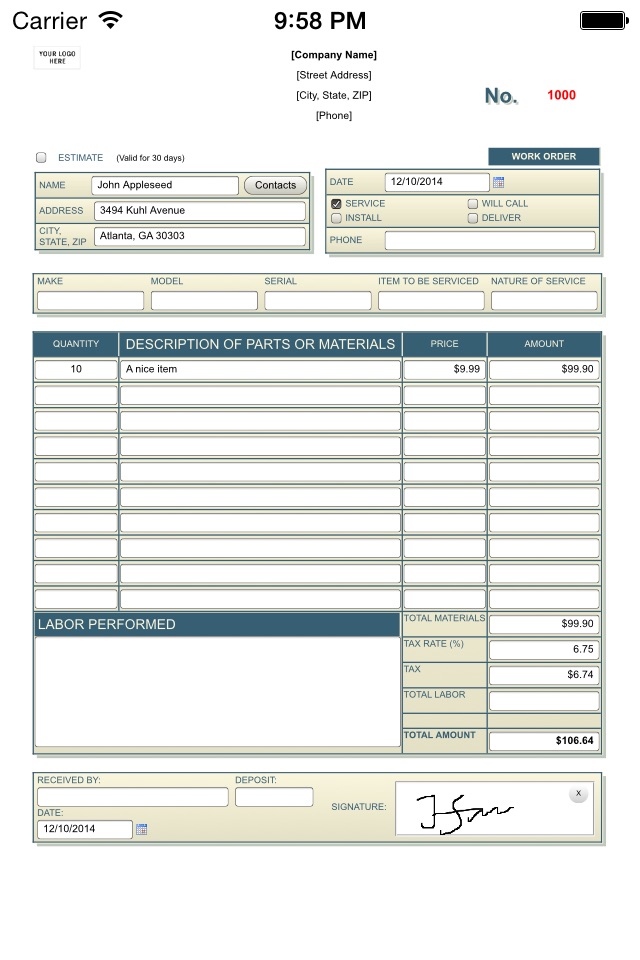
Complete set of over 100 electronic forms for your business
Replace your Paper or Computer forms with similar forms that are available at your Fingertips.
Store any form-based information directly on the iPhone, and access it anytime, anywhere. Your critical information won't get misplaced, misfiled, or become log-jammed.
*** KEY FEATURES ***
- The app comes with over 100 business forms (quotations, invoices, purchase orders, work orders, service orders, meeting notes, memos, etc.). And we are constantly adding new forms;
- No Internet connection is required to work on the forms.
- Forms support all basic controls, including text fields, checkboxes, radio buttons, drop downs.
- Many forms include spreadsheet-like formulas for auto-calculations;
- Forms can contain Signature panels, so you will capture customers signature directly on iPnone;
- Share Forms - start working on a form on one iPhone, or iPad, then use "Share via email" feature and the app will send form with all entered data to another iPhone, or iPad, for completion;
- Forms include popup Calendar control (supporting different date formats);
- Forms even support Drawing panels to make notes and do reviews.
- Completed forms can be Printed (on AirPrint-compatible printer), Emailed, or copied to a computer, for later printing (on any printer).
- Pre-build forms can be customized with your Company name, logo, address and contact information (requires in-app purchase).
- Forms, and their data, can be saved in several different formats: HTML (available for free), or PDF, CSV and XML (available after in-app purchase).
- Forms-2-Go is an Open system - it allows users to add their own forms. Instructions are available on Support forum.
Don't see a form that your business depends on? Not a problem.
If your form is already in electronic (HTML) format - you just need to package (see Support forum) and import it into the app.
Otherwise, contact our Sales team for estimate.
*** iPad version is available under 'Forms-2-Go HD' name ***
In-App Purchases DO pricing
One-Time Purchases
Forms Customization—
Additional form formats—
F2G_PRO_FEATURES—
Capabilities
In-App Purchases
Accessibility
ipadiphonemacrealityDevicetvoswatch
Version history 25 versions
Build 878690522v5.12025-10-07 12:24:48
Several fixes and improvements
Build 876751244v5.02025-07-28 23:22:18
- Over 20 new business forms
- Minor fixes and improvements.
Build 868729318v4.02024-09-11 02:41:48
- Over 20 new business forms (Applications, Employee, Permits, Safety).
- Minor fixes and improvements.
Build 853055502v3.82022-10-30 15:03:08
- Updated business forms
- Minor fixes and improvements
Build 841303511v3.72021-04-12 11:35:00
- Updated business forms
- Minor fixes and improvements
Build 836498877v3.62020-07-15 00:17:53
- Several updated business forms
- Minor fixes and improvements
Build 833712945v3.52019-11-24 22:15:02
Fixes iOS 13 compatibility issues
Build 829682562v3.4.52018-12-18 16:54:06
Fixes problem with restoring purchases
Build 825982756v3.42018-02-13 18:41:51
- Camera app can be opened directly from a form;
- Fix for 'disappearing' Signatures issue;
- Minor updates / fixes in some business forms.
Build 825077877v3.3.52017-11-30 22:05:54
- Resolves compatibility issues with iOS 11;
- Supports iPhone X
Build 822596316v3.22017-06-19 17:11:58
- Backup / Restore your forms at once (*).
- Fix for PDF issue with multi-page forms.
(*) requires in-app purchase of "Pro Features".
Build 822146771v3.12017-05-16 15:00:25
- Minor updates in some business forms;
- Updated FAQ section of the app Help system.
Build 820004688v3.0.52016-12-04 20:00:45
Fixes issue with PDF generation on iPhone 7 / iPhone 7 Plus.
Build 819417223v3.02016-10-31 12:32:01
- Over 20 new forms (invoices, work orders, purchase orders);
- Use iCloud to auto-sync your forms between different iOS devices;
- Email / Export multiple forms at once;
- Choose from 20 themes to set forms colors;
- Mark your forms with stamps like, Paid, Received, etc.
Build 819138106v2.3.52016-10-01 22:12:12
Fixes issue with loading Contacts in iOS 10.
Build 816798949v2.32016-03-25 01:03:44
- 27 new business forms (HVAC, Work Orders, Invoices, Proposals, etc.);
- Work Order templates are placed in a separate category;
- Miscellaneous fixes and enhancements.
Build 814289070v2.22015-11-12 03:06:50
- Compatibility with iOS 9;
- Improved "Edit Form Templates" functionality;
- Miscellaneous fixes and enhancements.
Build 811646450v2.1.62015-01-29 20:34:52
Fixes compatibility issues when running on iOS 6.x devices
Build 811596201v2.1.52015-01-23 19:49:18
Minor bug fixes
Build 811383619v2.12014-12-19 01:39:08
- Added new business forms
- Most of the forms now include auto-generated counter, like Invoice #, which starting value is controlled in app Settings.
- New screens with thumbnail images to select form template or open previously saved form.
- Integrated Help system.
- Allows to Modify form templates (requires in-app purchase);
- App can now auto-populate email recipient address.
- Integration with Cloud services like Dropbox, Box, etc.
Build 321702632v1.9.62014-02-04 10:10:28
Minor system improvements
Build 15588893v1.92013-06-17 02:49:13
- 11 new business forms (invoices, work orders, repair orders);
- App can auto-reduce image resolution when it's inserted into a form;
- Forms now support data validations, to prevent saving incomplete forms.
Build 14646284v1.82013-03-14 00:48:38
- Make form Copy.
If you want to reuse entered data on another form, use "Make form Copy" action.
- Currency symbol.
Forms included with the app can now show your country currency symbol in money amount fields.
This feature can be turned ON (default setting), or OFF, on app "Settings / General" screen.
Build 10812638v1.1.52012-09-24 23:38:49
Improved form export in PDF format in Landscape mode.
Build 10153782v1.12012-08-25 19:21:07
- Several new business forms (sales receipts);
- Improved form export in HTML format.
Price history by region
Currency
Show
Columns
Search
Availability 162 of 162 storefronts
| Region | Language | Price | Ratings | Avg | Version |
|---|---|---|---|---|---|
| US | en-US | Free | 86 | 4.3 | 5.1 |
| CA | en-CA | Free | 8 | 3.1 | 5.1 |
| GB | en-GB | Free | 6 | 3.7 | 5.1 |
| AU | en-AU | Free | 5 | 3.8 | 5.1 |
| MY | en-GB | Free | 2 | 3.0 | 5.1 |
| DE | de-DE | Free | 1 | 1.0 | 5.1 |
| DO | es-MX | Free | 1 | 5.0 | 5.1 |
| NZ | en-AU | Free | 1 | 3.0 | 5.1 |
| SG | en-GB | Free | 1 | 5.0 | 5.1 |
| ZA | en-GB | Free | 1 | 4.0 | 5.1 |
| AE | en-GB | Free | 0 | — | 5.1 |
| AF | en-GB | Free | 0 | — | 5.1 |
| AG | en-GB | Free | 0 | — | 5.1 |
| AI | en-GB | Free | 0 | — | 5.1 |
| AM | en-GB | Free | 0 | — | 5.1 |
| AO | en-GB | Free | 0 | — | 5.1 |
| AR | es-MX | Free | 0 | — | 5.1 |
| AZ | en-GB | Free | 0 | — | 5.1 |
| BB | en-GB | Free | 0 | — | 5.1 |
| BF | en-GB | Free | 0 | — | 5.1 |
| BG | en-GB | Free | 0 | — | 5.1 |
| BH | en-GB | Free | 0 | — | 5.1 |
| BJ | en-GB | Free | 0 | — | 5.1 |
| BM | en-GB | Free | 0 | — | 5.1 |
| BN | en-GB | Free | 0 | — | 5.1 |
| BO | es-MX | Free | 0 | — | 5.1 |
| BR | pt-BR | Free | 0 | — | 5.1 |
| BS | en-GB | Free | 0 | — | 5.1 |
| BT | en-GB | Free | 0 | — | 5.1 |
| BW | en-GB | Free | 0 | — | 5.1 |
| BY | en-GB | Free | 0 | — | 5.1 |
| BZ | en-GB | Free | 0 | — | 5.1 |
| CD | en-GB | Free | 0 | — | 5.1 |
| CG | en-GB | Free | 0 | — | 5.1 |
| CI | fr-FR | Free | 0 | — | 5.1 |
| CL | es-MX | Free | 0 | — | 5.1 |
| CM | fr-FR | Free | 0 | — | 5.1 |
| CN | zh-Hans-CN | Free | 0 | — | 5.1 |
| CO | es-MX | Free | 0 | — | 5.1 |
| CR | es-MX | Free | 0 | — | 5.1 |
| CV | en-GB | Free | 0 | — | 5.1 |
| CY | en-GB | Free | 0 | — | 5.1 |
| CZ | en-GB | Free | 0 | — | 5.1 |
| DK | en-GB | Free | 0 | — | 5.1 |
| DM | en-GB | Free | 0 | — | 5.1 |
| DZ | en-GB | Free | 0 | — | 5.1 |
| EC | es-MX | Free | 0 | — | 5.1 |
| EE | en-GB | Free | 0 | — | 5.1 |
| EG | en-GB | Free | 0 | — | 5.1 |
| ES | es-ES | Free | 0 | — | 5.1 |
| FI | en-GB | Free | 0 | — | 5.1 |
| FJ | en-GB | Free | 0 | — | 5.1 |
| FM | en-GB | Free | 0 | — | 5.1 |
| FR | fr-FR | Free | 0 | — | 5.1 |
| GA | fr-FR | Free | 0 | — | 5.1 |
| GD | en-GB | Free | 0 | — | 5.1 |
| GE | en-GB | Free | 0 | — | 5.1 |
| GH | en-GB | Free | 0 | — | 5.1 |
| GM | en-GB | Free | 0 | — | 5.1 |
| GR | en-GB | Free | 0 | — | 5.1 |
| GT | es-MX | Free | 0 | — | 5.1 |
| GW | en-GB | Free | 0 | — | 5.1 |
| GY | en-GB | Free | 0 | — | 5.1 |
| HK | zh-Hant-HK | Free | 0 | — | 5.1 |
| HN | es-MX | Free | 0 | — | 5.1 |
| HR | en-GB | Free | 0 | — | 5.1 |
| HU | en-GB | Free | 0 | — | 5.1 |
| ID | en-GB | Free | 0 | — | 5.1 |
| IE | en-GB | Free | 0 | — | 5.1 |
| IL | en-GB | Free | 0 | — | 5.1 |
| IN | en-GB | Free | 0 | — | 5.1 |
| IQ | en-GB | Free | 0 | — | 5.1 |
| IS | en-GB | Free | 0 | — | 5.1 |
| IT | it | Free | 0 | — | 5.1 |
| JM | en-GB | Free | 0 | — | 5.1 |
| JO | en-GB | Free | 0 | — | 5.1 |
| JP | ja | Free | 0 | — | 5.1 |
| KE | en-GB | Free | 0 | — | 5.1 |
| KG | en-GB | Free | 0 | — | 5.1 |
| KH | en-GB | Free | 0 | — | 5.1 |
| KR | ko | Free | 0 | — | 5.1 |
| KW | en-GB | Free | 0 | — | 5.1 |
| KY | en-GB | Free | 0 | — | 5.1 |
| KZ | en-GB | Free | 0 | — | 5.1 |
| LA | en-GB | Free | 0 | — | 5.1 |
| LB | en-GB | Free | 0 | — | 5.1 |
| LC | en-GB | Free | 0 | — | 5.1 |
| LK | en-GB | Free | 0 | — | 5.1 |
| LR | en-GB | Free | 0 | — | 5.1 |
| LT | en-GB | Free | 0 | — | 5.1 |
| LU | en-GB | Free | 0 | — | 5.1 |
| LV | en-GB | Free | 0 | — | 5.1 |
| LY | en-GB | Free | 0 | — | 5.1 |
| MA | en-GB | Free | 0 | — | 5.1 |
| ME | en-GB | Free | 0 | — | 5.1 |
| MG | en-GB | Free | 0 | — | 5.1 |
| ML | en-GB | Free | 0 | — | 5.1 |
| MM | en-GB | Free | 0 | — | 5.1 |
| MN | en-GB | Free | 0 | — | 5.1 |
| MO | zh-Hant-HK | Free | 0 | — | 5.1 |
| MR | en-GB | Free | 0 | — | 5.1 |
| MS | en-GB | Free | 0 | — | 5.1 |
| MT | en-GB | Free | 0 | — | 5.1 |
| MU | en-GB | Free | 0 | — | 5.1 |
| MV | en-GB | Free | 0 | — | 5.1 |
| MW | en-GB | Free | 0 | — | 5.1 |
| MX | es-MX | Free | 0 | — | 5.1 |
| MZ | en-GB | Free | 0 | — | 5.1 |
| NA | en-GB | Free | 0 | — | 5.1 |
| NE | en-GB | Free | 0 | — | 5.1 |
| NG | en-GB | Free | 0 | — | 5.1 |
| NI | es-MX | Free | 0 | — | 5.1 |
| NO | en-GB | Free | 0 | — | 5.1 |
| NP | en-GB | Free | 0 | — | 5.1 |
| NR | en-GB | Free | 0 | — | 5.1 |
| OM | en-GB | Free | 0 | — | 5.1 |
| PA | es-MX | Free | 0 | — | 5.1 |
| PE | es-MX | Free | 0 | — | 5.1 |
| PG | en-GB | Free | 0 | — | 5.1 |
| PK | en-GB | Free | 0 | — | 5.1 |
| PL | en-GB | Free | 0 | — | 5.1 |
| PW | en-GB | Free | 0 | — | 5.1 |
| PY | es-MX | Free | 0 | — | 5.1 |
| QA | en-GB | Free | 0 | — | 5.1 |
| RO | en-GB | Free | 0 | — | 5.1 |
| RS | en-GB | Free | 0 | — | 5.1 |
| RU | ru | Free | 0 | — | 5.1 |
| RW | en-GB | Free | 0 | — | 5.1 |
| SA | en-GB | Free | 0 | — | 5.1 |
| SB | en-GB | Free | 0 | — | 5.1 |
| SC | en-GB | Free | 0 | — | 5.1 |
| SI | en-GB | Free | 0 | — | 5.1 |
| SK | en-GB | Free | 0 | — | 5.1 |
| SL | en-GB | Free | 0 | — | 5.1 |
| SN | en-GB | Free | 0 | — | 5.1 |
| SR | en-GB | Free | 0 | — | 5.1 |
| ST | en-GB | Free | 0 | — | 5.1 |
| SV | es-MX | Free | 0 | — | 5.1 |
| SZ | en-GB | Free | 0 | — | 5.1 |
| TC | en-GB | Free | 0 | — | 5.1 |
| TD | en-GB | Free | 0 | — | 5.1 |
| TH | en-GB | Free | 0 | — | 5.1 |
| TJ | en-GB | Free | 0 | — | 5.1 |
| TM | en-GB | Free | 0 | — | 5.1 |
| TN | en-GB | Free | 0 | — | 5.1 |
| TO | en-GB | Free | 0 | — | 5.1 |
| TR | en-GB | Free | 0 | — | 5.1 |
| TT | en-GB | Free | 0 | — | 5.1 |
| TW | zh-Hant-TW | Free | 0 | — | 5.1 |
| TZ | en-GB | Free | 0 | — | 5.1 |
| UA | en-GB | Free | 0 | — | 5.1 |
| UG | en-GB | Free | 0 | — | 5.1 |
| UY | en-GB | Free | 0 | — | 5.1 |
| UZ | en-GB | Free | 0 | — | 5.1 |
| VC | en-GB | Free | 0 | — | 5.1 |
| VE | es-MX | Free | 0 | — | 5.1 |
| VN | en-GB | Free | 0 | — | 5.1 |
| VU | en-GB | Free | 0 | — | 5.1 |
| XK | en-GB | Free | 0 | — | 5.1 |
| YE | en-GB | Free | 0 | — | 5.1 |
| ZM | en-GB | Free | 0 | — | 5.1 |
| ZW | en-GB | Free | 0 | — | 5.1 |
Change log 29 changes · DO
✎
releaseNotes updated
Several fixes and improvements
✎
description updated
Complete set of over 100 electronic forms for your business
Replace your Paper or Computer forms with similar forms that are available at your Fingertips.
St
✎
subtitle updated
Business Forms on the Go
✎
name updated
Forms-2-Go
◆
Version 5.1 released
Several fixes and improvements
◆
Version 5.0 released
- Over 20 new business forms
- Minor fixes and improvements.
◆
Version 4.0 released
- Over 20 new business forms (Applications, Employee, Permits, Safety).
- Minor fixes and improvements.
◆
Version 3.8 released
- Updated business forms
- Minor fixes and improvements
◆
Version 3.7 released
- Updated business forms
- Minor fixes and improvements
◆
Version 3.6 released
- Several updated business forms
- Minor fixes and improvements
◆
Version 3.5 released
Fixes iOS 13 compatibility issues
◆
Version 3.4.5 released
Fixes problem with restoring purchases
◆
Version 3.4 released
- Camera app can be opened directly from a form;
- Fix for 'disappearing' Signatures issue;
- Minor updates / fixes in some business forms.
◆
Version 3.3.5 released
- Resolves compatibility issues with iOS 11;
- Supports iPhone X
◆
Version 3.2 released
- Backup / Restore your forms at once (*).
- Fix for PDF issue with multi-page forms.
(*) requires in-app purchase of "Pro Features".
◆
Version 3.1 released
- Minor updates in some business forms;
- Updated FAQ section of the app Help system.
◆
Version 3.0.5 released
Fixes issue with PDF generation on iPhone 7 / iPhone 7 Plus.
◆
Version 3.0 released
- Over 20 new forms (invoices, work orders, purchase orders);
- Use iCloud to auto-sync your forms between different iOS devices;
- Email / Export multiple forms at once;
- Choose from 20 themes to set forms colors;
- Mark your forms wi
◆
Version 2.3.5 released
Fixes issue with loading Contacts in iOS 10.
◆
Version 2.3 released
- 27 new business forms (HVAC, Work Orders, Invoices, Proposals, etc.);
- Work Order templates are placed in a separate category;
- Miscellaneous fixes and enhancements.
◆
Version 2.2 released
- Compatibility with iOS 9;
- Improved "Edit Form Templates" functionality;
- Miscellaneous fixes and enhancements.
◆
Version 2.1.6 released
Fixes compatibility issues when running on iOS 6.x devices
◆
Version 2.1.5 released
Minor bug fixes
◆
Version 2.1 released
- Added new business forms
- Most of the forms now include auto-generated counter, like Invoice #, which starting value is controlled in app Settings.
- New screens with thumbnail images to select form template or open previously saved form
◆
Version 1.9.6 released
Minor system improvements
◆
Version 1.9 released
- 11 new business forms (invoices, work orders, repair orders);
- App can auto-reduce image resolution when it's inserted into a form;
- Forms now support data validations, to prevent saving incomplete forms.
◆
Version 1.8 released
- Make form Copy.
If you want to reuse entered data on another form, use "Make form Copy" action.
- Currency symbol.
Forms included with the app can now show your country currency symbol in money amount fields.
This feature can be tur
◆
Version 1.1.5 released
Improved form export in PDF format in Landscape mode.
◆
Version 1.1 released
- Several new business forms (sales receipts);
- Improved form export in HTML format.