Home › Utilities

 CA
CA
 DEde-DE
 JPja
JPja USen-US
 CNzh-Hans-CN
 GBen-GBCAen-CA
 ITit
ITit AUen-AU
 NLnl
NLnl FRfr-FR
 RUru
RUru CHde-CH
 ATde-DE
 ESes-ES
 KRko
KRko THen-GB
 HKzh-Hant-HK
 TWzh-Hant-TW
 BRpt-BR
 CZen-GB
 PLen-GB
 BEen-GB
 HUen-GB
 INen-GB
 SEsv
SEsv MXes-MX
 DKen-GB
 VNen-GB
 ROen-GB
 IDen-GB
 SGen-GB
 UAen-GB
 ZAen-GB
 NZen-AU
 SKen-GB
 TRen-GB
 PTpt-PT
 NOen-GB
 FIen-GB
 MYen-GB
 PHen-GB
 GRen-GB
 ILen-GB
 CLes-MX
 IEen-GB
 AEen-GB
 BGen-GB
 ARes-MX
 SIen-GB
 SAen-GB
 HRen-GB
 COes-MX
 LUen-GB
 EGen-GB
 LTen-GB
 LVen-GB
 PEes-MX
 MOzh-Hant-HK
 EEen-GB
 BYen-GB
 CRes-MX
 KHen-GB
 UYen-GB
 DOes-MX
 ECes-MX
 SVes-MX
 ISen-GB
 KWen-GB
 KZen-GB
 PKen-GB
 QAen-GB
 GTes-MX
 LBen-GB
 LKen-GB
 PAes-MX
 AMen-GB
 PYes-MX
 RSen-GB
 CYen-GB
 MUen-GB
 OMen-GB
 MNen-GB
 MTen-GB
 BHen-GB
 GHen-GB
 KGen-GB
 MDen-GB
 MKen-GB
 NAen-GB
 AZen-GB
 BAen-GB
 BBen-GB
 BFen-GB
 BMen-GB
 BNen-GB
 BOes-MX
 MAen-GB
 SNen-GB
 ALen-GB
 CIfr-FR
 CMfr-FR
 FJen-GB
 HNes-MX
 JOen-GB
 KEen-GB
 KNen-GB
 LAen-GB
 MZen-GB
 NGen-GB
 PGen-GB
 SCen-GB
 TNen-GB
 TTen-GB
 TZen-GB
 AFen-GB
 AGen-GB
 AIen-GB
 AOen-GB
 BJen-GB
 BSen-GB
 BTen-GB
 BWen-GB
 BZen-GB
 CDen-GB
 CGen-GB
 CVen-GB
 DMen-GB
 DZen-GB
 FMen-GB
 GAfr-FR
 GDen-GB
 GEen-GB
 GMen-GB
 GWen-GB
 GYen-GB
 IQen-GB
 JMen-GB
 KYen-GB
 LCen-GB
 LRen-GB
 LYen-GB
 MEen-GB
 MGen-GB
 MLen-GB
 MMen-GB
 MRen-GB
 MSen-GB
 MVen-GB
 MWen-GB
 NEen-GB
 NIes-MX
 NPen-GB
 NRen-GB
 PWen-GB
 RWen-GB
 SBen-GB
 SLen-GB
 SRen-GB
 STen-GB
 SZen-GB
 TCen-GB
 TDen-GB
 TJen-GB
 TMen-GB
 TOen-GB
 UGen-GB
 UZen-GB
 VCen-GB
 VEes-MX
 VGen-GB
 VUen-GB
 XKen-GB
 YEen-GB
 ZMen-GB
 ZWen-GB
175 of 175 storefronts
Content in en-CA
Content in en-CA
Information
Preview 2 platforms
iPhone 8 images


iPad 6 images




What’s New Version 11.6.1
Bug fixes and stability improvements
Description
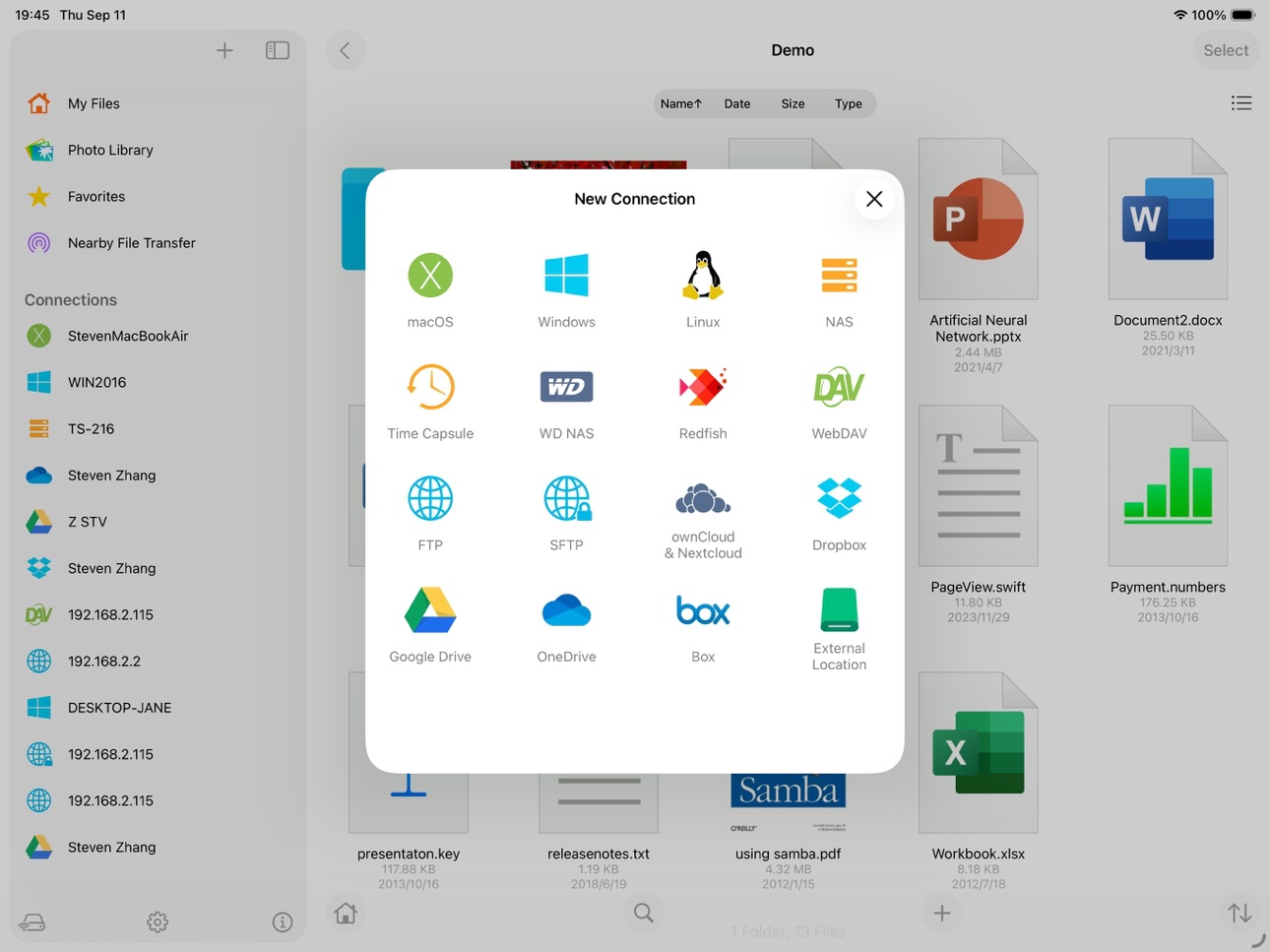
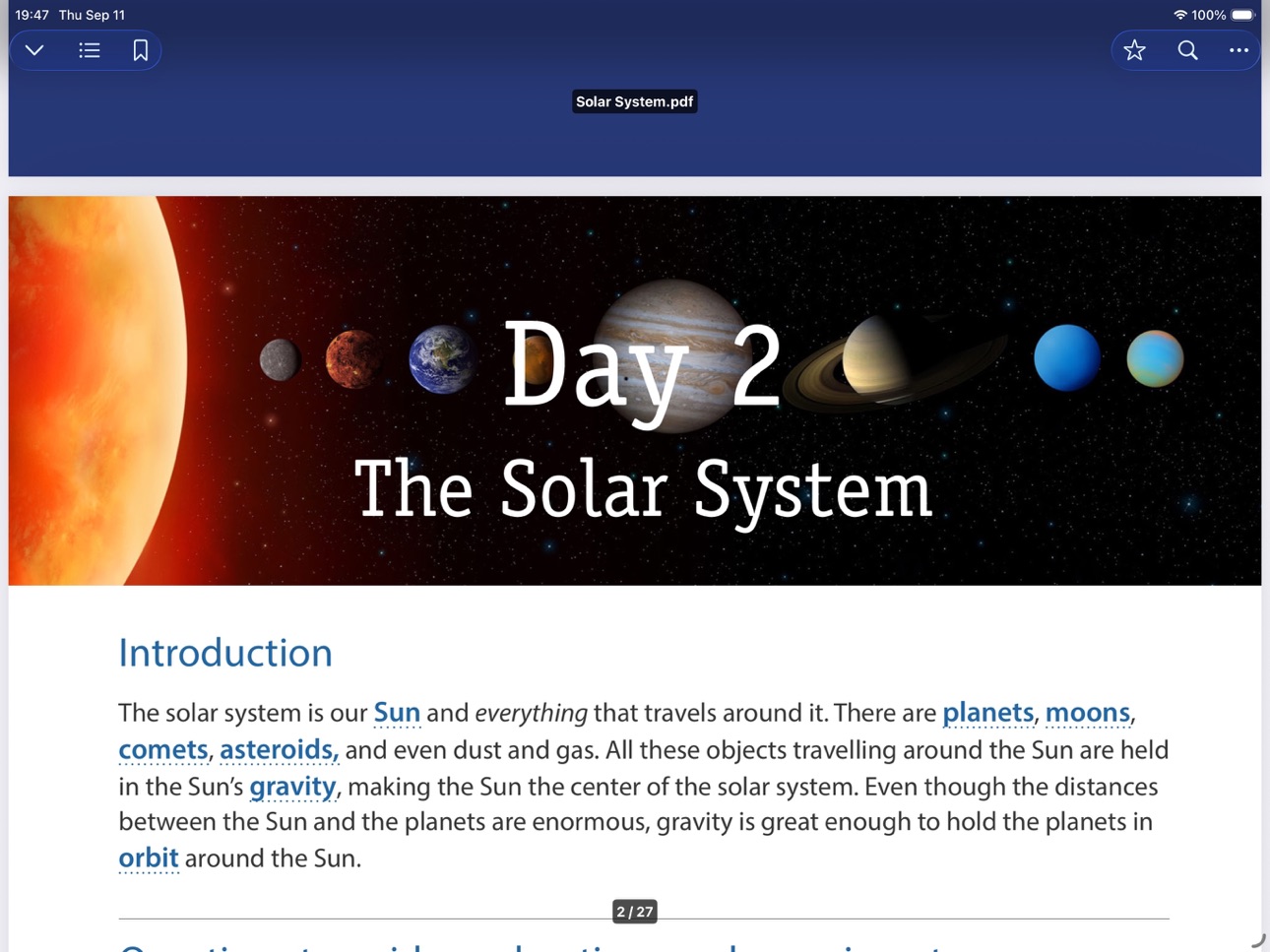
FE File Explorer Pro is a file manager app on your iPhone and iPad. It can access not only local files, but also files on your computer, NAS and cloud storages. Transfer files among those locations. Stream movies and music to your iPhone/iPad. Directly view and manage documents, photos, files on your computer and cloud without downloading to your iPhone/iPad.
FEATURES:
* Access network shares on macOS, Windows, Linux, Time Capsule, NAS via SMB/CIFS protocol.
* Access WebDAV Server, FTP Server and SFTP Server
* Access cloud storages: Google Drive, Dropbox, OneDrive, Box.
* Automatically discover comptuers, NAS and servers when you setup new connections.
* View, copy, move, rename and delete your files right on iPhone/iPad.
* Stream movies and musics from network shares and cloud storages to iPhone/iPad.
* AirPlay photos, musics and movies on Apple TV.
* Sort and search files
* Archive and unarchive files
* Dark Mode
* Multiple windows on iPad
* Integrated with iOS Files app
* Distribute configurations via MDM (Mobile Device Management).
* Built-in FTP Server and HTTP Server
* File Transfer:
Copy files among servers, cloud storages, iPhone and iPad.
Transfer files by drag and drop.
Nearby file transfer: Directly transfer files between two nearby iOS devices without Wi-Fi or LTE connection.
===== CONTACT US =====
Email: support@skyjos.com
Twitter: @SkyjosApps
Facebook: @SkyjosApp
Accessibility
ipadiphonemacrealityDevicetvoswatch
Version history 25 versions
Build 887330697v11.6.12026-06-25 06:24:01
Bug fixes and stability improvements
Build 886755806v11.6.02026-06-16 07:00:19
* Add SMB 3.1.1 support
* Uses GSS framework for authentication. The 'Windows File Sharing' option in macOS Sharing settings no longer needs to be enabled when you access the share on macOS.
* Fix bugs
Build 885007311v11.5.72026-04-29 04:18:44
* Add context menu on favorites.
* Bug fixes and stability improvements.
Build 882811381v11.5.62026-02-27 15:32:08
Bug fixes and stability improvements.
Build 881662960v11.5.52026-01-23 06:52:07
* Supports to import folder.
* The progress bar in video player is moved bottom of screen.
* Turn off the "Cache Credentials" option in WebDAV connection settings for switching between multiple WebDAV accounts.
* Supports to adjust music playing progress on lock screen.
* Bug fixes and stability improvements.
Build 879889999v11.5.42025-11-25 17:00:02
* Improves video player
* Supports ass subtitles
* Bug fixes and stability improvements
Build 879444573v11.5.32025-11-04 12:52:23
* Integrates Photo Manager Pro's Shared folder. You can copy photos into Photo Manager Pro's shared folder right in the app now.
* Shows language code of subtitles track.
* Fixes an issue that the 2nd line of subtitles isn't displayed.
* Fixes a crash issue with 3rd party keyboard.
* Fixes an issue that filenames on FTP server are not displayed correctly if filenames contain "=" character.
Build 878499969v11.5.22025-09-30 13:25:08
Bug fixes and stability improvements
Build 878151202v11.5.12025-09-17 17:59:30
Bug fixes and stability improvements
What's New in V11.5:
* New Liquid Glass UI on iOS 26
* Bring Google Drive back.
* Improvements for video player
New user interface
New video rendering engine base on Metal.
Support AV1 codec
Display subtitles in bottom of video frame.
* Drag & drop to sort connections
* Long press item to show file contextual menu.
* Display fingerprint verification for SFTP connection.
Build 877635602v11.52025-09-15 15:24:11
* New Liquid Glass UI on iOS 26
* Bring Google Drive back.
* Improvements for video player
New user interface
New video rendering engine base on Metal.
Support AV1 codec
Display subtitles in bottom of video frame.
* Drag & drop to sort connections
* Long press item to show file contextual menu.
* Display fingerprint verification for SFTP connection.
* Bug fixes and stability improvements
Build 874830747v11.4.52025-05-18 15:23:50
* Bug fixes and stability improvements.
Build 874011380v11.4.42025-04-16 12:01:06
* Moves built-in server from settings to main view.
* Supports to select all files and drag to another app.
* Bug fixes and stability improvements.
Build 871549702v11.4.32025-01-07 12:52:42
Bug fixes and stability improvements
Build 870856174v11.4.22024-12-05 10:57:45
Keeps file permission when editing and saving text file.
Keep the selected video decoder and playback rate until the next time you reopen the app.
Ignore PhotoDomainError during photo backup.
Fixes an issue that files cannot be uploaded to OneDrive.
Bug fixes and stability improvements
Build 869200039v11.4.12024-09-24 02:33:50
* Show text editor settings in app settings.
* Bug fixes and stability improvements
Build 868978042v11.42024-09-16 11:50:41
* Optimizes for iOS 18
* Brand new text editor:
- Syntax highlighting (HTML, JavaScript, CSS, C++, Java, etc.)
- Show line numbers
- Search text
- Open HTML in text editor and preview it. You can turn on/off this feature in the settings of text editor.
- Optimizes for opening big text document.
* Saves PDF from Safari to FE File Explorer Pro.
* Long press for 2x video playback
* Batch rename files
* New PDF display mode: continuous and single page
* Bug fixes and stability improvements
Leave a review on App Store if you like this update.
Contact us (support@skyjos.com) if you have any problems.
Build 868085752v11.3.52024-08-09 16:58:59
* Google requires a CASA assessment to get full access to Google Drive. And no clear guidelines have been published to pass the CASA assessment. We have not passed the CASA assessment so far. Without full access, Google Drive is useless to our users, so we decided to remove Google Drive.
* Bug fixes and stability improvements.
Build 866288335v11.3.42024-05-29 09:41:13
* Supports CR3 RAW image format.
* Supports 2FA login for Box.
* Bug fixes and stability improvements.
Build 864715053v11.3.32024-03-26 10:32:11
Bug fixes and stability improvements.
Build 862107926v11.3.22023-12-11 05:39:15
Fixed an issue that file transfer with WebDAV connection cannot be cancelled.
Build 859992153v11.3.12023-09-18 07:51:59
* Optimizes for iOS 17.
* Fixes a crash issue on iOS 12.
Build 859933382v11.32023-09-15 05:51:53
* Optimizes for iOS 17.
* Highlights search results on PDF reader.
* Fixes sound and picture unsynchronized issue when playing video at double speed.
* Bug fixes and stability improvements.
Build 859398516v11.2.12023-08-25 07:56:39
Bug fixes
Build 859373110v11.22023-08-24 10:53:24
Bug fixes and stability improvements.
Build 857919586v11.1.92023-06-19 14:15:18
Added TLS version selection to FTPS settings. TLSv1.2 is used by default to solve the compatibility problem of TLSv1.3 for some devices.
Price history by region
Currency
Show
Columns
Search
Availability 175 of 175 storefronts
| Region | Language | Price | Ratings | Avg | Version |
|---|---|---|---|---|---|
| DE | de-DE | EUR 5.99 | 6.8k | 4.7 | 11.6.1 |
| JP | ja | JPY 800 | 6.0k | 4.6 | 11.6.1 |
| US | en-US | USD 4.99 | 5.8k | 4.7 | 11.6.1 |
| CN | zh-Hans-CN | CNY 38 | 5.0k | 4.8 | 11.6.1 |
| GB | en-GB | GBP 4.99 | 1.3k | 4.7 | 11.6.1 |
| CA | en-CA | CAD 6.99 | 1.2k | 4.7 | 11.6.1 |
| IT | it | EUR 5.99 | 859 | 4.6 | 11.6.1 |
| AU | en-AU | AUD 7.99 | 843 | 4.7 | 11.6.1 |
| NL | nl | EUR 5.99 | 809 | 4.6 | 11.6.1 |
| FR | fr-FR | EUR 5.99 | 741 | 4.7 | 11.6.1 |
| RU | ru | RUB 449 | 573 | 4.8 | 11.6.1 |
| CH | de-CH | CHF 4 | 512 | 4.7 | 11.6.1 |
| AT | de-DE | EUR 5.99 | 491 | 4.7 | 11.6.1 |
| ES | es-ES | EUR 5.99 | 485 | 4.6 | 11.6.1 |
| KR | ko | KRW 7700 | 411 | 4.8 | 11.6.1 |
| TH | en-GB | THB 199 | 388 | 4.8 | 11.6.1 |
| HK | zh-Hant-HK | HKD 38 | 381 | 4.8 | 11.6.1 |
| TW | zh-Hant-TW | TWD 150 | 344 | 4.8 | 11.6.1 |
| BR | pt-BR | BRL 29.9 | 323 | 4.8 | 11.6.1 |
| CZ | en-GB | CZK 129 | 313 | 4.8 | 11.6.1 |
| PL | en-GB | PLN 24.99 | 277 | 4.7 | 11.6.1 |
| BE | en-GB | EUR 5.99 | 276 | 4.6 | 11.6.1 |
| HU | en-GB | HUF 1990 | 274 | 4.7 | 11.6.1 |
| IN | en-GB | INR 499 | 262 | 4.7 | 11.6.1 |
| SE | sv | SEK 69 | 260 | 4.5 | 11.6.1 |
| MX | es-MX | MXN 99 | 212 | 4.8 | 11.6.1 |
| DK | en-GB | DKK 39 | 187 | 4.4 | 11.6.1 |
| VN | en-GB | VND 149000 | 185 | 4.7 | 11.6.1 |
| RO | en-GB | RON 29.99 | 176 | 4.9 | 11.6.1 |
| ID | en-GB | IDR 89000 | 143 | 4.8 | 11.6.1 |
| SG | en-GB | SGD 6.98 | 140 | 4.7 | 11.6.1 |
| UA | en-GB | USD 5.99 | 137 | 4.8 | 11.6.1 |
| ZA | en-GB | ZAR 99.99 | 123 | 4.7 | 11.6.1 |
| NZ | en-AU | NZD 9.99 | 121 | 4.7 | 11.6.1 |
| SK | en-GB | EUR 5.99 | 116 | 4.8 | 11.6.1 |
| TR | en-GB | TRY 249.99 | 113 | 4.7 | 11.6.1 |
| PT | pt-PT | EUR 5.99 | 110 | 4.7 | 11.6.1 |
| NO | en-GB | NOK 59 | 104 | 4.7 | 11.6.1 |
| FI | en-GB | EUR 5.99 | 78 | 4.5 | 11.6.1 |
| MY | en-GB | MYR 22.9 | 78 | 4.7 | 11.6.1 |
| PH | en-GB | PHP 299 | 75 | 4.8 | 11.6.1 |
| GR | en-GB | EUR 5.99 | 72 | 4.8 | 11.6.1 |
| IL | en-GB | ILS 17.9 | 72 | 4.8 | 11.6.1 |
| CL | es-MX | CLP 5990 | 66 | 4.9 | 11.6.1 |
| IE | en-GB | EUR 5.99 | 61 | 4.9 | 11.6.1 |
| AE | en-GB | AED 19.99 | 53 | 4.7 | 11.6.1 |
| BG | en-GB | EUR 5.99 | 52 | 4.8 | 11.6.1 |
| AR | es-MX | USD 4.99 | 47 | 4.6 | 11.6.1 |
| SI | en-GB | EUR 5.99 | 44 | 4.8 | 11.6.1 |
| SA | en-GB | SAR 19.99 | 41 | 4.6 | 11.6.1 |
| HR | en-GB | EUR 5.99 | 35 | 4.9 | 11.6.1 |
| CO | es-MX | COP 24900 | 32 | 4.8 | 11.6.1 |
| LU | en-GB | EUR 5.99 | 32 | 4.7 | 11.6.1 |
| EG | en-GB | EGP 249.99 | 31 | 4.9 | 11.6.1 |
| LT | en-GB | EUR 5.99 | 28 | 4.8 | 11.6.1 |
| LV | en-GB | EUR 5.99 | 28 | 4.5 | 11.6.1 |
| PE | es-MX | PEN 22.9 | 26 | 4.5 | 11.6.1 |
| MO | zh-Hant-HK | USD 4.99 | 22 | 5.0 | 11.6.1 |
| EE | en-GB | EUR 5.99 | 19 | 4.9 | 11.6.1 |
| BY | en-GB | USD 5.99 | 15 | 4.9 | 11.6.1 |
| CR | es-MX | USD 4.99 | 12 | 4.8 | 11.6.1 |
| KH | en-GB | USD 4.99 | 12 | 4.8 | 11.6.1 |
| UY | en-GB | USD 4.99 | 12 | 4.8 | 11.6.1 |
| DO | es-MX | USD 4.99 | 11 | 4.5 | 11.6.1 |
| EC | es-MX | USD 4.99 | 11 | 4.8 | 11.6.1 |
| SV | es-MX | USD 4.99 | 9 | 4.9 | 11.6.1 |
| IS | en-GB | USD 5.99 | 8 | 4.9 | 11.6.1 |
| KW | en-GB | USD 4.99 | 8 | 5.0 | 11.6.1 |
| KZ | en-GB | KZT 2990 | 8 | 4.8 | 11.6.1 |
| PK | en-GB | PKR 1300 | 8 | 4.6 | 11.6.1 |
| QA | en-GB | QAR 19.99 | 8 | 4.3 | 11.6.1 |
| GT | es-MX | USD 4.99 | 7 | 4.9 | 11.6.1 |
| LB | en-GB | USD 4.99 | 7 | 5.0 | 11.6.1 |
| LK | en-GB | USD 4.99 | 7 | 4.3 | 11.6.1 |
| PA | es-MX | USD 4.99 | 7 | 4.7 | 11.6.1 |
| AM | en-GB | USD 5.99 | 6 | 5.0 | 11.6.1 |
| PY | es-MX | USD 4.99 | 6 | 4.8 | 11.6.1 |
| RS | en-GB | EUR 5.99 | 6 | 4.5 | 11.6.1 |
| CY | en-GB | EUR 5.99 | 5 | 5.0 | 11.6.1 |
| MU | en-GB | USD 5.99 | 5 | 5.0 | 11.6.1 |
| OM | en-GB | USD 4.99 | 5 | 5.0 | 11.6.1 |
| MN | en-GB | USD 4.99 | 4 | 5.0 | 11.6.1 |
| MT | en-GB | EUR 5.99 | 4 | 4.5 | 11.6.1 |
| BH | en-GB | USD 4.99 | 3 | 5.0 | 11.6.1 |
| GH | en-GB | USD 5.99 | 3 | 4.3 | 11.6.1 |
| KG | en-GB | USD 4.99 | 3 | 3.7 | 11.6.1 |
| MD | en-GB | USD 5.99 | 3 | 4.7 | 11.6.1 |
| MK | en-GB | USD 4.99 | 3 | 5.0 | 11.6.1 |
| NA | en-GB | USD 4.99 | 3 | 4.7 | 11.6.1 |
| AZ | en-GB | USD 5.99 | 2 | 3.0 | 11.6.1 |
| BA | en-GB | EUR 5.99 | 2 | 5.0 | 11.6.1 |
| BB | en-GB | USD 5.99 | 2 | 5.0 | 11.6.1 |
| BF | en-GB | USD 4.99 | 2 | 4.5 | 11.6.1 |
| BM | en-GB | USD 4.99 | 2 | 5.0 | 11.6.1 |
| BN | en-GB | USD 4.99 | 2 | 5.0 | 11.6.1 |
| BO | es-MX | USD 4.99 | 2 | 4.5 | 11.6.1 |
| MA | en-GB | USD 4.99 | 2 | 5.0 | 11.6.1 |
| SN | en-GB | USD 5.99 | 2 | 5.0 | 11.6.1 |
| AL | en-GB | USD 5.99 | 1 | 5.0 | 11.6.1 |
| CI | fr-FR | USD 5.99 | 1 | 5.0 | 11.6.1 |
| CM | fr-FR | USD 5.99 | 1 | 5.0 | 11.6.1 |
| FJ | en-GB | USD 4.99 | 1 | 4.0 | 11.6.1 |
| HN | es-MX | USD 4.99 | 1 | 5.0 | 11.6.1 |
| JO | en-GB | USD 4.99 | 1 | 4.0 | 11.6.1 |
| KE | en-GB | USD 5.99 | 1 | 4.0 | 11.6.1 |
| KN | en-GB | USD 4.99 | 1 | 5.0 | 11.6.1 |
| LA | en-GB | USD 4.99 | 1 | 5.0 | 11.6.1 |
| MZ | en-GB | USD 4.99 | 1 | 5.0 | 11.6.1 |
| NG | en-GB | NGN 7900 | 1 | 5.0 | 11.6.1 |
| PG | en-GB | USD 4.99 | 1 | 5.0 | 11.6.1 |
| SC | en-GB | USD 4.99 | 1 | 4.0 | 11.6.1 |
| TN | en-GB | USD 4.99 | 1 | 5.0 | 11.6.1 |
| TT | en-GB | USD 4.99 | 1 | 5.0 | 11.6.1 |
| TZ | en-GB | TZS 14900 | 1 | 5.0 | 11.6.1 |
| AF | en-GB | USD 4.99 | 0 | — | 11.6.1 |
| AG | en-GB | USD 4.99 | 0 | — | 11.6.1 |
| AI | en-GB | USD 4.99 | 0 | — | 11.6.1 |
| AO | en-GB | USD 4.99 | 0 | — | 11.6.1 |
| BJ | en-GB | USD 5.99 | 0 | — | 11.6.1 |
| BS | en-GB | USD 4.99 | 0 | — | 11.6.1 |
| BT | en-GB | USD 4.99 | 0 | — | 11.6.1 |
| BW | en-GB | USD 4.99 | 0 | — | 11.6.1 |
| BZ | en-GB | USD 4.99 | 0 | — | 11.6.1 |
| CD | en-GB | USD 4.99 | 0 | — | 11.6.1 |
| CG | en-GB | USD 4.99 | 0 | — | 11.6.1 |
| CV | en-GB | USD 4.99 | 0 | — | 11.6.1 |
| DM | en-GB | USD 4.99 | 0 | — | 11.6.1 |
| DZ | en-GB | USD 4.99 | 0 | — | 11.6.1 |
| FM | en-GB | USD 4.99 | 0 | — | 11.6.1 |
| GA | fr-FR | USD 4.99 | 0 | — | 11.6.1 |
| GD | en-GB | USD 4.99 | 0 | — | 11.6.1 |
| GE | en-GB | USD 5.99 | 0 | — | 11.6.1 |
| GM | en-GB | USD 4.99 | 0 | — | 11.6.1 |
| GW | en-GB | USD 4.99 | 0 | — | 11.6.1 |
| GY | en-GB | USD 4.99 | 0 | — | 11.6.1 |
| IQ | en-GB | USD 4.99 | 0 | — | 11.6.1 |
| JM | en-GB | USD 4.99 | 0 | — | 11.6.1 |
| KY | en-GB | USD 4.99 | 0 | — | 11.6.1 |
| LC | en-GB | USD 4.99 | 0 | — | 11.6.1 |
| LR | en-GB | USD 4.99 | 0 | — | 11.6.1 |
| LY | en-GB | USD 4.99 | 0 | — | 11.6.1 |
| ME | en-GB | EUR 4.99 | 0 | — | 11.6.1 |
| MG | en-GB | USD 4.99 | 0 | — | 11.6.1 |
| ML | en-GB | USD 4.99 | 0 | — | 11.6.1 |
| MM | en-GB | USD 4.99 | 0 | — | 11.6.1 |
| MR | en-GB | USD 4.99 | 0 | — | 11.6.1 |
| MS | en-GB | USD 4.99 | 0 | — | 11.6.1 |
| MV | en-GB | USD 4.99 | 0 | — | 11.6.1 |
| MW | en-GB | USD 4.99 | 0 | — | 11.6.1 |
| NE | en-GB | USD 4.99 | 0 | — | 11.6.1 |
| NI | es-MX | USD 4.99 | 0 | — | 11.6.1 |
| NP | en-GB | USD 5.99 | 0 | — | 11.6.1 |
| NR | en-GB | USD 4.99 | 0 | — | 11.6.1 |
| PW | en-GB | USD 4.99 | 0 | — | 11.6.1 |
| RW | en-GB | USD 4.99 | 0 | — | 11.6.1 |
| SB | en-GB | USD 4.99 | 0 | — | 11.6.1 |
| SL | en-GB | USD 4.99 | 0 | — | 11.6.1 |
| SR | en-GB | USD 4.99 | 0 | — | 11.6.1 |
| ST | en-GB | USD 4.99 | 0 | — | 11.6.1 |
| SZ | en-GB | USD 4.99 | 0 | — | 11.6.1 |
| TC | en-GB | USD 4.99 | 0 | — | 11.6.1 |
| TD | en-GB | USD 4.99 | 0 | — | 11.6.1 |
| TJ | en-GB | USD 4.99 | 0 | — | 11.6.1 |
| TM | en-GB | USD 4.99 | 0 | — | 11.6.1 |
| TO | en-GB | USD 4.99 | 0 | — | 11.6.1 |
| UG | en-GB | USD 5.99 | 0 | — | 11.6.1 |
| UZ | en-GB | USD 4.99 | 0 | — | 11.6.1 |
| VC | en-GB | USD 4.99 | 0 | — | 11.6.1 |
| VE | es-MX | USD 4.99 | 0 | — | 11.6.1 |
| VG | en-GB | USD 4.99 | 0 | — | 11.6.1 |
| VU | en-GB | USD 4.99 | 0 | — | 11.6.1 |
| XK | en-GB | EUR 5.99 | 0 | — | 11.6.1 |
| YE | en-GB | USD 4.99 | 0 | — | 11.6.1 |
| ZM | en-GB | USD 5.99 | 0 | — | 11.6.1 |
| ZW | en-GB | USD 5.99 | 0 | — | 11.6.1 |
Reviews 30 reviews · CA
★★★★★
Great app
I have been using this app for a few years. Great and no problems connecting to my various computers or servers. Love being able to play media within the app. Would love to have dark mode especially during the night.
Not impressed CDN2026-05-06
★★★★★
No support JFIF image format
App is ok. Offers similar basic functions to other file browser apps but no jfif image support. If you work with various image file types i wouldn’t recommend
Anthony Canada 20202026-03-22
★★★★★
Great File Manager, Add PiP Please
FE FileExplorer Pro is an excellent app — simple, elegant, and incredibly useful. The only feature I feel is missing is Picture-in-Picture (PiP) support when playing video. Please consider adding this in a future update — it would be a fantastic improvement to an already outstanding app.
Slkwcy2025-12-27
★★★★★
.RTF Viewer Broken (Latest Update)
Latest update has broken the .rtf file viewer! Very annoying…this is preventing my workflow.
iAceReviewer2025-09-20
★★★★★
Super app
Thanks for making a great product! This app is so easy to use. Thumbs up!
Lin-46532025-03-02
★★★★★
App suddenly stopped connection to home file sharing
App worked great for a couple weeks. Accessing and changing files on home server. But suddenly de-authenticated, and no matter what will not re-authenticate even with password turned off on server side. Makes it unusable. If I get a solution will update review to reflect.
Williamwillberforce18072025-01-13
★★★★★
Please bring back support for Google Drive
FE File Explorer is the best bar none! It had a set back a few updates ago that because of changes made to Google Drive, precluded FE File Explorer from supporting Google Drive without making some internal changes to allow this support. Please bring back support for Google Drive. It would be appreciated by many users!
Doug.ie2025-01-03
★★★★★
Crash on open
Great app, but after this update always crashes on open.
Can’t use it.
Bobiha2025-01-02
★★★★★
Texte éditeur
Texte éditeur un peux plus élaboré comme couleur pour différents caractère comme runestone
Benoit Blask2024-12-05
★★★★★
Markup Tool (no longer)
There used to be a markup tool which is now longer after a recent update. Very disappointed this feature is gone and nothing online helps troubleshoot this issue.
247chrispy2024-11-26
★★★★★
Network file access on iOS!
This app is amazing. Instead of all of the restrictions and limitations iOS puts on you, this app uses open and published standards to let you browse and copy to/from/between your networked files. GDrive, Box, OneDrive, SMB, WebDAV, SFTP etc are all supported. All of those things you thought just couldn’t be done from the iPad/iPhone because of the Files app… you can do them.
The app is not a subscription, it’s a one-time purchase, one I never regretted. It’s on my iPhone’s dock.
BoxOfSnoo2024-11-21
★★★★★
Overall great but wish more features/options
Very good file manager and video player comparable to ES file explorer without the privacy concern. But I wish FE explorer can add the option to auto play next file and “recent” function. All in all this is almost perfect.
The reason I moved away from ES File is because the concern of them collecting data.
cALcALTE2024-10-15
★★★★★
Love this app!
I really love this app! It’s more than useful! I can modify my files quickly and easily! The only request I would have is to be able to do a word search within a file. Ex: searching for the word winter in file.php This would help a lot! Instead of having to search manually among hundreds or thousands lines of codes. Other than this, the app is perfect! Thanks!
2024 September update: with the new update I can’t edit my html files anymore! It keep opening them in browser like and now asking me if I want to edit the files!… This must be fixed asap!
Capricorne8882024-09-26
★★★★★
Game changer
So much faster than Apple’s Files app. Before, I couldn’t really preview media from my NAS in iOS because it was way too slow, this app is much faster, making my desired workflow possible!
Macmadman2024-05-27
★★★★★
All is good except...
certain mp4 60fps format files playback seems to stutter with HW+ or HW. Please support more codec for smooth playback.
colsoft08112023-09-11
★★★★★
refund right after purchasing
WebDAV is broken. report http 405, but works with other file app.
Gyuumao2023-07-10
★★★★★
Very useful
In my goal to use only my iPad Pro as a laptop replacement, the default file app isn’t powerful enough.
Indeed, if you want to copy a file from the file app to your NAS for example, it’s take a long time and the there no real ETA.
By using FE, not only you have an ETA (Accurate) but also it’s way faster !
A fantastic app to use also to connect to remote servers!
Convenient, useful, it deserves 5 stars
The only downside, but it’s not FE fault, you can’t set FE as default safari download folder, iPad OS doesn’t allow it.
Team,
A last word : A little cosmetic refresh would be appreciated :-
Eric_Hoffmann2023-02-12
★★★★★
A Swiss Army Knife
FE is a powerful file manager for managing and playing back files locally and on device. It’s still being updated and hasn’t been superceded by bloatware or ads like many others have. A+.
dtimekeeper2023-02-09
★★★★★
Best File Explorer for IPhone
Very useful in taking offline backups for Iphone
PaulDavisBP2023-01-04
★★★★★
Best file browser app on iPhone
Samba shares with Linux or Windows. Sftp FTP Local files This is a go to app for networking on your lan or viewing media from your shares. I have it on my androids as well. Brilliant!
Rotten-Ronnie2022-11-26
★★★★★
IXpand bug
There’s a bug that’s causing use of an iXpand flash drive to not work properly with this app on iOS 15 on the latest update. For example there will be a bunch of blank pictures of photos in files on the iXpand that aren’t supposed to be there. This app is one of the last that supports iXpand flash drives, so I could really use an app like this for at least a few more years that does support it. I will take this unfair review down as soon as the bug is fixed and replace it with the 5 star review it deserves by highlighting its best features.
Update: Seems to be working for now, might have been
iTunes Forever10002022-09-28
★★★★★
Very reliable and professionally made
I was hesitant to spend $7 on this, but frankly the user experience and feature set are well worth it
I only use the FTP and SMB ("NAS") connections, but based on those I can tell a lot of time and care was put into polishing this app
It even supports WEBM, which the apple itself refuses to support for some reason
That said I'm hesitant to believe its no-logs privacy policy since in its app privacy report (Settings app > Privacy > App Privacy Report) it seems to connect to skyjos.com (the developer's site) occasionally
James C. Wise2022-06-12
★★★★★
Lacks SMB 3 support
Newer Windows machines only support SMB 3.0 protocol, which isn't supported by this app. Other file managers (eg. FileBrowser) do support SMBv3, will FE File Explorer add support soon?
artyfox72022-02-24
★★★★★
Excellent pour le SFTP (SSH)
Je testais la version gratuite et je me suis dit :
Si j’arrive à créer une connexion SSH avec un key file, alors j’achète l’app. C’est la seule qui a aussi bien fonctionné, alors je l’ai acheté, et c’est mon meilleur achat depuis longtemps !
J’apprécie tout particulièrement l’excellente intégration avec l’app Fichier d’Apple. Bon travail à l’équipe !
Irvinep312022-02-12
★★★★★
Charged everytime have to restore
Not sure if apple or app. Have issues with my phone and had restore it twice. Each time I was charged for this app. Contacted apple and no refund.
daviddurham2021-12-12
★★★★★
Worth every Penny
This app has turned my lowly iPad 2 into a really useful device. I store lots of stuff on a file server and a separate video server. I can easily browse both devices and watch videos and enjoy pictures, documents, music... And it works faster than my laptop. It has opened up the world between my computers and the iPad. If you have computers and or servers on your network, this will give your iPad a way to interface with them effortlessly too. And it remembers the settings to reconnect every time you re-open the app.
MichaelAngelo19602021-12-06
★★★★★
Way better than Apple “Files” App
Really solid app for accessing SMB share with good support for photo/video, pdf reader, etc etc. Really easy to transfer data in background too. 5/5 worth the small fee over data collection that other apps do.
Simon Bonin2021-11-30
★★★★★
Best IMO on the App Store
Compared to the others I have used, this probably the only that doesn’t collect any data privacy wise, and has all the features if not most behind a small fee. Easily access SMB or network shares to push or pull data to your device or stream directly from a NAS.
Definitely a must have for a power user.
Bradmonster1012021-09-30
★★★★★
Crashing from recent update September 2021.
Program does not open anymore. Select icon and program flashes briefly but then does not open. Please fix
Koffe2go2021-09-26
Change log 29 changes · CA
✎
releaseNotes updated
Bug fixes and stability improvements
✎
description updated
FE File Explorer Pro is a file manager app on your iPhone and iPad. It can access not only local files, but also files on your computer, NAS and cloud storages.
✎
subtitle updated
Access files on computer & NAS
✎
name updated
FE File Explorer Pro
◆
Version 11.6.1 released
Bug fixes and stability improvements
◆
Version 11.6.0 released
* Add SMB 3.1.1 support
* Uses GSS framework for authentication. The 'Windows File Sharing' option in macOS Sharing settings no longer needs to be enabled when you access the share on macOS.
* Fix bugs
◆
Version 11.5.7 released
* Add context menu on favorites.
* Bug fixes and stability improvements.
◆
Version 11.5.6 released
Bug fixes and stability improvements.
◆
Version 11.5.5 released
* Supports to import folder.
* The progress bar in video player is moved bottom of screen.
* Turn off the "Cache Credentials" option in WebDAV connection settings for switching between multiple WebDAV accounts.
* Supports to adjust music pl
◆
Version 11.5.4 released
* Improves video player
* Supports ass subtitles
* Bug fixes and stability improvements
◆
Version 11.5.3 released
* Integrates Photo Manager Pro's Shared folder. You can copy photos into Photo Manager Pro's shared folder right in the app now.
* Shows language code of subtitles track.
* Fixes an issue that the 2nd line of subtitles isn't displayed.
* Fi
◆
Version 11.5.2 released
Bug fixes and stability improvements
◆
Version 11.5.1 released
Bug fixes and stability improvements
What's New in V11.5:
* New Liquid Glass UI on iOS 26
* Bring Google Drive back.
* Improvements for video player
New user interface
New video rendering engine base on Metal.
Support AV1 co
◆
Version 11.5 released
* New Liquid Glass UI on iOS 26
* Bring Google Drive back.
* Improvements for video player
New user interface
New video rendering engine base on Metal.
Support AV1 codec
Display subtitles in bottom of video frame.
* Drag
◆
Version 11.4.5 released
* Bug fixes and stability improvements.
◆
Version 11.4.4 released
* Moves built-in server from settings to main view.
* Supports to select all files and drag to another app.
* Bug fixes and stability improvements.
◆
Version 11.4.3 released
Bug fixes and stability improvements
◆
Version 11.4.2 released
Keeps file permission when editing and saving text file.
Keep the selected video decoder and playback rate until the next time you reopen the app.
Ignore PhotoDomainError during photo backup.
Fixes an issue that files cannot be uploaded to
◆
Version 11.4.1 released
* Show text editor settings in app settings.
* Bug fixes and stability improvements
◆
Version 11.4 released
* Optimizes for iOS 18
* Brand new text editor:
- Syntax highlighting (HTML, JavaScript, CSS, C++, Java, etc.)
- Show line numbers
- Search text
- Open HTML in text editor and preview it. You can turn on/off this feature in the sett
◆
Version 11.3.5 released
* Google requires a CASA assessment to get full access to Google Drive. And no clear guidelines have been published to pass the CASA assessment. We have not passed the CASA assessment so far. Without full access, Google Drive is useless to
◆
Version 11.3.4 released
* Supports CR3 RAW image format.
* Supports 2FA login for Box.
* Bug fixes and stability improvements.
◆
Version 11.3.3 released
Bug fixes and stability improvements.
◆
Version 11.3.2 released
Fixed an issue that file transfer with WebDAV connection cannot be cancelled.
◆
Version 11.3.1 released
* Optimizes for iOS 17.
* Fixes a crash issue on iOS 12.
◆
Version 11.3 released
* Optimizes for iOS 17.
* Highlights search results on PDF reader.
* Fixes sound and picture unsynchronized issue when playing video at double speed.
* Bug fixes and stability improvements.
◆
Version 11.2.1 released
Bug fixes
◆
Version 11.2 released
Bug fixes and stability improvements.
◆
Version 11.1.9 released
Added TLS version selection to FTPS settings. TLSv1.2 is used by default to solve the compatibility problem of TLSv1.3 for some devices.