Home › Music

 US
US
1 of 1 storefronts
Content in en-US
Content in en-US
Information
Preview 2 platforms
iPhone 7 images


iPad 8 images


What’s New Version 3.6.0
maintenance update
bug fixes
Description
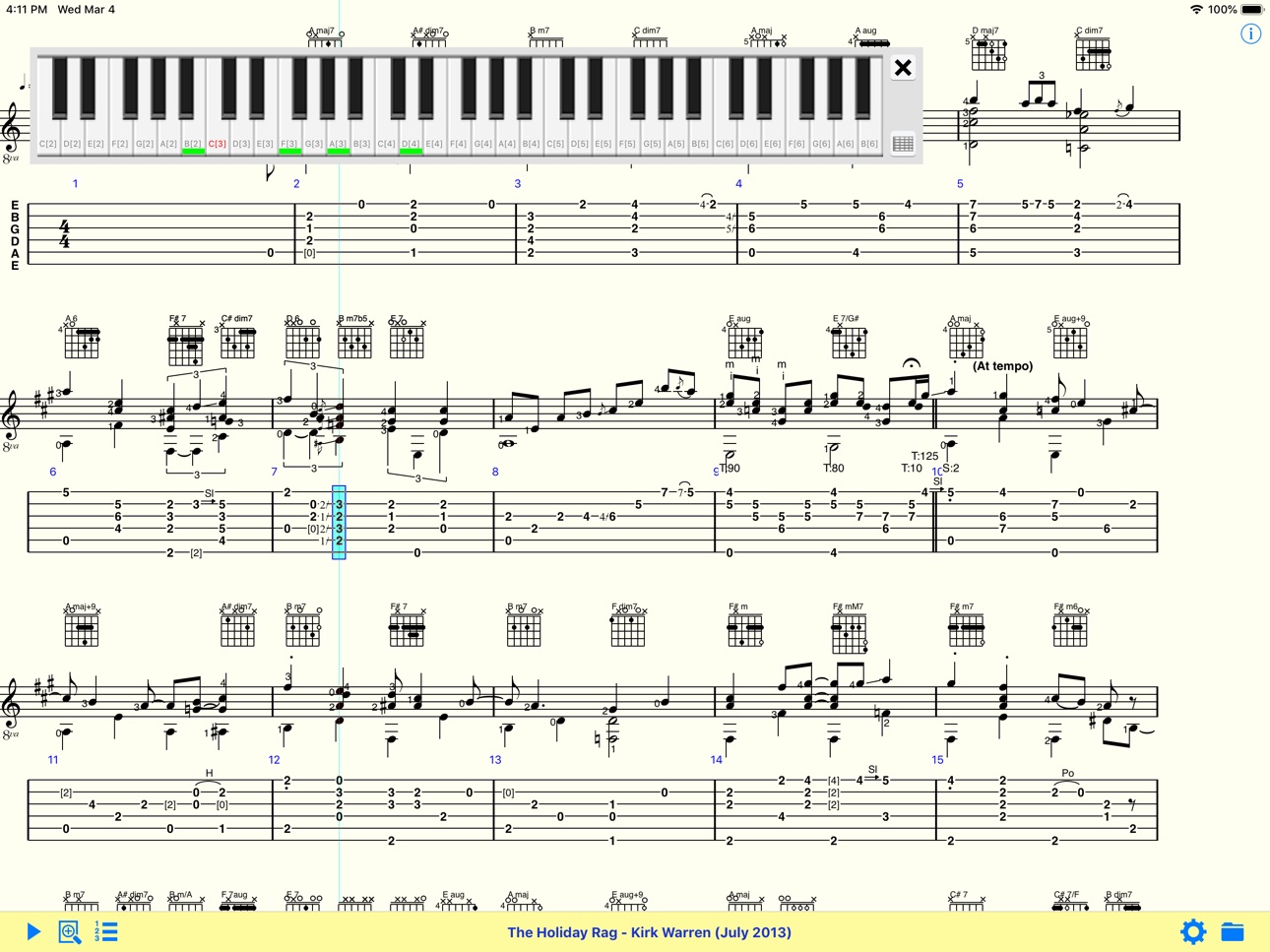
TEFview for iOS is an app that allows you to view, print and play tablatures created in TablEdit Tablature Editor on your iPad, iPhone or iPod touch.
TEFview allows you as well to view and listen to ASCII tabs, ABC tunes, MIDI, PowerTab, GuitarPro and musicXML files.
Specifications:
- Supported file formats: TablEdit, ASCII, ABC, MIDI, Music XML, PowerTab, GuitarPro
- Tablature and/or Standard notation display,
- MIDI Playback with full speed control,
- Ability to assign the volume and the MIDI instrument for any track in real time,
- Metronome and count down,
- Embedded Help,
- Emails file as attachment,
- File manager.
- WIFI file sharing, Files app support
- Subdirectory management
- Playlist
- extract the compressed tef files from a zip file
- pdf export: the pdf can be emailed, printed to a compatible AirPrint printer or opened in a third app,
Accessibility
ipadiphonemacrealityDevicetvoswatch
Version history 25 versions
Build 882889454v3.6.02026-03-12 12:07:05
maintenance update
bug fixes
Build 863155070v3.42024-04-09 16:37:14
New tab System settings in dialog Options
Build 860499548v3.32023-12-22 11:04:24
- new System Settings dialog (long press the Options button)
Build 855293127v3.2.02023-04-02 08:39:39
- the toolbar adapts to the context (device orientation, current playback...)
- optimized for the iPhone X.
Build 848135427v3.1.32022-04-06 07:48:42
- image and pdf import
- access to all presets included in the soundfont
- improved display and printing of overlapped notes in the tablature
Bug fix: Unwanted creation of a PDF file at each preview.
Build 846227769v3.1.22022-01-06 08:49:20
- Optical recognition of tablature images and PDF files
Build 839625414v3.1.12021-12-07 22:24:15
- Optical recognition of tablature images and PDF files
Build 834801889v3.02020-03-08 08:07:44
- open TablEdit 3.0 files
- the changes in time signature and tonality are integrated into the score, just as in printing.
Build 832021070v2.82019-08-27 17:54:59
- extract the compressed tef files from a zip file
- localizations in simplified Chinese and traditional Chinese
Build 829413530v2.72018-12-13 07:10:14
Better integration with the Files app
Build 828954324v2.62018-10-21 09:45:12
- iOS 12 and iPhone X compatibility
Build 828518089v2.52018-09-18 07:51:08
Jianpu Chinese notation support.
Ability to open MusicXML compressed files (.mxl)
Opens Guitar Pro 7 files (.gp)
Build 827432550v2.42018-06-16 20:50:32
Bug fixes
Upgrading features
Build 823040128v2.32017-08-04 17:17:56
- file history menu (after a long tap on the Open button)
Build 820477851v2.22017-02-22 13:51:39
- Ability to set the foreground color
- Simplified Chinese support
Build 819561913v2.12016-11-14 20:04:12
- Portuguese support
- Ability to force the screen mode (Page or Rows)
- Ability to set the printing options instrument by instrument
(tab, notation, tab+notation, none)
Build 818254030v2.02016-08-16 21:39:13
- Fingerboard or keyboard view
Build 816563126v1.92016-03-10 06:42:06
- iPad Pro Support
Build 815194694v1.82016-01-08 22:08:49
- iOS 9 support
- Russian and Ukrainian support
- iPad Pro support
Build 811756269v1.62015-02-24 07:06:16
- open GuitarPro files
- new page layout options
- better scrolling
- iOS 8 support
Build 555292667v1.5.62014-04-24 04:25:57
- Print options dialog
- iOS 7 support
Build 83352891v1.5.52013-11-12 07:39:56
- iOS 7 compatibilty
- Italian language support
- print in landscape
Build 15076484v1.5.42013-05-05 21:59:57
- New transpose slider
- Open a file by double tap
- Retina buttons
- Ability to change the vertical spacings
Build 13822033v1.5.32013-02-17 01:09:35
- Better notation output
- Ability to change the sound font
- Bug fixes
Build 13051783v1.5.22012-12-20 20:44:07
- Open in a third app the exported pdf
- Spanish localization
No pricing data captured yet — comparisons appear once the app has paid storefronts or in-app purchases.
Availability 1 of 1 storefronts
| Region | Language | Price | Ratings | Avg | Version |
|---|---|---|---|---|---|
| US | en-US | Free | 288 | 4.7 | 3.6.0 |
Reviews 30 reviews · US
★★★★★
Thanks for the update!
Underrated app! Thanks for the ‘fix’ to the more standard swipe direction, it feels much more natural. Such a great tool for learning/teaching 🤘🏻
fred__________2026-04-23
★★★★★
Free??
Amazing we live in a world where people give wonderful arrangements out for the love of music. Thank you! <3
Blessingggss2025-10-30
★★★★★
The Answer
It does it all and it does it simply, easily and well. May take a minute to get used to the hot keys but from there this has been my greatest tool for the comprehension of what I am actually doing. Filling in the gaps of the theory and actualizing those theories together. This app is super appreciated and far too underrated.
Thank you for all the hard work so it could be easy for the rest of us.
Flektar2025-01-18
★★★★★
Settings for Print
Can’t find the settings to “fit to page”. It’s not user friendly to adjust the print size.
JLV12024-09-15
★★★★★
Best alternative for tabledit
Im a banjo player and I don’t have anything that supports tabledit so I found this app and it’s definitely a 10/10, it’s my go to for downloading tabs to my phone and it helps when I'm in the middle of nowhere with no service and I want to learn/review my music
Skylar Hurst.2023-11-19
★★★★★
Impressive
I like the ease of importing midi. So easy and fast.
I wish it had some playback control of looping a specific part. But for now, this will do. Thank you to the developers!
inkblizzard2022-07-12
★★★★★
Best practice tool
I play mountain dulcimer, and this is the best practice tool I’ve seen. I can easily isolate the part I’m learning, and then combine with all the others to hear clearly how my part fits in the ensemble. If there are difficult measures, I can select them and play them over and over until I have them down. And if I don’t have a TEF file for a song I want to learn, I have TablEdit and can make one.
Chuck306062021-02-11
★★★★★
Fingerstyle
I like this program because it is so easy to use. I can go through the never ending collection of songs quickly to listen for the next song I wish to study. It works perfectly on my iPad Pro. I just can’t live without TEFview!!
BillyBullethead2020-10-07
★★★★★
doesn't work
I've tried uploading multiple different powertab files (.ptb extension) and none of them load into the app.
waste of time
Badgerhound842020-04-15
★★★★★
I like
This works well with tux guitar now i want to see a notepad. The only way I'm able to view these things is if I create them. I want a database too.
nicholaswentworth2020-01-01
★★★★★
Great Tool
For music that has been transcribed accurately, this is an invaluable learning tool.
Mandolinplayer012020-01-01
★★★★★
Great app on iPad and PC!
This would be nice if the volume would work on iPad. I tried everything on the faq page and have verified that the sound is on and working- no volume when playing files.
Edit: I Fixed the issue with your help. Thank you very much. This application works wonderfully. I recommended to all musicians.
ozymandias-III2019-09-29
★★★★★ · edited
It would be great but no sound on iPad
I needed to update my review and rating. The lack of sound/volume was due to the muting function in the swipe menu being activated. Clearly my omission. The program now works as expected and I’m quite happy with it. It’s very helpful to be able to play from downloaded pieces using my iPad as well as compose and modify pieces on my Mac and take them along on the iPad. Great app!
I’ve got tefview on my iPad and Tabledit for myMac. I really like the the Tabledit program for Mac as the features are great. Unfortunately nothing I do will allow me to have sound on my iPad. Yes, I’ve checked
TylerTheWonderBoy2019-07-12
★★★★★
Banjo player
Very nice for practicing banjo. Downloading tab is easy and just go from there. It's nice if you use it.
BNJOPLR2019-02-17
★★★★★
Love it!
Love this! It’s helped me to work out parts that I couldn’t have otherwise.
Frogs are the best animals2019-01-09
★★★★★
Doesn’t seem to work with Files
I have used TEFView for years, but for some reason it won’t open TEF files I have saved to my iCloud Drive. It tells me they don’t exist! However, if I send the file as an attachment to myself, it opens it right up. Real bug, and the email thing is a pain. Would love to know how to fix it.
CheapsuitUCR2019-01-08
★★★★★
Excellent for opening guitar pro and power tab files
I have a large old collection of guitar pro and power tab files -this thing is great !It also lets you slow down and change midi voicing - for example playing VH “Panama” with a classical guitar- shows sheet music and tabs as well as the fretboard ‘piano keyboard-nice!and on that fretboard keeps a grid of commonly used notes also nice!On my wish list is :
1-lefthanded fretboard
2-chord names as they are played
Overall great job!
Mike Cxxx2018-12-23
★★★★★
Anything ported to ipad is useless
The app depends on iTunes to open any files. Why does apple force developers to create unusable apps for iOS?
EdT99992018-11-16
★★★★★
Great app for learning
This is a great app for learning new songs, building speed and working on timing.
johnny jenga2018-10-05
★★★★★
Forced Rating
The app demands you write a review every time you open it. Hope you like your one-star!
D. Bland2018-07-28
★★★★★
Excellent resource
You can find a lifetimes worth of learning materials to use with this app for many instruments if you look a little. Great app
biblefan2018-04-16
★★★★★
Tef player
Great app to help learn music. Able to slow the tempo down and speed it up as I improve.
Okiegals2017-10-31
★★★★★
Excellent tool for pickers
Enables you to learn and hear melodies and be able to play them. I use it for guitar,banjo, and mandolin.
5stringsattatched2017-08-21
Change log 28 changes · US
✎
releaseNotes updated
maintenance update
bug fixes
✎
description updated
TEFview for iOS is an app that allows you to view, print and play tablatures created in TablEdit Tablature Editor on your iPad, iPhone or iPod touch.
TEFview al
✎
name updated
TEFview
◆
Version 3.6.0 released
maintenance update
bug fixes
◆
Version 3.4 released
New tab System settings in dialog Options
◆
Version 3.3 released
- new System Settings dialog (long press the Options button)
◆
Version 3.2.0 released
- the toolbar adapts to the context (device orientation, current playback...)
- optimized for the iPhone X.
◆
Version 3.1.3 released
- image and pdf import
- access to all presets included in the soundfont
- improved display and printing of overlapped notes in the tablature
Bug fix: Unwanted creation of a PDF file at each preview.
◆
Version 3.1.2 released
- Optical recognition of tablature images and PDF files
◆
Version 3.1.1 released
- Optical recognition of tablature images and PDF files
◆
Version 3.0 released
- open TablEdit 3.0 files
- the changes in time signature and tonality are integrated into the score, just as in printing.
◆
Version 2.8 released
- extract the compressed tef files from a zip file
- localizations in simplified Chinese and traditional Chinese
◆
Version 2.7 released
Better integration with the Files app
◆
Version 2.6 released
- iOS 12 and iPhone X compatibility
◆
Version 2.5 released
Jianpu Chinese notation support.
Ability to open MusicXML compressed files (.mxl)
Opens Guitar Pro 7 files (.gp)
◆
Version 2.4 released
Bug fixes
Upgrading features
◆
Version 2.3 released
- file history menu (after a long tap on the Open button)
◆
Version 2.2 released
- Ability to set the foreground color
- Simplified Chinese support
◆
Version 2.1 released
- Portuguese support
- Ability to force the screen mode (Page or Rows)
- Ability to set the printing options instrument by instrument
(tab, notation, tab+notation, none)
◆
Version 2.0 released
- Fingerboard or keyboard view
◆
Version 1.9 released
- iPad Pro Support
◆
Version 1.8 released
- iOS 9 support
- Russian and Ukrainian support
- iPad Pro support
◆
Version 1.6 released
- open GuitarPro files
- new page layout options
- better scrolling
- iOS 8 support
◆
Version 1.5.6 released
- Print options dialog
- iOS 7 support
◆
Version 1.5.5 released
- iOS 7 compatibilty
- Italian language support
- print in landscape
◆
Version 1.5.4 released
- New transpose slider
- Open a file by double tap
- Retina buttons
- Ability to change the vertical spacings
◆
Version 1.5.3 released
- Better notation output
- Ability to change the sound font
- Bug fixes
◆
Version 1.5.2 released
- Open in a third app the exported pdf
- Spanish localization