Home › Lifestyle

 US
US
USen-US CAen-CA
 AUen-AU
 GBen-GB
 BRpt-BR
 CNzh-Hans-CN
 CHde-CH
 IDen-GB
 RUru
RUru SGen-GB
 AEen-GB
 AFen-GB
 AIen-GB
 ALen-GB
 AMen-GB
 AOen-GB
 ARes-MX
 AZen-GB
 BAen-GB
 BBen-GB
 BFen-GB
 BHen-GB
 BJen-GB
 BMen-GB
 BNen-GB
 BOes-MX
 BSen-GB
 BTen-GB
 BWen-GB
 BYen-GB
 BZen-GB
 CDen-GB
 CGen-GB
 CIfr-FR
 CLes-MX
 CMfr-FR
 COes-MX
 CRes-MX
 CVen-GB
 DOes-MX
 DZen-GB
 ECes-MX
 EGen-GB
 FJen-GB
 FMen-GB
 GAfr-FR
 GEen-GB
 GMen-GB
 GTes-MX
 GWen-GB
 GYen-GB
 HKzh-Hant-HK
 HNes-MX
 ILen-GB
 INen-GB
 IQen-GB
 ISen-GB
 JMen-GB
 JOen-GB
 JPja
JPja KGen-GB
 KHen-GB
 KNen-GB
 KRko
KRko KWen-GB
 KYen-GB
 KZen-GB
 LAen-GB
 LBen-GB
 LCen-GB
 LKen-GB
 LRen-GB
 LYen-GB
 MAen-GB
 MDen-GB
 MEen-GB
 MGen-GB
 MKen-GB
 MLen-GB
 MMen-GB
 MNen-GB
 MOzh-Hant-HK
 MRen-GB
 MSen-GB
 MUen-GB
 MVen-GB
 MWen-GB
 MXes-MX
 MYen-GB
 MZen-GB
 NAen-GB
 NEen-GB
 NGen-GB
 NIes-MX
 NOen-GB
 NPen-GB
 NRen-GB
 NZen-AU
 OMen-GB
 PAes-MX
 PEes-MX
 PGen-GB
 PHen-GB
 PKen-GB
 PWen-GB
 PYes-MX
 QAen-GB
 RSen-GB
 RWen-GB
 SAen-GB
 SBen-GB
 SCen-GB
 SLen-GB
 SNen-GB
 STen-GB
 SVes-MX
 SZen-GB
 TCen-GB
 TDen-GB
 THen-GB
 TJen-GB
 TMen-GB
 TNen-GB
 TOen-GB
 TRen-GB
 TTen-GB
 TWzh-Hant-TW
 TZen-GB
 UAen-GB
 UGen-GB
 UYen-GB
 UZen-GB
 VCen-GB
 VEes-MX
 VGen-GB
 VNen-GB
 VUen-GB
 XKen-GB
 YEen-GB
 ZAen-GB
 ZMen-GB
 ZWen-GB
 ATNot Available
 BENot Available
 BGNot Available
 CYNot Available
 CZNot Available
 DENot Available
 DKNot Available
 EENot Available
 ESNot Available
 FINot Available
 FRNot Available
 GRNot Available
 HRNot Available
 HUNot Available
 IENot Available
 ITNot Available
 LTNot Available
 LUNot Available
 LVNot Available
 MTNot Available
 NLNot Available
 PLNot Available
 PTNot Available
 RONot Available
 SENot Available
 SINot Available
 SKNot Available
142 of 169 storefronts
Content in en-US
Content in en-US
Information
Apple ID475622761
Bundle IDcom.patrickdiligent.quiltwizard
SellerSeller
Min iOS12.0
Min macOS11.0
Device familiesiphone, ipad, ipod
Released2011-11-04
Copyright© 2011 Patrick Diligent
Privacy policyLink ↗
Preview 2 platforms
iPhone 6 images




iPad 5 images


What’s New Version 2.5.5
Refresh for iOS 13
Description
Which fabrics for this project ? Isn't it too bright ? Too dull ? I wish I could see it in the block !
Gain confidence in your quilt fabrics shopping with Quilt Wizard ! Take pictures of fabrics right on the spot, and immediately try them in your quilt project on screen. No need to carry snippets of fabrics with you when shopping, you can see straight away on your device how your choice of fabrics will perform on your quilt.
Here is how it works :
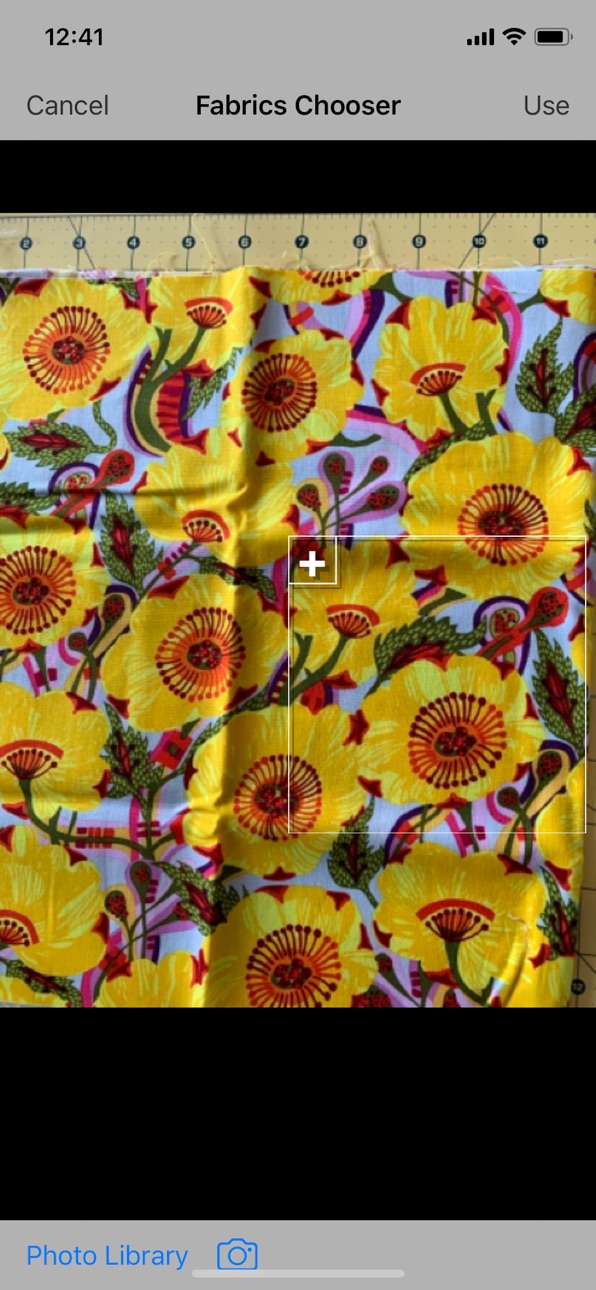
(1) Take pictures of your fabrics at home and keep them available into your photo library. From the application, select fabrics from the photo library or take a new picture with the camera.
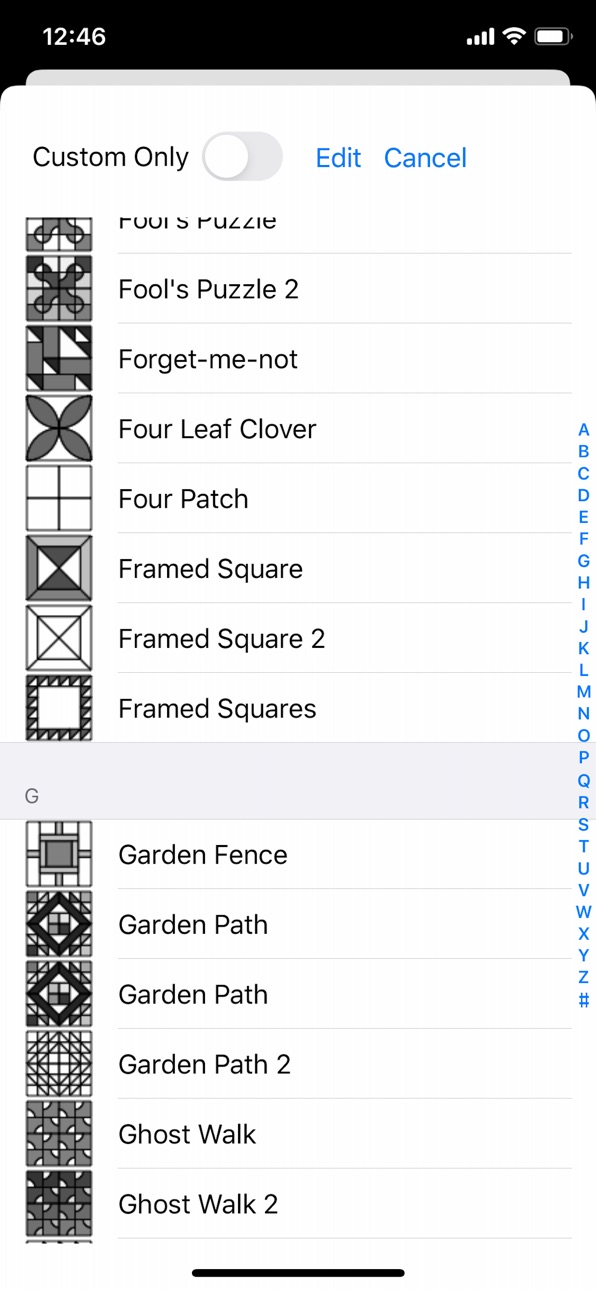
(2) Choose fabrics and blocks to compose your quilt on the screen. Create a block, fill it with selected fabrics. Create as many blocks as necessary. Rotate, flip, duplicate blocks, to suite your design.
(3) Assemble the quilt with the blocks you have designed.
(4) Take photos of fabrics at the shop or quilt show. Leave a note so you can remember where you have seen this fabrics. Incorporate it into your existing block design, and immediately see the result on screen. Not looking good ? Try another fabrics !
Designing a quilt will only take few minutes !!
Features :
- Build your fabrics stash from the Photo Library or built-in camera
- Choose from a list of most popular quilting blocks (100+).
- Sashing and border options.
- Incorporate your already sawn blocks into your project
- Block rotation, flipping and duplication.
- Choose from two quilt layouts : straight, or on point blocks layout.
- Zoom in and out your quilt and block design while editing.
- Configurable quilt size.
- Design multiple quilts at the same time.
See the user guide at http://blog.wattlebird.com.au
Accessibility
ipadiphonemacrealityDevicetvoswatch
Version history 15 versions
Build 835393163v2.5.52020-04-12 10:56:48
Refresh for iOS 13
Build 819269688v2.5.42016-10-15 16:24:31
iOS 10 refresh and minor bug fixes
Build 816424987v2.5.32016-02-16 17:52:37
Fix a glitch in the quilt drawing introduced in the previous release.
Build 816318202v2.5.22016-02-10 00:23:39
bug Fix and update to iOS 9
Build 544202640v2.5.12014-04-16 23:25:52
Blocks from QuiltWizardCompanion where not loaded when sent directly to QuiltWizard. It is now fixed.
Build 501062904v2.52014-04-04 22:14:28
Now load custom block definitions sent to you by mail directly into quilt wizard right from the mail app. You can design new simple blocks using the new application QuiltWizardCompanion.
Build 62262637v2.4.12013-09-30 22:29:36
Adapted to iOS 7
New blocks
Build 14762470v2.42013-03-22 01:35:20
- Bug fixes
- Block Design Customisation
Please visit http://blog.wattlebird.com.au for instructions
Build 11671658v2.32012-10-29 20:57:04
tested on iOS 6 tested and adapted to iPhone 5 dispaly
Build 9152037v2.22012-07-16 20:47:20
- Improved Fabrics drawing. Now you can choose from two fabrics size when adding from the camera or photo library. Large size fabrics, useful for large prints, are drawn in one single piece in a block, while small sizes are tiled by 2x2.
- Added a quick start guide to help first use of the application.
- Improved user interface.
- You can now also print, or mail a block in addition to the quilt.
- Added a feedback button to get quick & easy access to support.
- Fixed bugs.
Build 7773715v2.12012-05-05 21:01:12
Print, Send by Mail or Save in the Photo Gallery your quilts.
Build 6859292v2.02012-04-02 02:22:58
Have even more design options with these new features :
- Added a diagonal / on-point quilt layout
- Choose up to two borders for your quilt, and optionally, select a fabrics for the corner stones (the intersections between two sashing strips).
- Group your blocks to add sashing variations
Build 5824020v1.22012-01-16 16:18:32
This update comes with :
- a choice of more blocks, including curved blocks
- the ability to duplicate a block
- better stability
Build 4843623v1.12011-11-10 22:50:09
Fixed issue on iOS5.0, where the application remains locked into the camera mode.
Build 4649640v1.02011-11-04 22:36:09
Price history by region
Currency
Show
Columns
Search
Availability 142 of 169 storefronts
| Region | Language | Price | Ratings | Avg | Version |
|---|---|---|---|---|---|
| US | en-US | USD 5.99 | 31 | 3.0 | 2.5.5 |
| CA | en-CA | CAD 7.99 | 6 | 3.2 | 2.5.5 |
| AU | en-AU | AUD 9.99 | 3 | 3.7 | 2.5.5 |
| GB | en-GB | GBP 5.99 | 3 | 2.0 | 2.5.5 |
| BR | pt-BR | BRL 39.9 | 2 | 3.5 | 2.5.5 |
| CN | zh-Hans-CN | CNY 38 | 2 | 3.5 | 2.5.5 |
| CH | de-CH | CHF 5 | 1 | 5.0 | 2.5.5 |
| ID | en-GB | IDR 99000 | 1 | 5.0 | 2.5.5 |
| RU | ru | RUB 499 | 1 | 5.0 | 2.5.5 |
| SG | en-GB | SGD 8.98 | 1 | 2.0 | 2.5.5 |
| AE | en-GB | AED 22.99 | 0 | — | 2.5.5 |
| AF | en-GB | USD 5.99 | 0 | — | 2.5.5 |
| AI | en-GB | USD 5.99 | 0 | — | 2.5.5 |
| AL | en-GB | USD 6.99 | 0 | — | 2.5.5 |
| AM | en-GB | USD 6.99 | 0 | — | 2.5.5 |
| AO | en-GB | USD 5.99 | 0 | — | 2.5.5 |
| AR | es-MX | USD 5.99 | 0 | — | 2.5.5 |
| AZ | en-GB | USD 6.99 | 0 | — | 2.5.5 |
| BA | en-GB | EUR 6.99 | 0 | — | 2.5.5 |
| BB | en-GB | USD 6.99 | 0 | — | 2.5.5 |
| BF | en-GB | USD 5.99 | 0 | — | 2.5.5 |
| BH | en-GB | USD 6.99 | 0 | — | 2.5.5 |
| BJ | en-GB | USD 6.99 | 0 | — | 2.5.5 |
| BM | en-GB | USD 5.99 | 0 | — | 2.5.5 |
| BN | en-GB | USD 5.99 | 0 | — | 2.5.5 |
| BO | es-MX | USD 5.99 | 0 | — | 2.5.5 |
| BS | en-GB | USD 6.99 | 0 | — | 2.5.5 |
| BT | en-GB | USD 5.99 | 0 | — | 2.5.5 |
| BW | en-GB | USD 5.99 | 0 | — | 2.5.5 |
| BY | en-GB | USD 6.99 | 0 | — | 2.5.5 |
| BZ | en-GB | USD 5.99 | 0 | — | 2.5.5 |
| CD | en-GB | USD 5.99 | 0 | — | 2.5.5 |
| CG | en-GB | USD 5.99 | 0 | — | 2.5.5 |
| CI | fr-FR | USD 6.99 | 0 | — | 2.5.5 |
| CL | es-MX | CLP 6990 | 0 | — | 2.5.5 |
| CM | fr-FR | USD 6.99 | 0 | — | 2.5.5 |
| CO | es-MX | COP 29900 | 0 | — | 2.5.5 |
| CR | es-MX | USD 5.99 | 0 | — | 2.5.5 |
| CV | en-GB | USD 5.99 | 0 | — | 2.5.5 |
| DO | es-MX | USD 5.99 | 0 | — | 2.5.5 |
| DZ | en-GB | USD 5.99 | 0 | — | 2.5.5 |
| EC | es-MX | USD 5.99 | 0 | — | 2.5.5 |
| EG | en-GB | EGP 299.99 | 0 | — | 2.5.5 |
| FJ | en-GB | USD 5.99 | 0 | — | 2.5.5 |
| FM | en-GB | USD 5.99 | 0 | — | 2.5.5 |
| GA | fr-FR | USD 5.99 | 0 | — | 2.5.5 |
| GE | en-GB | USD 6.99 | 0 | — | 2.5.5 |
| GM | en-GB | USD 5.99 | 0 | — | 2.5.5 |
| GT | es-MX | USD 5.99 | 0 | — | 2.5.5 |
| GW | en-GB | USD 5.99 | 0 | — | 2.5.5 |
| GY | en-GB | USD 5.99 | 0 | — | 2.5.5 |
| HK | zh-Hant-HK | HKD 48 | 0 | — | 2.5.5 |
| HN | es-MX | USD 5.99 | 0 | — | 2.5.5 |
| IL | en-GB | ILS 19.9 | 0 | — | 2.5.5 |
| IN | en-GB | INR 599 | 0 | — | 2.5.5 |
| IQ | en-GB | USD 5.99 | 0 | — | 2.5.5 |
| IS | en-GB | USD 6.99 | 0 | — | 2.5.5 |
| JM | en-GB | USD 5.99 | 0 | — | 2.5.5 |
| JO | en-GB | USD 5.99 | 0 | — | 2.5.5 |
| JP | ja | JPY 1000 | 0 | — | 2.5.5 |
| KG | en-GB | USD 6.99 | 0 | — | 2.5.5 |
| KH | en-GB | USD 6.99 | 0 | — | 2.5.5 |
| KN | en-GB | USD 5.99 | 0 | — | 2.5.5 |
| KR | ko | KRW 9900 | 0 | — | 2.5.5 |
| KW | en-GB | USD 5.99 | 0 | — | 2.5.5 |
| KY | en-GB | USD 5.99 | 0 | — | 2.5.5 |
| KZ | en-GB | KZT 3490 | 0 | — | 2.5.5 |
| LA | en-GB | USD 6.99 | 0 | — | 2.5.5 |
| LB | en-GB | USD 5.99 | 0 | — | 2.5.5 |
| LC | en-GB | USD 5.99 | 0 | — | 2.5.5 |
| LK | en-GB | USD 5.99 | 0 | — | 2.5.5 |
| LR | en-GB | USD 5.99 | 0 | — | 2.5.5 |
| LY | en-GB | USD 5.99 | 0 | — | 2.5.5 |
| MA | en-GB | USD 5.99 | 0 | — | 2.5.5 |
| MD | en-GB | USD 6.99 | 0 | — | 2.5.5 |
| ME | en-GB | EUR 5.99 | 0 | — | 2.5.5 |
| MG | en-GB | USD 5.99 | 0 | — | 2.5.5 |
| MK | en-GB | USD 5.99 | 0 | — | 2.5.5 |
| ML | en-GB | USD 5.99 | 0 | — | 2.5.5 |
| MM | en-GB | USD 5.99 | 0 | — | 2.5.5 |
| MN | en-GB | USD 5.99 | 0 | — | 2.5.5 |
| MO | zh-Hant-HK | USD 5.99 | 0 | — | 2.5.5 |
| MR | en-GB | USD 5.99 | 0 | — | 2.5.5 |
| MS | en-GB | USD 5.99 | 0 | — | 2.5.5 |
| MU | en-GB | USD 6.99 | 0 | — | 2.5.5 |
| MV | en-GB | USD 5.99 | 0 | — | 2.5.5 |
| MW | en-GB | USD 5.99 | 0 | — | 2.5.5 |
| MX | es-MX | MXN 129 | 0 | — | 2.5.5 |
| MY | en-GB | MYR 29.9 | 0 | — | 2.5.5 |
| MZ | en-GB | USD 5.99 | 0 | — | 2.5.5 |
| NA | en-GB | USD 5.99 | 0 | — | 2.5.5 |
| NE | en-GB | USD 5.99 | 0 | — | 2.5.5 |
| NG | en-GB | NGN 9900 | 0 | — | 2.5.5 |
| NI | es-MX | USD 5.99 | 0 | — | 2.5.5 |
| NO | en-GB | NOK 79 | 0 | — | 2.5.5 |
| NP | en-GB | USD 6.99 | 0 | — | 2.5.5 |
| NR | en-GB | USD 5.99 | 0 | — | 2.5.5 |
| NZ | en-AU | NZD 9.99 | 0 | — | 2.5.5 |
| OM | en-GB | USD 5.99 | 0 | — | 2.5.5 |
| PA | es-MX | USD 5.99 | 0 | — | 2.5.5 |
| PE | es-MX | PEN 24.9 | 0 | — | 2.5.5 |
| PG | en-GB | USD 5.99 | 0 | — | 2.5.5 |
| PH | en-GB | PHP 399 | 0 | — | 2.5.5 |
| PK | en-GB | PKR 1700 | 0 | — | 2.5.5 |
| PW | en-GB | USD 5.99 | 0 | — | 2.5.5 |
| PY | es-MX | USD 5.99 | 0 | — | 2.5.5 |
| QA | en-GB | QAR 19.99 | 0 | — | 2.5.5 |
| RS | en-GB | EUR 6.99 | 0 | — | 2.5.5 |
| RW | en-GB | USD 5.99 | 0 | — | 2.5.5 |
| SA | en-GB | SAR 24.99 | 0 | — | 2.5.5 |
| SB | en-GB | USD 5.99 | 0 | — | 2.5.5 |
| SC | en-GB | USD 5.99 | 0 | — | 2.5.5 |
| SL | en-GB | USD 5.99 | 0 | — | 2.5.5 |
| SN | en-GB | USD 6.99 | 0 | — | 2.5.5 |
| ST | en-GB | USD 5.99 | 0 | — | 2.5.5 |
| SV | es-MX | USD 5.99 | 0 | — | 2.5.5 |
| SZ | en-GB | USD 5.99 | 0 | — | 2.5.5 |
| TC | en-GB | USD 5.99 | 0 | — | 2.5.5 |
| TD | en-GB | USD 5.99 | 0 | — | 2.5.5 |
| TH | en-GB | THB 199 | 0 | — | 2.5.5 |
| TJ | en-GB | USD 6.99 | 0 | — | 2.5.5 |
| TM | en-GB | USD 5.99 | 0 | — | 2.5.5 |
| TN | en-GB | USD 5.99 | 0 | — | 2.5.5 |
| TO | en-GB | USD 5.99 | 0 | — | 2.5.5 |
| TR | en-GB | TRY 299.99 | 0 | — | 2.5.5 |
| TT | en-GB | USD 5.99 | 0 | — | 2.5.5 |
| TW | zh-Hant-TW | TWD 190 | 0 | — | 2.5.5 |
| TZ | en-GB | TZS 17900 | 0 | — | 2.5.5 |
| UA | en-GB | USD 6.99 | 0 | — | 2.5.5 |
| UG | en-GB | USD 6.99 | 0 | — | 2.5.5 |
| UY | en-GB | USD 5.99 | 0 | — | 2.5.5 |
| UZ | en-GB | USD 6.99 | 0 | — | 2.5.5 |
| VC | en-GB | USD 5.99 | 0 | — | 2.5.5 |
| VE | es-MX | USD 5.99 | 0 | — | 2.5.5 |
| VG | en-GB | USD 5.99 | 0 | — | 2.5.5 |
| VN | en-GB | VND 199000 | 0 | — | 2.5.5 |
| VU | en-GB | USD 5.99 | 0 | — | 2.5.5 |
| XK | en-GB | EUR 6.99 | 0 | — | 2.5.5 |
| YE | en-GB | USD 5.99 | 0 | — | 2.5.5 |
| ZA | en-GB | ZAR 119.99 | 0 | — | 2.5.5 |
| ZM | en-GB | USD 6.99 | 0 | — | 2.5.5 |
| ZW | en-GB | USD 6.99 | 0 | — | 2.5.5 |
Not available in: AT, BE, BG, CY, CZ, DE, DK, EE, ES, FI, FR, GR, HR, HU, IE, IT, LT, LU, LV, MT, NL, PL, PT, RO, SE, SI, SK
Reviews 30 reviews · US
★★★★★
Too limited.
Great idea but too limited. I’m doing a brick pattern and there’s no way to see that layout. Also pretty hard to figure out step by step. This should be free until it’s better.
Kel10082024-03-10
★★★★★
Love/hate
I love the ability to use photos of my fabrics but need the ability to scale them. Also need to be able to go larger than 9 columns/rows. Ability to rotate blocks is also needed. So it leaves me loving and hating the app. So close yet so far from where if like it to be. Really hoping to see updates with some improvements!
cnbuyfbnjgddvnklhfcbj2023-11-06
★★★★★
Love this app! Please make the Companion app available for the iPhone!
I’ve been using the Quilt Wizard app and the Quilt Wizard Companion app almost as long as I’ve been quilting, which is about 7 years. I use the apps exclusively on my iPad because the Companion app is only available for iPad, and I use them all the time! That being said, please release the Quilt Wizard Companion app for the iPhone in addition to the iPad. It would be amazing to have both apps on both devices. There are many times that I want to work on a quilt design but I don’t have my iPad, and unfortunately the Quilt Wizard doesn’t have the block design I need. So I have to wait to do anyt
mwooley10782022-05-02
★★★★★
What is this?!
This app is completely useless. Worst $5 I ever spent. Worse, I wasted two hours arriving at the same dead end, going around in circles. The “tutorial” shows cute pictures of things that don’t pop up on my iPad. Useless.
This is the first bad review I have ever written. Ever.
Charlotte A. Elizabeth2021-11-08
★★★★★
Could be better/Buggy
I’m not able to save the images to my photo library. When I try, the app crashes and closes out. So frustrating. I end up taking screenshots but I lose image quality.
Sometimes I want to make a similar quilt and change the fabric or a couple of blocks. I’d like to save multiple versions. It would be nice to copy a quilt. Instead, you have to create a new one from scratch. It’s so much work!
Kleeful2021-03-22
★★★★★
I want a refund!
Scam! I gave a 1star and wrote this comment. When I hit send it asked for a nick name. Every single one I tried claimed “taken, please try again” I even use made up words, I used words in a different language that not many people even know and it still claimed it was taken.. I’ve wrote comments b4 and this never happens.. idk how they do it but they have it set up so you can’t make a bad review... now I change it to a 5 star, let’s see if it accepts it now..
The description is so misleading in my opinion...
1st of all, 5x out of 7 when I went to the design option, it was a total blank page..
oxytlm352020-12-31
★★★★★
Horrible just crashes and can’t report the problem
This is not working and no way to report. Appears to be out of business.
Fg2526992020-08-09
★★★★★
Not good
Can not design a block. You have to use one in the library and no simple design.
NancyHottman2019-10-19
★★★★★
Love it, but needs a little finesse
With the companion app, I’m able to build blocks from scratch! I’ve taken the time up load almost 350 Kona solids by name so I know my quilt will have true colors.
My only drawbacks are this. I wish I could ‘unselect all’ fabrics with one button. With 350 solid colors, I do a lot of scrolling just to unselect a fabric.
Also, I wish the options for borders and sassing could be much smaller. The ratio is quite large compared to the blocks.
But I use this exclusively to design and plan and I love it
HoffMamaCompany2019-10-04
★★★★★
Waste of Money!!
There are basic traditional blocks that are not in this app! I needed Sister’s Choice, a block that is very old, guess what, it’s not even in there!! How do I return this and get my money back??!
RivkaLynn2019-05-14
★★★★★
Almost what I wanted
I like everything about it so far except...I wish it had Disappearing Nine Patch designs. Because of that I had to give it 4 stars. It has tons of block designs that are very intricate but could use some of the more simple designs for us beginners.
NatFann2019-01-03
★★★★★
Disappointed
The previews make it seem as though you can design your own quilts, but the only capabilities it has is to choose one of their templates or a blank square (everything is in squares). There is no way to build your own template. The “import your own fabric” function is sorely lacking; when it imports, it zooms in, so you will only see a tiny piece of the print. For instance, if you import a woodland creature print, it zooms in on one deer’s leg. This happened with all of the fabrics I tried to import.
While I think this is a fine app for someone wanting to follow their templates & use their fab
wifey12222018-12-06
★★★★★
Amazing Quilt Design App
This is exactly what I was looking for in a quilt design app. So immediately rewarding. I have 40+ fabrics going into this quilt and it took very little time to add them into my library. I’m still figuring things out but I’m finding this app extremely helpful and easy to use. Thanks!
bmintzer72018-10-05
★★★★★
Exactly what I wanted!
I’m not a fancy quilter, but this did exactly what I wanted. I figured it out in under five minutes, was able to upload the material I’m using and design a quilt with it. I’m not sure why others had trouble, I almost didn’t get it because of the other reviews. It is worth it for what I’m doing.
jml50stars2018-07-01
★★★★★
Does what I need it to do
Love the fact I can take a photo of my fabric and use it in my design.
I was able to create my own design by taking blocks in the App and manipulating them for my own design.
I just wish it could give me fabric requirements based in the final design vs. me calculating it manually.
Nsnale2018-04-18
★★★★★
Has potential
I was so excited when I found this app. Now, I am slightly disappointed. It has some very good features. For instance, I like being able to take pictures of my own fabric to use in the layouts. I wish there was more versatility to the layouts. It would be nice to be able to build a pattern from 1 block to however many you need for the size quilt you want. Currently the smallest layout is 16 blocks. It would also be nice to configure your own blocks by starting with a blank and dropping in squares or half squares, 1/4 squares or flying geese, etc. Currently, you have to choose from the blocks t
Sheryl G, Des Moines2017-11-05
★★★★★
Could be great
This app has great potential but is not updated to iOS 11 yet and does not work right. I was looking forward to using it but now I am just so disappointed. PLEASE UPDATE THIS APP!
shetha22017-10-21
★★★★★
Great Design App!
I love this app. I take pics of my fabric and spend hours designing before making a single cut! I also import fabrics from online stores and design quilts before buying fabric!
SharkeysMachine2016-11-26
★★★★★
Doesn't work
Nice concept. Unfortunately the app freezes and renders itself useless when trying to put a quilt storyboard together.
MikesBride992016-10-20
★★★★★
Disappointed
I am a novice looking for a useful planning tool. This app is not versatile enough for me. Although there are many block options, they are not the ones I need . Wasted $5.00. Wish I could get a refund
JJ993112016-09-22
★★★★★
Simple but limited
I like making charm quilts, but with it limiting you to 9x9 rows and columns this does make it more challenging. The blank block makes it easy to use just on fabric and move things around to insert in a pattern here and there. With the limit I spend more time futzing around with 4 patch and 9 patch and never quite get what I am looking for. It is nice for adding in your own fabric but are again limited on cropping abilities.
KitsalKat2016-06-29
★★★★★
With the following additions it would be five star
Hi,
I appreciate your app. I saw that you have given people an option to do a little bit of programming to add blocks to the ones that are already offered. As good as your tutorial is, I am not skilled enough to follow the programming explanations.
Any idea when you will have the ability to more simply add blocks? I am particularly interested in half triangle blocks. I would love to see you the option for adding half triangles and being able to rotate them.
The other thing that is exceedingly important to me is the ability to add borders of different sizes and perhaps more than one. Could
Sloane MaLou2016-06-14
★★★★★
Want money back
Please give my money back. I was very disappointed with this app! Only used it for 5 minutes but that was enough to know this app won't work for me!
Whatever32362016-02-21
★★★★★
Nearly perfect
I was a looking for an app that I could design my own quilts in using my pictures of fabric that I had already owned. This is THE APP! At first I was hesitant at the price, but decided to take the plunge and I'm glad I did. The app allows you to create a quilt using pictures of fabric that you either have or have screen shots of through you camera. You collect your fabrics in the fabric part of the app and when you're ready to create a quilt you click on the quilt section and begin. First you choose a quilt type, then you add blocks and material. You create the blocks using material in your ma
SSH872016-02-20
★★★★★
Very helpful!
I'm new at quilting and I love it! I feel much more confident now that I can "see" how it will look using this app. I agree with others who have said the block selection is rather limited and I also wish there was a way to design blocks of your own. However, if this keeps me from wasting a yard of nice fabric then it's paid for itself. I'm glad I bought it.
MrJackWagon2016-01-27
★★★★★
Save your $5
$5 seemed like a lot to spend for this app and, sadly, it was. I could have lived with its distinctly 'beta version' lack of sophistication if it had performed for me. The designers have not responded to my request for help. I would have fared better just using instacollage.
Gobaby122015-12-22
★★★★★
Not impressed
While this app has many quilt designs it's lacking in so many more. Several of the designs it has it has in different variations but is then missing some of the classic designs, such as the irish chain. For the price that I got the app for I was hoping for more but was sadly disappointed.
:DeAnna :D2015-09-10
★★★★★
Not happy
I had a CD rom of Quilt Wizard and I used it all the time. I'd design my quilt on the "wall" and then it would give me the amount of fabric needed for everything, and I had more selections of fabrics (plain, prints ...large and small, batiks, and light, med., dark of just about all of it. I could save, adjust the size, and do everything but he sewing. And there was always help! So far, I'm not finding help, and am not able to do any of the things on the previous one. I thought this would be handy to take to quilt shops with me to do some planning right in the store. Will go back to my CD
Fiona Roisin2015-06-25
★★★★★
One of a kind
This is the ONLY app that allows me to experiment with color and design for my crochet granny square based afghans. It's well thought out. I can add yarn color swatches. I am waiting with baited breath for the block designer. Then I'd be all set. I am too inexperienced with programming to take advantage of the concise instructions about programming my own blocks on the website. But if you can program the instructions are all there!
Biojenic2014-11-26
★★★★★
Pretty, but not great.
It is really nice to see which fabrics look good together, BUT there is a very limited number of block patterns to choose from, no measurements provided, and you can't "create" a block pattern if one isn't already made. The app looks cool but it isn't very useful at ALL to me; wish I hadn't spent the money to get it honestly.
Dogsoul2014-10-28
Change log 18 changes · US
✎
releaseNotes updated
Refresh for iOS 13
✎
description updated
Which fabrics for this project ? Isn't it too bright ? Too dull ? I wish I could see it in the block !
Gain confidence in your quilt fabrics shopping with Quil
✎
name updated
Quilt Wizard
◆
Version 2.5.5 released
Refresh for iOS 13
◆
Version 2.5.4 released
iOS 10 refresh and minor bug fixes
◆
Version 2.5.3 released
Fix a glitch in the quilt drawing introduced in the previous release.
◆
Version 2.5.2 released
bug Fix and update to iOS 9
◆
Version 2.5.1 released
Blocks from QuiltWizardCompanion where not loaded when sent directly to QuiltWizard. It is now fixed.
◆
Version 2.5 released
Now load custom block definitions sent to you by mail directly into quilt wizard right from the mail app. You can design new simple blocks using the new application QuiltWizardCompanion.
◆
Version 2.4.1 released
Adapted to iOS 7
New blocks
◆
Version 2.4 released
- Bug fixes
- Block Design Customisation
Please visit http://blog.wattlebird.com.au for instructions
◆
Version 2.3 released
tested on iOS 6 tested and adapted to iPhone 5 dispaly
◆
Version 2.2 released
- Improved Fabrics drawing. Now you can choose from two fabrics size when adding from the camera or photo library. Large size fabrics, useful for large prints, are drawn in one single piece in a block, while small sizes are tiled by 2x2.
-
◆
Version 2.1 released
Print, Send by Mail or Save in the Photo Gallery your quilts.
◆
Version 2.0 released
Have even more design options with these new features :
- Added a diagonal / on-point quilt layout
- Choose up to two borders for your quilt, and optionally, select a fabrics for the corner stones (the intersections between two sashing str
◆
Version 1.2 released
This update comes with :
- a choice of more blocks, including curved blocks
- the ability to duplicate a block
- better stability
◆
Version 1.1 released
Fixed issue on iOS5.0, where the application remains locked into the camera mode.
◆
Version 1.0 released