Home › Business

Fulcrum GIS field data capture
Mobile app with built-in GIS
 MO
MO
 USen-US
 AUen-AU
 CAen-CA
 GBen-GB
 COes-MX
 BRpt-BR
 CLes-MX
 ESes-ES
 NZen-AU
 PKen-GB
 ZAen-GB
 AEen-GB
 CNzh-Hans-CN
 CYen-GB
 DKen-GB
 DOes-MX
 GTes-MX
 HNes-MX
 HRen-GB
 LBen-GB
 MXes-MX
 AFen-GB
 AGen-GB
 AIen-GB
 ALen-GB
 AMen-GB
 AOen-GB
 ARes-MX
 ATde-DE
 AZen-GB
 BAen-GB
 BBen-GB
 BEen-GB
 BFen-GB
 BGen-GB
 BHen-GB
 BJen-GB
 BMen-GB
 BNen-GB
 BOes-MX
 BSen-GB
 BTen-GB
 BWen-GB
 BYen-GB
 BZen-GB
 CDen-GB
 CGen-GB
 CHde-CH
 CIfr-FR
 CMfr-FR
 CRes-MX
 CVen-GB
 CZen-GB
 DEde-DE
 DMen-GB
 DZen-GB
 ECes-MX
 EEen-GB
 EGen-GB
 FIen-GB
 FJen-GB
 FMen-GB
 FRfr-FR
 GAfr-FR
 GDen-GB
 GEen-GB
 GHen-GB
 GMen-GB
 GRen-GB
 GWen-GB
 GYen-GB
 HKzh-Hant-HK
 HUen-GB
 IDen-GB
 IEen-GB
 ILen-GB
 INen-GB
 IQen-GB
 ISen-GB
 ITit
ITit JMen-GB
 JOen-GB
 JPja
JPja KEen-GB
 KGen-GB
 KHen-GB
 KNen-GB
 KRko
KRko KWen-GB
 KYen-GB
 KZen-GB
 LAen-GB
 LCen-GB
 LKen-GB
 LRen-GB
 LTen-GB
 LUen-GB
 LVen-GB
 LYen-GB
 MAen-GB
 MDen-GB
 MEen-GB
 MGen-GB
 MKen-GB
 MLen-GB
 MMen-GB
 MNen-GBMOzh-Hant-HK
 MRen-GB
 MSen-GB
 MTen-GB
 MUen-GB
 MVen-GB
 MWen-GB
 MYen-GB
 MZen-GB
 NAen-GB
 NEen-GB
 NGen-GB
 NIes-MX
 NLnl
NLnl NOen-GB
 NPen-GB
 NRen-GB
 OMen-GB
 PAes-MX
 PEes-MX
 PGen-GB
 PHen-GB
 PLen-GB
 PTpt-PT
 PWen-GB
 PYes-MX
 QAen-GB
 ROen-GB
 RSen-GB
 RUru
RUru RWen-GB
 SAen-GB
 SBen-GB
 SCen-GB
 SEsv
SEsv SGen-GB
 SIen-GB
 SKen-GB
 SLen-GB
 SNen-GB
 SRen-GB
 STen-GB
 SVes-MX
 SZen-GB
 TCen-GB
 TDen-GB
 THen-GB
 TJen-GB
 TMen-GB
 TNen-GB
 TOen-GB
 TRen-GB
 TTen-GB
 TWzh-Hant-TW
 TZen-GB
 UAen-GB
 UGen-GB
 UYen-GB
 UZen-GB
 VCen-GB
 VEes-MX
 VGen-GB
 VNen-GB
 VUen-GB
 XKen-GB
 YEen-GB
 ZMen-GB
 ZWen-GB
175 of 175 storefronts
Content in en-US
Content in en-US
Information
Preview 2 platforms
iPhone 5 images
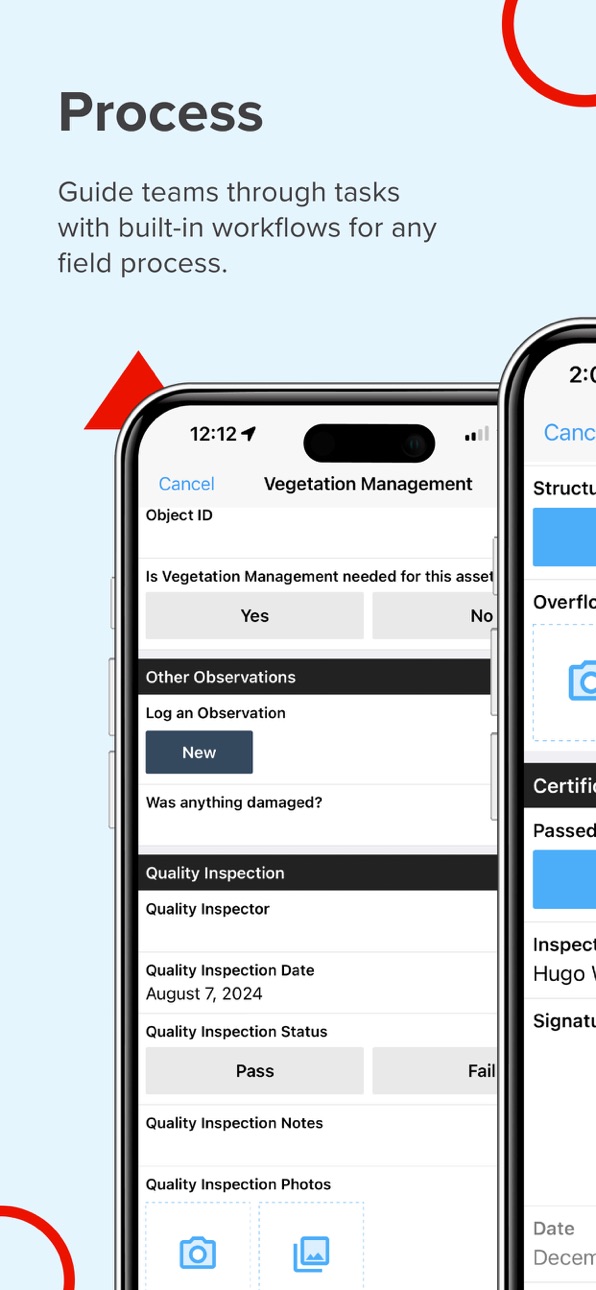
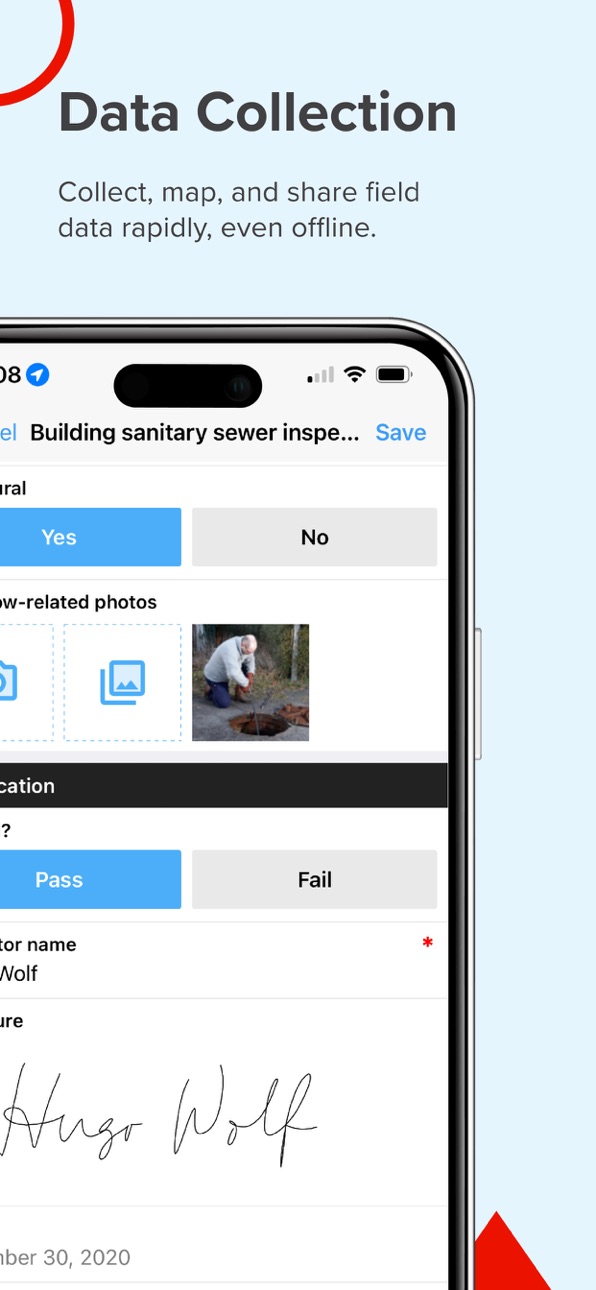


iPad 6 images


What’s New Version 2606.3.0
Enhancements & Fixes:
Fixed an issue where SSO users encountered 'Unauthorized (401)' errors during mobile sync.
Addressed a Fulcrum for Intune SSO login issue when the authentication flow needs to be performed via Microsoft Edge, improving compatibility with Conditional Access policies.
Description
Field teams often struggle with inefficient tools that slow operations and compromise data accuracy. Fulcrum transforms field workflows with intuitive, AI-powered mobile GIS software for seamless data collection, geospatial mobile apps tracking, and process automation.
Unlike traditional GIS mobile apps that require specialized training and are confined to the office, Fulcrum is a field-first solution that empowers both GIS experts and non-GIS team members to easily capture and share geospatial data.
Fulcrum is built for teams that need powerful, flexible tools for field data collection, asset tracking, and process automation. It provides:
- Field process management with real-time GIS mobile data collection for faster, more accurate data capture.
- Mobile data collection applications to streamline surveys, inspections, and compliance tracking.
- Asset data collection software mobile applications to track and manage infrastructure, utilities, and field equipment with precision.
- Geospatial mobile apps for GPS-based field data collection to give teams accurate location data for mapping, reporting, and decision-making.
Why choose Fulcrum?
Fulcrum is trusted by nearly 3,000 companies and 50,000+ users worldwide to digitize inspections, surveys, field data collection, and asset management tasks for industries such as construction, utilities, and environmental services. As an Esri Silver Partner, Fulcrum integrates seamlessly with ArcGIS, helping teams connect field data with their GIS workflows. And as a purpose-built field processes platform, Fulcrum helps teams customize field processes, reduce manual workflows, and capture more accurate, actionable data.
Key features
- Drag-and-drop form builder – Create and customize inspection checklists, surveys, and asset tracking forms with no coding required.
- AI-powered voice data entry – Use Audio FastFill for hands-free data collection, reducing manual input and speeding up fieldwork.
- Integrated GIS capabilities – Sync with Esri ArcGIS, export geospatial data in GeoJSON or Shapefiles, and enhance mobile GIS data collection.
- Real-time data sync – Instantly share collected data with your team and integrate with enterprise systems.
- Offline data collection – Capture and store data without connectivity, then sync once back online.
- Advanced security – Protect sensitive data with SOC 2 Type 2 compliance, SSO, SCIM to ease onboarding, and customizable user roles.
- Native mobile apps – Access full functionality on iOS, built for serious field use.
- Dedicated support – Get expert help via email, chat, or phone..
Built for the industries that rely on field data
Fulcrum’s field-first design makes it the best app for land survey, field inspection, and asset management workflows. Teams across construction, utilities, and environmental services and more use Fulcrum to streamline field workflows and improve data accuracy.
Industries and use cases include:
- Land surveying & field inspections – Use Fulcrum GPS data collection software to capture precise location data and sync in real time.
- Utility & infrastructure management – Improve asset tracking and maintenance with GIS mobile data collection and automated reporting.
- Environmental monitoring & compliance – Conduct site assessments, collect location-based data, and generate reports with user-friendly GIS cloud mobile data collection apps.
- Construction & engineering projects – Manage site audits, inspections, and progress tracking using mobile data collection applications designed for the field.
Download now to create your own GIS mobile app and streamline field data collection and process management with Fulcrum.
Privacy Policy
https://www.fulcrumapp.com/privacy
Terms of Service
https://www.fulcrumapp.com/terms-of-service
In-App Purchases MO pricing
Single User Subscriptions Subscription
Fulcrum · Monthly—
Capabilities
In-App Purchases
Accessibility
ipadiphonemacrealityDevicetvoswatch
Version history 25 versions
Build 887691971v2606.3.02026-07-06 13:18:57
Enhancements & Fixes:
Fixed an issue where SSO users encountered 'Unauthorized (401)' errors during mobile sync.
Addressed a Fulcrum for Intune SSO login issue when the authentication flow needs to be performed via Microsoft Edge, improving compatibility with Conditional Access policies.
Build 887345535v2606.2.02026-06-24 18:18:59
Enhancements & Fixes:
- The main map view now displays a scale bar, allowing you to understand distances and map scale without opening the Location Editor.
- Fixed an issue where ALERT() data events were not displayed after using Audio FastFill to populate a field.
- You can now start a GPS track and immediately background it, even if no points have been collected yet.
Build 887107192v2606.1.02026-06-18 14:18:11
Enhancements & Fixes:
- We’ve implemented bug fixes and performance optimizations in this release, contributing to a more reliable app experience.
Build 886796599v2606.0.02026-06-11 13:00:38
Enhancements & Fixes:
- Fixed an issue where WMS layers configured with a 'token' parameter in the request headers were not loading correctly.
Build 886592469v2605.3.12026-06-06 17:26:37
Enhancements & Fixes:
- General fixes and improvements
Build 886489798v2605.3.02026-06-03 21:21:40
Enhancements & Fixes:
- Fixed an issue where discarded tracking geometry could reappear and immediately trigger a limit alert after re-entering the geometry editor.
- Resolved an issue where URL actions (OPENURL) could fail to open forms that were newly synced to the device during the current session.
Build 886292602v2605.2.12026-05-29 20:09:25
Enhancements & Fixes:
- General fixes and improvements
Build 886175051v2605.2.02026-05-28 13:37:40
Enhancements & Fixes:
- New! Background Tracking: You can now continue GPS track recordings when you leave the map, switch records, or lock your device. Records with an active track are saved as a Draft, so you can keep working.
- Resolved an issue where records displayed stale or incorrect status values, preventing accurate status progression updates.
- Improved stability when filtering forms.
- Fixed a UI issue on iPadOS where the Map Settings panel overlapped the system time and date.
Build 885921600v2605.1.02026-05-20 20:54:09
Enhancements & Fixes:
- Download KML/KMZ Layers for Offline Use:You can now download KML and KMZ map layers directly to your device for offline access. Stay productive in the field — even without a connection.
- Fixed an issue where tracking settings could revert to default values after being set.
- When triggering a URL action while editing a record, you can now choose to save your current work as a draft or cancel the action.
- Fulcrum for Intune users can now authenticate using Microsoft Authenticator or other authentication apps.
Build 885728365v2605.0.12026-05-18 14:57:36
Enhancements & Fixes:
- General fixes and improvements
Build 885625864v2605.0.02026-05-14 13:27:18
Enhancements & Fixes:
- Fixed an issue where users could encounter an error retrieving memberships after the device was idle.
Build 885383035v2604.4.12026-05-08 16:32:07
Enhancements & Fixes:
Fix an issue were audio FastFill wasn't working on some devices
Build 885302896v2604.4.02026-05-06 15:30:52
Enhancements & Fixes:
- Fixed an issue where the app would crash when updating a record's location after opening a record link field.
Build 885049506v2604.3.02026-04-30 14:56:07
Enhancements & Fixes:
- Offline basemaps now display reliably even with weak or intermittent connectivity, so you no longer need to use airplane mode or reset cache to see your downloaded maps.
- Record status indicators have been redesigned with clear labels and modern icons, making it easier to identify unsynced, draft, failed sync, and attachment issues at a glance.
- Visibility logic for Date fields now works consistently on both desktop and mobile, ensuring your forms behave as expected everywhere.
Build 884778718v2604.2.02026-04-22 16:14:59
Enhancements & Fixes:
- General fixes and improvements
Build 884517384v2604.1.02026-04-15 13:21:23
Enhancements & Fixes:
- We’ve implemented bug fixes and performance optimizations in this release, contributing to a more reliable experience.
Build 884242329v2604.0.02026-04-08 16:27:42
Enhancements & Fixes:
- Fixed an issue where sketch images could grow larger in file size each time they were saved
- Fixed an issue where sketch dimensions could differ from the original uploaded background image
- Fixed an issue where Audio FastFill could unexpectedly close the app when sending a transcription
Build 884020211v2603.3.02026-04-01 21:53:38
*Enhancements & Fixes:*
- Fixed an issue that could occur when editing text in the Sketch Field after using speech-to-text, potentially causing unsaved work to be lost.
Build 883764818v2603.2.02026-03-26 15:30:41
- Improved sketch saving experience and snapshot quality
- Added tracking interrupted dialog for GPS sessions
- Faster record link field performance
- Bug fixes and stability improvements
Build 883480287v2603.1.02026-03-18 20:49:25
- Streamlined the photo markup experience and added additional markup tools on iOS 26+
- App list title text no longer shrinks when wrapping to multiple lines
- Scalebar is no longer hidden behind the overlay in Target Mode on the map view
- Improved Record Link field performance and increased the limit to 1,000 record links
Build 883272020v2603.0.02026-03-12 00:19:38
Enhancements & Fixes:
- Added a new button to place and move points in Target Mode for a more intuitive experience.
- In Target Mode, users can now tap on any point or vertex to select it, which automatically centers the map on that location.
- Fixed an issue that occurred when map layer where removed.
- Fixed an issue where tapping a sketch field occasionally did not navigate directly to markup mode. The keyboard is now dismissed before presenting the sketch editor, ensuring the tool picker is visible immediately.
- Updated record action copy from “Delete” to “Remove” to better reflect that the action removes the record from the device rather than deleting it from the server.
- Added search functionality to the sketch background selection modal.
Build 882994817v2602.3.02026-03-04 13:40:55
Enhancements & Fixes:
- Fixed an issue where sketch backgrounds with transparency turned gray when saving, they now save with a white background. Note: Sketch Field is in early access.
- Fixed an issue where records with overlapping polygon geometries could not sync on subsequent edits
- Fixed an issue where records with self-intersecting polygon geometries failed to sync after editing other fields
Build 882839581v2602.2.12026-02-27 11:12:15
Enhancements & Fixes:
Fixed issue were users can’t logout the app
Build 882762450v 2602.2.02026-02-25 14:32:18
Enhancements & Fixes:
- Fixed an issue where the map in the location editor would zoom out to the entire world instead of centering on the selected geometry when opening a record.
Build 882550951v2602.1.02026-02-18 14:47:57
Enhancements & Fixes:
- Fixed an issue where WMS map layers would display a popup over existing records, blocking users from selecting those records on the map
Price history by region
Currency
Show
Columns
Search
Availability 175 of 175 storefronts
| Region | Language | Price | Ratings | Avg | Version |
|---|---|---|---|---|---|
| US | en-US | Free | 103 | 4.1 | 2606.3.0 |
| AU | en-AU | Free | 20 | 3.5 | 2606.3.0 |
| CA | en-CA | Free | 9 | 4.7 | 2606.3.0 |
| GB | en-GB | Free | 7 | 4.4 | 2606.3.0 |
| CO | es-MX | Free | 5 | 4.6 | 2606.3.0 |
| BR | pt-BR | Free | 2 | 4.5 | 2606.3.0 |
| CL | es-MX | Free | 2 | 2.5 | 2606.3.0 |
| ES | es-ES | Free | 2 | 3.0 | 2606.3.0 |
| NZ | en-AU | Free | 2 | 4.5 | 2606.3.0 |
| PK | en-GB | Free | 2 | 5.0 | 2606.3.0 |
| ZA | en-GB | Free | 2 | 5.0 | 2606.3.0 |
| AE | en-GB | Free | 1 | 5.0 | 2606.3.0 |
| CN | zh-Hans-CN | Free | 1 | 5.0 | 2606.3.0 |
| CY | en-GB | Free | 1 | 5.0 | 2606.3.0 |
| DK | en-GB | Free | 1 | 5.0 | 2606.3.0 |
| DO | es-MX | Free | 1 | 5.0 | 2606.3.0 |
| GT | es-MX | Free | 1 | 5.0 | 2606.3.0 |
| HN | es-MX | Free | 1 | 5.0 | 2606.3.0 |
| HR | en-GB | Free | 1 | 5.0 | 2606.3.0 |
| LB | en-GB | Free | 1 | 5.0 | 2606.3.0 |
| MX | es-MX | Free | 1 | 2.0 | 2606.3.0 |
| AF | en-GB | Free | 0 | — | 2606.3.0 |
| AG | en-GB | Free | 0 | — | 2606.3.0 |
| AI | en-GB | Free | 0 | — | 2606.3.0 |
| AL | en-GB | Free | 0 | — | 2606.3.0 |
| AM | en-GB | Free | 0 | — | 2606.3.0 |
| AO | en-GB | Free | 0 | — | 2606.3.0 |
| AR | es-MX | Free | 0 | — | 2606.3.0 |
| AT | de-DE | Free | 0 | — | 2606.3.0 |
| AZ | en-GB | Free | 0 | — | 2606.3.0 |
| BA | en-GB | Free | 0 | — | 2606.3.0 |
| BB | en-GB | Free | 0 | — | 2606.3.0 |
| BE | en-GB | Free | 0 | — | 2606.3.0 |
| BF | en-GB | Free | 0 | — | 2606.3.0 |
| BG | en-GB | Free | 0 | — | 2606.3.0 |
| BH | en-GB | Free | 0 | — | 2606.3.0 |
| BJ | en-GB | Free | 0 | — | 2606.3.0 |
| BM | en-GB | Free | 0 | — | 2606.3.0 |
| BN | en-GB | Free | 0 | — | 2606.3.0 |
| BO | es-MX | Free | 0 | — | 2606.3.0 |
| BS | en-GB | Free | 0 | — | 2606.3.0 |
| BT | en-GB | Free | 0 | — | 2606.3.0 |
| BW | en-GB | Free | 0 | — | 2606.3.0 |
| BY | en-GB | Free | 0 | — | 2606.3.0 |
| BZ | en-GB | Free | 0 | — | 2606.3.0 |
| CD | en-GB | Free | 0 | — | 2606.3.0 |
| CG | en-GB | Free | 0 | — | 2606.3.0 |
| CH | de-CH | Free | 0 | — | 2606.3.0 |
| CI | fr-FR | Free | 0 | — | 2606.3.0 |
| CM | fr-FR | Free | 0 | — | 2606.3.0 |
| CR | es-MX | Free | 0 | — | 2606.3.0 |
| CV | en-GB | Free | 0 | — | 2606.3.0 |
| CZ | en-GB | Free | 0 | — | 2606.3.0 |
| DE | de-DE | Free | 0 | — | 2606.3.0 |
| DM | en-GB | Free | 0 | — | 2606.3.0 |
| DZ | en-GB | Free | 0 | — | 2606.3.0 |
| EC | es-MX | Free | 0 | — | 2606.3.0 |
| EE | en-GB | Free | 0 | — | 2606.3.0 |
| EG | en-GB | Free | 0 | — | 2606.3.0 |
| FI | en-GB | Free | 0 | — | 2606.3.0 |
| FJ | en-GB | Free | 0 | — | 2606.3.0 |
| FM | en-GB | Free | 0 | — | 2606.3.0 |
| FR | fr-FR | Free | 0 | — | 2606.3.0 |
| GA | fr-FR | Free | 0 | — | 2606.3.0 |
| GD | en-GB | Free | 0 | — | 2606.3.0 |
| GE | en-GB | Free | 0 | — | 2606.3.0 |
| GH | en-GB | Free | 0 | — | 2606.3.0 |
| GM | en-GB | Free | 0 | — | 2606.3.0 |
| GR | en-GB | Free | 0 | — | 2606.3.0 |
| GW | en-GB | Free | 0 | — | 2606.3.0 |
| GY | en-GB | Free | 0 | — | 2606.3.0 |
| HK | zh-Hant-HK | Free | 0 | — | 2606.3.0 |
| HU | en-GB | Free | 0 | — | 2606.3.0 |
| ID | en-GB | Free | 0 | — | 2606.3.0 |
| IE | en-GB | Free | 0 | — | 2606.3.0 |
| IL | en-GB | Free | 0 | — | 2606.3.0 |
| IN | en-GB | Free | 0 | — | 2606.3.0 |
| IQ | en-GB | Free | 0 | — | 2606.3.0 |
| IS | en-GB | Free | 0 | — | 2606.3.0 |
| IT | it | Free | 0 | — | 2606.3.0 |
| JM | en-GB | Free | 0 | — | 2606.3.0 |
| JO | en-GB | Free | 0 | — | 2606.3.0 |
| JP | ja | Free | 0 | — | 2606.3.0 |
| KE | en-GB | Free | 0 | — | 2606.3.0 |
| KG | en-GB | Free | 0 | — | 2606.3.0 |
| KH | en-GB | Free | 0 | — | 2606.3.0 |
| KN | en-GB | Free | 0 | — | 2606.3.0 |
| KR | ko | Free | 0 | — | 2606.3.0 |
| KW | en-GB | Free | 0 | — | 2606.3.0 |
| KY | en-GB | Free | 0 | — | 2606.3.0 |
| KZ | en-GB | Free | 0 | — | 2606.3.0 |
| LA | en-GB | Free | 0 | — | 2606.3.0 |
| LC | en-GB | Free | 0 | — | 2606.3.0 |
| LK | en-GB | Free | 0 | — | 2606.3.0 |
| LR | en-GB | Free | 0 | — | 2606.3.0 |
| LT | en-GB | Free | 0 | — | 2606.3.0 |
| LU | en-GB | Free | 0 | — | 2606.3.0 |
| LV | en-GB | Free | 0 | — | 2606.3.0 |
| LY | en-GB | Free | 0 | — | 2606.3.0 |
| MA | en-GB | Free | 0 | — | 2606.3.0 |
| MD | en-GB | Free | 0 | — | 2606.3.0 |
| ME | en-GB | Free | 0 | — | 2606.3.0 |
| MG | en-GB | Free | 0 | — | 2606.3.0 |
| MK | en-GB | Free | 0 | — | 2606.3.0 |
| ML | en-GB | Free | 0 | — | 2606.3.0 |
| MM | en-GB | Free | 0 | — | 2606.3.0 |
| MN | en-GB | Free | 0 | — | 2606.3.0 |
| MO | zh-Hant-HK | Free | 0 | — | 2606.3.0 |
| MR | en-GB | Free | 0 | — | 2606.3.0 |
| MS | en-GB | Free | 0 | — | 2606.3.0 |
| MT | en-GB | Free | 0 | — | 2606.3.0 |
| MU | en-GB | Free | 0 | — | 2606.3.0 |
| MV | en-GB | Free | 0 | — | 2606.3.0 |
| MW | en-GB | Free | 0 | — | 2606.3.0 |
| MY | en-GB | Free | 0 | — | 2606.3.0 |
| MZ | en-GB | Free | 0 | — | 2606.3.0 |
| NA | en-GB | Free | 0 | — | 2606.3.0 |
| NE | en-GB | Free | 0 | — | 2606.3.0 |
| NG | en-GB | Free | 0 | — | 2606.3.0 |
| NI | es-MX | Free | 0 | — | 2606.3.0 |
| NL | nl | Free | 0 | — | 2606.3.0 |
| NO | en-GB | Free | 0 | — | 2606.3.0 |
| NP | en-GB | Free | 0 | — | 2606.3.0 |
| NR | en-GB | Free | 0 | — | 2606.3.0 |
| OM | en-GB | Free | 0 | — | 2606.3.0 |
| PA | es-MX | Free | 0 | — | 2606.3.0 |
| PE | es-MX | Free | 0 | — | 2606.3.0 |
| PG | en-GB | Free | 0 | — | 2606.3.0 |
| PH | en-GB | Free | 0 | — | 2606.3.0 |
| PL | en-GB | Free | 0 | — | 2606.3.0 |
| PT | pt-PT | Free | 0 | — | 2606.3.0 |
| PW | en-GB | Free | 0 | — | 2606.3.0 |
| PY | es-MX | Free | 0 | — | 2606.3.0 |
| QA | en-GB | Free | 0 | — | 2606.3.0 |
| RO | en-GB | Free | 0 | — | 2606.3.0 |
| RS | en-GB | Free | 0 | — | 2606.3.0 |
| RU | ru | Free | 0 | — | 2606.3.0 |
| RW | en-GB | Free | 0 | — | 2606.3.0 |
| SA | en-GB | Free | 0 | — | 2606.3.0 |
| SB | en-GB | Free | 0 | — | 2606.3.0 |
| SC | en-GB | Free | 0 | — | 2606.3.0 |
| SE | sv | Free | 0 | — | 2606.3.0 |
| SG | en-GB | Free | 0 | — | 2606.3.0 |
| SI | en-GB | Free | 0 | — | 2606.3.0 |
| SK | en-GB | Free | 0 | — | 2606.3.0 |
| SL | en-GB | Free | 0 | — | 2606.3.0 |
| SN | en-GB | Free | 0 | — | 2606.3.0 |
| SR | en-GB | Free | 0 | — | 2606.3.0 |
| ST | en-GB | Free | 0 | — | 2606.3.0 |
| SV | es-MX | Free | 0 | — | 2606.3.0 |
| SZ | en-GB | Free | 0 | — | 2606.3.0 |
| TC | en-GB | Free | 0 | — | 2606.3.0 |
| TD | en-GB | Free | 0 | — | 2606.3.0 |
| TH | en-GB | Free | 0 | — | 2606.3.0 |
| TJ | en-GB | Free | 0 | — | 2606.3.0 |
| TM | en-GB | Free | 0 | — | 2606.3.0 |
| TN | en-GB | Free | 0 | — | 2606.3.0 |
| TO | en-GB | Free | 0 | — | 2606.3.0 |
| TR | en-GB | Free | 0 | — | 2606.3.0 |
| TT | en-GB | Free | 0 | — | 2606.3.0 |
| TW | zh-Hant-TW | Free | 0 | — | 2606.3.0 |
| TZ | en-GB | Free | 0 | — | 2606.3.0 |
| UA | en-GB | Free | 0 | — | 2606.3.0 |
| UG | en-GB | Free | 0 | — | 2606.3.0 |
| UY | en-GB | Free | 0 | — | 2606.3.0 |
| UZ | en-GB | Free | 0 | — | 2606.3.0 |
| VC | en-GB | Free | 0 | — | 2606.3.0 |
| VE | es-MX | Free | 0 | — | 2606.3.0 |
| VG | en-GB | Free | 0 | — | 2606.3.0 |
| VN | en-GB | Free | 0 | — | 2606.3.0 |
| VU | en-GB | Free | 0 | — | 2606.3.0 |
| XK | en-GB | Free | 0 | — | 2606.3.0 |
| YE | en-GB | Free | 0 | — | 2606.3.0 |
| ZM | en-GB | Free | 0 | — | 2606.3.0 |
| ZW | en-GB | Free | 0 | — | 2606.3.0 |
Change log 29 changes · MO
✎
releaseNotes updated
Enhancements & Fixes:
Fixed an issue where SSO users encountered 'Unauthorized (401)' errors during mobile sync.
Addressed a Fulcrum for Intune SSO login issue
✎
description updated
Field teams often struggle with inefficient tools that slow operations and compromise data accuracy. Fulcrum transforms field workflows with intuitive, AI-power
✎
subtitle updated
Mobile app with built-in GIS
✎
name updated
Fulcrum GIS field data capture
◆
Version 2606.3.0 released
Enhancements & Fixes:
Fixed an issue where SSO users encountered 'Unauthorized (401)' errors during mobile sync.
Addressed a Fulcrum for Intune SSO login issue when the authentication flow needs to be performed via Microsoft Edge, improvin
◆
Version 2606.2.0 released
Enhancements & Fixes:
- The main map view now displays a scale bar, allowing you to understand distances and map scale without opening the Location Editor.
- Fixed an issue where ALERT() data events were not displayed after using Audio Fast
◆
Version 2606.1.0 released
Enhancements & Fixes:
- We’ve implemented bug fixes and performance optimizations in this release, contributing to a more reliable app experience.
◆
Version 2606.0.0 released
Enhancements & Fixes:
- Fixed an issue where WMS layers configured with a 'token' parameter in the request headers were not loading correctly.
◆
Version 2605.3.1 released
Enhancements & Fixes:
- General fixes and improvements
◆
Version 2605.3.0 released
Enhancements & Fixes:
- Fixed an issue where discarded tracking geometry could reappear and immediately trigger a limit alert after re-entering the geometry editor.
- Resolved an issue where URL actions (OPENURL) could fail to open forms th
◆
Version 2605.2.1 released
Enhancements & Fixes:
- General fixes and improvements
◆
Version 2605.2.0 released
Enhancements & Fixes:
- New! Background Tracking: You can now continue GPS track recordings when you leave the map, switch records, or lock your device. Records with an active track are saved as a Draft, so you can keep working.
- Resolved
◆
Version 2605.1.0 released
Enhancements & Fixes:
- Download KML/KMZ Layers for Offline Use:You can now download KML and KMZ map layers directly to your device for offline access. Stay productive in the field — even without a connection.
- Fixed an issue where trackin
◆
Version 2605.0.1 released
Enhancements & Fixes:
- General fixes and improvements
◆
Version 2605.0.0 released
Enhancements & Fixes:
- Fixed an issue where users could encounter an error retrieving memberships after the device was idle.
◆
Version 2604.4.1 released
Enhancements & Fixes:
Fix an issue were audio FastFill wasn't working on some devices
◆
Version 2604.4.0 released
Enhancements & Fixes:
- Fixed an issue where the app would crash when updating a record's location after opening a record link field.
◆
Version 2604.3.0 released
Enhancements & Fixes:
- Offline basemaps now display reliably even with weak or intermittent connectivity, so you no longer need to use airplane mode or reset cache to see your downloaded maps.
- Record status indicators have been redesigne
◆
Version 2604.2.0 released
Enhancements & Fixes:
- General fixes and improvements
◆
Version 2604.1.0 released
Enhancements & Fixes:
- We’ve implemented bug fixes and performance optimizations in this release, contributing to a more reliable experience.
◆
Version 2604.0.0 released
Enhancements & Fixes:
- Fixed an issue where sketch images could grow larger in file size each time they were saved
- Fixed an issue where sketch dimensions could differ from the original uploaded background image
- Fixed an issue whe
◆
Version 2603.3.0 released
*Enhancements & Fixes:*
- Fixed an issue that could occur when editing text in the Sketch Field after using speech-to-text, potentially causing unsaved work to be lost.
◆
Version 2603.2.0 released
- Improved sketch saving experience and snapshot quality
- Added tracking interrupted dialog for GPS sessions
- Faster record link field performance
- Bug fixes and stability improvements
◆
Version 2603.1.0 released
- Streamlined the photo markup experience and added additional markup tools on iOS 26+
- App list title text no longer shrinks when wrapping to multiple lines
- Scalebar is no longer hidden behind the overlay in Target Mode on the map view
◆
Version 2603.0.0 released
Enhancements & Fixes:
- Added a new button to place and move points in Target Mode for a more intuitive experience.
- In Target Mode, users can now tap on any point or vertex to select it, which automatically centers the map on that locatio
◆
Version 2602.3.0 released
Enhancements & Fixes:
- Fixed an issue where sketch backgrounds with transparency turned gray when saving, they now save with a white background. Note: Sketch Field is in early access.
- Fixed an issue where records with overlapping polygo
◆
Version 2602.2.1 released
Enhancements & Fixes:
Fixed issue were users can’t logout the app
◆
Version 2602.2.0 released
Enhancements & Fixes:
- Fixed an issue where the map in the location editor would zoom out to the entire world instead of centering on the selected geometry when opening a record.
◆
Version 2602.1.0 released
Enhancements & Fixes:
- Fixed an issue where WMS map layers would display a popup over existing records, blocking users from selecting those records on the map