Home › Graphics & Design

 KR
KR
 JPja
JPja USen-US
 THen-GB
 CAen-CA
 GBen-GBKRko
 AUen-AU
 MXes-MX
 CNzh-Hans-CN
 RUru
RUru SAen-GB
 DEde-DE
 IDen-GB
 PHen-GB
 BRpt-BR
 FRfr-FR
 TWzh-Hant-TW
 NLnl
NLnl VNen-GB
 MYen-GB
 SEsv
SEsv ITit
ITit CLes-MX
 CHde-CH
 HKzh-Hant-HK
 NOen-GB
 AEen-GB
 DKen-GB
 ESes-ES
 INen-GB
 PLen-GB
 TRen-GB
 NZen-AU
 ATde-DE
 FIen-GB
 UAen-GB
 SGen-GB
 PEes-MX
 IEen-GB
 ROen-GB
 KWen-GB
 KZen-GB
 BEen-GB
 ILen-GB
 ECes-MX
 ZAen-GB
 ARes-MX
 COes-MX
 CZen-GB
 HUen-GB
 KHen-GB
 PAes-MX
 DOes-MX
 PTpt-PT
 AZen-GB
 CRes-MX
 EEen-GB
 LTen-GB
 LVen-GB
 EGen-GB
 GEen-GB
 GRen-GB
 QAen-GB
 SVes-MX
 AOen-GB
 BAen-GB
 BHen-GB
 BMen-GB
 BYen-GB
 GHen-GB
 GTes-MX
 HNes-MX
 HRen-GB
 JMen-GB
 KEen-GB
 KGen-GB
 LUen-GB
 MNen-GB
 MTen-GB
 NGen-GB
 NIes-MX
 PKen-GB
 SIen-GB
 SKen-GB
 UYen-GB
 UZen-GB
 AFen-GB
 AGen-GB
 AIen-GB
 ALen-GB
 AMen-GB
 BBen-GB
 BFen-GB
 BGen-GB
 BJen-GB
 BNen-GB
 BOes-MX
 BSen-GB
 BTen-GB
 BWen-GB
 BZen-GB
 CDen-GB
 CGen-GB
 CIfr-FR
 CMfr-FR
 CVen-GB
 CYen-GB
 DMen-GB
 DZen-GB
 FJen-GB
 FMen-GB
 GAfr-FR
 GDen-GB
 GMen-GB
 GWen-GB
 GYen-GB
 IQen-GB
 ISen-GB
 JOen-GB
 KNen-GB
 KYen-GB
 LAen-GB
 LBen-GB
 LCen-GB
 LKen-GB
 LRen-GB
 LYen-GB
 MAen-GB
 MDen-GB
 MEen-GB
 MGen-GB
 MKen-GB
 MLen-GB
 MMen-GB
 MOzh-Hant-HK
 MRen-GB
 MSen-GB
 MUen-GB
 MVen-GB
 MWen-GB
 MZen-GB
 NAen-GB
 NEen-GB
 NPen-GB
 NRen-GB
 OMen-GB
 PGen-GB
 PWen-GB
 PYes-MX
 RSen-GB
 RWen-GB
 SBen-GB
 SCen-GB
 SLen-GB
 SNen-GB
 SRen-GB
 STen-GB
 SZen-GB
 TCen-GB
 TDen-GB
 TJen-GB
 TMen-GB
 TNen-GB
 TOen-GB
 TTen-GB
 TZen-GB
 UGen-GB
 VCen-GB
 VEes-MX
 VGen-GB
 VUen-GB
 XKen-GB
 YEen-GB
 ZMen-GB
 ZWen-GB
175 of 175 storefronts
Content in ko
Content in ko
Information
Preview 2 platforms


iPhone 10 images

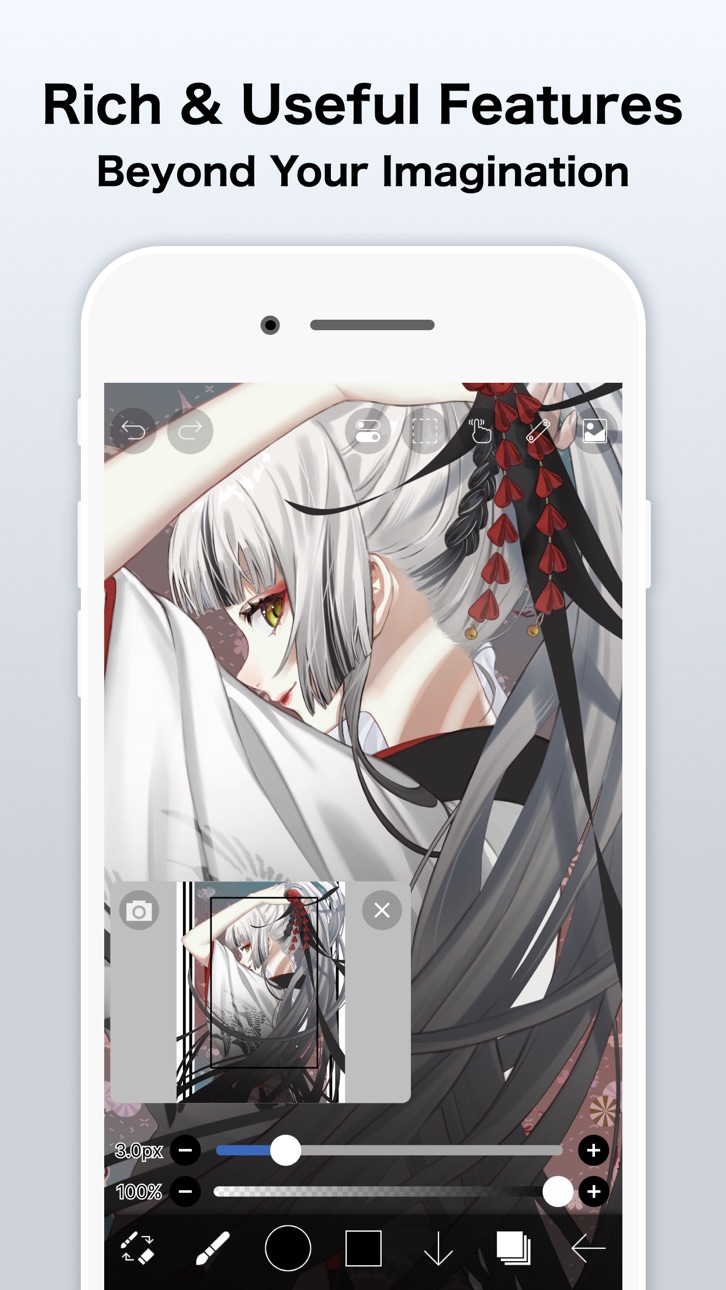


iPad 10 images

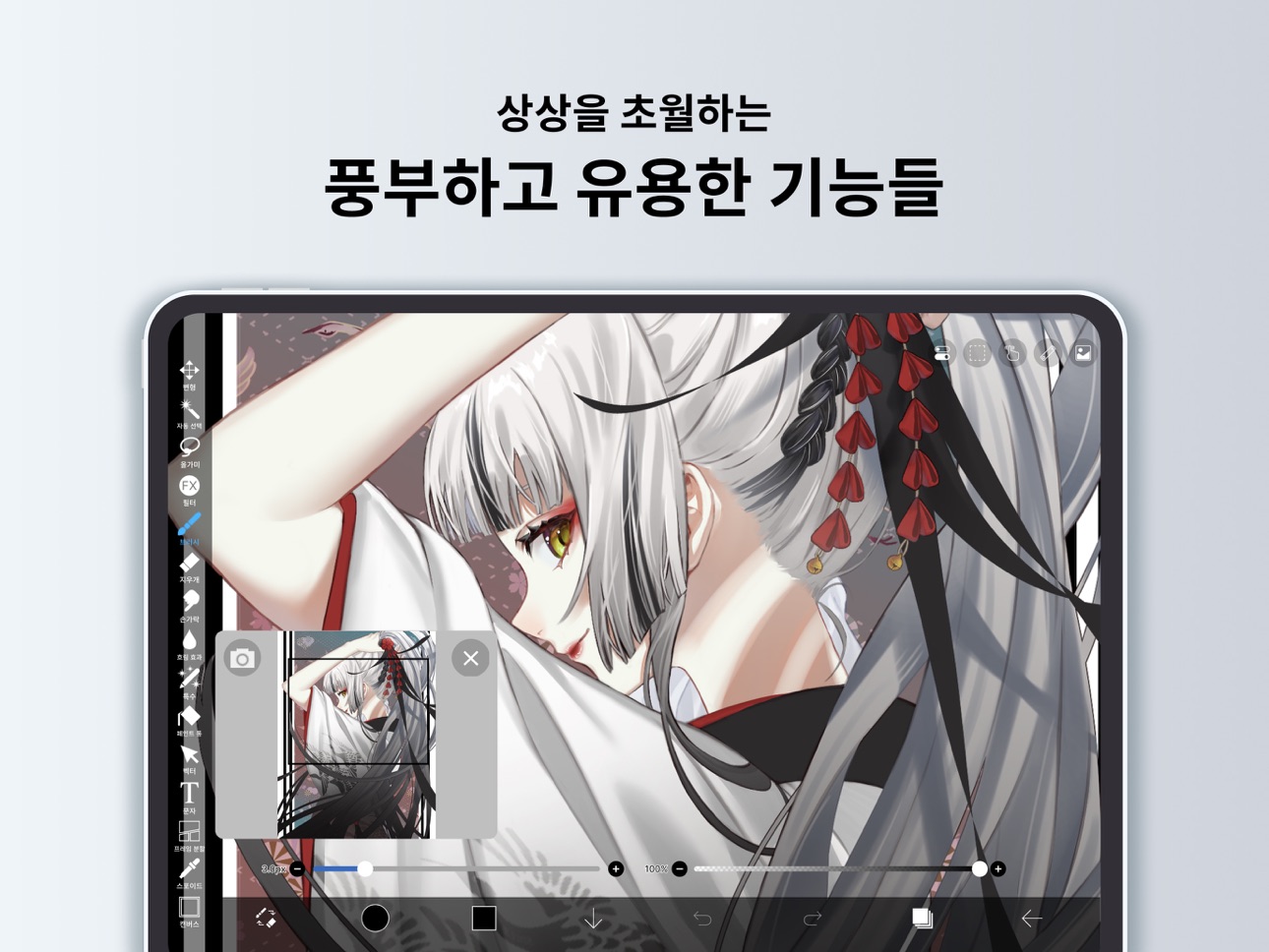

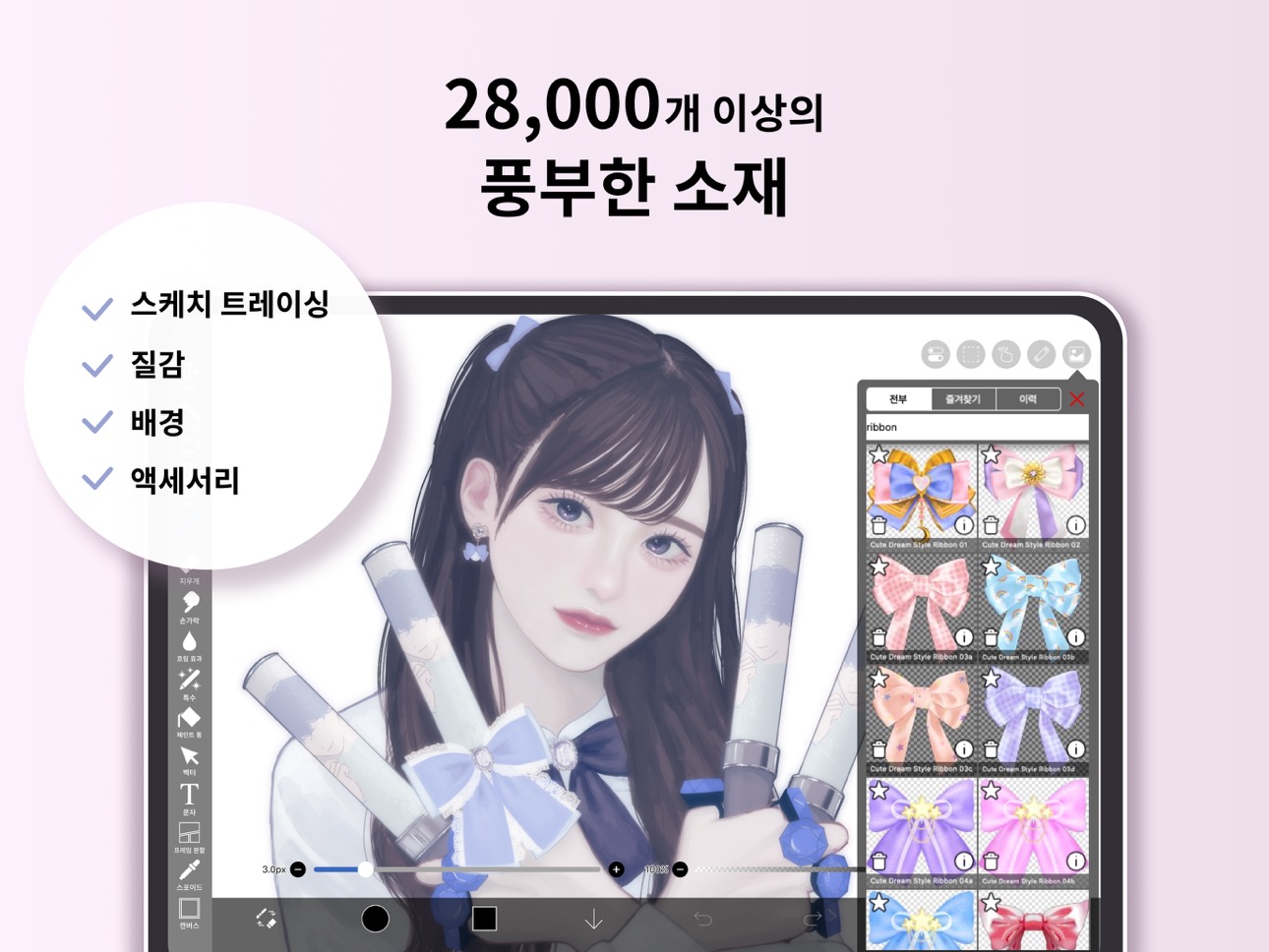


What’s New Version 14.0.6
Thank you for using ibisPaint!
The summary of this update is as follows.
[New Features]
- You can now install brushes from the install button on ibispaint.com brush pattern artwork pages, even when the page is opened in an external browser.
[Improvements, Changes]
- Moved the checkmark indicating the selected item from the right to the left in selection menus.
- Changed the position of toast notifications that may appear when using keyboard shortcuts from the center of the application to the top.
- Changed the behavior when changing colors while using the Bezier Curve Drawing tool or Polyline Drawing tool with Lasso Fill. Previously, the shape being drawn was implicitly finalized; now, only the color changes without finalizing the shape.
- The specification for artworks displayed in the rankings on the app's title screen has been changed. Only artworks from the ibispaint.com rankings that have been reviewed by us are now displayed.
- Web pages opened from the app will now open in an external browser instead of within the app.
- We removed multi-page artwork categories (Manga Books (Original), Manga Books (Fan Art), and Multiple Pages (Other)) from the categories that can be selected in the rankings on the app's title screen.
[Fixed Bugs and Problems]
- Fixed a bug where layer images could become corrupted with a diagonal skew.
- Fixed an issue where the application could crash when using specific keyboard shortcuts while launching Filter, Color Range, or Expand/Contract Selection Area.
- Fixed an issue where switching between Lasso Fill and Lasso Eraser could also affect shapes that were already drawn when using certain shape tools.
- Fixed an issue where the app could crash when applying the Replace Color Filter.
- Fixed a bug where JPEG files with color profiles could not be imported.
- Fixed a bug that could cause an error when copying a layer folder containing vector layers or text layers in an artwork with a large canvas size.
- Fixed an issue where changing the color after drawing a shape with Lasso Fill could also change the color of the already-drawn shape when using certain shape tools.
- Fixed an issue where the reorder handle was enabled even when there was only one Color Palette.
- Fixed an issue where shapes drawn on vector layers could appear differently during artwork playback under specific conditions.
- Fixed an issue where short brush strokes (strokes made by tapping) created in app versions earlier than 13.1.18 were not played back correctly.
- Fixed a crash that could occur when playing back a work containing a vector layer under specific conditions.
- Fixed a bug where the automatic restoration of an artwork could be misjudged as successful even when it had actually failed under certain conditions.
- Fixed an issue where the app could crash when applying the Waterdrop (Rounded) filter with the reference set to Lower Layer.
- Fixed an issue where the "About Cloud Storage" page could display content intended for other platforms on certain devices.
- Fixed an issue where the error message was not displayed correctly when an artwork upload failed.
- Fixed an issue on iPadOS 26 and later where tapping a button within My Gallery could cause unintended scrolling in the artwork list.
Description
이 앱은 ibisPaint X의 무광고 버전입니다. 전체 기능을 활성화하려면 앱 내에서 프리미엄 멤버십을 추가 구매해야 하며, ibisPaint X를 먼저 다운로드한 후 앱에서 프리미엄 멤버십을 구매하는 방식이 더 저렴합니다.
ibis Paint는 시리즈로 총 5억 번 이상 다운로드된 인기 있고 다양한 그리기 앱으로, 10만 5천 개 이상의 브러시, 2만 9천 개 이상의 재료, 3,000개 이상의 글꼴, 84개 필터, 46개 스크린톤, 27개 혼합 모드, 그리기 과정 기록, 획을 제공합니다. 안정화 기능, 방사형 선 자 또는 대칭 자 등의 다양한 자 기능, 클리핑 마스크 기능, 벡터 도구와 애니메이션 기능, AI 교란! 다양한 전문가 기능 제공!
*그림 그리기 강좌 YouTube 채널
그림 그리기 강좌 YouTube 채널에서는 ibis Paint 편리한 사용을 다수 제공하고 있습니다.
꼭 등록 해주십시오.
https://youtube.com/ibisPaint
*컨셉 특징
- PC의 일러스트 소프트를 능가하는 본격 그림 그리기 앱!
- 전혀 그릴 기분, OpenGL 기술을 이용한 고속 동작!
- 그림을 그리는 과정을 동영상으로 저장할 수있는 기능!
- 그림 그리는 법을 배울 수있는 SNS 기능 그림 그리기 앱!
*기능
그림을 그리는 과정의 동영상 공유를 눈으로하면서도, 그림 그리기 앱로서의 기능도 충실 시켰습니다.
[브러시 기능]
- 최대 120fps의 매끄럽고 술술 그릴 브러쉬
- G 펜, 펜, 디지털 펜, 에어 브러시, 둥근 붓, 平筆, 연필, 유채, 목탄, 크레용, 스탬프 등 10만 5천 종 이상의 브러쉬 패턴
- 시작/종료 두께, 시작/종료 불투명도, 초기/최종 브러시 각도와 같은 다양한 브러시 매개변수
- 즉시 조작 할 수있는 브러시 굵기와 브러시 불투명도 빠른 슬라이더
- 실시간으로 확인할 수있는 브러쉬 미리보기
- 오리지널 브러시 패턴
[레이어 기능]
- 무제한으로 추가 할 수있는 레이어 기능
- 각 레이어의 투명도, 알파 블렌딩, 더하기, 빼기, 곱하기 등의 혼합 모드
- 이미지 자르기 등 편리한 클리핑 기능
- 레이어 복제, 포토 라이브러리에서 가져 오기, 좌우 반전, 상하 반전 레이어 회전, 이동, 확대 축소 등 다채로운 레이어 명령
- 레이어 식별을위한 레이어 이름 설정 기능
- 이미지 화질 저하 없이 선을 자유롭게 변형할 수 있는 벡터 레이어
- 언제든지 필터 효과를 수정할 수 있는 조정 레이어
[만화 기능]
- 세로 쓰고 가로, 스트로크 글꼴 선택 여러 텍스트에 대응 한 본격 텍스트 도구 기능
- 아미 점, 소음, 수평, 수직, 대각선 크로스, 사각형 등의 46 종류의 스크린 톤 기능
[선택 범위 기능]
- 픽셀당 256 계조의 선택 범위 (선택 레이어)
- 선택 범위에서 뒤집기, 이동, 회전, 확대, 축소
- 브러시, 채우기, 레이어 복제, 레이어 결합, 레이어 이동, 회전, 크기 조절, 선택 범위 고려
[색상 기능]
- 등록 제한이없는 컬러 팔레트에서 선택 색상환에서 선택, HSB의 선택, RGB의 선택 등 다양한 색상 선택
- 컬러 팔레트로 드래그 앤 드롭 저장
- 여러 색상 팔레트 만들기, 내보내기 및 가져오기
- 탭 & 홀드에 의한 스포이드 기능
[그림 그리기 기능 일반]
- 도형 등의 그리기 편리한 통치자 도구 기능 (이전 통치자, 엔 통치자, 타원 통치자, 집중 선 자)
- 밝기 명암 및 색상 균형, 선화 추출, 그레이 스케일, 색조 화, 흐림 효과, 그라데이션, 애니메이션 풍의 배경, 만화 풍의 배경, 색수차 등 필터 기능
- 질감과 톤을 사용할 수있는 소재 도구 기능
- SD, HD, X(구 Twitter) 헤더, 엽서 등 다양한 캔버스 크기에 어떤 캔버스 크기 지정 기능
- 캔버스에서 회전 기능
- 배경색 (흰색, 밝은 투명 어두운 투명) 설정 기능
- 최대 100 단계 이상의 「취소」 「다시」기능 (저장 공간에 따라 달라집니다.)
- 브러시, 지우개, 손가락 도구 흐림 도구 채우기 스포이드 기능
- 빠르고 부드러운 빵 줌 기능
- 주변 채우기・주변 지우개
- 플로팅 레이어 창、플로팅 컬러 창
[작품을 즐길 기능]
- 자신 만의 그림을 감상하는 내 갤러리 기능
- 그림을 그리는 공정의 재생 기능 (재생 속도 조절 기능)
- 일러스트의 사진 (PNG / JPEG) 및 동영상 (MOV) 사진 라이브러리로 내보내기 기능
- 그림을 그리는 과정 동영상 인코딩 기능과 업로드 기능
- 게시 된 오에카키 URL을 X(구 Twitter)r와 Facebook에서 공유
- 일러스트 댓글이 온 경우 푸시 알림
- 다른 사람의 그림 (작품 파일) 다운로드 기능
- 다른 사람의 그림을 감상하는 컬렉션 기능
- PC, Mac와 USB 파일 전송에 의한 작품 파일 가져 오기 내보내기 기능
- 사진 (PNG / JPEG), 동영상 (MOV), 작품 파일 (IPV)을 X(구 Twitter)와 Facebook, LINE 등을 공유하는 기능
- CLIP STUDIO PAINT 연계 기능 (클라우드를 통해 ibis Paint 그린 벌이 CLIP STUDIO PAINT에서 그릴 수 있습니다)
- CMYK, 그레이스케일(8비트), 바이너리(1비트)로 이미지 내보내기
* 일러스트레이션을 업로드하고 다운로드하려면 ibisAccount 또는 X(구 Twitter), Facebook, Apple ID 계정이 필요합니다.
*ibis Paint 구매 계획 정보
ibis Paint에 대해 다음 구매 계획을 사용할 수 있습니다.
- ibis Paint X (무료버전)
- ibis Paint (유료버전)
- 광고 제거 업그레이드
- 프리미엄 멤버십 (월간 플랜 / 연간 플랜)
유료 버전과 무료 버전의 광고 유무 외에는 기능 차이가 없습니다.
광고 제거 업그레이드 을 구매하면 광고가 표시되지 않으며 ibis Paint의 유료 버전과 차이가 없습니다.
고급 기능을 사용하기 위해서는 다음과 같은 프리미엄 멤버십 (월간 플랜 / 연간 플랜) 계약이 필요합니다.
[프리미엄 멤버십]
프리미엄 회원은 프리미엄 기능을 사용할 수 있습니다. 최초 가입 시에만 7일 또는 1개월 무료 체험을 제공해 드립니다. 프리미엄 멤버십은 다음 기능을 이용할 수 있습니다.
- 20GB의 클라우드 스토리지 용량
- 프리미엄 재료
- 프리미엄 캔버스 페이퍼
- 프리미엄 서체
- 톤 곡선 필터
- 그라데이션 맵 필터
- 내 갤러리에서 작품 정렬
- 벡터 도구(*1)
- 프리미엄 조정 레이어
- 주변 채우기 ・주변 지우개
- AI 교란
- 모든 크기의 애니메이션 생성
- 여러 색상 팔레트 만들기
- CMYK 내보내기
- 그 밖에도 다양한 프리미엄 멤버십 전용 기능을 이용할 수 있습니다!
(*1) 매일 최대 1시간 동안 무료로 체험할 수 있습니다.
* 무료 체험으로 프리미엄 멤버십에 가입한 후에는 무료 체험 기간이 종료되기 최소 24시간 전까지 프리미엄 멤버십을 취소하지 않을 경우 갱신 요금이 자동으로 청구됩니다.
* 향후 프리미엄 기능들을 추가할 예정입니다. 기대해 주시기 바랍니다.
*질문 · 불편에 대해
리뷰 질문 버그들은 확인 및 대응을 할 수 없기 때문에 ibis Paint 지원 계까지 부탁합니다.
https://ssl.ibis.ne.jp/en/support/Entry?svid=25
*ibisPaint의 이용 약관
https://ibispaint.com/agreement.jsp
In-App Purchases KR pricing
ibis Paint Subscription
프리미엄 멤버십 (월간 요금제) · Monthly 7-day free trial₩3,500
프리미엄 멤버십 (연간 요금제) · Yearly 1-month free trial₩37,000
Capabilities
In-App Purchases
Accessibility
ipadiphonemacrealityDevicetvoswatch
Version history 25 versions
Build 887363361v14.0.62026-07-05 23:14:16
Thank you for using ibisPaint!
The summary of this update is as follows.
[New Features]
- You can now install brushes from the install button on ibispaint.com brush pattern artwork pages, even when the page is opened in an external browser.
[Improvements, Changes]
- Moved the checkmark indicating the selected item from the right to the left in selection menus.
- Changed the position of toast notifications that may appear when using keyboard shortcuts from the center of the application to the top.
- Changed the behavior when changing colors while using the Bezier Curve Drawing tool or Polyline Drawing tool with Lasso Fill. Previously, the shape being drawn was implicitly finalized; now, only the color changes without finalizing the shape.
- The specification for artworks displayed in the rankings on the app's title screen has been changed. Only artworks from the ibispaint.com rankings that have been reviewed by us are now displayed.
- Web pages opened from the app will now open in an external browser instead of within the app.
- We removed multi-page artwork categories (Manga Books (Original), Manga Books (Fan Art), and Multiple Pages (Other)) from the categories that can be selected in the rankings on the app's title screen.
[Fixed Bugs and Problems]
- Fixed a bug where layer images could become corrupted with a diagonal skew.
- Fixed an issue where the application could crash when using specific keyboard shortcuts while launching Filter, Color Range, or Expand/Contract Selection Area.
- Fixed an issue where switching between Lasso Fill and Lasso Eraser could also affect shapes that were already drawn when using certain shape tools.
- Fixed an issue where the app could crash when applying the Replace Color Filter.
- Fixed a bug where JPEG files with color profiles could not be imported.
- Fixed a bug that could cause an error when copying a layer folder containing vector layers or text layers in an artwork with a large canvas size.
- Fixed an issue where changing the color after drawing a shape with Lasso Fill could also change the color of the already-drawn shape when using certain shape tools.
- Fixed an issue where the reorder handle was enabled even when there was only one Color Palette.
- Fixed an issue where shapes drawn on vector layers could appear differently during artwork playback under specific conditions.
- Fixed an issue where short brush strokes (strokes made by tapping) created in app versions earlier than 13.1.18 were not played back correctly.
- Fixed a crash that could occur when playing back a work containing a vector layer under specific conditions.
- Fixed a bug where the automatic restoration of an artwork could be misjudged as successful even when it had actually failed under certain conditions.
- Fixed an issue where the app could crash when applying the Waterdrop (Rounded) filter with the reference set to Lower Layer.
- Fixed an issue where the "About Cloud Storage" page could display content intended for other platforms on certain devices.
- Fixed an issue where the error message was not displayed correctly when an artwork upload failed.
- Fixed an issue on iPadOS 26 and later where tapping a button within My Gallery could cause unintended scrolling in the artwork list.
Build 885103645v14.0.22026-05-25 05:11:52
Thank you for using ibisPaint!
The summary of this update is as follows.
[New Features]
- Added support for Deco mini7W V2. (Available via Bluetooth connection)
[Improvements, Changes]
- When transforming shapes created with the symmetry ruler using the Translate Scale command, their appearance remains unchanged before and after confirming the transformation.
- Renamed the shortcut command from "Save Canvas as PNG" to "Open Save Image window".
- The Cancel button in the Transform Tool has been moved back to the bottom.
- An icon has been added to the Edit Canvas Size button in the Create New window.
- Improved the UI of the Rain Filter.
[Fixed Bugs and Problems]
- Fixed an issue where the playback of "Invert Color", "Clear White", "Flip Layer" and "Flip canvas" were incorrect with locked layers.
- Fixed an issue where the Wave adjustment layer was not flipped correctly with certain parameters when flipping horizontally or vertically.
- Fixed an issue where, when switching the artwork size between portrait and landscape orientation, the appearance of the Wave adjustment layer changed more than expected.
- Fixed an issue where dragging the canvas while closing some windows could prevent drawing on the canvas afterward.
- Fixed an issue where undoing "Reorder Frame" in an animation artwork could mistakenly undo "Change Current Frame".
- Fixed an issue where the scrollbar in a floating window would not fade out.
- Fixed a bug where the Tool Selection bar would scroll even when there was enough vertical space when it was positioned on the side of the screen.
- Fixed an issue where the brush "Chain 8 (Color)" was incorrectly displayed as "Chain 8 (Outline, Color)".
- Fixed an issue where the first image would be imported twice when another image import was initiated while an image import was already in progress.
- Fixed an issue where the Deco SE was not recognized correctly when connected.
Build 884351071v14.0.12026-04-12 23:30:59
Thank you for using ibisPaint!
The summary of this update is as follows.
[Fixed Bugs and Problems]
- Fixed a crash that could occur when clearing a layer.
- Fixed a crash that occurred when using the "Lasso Selection" feature to the Vector tool, Text tool, and Frame Divider tool while a window close animation was playing.
- Fixed an issue where the app could crash when image saving completed.
- Fixed an issue where the app could crash during color palette merging, renaming, or color palette QR code importing.
- Fixed a bug where the app could crash when deleting an artwork in My Gallery.
- Fixed an issue where the app became unresponsive after closing the paywall at startup.
- Fixed a bug where the app could crash when using the “Parallel Gradation", “Concentric Gradation” or “Radial Line Gradation”.
[New Features in ver. 14.0.0]
- You can now create and name multiple color palettes for easier management.
- Added a feature to share color palettes via QR code.
- Brushes in the "Basic" tab of the Brush window are now organized by category.
- Added support for selecting CMYK colors when saving artwork as a JPEG or flattened layer PSD file.
- Added support for selecting grayscale (8bit) color space when saving artwork as a PNG or JPEG file.
- Added support for selecting binary (1bit) color space when saving artwork as an opaque PNG file.
- Added "Speech Bubble" to the Shape tool.
- Added "Thin Arrow" to the Shape tool.
- You can now adjust the position, shape, and other properties of a shape before finalizing it in the Shape tool.
- Added an "Anti-aliasing" option available when "Fill" is enabled in the Shape Tool. When turned on, it smooths the edges of the filled area.
- Added "Draw Line by Brush" to the Shape tool settings.
- Added new special pens: “Parallel Gradation Pen” and “Concentric Gradation Pen”.
- Added knobs to move the start and end points of the gradation in “Parallel Gradation” and "Concentric Gradation".
- Added "Transparent-Current Color" to preset of gradation slider.
- Added new parameter “Extension Method” to “Parallel Gradation” and "Concentric Gradation”.
- For iPad, added the floating view of the Color window.
- Added a graph to the "Dynamic" tab of each brush setting to customize the response of size and opacity to pen pressure.
- Added a Brush Lock feature. You can access it via the lock icon located in the top-right corner of each brush's settings screen.
- Added the Brush Cursor feature. When using a stylus with hover support, you can now display the brush pattern on the screen while hovering. To enable this, go to the "Stylus" section in the Settings window and select "Brush Pattern" under "Brush Cursor while Hovering."
- Added "Lasso Selection" feature to the Vector tool, Text tool, and Frame Divider tool.
- Some filters in the "Art," "Pixelate," and "Transform" categories can now be used as adjustment layers.
- Significantly expanded keyboard shortcuts. Press "Shift + /" to view the list and customize assignments.
- Added a Layer Lock feature. You can toggle the lock via the menu accessed through the "⋮" button in the Layer window.
Build 883649572v14.0.02026-03-31 00:41:52
Thank you for using ibisPaint!
The summary of this update is as follows.
[New Features]
- You can now create and name multiple color palettes for easier management.
- Added a feature to share color palettes via QR code.
- Brushes in the "Basic" tab of the Brush window are now organized by category.
- Added support for selecting CMYK colors when saving artwork as a JPEG or flattened layer PSD file.
- Added support for selecting grayscale (8bit) color space when saving artwork as a PNG or JPEG file.
- Added support for selecting binary (1bit) color space when saving artwork as an opaque PNG file.
- Added "Speech Bubble" to the Shape tool.
- Added "Thin Arrow" to the Shape tool.
- You can now adjust the position, shape, and other properties of a shape before finalizing it in the Shape tool.
- Added an "Anti-aliasing" option available when "Fill" is enabled in the Shape Tool. When turned on, it smooths the edges of the filled area.
- Added "Draw Line by Brush" to the Shape tool settings.
- Added new special pens: “Parallel Gradation Pen” and “Concentric Gradation Pen”.
- Added knobs to move the start and end points of the gradation in “Parallel Gradation” and "Concentric Gradation".
- Added "Transparent-Current Color" to preset of gradation slider.
- Added new parameter “Extension Method” to “Parallel Gradation” and "Concentric Gradation”.
- For iPad, added the floating view of the Color window.
- Added a graph to the "Dynamic" tab of each brush setting to customize the response of size and opacity to pen pressure.
- Added a Brush Lock feature. You can access it via the lock icon located in the top-right corner of each brush's settings screen.
- Added the Brush Cursor feature. When using a stylus with hover support, you can now display the brush pattern on the screen while hovering. To enable this, go to the "Stylus" section in the Settings window and select "Brush Pattern" under "Brush Cursor while Hovering."
- Added "Lasso Selection" feature to the Vector tool, Text tool, and Frame Divider tool.
- Some filters in the "Art," "Pixelate," and "Transform" categories can now be used as adjustment layers.
- Significantly expanded keyboard shortcuts. Press "Shift + /" to view the list and customize assignments.
- Added a Layer Lock feature. You can toggle the lock via the menu accessed through the "⋮" button in the Layer window.
[Improvements, Changes]
- Remade the Blending Modes “Hue”, "Saturation", and "Color" to be more compatible with other companies' products.
- Remade the Blending Modes “Hard Mix" and "Vivid Light" to be more compatible with other companies' products.
- You can now save an artwork as a flattened layer PSD file via the File menu.
- In My Gallery, saving your artwork as a PSD file is now done via the "Save Image" menu.
- You can now apply AI Super-resolution x2 and/or AI Disturbance when saving your artwork as a flattened layer PSD file.
- You can now scroll by dragging the scroll bar.
- Several windows have been redesigned.
- Improved the performance while the Floating Layer window is displayed.
- Renamed "Drawing tool" to "Shape tool".
- Shape tool settings are now saved individually for each shape.
- You can now change the number using the up/down arrow keys or Shift + up/down arrow keys while the Numeric Input window is displayed.
- You can now reorder colors in the color palette.
- Changed the animation when the Floating Layer window disappears.
- Added new brushes "Impasto Brush", "Ink Bleed Pen", "Sketch Pencil", "Textured Marker (Square)", "Textured Marker (Rectangle)", "Canvas Brush", "Matte Pastel" and "Expressive Pastel".
- Renamed subscription "Prime Membership" to "Premium Membership" in English and replaced all other instances of "Prime" with "Premium." Updated other languages accordingly to translate from "Premium."
- Renamed the in-app purchase item "Remove Ads Add-on" to "Ad Removal Upgrade."
etc.
For more details, see: https://ibispaint.com/historyAndRights.jsp?newsID=256373832
Build 880129718v13.1.182026-01-15 15:15:49
Thank you for using ibisPaint!
The summary of this update is as follows.
[Improvements, Changes]
- Changed the menu item icon for the Brush QR code export/import.
- Changed the preferred action for some of alerts.
- When deleting a selected vertex in the Bézier Curve and Polyline Drawing tools, the last vertex will now be selected.
- Enabled translation and scaling for vector layers containing brush shapes with the Translate Scale tool without rasterization for users without Prime Membership.
- Changed so that when playing an animation artwork, tapping frames on the Animation toolbar stops the playback.
- Changed the app name shown under the app icon in some languages.
[Fixed Bugs and Problems]
- Fixed an issue where creating a folder from the popup displayed in My Gallery could occasionally cause the app to crash.
- Fixed a rendering issue where opacity appeared incorrect when clipping to an adjustment layer set to less than 100% opacity.
- Fixed an issue where the radius knob might become unresponsive when a rounded rectangle shape is tilted.
- Fixed an issue where the layout became distorted after navigating to the login screen from the Artwork Information window to upload, then returning back.
- Fixed a bug where the app could sometimes crash when closing the Selection Area window.
- Fixed a rendering issue where filled Bézier curves on the selection layer were displayed incorrectly while being transformed.
- Fixed a bug where the Gradation knob position was misaligned with the touch position when dragging the Gradation knob.
- Fixed a bug where the app could crash when the Canvas screen was closed during Mesh Form.
- Fixed an issue where using certain brushes on vector layers could cause drawings to temporarily appear incorrect.
- Fixed an issue where the wait indicator would continue to spin and not close when saving an image or file.
- Fixed an issue where opacity was sometimes not reflected correctly when drawing with a tap.
- Fixed an issue where outlines and shadows were sometimes rendered incorrectly when using a double color brush with anti-aliasing turned off.
- Fixed an issue in the Bézier curve drawing tool, Polyline drawing tool, and Vector tool’s Edit Vertices mode where the drawing would sometimes become misaligned with the vertex position when the vertex knob was tapped.
- Fixed a bug where Artworks would not be created when sharing files to ibisPaint while having multiple windows open.
[New Features in ver. 13.1.13]
- Now, when you share PNG or JPEG files from other apps to ibisPaint, Artwork will be created from the images.
[New Features in ver. 13.1.1]
- Added a new blending mode "Flat" for brushes, suitable for layering over different colors with either uniform opacity or smoothly graded opacity.
[New Features in ver. 13.1.0]
- Added a "Vector Eraser" feature to the Vector tool.
- Added handles to adjust control points in the Bézier Curve drawing tool and “Edit Vertices” mode of brush shapes.
- Added a feature to simplify brush shapes by reducing the number of vertices.
- Added rounded rectangle to the Drawing tool.
- Quick Eyedropper can now be activated with a right-click of the mouse.
- You can now undo and redo parameter changes in the Filter tool.
Build 879925340v13.1.162025-11-26 23:03:07
Thank you for using ibisPaint!
The summary of this update is as follows.
[Improvements, Changes]
- Fixed the confirmation alert message when importing images or PSDs.
[Fixed Bugs and Problems]
- Fixed a bug where the app could crash when using "Translate Scale" in the Transform tool while a selection area was active and the Vector tool was selecting a brush shape.
- Fixed a bug where the handle mode would sometimes change while dragging a vertex of a Bézier curve.
- Fixed a bug where changes were not saved when adding or removing knobs in the Pressure Adjustment Graph.
- Fixed a bug where Translate Scale with Repeat on a Vector Layer sometimes produced incorrect results.
- Fixed a bug where the automatic restoration process would sometimes fail to start when selecting corrupted artwork in My Gallery.
- Fixed a bug where rotating the screen during hover or drag actions prevented further interaction until hover-up or touch-up occurred.
- Fixed a bug where, when resuming stylus hover, the hover cursor occasionally appeared for a moment at the previous hover end position.
- Fixed a bug where drawing could become incorrect when using "Translate Scale" in the Transform tool on a vector layer while a selection was active.
- Updated the Online Gallery to support the new UI of iOS/iPadOS 26.
- Fixed a bug where an unnecessary alert box (an alert asking to restore the artwork by playback) would sometimes be displayed when sharing artwork from the Share menu.
[New Features in ver. 13.1.13]
- Now, when you share PNG or JPEG files from other apps to ibisPaint, Artwork will be created from the images.
[New Features in ver. 13.1.1]
- Added a new blending mode "Flat" for brushes, suitable for layering over different colors with either uniform opacity or smoothly graded opacity.
[New Features in ver. 13.1.0]
- Added a "Vector Eraser" feature to the Vector tool.
- Added handles to adjust control points in the Bézier Curve drawing tool and “Edit Vertices” mode of brush shapes.
- Added a feature to simplify brush shapes by reducing the number of vertices.
- Added rounded rectangle to the Drawing tool.
- Quick Eyedropper can now be activated with a right-click of the mouse.
- You can now undo and redo parameter changes in the Filter tool.
[New Features in ver. 13.0.0]
- Added the Original Brush Pattern feature.
- Added the Surrounding Fill and Surrounding Eraser features.
- Added the settings parameter “Time for Activation of Quick Eyedropper”.
- Added the Numeric Keypad where you can enter a numeric value for the Brush size or the Canvas size etc.
- Added a stylus shortcut key for the Switch Tool feature.
- Added a selection of the Palm Rejection type for some styluses.
- Added support for the login with an ibisAccount linked to an X/Facebook/Apple account.
- Added support for the hover feature of the Apple Pencil. Added a switch to the Settings which allows you to turn on/off the Show Cross Mark while Hovering.
- Added support for the Barrel Roll feature of the Apple Pencil Pro.
- Added support for the Squeeze feature of the Apple Pencil Pro.
Build 878946894v13.1.132025-10-27 00:15:12
Thank you for using ibisPaint!
The summary of this update is as follows.
[New Features]
- Now, when you share PNG or JPEG files from other apps to ibisPaint, Artwork will be created from the images.
[Improvements, Changes]
- Adjusted the display position of buttons such as the confirmation button and the "⋮" button for the Bézier Curve and Polyline Drawing tools.
- You can now use "Merge Layers" on adjustment layers that use filters from the "Draw", "Artistic" and "Frame" categories.
[Fixed Bugs and Problems]
- Fixed an issue where, in a landscape-oriented artwork, screen tones would appear rotated 90 degrees during vertex editing when using filled polyline or Bézier curve tools.
- Fixed an issue where, in a landscape-oriented artwork, screen tones could appear rotated 90 degrees in the thumbnail after automatic restoration.
- Fixed an issue where fills could overflow the line in the curve drawing tool.
- Fixed an issue where the brush parameters "Speed - Thickness", "Speed - Opacity" and "Speed - Blurring" did not work properly.
- Fixed an issue where unnecessary input fields were displayed in the Artwork Information Window.
- Fixed an issue where playing a time-lapse video of a work drawn with a single stroke took longer than expected.
- Fixed a bug where the display was not updated when a value was changed by undoing or other actions while the Numeric Input window was displayed.
[New Features in ver.13.1.1]
- Added a new blending mode "Flat" for brushes, suitable for layering over different colors with either uniform opacity or smoothly graded opacity.
[New Features in ver.13.1.0]
- Added a "Vector Eraser" feature to the Vector tool.
- Added handles to adjust control points in the Bézier Curve drawing tool and “Edit Vertices” mode of brush shapes.
- Added a feature to simplify brush shapes by reducing the number of vertices.
- Added rounded rectangle to the Drawing tool.
- Quick Eyedropper can now be activated with a right-click of the mouse.
- You can now undo and redo parameter changes in the Filter tool.
[New Features in ver.13.0.0]
- Added the Original Brush Pattern feature.
- Added the Surrounding Fill and Surrounding Eraser features.
- Added the settings parameter “Time for Activation of Quick Eyedropper”.
- Added the Numeric Keypad where you can enter a numeric value for the Brush size or the Canvas size etc.
- Added a stylus shortcut key for the Switch Tool feature.
- Added a selection of the Palm Rejection type for some styluses.
- Added support for the login with an ibisAccount linked to an X/Facebook/Apple account.
- Added support for the hover feature of the Apple Pencil. Added a switch to the Settings which allows you to turn on/off the Show Cross Mark while Hovering.
- Added support for the Barrel Roll feature of the Apple Pencil Pro.
- Added support for the Squeeze feature of the Apple Pencil Pro.
Build 877666949v13.1.92025-09-04 03:55:52
Thank you for using ibisPaint!
The summary of this update is as follows.
[Improvements, Changes]
- Supports Unicode 16.0 emoji characters.
- Expanded the value range of “Speed - Thickness”, “Speed - Opacity”, “Speed - Blurring”, “Pressure - Thickness”, “Pressure - Opacity”, and “Pressure - Blurring” from -100% – 100% to -200% – 200%.
[Fixed Bugs and Problems]
- Fixed a bug where some layers are unnecessarily rasterized when using "Translate Scale" in the Transform tool.
- Fixed a bug where the app might crash when changing the current tool from Special Pen tool to other one.
- Fixed a bug where the hit detection for curves was incorrect when zooming in and out on the canvas in the curve drawing tool.
- Fixed a bug where the app might crash on long press.
- Fixed an issue where Quick Eyedropper would not start under certain conditions.
[New Features in ver.13.1.1]
- Added a new blending mode "Flat" for brushes, suitable for layering over different colors with either uniform opacity or smoothly graded opacity.
[New Features in ver.13.1.0]
- Added a "Vector Eraser" feature to the Vector tool.
- Added handles to adjust control points in the Bézier Curve drawing tool and “Edit Vertices” mode of brush shapes.
- Added a feature to simplify brush shapes by reducing the number of vertices.
- Added rounded rectangle to the Drawing tool.
- Quick Eyedropper can now be activated with a right-click of the mouse.
- You can now undo and redo parameter changes in the Filter tool.
[New Features in ver.13.0.0]
- Added the Original Brush Pattern feature.
- Added the Surrounding Fill and Surrounding Eraser features.
- Added the settings parameter “Time for Activation of Quick Eyedropper”.
- Added the Numeric Keypad where you can enter a numeric value for the Brush size or the Canvas size etc.
- Added a stylus shortcut key for the Switch Tool feature.
- Added a selection of the Palm Rejection type for some styluses.
- Added support for the login with an ibisAccount linked to an X/Facebook/Apple account.
- Added support for the hover feature of the Apple Pencil. Added a switch to the Settings which allows you to turn on/off the Show Cross Mark while Hovering.
- Added support for the Barrel Roll feature of the Apple Pencil Pro.
- Added support for the Squeeze feature of the Apple Pencil Pro.
Build 876825492v13.1.42025-08-03 23:51:37
Thank you for using ibisPaint!
The summary of this update is as follows.
[Improvements, Changes]
- Changed so that you can add special layers (such as Vector Layer, Adjustment Layer, Folder) even when the current layer is the Selection Layer.
- Changed the default selected canvas size to a larger one on some devices.
- Reduced the frequency of the "About Brush Pattern Artworks" page appearing. This will only be displayed when creating a brush pattern artwork for the first time. Thereafter, it can be viewed from the command menu on the toolbar of the edit screen.
- Changed so that when handles are hidden in the Bézier Curve drawing tool and “Edit Vertices” mode of brush shapes, control points around moved vertices are automatically adjusted.
- Changed so that when a vertex handle mode is set to "Corner" in Bézier curves, the curve is drawn as if it were separated at that vertex.
- Improved palm rejection “Canvas” so that if the hand touches the screen during a brush stroke by a stylus, the brush stroke is no longer canceled.
[Fixed Bugs and Problems]
- Fixed an issue where an alert to regenerate thumbnails would repeatedly appear when the thumbnails of artworks in a folder were corrupted.
- Fixed an issue where some UI elements were not displayed correctly when using RTL languages.
- Fixed an issue where moving an artwork into a folder in My Gallery could cause the app to crash.
- Fixed an app crash that occurred when an alert box appeared while searching for materials in the Material Tool window.
- Fixed an issue where it was possible to enter the Canvas screen by selecting the Edit button before auto restore starts when selecting an artwork requiring auto restore in My Gallery.
- Fixed a bug where the hit detection of curves was incorrect when using the Bézier Curve drawing tool with special pens.
- Fixed a crash that occurred when importing a settings backup files (ipcfg) while the paywall was displayed on the Canvas screen.
- Fixed a bug where drawings on other layers would disappear when playing an artwork that used the Liquify Pen.
- Fixed an issue where the app could crash when creating a new artwork by importing large photos or loading large photos in the Reference window.
- Fixed a problem in which sliders and windows were not always hidden when the Material tool was activated.
- Fixed a bug where importing some PSD files would cause a crash.
- Fixed a bug where the illustration content would change unintentionally when you started editing an artwork that was saved using the History Retrieval feature at the time a specific brush stroke was replayed.
- Fixed a bug where it was possible to perform operations such as switching layers during the fill process when “Continuous Fill” was ON, which could sometimes corrupt the drawing.
- Fixed a problem in which the frame shape property button was not displayed when a frame shape was added to a vector layer with a brush shape using the Frame Divider tool.
- Fixed a bug that could cause files to fail to be loaded when an artwork having the same name as an existing artwork is shared from another app.
- Fixed a bug where the Floating window was hidden when opening the Color Picker window from the background color button in the Floating Layer window.
- Fixed an issue where the paywall window would reappear if actions like screen rotation were performed while restoring purchased rights via the Paywall window.
- Fixed a crash that occurred when importing a settings backup files (ipcfg) while operating the Transform tool shown via the Layer window.
- Fixed an issue where the app might crash when rotating the screen while returning to the My Gallery screen from the Canvas screen of an animation artwork.
- Fixed a crash when tapping the share button continuously on the browser screen.
etc.
For more details, see: https://ibispaint.com/historyAndRights.jsp?newsID=208689930
Build 876247105v13.1.22025-07-13 23:00:53
Thank you for using ibisPaint!
The summary of this update is as follows.
[Improvements, Changes]
- Improved performance when editing artworks with large layers and many layers.
[New Features in ver.13.1.1]
- Added a new blending mode "Flat" for brushes, suitable for layering over different colors with either uniform opacity or smoothly graded opacity.
[New Features in ver.13.1.0]
- Added a "Vector Eraser" feature to the Vector tool.
- Added handles to adjust control points in the Bézier Curve drawing tool and “Edit Vertices” mode of brush shapes.
- Added a feature to simplify brush shapes by reducing the number of vertices.
- Added rounded rectangle to the Drawing tool.
- Quick Eyedropper can now be activated with a right-click of the mouse.
- You can now undo and redo parameter changes in the Filter tool.
[New Features in ver.13.0.0]
- Added the Original Brush Pattern feature.
- Added the Surrounding Fill and Surrounding Eraser features.
- Added the settings parameter “Time for Activation of Quick Eyedropper”.
- Added the Numeric Keypad where you can enter a numeric value for the Brush size or the Canvas size etc.
- Added a stylus shortcut key for the Switch Tool feature.
- Added a selection of the Palm Rejection type for some styluses.
- Added support for the login with an ibisAccount linked to an X/Facebook/Apple account.
- Added support for the hover feature of the Apple Pencil. Added a switch to the Settings which allows you to turn on/off the Show Cross Mark while Hovering.
- Added support for the Barrel Roll feature of the Apple Pencil Pro.
- Added support for the Squeeze feature of the Apple Pencil Pro.
Build 875425579v13.1.12025-06-10 23:15:26
Thank you for using ibisPaint!
The summary of this update is as follows.
[New Features]
- Added a new blending mode "Flat" for brushes, suitable for layering over different colors with either uniform opacity or smoothly graded opacity.
[Fixed Bugs and Problems]
- Fixed a bug where, when the brush blending mode was set to Opacity and the brush type was set to Water, colors would appear too dark when the wetness parameter was high.
- Fixed an issue where the app would crash if you use a locked brush with "Bézier Curve" or "Polyline" drawing tools, select "Use for Free" in the alert box displayed and then try to use another drawing tool.
[New Features in ver.13.1.0]
- Added a "Vector Eraser" feature to the Vector tool.
- Added handles to adjust control points in the Bézier Curve drawing tool and “Edit Vertices” mode of brush shapes.
- Added a feature to simplify brush shapes by reducing the number of vertices.
- Added rounded rectangle to the Drawing tool.
- Quick Eyedropper can now be activated with a right-click of the mouse.
- You can now undo and redo parameter changes in the Filter tool.
[New Features in ver.13.0.0]
- Added the Original Brush Pattern feature.
- Added the Surrounding Fill and Surrounding Eraser features.
- Added the settings parameter “Time for Activation of Quick Eyedropper”.
- Added the Numeric Keypad where you can enter a numeric value for the Brush size or the Canvas size etc.
- Added a stylus shortcut key for the Switch Tool feature.
- Added a selection of the Palm Rejection type for some styluses.
- Added support for the login with an ibisAccount linked to an X/Facebook/Apple account.
- Added support for the hover feature of the Apple Pencil. Added a switch to the Settings which allows you to turn on/off the Show Cross Mark while Hovering.
- Added support for the Barrel Roll feature of the Apple Pencil Pro.
- Added support for the Squeeze feature of the Apple Pencil Pro.
Build 874921157v13.1.02025-05-25 23:16:02
Thank you for using ibisPaint!
The summary of this update is as follows.
[New Features]
- Added a "Vector Eraser" feature to the Vector tool.
- Added handles to adjust control points in the Bézier Curve drawing tool and “Edit Vertices” mode of brush shapes.
- Added a feature to simplify brush shapes by reducing the number of vertices.
- Added rounded rectangle to the Drawing tool.
- Quick Eyedropper can now be activated with a right-click of the mouse.
- You can now undo and redo parameter changes in the Filter tool.
[Improvements, Changes]
- The initial parameter values of the Gradation Map filter have been changed.
- Improve the Bézier Curve drawing tool so that it draws more rounded curves.
- Bars specific to each tool are now always displayed on the left side of the Tool Select window when the “Tool Select Position” in the settings is set to the right.
- Cropping brush shapes (created by freehand and not by drawing tools) by selection area now preserves the shape more accurately.
- Cropping brush shapes created by Array ruler by selection area now preserves the shape more accurately.
[Fixed Bugs and Problems]
- Fixed a bug that users cannot manipulate shapes by the Vector tool correctly when the aspect ratio of the canvas is unusual.
- Fixed a bug that the fade parts of brush shapes to be drawn inaccurately.
- Fixed an issue where the remaining import times for brushes containing Original Brush Patterns created by other users was not consumed correctly when scanning brush QR codes.
- Improved texture memory management and fixed an issue where the application was prone to crash on certain devices when editing artwork with a large number of layers.
- Fixed an issue where artworks saved using the history retrieval feature could not be edited or played under certain conditions when transferred to the app for another operating system.
[New Features in ver.13.0.0]
- Added the Original Brush Pattern feature.
- Added the Surrounding Fill and Surrounding Eraser features.
- Added the settings parameter “Time for Activation of Quick Eyedropper”.
- Added the Numeric Keypad where you can enter a numeric value for the Brush size or the Canvas size etc.
- Added a stylus shortcut key for the Switch Tool feature.
- Added a selection of the Palm Rejection type for some styluses.
- Added support for the login with an ibisAccount linked to an X/Facebook/Apple account.
- Added support for the hover feature of the Apple Pencil. Added a switch to the Settings which allows you to turn on/off the Show Cross Mark while Hovering.
- Added support for the Barrel Roll feature of the Apple Pencil Pro.
- Added support for the Squeeze feature of the Apple Pencil Pro.
Build 874257826v13.0.82025-05-07 00:49:56
Thank you for using ibisPaint!
The summary of this update is as follows.
[Improvements, Changes]
- Improved the item reordering and scrolling operations in My Gallery and the Animation toolbar for a more comfortable experience.
[Fixed Bugs and Problems]
- Fixed a bug where the width of the thickness slider and the opacity slider on the canvas screen could be misaligned.
- Fixed a bug where the reordering of items in the Animation toolbar would end when a second tap was performed.
- Fixed a bug that could cause the app to crash when closing it while the Numeric Input window was displayed.
- Fixed a bug where the Thickness Mark would sometimes disappear while drawing with the Special Pen tool.
[New Features in ver.13.0.0]
- Added the Original Brush Pattern feature.
- Added the Surrounding Fill and Surrounding Eraser features.
- Added the settings parameter “Time for Activation of Quick Eyedropper”.
- Added the Numeric Keypad where you can enter a numeric value for the Brush size or the Canvas size etc.
- Added a stylus shortcut key for the Switch Tool feature.
- Added a selection of the Palm Rejection type for some styluses.
- Added support for the login with an ibisAccount linked to an X/Facebook/Apple account.
- Added support for the hover feature of the Apple Pencil. Added a switch to the Settings which allows you to turn on/off the Show Cross Mark while Hovering.
- Added support for the Barrel Roll feature of the Apple Pencil Pro.
- Added support for the Squeeze feature of the Apple Pencil Pro.
Build 873656378v13.0.52025-04-02 05:27:45
Thank you for using ibisPaint!
The summary of this update is as follows.
[Improvements, Changes]
- When there is something editable with the Numeric Input window on the screen, you can now display the Numeric Input window by pressing the Tab key.
[Fixed Bugs and Problems]
- Fixed a bug where an artwork could be damaged If you cut the only one layer without a selection area.
- Fixed a bug where the copy and cut buttons in the selection area window would be disabled when there is only drawing with certain brushes such as "Outline" on the current layer.
- Fixed a bug where the layer image could become incorrect when copying after using certain brushes such as "Outline" on a vector layer.
- Fixed a bug where text shapes that did not overlap the selection area were sometimes cut when "Cut" was executed.
- Fixed a bug where part of the drawing on the target layer could remain on the screen when using "Translate Scale" in the Transform tool.
- Fixed an issue where the Numeric Input window would not appear when tapping a number on some sliders.
- Fixed a bug where the undo and redo buttons were displayed incorrectly after exiting the Filter tool when certain filters were activated while in full-screen mode.
[New Features in ver.13.0.0]
- Added the Original Brush Pattern feature.
- Added the Surrounding Fill and Surrounding Eraser features.
- Added the settings parameter “Time for Activation of Quick Eyedropper”.
- Added the Numeric Keypad where you can enter a numeric value for the Brush size or the Canvas size etc.
- Added a stylus shortcut key for the Switch Tool feature.
- Added a selection of the Palm Rejection type for some styluses.
- Added support for the login with an ibisAccount linked to an X/Facebook/Apple account.
- Added support for the hover feature of the Apple Pencil. Added a switch to the Settings which allows you to turn on/off the Show Cross Mark while Hovering.
- Added support for the Barrel Roll feature of the Apple Pencil Pro.
- Added support for the Squeeze feature of the Apple Pencil Pro.
Build 873326206v13.0.42025-03-18 13:24:56
Thank you for using ibisPaint!
The summary of this update is as follows.
[Fixed Bugs and Problems]
- Fixed an issue where brush strokes would occur despite the stylus being in "eraser mode" on some devices.
- Fixed a bug where the app could freeze when using the Surrounding Fill tool under certain conditions.
- Fixed a bug where the Surrounding Fill tool would not work immediately after performing a canvas flip.
- Fixed a problem in which sharing a non-IPV file to the app could cause it to become inoperable for a long period of time.
[New Features in ver.13.0.0]
- Added the Original Brush Pattern feature.
- Added the Surrounding Fill and Surrounding Eraser features.
- Added the settings parameter “Time for Activation of Quick Eyedropper”.
- Added the Numeric Keypad where you can enter a numeric value for the Brush size or the Canvas size etc.
- Added a stylus shortcut key for the Switch Tool feature.
- Added a selection of the Palm Rejection type for some styluses.
- Added support for the login with an ibisAccount linked to an X/Facebook/Apple account.
- Added support for the hover feature of the Apple Pencil. Added a switch to the Settings which allows you to turn on/off the Show Cross Mark while Hovering.
- Added support for the Barrel Roll feature of the Apple Pencil Pro.
- Added support for the Squeeze feature of the Apple Pencil Pro.
Build 873163573v13.0.32025-03-12 12:43:31
Thank you for using ibisPaint!
The summary of this update is as follows.
[Improvements, Changes]
- When entering numbers for the first time after opening the Numeric Input window, the previously entered values are now automatically cleared.
[Fixed Bugs and Problems]
- Fixed a bug that prevented drawing by some brushes when "Canvas" palm rejection was selected.
[New Features in ver.13.0.0]
- Added the Original Brush Pattern feature.
- Added the Surrounding Fill and Surrounding Eraser features.
- Added the settings parameter “Time for Activation of Quick Eyedropper”.
- Added the Numeric Keypad where you can enter a numeric value for the Brush size or the Canvas size etc.
- Added a stylus shortcut key for the Switch Tool feature.
- Added a selection of the Palm Rejection type for some styluses.
- Added support for the login with an ibisAccount linked to an X/Facebook/Apple account.
- Added support for the hover feature of the Apple Pencil. Added a switch to the Settings which allows you to turn on/off the Show Cross Mark while Hovering.
- Added support for the Barrel Roll feature of the Apple Pencil Pro.
- Added support for the Squeeze feature of the Apple Pencil Pro.
Build 873103718v13.0.22025-03-10 11:10:14
Thank you for using ibisPaint!
The summary of this update is as follows.
[Fixed Bugs and Problems]
- Fixed a bug that could cause the drawing to break on undo/redo operations of the fill.
[New Features in ver.13.0.0]
- Added the Original Brush Pattern feature.
- Added the Surrounding Fill and Surrounding Eraser features.
- Added the settings parameter “Time for Activation of Quick Eyedropper”.
- Added the Numeric Keypad where you can enter a numeric value for the Brush size or the Canvas size etc.
- Added a stylus shortcut key for the Switch Tool feature.
- Added a selection of the Palm Rejection type for some styluses.
- Added support for the login with an ibisAccount linked to an X/Facebook/Apple account.
- Added support for the hover feature of the Apple Pencil. Added a switch to the Settings which allows you to turn on/off the Show Cross Mark while Hovering.
- Added support for the Barrel Roll feature of the Apple Pencil Pro.
- Added support for the Squeeze feature of the Apple Pencil Pro.
Build 873018445v13.0.12025-03-06 12:02:04
Thank you for using ibisPaint!
The summary of this update is as follows.
[Fixed Bugs and Problems]
- Fixed a bug that sometimes the drawing may go wrong if you use the Magic Wand when the Surrounding Fill or the Surrounding Eraser is selected.
[New Features in ver.13.0.0]
- Added the Original Brush Pattern feature.
- Added the Surrounding Fill and Surrounding Eraser features.
- Added the settings parameter “Time for Activation of Quick Eyedropper”.
- Added the Numeric Keypad where you can enter a numeric value for the Brush size or the Canvas size etc.
- Added a stylus shortcut key for the Switch Tool feature.
- Added a selection of the Palm Rejection type for some styluses.
- Added support for the login with an ibisAccount linked to an X/Facebook/Apple account.
- Added support for the hover feature of the Apple Pencil. Added a switch to the Settings which allows you to turn on/off the Show Cross Mark while Hovering.
- Added support for the Barrel Roll feature of the Apple Pencil Pro.
- Added support for the Squeeze feature of the Apple Pencil Pro.
Build 872950174v13.0.02025-03-05 00:14:22
Thank you for using ibisPaint!
The summary of this update is as follows.
[New Features]
- Added the Original Brush Pattern feature.
- Added the Surrounding Fill and Surrounding Eraser features.
- Added the settings parameter “Time for Activation of Quick Eyedropper”.
- Added the Numeric Keypad where you can enter a numeric value for the Brush size or the Canvas size etc.
- Added a stylus shortcut key for the Switch Tool feature.
- Added a selection of the Palm Rejection type for some styluses.
- Added support for the login with an ibisAccount linked to an X/Facebook/Apple account.
- Added support for the hover feature of the Apple Pencil. Added a switch to the Settings which allows you to turn on/off the Show Cross Mark while Hovering.
- Added support for the Barrel Roll feature of the Apple Pencil Pro.
- Added support for the Squeeze feature of the Apple Pencil Pro.
[Improvements, Changes]
- Unified the “Enlarge Method” and the “Reduce Method” of the Canvas tool’s “Resize” feature to “Interpolation”, and added “Color Average (Pixel)” to the “Interpolation” option.
- Expanded the movable range of the Floating Window.
- Improved as much as possible so that the corrupted artwork files can be imported from other applications.
[Fixed Bugs and Problems]
- Fixed a bug that sometimes the app may crash, freeze, or the scaling mode may activate when touching the canvas with a Wacom Stylus or SonarPen connected.
- Fixed a bug that sometimes the display of the Contents Layer may be unstable if using 2 pointer devices at the same time when activating Contents Layer Selection with a shortcut key.
- Fixed a bug that the Contents Layer Selection gets confirmed without cancelation even when the touch is cancelled.
- Fixed a bug that the upper tool bar or the Floating Window does not get closed when the Animation Settings window is displayed.
- Fixed a bug that sometimes the app may crash if drawing a line for extremely long time when drawing a Brush Shape or when replaying that moment in the Time-lapse video.
- Fixed a bug that even if you edited an artwork, the previous drawing would remain if added a Brush Shape so that it fully fits in the Selection Area.
- Fixed a bug that even after tapping the Brush/Eraser button while Lasso Fill or Lasso Eraser of the Special Pen is selected, tool’s icon does not change.
Build 872066637v12.2.132025-01-28 23:11:05
Thank you for using ibisPaint!
The summary of this update is as follows.
[Fixed Bugs and Problems]
- Fixed the behavior when “Eyedropper” is activated from a button or key on the digital stylus to be the same as when “Eyedropper” is selected in the tool selection window.
- Fixed a bug that could cause a crash when the reference window is closed while images are being loaded in the reference window.
- Fixed a bug that caused a crash or made it impossible to operate a layer when a layer was added with the “Vector Felt Tip Pen” or other tools while using the Bézier Curve or Polyline tools.
- Fixed a bug that layer images sometimes became abnormal after undo/redo when using a brush with “Separate each stroke” OFF.
- Fixed a bug that when windows are overlapping, the lower window may also close if something is done while the upper window is in the process of closing.
- Fixed a bug that caused premium icons and text to overlap on some canvas sizes when selecting a canvas size for animated artworks in the canvas size selection window when in RTL language.
- Fixed a bug that could cause images to not update correctly when a brush shape with a brush whose “Speed - Thickness” is not 0% is on a vector layer.
- Fixed a bug that caused the Ruler tool and the Stabilizer tool to remain visible when “Eyedropper” was activated from a button or key on the digital stylus while using the Brush tool or other tools.
- Fixed a bug that prevented the close button from appearing when selecting “Select Ruler” from the Ruler tool that is displayed in a situation where it should not be displayed.
- Fixed a bug that after activating “Eyedropper” from a button or key on the digital stylus, it may not be activated in the same way.
- Fixed a bug that the thickness of lines drawn with the stylus may not be accurate when drawing alternately with a finger and a pressure sensitive stylus.
- Fixed a bug that may cause a crash due to slider operation.
- Fixed a bug that when content containing NULL, one of the control characters, was pasted into the text portion of a Text shape and edited, the content after NULL was sometimes lost.
- Fixed a bug that prevented switching ibis accounts in the settings window.
- Fixed a bug that the position mark of the special pen did not follow the drag while using the drawing tool.
- Fixed a bug that drawing may not be performed correctly when Bézier curves and Polylines are drawn when using the copy pen.
- Fixed a crash when drawing with the special pen when using the array ruler and line/rectangle drawing tools at the same time.
- Fixed a bug in the floating layer window that could cause layout corruption when dragging a layer and adding it to a folder.
- Fixed a bug that when dragging a layer folder, the layer above it might move up.
- Fixed a bug that could cause a crash when duplicating an artwork whose name consists only of numbers.
- Fixed a bug in which saving a JPEG with a selection from the File menu resulted in an incorrect saved image.
- Fixed a bug that caused an error when renaming the artwork folder containing the artworks in which video files are saved.
- Fixed a bug that an error message may appear when importing a zip file, even if the artwork file is normal.
- Fixed a bug that the fill area of an ellipse drawn with the canvas tilted may be inaccurate in time-lapse videos.
- Removed thin circles from various buttons on the gradient slider.
- Fixed a bug in which a hidden window was displayed by rotating the tablet device.
- Fixed a bug that the online gallery did not open automatically when the application was launched from a push notification.
- Fixed a bug that the online gallery would not open after tapping on a push notification when an alert was displayed.
- Fixed a bug that could cause a crash when closing the popup that appears when importing pictures.
- Fixed a bug that prevented login by X account on iPad.
etc.
For more details, see: https://ibispaint.com/historyAndRights.jsp?newsID=158276433
Build 870606415v12.2.112024-12-02 00:03:47
Thank you for using ibisPaint!
From this version, the supported iOS/iPadOS versions will be 15.0 or later.
We kindly ask for your understanding.
However, devices running on iOS/iPadOS 13 and 14, which were the supported versions before the change, can be updated to iOS/iPadOS 15, so there is no change in supported devices.
The summary of this update is as follows.
[Improvements, Changes]
- Improved the Color window design.
- Changed the size of the toolbar icons and buttons on the Layer window.
- Changed so that when SonarPen is selected in Pressure Sensitive Stylus section of the Settings window, an alert is displayed if the app is not allowed to use the microphone.
- Changed so that the scroll position of the Settings window is now saved and can be restored when the Settings window is reopened.
- Stopped updating Layer Thumbnail while drawing with a brush, etc. to speed up the process.
[Fixed Bugs and Problems]
- Fixed a bug that could cause a crash when moving to My Gallery while the tutorial for creating a new artwork is displayed.
- Fixed a bug that the button color did not change when canceling the Alpha Lock of a Vector Layer on the Floating Layer window.
- Fixed a bug that prevented merging folders containing only Adjustment Layers.
- Fixed a bug that could cause incorrect display when opening Prime Membership product description page from Remove Ads Add-on product description page.
- Fixed a bug that could cause a crash when returning to My Gallery with the Reference Window open in Reference mode.
- Fixed a bug that may cause a crash when rotating the screen while the Tool Select Popup window is displayed in Animation artworks.
- Fixed a bug in which brush shapes created by certain Drawing Tools were not cropped correctly when cropped with the Selection Area tool.
- Fixed a bug that a Bézier Curve brush shape consisting of only one point could not be cropped with the Selection Area tool.
- Fixed a bug that could cause a crash when playing back or restoring from a playback result an artwork that uses rulers.
- Fixed a bug that the text was displayed on top of the color palettes on some devices when the color palette was opened while editing text in the QR Code filter.
- Fixed a bug that cropping an inverted circle shape with the Selection Area tool resulted in another part being cropped.
- Fixed a bug in which Contents Layer Selection was not performed correctly for layers in folders in Animation artworks.
- Fixed a bug that could cause an error when copying a folder containing layers with a large canvas size.
- Fixed a bug that the brush type could be changed to "Watercolor" while drawing with Bézier Curve or Polyline on a Vector Layer.
[New Features in ver.12.2.0]
- Added the ability to create folders in My Gallery.
- For iPad, added the floating view of the Layer window.
- Added the Watercolor filter to AI filter category.
- Added Contents Layer Selection function, which is available via Eyedropper tool.
- Added the ability to select a category of the Daily Ranking to be displayed on the title screen.
[New Features in ver.12.1.0]
- Added AI Disturbance function.
[New Features in ver.12.0.0]
- Added Vector Layer feature.
- Added History Retrieval feature.
Build 870551612v12.2.102024-11-20 10:25:59
Thank you for using ibisPaint!
The summary of this update is as follows.
[Improvements, Changes]
- Added support for SonarPen 2.
[New Features in ver.12.2.0]
- Added the ability to create folders in My Gallery.
- For iPad, added the floating view of the Layer window.
- Added the Watercolor filter to AI filter category.
- Added Contents Layer Selection function, which is available via Eyedropper tool.
- Added the ability to select a category of the Daily Ranking to be displayed on the title screen.
[New Features in ver.12.1.0]
- Added AI Disturbance function.
[New Features in ver.12.0.0]
- Added Vector Layer feature.
- Added History Retrieval feature.
Build 869859352v12.2.72024-10-21 12:05:41
Thank you for using ibisPaint!
The summary of this update is as follows.
[Fixed Bugs and Problems]
- Fixed a crash when opening Stabilizer window with a text shape selected.
[New Features in ver.12.2.0]
- Added the ability to create folders in My Gallery.
- For iPad, added the floating view of the Layer window.
- Added the Watercolor filter to AI filter category.
- Added Contents Layer Selection function, which is available via Eyedropper tool.
- Added the ability to select a category of the Daily Ranking to be displayed on the title screen.
[New Features in ver.12.1.0]
- Added AI Disturbance function.
[New Features in ver.12.0.0]
- Added Vector Layer feature.
- Added History Retrieval feature.
Build 869721551v12.2.62024-10-16 06:27:59
Thank you for using ibisPaint!
The summary of this update is as follows.
[Improvements, Changes]
- Quicker response to application operations, and some other improvements.
[New Features in ver.12.2.0]
- Added the ability to create folders in My Gallery.
- For iPad, added the floating view of the Layer window.
- Added the Watercolor filter to AI filter category.
- Added Contents Layer Selection function, which is available via Eyedropper tool.
- Added the ability to select a category of the Daily Ranking to be displayed on the title screen.
[New Features in ver.12.1.0]
- Added AI Disturbance function.
[New Features in ver.12.0.0]
- Added Vector Layer feature.
- Added History Retrieval feature.
Build 869370824v12.2.42024-09-30 23:05:04
Thank you for using ibisPaint!
The summary of this update is as follows.
[Improvements, Changes]
- Improved the operation speed of the Vector tool when there are many unselected Brush Shapes exist, and the operation speed of the Brush Shape selection.
[Fixed Bugs and Problems]
- Improved playback restoration to be less likely to fail.
- Fixed a bug in which the waiting indicator sometimes remained displayed, and the screen became inoperable when adding Text or Frame Shapes.
- Fixed the ability to open and close the folder tree by tapping the “>” on the folder tree window.
- Fixed a bug that prevented the stylus zoom fit from working.
- Fixed a bug that the Brush Shape selection of the Vector tool sometimes prevented selecting a shape by specifying a range of fill areas.
- Fixed a bug that sometimes prevented editing artworks even though there was sufficient free space in the storage.
[New Features in ver.12.2.0]
- Added the ability to create folders in My Gallery.
- For iPad, added the floating view of the Layer window.
- Added the Watercolor filter to AI filter category.
- Added Contents Layer Selection function, which is available via Eyedropper tool.
- Added the ability to select a category of the Daily Ranking to be displayed on the title screen.
[New Features in ver.12.1.0]
- Added AI Disturbance function.
[New Features in ver.12.0.0]
- Added Vector Layer feature.
- Added History Retrieval feature.
Price history by region
Currency
Show
Columns
Search
Availability 175 of 175 storefronts
| Region | Language | Price | Ratings | Avg | Version |
|---|---|---|---|---|---|
| JP | ja | JPY 1500 | 9.9k | 4.8 | 14.0.6 |
| US | en-US | USD 15.99 | 4.0k | 4.7 | 14.0.6 |
| TH | en-GB | THB 399 | 537 | 4.7 | 14.0.6 |
| CA | en-CA | CAD 12.99 | 297 | 4.6 | 14.0.6 |
| GB | en-GB | GBP 9.99 | 275 | 4.7 | 14.0.6 |
| KR | ko | KRW 14000 | 250 | 4.4 | 14.0.6 |
| AU | en-AU | AUD 14.99 | 231 | 4.7 | 14.0.6 |
| MX | es-MX | MXN 199 | 220 | 4.8 | 14.0.6 |
| CN | zh-Hans-CN | CNY 68 | 207 | 4.6 | 14.0.6 |
| RU | ru | RUB 899 | 87 | 4.4 | 14.0.6 |
| SA | en-GB | SAR 39.99 | 82 | 4.7 | 14.0.6 |
| DE | de-DE | EUR 9.99 | 75 | 4.7 | 14.0.6 |
| ID | en-GB | IDR 169000 | 63 | 4.8 | 14.0.6 |
| PH | en-GB | PHP 499 | 59 | 4.7 | 14.0.6 |
| BR | pt-BR | BRL 49.9 | 56 | 4.8 | 14.0.6 |
| FR | fr-FR | EUR 9.99 | 54 | 4.6 | 14.0.6 |
| TW | zh-Hant-TW | TWD 320 | 46 | 4.8 | 14.0.6 |
| NL | nl | EUR 9.99 | 43 | 4.7 | 14.0.6 |
| VN | en-GB | VND 249000 | 41 | 4.8 | 14.0.6 |
| MY | en-GB | MYR 49.9 | 39 | 4.8 | 14.0.6 |
| SE | sv | SEK 129 | 39 | 4.7 | 14.0.6 |
| IT | it | EUR 9.99 | 38 | 4.8 | 14.0.6 |
| CL | es-MX | CLP 9990 | 37 | 4.9 | 14.0.6 |
| CH | de-CH | CHF 10 | 30 | 5.0 | 14.0.6 |
| HK | zh-Hant-HK | HKD 88 | 30 | 4.6 | 14.0.6 |
| NO | en-GB | NOK 129 | 30 | 4.6 | 14.0.6 |
| AE | en-GB | AED 39.99 | 29 | 4.4 | 14.0.6 |
| DK | en-GB | DKK 89 | 28 | 4.7 | 14.0.6 |
| ES | es-ES | EUR 9.99 | 26 | 5.0 | 14.0.6 |
| IN | en-GB | INR 29 | 25 | 4.9 | 14.0.6 |
| PL | en-GB | PLN 49.99 | 20 | 4.7 | 14.0.6 |
| TR | en-GB | TRY 399.99 | 19 | 4.3 | 14.0.6 |
| NZ | en-AU | NZD 19.99 | 16 | 4.2 | 14.0.6 |
| AT | de-DE | EUR 9.99 | 15 | 4.8 | 14.0.6 |
| FI | en-GB | EUR 9.99 | 15 | 4.7 | 14.0.6 |
| UA | en-GB | USD 11.99 | 15 | 5.0 | 14.0.6 |
| SG | en-GB | SGD 14.98 | 14 | 4.9 | 14.0.6 |
| PE | es-MX | PEN 39.9 | 13 | 4.5 | 14.0.6 |
| IE | en-GB | EUR 9.99 | 12 | 4.4 | 14.0.6 |
| RO | en-GB | RON 49.99 | 10 | 4.9 | 14.0.6 |
| KW | en-GB | USD 9.99 | 9 | 4.4 | 14.0.6 |
| KZ | en-GB | KZT 4990 | 9 | 4.1 | 14.0.6 |
| BE | en-GB | EUR 9.99 | 8 | 4.8 | 14.0.6 |
| IL | en-GB | ILS 34.9 | 8 | 4.1 | 14.0.6 |
| EC | es-MX | USD 9.99 | 7 | 4.1 | 14.0.6 |
| ZA | en-GB | ZAR 199.99 | 7 | 4.9 | 14.0.6 |
| AR | es-MX | USD 9.99 | 6 | 3.7 | 14.0.6 |
| CO | es-MX | COP 49900 | 6 | 5.0 | 14.0.6 |
| CZ | en-GB | CZK 249 | 6 | 4.8 | 14.0.6 |
| HU | en-GB | HUF 4490 | 5 | 5.0 | 14.0.6 |
| KH | en-GB | USD 9.99 | 5 | 4.2 | 14.0.6 |
| PA | es-MX | USD 9.99 | 5 | 4.2 | 14.0.6 |
| DO | es-MX | USD 9.99 | 4 | 5.0 | 14.0.6 |
| PT | pt-PT | EUR 9.99 | 4 | 5.0 | 14.0.6 |
| AZ | en-GB | USD 9.99 | 3 | 5.0 | 14.0.6 |
| CR | es-MX | USD 9.99 | 3 | 4.3 | 14.0.6 |
| EE | en-GB | EUR 9.99 | 3 | 5.0 | 14.0.6 |
| LT | en-GB | EUR 9.99 | 3 | 3.7 | 14.0.6 |
| LV | en-GB | EUR 9.99 | 3 | 4.7 | 14.0.6 |
| EG | en-GB | EGP 499.99 | 2 | 5.0 | 14.0.6 |
| GE | en-GB | USD 11.99 | 2 | 3.0 | 14.0.6 |
| GR | en-GB | EUR 9.99 | 2 | 5.0 | 14.0.6 |
| QA | en-GB | QAR 39.99 | 2 | 3.5 | 14.0.6 |
| SV | es-MX | USD 9.99 | 2 | 5.0 | 14.0.6 |
| AO | en-GB | USD 9.99 | 1 | 5.0 | 14.0.6 |
| BA | en-GB | EUR 9.99 | 1 | 5.0 | 14.0.6 |
| BH | en-GB | USD 9.99 | 1 | 5.0 | 14.0.6 |
| BM | en-GB | USD 9.99 | 1 | 5.0 | 14.0.6 |
| BY | en-GB | USD 11.99 | 1 | 5.0 | 14.0.6 |
| GH | en-GB | USD 11.99 | 1 | 5.0 | 14.0.6 |
| GT | es-MX | USD 9.99 | 1 | 5.0 | 14.0.6 |
| HN | es-MX | USD 9.99 | 1 | 5.0 | 14.0.6 |
| HR | en-GB | EUR 9.99 | 1 | 5.0 | 14.0.6 |
| JM | en-GB | USD 9.99 | 1 | 5.0 | 14.0.6 |
| KE | en-GB | USD 11.99 | 1 | 4.0 | 14.0.6 |
| KG | en-GB | USD 9.99 | 1 | 4.0 | 14.0.6 |
| LU | en-GB | EUR 9.99 | 1 | 5.0 | 14.0.6 |
| MN | en-GB | USD 9.99 | 1 | 1.0 | 14.0.6 |
| MT | en-GB | EUR 9.99 | 1 | 4.0 | 14.0.6 |
| NG | en-GB | NGN 14900 | 1 | 5.0 | 14.0.6 |
| NI | es-MX | USD 9.99 | 1 | 5.0 | 14.0.6 |
| PK | en-GB | PKR 2900 | 1 | 5.0 | 14.0.6 |
| SI | en-GB | EUR 9.99 | 1 | 5.0 | 14.0.6 |
| SK | en-GB | EUR 9.99 | 1 | 5.0 | 14.0.6 |
| UY | en-GB | USD 9.99 | 1 | 5.0 | 14.0.6 |
| UZ | en-GB | USD 9.99 | 1 | 5.0 | 14.0.6 |
| AF | en-GB | USD 9.99 | 0 | — | 14.0.6 |
| AG | en-GB | USD 9.99 | 0 | — | 14.0.6 |
| AI | en-GB | USD 9.99 | 0 | — | 14.0.6 |
| AL | en-GB | USD 11.99 | 0 | — | 14.0.6 |
| AM | en-GB | USD 11.99 | 0 | — | 14.0.6 |
| BB | en-GB | USD 11.99 | 0 | — | 14.0.6 |
| BF | en-GB | USD 9.99 | 0 | — | 14.0.6 |
| BG | en-GB | EUR 9.99 | 0 | — | 14.0.6 |
| BJ | en-GB | USD 11.99 | 0 | — | 14.0.6 |
| BN | en-GB | USD 9.99 | 0 | — | 14.0.6 |
| BO | es-MX | USD 9.99 | 0 | — | 14.0.6 |
| BS | en-GB | USD 9.99 | 0 | — | 14.0.6 |
| BT | en-GB | USD 9.99 | 0 | — | 14.0.6 |
| BW | en-GB | USD 9.99 | 0 | — | 14.0.6 |
| BZ | en-GB | USD 9.99 | 0 | — | 14.0.6 |
| CD | en-GB | USD 9.99 | 0 | — | 14.0.6 |
| CG | en-GB | USD 9.99 | 0 | — | 14.0.6 |
| CI | fr-FR | USD 11.99 | 0 | — | 14.0.6 |
| CM | fr-FR | USD 11.99 | 0 | — | 14.0.6 |
| CV | en-GB | USD 9.99 | 0 | — | 14.0.6 |
| CY | en-GB | EUR 9.99 | 0 | — | 14.0.6 |
| DM | en-GB | USD 9.99 | 0 | — | 14.0.6 |
| DZ | en-GB | USD 9.99 | 0 | — | 14.0.6 |
| FJ | en-GB | USD 9.99 | 0 | — | 14.0.6 |
| FM | en-GB | USD 9.99 | 0 | — | 14.0.6 |
| GA | fr-FR | USD 9.99 | 0 | — | 14.0.6 |
| GD | en-GB | USD 9.99 | 0 | — | 14.0.6 |
| GM | en-GB | USD 9.99 | 0 | — | 14.0.6 |
| GW | en-GB | USD 9.99 | 0 | — | 14.0.6 |
| GY | en-GB | USD 9.99 | 0 | — | 14.0.6 |
| IQ | en-GB | USD 9.99 | 0 | — | 14.0.6 |
| IS | en-GB | USD 11.99 | 0 | — | 14.0.6 |
| JO | en-GB | USD 9.99 | 0 | — | 14.0.6 |
| KN | en-GB | USD 9.99 | 0 | — | 14.0.6 |
| KY | en-GB | USD 9.99 | 0 | — | 14.0.6 |
| LA | en-GB | USD 9.99 | 0 | — | 14.0.6 |
| LB | en-GB | USD 9.99 | 0 | — | 14.0.6 |
| LC | en-GB | USD 9.99 | 0 | — | 14.0.6 |
| LK | en-GB | USD 9.99 | 0 | — | 14.0.6 |
| LR | en-GB | USD 9.99 | 0 | — | 14.0.6 |
| LY | en-GB | USD 9.99 | 0 | — | 14.0.6 |
| MA | en-GB | USD 9.99 | 0 | — | 14.0.6 |
| MD | en-GB | USD 11.99 | 0 | — | 14.0.6 |
| ME | en-GB | EUR 9.99 | 0 | — | 14.0.6 |
| MG | en-GB | USD 9.99 | 0 | — | 14.0.6 |
| MK | en-GB | USD 9.99 | 0 | — | 14.0.6 |
| ML | en-GB | USD 9.99 | 0 | — | 14.0.6 |
| MM | en-GB | USD 9.99 | 0 | — | 14.0.6 |
| MO | zh-Hant-HK | USD 9.99 | 0 | — | 14.0.6 |
| MR | en-GB | USD 9.99 | 0 | — | 14.0.6 |
| MS | en-GB | USD 9.99 | 0 | — | 14.0.6 |
| MU | en-GB | USD 9.99 | 0 | — | 14.0.6 |
| MV | en-GB | USD 9.99 | 0 | — | 14.0.6 |
| MW | en-GB | USD 9.99 | 0 | — | 14.0.6 |
| MZ | en-GB | USD 9.99 | 0 | — | 14.0.6 |
| NA | en-GB | USD 9.99 | 0 | — | 14.0.6 |
| NE | en-GB | USD 9.99 | 0 | — | 14.0.6 |
| NP | en-GB | USD 11.99 | 0 | — | 14.0.6 |
| NR | en-GB | USD 9.99 | 0 | — | 14.0.6 |
| OM | en-GB | USD 9.99 | 0 | — | 14.0.6 |
| PG | en-GB | USD 9.99 | 0 | — | 14.0.6 |
| PW | en-GB | USD 9.99 | 0 | — | 14.0.6 |
| PY | es-MX | USD 9.99 | 0 | — | 14.0.6 |
| RS | en-GB | EUR 9.99 | 0 | — | 14.0.6 |
| RW | en-GB | USD 9.99 | 0 | — | 14.0.6 |
| SB | en-GB | USD 9.99 | 0 | — | 14.0.6 |
| SC | en-GB | USD 9.99 | 0 | — | 14.0.6 |
| SL | en-GB | USD 9.99 | 0 | — | 14.0.6 |
| SN | en-GB | USD 9.99 | 0 | — | 14.0.6 |
| SR | en-GB | USD 9.99 | 0 | — | 14.0.6 |
| ST | en-GB | USD 9.99 | 0 | — | 14.0.6 |
| SZ | en-GB | USD 9.99 | 0 | — | 14.0.6 |
| TC | en-GB | USD 9.99 | 0 | — | 14.0.6 |
| TD | en-GB | USD 9.99 | 0 | — | 14.0.6 |
| TJ | en-GB | USD 9.99 | 0 | — | 14.0.6 |
| TM | en-GB | USD 9.99 | 0 | — | 14.0.6 |
| TN | en-GB | USD 9.99 | 0 | — | 14.0.6 |
| TO | en-GB | USD 9.99 | 0 | — | 14.0.6 |
| TT | en-GB | USD 9.99 | 0 | — | 14.0.6 |
| TZ | en-GB | TZS 29900 | 0 | — | 14.0.6 |
| UG | en-GB | USD 11.99 | 0 | — | 14.0.6 |
| VC | en-GB | USD 9.99 | 0 | — | 14.0.6 |
| VE | es-MX | USD 9.99 | 0 | — | 14.0.6 |
| VG | en-GB | USD 9.99 | 0 | — | 14.0.6 |
| VU | en-GB | USD 9.99 | 0 | — | 14.0.6 |
| XK | en-GB | EUR 9.99 | 0 | — | 14.0.6 |
| YE | en-GB | USD 9.99 | 0 | — | 14.0.6 |
| ZM | en-GB | USD 11.99 | 0 | — | 14.0.6 |
| ZW | en-GB | USD 11.99 | 0 | — | 14.0.6 |
Reviews 30 reviews · KR
★★★★★
너무 좋은 앱
성능이랑 그림 너무 좋아요. 클튜 쓰다 이거 쓰네요.
기본적인 거 다 있구요. ..
갠적으로 사용자 브러쉬 중복 되는 거 있으면 알림 떠서 지우는 거 있으면 좋겠네요
leosjaa2026-01-19
★★★★★
와씨 최고에요
최고. 아까도 쓰고 왔습니다. 그림쟁이에게는 삼대장으로 뽑히는 만큼 단순하고 좋아요..
그리고 이비스페인트 X 말고 이비스페인트로 구매하시려는 분들께 한 말씀 드립니다. 이비스페인트는 이비스페인트X 랑 별 차이 없어요.. 진쩌 혁신적인 걸 하고 싶으시다면 프라임 멤버쉽을 쓰셔야 합니다..ㅠㅜ 펜 열리는거 말고는 딱히 별 차이 없구요,.. 예.. 큰 기대는 안 하시는 게 좋을 듯 합니다.
그치만 너무너무 잘 쓰고 있어요. 다들 한 번 쯔음 깔아서 해보실 가치 있습니다!
찌그러진 카스테라2026-01-06
★★★★★
나이 제한 줄여주세요
저는 이비스 잘 쓰고 있는데요, 아버지가 돈 내주셔서 샀는데 나이가 15세로 갑자기 바뀌어서 사용을 못하겠네요.
원래인 10세로 낮춰주세요.
글 읽어주셔서 감사해요.
조작법도 편해서 잘 쓰고 있었는데 안타까워요.
초등학교 다니는 사람2025-12-10
★★★★★
인생 최고의 그림앱이나, 부족한 점이 있다.
간편하고, 그리기도 편하고, 기능도 많고, 좋지만 요즘 들어 렉이 정말 심합니다. 화면을 확대하려 손가락을 갔다만 대도 지멋대로 획 취소하고 난리치고, 확대는 커녕 오히려 열심히 그린 선들 다 날라가고. 너무 속상합니다. 이비스 앱을 나갔다 들어와도, 패드를 껐다 다시 켜도 그대로고 계속 이러니 그림을 그릴 수야 있겠습니까… 그리고 픽셀유동화 고쳐주세요 제발
마요네즈주쎄요2025-08-07
★★★★★
안드에서 구매한 구독이 연동 안되네요
앱 구매까지는 이해했는데 같은 계정으로 로그인하면 보통 구매한 구독은 연동되어야 하는 거 아닌가요? 복구할 게 없다고 하니 기분이 팍 상합니다;;;
실버룬2025-05-06
★★★★★
하트 레이스 어디갔죠?
보통 굿즈 도안 만들때 사용하는데 오늘 만드려고 보니까 갑자기 하트 레이스가 사라졌네요..? 저만 그런줄 알고 찾아봤는데 다른 분들도 다 사라진것 같네요 갑자기 왜 없앤건지 모르겠네요;;
잼믽2025-02-28
★★★★★
하.. 업뎃한거임?
편하게 음슴체 쓰겠음. 아니.. ’도무송 만들기‘가 내 유일한 돈벌이이자 일터인데 ‘lace&frills’누르면 하트 레이스가 없음; 업뎃인가 하고 찾아보는데 업뎃은 아닌것같고 그냥 나만 안보이는것 같아 리뷰 써봄.
이비스 ㅗ;
09임미다2025-02-21
★★★★★
이비스 정말 잘쓰고있어요!
정말정말 이비스 잘쓰고있습니다!!! 하지만 유료이비스는 유료를 샀는데 다른 것들도 무료가 아니고 유료라는점이 조금 아쉽습니다 (예:폴더) 하지만 정말정달 잘쓰고있어요!! 업데이트 자주 해주시고 즐거운추석보내새요~
중복닉네임 왤캐 많아2024-09-17
★★★★★
확대축소 기능 때문에 그림을 못 그리겠어요
확대축소는 필요할 때만 두 손가락으로 하면 되는데,
새끼손가락을 화면에 대고 펜으로 그릴 때도 두 손가락 댄 것처럼 인식이 돼서,
툭하면 확대축소로 바뀌고 그림이 안 그려져요.
불편해 죽겠는데 펜이랑 손가락 구분 못하는 것도 아니고,
어떻게 할 수 있는 방법 없나요?
충분히 팜 거부 기능에서 이 부분도 추가할 수 있지 않을까요?
illilliliillillililliilill2024-09-07
★★★★★
아…아까비…
다 좋습니다. 다 좋아요. 이비스 페인트 최고입니다아
근데 프러임 멤버십 어떻게 처리 하면 않될까요? 멤버쉽 때문에 할수 있는 드로잉이 점점 사라지네요오—
키메츠노 야이바 귀칼2024-08-21
Change log 29 changes · KR
✎
releaseNotes updated
Thank you for using ibisPaint!
The summary of this update is as follows.
[New Features]
- You can now install brushes from the install button on ibispaint.com
✎
description updated
This app is an ad-removed version of ibisPaint X. An additional in-app purchase for Premium Membership is required to unlock all features, in which case it is c
✎
subtitle updated
High-performance painting app
✎
name updated
ibis Paint
◆
Version 14.0.6 released
Thank you for using ibisPaint!
The summary of this update is as follows.
[New Features]
- You can now install brushes from the install button on ibispaint.com brush pattern artwork pages, even when the page is opened in an external browser
◆
Version 14.0.2 released
Thank you for using ibisPaint!
The summary of this update is as follows.
[New Features]
- Added support for Deco mini7W V2. (Available via Bluetooth connection)
[Improvements, Changes]
- When transforming shapes created with the symmetry
◆
Version 14.0.1 released
Thank you for using ibisPaint!
The summary of this update is as follows.
[Fixed Bugs and Problems]
- Fixed a crash that could occur when clearing a layer.
- Fixed a crash that occurred when using the "Lasso Selection" feature to the Vector
◆
Version 14.0.0 released
Thank you for using ibisPaint!
The summary of this update is as follows.
[New Features]
- You can now create and name multiple color palettes for easier management.
- Added a feature to share color palettes via QR code.
- Brushes in the "B
◆
Version 13.1.18 released
Thank you for using ibisPaint!
The summary of this update is as follows.
[Improvements, Changes]
- Changed the menu item icon for the Brush QR code export/import.
- Changed the preferred action for some of alerts.
- When deleting a selecte
◆
Version 13.1.16 released
Thank you for using ibisPaint!
The summary of this update is as follows.
[Improvements, Changes]
- Fixed the confirmation alert message when importing images or PSDs.
[Fixed Bugs and Problems]
- Fixed a bug where the app could crash when
◆
Version 13.1.13 released
Thank you for using ibisPaint!
The summary of this update is as follows.
[New Features]
- Now, when you share PNG or JPEG files from other apps to ibisPaint, Artwork will be created from the images.
[Improvements, Changes]
- Adjusted the
◆
Version 13.1.9 released
Thank you for using ibisPaint!
The summary of this update is as follows.
[Improvements, Changes]
- Supports Unicode 16.0 emoji characters.
- Expanded the value range of “Speed - Thickness”, “Speed - Opacity”, “Speed - Blurring”, “Pressure
◆
Version 13.1.4 released
Thank you for using ibisPaint!
The summary of this update is as follows.
[Improvements, Changes]
- Changed so that you can add special layers (such as Vector Layer, Adjustment Layer, Folder) even when the current layer is the Selection Lay
◆
Version 13.1.2 released
Thank you for using ibisPaint!
The summary of this update is as follows.
[Improvements, Changes]
- Improved performance when editing artworks with large layers and many layers.
[New Features in ver.13.1.1]
- Added a new blending mode "Fla
◆
Version 13.1.1 released
Thank you for using ibisPaint!
The summary of this update is as follows.
[New Features]
- Added a new blending mode "Flat" for brushes, suitable for layering over different colors with either uniform opacity or smoothly graded opacity.
[F
◆
Version 13.1.0 released
Thank you for using ibisPaint!
The summary of this update is as follows.
[New Features]
- Added a "Vector Eraser" feature to the Vector tool.
- Added handles to adjust control points in the Bézier Curve drawing tool and “Edit Vertices” mod
◆
Version 13.0.8 released
Thank you for using ibisPaint!
The summary of this update is as follows.
[Improvements, Changes]
- Improved the item reordering and scrolling operations in My Gallery and the Animation toolbar for a more comfortable experience.
[Fixed Bug
◆
Version 13.0.5 released
Thank you for using ibisPaint!
The summary of this update is as follows.
[Improvements, Changes]
- When there is something editable with the Numeric Input window on the screen, you can now display the Numeric Input window by pressing the T
◆
Version 13.0.4 released
Thank you for using ibisPaint!
The summary of this update is as follows.
[Fixed Bugs and Problems]
- Fixed an issue where brush strokes would occur despite the stylus being in "eraser mode" on some devices.
- Fixed a bug where the app coul
◆
Version 13.0.3 released
Thank you for using ibisPaint!
The summary of this update is as follows.
[Improvements, Changes]
- When entering numbers for the first time after opening the Numeric Input window, the previously entered values are now automatically cleared
◆
Version 13.0.2 released
Thank you for using ibisPaint!
The summary of this update is as follows.
[Fixed Bugs and Problems]
- Fixed a bug that could cause the drawing to break on undo/redo operations of the fill.
[New Features in ver.13.0.0]
- Added the Original
◆
Version 13.0.1 released
Thank you for using ibisPaint!
The summary of this update is as follows.
[Fixed Bugs and Problems]
- Fixed a bug that sometimes the drawing may go wrong if you use the Magic Wand when the Surrounding Fill or the Surrounding Eraser is selec
◆
Version 13.0.0 released
Thank you for using ibisPaint!
The summary of this update is as follows.
[New Features]
- Added the Original Brush Pattern feature.
- Added the Surrounding Fill and Surrounding Eraser features.
- Added the settings parameter “Time for Ac
◆
Version 12.2.13 released
Thank you for using ibisPaint!
The summary of this update is as follows.
[Fixed Bugs and Problems]
- Fixed the behavior when “Eyedropper” is activated from a button or key on the digital stylus to be the same as when “Eyedropper” is selec
◆
Version 12.2.11 released
Thank you for using ibisPaint!
From this version, the supported iOS/iPadOS versions will be 15.0 or later.
We kindly ask for your understanding.
However, devices running on iOS/iPadOS 13 and 14, which were the supported versions before the
◆
Version 12.2.10 released
Thank you for using ibisPaint!
The summary of this update is as follows.
[Improvements, Changes]
- Added support for SonarPen 2.
[New Features in ver.12.2.0]
- Added the ability to create folders in My Gallery.
- For iPad, added the float
◆
Version 12.2.7 released
Thank you for using ibisPaint!
The summary of this update is as follows.
[Fixed Bugs and Problems]
- Fixed a crash when opening Stabilizer window with a text shape selected.
[New Features in ver.12.2.0]
- Added the ability to create folde
◆
Version 12.2.6 released
Thank you for using ibisPaint!
The summary of this update is as follows.
[Improvements, Changes]
- Quicker response to application operations, and some other improvements.
[New Features in ver.12.2.0]
- Added the ability to create folders
◆
Version 12.2.4 released
Thank you for using ibisPaint!
The summary of this update is as follows.
[Improvements, Changes]
- Improved the operation speed of the Vector tool when there are many unselected Brush Shapes exist, and the operation speed of the Brush Shap