Home › Business

 MS
MS
 USen-US
 AGen-GB
 AIen-GB
 AOen-GB
 ARes-MX
 BBen-GB
 BFen-GB
 BJen-GB
 BOes-MX
 BRpt-BR
 BSen-GB
 BWen-GB
 BZen-GB
 CDen-GB
 CGen-GB
 CIfr-FR
 CLes-MX
 CMfr-FR
 COes-MX
 CRes-MX
 CVen-GB
 DMen-GB
 DOes-MX
 DZen-GB
 ECes-MX
 GAfr-FR
 GDen-GB
 GHen-GB
 GMen-GB
 GTes-MX
 GWen-GB
 GYen-GB
 HNes-MX
 JMen-GB
 KEen-GB
 KNen-GB
 KYen-GB
 LCen-GB
 LRen-GB
 LYen-GB
 MAen-GB
 MGen-GB
 MLen-GBMSen-GB
 MUen-GB
 MWen-GB
 MXes-MX
 MZen-GB
 NAen-GB
 NEen-GB
 NIes-MX
 PAes-MX
 PEes-MX
 PYes-MX
 RWen-GB
 SCen-GB
 SLen-GB
 SNen-GB
 SRen-GB
 STen-GB
 SVes-MX
 SZen-GB
 TCen-GB
 TDen-GB
 TNen-GB
 TTen-GB
 TZen-GB
 UGen-GB
 UYen-GB
 VCen-GB
 VEes-MX
 VGen-GB
 ZMen-GB
 ZWen-GB
74 of 74 storefronts
Content in en-US
Content in en-US
Information
Preview 2 platforms
iPhone 4 images
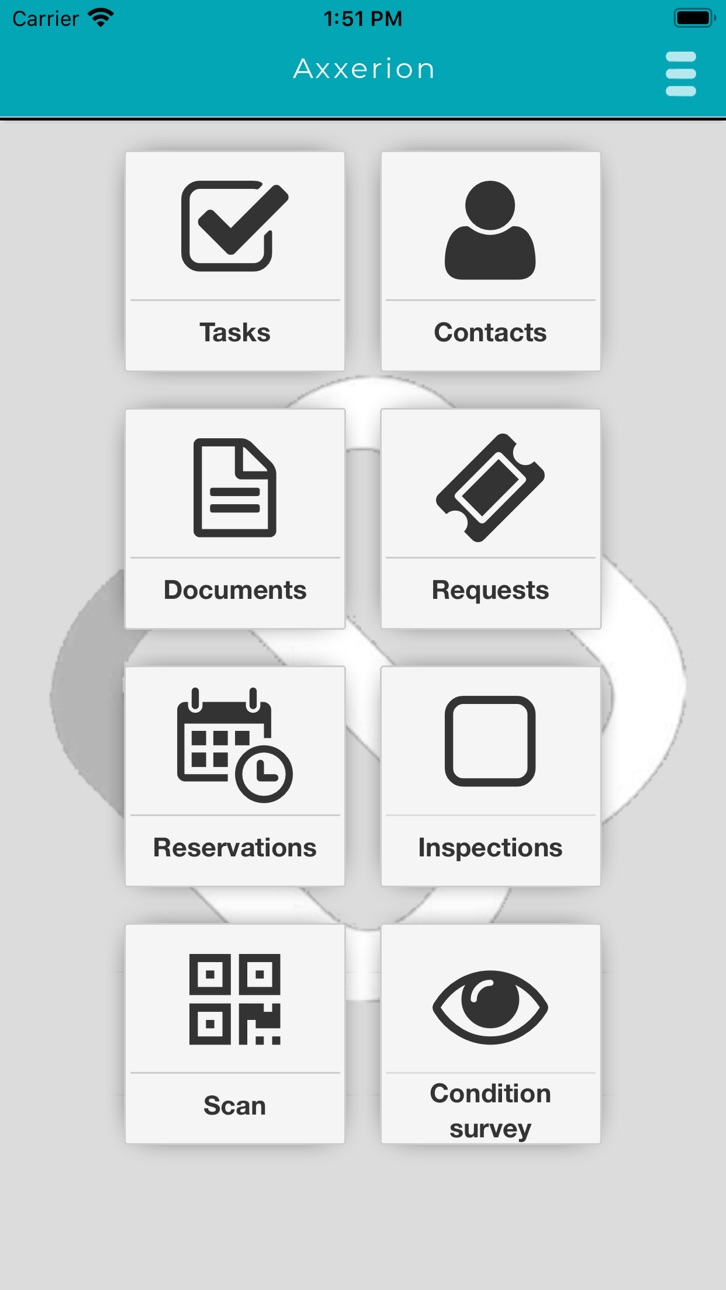

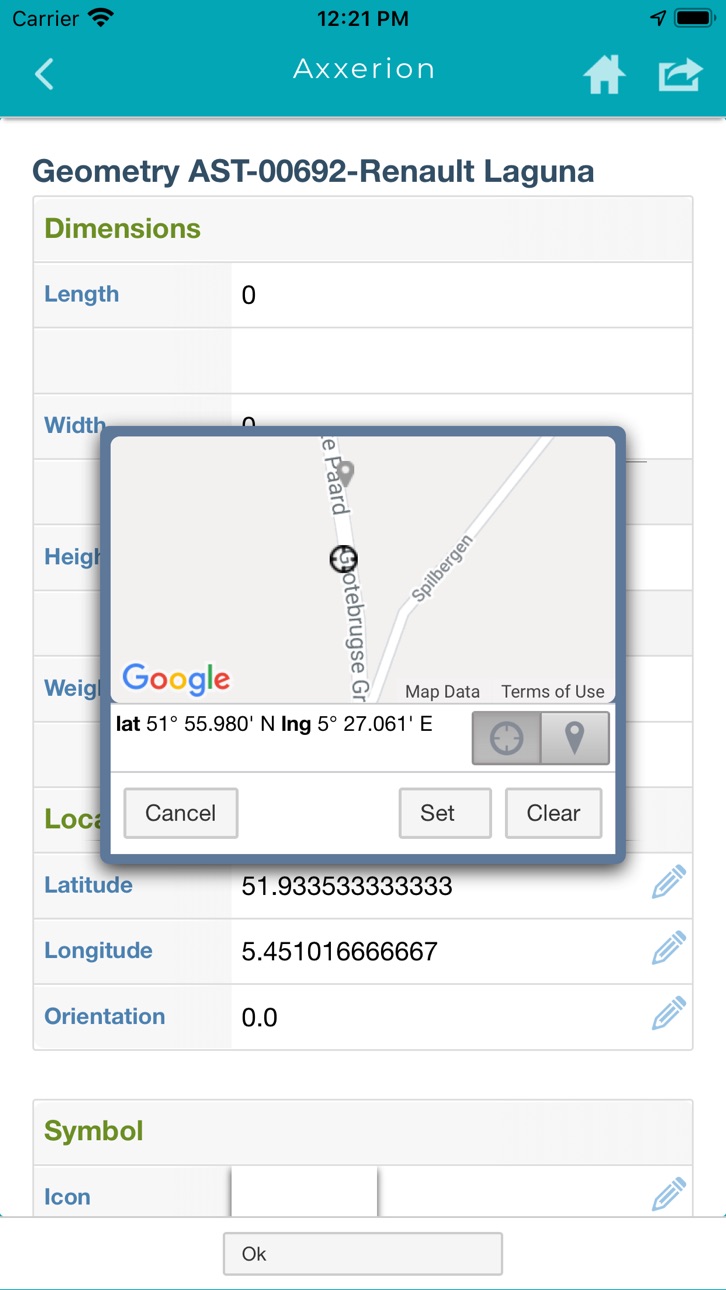

iPad 4 images


What’s New Version 1.11.35
Documents bug fix
Description
Axxerion is an Internet environment that enables employees, partners, suppliers and customers to collaborate on business processes. You can define your own processes for handling complaints, ordering supplies, making room reservations or renewing contracts. You have 24-hour access to the latest information and you decide who may view or modify certain information. The fully integrated modules enable you to quickly implement 'request to invoice' workflows for various application domains such as facility management, ERP, purchasing or project management.
Axxerion Mobile allows you to access and update information anywhere using a smartphone or tablet PC. You can perform a variety of tasks like viewing your tasks list, find contacts, submit timesheets, process work orders or complete checklists. If you do not have access to a wireless connection you can work offline and synchronize later.
The module can be configured for each user group by setting access rights to fields and functions. You can also define your own processes for modifying or creating data by defining custom workflows. Specific functions for your organization can be implemented on request.
Note: This app is for registered Axxerion users only.
Accessibility
ipadiphonemacrealityDevicetvoswatch
Version history 25 versions
Build 873420437v1.11.352025-03-24 05:53:05
Documents bug fix
Build 873357879v1.11.342025-03-19 12:26:05
Bug fixes
Build 871233113v1.11.332024-12-19 05:18:42
* Support for iOS 18.1.1 update
Build 870891313v1.11.322024-12-05 06:29:01
Support from iOS 13 version
Build 870841954v1.11.312024-12-04 05:15:16
* iOS 18 support
* Enhancements
* Bug fixes
Build 836020981v1.11.262020-06-29 11:42:42
Spacewell branding
Rebuild for iOS13
Build 830261770v1.11.182019-02-19 07:29:46
Scrolling in the App on iOS 12 devices was difficult. This is resolved.
Build 829978633v1.11.162019-01-18 07:43:48
Bug-fix release: fix for pagination on list pages; clicking on "Next" will give you the next page again.
Build 829467016v1.11.132018-12-17 10:42:39
This version fixes the following errors:
- Error when opening two images successively
- Error when registering the mobile device
- The app changes to classic view when logging into a new session when a session is already open
- Error when searching with non-default characters such as umlauts
- The app does not use the full screen size, and grey margins appear
Known issues
- It is possible that you see the 'Error retrieving credentials' message when you open the new version of the app for the first time. You can ignore this message.
- On iOS 12 or higher it is possible that you have difficulties when scrolling. This is a problem of the iOS operating system. You can still access all of the information on the screen.
Build 826268653v1.11.72018-04-05 08:03:38
- A new field type specific for signatures.
- Possibility to view and edit multi-line text fields directly, without opening a new page.
- Support for 1-minute increase/decrease steps for time fields.
- Possibility to refresh a list by pulling it down.
Build 824991592v1.10.42017-12-13 19:41:35
New: Addtional field types for inspections
New: Different style for read-only fields
Fix: Call telephone number from app
Fix: Improved loading indicator
Fix: Edit option removed for empty values
Fix: Header updating when navigating
Fix: Close message appearing after login
Fix: Several minor styling improvements
Build 821050067v1.9.42017-03-15 08:15:23
V1.9.4
New: Support for inspections
New: Modular UI style changed to new Axxerion style
New: New display for selecting list values
Fix: Menu refresh on login
Fix: Opening images
Fix: Pull down to refresh menu
Fix: Scrolling in menus
Fix: Display of enumeration values
Fix: Search multiple times on same page
Fix: Visibility of submenus
Build 817772370v1.8.12016-06-24 13:23:30
New: Redesigned device registration.
New: Removed logout button when device is registered.
Fix: Scan functionality on autocomplete screen
Build 815902967v1.8.02016-01-29 08:28:59
Fix: Added splash screen and icon for iPhone 6(s) plus.
Fix: Screen orientation is determined correctly.
Fix: Improved sorting and grouping of results on list pages.
Fix: Corrected issue when executing search function.
New: Home button navigates back to start page (for modular layout).
New: Autocomplete in search fields.
New: Asynchronous loading of included pages.
New: Preview image of documents added.
Build 813842497v1.7.72015-11-06 09:19:39
- Wizards are now supported.
- Filters retrieved data too soon, this is resolved.
- iOS 9.0 SSL compatibility problem resolved.
Build 813169914v1.7.32015-09-03 06:40:13
- Support for selecting multiple list items for batch operations.
- Manatee Works is now the only supported barcode scanner.
- If you search for an object to link to another object, and there is only one search result, this is automatically filled in. No search results page is shown.
- Filter views with only hidden filter fields are shown automatically.
- Improved pagination of lists.
- Fixed issue where text was cut in multi-column layout in landscape style.
- Fixed issue where trying to log in with an expired or disabled account caused an infinite loop.
Build 812303801v1.7.02015-06-30 06:33:23
- Improved barcode scanning and QR code scanning using the Manatee Works, Inc. scanner.
- Card layout now also available for items in include lists.
- Integration with local device functions such as telephone and email.
- Experimental: improved editing in multi-line text boxes. To try it, select it at Settings.
- Several improvements.
Build 812237679v1.6.82015-04-27 12:23:58
- Support for custom background images on menu views
- New layout for lists and more data fields in list items
- Better support for fields that are read-only on an instance view
- Better support for fields that have no label on an instance view
- Support for an additional barcode and QR code scanner: ZBar
Build 811950592v1.6.62015-03-15 11:12:44
Support for pinch zooming for documents viewed in the app
Option to view documents in the app or in the browser
Simple display of hierarchic data
Option to use bar code scanning or QR code scanning to search for related data
Improved layout of the start menu in landscape orientation
Improved readability of read-only texts
Fixed navigating back to the start menu
No border when adding a signature
Support for remembering the log-in credentials (not the password)
Improved log-out mechanism
Security update
Build 811704496v1.6.52015-03-06 07:22:51
Notice: Please, re-login after the update and provide a server name without 'http(s)://'.
Support for pinch zooming for documents viewed in the app
Option to view documents in the app or in the browser
Simple display of hierarchic data
Option to use bar code scanning or QR code scanning to search for related data
Improved layout of the start menu in landscape orientation
Improved readability of read-only texts
Fixed navigating back to the start menu
No border when adding a signature
Support for remembering the log-in credentials (not the password)
Improved log-out mechanism
Security update
Build 786342677v1.6.22015-01-13 09:41:19
1. Introduced subheadings to improve the layout of larger quantities of data.
2. You can double-tap truncated labels, to show the full label text for a short while.
3. The module layout displays the page title in the title bar.
4. The barcode scanner also supports QR code scanning.
5. The function to search for assets and areas with barcodes and QR codes is added to the start page.
6. Viewing files and documents is now done in the app instead of in an external browser.
7. Screen rotation is now supported.
8. If a page has associated help, a help icon is displayed.
Note: This version of the app uses a newer version of the abstraction layer of the operating system.
Build 718472675v1.5.272014-10-06 08:13:50
List can now have actions. For example to create and add a request to a list of requests.
Improvements to the filter pages, document and contact lists.
Support for unicode user names. Default user name 'test' removed.
Build 679222664v1.5.262014-08-22 13:21:17
maintenance update
Build 643982655v1.5.252014-07-30 20:10:54
Multiple themes. Now its possible to select themes from the settings page. Leave setting to default to experience ongoing theme development.
Document viewing improved. Pagination of document lists.
Build 603802650v1.5.242014-07-14 10:05:07
A new color scheme.
Introduction of the new 'modular' mode (requires configuration in Axxerion ask your consultant).
- Featuring modules from the menu. Each module focusses on an activity, such as Requests or Reservations.
- A 'Card' layout for instance views (single Assets, Request, etc views).
- Reduction of toolbar buttons and a new side menu.
- New menu view with larger icons.
Extended navigation on in instance pages with an item list, such as checklist of a work order. Navigation by means of previous and next buttons and swipe left right.
No pricing data captured yet — comparisons appear once the app has paid storefronts or in-app purchases.
Availability 74 of 74 storefronts
| Region | Language | Price | Ratings | Avg | Version |
|---|---|---|---|---|---|
| US | en-US | Free | 2 | 4.0 | 1.11.35 |
| AG | en-GB | Free | 0 | — | 1.11.35 |
| AI | en-GB | Free | 0 | — | 1.11.35 |
| AO | en-GB | Free | 0 | — | 1.11.35 |
| AR | es-MX | Free | 0 | — | 1.11.35 |
| BB | en-GB | Free | 0 | — | 1.11.35 |
| BF | en-GB | Free | 0 | — | 1.11.35 |
| BJ | en-GB | Free | 0 | — | 1.11.35 |
| BO | es-MX | Free | 0 | — | 1.11.35 |
| BR | pt-BR | Free | 0 | — | 1.11.35 |
| BS | en-GB | Free | 0 | — | 1.11.35 |
| BW | en-GB | Free | 0 | — | 1.11.35 |
| BZ | en-GB | Free | 0 | — | 1.11.35 |
| CD | en-GB | Free | 0 | — | 1.11.35 |
| CG | en-GB | Free | 0 | — | 1.11.35 |
| CI | fr-FR | Free | 0 | — | 1.11.35 |
| CL | es-MX | Free | 0 | — | 1.11.35 |
| CM | fr-FR | Free | 0 | — | 1.11.35 |
| CO | es-MX | Free | 0 | — | 1.11.35 |
| CR | es-MX | Free | 0 | — | 1.11.35 |
| CV | en-GB | Free | 0 | — | 1.11.35 |
| DM | en-GB | Free | 0 | — | 1.11.35 |
| DO | es-MX | Free | 0 | — | 1.11.35 |
| DZ | en-GB | Free | 0 | — | 1.11.35 |
| EC | es-MX | Free | 0 | — | 1.11.35 |
| GA | fr-FR | Free | 0 | — | 1.11.35 |
| GD | en-GB | Free | 0 | — | 1.11.35 |
| GH | en-GB | Free | 0 | — | 1.11.35 |
| GM | en-GB | Free | 0 | — | 1.11.35 |
| GT | es-MX | Free | 0 | — | 1.11.35 |
| GW | en-GB | Free | 0 | — | 1.11.35 |
| GY | en-GB | Free | 0 | — | 1.11.35 |
| HN | es-MX | Free | 0 | — | 1.11.35 |
| JM | en-GB | Free | 0 | — | 1.11.35 |
| KE | en-GB | Free | 0 | — | 1.11.35 |
| KN | en-GB | Free | 0 | — | 1.11.35 |
| KY | en-GB | Free | 0 | — | 1.11.35 |
| LC | en-GB | Free | 0 | — | 1.11.35 |
| LR | en-GB | Free | 0 | — | 1.11.35 |
| LY | en-GB | Free | 0 | — | 1.11.35 |
| MA | en-GB | Free | 0 | — | 1.11.35 |
| MG | en-GB | Free | 0 | — | 1.11.35 |
| ML | en-GB | Free | 0 | — | 1.11.35 |
| MS | en-GB | Free | 0 | — | 1.11.35 |
| MU | en-GB | Free | 0 | — | 1.11.35 |
| MW | en-GB | Free | 0 | — | 1.11.35 |
| MX | es-MX | Free | 0 | — | 1.11.35 |
| MZ | en-GB | Free | 0 | — | 1.11.35 |
| NA | en-GB | Free | 0 | — | 1.11.35 |
| NE | en-GB | Free | 0 | — | 1.11.35 |
| NI | es-MX | Free | 0 | — | 1.11.35 |
| PA | es-MX | Free | 0 | — | 1.11.35 |
| PE | es-MX | Free | 0 | — | 1.11.35 |
| PY | es-MX | Free | 0 | — | 1.11.35 |
| RW | en-GB | Free | 0 | — | 1.11.35 |
| SC | en-GB | Free | 0 | — | 1.11.35 |
| SL | en-GB | Free | 0 | — | 1.11.35 |
| SN | en-GB | Free | 0 | — | 1.11.35 |
| SR | en-GB | Free | 0 | — | 1.11.35 |
| ST | en-GB | Free | 0 | — | 1.11.35 |
| SV | es-MX | Free | 0 | — | 1.11.35 |
| SZ | en-GB | Free | 0 | — | 1.11.35 |
| TC | en-GB | Free | 0 | — | 1.11.35 |
| TD | en-GB | Free | 0 | — | 1.11.35 |
| TN | en-GB | Free | 0 | — | 1.11.35 |
| TT | en-GB | Free | 0 | — | 1.11.35 |
| TZ | en-GB | Free | 0 | — | 1.11.35 |
| UG | en-GB | Free | 0 | — | 1.11.35 |
| UY | en-GB | Free | 0 | — | 1.11.35 |
| VC | en-GB | Free | 0 | — | 1.11.35 |
| VE | es-MX | Free | 0 | — | 1.11.35 |
| VG | en-GB | Free | 0 | — | 1.11.35 |
| ZM | en-GB | Free | 0 | — | 1.11.35 |
| ZW | en-GB | Free | 0 | — | 1.11.35 |
Change log 28 changes · MS
✎
releaseNotes updated
Documents bug fix
✎
description updated
Axxerion is an Internet environment that enables employees, partners, suppliers and customers to collaborate on business processes. You can define your own proc
✎
name updated
Axxerion Mobile ©
◆
Version 1.11.35 released
Documents bug fix
◆
Version 1.11.34 released
Bug fixes
◆
Version 1.11.33 released
* Support for iOS 18.1.1 update
◆
Version 1.11.32 released
Support from iOS 13 version
◆
Version 1.11.31 released
* iOS 18 support
* Enhancements
* Bug fixes
◆
Version 1.11.26 released
Spacewell branding
Rebuild for iOS13
◆
Version 1.11.18 released
Scrolling in the App on iOS 12 devices was difficult. This is resolved.
◆
Version 1.11.16 released
Bug-fix release: fix for pagination on list pages; clicking on "Next" will give you the next page again.
◆
Version 1.11.13 released
This version fixes the following errors:
- Error when opening two images successively
- Error when registering the mobile device
- The app changes to classic view when logging into a new session when a session is already open
- Error when s
◆
Version 1.11.7 released
- A new field type specific for signatures.
- Possibility to view and edit multi-line text fields directly, without opening a new page.
- Support for 1-minute increase/decrease steps for time fields.
- Possibility to refresh a list by pulli
◆
Version 1.10.4 released
New: Addtional field types for inspections
New: Different style for read-only fields
Fix: Call telephone number from app
Fix: Improved loading indicator
Fix: Edit option removed for empty values
Fix: Header updating when navigating
Fix: Clo
◆
Version 1.9.4 released
V1.9.4
New: Support for inspections
New: Modular UI style changed to new Axxerion style
New: New display for selecting list values
Fix: Menu refresh on login
Fix: Opening images
Fix: Pull down to refresh menu
Fix: Scrolling in menus
Fix: D
◆
Version 1.8.1 released
New: Redesigned device registration.
New: Removed logout button when device is registered.
Fix: Scan functionality on autocomplete screen
◆
Version 1.8.0 released
Fix: Added splash screen and icon for iPhone 6(s) plus.
Fix: Screen orientation is determined correctly.
Fix: Improved sorting and grouping of results on list pages.
Fix: Corrected issue when executing search function.
New: Home button nav
◆
Version 1.7.7 released
- Wizards are now supported.
- Filters retrieved data too soon, this is resolved.
- iOS 9.0 SSL compatibility problem resolved.
◆
Version 1.7.3 released
- Support for selecting multiple list items for batch operations.
- Manatee Works is now the only supported barcode scanner.
- If you search for an object to link to another object, and there is only one search result, this is automatically
◆
Version 1.7.0 released
- Improved barcode scanning and QR code scanning using the Manatee Works, Inc. scanner.
- Card layout now also available for items in include lists.
- Integration with local device functions such as telephone and email.
- Experimental: impr
◆
Version 1.6.8 released
- Support for custom background images on menu views
- New layout for lists and more data fields in list items
- Better support for fields that are read-only on an instance view
- Better support for fields that have no label on an instance
◆
Version 1.6.6 released
Support for pinch zooming for documents viewed in the app
Option to view documents in the app or in the browser
Simple display of hierarchic data
Option to use bar code scanning or QR code scanning to search for related data
Improved la
◆
Version 1.6.5 released
Notice: Please, re-login after the update and provide a server name without 'http(s)://'.
Support for pinch zooming for documents viewed in the app
Option to view documents in the app or in the browser
Simple display of hierarchic data
◆
Version 1.6.2 released
1. Introduced subheadings to improve the layout of larger quantities of data.
2. You can double-tap truncated labels, to show the full label text for a short while.
3. The module layout displays the page title in the title bar.
4. The ba
◆
Version 1.5.27 released
List can now have actions. For example to create and add a request to a list of requests.
Improvements to the filter pages, document and contact lists.
Support for unicode user names. Default user name 'test' removed.
◆
Version 1.5.26 released
maintenance update
◆
Version 1.5.25 released
Multiple themes. Now its possible to select themes from the settings page. Leave setting to default to experience ongoing theme development.
Document viewing improved. Pagination of document lists.
◆
Version 1.5.24 released
A new color scheme.
Introduction of the new 'modular' mode (requires configuration in Axxerion ask your consultant).
- Featuring modules from the menu. Each module focusses on an activity, such as Requests or Reservations.
- A 'Card' layout