Home › Business

 ID
ID
 USen-US
 GBen-GB
 CAen-CA
 AEen-GB
 AUen-AU
 INen-GB
 MXes-MX
 RUru
RUru HKzh-Hant-HK
 JPja
JPja CHde-CH
 NOen-GB
 SAen-GB
 SGen-GB
 BRpt-BR
 CNzh-Hans-CN
 ARes-MX
 TRen-GB
 TWzh-Hant-TW
 COes-MX
 KRko
KRko MYen-GB
 OMen-GB
 ZAen-GBIDen-GB
 KZen-GB
 MOzh-Hant-HK
 NGen-GB
 QAen-GB
 CLes-MX
 EGen-GB
 GTes-MX
 ILen-GB
 JOen-GB
 KEen-GB
 KWen-GB
 LBen-GB
 MUen-GB
 NZen-AU
 PAes-MX
 PEes-MX
 THen-GB
 UAen-GB
 ALen-GB
 AZen-GB
 BHen-GB
 BMen-GB
 BOes-MX
 BYen-GB
 CRes-MX
 DOes-MX
 ECes-MX
 HNes-MX
 KHen-GB
 LKen-GB
 MDen-GB
 MKen-GB
 NIes-MX
 PGen-GB
 PHen-GB
 PKen-GB
 PYes-MX
 SVes-MX
 TTen-GB
 UGen-GB
 UYen-GB
 VEes-MX
 VNen-GB
 ZWen-GB
 AFen-GB
 AGen-GB
 AIen-GB
 AMen-GB
 AOen-GB
 BAen-GB
 BBen-GB
 BFen-GB
 BJen-GB
 BNen-GB
 BSen-GB
 BTen-GB
 BWen-GB
 BZen-GB
 CDen-GB
 CGen-GB
 CIfr-FR
 CMfr-FR
 CVen-GB
 DMen-GB
 DZen-GB
 FJen-GB
 FMen-GB
 GAfr-FR
 GDen-GB
 GEen-GB
 GHen-GB
 GMen-GB
 GWen-GB
 GYen-GB
 IQen-GB
 ISen-GB
 JMen-GB
 KGen-GB
 KNen-GB
 KYen-GB
 LAen-GB
 LCen-GB
 LRen-GB
 LYen-GB
 MAen-GB
 MEen-GB
 MGen-GB
 MLen-GB
 MMen-GB
 MNen-GB
 MRen-GB
 MSen-GB
 MVen-GB
 MWen-GB
 MZen-GB
 NAen-GB
 NEen-GB
 NPen-GB
 NRen-GB
 PWen-GB
 RSen-GB
 RWen-GB
 SBen-GB
 SCen-GB
 SLen-GB
 SNen-GB
 SRen-GB
 STen-GB
 SZen-GB
 TCen-GB
 TDen-GB
 TJen-GB
 TMen-GB
 TNen-GB
 TOen-GB
 TZen-GB
 UZen-GB
 VCen-GB
 VGen-GB
 VUen-GB
 XKen-GB
 YEen-GB
 ZMen-GB
 ATNot Available
 BENot Available
 BGNot Available
 CYNot Available
 CZNot Available
 DENot Available
 DKNot Available
 EENot Available
 ESNot Available
 FINot Available
 FRNot Available
 GRNot Available
 HRNot Available
 HUNot Available
 IENot Available
 ITNot Available
 LTNot Available
 LUNot Available
 LVNot Available
 MTNot Available
 NLNot Available
 PLNot Available
 PTNot Available
 RONot Available
 SENot Available
 SINot Available
 SKNot Available
148 of 175 storefronts
Content in en-US
Content in en-US
Information
Preview 2 platforms
iPhone 5 images


iPad 5 images

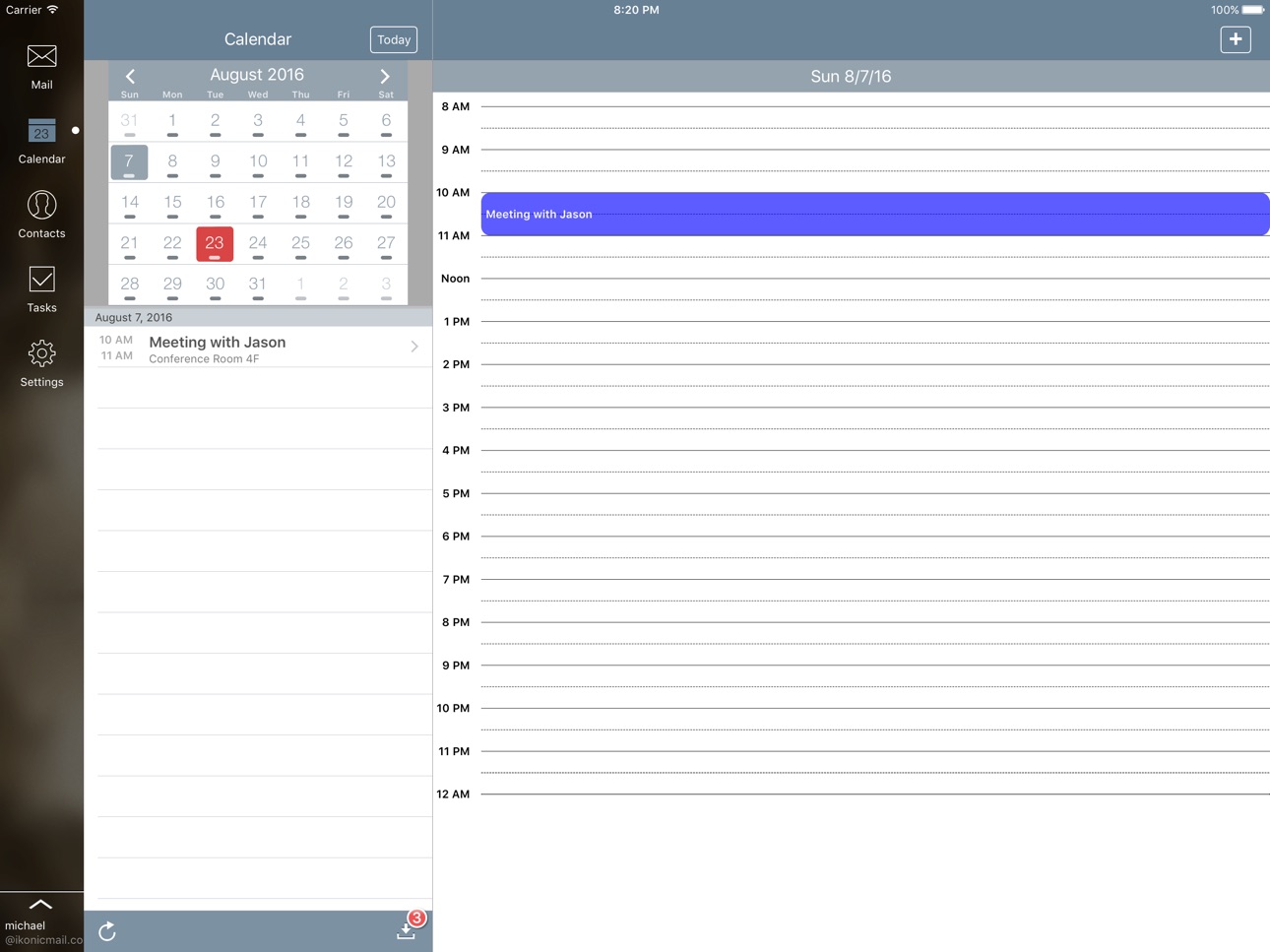


What’s New Version 3.6.7
• Optimized for all new devices
• Fix the most common crashes
• Added a setting to allow you to export your calendar to your local iOS calendar (Save Events to Local Calendar)
• Out of office settings now free for everyone
Description
########################################
- Securely access Outlook Email and Calendar
- #1 Outlook/Exchange Email App
- Top 5 business apps, peaked at 55 overall
########################################
Keep your work and personal email accounts separate. Access your work email with an all-in-one Outlook/Exchange solution with tools designed for mobile business users.
Read and compose Outlook emails and manage your calendar directly from any iOS device. No more using the web browser to access your Outlook account!
-Read and reply to all Outlook email (includes subfolders)
-Open and forward attachments
-Compatible with PDF, XLS, DOC, JPG files
-Exchange 2013, 2010, 2007, 2003, Office 365 business
- Rich HTML Text Editing
- Out of Office
- Scheduling Assistant
-View, create calendar events (and reminders)
-Search Exchange Global Address Book
-Access contact details (name, tile, phone)
-Landscape mode (great for iPad)
-User-friendly design with easy navigation
-Excellent customer support
-Signature feature available
-Passcode protection for extra security
-Secure login
-Multiple accounts
-Works on iPhone, iPad over 3G or WiFi
-Connect to Microsoft Exchange 2003, 2007, 2010
-Compatible with Microsoft Office 365, Gmail, Outlook.com, Yahoo, AOL
Connect with us!
http://www.mailplusapp.com
http://www.twitter.com/mailplusapp
http://www.mailplusapp.com/news
Outlook is a registered trademark of Microsoft Corporation. This application has been developed by a third party developer and is not endorsed, tested, or associated with Microsoft Corporation.
In-App Purchases ID pricing
One-Time Purchases
Out of Office—
Capabilities
In-App Purchases
Accessibility
ipadiphonemacrealityDevicetvoswatch
Version history 25 versions
Build 833613320v3.6.72020-01-31 01:16:53
• Optimized for all new devices
• Fix the most common crashes
• Added a setting to allow you to export your calendar to your local iOS calendar (Save Events to Local Calendar)
• Out of office settings now free for everyone
Build 818586805v3.6.62016-08-25 12:21:00
Follow us @mailplusapp for more info and updates
- Bug fixes and library updates
v3.6.5
Fixed
- Reply All crash
- A crash when searching emails
Build 813247222v3.6.52015-09-23 12:02:05
Follow us @mailplusapp for more info and updates
Fixed
- Reply All crash
- A crash when searching emails
Build 813081825v3.6.42015-09-01 14:53:26
Follow us @mailplusapp for more info and updates
Added
-Apple Watch Support
Fixed
-Numerous crashes
Build 811105347v3.6.32014-12-04 14:59:11
Follow us @mailplusapp for more info and updates
Fixed
- iPad fix for not being able to view emails
- Bug fixes
Build 782362735v3.6.22014-11-10 01:40:29
Follow us @mailplusapp for more info and updates
Fixed
- iOS 8 password prompts
- Connection issues for failed to refresh
3.6 Added
- Default reply font color option (in addition to font options in 3.6)
3.6 Fixed
- Crashes on startup
- Forwarding with attachments on iPad
- Multiple accounts iOS 7
- Invalid start/end dates in calendar
- Multiple issues with compose
- iPad save drafts crash
- Invitations referencing wrong items in calendar
Build 770453046v3.6.12014-11-05 23:25:04
Follow us @mailplusapp for more info and updates
Added:
- Default reply font color option (in addition to font options added in 3.6)
Fixes for:
- Crashes on startup
- Forwarding with attachments on iPad
- Multiple accounts iOS 7
- Invalid start/end dates in calendar
- Multiple issues with compose
- iPad save drafts crash
- Invitations referencing wrong items in calendar
For those seeing connection issues (failed to refresh), we've finally fixed this in 3.6.2 (confirmed by multiple users). If you're interested in trying out the beta, please email tech@ikonicapps.com
Build 755362709v3.62014-10-25 21:21:22
Added
- Touch ID support
- Default font options for emails
Fixes for
- Connection problems
- Crashes
Build 745942719v3.5.12014-10-15 17:47:21
Follow us @mailplusapp for more info and updates
Fixed
- iPad reply/forward button
- Importance crash when sending email (Thanks Tony)
- Freezes when upgrading
- Connection problems
- Various crashes
Build 612163543v3.52014-10-09 12:35:20
Added
- iPhone 6/ 6 Plus support
- Autosave drafts (automatically save drafts while composing emails)
- Options to download more messages (200, 500)
- Improved server speed
Fixes
- Invalid credentials
- iOS 8 issues (date pickers and colors)
- Signature phone number links
- Signature (now you can easily paste signatures into the app)
Follow us @mailplusapp for more info and updates
Build 605152642v3.4.112014-06-21 15:45:51
- Bug fixes
Follow us @mailplusapp for more info and updates
Build 596442681v3.4.102014-06-12 19:06:45
Follow us @mailplusapp for more info and updates
- Out of Office fixes for line spaces
- Passcode timeout
- Calendar response fix for "No Reply"
- Full mailto support
Build 553842639v3.4.92014-05-16 11:25:01
Follow us @mailplusapp for more info and updates
- Fixes for Out of Office
- Calendar fixes for some connections
- New email notification options
- Swipe right gesture to switch between multiple accounts
Build 263802635v3.4.82013-12-30 17:00:24
- Connection fixes
Build 243662667v3.4.72013-12-17 20:47:44
Follow us @mailplusapp for more info and updates
- Connection fixes
- Stability and performance improvements
Note: if you're still seeing "Failed to Refresh" after reinstalling Mail+, please contact us at info@ikonicapps.com
Build 171522631v3.4.62013-11-27 14:27:47
Follow us @mailplusapp for more info and updates
- Fixes for characters showing as question marks
Note: if you're still seeing "Failed to Refresh" after reinstalling Mail+, please contact us at info@ikonicapps.com
--- 3.4.5 ---
Added
- More language support for some Inboxes
Fixed
- Minor connectivity for certain servers
- Calendar hyperlinks in email forwards
- Significantly improved performance
- Access to iOS contacts for some devices
- Improved GAL searches
- Flagging inconsistencies
Build 121342633v3.4.52013-11-19 16:36:56
Follow us @mailplusapp for more info and updates
Added
- More language support for some Inboxes
Fixed
- Minor connectivity for certain servers
- Calendar hyperlinks in email forwards
- Significantly improved performance
- Access to iOS contacts for some devices
- Improved GAL searches
- Flagging inconsistencies
Note: if you're still seeing "Failed to Refresh" please contact us at info@ikonicapps.com
Build 85562892v3.4.42013-11-04 17:38:50
Follow us @mailplusapp for more info and updates
Added
- Swipe Left to Right sidebar
- Free/Busy options for Calendar
- Sensitivity for Calendar
Fixed
- Fixes for extremely large calendars
- iOS 7.0.3 color changes
- Crash fixes
- Crashes and performance optimizations
Build 84842640v3.4.32013-10-25 12:53:21
Follow us @mailplusapp for more info and updates
Fixed
- Invalid credentials when running app in background
- Crashes and performance optimizations
- More connections for Outlook.com
- 2003 email replies
Build 84044688v3.4.22013-10-17 02:20:56
Follow us @mailplusapp for more info and updates
Version 3.4.2
- Fix for failing connection to some Exchange servers
Version 3.4.1
- Fix for invitations crash
- Fix slowness for large Exchange calendars
Version 3.4
- iOS 7 Redesign
- New look and feel with transparency
- Updated iOS 7 icon
- iOS 7 Constant backgrounding (setting)
- New sidebar design
- New calendar styling
- Fixes for Exchange 2003
Build 83342666v3.4.12013-10-16 13:35:23
Follow us @mailplusapp for more info and updates
Version 3.4.1
- Fix for invitations crash
- Fix slowness for large Exchange calendars
Version 3.4
- iOS 7 Redesign
- New look and feel with transparency
- Updated iOS 7 icon
- iOS 7 Constant backgrounding (setting)
- New sidebar design
- New calendar styling
- Fixes for Exchange 2003
Build 79302814v3.42013-10-09 22:13:16
Follow us @mailplusapp for more info and updates
iOS 7 Redesign
- New look and feel with transparency
- Updated iOS 7 icon
- iOS 7 Constant backgrounding (setting)
- New sidebar design
- New calendar styling
- Fixes for Exchange 2003
Added
- New OOF Indicator
- Expand/Collapse buttons for folders
- Rich HTML Signatures
- Automatic syncing of Mail/Calendar/Contacts for new accounts
Fixed
- 2003 Connection Issues with iOS 7
- Minor contacts fixes
- Multiple crashes and minor bug fixes
- iOS 7 Fixes
Build 31662723v3.3.22013-09-16 20:24:00
Follow us on Twitter for frequent updates @mailplusapp
- iPad back button fix
- Bug fixes
Version 3.3.1
- Collapsible folders
- Subfolder order
- Minor fixes for iOS 7
- Easier OOF syncing
- Calendar crashes
- Correct email flag
- Long meeting notes
Version 3.3
- Rich HTML Text Editing
- Scheduling Assistant
- Out of Office Controls
- Attachments Integration with Dropbox/Box
- Filter for Unread/Flag/Attachments
Build 23692725v3.3.12013-09-13 19:11:39
Follow us on Twitter for updates and more info @mailplusapp
Added
- Collapsible folders
Fixed
- Subfolder order
- Minor fixes for newer versions of iOS
- Easier OOF syncing
- Calendar crash fixes (Thanks JPP)
- Correct email flag instead of "Flag for Recipient" (Thanks JPP)
- Long meeting notes (Thanks JPP)
- Other minor bugs
Build 16586231v3.32013-09-08 23:19:37
The first 100 people to follow and tweet @mailplusapp with their favorite Mail+ feature with hashtag #mailplusmore will receive a free promotional code to unlock "Out of Office"
Featured Enhancements
- Rich HTML Text Editing (change color, font, add bulleted lists, increase indentation)
- Scheduling Assistant (Find a meeting time based on everyone's availability)
- Out Of Office Controls for (2007 and up)
- Attachments Integration (Dropbox/Box)
- Filter for Unread/Flag/Attachments
Additional Enhancements
- Setting for "Auto Mark as Read"
- Setting for "Show Next Email" after move/deletes
- Additional Mail Controls (Create Event, Print)
- Additional Calendar Controls (I'm Late, Email Attendees)
- Print Functionality
- Localization in over 10 different languages
- Video Attachments
- Breezy Print Integration
Bug Fixes
- Duplicate Calendar Notifications
- Signature for Open In
- Easier Account Setup
- iPad Calendar UI bugs
- Improved Logging
- 0 Byte Attachments
- IMAP Attachment bugs
- Preview while searching
- Multiple Accounts iPad bug
- Bug causing Recent Contacts not to display anything
- Bug causing IMAP conversations to break thread
- Opening notifications not selecting the right email/calendar/account
- Allday and Multiday calendar bugs
- Invitations bugs
- Disable links in tasks
- Calendar performance improvements
- Passcode Hangs
- Crashes
Follow us on Twitter or read our blog for more info and updates http://www.twitter.com/mailplusapp
http://www.mailplusapp.com/news
Price history by region
Currency
Show
Columns
Search
Availability 148 of 175 storefronts
| Region | Language | Price | Ratings | Avg | Version |
|---|---|---|---|---|---|
| US | en-US | USD 4.99 | 839 | 3.9 | 3.6.7 |
| GB | en-GB | GBP 4.99 | 125 | 4.0 | 3.6.7 |
| CA | en-CA | CAD 6.99 | 123 | 4.1 | 3.6.7 |
| AE | en-GB | AED 19.99 | 46 | 4.2 | 3.6.7 |
| AU | en-AU | AUD 7.99 | 45 | 3.7 | 3.6.7 |
| IN | en-GB | INR 499 | 21 | 3.4 | 3.6.7 |
| MX | es-MX | MXN 99 | 20 | 3.9 | 3.6.7 |
| RU | ru | RUB 449 | 15 | 3.7 | 3.6.7 |
| HK | zh-Hant-HK | HKD 38 | 14 | 4.2 | 3.6.7 |
| JP | ja | JPY 800 | 13 | 4.4 | 3.6.7 |
| CH | de-CH | CHF 4 | 12 | 4.1 | 3.6.7 |
| NO | en-GB | NOK 59 | 9 | 3.9 | 3.6.7 |
| SA | en-GB | SAR 19.99 | 9 | 4.0 | 3.6.7 |
| SG | en-GB | SGD 6.98 | 9 | 3.7 | 3.6.7 |
| BR | pt-BR | BRL 29.9 | 8 | 4.4 | 3.6.7 |
| CN | zh-Hans-CN | CNY 38 | 8 | 3.9 | 3.6.7 |
| AR | es-MX | USD 4.99 | 6 | 3.8 | 3.6.7 |
| TR | en-GB | TRY 249.99 | 6 | 4.0 | 3.6.7 |
| TW | zh-Hant-TW | TWD 150 | 5 | 3.8 | 3.6.7 |
| CO | es-MX | COP 24900 | 4 | 4.0 | 3.6.7 |
| KR | ko | KRW 7700 | 4 | 3.3 | 3.6.7 |
| MY | en-GB | MYR 22.9 | 4 | 4.8 | 3.6.7 |
| OM | en-GB | USD 4.99 | 4 | 4.3 | 3.6.7 |
| ZA | en-GB | ZAR 99.99 | 4 | 2.8 | 3.6.7 |
| ID | en-GB | IDR 89000 | 3 | 4.0 | 3.6.7 |
| KZ | en-GB | KZT 2990 | 3 | 4.7 | 3.6.7 |
| MO | zh-Hant-HK | USD 4.99 | 3 | 4.0 | 3.6.7 |
| NG | en-GB | NGN 7900 | 3 | 4.7 | 3.6.7 |
| QA | en-GB | QAR 19.99 | 3 | 4.0 | 3.6.7 |
| CL | es-MX | CLP 5990 | 2 | 5.0 | 3.6.7 |
| EG | en-GB | EGP 249.99 | 2 | 4.5 | 3.6.7 |
| GT | es-MX | USD 4.99 | 2 | 4.0 | 3.6.7 |
| IL | en-GB | ILS 17.9 | 2 | 5.0 | 3.6.7 |
| JO | en-GB | USD 4.99 | 2 | 3.0 | 3.6.7 |
| KE | en-GB | USD 5.99 | 2 | 4.5 | 3.6.7 |
| KW | en-GB | USD 4.99 | 2 | 3.5 | 3.6.7 |
| LB | en-GB | USD 4.99 | 2 | 3.0 | 3.6.7 |
| MU | en-GB | USD 5.99 | 2 | 3.0 | 3.6.7 |
| NZ | en-AU | NZD 9.99 | 2 | 3.5 | 3.6.7 |
| PA | es-MX | USD 4.99 | 2 | 4.5 | 3.6.7 |
| PE | es-MX | PEN 22.9 | 2 | 5.0 | 3.6.7 |
| TH | en-GB | THB 199 | 2 | 5.0 | 3.6.7 |
| UA | en-GB | USD 5.99 | 2 | 3.0 | 3.6.7 |
| AL | en-GB | USD 5.99 | 1 | 2.0 | 3.6.7 |
| AZ | en-GB | USD 5.99 | 1 | 5.0 | 3.6.7 |
| BH | en-GB | USD 4.99 | 1 | 5.0 | 3.6.7 |
| BM | en-GB | USD 4.99 | 1 | 1.0 | 3.6.7 |
| BO | es-MX | USD 4.99 | 1 | 3.0 | 3.6.7 |
| BY | en-GB | USD 5.99 | 1 | 1.0 | 3.6.7 |
| CR | es-MX | USD 4.99 | 1 | 4.0 | 3.6.7 |
| DO | es-MX | USD 4.99 | 1 | 1.0 | 3.6.7 |
| EC | es-MX | USD 4.99 | 1 | 5.0 | 3.6.7 |
| HN | es-MX | USD 4.99 | 1 | 4.0 | 3.6.7 |
| KH | en-GB | USD 4.99 | 1 | 3.0 | 3.6.7 |
| LK | en-GB | USD 4.99 | 1 | 4.0 | 3.6.7 |
| MD | en-GB | USD 5.99 | 1 | 4.0 | 3.6.7 |
| MK | en-GB | USD 4.99 | 1 | 5.0 | 3.6.7 |
| NI | es-MX | USD 4.99 | 1 | 1.0 | 3.6.7 |
| PG | en-GB | USD 4.99 | 1 | 3.0 | 3.6.7 |
| PH | en-GB | PHP 299 | 1 | 4.0 | 3.6.7 |
| PK | en-GB | PKR 1300 | 1 | 5.0 | 3.6.7 |
| PY | es-MX | USD 4.99 | 1 | 4.0 | 3.6.7 |
| SV | es-MX | USD 4.99 | 1 | 4.0 | 3.6.7 |
| TT | en-GB | USD 4.99 | 1 | 5.0 | 3.6.7 |
| UG | en-GB | USD 5.99 | 1 | 4.0 | 3.6.7 |
| UY | en-GB | USD 4.99 | 1 | 5.0 | 3.6.7 |
| VE | es-MX | USD 4.99 | 1 | 5.0 | 3.6.7 |
| VN | en-GB | VND 149000 | 1 | 4.0 | 3.6.7 |
| ZW | en-GB | USD 5.99 | 1 | 4.0 | 3.6.7 |
| AF | en-GB | USD 4.99 | 0 | — | 3.6.7 |
| AG | en-GB | USD 4.99 | 0 | — | 3.6.7 |
| AI | en-GB | USD 4.99 | 0 | — | 3.6.7 |
| AM | en-GB | USD 5.99 | 0 | — | 3.6.7 |
| AO | en-GB | USD 4.99 | 0 | — | 3.6.7 |
| BA | en-GB | EUR 5.99 | 0 | — | 3.6.7 |
| BB | en-GB | USD 5.99 | 0 | — | 3.6.7 |
| BF | en-GB | USD 4.99 | 0 | — | 3.6.7 |
| BJ | en-GB | USD 5.99 | 0 | — | 3.6.7 |
| BN | en-GB | USD 4.99 | 0 | — | 3.6.7 |
| BS | en-GB | USD 4.99 | 0 | — | 3.6.7 |
| BT | en-GB | USD 4.99 | 0 | — | 3.6.7 |
| BW | en-GB | USD 4.99 | 0 | — | 3.6.7 |
| BZ | en-GB | USD 4.99 | 0 | — | 3.6.7 |
| CD | en-GB | USD 4.99 | 0 | — | 3.6.7 |
| CG | en-GB | USD 4.99 | 0 | — | 3.6.7 |
| CI | fr-FR | USD 5.99 | 0 | — | 3.6.7 |
| CM | fr-FR | USD 5.99 | 0 | — | 3.6.7 |
| CV | en-GB | USD 4.99 | 0 | — | 3.6.7 |
| DM | en-GB | USD 4.99 | 0 | — | 3.6.7 |
| DZ | en-GB | USD 4.99 | 0 | — | 3.6.7 |
| FJ | en-GB | USD 4.99 | 0 | — | 3.6.7 |
| FM | en-GB | USD 4.99 | 0 | — | 3.6.7 |
| GA | fr-FR | USD 4.99 | 0 | — | 3.6.7 |
| GD | en-GB | USD 4.99 | 0 | — | 3.6.7 |
| GE | en-GB | USD 5.99 | 0 | — | 3.6.7 |
| GH | en-GB | USD 5.99 | 0 | — | 3.6.7 |
| GM | en-GB | USD 4.99 | 0 | — | 3.6.7 |
| GW | en-GB | USD 4.99 | 0 | — | 3.6.7 |
| GY | en-GB | USD 4.99 | 0 | — | 3.6.7 |
| IQ | en-GB | USD 4.99 | 0 | — | 3.6.7 |
| IS | en-GB | USD 5.99 | 0 | — | 3.6.7 |
| JM | en-GB | USD 4.99 | 0 | — | 3.6.7 |
| KG | en-GB | USD 4.99 | 0 | — | 3.6.7 |
| KN | en-GB | USD 4.99 | 0 | — | 3.6.7 |
| KY | en-GB | USD 4.99 | 0 | — | 3.6.7 |
| LA | en-GB | USD 4.99 | 0 | — | 3.6.7 |
| LC | en-GB | USD 4.99 | 0 | — | 3.6.7 |
| LR | en-GB | USD 4.99 | 0 | — | 3.6.7 |
| LY | en-GB | USD 4.99 | 0 | — | 3.6.7 |
| MA | en-GB | USD 4.99 | 0 | — | 3.6.7 |
| ME | en-GB | EUR 4.99 | 0 | — | 3.6.7 |
| MG | en-GB | USD 4.99 | 0 | — | 3.6.7 |
| ML | en-GB | USD 4.99 | 0 | — | 3.6.7 |
| MM | en-GB | USD 4.99 | 0 | — | 3.6.7 |
| MN | en-GB | USD 4.99 | 0 | — | 3.6.7 |
| MR | en-GB | USD 4.99 | 0 | — | 3.6.7 |
| MS | en-GB | USD 4.99 | 0 | — | 3.6.7 |
| MV | en-GB | USD 4.99 | 0 | — | 3.6.7 |
| MW | en-GB | USD 4.99 | 0 | — | 3.6.7 |
| MZ | en-GB | USD 4.99 | 0 | — | 3.6.7 |
| NA | en-GB | USD 4.99 | 0 | — | 3.6.7 |
| NE | en-GB | USD 4.99 | 0 | — | 3.6.7 |
| NP | en-GB | USD 5.99 | 0 | — | 3.6.7 |
| NR | en-GB | USD 4.99 | 0 | — | 3.6.7 |
| PW | en-GB | USD 4.99 | 0 | — | 3.6.7 |
| RS | en-GB | EUR 5.99 | 0 | — | 3.6.7 |
| RW | en-GB | USD 4.99 | 0 | — | 3.6.7 |
| SB | en-GB | USD 4.99 | 0 | — | 3.6.7 |
| SC | en-GB | USD 4.99 | 0 | — | 3.6.7 |
| SL | en-GB | USD 4.99 | 0 | — | 3.6.7 |
| SN | en-GB | USD 5.99 | 0 | — | 3.6.7 |
| SR | en-GB | USD 4.99 | 0 | — | 3.6.7 |
| ST | en-GB | USD 4.99 | 0 | — | 3.6.7 |
| SZ | en-GB | USD 4.99 | 0 | — | 3.6.7 |
| TC | en-GB | USD 4.99 | 0 | — | 3.6.7 |
| TD | en-GB | USD 4.99 | 0 | — | 3.6.7 |
| TJ | en-GB | USD 4.99 | 0 | — | 3.6.7 |
| TM | en-GB | USD 4.99 | 0 | — | 3.6.7 |
| TN | en-GB | USD 4.99 | 0 | — | 3.6.7 |
| TO | en-GB | USD 4.99 | 0 | — | 3.6.7 |
| TZ | en-GB | TZS 14900 | 0 | — | 3.6.7 |
| UZ | en-GB | USD 4.99 | 0 | — | 3.6.7 |
| VC | en-GB | USD 4.99 | 0 | — | 3.6.7 |
| VG | en-GB | USD 4.99 | 0 | — | 3.6.7 |
| VU | en-GB | USD 4.99 | 0 | — | 3.6.7 |
| XK | en-GB | EUR 5.99 | 0 | — | 3.6.7 |
| YE | en-GB | USD 4.99 | 0 | — | 3.6.7 |
| ZM | en-GB | USD 5.99 | 0 | — | 3.6.7 |
Not available in: AT, BE, BG, CY, CZ, DE, DK, EE, ES, FI, FR, GR, HR, HU, IE, IT, LT, LU, LV, MT, NL, PL, PT, RO, SE, SI, SK
Change log 28 changes · ID
✎
releaseNotes updated
• Optimized for all new devices
• Fix the most common crashes
• Added a setting to allow you to export your calendar to your local iOS calendar (Save Events to
✎
description updated
########################################
- Securely access Outlook Email and Calendar
- #1 Outlook/Exchange Email App
- Top 5 business apps, peaked at 55 overal
✎
name updated
Mail+ for Outlook
◆
Version 3.6.7 released
• Optimized for all new devices
• Fix the most common crashes
• Added a setting to allow you to export your calendar to your local iOS calendar (Save Events to Local Calendar)
• Out of office settings now free for everyone
◆
Version 3.6.6 released
Follow us @mailplusapp for more info and updates
- Bug fixes and library updates
v3.6.5
Fixed
- Reply All crash
- A crash when searching emails
◆
Version 3.6.5 released
Follow us @mailplusapp for more info and updates
Fixed
- Reply All crash
- A crash when searching emails
◆
Version 3.6.4 released
Follow us @mailplusapp for more info and updates
Added
-Apple Watch Support
Fixed
-Numerous crashes
◆
Version 3.6.3 released
Follow us @mailplusapp for more info and updates
Fixed
- iPad fix for not being able to view emails
- Bug fixes
◆
Version 3.6.2 released
Follow us @mailplusapp for more info and updates
Fixed
- iOS 8 password prompts
- Connection issues for failed to refresh
3.6 Added
- Default reply font color option (in addition to font options in 3.6)
3.6 Fixed
- Crashes on startup
- F
◆
Version 3.6.1 released
Follow us @mailplusapp for more info and updates
Added:
- Default reply font color option (in addition to font options added in 3.6)
Fixes for:
- Crashes on startup
- Forwarding with attachments on iPad
- Multiple accounts iOS 7
- Invalid
◆
Version 3.6 released
Added
- Touch ID support
- Default font options for emails
Fixes for
- Connection problems
- Crashes
◆
Version 3.5.1 released
Follow us @mailplusapp for more info and updates
Fixed
- iPad reply/forward button
- Importance crash when sending email (Thanks Tony)
- Freezes when upgrading
- Connection problems
- Various crashes
◆
Version 3.5 released
Added
- iPhone 6/ 6 Plus support
- Autosave drafts (automatically save drafts while composing emails)
- Options to download more messages (200, 500)
- Improved server speed
Fixes
- Invalid credentials
- iOS 8 issues (date pickers and color
◆
Version 3.4.11 released
- Bug fixes
Follow us @mailplusapp for more info and updates
◆
Version 3.4.10 released
Follow us @mailplusapp for more info and updates
- Out of Office fixes for line spaces
- Passcode timeout
- Calendar response fix for "No Reply"
- Full mailto support
◆
Version 3.4.9 released
Follow us @mailplusapp for more info and updates
- Fixes for Out of Office
- Calendar fixes for some connections
- New email notification options
- Swipe right gesture to switch between multiple accounts
◆
Version 3.4.8 released
- Connection fixes
◆
Version 3.4.7 released
Follow us @mailplusapp for more info and updates
- Connection fixes
- Stability and performance improvements
Note: if you're still seeing "Failed to Refresh" after reinstalling Mail+, please contact us at info@ikonicapps.com
◆
Version 3.4.6 released
Follow us @mailplusapp for more info and updates
- Fixes for characters showing as question marks
Note: if you're still seeing "Failed to Refresh" after reinstalling Mail+, please contact us at info@ikonicapps.com
--- 3.4.5 ---
Added
-
◆
Version 3.4.5 released
Follow us @mailplusapp for more info and updates
Added
- More language support for some Inboxes
Fixed
- Minor connectivity for certain servers
- Calendar hyperlinks in email forwards
- Significantly improved performance
- Access to iOS
◆
Version 3.4.4 released
Follow us @mailplusapp for more info and updates
Added
- Swipe Left to Right sidebar
- Free/Busy options for Calendar
- Sensitivity for Calendar
Fixed
- Fixes for extremely large calendars
- iOS 7.0.3 color changes
- Crash fixes
-
◆
Version 3.4.3 released
Follow us @mailplusapp for more info and updates
Fixed
- Invalid credentials when running app in background
- Crashes and performance optimizations
- More connections for Outlook.com
- 2003 email replies
◆
Version 3.4.2 released
Follow us @mailplusapp for more info and updates
Version 3.4.2
- Fix for failing connection to some Exchange servers
Version 3.4.1
- Fix for invitations crash
- Fix slowness for large Exchange calendars
Version 3.4
- iOS 7 Redesign
◆
Version 3.4.1 released
Follow us @mailplusapp for more info and updates
Version 3.4.1
- Fix for invitations crash
- Fix slowness for large Exchange calendars
Version 3.4
- iOS 7 Redesign
- New look and feel with transparency
- Updated iOS 7 icon
- iOS 7 Con
◆
Version 3.4 released
Follow us @mailplusapp for more info and updates
iOS 7 Redesign
- New look and feel with transparency
- Updated iOS 7 icon
- iOS 7 Constant backgrounding (setting)
- New sidebar design
- New calendar styling
- Fixes for Exchange 2003
Adde
◆
Version 3.3.2 released
Follow us on Twitter for frequent updates @mailplusapp
- iPad back button fix
- Bug fixes
Version 3.3.1
- Collapsible folders
- Subfolder order
- Minor fixes for iOS 7
- Easier OOF syncing
- Calendar crashes
- Correct email flag
- Long me
◆
Version 3.3.1 released
Follow us on Twitter for updates and more info @mailplusapp
Added
- Collapsible folders
Fixed
- Subfolder order
- Minor fixes for newer versions of iOS
- Easier OOF syncing
- Calendar crash fixes (Thanks JPP)
- Correct email flag instead
◆
Version 3.3 released
The first 100 people to follow and tweet @mailplusapp with their favorite Mail+ feature with hashtag #mailplusmore will receive a free promotional code to unlock "Out of Office"
Featured Enhancements
- Rich HTML Text Editing (change color,