Home › Navigation

 CD
CD
 USen-US
 MXes-MX
 BRpt-BR
 ESes-ES
 AUen-AU
 COes-MX
 ARes-MX
 KEen-GB
 LCen-GB
 PYes-MX
 RUru
RUru SVes-MX
 AGen-GB
 AOen-GB
 BFen-GB
 BJen-GB
 BOes-MX
 BSen-GB
 BWen-GB
 BYen-GBCDen-GB
 CGen-GB
 CRes-MX
 CVen-GB
 DKen-GB
 DOes-MX
 ECes-MX
 FJen-GB
 GDen-GB
 GHen-GB
 GMen-GB
 GWen-GB
 HNes-MX
 IEen-GB
 JMen-GB
 KYen-GB
 LRen-GB
 LYen-GB
 MAen-GB
 MGen-GB
 MLen-GB
 MRen-GB
 MSen-GB
 MUen-GB
 MWen-GB
 MZen-GB
 NAen-GB
 NEen-GB
 NGen-GB
 NZen-AU
 PAes-MX
 RSen-GB
 SEsv
SEsv SLen-GB
 SNen-GB
 SRen-GB
 STen-GB
 TCen-GB
 TNen-GB
 TTen-GB
 TZen-GB
 UGen-GB
 UYen-GB
 VCen-GB
 VGen-GB
 ZMen-GB
 ZWen-GB
67 of 67 storefronts
Content in en-GB
Content in en-GB
Information
Preview 2 platforms
iPhone 5 images



iPad 5 images



What’s New Version 3.5.0
- Bug fixes
- UI improvements
Description
Selected by AOPA.org readers as number one of five aviation apps you can't live without! *
***** Reached No. 4 in the Navigation category of the U.S. app store for iPad! *****
Make IFR flight training easier!
Practice the use of aviation navigational equipment on your mobile device.
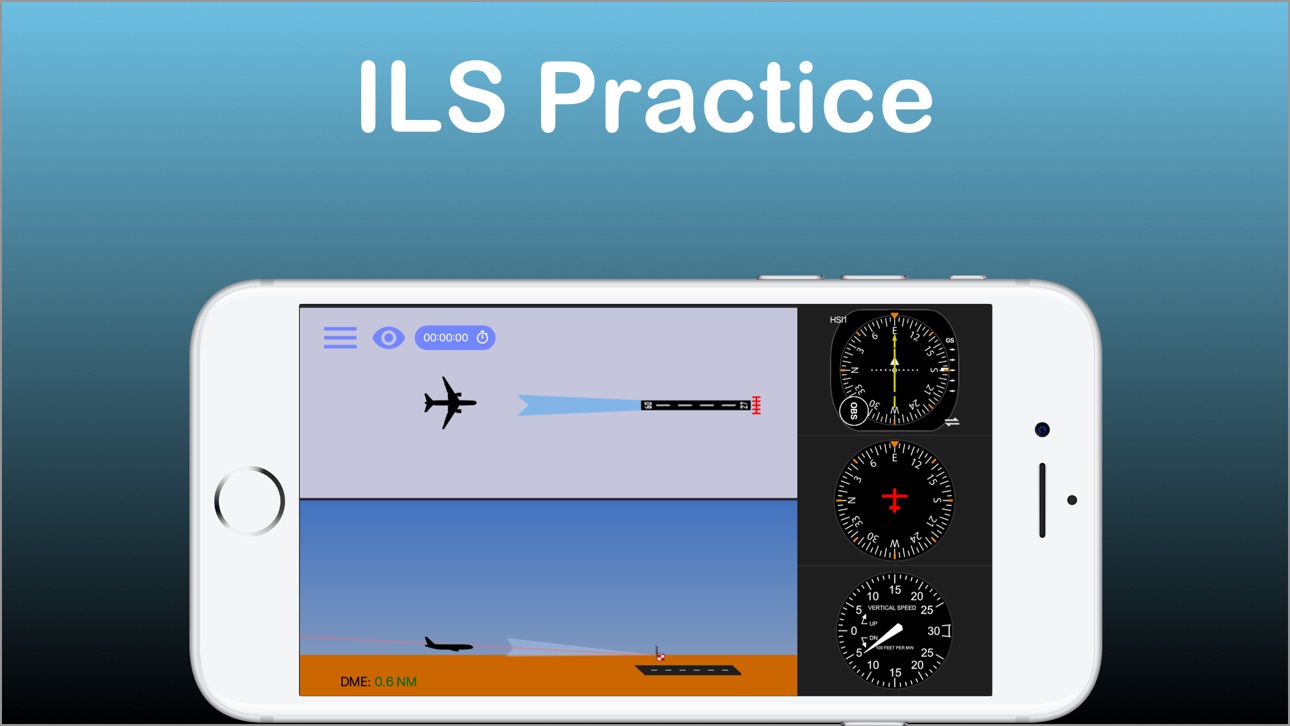
Simulates VOR, HSI, RMI, ADF, DME and ILS navigation.
A must have tool for any CFII, student and instrument pilot!
-Students and pilots: improve your understanding of radio instrument navigation at the comfort of your own mobile device.
-Instructors: demonstrate complex IFR concepts to your students from bird's-eye view while on the ground.
-Also suitable for flight simulator enthusiasts.
Used in classrooms, one-on-one ground sessions and by individuals to improve their IFR orientation skills.
--------------------------------------
-user reviews (from all markets)
***** Great to study instruments and saves lots of $$$!!!"
"***** I have been looking for an app such as this to teach my students"
"***** Before I used this app all this VOR orientation was so complicated, and now it's clear as ice!"
"***** Easy to use, perfectly designed and helping to understand basic navigation stuff. Highly recommended for student pilots, instrument applicant and CFI's."
- Improve your situational awareness under IFR.
- Save time and money on your instrument and initial flight training.
- Prepare for your instrument rating or proficiency check.
- Test your NAV situational awareness with the test mode.
- Flight instructors: the perfect tool to help you easily explain and demonstrate complex radio navigation concepts to your students.
***Features:***
-Dual navigation displays.
-VOR\NDB trainer screen: Simulates VOR and NDB navigation using VOR, HSI, ADF and RMI displays.
-ILS trainer with both VOR and HSI displays.
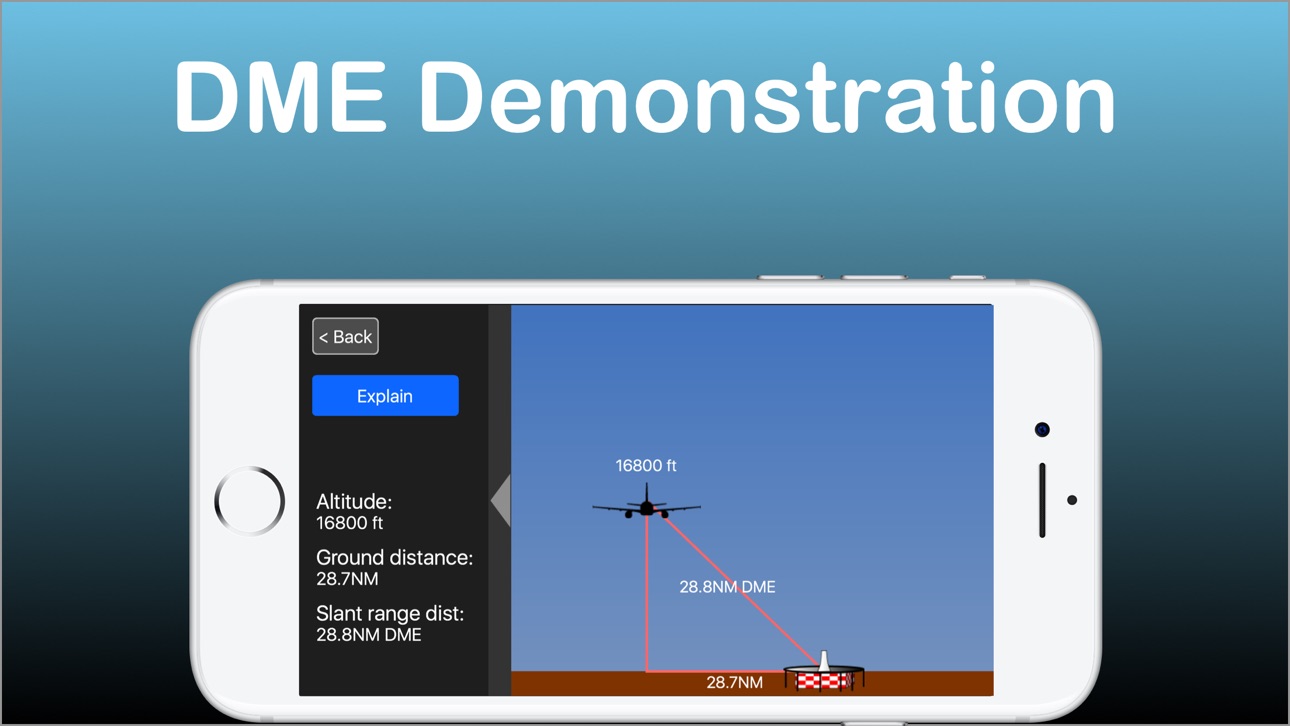
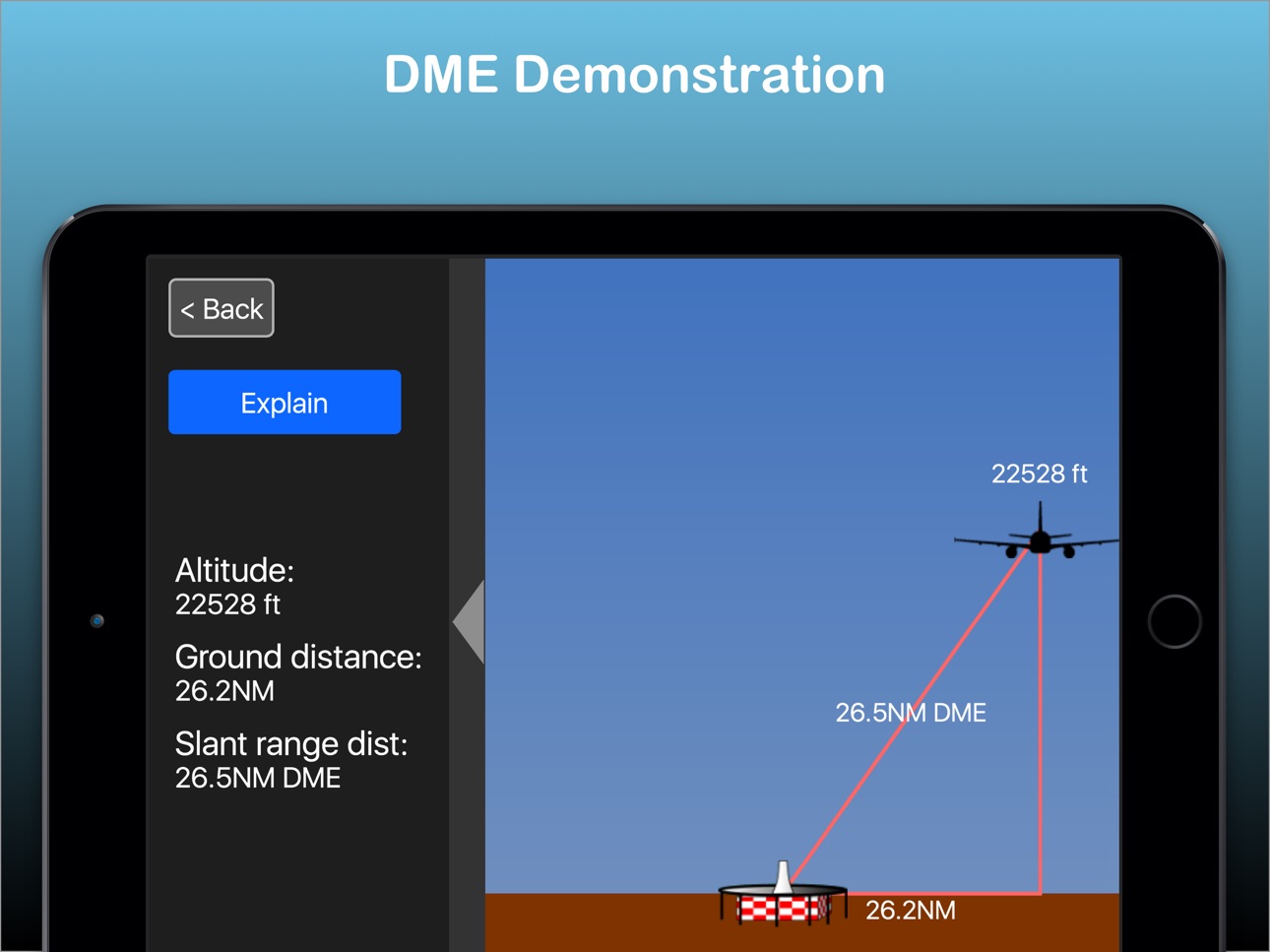
-DME visualization screen - demonstrates how DME slant range distance is affected by ground distance and altitude.
-Test mode - generates phantom aircraft around the navaids. Your goal is to find the correct aircraft position.
-Drag and drop the aircraft and nav fix around the screen.
-Fly! mode - Make the airplane fly around the screen. great for practicing intercepting and tracking courses.
-Wind direction & velocity control.
-Aircraft tracing (contrail mode).
-Accelerator support for aircraft control.
How to use:
-Select the various instruments by double-tapping their dials.
-Toggle VOR sectors visualization on/off.
-Auto tune OBS by pressing the OBS knob.
-Auto turn the aircraft towards the nav fix by tapping the aircraft symbol. Double tap will turn the aircraft toward NAV station #2
-Change aircraft headings by flicking your finger over the heading indicator.
-Tune the OBS by dragging your finger around the HSI/VOR displays or over the OBS knob.
---------------------------------------
The developer is a Gold Seal CFI/CFII/MEI and part 121 airline pilot
---------------------------------------
For comments, feature requests or bug reports, if you have the app, please take the survey at http://bit.ly/hCAqgF
* (https://www.aopa.org/news-and-media/all-news/2013/february/26/five-more-aviation-apps-you-cant-live-without)
**If you experience any problem with the app, please contact me before leaving a review and I will do my best to solve it for you.**
Accessibility
ipadiphonemacrealityDevicetvoswatch
Version history 15 versions
Build 864738772v3.5.02024-03-27 09:19:39
- Bug fixes
- UI improvements
Build 824440923v3.4.12017-11-17 04:09:14
This update from Apple will improve the functionality of this app. No new features are included.
- Save last aircraft position and heading when exiting screen
- Save last OBS values
- Save latest wind values
- Save whether user chose contrails ON/OFF and Wind ON/OFF
- Test mode - navaid centers in mid screen
Build 823869403v3.42017-10-03 12:49:25
- iOS 11 support
- New control for hiding / showing the aircraft
- New control for switching navaid type (in addition to the old method of double-tapping the nav display)
- Stopwatch
- Improved, HD, graphics
- Improved UI
- Improved performance
- DME screen now has an explanation
Build 16065840v3.3.02013-08-12 04:28:16
-Changed the way you select the instruments. Used to be single-tap, now its double-tap on the gauges. This fixes a situation where you would try to turn the OBS and the instrument will change inadvertently.
-Rotatable card ADF
-Bug fixes
-Minor graphic improvements
Build 14647334v3.2.22013-03-13 21:14:45
-Fly mode now supports x0.5, x1.0, x1.5 and x2.0 standard rate turns
Build 10910077v3.2.12012-11-26 22:16:54
-Support for iPhone 5
Build 9057658v3.2.02012-07-11 17:58:32
-Fixed bug where aircraft may turn the wrong direction when turning with the accelerometer.
-Test Mode now allows review before proceeding to generate new test.
Build 8757654v3.1.22012-06-25 23:03:05
-Improved glide slope response on ILS screen.
-Much larger available map area.
-Contrails last longer.
Build 8452837v3.1.12012-06-10 20:56:07
-Standard rate turns in Fly mode
-Improved graphics
-Minor performance and bug fixes
Build 7128183v3.0.22012-03-20 23:14:45
Fixed new iPad Retina bug.
Longer contrails.
Build 4822585v3.0.12011-11-09 01:01:06
-Fixed issue with test mode where the navaid would not center on the map, when using the default right panel view.
Build 4421139v3.0.02011-10-13 01:05:12
New
-Dual navigation stations. You can now practice cross-bearing orientation.
-options to select big or small panel instruments.
-option to select panel on left or right side of the screen.
-Much larger practice area.
-Drag and zoom (lateral navigation screen)
-Pan capability on the now larger ILS screen.
-Windsock animation now adjusts to wind velocity.
-Vertical Speed Indicator (VSI) added to ILS training screen. You can now control and view vertical speed with the VSI.
Fixed
-Speed and distance now match to scale.
-Ability to fly standard rate turns when using the accelerometer to fly
-45 degree tick marks on navigation dials.
-Minor graphical improvements
-Other minor bug fixes
Build 3794719v2.0.12011-06-08 16:16:36
-improved graphics
-Social media buttons
-minor bug fixes
Build 3770649v2.0.02011-06-01 08:10:25
Bug Fixes & improvements
-Improved performance and memory management.
-Profile view on ILS screen now opens menu on touch.
-OBS and heading dials easier to control.
-Top navigation bar is now semi-transparent for easier view.
-Test mode is now continuous until user stops it.
-Improved graphics.
-Multitouch support
-New icon
New Features
-Wind Control. In fly mode, click the windsock button to activate. Control the wind direction and velocity by dragging the windsock on the map view.
-Fly with the device accelerometer. Turn left/right to control heading; tilt backwards/forwards to control vertical speed (in ILS trainer screen).
-Trace the aircraft in "contrail mode".
-Added data labels for distance, ground speed, true airspeed, wind and vertical speed.
-New help screens.
-New "Settings / Info" screen.
Build 3545020v1.02011-03-28 17:21:24
Price history by region
Currency
Show
Columns
Search
Availability 67 of 67 storefronts
| Region | Language | Price | Ratings | Avg | Version |
|---|---|---|---|---|---|
| US | en-US | USD 8.99 | 37 | 3.9 | 3.5.0 |
| MX | es-MX | MXN 199 | 5 | 4.2 | 3.5.0 |
| BR | pt-BR | BRL 59.9 | 3 | 3.7 | 3.5.0 |
| ES | es-ES | EUR 9.99 | 3 | 3.7 | 3.5.0 |
| AU | en-AU | AUD 14.99 | 2 | 3.0 | 3.5.0 |
| CO | es-MX | COP 39900 | 2 | 5.0 | 3.5.0 |
| AR | es-MX | USD 8.99 | 1 | 4.0 | 3.5.0 |
| KE | en-GB | USD 9.99 | 1 | 3.0 | 3.5.0 |
| LC | en-GB | USD 8.99 | 1 | 5.0 | 3.5.0 |
| PY | es-MX | USD 8.99 | 1 | 3.0 | 3.5.0 |
| RU | ru | RUB 799 | 1 | 5.0 | 3.5.0 |
| SV | es-MX | USD 8.99 | 1 | 1.0 | 3.5.0 |
| AG | en-GB | USD 8.99 | 0 | — | 3.5.0 |
| AO | en-GB | USD 8.99 | 0 | — | 3.5.0 |
| BF | en-GB | USD 8.99 | 0 | — | 3.5.0 |
| BJ | en-GB | USD 9.99 | 0 | — | 3.5.0 |
| BO | es-MX | USD 8.99 | 0 | — | 3.5.0 |
| BS | en-GB | USD 9.99 | 0 | — | 3.5.0 |
| BW | en-GB | USD 8.99 | 0 | — | 3.5.0 |
| BY | en-GB | USD 9.99 | 0 | — | 3.5.0 |
| CD | en-GB | USD 8.99 | 0 | — | 3.5.0 |
| CG | en-GB | USD 8.99 | 0 | — | 3.5.0 |
| CR | es-MX | USD 8.99 | 0 | — | 3.5.0 |
| CV | en-GB | USD 8.99 | 0 | — | 3.5.0 |
| DK | en-GB | DKK 79 | 0 | — | 3.5.0 |
| DO | es-MX | USD 8.99 | 0 | — | 3.5.0 |
| EC | es-MX | USD 8.99 | 0 | — | 3.5.0 |
| FJ | en-GB | USD 8.99 | 0 | — | 3.5.0 |
| GD | en-GB | USD 8.99 | 0 | — | 3.5.0 |
| GH | en-GB | USD 9.99 | 0 | — | 3.5.0 |
| GM | en-GB | USD 8.99 | 0 | — | 3.5.0 |
| GW | en-GB | USD 8.99 | 0 | — | 3.5.0 |
| HN | es-MX | USD 8.99 | 0 | — | 3.5.0 |
| IE | en-GB | EUR 9.99 | 0 | — | 3.5.0 |
| JM | en-GB | USD 8.99 | 0 | — | 3.5.0 |
| KY | en-GB | USD 8.99 | 0 | — | 3.5.0 |
| LR | en-GB | USD 8.99 | 0 | — | 3.5.0 |
| LY | en-GB | USD 8.99 | 0 | — | 3.5.0 |
| MA | en-GB | USD 8.99 | 0 | — | 3.5.0 |
| MG | en-GB | USD 8.99 | 0 | — | 3.5.0 |
| ML | en-GB | USD 8.99 | 0 | — | 3.5.0 |
| MR | en-GB | USD 8.99 | 0 | — | 3.5.0 |
| MS | en-GB | USD 8.99 | 0 | — | 3.5.0 |
| MU | en-GB | USD 9.99 | 0 | — | 3.5.0 |
| MW | en-GB | USD 8.99 | 0 | — | 3.5.0 |
| MZ | en-GB | USD 8.99 | 0 | — | 3.5.0 |
| NA | en-GB | USD 8.99 | 0 | — | 3.5.0 |
| NE | en-GB | USD 8.99 | 0 | — | 3.5.0 |
| NG | en-GB | NGN 14900 | 0 | — | 3.5.0 |
| NZ | en-AU | NZD 14.99 | 0 | — | 3.5.0 |
| PA | es-MX | USD 8.99 | 0 | — | 3.5.0 |
| RS | en-GB | EUR 9.99 | 0 | — | 3.5.0 |
| SE | sv | SEK 119 | 0 | — | 3.5.0 |
| SL | en-GB | USD 8.99 | 0 | — | 3.5.0 |
| SN | en-GB | USD 9.99 | 0 | — | 3.5.0 |
| SR | en-GB | USD 9.99 | 0 | — | 3.5.0 |
| ST | en-GB | USD 8.99 | 0 | — | 3.5.0 |
| TC | en-GB | USD 8.99 | 0 | — | 3.5.0 |
| TN | en-GB | USD 8.99 | 0 | — | 3.5.0 |
| TT | en-GB | USD 8.99 | 0 | — | 3.5.0 |
| TZ | en-GB | TZS 24900 | 0 | — | 3.5.0 |
| UG | en-GB | USD 9.99 | 0 | — | 3.5.0 |
| UY | en-GB | USD 8.99 | 0 | — | 3.5.0 |
| VC | en-GB | USD 8.99 | 0 | — | 3.5.0 |
| VG | en-GB | USD 8.99 | 0 | — | 3.5.0 |
| ZM | en-GB | USD 9.99 | 0 | — | 3.5.0 |
| ZW | en-GB | USD 9.99 | 0 | — | 3.5.0 |
Change log 19 changes · CD
✎
releaseNotes updated
- Bug fixes
- UI improvements
✎
description updated
Selected by AOPA.org readers as number one of five aviation apps you can't live without! *
***** Reached No. 4 in the Navigation category of the U.S. app store
✎
subtitle updated
IFR Navigation Trainer
✎
name updated
Nav Trainer Pro
◆
Version 3.5.0 released
- Bug fixes
- UI improvements
◆
Version 3.4.1 released
This update from Apple will improve the functionality of this app. No new features are included.
- Save last aircraft position and heading when exiting screen
- Save last OBS values
- Save latest wind values
- Save whether user chose contr
◆
Version 3.4 released
- iOS 11 support
- New control for hiding / showing the aircraft
- New control for switching navaid type (in addition to the old method of double-tapping the nav display)
- Stopwatch
- Improved, HD, graphics
- Improved UI
- Improved perform
◆
Version 3.3.0 released
-Changed the way you select the instruments. Used to be single-tap, now its double-tap on the gauges. This fixes a situation where you would try to turn the OBS and the instrument will change inadvertently.
-Rotatable card ADF
-Bug fixes
-
◆
Version 3.2.2 released
-Fly mode now supports x0.5, x1.0, x1.5 and x2.0 standard rate turns
◆
Version 3.2.1 released
-Support for iPhone 5
◆
Version 3.2.0 released
-Fixed bug where aircraft may turn the wrong direction when turning with the accelerometer.
-Test Mode now allows review before proceeding to generate new test.
◆
Version 3.1.2 released
-Improved glide slope response on ILS screen.
-Much larger available map area.
-Contrails last longer.
◆
Version 3.1.1 released
-Standard rate turns in Fly mode
-Improved graphics
-Minor performance and bug fixes
◆
Version 3.0.2 released
Fixed new iPad Retina bug.
Longer contrails.
◆
Version 3.0.1 released
-Fixed issue with test mode where the navaid would not center on the map, when using the default right panel view.
◆
Version 3.0.0 released
New
-Dual navigation stations. You can now practice cross-bearing orientation.
-options to select big or small panel instruments.
-option to select panel on left or right side of the screen.
-Much larger practice area.
-Drag and zoom (later
◆
Version 2.0.1 released
-improved graphics
-Social media buttons
-minor bug fixes
◆
Version 2.0.0 released
Bug Fixes & improvements
-Improved performance and memory management.
-Profile view on ILS screen now opens menu on touch.
-OBS and heading dials easier to control.
-Top navigation bar is now semi-transparent for easier view.
-Test mode is
◆
Version 1.0 released