Home › Navigation

 US
US
USen-US MXes-MX
 BRpt-BR
 ESes-ES
 AUen-AU
 COes-MX
 ARes-MX
 KEen-GB
 LCen-GB
 PYes-MX
 RUru
RUru SVes-MX
 AGen-GB
 AOen-GB
 BFen-GB
 BJen-GB
 BOes-MX
 BSen-GB
 BWen-GB
 BYen-GB
 CDen-GB
 CGen-GB
 CRes-MX
 CVen-GB
 DKen-GB
 ECes-MX
 FJen-GB
 GDen-GB
 GHen-GB
 GMen-GB
 GWen-GB
 HNes-MX
 IEen-GB
 JMen-GB
 KYen-GB
 LRen-GB
 LYen-GB
 MAen-GB
 MGen-GB
 MLen-GB
 MRen-GB
 MSen-GB
 MUen-GB
 MWen-GB
 MZen-GB
 NAen-GB
 NEen-GB
 NGen-GB
 NZen-AU
 PAes-MX
 RSen-GB
 SEsv
SEsv SLen-GB
 SNen-GB
 SRen-GB
 STen-GB
 TCen-GB
 TNen-GB
 TTen-GB
 TZen-GB
 UGen-GB
 UYen-GB
 VCen-GB
 VGen-GB
 ZMen-GB
 ZWen-GB
66 of 66 storefronts
Content in en-US
Content in en-US
Information
Preview 2 platforms
iPhone 5 images



iPad 5 images



What’s New Version 3.5.0
- Bug fixes
- UI improvements
Description
Selected by AOPA.org readers as number one of five aviation apps you can't live without! *
***** Reached No. 4 in the Navigation category of the U.S. app store for iPad! *****
Make IFR flight training easier!
Practice the use of aviation navigational equipment on your mobile device.
Simulates VOR, HSI, RMI, ADF, DME and ILS navigation.
A must have tool for any CFII, student and instrument pilot!
-Students and pilots: improve your understanding of radio instrument navigation at the comfort of your own mobile device.
-Instructors: demonstrate complex IFR concepts to your students from bird's-eye view while on the ground.
-Also suitable for flight simulator enthusiasts.
Used in classrooms, one-on-one ground sessions and by individuals to improve their IFR orientation skills.
--------------------------------------
-user reviews (from all markets)
***** Great to study instruments and saves lots of $$$!!!"
"***** I have been looking for an app such as this to teach my students"
"***** Before I used this app all this VOR orientation was so complicated, and now it's clear as ice!"
"***** Easy to use, perfectly designed and helping to understand basic navigation stuff. Highly recommended for student pilots, instrument applicant and CFI's."
- Improve your situational awareness under IFR.
- Save time and money on your instrument and initial flight training.
- Prepare for your instrument rating or proficiency check.
- Test your NAV situational awareness with the test mode.
- Flight instructors: the perfect tool to help you easily explain and demonstrate complex radio navigation concepts to your students.
***Features:***
-Dual navigation displays.
-VOR\NDB trainer screen: Simulates VOR and NDB navigation using VOR, HSI, ADF and RMI displays.
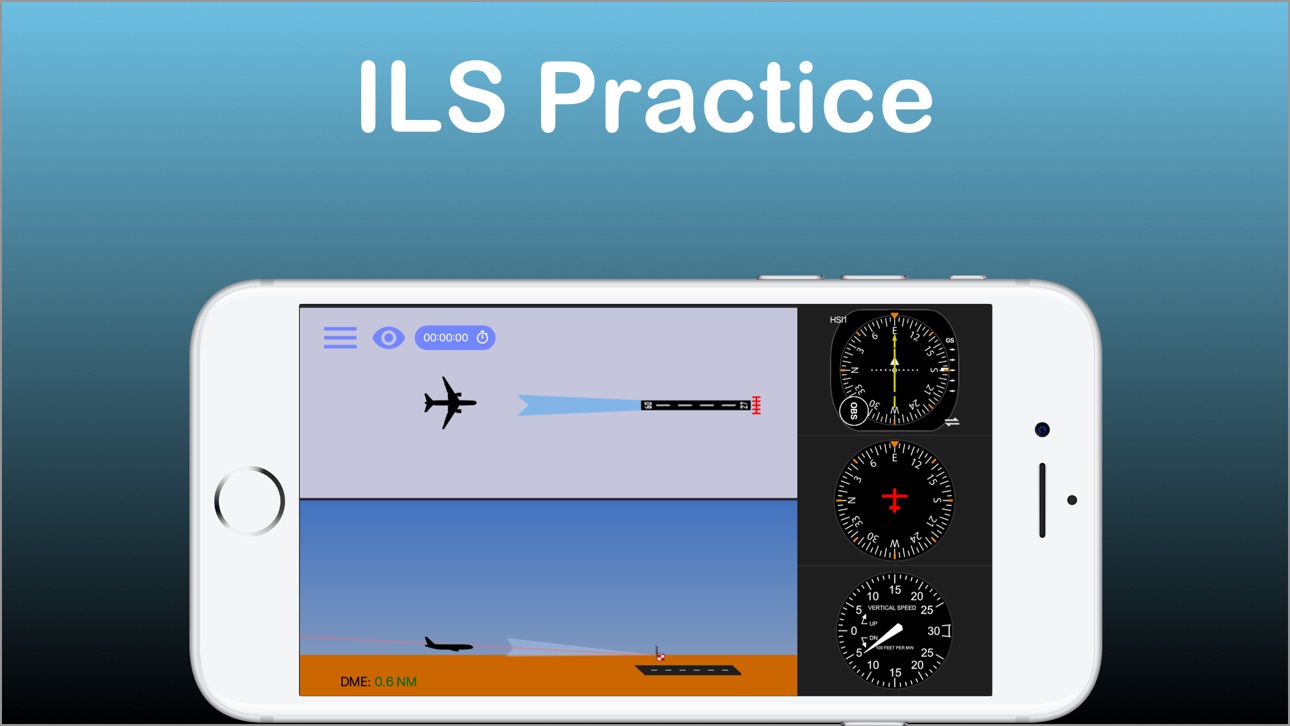
-ILS trainer with both VOR and HSI displays.
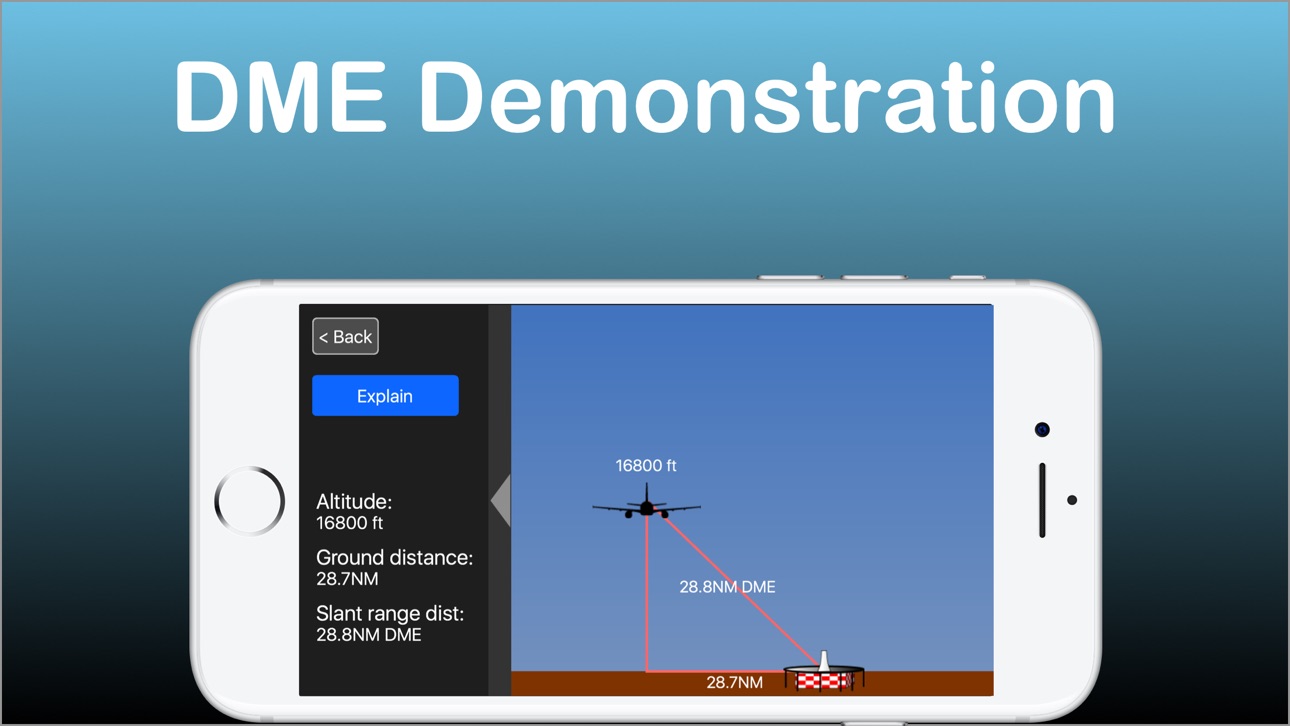
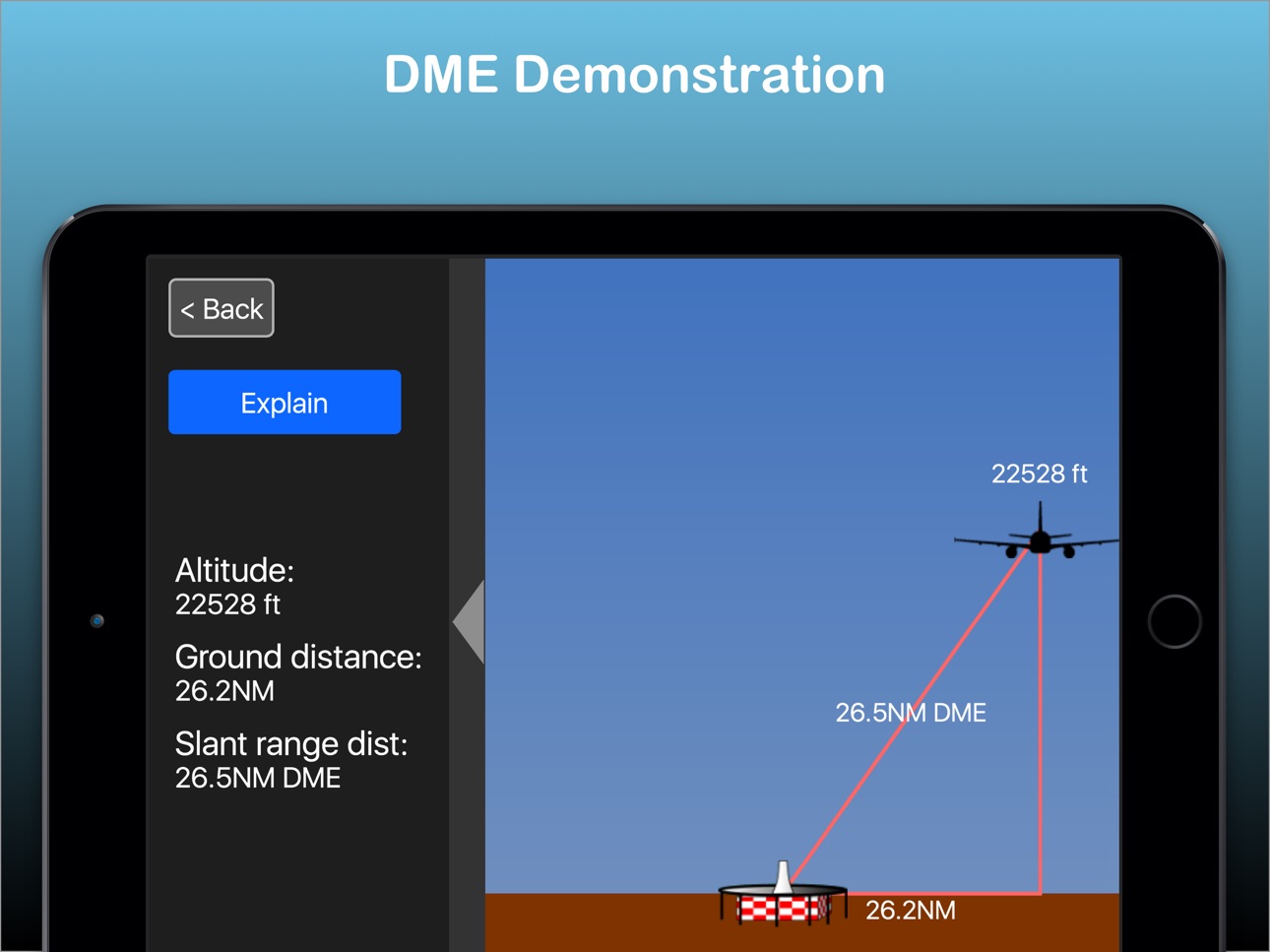
-DME visualization screen - demonstrates how DME slant range distance is affected by ground distance and altitude.
-Test mode - generates phantom aircraft around the navaids. Your goal is to find the correct aircraft position.
-Drag and drop the aircraft and nav fix around the screen.
-Fly! mode - Make the airplane fly around the screen. great for practicing intercepting and tracking courses.
-Wind direction & velocity control.
-Aircraft tracing (contrail mode).
-Accelerator support for aircraft control.
How to use:
-Select the various instruments by double-tapping their dials.
-Toggle VOR sectors visualization on/off.
-Auto tune OBS by pressing the OBS knob.
-Auto turn the aircraft towards the nav fix by tapping the aircraft symbol. Double tap will turn the aircraft toward NAV station #2
-Change aircraft headings by flicking your finger over the heading indicator.
-Tune the OBS by dragging your finger around the HSI/VOR displays or over the OBS knob.
---------------------------------------
The developer is a Gold Seal CFI/CFII/MEI and part 121 airline pilot
---------------------------------------
For comments, feature requests or bug reports, if you have the app, please take the survey at http://bit.ly/hCAqgF
* (https://www.aopa.org/news-and-media/all-news/2013/february/26/five-more-aviation-apps-you-cant-live-without)
**If you experience any problem with the app, please contact me before leaving a review and I will do my best to solve it for you.**
Accessibility
ipadiphonemacrealityDevicetvoswatch
Version history 15 versions
Build 864738772v3.5.02024-03-27 09:19:39
- Bug fixes
- UI improvements
Build 824440923v3.4.12017-11-17 04:09:14
This update from Apple will improve the functionality of this app. No new features are included.
- Save last aircraft position and heading when exiting screen
- Save last OBS values
- Save latest wind values
- Save whether user chose contrails ON/OFF and Wind ON/OFF
- Test mode - navaid centers in mid screen
Build 823869403v3.42017-10-03 12:49:25
- iOS 11 support
- New control for hiding / showing the aircraft
- New control for switching navaid type (in addition to the old method of double-tapping the nav display)
- Stopwatch
- Improved, HD, graphics
- Improved UI
- Improved performance
- DME screen now has an explanation
Build 16065840v3.3.02013-08-12 04:28:16
-Changed the way you select the instruments. Used to be single-tap, now its double-tap on the gauges. This fixes a situation where you would try to turn the OBS and the instrument will change inadvertently.
-Rotatable card ADF
-Bug fixes
-Minor graphic improvements
Build 14647334v3.2.22013-03-13 21:14:45
-Fly mode now supports x0.5, x1.0, x1.5 and x2.0 standard rate turns
Build 10910077v3.2.12012-11-26 22:16:54
-Support for iPhone 5
Build 9057658v3.2.02012-07-11 17:58:32
-Fixed bug where aircraft may turn the wrong direction when turning with the accelerometer.
-Test Mode now allows review before proceeding to generate new test.
Build 8757654v3.1.22012-06-25 23:03:05
-Improved glide slope response on ILS screen.
-Much larger available map area.
-Contrails last longer.
Build 8452837v3.1.12012-06-10 20:56:07
-Standard rate turns in Fly mode
-Improved graphics
-Minor performance and bug fixes
Build 7128183v3.0.22012-03-20 23:14:45
Fixed new iPad Retina bug.
Longer contrails.
Build 4822585v3.0.12011-11-09 01:01:06
-Fixed issue with test mode where the navaid would not center on the map, when using the default right panel view.
Build 4421139v3.0.02011-10-13 01:05:12
New
-Dual navigation stations. You can now practice cross-bearing orientation.
-options to select big or small panel instruments.
-option to select panel on left or right side of the screen.
-Much larger practice area.
-Drag and zoom (lateral navigation screen)
-Pan capability on the now larger ILS screen.
-Windsock animation now adjusts to wind velocity.
-Vertical Speed Indicator (VSI) added to ILS training screen. You can now control and view vertical speed with the VSI.
Fixed
-Speed and distance now match to scale.
-Ability to fly standard rate turns when using the accelerometer to fly
-45 degree tick marks on navigation dials.
-Minor graphical improvements
-Other minor bug fixes
Build 3794719v2.0.12011-06-08 16:16:36
-improved graphics
-Social media buttons
-minor bug fixes
Build 3770649v2.0.02011-06-01 08:10:25
Bug Fixes & improvements
-Improved performance and memory management.
-Profile view on ILS screen now opens menu on touch.
-OBS and heading dials easier to control.
-Top navigation bar is now semi-transparent for easier view.
-Test mode is now continuous until user stops it.
-Improved graphics.
-Multitouch support
-New icon
New Features
-Wind Control. In fly mode, click the windsock button to activate. Control the wind direction and velocity by dragging the windsock on the map view.
-Fly with the device accelerometer. Turn left/right to control heading; tilt backwards/forwards to control vertical speed (in ILS trainer screen).
-Trace the aircraft in "contrail mode".
-Added data labels for distance, ground speed, true airspeed, wind and vertical speed.
-New help screens.
-New "Settings / Info" screen.
Build 3545020v1.02011-03-28 17:21:24
Price history by region
Currency
Show
Columns
Search
Availability 66 of 66 storefronts
| Region | Language | Price | Ratings | Avg | Version |
|---|---|---|---|---|---|
| US | en-US | USD 8.99 | 37 | 3.9 | 3.5.0 |
| MX | es-MX | MXN 199 | 5 | 4.2 | 3.5.0 |
| BR | pt-BR | BRL 59.9 | 3 | 3.7 | 3.5.0 |
| ES | es-ES | EUR 9.99 | 3 | 3.7 | 3.5.0 |
| AU | en-AU | AUD 14.99 | 2 | 3.0 | 3.5.0 |
| CO | es-MX | COP 39900 | 2 | 5.0 | 3.5.0 |
| AR | es-MX | USD 8.99 | 1 | 4.0 | 3.5.0 |
| KE | en-GB | USD 9.99 | 1 | 3.0 | 3.5.0 |
| LC | en-GB | USD 8.99 | 1 | 5.0 | 3.5.0 |
| PY | es-MX | USD 8.99 | 1 | 3.0 | 3.5.0 |
| RU | ru | RUB 799 | 1 | 5.0 | 3.5.0 |
| SV | es-MX | USD 8.99 | 1 | 1.0 | 3.5.0 |
| AG | en-GB | USD 8.99 | 0 | — | 3.5.0 |
| AO | en-GB | USD 8.99 | 0 | — | 3.5.0 |
| BF | en-GB | USD 8.99 | 0 | — | 3.5.0 |
| BJ | en-GB | USD 9.99 | 0 | — | 3.5.0 |
| BO | es-MX | USD 8.99 | 0 | — | 3.5.0 |
| BS | en-GB | USD 9.99 | 0 | — | 3.5.0 |
| BW | en-GB | USD 8.99 | 0 | — | 3.5.0 |
| BY | en-GB | USD 9.99 | 0 | — | 3.5.0 |
| CD | en-GB | USD 8.99 | 0 | — | 3.5.0 |
| CG | en-GB | USD 8.99 | 0 | — | 3.5.0 |
| CR | es-MX | USD 8.99 | 0 | — | 3.5.0 |
| CV | en-GB | USD 8.99 | 0 | — | 3.5.0 |
| DK | en-GB | DKK 79 | 0 | — | 3.5.0 |
| EC | es-MX | USD 8.99 | 0 | — | 3.5.0 |
| FJ | en-GB | USD 8.99 | 0 | — | 3.5.0 |
| GD | en-GB | USD 8.99 | 0 | — | 3.5.0 |
| GH | en-GB | USD 9.99 | 0 | — | 3.5.0 |
| GM | en-GB | USD 8.99 | 0 | — | 3.5.0 |
| GW | en-GB | USD 8.99 | 0 | — | 3.5.0 |
| HN | es-MX | USD 8.99 | 0 | — | 3.5.0 |
| IE | en-GB | EUR 9.99 | 0 | — | 3.5.0 |
| JM | en-GB | USD 8.99 | 0 | — | 3.5.0 |
| KY | en-GB | USD 8.99 | 0 | — | 3.5.0 |
| LR | en-GB | USD 8.99 | 0 | — | 3.5.0 |
| LY | en-GB | USD 8.99 | 0 | — | 3.5.0 |
| MA | en-GB | USD 8.99 | 0 | — | 3.5.0 |
| MG | en-GB | USD 8.99 | 0 | — | 3.5.0 |
| ML | en-GB | USD 8.99 | 0 | — | 3.5.0 |
| MR | en-GB | USD 8.99 | 0 | — | 3.5.0 |
| MS | en-GB | USD 8.99 | 0 | — | 3.5.0 |
| MU | en-GB | USD 9.99 | 0 | — | 3.5.0 |
| MW | en-GB | USD 8.99 | 0 | — | 3.5.0 |
| MZ | en-GB | USD 8.99 | 0 | — | 3.5.0 |
| NA | en-GB | USD 8.99 | 0 | — | 3.5.0 |
| NE | en-GB | USD 8.99 | 0 | — | 3.5.0 |
| NG | en-GB | NGN 14900 | 0 | — | 3.5.0 |
| NZ | en-AU | NZD 14.99 | 0 | — | 3.5.0 |
| PA | es-MX | USD 8.99 | 0 | — | 3.5.0 |
| RS | en-GB | EUR 9.99 | 0 | — | 3.5.0 |
| SE | sv | SEK 119 | 0 | — | 3.5.0 |
| SL | en-GB | USD 8.99 | 0 | — | 3.5.0 |
| SN | en-GB | USD 9.99 | 0 | — | 3.5.0 |
| SR | en-GB | USD 9.99 | 0 | — | 3.5.0 |
| ST | en-GB | USD 8.99 | 0 | — | 3.5.0 |
| TC | en-GB | USD 8.99 | 0 | — | 3.5.0 |
| TN | en-GB | USD 8.99 | 0 | — | 3.5.0 |
| TT | en-GB | USD 8.99 | 0 | — | 3.5.0 |
| TZ | en-GB | TZS 24900 | 0 | — | 3.5.0 |
| UG | en-GB | USD 9.99 | 0 | — | 3.5.0 |
| UY | en-GB | USD 8.99 | 0 | — | 3.5.0 |
| VC | en-GB | USD 8.99 | 0 | — | 3.5.0 |
| VG | en-GB | USD 8.99 | 0 | — | 3.5.0 |
| ZM | en-GB | USD 9.99 | 0 | — | 3.5.0 |
| ZW | en-GB | USD 9.99 | 0 | — | 3.5.0 |
Reviews 30 reviews · US
★★★★★
Good learning tool.
Great for answering the question “where are you in relation to the VOR or ILS? Especially good for those tricky reverse sensing problems when on an ILS. Back Course.
DBKMDPHD2021-04-16
★★★★★
Excellent product
I use this extensively to test VOR knowledge. It is perfect.
RickH112020-12-16
★★★★★
Unrealistic instrument behavior
The CDI needle has very low resolution. It ticks in 1 degree increments. One dot is 2 degrees, so from full deflection to intercept is only 10 ticks... it looks terrible. The CDI does not move fluidly in an analogue manner like in real-life. There is not as much trend information as in real-life. Not good.
Update: Your response is nonsense. I’ve used plenty of modern digital displays like Garmin G5 and G1000 and while the OBS is only capable of selecting a course in 1 degree increments, the CDI needle itself still moves fluidly in an analogue manner as bearing to the station is changed. Stop
rvleic2020-11-13
★★★★★
Disappointed
Don’t get me wrong— there’s nothing wrong with the app. But the price point is off base. This is a $1.99 app at most.
HOMEMEANSNEVADA2020-03-27
★★★★★ · edited
CFI-I Review (Updated)
Nav Trainer 3.4.1
IPad Pro 9.7 v.11.1.2
• Settings > Instruments “BIG \/ SMALL” does not work.
• Motion sensors still changes heading at warp speed. Absolutely useless.
• If you are going to provide an option for turning via the motions sensors, use an algorithm which works similar to a real control wheel/yoke.
[Ref. X-Plane 10 for iPad]
• Add delay variable when rolling in/out of standard rate.
[Ref. VOR Tracker]
• Based upon most textbooks (FAA, Jeppesen, ASA, Rod Machado, etc.) and typical training aircraft with ‘standard’ instrument configurations, the HI should be either on top o
yinYangMountain2017-11-19
★★★★★
Updated for iOS 11
Thanks for keeping this app alive with an update for 64bit!
SeriousBsns2017-10-06
★★★★★
Please Update
$5 is a lot of money for an app that hasn't been updated to work with the new iOS
Scodemax2017-06-14
★★★★★
The best app
This app is the best i ever used. It is very user friendly, helps you understand and create navigation scenarios and even use it to demonstrate and explain about the navigation instruments to your student !
MaxMink2014-09-05
★★★★★
Feature for next update
I think you should add a clock/timer feature for practicing holds. Besides that app is great.
mjl9412014-05-01
★★★★★
Great Training tool
This app is simple yet does an excellent job of helping you visualize the relationship between what the gauges show and the plane's actual position. I agree-OBS scrolling could stand to be a little less sensitive. Useful tool for ground school.
cessna222013-12-01
★★★★★
Nicely done!
Well put together; really gives good visual interpretation of what your nav indicators are showing you, including wind effects. Only suggestion would be to make OBS and DG a little less sensitive so that changes could be more precisely set. Test feature is great - really makes you think about what you're seeing on the DG & OBS. About to get an iPad; hope this is set up to run on the iPad, too, with a larger display.
AV8VA2013-08-13
★★★★★
Just what the doctor ordered
This is a tremendously simple, intuitive, and powerful app for those of us who get a little spatially confused by abstract geometry represented by a static image. The user can easily toggle among 1 or 2 navigation devices including VOR, HSI, ADF, and RMI and drag a plane around. This is not a flight simulator but a great Navaid simulator. Worth every penny and a great study partner for the FAA knowledge exams.
roxyfly112013-07-08
★★★★★
Don't buy
Waste of money, all of about 5 minutes of use and its done. Not a very extensive learning tool. Looks thrown together, is definitely not worth 5 dollars and leaves me very disappointed.
Derick132013-03-03
★★★★★
GREAT APP
This app works good and has helped me a lot. I recommend it to all pilots.
Wystler2012-12-16
★★★★★
A Very Poor App
After having this app go black on me, I got it going again be deleting and reloading it.
Tiger owner2012-10-07
★★★★★
Great trainer for IFR students
This is a great app for pilots seeking an instrument rating. The simulated test function within the app is great practice for the FAA written exam. I have used this app to demonstrate holds, DME arcs, and HSI situational awareness. The only downfall is that there is no test prep for the ADF. Great app none the less.
Two "oh's" in goose2012-10-06
★★★★★
Great learning tool!!
RMI could use 2 needles. Other than that works well
Flyin' chef2012-08-14
★★★★★
Geez!
Don't waste your time with this app. When it works, you just drag and drop to move the aircraft around...no instructions. Otherwise the app doesn't open. geez, at waste of time and money!
DD13___2012-06-24
★★★★★
Great for navigation training
Its so realistic and useful for navigation training and exercises for VOR interception and ILS approach training
samanjangjoo2012-06-08
★★★★★
Really Useful
A simple really useful app to drill VOR use (even though most of us fly with GPS).
Great for FAA test prep.
Captain Momo2012-05-15
★★★★★
Good basic instruction tool.
I like the app, for the $5 it is a good value. It demonstrates clearly what the instrument would display, relative to the aircraft position from the VOR, ILS, or radio signal station. The "fly" mode is interesting, but not very useful. The pitch control barely responds and the speed control (reverse?) is really just silly. Turning with the compass on the tiny little ipod screen is a little touchy This app could be improved by fixing those things and maybe adding VOR morse identifiers and ILS marker signals.
MisterM.2012-03-21
Change log 19 changes · US
✎
releaseNotes updated
- Bug fixes
- UI improvements
✎
description updated
Selected by AOPA.org readers as number one of five aviation apps you can't live without! *
***** Reached No. 4 in the Navigation category of the U.S. app store
✎
subtitle updated
IFR Navigation Trainer
✎
name updated
Nav Trainer Pro
◆
Version 3.5.0 released
- Bug fixes
- UI improvements
◆
Version 3.4.1 released
This update from Apple will improve the functionality of this app. No new features are included.
- Save last aircraft position and heading when exiting screen
- Save last OBS values
- Save latest wind values
- Save whether user chose contr
◆
Version 3.4 released
- iOS 11 support
- New control for hiding / showing the aircraft
- New control for switching navaid type (in addition to the old method of double-tapping the nav display)
- Stopwatch
- Improved, HD, graphics
- Improved UI
- Improved perform
◆
Version 3.3.0 released
-Changed the way you select the instruments. Used to be single-tap, now its double-tap on the gauges. This fixes a situation where you would try to turn the OBS and the instrument will change inadvertently.
-Rotatable card ADF
-Bug fixes
-
◆
Version 3.2.2 released
-Fly mode now supports x0.5, x1.0, x1.5 and x2.0 standard rate turns
◆
Version 3.2.1 released
-Support for iPhone 5
◆
Version 3.2.0 released
-Fixed bug where aircraft may turn the wrong direction when turning with the accelerometer.
-Test Mode now allows review before proceeding to generate new test.
◆
Version 3.1.2 released
-Improved glide slope response on ILS screen.
-Much larger available map area.
-Contrails last longer.
◆
Version 3.1.1 released
-Standard rate turns in Fly mode
-Improved graphics
-Minor performance and bug fixes
◆
Version 3.0.2 released
Fixed new iPad Retina bug.
Longer contrails.
◆
Version 3.0.1 released
-Fixed issue with test mode where the navaid would not center on the map, when using the default right panel view.
◆
Version 3.0.0 released
New
-Dual navigation stations. You can now practice cross-bearing orientation.
-options to select big or small panel instruments.
-option to select panel on left or right side of the screen.
-Much larger practice area.
-Drag and zoom (later
◆
Version 2.0.1 released
-improved graphics
-Social media buttons
-minor bug fixes
◆
Version 2.0.0 released
Bug Fixes & improvements
-Improved performance and memory management.
-Profile view on ILS screen now opens menu on touch.
-OBS and heading dials easier to control.
-Top navigation bar is now semi-transparent for easier view.
-Test mode is
◆
Version 1.0 released