Home › Photo & Video

 PY
PY
 USen-US
 MXes-MX
 ITit
ITit BRpt-BR
 RUru
RUru DEde-DE
 FRfr-FR
 TRen-GB
 JPja
JPja COes-MX
 ESes-ES
 GBen-GB
 CLes-MX
 CNzh-Hans-CN
 KRko
KRko SAen-GB
 CAen-CA
 THen-GB
 PEes-MX
 ARes-MX
 ILen-GB
 ECes-MX
 AUen-AU
 CHde-CH
 AEen-GB
 NLnl
NLnl SEsv
SEsv UAen-GB
 ATde-DE
 IDen-GB
 PTpt-PT
 GTes-MX
 BEen-GB
 INen-GB
 KWen-GB
 PAes-MX
 PLen-GB
 AZen-GB
 TWzh-Hant-TW
 PHen-GB
 CZen-GB
 VEes-MX
 CRes-MX
 GRen-GB
 SGen-GBPYes-MX
 ROen-GB
 BOes-MX
 DKen-GB
 EGen-GB
 HRen-GB
 HUen-GB
 MYen-GB
 HNes-MX
 IEen-GB
 NOen-GB
 OMen-GB
 PKen-GB
 AMen-GB
 BYen-GB
 LUen-GB
 UYen-GB
 HKzh-Hant-HK
 BGen-GB
 BHen-GB
 FIen-GB
 NIes-MX
 QAen-GB
 SVes-MX
 VNen-GB
 ALen-GB
 CYen-GB
 JOen-GB
 LBen-GB
 NZen-AU
 LKen-GB
 LVen-GB
 RSen-GB
 AOen-GB
 EEen-GB
 GEen-GB
 IQen-GB
 ISen-GB
 LTen-GB
 NGen-GB
 SIen-GB
 SKen-GB
 TZen-GB
 UZen-GB
 ZAen-GB
 AFen-GB
 BAen-GB
 BFen-GB
 BJen-GB
 BMen-GB
 BNen-GB
 BWen-GB
 CDen-GB
 CGen-GB
 CIfr-FR
 CMfr-FR
 CVen-GB
 DZen-GB
 GAfr-FR
 GHen-GB
 GMen-GB
 GWen-GB
 GYen-GB
 KEen-GB
 KNen-GB
 LRen-GB
 LYen-GB
 MAen-GB
 MDen-GB
 MEen-GB
 MGen-GB
 MKen-GB
 MLen-GB
 MOzh-Hant-HK
 MRen-GB
 MTen-GB
 MUen-GB
 MWen-GB
 MZen-GB
 NAen-GB
 NEen-GB
 NPen-GB
 NRen-GB
 RWen-GB
 SCen-GB
 SLen-GB
 SNen-GB
 SRen-GB
 STen-GB
 SZen-GB
 TDen-GB
 TMen-GB
 TNen-GB
 UGen-GB
 VCen-GB
 VGen-GB
 XKen-GB
 YEen-GB
 ZMen-GB
 ZWen-GB
145 of 145 storefronts
Content in en-US
Content in en-US
Information
Preview 2 platforms
iPhone 6 images




iPad 5 images


What’s New Version 1.23
- Update to support iOS 17.
- Fixed a bug about image with certain proportion not loading properly.
Description
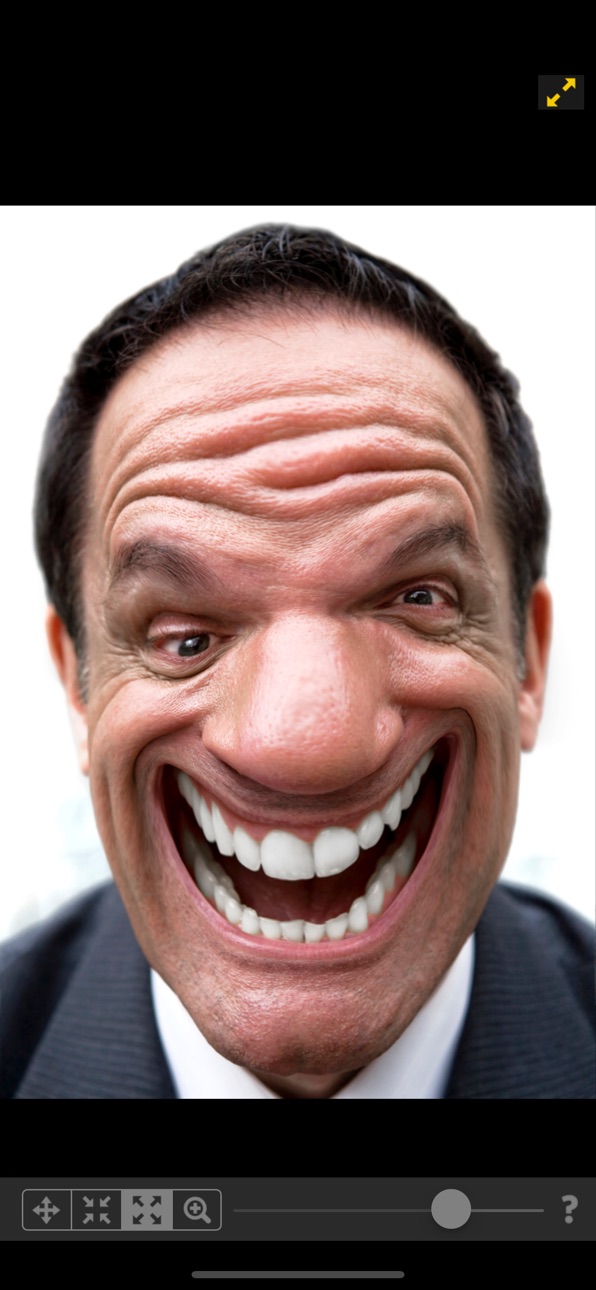
This is a simple but powerful photo distortion App. You can use it to simulate body transformations, improve your appearance on social networks, or have fun warping people. All you need to do is drag, grow or shrink the body parts you want to distort. Find out how you would look like with a different nose, chin, buttock, less weight...
Our app, downloaded 10 million times on all platforms worldwide stands out because of 2 particular features:
1) The distortion algorithm we are using produce very smooth image distortions, such as the ones you find in 100x more expensive professional liquify apps.
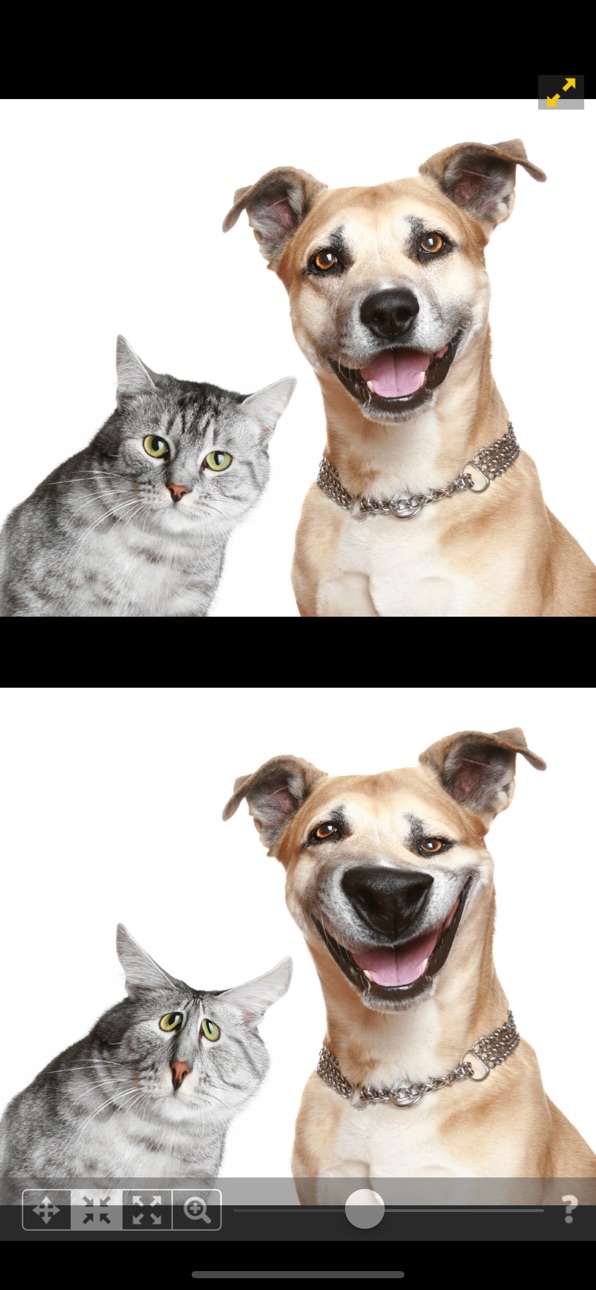
2) Our dual display mode, which clones your image into the other half of the screen when you rotate your device, allows you to modify your image without the encumbrance of your finger hiding the area you are working on. This is ideal for small touch devices such as your phone !!
- New Feature: You can now save morphing animations as videos!
************************
WHAT CAN THE APP DO?
************************
With this photo distortion app you can transform any face and body part:
• Nose reshaping
• Lips augmentation
• Chin and face contouring
• Weight loss
• Muscle augmentation
• anything you can reshape or shrink!
For fun or simply because you are curious about how you would look with a differently shaped body part, this app will help you.
************************
HOW TO USE THE APP?
************************
Using the app is very easy, even on small screens:
• Import a head-shot or full body picture from your camera or device image library. Preferably the subject should be photographed on a unified color background and well lit, so the contours are clearly visible.
• Use your finger to drag or shrink the body parts that you want distorted. For example you can crush this bump on your nose, or even make you slimmer.
• Undo latest changes if you are not satisfied with latest modifications.
• By rotating your device, switch from single to dual view, to easily compare the before / after images on the same screen.
• Zoom in, and use the dual view to see your changes on a real time workspace mirror without your finger in the way. This is a great solution to perform precise distortions on small screens!!
• Launch a morphing animation between the original photo and the modified one to see the old you transforming into the new you!
Download our app now. Then see how those changes you’ve been wanting to see might look.
Accessibility
ipadiphonemacrealityDevicetvoswatch
Version history 25 versions
Build 860142590v1.232023-09-23 08:42:00
- Update to support iOS 17.
- Fixed a bug about image with certain proportion not loading properly.
Build 852125078v1.222022-09-21 05:36:27
- iOS 16 update.
- Fix size of image selection dialogue on iPad.
Build 844221714v1.212021-09-24 21:51:59
- iOS 15 compatibility update.
Build 837850040v1.202020-09-18 22:51:09
- Full compatibility with iOS 14.
Build 833082187v1.192019-10-15 14:36:22
- Increased resolution of saved images.
Build 828714042v1.182019-09-23 23:55:29
- iOS 13 compatibility update.
Build 828604909v1.172018-09-21 17:09:53
Compatibility with iOS 12 and XS iPhones.
Build 825040122v1.162017-12-06 21:44:22
- iPhone X fix
Build 824642936v1.152017-11-28 18:31:19
- iPhone X Fix
Build 823787774v1.142017-10-16 07:59:18
- By popular request, the app now saves in higher resolution.
- Compatibility with ios 11.
- Fix of the grey screen bug upon uploading an image into the app.
- Due to regulation in App stores, we had to change the name of our app. It formerly was the "Plastic Surgery Simulator". But functionalities are exactly the same in the app with the new name.
Build 820014094v1.132017-09-20 02:29:27
- Much requested update: images are now saved in higher resolution
- iOS11 compatibility update
Build 819110969v1.122016-10-12 00:10:39
- Correction of some typo errors.
Build 818910757v1.112016-09-20 14:44:16
- iOS 10 compatibility
Build 818247605v1.102016-07-29 17:53:25
- New Feature: You can now save morphing animations as videos !
Build 816580952v1.92016-03-22 01:18:17
- Compliance update
Build 814115245v1.82015-11-06 19:45:27
- Optimization for iOS9, iPhones 6S and 6S+
- Saved images are now always saved in higher resolution (1024 px for largest dimension). Before, it was saved in low resolution when device memory was low (512px for largest dimension).
Build 705744700v1.72014-09-29 15:46:26
- Added support for iOS8, iPhone6 and 6+
Build 219952805v1.62014-07-13 10:37:17
- 1.6 : New translations added: Swedish, Turkish, Arabic, Hebrew, Russian and traditional Chinese.
Build 16465068v1.52013-09-17 01:27:27
- iOS7 support.
Build 11116273v1.42012-09-30 21:34:30
- iOS 6 / iPhone 5 support
Build 8441231v1.32012-06-09 19:08:22
- New iPad Retina support
Build 5833778v1.22012-01-10 21:08:09
- Bug fix: blank image when saving dual view.
Build 4840404v1.12011-11-20 15:51:59
-iOS 5 compatibility.
-Exclusive free access to the Befaft.com network, where users can optionally share their simulated plastic surgery pictures, and rate the pictures of other users!
Build 4040036v1.0.32011-08-17 21:19:29
-Stability improvement.
Build 3856532v1.0.22011-06-28 20:55:51
- Added Japanese, Korean, German, Brazilian Portuguese translations.
- Some bug fixes.
- New name: Plastic Surgery Simulator.
Price history by region
Currency
Show
Columns
Search
Availability 145 of 145 storefronts
| Region | Language | Price | Ratings | Avg | Version |
|---|---|---|---|---|---|
| US | en-US | USD 1.99 | 1.7k | 4.7 | 1.23 |
| MX | es-MX | MXN 39 | 560 | 4.8 | 1.23 |
| IT | it | EUR 1.99 | 456 | 4.7 | 1.23 |
| BR | pt-BR | BRL 12.9 | 422 | 4.7 | 1.23 |
| RU | ru | RUB 199 | 276 | 4.5 | 1.23 |
| DE | de-DE | EUR 1.99 | 265 | 4.5 | 1.23 |
| FR | fr-FR | EUR 1.99 | 236 | 4.5 | 1.23 |
| TR | en-GB | TRY 99.99 | 227 | 4.5 | 1.23 |
| JP | ja | JPY 300 | 174 | 4.6 | 1.23 |
| CO | es-MX | COP 9900 | 169 | 4.7 | 1.23 |
| ES | es-ES | EUR 1.99 | 165 | 4.6 | 1.23 |
| GB | en-GB | GBP 1.99 | 148 | 4.5 | 1.23 |
| CL | es-MX | CLP 1990 | 97 | 4.7 | 1.23 |
| CN | zh-Hans-CN | CNY 15 | 85 | 4.9 | 1.23 |
| KR | ko | KRW 3300 | 78 | 4.6 | 1.23 |
| SA | en-GB | SAR 9.99 | 75 | 4.7 | 1.23 |
| CA | en-CA | CAD 2.99 | 73 | 4.4 | 1.23 |
| TH | en-GB | THB 79 | 68 | 4.8 | 1.23 |
| PE | es-MX | PEN 9.9 | 67 | 4.4 | 1.23 |
| AR | es-MX | USD 1.99 | 63 | 4.7 | 1.23 |
| IL | en-GB | ILS 7.9 | 58 | 4.2 | 1.23 |
| EC | es-MX | USD 1.99 | 56 | 4.9 | 1.23 |
| AU | en-AU | AUD 2.99 | 51 | 4.3 | 1.23 |
| CH | de-CH | CHF 2 | 49 | 4.5 | 1.23 |
| AE | en-GB | AED 7.99 | 44 | 4.5 | 1.23 |
| NL | nl | EUR 1.99 | 33 | 4.0 | 1.23 |
| SE | sv | SEK 29 | 32 | 4.3 | 1.23 |
| UA | en-GB | USD 1.99 | 32 | 4.7 | 1.23 |
| AT | de-DE | EUR 1.99 | 29 | 4.8 | 1.23 |
| ID | en-GB | IDR 29000 | 24 | 4.4 | 1.23 |
| PT | pt-PT | EUR 1.99 | 24 | 4.5 | 1.23 |
| GT | es-MX | USD 1.99 | 19 | 5.0 | 1.23 |
| BE | en-GB | EUR 1.99 | 18 | 4.7 | 1.23 |
| IN | en-GB | INR 199 | 17 | 4.3 | 1.23 |
| KW | en-GB | USD 1.99 | 17 | 4.4 | 1.23 |
| PA | es-MX | USD 1.99 | 17 | 4.6 | 1.23 |
| PL | en-GB | PLN 9.99 | 17 | 4.2 | 1.23 |
| AZ | en-GB | USD 1.99 | 16 | 4.8 | 1.23 |
| TW | zh-Hant-TW | TWD 60 | 15 | 4.1 | 1.23 |
| PH | en-GB | PHP 129 | 14 | 4.9 | 1.23 |
| CZ | en-GB | CZK 49 | 12 | 4.9 | 1.23 |
| VE | es-MX | USD 1.99 | 12 | 4.6 | 1.23 |
| CR | es-MX | USD 1.99 | 11 | 5.0 | 1.23 |
| GR | en-GB | EUR 1.99 | 11 | 4.6 | 1.23 |
| SG | en-GB | SGD 2.98 | 11 | 4.5 | 1.23 |
| PY | es-MX | USD 1.99 | 10 | 5.0 | 1.23 |
| RO | en-GB | RON 9.99 | 10 | 4.6 | 1.23 |
| BO | es-MX | USD 1.99 | 8 | 4.9 | 1.23 |
| DK | en-GB | DKK 19 | 8 | 4.0 | 1.23 |
| EG | en-GB | EGP 99.99 | 8 | 5.0 | 1.23 |
| HR | en-GB | EUR 1.99 | 8 | 4.5 | 1.23 |
| HU | en-GB | HUF 999 | 8 | 5.0 | 1.23 |
| MY | en-GB | MYR 9.9 | 8 | 4.9 | 1.23 |
| HN | es-MX | USD 1.99 | 7 | 5.0 | 1.23 |
| IE | en-GB | EUR 1.99 | 7 | 3.4 | 1.23 |
| NO | en-GB | NOK 29 | 7 | 4.6 | 1.23 |
| OM | en-GB | USD 1.99 | 7 | 3.7 | 1.23 |
| PK | en-GB | PKR 500 | 7 | 4.9 | 1.23 |
| AM | en-GB | USD 1.99 | 6 | 5.0 | 1.23 |
| BY | en-GB | USD 1.99 | 6 | 4.8 | 1.23 |
| LU | en-GB | EUR 1.99 | 6 | 4.8 | 1.23 |
| UY | en-GB | USD 1.99 | 6 | 4.7 | 1.23 |
| HK | zh-Hant-HK | HKD 18 | 5 | 4.8 | 1.23 |
| BG | en-GB | EUR 1.99 | 4 | 4.0 | 1.23 |
| BH | en-GB | USD 1.99 | 4 | 5.0 | 1.23 |
| FI | en-GB | EUR 1.99 | 4 | 4.3 | 1.23 |
| NI | es-MX | USD 1.99 | 4 | 5.0 | 1.23 |
| QA | en-GB | QAR 7.99 | 4 | 5.0 | 1.23 |
| SV | es-MX | USD 1.99 | 4 | 5.0 | 1.23 |
| VN | en-GB | VND 59000 | 4 | 3.8 | 1.23 |
| AL | en-GB | USD 1.99 | 3 | 4.7 | 1.23 |
| CY | en-GB | EUR 1.99 | 3 | 5.0 | 1.23 |
| JO | en-GB | USD 1.99 | 3 | 4.0 | 1.23 |
| LB | en-GB | USD 1.99 | 3 | 5.0 | 1.23 |
| NZ | en-AU | NZD 3.99 | 3 | 5.0 | 1.23 |
| LK | en-GB | USD 1.99 | 2 | 4.5 | 1.23 |
| LV | en-GB | EUR 1.99 | 2 | 4.5 | 1.23 |
| RS | en-GB | EUR 1.99 | 2 | 5.0 | 1.23 |
| AO | en-GB | USD 1.99 | 1 | 5.0 | 1.23 |
| EE | en-GB | EUR 1.99 | 1 | 4.0 | 1.23 |
| GE | en-GB | USD 1.99 | 1 | 5.0 | 1.23 |
| IQ | en-GB | USD 1.99 | 1 | 5.0 | 1.23 |
| IS | en-GB | USD 1.99 | 1 | 5.0 | 1.23 |
| LT | en-GB | EUR 1.99 | 1 | 5.0 | 1.23 |
| NG | en-GB | NGN 3200 | 1 | 5.0 | 1.23 |
| SI | en-GB | EUR 1.99 | 1 | 5.0 | 1.23 |
| SK | en-GB | EUR 1.99 | 1 | 5.0 | 1.23 |
| TZ | en-GB | TZS 5900 | 1 | 5.0 | 1.23 |
| UZ | en-GB | USD 1.99 | 1 | 5.0 | 1.23 |
| ZA | en-GB | ZAR 39.99 | 1 | 5.0 | 1.23 |
| AF | en-GB | USD 1.99 | 0 | — | 1.23 |
| BA | en-GB | EUR 1.99 | 0 | — | 1.23 |
| BF | en-GB | USD 1.99 | 0 | — | 1.23 |
| BJ | en-GB | USD 1.99 | 0 | — | 1.23 |
| BM | en-GB | USD 1.99 | 0 | — | 1.23 |
| BN | en-GB | USD 1.99 | 0 | — | 1.23 |
| BW | en-GB | USD 1.99 | 0 | — | 1.23 |
| CD | en-GB | USD 1.99 | 0 | — | 1.23 |
| CG | en-GB | USD 1.99 | 0 | — | 1.23 |
| CI | fr-FR | USD 1.99 | 0 | — | 1.23 |
| CM | fr-FR | USD 1.99 | 0 | — | 1.23 |
| CV | en-GB | USD 1.99 | 0 | — | 1.23 |
| DZ | en-GB | USD 1.99 | 0 | — | 1.23 |
| GA | fr-FR | USD 1.99 | 0 | — | 1.23 |
| GH | en-GB | USD 1.99 | 0 | — | 1.23 |
| GM | en-GB | USD 1.99 | 0 | — | 1.23 |
| GW | en-GB | USD 1.99 | 0 | — | 1.23 |
| GY | en-GB | USD 1.99 | 0 | — | 1.23 |
| KE | en-GB | USD 1.99 | 0 | — | 1.23 |
| KN | en-GB | USD 1.99 | 0 | — | 1.23 |
| LR | en-GB | USD 1.99 | 0 | — | 1.23 |
| LY | en-GB | USD 1.99 | 0 | — | 1.23 |
| MA | en-GB | USD 1.99 | 0 | — | 1.23 |
| MD | en-GB | USD 1.99 | 0 | — | 1.23 |
| ME | en-GB | EUR 1.99 | 0 | — | 1.23 |
| MG | en-GB | USD 1.99 | 0 | — | 1.23 |
| MK | en-GB | USD 1.99 | 0 | — | 1.23 |
| ML | en-GB | USD 1.99 | 0 | — | 1.23 |
| MO | zh-Hant-HK | USD 1.99 | 0 | — | 1.23 |
| MR | en-GB | USD 1.99 | 0 | — | 1.23 |
| MT | en-GB | EUR 1.99 | 0 | — | 1.23 |
| MU | en-GB | USD 1.99 | 0 | — | 1.23 |
| MW | en-GB | USD 1.99 | 0 | — | 1.23 |
| MZ | en-GB | USD 1.99 | 0 | — | 1.23 |
| NA | en-GB | USD 1.99 | 0 | — | 1.23 |
| NE | en-GB | USD 1.99 | 0 | — | 1.23 |
| NP | en-GB | USD 1.99 | 0 | — | 1.23 |
| NR | en-GB | USD 1.99 | 0 | — | 1.23 |
| RW | en-GB | USD 1.99 | 0 | — | 1.23 |
| SC | en-GB | USD 1.99 | 0 | — | 1.23 |
| SL | en-GB | USD 1.99 | 0 | — | 1.23 |
| SN | en-GB | USD 1.99 | 0 | — | 1.23 |
| SR | en-GB | USD 1.99 | 0 | — | 1.23 |
| ST | en-GB | USD 1.99 | 0 | — | 1.23 |
| SZ | en-GB | USD 1.99 | 0 | — | 1.23 |
| TD | en-GB | USD 1.99 | 0 | — | 1.23 |
| TM | en-GB | USD 1.99 | 0 | — | 1.23 |
| TN | en-GB | USD 1.99 | 0 | — | 1.23 |
| UG | en-GB | USD 1.99 | 0 | — | 1.23 |
| VC | en-GB | USD 1.99 | 0 | — | 1.23 |
| VG | en-GB | USD 1.99 | 0 | — | 1.23 |
| XK | en-GB | EUR 1.99 | 0 | — | 1.23 |
| YE | en-GB | USD 1.99 | 0 | — | 1.23 |
| ZM | en-GB | USD 1.99 | 0 | — | 1.23 |
| ZW | en-GB | USD 1.99 | 0 | — | 1.23 |
Change log 29 changes · PY
✎
releaseNotes updated
- Update to support iOS 17.
- Fixed a bug about image with certain proportion not loading properly.
✎
description updated
This is a simple but powerful photo distortion App. You can use it to simulate body transformations, improve your appearance on social networks, or have fun war
✎
subtitle updated
Liquify on your phone
✎
name updated
Face & Body Photo editor
◆
Version 1.23 released
- Update to support iOS 17.
- Fixed a bug about image with certain proportion not loading properly.
◆
Version 1.22 released
- iOS 16 update.
- Fix size of image selection dialogue on iPad.
◆
Version 1.21 released
- iOS 15 compatibility update.
◆
Version 1.20 released
- Full compatibility with iOS 14.
◆
Version 1.19 released
- Increased resolution of saved images.
◆
Version 1.18 released
- iOS 13 compatibility update.
◆
Version 1.17 released
Compatibility with iOS 12 and XS iPhones.
◆
Version 1.16 released
- iPhone X fix
◆
Version 1.15 released
- iPhone X Fix
◆
Version 1.14 released
- By popular request, the app now saves in higher resolution.
- Compatibility with ios 11.
- Fix of the grey screen bug upon uploading an image into the app.
- Due to regulation in App stores, we had to change the name of our app. It former
◆
Version 1.13 released
- Much requested update: images are now saved in higher resolution
- iOS11 compatibility update
◆
Version 1.12 released
- Correction of some typo errors.
◆
Version 1.11 released
- iOS 10 compatibility
◆
Version 1.10 released
- New Feature: You can now save morphing animations as videos !
◆
Version 1.9 released
- Compliance update
◆
Version 1.8 released
- Optimization for iOS9, iPhones 6S and 6S+
- Saved images are now always saved in higher resolution (1024 px for largest dimension). Before, it was saved in low resolution when device memory was low (512px for largest dimension).
◆
Version 1.7 released
- Added support for iOS8, iPhone6 and 6+
◆
Version 1.6 released
- 1.6 : New translations added: Swedish, Turkish, Arabic, Hebrew, Russian and traditional Chinese.
◆
Version 1.5 released
- iOS7 support.
◆
Version 1.4 released
- iOS 6 / iPhone 5 support
◆
Version 1.3 released
- New iPad Retina support
◆
Version 1.2 released
- Bug fix: blank image when saving dual view.
◆
Version 1.1 released
-iOS 5 compatibility.
-Exclusive free access to the Befaft.com network, where users can optionally share their simulated plastic surgery pictures, and rate the pictures of other users!
◆
Version 1.0.3 released
-Stability improvement.
◆
Version 1.0.2 released
- Added Japanese, Korean, German, Brazilian Portuguese translations.
- Some bug fixes.
- New name: Plastic Surgery Simulator.