Home › News

 DO
DO
 USen-US
 DEde-DE
 GBen-GB
 CAen-CA
 AUen-AU
 FRfr-FR
 SEsv
SEsv CHde-CH
 NLnl
NLnl NOen-GB
 ESes-ES
 ATde-DE
 DKen-GB
 ITit
ITit NZen-AU
 IEen-GB
 JPja
JPja BRpt-BR
 FIen-GB
 CNzh-Hans-CN
 ILen-GB
 AEen-GB
 BEen-GB
 PLen-GB
 THen-GB
 ZAen-GB
 INen-GB
 KRko
KRko SGen-GB
 HKzh-Hant-HK
 LTen-GB
 MXes-MX
 MYen-GB
 SAen-GB
 TWzh-Hant-TW
 ARes-MX
 CLes-MX
 GTes-MX
 JMen-GB
 PHen-GB
 AGen-GB
 AIen-GB
 ALen-GB
 AMen-GB
 AOen-GB
 AZen-GB
 BBen-GB
 BFen-GB
 BHen-GB
 BJen-GB
 BMen-GB
 BNen-GB
 BOes-MX
 BSen-GB
 BTen-GB
 BWen-GB
 BZen-GB
 CGen-GB
 COes-MX
 CRes-MX
 CVen-GB
 DMen-GBDOes-MX
 ECes-MX
 FJen-GB
 FMen-GB
 GDen-GB
 GHen-GB
 GMen-GB
 GWen-GB
 GYen-GB
 HNes-MX
 KGen-GB
 KHen-GB
 KNen-GB
 KYen-GB
 LAen-GB
 LCen-GB
 LKen-GB
 LRen-GB
 MLen-GB
 MNen-GB
 MOzh-Hant-HK
 MSen-GB
 NIes-MX
 NPen-GB
 PAes-MX
 PEes-MX
 PGen-GB
 PWen-GB
 SBen-GB
 SCen-GB
 SLen-GB
 SNen-GB
 SRen-GB
 SVes-MX
 SZen-GB
 TCen-GB
 TDen-GB
 TJen-GB
 TMen-GB
 TNen-GB
 TZen-GB
 UGen-GB
 VCen-GB
 VGen-GB
 YEen-GB
 ZWen-GB
 AFNot Available
 BANot Available
 BGNot Available
 BYNot Available
 CDNot Available
 CINot Available
 CMNot Available
 CYNot Available
 CZNot Available
 DZNot Available
 EENot Available
 EGNot Available
 GANot Available
 GENot Available
 GRNot Available
 HRNot Available
 HUNot Available
 IDNot Available
 IQNot Available
 ISNot Available
 JONot Available
 KENot Available
 KWNot Available
 KZNot Available
 LBNot Available
 LUNot Available
 LVNot Available
 LYNot Available
 MANot Available
 MDNot Available
 MENot Available
 MGNot Available
 MKNot Available
 MMNot Available
 MRNot Available
 MTNot Available
 MUNot Available
 MVNot Available
 MWNot Available
 MZNot Available
 NANot Available
 NENot Available
 NGNot Available
 NRNot Available
 OMNot Available
 PKNot Available
 PTNot Available
 PYNot Available
 QANot Available
 RONot Available
 RSNot Available
 RUNot Available
 RWNot Available
 SINot Available
 SKNot Available
 STNot Available
 TONot Available
 TRNot Available
 TTNot Available
 UANot Available
 UYNot Available
 UZNot Available
 VENot Available
 VNNot Available
 VUNot Available
 XKNot Available
 ZMNot Available
108 of 175 storefronts
Content in en-US
Content in en-US
Information
Preview 3 platforms
iPhone 9 images


iPad 5 images



Apple Watch 5 images


What’s New Version 15.0.2
If you find iCatcher useful, please consider tipping in the help and settings tab, or share the app with your friends! Thanks!
15.0.2
+Podcast list view added option to toggle show categories. List mode also shows unplayed episode count and space used for each podcast that has downloaded items
+Updated context menu (tap and hold) on episodes to be more consistent between the different views
Fixes
- fix for podcast defaults 'show downloaded first' and the 'default sort’
- fix for numerous German translations
- fix for episode playback progress look and feel
- fix for some shoes not show the show notes preview in the episode list
- fix for smaller device screens and the floating media toolbar
- fix related to the media toolbar and smaller devices
- fix for some German translations. Hopefully
- fix for changing a podcasts name and it not saving after force close and reopen
- fix for delete episode after playing not working as expect at the global level
- fix related to file transfers to the watch failing to complete
- fix for podcast settings potentially not saving
- fix for missing menu in the apple watch settings
15.0.1
Bug fixes
-fix playlist editor being able to select downloaded, streaming, not downloaded/streaming
-fix for voice-over button mis-labeled
-fix for selecting all in downloads queue, deselect a few and take action on the rest
-fix for some items not showing due to the color mismatch
-fix for lock-screen widget not showing the right icon
-fix for playlist grid icons not have correct accessibility labels
-fix for ui if user had the experimental podcasts tab enabled before the 15.0 update
15.0
+iOS 26+, Added a sidebar option on iPad.
+iOS 26+, Added the ability to generate [transcripts](transcripts.html). This uses Apple's built-in on-device transcription support. The episode file must be downloaded first, and transcription uses the language specified by the podcast.
+iOS 26+, Added a dedicated Search tab for finding new podcasts.
+The Podcasts tab now has additional layout options, including multiple tile sizes and the traditional list view.
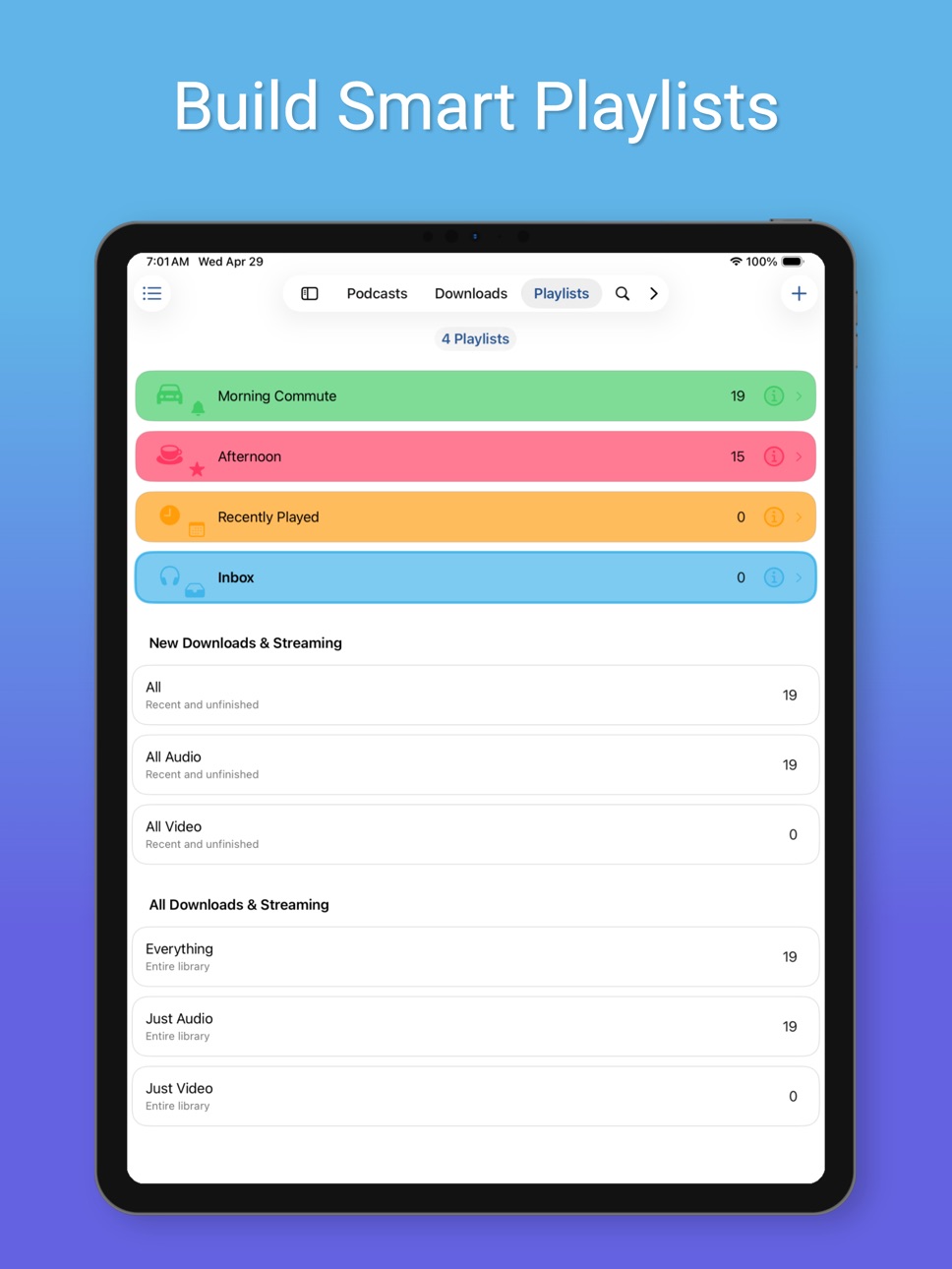
+Updated Playlist Settings. iOS 26+, has the ability to set a playlist color and view the list of playlists in grid view.
+The new podcast search gives more prominence to artwork. Tapping an episode now shows more detail, including episode artwork when available.
+Added a new podcast default option under Settings, Podcast Defaults for after streaming. One option is Do Nothing, which leaves the streaming flag enabled.
+Added Bonus and Trailer media types under Settings, Podcast Defaults, Allowed Media Types, so episodes marked as bonus content or trailers can be excluded from automatically becoming playable.
+Added additional playback speed defaults within a podcast's settings.
+Updated help viewer. For iOS 26+ users added translate button to convert to your language of choice.
+New onboarding view. Meant for fresh installs, but you can check it out by tapping that link
+Removed Siri shortcuts items under settings tab. Those are all available now as shortcuts actions.
+New experimental feature to use a game controller to controller certain aspects of the application
Fixes
-fix for the episode show notes popover where links were not recognized
-fix for fullscreen video not taking stretching to fill cop and bottom in landscape view.
View the Settings tab, What’s New to view past updates
Follow me on x @joeisanerd and mastodon joeisanerd@techhub.social
Description
Download, listen, watch, and relish your favorite podcasts.
FEATURES
- Subscribe to your preferred podcasts within the app and manage them conveniently.
- Download episodes over WiFi or Cellular (available on devices with cellular capabilities).
- Support for password-protected feeds.
- Background refresh and download in the background.
- Sync subscriptions, episode playback positions, and playlists between your devices using iCloud.
- Universal App (compatible with iPhone and iPad).
- Search across all views to locate the podcast or episode you’re seeking.
- Customize playlists with filtering options based on podcasts, episodes, and more.
- Support for continuous playback (toggle it on the now playing screen just below the time elapsed).
- Portrait and landscape orientation supporter, with a configurable option in the settings.
- Unfollow podcasts and still keep them on your device. This feature is particularly useful for podcasts that don’t meet your expectations.
PLAYBACK
- Variable playback speed.
- Remembered playback speed per podcast.
- Support for podcasts with chapters and chapter images (MP3 and M4A formats).
- Utilize your headset controls, including Bluetooth car controls (when paired), to play/pause, jump forward or backward 30 seconds.
- Sleep timer.
- Beautifully rendered show notes.
- Onscreen controls for skipping ahead and skipping back.
- Gesture support on the now playing screen (when the podcast logo is visible) to facilitate hands-free use.
- Double-tap to play/pause.
- Swipe up to adjust playback speed.
- Swipe left or right to rewind or fast-forward.
- Home to the L gesture for the 2-minute Leo jump.
- Refer to Settings and Gestures for more information and customization options for rewind/fast-forward gestures.
- AirPlay support allows you to watch or listen to podcasts on your large screen.
- External display support for videos is available for devices that support an external display (use the Apple HDMI adapter).
- Enjoy your favorite podcasts with a familiar layout.
FIND NEW PODCASTS QUICKLY
- Search for your podcasts by title, keyword, or author.
- Browse the top podcasts categorized by different genres.
• Manually add podcasts by entering their URLs.
• Support for password-protected feeds.
• Option to download a single episode.
• Import podcast subscriptions for episodes already on your device from iTunes.
• Import your OPML file from iTunes or other iOS podcast app.
• Import media using the iTunes File Sharing feature.
• Add your existing audiobooks (non-password-protected ones) using the iTunes File Sharing feature.
• Add previously downloaded podcasts from your computer using the iTunes file sharing feature (see Settings and Import Media for details).
SHORTCUT ACTIONS
• Search your podcasts and episodes using shortcut actions.
• Easily create an export from other apps into iCatcher using the subscribe action.
• Control playback.
• View podcast action including currently playing.
• Import media directly into the app (like audiobooks).
• Transfer your media to the watch via shortcut actions.
• Pull chapter images.
• Many more actions available.
MORE
• Completely customizable to suit your podcast preferences.
• Swipe across a podcast or episode to access additional options.
• Podcast settings allow you to set the days the podcast typically releases or the number of days between.
• Specify the number of episodes to download when new ones are available.
• Share podcast information via email with your friends.
CONTACT
Email: Tap the settings tab and select Send Questions or Feedback.
Twitter/X: @Joeisanerd.
PLEASE NOTE: The app doesn’t sync with iTunes. Like other podcast apps, it’s a standalone app designed for subscribing and downloading on the device.
* If a feed doesn’t work, please let me know so I can investigate it.
Requires iOS 18.5
In-App Purchases DO pricing
One-Time Purchases
Thank You Tip—
Big Thank You Tip—
Really Big Thank You Tip—
Enormous Tip—
Capabilities
In-App PurchasesSiriGame controller
Accessibility
ipadiphonemacrealityDevicetvoswatch
Version history 25 versions
Build 887359896v15.0.22026-07-01 22:07:32
If you find iCatcher useful, please consider tipping in the help and settings tab, or share the app with your friends! Thanks!
15.0.2
+Podcast list view added option to toggle show categories. List mode also shows unplayed episode count and space used for each podcast that has downloaded items
+Updated context menu (tap and hold) on episodes to be more consistent between the different views
Fixes
- fix for podcast defaults 'show downloaded first' and the 'default sort’
- fix for numerous German translations
- fix for episode playback progress look and feel
- fix for some shoes not show the show notes preview in the episode list
- fix for smaller device screens and the floating media toolbar
- fix related to the media toolbar and smaller devices
- fix for some German translations. Hopefully
- fix for changing a podcasts name and it not saving after force close and reopen
- fix for delete episode after playing not working as expect at the global level
- fix related to file transfers to the watch failing to complete
- fix for podcast settings potentially not saving
- fix for missing menu in the apple watch settings
15.0.1
Bug fixes
-fix playlist editor being able to select downloaded, streaming, not downloaded/streaming
-fix for voice-over button mis-labeled
-fix for selecting all in downloads queue, deselect a few and take action on the rest
-fix for some items not showing due to the color mismatch
-fix for lock-screen widget not showing the right icon
-fix for playlist grid icons not have correct accessibility labels
-fix for ui if user had the experimental podcasts tab enabled before the 15.0 update
15.0
+iOS 26+, Added a sidebar option on iPad.
+iOS 26+, Added the ability to generate [transcripts](transcripts.html). This uses Apple's built-in on-device transcription support. The episode file must be downloaded first, and transcription uses the language specified by the podcast.
+iOS 26+, Added a dedicated Search tab for finding new podcasts.
+The Podcasts tab now has additional layout options, including multiple tile sizes and the traditional list view.
+Updated Playlist Settings. iOS 26+, has the ability to set a playlist color and view the list of playlists in grid view.
+The new podcast search gives more prominence to artwork. Tapping an episode now shows more detail, including episode artwork when available.
+Added a new podcast default option under Settings, Podcast Defaults for after streaming. One option is Do Nothing, which leaves the streaming flag enabled.
+Added Bonus and Trailer media types under Settings, Podcast Defaults, Allowed Media Types, so episodes marked as bonus content or trailers can be excluded from automatically becoming playable.
+Added additional playback speed defaults within a podcast's settings.
+Updated help viewer. For iOS 26+ users added translate button to convert to your language of choice.
+New onboarding view. Meant for fresh installs, but you can check it out by tapping that link
+Removed Siri shortcuts items under settings tab. Those are all available now as shortcuts actions.
+New experimental feature to use a game controller to controller certain aspects of the application
Fixes
-fix for the episode show notes popover where links were not recognized
-fix for fullscreen video not taking stretching to fill cop and bottom in landscape view.
View the Settings tab, What’s New to view past updates
Follow me on x @joeisanerd and mastodon joeisanerd@techhub.social
Build 887175068v15.0.12026-06-23 21:52:13
If you find iCatcher useful, please consider tipping in the help and settings tab, or share the app with your friends! Thanks!
15.0.1
Bug fixes
-fix playlist editor being able to select downloaded, streaming, not downloaded/streaming
-fix for voice-over button mis-labeled
-fix for selecting all in downloads queue, deselect a few and take action on the rest
-fix for some items not showing due to the color mismatch
-fix for lock-screen widget not showing the right icon
-fix for playlist grid icons not have correct accessibility labels
-fix for ui if user had the experimental podcasts tab enabled before the 15.0 update
15.0
+iOS 26+, Added a sidebar option on iPad.
+iOS 26+, Added the ability to generate [transcripts](transcripts.html). This uses Apple's built-in on-device transcription support. The episode file must be downloaded first, and transcription uses the language specified by the podcast.
+iOS 26+, Added a dedicated Search tab for finding new podcasts.
+The Podcasts tab now has additional layout options, including multiple tile sizes and the traditional list view.
+Updated Playlist Settings. iOS 26+, has the ability to set a playlist color and view the list of playlists in grid view.
+The new podcast search gives more prominence to artwork. Tapping an episode now shows more detail, including episode artwork when available.
+Added a new podcast default option under Settings, Podcast Defaults for after streaming. One option is Do Nothing, which leaves the streaming flag enabled.
+Added Bonus and Trailer media types under Settings, Podcast Defaults, Allowed Media Types, so episodes marked as bonus content or trailers can be excluded from automatically becoming playable.
+Added additional playback speed defaults within a podcast's settings.
+Updated help viewer. For iOS 26+ users added translate button to convert to your language of choice.
+New onboarding view. Meant for fresh installs, but you can check it out by tapping that link
+Removed Siri shortcuts items under settings tab. Those are all available now as shortcuts actions.
+New experimental feature to use a game controller to controller certain aspects of the application
Bug fixes
-fix for the episode show notes popover where links were not recognized
-fix for fullscreen video not taking stretching to fill cop and bottom in landscape view.
View the Settings tab, What’s New to view past updates
Follow me on x @joeisanerd and mastodon joeisanerd@techhub.social
Build 879978819v15.02026-06-19 03:48:36
Download, listen, watch, and relish your favorite podcasts.
FEATURES
• Subscribe to your preferred podcasts within the app and manage them conveniently.
• Download episodes over WiFi or Cellular (available on devices with cellular capabilities).
• Support for password-protected feeds.
• Background refresh and download in the background.
• Sync subscriptions, episode playback positions, and playlists between your devices using iCloud.
• Universal App (compatible with iPhone and iPad).
• Search across all views to locate the podcast or episode you’re seeking.
• Customize playlists with filtering options based on podcasts, episodes, and more.
• Support for continuous playback (toggle it on the now playing screen just below the time elapsed).
• Portrait and landscape orientation supporter, with a configurable option in the settings.
• Unfollow podcasts and still keep them on your device. This feature is particularly useful for podcasts that don’t meet your expectations.
• Generate transcripts on device with iOS 26+ devices
PLAYBACK
• Variable playback speed.
• Remembered playback speed per podcast.
• Support for podcasts with chapters and chapter images (MP3 and M4A formats).
• Utilize your headset controls, including Bluetooth car controls (when paired), to play/pause, jump forward or backward 30 seconds.
• Sleep timer.
• Beautifully rendered show notes.
• Onscreen controls for skipping ahead and skipping back.
• Gesture support on the now playing screen (when the podcast logo is visible) to facilitate hands-free use.
- Double-tap to play/pause.
- Swipe up to adjust playback speed.
- Swipe left or right to rewind or fast-forward.
- Home to the L gesture for the 2-minute Leo jump.
• Refer to Settings and Gestures for more information and customization options for rewind/fast-forward gestures.
• AirPlay support allows you to watch or listen to podcasts on your large screen.
• External display support for videos is available for devices that support an external display (use the Apple HDMI adapter).
• Enjoy your favorite podcasts with a familiar layout.
FIND NEW PODCASTS QUICKLY
• Search for your podcasts by title, keyword, or author.
• Browse the top podcasts categorized by different genres.
• Manually add podcasts by entering their URLs.
• Support for password-protected feeds.
• Option to download a single episode.
• Import podcast subscriptions for episodes already on your device from iTunes.
• Import your OPML file from iTunes or other iOS podcast app.
• Import media using the iTunes File Sharing feature.
• Add your existing audiobooks (non-password-protected ones) using the iTunes File Sharing feature.
• Add previously downloaded podcasts from your computer using the iTunes file sharing feature (see Settings and Import Media for details).
SHORTCUT ACTIONS
• Search your podcasts and episodes using shortcut actions.
• Easily create an export from other apps into iCatcher using the subscribe action.
• Control playback.
• View podcast action including currently playing.
• Import media directly into the app (like audiobooks).
• Transfer your media to the watch via shortcut actions.
• Pull chapter images.
• Many more actions available.
MORE
• Completely customizable to suit your podcast preferences.
• Swipe across a podcast or episode to access additional options.
• Podcast settings allow you to set the days the podcast typically releases or the number of days between.
• Specify the number of episodes to download when new ones are available.
• Share podcast information via email with your friends.
CONTACT
Email: Tap the settings tab and select Send Questions or Feedback.
Twitter/X: @Joeisanerd.
PLEASE NOTE: The app doesn’t sync with iTunes. Like other podcast apps, it’s a standalone app designed for subscribing and downloading on the device.
* If a feed doesn’t work, please let me know so I can investigate it.
Requires iOS 18.1 or higher.
Build 879627980v9.3.32025-11-12 02:19:24
If you find iCatcher useful, please consider tipping in the help and settings tab, or share the app with your friends! Thanks!
Fixes:
-Bug fix for when device is in dark mode, but you have it disabled in iCatcher (light mode).
-Bug fix for the lock screen widgets not doing anything when tapped. Also added 2 additional options when configuring widgets. Do nothing and show episode details.
-Bug fix for playback queue (x of y episodes)
View the Settings tab, What’s New to view past updates
Follow me on x @joeisanerd and mastodon joeisanerd@techhub.social
Build 879068346v9.3.22025-10-28 02:45:53
If you find iCatcher useful, please consider tipping in the help and settings tab, or share the app with your friends! Thanks!
Fixes:
-Bug fix some buttons that don't look right with the button shapes accessibility option enabled.
-Bug fix for the import episode from the web shortcut action
View the Settings tab, What’s New to view past updates
Follow me on x @joeisanerd and mastodon joeisanerd@techhub.social
Build 879031611v9.32025-10-19 05:26:05
If you get ongoing value from iCatcher, then please consider the Tip Jar in the help and settings tab or tell your friends about the app. Thank you
Fixes
-Bug fix for some episodes downloading, then appearing to not be downloaded
New
-New shortcut action 'Import Media Items' to process 1 or multiple files to import into an existing podcast or to create a new import media podcast (like audiobooks). Setup a shortcut that works with the share sheet and you can import a folder into iCatcher. If the folder has an artwork file, then that will be used for that new podcasts artwork.
-New shortcut action 'Import Episode From Web'. This action expects a webpage url. Attempts to scrape the webpage output looking for meta tags (og:title and og:description) and a source tag that contains the media file.
-New option under settings, playback, controls for Volume Slider. Disable to hide the volume slider on the now playing view.
View the Settings tab, What’s New to view past updates
Follow me on x @joeisanerd and mastodon joeisanerd@techhub.social
Build 879063930v9.3.12025-10-19 18:18:03
If you find iCatcher useful, please consider tipping in the help and settings tab, or share the app with your friends! Thanks!
Fixes:
- Resolved the issue where the shortcut for the last update was not displayed as available in the shortcuts app.
New:
- Introduced a new podcast default setting (found in the settings tab, under podcast defaults) that allows users to prevent the disabling of the streaming tag on an episode after streaming.
9.3
Fixes
- Bug fix for some episodes downloading, then appearing to not be downloaded
New
- New shortcut action 'Import Media Items' to process 1 or multiple files to import into an existing podcast or to create a new import media podcast (like audiobooks). Set up a shortcut that works with the share sheet and you can import a folder into iCatcher. If the folder has an artwork file, then that will be used for that new podcast’s artwork.
- New shortcut action 'Import Episode From Web'. This action expects a webpage URL. Attempts to scrape the webpage output looking for meta tags (og:title and og:description) and a source tag that contains the media file.
- New option under settings, playback, controls for Volume Slider. Disable to hide the volume slider on the now playing view.
View the Settings tab, What’s New to view past updates
Follow me on x @joeisanerd and mastodon joeisanerd@techhub.social
Build 878512498v9.2.82025-10-07 15:34:42
If you get ongoing value from iCatcher, then please consider the Tip Jar in the help and settings tab or tell your friends about the app. Thank you
New
-New setting under playback, controls for Always show now playing to show now playing when tapping an episode to play. This also works with the media toolbar enabled.
-Additional option for the media toolbar (Settings, Playback, Controls) to show the rewind button
Fixes
-Fix for media toolbar setting not respecting users choice to disable it
-Fix for downloading episodes on the watch that wouldn't finish completely
9.2.7
New
-Control Center widget to open iCatcher for iOS 18+
-Updated media toolbar with new layout. Tapping the artwork (left side) will show additional options previously on the right. Tapping the title will now show now playing.
Fixes
-Fix for links in show notes popover not being clickable
-Fix for playback getting stuck in fast forward/fast reverse in rare scenario
-Playback fix
View the Settings tab, What’s New to view past updates
Follow me on x @joeisanerd and mastodon joeisanerd@techhub.social
Build 876534831v9.2.72025-09-28 16:24:12
If you get ongoing value from iCatcher, then please consider the Tip Jar in the help and settings tab or tell your friends about the app. Thank you
New
-Control Center widget to open iCatcher for iOS 18+
-Updated media toolbar with new layout. Tapping the artwork (left side) will show additional options previously on the right. Tapping the title will now show now playing.
Fixes
-Fix for links in show notes popover not being clickable
-Fix for playback getting stuck in fast forward/fast reverse in rare scenario
-Playback fix
View the Settings tab, What’s New to view past updates
Follow me on x @joeisanerd and mastodon joeisanerd@techhub.social
Build 875420756v9.2.62025-06-20 22:24:56
If you get ongoing value from iCatcher, then please consider the Tip Jar in the help and settings tab or tell your friends about the app. Thank you
New
+Added Stop Playback intent available as an action in the shortcuts app.
+Updated podcast episode entity in app intents (shortcut actions) to include imageUrl. If the episode has an image url that will have the url.
Fixes
-Experimental New Podcasts Tab UI updated to support multi select and drag like the existing UI. This now works with the grid layout.
-Experimental New Podcasts Tab UI updated to support multi select and drag like the existing UI. This now works with the grid layout.
-Fix for watch local playback not playing at higher than 2.5x speed
-Fix for Portrait only orientations
-Fix for feed parsing
View the Settings tab, What’s New to view past updates
Follow me on x @joeisanerd and mastodon joeisanerd@techhub.social
Build 875217416v9.2.52025-06-06 01:05:40
If you get ongoing value from iCatcher, then please consider the Tip Jar in the help and settings tab or tell your friends about the app. Thank you
New
+Additional download options included in context menu (tap and hold) for episodes.
Fixes
-Fix for import media shortcut not properly handling movie files
-Fix for not selecting the last tab that was active on relaunch
-Performance improvement during podcast refresh
View the Settings tab, What’s New to view past updates
Follow me on x @joeisanerd and mastodon joeisanerd@techhub.social
Build 874944219v9.2.42025-05-21 23:36:51
If you get ongoing value from iCatcher, then please consider the Tip Jar in the help and settings tab or tell your friends about the app. Thank you
New
+Added share action to the list of playlists when swiping right to left. Also added share within a playlists settings.
Fixes
-Fix for apple watch auto transfer playlist when deleting the playlist
-Fix related to the import media app intent shortcut action
View the Settings tab, What’s New to view past updates
Follow me on x @joeisanerd and mastodon joeisanerd@techhub.social
Build 874620926v9.2.32025-05-14 14:35:38
If you get ongoing value from iCatcher, then please consider the Tip Jar in the help and settings tab or tell your friends about the app. Thank you
New
+New AppIntent to set playback rate. See shortcuts app for this new item
+New AppIntent to import media to allow for importing files via the shortcuts app. You could make the shortcut available a share action to import a media file from the files app directly into the app
Fixes
-Fix for playback speed with voiceover
-Fix for issue with CarPlay
View the Settings tab, What’s New to view past updates
Follow me on x @joeisanerd and mastodon joeisanerd@techhub.social
Build 874475548v9.2.22025-05-03 16:35:01
If you get ongoing value from iCatcher, then please consider the Tip Jar in the help and settings tab or tell your friends about the app. Thank you
Fixes
-Added the Play episode intent for the shortcuts app. This was unintentionally removed in a prior version
-Fix for the navigate broken shortcut actions that navigate to different areas in the app including the now playing screen
9.2/9.2.1 updates
New
+Initial support for m3u8 streaming
+Updates to the Media Toolbar (Settings, playback, controls). Updated toolbar has menu options reorganized with new Speed slider and a new option to select playback destination.
+Updates to Car Play
+Update Watch setting area. Shows podcasts/audiobooks in groups. You can now select a folder to import something like an audio book (if artwork file is in the folder it will set that as the artwork).
+New AppIntents added to allow for easily importing files directly to the apple watch. Great for those that use the apple watch to listen to audio books.
+Added sort by filename on the watch
+Added podcast/audiobook sorting for the local items added to the Apple Watch
Fixes
-Fix for CarPlay issue when app is completely closed and you attept to start playback from carplay
-Fix for the playback rate view that allowing for your max playback speed
-Fix for the Auto Transfer playlist watch option. (Settings, Apple Watch). Add items to the selected playlist will initiate a transfer to the watch.
-Fix for episodes not finishing correctly and updating their status
View the Settings tab, What’s New to view past updates
Follow me on x @joeisanerd and mastodon joeisanerd@techhub.social
Build 874456164v9.2.12025-05-02 03:51:39
If you get ongoing value from iCatcher, then please consider the Tip Jar in the help and settings tab or tell your friends about the app. Thank you
New
+Initial support for m3u8 streaming
Fixes
-Fix for CarPlay issue when app is completely closed and you attempt to start playback
-Fix for the playback rate view that allowing for your max playback speed
9.2 updates
New
+Updates to the Media Toolbar (Settings, playback, controls). Updated toolbar has menu options reorganized with new Speed slider and a new option to select playback destination.
+Updates to Car Play
+Update Watch setting area. Shows podcasts/audiobooks in groups. You can now select a folder to import something like an audio book (if artwork file is in the folder it will set that as the artwork).
+New AppIntents added to allow for easily importing files directly to the apple watch. Great for those that use the apple watch to listen to audio books.
+Added sort by filename on the watch
+Added podcast/audiobook sorting for the local items added to the Apple Watch
Fixes
-Fix for the Auto Transfer playlist watch option. (Settings, Apple Watch). Add items to the selected playlist will initiate a transfer to the watch.
-Fix for episodes not finishing correctly and updating their status
View the Settings tab, What’s New to view past updates
Follow me on x @joeisanerd and mastodon joeisanerd@techhub.social
Build 873798514v9.22025-04-22 04:03:05
If you get ongoing value from iCatcher, then please consider the Tip Jar in the help and settings tab or tell your friends about the app. Thank you
New
+Updates to the Media Toolbar (Settings, playback, controls). Updated toolbar has menu options reorganized with new Speed slider and a new option to select playback destination.
+Updates to Car Play
+Update Watch setting area. Shows podcasts/audiobooks in groups. You can now select a folder to import something like an audio book (if artwork file is in the folder it will set that as the artwork).
+New AppIntents added to allow for easily importing files directly to the apple watch. Great for those that use the apple watch to listen to audio books.
+Added sort by filename on the watch
+Added podcast/audiobook sorting for the local items added to the Apple Watch
Fixes
-Fix for the Auto Transfer playlist watch option. (Settings, Apple Watch). Add items to the selected playlist will initiate a transfer to the watch.
-Fix for episodes not finishing correctly and updating their status
View the Settings tab, What’s New to view past updates
Follow me on x @joeisanerd and mastodon joeisanerd@techhub.social
Build 872243372v9.1.72025-03-01 00:15:33
If you get ongoing value from iCatcher, then please consider the Tip Jar in the help and settings tab or tell your friends about the app. Thank you
Fixes
-Fix for downloader
View the Settings tab, What’s New to view past updates
Follow me on x @joeisanerd and mastodon joeisanerd@techhub.social
Build 872084349v9.1.62025-02-01 21:31:09
If you get ongoing value from iCatcher, then please consider the Tip Jar in the help and settings tab or tell your friends about the app. Thank you
New Stuff
+Another setting for skipping to next/previous episode. Settings tab, playback, controls, Next/Previous treated as skip Forward/Back. This doesn't change the skip buttons that show on the lock screen. This only affects issuing the command from headphones or other remove action.
Fixes
-Fix related to episode cleanup
-Fix for duplicate episodes checker in the Settings tab, other tools
9.1.4 & 9.1.5
New Stuff
+Category selection updates on the beta podcasts tab (Settings / Experimental). Selecting a category and then tapping or pulling down to refresh will refresh only those podcasts.
Fixes
-Fix for search in settings tab not showing help topics
-Fix for tapping an episode in the podcast search that wasn't showing the current options.
-Fix for custom artwork selection on the Mac
-Fix for empty share sheet from the show notes popup
-Fix for images not showing right away in car play screen
-Fix for cleanup after playing
View the Settings tab, What’s New to view past updates
Follow me on x @joeisanerd and mastodon joeisanerd@techhub.social
Build 871899871v9.1.52025-01-22 07:51:12
If you get ongoing value from iCatcher, then please consider the Tip Jar in the help and settings tab or tell your friends about the app. Thank you
Fixes
-Fix for search in settings tab not showing help topics
-Fix for tapping an episode in the podcast search that wasn't showing the current options.
v9.1.4
New Stuff
+Category selection updates on the beta podcasts tab (Settings / Experimental). Selecting a category and then tapping or pulling down to refresh will refresh only those podcasts.
Fixes
-Fix for custom artwork selection on the Mac
-Fix for empty share sheet from the show notes popup
-Fix for images not showing right away in car play screen
-Fix for cleanup after playing
View the Settings tab, What’s New to view past updates
Follow me on x @joeisanerd and mastodon joeisanerd@techhub.social
Build 871441022v9.1.42025-01-16 02:08:38
If you get ongoing value from iCatcher, then please consider the Tip Jar in the help and settings tab or tell your friends about the app. Thank you
New Stuff
+Category selection updates on the beta podcasts tab (Settings / Experimental). Selecting a category and then tapping or pulling down to refresh will refresh only those podcasts.
Fixes
-Fix for custom artwork selection on the Mac
-Fix for empty share sheet from the show notes popup
-Fix for images not showing right away in car play screen
-Fix for cleanup after playing
View the Settings tab, What’s New to view past updates
Follow me on x @joeisanerd, mastodon joeisanerd@techhub.social, BlueSky @joeisanerd.bsky.social
Build 871145063v9.1.32024-12-22 18:06:29
If you get ongoing value from iCatcher, then please consider the Tip Jar in the help and settings tab or tell your friends about the app. Thank you
New Stuff
+Option to disable the favorite button on the Lock Screen
+Updates to experimental podcasts tab UI. Including option to search for new podcast if search doesn’t return any results. Ability to remove a category (select it first) from all podcasts. Option for showing ready to play badge.
+Clear filters message on podcasts tab when there is a filter, but nothing is showing.
+Added support back for older Apple Watch devices (series 3).
Fixes
-bug fixes related to playback controls.
View the Settings tab, What’s New to view past updates
Follow me on x @joeisanerd and mastodon joeisanerd@techhub.social
Build 870987876v9.1.22024-12-09 17:34:13
If you get ongoing value from iCatcher, then please consider the Tip Jar in the help and settings tab or tell your friends about the app. Thank you
New Stuff
+Adding the view episodes option to the share action on podcast in the new beta podcasts tab (Settings tab, experimental).
Fixed
-Fix for next/previous buttons on some devices where it should be skipping x seconds instead of next track.
9.1.1, 9.1
New Stuff
+Added support for the lock screen favorite/unfavorite an episode
+Added favorite option to episodes when performing tap and hold
+Sleep timer option to control how much it rewinds after timer ends
+Updated Playback-Controls-Remote Next/Previous Action Setting. The next in playlist item has been renamed and reconfigured. It is now Skip X, Next/Previous Episode when paused. Lock screen controls show the normal skip back and skip ahead controls while playing. When paused those controls disappear and instead show the next/previous track controls allow you to skip around
+Now requires watch OS 10
+New beta feature in the experimental settings. Working on a new podcast tab.
Bug Fixes
9.1.1/9.1
-Fix for stats view not showing images
-For for podcasts feed not showing titles properly in some cases
-Fix for skip chapters feature from the Lock Screen controls
-Fix for crashes related to podcast images
-Fix for crash when selected episodes in a playlist as well as in the downloads tab.
-Unicode fix for episode titles
-Fix for now playing view where it was hiding the home indicator every time, which also caused the Dynamic Island (top status) to disappear. This will now only happen if the now playing view is in fullscreen mode.
View the Settings tab, What’s New to view past updates
Follow me on x @joeisanerd and mastodon joeisanerd@techhub.social
Build 870979754v9.1.12024-12-08 18:38:27
If you get ongoing value from iCatcher, then please consider the Tip Jar in the help and settings tab or tell your friends about the app. Thank you
9.1.1
New Stuff
+Added support for the lock screen favorite/unfavorite an episode
Bug fixes
-Fix for stats view not showing images
-For for podcasts feed not showing titles properly in some cases
-Fix for skip chapters feature from the Lock Screen controls
9.1
+Added favorite option to episodes when performing tap and hold
+Sleep timer option to control how much it rewinds after timer ends
+Updated Playback-Controls-Remote Next/Previous Action Setting. The next in playlist item has been renamed and reconfigured. It is now Skip X, Next/Previous Episode when paused. Lock screen controls show the normal skip back and skip ahead controls while playing. When paused those controls disappear and instead show the next/previous track controls allow you to skip around
+Now requires watch OS 10
+New beta feature in the experimental settings. Working on a new podcast tab.
Bug Fixes
9.1
-Fix for crashes related to podcast images
-Fix for crash when selected episodes in a playlist as well as in the downloads tab.
-Unicode fix for episode titles
-Fix for now playing view where it was hiding the home indicator every time, which also caused the Dynamic Island (top status) to disappear. This will now only happen if the now playing view is in fullscreen mode.
View the Settings tab, What’s New to view past updates
Follow me on x @joeisanerd and mastodon joeisanerd@techhub.social
Build 870641946v9.12024-12-03 20:00:59
If you get ongoing value from iCatcher, then please consider the Tip Jar in the help and settings tab or tell your friends about the app. Thank you
New Stuff
-Added favorite option to episodes when performing tap and hold
-Sleep timer option to control how much it rewinds after timer ends
-Updated Playback-Controls-Remote Next/Previous Action Setting. The next in playlist item has been renamed and reconfigured. It is now Skip X, Next/Previous Episode when paused. Lock screen controls show the normal skip back and skip ahead controls while playing. When paused those controls disappear and instead show the next/previous track controls allow you to skip around
-Now requires watch OS 10
-New beta feature in the experimental settings. Working on a new podcast tab.
Bug Fixes
-Fix for crashes related to podcast images
-Fix for crash when selected episodes in a playlist as well as in the downloads tab.
-Unicode fix for episode titles
-Fix for now playing view where it was hiding the home indicator every time, which also caused the Dynamic Island (top status) to disappear. This will now only happen if the now playing view is in fullscreen mode.
View the Settings tab, What’s New to view past updates
Follow me on x @joeisanerd and mastodon joeisanerd@techhub.social
Build 869687069v9.0.22024-10-16 19:58:57
If you get ongoing value from iCatcher, then please consider the Tip Jar in the help and settings tab or tell your friends about the app. Thank you
New Stuff
v9.0.1
- Watch episodes that have chapters show an indicator (speaker icon) which chapter is currently playing. Also added artwork to those chapters if they have artwork.
v9.0
-Support for the latest iOS icon variations
- Updated car play buttons. Added next/previous to the available buttons
-Watch updates. New global playback rate option. New manual sorting option for episodes on downloaded to the watch. Drag to reorder.
Bug Fixes
v9.0.2
-Fix for watch podcast search
-Fix for watch showing selected chapter for phone playback
v9.0.1
-Fix for blurry artwork. Previous fix didn't fix all scenarios
-Fix for high cpu usage after a refresh causing crashes
v9.0
-Fix for playlist crash when the playlist uses a podcast category keyword
-Fix for editing podcast settings
-Fix for CarPlay disabled buttons.
-Fix for blurry artwork
-Numerous other fixes
View the Settings tab, What’s New to view past updates
Follow me on x @joeisanerd and mastodon joeisanerd@techhub.social
Price history by region
Currency
Show
Columns
Search
Availability 108 of 175 storefronts
| Region | Language | Price | Ratings | Avg | Version |
|---|---|---|---|---|---|
| US | en-US | USD 4.99 | 1.9k | 4.7 | 15.0.2 |
| DE | de-DE | EUR 5.99 | 463 | 4.7 | 15.0.2 |
| GB | en-GB | GBP 4.99 | 162 | 4.7 | 15.0.2 |
| CA | en-CA | CAD 6.99 | 134 | 4.8 | 15.0.2 |
| AU | en-AU | AUD 7.99 | 110 | 4.8 | 15.0.2 |
| FR | fr-FR | EUR 5.99 | 43 | 4.1 | 15.0.2 |
| SE | sv | SEK 69 | 35 | 4.6 | 15.0.2 |
| CH | de-CH | CHF 4 | 26 | 4.7 | 15.0.2 |
| NL | nl | EUR 5.99 | 21 | 4.9 | 15.0.2 |
| NO | en-GB | NOK 59 | 20 | 4.7 | 15.0.2 |
| ES | es-ES | EUR 5.99 | 19 | 4.9 | 15.0.2 |
| AT | de-DE | EUR 5.99 | 18 | 4.9 | 15.0.2 |
| DK | en-GB | DKK 39 | 13 | 4.8 | 15.0.2 |
| IT | it | EUR 5.99 | 13 | 4.9 | 15.0.2 |
| NZ | en-AU | NZD 9.99 | 12 | 4.8 | 15.0.2 |
| IE | en-GB | EUR 5.99 | 10 | 4.9 | 15.0.2 |
| JP | ja | JPY 800 | 10 | 4.7 | 15.0.2 |
| BR | pt-BR | BRL 29.9 | 7 | 4.9 | 15.0.2 |
| FI | en-GB | EUR 5.99 | 7 | 4.9 | 15.0.2 |
| CN | zh-Hans-CN | CNY 38 | 6 | 5.0 | 15.0.2 |
| IL | en-GB | ILS 17.9 | 5 | 4.2 | 15.0.2 |
| AE | en-GB | AED 19.99 | 4 | 5.0 | 15.0.2 |
| BE | en-GB | EUR 5.99 | 4 | 4.3 | 15.0.2 |
| PL | en-GB | PLN 24.99 | 4 | 5.0 | 15.0.2 |
| TH | en-GB | THB 199 | 4 | 4.8 | 15.0.2 |
| ZA | en-GB | ZAR 99.99 | 4 | 4.8 | 15.0.2 |
| IN | en-GB | INR 499 | 3 | 5.0 | 15.0.2 |
| KR | ko | KRW 7700 | 3 | 5.0 | 15.0.2 |
| SG | en-GB | SGD 6.98 | 3 | 4.3 | 15.0.2 |
| HK | zh-Hant-HK | HKD 38 | 2 | 5.0 | 15.0.2 |
| LT | en-GB | EUR 5.99 | 2 | 5.0 | 15.0.2 |
| MX | es-MX | MXN 99 | 2 | 5.0 | 15.0.2 |
| MY | en-GB | MYR 22.9 | 2 | 5.0 | 15.0.2 |
| SA | en-GB | SAR 19.99 | 2 | 5.0 | 15.0.2 |
| TW | zh-Hant-TW | TWD 150 | 2 | 5.0 | 15.0.2 |
| AR | es-MX | USD 4.99 | 1 | 5.0 | 15.0.2 |
| CL | es-MX | CLP 5990 | 1 | 5.0 | 15.0.2 |
| GT | es-MX | USD 4.99 | 1 | 5.0 | 15.0.2 |
| JM | en-GB | USD 4.99 | 1 | 5.0 | 15.0.2 |
| PH | en-GB | PHP 299 | 1 | 5.0 | 15.0.2 |
| AG | en-GB | USD 4.99 | 0 | — | 15.0.2 |
| AI | en-GB | USD 4.99 | 0 | — | 15.0.2 |
| AL | en-GB | USD 5.99 | 0 | — | 15.0.2 |
| AM | en-GB | USD 5.99 | 0 | — | 15.0.2 |
| AO | en-GB | USD 4.99 | 0 | — | 15.0.2 |
| AZ | en-GB | USD 5.99 | 0 | — | 15.0.2 |
| BB | en-GB | USD 5.99 | 0 | — | 15.0.2 |
| BF | en-GB | USD 4.99 | 0 | — | 15.0.2 |
| BH | en-GB | USD 4.99 | 0 | — | 15.0.2 |
| BJ | en-GB | USD 5.99 | 0 | — | 15.0.2 |
| BM | en-GB | USD 4.99 | 0 | — | 15.0.2 |
| BN | en-GB | USD 4.99 | 0 | — | 15.0.2 |
| BO | es-MX | USD 4.99 | 0 | — | 15.0.2 |
| BS | en-GB | USD 4.99 | 0 | — | 15.0.2 |
| BT | en-GB | USD 4.99 | 0 | — | 15.0.2 |
| BW | en-GB | USD 4.99 | 0 | — | 15.0.2 |
| BZ | en-GB | USD 4.99 | 0 | — | 15.0.2 |
| CG | en-GB | USD 4.99 | 0 | — | 15.0.2 |
| CO | es-MX | COP 24900 | 0 | — | 15.0.2 |
| CR | es-MX | USD 4.99 | 0 | — | 15.0.2 |
| CV | en-GB | USD 4.99 | 0 | — | 15.0.2 |
| DM | en-GB | USD 4.99 | 0 | — | 15.0.2 |
| DO | es-MX | USD 4.99 | 0 | — | 15.0.2 |
| EC | es-MX | USD 4.99 | 0 | — | 15.0.2 |
| FJ | en-GB | USD 4.99 | 0 | — | 15.0.2 |
| FM | en-GB | USD 4.99 | 0 | — | 15.0.2 |
| GD | en-GB | USD 4.99 | 0 | — | 15.0.2 |
| GH | en-GB | USD 5.99 | 0 | — | 15.0.2 |
| GM | en-GB | USD 4.99 | 0 | — | 15.0.2 |
| GW | en-GB | USD 4.99 | 0 | — | 15.0.2 |
| GY | en-GB | USD 4.99 | 0 | — | 15.0.2 |
| HN | es-MX | USD 4.99 | 0 | — | 15.0.2 |
| KG | en-GB | USD 4.99 | 0 | — | 15.0.2 |
| KH | en-GB | USD 4.99 | 0 | — | 15.0.2 |
| KN | en-GB | USD 4.99 | 0 | — | 15.0.2 |
| KY | en-GB | USD 4.99 | 0 | — | 15.0.2 |
| LA | en-GB | USD 4.99 | 0 | — | 15.0.2 |
| LC | en-GB | USD 4.99 | 0 | — | 15.0.2 |
| LK | en-GB | USD 4.99 | 0 | — | 15.0.2 |
| LR | en-GB | USD 4.99 | 0 | — | 15.0.2 |
| ML | en-GB | USD 4.99 | 0 | — | 15.0.2 |
| MN | en-GB | USD 4.99 | 0 | — | 15.0.2 |
| MO | zh-Hant-HK | USD 4.99 | 0 | — | 15.0.2 |
| MS | en-GB | USD 4.99 | 0 | — | 15.0.2 |
| NI | es-MX | USD 4.99 | 0 | — | 15.0.2 |
| NP | en-GB | USD 5.99 | 0 | — | 15.0.2 |
| PA | es-MX | USD 4.99 | 0 | — | 15.0.2 |
| PE | es-MX | PEN 22.9 | 0 | — | 15.0.2 |
| PG | en-GB | USD 4.99 | 0 | — | 15.0.2 |
| PW | en-GB | USD 4.99 | 0 | — | 15.0.2 |
| SB | en-GB | USD 4.99 | 0 | — | 15.0.2 |
| SC | en-GB | USD 4.99 | 0 | — | 15.0.2 |
| SL | en-GB | USD 4.99 | 0 | — | 15.0.2 |
| SN | en-GB | USD 5.99 | 0 | — | 15.0.2 |
| SR | en-GB | USD 4.99 | 0 | — | 15.0.2 |
| SV | es-MX | USD 4.99 | 0 | — | 15.0.2 |
| SZ | en-GB | USD 4.99 | 0 | — | 15.0.2 |
| TC | en-GB | USD 4.99 | 0 | — | 15.0.2 |
| TD | en-GB | USD 4.99 | 0 | — | 15.0.2 |
| TJ | en-GB | USD 4.99 | 0 | — | 15.0.2 |
| TM | en-GB | USD 4.99 | 0 | — | 15.0.2 |
| TN | en-GB | USD 4.99 | 0 | — | 15.0.2 |
| TZ | en-GB | TZS 14900 | 0 | — | 15.0.2 |
| UG | en-GB | USD 5.99 | 0 | — | 15.0.2 |
| VC | en-GB | USD 4.99 | 0 | — | 15.0.2 |
| VG | en-GB | USD 4.99 | 0 | — | 15.0.2 |
| YE | en-GB | USD 4.99 | 0 | — | 15.0.2 |
| ZW | en-GB | USD 5.99 | 0 | — | 15.0.2 |
Not available in: AF, BA, BG, BY, CD, CI, CM, CY, CZ, DZ, EE, EG, GA, GE, GR, HR, HU, ID, IQ, IS, JO, KE, KW, KZ, LB, LU, LV, LY, MA, MD, ME, MG, MK, MM, MR, MT, MU, MV, MW, MZ, NA, NE, NG, NR, OM, PK, PT, PY, QA, RO, RS, RU, RW, SI, SK, ST, TO, TR, TT, UA, UY, UZ, VE, VN, VU, XK, ZM
Change log 29 changes · DO
✎
releaseNotes updated
If you find iCatcher useful, please consider tipping in the help and settings tab, or share the app with your friends! Thanks!
15.0.2
+Podcast list view added
✎
description updated
Download, listen, watch, and relish your favorite podcasts.
FEATURES
- Subscribe to your preferred podcasts within the app and manage them conveniently.
- Down
✎
subtitle updated
Podcast Player
✎
name updated
iCatcher! Podcast Player
◆
Version 15.0.2 released
If you find iCatcher useful, please consider tipping in the help and settings tab, or share the app with your friends! Thanks!
15.0.2
+Podcast list view added option to toggle show categories. List mode also shows unplayed episode count an
◆
Version 15.0.1 released
If you find iCatcher useful, please consider tipping in the help and settings tab, or share the app with your friends! Thanks!
15.0.1
Bug fixes
-fix playlist editor being able to select downloaded, streaming, not downloaded/streaming
-fix
◆
Version 15.0 released
Download, listen, watch, and relish your favorite podcasts.
FEATURES
• Subscribe to your preferred podcasts within the app and manage them conveniently.
• Download episodes over WiFi or Cellular (available on devices with cellular capabili
◆
Version 9.3.3 released
If you find iCatcher useful, please consider tipping in the help and settings tab, or share the app with your friends! Thanks!
Fixes:
-Bug fix for when device is in dark mode, but you have it disabled in iCatcher (light mode).
-Bug fix for
◆
Version 9.3.2 released
If you find iCatcher useful, please consider tipping in the help and settings tab, or share the app with your friends! Thanks!
Fixes:
-Bug fix some buttons that don't look right with the button shapes accessibility option enabled.
-Bug fix
◆
Version 9.3.1 released
If you find iCatcher useful, please consider tipping in the help and settings tab, or share the app with your friends! Thanks!
Fixes:
- Resolved the issue where the shortcut for the last update was not displayed as available in the shortcu
◆
Version 9.3 released
If you get ongoing value from iCatcher, then please consider the Tip Jar in the help and settings tab or tell your friends about the app. Thank you
Fixes
-Bug fix for some episodes downloading, then appearing to not be downloaded
New
-New
◆
Version 9.2.8 released
If you get ongoing value from iCatcher, then please consider the Tip Jar in the help and settings tab or tell your friends about the app. Thank you
New
-New setting under playback, controls for Always show now playing to show now playing w
◆
Version 9.2.7 released
If you get ongoing value from iCatcher, then please consider the Tip Jar in the help and settings tab or tell your friends about the app. Thank you
New
-Control Center widget to open iCatcher for iOS 18+
-Updated media toolbar with new la
◆
Version 9.2.6 released
If you get ongoing value from iCatcher, then please consider the Tip Jar in the help and settings tab or tell your friends about the app. Thank you
New
+Added Stop Playback intent available as an action in the shortcuts app.
+Updated podc
◆
Version 9.2.5 released
If you get ongoing value from iCatcher, then please consider the Tip Jar in the help and settings tab or tell your friends about the app. Thank you
New
+Additional download options included in context menu (tap and hold) for episodes.
Fi
◆
Version 9.2.4 released
If you get ongoing value from iCatcher, then please consider the Tip Jar in the help and settings tab or tell your friends about the app. Thank you
New
+Added share action to the list of playlists when swiping right to left. Also added sh
◆
Version 9.2.3 released
If you get ongoing value from iCatcher, then please consider the Tip Jar in the help and settings tab or tell your friends about the app. Thank you
New
+New AppIntent to set playback rate. See shortcuts app for this new item
+New AppInten
◆
Version 9.2.2 released
If you get ongoing value from iCatcher, then please consider the Tip Jar in the help and settings tab or tell your friends about the app. Thank you
Fixes
-Added the Play episode intent for the shortcuts app. This was unintentionally remove
◆
Version 9.2.1 released
If you get ongoing value from iCatcher, then please consider the Tip Jar in the help and settings tab or tell your friends about the app. Thank you
New
+Initial support for m3u8 streaming
Fixes
-Fix for CarPlay issue when app is complete
◆
Version 9.2 released
If you get ongoing value from iCatcher, then please consider the Tip Jar in the help and settings tab or tell your friends about the app. Thank you
New
+Updates to the Media Toolbar (Settings, playback, controls). Updated toolbar has menu
◆
Version 9.1.7 released
If you get ongoing value from iCatcher, then please consider the Tip Jar in the help and settings tab or tell your friends about the app. Thank you
Fixes
-Fix for downloader
View the Settings tab, What’s New to view past updates
Follow m
◆
Version 9.1.6 released
If you get ongoing value from iCatcher, then please consider the Tip Jar in the help and settings tab or tell your friends about the app. Thank you
New Stuff
+Another setting for skipping to next/previous episode. Settings tab, playback, c
◆
Version 9.1.5 released
If you get ongoing value from iCatcher, then please consider the Tip Jar in the help and settings tab or tell your friends about the app. Thank you
Fixes
-Fix for search in settings tab not showing help topics
-Fix for tapping an episode i
◆
Version 9.1.4 released
If you get ongoing value from iCatcher, then please consider the Tip Jar in the help and settings tab or tell your friends about the app. Thank you
New Stuff
+Category selection updates on the beta podcasts tab (Settings / Experimental). S
◆
Version 9.1.3 released
If you get ongoing value from iCatcher, then please consider the Tip Jar in the help and settings tab or tell your friends about the app. Thank you
New Stuff
+Option to disable the favorite button on the Lock Screen
+Updates to experimenta
◆
Version 9.1.2 released
If you get ongoing value from iCatcher, then please consider the Tip Jar in the help and settings tab or tell your friends about the app. Thank you
New Stuff
+Adding the view episodes option to the share action on podcast in the new beta p
◆
Version 9.1.1 released
If you get ongoing value from iCatcher, then please consider the Tip Jar in the help and settings tab or tell your friends about the app. Thank you
9.1.1
New Stuff
+Added support for the lock screen favorite/unfavorite an episode
Bug fixe
◆
Version 9.1 released
If you get ongoing value from iCatcher, then please consider the Tip Jar in the help and settings tab or tell your friends about the app. Thank you
New Stuff
-Added favorite option to episodes when performing tap and hold
-Sleep timer opti
◆
Version 9.0.2 released
If you get ongoing value from iCatcher, then please consider the Tip Jar in the help and settings tab or tell your friends about the app. Thank you
New Stuff
v9.0.1
- Watch episodes that have chapters show an indicator (speaker icon) which