Home › Navigation

 KR
KR
 GBen-GB
 DEde-DE
 AUen-AU
 AZen-GB
 FIen-GB
 NOen-GB
 SEsv
SEsv TRen-GB
 ZAen-GB
 AEen-GB
 AFen-GB
 ALen-GB
 AMen-GB
 AOen-GB
 ATde-DE
 BAen-GB
 BEen-GB
 BGen-GB
 BHen-GB
 BMen-GB
 BNen-GB
 BOes-MX
 BTen-GB
 BWen-GB
 BYen-GB
 CAen-CA
 CDen-GB
 CGen-GB
 CHde-CH
 CNzh-Hans-CN
 CRes-MX
 CVen-GB
 CYen-GB
 CZen-GB
 DKen-GB
 DOes-MX
 DZen-GB
 ECes-MX
 EEen-GB
 EGen-GB
 ESes-ES
 FJen-GB
 FMen-GB
 FRfr-FR
 GEen-GB
 GHen-GB
 GMen-GB
 GRen-GB
 GTes-MX
 GWen-GB
 HKzh-Hant-HK
 HNes-MX
 HRen-GB
 HUen-GB
 IDen-GB
 IEen-GB
 INen-GB
 IQen-GB
 ISen-GB
 ITit
ITit JMen-GB
 JOen-GB
 JPja
JPja KEen-GB
 KGen-GB
 KHen-GBKRko
 KWen-GB
 KZen-GB
 LAen-GB
 LBen-GB
 LKen-GB
 LRen-GB
 LTen-GB
 LUen-GB
 LVen-GB
 LYen-GB
 MAen-GB
 MDen-GB
 MEen-GB
 MGen-GB
 MKen-GB
 MMen-GB
 MNen-GB
 MOzh-Hant-HK
 MRen-GB
 MTen-GB
 MUen-GB
 MVen-GB
 MYen-GB
 MZen-GB
 NAen-GB
 NGen-GB
 NIes-MX
 NLnl
NLnl NPen-GB
 NRen-GB
 NZen-AU
 OMen-GB
 PAes-MX
 PEes-MX
 PGen-GB
 PHen-GB
 PKen-GB
 PLen-GB
 PTpt-PT
 PWen-GB
 PYes-MX
 QAen-GB
 ROen-GB
 RSen-GB
 RWen-GB
 SAen-GB
 SBen-GB
 SCen-GB
 SGen-GB
 SIen-GB
 SKen-GB
 SNen-GB
 STen-GB
 SVes-MX
 SZen-GB
 TDen-GB
 THen-GB
 TJen-GB
 TMen-GB
 TNen-GB
 TOen-GB
 TTen-GB
 TWzh-Hant-TW
 TZen-GB
 UAen-GB
 UGen-GB
 USen-US
 UYen-GB
 UZen-GB
 VEes-MX
 VNen-GB
 VUen-GB
 XKen-GB
 YEen-GB
 ZMen-GB
 ZWen-GB
 ILNot Available
 RUNot Available
143 of 145 storefronts
Content in ko
Content in ko
Information
Preview 2 platforms
iPhone 6 images


iPad 4 images
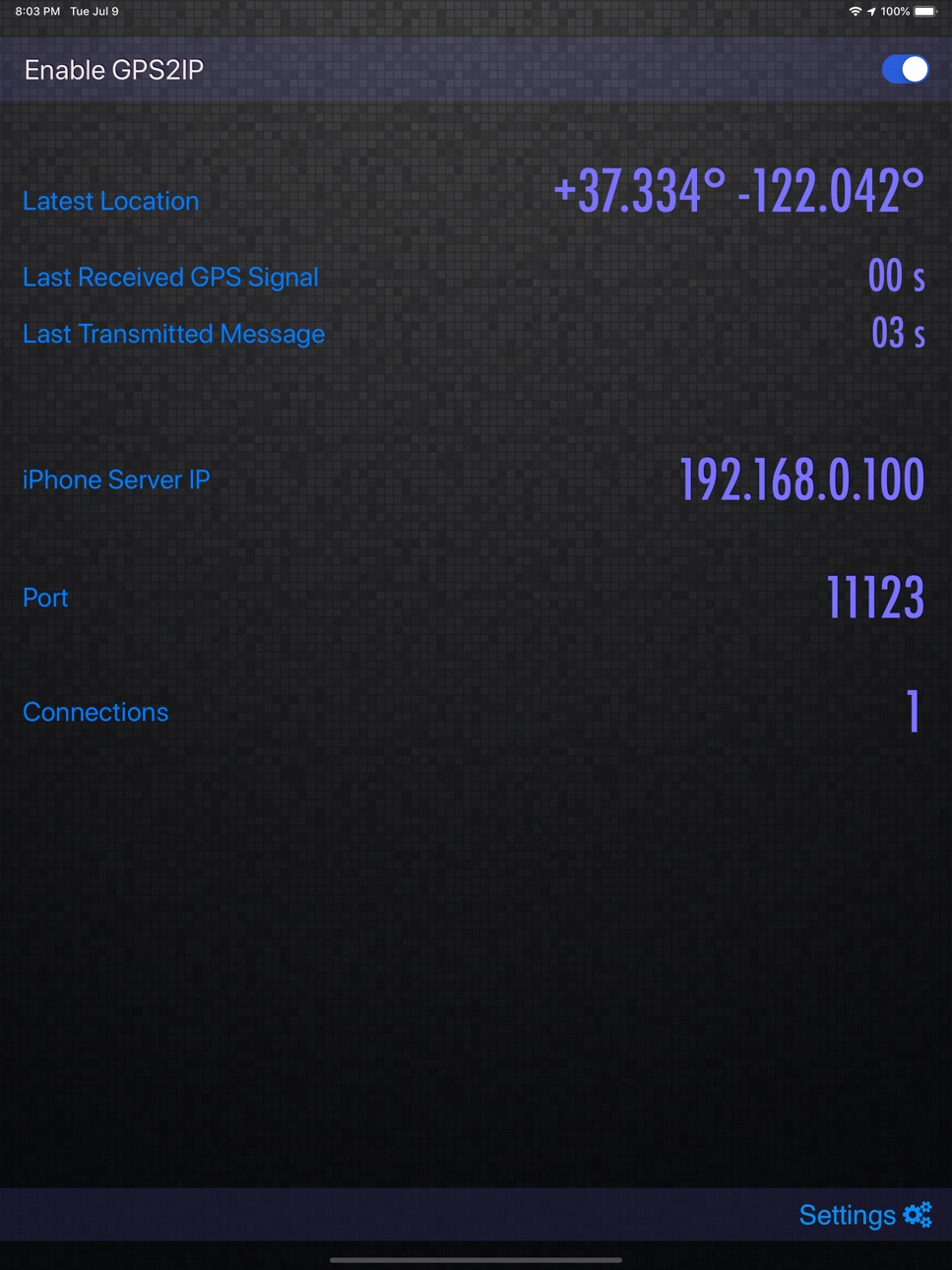
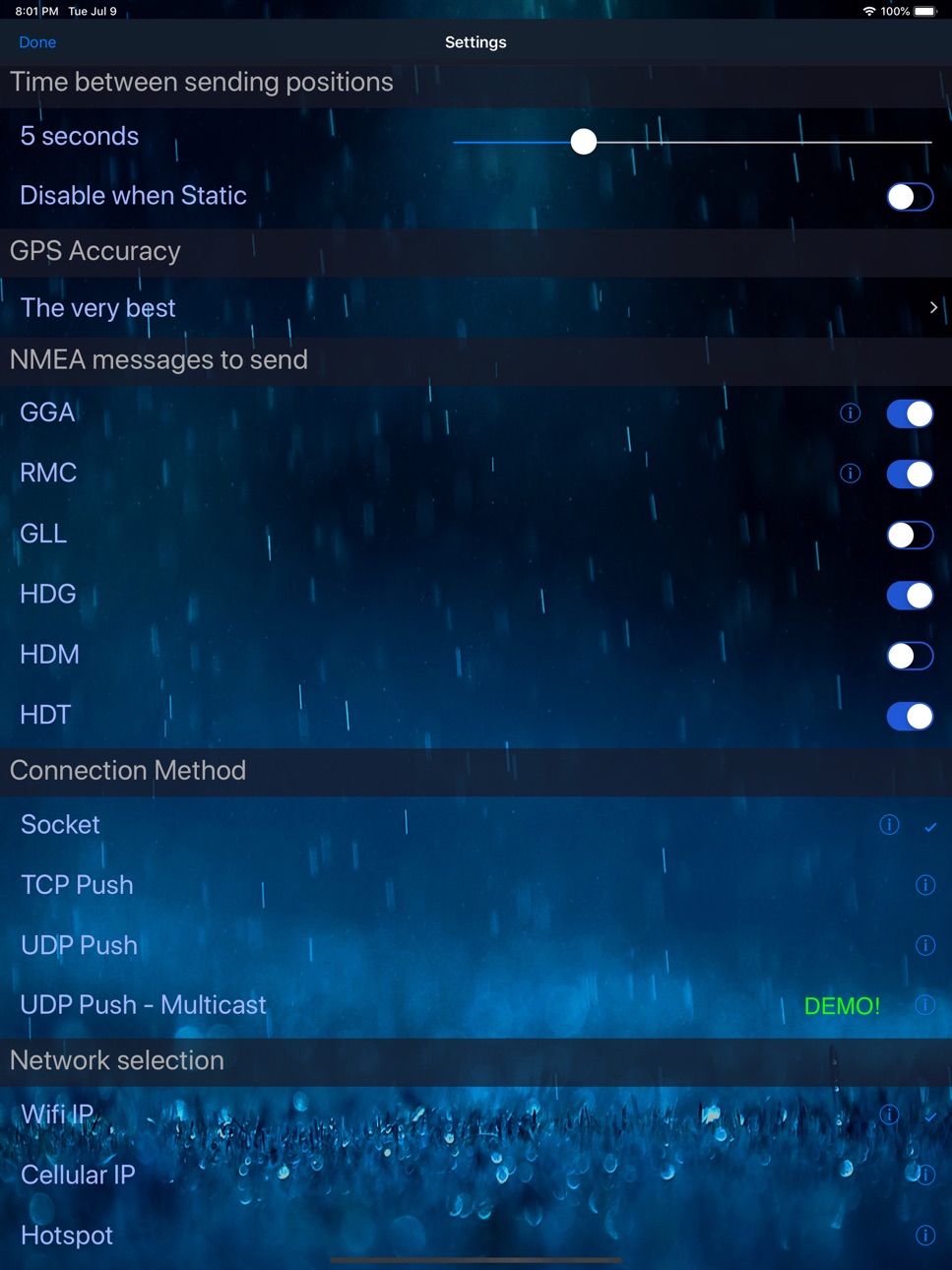

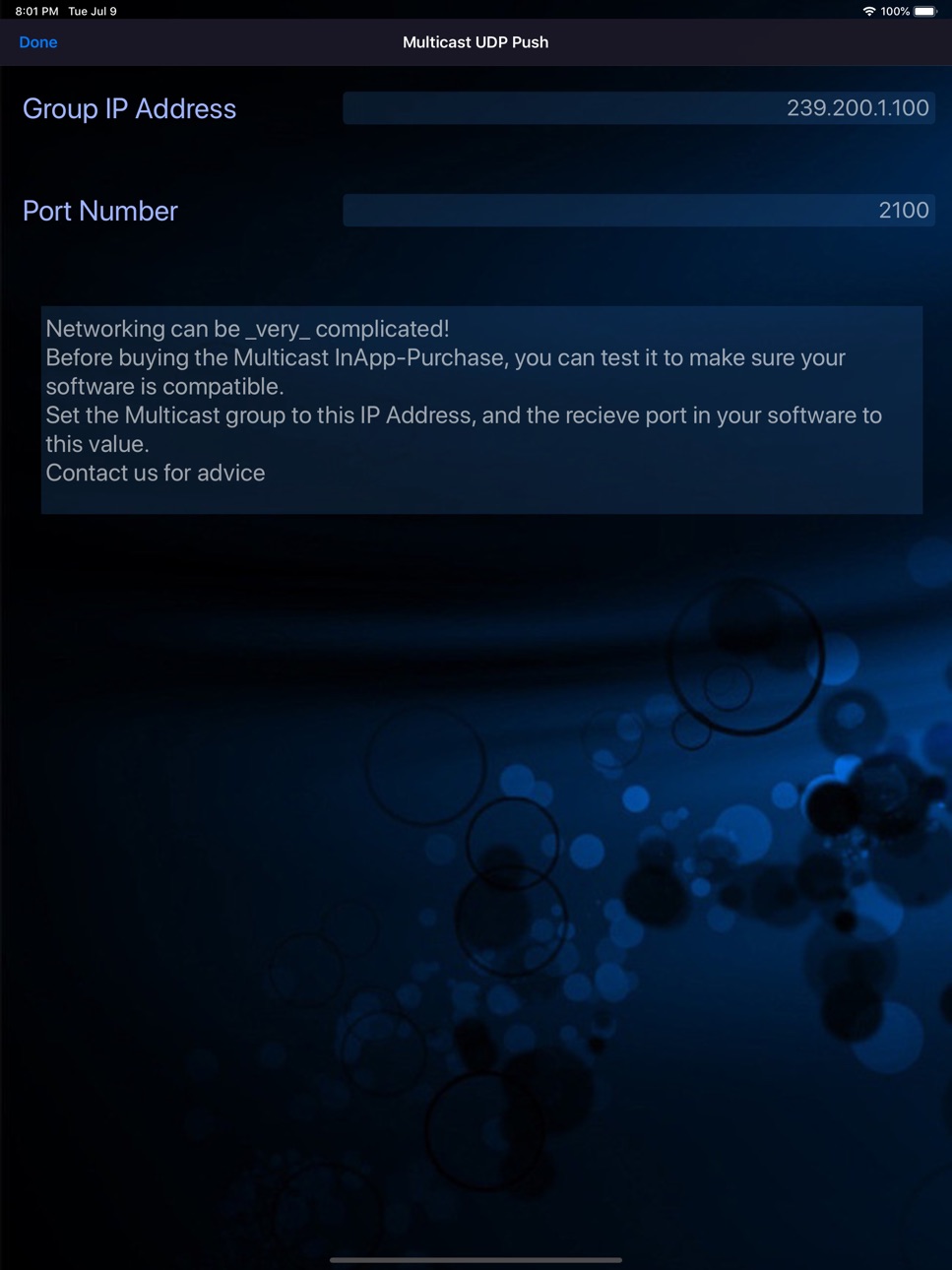
What’s New Version 5.8
» Fixed scaling when "Display Zoom" enabled
Description
Do you need GPS NMEA location data for your computer or other device - maybe to use some mapping or navigation software?
Until now, you couldn't get external access to the GPS inside your iPhone or iPad, but now with GPS2IP you can stream the information in realtime to solve your requirements.
BEWARE - GPS2IP is *not* able to be used for the Apple turn-by-turn navigation app, or Google Maps, or most car navigation programs.
It is designed for enthusiasts, or more sophisticated navigation software that can use an external wireless GPS unit. If you aren't sure what NMEA is, please check the website before buying.
This is a rather special piece of software, and must be used in the right system. PLEASE CHECK THE WEBSITE: www.capsicumdreams.com/iPhone/gps2ip/
We have a free version "GPS2IP Lite" that has most of the same features, so that you can try it out for free.
Have a look on our website: http://capsicumdreams.com/gps2ip/differences.php
Try it for free, and only buy this full-featured version if it does what you need!
The iPhone becomes a GPS server, and to get the information, you just connect to your iPhone using either wifi or Bluetooth LE.
Alternatively, you can also push the NMEA data to any online server, using either TCP or UDP and process the information however you want.The TAIP protocol is also supported.
Each device running GPS2IP can send a unique identifier, so that if you have multiple devices you can determine which device is sending what messages.
GPS2IP now can be configured to restart automatically after your iOS device restarts, so you'll always keep track of your position.
Apart from navigation software, other methods for connection include telnet or netcat, or many terminal programs.
Some navigation software such as MacEnc can read from an IP address natively.
Setting up a connection between MacEnc and GPS2IP is easy.
Just have a look at the capsicumDreams website!
http://capsicumdreams.com/gps2ip/
Different NMEA messages can be selected for transmission according to your requirements.
One non-standard message that GPS2IP transmits that is very useful for sailing is $PASHR.
GPS 2 IP can run when the iPhone sleeps to support constant location reporting, but be aware that continued use of the GPS when running in the background can dramatically decrease battery life.
If your device dies or you turn it off when it was running, GPS2IP now automatically resumes sending the location. Beware that this will decrease battery life - we recommend keeping it charging if possible.
GPS2IP can also be configured to output data at a selectable frequency (for example once every minute).
You can lock the settings, so that no unauthorised people can change the settings.
Lots more information and instructions on usage can be found on our website. Enjoy!
Accessibility
ipadiphonemacrealityDevicetvoswatch
Version history 25 versions
Build 881794804v5.82026-02-01 18:55:14
» Fixed scaling when "Display Zoom" enabled
Build 878742982v5.72025-12-07 22:49:31
» Changed location display choice to Decimals Minutes from Decimal Degrees
Build 875416316v5.62025-08-25 03:36:09
» Added "High Contrast" mode for UI. See https://capsicumdreams.com/gps2ip/docs/settings/#high-contrast
Build 875087225v5.52025-05-31 18:20:53
» Added GSA sentence. When this is enabled, the NASA Clipper GPS Repeater device is functional
Build 873193159v5.42025-03-13 07:10:40
» Fixed bug that removed TAIP message settings
Build 872242854v5.32025-02-27 00:02:28
» Fixed bug where only one message sent at a time!
» Added VTG NMEA sentence
» Changed display format to Degrees + Decimal Minutes
» Fixed main page UI layout issues on iPhone
Build 867629028v5.22024-07-20 20:48:43
» Fixed TAIP bug
Build 859259295v5.12024-05-20 08:02:20
» UDP Broadcast capable. Send NMEA traffic to every device on the network.
Only available in the Full Version.
» GPS2IP can connect to a WebSocket Server for almost limitless scaling, and instant data updates
Build 855754227v5.02023-05-15 19:06:52
» TAIP Support! For configuration options, check out https://capsicumdreams.com/gps2ip/taip.php
» Buffer for data received when not connected increased to 600 messages.
» More options for time interval between messages
» Transmission continues after returning from settings page
Build 854781622v4.62023-02-06 17:12:56
» When connection is lost, the 120 most recent messages are stored and transmitted upon reconnection
» Altitude is now displayed
» Geoidal separation is now in GGA messages
Build 849347177v4.42023-01-21 21:54:35
TAIP format messages!
Build 844868951v4.32021-12-10 17:05:40
‣ Added an option to display D,M,S format location instead of Decimal Degrees
Build 844350870v4.22021-09-30 22:42:13
‣ Fixed a 12hr / 24hr output data bug
Build 841926053v4.12021-04-26 21:04:39
‣ You can enable/disable sending all NMEA at once, in one transmission
Build 841359619v4.02021-04-22 20:08:03
‣ Settings UI has been simplified
‣ Messages sent in one packet, instead of separately
‣ $GPTXT message has been added, again
Build 837797705v3.32020-09-16 13:57:32
‣ Fixed Bluetooth Low Energy (BLE) crash
Build 837523095v3.22020-09-01 12:04:35
‣ Fixed RMC output format for i-Boating app
‣ Removed languages other than English
‣ Increased trial message sending period
Build 831737517v3.12019-07-10 18:12:00
‣ Fixed the heading output over BLE
‣ BLE heading is now 'Magnetic Compass' source
‣ Added Multicast UDP mode
‣ Fixed Norwegian and French translations
Build 829883351v3.02019-01-19 19:50:51
‣ GPS2IP is now free to try and check your configuration - only if you are happy and want to upgrade does it cost you anything!
Build 829609034v2.192018-12-12 22:59:20
‣ Fixed millisecond output in GGA & RMC!
Build 829509556v2.182018-12-05 23:08:47
‣ Added optional milliseconds to GGA and RMC messages
‣ Added a locking feature with password. You can prevent someone from changing any settings
‣ Added HDM and HDT messages
‣ Can select between True and Magnetic output in PASHR
‣ Added a Custom Prefix message. Any text can be output at the start of every message. See documentation for details
Build 824067443v2.162017-11-29 19:05:47
‣ Fixed bug where you cannot close the telnet session from the client by typing 'exit' when in Socket Mode.
‣ NEW - Bluetooth Low Energy support!
Build 823894068v2.142017-10-06 19:15:13
‣ Fixed for iOS11
‣ Removed option for outputting text at initial connection
Build 818310992v2.132016-09-03 02:43:55
‣ Fixed an issue when if the GPS determined an invalid speed, the output would be [null]. It now transmits 0.00 m/s
‣ Added a new feature: if the device remains (approximately) in the same location, you can prevent the data from being transmitted
‣ Updated to ensure compatibility with Software On Board v11 [http://digiboat.us]
Build 815669176v2.122016-04-24 21:11:27
‣ Now GPS2IP can automatically restart after powering on your device (if it was enabled when power ran out) without opening GPS2IP
Price history by region
Currency
Show
Columns
Search
Availability 143 of 145 storefronts
| Region | Language | Price | Ratings | Avg | Version |
|---|---|---|---|---|---|
| GB | en-GB | GBP 7.99 | 3 | 4.7 | 5.8 |
| DE | de-DE | EUR 8.99 | 2 | 3.0 | 5.8 |
| AU | en-AU | AUD 12.99 | 1 | 5.0 | 5.8 |
| AZ | en-GB | USD 9.99 | 1 | 5.0 | 5.8 |
| FI | en-GB | EUR 8.99 | 1 | 5.0 | 5.8 |
| NO | en-GB | NOK 99 | 1 | 1.0 | 5.8 |
| SE | sv | SEK 99 | 1 | 5.0 | 5.8 |
| TR | en-GB | TRY 399.99 | 1 | 5.0 | 5.8 |
| ZA | en-GB | ZAR 149.99 | 1 | 5.0 | 5.8 |
| AE | en-GB | AED 29.99 | 0 | — | 5.8 |
| AF | en-GB | USD 7.99 | 0 | — | 5.8 |
| AL | en-GB | USD 9.99 | 0 | — | 5.8 |
| AM | en-GB | USD 9.99 | 0 | — | 5.8 |
| AO | en-GB | USD 7.99 | 0 | — | 5.8 |
| AT | de-DE | EUR 8.99 | 0 | — | 5.8 |
| BA | en-GB | EUR 8.99 | 0 | — | 5.8 |
| BE | en-GB | EUR 8.99 | 0 | — | 5.8 |
| BG | en-GB | EUR 8.99 | 0 | — | 5.8 |
| BH | en-GB | USD 8.99 | 0 | — | 5.8 |
| BM | en-GB | USD 7.99 | 0 | — | 5.8 |
| BN | en-GB | USD 7.99 | 0 | — | 5.8 |
| BO | es-MX | USD 7.99 | 0 | — | 5.8 |
| BT | en-GB | USD 7.99 | 0 | — | 5.8 |
| BW | en-GB | USD 7.99 | 0 | — | 5.8 |
| BY | en-GB | USD 9.99 | 0 | — | 5.8 |
| CA | en-CA | CAD 9.99 | 0 | — | 5.8 |
| CD | en-GB | USD 7.99 | 0 | — | 5.8 |
| CG | en-GB | USD 7.99 | 0 | — | 5.8 |
| CH | de-CH | CHF 7 | 0 | — | 5.8 |
| CN | zh-Hans-CN | CNY 58 | 0 | — | 5.8 |
| CR | es-MX | USD 7.99 | 0 | — | 5.8 |
| CV | en-GB | USD 7.99 | 0 | — | 5.8 |
| CY | en-GB | EUR 8.99 | 0 | — | 5.8 |
| CZ | en-GB | CZK 199 | 0 | — | 5.8 |
| DK | en-GB | DKK 69 | 0 | — | 5.8 |
| DO | es-MX | USD 7.99 | 0 | — | 5.8 |
| DZ | en-GB | USD 7.99 | 0 | — | 5.8 |
| EC | es-MX | USD 7.99 | 0 | — | 5.8 |
| EE | en-GB | EUR 8.99 | 0 | — | 5.8 |
| EG | en-GB | EGP 399.99 | 0 | — | 5.8 |
| ES | es-ES | EUR 8.99 | 0 | — | 5.8 |
| FJ | en-GB | USD 7.99 | 0 | — | 5.8 |
| FM | en-GB | USD 7.99 | 0 | — | 5.8 |
| FR | fr-FR | EUR 8.99 | 0 | — | 5.8 |
| GE | en-GB | USD 9.99 | 0 | — | 5.8 |
| GH | en-GB | USD 9.99 | 0 | — | 5.8 |
| GM | en-GB | USD 7.99 | 0 | — | 5.8 |
| GR | en-GB | EUR 8.99 | 0 | — | 5.8 |
| GT | es-MX | USD 7.99 | 0 | — | 5.8 |
| GW | en-GB | USD 7.99 | 0 | — | 5.8 |
| HK | zh-Hant-HK | HKD 58 | 0 | — | 5.8 |
| HN | es-MX | USD 7.99 | 0 | — | 5.8 |
| HR | en-GB | EUR 8.99 | 0 | — | 5.8 |
| HU | en-GB | HUF 3490 | 0 | — | 5.8 |
| ID | en-GB | IDR 129000 | 0 | — | 5.8 |
| IE | en-GB | EUR 8.99 | 0 | — | 5.8 |
| IN | en-GB | INR 799 | 0 | — | 5.8 |
| IQ | en-GB | USD 7.99 | 0 | — | 5.8 |
| IS | en-GB | USD 9.99 | 0 | — | 5.8 |
| IT | it | EUR 8.99 | 0 | — | 5.8 |
| JM | en-GB | USD 7.99 | 0 | — | 5.8 |
| JO | en-GB | USD 7.99 | 0 | — | 5.8 |
| JP | ja | JPY 1300 | 0 | — | 5.8 |
| KE | en-GB | USD 9.99 | 0 | — | 5.8 |
| KG | en-GB | USD 8.99 | 0 | — | 5.8 |
| KH | en-GB | USD 8.99 | 0 | — | 5.8 |
| KR | ko | KRW 12000 | 0 | — | 5.8 |
| KW | en-GB | USD 7.99 | 0 | — | 5.8 |
| KZ | en-GB | KZT 4990 | 0 | — | 5.8 |
| LA | en-GB | USD 8.99 | 0 | — | 5.8 |
| LB | en-GB | USD 7.99 | 0 | — | 5.8 |
| LK | en-GB | USD 7.99 | 0 | — | 5.8 |
| LR | en-GB | USD 7.99 | 0 | — | 5.8 |
| LT | en-GB | EUR 8.99 | 0 | — | 5.8 |
| LU | en-GB | EUR 8.99 | 0 | — | 5.8 |
| LV | en-GB | EUR 8.99 | 0 | — | 5.8 |
| LY | en-GB | USD 7.99 | 0 | — | 5.8 |
| MA | en-GB | USD 7.99 | 0 | — | 5.8 |
| MD | en-GB | USD 9.99 | 0 | — | 5.8 |
| ME | en-GB | EUR 6.99 | 0 | — | 5.8 |
| MG | en-GB | USD 7.99 | 0 | — | 5.8 |
| MK | en-GB | USD 7.99 | 0 | — | 5.8 |
| MM | en-GB | USD 7.99 | 0 | — | 5.8 |
| MN | en-GB | USD 7.99 | 0 | — | 5.8 |
| MO | zh-Hant-HK | USD 7.99 | 0 | — | 5.8 |
| MR | en-GB | USD 7.99 | 0 | — | 5.8 |
| MT | en-GB | EUR 8.99 | 0 | — | 5.8 |
| MU | en-GB | USD 9.99 | 0 | — | 5.8 |
| MV | en-GB | USD 7.99 | 0 | — | 5.8 |
| MY | en-GB | MYR 39.9 | 0 | — | 5.8 |
| MZ | en-GB | USD 7.99 | 0 | — | 5.8 |
| NA | en-GB | USD 7.99 | 0 | — | 5.8 |
| NG | en-GB | NGN 12900 | 0 | — | 5.8 |
| NI | es-MX | USD 7.99 | 0 | — | 5.8 |
| NL | nl | EUR 8.99 | 0 | — | 5.8 |
| NP | en-GB | USD 9.99 | 0 | — | 5.8 |
| NR | en-GB | USD 7.99 | 0 | — | 5.8 |
| NZ | en-AU | NZD 14.99 | 0 | — | 5.8 |
| OM | en-GB | USD 7.99 | 0 | — | 5.8 |
| PA | es-MX | USD 7.99 | 0 | — | 5.8 |
| PE | es-MX | PEN 34.9 | 0 | — | 5.8 |
| PG | en-GB | USD 7.99 | 0 | — | 5.8 |
| PH | en-GB | PHP 499 | 0 | — | 5.8 |
| PK | en-GB | PKR 2200 | 0 | — | 5.8 |
| PL | en-GB | PLN 39.99 | 0 | — | 5.8 |
| PT | pt-PT | EUR 8.99 | 0 | — | 5.8 |
| PW | en-GB | USD 7.99 | 0 | — | 5.8 |
| PY | es-MX | USD 7.99 | 0 | — | 5.8 |
| QA | en-GB | QAR 29.99 | 0 | — | 5.8 |
| RO | en-GB | RON 39.99 | 0 | — | 5.8 |
| RS | en-GB | EUR 8.99 | 0 | — | 5.8 |
| RW | en-GB | USD 7.99 | 0 | — | 5.8 |
| SA | en-GB | SAR 34.99 | 0 | — | 5.8 |
| SB | en-GB | USD 7.99 | 0 | — | 5.8 |
| SC | en-GB | USD 7.99 | 0 | — | 5.8 |
| SG | en-GB | SGD 9.98 | 0 | — | 5.8 |
| SI | en-GB | EUR 8.99 | 0 | — | 5.8 |
| SK | en-GB | EUR 8.99 | 0 | — | 5.8 |
| SN | en-GB | USD 9.99 | 0 | — | 5.8 |
| ST | en-GB | USD 7.99 | 0 | — | 5.8 |
| SV | es-MX | USD 7.99 | 0 | — | 5.8 |
| SZ | en-GB | USD 7.99 | 0 | — | 5.8 |
| TD | en-GB | USD 7.99 | 0 | — | 5.8 |
| TH | en-GB | THB 299 | 0 | — | 5.8 |
| TJ | en-GB | USD 8.99 | 0 | — | 5.8 |
| TM | en-GB | USD 7.99 | 0 | — | 5.8 |
| TN | en-GB | USD 7.99 | 0 | — | 5.8 |
| TO | en-GB | USD 7.99 | 0 | — | 5.8 |
| TT | en-GB | USD 7.99 | 0 | — | 5.8 |
| TW | zh-Hant-TW | TWD 290 | 0 | — | 5.8 |
| TZ | en-GB | TZS 22900 | 0 | — | 5.8 |
| UA | en-GB | USD 9.99 | 0 | — | 5.8 |
| UG | en-GB | USD 9.99 | 0 | — | 5.8 |
| US | en-US | USD 7.99 | 0 | — | 5.8 |
| UY | en-GB | USD 7.99 | 0 | — | 5.8 |
| UZ | en-GB | USD 8.99 | 0 | — | 5.8 |
| VE | es-MX | USD 7.99 | 0 | — | 5.8 |
| VN | en-GB | VND 249000 | 0 | — | 5.8 |
| VU | en-GB | USD 7.99 | 0 | — | 5.8 |
| XK | en-GB | EUR 8.99 | 0 | — | 5.8 |
| YE | en-GB | USD 7.99 | 0 | — | 5.8 |
| ZM | en-GB | USD 9.99 | 0 | — | 5.8 |
| ZW | en-GB | USD 9.99 | 0 | — | 5.8 |
Not available in: IL, RU
Change log 29 changes · KR
✎
releaseNotes updated
» Fixed scaling when "Display Zoom" enabled
✎
description updated
Do you need GPS NMEA location data for your computer or other device - maybe to use some mapping or navigation software?
Until now, you couldn't get external ac
✎
subtitle updated
Wireless NMEA Navigation Data
✎
name updated
GPS 2 IP
◆
Version 5.8 released
» Fixed scaling when "Display Zoom" enabled
◆
Version 5.7 released
» Changed location display choice to Decimals Minutes from Decimal Degrees
◆
Version 5.6 released
» Added "High Contrast" mode for UI. See https://capsicumdreams.com/gps2ip/docs/settings/#high-contrast
◆
Version 5.5 released
» Added GSA sentence. When this is enabled, the NASA Clipper GPS Repeater device is functional
◆
Version 5.4 released
» Fixed bug that removed TAIP message settings
◆
Version 5.3 released
» Fixed bug where only one message sent at a time!
» Added VTG NMEA sentence
» Changed display format to Degrees + Decimal Minutes
» Fixed main page UI layout issues on iPhone
◆
Version 5.2 released
» Fixed TAIP bug
◆
Version 5.1 released
» UDP Broadcast capable. Send NMEA traffic to every device on the network.
Only available in the Full Version.
» GPS2IP can connect to a WebSocket Server for almost limitless scaling, and instant data updates
◆
Version 5.0 released
» TAIP Support! For configuration options, check out https://capsicumdreams.com/gps2ip/taip.php
» Buffer for data received when not connected increased to 600 messages.
» More options for time interval between messages
» Transmission contin
◆
Version 4.6 released
» When connection is lost, the 120 most recent messages are stored and transmitted upon reconnection
» Altitude is now displayed
» Geoidal separation is now in GGA messages
◆
Version 4.4 released
TAIP format messages!
◆
Version 4.3 released
‣ Added an option to display D,M,S format location instead of Decimal Degrees
◆
Version 4.2 released
‣ Fixed a 12hr / 24hr output data bug
◆
Version 4.1 released
‣ You can enable/disable sending all NMEA at once, in one transmission
◆
Version 4.0 released
‣ Settings UI has been simplified
‣ Messages sent in one packet, instead of separately
‣ $GPTXT message has been added, again
◆
Version 3.3 released
‣ Fixed Bluetooth Low Energy (BLE) crash
◆
Version 3.2 released
‣ Fixed RMC output format for i-Boating app
‣ Removed languages other than English
‣ Increased trial message sending period
◆
Version 3.1 released
‣ Fixed the heading output over BLE
‣ BLE heading is now 'Magnetic Compass' source
‣ Added Multicast UDP mode
‣ Fixed Norwegian and French translations
◆
Version 3.0 released
‣ GPS2IP is now free to try and check your configuration - only if you are happy and want to upgrade does it cost you anything!
◆
Version 2.19 released
‣ Fixed millisecond output in GGA & RMC!
◆
Version 2.18 released
‣ Added optional milliseconds to GGA and RMC messages
‣ Added a locking feature with password. You can prevent someone from changing any settings
‣ Added HDM and HDT messages
‣ Can select between True and Magnetic output in PASHR
‣ Added a
◆
Version 2.16 released
‣ Fixed bug where you cannot close the telnet session from the client by typing 'exit' when in Socket Mode.
‣ NEW - Bluetooth Low Energy support!
◆
Version 2.14 released
‣ Fixed for iOS11
‣ Removed option for outputting text at initial connection
◆
Version 2.13 released
‣ Fixed an issue when if the GPS determined an invalid speed, the output would be [null]. It now transmits 0.00 m/s
‣ Added a new feature: if the device remains (approximately) in the same location, you can prevent the data from being trans
◆
Version 2.12 released
‣ Now GPS2IP can automatically restart after powering on your device (if it was enabled when power ran out) without opening GPS2IP