Home › Utilities

 BF
BF
 USen-US
 DEde-DE
 GBen-GB
 JPja
JPja CAen-CA
 AUen-AU
 NLnl
NLnl CHde-CH
 FRfr-FR
 ITit
ITit SEsv
SEsv BRpt-BR
 CZen-GB
 MXes-MX
 ATde-DE
 DKen-GB
 BEen-GB
 KRko
KRko PLen-GB
 ESes-ES
 NOen-GB
 NZen-AU
 THen-GB
 TWzh-Hant-TW
 HUen-GB
 ROen-GB
 CNzh-Hans-CN
 FIen-GB
 IDen-GB
 PTpt-PT
 GRen-GB
 HKzh-Hant-HK
 ILen-GB
 ZAen-GB
 TRen-GB
 SKen-GB
 INen-GB
 IEen-GB
 MYen-GB
 SGen-GB
 BGen-GB
 UAen-GB
 AEen-GB
 COes-MX
 SAen-GB
 VNen-GB
 HRen-GB
 LUen-GB
 ARes-MX
 PHen-GB
 CLes-MX
 SIen-GB
 EGen-GB
 ECes-MX
 PEes-MX
 LVen-GB
 CYen-GB
 PAes-MX
 KWen-GB
 CRes-MX
 LTen-GB
 MTen-GB
 PKen-GB
 EEen-GB
 ISen-GB
 JOen-GB
 LBen-GB
 UYen-GB
 BYen-GB
 DOes-MX
 GEen-GB
 HNes-MX
 QAen-GB
 BBen-GB
 GTes-MX
 KHen-GB
 KZen-GB
 MAen-GB
 MOzh-Hant-HK
 NGen-GB
 UGen-GB
 VEes-MX
 XKen-GB
 ALen-GB
 AMen-GB
 AZen-GB
 BHen-GB
 BSen-GB
 GHen-GB
 JMen-GB
 KEen-GB
 MDen-GB
 MKen-GB
 NIes-MX
 PYes-MX
 SVes-MX
 TTen-GB
 YEen-GB
 AFen-GB
 AGen-GB
 AIen-GB
 AOen-GB
 BAen-GBBFen-GB
 BJen-GB
 BMen-GB
 BNen-GB
 BOes-MX
 BTen-GB
 BWen-GB
 BZen-GB
 CDen-GB
 CGen-GB
 CIfr-FR
 CMfr-FR
 CVen-GB
 DMen-GB
 DZen-GB
 FJen-GB
 FMen-GB
 GAfr-FR
 GDen-GB
 GMen-GB
 GWen-GB
 GYen-GB
 IQen-GB
 KGen-GB
 KNen-GB
 KYen-GB
 LAen-GB
 LCen-GB
 LKen-GB
 LRen-GB
 LYen-GB
 MEen-GB
 MGen-GB
 MLen-GB
 MMen-GB
 MNen-GB
 MRen-GB
 MSen-GB
 MUen-GB
 MVen-GB
 MWen-GB
 MZen-GB
 NAen-GB
 NEen-GB
 NPen-GB
 NRen-GB
 OMen-GB
 PGen-GB
 PWen-GB
 RSen-GB
 RWen-GB
 SBen-GB
 SCen-GB
 SLen-GB
 SNen-GB
 SRen-GB
 STen-GB
 SZen-GB
 TCen-GB
 TDen-GB
 TJen-GB
 TMen-GB
 TNen-GB
 TOen-GB
 TZen-GB
 UZen-GB
 VCen-GB
 VGen-GB
 VUen-GB
 ZMen-GB
 ZWen-GB
 RUNot Available
174 of 175 storefronts
Content in en-GB
Content in en-GB
Information
Preview 2 platforms
iPhone 9 images






iPad 9 images





What’s New Version 7.0.2
• minor fixes and improvements
Description
An advanced tool for monitoring your iPhone and iPad performance.
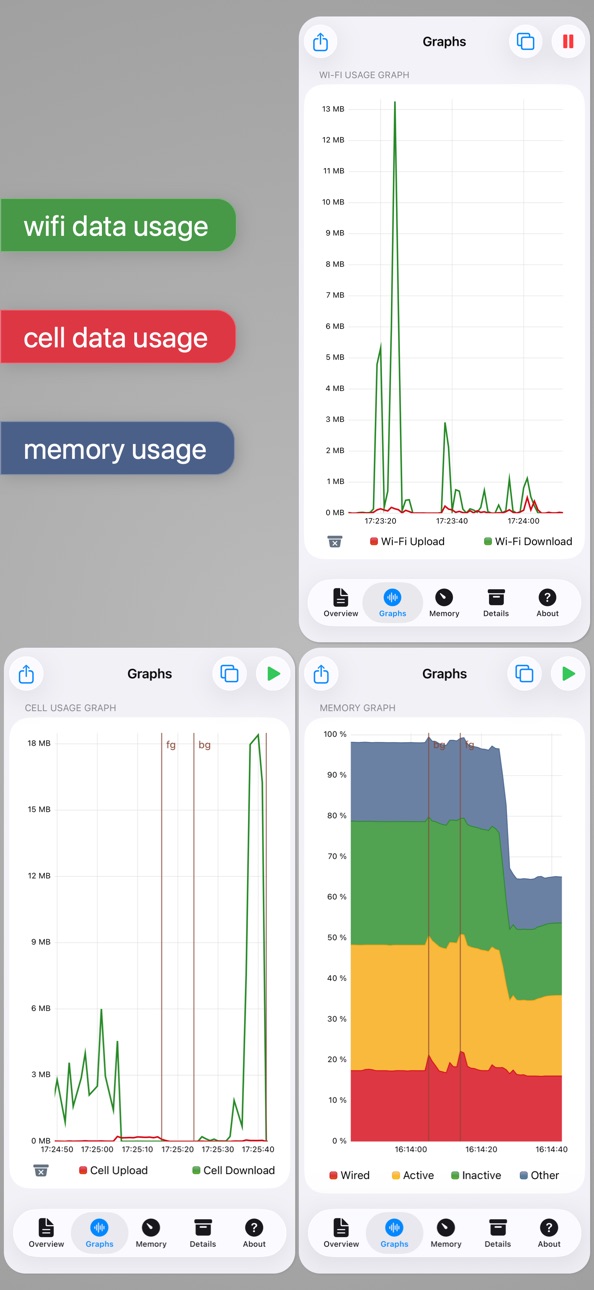
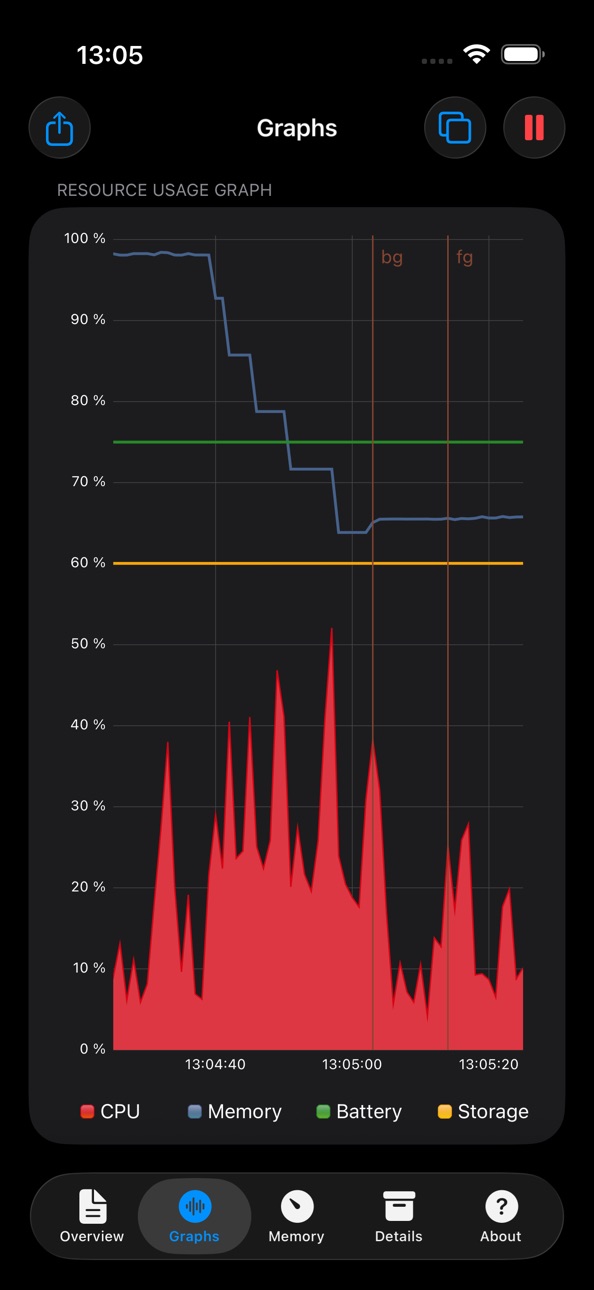
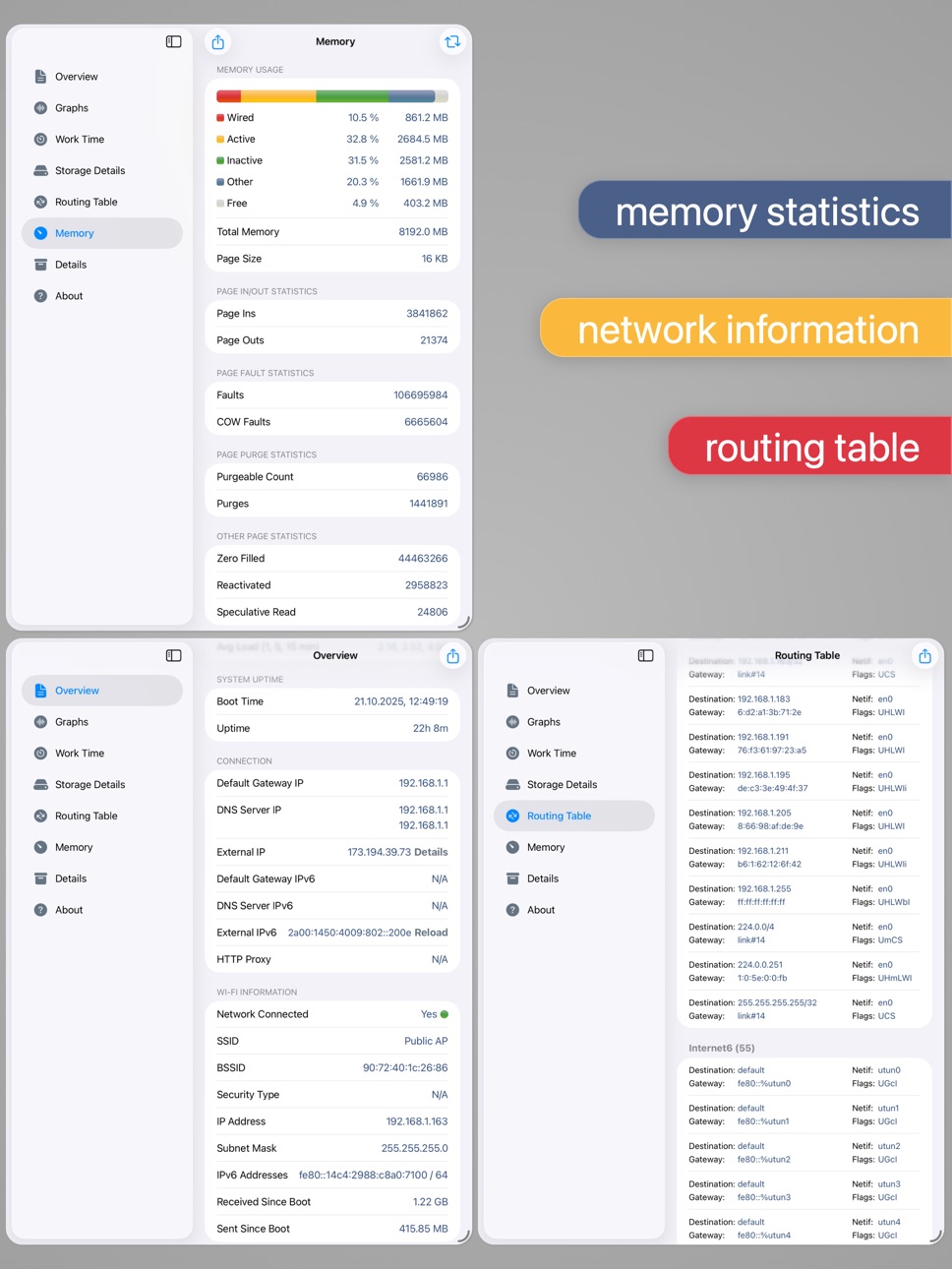
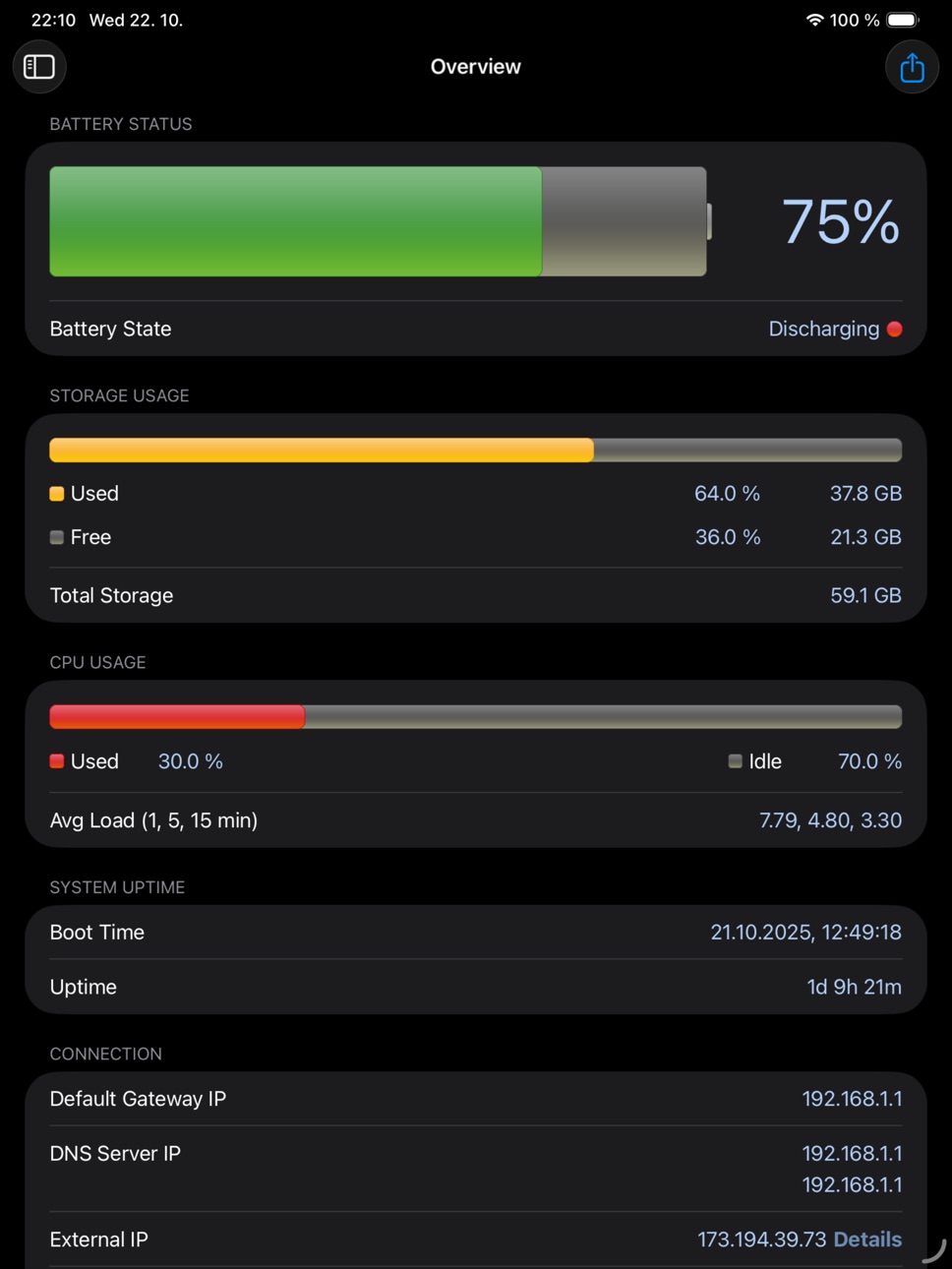
System Status provides graphical monitoring of all the device's resources such as CPU, memory, disk, battery and wifi/cell data usage. Further, it shows network-related info such as wifi/cell connection details and the routing table. Finally, System Status displays operating system details such as kernel version, memory page statistics and shows various hardware-related data.
BATTERY
• Graphical battery level display
• Battery state monitoring (discharging, charging, full)
• Estimated battery work time for different usage patterns (standby, audio and video playback, Wi-Fi and 3G browser usage, talk time)
• Adjustable battery health to make the estimated work times usable for older batteries
MEMORY & DISK
• Real time memory usage monitoring - graphical display of wired, active, inactive, and free memory
• Detailed page statistics including page ins and outs, page faults, page lookups, page purges and others
• Used and free disk capacity monitoring
• File statistics (number of songs, videos, podcasts, artists, genres, etc.)
• Mounted file system list
CELL & NETWORK
• Cell and Wi-Fi network connection information
• IP address of the current connection
• Carrier information such as network technology used
• External IP address
• DNS server, default gateway
• Received and sent wifi/cell data since last boot
• Routing table
CPU
• CPU usage updated in real time
• Average load over the last 1, 5, and 15 minutes
OPERATING SYSTEM & HARDWARE INFORMATION
• System boot time and uptime
• Operating system and kernel version
• Device model and user name
• Detailed CPU and GPU information - model, core number, CPU and BUS frequency, L1, L2 cache sizes, and others
• Hardware features of the device including display resolution, pixel density, battery voltage, battery capacity, front and rear camera resolution and many more
RESOURCE GRAPHS
• Possibility to record up to 3 minutes of background activity
• Pinch to zoom & pan
• Play/pause to see real-time or history data
MORE
• Real time updates of the display every time the monitored parameters change
• Export by email, AirPrint, and AirDrop for most info
• Light/dark theme
• Copy/paste support
• Detailed help
• Regular updates
Accessibility
ipadiphonemacrealityDevicetvoswatch
Version history 25 versions
Build 883543530v7.0.22026-03-19 19:55:43
• minor fixes and improvements
Build 879454304v7.0.12025-11-05 21:42:37
• fix update of devices specifications
• fix export of Graphs page
• fix received/sent cell data update
• minor UI updates and fixes
• various minor fixes and stability fixes
Build 879206491v7.02025-10-28 18:44:29
• modernize UI to match iOS 26 appearance
• fix missing past plot values when plot paused
• minor fixes and improvements
Build 874423326v6.2.12025-04-30 17:16:04
• fix various UI problems
Build 873996813v6.22025-04-14 07:42:24
• rework network interface detection to fix incorrect wi-fi or VPN interface reporting
• show localized dates and times at various places in the app
• add date to export title
• support sending user feedback from other email clients
• various fixes and improvements
Build 872055897v6.1.12025-01-28 18:08:52
• Fixed incorrect legend in memory graph
• Fixed incorrect percentage reporting in storage details
• Various stability improvements
Build 871751721v6.12025-01-15 15:34:04
• workaround for wrong color of navigation bar under iOS 18 (the title has to stay dark until the problem is fixed in iOS)
• iOS 18 compatibility improvements
• various bugfixes and improvements
Build 857006626v6.02023-05-12 13:06:16
• dark theme support!
• app theme can be changed independently of the system theme in the iOS Settings app
• some cell connection information has been removed as it is no longer reported by iOS
---
In this release, the whole user interface code has been rewritten from scratch. Please report any bugs you experience.
Build 842713280v5.8.32021-06-22 08:29:58
• minor stability fixes and improvements
Build 842520476v5.8.22021-06-06 18:37:11
• display information about second SIM if present
• support 5G network type
• fix external storage reporting
• display external storage usage on iPad Pro also on the Overview page
• fix incorrect device stats reporting in some cases
• minor bug fixes and improvements
Build 835748669v5.8.12020-04-30 09:06:48
• Added the possibility to enable the location permission which is required to access SSID/BSSID since iOS 13
• Added support for latest devices
• Plots are drawn using a different plotting library as the previouls library stopped getting supported (there are minor differences in behavior in certain cases)
• Entering background/foreground is now shown in the plot using brown vertical lines with bg/fg labels
• Various fixes and improvements
• TODO: dark mode will be supported in the upcoming release
Build 829169318v5.82020-04-29 08:53:29
• Added the possibility to enable the location permission which is required to access SSID/BSSID since iOS 13
• Added support for latest devices
• Plots are drawn using a different plotting library as the previouls library stopped getting supported (there are minor differences in behavior in certain cases)
• Entering background/foreground is now shown in the plot using brown vertical lines with bg/fg labels
• Various fixes and improvements
• TODO: dark mode will be supported in the upcoming release
Build 828955657v5.7.22018-10-17 21:29:21
5.7.2
• Stability improvements
5.7
• Allow showing additional details related to external IP (location, AS number, hostname, etc.)
• Show information about all available network interfaces on the Information page
• Show IPv6 prefix lengths on the Information page
• iOS 12 compatibility improvements
• Lots of internal changes and cleanups
• Various UI updates, minor improvements and fixes
Build 828793749v5.7.12018-10-02 21:44:50
5.7.1
• Stability fixes and minor improvements
5.7
• Allow showing additional details related to external IP (location, AS number, hostname, etc.)
• Show information about all available network interfaces on the Information page
• Show IPv6 prefix lengths on the Information page
• iOS 12 compatibility improvements
• Lots of internal changes and cleanups
• Various UI updates, minor improvements and fixes
Build 826050803v5.72018-09-23 18:26:56
• Allow showing additional details related to external IP (location, AS number, hostname, etc.)
• Show information about all available network interfaces on the Information page
• Show IPv6 prefix lengths on the Information page
• iOS 12 compatibility improvements
• Lots of internal changes and cleanups
• Various UI updates, minor improvements and fixes
Build 824693065v5.6.32017-11-22 00:30:50
• Fix free storage reporting on iOS 11. For free space calculation use the sum of free storage and the storage used by iOS for temporary files which is automatically freed when storage space is low. This way the app shows the same amount of free storage as the Settings app.
• Fix crash when exporting plots
• Various minor fixes and improvements
Build 824158442v5.6.22017-10-28 08:11:38
• improved iPhone X support
• minor stability fixes and improvements
Build 823203911v5.6.12017-08-07 23:25:44
5.6.1
• fix a problem when values don't get updated when switching between Overview and Memory page
• fix crash when saving plots to the photos library
5.6
• show CPU architecture (32-bit, 64-bit) on Details page
• show all DNS servers on the Overview page
• fix huge y-axis scale bug for wifi/cell plots (you need to clear the plot with the garbage bin icon at the bottom of the graph first)
• improved iOS 11 support
• improved support of iPad Pro 10.5 and split screen mode
• lots of minor fixes, performance and stability improvements
Build 823194124v5.62017-08-05 10:42:35
• show CPU architecture (32-bit, 64-bit) on Details page
• show all DNS servers on the Overview page
• fix huge y-axis scale bug for wifi/cell plots (you need to clear the plot with the garbage bin icon at the bottom of the graph first)
• improved iOS 11 support
• improved support of iPad Pro 10.5 and split screen mode
• lots of minor fixes, performance and stability improvements
Build 820376662v5.5.12017-01-10 22:25:24
• stability fixes and minor improvements
*** If you like the app, please consider rating it on the App Store. It really helps. Thanks!
Build 818859546v5.52016-09-15 16:28:20
• iOS 10 compatibility fixes
• removed Connections page on iOS 10 where the connection info isn't accessible any more (it is still available on iOS 9)
• full IPv6 support and addition of IPv6-related information
• moved graphs from the Overview page to a separate page
• added export for all the information from the Overview page
• various minor fixes and improvements
Build 814938560v5.4.12015-12-09 20:20:24
• iPad Pro support
• various bug fixes
Build 813514486v5.42015-10-02 21:27:51
• fix memory accounting on devices with 2GB of memory
• add iOS 9 iPad multitasking support
• update for new iOS devices
• various minor fixes
Build 813327401v5.32015-09-20 19:26:29
• because iOS 9 does not allow apps to access the process info, hide the Processes page on iOS 9 (the process info is still available on iOS 8 devices)
• various bug fixes
Build 811680214v5.2.12015-02-01 11:03:56
• Revert the disk usage calculation change so the 1024 multiplier is used again (which is used by iTunes too)
• Fix file statistics
• Show both local and iCloud file counts in file statistics
• Add video count to file statistics
Price history by region
Currency
Show
Columns
Search
Availability 174 of 175 storefronts
| Region | Language | Price | Ratings | Avg | Version |
|---|---|---|---|---|---|
| US | en-US | USD 3.99 | 5.4k | 4.8 | 7.0.2 |
| DE | de-DE | EUR 3.99 | 1.1k | 4.7 | 7.0.2 |
| GB | en-GB | GBP 3.99 | 718 | 4.7 | 7.0.2 |
| JP | ja | JPY 600 | 713 | 4.5 | 7.0.2 |
| CA | en-CA | CAD 4.99 | 571 | 4.8 | 7.0.2 |
| AU | en-AU | AUD 5.99 | 371 | 4.8 | 7.0.2 |
| NL | nl | EUR 3.99 | 358 | 4.5 | 7.0.2 |
| CH | de-CH | CHF 3 | 252 | 4.6 | 7.0.2 |
| FR | fr-FR | EUR 3.99 | 170 | 4.8 | 7.0.2 |
| IT | it | EUR 3.99 | 155 | 4.7 | 7.0.2 |
| SE | sv | SEK 49 | 154 | 4.6 | 7.0.2 |
| BR | pt-BR | BRL 24.9 | 129 | 4.8 | 7.0.2 |
| CZ | en-GB | CZK 99 | 122 | 4.8 | 7.0.2 |
| MX | es-MX | MXN 89 | 118 | 4.8 | 7.0.2 |
| AT | de-DE | EUR 3.99 | 116 | 4.6 | 7.0.2 |
| DK | en-GB | DKK 39 | 100 | 4.4 | 7.0.2 |
| BE | en-GB | EUR 3.99 | 98 | 4.6 | 7.0.2 |
| KR | ko | KRW 6600 | 95 | 4.6 | 7.0.2 |
| PL | en-GB | PLN 19.99 | 92 | 4.9 | 7.0.2 |
| ES | es-ES | EUR 3.99 | 90 | 4.5 | 7.0.2 |
| NO | en-GB | NOK 49 | 87 | 4.7 | 7.0.2 |
| NZ | en-AU | NZD 6.99 | 55 | 4.7 | 7.0.2 |
| TH | en-GB | THB 149 | 54 | 4.9 | 7.0.2 |
| TW | zh-Hant-TW | TWD 120 | 50 | 4.8 | 7.0.2 |
| HU | en-GB | HUF 1790 | 49 | 4.8 | 7.0.2 |
| RO | en-GB | RON 19.99 | 49 | 5.0 | 7.0.2 |
| CN | zh-Hans-CN | CNY 28 | 46 | 4.8 | 7.0.2 |
| FI | en-GB | EUR 3.99 | 44 | 4.7 | 7.0.2 |
| ID | en-GB | IDR 69000 | 40 | 4.8 | 7.0.2 |
| PT | pt-PT | EUR 3.99 | 40 | 4.6 | 7.0.2 |
| GR | en-GB | EUR 3.99 | 38 | 4.8 | 7.0.2 |
| HK | zh-Hant-HK | HKD 32 | 37 | 4.5 | 7.0.2 |
| IL | en-GB | ILS 14.9 | 37 | 4.7 | 7.0.2 |
| ZA | en-GB | ZAR 79.99 | 37 | 4.8 | 7.0.2 |
| TR | en-GB | TRY 199.99 | 32 | 4.9 | 7.0.2 |
| SK | en-GB | EUR 3.99 | 31 | 4.8 | 7.0.2 |
| IN | en-GB | INR 399 | 30 | 4.6 | 7.0.2 |
| IE | en-GB | EUR 3.99 | 25 | 4.7 | 7.0.2 |
| MY | en-GB | MYR 19.9 | 25 | 4.6 | 7.0.2 |
| SG | en-GB | SGD 5.98 | 23 | 4.8 | 7.0.2 |
| BG | en-GB | EUR 3.99 | 22 | 4.8 | 7.0.2 |
| UA | en-GB | USD 4.99 | 18 | 5.0 | 7.0.2 |
| AE | en-GB | AED 14.99 | 17 | 4.9 | 7.0.2 |
| CO | es-MX | COP 19900 | 15 | 4.8 | 7.0.2 |
| SA | en-GB | SAR 17.99 | 15 | 4.3 | 7.0.2 |
| VN | en-GB | VND 119000 | 15 | 4.7 | 7.0.2 |
| HR | en-GB | EUR 3.99 | 14 | 4.9 | 7.0.2 |
| LU | en-GB | EUR 3.99 | 14 | 4.8 | 7.0.2 |
| AR | es-MX | USD 3.99 | 13 | 4.7 | 7.0.2 |
| PH | en-GB | PHP 249 | 13 | 4.7 | 7.0.2 |
| CL | es-MX | CLP 4990 | 12 | 4.8 | 7.0.2 |
| SI | en-GB | EUR 3.99 | 11 | 4.5 | 7.0.2 |
| EG | en-GB | EGP 199.99 | 10 | 4.8 | 7.0.2 |
| EC | es-MX | USD 3.99 | 9 | 4.8 | 7.0.2 |
| PE | es-MX | PEN 17.9 | 9 | 4.8 | 7.0.2 |
| LV | en-GB | EUR 3.99 | 8 | 4.4 | 7.0.2 |
| CY | en-GB | EUR 3.99 | 7 | 4.6 | 7.0.2 |
| PA | es-MX | USD 3.99 | 7 | 4.9 | 7.0.2 |
| KW | en-GB | USD 3.99 | 6 | 5.0 | 7.0.2 |
| CR | es-MX | USD 3.99 | 5 | 4.8 | 7.0.2 |
| LT | en-GB | EUR 3.99 | 5 | 4.4 | 7.0.2 |
| MT | en-GB | EUR 3.99 | 5 | 4.6 | 7.0.2 |
| PK | en-GB | PKR 1100 | 5 | 4.8 | 7.0.2 |
| EE | en-GB | EUR 3.99 | 4 | 5.0 | 7.0.2 |
| IS | en-GB | USD 4.99 | 4 | 4.0 | 7.0.2 |
| JO | en-GB | USD 3.99 | 4 | 4.3 | 7.0.2 |
| LB | en-GB | USD 3.99 | 4 | 4.0 | 7.0.2 |
| UY | en-GB | USD 3.99 | 4 | 4.8 | 7.0.2 |
| BY | en-GB | USD 4.99 | 3 | 5.0 | 7.0.2 |
| DO | es-MX | USD 3.99 | 3 | 4.3 | 7.0.2 |
| GE | en-GB | USD 4.99 | 3 | 4.7 | 7.0.2 |
| HN | es-MX | USD 3.99 | 3 | 4.7 | 7.0.2 |
| QA | en-GB | QAR 14.99 | 3 | 5.0 | 7.0.2 |
| BB | en-GB | USD 4.99 | 2 | 4.0 | 7.0.2 |
| GT | es-MX | USD 3.99 | 2 | 5.0 | 7.0.2 |
| KH | en-GB | USD 3.99 | 2 | 5.0 | 7.0.2 |
| KZ | en-GB | KZT 2490 | 2 | 5.0 | 7.0.2 |
| MA | en-GB | USD 3.99 | 2 | 4.5 | 7.0.2 |
| MO | zh-Hant-HK | USD 3.99 | 2 | 5.0 | 7.0.2 |
| NG | en-GB | NGN 6900 | 2 | 4.0 | 7.0.2 |
| UG | en-GB | USD 4.99 | 2 | 4.5 | 7.0.2 |
| VE | es-MX | USD 3.99 | 2 | 4.5 | 7.0.2 |
| XK | en-GB | EUR 3.99 | 2 | 5.0 | 7.0.2 |
| AL | en-GB | USD 4.99 | 1 | 5.0 | 7.0.2 |
| AM | en-GB | USD 4.99 | 1 | 5.0 | 7.0.2 |
| AZ | en-GB | USD 4.99 | 1 | 5.0 | 7.0.2 |
| BH | en-GB | USD 3.99 | 1 | 2.0 | 7.0.2 |
| BS | en-GB | USD 3.99 | 1 | 5.0 | 7.0.2 |
| GH | en-GB | USD 4.99 | 1 | 5.0 | 7.0.2 |
| JM | en-GB | USD 3.99 | 1 | 4.0 | 7.0.2 |
| KE | en-GB | USD 4.99 | 1 | 3.0 | 7.0.2 |
| MD | en-GB | USD 4.99 | 1 | 5.0 | 7.0.2 |
| MK | en-GB | USD 3.99 | 1 | 5.0 | 7.0.2 |
| NI | es-MX | USD 3.99 | 1 | 5.0 | 7.0.2 |
| PY | es-MX | USD 3.99 | 1 | 5.0 | 7.0.2 |
| SV | es-MX | USD 3.99 | 1 | 1.0 | 7.0.2 |
| TT | en-GB | USD 3.99 | 1 | 4.0 | 7.0.2 |
| YE | en-GB | USD 3.99 | 1 | 5.0 | 7.0.2 |
| AF | en-GB | USD 3.99 | 0 | — | 7.0.2 |
| AG | en-GB | USD 3.99 | 0 | — | 7.0.2 |
| AI | en-GB | USD 3.99 | 0 | — | 7.0.2 |
| AO | en-GB | USD 3.99 | 0 | — | 7.0.2 |
| BA | en-GB | EUR 3.99 | 0 | — | 7.0.2 |
| BF | en-GB | USD 3.99 | 0 | — | 7.0.2 |
| BJ | en-GB | USD 4.99 | 0 | — | 7.0.2 |
| BM | en-GB | USD 3.99 | 0 | — | 7.0.2 |
| BN | en-GB | USD 3.99 | 0 | — | 7.0.2 |
| BO | es-MX | USD 3.99 | 0 | — | 7.0.2 |
| BT | en-GB | USD 3.99 | 0 | — | 7.0.2 |
| BW | en-GB | USD 3.99 | 0 | — | 7.0.2 |
| BZ | en-GB | USD 3.99 | 0 | — | 7.0.2 |
| CD | en-GB | USD 3.99 | 0 | — | 7.0.2 |
| CG | en-GB | USD 3.99 | 0 | — | 7.0.2 |
| CI | fr-FR | USD 4.99 | 0 | — | 7.0.2 |
| CM | fr-FR | USD 4.99 | 0 | — | 7.0.2 |
| CV | en-GB | USD 3.99 | 0 | — | 7.0.2 |
| DM | en-GB | USD 3.99 | 0 | — | 7.0.2 |
| DZ | en-GB | USD 3.99 | 0 | — | 7.0.2 |
| FJ | en-GB | USD 3.99 | 0 | — | 7.0.2 |
| FM | en-GB | USD 3.99 | 0 | — | 7.0.2 |
| GA | fr-FR | USD 3.99 | 0 | — | 7.0.2 |
| GD | en-GB | USD 3.99 | 0 | — | 7.0.2 |
| GM | en-GB | USD 3.99 | 0 | — | 7.0.2 |
| GW | en-GB | USD 3.99 | 0 | — | 7.0.2 |
| GY | en-GB | USD 3.99 | 0 | — | 7.0.2 |
| IQ | en-GB | USD 3.99 | 0 | — | 7.0.2 |
| KG | en-GB | USD 3.99 | 0 | — | 7.0.2 |
| KN | en-GB | USD 3.99 | 0 | — | 7.0.2 |
| KY | en-GB | USD 3.99 | 0 | — | 7.0.2 |
| LA | en-GB | USD 3.99 | 0 | — | 7.0.2 |
| LC | en-GB | USD 3.99 | 0 | — | 7.0.2 |
| LK | en-GB | USD 3.99 | 0 | — | 7.0.2 |
| LR | en-GB | USD 3.99 | 0 | — | 7.0.2 |
| LY | en-GB | USD 3.99 | 0 | — | 7.0.2 |
| ME | en-GB | EUR 3.99 | 0 | — | 7.0.2 |
| MG | en-GB | USD 3.99 | 0 | — | 7.0.2 |
| ML | en-GB | USD 3.99 | 0 | — | 7.0.2 |
| MM | en-GB | USD 3.99 | 0 | — | 7.0.2 |
| MN | en-GB | USD 3.99 | 0 | — | 7.0.2 |
| MR | en-GB | USD 3.99 | 0 | — | 7.0.2 |
| MS | en-GB | USD 3.99 | 0 | — | 7.0.2 |
| MU | en-GB | USD 4.99 | 0 | — | 7.0.2 |
| MV | en-GB | USD 3.99 | 0 | — | 7.0.2 |
| MW | en-GB | USD 3.99 | 0 | — | 7.0.2 |
| MZ | en-GB | USD 3.99 | 0 | — | 7.0.2 |
| NA | en-GB | USD 3.99 | 0 | — | 7.0.2 |
| NE | en-GB | USD 3.99 | 0 | — | 7.0.2 |
| NP | en-GB | USD 4.99 | 0 | — | 7.0.2 |
| NR | en-GB | USD 3.99 | 0 | — | 7.0.2 |
| OM | en-GB | USD 3.99 | 0 | — | 7.0.2 |
| PG | en-GB | USD 3.99 | 0 | — | 7.0.2 |
| PW | en-GB | USD 3.99 | 0 | — | 7.0.2 |
| RS | en-GB | EUR 3.99 | 0 | — | 7.0.2 |
| RW | en-GB | USD 3.99 | 0 | — | 7.0.2 |
| SB | en-GB | USD 3.99 | 0 | — | 7.0.2 |
| SC | en-GB | USD 3.99 | 0 | — | 7.0.2 |
| SL | en-GB | USD 3.99 | 0 | — | 7.0.2 |
| SN | en-GB | USD 4.99 | 0 | — | 7.0.2 |
| SR | en-GB | USD 3.99 | 0 | — | 7.0.2 |
| ST | en-GB | USD 3.99 | 0 | — | 7.0.2 |
| SZ | en-GB | USD 3.99 | 0 | — | 7.0.2 |
| TC | en-GB | USD 3.99 | 0 | — | 7.0.2 |
| TD | en-GB | USD 3.99 | 0 | — | 7.0.2 |
| TJ | en-GB | USD 3.99 | 0 | — | 7.0.2 |
| TM | en-GB | USD 3.99 | 0 | — | 7.0.2 |
| TN | en-GB | USD 3.99 | 0 | — | 7.0.2 |
| TO | en-GB | USD 3.99 | 0 | — | 7.0.2 |
| TZ | en-GB | TZS 11900 | 0 | — | 7.0.2 |
| UZ | en-GB | USD 3.99 | 0 | — | 7.0.2 |
| VC | en-GB | USD 3.99 | 0 | — | 7.0.2 |
| VG | en-GB | USD 3.99 | 0 | — | 7.0.2 |
| VU | en-GB | USD 3.99 | 0 | — | 7.0.2 |
| ZM | en-GB | USD 4.99 | 0 | — | 7.0.2 |
| ZW | en-GB | USD 4.99 | 0 | — | 7.0.2 |
Not available in: RU
Change log 29 changes · BF
✎
releaseNotes updated
• minor fixes and improvements
✎
description updated
An advanced tool for monitoring your iPhone and iPad performance.
System Status provides graphical monitoring of all the device's resources such as CPU, memory
✎
subtitle updated
CPU,battery,memory usage info
✎
name updated
System Status Pro: hw monitor
◆
Version 7.0.2 released
• minor fixes and improvements
◆
Version 7.0.1 released
• fix update of devices specifications
• fix export of Graphs page
• fix received/sent cell data update
• minor UI updates and fixes
• various minor fixes and stability fixes
◆
Version 7.0 released
• modernize UI to match iOS 26 appearance
• fix missing past plot values when plot paused
• minor fixes and improvements
◆
Version 6.2.1 released
• fix various UI problems
◆
Version 6.2 released
• rework network interface detection to fix incorrect wi-fi or VPN interface reporting
• show localized dates and times at various places in the app
• add date to export title
• support sending user feedback from other email clients
• vario
◆
Version 6.1.1 released
• Fixed incorrect legend in memory graph
• Fixed incorrect percentage reporting in storage details
• Various stability improvements
◆
Version 6.1 released
• workaround for wrong color of navigation bar under iOS 18 (the title has to stay dark until the problem is fixed in iOS)
• iOS 18 compatibility improvements
• various bugfixes and improvements
◆
Version 6.0 released
• dark theme support!
• app theme can be changed independently of the system theme in the iOS Settings app
• some cell connection information has been removed as it is no longer reported by iOS
---
In this release, the whole user interface
◆
Version 5.8.3 released
• minor stability fixes and improvements
◆
Version 5.8.2 released
• display information about second SIM if present
• support 5G network type
• fix external storage reporting
• display external storage usage on iPad Pro also on the Overview page
• fix incorrect device stats reporting in some cases
• minor
◆
Version 5.8.1 released
• Added the possibility to enable the location permission which is required to access SSID/BSSID since iOS 13
• Added support for latest devices
• Plots are drawn using a different plotting library as the previouls library stopped getting s
◆
Version 5.8 released
• Added the possibility to enable the location permission which is required to access SSID/BSSID since iOS 13
• Added support for latest devices
• Plots are drawn using a different plotting library as the previouls library stopped getting s
◆
Version 5.7.2 released
5.7.2
• Stability improvements
5.7
• Allow showing additional details related to external IP (location, AS number, hostname, etc.)
• Show information about all available network interfaces on the Information page
• Show IPv6 prefix lengths
◆
Version 5.7.1 released
5.7.1
• Stability fixes and minor improvements
5.7
• Allow showing additional details related to external IP (location, AS number, hostname, etc.)
• Show information about all available network interfaces on the Information page
• Show IPv
◆
Version 5.7 released
• Allow showing additional details related to external IP (location, AS number, hostname, etc.)
• Show information about all available network interfaces on the Information page
• Show IPv6 prefix lengths on the Information page
• iOS 12 co
◆
Version 5.6.3 released
• Fix free storage reporting on iOS 11. For free space calculation use the sum of free storage and the storage used by iOS for temporary files which is automatically freed when storage space is low. This way the app shows the same amount of
◆
Version 5.6.2 released
• improved iPhone X support
• minor stability fixes and improvements
◆
Version 5.6.1 released
5.6.1
• fix a problem when values don't get updated when switching between Overview and Memory page
• fix crash when saving plots to the photos library
5.6
• show CPU architecture (32-bit, 64-bit) on Details page
• show all DNS servers on
◆
Version 5.6 released
• show CPU architecture (32-bit, 64-bit) on Details page
• show all DNS servers on the Overview page
• fix huge y-axis scale bug for wifi/cell plots (you need to clear the plot with the garbage bin icon at the bottom of the graph first)
• i
◆
Version 5.5.1 released
• stability fixes and minor improvements
*** If you like the app, please consider rating it on the App Store. It really helps. Thanks!
◆
Version 5.5 released
• iOS 10 compatibility fixes
• removed Connections page on iOS 10 where the connection info isn't accessible any more (it is still available on iOS 9)
• full IPv6 support and addition of IPv6-related information
• moved graphs from the Over
◆
Version 5.4.1 released
• iPad Pro support
• various bug fixes
◆
Version 5.4 released
• fix memory accounting on devices with 2GB of memory
• add iOS 9 iPad multitasking support
• update for new iOS devices
• various minor fixes
◆
Version 5.3 released
• because iOS 9 does not allow apps to access the process info, hide the Processes page on iOS 9 (the process info is still available on iOS 8 devices)
• various bug fixes
◆
Version 5.2.1 released
• Revert the disk usage calculation change so the 1024 multiplier is used again (which is used by iTunes too)
• Fix file statistics
• Show both local and iCloud file counts in file statistics
• Add video count to file statistics