Home › Utilities

 NP
NP
 DEde-DE
 CHde-CH
 NLnl
NLnl ATde-DE
 NOen-GB
 USen-US
 GBen-GB
 ESes-ES
 RUru
RUru ITit
ITit FRfr-FR
 BEen-GB
 DKen-GB
 PLen-GB
 SEsv
SEsv CAen-CA
 BRpt-BR
 AUen-AU
 CLes-MX
 LUen-GB
 SAen-GB
 MXes-MX
 TRen-GB
 GRen-GB
 CZen-GB
 PTpt-PT
 SKen-GB
 ROen-GB
 CNzh-Hans-CN
 IEen-GB
 AEen-GB
 HUen-GB
 KWen-GB
 LBen-GB
 COes-MX
 ZAen-GB
 IDen-GB
 ILen-GB
 NZen-AU
 ECes-MX
 OMen-GB
 ARes-MX
 HRen-GB
 MYen-GB
 JPja
JPja LTen-GB
 THen-GB
 EGen-GB
 KZen-GB
 UYen-GB
 LVen-GB
 BGen-GB
 BHen-GB
 FIen-GB
 UAen-GB
 AZen-GB
 CYen-GB
 QAen-GB
 BFen-GB
 EEen-GB
 JOen-GB
 PYes-MX
 VEes-MX
 ALen-GB
 AOen-GB
 BYen-GB
 CRes-MX
 DZen-GB
 IQen-GB
 ISen-GB
 KHen-GB
 LKen-GB
 MKen-GB
 PEes-MX
 TWzh-Hant-TW
 BOes-MX
 CVen-GB
 GHen-GB
 HKzh-Hant-HK
 INen-GB
 KEen-GB
 KGen-GB
 KRko
KRko MZen-GB
 NAen-GB
 PHen-GB
 PKen-GB
 SIen-GB
 UGen-GB
 VCen-GB
 AFen-GB
 AGen-GB
 AIen-GB
 AMen-GB
 BAen-GB
 BJen-GB
 BMen-GB
 BNen-GB
 BTen-GB
 BWen-GB
 CDen-GB
 CGen-GB
 CIfr-FR
 CMfr-FR
 DMen-GB
 FJen-GB
 FMen-GB
 GAfr-FR
 GDen-GB
 GEen-GB
 GMen-GB
 GWen-GB
 GYen-GB
 KNen-GB
 KYen-GB
 LAen-GB
 LCen-GB
 LRen-GB
 LYen-GB
 MAen-GB
 MDen-GB
 MEen-GB
 MGen-GB
 MLen-GB
 MMen-GB
 MNen-GB
 MOzh-Hant-HK
 MRen-GB
 MSen-GB
 MTen-GB
 MUen-GB
 MVen-GB
 MWen-GB
 NEen-GB
 NGen-GBNPen-GB
 NRen-GB
 PGen-GB
 PWen-GB
 RSen-GB
 RWen-GB
 SBen-GB
 SCen-GB
 SGen-GB
 SLen-GB
 SNen-GB
 SRen-GB
 STen-GB
 SZen-GB
 TCen-GB
 TDen-GB
 TJen-GB
 TMen-GB
 TNen-GB
 TOen-GB
 TTen-GB
 TZen-GB
 UZen-GB
 VGen-GB
 VNen-GB
 VUen-GB
 XKen-GB
 YEen-GB
 ZMen-GB
 ZWen-GB
165 of 165 storefronts
Content in en-US
Content in en-US
Information
Preview 2 platforms
iPhone 10 images



iPad 10 images




What’s New Version 5.0.4
- Customizations for iOS 17
Description
With SatFinder you can adjust your satellite antenna in a few seconds and with 4 simple steps:
STEP 1 - CHOOSE YOUR ANTENNA
Choose one of the four different antenna designs:
- Offset antennas (the most common, is slightly oval, the LNB is not in the center).
- Special design (e.g. Oblong shaped Offset antenna, Multifeed antenna)
- Parabolic antenna (LNB is located in the center of the reflector, usually larger than 100cm)
- Flat or planar antenna (small, camping antennas)
If you have an offset antenna, enter the height and width of the antenna. If your antenna has a special shape, enter the offset angle and the size of the satellite antenna. You can find the offset angle in the manual of your satellite antenna. For parabolic antennas it is sufficient to enter the antenna diameter. With a flat antenna you do not have to set anything. If you know the exact antenna name, check if your antenna is already in the database.
Tip: Press the wizard button to measure the size of the satellite antenna using the iPhone camera and LiDAR scanner.
STEP 2 - CHOOSE YOUR SATELLITE
To quickly and easily select a suitable satellite, simply press the "AUTO" button. The SatFinder will now automatically search for satellites that are in your reception area and that offer TV or radio stations in your language (the language setting of your iPhone will be selected). The stars (1-10) shown in the table result from the number of radio and TV channels offered and the reception strength at your location.
If you want to receive a special satellite, switch off "AUTO": Now you can simply scroll through the table and select the satellite. Faster is the search function - just enter the name of the satellite, the channel or the orbit position. You can also reduce the number of table entries by hiding satellites that are not available at your location or do not broadcast in your language. With the button "Channel Info" you can check which channels the selected satellite is currently broadcasting - including all channel parameters for your satellite receiver.
STEP 3 - CHECK OBSTACLES
For a smooth satellite reception, there must not be any obstacles between the satellite and your satellite antenna. You can check this with the "View" function. Simply aim at the satellite and watch the signs (GREEN - no obstacle, RED - caution, free view may not be given).
Tip: Press the button for the assistant to activate the voice output.
STEP 4 - ADJUST ANTENNA
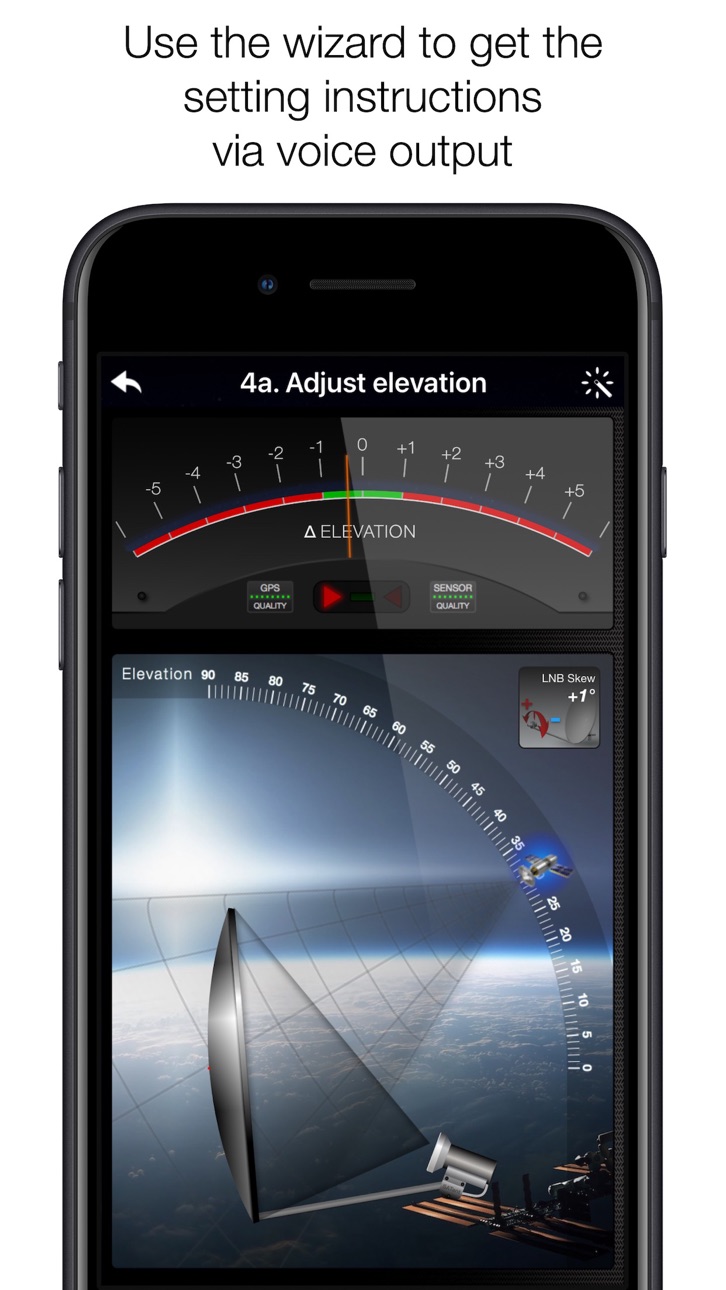
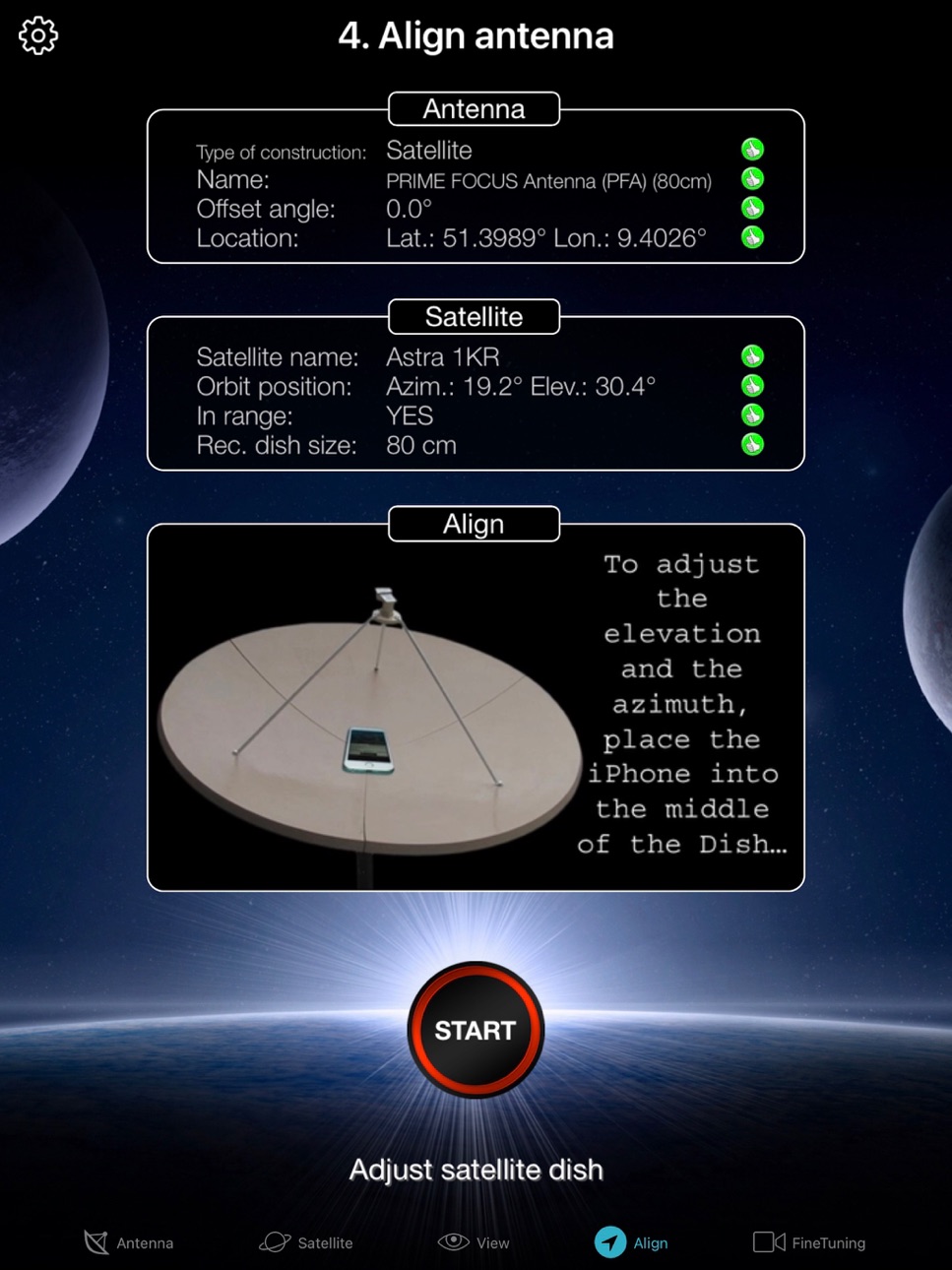
In the menu item "Align" different graphics appear depending on the selected antenna type. If you use an offset antenna, you have to adjust the azimuth and elevation separately. With planar or parabolic antennas the adjustment of the angles is done together. Before you press the "Start" button, a video clip shows how to position your iPhone at the antenna.
Tip: Press the button for the assistant to activate the voice output.
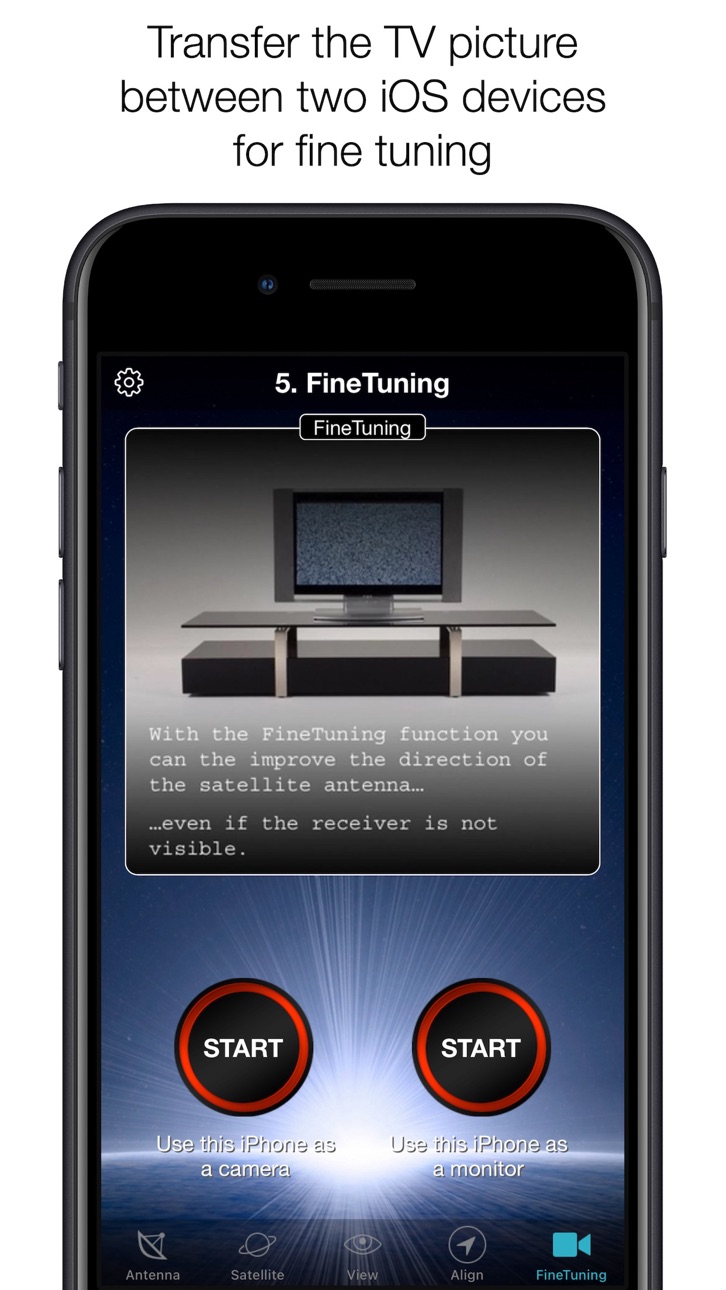
STEP 5 - FINE TUNING
If necessary, you can optimize the reception of your satellite system. The SatFinder provides you with the function "FineTuning". To use this function, you need a second iOS device. One device serves as a camera; the second device as a monitor. Simply place an iPhone in front of your reception screen and observe changes in picture quality while slightly rotating or tilting your satellite antenna. With the FineTuning feature, you'll have visual contact with your TV even when you're out of sight.
THAT'S IT. YOU SHOULD NOW BE ABLE TO ENJOY INTERFERENCE-FREE SATELLITE RECEPTION...
Note: Satellite antenna tuning is only available on iOS devices with LiDAR sensor (e.g. iPhone 12 Pro).
Accessibility
ipadiphonemacrealityDevicetvoswatch
Version history 25 versions
Build 866501343v5.0.42024-06-06 14:36:16
- Customizations for iOS 17
Build 852269959v5.0.32022-09-19 09:16:56
- Adjustments to iPhone 14 and iOS 16
Build 850087402v5.0.22022-06-13 12:15:20
- For the functions "Check obstacles" and "Align antenna", the compass calibration must be enabled in the settings. If compass calibration is not enabled, an error message appears.
Build 849782362v5.0.12022-06-04 08:06:58
- Error in the database fixed
Build 840707396v5.0.02022-06-02 11:42:42
- new, easy to use UI
- LiDAR measurement for antenna dimensions
- automatic satellite selection
- voice output
- new database
Build 826136401v4.2.12018-03-04 20:23:17
This update from Apple will improve the functionality of this app. No new features are included.
- new satellite database
- minor bug fixes
Build 824378192v4.2.02017-11-14 03:46:51
- New user interface for iPad and iPhone X (universal app)
Build 824111314v4.1.02017-10-26 06:40:32
- iOS 11 compatible
- improved satellite database (new satellites, new channels)
- new features for north and south america market
- supports prime focus antennas (PFA) up to 2,50 meter
- supports toroidal antennas
- supports cassegrain antennas
- direct input for offset angle (with data from dish user manual)
- new antenna: DIRECTV SlimLine
- new antenna: Dish Network DISH 500.x / 1000.x
- minor bug fixes
- improved compass accuracy
Build 822233612v4.0.32017-05-22 20:52:20
- new localization
- databases update
Build 821680264v4.0.22017-04-18 13:10:04
- reduced code size to faster download from the app store
- add languages and satellites
- satellite database and channel database updated
Build 821560915v4.0.12017-03-31 21:59:31
- Resolved: sometimes SatFinder crash if iOS version is not the latest
- New: SatFinder supports iOS devices with 32 bit processor (e.g. iPhone 4s, iPhone 5)
Build 820948631v4.0.02017-03-28 05:21:35
- new antenna database
- new satellite database
- detailed channel informations
- new search functions and filters
- new user interface
- new sensor handling with highest precision
- 64 bit code
- compatible with iOS 9 or higher
Build 15009710v3.02013-04-10 18:52:17
- new design
- new sat-table
- minor bug fixes
- improved accuracy
Build 13984008v2.92013-02-12 17:03:30
- new satellite table
- Compass pecision improved
- new languages: China, Japan
Build 11877239v2.82012-11-09 21:30:33
- New Design for iPhone 5 Display
- Minor Bug-Fixes
Build 10753032v2.72012-09-20 02:25:11
- compatible with iOS 6.0
- works with the new iPhone 5
Build 8491639v2.62012-06-14 00:55:30
- performance improvements
- minox bug fixes
- actual satellite table
Build 7610330v2.52012-04-26 00:13:43
- minor bug fix
Build 7499156v2.42012-04-19 01:00:25
- New Sat table
- Intro clip can be switched off (Setup/SatFinder)
Build 7206663v2.32012-03-29 00:26:33
- Bug in menue "view" with iOS 5.1 fixed
Build 7034657v2.22012-03-21 01:35:59
- New Language Arabic
- Bug-fixing in context with iOS 5.1
Build 6627161v2.12012-02-23 20:30:01
- minor bugfixes
Build 5366998v2.02011-12-12 23:35:24
- iOS 5 compatible
- Skew calculator
- Accuracy improvements
- Minor bugfixes
Build 4152057v1.92011-09-16 17:36:44
- Satellite Table ordered at position
- Full Flat Antenna support
- Minor bug fixes
- Swedish language support
Build 3832559v1.82011-06-20 23:54:29
- Supports bigger dishes (up to 1,50 m)
- Calculates offset with more precision
- tv-satellites now alphabetically ordered
Price history by region
Currency
Show
Columns
Search
Availability 165 of 165 storefronts
| Region | Language | Price | Ratings | Avg | Version |
|---|---|---|---|---|---|
| DE | de-DE | EUR 6.99 | 5.4k | 4.6 | 5.0.4 |
| CH | de-CH | CHF 5 | 572 | 4.5 | 5.0.4 |
| NL | nl | EUR 6.99 | 525 | 4.5 | 5.0.4 |
| AT | de-DE | EUR 6.99 | 448 | 4.6 | 5.0.4 |
| NO | en-GB | NOK 79 | 383 | 4.3 | 5.0.4 |
| US | en-US | USD 5.99 | 345 | 4.6 | 5.0.4 |
| GB | en-GB | GBP 5.99 | 247 | 4.6 | 5.0.4 |
| ES | es-ES | EUR 6.99 | 242 | 4.7 | 5.0.4 |
| RU | ru | RUB 499 | 218 | 4.7 | 5.0.4 |
| IT | it | EUR 6.99 | 182 | 4.8 | 5.0.4 |
| FR | fr-FR | EUR 6.99 | 181 | 4.5 | 5.0.4 |
| BE | en-GB | EUR 6.99 | 158 | 4.5 | 5.0.4 |
| DK | en-GB | DKK 49 | 121 | 4.5 | 5.0.4 |
| PL | en-GB | PLN 29.99 | 100 | 4.7 | 5.0.4 |
| SE | sv | SEK 79 | 99 | 4.6 | 5.0.4 |
| CA | en-CA | CAD 7.99 | 81 | 4.5 | 5.0.4 |
| BR | pt-BR | BRL 39.9 | 73 | 4.8 | 5.0.4 |
| AU | en-AU | AUD 9.99 | 61 | 4.6 | 5.0.4 |
| CL | es-MX | CLP 6990 | 58 | 4.7 | 5.0.4 |
| LU | en-GB | EUR 6.99 | 58 | 4.4 | 5.0.4 |
| SA | en-GB | SAR 24.99 | 53 | 4.8 | 5.0.4 |
| MX | es-MX | MXN 129 | 50 | 4.8 | 5.0.4 |
| TR | en-GB | TRY 299.99 | 50 | 4.7 | 5.0.4 |
| GR | en-GB | EUR 6.99 | 49 | 4.9 | 5.0.4 |
| CZ | en-GB | CZK 149 | 48 | 4.9 | 5.0.4 |
| PT | pt-PT | EUR 6.99 | 37 | 4.5 | 5.0.4 |
| SK | en-GB | EUR 6.99 | 32 | 4.7 | 5.0.4 |
| RO | en-GB | RON 29.99 | 31 | 4.5 | 5.0.4 |
| CN | zh-Hans-CN | CNY 38 | 30 | 4.9 | 5.0.4 |
| IE | en-GB | EUR 6.99 | 28 | 4.5 | 5.0.4 |
| AE | en-GB | AED 22.99 | 25 | 4.4 | 5.0.4 |
| HU | en-GB | HUF 2490 | 24 | 4.6 | 5.0.4 |
| KW | en-GB | USD 5.99 | 20 | 5.0 | 5.0.4 |
| LB | en-GB | USD 5.99 | 17 | 4.8 | 5.0.4 |
| CO | es-MX | COP 29900 | 16 | 4.9 | 5.0.4 |
| ZA | en-GB | ZAR 119.99 | 16 | 4.3 | 5.0.4 |
| ID | en-GB | IDR 99000 | 15 | 4.9 | 5.0.4 |
| IL | en-GB | ILS 19.9 | 14 | 4.7 | 5.0.4 |
| NZ | en-AU | NZD 9.99 | 13 | 4.5 | 5.0.4 |
| EC | es-MX | USD 5.99 | 12 | 4.6 | 5.0.4 |
| OM | en-GB | USD 5.99 | 11 | 5.0 | 5.0.4 |
| AR | es-MX | USD 5.99 | 10 | 4.9 | 5.0.4 |
| HR | en-GB | EUR 6.99 | 10 | 4.9 | 5.0.4 |
| MY | en-GB | MYR 29.9 | 10 | 4.2 | 5.0.4 |
| JP | ja | JPY 1000 | 9 | 3.9 | 5.0.4 |
| LT | en-GB | EUR 6.99 | 9 | 4.9 | 5.0.4 |
| TH | en-GB | THB 199 | 9 | 4.6 | 5.0.4 |
| EG | en-GB | EGP 299.99 | 8 | 4.3 | 5.0.4 |
| KZ | en-GB | KZT 3490 | 8 | 4.5 | 5.0.4 |
| UY | en-GB | USD 5.99 | 8 | 4.8 | 5.0.4 |
| LV | en-GB | EUR 6.99 | 6 | 5.0 | 5.0.4 |
| BG | en-GB | EUR 6.99 | 5 | 4.4 | 5.0.4 |
| BH | en-GB | USD 6.99 | 5 | 5.0 | 5.0.4 |
| FI | en-GB | EUR 6.99 | 5 | 4.4 | 5.0.4 |
| UA | en-GB | USD 6.99 | 5 | 5.0 | 5.0.4 |
| AZ | en-GB | USD 6.99 | 4 | 4.8 | 5.0.4 |
| CY | en-GB | EUR 6.99 | 4 | 4.8 | 5.0.4 |
| QA | en-GB | QAR 19.99 | 4 | 4.0 | 5.0.4 |
| BF | en-GB | USD 5.99 | 3 | 4.0 | 5.0.4 |
| EE | en-GB | EUR 6.99 | 3 | 4.7 | 5.0.4 |
| JO | en-GB | USD 5.99 | 3 | 4.7 | 5.0.4 |
| PY | es-MX | USD 5.99 | 3 | 2.3 | 5.0.4 |
| VE | es-MX | USD 5.99 | 3 | 5.0 | 5.0.4 |
| AL | en-GB | USD 6.99 | 2 | 5.0 | 5.0.4 |
| AO | en-GB | USD 5.99 | 2 | 3.0 | 5.0.4 |
| BY | en-GB | USD 6.99 | 2 | 5.0 | 5.0.4 |
| CR | es-MX | USD 5.99 | 2 | 5.0 | 5.0.4 |
| DZ | en-GB | USD 5.99 | 2 | 5.0 | 5.0.4 |
| IQ | en-GB | USD 5.99 | 2 | 5.0 | 5.0.4 |
| IS | en-GB | USD 6.99 | 2 | 5.0 | 5.0.4 |
| KH | en-GB | USD 6.99 | 2 | 4.5 | 5.0.4 |
| LK | en-GB | USD 5.99 | 2 | 5.0 | 5.0.4 |
| MK | en-GB | USD 5.99 | 2 | 5.0 | 5.0.4 |
| PE | es-MX | PEN 24.9 | 2 | 5.0 | 5.0.4 |
| TW | zh-Hant-TW | TWD 190 | 2 | 5.0 | 5.0.4 |
| BO | es-MX | USD 5.99 | 1 | 5.0 | 5.0.4 |
| CV | en-GB | USD 5.99 | 1 | 5.0 | 5.0.4 |
| GH | en-GB | USD 6.99 | 1 | 5.0 | 5.0.4 |
| HK | zh-Hant-HK | HKD 48 | 1 | 5.0 | 5.0.4 |
| IN | en-GB | INR 599 | 1 | 5.0 | 5.0.4 |
| KE | en-GB | USD 6.99 | 1 | 5.0 | 5.0.4 |
| KG | en-GB | USD 6.99 | 1 | 5.0 | 5.0.4 |
| KR | ko | KRW 9900 | 1 | 5.0 | 5.0.4 |
| MZ | en-GB | USD 5.99 | 1 | 4.0 | 5.0.4 |
| NA | en-GB | USD 5.99 | 1 | 5.0 | 5.0.4 |
| PH | en-GB | PHP 399 | 1 | 5.0 | 5.0.4 |
| PK | en-GB | PKR 1700 | 1 | 5.0 | 5.0.4 |
| SI | en-GB | EUR 6.99 | 1 | 5.0 | 5.0.4 |
| UG | en-GB | USD 6.99 | 1 | 5.0 | 5.0.4 |
| VC | en-GB | USD 5.99 | 1 | 4.0 | 5.0.4 |
| AF | en-GB | USD 5.99 | 0 | — | 5.0.4 |
| AG | en-GB | USD 5.99 | 0 | — | 5.0.4 |
| AI | en-GB | USD 5.99 | 0 | — | 5.0.4 |
| AM | en-GB | USD 6.99 | 0 | — | 5.0.4 |
| BA | en-GB | EUR 6.99 | 0 | — | 5.0.4 |
| BJ | en-GB | USD 6.99 | 0 | — | 5.0.4 |
| BM | en-GB | USD 5.99 | 0 | — | 5.0.4 |
| BN | en-GB | USD 5.99 | 0 | — | 5.0.4 |
| BT | en-GB | USD 5.99 | 0 | — | 5.0.4 |
| BW | en-GB | USD 5.99 | 0 | — | 5.0.4 |
| CD | en-GB | USD 5.99 | 0 | — | 5.0.4 |
| CG | en-GB | USD 5.99 | 0 | — | 5.0.4 |
| CI | fr-FR | USD 6.99 | 0 | — | 5.0.4 |
| CM | fr-FR | USD 6.99 | 0 | — | 5.0.4 |
| DM | en-GB | USD 5.99 | 0 | — | 5.0.4 |
| FJ | en-GB | USD 5.99 | 0 | — | 5.0.4 |
| FM | en-GB | USD 5.99 | 0 | — | 5.0.4 |
| GA | fr-FR | USD 5.99 | 0 | — | 5.0.4 |
| GD | en-GB | USD 5.99 | 0 | — | 5.0.4 |
| GE | en-GB | USD 6.99 | 0 | — | 5.0.4 |
| GM | en-GB | USD 5.99 | 0 | — | 5.0.4 |
| GW | en-GB | USD 5.99 | 0 | — | 5.0.4 |
| GY | en-GB | USD 5.99 | 0 | — | 5.0.4 |
| KN | en-GB | USD 5.99 | 0 | — | 5.0.4 |
| KY | en-GB | USD 5.99 | 0 | — | 5.0.4 |
| LA | en-GB | USD 6.99 | 0 | — | 5.0.4 |
| LC | en-GB | USD 5.99 | 0 | — | 5.0.4 |
| LR | en-GB | USD 5.99 | 0 | — | 5.0.4 |
| LY | en-GB | USD 5.99 | 0 | — | 5.0.4 |
| MA | en-GB | USD 5.99 | 0 | — | 5.0.4 |
| MD | en-GB | USD 6.99 | 0 | — | 5.0.4 |
| ME | en-GB | EUR 5.99 | 0 | — | 5.0.4 |
| MG | en-GB | USD 5.99 | 0 | — | 5.0.4 |
| ML | en-GB | USD 5.99 | 0 | — | 5.0.4 |
| MM | en-GB | USD 5.99 | 0 | — | 5.0.4 |
| MN | en-GB | USD 5.99 | 0 | — | 5.0.4 |
| MO | zh-Hant-HK | USD 5.99 | 0 | — | 5.0.4 |
| MR | en-GB | USD 5.99 | 0 | — | 5.0.4 |
| MS | en-GB | USD 5.99 | 0 | — | 5.0.4 |
| MT | en-GB | EUR 6.99 | 0 | — | 5.0.4 |
| MU | en-GB | USD 6.99 | 0 | — | 5.0.4 |
| MV | en-GB | USD 5.99 | 0 | — | 5.0.4 |
| MW | en-GB | USD 5.99 | 0 | — | 5.0.4 |
| NE | en-GB | USD 5.99 | 0 | — | 5.0.4 |
| NG | en-GB | NGN 9900 | 0 | — | 5.0.4 |
| NP | en-GB | USD 6.99 | 0 | — | 5.0.4 |
| NR | en-GB | USD 5.99 | 0 | — | 5.0.4 |
| PG | en-GB | USD 5.99 | 0 | — | 5.0.4 |
| PW | en-GB | USD 5.99 | 0 | — | 5.0.4 |
| RS | en-GB | EUR 6.99 | 0 | — | 5.0.4 |
| RW | en-GB | USD 5.99 | 0 | — | 5.0.4 |
| SB | en-GB | USD 5.99 | 0 | — | 5.0.4 |
| SC | en-GB | USD 5.99 | 0 | — | 5.0.4 |
| SG | en-GB | SGD 8.98 | 0 | — | 5.0.4 |
| SL | en-GB | USD 5.99 | 0 | — | 5.0.4 |
| SN | en-GB | USD 6.99 | 0 | — | 5.0.4 |
| SR | en-GB | USD 6.99 | 0 | — | 5.0.4 |
| ST | en-GB | USD 5.99 | 0 | — | 5.0.4 |
| SZ | en-GB | USD 5.99 | 0 | — | 5.0.4 |
| TC | en-GB | USD 5.99 | 0 | — | 5.0.4 |
| TD | en-GB | USD 5.99 | 0 | — | 5.0.4 |
| TJ | en-GB | USD 6.99 | 0 | — | 5.0.4 |
| TM | en-GB | USD 5.99 | 0 | — | 5.0.4 |
| TN | en-GB | USD 5.99 | 0 | — | 5.0.4 |
| TO | en-GB | USD 5.99 | 0 | — | 5.0.4 |
| TT | en-GB | USD 5.99 | 0 | — | 5.0.4 |
| TZ | en-GB | TZS 17900 | 0 | — | 5.0.4 |
| UZ | en-GB | USD 6.99 | 0 | — | 5.0.4 |
| VG | en-GB | USD 5.99 | 0 | — | 5.0.4 |
| VN | en-GB | VND 199000 | 0 | — | 5.0.4 |
| VU | en-GB | USD 5.99 | 0 | — | 5.0.4 |
| XK | en-GB | EUR 6.99 | 0 | — | 5.0.4 |
| YE | en-GB | USD 5.99 | 0 | — | 5.0.4 |
| ZM | en-GB | USD 6.99 | 0 | — | 5.0.4 |
| ZW | en-GB | USD 6.99 | 0 | — | 5.0.4 |
Change log 29 changes · NP
✎
releaseNotes updated
- Customizations for iOS 17
✎
description updated
With SatFinder you can adjust your satellite antenna in a few seconds and with 4 simple steps:
STEP 1 - CHOOSE YOUR ANTENNA
Choose one of the four different an
✎
subtitle updated
Adjust your dish in seconds
✎
name updated
SatFinder
◆
Version 5.0.4 released
- Customizations for iOS 17
◆
Version 5.0.3 released
- Adjustments to iPhone 14 and iOS 16
◆
Version 5.0.2 released
- For the functions "Check obstacles" and "Align antenna", the compass calibration must be enabled in the settings. If compass calibration is not enabled, an error message appears.
◆
Version 5.0.1 released
- Error in the database fixed
◆
Version 5.0.0 released
- new, easy to use UI
- LiDAR measurement for antenna dimensions
- automatic satellite selection
- voice output
- new database
◆
Version 4.2.1 released
This update from Apple will improve the functionality of this app. No new features are included.
- new satellite database
- minor bug fixes
◆
Version 4.2.0 released
- New user interface for iPad and iPhone X (universal app)
◆
Version 4.1.0 released
- iOS 11 compatible
- improved satellite database (new satellites, new channels)
- new features for north and south america market
- supports prime focus antennas (PFA) up to 2,50 meter
- supports toroidal antennas
- supports cassegr
◆
Version 4.0.3 released
- new localization
- databases update
◆
Version 4.0.2 released
- reduced code size to faster download from the app store
- add languages and satellites
- satellite database and channel database updated
◆
Version 4.0.1 released
- Resolved: sometimes SatFinder crash if iOS version is not the latest
- New: SatFinder supports iOS devices with 32 bit processor (e.g. iPhone 4s, iPhone 5)
◆
Version 4.0.0 released
- new antenna database
- new satellite database
- detailed channel informations
- new search functions and filters
- new user interface
- new sensor handling with highest precision
- 64 bit code
- compatible with iOS 9 or higher
◆
Version 3.0 released
- new design
- new sat-table
- minor bug fixes
- improved accuracy
◆
Version 2.9 released
- new satellite table
- Compass pecision improved
- new languages: China, Japan
◆
Version 2.8 released
- New Design for iPhone 5 Display
- Minor Bug-Fixes
◆
Version 2.7 released
- compatible with iOS 6.0
- works with the new iPhone 5
◆
Version 2.6 released
- performance improvements
- minox bug fixes
- actual satellite table
◆
Version 2.5 released
- minor bug fix
◆
Version 2.4 released
- New Sat table
- Intro clip can be switched off (Setup/SatFinder)
◆
Version 2.3 released
- Bug in menue "view" with iOS 5.1 fixed
◆
Version 2.2 released
- New Language Arabic
- Bug-fixing in context with iOS 5.1
◆
Version 2.1 released
- minor bugfixes
◆
Version 2.0 released
- iOS 5 compatible
- Skew calculator
- Accuracy improvements
- Minor bugfixes
◆
Version 1.9 released
- Satellite Table ordered at position
- Full Flat Antenna support
- Minor bug fixes
- Swedish language support
◆
Version 1.8 released
- Supports bigger dishes (up to 1,50 m)
- Calculates offset with more precision
- tv-satellites now alphabetically ordered