Home › Education

 GR
GR
 USen-US
 DEde-DE
 CHde-CH
 CAen-CA
 AUen-AU
 SEsv
SEsv NLnl
NLnl GBen-GB
 NZen-AU
 ESes-ES
 LUen-GB
 ATde-DE
 FIen-GB
 IEen-GB
 BEen-GB
 CNzh-Hans-CN
 DKen-GB
 JPja
JPja FRfr-FR
 MXes-MX
 NOen-GB
 ITit
ITit HKzh-Hant-HK
 SGen-GB
 SIen-GB
 ISen-GB
 THen-GB
 BRpt-BR
 COes-MX
 ILen-GB
 ZAen-GB
 ECes-MX
 KRko
KRko AZen-GB
 CYen-GB
 DOes-MX
 KEen-GB
 PAes-MX
 PLen-GB
 PTpt-PT
 SAen-GB
 AEen-GB
 AFen-GB
 AGen-GB
 AIen-GB
 ALen-GB
 AMen-GB
 AOen-GB
 ARes-MX
 BAen-GB
 BBen-GB
 BFen-GB
 BGen-GB
 BHen-GB
 BJen-GB
 BMen-GB
 BNen-GB
 BOes-MX
 BSen-GB
 BTen-GB
 BWen-GB
 BYen-GB
 BZen-GB
 CDen-GB
 CGen-GB
 CIfr-FR
 CLes-MX
 CMfr-FR
 CRes-MX
 CVen-GB
 CZen-GB
 DMen-GB
 DZen-GB
 EEen-GB
 EGen-GB
 FJen-GB
 FMen-GB
 GAfr-FR
 GDen-GB
 GEen-GB
 GHen-GB
 GMen-GBGRen-GB
 GTes-MX
 GWen-GB
 GYen-GB
 HNes-MX
 HRen-GB
 HUen-GB
 IDen-GB
 INen-GB
 IQen-GB
 JMen-GB
 JOen-GB
 KGen-GB
 KHen-GB
 KNen-GB
 KWen-GB
 KYen-GB
 KZen-GB
 LAen-GB
 LBen-GB
 LCen-GB
 LKen-GB
 LRen-GB
 LTen-GB
 LVen-GB
 LYen-GB
 MAen-GB
 MDen-GB
 MEen-GB
 MGen-GB
 MKen-GB
 MLen-GB
 MMen-GB
 MNen-GB
 MOzh-Hant-HK
 MRen-GB
 MSen-GB
 MTen-GB
 MUen-GB
 MVen-GB
 MWen-GB
 MYen-GB
 MZen-GB
 NAen-GB
 NEen-GB
 NGen-GB
 NIes-MX
 NPen-GB
 NRen-GB
 OMen-GB
 PEes-MX
 PGen-GB
 PHen-GB
 PKen-GB
 PWen-GB
 PYes-MX
 QAen-GB
 ROen-GB
 RSen-GB
 RUru
RUru RWen-GB
 SBen-GB
 SCen-GB
 SKen-GB
 SLen-GB
 SNen-GB
 SRen-GB
 STen-GB
 SVes-MX
 SZen-GB
 TCen-GB
 TDen-GB
 TJen-GB
 TMen-GB
 TNen-GB
 TOen-GB
 TRen-GB
 TTen-GB
 TWzh-Hant-TW
 TZen-GB
 UAen-GB
 UGen-GB
 UYen-GB
 UZen-GB
 VCen-GB
 VEes-MX
 VGen-GB
 VNen-GB
 VUen-GB
 XKen-GB
 YEen-GB
 ZMen-GB
 ZWen-GB
175 of 175 storefronts
Content in en-US
Content in en-US
Information
Preview 3 platforms
iPhone 10 images





iPad 9 images


Mac 10 images


What’s New Version 3.0.3
Version 3.0.3 fixes a bug with iOS 12.x which causes crashes when editing a player's properties
Version 3.0.2 brings the ability to assign multiple subteams and oppose teams to iPad and Mac devices. XLSX files will now be exported with the same order as is seen on the screen.
Version 3.0.1 is a minor bug fix release that fixes some problems with the import of list via CSV and XLSX files
Version 3.0.0 is a major update bringing in some major features:
- Team Shake now supports simultaneously assigning players to multiple subteams and / or oppose teams at the same time.
- Subteams / Oppose teams can now have customized names to make selection easier
- Subteams / Oppose teams can now be enabled or disabled globally so that teams can be made quickly without subteams / oppose teams. In particular, Balance Teams Strengths will work when separate Male / Female teams are created.
- Team Selection algorithms have been update to be more compatible with each other
- A new options to choose team color automatically has been created.
- New option to choose the default number of teams / people for a new list has been added.
- New option to choose if a new list should default to creating a # of Teams or a # of People has been added.
- Subteam X in Team X option has been added to all subteams to be assigned to particular teams
- Fonts and Font Sizes can now be changed for both the main screen and the teams screen
- Team Shake can now force all teams to have an even number of players.
- An option has been added to show user strength on the Teams Screen
- An option has been added to show gender on the Teams Screen
- All subteams / oppose teams can now be cleared with a single action.
- If a subteam is larger the team size, the subteam will be split into 2 or more subteams rather than ignoring the subteam.
- If an oppose team is larger than the number of teams, it will be distributed evenly between teams so that the users are as separated as possible rather than ignoring the oppose team.
Description
Team Shake provides a technological and environmentally friendly way to choose teams for board games, sporting events, tournaments, school projects or anytime groups are required. The newest release brings many new features including full iPad support, balancing teams based on skill or gender, importing users from a file, enabling video output, and sharing teams via facebook or email.
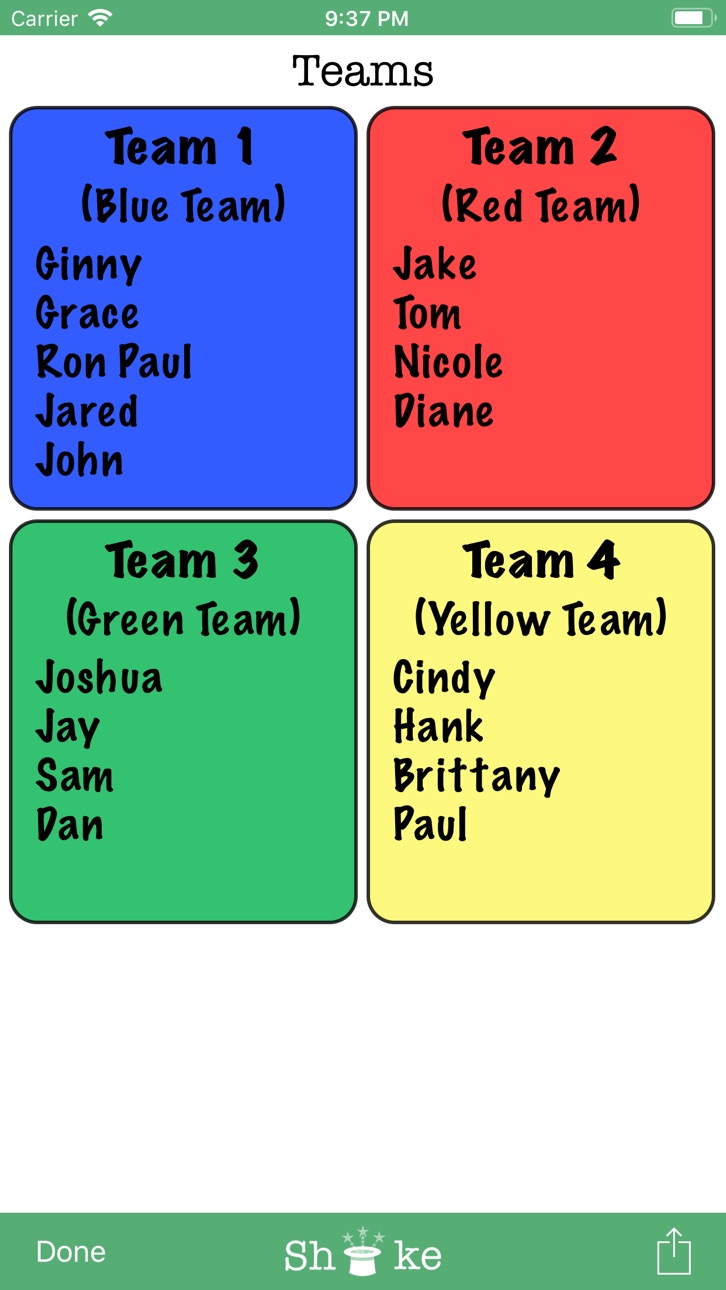
Team Shake is the premier iOS App for creating teams. Instead of a hat and scraps of paper, the user enters his friends' names in his iPhone and gives it a shake. The screen will then display a random set of color-coded teams. These teams can immediately be used for game play or shared via facebook or email. The quick and easy selection of random (or balanced) teams eliminates fighting over who will be on which team. Innovative use of the iPhone shake gesture gives users the satisfying feeling of shaking a virtual hat without the trouble of carrying around an actual hat. Conventional buttons can also be used for those who would rather not shake their expensive hardware about.
The app is designed with ease of use and simplicity in mind. Names can easily be entered with the onscreen keyboard, chosen from the user's contacts, or imported from a file. The email and facebook functions document the members of each individual team as well as preserving the team number and color assigned by the app. For repeated use of Team Shake, lists of friends can be easily saved and loaded later. The current list is also automatically saved so that if you exit the app, or even reboot the device, changes will not be lost. For teachers and others with large lists of people, Team Shake supports the ability to import teams from text or csv files.
If you have any problems, feature requests, or comments please send an email to support@rhine-o.com.
Features:
* Create 1 to 64 random teams
* Create completely random or balanced teams
* Full iPad support
* Eliminates fighting over choosing teams
* Share / Save teams via email or Facebook
* Teams can be chosen by the number of teams or by the size of teams.
* Save lists of friends for later games
* Import lists from email or spreadsheet
* Export lists and options for use on another device
* Satisfying feeling of shaking a “virtual” hat to create teams
* Animated shaking hat
* Entry of names via onscreen keyboard
* Entry of names via iPhone contacts
* Temporarily disable people who are absent
* Set groups of people to always be on the same team
* Set groups of people to always be on different teams
* Set user strength to make more even teams (now supports fully balanced teams)
* 5 users strengths level
* Pick a single random person from the list of players
* User strength indicator on the main screen (can be disabled in options)
* Number of active players and total players is now displayed on the main screen
* Video Out Support
* Option to Sort Teams by Name
* Option to balance male / female team members
* "Equal Ability" option to create teams where all players have the same strength
* Option to create separate male and female teams
* Configurable Team Colors
* Configurable Team Names
* Print Support
* Export Teams in CSV or XLS Format
* Team Shake now supports simultaneously assigning players to multiple subteams and / or oppose teams at the same time.
* Subteams / Oppose teams can now have customized names to make selection easier
* Subteams / Oppose teams can now be enabled or disabled globally so that teams can be made quickly without subteams / oppose teams. In particular, Balance Teams Strengths will work when separate Male / Female teams are created.
Yappler-Tags: Teams, Groups, Random, Hat, Entertainment, Games, Utilities
Accessibility
ipadiphonemacrealityDevicetvoswatch
Version history 25 versions
Build 845360371v3.0.32021-11-16 06:48:26
Version 3.0.3 fixes a bug with iOS 12.x which causes crashes when editing a player's properties
Version 3.0.2 brings the ability to assign multiple subteams and oppose teams to iPad and Mac devices. XLSX files will now be exported with the same order as is seen on the screen.
Version 3.0.1 is a minor bug fix release that fixes some problems with the import of list via CSV and XLSX files
Version 3.0.0 is a major update bringing in some major features:
- Team Shake now supports simultaneously assigning players to multiple subteams and / or oppose teams at the same time.
- Subteams / Oppose teams can now have customized names to make selection easier
- Subteams / Oppose teams can now be enabled or disabled globally so that teams can be made quickly without subteams / oppose teams. In particular, Balance Teams Strengths will work when separate Male / Female teams are created.
- Team Selection algorithms have been update to be more compatible with each other
- A new options to choose team color automatically has been created.
- New option to choose the default number of teams / people for a new list has been added.
- New option to choose if a new list should default to creating a # of Teams or a # of People has been added.
- Subteam X in Team X option has been added to all subteams to be assigned to particular teams
- Fonts and Font Sizes can now be changed for both the main screen and the teams screen
- Team Shake can now force all teams to have an even number of players.
- An option has been added to show user strength on the Teams Screen
- An option has been added to show gender on the Teams Screen
- All subteams / oppose teams can now be cleared with a single action.
- If a subteam is larger the team size, the subteam will be split into 2 or more subteams rather than ignoring the subteam.
- If an oppose team is larger than the number of teams, it will be distributed evenly between teams so that the users are as separated as possible rather than ignoring the oppose team.
Build 845316438v3.0.22021-11-14 08:57:38
Version 3.0.2 brings the ability to assign multiple subteams and oppose teams to iPad and Mac devices. XLSX files will now be exported with the same order as is seen on the screen.
Version 3.0.1 is a minor bug fix release that fixes some problems with the import of list via CSV and XLSX files
Version 3.0.0 is a major update bringing in some major features:
- Team Shake now supports simultaneously assigning players to multiple subteams and / or oppose teams at the same time.
- Subteams / Oppose teams can now have customized names to make selection easier
- Subteams / Oppose teams can now be enabled or disabled globally so that teams can be made quickly without subteams / oppose teams. In particular, Balance Teams Strengths will work when separate Male / Female teams are created.
- Team Selection algorithms have been update to be more compatible with each other
- A new options to choose team color automatically has been created.
- New option to choose the default number of teams / people for a new list has been added.
- New option to choose if a new list should default to creating a # of Teams or a # of People has been added.
- Subteam X in Team X option has been added to all subteams to be assigned to particular teams
- Fonts and Font Sizes can now be changed for both the main screen and the teams screen
- Team Shake can now force all teams to have an even number of players.
- An option has been added to show user strength on the Teams Screen
- An option has been added to show gender on the Teams Screen
- All subteams / oppose teams can now be cleared with a single action.
- If a subteam is larger the team size, the subteam will be split into 2 or more subteams rather than ignoring the subteam.
- If an oppose team is larger than the number of teams, it will be distributed evenly between teams so that the users are as separated as possible rather than ignoring the oppose team.
Build 839858260v3.0.12020-12-31 18:21:11
Version 3.0.1 is a minor bug fix release that fixes some problems with the import of list via CSV and XLSX files
Version 3.0.0 is a major update bringing in some major features:
- Team Shake now supports simultaneously assigning players to multiple subteams and / or oppose teams at the same time.
- Subteams / Oppose teams can now have customized names to make selection easier
- Subteams / Oppose teams can now be enabled or disabled globally so that teams can be made quickly without subteams / oppose teams. In particular, Balance Teams Strengths will work when separate Male / Female teams are created.
- Team Selection algorithms have been update to be more compatible with each other
- A new options to choose team color automatically has been created.
- New option to choose the default number of teams / people for a new list has been added.
- New option to choose if a new list should default to creating a # of Teams or a # of People has been added.
- Subteam X in Team X option has been added to all subteams to be assigned to particular teams
- Fonts and Font Sizes can now be changed for both the main screen and the teams screen
- Team Shake can now force all teams to have an even number of players.
- An option has been added to show user strength on the Teams Screen
- An option has been added to show gender on the Teams Screen
- All subteams / oppose teams can now be cleared with a single action.
- If a subteam is larger the team size, the subteam will be split into 2 or more subteams rather than ignoring the subteam.
- If an oppose team is larger than the number of teams, it will be distributed evenly between teams so that the users are as separated as possible rather than ignoring the oppose team.
Build 837672972v3.0.02020-11-30 19:43:08
Version 3.0.0 is a major update bringing in some major features:
- Team Shake now supports simultaneously assigning players to multiple subteams and / or oppose teams at the same time.
- Subteams / Oppose teams can now have customized names to make selection easier
- Subteams / Oppose teams can now be enabled or disabled globally so that teams can be made quickly without subteams / oppose teams. In particular, Balance Teams Strengths will work when separate Male / Female teams are created.
- Team Selection algorithms have been update to be more compatible with each other
- A new options to choose team color automatically has been created.
- New option to choose the default number of teams / people for a new list has been added.
- New option to choose if a new list should default to creating a # of Teams or a # of People has been added.
- Subteam X in Team X option has been added to all subteams to be assigned to particular teams
- Fonts and Font Sizes can now be changed for both the main screen and the teams screen
- Team Shake can now force all teams to have an even number of players.
- An option has been added to show user strength on the Teams Screen
- An option has been added to show gender on the Teams Screen
- All subteams / oppose teams can now be cleared with a single action.
- If a subteam is larger the team size, the subteam will be split into 2 or more subteams rather than ignoring the subteam.
- If an oppose team is larger than the number of teams, it will be distributed evenly between teams so that the users are as separated as possible rather than ignoring the oppose team.
Build 829362359v2.6.22018-11-20 17:29:01
This version fixes a bug in the iPad version that prevents iPad users from editing user settings. It also slightly improves the excel export function.
Build 827138488v2.6.12018-11-19 16:01:06
This new version brings some major improvements:
- Includes support for directly importing lists from Excel files
- New slide out menus allow for easy access of common options
- Added the ability to resize text using a slider for easy access
- iPhone X support has been optimized for a better use experience
Build 820272046v2.5.42017-10-02 19:57:45
-- Version 2.5.4
Fixed several iOS 11 related bugs
-- Version 2.5.3
Fixed several iOS 10 related bugs
-- Version 2.5.2
Fixed an issue that prevents users from being added from your contact list in iOS 10
Add support for commas in name when importing from a spreadsheet
Added an easy to access help button on the main page
-- Version 2.5.1
Optimized for iOS 9.0
Added a new request feature to allow users to be sorted by strength
-- Version 2.5.0
Fixed 2 bugs
- One that prevented Teams from being created if the phone was shaken on an incorrect screen
- One that prevented other Subteams from working correctly when the "Subteam 1 in Team 1" option was chosen
-- Version 2.4.9
Fixed a bug that caused Team Shake create a new set of teams whenever teams were shared.
-- Version 2.4.8
Fixed a bug that caused Team Shake to hang or run slowly on iOS7
Fixed a bug that caused iOS7 users to have problems saving teams
Fixed a bug that caused the Require 2 Females / Require 2 Males options to not work when balancing based on strengths
New updated icons are now used on the main screen
-- Version 2.4.7
Fixed a bug that caused Team Shake to crash or hang for users using iOS7
Fixed a bug that prevented iOS7 users from scrolling down to see all teams
Added New Options / Features
- Pick Random Users on Main Screen now cycles through all users before repeating users by default (original behavior can be selected in the options menu)
- Two new option to force teams to always require teams to have a minimum of two girls (or two boys) on a team. This prevents the situation where a team will have all boys except for one girl (or all girls except for one boy).
-- Version 2.4.6
Fixed a bug where gender colors where not shown on the main screen
-- Version 2.4.5
Minor update to allow images to be sent via Text Message
-- Version 2.4.4
Bug fix release for serious issue where iPhone 6 / 6 Plus phones could not see the team selection bar
-- Version 2.4.3
Full Support for iPhone 6 / 6 Plus Screen Size
Support for Rotation to Landscape
New options available to customize Team Shake Even further:
- Single Uneven Sized Team - Create only one small team
- Show Subteam Bubble - Show or hide the sub team bubbles
- Show Oppose Team Bubble - Show or hide the oppose team bubble
- Team Size Preview - Preview the number and size of teams to be created when you change the selection
- Use Student View - Single toggle that hides player strings and subteam / oppose team bubbles
- Direct link to the Team Shake Demo Video
- Direct link to the Team Shake Help Guide
- New options to handle how teams are sorted with Male and Female players
- Option to control the size of the font used for the players in the main screen and in the generated teams
- Option to control the size of the font used when picking a single random player
- Option to control the number of columns that are used on the Teams Page
Build 819650648v2.5.32016-11-08 21:22:02
-- Version 2.5.3
Fixed several iOS 10 related bugs
-- Version 2.5.2
Fixed an issue that prevents users from being added from your contact list in iOS 10
Add support for commas in name when importing from a spreadsheet
Added an easy to access help button on the main page
-- Version 2.5.1
Optimized for iOS 9.0
Added a new request feature to allow users to be sorted by strength
-- Version 2.5.0
Fixed 2 bugs
- One that prevented Teams from being created if the phone was shaken on an incorrect screen
- One that prevented other Subteams from working correctly when the "Subteam 1 in Team 1" option was chosen
-- Version 2.4.9
Fixed a bug that caused Team Shake create a new set of teams whenever teams were shared.
-- Version 2.4.8
Fixed a bug that caused Team Shake to hang or run slowly on iOS7
Fixed a bug that caused iOS7 users to have problems saving teams
Fixed a bug that caused the Require 2 Females / Require 2 Males options to not work when balancing based on strengths
New updated icons are now used on the main screen
-- Version 2.4.7
Fixed a bug that caused Team Shake to crash or hang for users using iOS7
Fixed a bug that prevented iOS7 users from scrolling down to see all teams
Added New Options / Features
- Pick Random Users on Main Screen now cycles through all users before repeating users by default (original behavior can be selected in the options menu)
- Two new option to force teams to always require teams to have a minimum of two girls (or two boys) on a team. This prevents the situation where a team will have all boys except for one girl (or all girls except for one boy).
-- Version 2.4.6
Fixed a bug where gender colors where not shown on the main screen
-- Version 2.4.5
Minor update to allow images to be sent via Text Message
-- Version 2.4.4
Bug fix release for serious issue where iPhone 6 / 6 Plus phones could not see the team selection bar
-- Version 2.4.3
Full Support for iPhone 6 / 6 Plus Screen Size
Support for Rotation to Landscape
New options available to customize Team Shake Even further:
- Single Uneven Sized Team - Create only one small team
- Show Subteam Bubble - Show or hide the sub team bubbles
- Show Oppose Team Bubble - Show or hide the oppose team bubble
- Team Size Preview - Preview the number and size of teams to be created when you change the selection
- Use Student View - Single toggle that hides player strings and subteam / oppose team bubbles
- Direct link to the Team Shake Demo Video
- Direct link to the Team Shake Help Guide
- New options to handle how teams are sorted with Male and Female players
- Option to control the size of the font used for the players in the main screen and in the generated teams
- Option to control the size of the font used when picking a single random player
- Option to control the number of columns that are used on the Teams Page
Build 819080758v2.5.22016-09-30 18:08:32
-- Version 2.5.2
Fixed an issue that prevents users from being added from your contact list in iOS 10
Add support for commas in name when importing from a spreadsheet
Added an easy to access help button on the main page
-- Version 2.5.1
Optimized for iOS 9.0
Added a new request feature to allow users to be sorted by strength
-- Version 2.5.0
Fixed 2 bugs
- One that prevented Teams from being created if the phone was shaken on an incorrect screen
- One that prevented other Subteams from working correctly when the "Subteam 1 in Team 1" option was chosen
-- Version 2.4.9
Fixed a bug that caused Team Shake create a new set of teams whenever teams were shared.
-- Version 2.4.8
Fixed a bug that caused Team Shake to hang or run slowly on iOS7
Fixed a bug that caused iOS7 users to have problems saving teams
Fixed a bug that caused the Require 2 Females / Require 2 Males options to not work when balancing based on strengths
New updated icons are now used on the main screen
-- Version 2.4.7
Fixed a bug that caused Team Shake to crash or hang for users using iOS7
Fixed a bug that prevented iOS7 users from scrolling down to see all teams
Added New Options / Features
- Pick Random Users on Main Screen now cycles through all users before repeating users by default (original behavior can be selected in the options menu)
- Two new option to force teams to always require teams to have a minimum of two girls (or two boys) on a team. This prevents the situation where a team will have all boys except for one girl (or all girls except for one boy).
-- Version 2.4.6
Fixed a bug where gender colors where not shown on the main screen
-- Version 2.4.5
Minor update to allow images to be sent via Text Message
-- Version 2.4.4
Bug fix release for serious issue where iPhone 6 / 6 Plus phones could not see the team selection bar
-- Version 2.4.3
Full Support for iPhone 6 / 6 Plus Screen Size
Support for Rotation to Landscape
New options available to customize Team Shake Even further:
- Single Uneven Sized Team - Create only one small team
- Show Subteam Bubble - Show or hide the sub team bubbles
- Show Oppose Team Bubble - Show or hide the oppose team bubble
- Team Size Preview - Preview the number and size of teams to be created when you change the selection
- Use Student View - Single toggle that hides player strings and subteam / oppose team bubbles
- Direct link to the Team Shake Demo Video
- Direct link to the Team Shake Help Guide
- New options to handle how teams are sorted with Male and Female players
- Option to control the size of the font used for the players in the main screen and in the generated teams
- Option to control the size of the font used when picking a single random player
- Option to control the number of columns that are used on the Teams Page
Build 812427739v2.5.12015-10-30 16:41:06
-- Version 2.5.1
Optimized for iOS 9.0
Added a new request feature to allow users to be sorted by strength
-- Version 2.5.0
Fixed 2 bugs
- One that prevented Teams from being created if the phone was shaken on an incorrect screen
- One that prevented other Subteams from working correctly when the "Subteam 1 in Team 1" option was chosen
-- Version 2.4.9
Fixed a bug that caused Team Shake create a new set of teams whenever teams were shared.
-- Version 2.4.8
Fixed a bug that caused Team Shake to hang or run slowly on iOS7
Fixed a bug that caused iOS7 users to have problems saving teams
Fixed a bug that caused the Require 2 Females / Require 2 Males options to not work when balancing based on strengths
New updated icons are now used on the main screen
-- Version 2.4.7
Fixed a bug that caused Team Shake to crash or hang for users using iOS7
Fixed a bug that prevented iOS7 users from scrolling down to see all teams
Added New Options / Features
- Pick Random Users on Main Screen now cycles through all users before repeating users by default (original behavior can be selected in the options menu)
- Two new option to force teams to always require teams to have a minimum of two girls (or two boys) on a team. This prevents the situation where a team will have all boys except for one girl (or all girls except for one boy).
-- Version 2.4.6
Fixed a bug where gender colors where not shown on the main screen
-- Version 2.4.5
Minor update to allow images to be sent via Text Message
-- Version 2.4.4
Bug fix release for serious issue where iPhone 6 / 6 Plus phones could not see the team selection bar
-- Version 2.4.3
Full Support for iPhone 6 / 6 Plus Screen Size
Support for Rotation to Landscape
New options available to customize Team Shake Even further:
- Single Uneven Sized Team - Create only one small team
- Show Subteam Bubble - Show or hide the sub team bubbles
- Show Oppose Team Bubble - Show or hide the oppose team bubble
- Team Size Preview - Preview the number and size of teams to be created when you change the selection
- Use Student View - Single toggle that hides player strings and subteam / oppose team bubbles
- Direct link to the Team Shake Demo Video
- Direct link to the Team Shake Help Guide
- New options to handle how teams are sorted with Male and Female players
- Option to control the size of the font used for the players in the main screen and in the generated teams
- Option to control the size of the font used when picking a single random player
- Option to control the number of columns that are used on the Teams Page
Build 812245061v2.5.02015-04-24 21:01:22
-- Version 2.5.0
Fixed 2 bugs
- One that prevented Teams from being created if the phone was shaken on an incorrect screen
- One that prevented other Subteams from working correctly when the "Subteam 1 in Team 1" option was chosen
-- Version 2.4.9
Fixed a bug that caused Team Shake create a new set of teams whenever teams were shared.
-- Version 2.4.8
Fixed a bug that caused Team Shake to hang or run slowly on iOS7
Fixed a bug that caused iOS7 users to have problems saving teams
Fixed a bug that caused the Require 2 Females / Require 2 Males options to not work when balancing based on strengths
New updated icons are now used on the main screen
-- Version 2.4.7
Fixed a bug that caused Team Shake to crash or hang for users using iOS7
Fixed a bug that prevented iOS7 users from scrolling down to see all teams
Added New Options / Features
- Pick Random Users on Main Screen now cycles through all users before repeating users by default (original behavior can be selected in the options menu)
- Two new option to force teams to always require teams to have a minimum of two girls (or two boys) on a team. This prevents the situation where a team will have all boys except for one girl (or all girls except for one boy).
-- Version 2.4.6
Fixed a bug where gender colors where not shown on the main screen
-- Version 2.4.5
Minor update to allow images to be sent via Text Message
-- Version 2.4.4
Bug fix release for serious issue where iPhone 6 / 6 Plus phones could not see the team selection bar
-- Version 2.4.3
Full Support for iPhone 6 / 6 Plus Screen Size
Support for Rotation to Landscape
New options available to customize Team Shake Even further:
- Single Uneven Sized Team - Create only one small team
- Show Subteam Bubble - Show or hide the sub team bubbles
- Show Oppose Team Bubble - Show or hide the oppose team bubble
- Team Size Preview - Preview the number and size of teams to be created when you change the selection
- Use Student View - Single toggle that hides player strings and subteam / oppose team bubbles
- Direct link to the Team Shake Demo Video
- Direct link to the Team Shake Help Guide
- New options to handle how teams are sorted with Male and Female players
- Option to control the size of the font used for the players in the main screen and in the generated teams
- Option to control the size of the font used when picking a single random player
- Option to control the number of columns that are used on the Teams Page
Build 812059214v2.4.92015-04-01 02:08:14
-- Version 2.4.9
Fixed a bug that caused Team Shake create a new set of teams whenever teams were shared.
-- Version 2.4.8
Fixed a bug that caused Team Shake to hang or run slowly on iOS7
Fixed a bug that caused iOS7 users to have problems saving teams
Fixed a bug that caused the Require 2 Females / Require 2 Males options to not work when balancing based on strengths
New updated icons are now used on the main screen
-- Version 2.4.7
Fixed a bug that caused Team Shake to crash or hang for users using iOS7
Fixed a bug that prevented iOS7 users from scrolling down to see all teams
Added New Options / Features
- Pick Random Users on Main Screen now cycles through all users before repeating users by default (original behavior can be selected in the options menu)
- Two new option to force teams to always require teams to have a minimum of two girls (or two boys) on a team. This prevents the situation where a team will have all boys except for one girl (or all girls except for one boy).
-- Version 2.4.6
Fixed a bug where gender colors where not shown on the main screen
-- Version 2.4.5
Minor update to allow images to be sent via Text Message
-- Version 2.4.4
Bug fix release for serious issue where iPhone 6 / 6 Plus phones could not see the team selection bar
-- Version 2.4.3
Full Support for iPhone 6 / 6 Plus Screen Size
Support for Rotation to Landscape
New options available to customize Team Shake Even further:
- Single Uneven Sized Team - Create only one small team
- Show Subteam Bubble - Show or hide the sub team bubbles
- Show Oppose Team Bubble - Show or hide the oppose team bubble
- Team Size Preview - Preview the number and size of teams to be created when you change the selection
- Use Student View - Single toggle that hides player strings and subteam / oppose team bubbles
- Direct link to the Team Shake Demo Video
- Direct link to the Team Shake Help Guide
- New options to handle how teams are sorted with Male and Female players
- Option to control the size of the font used for the players in the main screen and in the generated teams
- Option to control the size of the font used when picking a single random player
- Option to control the number of columns that are used on the Teams Page
Build 811751182v2.4.82015-02-21 22:01:48
-- Version 2.4.8
Fixed a bug that caused Team Shake to hang or run slowly on iOS7
Fixed a bug that caused iOS7 users to have problems saving teams
Fixed a bug that caused the Require 2 Females / Require 2 Males options to not work when balancing based on strengths
New updated icons are now used on the main screen
-- Version 2.4.7
Fixed a bug that caused Team Shake to crash or hang for users using iOS7
Fixed a bug that prevented iOS7 users from scrolling down to see all teams
Added New Options / Features
- Pick Random Users on Main Screen now cycles through all users before repeating users by default (original behavior can be selected in the options menu)
- Two new option to force teams to always require teams to have a minimum of two girls (or two boys) on a team. This prevents the situation where a team will have all boys except for one girl (or all girls except for one boy).
-- Version 2.4.6
Fixed a bug where gender colors where not shown on the main screen
-- Version 2.4.5
Minor update to allow images to be sent via Text Message
-- Version 2.4.4
Bug fix release for serious issue where iPhone 6 / 6 Plus phones could not see the team selection bar
-- Version 2.4.3
Full Support for iPhone 6 / 6 Plus Screen Size
Support for Rotation to Landscape
New options available to customize Team Shake Even further:
- Single Uneven Sized Team - Create only one small team
- Show Subteam Bubble - Show or hide the sub team bubbles
- Show Oppose Team Bubble - Show or hide the oppose team bubble
- Team Size Preview - Preview the number and size of teams to be created when you change the selection
- Use Student View - Single toggle that hides player strings and subteam / oppose team bubbles
- Direct link to the Team Shake Demo Video
- Direct link to the Team Shake Help Guide
- New options to handle how teams are sorted with Male and Female players
- Option to control the size of the font used for the players in the main screen and in the generated teams
- Option to control the size of the font used when picking a single random player
- Option to control the number of columns that are used on the Teams Page
Build 811665567v2.4.72015-01-30 19:34:56
-- Version 2.4.7
Fixed a bug that caused Team Shake to crash or hang for users using iOS7
Fixed a bug that prevented iOS7 users from scrolling down to see all teams
Added New Options / Features
- Pick Random Users on Main Screen now cycles through all users before repeating users by default (original behavior can be selected in the options menu)
- Two new option to force teams to always require teams to have a minimum of two girls (or two boys) on a team. This prevents the situation where a team will have all boys except for one girl (or all girls except for one boy).
-- Version 2.4.6
Fixed a bug where gender colors where not shown on the main screen
-- Version 2.4.5
Minor update to allow images to be sent via Text Message
-- Version 2.4.4
Bug fix release for serious issue where iPhone 6 / 6 Plus phones could not see the team selection bar
-- Version 2.4.3
Full Support for iPhone 6 / 6 Plus Screen Size
Support for Rotation to Landscape
New options available to customize Team Shake Even further:
- Single Uneven Sized Team - Create only one small team
- Show Subteam Bubble - Show or hide the sub team bubbles
- Show Oppose Team Bubble - Show or hide the oppose team bubble
- Team Size Preview - Preview the number and size of teams to be created when you change the selection
- Use Student View - Single toggle that hides player strings and subteam / oppose team bubbles
- Direct link to the Team Shake Demo Video
- Direct link to the Team Shake Help Guide
- New options to handle how teams are sorted with Male and Female players
- Option to control the size of the font used for the players in the main screen and in the generated teams
- Option to control the size of the font used when picking a single random player
- Option to control the number of columns that are used on the Teams Page
Build 811510446v2.4.62015-01-13 22:41:34
-- Version 2.4.6
Fixed a bug where gender colors where not shown on the main screen
-- Version 2.4.5
Minor update to allow images to be sent via Text Message
-- Version 2.4.4
Bug fix release for serious issue where iPhone 6 / 6 Plus phones could not see the team selection bar
-- Version 2.4.3
Full Support for iPhone 6 / 6 Plus Screen Size
Support for Rotation to Landscape
New options available to customize Team Shake Even further:
- Single Uneven Sized Team - Create only one small team
- Show Subteam Bubble - Show or hide the sub team bubbles
- Show Oppose Team Bubble - Show or hide the oppose team bubble
- Team Size Preview - Preview the number and size of teams to be created when you change the selection
- Use Student View - Single toggle that hides player strings and subteam / oppose team bubbles
- Direct link to the Team Shake Demo Video
- Direct link to the Team Shake Help Guide
- New options to handle how teams are sorted with Male and Female players
- Option to control the size of the font used for the players in the main screen and in the generated teams
- Option to control the size of the font used when picking a single random player
- Option to control the number of columns that are used on the Teams Page
Build 811504735v2.4.52015-01-05 04:11:10
-- Version 2.4.5
Minor update to allow images to be sent via Text Message
-- Version 2.4.4
Bug fix release for serious issue where iPhone 6 / 6 Plus phones could not see the team selection bar
-- Version 2.4.3
Full Support for iPhone 6 / 6 Plus Screen Size
Support for Rotation to Landscape
New options available to customize Team Shake Even further:
- Single Uneven Sized Team - Create only one small team
- Show Subteam Bubble - Show or hide the sub team bubbles
- Show Oppose Team Bubble - Show or hide the oppose team bubble
- Team Size Preview - Preview the number and size of teams to be created when you change the selection
- Use Student View - Single toggle that hides player strings and subteam / oppose team bubbles
- Direct link to the Team Shake Demo Video
- Direct link to the Team Shake Help Guide
- New options to handle how teams are sorted with Male and Female players
- Option to control the size of the font used for the players in the main screen and in the generated teams
- Option to control the size of the font used when picking a single random player
- Option to control the number of columns that are used on the Teams Page
Build 811499182v2.4.42015-01-04 00:45:01
Full Support for iPhone 6 / 6 Plus Screen Size
Support for Rotation to Landscape
New options available to customize Team Shake Even further:
- Single Uneven Sized Team - Create only one small team
- Show Subteam Bubble - Show or hide the sub team bubbles
- Show Oppose Team Bubble - Show or hide the oppose team bubble
- Team Size Preview - Preview the number and size of teams to be created when you change the selection
- Use Student View - Single toggle that hides player strings and subteam / oppose team bubbles
- Direct link to the Team Shake Demo Video
- Direct link to the Team Shake Help Guide
- New options to handle how teams are sorted with Male and Female players
- Option to control the size of the font used for the players in the main screen and in the generated teams
- Option to control the size of the font used when picking a single random player
- Option to control the number of columns that are used on the Teams Page
Build 811458317v2.4.32015-01-03 02:14:10
Full Support for iPhone 6 / 6 Plus Screen Size
Support for Rotation to Landscape
New options available to customize Team Shake Even further:
- Single Uneven Sized Team - Create only one small team
- Show Subteam Bubble - Show or hide the sub team bubbles
- Show Oppose Team Bubble - Show or hide the oppose team bubble
- Team Size Preview - Preview the number and size of teams to be created when you change the selection
- Use Student View - Single toggle that hides player strings and subteam / oppose team bubbles
- Direct link to the Team Shake Demo Video
- Direct link to the Team Shake Help Guide
- New options to handle how teams are sorted with Male and Female players
- Option to control the size of the font used for the players in the main screen and in the generated teams
- Option to control the size of the font used when picking a single random player
- Option to control the number of columns that are used on the Teams Page
Build 63602653v2.3.02013-09-30 19:00:40
Changes in 2.3.0
- Fixes iOS 7 bug where changes to current lists or to new lists cannot be saved.
- Adds the ability to modify the names of the users without deleting and readding them
- Adds the ability to export teams in CSV and XLS file formats
- UI Redesigned for the new iOS 7 look and feel
Changes in 2.2.1
- Fixed bug where Shake'em Up button stops working if the device is shaken on a screen other than the main screen.
Changes in 2.2.0
- New feature to create separate male and female teams.
- New button on main screen to switch between making X teams or teams of size X
- The size of the teams is now saved as a part of the list
- The random player feature on the iPad now displays the names in a larger font.
Changes in 2.1.1
- Fixed bug that caused lists added via the "Import" option from saving changes correctly.
Changes in 2.1.0
- Added option to save changes to current list without creating a new name
- New option to "Equal Ability" teams where all players have the same (or similar) strengths
- Updated Artwork
Build 14112395v2.2.12013-02-20 01:34:20
Changes in 2.2.1
- Fixed bug where Shake'em Up button stops working if the device is shaken on a screen other than the main screen.
Changes in 2.2.0
- New feature to create separe male and female teams.
- New button on main screen to switch between making X teams or teams of size X
- The size of the teams is now saved as a part of the list
- The random player feature on the iPad now displays the names in a larger font.
Changes in 2.1.1
- Fixed bug that caused lists added via the "Import" option from saving changes correctly.
Changes in 2.1.0
- Added option to save changes to current list without creating a new name
- New option to "Equal Ability" teams where all players have the same (or similar) strengths
- Updated Artwork
Build 13924256v2.2.02013-02-06 21:41:30
Changes in 2.2.0
- New feature to create separe male and female teams.
- New button on main screen to switch between making X teams or teams of size X
- The size of the teams is now saved as a part of the list
- The random player feature on the iPad now displays the names in a larger font.
Changes in 2.1.1
- Fixed bug that caused lists added via the "Import" option from saving changes correctly.
Changes in 2.1.0
- Added option to save changes to current list without creating a new name
- New option to "Equal Ability" teams where all players have the same (or similar) strengths
- Updated Artwork
Build 13742222v2.1.12013-01-31 19:34:00
Changes in 2.1.1
- Fixed bug that caused lists added via the "Import" option from saving changes correctly.
Changes in 2.1.0
- Added option to save changes to current list without creating a new name
- New option to "Equal Ability" teams where all players have the same (or similar) strengths
- Updated Artwork
Build 10614502v2.1.02012-11-28 19:28:23
- Added option to save changes to current list without creating a new name
- New option to "Equal Ability" teams where all players have the same (or similar) strengths
- Updated Artwork
Build 10375043v2.0.12012-09-06 04:30:13
- Bug fixes
- Problems importing lists on iOS 4.3
- Problems restoring backups
- Other minor issues
Build 8134525v2.0.02012-05-24 18:27:28
- iPad Support
- Import Lists from email or file
- Export lists / configuration
- Video Out Support
- Share Teams on Facebook
- Teams can now be sorted
- Option to balance male / female team member
- Configurable Team Colors
- Configurable Team Names
- Print Support
Price history by region
Currency
Show
Columns
Search
Availability 175 of 175 storefronts
| Region | Language | Price | Ratings | Avg | Version |
|---|---|---|---|---|---|
| US | en-US | USD 1.99 | 1.6k | 4.9 | 3.0.3 |
| DE | de-DE | EUR 1.99 | 1.3k | 4.7 | 3.0.3 |
| CH | de-CH | CHF 2 | 357 | 4.7 | 3.0.3 |
| CA | en-CA | CAD 2.99 | 288 | 4.7 | 3.0.3 |
| AU | en-AU | AUD 2.99 | 107 | 4.8 | 3.0.3 |
| SE | sv | SEK 29 | 98 | 4.6 | 3.0.3 |
| NL | nl | EUR 1.99 | 60 | 4.6 | 3.0.3 |
| GB | en-GB | GBP 1.99 | 52 | 4.8 | 3.0.3 |
| NZ | en-AU | NZD 3.99 | 24 | 4.8 | 3.0.3 |
| ES | es-ES | EUR 1.99 | 21 | 4.5 | 3.0.3 |
| LU | en-GB | EUR 1.99 | 20 | 4.8 | 3.0.3 |
| AT | de-DE | EUR 1.99 | 18 | 4.6 | 3.0.3 |
| FI | en-GB | EUR 1.99 | 12 | 4.1 | 3.0.3 |
| IE | en-GB | EUR 1.99 | 11 | 4.5 | 3.0.3 |
| BE | en-GB | EUR 1.99 | 10 | 4.6 | 3.0.3 |
| CN | zh-Hans-CN | CNY 15 | 10 | 5.0 | 3.0.3 |
| DK | en-GB | DKK 19 | 10 | 4.6 | 3.0.3 |
| JP | ja | JPY 300 | 10 | 4.6 | 3.0.3 |
| FR | fr-FR | EUR 1.99 | 8 | 4.3 | 3.0.3 |
| MX | es-MX | MXN 39 | 8 | 5.0 | 3.0.3 |
| NO | en-GB | NOK 29 | 8 | 4.5 | 3.0.3 |
| IT | it | EUR 1.99 | 6 | 4.7 | 3.0.3 |
| HK | zh-Hant-HK | HKD 18 | 5 | 4.8 | 3.0.3 |
| SG | en-GB | SGD 2.98 | 5 | 4.8 | 3.0.3 |
| SI | en-GB | EUR 1.99 | 5 | 4.8 | 3.0.3 |
| IS | en-GB | USD 1.99 | 4 | 5.0 | 3.0.3 |
| TH | en-GB | THB 79 | 4 | 5.0 | 3.0.3 |
| BR | pt-BR | BRL 12.9 | 3 | 5.0 | 3.0.3 |
| CO | es-MX | COP 9900 | 3 | 4.0 | 3.0.3 |
| IL | en-GB | ILS 7.9 | 3 | 5.0 | 3.0.3 |
| ZA | en-GB | ZAR 39.99 | 3 | 5.0 | 3.0.3 |
| EC | es-MX | USD 1.99 | 2 | 4.5 | 3.0.3 |
| KR | ko | KRW 3300 | 2 | 4.0 | 3.0.3 |
| AZ | en-GB | USD 1.99 | 1 | 5.0 | 3.0.3 |
| CY | en-GB | EUR 1.99 | 1 | 5.0 | 3.0.3 |
| DO | es-MX | USD 1.99 | 1 | 5.0 | 3.0.3 |
| KE | en-GB | USD 1.99 | 1 | 1.0 | 3.0.3 |
| PA | es-MX | USD 1.99 | 1 | 5.0 | 3.0.3 |
| PL | en-GB | PLN 9.99 | 1 | 5.0 | 3.0.3 |
| PT | pt-PT | EUR 1.99 | 1 | 5.0 | 3.0.3 |
| SA | en-GB | SAR 9.99 | 1 | 5.0 | 3.0.3 |
| AE | en-GB | AED 7.99 | 0 | — | 3.0.3 |
| AF | en-GB | USD 1.99 | 0 | — | 3.0.3 |
| AG | en-GB | USD 1.99 | 0 | — | 3.0.3 |
| AI | en-GB | USD 1.99 | 0 | — | 3.0.3 |
| AL | en-GB | USD 1.99 | 0 | — | 3.0.3 |
| AM | en-GB | USD 1.99 | 0 | — | 3.0.3 |
| AO | en-GB | USD 1.99 | 0 | — | 3.0.3 |
| AR | es-MX | USD 1.99 | 0 | — | 3.0.3 |
| BA | en-GB | EUR 1.99 | 0 | — | 3.0.3 |
| BB | en-GB | USD 1.99 | 0 | — | 3.0.3 |
| BF | en-GB | USD 1.99 | 0 | — | 3.0.3 |
| BG | en-GB | EUR 1.99 | 0 | — | 3.0.3 |
| BH | en-GB | USD 1.99 | 0 | — | 3.0.3 |
| BJ | en-GB | USD 1.99 | 0 | — | 3.0.3 |
| BM | en-GB | USD 1.99 | 0 | — | 3.0.3 |
| BN | en-GB | USD 1.99 | 0 | — | 3.0.3 |
| BO | es-MX | USD 1.99 | 0 | — | 3.0.3 |
| BS | en-GB | USD 1.99 | 0 | — | 3.0.3 |
| BT | en-GB | USD 1.99 | 0 | — | 3.0.3 |
| BW | en-GB | USD 1.99 | 0 | — | 3.0.3 |
| BY | en-GB | USD 1.99 | 0 | — | 3.0.3 |
| BZ | en-GB | USD 1.99 | 0 | — | 3.0.3 |
| CD | en-GB | USD 1.99 | 0 | — | 3.0.3 |
| CG | en-GB | USD 1.99 | 0 | — | 3.0.3 |
| CI | fr-FR | USD 1.99 | 0 | — | 3.0.3 |
| CL | es-MX | CLP 1990 | 0 | — | 3.0.3 |
| CM | fr-FR | USD 1.99 | 0 | — | 3.0.3 |
| CR | es-MX | USD 1.99 | 0 | — | 3.0.3 |
| CV | en-GB | USD 1.99 | 0 | — | 3.0.3 |
| CZ | en-GB | CZK 49 | 0 | — | 3.0.3 |
| DM | en-GB | USD 1.99 | 0 | — | 3.0.3 |
| DZ | en-GB | USD 1.99 | 0 | — | 3.0.3 |
| EE | en-GB | EUR 1.99 | 0 | — | 3.0.3 |
| EG | en-GB | EGP 99.99 | 0 | — | 3.0.3 |
| FJ | en-GB | USD 1.99 | 0 | — | 3.0.3 |
| FM | en-GB | USD 1.99 | 0 | — | 3.0.3 |
| GA | fr-FR | USD 1.99 | 0 | — | 3.0.3 |
| GD | en-GB | USD 1.99 | 0 | — | 3.0.3 |
| GE | en-GB | USD 1.99 | 0 | — | 3.0.3 |
| GH | en-GB | USD 1.99 | 0 | — | 3.0.3 |
| GM | en-GB | USD 1.99 | 0 | — | 3.0.3 |
| GR | en-GB | EUR 1.99 | 0 | — | 3.0.3 |
| GT | es-MX | USD 1.99 | 0 | — | 3.0.3 |
| GW | en-GB | USD 1.99 | 0 | — | 3.0.3 |
| GY | en-GB | USD 1.99 | 0 | — | 3.0.3 |
| HN | es-MX | USD 1.99 | 0 | — | 3.0.3 |
| HR | en-GB | EUR 1.99 | 0 | — | 3.0.3 |
| HU | en-GB | HUF 999 | 0 | — | 3.0.3 |
| ID | en-GB | IDR 29000 | 0 | — | 3.0.3 |
| IN | en-GB | INR 199 | 0 | — | 3.0.3 |
| IQ | en-GB | USD 1.99 | 0 | — | 3.0.3 |
| JM | en-GB | USD 1.99 | 0 | — | 3.0.3 |
| JO | en-GB | USD 1.99 | 0 | — | 3.0.3 |
| KG | en-GB | USD 1.99 | 0 | — | 3.0.3 |
| KH | en-GB | USD 1.99 | 0 | — | 3.0.3 |
| KN | en-GB | USD 1.99 | 0 | — | 3.0.3 |
| KW | en-GB | USD 1.99 | 0 | — | 3.0.3 |
| KY | en-GB | USD 1.99 | 0 | — | 3.0.3 |
| KZ | en-GB | KZT 999 | 0 | — | 3.0.3 |
| LA | en-GB | USD 1.99 | 0 | — | 3.0.3 |
| LB | en-GB | USD 1.99 | 0 | — | 3.0.3 |
| LC | en-GB | USD 1.99 | 0 | — | 3.0.3 |
| LK | en-GB | USD 1.99 | 0 | — | 3.0.3 |
| LR | en-GB | USD 1.99 | 0 | — | 3.0.3 |
| LT | en-GB | EUR 1.99 | 0 | — | 3.0.3 |
| LV | en-GB | EUR 1.99 | 0 | — | 3.0.3 |
| LY | en-GB | USD 1.99 | 0 | — | 3.0.3 |
| MA | en-GB | USD 1.99 | 0 | — | 3.0.3 |
| MD | en-GB | USD 1.99 | 0 | — | 3.0.3 |
| ME | en-GB | EUR 1.99 | 0 | — | 3.0.3 |
| MG | en-GB | USD 1.99 | 0 | — | 3.0.3 |
| MK | en-GB | USD 1.99 | 0 | — | 3.0.3 |
| ML | en-GB | USD 1.99 | 0 | — | 3.0.3 |
| MM | en-GB | USD 1.99 | 0 | — | 3.0.3 |
| MN | en-GB | USD 1.99 | 0 | — | 3.0.3 |
| MO | zh-Hant-HK | USD 1.99 | 0 | — | 3.0.3 |
| MR | en-GB | USD 1.99 | 0 | — | 3.0.3 |
| MS | en-GB | USD 1.99 | 0 | — | 3.0.3 |
| MT | en-GB | EUR 1.99 | 0 | — | 3.0.3 |
| MU | en-GB | USD 1.99 | 0 | — | 3.0.3 |
| MV | en-GB | USD 1.99 | 0 | — | 3.0.3 |
| MW | en-GB | USD 1.99 | 0 | — | 3.0.3 |
| MY | en-GB | MYR 9.9 | 0 | — | 3.0.3 |
| MZ | en-GB | USD 1.99 | 0 | — | 3.0.3 |
| NA | en-GB | USD 1.99 | 0 | — | 3.0.3 |
| NE | en-GB | USD 1.99 | 0 | — | 3.0.3 |
| NG | en-GB | NGN 3200 | 0 | — | 3.0.3 |
| NI | es-MX | USD 1.99 | 0 | — | 3.0.3 |
| NP | en-GB | USD 1.99 | 0 | — | 3.0.3 |
| NR | en-GB | USD 1.99 | 0 | — | 3.0.3 |
| OM | en-GB | USD 1.99 | 0 | — | 3.0.3 |
| PE | es-MX | PEN 9.9 | 0 | — | 3.0.3 |
| PG | en-GB | USD 1.99 | 0 | — | 3.0.3 |
| PH | en-GB | PHP 129 | 0 | — | 3.0.3 |
| PK | en-GB | PKR 500 | 0 | — | 3.0.3 |
| PW | en-GB | USD 1.99 | 0 | — | 3.0.3 |
| PY | es-MX | USD 1.99 | 0 | — | 3.0.3 |
| QA | en-GB | QAR 7.99 | 0 | — | 3.0.3 |
| RO | en-GB | RON 9.99 | 0 | — | 3.0.3 |
| RS | en-GB | EUR 1.99 | 0 | — | 3.0.3 |
| RU | ru | RUB 199 | 0 | — | 3.0.3 |
| RW | en-GB | USD 1.99 | 0 | — | 3.0.3 |
| SB | en-GB | USD 1.99 | 0 | — | 3.0.3 |
| SC | en-GB | USD 1.99 | 0 | — | 3.0.3 |
| SK | en-GB | EUR 1.99 | 0 | — | 3.0.3 |
| SL | en-GB | USD 1.99 | 0 | — | 3.0.3 |
| SN | en-GB | USD 1.99 | 0 | — | 3.0.3 |
| SR | en-GB | USD 1.99 | 0 | — | 3.0.3 |
| ST | en-GB | USD 1.99 | 0 | — | 3.0.3 |
| SV | es-MX | USD 1.99 | 0 | — | 3.0.3 |
| SZ | en-GB | USD 1.99 | 0 | — | 3.0.3 |
| TC | en-GB | USD 1.99 | 0 | — | 3.0.3 |
| TD | en-GB | USD 1.99 | 0 | — | 3.0.3 |
| TJ | en-GB | USD 1.99 | 0 | — | 3.0.3 |
| TM | en-GB | USD 1.99 | 0 | — | 3.0.3 |
| TN | en-GB | USD 1.99 | 0 | — | 3.0.3 |
| TO | en-GB | USD 1.99 | 0 | — | 3.0.3 |
| TR | en-GB | TRY 99.99 | 0 | — | 3.0.3 |
| TT | en-GB | USD 1.99 | 0 | — | 3.0.3 |
| TW | zh-Hant-TW | TWD 60 | 0 | — | 3.0.3 |
| TZ | en-GB | TZS 5900 | 0 | — | 3.0.3 |
| UA | en-GB | USD 1.99 | 0 | — | 3.0.3 |
| UG | en-GB | USD 1.99 | 0 | — | 3.0.3 |
| UY | en-GB | USD 1.99 | 0 | — | 3.0.3 |
| UZ | en-GB | USD 1.99 | 0 | — | 3.0.3 |
| VC | en-GB | USD 1.99 | 0 | — | 3.0.3 |
| VE | es-MX | USD 1.99 | 0 | — | 3.0.3 |
| VG | en-GB | USD 1.99 | 0 | — | 3.0.3 |
| VN | en-GB | VND 59000 | 0 | — | 3.0.3 |
| VU | en-GB | USD 1.99 | 0 | — | 3.0.3 |
| XK | en-GB | EUR 1.99 | 0 | — | 3.0.3 |
| YE | en-GB | USD 1.99 | 0 | — | 3.0.3 |
| ZM | en-GB | USD 1.99 | 0 | — | 3.0.3 |
| ZW | en-GB | USD 1.99 | 0 | — | 3.0.3 |
Change log 28 changes · GR
✎
releaseNotes updated
Version 3.0.3 fixes a bug with iOS 12.x which causes crashes when editing a player's properties
Version 3.0.2 brings the ability to assign multiple subteams and
✎
description updated
Team Shake provides a technological and environmentally friendly way to choose teams for board games, sporting events, tournaments, school projects or anytime g
✎
name updated
Team Shake
◆
Version 3.0.3 released
Version 3.0.3 fixes a bug with iOS 12.x which causes crashes when editing a player's properties
Version 3.0.2 brings the ability to assign multiple subteams and oppose teams to iPad and Mac devices. XLSX files will now be exported with the
◆
Version 3.0.2 released
Version 3.0.2 brings the ability to assign multiple subteams and oppose teams to iPad and Mac devices. XLSX files will now be exported with the same order as is seen on the screen.
Version 3.0.1 is a minor bug fix release that fixes some p
◆
Version 3.0.1 released
Version 3.0.1 is a minor bug fix release that fixes some problems with the import of list via CSV and XLSX files
Version 3.0.0 is a major update bringing in some major features:
- Team Shake now supports simultaneously assigning players to
◆
Version 3.0.0 released
Version 3.0.0 is a major update bringing in some major features:
- Team Shake now supports simultaneously assigning players to multiple subteams and / or oppose teams at the same time.
- Subteams / Oppose teams can now have customized names
◆
Version 2.6.2 released
This version fixes a bug in the iPad version that prevents iPad users from editing user settings. It also slightly improves the excel export function.
◆
Version 2.6.1 released
This new version brings some major improvements:
- Includes support for directly importing lists from Excel files
- New slide out menus allow for easy access of common options
- Added the ability to resize text using a slider for easy acces
◆
Version 2.5.4 released
-- Version 2.5.4
Fixed several iOS 11 related bugs
-- Version 2.5.3
Fixed several iOS 10 related bugs
-- Version 2.5.2
Fixed an issue that prevents users from being added from your contact list in iOS 10
Add support for commas in name whe
◆
Version 2.5.3 released
-- Version 2.5.3
Fixed several iOS 10 related bugs
-- Version 2.5.2
Fixed an issue that prevents users from being added from your contact list in iOS 10
Add support for commas in name when importing from a spreadsheet
Added an easy to acce
◆
Version 2.5.2 released
-- Version 2.5.2
Fixed an issue that prevents users from being added from your contact list in iOS 10
Add support for commas in name when importing from a spreadsheet
Added an easy to access help button on the main page
-- Version 2.5.1
Op
◆
Version 2.5.1 released
-- Version 2.5.1
Optimized for iOS 9.0
Added a new request feature to allow users to be sorted by strength
-- Version 2.5.0
Fixed 2 bugs
- One that prevented Teams from being created if the phone was shaken on an incorrect screen
- One t
◆
Version 2.5.0 released
-- Version 2.5.0
Fixed 2 bugs
- One that prevented Teams from being created if the phone was shaken on an incorrect screen
- One that prevented other Subteams from working correctly when the "Subteam 1 in Team 1" option was chosen
-- Ve
◆
Version 2.4.9 released
-- Version 2.4.9
Fixed a bug that caused Team Shake create a new set of teams whenever teams were shared.
-- Version 2.4.8
Fixed a bug that caused Team Shake to hang or run slowly on iOS7
Fixed a bug that caused iOS7 users to have problems
◆
Version 2.4.8 released
-- Version 2.4.8
Fixed a bug that caused Team Shake to hang or run slowly on iOS7
Fixed a bug that caused iOS7 users to have problems saving teams
Fixed a bug that caused the Require 2 Females / Require 2 Males options to not work when bala
◆
Version 2.4.7 released
-- Version 2.4.7
Fixed a bug that caused Team Shake to crash or hang for users using iOS7
Fixed a bug that prevented iOS7 users from scrolling down to see all teams
Added New Options / Features
- Pick Random Users on Main Screen now cycles
◆
Version 2.4.6 released
-- Version 2.4.6
Fixed a bug where gender colors where not shown on the main screen
-- Version 2.4.5
Minor update to allow images to be sent via Text Message
-- Version 2.4.4
Bug fix release for serious issue where iPhone 6 / 6 Plus phone
◆
Version 2.4.5 released
-- Version 2.4.5
Minor update to allow images to be sent via Text Message
-- Version 2.4.4
Bug fix release for serious issue where iPhone 6 / 6 Plus phones could not see the team selection bar
-- Version 2.4.3
Full Support for iPhone 6 /
◆
Version 2.4.4 released
Full Support for iPhone 6 / 6 Plus Screen Size
Support for Rotation to Landscape
New options available to customize Team Shake Even further:
- Single Uneven Sized Team - Create only one small team
- Show Subteam Bubble - Show or hide the s
◆
Version 2.4.3 released
Full Support for iPhone 6 / 6 Plus Screen Size
Support for Rotation to Landscape
New options available to customize Team Shake Even further:
- Single Uneven Sized Team - Create only one small team
- Show Subteam Bubble - Show or hide the s
◆
Version 2.3.0 released
Changes in 2.3.0
- Fixes iOS 7 bug where changes to current lists or to new lists cannot be saved.
- Adds the ability to modify the names of the users without deleting and readding them
- Adds the ability to export teams in CSV and XLS file
◆
Version 2.2.1 released
Changes in 2.2.1
- Fixed bug where Shake'em Up button stops working if the device is shaken on a screen other than the main screen.
Changes in 2.2.0
- New feature to create separe male and female teams.
- New button on main screen to swi
◆
Version 2.2.0 released
Changes in 2.2.0
- New feature to create separe male and female teams.
- New button on main screen to switch between making X teams or teams of size X
- The size of the teams is now saved as a part of the list
- The random player feature on
◆
Version 2.1.1 released
Changes in 2.1.1
- Fixed bug that caused lists added via the "Import" option from saving changes correctly.
Changes in 2.1.0
- Added option to save changes to current list without creating a new name
- New option to "Equal Ability"
◆
Version 2.1.0 released
- Added option to save changes to current list without creating a new name
- New option to "Equal Ability" teams where all players have the same (or similar) strengths
- Updated Artwork
◆
Version 2.0.1 released
- Bug fixes
- Problems importing lists on iOS 4.3
- Problems restoring backups
- Other minor issues
◆
Version 2.0.0 released
- iPad Support
- Import Lists from email or file
- Export lists / configuration
- Video Out Support
- Share Teams on Facebook
- Teams can now be sorted
- Option to balance male / female team member
- Configurable Team Colors
- Configurable