Home › Finance

 CA
CA
 USen-US
 AUen-AUCAen-CA
 GBen-GB
 DEde-DE
 INen-GB
 NLnl
NLnl NZen-AU
 GRen-GB
 MXes-MX
 RUru
RUru CHde-CH
 DKen-GB
 IEen-GB
 PHen-GB
 SGen-GB
 THen-GB
 TRen-GB
 ZAen-GB
 AEen-GB
 ATde-DE
 BRpt-BR
 BWen-GB
 COes-MX
 ESes-ES
 FRfr-FR
 HKzh-Hant-HK
 IDen-GB
 ILen-GB
 ITit
ITit JPja
JPja KHen-GB
 MYen-GB
 NOen-GB
 PAes-MX
 PLen-GB
 QAen-GB
 SAen-GB
 SEsv
SEsv SNen-GB
 TZen-GB
 AFen-GB
 AGen-GB
 AIen-GB
 ALen-GB
 AMen-GB
 AOen-GB
 ARes-MX
 AZen-GB
 BAen-GB
 BBen-GB
 BEen-GB
 BFen-GB
 BGen-GB
 BHen-GB
 BJen-GB
 BMen-GB
 BNen-GB
 BOes-MX
 BSen-GB
 BTen-GB
 BYen-GB
 BZen-GB
 CDen-GB
 CGen-GB
 CIfr-FR
 CLes-MX
 CMfr-FR
 CNzh-Hans-CN
 CRes-MX
 CVen-GB
 CYen-GB
 CZen-GB
 DMen-GB
 DOes-MX
 DZen-GB
 ECes-MX
 EEen-GB
 EGen-GB
 FIen-GB
 FJen-GB
 FMen-GB
 GAfr-FR
 GDen-GB
 GEen-GB
 GHen-GB
 GMen-GB
 GTes-MX
 GWen-GB
 GYen-GB
 HNes-MX
 HRen-GB
 HUen-GB
 IQen-GB
 ISen-GB
 JMen-GB
 JOen-GB
 KEen-GB
 KGen-GB
 KNen-GB
 KRko
KRko KWen-GB
 KYen-GB
 KZen-GB
 LAen-GB
 LBen-GB
 LCen-GB
 LKen-GB
 LRen-GB
 LTen-GB
 LUen-GB
 LVen-GB
 LYen-GB
 MAen-GB
 MDen-GB
 MEen-GB
 MGen-GB
 MKen-GB
 MLen-GB
 MMen-GB
 MNen-GB
 MOzh-Hant-HK
 MRen-GB
 MSen-GB
 MTen-GB
 MUen-GB
 MVen-GB
 MWen-GB
 MZen-GB
 NAen-GB
 NEen-GB
 NGen-GB
 NIes-MX
 NPen-GB
 NRen-GB
 OMen-GB
 PEes-MX
 PGen-GB
 PKen-GB
 PTpt-PT
 PWen-GB
 PYes-MX
 ROen-GB
 RSen-GB
 RWen-GB
 SBen-GB
 SCen-GB
 SIen-GB
 SKen-GB
 SLen-GB
 SRen-GB
 STen-GB
 SVes-MX
 SZen-GB
 TCen-GB
 TDen-GB
 TJen-GB
 TMen-GB
 TNen-GB
 TOen-GB
 TTen-GB
 TWzh-Hant-TW
 UAen-GB
 UGen-GB
 UYen-GB
 UZen-GB
 VCen-GB
 VEes-MX
 VGen-GB
 VNen-GB
 VUen-GB
 XKen-GB
 YEen-GB
 ZMen-GB
 ZWen-GB
175 of 175 storefronts
Content in en-CA
Content in en-CA
Information
Preview 3 platforms
iPhone 5 images


iPad 5 images


Mac 6 images




What’s New Version 11.2
Bug fixes and performance optimization.
Description
CalcMadeEasy combines powerful financial tools, a feature-rich calculator, unit converter, and smart auto note-taking — all in one easy-to-use app. Whether you're managing loans, converting units, or doing everyday math, this app has you covered.
**Key Features:
*Financial Calculations & Planning: Make smarter financial decisions with built-in tools for:
-Home or car purchase planning
-Loan affordability analysis
-Detailed amortization schedule generation
-Refinance savings estimation
-Monthly savings needed for long-term goals
-Total interest paid on a loan
All calculations are automatically saved as notes and can be shared — perfect for planning with family or advisors.
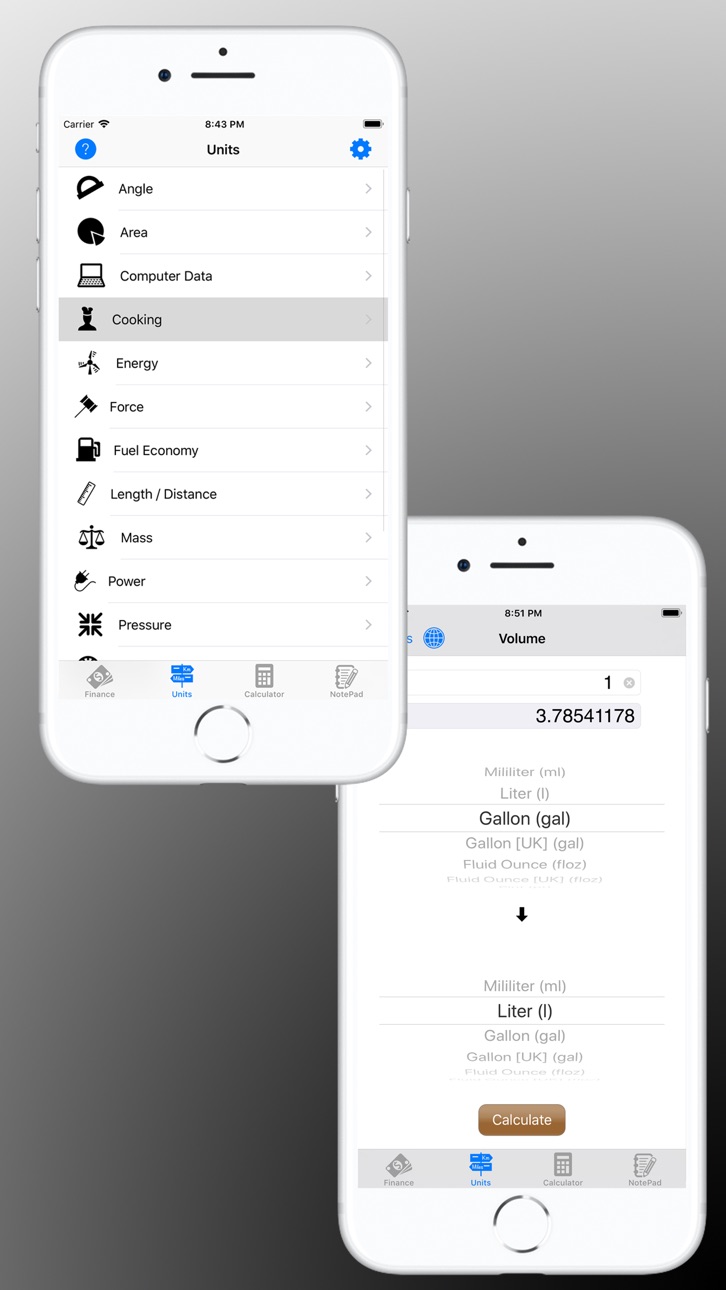
*Unit Conversions: Traveling or dealing with different measurement systems? Effortlessly convert between various units across categories.
*Advanced Calculator: Perform basic, scientific, or RPN calculations:
-Clean, intuitive interface with multiple themes
-Access to universal constants
-RPN mode with stack editing (delete/reorder/swap)
-Calculation history and check features
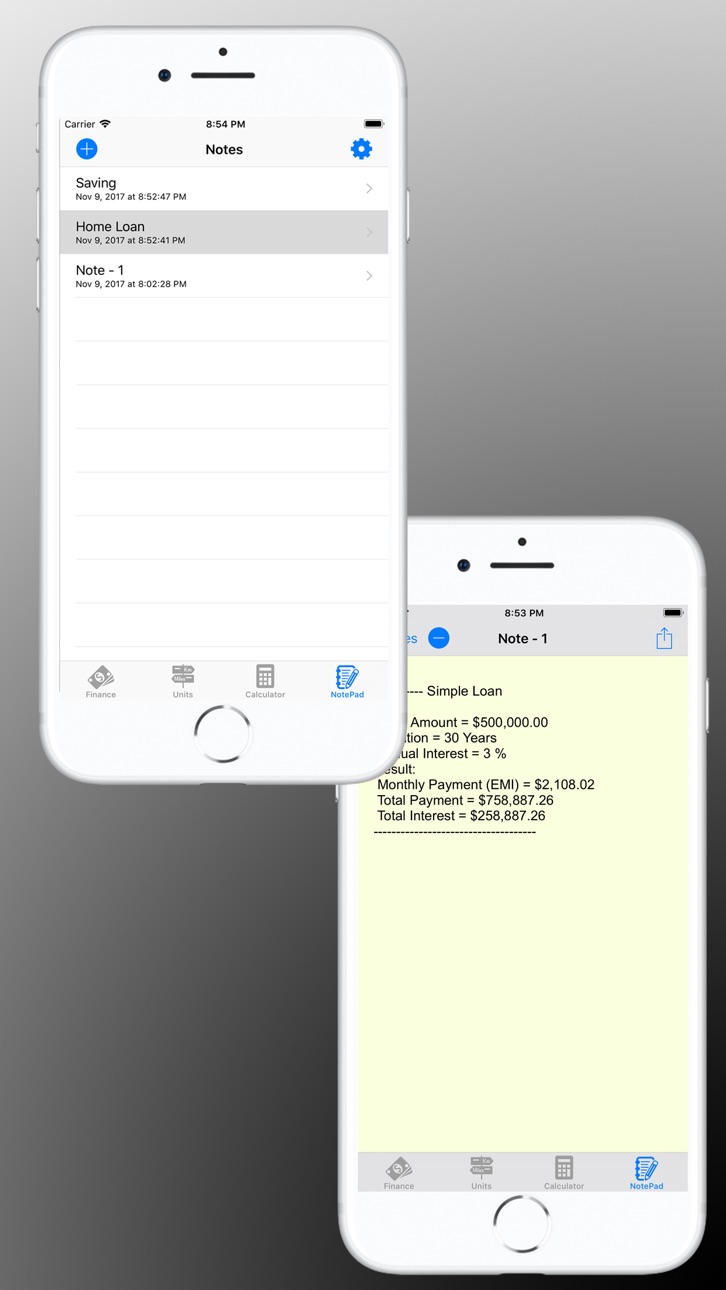
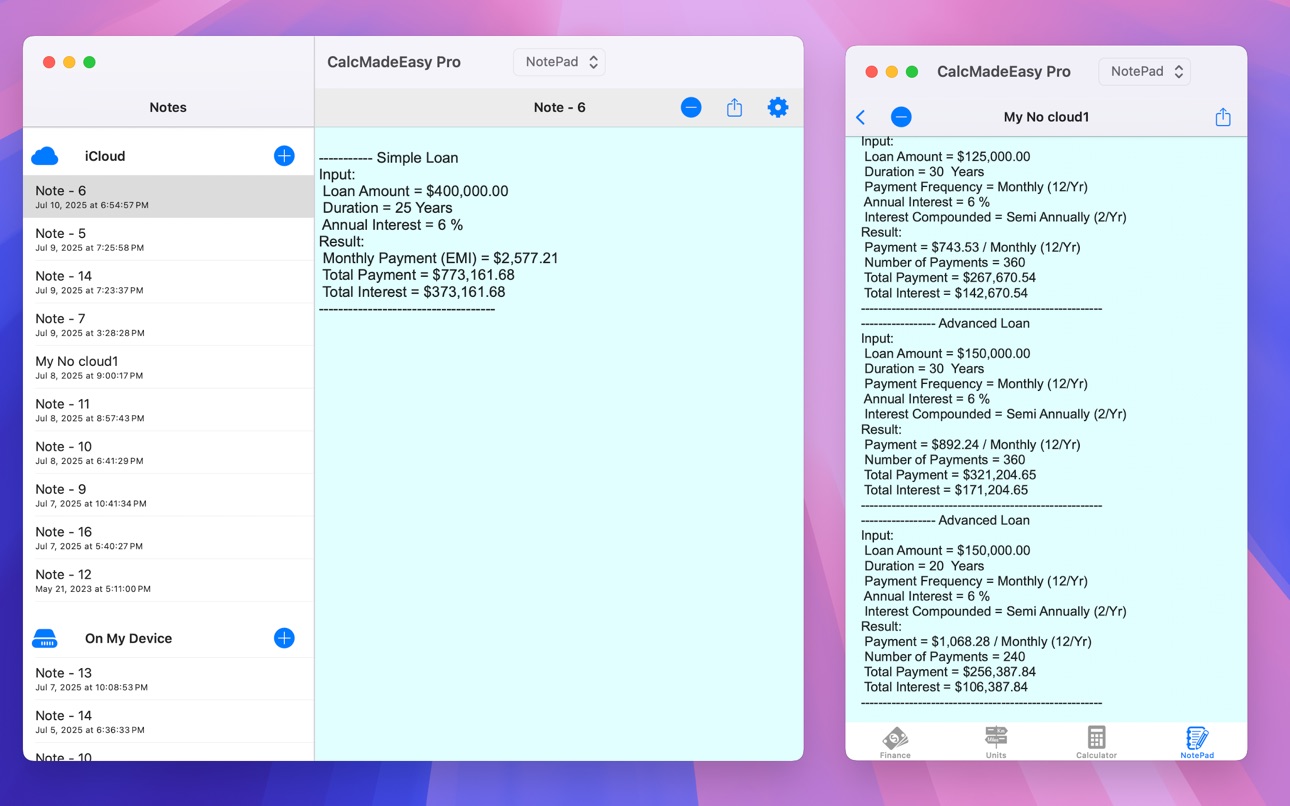
*Auto Note-Taking: Never lose track of important calculations!
-Automatically records inputs and results
-Easily share notes for financial decisions
-Can be turned off in settings if preferred
It’s like having 4 apps in 1 – all at a great value! Start using CalcMadeEasy and simplify your calculations, conversions, and financial planning — all in one place.
Accessibility
ipadiphonemacrealityDevicetvoswatch
Version history 25 versions
Build 876656824v11.22025-07-24 16:01:55
Bug fixes and performance optimization.
Build 876539322v11.12025-07-21 00:22:04
User reported bug fixes and improvements,
Build 876139042v11.02025-07-14 19:02:55
*Bug fixes and performance improvements.
Build 845635503v10.5.22021-12-01 00:33:46
*Bug fixes and improvements.
Build 845358376v10.5.12021-11-16 00:02:25
*Bug fixes and improvements.
Build 845325786v10.52021-11-14 10:01:59
*Bug fixes and improvements.
Build 840858060v10.42021-03-12 16:26:44
*Bug fixes and other improvements.
Build 840566785v10.32021-02-21 14:36:20
*Bug fixes and other improvements.
Build 840560795v10.22021-02-20 11:34:12
*Bug fixes and other improvements.
Build 840279972v10.12021-01-31 18:07:54
*Units: Added Stone conversion to Mass.
*Bug fixes and other improvements.
In version 10.0:
*Added Support for iCloud Drive.
*Optimization for iPadOS/iOS 14.
Build 838267180v10.02020-12-06 22:28:27
*Added Support for iCloud Drive.
*Optimization for iPadOS/iOS 14.
*Bug fixes and other improvements.
Build 835483854v9.42020-04-10 19:53:17
*Notepad: Fixed issue - Add new Note not working for some users on iPad.
*Universal constants: fixed Moon mean radius.
*Bug fixes and other improvements.
Build 833503207v9.32019-11-07 02:32:45
* Bug fixes and other improvements.
In version 9.0:
* Optimization for iOS/iPadOS 13.
* Dark Mode support.
Build 833462061v9.22019-11-05 03:35:07
* Bug fixes and other improvements.
In version 9.0:
* Optimization for iOS/iPadOS 13.
* Dark Mode support.
Build 833241093v9.12019-10-19 12:05:44
* Bug fixes and other improvements.
In version 9.0:
* Optimization for iOS/iPadOS 13.
* Dark Mode support.
Build 833150200v9.02019-10-17 12:17:48
* Optimization for iPadOS 13.
* Dark Mode support.
* Bug fixes and other improvements.
Build 829024147v8.12018-10-23 20:56:24
*Optimization and support for iOS 12.
*Bug fixes and other improvements.
Build 828942068v8.02018-10-21 21:01:51
Optimization and support for iOS 12
Build 826238687v7.2.12018-03-09 03:19:07
*Bug fixes and other improvements.
Build 826224506v7.22018-03-08 14:12:56
*Bug fixes and other improvements.
Build 824354478v7.1.12017-11-10 22:18:39
*Bug fixes and other improvements.
In version: 7.1
*Calculator now supports Basic layout. Go to 'Settings' to change Layout.
*Optimization and support for iOS 11
*Drag N Drop support (devices running iOS11 and later):
-Drop number on Calculator display from external App or within CalcMadeEasy.
-Drag number from Calculator display to copy it to external App or internally.
-Drop text on Notepad Notes table to create new Note.
-Drag and Drop made easy within App, just Drag number/text to bottom Tabbar and hold there to open that tab.
-Drag and Drop also supported on all Text-Fields in Finance and Units tabs.
*Added 'Acre Foot' to Volume in Units.
Build 824197218v7.12017-11-06 19:04:35
*Calculator now supports Basic layout. Go to 'Settings' to change Layout.
*Bug fixes and other improvements.
In version: 7.0
*Optimization and support for iOS 11
*Drag N Drop support (devices running iOS11 and later):
-Drop number on Calculator display from external App or within CalcMadeEasy.
-Drag number from Calculator display to copy it to external App or internally.
-Drop text on Notepad Notes table to create new Note.
-Drag and Drop made easy within App, just Drag number/text to bottom Tabbar and hold there to open that tab.
-Drag and Drop also supported on all Text-Fields in Finance and Units tabs.
*Added 'Acre Foot' to Volume in Units.
Build 824019728v7.02017-10-16 19:07:20
*Optimization for iOS 11
*Drag N Drop support (device running iOS11 or later):
-Drop number on Calculator display from external App or within CalcMadeEasy.
-Drag number from Calculator display to copy it to external App or internally.
-Drop text on Notepad Notes table to create new Note.
-Drag and Drop made easy within App, just Drag number/text to bottom Tabbar and hold there to open that tab.
-Drag and Drop also supported on all Text-Fields in Finance and Units tabs.
*Added 'Acre Foot' to Volume in Units.
Build 821021182v6.72017-02-21 00:16:28
Bug Fixes
Build 818854453v6.62016-09-11 20:50:51
Optimization and support for iOS 10
Price history by region
Currency
Show
Columns
Search
Availability 175 of 175 storefronts
| Region | Language | Price | Ratings | Avg | Version |
|---|---|---|---|---|---|
| US | en-US | USD 1.99 | 81 | 4.5 | 11.2 |
| AU | en-AU | AUD 2.99 | 20 | 4.7 | 11.2 |
| CA | en-CA | CAD 2.99 | 15 | 4.5 | 11.2 |
| GB | en-GB | GBP 1.99 | 13 | 4.6 | 11.2 |
| DE | de-DE | EUR 1.99 | 6 | 5.0 | 11.2 |
| IN | en-GB | INR 199 | 4 | 5.0 | 11.2 |
| NL | nl | EUR 1.99 | 4 | 3.8 | 11.2 |
| NZ | en-AU | NZD 3.99 | 4 | 4.8 | 11.2 |
| GR | en-GB | EUR 1.99 | 3 | 4.7 | 11.2 |
| MX | es-MX | MXN 39 | 3 | 5.0 | 11.2 |
| RU | ru | RUB 199 | 3 | 3.3 | 11.2 |
| CH | de-CH | CHF 2 | 2 | 4.5 | 11.2 |
| DK | en-GB | DKK 19 | 2 | 5.0 | 11.2 |
| IE | en-GB | EUR 1.99 | 2 | 4.0 | 11.2 |
| PH | en-GB | PHP 129 | 2 | 4.0 | 11.2 |
| SG | en-GB | SGD 2.98 | 2 | 5.0 | 11.2 |
| TH | en-GB | THB 79 | 2 | 4.5 | 11.2 |
| TR | en-GB | TRY 99.99 | 2 | 5.0 | 11.2 |
| ZA | en-GB | ZAR 39.99 | 2 | 5.0 | 11.2 |
| AE | en-GB | AED 7.99 | 1 | 5.0 | 11.2 |
| AT | de-DE | EUR 1.99 | 1 | 5.0 | 11.2 |
| BR | pt-BR | BRL 12.9 | 1 | 5.0 | 11.2 |
| BW | en-GB | USD 1.99 | 1 | 5.0 | 11.2 |
| CO | es-MX | COP 9900 | 1 | 5.0 | 11.2 |
| ES | es-ES | EUR 1.99 | 1 | 5.0 | 11.2 |
| FR | fr-FR | EUR 1.99 | 1 | 5.0 | 11.2 |
| HK | zh-Hant-HK | HKD 18 | 1 | 5.0 | 11.2 |
| ID | en-GB | IDR 29000 | 1 | 4.0 | 11.2 |
| IL | en-GB | ILS 7.9 | 1 | 5.0 | 11.2 |
| IT | it | EUR 1.99 | 1 | 5.0 | 11.2 |
| JP | ja | JPY 300 | 1 | 1.0 | 11.2 |
| KH | en-GB | USD 1.99 | 1 | 5.0 | 11.2 |
| MY | en-GB | MYR 9.9 | 1 | 4.0 | 11.2 |
| NO | en-GB | NOK 29 | 1 | 5.0 | 11.2 |
| PA | es-MX | USD 1.99 | 1 | 5.0 | 11.2 |
| PL | en-GB | PLN 9.99 | 1 | 1.0 | 11.2 |
| QA | en-GB | QAR 7.99 | 1 | 5.0 | 11.2 |
| SA | en-GB | SAR 9.99 | 1 | 4.0 | 11.2 |
| SE | sv | SEK 29 | 1 | 3.0 | 11.2 |
| SN | en-GB | USD 1.99 | 1 | 5.0 | 11.2 |
| TZ | en-GB | TZS 5900 | 1 | 4.0 | 11.2 |
| AF | en-GB | USD 1.99 | 0 | — | 11.2 |
| AG | en-GB | USD 1.99 | 0 | — | 11.2 |
| AI | en-GB | USD 1.99 | 0 | — | 11.2 |
| AL | en-GB | USD 1.99 | 0 | — | 11.2 |
| AM | en-GB | USD 1.99 | 0 | — | 11.2 |
| AO | en-GB | USD 1.99 | 0 | — | 11.2 |
| AR | es-MX | USD 1.99 | 0 | — | 11.2 |
| AZ | en-GB | USD 1.99 | 0 | — | 11.2 |
| BA | en-GB | EUR 1.99 | 0 | — | 11.2 |
| BB | en-GB | USD 1.99 | 0 | — | 11.2 |
| BE | en-GB | EUR 1.99 | 0 | — | 11.2 |
| BF | en-GB | USD 1.99 | 0 | — | 11.2 |
| BG | en-GB | EUR 1.99 | 0 | — | 11.2 |
| BH | en-GB | USD 1.99 | 0 | — | 11.2 |
| BJ | en-GB | USD 1.99 | 0 | — | 11.2 |
| BM | en-GB | USD 1.99 | 0 | — | 11.2 |
| BN | en-GB | USD 1.99 | 0 | — | 11.2 |
| BO | es-MX | USD 1.99 | 0 | — | 11.2 |
| BS | en-GB | USD 1.99 | 0 | — | 11.2 |
| BT | en-GB | USD 1.99 | 0 | — | 11.2 |
| BY | en-GB | USD 1.99 | 0 | — | 11.2 |
| BZ | en-GB | USD 1.99 | 0 | — | 11.2 |
| CD | en-GB | USD 1.99 | 0 | — | 11.2 |
| CG | en-GB | USD 1.99 | 0 | — | 11.2 |
| CI | fr-FR | USD 1.99 | 0 | — | 11.2 |
| CL | es-MX | CLP 1990 | 0 | — | 11.2 |
| CM | fr-FR | USD 1.99 | 0 | — | 11.2 |
| CN | zh-Hans-CN | CNY 15 | 0 | — | 11.2 |
| CR | es-MX | USD 1.99 | 0 | — | 11.2 |
| CV | en-GB | USD 1.99 | 0 | — | 11.2 |
| CY | en-GB | EUR 1.99 | 0 | — | 11.2 |
| CZ | en-GB | CZK 49 | 0 | — | 11.2 |
| DM | en-GB | USD 1.99 | 0 | — | 11.2 |
| DO | es-MX | USD 1.99 | 0 | — | 11.2 |
| DZ | en-GB | USD 1.99 | 0 | — | 11.2 |
| EC | es-MX | USD 1.99 | 0 | — | 11.2 |
| EE | en-GB | EUR 1.99 | 0 | — | 11.2 |
| EG | en-GB | EGP 99.99 | 0 | — | 11.2 |
| FI | en-GB | EUR 1.99 | 0 | — | 11.2 |
| FJ | en-GB | USD 1.99 | 0 | — | 11.2 |
| FM | en-GB | USD 1.99 | 0 | — | 11.2 |
| GA | fr-FR | USD 1.99 | 0 | — | 11.2 |
| GD | en-GB | USD 1.99 | 0 | — | 11.2 |
| GE | en-GB | USD 1.99 | 0 | — | 11.2 |
| GH | en-GB | USD 1.99 | 0 | — | 11.2 |
| GM | en-GB | USD 1.99 | 0 | — | 11.2 |
| GT | es-MX | USD 1.99 | 0 | — | 11.2 |
| GW | en-GB | USD 1.99 | 0 | — | 11.2 |
| GY | en-GB | USD 1.99 | 0 | — | 11.2 |
| HN | es-MX | USD 1.99 | 0 | — | 11.2 |
| HR | en-GB | EUR 1.99 | 0 | — | 11.2 |
| HU | en-GB | HUF 999 | 0 | — | 11.2 |
| IQ | en-GB | USD 1.99 | 0 | — | 11.2 |
| IS | en-GB | USD 1.99 | 0 | — | 11.2 |
| JM | en-GB | USD 1.99 | 0 | — | 11.2 |
| JO | en-GB | USD 1.99 | 0 | — | 11.2 |
| KE | en-GB | USD 1.99 | 0 | — | 11.2 |
| KG | en-GB | USD 1.99 | 0 | — | 11.2 |
| KN | en-GB | USD 1.99 | 0 | — | 11.2 |
| KR | ko | KRW 3300 | 0 | — | 11.2 |
| KW | en-GB | USD 1.99 | 0 | — | 11.2 |
| KY | en-GB | USD 1.99 | 0 | — | 11.2 |
| KZ | en-GB | KZT 999 | 0 | — | 11.2 |
| LA | en-GB | USD 1.99 | 0 | — | 11.2 |
| LB | en-GB | USD 1.99 | 0 | — | 11.2 |
| LC | en-GB | USD 1.99 | 0 | — | 11.2 |
| LK | en-GB | USD 1.99 | 0 | — | 11.2 |
| LR | en-GB | USD 1.99 | 0 | — | 11.2 |
| LT | en-GB | EUR 1.99 | 0 | — | 11.2 |
| LU | en-GB | EUR 1.99 | 0 | — | 11.2 |
| LV | en-GB | EUR 1.99 | 0 | — | 11.2 |
| LY | en-GB | USD 1.99 | 0 | — | 11.2 |
| MA | en-GB | USD 1.99 | 0 | — | 11.2 |
| MD | en-GB | USD 1.99 | 0 | — | 11.2 |
| ME | en-GB | EUR 1.99 | 0 | — | 11.2 |
| MG | en-GB | USD 1.99 | 0 | — | 11.2 |
| MK | en-GB | USD 1.99 | 0 | — | 11.2 |
| ML | en-GB | USD 1.99 | 0 | — | 11.2 |
| MM | en-GB | USD 1.99 | 0 | — | 11.2 |
| MN | en-GB | USD 1.99 | 0 | — | 11.2 |
| MO | zh-Hant-HK | USD 1.99 | 0 | — | 11.2 |
| MR | en-GB | USD 1.99 | 0 | — | 11.2 |
| MS | en-GB | USD 1.99 | 0 | — | 11.2 |
| MT | en-GB | EUR 1.99 | 0 | — | 11.2 |
| MU | en-GB | USD 1.99 | 0 | — | 11.2 |
| MV | en-GB | USD 1.99 | 0 | — | 11.2 |
| MW | en-GB | USD 1.99 | 0 | — | 11.2 |
| MZ | en-GB | USD 1.99 | 0 | — | 11.2 |
| NA | en-GB | USD 1.99 | 0 | — | 11.2 |
| NE | en-GB | USD 1.99 | 0 | — | 11.2 |
| NG | en-GB | NGN 3200 | 0 | — | 11.2 |
| NI | es-MX | USD 1.99 | 0 | — | 11.2 |
| NP | en-GB | USD 1.99 | 0 | — | 11.2 |
| NR | en-GB | USD 1.99 | 0 | — | 11.2 |
| OM | en-GB | USD 1.99 | 0 | — | 11.2 |
| PE | es-MX | PEN 9.9 | 0 | — | 11.2 |
| PG | en-GB | USD 1.99 | 0 | — | 11.2 |
| PK | en-GB | PKR 500 | 0 | — | 11.2 |
| PT | pt-PT | EUR 1.99 | 0 | — | 11.2 |
| PW | en-GB | USD 1.99 | 0 | — | 11.2 |
| PY | es-MX | USD 1.99 | 0 | — | 11.2 |
| RO | en-GB | RON 9.99 | 0 | — | 11.2 |
| RS | en-GB | EUR 1.99 | 0 | — | 11.2 |
| RW | en-GB | USD 1.99 | 0 | — | 11.2 |
| SB | en-GB | USD 1.99 | 0 | — | 11.2 |
| SC | en-GB | USD 1.99 | 0 | — | 11.2 |
| SI | en-GB | EUR 1.99 | 0 | — | 11.2 |
| SK | en-GB | EUR 1.99 | 0 | — | 11.2 |
| SL | en-GB | USD 1.99 | 0 | — | 11.2 |
| SR | en-GB | USD 1.99 | 0 | — | 11.2 |
| ST | en-GB | USD 1.99 | 0 | — | 11.2 |
| SV | es-MX | USD 1.99 | 0 | — | 11.2 |
| SZ | en-GB | USD 1.99 | 0 | — | 11.2 |
| TC | en-GB | USD 1.99 | 0 | — | 11.2 |
| TD | en-GB | USD 1.99 | 0 | — | 11.2 |
| TJ | en-GB | USD 1.99 | 0 | — | 11.2 |
| TM | en-GB | USD 1.99 | 0 | — | 11.2 |
| TN | en-GB | USD 1.99 | 0 | — | 11.2 |
| TO | en-GB | USD 1.99 | 0 | — | 11.2 |
| TT | en-GB | USD 1.99 | 0 | — | 11.2 |
| TW | zh-Hant-TW | TWD 60 | 0 | — | 11.2 |
| UA | en-GB | USD 1.99 | 0 | — | 11.2 |
| UG | en-GB | USD 1.99 | 0 | — | 11.2 |
| UY | en-GB | USD 1.99 | 0 | — | 11.2 |
| UZ | en-GB | USD 1.99 | 0 | — | 11.2 |
| VC | en-GB | USD 1.99 | 0 | — | 11.2 |
| VE | es-MX | USD 1.99 | 0 | — | 11.2 |
| VG | en-GB | USD 1.99 | 0 | — | 11.2 |
| VN | en-GB | VND 59000 | 0 | — | 11.2 |
| VU | en-GB | USD 1.99 | 0 | — | 11.2 |
| XK | en-GB | EUR 1.99 | 0 | — | 11.2 |
| YE | en-GB | USD 1.99 | 0 | — | 11.2 |
| ZM | en-GB | USD 1.99 | 0 | — | 11.2 |
| ZW | en-GB | USD 1.99 | 0 | — | 11.2 |
Reviews 20 reviews · CA
★★★★★
Units conversion not working
I’ve been using this app for several years and for some reason the unit conversion function quit working. ☹️
HPM9192023-07-02
★★★★★
Amazing
I have been using this app for many years. It has everything I need. I especially like the no tracking feature. Thank you.
Robert
smokylol2023-02-16
★★★★★
Super application
Seul application qui aide à votre budget facile et foable
debast232021-12-08
★★★★★
Just Perfect
10/10... my go to app for conversions and calculations, bar none
Rodders78152019-12-31
★★★★★
Great app!
I am an engineer in the oil and gas business and I use this app a lot in the field on my phone! Works great!
Black Gold Guy2015-05-05
★★★★★
Great app
Does exactly what I want and then some....what more could you ask for
Builds them better!!2012-03-12
★★★★★
Excellent Calculator, just one are for improvement
This is a beautiful calculator, well thought out with some outstanding features one does not expect in a calculator. There are only 3 things I would like to see added. 1) I would like to see a more comprehensive conversion module. Some very basic albeit old measurements are lacking such as "Rods, Leagues" in length just to name two. 2) I would love to not only have a list of every step in a run of calculations, I would like to be able to edit any step and have it automatically recalculate the entire set. 3) Lastly I would like to be able to enter fractions as is without having to convert them
FuzzeeDee2011-06-03
★★★★★
Missing some pretty obvious conversions
Not a bad calculator...but is missing volume conversions such as cubic meters to cubic feet...which was my reason for buying the full version. Decent app but room for improvement.
Vangruvie2011-03-03
★★★★★
CEO
I cannot convert the area calculator from square meters to square feet and get the correct answer. It works in reverse sq ft to sq m . I like all the features but this one area is not accurate.
JoBarJon2011-01-25
★★★★★
Good calculator
I like the calculator with its built-in function to issue a note with the functions and numbers typed in. In this way it is easy to review and verify the calculation done. The calculator can be used in both modes (vertical and landscape) with lots of buttons big enough to find the right ones with my stubby fingers.
I have not checked its mathematical engine yet but I trust that this will be working.
Definitively to recommend.
why only 4 stars. For me 4 stars is already very good. I do not have much experience with this app so I might give it one more later.
Ueli
----------
Ueli Schrader2010-12-28
Change log 29 changes · CA
✎
releaseNotes updated
Bug fixes and performance optimization.
✎
description updated
CalcMadeEasy combines powerful financial tools, a feature-rich calculator, unit converter, and smart auto note-taking — all in one easy-to-use app. Whether you'
✎
subtitle updated
Units & Finance Calculator
✎
name updated
CalcMadeEasy Pro
◆
Version 11.2 released
Bug fixes and performance optimization.
◆
Version 11.1 released
User reported bug fixes and improvements,
◆
Version 11.0 released
*Bug fixes and performance improvements.
◆
Version 10.5.2 released
*Bug fixes and improvements.
◆
Version 10.5.1 released
*Bug fixes and improvements.
◆
Version 10.5 released
*Bug fixes and improvements.
◆
Version 10.4 released
*Bug fixes and other improvements.
◆
Version 10.3 released
*Bug fixes and other improvements.
◆
Version 10.2 released
*Bug fixes and other improvements.
◆
Version 10.1 released
*Units: Added Stone conversion to Mass.
*Bug fixes and other improvements.
In version 10.0:
*Added Support for iCloud Drive.
*Optimization for iPadOS/iOS 14.
◆
Version 10.0 released
*Added Support for iCloud Drive.
*Optimization for iPadOS/iOS 14.
*Bug fixes and other improvements.
◆
Version 9.4 released
*Notepad: Fixed issue - Add new Note not working for some users on iPad.
*Universal constants: fixed Moon mean radius.
*Bug fixes and other improvements.
◆
Version 9.3 released
* Bug fixes and other improvements.
In version 9.0:
* Optimization for iOS/iPadOS 13.
* Dark Mode support.
◆
Version 9.2 released
* Bug fixes and other improvements.
In version 9.0:
* Optimization for iOS/iPadOS 13.
* Dark Mode support.
◆
Version 9.1 released
* Bug fixes and other improvements.
In version 9.0:
* Optimization for iOS/iPadOS 13.
* Dark Mode support.
◆
Version 9.0 released
* Optimization for iPadOS 13.
* Dark Mode support.
* Bug fixes and other improvements.
◆
Version 8.1 released
*Optimization and support for iOS 12.
*Bug fixes and other improvements.
◆
Version 8.0 released
Optimization and support for iOS 12
◆
Version 7.2.1 released
*Bug fixes and other improvements.
◆
Version 7.2 released
*Bug fixes and other improvements.
◆
Version 7.1.1 released
*Bug fixes and other improvements.
In version: 7.1
*Calculator now supports Basic layout. Go to 'Settings' to change Layout.
*Optimization and support for iOS 11
*Drag N Drop support (devices running iOS11 and later):
-Drop number on Calcul
◆
Version 7.1 released
*Calculator now supports Basic layout. Go to 'Settings' to change Layout.
*Bug fixes and other improvements.
In version: 7.0
*Optimization and support for iOS 11
*Drag N Drop support (devices running iOS11 and later):
-Drop number on Calcul
◆
Version 7.0 released
*Optimization for iOS 11
*Drag N Drop support (device running iOS11 or later):
-Drop number on Calculator display from external App or within CalcMadeEasy.
-Drag number from Calculator display to copy it to external App or internally.
◆
Version 6.7 released
Bug Fixes
◆
Version 6.6 released
Optimization and support for iOS 10