Home › Utilities

 PA
PA
 USen-US
 BRpt-BR
 AIen-GB
 KEen-GB
 KNen-GB
 PEes-MX
 VEes-MX
 AGen-GB
 AOen-GB
 ARes-MX
 BBen-GB
 BFen-GB
 BJen-GB
 BOes-MX
 BSen-GB
 BWen-GB
 BZen-GB
 CDen-GB
 CGen-GB
 CIfr-FR
 CLes-MX
 CMfr-FR
 COes-MX
 CRes-MX
 CVen-GB
 DMen-GB
 DOes-MX
 DZen-GB
 ECes-MX
 GAfr-FR
 GDen-GB
 GHen-GB
 GMen-GB
 GTes-MX
 GWen-GB
 GYen-GB
 HNes-MX
 JMen-GB
 KYen-GB
 LCen-GB
 LRen-GB
 LYen-GB
 MAen-GB
 MGen-GB
 MLen-GB
 MSen-GB
 MUen-GB
 MWen-GB
 MXes-MX
 MZen-GB
 NAen-GB
 NEen-GB
 NGen-GB
 NIes-MXPAes-MX
 PYes-MX
 RWen-GB
 SCen-GB
 SLen-GB
 SNen-GB
 SRen-GB
 STen-GB
 SVes-MX
 SZen-GB
 TCen-GB
 TDen-GB
 TNen-GB
 TTen-GB
 TZen-GB
 UGen-GB
 UYen-GB
 VCen-GB
 VGen-GB
 ZMen-GB
 ZWen-GB
75 of 75 storefronts
Content in en-US
Content in en-US
Information
Preview 2 platforms
iPhone 5 images




iPad 5 images


What’s New Version 5.1.1
- Fixed an issue where characters without a system font glyph are hidden in keyboard collections.
Description
CharMap allows to you discover, organize, and use unicode characters.
FEATURES
• Browse a collection of curated character categories, and organize your favourite characters into custom collections.
• View character details and copy characters to the clipboard.
• Enable the CharMap keyboard to insert characters wherever custom keyboards are supported.
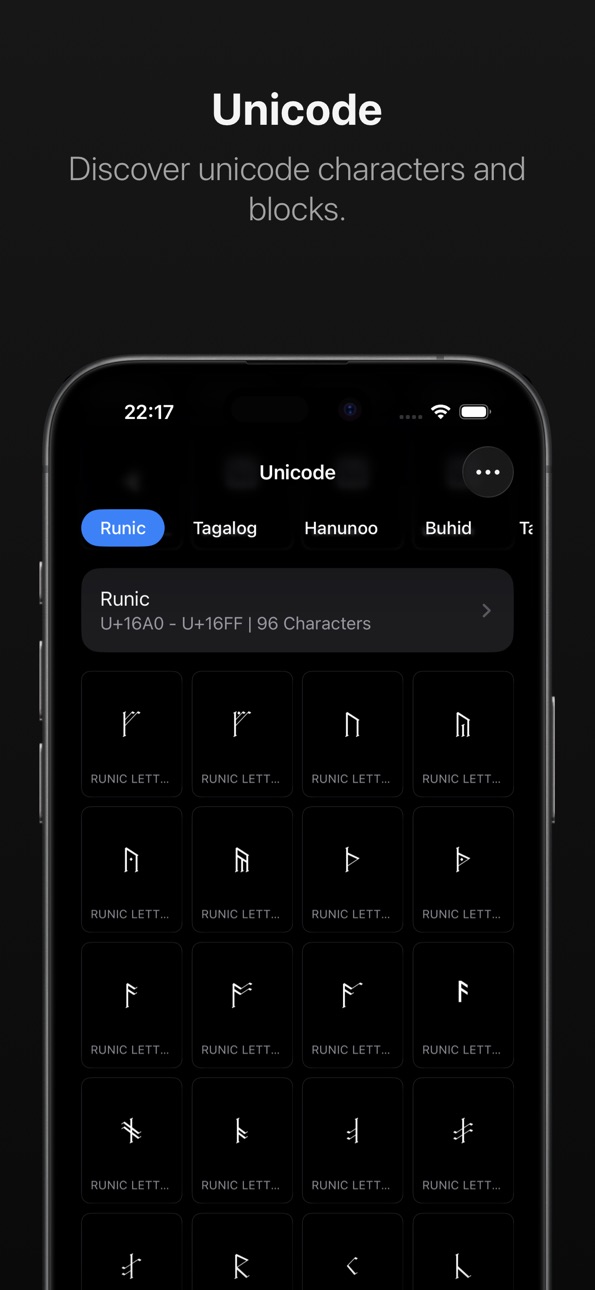
• Discover unicode characters and blocks using a dedicated unicode browser.
• Automatically sync your collections between devices.
• Quickly access your custom collections using the collection widget.
• Browse and preview system fonts.
• No ads, trackers, or analytics. Your data is stored on-device, and optionally synced across your private iCloud account.
Accessibility
ipadiphonemacrealityDevicetvoswatch
Version history 15 versions
Build 887612073v5.1.12026-06-30 19:19:23
- Fixed an issue where characters without a system font glyph are hidden in keyboard collections.
Build 887310520v5.12026-06-23 16:21:20
- Added recent and frequently-used characters to the "Browse" screen and keyboard.
- Added "Geometrical Shapes" category.
- Added "Musical Symbols" category.
- Collections are now reorderable.
- You can now hide categories.
- The iPad sidebar has been updated to support customization and a collapsible tab bar.
- Added full-text search.
- Updated the keyboard to Unicode 17.0.
- Improved keyboard layout.
- Miscellaneous UI tweaks.
Build 883721921v5.02026-03-25 00:24:01
- Redesigned to support Liquid Glass.
- Updated app icon.
- Unicode 17.0 is now supported.
- Redesigned widgets.
- Improved search UI.
- Added search history.
Build 873637731v4.22025-03-30 16:17:13
- Added the collections widget.
- Characters now display typographic lines including the baseline, ascender height and descender height.
- You can now search within categories and collections.
- Improved performance and stability.
Build 869027560v4.12024-09-15 22:15:27
- Added two new categories: "Digits" and "Technical Symbols".
- You can now choose a custom icon when creating collections.
- Added dark and tinted icon variants.
- You can now search for characters by value or by codepoint.
- Added "cozy grid" and "list" layout modes to the collection and category screens.
- Added the ability to change the font used to display characters.
- Updated for iOS 18.
- Updated to Unicode 16.0.0.
- Miscellaneous bug fixes.
Build 866226991v4.0.32024-05-26 16:24:40
- Improved reliability when importing collections from previous versions.
- Added new tips.
Build 865672841v4.0.22024-05-04 00:22:31
- You can now drag characters in collections to reorder them.
Build 865546987v4.0.12024-04-28 23:17:39
- Prevented a recurring crash at launch.
- Improved reliability when importing collections from version 3.0.
Build 864880432v4.02024-04-17 22:33:15
CharMap has been redesigned from the ground up with a fresh new look, simplified UI, and support for iPad.
- Rebuilt UI.
- Added iPad support.
- Updated for iOS 17.
- Added dark mode.
- Added dynamic type support.
- The new unified keyboard is faster and easier to use.
- Added iCloud sync.
- Added a curated collection of character categories.
- Added Spotlight integration.
Build 830994169v3.12019-04-17 17:25:47
CharMap now includes the Collections Keyboard, allowing you to access your collections wherever custom keyboards are supported.
Not only that, but it's also got a fresh new look and a bunch of bug fixes!
Build 829005188v3.02018-10-21 21:32:59
• Updated UI.
• You can now search and sort sections.
• Added 3D Touch support.
• Updated icon.
• Significantly improved performance.
• Miscellaneous bug fixes.
Build 823786141v2.02017-09-26 16:05:42
CharMap 2.0 has been redesigned from the ground up for iOS 11 and now includes a character keyboard, giving you access to unicode characters wherever custom keyboards are supported.
Build 3489574v1.22011-03-14 00:32:58
- Added a dedicated font viewer
- Allows you to enable and disable Emoji
- You can now filter sections using a search bar
- Overhauled settings tab
- Updated icons
Build 3292894v1.12011-01-07 17:41:31
- Multitasking enabled.
- High-resolution graphics for Retina display.
- Performance improvements.
- Fixed a persistent crash when changing fonts on iOS 4.
- Miscellaneous bug fixes.
Build 2590771v1.02010-05-04 03:32:35
No pricing data captured yet — comparisons appear once the app has paid storefronts or in-app purchases.
Availability 75 of 75 storefronts
| Region | Language | Price | Ratings | Avg | Version |
|---|---|---|---|---|---|
| US | en-US | Free | 53 | 4.0 | 5.1.1 |
| BR | pt-BR | Free | 3 | 5.0 | 5.1.1 |
| AI | en-GB | Free | 1 | 5.0 | 5.1.1 |
| KE | en-GB | Free | 1 | 5.0 | 5.1.1 |
| KN | en-GB | Free | 1 | 5.0 | 5.1.1 |
| PE | es-MX | Free | 1 | 5.0 | 5.1.1 |
| VE | es-MX | Free | 1 | 5.0 | 5.1.1 |
| AG | en-GB | Free | 0 | — | 5.1.1 |
| AO | en-GB | Free | 0 | — | 5.1.1 |
| AR | es-MX | Free | 0 | — | 5.1.1 |
| BB | en-GB | Free | 0 | — | 5.1.1 |
| BF | en-GB | Free | 0 | — | 5.1.1 |
| BJ | en-GB | Free | 0 | — | 5.1.1 |
| BO | es-MX | Free | 0 | — | 5.1.1 |
| BS | en-GB | Free | 0 | — | 5.1.1 |
| BW | en-GB | Free | 0 | — | 5.1.1 |
| BZ | en-GB | Free | 0 | — | 5.1.1 |
| CD | en-GB | Free | 0 | — | 5.1.1 |
| CG | en-GB | Free | 0 | — | 5.1.1 |
| CI | fr-FR | Free | 0 | — | 5.1.1 |
| CL | es-MX | Free | 0 | — | 5.1.1 |
| CM | fr-FR | Free | 0 | — | 5.1.1 |
| CO | es-MX | Free | 0 | — | 5.1.1 |
| CR | es-MX | Free | 0 | — | 5.1.1 |
| CV | en-GB | Free | 0 | — | 5.1.1 |
| DM | en-GB | Free | 0 | — | 5.1.1 |
| DO | es-MX | Free | 0 | — | 5.1.1 |
| DZ | en-GB | Free | 0 | — | 5.1.1 |
| EC | es-MX | Free | 0 | — | 5.1.1 |
| GA | fr-FR | Free | 0 | — | 5.1.1 |
| GD | en-GB | Free | 0 | — | 5.1.1 |
| GH | en-GB | Free | 0 | — | 5.1.1 |
| GM | en-GB | Free | 0 | — | 5.1.1 |
| GT | es-MX | Free | 0 | — | 5.1.1 |
| GW | en-GB | Free | 0 | — | 5.1.1 |
| GY | en-GB | Free | 0 | — | 5.1.1 |
| HN | es-MX | Free | 0 | — | 5.1.1 |
| JM | en-GB | Free | 0 | — | 5.1.1 |
| KY | en-GB | Free | 0 | — | 5.1.1 |
| LC | en-GB | Free | 0 | — | 5.1.1 |
| LR | en-GB | Free | 0 | — | 5.1.1 |
| LY | en-GB | Free | 0 | — | 5.1.1 |
| MA | en-GB | Free | 0 | — | 5.1.1 |
| MG | en-GB | Free | 0 | — | 5.1.1 |
| ML | en-GB | Free | 0 | — | 5.1.1 |
| MS | en-GB | Free | 0 | — | 5.1.1 |
| MU | en-GB | Free | 0 | — | 5.1.1 |
| MW | en-GB | Free | 0 | — | 5.1.1 |
| MX | es-MX | Free | 0 | — | 5.1.1 |
| MZ | en-GB | Free | 0 | — | 5.1.1 |
| NA | en-GB | Free | 0 | — | 5.1.1 |
| NE | en-GB | Free | 0 | — | 5.1.1 |
| NG | en-GB | Free | 0 | — | 5.1.1 |
| NI | es-MX | Free | 0 | — | 5.1.1 |
| PA | es-MX | Free | 0 | — | 5.1.1 |
| PY | es-MX | Free | 0 | — | 5.1.1 |
| RW | en-GB | Free | 0 | — | 5.1.1 |
| SC | en-GB | Free | 0 | — | 5.1.1 |
| SL | en-GB | Free | 0 | — | 5.1.1 |
| SN | en-GB | Free | 0 | — | 5.1.1 |
| SR | en-GB | Free | 0 | — | 5.1.1 |
| ST | en-GB | Free | 0 | — | 5.1.1 |
| SV | es-MX | Free | 0 | — | 5.1.1 |
| SZ | en-GB | Free | 0 | — | 5.1.1 |
| TC | en-GB | Free | 0 | — | 5.1.1 |
| TD | en-GB | Free | 0 | — | 5.1.1 |
| TN | en-GB | Free | 0 | — | 5.1.1 |
| TT | en-GB | Free | 0 | — | 5.1.1 |
| TZ | en-GB | Free | 0 | — | 5.1.1 |
| UG | en-GB | Free | 0 | — | 5.1.1 |
| UY | en-GB | Free | 0 | — | 5.1.1 |
| VC | en-GB | Free | 0 | — | 5.1.1 |
| VG | en-GB | Free | 0 | — | 5.1.1 |
| ZM | en-GB | Free | 0 | — | 5.1.1 |
| ZW | en-GB | Free | 0 | — | 5.1.1 |
Change log 19 changes · PA
✎
releaseNotes updated
- Fixed an issue where characters without a system font glyph are hidden in keyboard collections.
✎
description updated
CharMap allows to you discover, organize, and use unicode characters.
FEATURES
• Browse a collection of curated character categories, and organize your favour
✎
subtitle updated
Unicode viewer and keyboard
✎
name updated
CharMap — Unicode Characters
◆
Version 5.1.1 released
- Fixed an issue where characters without a system font glyph are hidden in keyboard collections.
◆
Version 5.1 released
- Added recent and frequently-used characters to the "Browse" screen and keyboard.
- Added "Geometrical Shapes" category.
- Added "Musical Symbols" category.
- Collections are now reorderable.
- You can now hide categories.
- The iPad sideb
◆
Version 5.0 released
- Redesigned to support Liquid Glass.
- Updated app icon.
- Unicode 17.0 is now supported.
- Redesigned widgets.
- Improved search UI.
- Added search history.
◆
Version 4.2 released
- Added the collections widget.
- Characters now display typographic lines including the baseline, ascender height and descender height.
- You can now search within categories and collections.
- Improved performance and stability.
◆
Version 4.1 released
- Added two new categories: "Digits" and "Technical Symbols".
- You can now choose a custom icon when creating collections.
- Added dark and tinted icon variants.
- You can now search for characters by value or by codepoint.
- Added "cozy g
◆
Version 4.0.3 released
- Improved reliability when importing collections from previous versions.
- Added new tips.
◆
Version 4.0.2 released
- You can now drag characters in collections to reorder them.
◆
Version 4.0.1 released
- Prevented a recurring crash at launch.
- Improved reliability when importing collections from version 3.0.
◆
Version 4.0 released
CharMap has been redesigned from the ground up with a fresh new look, simplified UI, and support for iPad.
- Rebuilt UI.
- Added iPad support.
- Updated for iOS 17.
- Added dark mode.
- Added dynamic type support.
- The new unified keyboar
◆
Version 3.1 released
CharMap now includes the Collections Keyboard, allowing you to access your collections wherever custom keyboards are supported.
Not only that, but it's also got a fresh new look and a bunch of bug fixes!
◆
Version 3.0 released
• Updated UI.
• You can now search and sort sections.
• Added 3D Touch support.
• Updated icon.
• Significantly improved performance.
• Miscellaneous bug fixes.
◆
Version 2.0 released
CharMap 2.0 has been redesigned from the ground up for iOS 11 and now includes a character keyboard, giving you access to unicode characters wherever custom keyboards are supported.
◆
Version 1.2 released
- Added a dedicated font viewer
- Allows you to enable and disable Emoji
- You can now filter sections using a search bar
- Overhauled settings tab
- Updated icons
◆
Version 1.1 released
- Multitasking enabled.
- High-resolution graphics for Retina display.
- Performance improvements.
- Fixed a persistent crash when changing fonts on iOS 4.
- Miscellaneous bug fixes.
◆
Version 1.0 released