Home › Utilities

 MD
MD
 USen-US
 GBen-GB
 AUen-AU
 CHde-CH
 SEsv
SEsv BEen-GB
 ITit
ITit NOen-GB
 ATde-DE
 RUru
RUru DKen-GB
 HUen-GB
 SGen-GB
 DOes-MX
 INen-GB
 KRko
KRko MYen-GB
 NZen-AU
 PHen-GB
 PTpt-PT
 SIen-GB
 ALen-GB
 BAen-GB
 CDen-GB
 CGen-GB
 EEen-GB
 EGen-GB
 FJen-GB
 FMen-GB
 GAfr-FR
 GEen-GB
 GRen-GB
 HNes-MX
 ISen-GB
 JMen-GB
 JOen-GBMDen-GB
 MKen-GB
 MOzh-Hant-HK
 MTen-GB
 MXes-MX
 NIes-MX
 OMen-GB
 PGen-GB
 ROen-GB
 RSen-GB
 SBen-GB
 SKen-GB
 SVes-MX
 THen-GB
 TOen-GB
 TTen-GB
 VCen-GB
 VUen-GB
 YEen-GB
55 of 55 storefronts
Content in en-US
Content in en-US
Information
Preview 2 platforms
iPhone 8 images


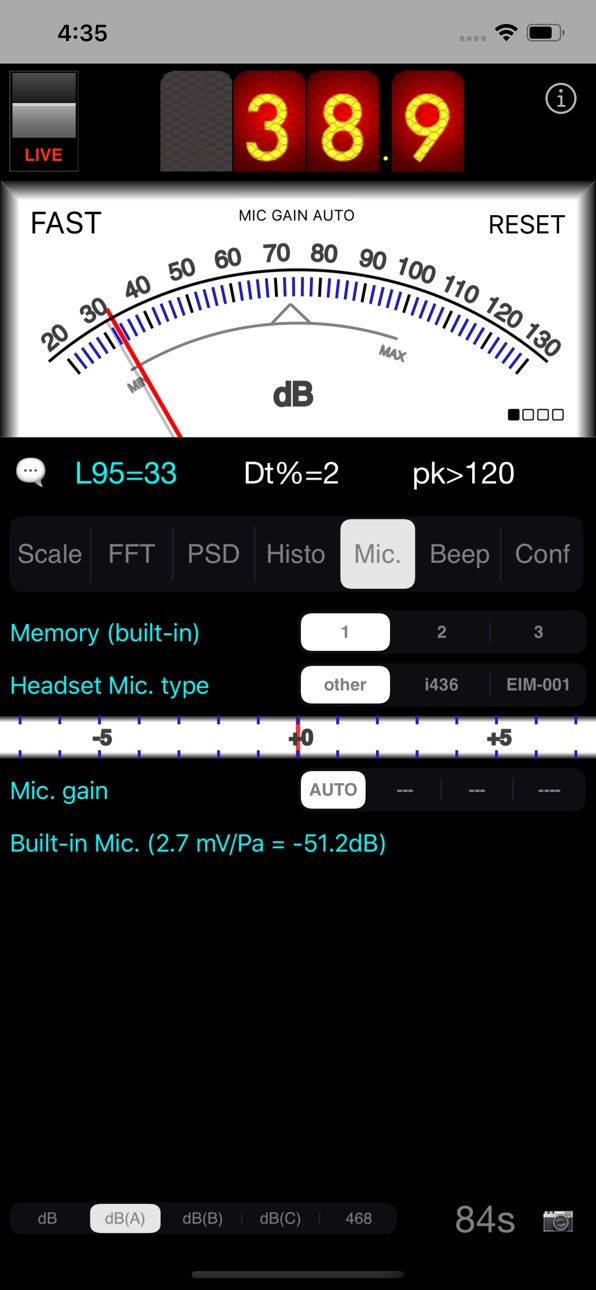

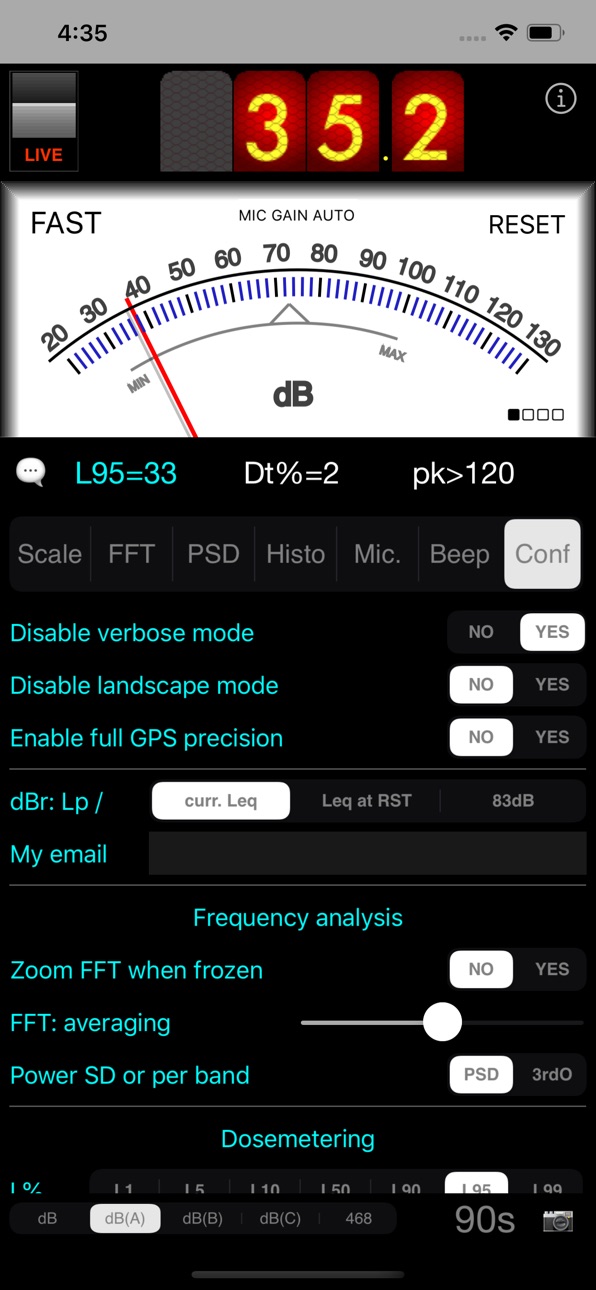

iPad 8 images


What’s New Version 7.1
No more long press to change frequency weightings.
Re-compiled for latest iOS. Better handling of various screen sizes and shapes.
Description
SPLnFFT is a sound level meter (noise meter) for your iPhone or iPad with many advanced features: frequency analyzer, frequency meter, test signal generator, dosimeter, ...
This soundmeter App is the only one for iOS recommended by the "Laborers' Health and Safety Fund of North America".
Here are extracts from other reviews:
"our favorite sound measurement app" SafetyAwakenings.com
"SPLnFFT is comprehensive, easy to use" TapeOp.com
You will find more reviews here: https://www.facebook.com/SPLnFFT
For daily use, a very simple interface displays the level of exposure: if orange or red, protect your ears !
Professional users will take advantage of a wide range of accurate and reliable measurements: Leq, peak, L10, L95, taktmaximal, frequency analysis, histogram, dosemetering, ... A&C weightings are compliant with ANSI® S1.42 standard. "468" refers to ITU-R 468-4
*** Some KEY INFORMATION *** :
- you absolutely need to allow access to microphone to use this App
- screen rotation must be un-locked
- there are built-in help messages (speech bubble). Need more ? Contact us !: email, blog, Facebook,...
- do not expect to measure as low as 0dB(A) in a quiet room, for these 2 reasons: 30-130dB(A) is the standard usable range for sound level meters and anyway a standard quiet room is around 30dB(A) whereas a typical anechoic chamber is 10 to 20dB(A)
Top digital display is for measurement of sound power in 'slow' mode (averaged on 1s). Central analog display is for 'fast' mode (averaged on 1/8th s). But it can display 'slow' mode as well on request: just click on 'fast' label.
Peak and average values are displayed below and are held until you touch the 'reset' label. The videos on Youtube reveal more details.
Bottom view is a real time FFT (frequency analysis). You will notice that predominant frequency and next one are highlighted. Their frequencies and relative power are displayed on the right. If your input signal is a pure tone then this App will lock on its frequency and display a very accurate result.
Green line is the result of a real time FFT done with 1024 points. Purple line is the averaged FFT (exponential filtering done on power of each frequency). Blue line is a copy of what the purple line was when the user froze the display the last time.
A test tone at 1kHz or a white noise or a pink noise can be generated and sent to right and/or left outputs (select the type you want in BEEP tab). This FFT view - more precisely an upsized version of it - can be exported as a picture in your own photo library, using the camera button (when display is frozen only). This picture can be exported in a mail as well.
The display can be flipped upside-down to ease reading: just rotate your iPhone while holding it vertically.
As for ALL sound meters (thus including this one and all others at any price), calibration is suggested if you want to reach extreme precision. This is enabled in this App thanks to a slider to apply some compensation and to three non volatile memories (choice to be made in MIC. tab). How to ? For calibration, you need and external reference, either a calibrated sound meter, or a calibrated noise source.
Note as well that the tiny embedded loudspeaker cannot reproduce extreme frequencies. Thus if you want to hear a real white or pink noise, you will need to use a quality headphone or HiFi system.
This App was designed seriously for our own needs, by a signal processing expert, and is regularly updated to maintain accuracy and reliability.
***** Any comment, any feedback ? Click on 'support' in iTunes: there is a blog for this. You can even contact us directly by email or through the dedicated FaceBook page (note 'send email' top right) *****
Capabilities
In-App Purchases
Accessibility
ipadiphonemacrealityDevicetvoswatch
Version history 25 versions
Build 847158492v7.12023-12-24 12:06:07
No more long press to change frequency weightings.
Re-compiled for latest iOS. Better handling of various screen sizes and shapes.
Build 829932456v7.02020-02-20 20:16:59
Optimized for latest iPhones and iOS.
Note that iPhone X and later do NOT support any more upside down orientation.
Build 828733433v6.912018-10-15 18:19:10
Minor update for the HTTP GET feature: unique identifier added
Build 827387658v6.92018-07-19 19:36:19
Broken links to external webpages repaired.
New set of durations for 'HTTP GET' feature.
Build 826140291v6.82018-05-31 18:46:13
Native support of new kind of display as offered by iPhoneX for example.
New feature added in the advanced features pack: the ability to export main data regularly to a distant web server through a HTTP GET request.
Build 822614139v6.72017-06-20 17:16:07
Version 6.6 was problematic with iOS 8. Thus skipping this version v6.6.
iOS 8 users can retrieve version 6.5 instead (delete current installation if you already installed v6.6), whereas iOS9/10 users can keep using v6.6 or update to v6.7.
For information, this is just to support the latest and only supported version of Dropbox API. This means as well that Dropbox feature is now no more compatible with iOS8.
Build 821820229v6.62017-06-12 11:13:21
New SDK being used for Dropbox since previous one will soon be dropped. This should be transparent to end users. Except that initial association has to be re-run in 'Conf' tab: 'link to Dropbox'.
New external link to replace broken ones.
!!! DO NOT UPDATE IF USING iOS 8 !!! (no issue with iOS 9 or 10)
Build 821640959v6.52017-04-08 21:41:22
Previous update was quite major:
Screenshots now contain metadata including keywords and GPS data, provided you authorised the App to access such data.
Added more choices for external microphones in general settings of the iPhone. Force close then re-open the App after changing these new settings.
New advanced features included in the optional pack:
_ load calibration files for frequency analysis from Dropbox directory, the same one being used for uploading .bin files. See 'i' page for detailed instructions
_ 'Snap' tab added: take a photo of the surroundings with current sound level displayed on top of it. Will be stored to local photo library (of course this requires you to allow access to camera when requested to do so. Otherwise go to iPhone settings/SPLnFFT)
This update brings fine tuning of the new optional feature 'Snap':
_ no more warning message if disable verbose mode is activated. The camera icon will disappear shortly to validate the action
_ the 2 landscape orientations are now supported
And fixes one bug: metadata for date and time within recorded pictures were not set correctly for some of them
Build 821262403v6.42017-03-29 18:32:56
Screenshots now contain metadata including keywords and GPS data, provided you authorised the App to access such data.
Added more choices for external microphones in general settings of the iPhone. Force close then re-open the App after changing these new settings.
New advanced features included in the optional pack:
_ load calibration files for frequency analysis from Dropbox directory, the same one being used for uploading .bin files. See 'i' page for detailed instructions
_ 'Snap' tab added: take a photo of the surroundings with current sound level displayed on top of it. Will be stored to local photo library (of course this requires you to allow access to camera when requested to do so. Otherwise go to iPhone settings/SPLnFFT)
Build 820802748v6.32017-03-02 19:41:27
Some minor improvements and few smart updates, based on your feedbacks:
_ fine tuning of the 'SET' procedure in 'Mic' tab, when applicable. It is now recommended to avoid using LOW gain for frequency analysis, due to a slight filtering effect
_ dBr in analog views changed: so far reference was current Leq value. Now you can choose instead Leq sampled at last RESET, or 83dB (K-system)
_ you can pre-enter an address for export by mail
_ files exported by mail have a name appended with today's date
Build 819212073v6.22016-11-21 16:18:53
Fixed a bug that prevented to save screenshots to photo library with latest iOS.
BAR view slightly modified to get closer to standard ANSI bands.
This tab was renamed to PSD to reflect more precisely what it does: average power spectrum density over each band. A new setting is proposed to display power per band instead. A pink test signal will show as flat with this new setting.
Build 816556919v6.12016-09-20 17:58:51
IMPORTANT CHANGE !!!: Selecting dB(A), dB(C),... is less sensitive: a LONG PRESS of 1/3s is required now to avoid accidental changes.
Updated with a more recent Dropbox API.
Export to Dropbox is now restricted to the last 2 days. Before this, an old recording could have been exported with null data inside.
Pop-up "please review this App" was too intrusive with latest iOS. This is corrected and anyway instructions are given to disable it once for ever.
Landscape view is now available when the device is laying flat.
A new special mode for FFT averaging is now available: when selecting maximum value (Conf tab), averaging is done over the full period since last reset. The slider itself turns red in that case to identify that this new mode is indeed selected.
Build 815705255v6.02016-02-25 07:44:20
This update is important to consider if using an external microphone (iMM-6, i436, ...):
_ pre-calibration was slightly adjusted for external microphones (if ever you used a sound calibrator then you should check again or contact us)
_ bug correction: in very particular conditions the 'SET' procedure (relative calibration between HIGH/MID/LOW gains) applied to an external microphone may have failed. No such issue detected with internal microphone. Users with external microphones may re-run this procedure
Pre-calibration for internal microphones was not modified. Most types of devices were tested again, including: iPhone 4S, 5S, 6, 6S and iPad 2, Air, Air 2.
You may have noticed that some iPads behaved differently with latest iOS. Just re-run the 'SET' procedure as you will be invited to by this update to complete this transition to latest iOS. iPhones still behave as previously.
This update is important as well for in-app purchase: on top of current feature it brings (export to Dropbox), new frequency weightings are introduced, for SIL="Speech Interference Level", along with a new time weighting (3s), all this simultaneously in one page. Feedback by mail/FB is welcome since this is quite new. Very old devices (iOS7) are dropped due to increased computing power which is required.
Introducing a new setting, that allows mixing audio from this this App with audio from other Apps. For example to play some audio from Music App and monitor your speakers with this App.
Since only few users will need this feature, it is quite hidden: go to iPhone settings, find the App, activate this option. Now kill this App (double click on home button, swipe this App off the top edge of the screen) and re-launch it. Launch the other App and start playing audio. Back to this one to monitor audio inputs. The other App should keep playing audio.
Note that SPLnFFT must be launched first, then switch to Music then back to SPLnFFT.
Build 813363971v5.92015-09-22 08:27:50
Still improving the new "SET procedure" in Mic. tab: now gain calibration results for internal microphone become default values for external microphones.
This will be more convenient for those using external microphones.
Still this new feature: you can make a screenshot with the camera icon bottom right in running mode (when not in pause: in that case this is the export menu that pops in).
Build 813327540v5.82015-09-16 06:50:01
Latest version was a major update: new gain setting, new SET procedure.
This one is minor:
_ behavior in AUTO mode slightly improved
_ the camera icon which was useless in running mode can now be used for a screenshot to be captured in your own photo library
Build 813195242v5.72015-09-09 14:23:56
Internal gain setting heavily re-worked. A new range is defined - "MED" - which corresponds exactly to previous range "LOW". The new range "LOW" makes it possible to go even higher than before.
IMPORTANT: the "Mic. gain SET" procedure in Mic. tab should be re-run. It's a litlle longer to run but only one iteration is required now. Find a quiet room, set volume to maximum and launch the procedure.
SPLnFFT and SPLnWATCH should be both updated since they share settings including those concerning gains.
Build 812921950v5.62015-07-24 18:23:58
Very minor bug corrected with the SET procedure: if launched while paused then the process failed.
Build 812698251v5.52015-07-22 19:54:16
Rendering was improved for iPhone6/6+.
The info page was redesigned, and its existence is more obvious for new users. New links were added in particular for prevention of hearing loss. We will add other specific topics in this area on request: something is not clear in the usage of the App ? Contact us !
Remember that if you are annoyed by info messages (pop ups), there is an option in the Conf. tab to disable the verbose mode.
Build 812023217v5.42015-05-01 22:34:54
Export to Dropbox: the date used in file names for time zones with negative offset (America...) needed to be corrected. Before correction there was a shift of one day in this area.
Microphone gain "AUTO": thresholds changed from 85/60 to 80/40.
Displayed device name: using now commercial name iso internal iOS name (just a cosmetic change).
Build 811767146v5.32015-03-18 07:38:44
Updated to support natively latest architectures (arm64). No change expected from user's point of view.
Annoyed with warnings ? There is a new switch in Conf tab now.
Introducing latest optional feature - export raw data to Dropbox - as in-app purchase. Yet casual users still have opportunities to use it for free, provided they plan for it.
Note for export to Dropbox: the date used in the name of exported files is not correctly computed in time zones with negative offset (America,...). Add 1 day to what is indicated. This will be corrected in next update
Build 811654441v5.22015-02-06 06:00:33
A new optional feature was introduced in version 5.0: export to Dropbox.
It is still under development:
_ new icon
_ new trial conditions, heavily relaxed
Coming soon:
_ this new optional feature available for purchase. Yet still available for trial for long periods
_ the ability to disable some warnings: less pop-up messages
Build 811534653v5.12015-01-23 14:19:53
Major update for recent iPads: new offset applied. Before this modification measurements with internal microphone were over-estimated of 10dB on this type of device. No change for iPhones.
Any issue regarding installation or any other topic ? Contact me by mail: I cannot answer to comments in iTunes.
Build 810936189v5.02015-01-08 19:29:59
Some smart updates, in particular for the "i" page
Introducing new optional feature, for advanced users: the ability to export a full day's measurements (Lp SLOW and FAST) to Dropbox, for further processing using your preferred tool: Matlab, GNU Octave, Excel, ... This feature once optimized will be proposed as in-app purchase
Next step:
_ release this new optional feature
_ adjust offset for latest iPad
Build 731642888v4.92014-10-15 09:17:45
Completing migration to iOS8
Now the BAR view can be exported
Added a warning for pre-calibration of gains (LOW vs HIGH)
Storage space required for backup to iCloud minimized
Build 710043136v4.82014-09-27 19:33:51
Ready for iOS 8.
Still one minor update required for iOS 8 adopters, to enable again adding current location when exporting data by mail: please be patient few more days.
Price history by region
Currency
Show
Columns
Search
Availability 55 of 55 storefronts
| Region | Language | Price | Ratings | Avg | Version |
|---|---|---|---|---|---|
| US | en-US | USD 3.99 | 59 | 4.8 | 7.1 |
| GB | en-GB | GBP 3.99 | 20 | 4.5 | 7.1 |
| AU | en-AU | AUD 5.99 | 10 | 4.8 | 7.1 |
| CH | de-CH | CHF 3 | 6 | 5.0 | 7.1 |
| SE | sv | SEK 49 | 5 | 5.0 | 7.1 |
| BE | en-GB | EUR 3.99 | 4 | 5.0 | 7.1 |
| IT | it | EUR 3.99 | 4 | 5.0 | 7.1 |
| NO | en-GB | NOK 49 | 4 | 5.0 | 7.1 |
| AT | de-DE | EUR 3.99 | 3 | 5.0 | 7.1 |
| RU | ru | RUB 349 | 3 | 5.0 | 7.1 |
| DK | en-GB | DKK 39 | 2 | 5.0 | 7.1 |
| HU | en-GB | HUF 1790 | 2 | 5.0 | 7.1 |
| SG | en-GB | SGD 5.98 | 2 | 4.5 | 7.1 |
| DO | es-MX | USD 3.99 | 1 | 5.0 | 7.1 |
| IN | en-GB | INR 399 | 1 | 5.0 | 7.1 |
| KR | ko | KRW 6600 | 1 | 5.0 | 7.1 |
| MY | en-GB | MYR 19.9 | 1 | 1.0 | 7.1 |
| NZ | en-AU | NZD 6.99 | 1 | 5.0 | 7.1 |
| PH | en-GB | PHP 249 | 1 | 5.0 | 7.1 |
| PT | pt-PT | EUR 3.99 | 1 | 4.0 | 7.1 |
| SI | en-GB | EUR 3.99 | 1 | 5.0 | 7.1 |
| AL | en-GB | USD 4.99 | 0 | — | 7.1 |
| BA | en-GB | EUR 3.99 | 0 | — | 7.1 |
| CD | en-GB | USD 3.99 | 0 | — | 7.1 |
| CG | en-GB | USD 3.99 | 0 | — | 7.1 |
| EE | en-GB | EUR 3.99 | 0 | — | 7.1 |
| EG | en-GB | EGP 199.99 | 0 | — | 7.1 |
| FJ | en-GB | USD 3.99 | 0 | — | 7.1 |
| FM | en-GB | USD 3.99 | 0 | — | 7.1 |
| GA | fr-FR | USD 3.99 | 0 | — | 7.1 |
| GE | en-GB | USD 4.99 | 0 | — | 7.1 |
| GR | en-GB | EUR 3.99 | 0 | — | 7.1 |
| HN | es-MX | USD 3.99 | 0 | — | 7.1 |
| IS | en-GB | USD 4.99 | 0 | — | 7.1 |
| JM | en-GB | USD 3.99 | 0 | — | 7.1 |
| JO | en-GB | USD 3.99 | 0 | — | 7.1 |
| MD | en-GB | USD 4.99 | 0 | — | 7.1 |
| MK | en-GB | USD 3.99 | 0 | — | 7.1 |
| MO | zh-Hant-HK | USD 3.99 | 0 | — | 7.1 |
| MT | en-GB | EUR 3.99 | 0 | — | 7.1 |
| MX | es-MX | MXN 89 | 0 | — | 7.1 |
| NI | es-MX | USD 3.99 | 0 | — | 7.1 |
| OM | en-GB | USD 3.99 | 0 | — | 7.1 |
| PG | en-GB | USD 3.99 | 0 | — | 7.1 |
| RO | en-GB | RON 19.99 | 0 | — | 7.1 |
| RS | en-GB | EUR 3.99 | 0 | — | 7.1 |
| SB | en-GB | USD 3.99 | 0 | — | 7.1 |
| SK | en-GB | EUR 3.99 | 0 | — | 7.1 |
| SV | es-MX | USD 3.99 | 0 | — | 7.1 |
| TH | en-GB | THB 149 | 0 | — | 7.1 |
| TO | en-GB | USD 3.99 | 0 | — | 7.1 |
| TT | en-GB | USD 3.99 | 0 | — | 7.1 |
| VC | en-GB | USD 3.99 | 0 | — | 7.1 |
| VU | en-GB | USD 3.99 | 0 | — | 7.1 |
| YE | en-GB | USD 3.99 | 0 | — | 7.1 |
Change log 29 changes · MD
✎
releaseNotes updated
No more long press to change frequency weightings.
Re-compiled for latest iOS. Better handling of various screen sizes and shapes.
✎
description updated
SPLnFFT is a sound level meter (noise meter) for your iPhone or iPad with many advanced features: frequency analyzer, frequency meter, test signal generator, do
✎
subtitle updated
Serious audio measurements
✎
name updated
SPLnFFT Noise Meter
◆
Version 7.1 released
No more long press to change frequency weightings.
Re-compiled for latest iOS. Better handling of various screen sizes and shapes.
◆
Version 7.0 released
Optimized for latest iPhones and iOS.
Note that iPhone X and later do NOT support any more upside down orientation.
◆
Version 6.91 released
Minor update for the HTTP GET feature: unique identifier added
◆
Version 6.9 released
Broken links to external webpages repaired.
New set of durations for 'HTTP GET' feature.
◆
Version 6.8 released
Native support of new kind of display as offered by iPhoneX for example.
New feature added in the advanced features pack: the ability to export main data regularly to a distant web server through a HTTP GET request.
◆
Version 6.7 released
Version 6.6 was problematic with iOS 8. Thus skipping this version v6.6.
iOS 8 users can retrieve version 6.5 instead (delete current installation if you already installed v6.6), whereas iOS9/10 users can keep using v6.6 or update to v6.7.
◆
Version 6.6 released
New SDK being used for Dropbox since previous one will soon be dropped. This should be transparent to end users. Except that initial association has to be re-run in 'Conf' tab: 'link to Dropbox'.
New external link to replace broken ones.
!!
◆
Version 6.5 released
Previous update was quite major:
Screenshots now contain metadata including keywords and GPS data, provided you authorised the App to access such data.
Added more choices for external microphones in general settings of the iPhone. Force clo
◆
Version 6.4 released
Screenshots now contain metadata including keywords and GPS data, provided you authorised the App to access such data.
Added more choices for external microphones in general settings of the iPhone. Force close then re-open the App after cha
◆
Version 6.3 released
Some minor improvements and few smart updates, based on your feedbacks:
_ fine tuning of the 'SET' procedure in 'Mic' tab, when applicable. It is now recommended to avoid using LOW gain for frequency analysis, due to a slight filtering effe
◆
Version 6.2 released
Fixed a bug that prevented to save screenshots to photo library with latest iOS.
BAR view slightly modified to get closer to standard ANSI bands.
This tab was renamed to PSD to reflect more precisely what it does: average power spectrum den
◆
Version 6.1 released
IMPORTANT CHANGE !!!: Selecting dB(A), dB(C),... is less sensitive: a LONG PRESS of 1/3s is required now to avoid accidental changes.
Updated with a more recent Dropbox API.
Export to Dropbox is now restricted to the last 2 days. Before thi
◆
Version 6.0 released
This update is important to consider if using an external microphone (iMM-6, i436, ...):
_ pre-calibration was slightly adjusted for external microphones (if ever you used a sound calibrator then you should check again or contact us)
_ bug
◆
Version 5.9 released
Still improving the new "SET procedure" in Mic. tab: now gain calibration results for internal microphone become default values for external microphones.
This will be more convenient for those using external microphones.
Still this new feat
◆
Version 5.8 released
Latest version was a major update: new gain setting, new SET procedure.
This one is minor:
_ behavior in AUTO mode slightly improved
_ the camera icon which was useless in running mode can now be used for a screenshot to be captured in your
◆
Version 5.7 released
Internal gain setting heavily re-worked. A new range is defined - "MED" - which corresponds exactly to previous range "LOW". The new range "LOW" makes it possible to go even higher than before.
IMPORTANT: the "Mic. gain SET" procedure in M
◆
Version 5.6 released
Very minor bug corrected with the SET procedure: if launched while paused then the process failed.
◆
Version 5.5 released
Rendering was improved for iPhone6/6+.
The info page was redesigned, and its existence is more obvious for new users. New links were added in particular for prevention of hearing loss. We will add other specific topics in this area on reque
◆
Version 5.4 released
Export to Dropbox: the date used in file names for time zones with negative offset (America...) needed to be corrected. Before correction there was a shift of one day in this area.
Microphone gain "AUTO": thresholds changed from 85/60 to 80
◆
Version 5.3 released
Updated to support natively latest architectures (arm64). No change expected from user's point of view.
Annoyed with warnings ? There is a new switch in Conf tab now.
Introducing latest optional feature - export raw data to Dropbox - as in-
◆
Version 5.2 released
A new optional feature was introduced in version 5.0: export to Dropbox.
It is still under development:
_ new icon
_ new trial conditions, heavily relaxed
Coming soon:
_ this new optional feature available for purchase. Yet still available
◆
Version 5.1 released
Major update for recent iPads: new offset applied. Before this modification measurements with internal microphone were over-estimated of 10dB on this type of device. No change for iPhones.
Any issue regarding installation or any other topic
◆
Version 5.0 released
Some smart updates, in particular for the "i" page
Introducing new optional feature, for advanced users: the ability to export a full day's measurements (Lp SLOW and FAST) to Dropbox, for further processing using your preferred tool: Matla
◆
Version 4.9 released
Completing migration to iOS8
Now the BAR view can be exported
Added a warning for pre-calibration of gains (LOW vs HIGH)
Storage space required for backup to iCloud minimized
◆
Version 4.8 released
Ready for iOS 8.
Still one minor update required for iOS 8 adopters, to enable again adding current location when exporting data by mail: please be patient few more days.