Home › Navigation

Information
Preview 2 platforms
iPhone 5 images


iPad 6 images


What’s New Version 12.0.8
This is a minor correction
Description
The “GPS Recorder X” is a recorder capable of operating in all kinds of measuring environments such as in research, during work, while driving and in exploration situations.
It also comes complete with a preview function.
GPS Logger & Viewer.
I was supported movie making. You can also post to post video sites such as Youtube!
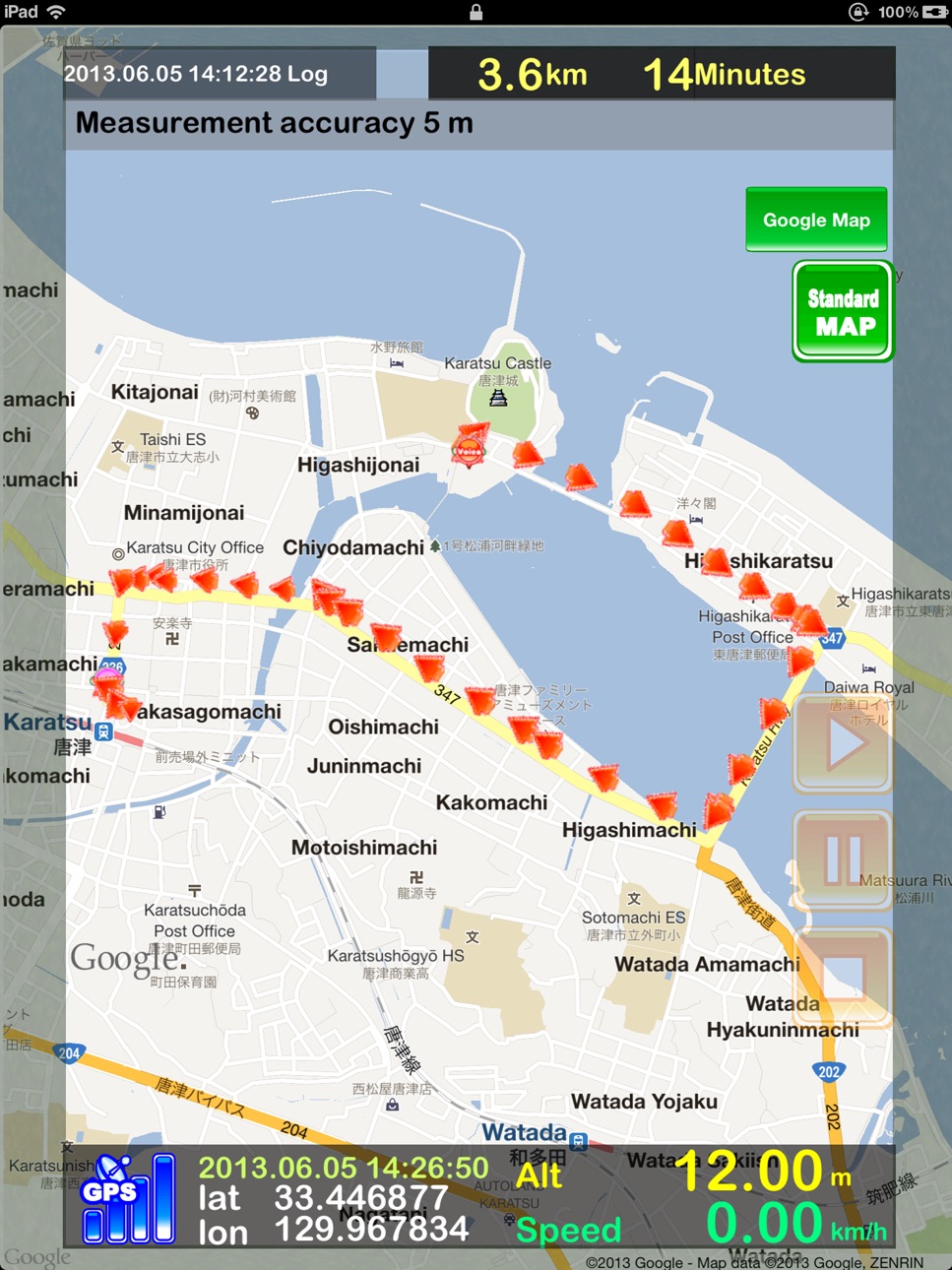
I was fully compatible with “Google™ Maps”.
Support changing the icon of the trajectory.
You can get the image from the camera roll, support changing the icon of the trajectory.
Graph enhances the sense of realism is also incorporated into video!
When you run it in the background, the battery life is significantly improved.
Support
Graph, swipe, original icon, Google™ Map, movie making, search, target, offline map, schedule, Dropbox transfer, external application cooperation, map camera, memo, voice memo, camera writing.
Export
html,gpx,kml,txt,jpg,mp4,mov
1. Routine GPS measurement
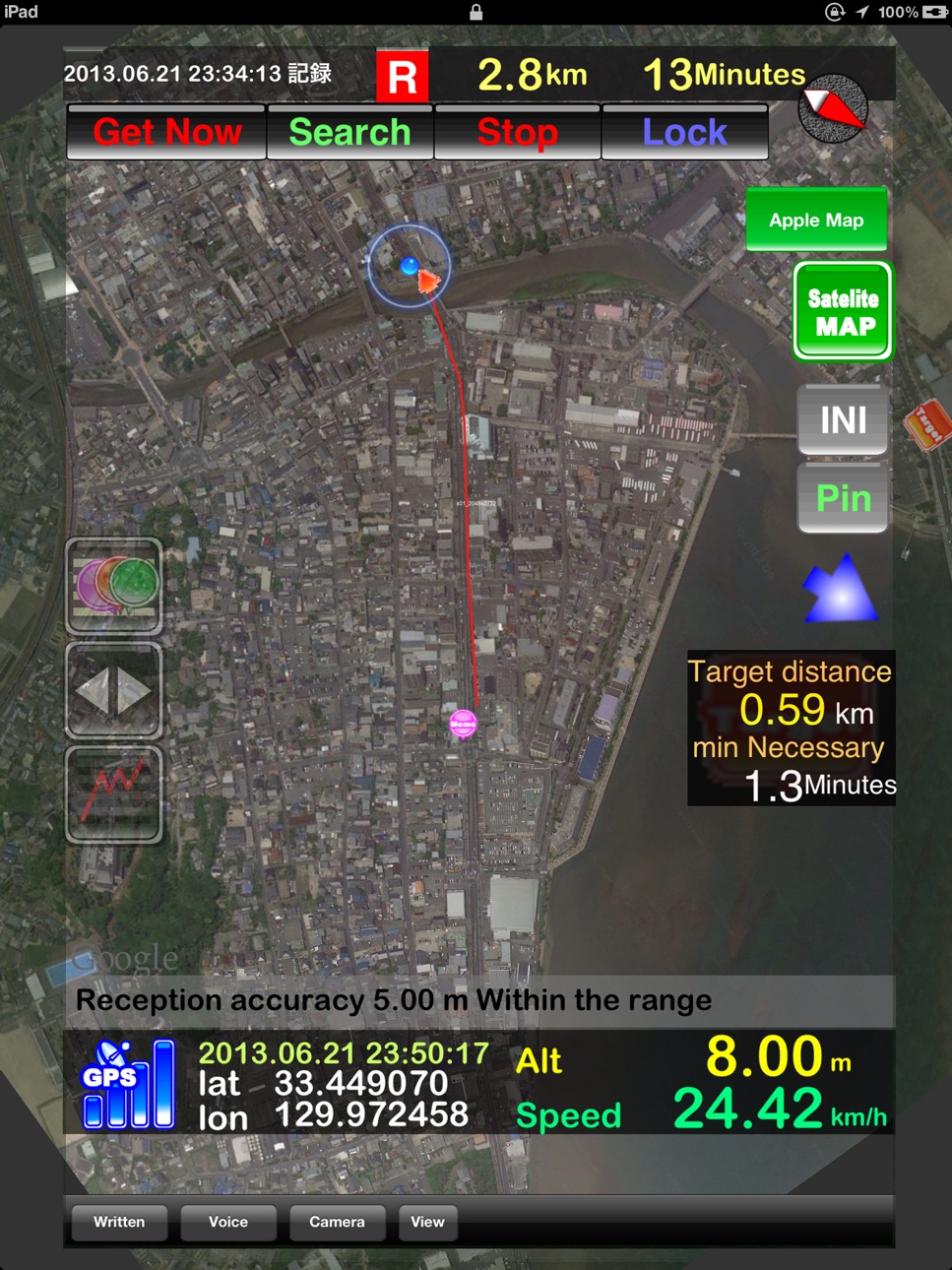
You can record various kinds of information such as “Measurement accuracy”, “Traveling distance”, “Measurement time”, “Speed”, “Altitude”, “Average speed”, “Maximum speed”, “Average altitude”, and “Maximum altitude”.
You can measure using a number of different units.
You can compare “Speed”, “Altitude”, and “Distance” by displaying them in graph form on one screen.
You can tweet in “Twitter” things such as location information (with iOS5 and later).
2. Maps
It also comes with functions that make map viewing easier including “function to enlarge/reduce in accordance with the speed” and “One screen function” which allows you to constantly check everything within the traveling range in one screen.
Not to mention the fact that you can easily switch to the full-screen map while hiding all the buttons that are not in use.
When you set the destination, the system displays the distance and direction to the destination and approximate time required to get there.
You can view the map from a mobile phone no-service area using the “Off-line map”.
You can get the map image from the camera roll for setting it up.
You can also import a map by obtaining a kmz file attached to an E-mail.
3. Complete with three kinds of note-taking functions, written memo, voice memo and camera
The recorded memos are perfectly linked to the location information.
In addition, you can always re-confirm the contents of the memo along your traveling track.
4. Particular attention paid to simplifying memo functions
Our concept is to support memo writing by making it as automatic and easy as possible.
5. Equipped with a preview function
You can reproduce the recorded data via the “Preview” in presentation format.
You will be impressed with the excellent performance of “GPS Recorder X” as it keeps your sweet memories alive.
6. Equipped with an “ECO” mode
This is a function to reduce power consumption.
7. Capable of operating in various environments with the use of different settings
a) For the purpose of research and the collection of a range of information.
b) Recording one full-day of measurement or measurement over a long period of time.
c) Recording detailed measurements over a short period of time.
8. Excellent data transfer function
You can send all the information via the “E-mail” or “Dropbox”, including recorded location information, “Written memo”, “Voice memo”, “Photos taken by the camera”, “Analytical information from the GPS measurement”, “Map image complete with traveling track”, and information in a “Google™ Maps preview HTML file”.
Capable of outputting KML and GPX files.
You can also confirm the route by reading it into Google™ Earth.
9. Bonus
As a future vision, we also added, as a “bonus”, the element of a target such as “so and so kilometers to the Moon”.
Can you reach the moon? I hope you will do your best.
Note: Continued use of GPS running in the background can dramatically decrease battery life.
urlscheme:gpsrecorderx://
Note: I can use the “Google™ Maps” in iOS 5.1 or later!
Accessibility
ipadiphonemacrealityDevicetvoswatch
Version history 25 versions
Build 860606777v12.0.82023-10-12 10:42:28
This is a minor correction
Build 853730418v12.0.72022-12-06 02:01:39
Minor fix
Build 853728860v12.0.62022-12-05 22:59:14
Minor fix
Build 853243626v12.0.52022-11-09 09:51:56
Minor fix
Build 851613054v12.0.42022-08-17 06:19:37
Minor fix
Build 845461049v12.0.32021-11-20 18:00:22
iOS 15.0 support
Added Air Drop All GPS Recorder X data transfer and import capabilities
Build 838477464v11.0.82020-11-02 21:30:51
iOS 14.0 Support
Build 835114735v11.0.62020-03-16 23:13:27
・ Save search condition of record file
・ Keyword added to record file search
Build 834928127v11.0.42020-03-02 20:25:16
Toolbar update, startup capacity check
Build 834920919v11.0.32020-03-01 22:56:27
Modify image
Build 834838447v11.0.02020-02-25 04:21:35
Added support for sorting the list
Updated design
Fixed view shift
Build 834856863v11.0.22020-02-25 23:05:47
Some image corrections
Build 832375711v10.0.72019-12-19 18:31:30
support iOS13. rebuild version.
Build 819632628v10.0.22017-09-20 03:45:12
64bit Support
iOS 11 Support
Build 715503686v8.3.32014-09-29 23:16:53
iOS8.0 Support.
Build 430542679v8.1.12014-03-06 03:20:47
Layout adjustment of a graph.
Build 369392631v8.12014-02-14 03:06:45
The group total was attained.
Build 108412735v8.0.22013-11-15 01:09:02
iOS7.0 support.
Allows you to check the App background update (iOS7.0 support).
IOS7.0 support of the date picker.
Build 82562637v8.0.12013-10-19 18:36:02
iOS7.0 support
Build 62122641v8.02013-10-09 02:12:36
iOS7.0 support
Video cache clear correspondence
Video playback function
The file name displayed in the Dropbox transfer
Build 15945281v7.0.52013-08-07 00:07:04
You have to adjust the movie making process in the iPad.
Build 15849023v7.0.42013-07-16 23:15:17
In support of "Google ™ Map", added support modify the "iOS 5.1.0".
Build 15792098v7.0.32013-07-15 01:42:24
I have to display the message of automatic stop on a schedule.
If it is scheduled, it was displayed on the warning screen of the automatic stop.
Bug fixes.
Build 15721417v7.0.12013-07-05 16:06:14
I was supported movie making. It is two kinds of mp4 format and mov format. You can also post to post video sites such as Youtube!
I was fully compatible with Google™ Maps. I can use the Google™ Maps in iOS 5.0 or later!
Support changing the icon of the trajectory.
You can get the image from the camera roll, support changing the icon of the trajectory.
The Google™ Maps is selected, I have to draw the corresponding line.
Graph design is renewed! Was easier to see! Graph enhances the sense of realism is also incorporated into video!
Build 15785678v7.0.22013-07-05 20:12:48
I was supported movie making. It is two kinds of mp4 format and mov format. You can also post to post video sites such as Youtube!
I was fully compatible with Google™ Maps. I can use the Google™ Maps in iOS 5.1 or later!
Support changing the icon of the trajectory.
You can get the image from the camera roll, support changing the icon of the trajectory.
The Google™ Maps is selected, I have to draw the corresponding line.
Graph design is renewed! Was easier to see! Graph enhances the sense of realism is also incorporated into video!
I problems have been fixed in the iPad.
Price history by region
Currency
Show
Columns
Search
Availability 24 of 24 storefronts
| Region | Language | Price | Ratings | Avg | Version |
|---|---|---|---|---|---|
 KR KR | ko | KRW 1100 | 2 | 5.0 | 12.0.8 |
 US US | en-US | USD 0.99 | 1 | 1.0 | 12.0.8 |
 AF AF | en-GB | USD 0.99 | 0 | — | 12.0.8 |
 AM AM | en-GB | USD 0.99 | 0 | — | 12.0.8 |
 AZ AZ | en-GB | USD 0.99 | 0 | — | 12.0.8 |
 BG BG | en-GB | EUR 0.99 | 0 | — | 12.0.8 |
 BY BY | en-GB | USD 0.99 | 0 | — | 12.0.8 |
 EE EE | en-GB | EUR 0.99 | 0 | — | 12.0.8 |
 EG EG | en-GB | EGP 49.99 | 0 | — | 12.0.8 |
 FM FM | en-GB | USD 0.99 | 0 | — | 12.0.8 |
 GE GE | en-GB | USD 0.99 | 0 | — | 12.0.8 |
 GR GR | en-GB | EUR 0.99 | 0 | — | 12.0.8 |
 HN HN | es-MX | USD 0.99 | 0 | — | 12.0.8 |
 HR HR | en-GB | EUR 0.99 | 0 | — | 12.0.8 |
 HU HU | en-GB | HUF 499 | 0 | — | 12.0.8 |
 IQ IQ | en-GB | USD 0.99 | 0 | — | 12.0.8 |
 LT LT | en-GB | EUR 0.99 | 0 | — | 12.0.8 |
 LV LV | en-GB | EUR 0.99 | 0 | — | 12.0.8 |
 MW MW | en-GB | USD 0.99 | 0 | — | 12.0.8 |
 PW PW | en-GB | USD 0.99 | 0 | — | 12.0.8 |
 RO RO | en-GB | RON 4.99 | 0 | — | 12.0.8 |
 SI SI | en-GB | EUR 0.99 | 0 | — | 12.0.8 |
 SK SK | en-GB | EUR 0.99 | 0 | — | 12.0.8 |
 YE YE | en-GB | USD 0.99 | 0 | — | 12.0.8 |
Change log 28 changes · GR
✎
releaseNotes updated
This is a minor correction
✎
description updated
The “GPS Recorder X” is a recorder capable of operating in all kinds of measuring environments such as in research, during work, while driving and in exploratio
✎
name updated
GPS Recorder X
◆
Version 12.0.8 released
This is a minor correction
◆
Version 12.0.7 released
Minor fix
◆
Version 12.0.6 released
Minor fix
◆
Version 12.0.5 released
Minor fix
◆
Version 12.0.4 released
Minor fix
◆
Version 12.0.3 released
iOS 15.0 support
Added Air Drop All GPS Recorder X data transfer and import capabilities
◆
Version 11.0.8 released
iOS 14.0 Support
◆
Version 11.0.6 released
・ Save search condition of record file
・ Keyword added to record file search
◆
Version 11.0.4 released
Toolbar update, startup capacity check
◆
Version 11.0.3 released
Modify image
◆
Version 11.0.2 released
Some image corrections
◆
Version 11.0.0 released
Added support for sorting the list
Updated design
Fixed view shift
◆
Version 10.0.7 released
support iOS13. rebuild version.
◆
Version 10.0.2 released
64bit Support
iOS 11 Support
◆
Version 8.3.3 released
iOS8.0 Support.
◆
Version 8.1.1 released
Layout adjustment of a graph.
◆
Version 8.1 released
The group total was attained.
◆
Version 8.0.2 released
iOS7.0 support.
Allows you to check the App background update (iOS7.0 support).
IOS7.0 support of the date picker.
◆
Version 8.0.1 released
iOS7.0 support
◆
Version 8.0 released
iOS7.0 support
Video cache clear correspondence
Video playback function
The file name displayed in the Dropbox transfer
◆
Version 7.0.5 released
You have to adjust the movie making process in the iPad.
◆
Version 7.0.4 released
In support of "Google ™ Map", added support modify the "iOS 5.1.0".
◆
Version 7.0.3 released
I have to display the message of automatic stop on a schedule.
If it is scheduled, it was displayed on the warning screen of the automatic stop.
Bug fixes.
◆
Version 7.0.2 released
I was supported movie making. It is two kinds of mp4 format and mov format. You can also post to post video sites such as Youtube!
I was fully compatible with Google™ Maps. I can use the Google™ Maps in iOS 5.1 or later!
Support changing th
◆
Version 7.0.1 released
I was supported movie making. It is two kinds of mp4 format and mov format. You can also post to post video sites such as Youtube!
I was fully compatible with Google™ Maps. I can use the Google™ Maps in iOS 5.0 or later!
Support changing