Home › Lifestyle

The Clothing App – AI Stylist
Closet, Outfit & Style Planner
 ZM
ZM
 USen-US
 AGen-GB
 AIen-GB
 AOen-GB
 ARes-MX
 BBen-GB
 BFen-GB
 BJen-GB
 BOes-MX
 BRpt-BR
 BSen-GB
 BWen-GB
 BZen-GB
 CDen-GB
 CGen-GB
 CIfr-FR
 CLes-MX
 CMfr-FR
 COes-MX
 CRes-MX
 CVen-GB
 DMen-GB
 DOes-MX
 DZen-GB
 ECes-MX
 GAfr-FR
 GDen-GB
 GHen-GB
 GMen-GB
 GTes-MX
 GWen-GB
 GYen-GB
 HNes-MX
 JMen-GB
 KEen-GB
 KNen-GB
 KYen-GB
 LCen-GB
 LRen-GB
 LYen-GB
 MAen-GB
 MGen-GB
 MLen-GB
 MSen-GB
 MUen-GB
 MWen-GB
 MXes-MX
 MZen-GB
 NAen-GB
 NEen-GB
 NGen-GB
 NIes-MX
 PAes-MX
 PEes-MX
 PYes-MX
 RWen-GB
 SCen-GB
 SLen-GB
 SNen-GB
 SRen-GB
 STen-GB
 SVes-MX
 SZen-GB
 TCen-GB
 TDen-GB
 TNen-GB
 TTen-GB
 TZen-GB
 UGen-GB
 UYen-GB
 VCen-GB
 VEes-MX
 VGen-GBZMen-GB
 ZWen-GB
75 of 75 storefronts
Content in en-US
Content in en-US
Information
Preview 1 platform
iPhone 10 images




What’s New Version 3.1.0
Thank you for all the feedback this past week, and apologies again to our long-time users for the bumpy launch. Got a request or running into something? Email me at feedback@theclothingapp.com and I'll sort it out.
This update is more than bug fixes. It brings back features you asked for, with plenty more on the way.
What's new
- Outfit row view is back. Switch between row and grid layouts from Settings or the top-right menu on any outfit list.
- "View outfits containing this item" is back. Open it from the menu on any item, in a list or on its detail screen.
- More grid sizes. View items and outfits in 1–4 columns.
- Auto-load. Scroll to the bottom and the next set loads on its own — no more tapping "Load more."
- Jump to Today. Tap "Today" in the calendar menu, or tap the month name in the header, to snap back to the current day.
- Select Month. Jump up to a year forward or back from the month you're viewing.
Description
Your closet is full. So why does it always feel like you have nothing to wear?
The Clothing App (formerly Closet+) puts your entire wardrobe in your pocket. Catalog your clothes, build outfits in seconds, and rediscover everything already hanging in your closet.
REDISCOVER EVERYTHING YOU OWN
• Snap photos of your clothes and AI describes, tags, and categorizes each piece for you
• Start instantly with over 350 built-in basics
• Organize with closets, categories, lists, and tags — any way you like
• Never dig through piles again
ALWAYS HAVE SOMETHING YOU'RE EXCITED TO WEAR
• Ask your AI Stylist for complete looks built from clothes you already own
• Get outfit ideas for any occasion: work, date night, travel, weekends
• Weather-aware suggestions, so the look fits the day
KNOW WHAT YOU'RE WEARING BEFORE THE DAY BEGINS
• Plan your week ahead with the built-in calendar
• Or let your AI Stylist plan days of outfits on your calendar for you, automatically
• Schedule outfits to any date and look back at what you wore
• See today's look the moment you open the app
LISTS FOR ANY OCCASION, CREATED IN SECONDS
• Create packing lists, party looks, office staples, capsule wardrobes, or any other list to meet your needs
• Mix items and outfits in the same list
• Or describe the list and let your AI Stylist build it for you
FIND ANYTHING YOU OWN, INSTANTLY
• Search your wardrobe by description, so "blue floral dress" just works
MAKE IT YOURS
• Custom themes and app icons to match your style
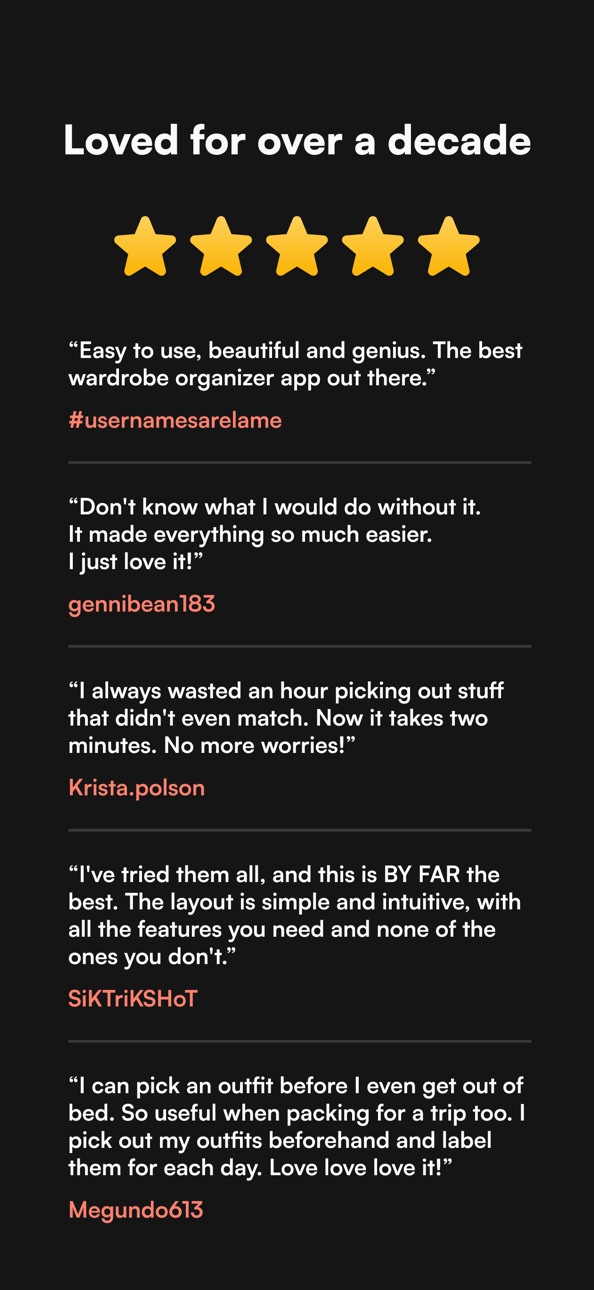
LOVED FOR OVER A DECADE
"I can pick an outfit before I even get out of bed. So useful when packing for a trip too." — Megundo613
"I've tried them all, and this is BY FAR the best. Simple and intuitive, with all the features you need and none of the ones you don't." — SiKTriKSHoT
"I always wasted an hour picking out stuff that didn't even match. Now it takes two minutes." — Krista.polson
PLANS
Free: 1 closet, 50 items, 20 outfits, 5 lists, unlimited categories, calendar events, and tags, plus 5 AI Stylist uses. No credit card required.
Standard: unlimited closets, items, outfits, and lists, the AI Stylist, custom themes, and custom app icons.
Plus: everything in Standard with higher AI Stylist limits, custom fields (brand, size, cost, etc), and multiple photos per item.
COMMON QUESTIONS
How long does setup take? About 15 minutes. Use the built-in basics to start immediately, then add your own photos over time.
Do I need to photograph everything? No. Even 20 items gives you weeks of outfit ideas.
Do I have to use the AI? Not at all. Outfits, lists, and calendar plans can all be created by hand. Your AI Stylist is there when you want a creative boost or time-saver.
Getting dressed should be the easiest part of your day. Start your free closet now.
Terms of Use (EULA): https://www.apple.com/legal/internet-services/itunes/dev/stdeula/
In-App Purchases ZM pricing
Plus - Yearly Subscription
Yearly—
Plus - Monthly Subscription
Monthly—
Standard - Yearly Subscription
Yearly—
Standard - Monthly Subscription
Monthly—
Capabilities
In-App Purchases
Accessibility
ipadiphonemacrealityDevicetvoswatch
Version history 25 versions
Build 887657475v3.1.02026-07-01 04:40:05
Thank you for all the feedback this past week, and apologies again to our long-time users for the bumpy launch. Got a request or running into something? Email me at feedback@theclothingapp.com and I'll sort it out.
This update is more than bug fixes. It brings back features you asked for, with plenty more on the way.
What's new
- Outfit row view is back. Switch between row and grid layouts from Settings or the top-right menu on any outfit list.
- "View outfits containing this item" is back. Open it from the menu on any item, in a list or on its detail screen.
- More grid sizes. View items and outfits in 1–4 columns.
- Auto-load. Scroll to the bottom and the next set loads on its own — no more tapping "Load more."
- Jump to Today. Tap "Today" in the calendar menu, or tap the month name in the header, to snap back to the current day.
- Select Month. Jump up to a year forward or back from the month you're viewing.
Build 887565680v3.0.42026-06-29 16:31:00
Importing your Closet+ wardrobe is now more reliable, especially for large closets.
• Keeps going: if an import is interrupted or hits a temporary snag, it now resumes where it left off and retries automatically instead of stopping.
• Fewer errors: we fixed several issues that could cause an import to fail partway through, so more of your items, outfits, and calendar history come over cleanly.
• Smoother finish: fixed a problem where the Clothing tab could get stuck loading right after an import.
Thanks for sticking with us. If you run into any trouble importing, tap "Send diagnostics to support" on the import screen, or email us directly at help@theclothingapp.com.
Build 887410678v3.0.22026-06-25 02:51:14
• Improvements around an issue that prevented some users from importing their Closet+ data
• Added a one-tap way to send import details to our support team if something doesn't transfer
• Polish and refinements to the migration screen
Build 887454628v3.0.32026-06-25 22:51:50
We've been hard at work on the Closet+ import problems many of you reported. This update addresses the errors that were causing imports to stop partway through, especially on larger closets. Open the app and tap Resume to pick up where you left off — your items, outfits, and calendar won't be duplicated.
Still running into trouble? Tap "Send diagnostics to support" on the error screen and we'll jump on it. Thank you for your patience.
Build 887345652v3.0.12026-06-24 00:33:51
bug fixes and improvements
Build 887001863v3.0.02026-06-23 11:54:28
Closet+ is now The Clothing App — rebuilt from the ground up.
• A completely redesigned wardrobe: closets, categories, tags, and lists
• AI Stylist: complete looks from your own clothes, for any occasion
• AI photo tagging: snap a picture and your item describes itself
• Calendar planning with wear history
• Search your wardrobe by description
• Custom themes and app icons
• Your closet now syncs securely across iPhone and the web
Same app you've trusted for over a decade — now it styles you too.
Build 814030457v2.2.72015-11-02 16:44:59
This update from Apple will improve the functionality of this app. No new features are included.
• iOS 9 Support.
• iPhone 6/6S/6+/6S+ Support (Finally).
• New Sharing section which can be found in the main menu. Quickly share what you're wearing today (#TodayImWearing), which will post what's on your calendar for today. Or share any item or outfit you wish with various social networks.
• You can now zoom in on item photos. Tap the photo to enter fullscreen mode, then pinch or double-tap to zoom in and out. Single tap to exit.
• When dragging items and outfits around to rearrange them you can now move to the top and bottom of the screen to scroll around before dropping.
• When creating items and outfits you can now add them to the calendar right from the details screen.
• When viewing items and outfits in the calendar you can now navigate to the next/previous ones.
• Category cells now display the total number of items/outfits in that category as well as those in any subcategories.
• The "Uncategorized" cells in the clothing section will now only show if uncategorized content exists.
• Minor refinements and bug fixes.
Build 239342650v2.2.62013-12-19 09:02:00
2.2.6
Just a small update, more coming soon.
• Fixed theme packs not showing up in the store.
• Refreshed the help content with videos.
2.2.5
• Closet is now Closet+.
• New icon, and updated design for iOS 7.
• The long-awaited backup & restore functionality is back! You can find these options in the Tools section. Thanks for your patience with this one!
• Themes! You can find free & premium theme packs in the settings section. More coming soon.
• Tags & packing lists moved from tools to the main menu.
• You can now select your tags (now found in the main menu) and it will display any items & outfits containing that tag.
• You can now move items between different closets.
• You can now search for multiple terms separated by spaces.
• Outfit & Packing List cells now display all items inside them.
• Selecting/deselecting categories to use in the item grid will now also select/deselect any non-empty subcategories within that category.
• Shake-to-randomize when creating an outfit in the item grid.
• Lots of other refinements.
• Various bug fixes.
Build 220722631v2.2.52013-12-12 00:37:34
• Closet is now Closet+.
• New icon, and updated design for iOS 7.
• The long-awaited backup & restore functionality is back! You can find these options in the Tools section. Thanks for your patience with this one!
• Themes! You can find free & premium theme packs in the settings section. More coming soon.
• Tags & packing lists moved from tools to the main menu.
• You can now select your tags (now found in the main menu) and it will display any items & outfits containing that tag.
• You can now move items between different closets.
• You can now search for multiple terms separated by spaces.
• Outfit & Packing List cells now display all items inside them.
• Selecting/deselecting categories to use in the item grid will now also select/deselect any non-empty subcategories within that category.
• Shake-to-randomize when creating an outfit in the item grid.
• Lots of other refinements.
• Various bug fixes.
Thanks for continuing to use Closet!
If you haven't already, please take a second to rate and/or review Closet. It goes a long way to ensure that Closet keeps getting better.
Build 70122670v2.2.32013-10-07 23:19:51
Fixed the missing items bug in the item grid.
Two-finger swipes to navigate your content is gone! You can now use one finger to swipe between your items, outfits, packing lists, and even whole categories.
You now swipe from the left edge to open the menus, swipes starting away from the edge will navigate your content.
You also now use single finger swipes to navigate through months in the calendar.
Double tap the navigation bar to go all the way back when navigating multiple screens deep.
Build 56372640v2.2.22013-09-24 18:15:28
Fixes for iOS 7.
Photo quality improvements.
Item photo replacement fixes.
Build 15759966v2.2.12013-07-11 23:11:02
Fixed a bug where rearranging categories would cause a crash.
Build 15664252v2.22013-06-30 02:06:27
Thanks for all the feedback! Please keep your suggestions coming either by emailing me at support@closetapp.com or by using the in-app support options in the Tools section.
If you appreciate these updates please help out by rating/reviewing Closet in the App Store. It's a huge help to ensure these updates keep coming. Your support is greatly appreciated!
The Goods:
• Creating outfits using the item grid is back! You'll find this option in the main menu or within an outfit category. You can create random outfits again, add as many categories as you wish, and even reorder the category rows to get a real top-down view of your outfit.
• When you choose "Calendar Dates" for an item or outfit the calendar will now display a list icon in the top left corner. Select this to view a list of all calendar dates for that item/outfit. Select the calendar icon in the list view to get back to the calendar.
• New sorting options for categories, items, outfits, and packing lists added to the settings.
• New "Duplicate Outfit" option added to the outfit menu. This is great for quickly creating similar outfits by duplicating a current one and making small changes to it. Everything from the original outfit will be copied over to the duplicate EXCEPT calendar events since it's a new outfit.
• New expanded and organized help section added to the tools section.
• The Categories section in Tools now displays the subcategory count for each category.
• Long-pressing an item/outfit now not only enters into edit mode, but also picks up the item/outfit so you can rearrange it.
• Searching through items & outfits now includes calendar events into the search results, and generally works much better now.
• Searching through outfits will now also consider the items inside the outfit when finding matches.
• Calendar is now faster to load, and navigate.
• Modified icon and theme.
• Bug fixes & tweaks.
Build 15495095v2.12013-06-12 05:16:19
Thank you for all the feedback, I'm listening! Please continue to voice your opinion by emailing me at support@closetapp.com, or by using the in-app support options.
• The "Outfits Containing This Item" feature is back! You can find it either in the menu within an item, or in the option bar below an item's photo.
• The "Shake To Add A Random Outfit To The Calendar" feature is back! Also accessible through the calendar menu. The ability to add random items, and a weeks worth of random outfits has also been added.
• You can now collapse & expand Item, Outfit, and Subcategory sections throughout the app by tapping on the headers for each section. Their status' are indicated by collapse (-) and expand (+) icons to the right of each header.
• Calendar two-finger swipe left/right to navigate months.
• Calendar button added to the option bar in items & outfits.
• New setting for allowing/disallowing the outfit, calendar, and packing list sections to autosize the items based on the quantity and instead use the user preference throughout.
• Press & hold on items/outfits to engage edit mode so you can quickly rearrange and delete them.
• An item's 'Last Worn' date & 'Times Worn' count now includes any outfits that the item is inside of.
• Photos that have been rotated in the Photos app will retain their orientation when imported.
• Made it more obvious that menus with many options scroll.
• Moved "Delete" options to the top of menus so they're more accessible.
• Font sizes increased slightly to improve legibility
• Other bug fixes.
More improvements are coming! If you're happy with Closet so far please take a second to review/rate Closet in the app store. This is a HUGE help to ensure I'm able to continue to improve Closet.
Build 15022885v2.02013-05-28 00:47:20
*** IMPORTANT! ***
[For current Closet 1.x users only]
Some users have reported an issue where calendar events are not being migrated over. I've fixed the issue, submitted the new update to Apple, and requested an expedited review (which may or may not happen). To avoid losing any calendar data I would hold off on updating until the 2.0.1 update is released.
I'm deeply sorry for this issue.
********************
Totally redesigned and rebuilt from the ground up, integrating over 4 years of feedback from the community.
• iPhone 5 & retina support (finally).
• High-res photo support for your items.
• Bulk import for photos.
• Bulk camera capture for photos.
• Add items, outfits, and notes to the calendar.
• Add notes to your items and outfits.
• Add tags to your items and outfits.
• Add content quicker by accessing common options from the new main menu.
• Search/filter your categories, items, and outfits.
• Add subcategories.
• Rearrange items and outfits into any order you wish. Each category can have its own order for content.
• Share your items and outfits with the world using Facebook, Twitter, or email.
• See the cost-per-wear for individual items or whole outfits based on how much you wear them.
• Create multiple closets which is great for stylists, people with multiple physical closets, or people who wish to organize their clothing by season (Upgrade Required).
• Generally much easier and faster to create, edit, and find your content.
Build 15488507v2.0.12013-05-28 21:40:22
2.0.1
**********
Critical bug fixes for migration from Closet 1.x.
Other bug fixes.
2.0
**********
Totally redesigned and rebuilt from the ground up, integrating over 4 years of feedback from the community.
• iPhone 5 & retina support (finally).
• High-res photo support for your items.
• Bulk import for photos.
• Bulk camera capture for photos.
• Add items, outfits, and notes to the calendar.
• Add notes to your items and outfits.
• Add tags to your items and outfits.
• Add content quicker by accessing common options from the new main menu.
• Search/filter your categories, items, and outfits.
• Add subcategories.
• Rearrange items and outfits into any order you wish. Each category can have its own order for content.
• Share your items and outfits with the world using Facebook, Twitter, or email.
• See the cost-per-wear for individual items or whole outfits based on how much you wear them.
• Create multiple closets which is great for stylists, people with multiple physical closets, or people who wish to organize their clothing by season (Upgrade Required).
• Generally much easier and faster to create, edit, and find your content.
Build 2949138v1.4.22010-08-31 22:37:41
Fixed a crashing issue on devices running an earlier version of iOS than 3.2.
Build 2848401v1.4.12010-08-03 22:26:54
Support for devices running iOS 3.1.3 and up. You now don't need to have iOS 4 installed to run the app.
*Note - iTunes File Sharing is used for accessing your backup files created by Closet but this feature is only available on iOS 3.2 and above. You can still create backup files and restore from them directly on the device but you won't be able to copy them from your device if you're running an earlier version of iOS than version 3.2.
Build 2765301v1.42010-06-30 18:08:17
iOS 4 compatibility fixes.
Fast App Switching on iOS 4.
Backup & Restore support via in-app tools and iTunes File Sharing.
Build 2214712v1.3.12009-12-23 05:38:56
Each category row in the Item Grid now starts out excluded so you don't have to scroll to the end of each row to exclude it from the outfit.
Added a new Blank Item Grid method of creating outfits. This lets you add the categories you wish to include rather than being stuck with all of them and having to exclude them. This method also helps with memory issues when you have a large number of items.
Build 2040044v1.32009-10-23 18:15:45
You can now:
Swipe outfit cells to delete them.
Swipe an outfits date cells to delete them.
Swipe packing list cells to delete them.
Swipe favorite outfit cells to remove them as favorites.
Swipe outfit cells in the calendar to remove them from that date.
Delete multiple items at once when viewing a list of thumbnails.
Duplicate outfits so creating similar outfits with only slight modifications is much faster now.
Duplicate packing lists.
Email packing lists.
Added a News section to the Tools which will display any relevant info pertaining to Closet.
While viewing an item in fullscreen mode you can now view all the outfits that contain that item.
When viewing the "All" categories your outfits and items are now ordered in the same order as your categories.
Deleting items when viewing them in fullscreen mode will no longer kick you back to thumbnail view after each delete.
Bug fixes.
Updated icon.
Build 1899003v1.2.22009-08-19 21:22:47
Bug fix for an issue where in certain regions the calendar would display the dates under the incorrect days.
Build 1827992v1.2.12009-07-15 21:12:26
bug fixes
Build 1784659v1.22009-06-30 20:36:19
Build 1683418v1.12009-05-08 00:57:34
Price history by region
Currency
Show
Columns
Search
Availability 75 of 75 storefronts
| Region | Language | Price | Ratings | Avg | Version |
|---|---|---|---|---|---|
| US | en-US | Free | 4 | 2.0 | 3.1.0 |
| AG | en-GB | Free | 0 | — | 3.1.0 |
| AI | en-GB | Free | 0 | — | 3.1.0 |
| AO | en-GB | Free | 0 | — | 3.1.0 |
| AR | es-MX | Free | 0 | — | 3.1.0 |
| BB | en-GB | Free | 0 | — | 3.1.0 |
| BF | en-GB | Free | 0 | — | 3.1.0 |
| BJ | en-GB | Free | 0 | — | 3.1.0 |
| BO | es-MX | Free | 0 | — | 3.1.0 |
| BR | pt-BR | Free | 0 | — | 3.1.0 |
| BS | en-GB | Free | 0 | — | 3.1.0 |
| BW | en-GB | Free | 0 | — | 3.1.0 |
| BZ | en-GB | Free | 0 | — | 3.1.0 |
| CD | en-GB | Free | 0 | — | 3.1.0 |
| CG | en-GB | Free | 0 | — | 3.1.0 |
| CI | fr-FR | Free | 0 | — | 3.1.0 |
| CL | es-MX | Free | 0 | — | 3.1.0 |
| CM | fr-FR | Free | 0 | — | 3.1.0 |
| CO | es-MX | Free | 0 | — | 3.1.0 |
| CR | es-MX | Free | 0 | — | 3.1.0 |
| CV | en-GB | Free | 0 | — | 3.1.0 |
| DM | en-GB | Free | 0 | — | 3.1.0 |
| DO | es-MX | Free | 0 | — | 3.1.0 |
| DZ | en-GB | Free | 0 | — | 3.1.0 |
| EC | es-MX | Free | 0 | — | 3.1.0 |
| GA | fr-FR | Free | 0 | — | 3.1.0 |
| GD | en-GB | Free | 0 | — | 3.1.0 |
| GH | en-GB | Free | 0 | — | 3.1.0 |
| GM | en-GB | Free | 0 | — | 3.1.0 |
| GT | es-MX | Free | 0 | — | 3.1.0 |
| GW | en-GB | Free | 0 | — | 3.1.0 |
| GY | en-GB | Free | 0 | — | 3.1.0 |
| HN | es-MX | Free | 0 | — | 3.1.0 |
| JM | en-GB | Free | 0 | — | 3.1.0 |
| KE | en-GB | Free | 0 | — | 3.1.0 |
| KN | en-GB | Free | 0 | — | 3.1.0 |
| KY | en-GB | Free | 0 | — | 3.1.0 |
| LC | en-GB | Free | 0 | — | 3.1.0 |
| LR | en-GB | Free | 0 | — | 3.1.0 |
| LY | en-GB | Free | 0 | — | 3.1.0 |
| MA | en-GB | Free | 0 | — | 3.1.0 |
| MG | en-GB | Free | 0 | — | 3.1.0 |
| ML | en-GB | Free | 0 | — | 3.1.0 |
| MS | en-GB | Free | 0 | — | 3.1.0 |
| MU | en-GB | Free | 0 | — | 3.1.0 |
| MW | en-GB | Free | 0 | — | 3.1.0 |
| MX | es-MX | Free | 0 | — | 3.1.0 |
| MZ | en-GB | Free | 0 | — | 3.1.0 |
| NA | en-GB | Free | 0 | — | 3.1.0 |
| NE | en-GB | Free | 0 | — | 3.1.0 |
| NG | en-GB | Free | 0 | — | 3.1.0 |
| NI | es-MX | Free | 0 | — | 3.1.0 |
| PA | es-MX | Free | 0 | — | 3.1.0 |
| PE | es-MX | Free | 0 | — | 3.1.0 |
| PY | es-MX | Free | 0 | — | 3.1.0 |
| RW | en-GB | Free | 0 | — | 3.1.0 |
| SC | en-GB | Free | 0 | — | 3.1.0 |
| SL | en-GB | Free | 0 | — | 3.1.0 |
| SN | en-GB | Free | 0 | — | 3.1.0 |
| SR | en-GB | Free | 0 | — | 3.1.0 |
| ST | en-GB | Free | 0 | — | 3.1.0 |
| SV | es-MX | Free | 0 | — | 3.1.0 |
| SZ | en-GB | Free | 0 | — | 3.1.0 |
| TC | en-GB | Free | 0 | — | 3.1.0 |
| TD | en-GB | Free | 0 | — | 3.1.0 |
| TN | en-GB | Free | 0 | — | 3.1.0 |
| TT | en-GB | Free | 0 | — | 3.1.0 |
| TZ | en-GB | Free | 0 | — | 3.1.0 |
| UG | en-GB | Free | 0 | — | 3.1.0 |
| UY | en-GB | Free | 0 | — | 3.1.0 |
| VC | en-GB | Free | 0 | — | 3.1.0 |
| VE | es-MX | Free | 0 | — | 3.1.0 |
| VG | en-GB | Free | 0 | — | 3.1.0 |
| ZM | en-GB | Free | 0 | — | 3.1.0 |
| ZW | en-GB | Free | 0 | — | 3.1.0 |
Change log 29 changes · ZM
✎
releaseNotes updated
Thank you for all the feedback this past week, and apologies again to our long-time users for the bumpy launch. Got a request or running into something? Email m
✎
description updated
Your closet is full. So why does it always feel like you have nothing to wear?
The Clothing App (formerly Closet+) puts your entire wardrobe in your pocket. Ca
✎
subtitle updated
Closet, Outfit & Style Planner
✎
name updated
The Clothing App – AI Stylist
◆
Version 3.1.0 released
Thank you for all the feedback this past week, and apologies again to our long-time users for the bumpy launch. Got a request or running into something? Email me at feedback@theclothingapp.com and I'll sort it out.
This update is more than
◆
Version 3.0.4 released
Importing your Closet+ wardrobe is now more reliable, especially for large closets.
• Keeps going: if an import is interrupted or hits a temporary snag, it now resumes where it left off and retries automatically instead of stopping.
• Fewe
◆
Version 3.0.3 released
We've been hard at work on the Closet+ import problems many of you reported. This update addresses the errors that were causing imports to stop partway through, especially on larger closets. Open the app and tap Resume to pick up where you
◆
Version 3.0.2 released
• Improvements around an issue that prevented some users from importing their Closet+ data
• Added a one-tap way to send import details to our support team if something doesn't transfer
• Polish and refinements to the migration screen
◆
Version 3.0.1 released
bug fixes and improvements
◆
Version 3.0.0 released
Closet+ is now The Clothing App — rebuilt from the ground up.
• A completely redesigned wardrobe: closets, categories, tags, and lists
• AI Stylist: complete looks from your own clothes, for any occasion
• AI photo tagging: snap a picture
◆
Version 2.2.7 released
This update from Apple will improve the functionality of this app. No new features are included.
• iOS 9 Support.
• iPhone 6/6S/6+/6S+ Support (Finally).
• New Sharing section which can be found in the main menu. Quickly share what you're
◆
Version 2.2.6 released
2.2.6
Just a small update, more coming soon.
• Fixed theme packs not showing up in the store.
• Refreshed the help content with videos.
2.2.5
• Closet is now Closet+.
• New icon, and updated design for iOS 7.
• The long-awaited backu
◆
Version 2.2.5 released
• Closet is now Closet+.
• New icon, and updated design for iOS 7.
• The long-awaited backup & restore functionality is back! You can find these options in the Tools section. Thanks for your patience with this one!
• Themes! You can find
◆
Version 2.2.3 released
Fixed the missing items bug in the item grid.
Two-finger swipes to navigate your content is gone! You can now use one finger to swipe between your items, outfits, packing lists, and even whole categories.
You now swipe from the left
◆
Version 2.2.2 released
Fixes for iOS 7.
Photo quality improvements.
Item photo replacement fixes.
◆
Version 2.2.1 released
Fixed a bug where rearranging categories would cause a crash.
◆
Version 2.2 released
Thanks for all the feedback! Please keep your suggestions coming either by emailing me at support@closetapp.com or by using the in-app support options in the Tools section.
If you appreciate these updates please help out by rating/reviewin
◆
Version 2.1 released
Thank you for all the feedback, I'm listening! Please continue to voice your opinion by emailing me at support@closetapp.com, or by using the in-app support options.
• The "Outfits Containing This Item" feature is back! You can find it eit
◆
Version 2.0.1 released
2.0.1
**********
Critical bug fixes for migration from Closet 1.x.
Other bug fixes.
2.0
**********
Totally redesigned and rebuilt from the ground up, integrating over 4 years of feedback from the community.
• iPhone 5 & retina s
◆
Version 2.0 released
*** IMPORTANT! ***
[For current Closet 1.x users only]
Some users have reported an issue where calendar events are not being migrated over. I've fixed the issue, submitted the new update to Apple, and requested an expedited review (which m
◆
Version 1.4.2 released
Fixed a crashing issue on devices running an earlier version of iOS than 3.2.
◆
Version 1.4.1 released
Support for devices running iOS 3.1.3 and up. You now don't need to have iOS 4 installed to run the app.
*Note - iTunes File Sharing is used for accessing your backup files created by Closet but this feature is only available on iOS 3.2
◆
Version 1.4 released
iOS 4 compatibility fixes.
Fast App Switching on iOS 4.
Backup & Restore support via in-app tools and iTunes File Sharing.
◆
Version 1.3.1 released
Each category row in the Item Grid now starts out excluded so you don't have to scroll to the end of each row to exclude it from the outfit.
Added a new Blank Item Grid method of creating outfits. This lets you add the categories you wi
◆
Version 1.3 released
You can now:
Swipe outfit cells to delete them.
Swipe an outfits date cells to delete them.
Swipe packing list cells to delete them.
Swipe favorite outfit cells to remove them as favorites.
Swipe outfit cells in the calendar to remove
◆
Version 1.2.2 released
Bug fix for an issue where in certain regions the calendar would display the dates under the incorrect days.
◆
Version 1.2.1 released
bug fixes
◆
Version 1.2 released
◆
Version 1.1 released