Home › Sports

 MT
MT
 USen-US
 DEde-DE
 CHde-CH
 GBen-GB
 FRfr-FR
 ATde-DE
 NLnl
NLnl AUen-AU
 CAen-CA
 ESes-ES
 BEen-GB
 JPja
JPja DKen-GB
 ITit
ITit MXes-MX
 RUru
RUru BRpt-BR
 CZen-GB
 GRen-GB
 HKzh-Hant-HK
 KRko
KRko NZen-AU
 PTpt-PT
 ROen-GB
 SEsv
SEsv SGen-GB
 AEen-GB
 LUen-GB
 MYen-GB
 NOen-GB
 THen-GB
 ARes-MX
 BGen-GB
 CLes-MX
 CNzh-Hans-CN
 FIen-GB
 ILen-GB
 KWen-GB
 LVen-GB
 PHen-GB
 PLen-GB
 UAen-GB
 AFen-GB
 AGen-GB
 AIen-GB
 ALen-GB
 AMen-GB
 AOen-GB
 AZen-GB
 BAen-GB
 BBen-GB
 BFen-GB
 BHen-GB
 BJen-GB
 BMen-GB
 BNen-GB
 BOes-MX
 BSen-GB
 BTen-GB
 BWen-GB
 BYen-GB
 BZen-GB
 CDen-GB
 CGen-GB
 CIfr-FR
 CMfr-FR
 COes-MX
 CRes-MX
 CVen-GB
 CYen-GB
 DMen-GB
 DOes-MX
 DZen-GB
 ECes-MX
 EEen-GB
 EGen-GB
 FJen-GB
 GAfr-FR
 GDen-GB
 GEen-GB
 GHen-GB
 GMen-GB
 GTes-MX
 GWen-GB
 GYen-GB
 HNes-MX
 HRen-GB
 HUen-GB
 IDen-GB
 IEen-GB
 INen-GB
 IQen-GB
 ISen-GB
 JMen-GB
 JOen-GB
 KEen-GB
 KGen-GB
 KHen-GB
 KNen-GB
 KYen-GB
 KZen-GB
 LAen-GB
 LBen-GB
 LCen-GB
 LKen-GB
 LRen-GB
 LTen-GB
 LYen-GB
 MAen-GB
 MDen-GB
 MEen-GB
 MGen-GB
 MKen-GB
 MLen-GB
 MMen-GB
 MNen-GB
 MOzh-Hant-HK
 MRen-GB
 MSen-GBMTen-GB
 MUen-GB
 MVen-GB
 MWen-GB
 MZen-GB
 NAen-GB
 NEen-GB
 NGen-GB
 NIes-MX
 NPen-GB
 OMen-GB
 PAes-MX
 PEes-MX
 PGen-GB
 PKen-GB
 PYes-MX
 QAen-GB
 RSen-GB
 RWen-GB
 SAen-GB
 SBen-GB
 SCen-GB
 SIen-GB
 SKen-GB
 SLen-GB
 SNen-GB
 SRen-GB
 STen-GB
 SVes-MX
 SZen-GB
 TCen-GB
 TDen-GB
 TJen-GB
 TMen-GB
 TNen-GB
 TOen-GB
 TRen-GB
 TTen-GB
 TWzh-Hant-TW
 TZen-GB
 UGen-GB
 UYen-GB
 UZen-GB
 VCen-GB
 VEes-MX
 VGen-GB
 VNen-GB
 XKen-GB
 YEen-GB
 ZMen-GB
 ZWen-GB
170 of 170 storefronts
Content in en-US
Content in en-US
Information
Preview 2 platforms
iPhone 10 images




iPad 10 images


What’s New Version 4.0
Redesigned for iOS 26
• Updated throughout to support Liquid Glass on iOS 26.
• Improved multitasking and search on iPad.
Dive Profile
• A new cursor overlay shows ascent and descent rate, plus gas consumption rate when available.
• A new Smoothing slider lets you fine-tune these rate calculations.
• Pinch on the profile graph to select a region and see its average depth, duration, and gas consumption rate.
Statistics
• Added new charts for Dive Site, City, Country, Dive Type, and Dive Suit.
• Added Dive Suit statistics.
Note: Charts are only available on iOS 17 or later.
Other Improvements
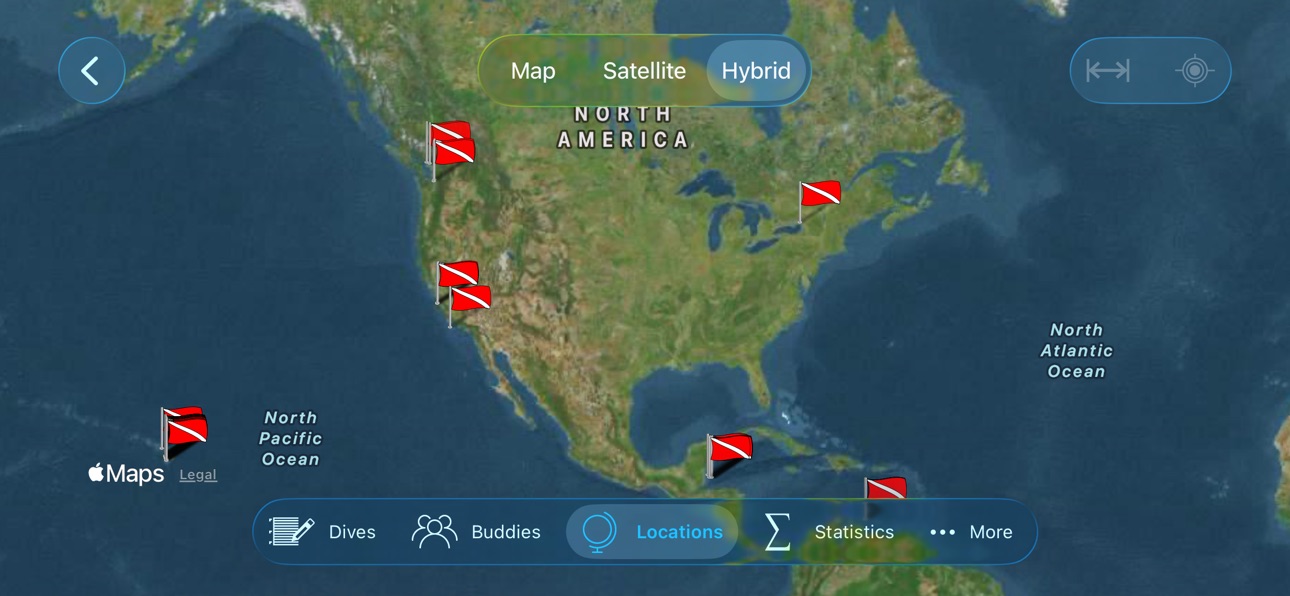
• The Locations map now shows the number of dives at each site, with quick access to the dive site.
• Improved Garmin FIT import for sidemount and unused transmitters.
• Improved overall stability and fixed several issues.
Description
Dive Log is designed to work either as your primary SCUBA diving logbook application or in conjunction with compatible 3rd party desktop logbook applications. You can use Dive Log at the dive site or on the dive boat to capture the information about the site while it is fresh in your mind (or your dive guide's mind). You can even capture the GPS coordinates of the dive site using the built in location services of your iOS device. Details about your actual dive can be added immediately after your dive or at the après dive event and later be saved to your desktop computer. The dive buddy feature is fully integrated with Contacts on your iPhone or iPad, letting you capture information about your newest dive buddy or quickly add an existing buddy to a particular dive. The dive data and statistics features let you have an immediate answer the next time your dive guide asks how much weight you used on your last dive or have all the information you need about your dive history when you fill out that next dive waiver. Metric and Imperial values are supported for all appropriate logbook fields. You can easily enter values using the appropriate units for the situation and view them in your preferred measurement system. You can even explore detailed dive profiles from popular dive computers that you download with your desktop software and later upload to Dive Log on iPhone/iPad. Dive profile data can also be transferred directly from certain dive computers directly via Bluetooth or using a supported Bluetooth accessory and an associated in-app purchase.
On Windows, Diving Log 6.0 (www.divinglog.de) is fully integrated with Dive Log on iPhone/iPad and has built in synchronization. Diving Log 6.0 has extensive support for importing data from dive computers and other dive log applications.
On Mac OS X, logbook information can be imported to Dive Log on iPhone/iPad from a number of compatible applications using the free Dive Log Manager application available from More Mobile Software (www.moremobilesoftware.com/divelog-sync). DiveLogDT (available on the Mac App Store) can be used to directly import a number of dive computers and file formats and can synchronize with Dive Log on iOS.
Dive data can be directly downloaded on a Bluetooth LE (Bluetooth 4.0/5.0) compatible iPhone, iPad or iPod touch from Bluetooth LE capable dive computers such as the Suunto EON Steel, Suunto EON Core, Suunto D5, Scubapro Galileo 2 (G2), Aladin Sport (Matrix), Aladin H (Matrix), G2 HUD, Aladin A1, Shearwater Teric, Peregrine, Petrel 2, Petrel 3, Perdix, Perdix AI, Perdix 2, NERD 2, Oceanic VTX, Pro Plus 4, Geo 4.0, VEO 4.0, Aeris A300CS, Aqualung i300C, i330R, i550C, i750TC, i770R, Apeks DSX, Sherwood Wisdom 4, Mares Genius and certain heinrichs weikamp OSTC computers as well as the DiveNav Inc. bluebuddy and Tech Buddy dive logger accessories. Supported Bluetooth LE accessories are available separately.
Mares Bluelink Pro is a Bluetooth LE accessory by Mares and available for purchase separately (www.mares.com). The Bluelink Pro allows you transfer dive data from certain Mares dive computers (Puck Pro, Smart, Smart Air, Quad and Quad Air) directly to Dive Log on your Bluetooth LE compatible iPhone, iPad or iPod touch.
Dive Computer Buddy (aka DCbuddy) is a Bluetooth LE accessory by DiveNav Inc. (note that the DCbuddy itself is no longer available). The DCbuddy allows you transfer dive data from certain dive computers (including models from Suunto, Oceanic, Aqualung, Aeris, Sherwood, Tusa and Mares) directly to Dive Log on your Bluetooth LE compatible iPhone, iPad or iPod touch.
In-App Purchases MT pricing
One-Time Purchases
DCbuddy Support—
Shearwater Download—
bluebuddy Download—
SCUBAPRO Download—
Suunto EON Download—
Mares Bluelink Pro Download—
Pelagic Bluetooth Download—
Cressi Bluetooth Download—
Ratio Bluetooth Download—
Crest Bluetooth Download—
Capabilities
In-App Purchases
Accessibility
ipadiphonemacrealityDevicetvoswatch
Version history 25 versions
Build 887558854v4.02026-07-02 15:00:17
Redesigned for iOS 26
• Updated throughout to support Liquid Glass on iOS 26.
• Improved multitasking and search on iPad.
Dive Profile
• A new cursor overlay shows ascent and descent rate, plus gas consumption rate when available.
• A new Smoothing slider lets you fine-tune these rate calculations.
• Pinch on the profile graph to select a region and see its average depth, duration, and gas consumption rate.
Statistics
• Added new charts for Dive Site, City, Country, Dive Type, and Dive Suit.
• Added Dive Suit statistics.
Note: Charts are only available on iOS 17 or later.
Other Improvements
• The Locations map now shows the number of dives at each site, with quick access to the dive site.
• Improved Garmin FIT import for sidemount and unused transmitters.
• Improved overall stability and fixed several issues.
Build 883878157v3.9.42026-03-29 17:40:32
• Minor bug fixes and corrections.
Build 881548835v3.9.22026-01-16 23:24:44
• New in-app purchase option to enable transferring dive data from certain Halcyon Symbios Bluetooth LE compatible dive computers (available for purchase separately). This option is only available for iOS devices that have Bluetooth LE hardware.
• Added support for Swift GPS to Shearwater Download in-app purchase.
• Minor bug fixes and corrections.
Build 881293811v3.9.12026-01-13 18:27:30
• New in-app purchase option to enable transferring dive data from certain Halcyon Symbios Bluetooth LE compatible dive computers (available for purchase separately). This option is only available for iOS devices that have Bluetooth LE hardware.
• Added support for Swift GPS to Shearwater Download in-app purchase.
• Minor bug fixes and corrections.
Build 880702936v3.92025-12-16 18:40:32
• Minor bug fixes and corrections.
Build 879684842v3.8.122025-11-12 19:42:53
• Entry Type Statistics (Shore, Boat, Pool, Aquarium, Jetty, Ice).
• Minor bug fixes and corrections.
Build 878860004v3.8.112025-10-14 14:37:39
• Import dive data from Suunto JSON files generated by the Suunto Ocean dive instrument.
• Minor bug fixes and corrections.
Build 878138971v3.8.102025-09-19 22:02:41
• Minor bug fixes and corrections.
Build 875784588v3.8.92025-06-22 17:06:50
• Expanded list of dive computers supported by the Mares Bluetooth Download in-app purchase to include: Mares Puck Lite.
• Minor bug fixes and corrections.
Build 875592391v3.8.82025-06-15 15:26:10
• Expanded list of dive computers supported by the Mares Bluetooth Download in-app purchase to include: Mares Puck 4
• Cressi Bluetooth Download in-app purchase updated to support newer Cressi Firmware.
• New in-app purchase option to enable transferring dive data from certain DeepBlu (Cosmiq+) Bluetooth LE compatible dive computers (available for purchase separately). This option is only available for iOS devices that have Bluetooth LE hardware.
• Minor bug fixes and corrections.
Build 875387073v3.8.72025-06-07 15:33:19
• Expanded list of dive computers supported by the Mares Bluetooth Download in-app purchase to include: Mares Puck 4
• Cressi Bluetooth Download in-app purchase updated to support newer Cressi Firmware.
• New in-app purchase option to enable transferring dive data from certain DeepBlu (Cosmiq+) Bluetooth LE compatible dive computers (available for purchase separately). This option is only available for iOS devices that have Bluetooth LE hardware.
• Minor bug fixes and corrections.
Build 874370733v3.8.62025-04-29 15:30:36
• Minor bug fixes and corrections.
Build 873468893v3.8.52025-03-24 15:04:10
• Import dive data from Garmin Fit files generated by the Garmin Fenix 8 dive instrument.
• Support for printing and deleting multiple dives.
• Minor bug fixes and corrections.
Build 872390394v3.8.42025-02-11 18:33:48
• Import dive data from Garmin Fit files generated by the Garmin X50i dive instrument.
• Minor bug fixes and corrections.
Build 872273914v3.8.32025-02-06 17:00:03
• Import dive data from Garmin Fit files generated by the Garmin X50i dive instrument.
• Minor bug fixes and corrections.
Build 871546462v3.8.22025-01-06 18:16:45
• Add Temperature and Water Type Statistics.
• Added support for bulk dive renumbering.
• Update Equipment list filter support (added Service Due option).
• Minor bug fixes and corrections.
Build 869603751v3.8.12024-10-10 18:16:56
• Added support for Avelo Mode to Shearwater Download in-app purchase.
• Expanded list of dive computers supported by the Cressi Bluetooth Download in-app purchase to include: Leonardo 2.0.
• Minor bug fixes and corrections.
Build 868969759v3.82024-09-14 18:54:30
• Expanded list of dive computers supported by the Pelagic Bluetooth Download in-app purchase to include: Aqualung i330R Console.
• Statistics Charts (requires iOS 17).
• Minor bug fixes and corrections.
Build 868158000v3.7.112024-08-13 15:52:38
• Expanded list of dive computers supported by the Mares Bluetooth Download in-app purchase to include: Mares Quad Ci.
• Minor bug fixes and corrections.
Build 867824901v3.7.102024-07-30 14:40:33
• Minor bug fixes and corrections.
Build 867796593v3.7.92024-07-28 19:08:28
• Minor bug fixes and corrections.
Build 867294076v3.7.82024-07-08 00:25:40
• Expanded list of dive computers supported by the Shearwater Download in-app purchase to include: Peregrine TX.
• Expanded list of dive computers supported by the Divesoft Download in-app purchase to include: Freedom+.
• Minor bug fixes and corrections.
Build 864063882v3.7.72024-02-28 17:21:21
• Expanded list of dive computers supported by the Shearwater Download in-app purchase to include: Tern and Tern TX
• Minor bug fixes and corrections.
Build 862928591v3.7.62024-01-23 02:32:51
• Dive Log is now available in Czech. Users can choose to use other supported languages by choosing a different language in the Settings app under Dive Log.
• Expanded list of dive computers supported by the Mares Bluetooth Download in-app purchase to include: Mares Sirius
• Minor bug fixes and corrections.
Build 862455158v3.7.52023-12-24 23:43:41
• Improvements when importing dive data generated by the Apple Watch Ultra improvements. Synchronize -> Import -> Import Apple Watch Ultra dives.
• Minor bug fixes and corrections.
Price history by region
Currency
Show
Columns
Search
Availability 170 of 170 storefronts
| Region | Language | Price | Ratings | Avg | Version |
|---|---|---|---|---|---|
| US | en-US | USD 14.99 | 105 | 4.7 | 4.0 |
| DE | de-DE | EUR 17.99 | 67 | 4.4 | 4.0 |
| CH | de-CH | CHF 14 | 31 | 4.6 | 4.0 |
| GB | en-GB | GBP 14.99 | 27 | 4.7 | 4.0 |
| FR | fr-FR | EUR 17.99 | 22 | 4.8 | 4.0 |
| AT | de-DE | EUR 17.99 | 13 | 4.3 | 4.0 |
| NL | nl | EUR 17.99 | 13 | 4.9 | 4.0 |
| AU | en-AU | AUD 22.99 | 10 | 4.6 | 4.0 |
| CA | en-CA | CAD 19.99 | 10 | 4.5 | 4.0 |
| ES | es-ES | EUR 17.99 | 9 | 3.2 | 4.0 |
| BE | en-GB | EUR 17.99 | 7 | 4.3 | 4.0 |
| JP | ja | JPY 2500 | 6 | 4.2 | 4.0 |
| DK | en-GB | DKK 129 | 4 | 3.0 | 4.0 |
| IT | it | EUR 17.99 | 4 | 4.8 | 4.0 |
| MX | es-MX | MXN 299 | 4 | 4.0 | 4.0 |
| RU | ru | RUB 1290 | 4 | 4.3 | 4.0 |
| BR | pt-BR | BRL 99.9 | 3 | 5.0 | 4.0 |
| CZ | en-GB | CZK 399 | 3 | 5.0 | 4.0 |
| GR | en-GB | EUR 17.99 | 3 | 5.0 | 4.0 |
| HK | zh-Hant-HK | HKD 118 | 3 | 4.7 | 4.0 |
| KR | ko | KRW 25000 | 3 | 3.7 | 4.0 |
| NZ | en-AU | NZD 29.99 | 3 | 4.3 | 4.0 |
| PT | pt-PT | EUR 17.99 | 3 | 4.7 | 4.0 |
| RO | en-GB | RON 79.99 | 3 | 3.7 | 4.0 |
| SE | sv | SEK 199 | 3 | 5.0 | 4.0 |
| SG | en-GB | SGD 19.98 | 3 | 3.3 | 4.0 |
| AE | en-GB | AED 59.99 | 2 | 5.0 | 4.0 |
| LU | en-GB | EUR 17.99 | 2 | 4.0 | 4.0 |
| MY | en-GB | MYR 69.9 | 2 | 4.5 | 4.0 |
| NO | en-GB | NOK 199 | 2 | 3.5 | 4.0 |
| TH | en-GB | THB 499 | 2 | 3.5 | 4.0 |
| AR | es-MX | USD 14.99 | 1 | 1.0 | 4.0 |
| BG | en-GB | EUR 17.99 | 1 | 5.0 | 4.0 |
| CL | es-MX | CLP 17990 | 1 | 3.0 | 4.0 |
| CN | zh-Hans-CN | CNY 98 | 1 | 5.0 | 4.0 |
| FI | en-GB | EUR 17.99 | 1 | 5.0 | 4.0 |
| IL | en-GB | ILS 49.9 | 1 | 5.0 | 4.0 |
| KW | en-GB | USD 14.99 | 1 | 5.0 | 4.0 |
| LV | en-GB | EUR 17.99 | 1 | 5.0 | 4.0 |
| PH | en-GB | PHP 999 | 1 | 3.0 | 4.0 |
| PL | en-GB | PLN 69.99 | 1 | 5.0 | 4.0 |
| UA | en-GB | USD 17.99 | 1 | 5.0 | 4.0 |
| AF | en-GB | USD 14.99 | 0 | — | 4.0 |
| AG | en-GB | USD 14.99 | 0 | — | 4.0 |
| AI | en-GB | USD 14.99 | 0 | — | 4.0 |
| AL | en-GB | USD 17.99 | 0 | — | 4.0 |
| AM | en-GB | USD 17.99 | 0 | — | 4.0 |
| AO | en-GB | USD 14.99 | 0 | — | 4.0 |
| AZ | en-GB | USD 17.99 | 0 | — | 4.0 |
| BA | en-GB | EUR 17.99 | 0 | — | 4.0 |
| BB | en-GB | USD 17.99 | 0 | — | 4.0 |
| BF | en-GB | USD 14.99 | 0 | — | 4.0 |
| BH | en-GB | USD 14.99 | 0 | — | 4.0 |
| BJ | en-GB | USD 17.99 | 0 | — | 4.0 |
| BM | en-GB | USD 14.99 | 0 | — | 4.0 |
| BN | en-GB | USD 14.99 | 0 | — | 4.0 |
| BO | es-MX | USD 14.99 | 0 | — | 4.0 |
| BS | en-GB | USD 14.99 | 0 | — | 4.0 |
| BT | en-GB | USD 14.99 | 0 | — | 4.0 |
| BW | en-GB | USD 14.99 | 0 | — | 4.0 |
| BY | en-GB | USD 17.99 | 0 | — | 4.0 |
| BZ | en-GB | USD 14.99 | 0 | — | 4.0 |
| CD | en-GB | USD 14.99 | 0 | — | 4.0 |
| CG | en-GB | USD 14.99 | 0 | — | 4.0 |
| CI | fr-FR | USD 17.99 | 0 | — | 4.0 |
| CM | fr-FR | USD 17.99 | 0 | — | 4.0 |
| CO | es-MX | COP 69900 | 0 | — | 4.0 |
| CR | es-MX | USD 14.99 | 0 | — | 4.0 |
| CV | en-GB | USD 14.99 | 0 | — | 4.0 |
| CY | en-GB | EUR 17.99 | 0 | — | 4.0 |
| DM | en-GB | USD 14.99 | 0 | — | 4.0 |
| DO | es-MX | USD 14.99 | 0 | — | 4.0 |
| DZ | en-GB | USD 14.99 | 0 | — | 4.0 |
| EC | es-MX | USD 14.99 | 0 | — | 4.0 |
| EE | en-GB | EUR 17.99 | 0 | — | 4.0 |
| EG | en-GB | EGP 799.99 | 0 | — | 4.0 |
| FJ | en-GB | USD 14.99 | 0 | — | 4.0 |
| GA | fr-FR | USD 14.99 | 0 | — | 4.0 |
| GD | en-GB | USD 14.99 | 0 | — | 4.0 |
| GE | en-GB | USD 17.99 | 0 | — | 4.0 |
| GH | en-GB | USD 17.99 | 0 | — | 4.0 |
| GM | en-GB | USD 14.99 | 0 | — | 4.0 |
| GT | es-MX | USD 14.99 | 0 | — | 4.0 |
| GW | en-GB | USD 14.99 | 0 | — | 4.0 |
| GY | en-GB | USD 14.99 | 0 | — | 4.0 |
| HN | es-MX | USD 14.99 | 0 | — | 4.0 |
| HR | en-GB | EUR 17.99 | 0 | — | 4.0 |
| HU | en-GB | HUF 6990 | 0 | — | 4.0 |
| ID | en-GB | IDR 249000 | 0 | — | 4.0 |
| IE | en-GB | EUR 17.99 | 0 | — | 4.0 |
| IN | en-GB | INR 1499 | 0 | — | 4.0 |
| IQ | en-GB | USD 14.99 | 0 | — | 4.0 |
| IS | en-GB | USD 17.99 | 0 | — | 4.0 |
| JM | en-GB | USD 14.99 | 0 | — | 4.0 |
| JO | en-GB | USD 14.99 | 0 | — | 4.0 |
| KE | en-GB | USD 17.99 | 0 | — | 4.0 |
| KG | en-GB | USD 14.99 | 0 | — | 4.0 |
| KH | en-GB | USD 14.99 | 0 | — | 4.0 |
| KN | en-GB | USD 14.99 | 0 | — | 4.0 |
| KY | en-GB | USD 14.99 | 0 | — | 4.0 |
| KZ | en-GB | KZT 8990 | 0 | — | 4.0 |
| LA | en-GB | USD 14.99 | 0 | — | 4.0 |
| LB | en-GB | USD 14.99 | 0 | — | 4.0 |
| LC | en-GB | USD 14.99 | 0 | — | 4.0 |
| LK | en-GB | USD 14.99 | 0 | — | 4.0 |
| LR | en-GB | USD 14.99 | 0 | — | 4.0 |
| LT | en-GB | EUR 17.99 | 0 | — | 4.0 |
| LY | en-GB | USD 14.99 | 0 | — | 4.0 |
| MA | en-GB | USD 14.99 | 0 | — | 4.0 |
| MD | en-GB | USD 17.99 | 0 | — | 4.0 |
| ME | en-GB | EUR 12.99 | 0 | — | 4.0 |
| MG | en-GB | USD 14.99 | 0 | — | 4.0 |
| MK | en-GB | USD 14.99 | 0 | — | 4.0 |
| ML | en-GB | USD 14.99 | 0 | — | 4.0 |
| MM | en-GB | USD 14.99 | 0 | — | 4.0 |
| MN | en-GB | USD 14.99 | 0 | — | 4.0 |
| MO | zh-Hant-HK | USD 14.99 | 0 | — | 4.0 |
| MR | en-GB | USD 14.99 | 0 | — | 4.0 |
| MS | en-GB | USD 14.99 | 0 | — | 4.0 |
| MT | en-GB | EUR 17.99 | 0 | — | 4.0 |
| MU | en-GB | USD 17.99 | 0 | — | 4.0 |
| MV | en-GB | USD 14.99 | 0 | — | 4.0 |
| MW | en-GB | USD 14.99 | 0 | — | 4.0 |
| MZ | en-GB | USD 14.99 | 0 | — | 4.0 |
| NA | en-GB | USD 14.99 | 0 | — | 4.0 |
| NE | en-GB | USD 14.99 | 0 | — | 4.0 |
| NG | en-GB | NGN 24900 | 0 | — | 4.0 |
| NI | es-MX | USD 14.99 | 0 | — | 4.0 |
| NP | en-GB | USD 17.99 | 0 | — | 4.0 |
| OM | en-GB | USD 14.99 | 0 | — | 4.0 |
| PA | es-MX | USD 14.99 | 0 | — | 4.0 |
| PE | es-MX | PEN 69.9 | 0 | — | 4.0 |
| PG | en-GB | USD 14.99 | 0 | — | 4.0 |
| PK | en-GB | PKR 3900 | 0 | — | 4.0 |
| PY | es-MX | USD 14.99 | 0 | — | 4.0 |
| QA | en-GB | QAR 49.99 | 0 | — | 4.0 |
| RS | en-GB | EUR 17.99 | 0 | — | 4.0 |
| RW | en-GB | USD 14.99 | 0 | — | 4.0 |
| SA | en-GB | SAR 59.99 | 0 | — | 4.0 |
| SB | en-GB | USD 14.99 | 0 | — | 4.0 |
| SC | en-GB | USD 14.99 | 0 | — | 4.0 |
| SI | en-GB | EUR 17.99 | 0 | — | 4.0 |
| SK | en-GB | EUR 17.99 | 0 | — | 4.0 |
| SL | en-GB | USD 14.99 | 0 | — | 4.0 |
| SN | en-GB | USD 17.99 | 0 | — | 4.0 |
| SR | en-GB | USD 14.99 | 0 | — | 4.0 |
| ST | en-GB | USD 14.99 | 0 | — | 4.0 |
| SV | es-MX | USD 14.99 | 0 | — | 4.0 |
| SZ | en-GB | USD 14.99 | 0 | — | 4.0 |
| TC | en-GB | USD 14.99 | 0 | — | 4.0 |
| TD | en-GB | USD 14.99 | 0 | — | 4.0 |
| TJ | en-GB | USD 14.99 | 0 | — | 4.0 |
| TM | en-GB | USD 14.99 | 0 | — | 4.0 |
| TN | en-GB | USD 14.99 | 0 | — | 4.0 |
| TO | en-GB | USD 14.99 | 0 | — | 4.0 |
| TR | en-GB | TRY 799.99 | 0 | — | 4.0 |
| TT | en-GB | USD 14.99 | 0 | — | 4.0 |
| TW | zh-Hant-TW | TWD 490 | 0 | — | 4.0 |
| TZ | en-GB | TZS 39900 | 0 | — | 4.0 |
| UG | en-GB | USD 17.99 | 0 | — | 4.0 |
| UY | en-GB | USD 14.99 | 0 | — | 4.0 |
| UZ | en-GB | USD 14.99 | 0 | — | 4.0 |
| VC | en-GB | USD 14.99 | 0 | — | 4.0 |
| VE | es-MX | USD 14.99 | 0 | — | 4.0 |
| VG | en-GB | USD 14.99 | 0 | — | 4.0 |
| VN | en-GB | VND 499000 | 0 | — | 4.0 |
| XK | en-GB | EUR 17.99 | 0 | — | 4.0 |
| YE | en-GB | USD 14.99 | 0 | — | 4.0 |
| ZM | en-GB | USD 17.99 | 0 | — | 4.0 |
| ZW | en-GB | USD 17.99 | 0 | — | 4.0 |
Change log 28 changes · MT
✎
releaseNotes updated
Redesigned for iOS 26
• Updated throughout to support Liquid Glass on iOS 26.
• Improved multitasking and search on iPad.
Dive Profile
• A new cursor overlay s
✎
description updated
Dive Log is designed to work either as your primary SCUBA diving logbook application or in conjunction with compatible 3rd party desktop logbook applications. Y
✎
name updated
Dive Log
◆
Version 4.0 released
Redesigned for iOS 26
• Updated throughout to support Liquid Glass on iOS 26.
• Improved multitasking and search on iPad.
Dive Profile
• A new cursor overlay shows ascent and descent rate, plus gas consumption rate when available.
• A new
◆
Version 3.9.4 released
• Minor bug fixes and corrections.
◆
Version 3.9.2 released
• New in-app purchase option to enable transferring dive data from certain Halcyon Symbios Bluetooth LE compatible dive computers (available for purchase separately). This option is only available for iOS devices that have Bluetooth LE hard
◆
Version 3.9.1 released
• New in-app purchase option to enable transferring dive data from certain Halcyon Symbios Bluetooth LE compatible dive computers (available for purchase separately). This option is only available for iOS devices that have Bluetooth LE hard
◆
Version 3.9 released
• Minor bug fixes and corrections.
◆
Version 3.8.12 released
• Entry Type Statistics (Shore, Boat, Pool, Aquarium, Jetty, Ice).
• Minor bug fixes and corrections.
◆
Version 3.8.11 released
• Import dive data from Suunto JSON files generated by the Suunto Ocean dive instrument.
• Minor bug fixes and corrections.
◆
Version 3.8.10 released
• Minor bug fixes and corrections.
◆
Version 3.8.9 released
• Expanded list of dive computers supported by the Mares Bluetooth Download in-app purchase to include: Mares Puck Lite.
• Minor bug fixes and corrections.
◆
Version 3.8.8 released
• Expanded list of dive computers supported by the Mares Bluetooth Download in-app purchase to include: Mares Puck 4
• Cressi Bluetooth Download in-app purchase updated to support newer Cressi Firmware.
• New in-app purchase option to ena
◆
Version 3.8.7 released
• Expanded list of dive computers supported by the Mares Bluetooth Download in-app purchase to include: Mares Puck 4
• Cressi Bluetooth Download in-app purchase updated to support newer Cressi Firmware.
• New in-app purchase option to ena
◆
Version 3.8.6 released
• Minor bug fixes and corrections.
◆
Version 3.8.5 released
• Import dive data from Garmin Fit files generated by the Garmin Fenix 8 dive instrument.
• Support for printing and deleting multiple dives.
• Minor bug fixes and corrections.
◆
Version 3.8.4 released
• Import dive data from Garmin Fit files generated by the Garmin X50i dive instrument.
• Minor bug fixes and corrections.
◆
Version 3.8.3 released
• Import dive data from Garmin Fit files generated by the Garmin X50i dive instrument.
• Minor bug fixes and corrections.
◆
Version 3.8.2 released
• Add Temperature and Water Type Statistics.
• Added support for bulk dive renumbering.
• Update Equipment list filter support (added Service Due option).
• Minor bug fixes and corrections.
◆
Version 3.8.1 released
• Added support for Avelo Mode to Shearwater Download in-app purchase.
• Expanded list of dive computers supported by the Cressi Bluetooth Download in-app purchase to include: Leonardo 2.0.
• Minor bug fixes and corrections.
◆
Version 3.8 released
• Expanded list of dive computers supported by the Pelagic Bluetooth Download in-app purchase to include: Aqualung i330R Console.
• Statistics Charts (requires iOS 17).
• Minor bug fixes and corrections.
◆
Version 3.7.11 released
• Expanded list of dive computers supported by the Mares Bluetooth Download in-app purchase to include: Mares Quad Ci.
• Minor bug fixes and corrections.
◆
Version 3.7.10 released
• Minor bug fixes and corrections.
◆
Version 3.7.9 released
• Minor bug fixes and corrections.
◆
Version 3.7.8 released
• Expanded list of dive computers supported by the Shearwater Download in-app purchase to include: Peregrine TX.
• Expanded list of dive computers supported by the Divesoft Download in-app purchase to include: Freedom+.
• Minor bug fixes
◆
Version 3.7.7 released
• Expanded list of dive computers supported by the Shearwater Download in-app purchase to include: Tern and Tern TX
• Minor bug fixes and corrections.
◆
Version 3.7.6 released
• Dive Log is now available in Czech. Users can choose to use other supported languages by choosing a different language in the Settings app under Dive Log.
• Expanded list of dive computers supported by the Mares Bluetooth Download in-app
◆
Version 3.7.5 released
• Improvements when importing dive data generated by the Apple Watch Ultra improvements. Synchronize -> Import -> Import Apple Watch Ultra dives.
• Minor bug fixes and corrections.