Home › Card

 EE
EE
 USen-US
 DEde-DE
 GBen-GB
 CAen-CA
 FRfr-FR
 AUen-AU
 JPja
JPja CHde-CH
 ITit
ITit NLnl
NLnl ESes-ES
 ATde-DE
 MXes-MX
 RUru
RUru SEsv
SEsv NOen-GB
 BEen-GB
 NZen-AU
 DKen-GB
 GRen-GB
 BRpt-BR
 PTpt-PT
 PLen-GB
 HUen-GB
 TRen-GB
 CZen-GB
 LUen-GB
 CLes-MX
 ARes-MX
 IEen-GB
 ILen-GB
 INen-GB
 THen-GB
 KWen-GB
 ROen-GB
 SKen-GB
 COes-MX
 HKzh-Hant-HK
 UAen-GB
 AEen-GB
 SAen-GB
 HRen-GB
 ISen-GB
 LVen-GB
 SGen-GB
 CYen-GB
 FIen-GB
 IDen-GB
 LTen-GB
 SIen-GB
 DOes-MX
 EGen-GB
 GTes-MX
 MYen-GB
 PEes-MX
 PHen-GB
 TWzh-Hant-TW
 BHen-GB
 CRes-MX
 KZen-GB
 LBen-GB
 UYen-GB
 VEes-MX
 ALen-GB
 BGen-GB
 BOes-MX
 BYen-GB
 ECes-MX
 HNes-MX
 JOen-GB
 KGen-GB
 KHen-GB
 MOzh-Hant-HK
 NIes-MX
 OMen-GB
 PAes-MX
 SVes-MX
 TCen-GB
 VNen-GB
 AGen-GB
 AIen-GB
 AMen-GB
 AOen-GB
 AZen-GB
 BAen-GB
 BBen-GB
 BFen-GB
 BJen-GB
 BNen-GB
 BSen-GB
 BTen-GB
 BWen-GB
 BZen-GB
 CDen-GB
 CGen-GB
 CIfr-FR
 CMfr-FR
 CVen-GB
 DMen-GB
 DZen-GBEEen-GB
 FJen-GB
 FMen-GB
 GDen-GB
 GEen-GB
 GHen-GB
 GMen-GB
 GWen-GB
 GYen-GB
 IQen-GB
 JMen-GB
 KEen-GB
 KNen-GB
 KYen-GB
 LAen-GB
 LCen-GB
 LKen-GB
 LRen-GB
 LYen-GB
 MAen-GB
 MDen-GB
 MEen-GB
 MGen-GB
 MKen-GB
 MLen-GB
 MMen-GB
 MRen-GB
 MSen-GB
 MTen-GB
 MUen-GB
 MVen-GB
 MWen-GB
 MZen-GB
 NAen-GB
 NEen-GB
 NGen-GB
 NPen-GB
 NRen-GB
 PGen-GB
 PKen-GB
 PWen-GB
 PYes-MX
 QAen-GB
 RSen-GB
 RWen-GB
 SBen-GB
 SCen-GB
 SLen-GB
 SNen-GB
 SRen-GB
 STen-GB
 SZen-GB
 TDen-GB
 TJen-GB
 TMen-GB
 TNen-GB
 TOen-GB
 TTen-GB
 TZen-GB
 UGen-GB
 UZen-GB
 VCen-GB
 VGen-GB
 VUen-GB
 XKen-GB
 YEen-GB
 ZMen-GB
 ZWen-GB
 AFNot Available
 CNNot Available
 GANot Available
 KRNot Available
168 of 172 storefronts
Content in en-US
Content in en-US
Information
Preview 2 platforms


iPhone 10 images


iPad 9 images



What’s New Version 7.32
This version of Solitaire City fixes a few bugs:
1) Sometimes during a game, when the status bar was turned on, the cards would be positioned too high up the screen and be obscured by the button bar at the top.
2) If you ended a game with time left on the Show Move button then the number would still be visible when you started the next game.
3) On iOS 26, tapping on an App on the More Games screen didn't open the App Store. Same problem when tapping Rate on App Store, Tell a Friend or Buy Ad Free version.
Solitaire City 7.31 added the following new features:
1) The Show Move button now displays the number of seconds remaining before it becomes available again.
2) Time taken is now displayed to the right of Last Score on the leaderboards.
3) If you’re on a Winning Streak then your Current Losing Streak will be zero so this isn’t displayed anymore in the stats if redundant (and vice versa).
4) Reset Stats for All Games now also sets the Total of All Games Played back to zero.
Bug Fixes in v7.31
1) The Demon Slayer achievement wasn’t awarded in the two new Superior Canfield rules.
2) Sometimes the Show Move button would be available even if turned off in the game settings.
3) The vertical spacing between cards on iPads was too large after a fresh install of the app.
4) Minor bug fixes.
Description
Play classic solitaire card games with Solitaire City advert free - one of the first 500 apps on the original iOS App Store that launched in 2008!
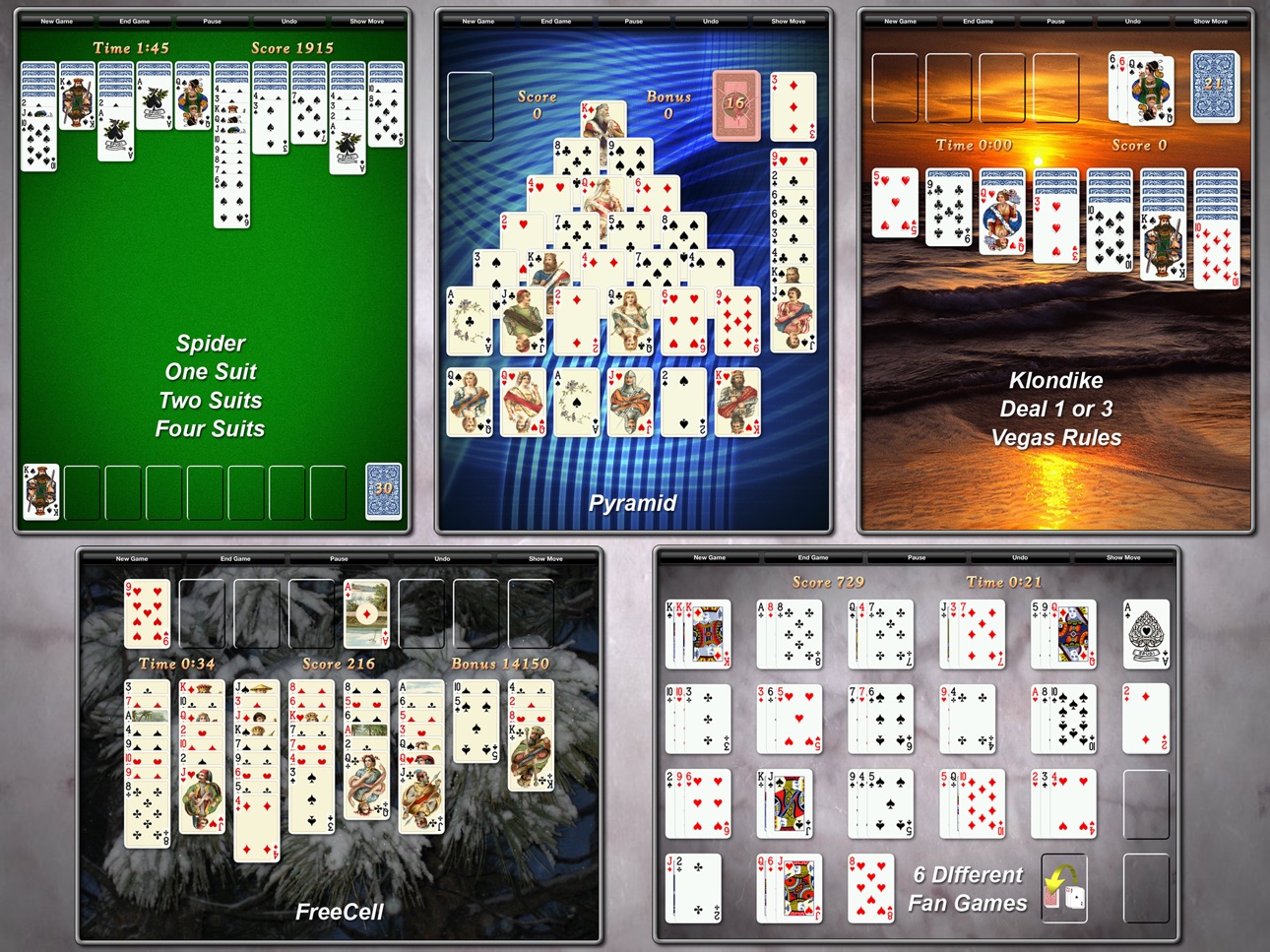
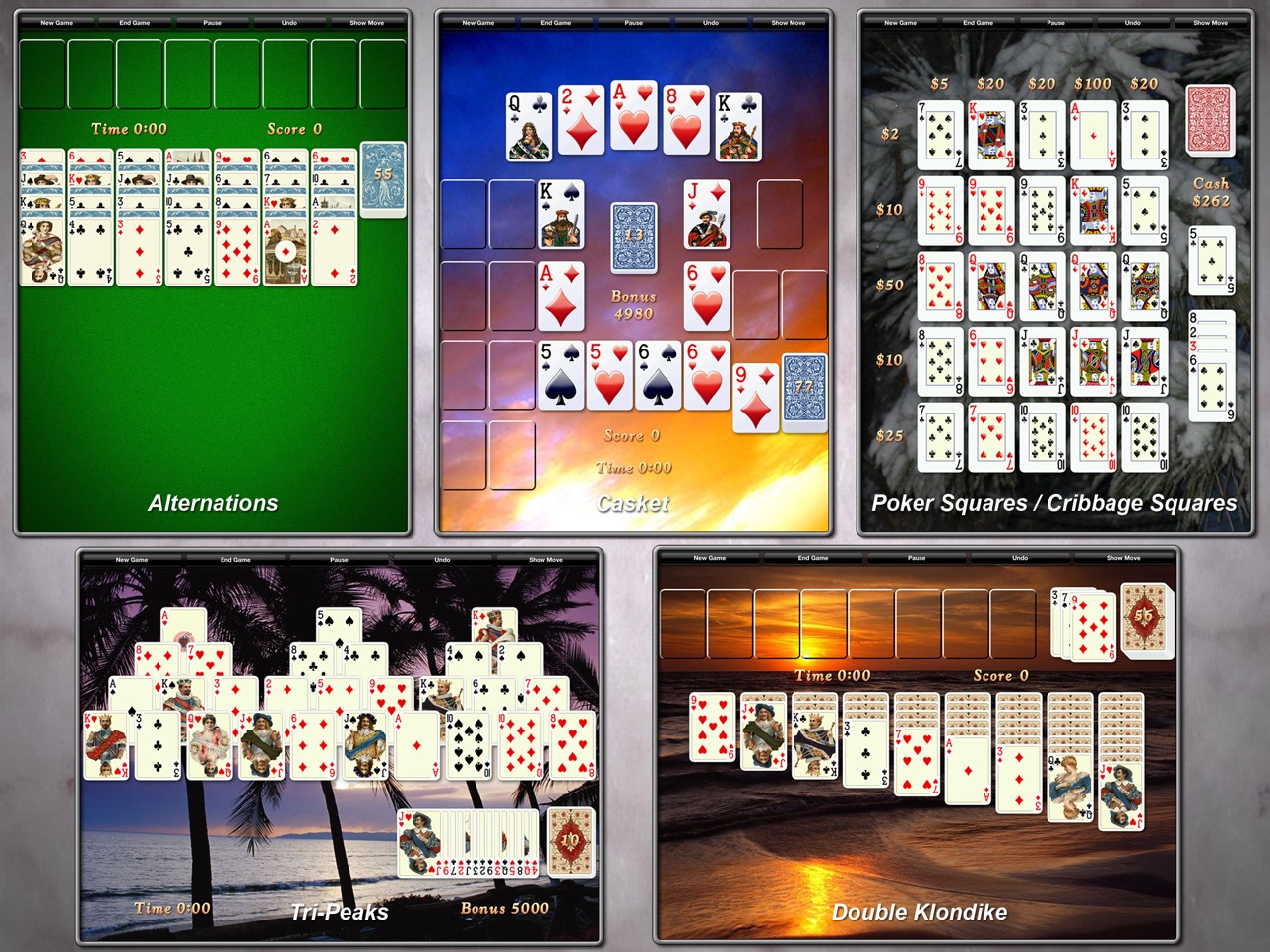
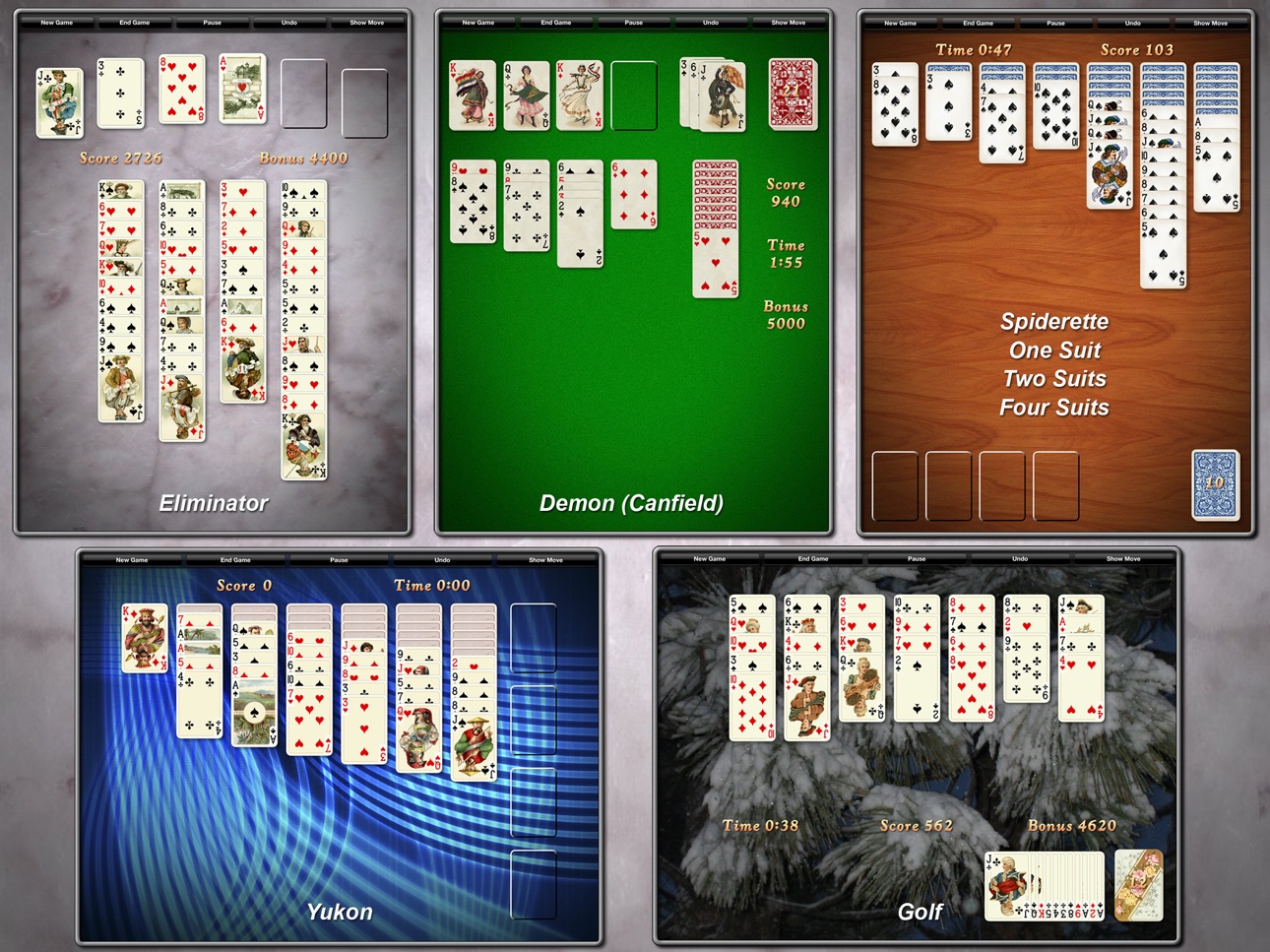
Enjoy your favorite solitaire games such as Klondike, Double Klondike, Spider, FreeCell, Spiderette, Tri-Peaks, Scorpion, Pyramid and many more. This paid version of Solitaire City is completely advert free, contains no In-App Purchases, no tracking and doesn't collect any analytics data. Your privacy is important to us! If you've played thousands of games with the free version of Solitaire City then your scores, statistics and customizations will now be automatically transferred to this paid version so there's no excuse not to upgrade now! Solitaire City is a Universal App! Buy once and play it on all your iOS devices with tablet enhanced high resolution graphics on iPads and detailed HD graphics on all devices that have Retina displays.
Nearly 70 Solitaire Games and Variations
Enjoy one of the largest solitaire collections available:
• Klondike Solitaire (6 variations)
• Spider Solitaire One, Two and Four Suits
• FreeCell Solitaire (7 variations)
• Double Klondike Solitaire (3 variations)
• Spiderette Solitaire One, Two and Four Suits
• Tri-Peaks Solitaire (2 variations)
• Scorpion Solitaire One, Two and Four Suits
• Alternations Solitaire (4 variations)
• Three Shuffles and a Draw
• Demon/Canfield Solitaire (4 variations)
• Poker Squares (4 variations)
• Pyramid Solitaire (4 variations)
• Cribbage Squares (3 variations)
• Golf Solitaire (4 variations)
• Casket Solitaire (2 variations)
• Eliminator Solitaire (3 variations)
• Yukon Solitaire (3 variations)
• La Belle Lucie
• Demon Fan
• Shamrocks
• Fan
• Super Flower Garden
• Baker's Dozen Solitaire
• Blind Alleys Solitaire (2 variations)
• Accordion Solitaire (2 variations)
Solitaire City is played against the clock for points. The faster you complete a game, the higher your score. Think you have an epic score? Then take a look at the numerous Game Center leaderboards to see how it compares with players from all around the world.
A unique training system is included that teaches you the game rules and points out valid moves as you play. No more confusing rules to read. Learn new solitaire games as you play!
Solitaire City Features:
• No adverts or In-App purchases
• Universal iPhone and iPad solitaire app
• Smooth tap or drag card gameplay
• Classic Klondike solitaire (patience)
• Windows Solitaire rule numbers.
• Beautiful HD graphics for all Retina displays
• Enhanced HD graphics on iPad
• Play solitaire in portrait or landscape
• Rotate your device during play
• Stunning card animations and visual effects
• Fast timed scoring system
• Game Center leaderboards & achievements
• Interactive solitaire training system
• Hint / Suggest Move button
• Detailed solitaire statistics
• Listen to your music while playing
• Fun sound effects and customizable sound themes
• Custom card backs and backgrounds
• Use photos from your album as card backgrounds or card backs
• Multiple card deck styles
• Replay the same solitaire deal anytime
• Unlimited undo moves
• Automatically saves your game
• Left-handed and right-handed play options
Notes:
• Three Shuffles and a Draw and La Belle Lucie appear under the Fan Games section.
• Enable Confirm New/End Game in Settings if you want confirmation before ending a game.
• Prefer playing solitaire in bed? Lock the screen orientation to portrait or landscape in Settings.
• You can either drag cards onto other cards or use the Tap to Move feature - tap on a card to highlight it grey and then tap where you want it to move to. You can turn Tap to Move off from the Solitaire City Settings screen if you always drag cards.
Try our other games "Yatzy Master", "10 Pin Shuffle" and "Silly Saucers", also available on the App Store.
Capabilities
Game Center
Accessibility
ipadiphonemacrealityDevicetvoswatch
Version history 25 versions
Build 885701609v7.322026-05-15 22:57:09
This version of Solitaire City fixes a few bugs:
1) Sometimes during a game, when the status bar was turned on, the cards would be positioned too high up the screen and be obscured by the button bar at the top.
2) If you ended a game with time left on the Show Move button then the number would still be visible when you started the next game.
3) On iOS 26, tapping on an App on the More Games screen didn't open the App Store. Same problem when tapping Rate on App Store, Tell a Friend or Buy Ad Free version.
Solitaire City 7.31 added the following new features:
1) The Show Move button now displays the number of seconds remaining before it becomes available again.
2) Time taken is now displayed to the right of Last Score on the leaderboards.
3) If you’re on a Winning Streak then your Current Losing Streak will be zero so this isn’t displayed anymore in the stats if redundant (and vice versa).
4) Reset Stats for All Games now also sets the Total of All Games Played back to zero.
Bug Fixes in v7.31
1) The Demon Slayer achievement wasn’t awarded in the two new Superior Canfield rules.
2) Sometimes the Show Move button would be available even if turned off in the game settings.
3) The vertical spacing between cards on iPads was too large after a fresh install of the app.
4) Minor bug fixes.
Build 882126603v7.312026-05-05 23:18:50
This version of Solitaire City adds the following new features:
1) The Show Move button now displays the number of seconds remaining before it becomes available again.
2) Time taken is now displayed to the right of Last Score on the leaderboards.
3) If you’re on a Winning Streak then your Current Losing Streak will be zero so this isn’t displayed anymore in the stats if redundant (and vice versa).
4) Reset Stats for All Games now also sets the Total of All Games Played back to zero.
Bug Fixes in v7.31
1) The Demon Slayer achievement wasn’t awarded in the two new Superior Canfield rules.
2) Sometimes the Show Move button would be available even if turned off in the game settings.
3) The vertical spacing between cards on iPads was too large after a fresh install of the app.
4) Minor bug fixes.
Build 860288770v7.302024-08-10 14:19:28
1) Added two new versions of Demon, called "Superior Canfield" which is easier than Demon in that all the cards are dealt face up to the demon and empty spaces in the tableau are not automatically filled from the Demon.
2) Fixed a bug in Demon where sometimes you could place an Ace on the foundations even though the base card first dealt was different.
3) "Card Rotations" On/Off switch is back in the Settings screen.
4) Added a Card "Dragging Height" option in the Settings screen that allows you to adjust the visual height of the cards above the play area when they're dragged around the screen. This adjusts the appearance of the cast shadows.
Build 859490366v7.252023-08-31 05:49:43
1) The 7.24 update would crash after creating a new background or card back using the camera or from the photo album.
2) Removed "Card Rotations" and "Card Shadows" from the Settings screen that appears when you press the cog wheel during game play.
3) New backgrounds - Aged Wood, Kittens, Puppies and Dolphins.
Bug Fixes in 7.24
1) Game Center stopped working when updating iOS because a "What's New in Game Center" screen would briefly appear and then disappear behind the user interface preventing the "Continue" button from being pressed.
2) On iOS 16, if you paused the game and changed your device orientation then the screen would mess up.
3) If you replayed a game with scoring turned off and then won the game and then chose to play another game, the same cards would be dealt again.
4) Some of the help message boxes were lingering around during Training.
Build 859161092v7.242023-08-26 18:06:51
1) New backgrounds - Aged Wood, Kittens, Puppies and Dolphins.
Bug Fixes
1) Game Center stopped working when updating iOS because a "What's New in Game Center" screen would briefly appear and then disappear behind the user interface preventing the "Continue" button from being pressed.
2) On iOS 16, if you paused the game and changed your device orientation then the screen would mess up.
3) If you replayed a game with scoring turned off and then won the game and then chose to play another game, the same cards would be dealt again.
4) Some of the help message boxes were lingering around during Training.
Build 850052491v7.232022-06-12 16:24:56
1) Tapping on Reset Statistics would freeze the game on newer devices running iOS 15.
2) Selecting “Use Another App” from the “Tell Your Friends” screen would freeze the game on newer devices running iOS 15.
3) Sometimes the buttons at the top of the screen would become unresponsive after the Game Over message displayed.
Build 842189976v7.222021-07-13 17:57:43
1) Now works on macOS Silicon devices.
2) The font size has been increased.
3) You can now adjust or mute the sound effects volume when you pause the game.
4) The volume slider on the Settings screen now becomes grayed out when sound effects are turned off to avoid confusion when the sound stops working.
Bug Fixes
1) If you turned off Game Center in Settings then other random text in Settings would be grayed out.
2) The Demon card layout has been moved further down the screen so that when you touch a foundation to reveal the base card, it doesn’t get covered by the buttons at the top of the screen anymore.
Build 842174257v7.212021-05-12 08:33:02
1) If you don’t like the new Daily and Weekly leaderboards that reset at midnight then you can go back to the old 24 hour and 7 day sliding window leaderboards from Settings, “Game Center” section, “Daily / Weekly Leaderboards”
2) The App Version number can now be found on the Settings screen.
Bug Fixes in Version 7.21
1) Poker Squares, iPad, landscape - the scores were off the left side of the screen.
2) Poker Squares Rule 3 - the reserve pile wasn’t positioned in the correct location.
3) The card layouts were too high up the screen on iOS 10 devices.
Build 840499239v7.202021-05-06 18:18:19
1) Full screen on iPhone X and other notched iPhones.
2) All devices display in their native screen resolution - no more upscaling!
3) Daily leaderboards now reset at midnight each day and Weekly leaderboards reset at midnight each Sunday on iOS 14 (Recurring leaderboards).
4) Yesterday's Best and Last Week's Best leaderboards for each game rule on iOS 14.
5) The Scoring On/Off button has been moved to the Settings screen.
6) Various buttons have been added to the status bar such as Settings, Share and Game Center Dashboard on iOS 14.
Build 832942184v7.132019-10-02 16:30:34
1) Now works on iOS 13 (fixed Landscape Lock chaos).
2) Added Dark Mode support on iOS 13.
3) Added an “Add Friends” button to the Game Center leaderboards.
4) You can now send a download link to friends via WhatsApp and Other Apps as well as Messages and Mail (Tell Your Friends).
5) Fixed a bug in the Demon rules that prevented you moving a single card from the end of a tableau column to a single tableau card on an empty column
Build 824439354v7.122017-11-20 16:29:34
1) Sometimes, on iOS 11, there would be a long pause after pressing the Play button and eventually the game screen would appear.
2) Fixed up a lot of visual problems with various screen layouts on iPhone X.
3) Added some more country flags.
Build 824290464v7.112017-11-06 05:14:50
1) iOS 11 compatible!
2) The game would crash quite regularly after the 7.10 update.
3) The Scoring Off button wouldn't remember it's setting.
4) Total of All Games Played got reset to zero in 7.10 (this will be recovered)
5) The Play button would sometimes stop working.
Build 822084595v7.102017-11-04 22:46:49
1) iOS 11 compatible!
2) The Play button would sometimes stop working.
Build 821841306v7.022017-04-21 13:11:31
If you had Game Center turned off then it would turn back on each time you restarted the App.
What's New in v7.01 ?
1) You can now lock the Training button and the Scoring On/Off button from the User Interface section of the Settings screen to prevent fat fingers accidentally pressing them.
Bug Fixes in 7.01
1) Some data in the previous version caused the App Store to incorrectly state that the App contains English, French, German, Italian, Japanese and Spanish language support when in fact it only contains English.
2) If you played Spider or Poker Squares in landscape orientation then the empty card stacks overlapped each other. Now they look much better.
3) In Cribbage Squares, a Flush was only scored when all five cards were the same suit for 5 points whereas the correct rules should score 4 points if the four cards excluding the Starter are the same suit. This has been corrected.
Build 821809624v7.012017-04-19 20:36:02
1) You can now lock the Training button and the Scoring On/Off button from the User Interface section of the Settings screen to prevent fat fingers accidentally pressing them.
Bug Fixes in 7.01
1) Some data in the previous version caused the App Store to incorrectly state that the App contains English, French, German, Italian, Japanese and Spanish language support when in fact it only contains English.
2) If you played Spider or Poker Squares in landscape orientation then the empty card stacks overlapped each other. Now they look much better.
3) In Cribbage Squares, a Flush was only scored when all five cards were the same suit for 5 points whereas the correct rules should score 4 points if the four cards excluding the Starter are the same suit. This has been corrected.
Build 819219504v7.002016-10-11 15:42:36
1) A new game; Accordion!
2) Blind Alleys was only letting you move a full column to an empty space when it should have allowed you to break up a column and move it to an empty space.
Build 818675682v6.002016-09-13 20:14:42
1) A new game; Blind Alleys with 2 rule variations!
2) Added a way for you to reset your stats from the Statistics section at the bottom of the Settings Screen.
Bug Fixes in 6.00
1) Since the last update, sometimes Spider and Spiderette Rule 3 would suggest dumb moves at the end of a game.
If you've reviewed or rated a previous version of Solitaire City then please take a few seconds to re-send it as ratings are reset with each new update. Your old review will still be present when you press the "Write a Review" link on the Solitaire City review page.
Build 818225999v5.102016-07-28 17:33:11
1) If you've been playing the free version of Solitaire City then your scores, statistics, custom backgrounds and card backs will now all be transferred automatically to this Ad-Free version so you won't lose any valuable data (iOS 8 and newer). Just make sure you download the free Solitaire City 5.10 version and open it once before playing this Ad-Free version to transfer you scores over.
2) If you play with the scoring/timer turned off then you'll now be asked whether you want to play another game after a win rather than being taken back to the hi-scores screen which never made much sense if you're not playing for points.
Bug Fixes
1) Sometimes Scorpion Rule 3 would think the game was blocked when valid moves were still available.
2) If you changed your device orientation while playing Spider, Baker's Dozen or Double Klondike then the translucency in the center of the empty spaces disappeared.
3) On an iPhone, if you tried to select an image for a custom background from your Photo Album while in landscape orientation, the display would flip back to portrait making it impossible to select a landscape image.
If you've reviewed or rated a previous version of Solitaire City then please take a few seconds to re-send it as ratings are reset with each new update. Your old review will still be present when you press the "Write a Review" link on the Solitaire City review page. Thanks, it really helps!
Build 816904408v5.012016-04-06 21:12:05
Bug Fixes in 5.01 (a few crept into the 5.00 update)
1) If you won a game of Tri-Peaks then the bonus for the remaining cards wasn't added to your score.
2) Cribbage Squares scores weren't being remembered.
3) If you won a game when scoring was turned off then it would still ask you to enter your name for the hi-score tables.
4) The card layout was messed up in Baker's Dozen when the left handed option was turned on.
What's New in 5.00 & 5.01
1) New Games! Baker's Dozen and Scorpion One, Two and Four Suits.
2) Added winning and losing streaks statistics for each game and rule number (at the bottom of each hi-score table).
3) Added a link to the Game Center Achievements on the game selection screen.
4) There's now a Frequently Asked Questions page accessible from the Settings screen.
5) Added a way to tell friends about the game via e-mail or text message from the Settings screen.
Bug Fixes in 5.00
1) The game was a mess on iPhone 6 Plus devices running iOS 9. The game was accidentally using non-retina card graphics and backgrounds making them look blurry and the cards were covered by the shortcut bar. This has been fixed.
2) If you tapped on a card to select it and then flipped the phone's orientation then the card would end up in the wrong position.
If you've reviewed or rated a previous version of Solitaire City then please take a few seconds to re-send it as ratings are reset with each new update. Your old review will still be present when you press the "Write a Review" link on the Solitaire City review page.
Build 816646558v5.002016-03-29 00:54:19
1) New Games! Baker's Dozen and Scorpion One, Two and Four Suits.
2) Added winning and losing streaks statistics for each game and rule number (at the bottom of each hi-score table).
3) Added a link to the Game Center Achievements on the game selection screen.
4) There's now a Frequently Asked Questions page accessible from the Settings screen.
5) Added a way to tell friends about the game via e-mail or text message from the Settings screen.
Bug Fixes:
1) The game was a mess on iPhone 6 Plus devices running iOS 9. The game was accidentally using non-retina card graphics and backgrounds making them look blurry and the cards were covered by the shortcut bar. This has been fixed.
2) If you tapped on a card to select it and then flipped the phone's orientation then the card would end up in the wrong position.
If you've reviewed or rated a previous version of Solitaire City then please take a few seconds to re-send it as ratings are reset with each new update. Your old review will still be present when you press the "Write a Review" link on the Solitaire City review page.
Build 816086669v4.322016-01-26 17:15:44
1) When you won a game, sometimes the buttons in the message box would be offset to the left.
2) The 4 of Hearts on the new iPad "Solitaire City Clean Large" cardset had an extra heart on it like a 5.
3) Improved the card spacing on iPads when using cardsets with large numbers.
If you've reviewed or rated a previous version of Solitaire City then please take a few seconds to re-send it as ratings are reset with each new update. You won't need to re-write your review, you just need to rate this new version and press the send button again on the App Store review page. Thanks!
Build 815676308v4.312016-01-16 04:31:46
1) The Facebook icons will now only appear if you have the Facebook App installed on your device.
2) Improved the appearance of card animations while dragging a long stack around the screen.
3) Added a new cardset for iPads called "Solitaire City Clean Large". It's the same as the default iPhone "Solitaire City Clean" cardset but the numbers are huge on iPads. Good for people with really bad eyesight.
Bug Fixes in v4.31
1) If you launched the App in landscape mode on an iPhone 6 plus running iOS 9 then the result wasn't pretty.
2) Sometimes, while frantically tapping on cards to finish the game in FreeCell or tapping on the auto-finish flag, a card would end up on the wrong stack blocking the game.
3) The name you entered for the hi-scores would sometimes pickup extra characters at the end.
btw, there were no adverts in v4.30 as some iTunes comments claim. A news screen displayed about our new game Silly Saucers and it only displayed once.
Build 814626266v4.302015-12-17 06:50:32
1) Added the option to Tap on cards to move them as an alternative to dragging.
2) You can now change to a different solitaire game or a different game rule from the in game settings screen.
3) Four new backgrounds - Blue Condensation, Golden Marble, Green Grass and Red Hot.
4) Empty spaces are more visible on certain backgrounds.
5) Higher resolution backgrounds on retina phones.
6) Added the option to Share your wins on Facebook. Please Like Solitaire City!
7) Faster 64-bit code and iOS 9 compatible.
Bug Fixes in v4.30
1) The loading screen was rotated in the wrong direction when launching the game in landscape on iPads running iOS 8.3 and higher.
2) There were problems moving cards on iPads and iPhone 6 Plus when this happened.
To use the new Tap to Move feature, tap on a card(s) that you want to move and it will turn grey. Then tap on where you want it to go to. You can turn this feature off from the Solitaire City Settings screen if you prefer to drag cards.
Build 810772139v4.222014-12-17 02:14:20
What's New in v4.22
1) Moved the in-game Settings icon from the right hand side of the toolbar to the left because some people have said that they accidentally press it when they mean to press the Show Move button.
Bug Fixes in v4.22
1) If Game Center was disabled in the Settings, then Show Achievements was greyed out but so was Sound Theme.
2) On the Sound Themes page, you could tap on the message about creating a Custom Sound Theme and it would display a check mark next to it as though you had selected it as a Theme.
3) If you chose a different card set while playing Spider or Double Klondike on a retina iPad then it would forget which card set you'd selected when you re-opened the App.
4) Sometimes the in-game buttons at the top of the screen would be pushed down the screen too far after the green in-call status bar had appeared.
5) If you won a game of FreeCell Rule 1 to get the "First FreeCell" achievement then you would be awarded the "FreeCell Freak" achievement too.
6) It wasn't possible to unlock the Klondike Champ achievement.
Build 799412672v4.212014-11-15 23:46:32
1) There was a large gap between the new in-game Settings button and Show Move button in Left Handed mode.
2) Using a right swipe gesture to close the new in-game Settings screen could get messy. This swipe has now been disabled.
3) When you switched from Right handed to Left handed from the in-game Settings, the game buttons on the status bar didn't flip their positions.
Price history by region
Currency
Show
Columns
Search
Availability 168 of 172 storefronts
| Region | Language | Price | Ratings | Avg | Version |
|---|---|---|---|---|---|
| US | en-US | USD 4.99 | 4.3k | 4.6 | 7.32 |
| DE | de-DE | EUR 5.99 | 626 | 4.6 | 7.32 |
| GB | en-GB | GBP 4.99 | 556 | 4.7 | 7.32 |
| CA | en-CA | CAD 6.99 | 424 | 4.6 | 7.32 |
| FR | fr-FR | EUR 5.99 | 399 | 4.7 | 7.32 |
| AU | en-AU | AUD 7.99 | 368 | 4.7 | 7.32 |
| JP | ja | JPY 800 | 276 | 4.6 | 7.32 |
| CH | de-CH | CHF 4 | 227 | 4.6 | 7.32 |
| IT | it | EUR 5.99 | 183 | 4.7 | 7.32 |
| NL | nl | EUR 5.99 | 154 | 4.7 | 7.32 |
| ES | es-ES | EUR 5.99 | 121 | 4.7 | 7.32 |
| AT | de-DE | EUR 5.99 | 82 | 4.7 | 7.32 |
| MX | es-MX | MXN 99 | 70 | 4.9 | 7.32 |
| RU | ru | RUB 449 | 66 | 4.8 | 7.32 |
| SE | sv | SEK 69 | 62 | 4.5 | 7.32 |
| NO | en-GB | NOK 59 | 58 | 4.7 | 7.32 |
| BE | en-GB | EUR 5.99 | 56 | 4.7 | 7.32 |
| NZ | en-AU | NZD 9.99 | 34 | 4.8 | 7.32 |
| DK | en-GB | DKK 39 | 29 | 4.7 | 7.32 |
| GR | en-GB | EUR 5.99 | 21 | 4.8 | 7.32 |
| BR | pt-BR | BRL 29.9 | 20 | 4.8 | 7.32 |
| PT | pt-PT | EUR 5.99 | 20 | 4.8 | 7.32 |
| PL | en-GB | PLN 24.99 | 19 | 4.9 | 7.32 |
| HU | en-GB | HUF 1990 | 17 | 4.9 | 7.32 |
| TR | en-GB | TRY 249.99 | 17 | 4.7 | 7.32 |
| CZ | en-GB | CZK 129 | 15 | 5.0 | 7.32 |
| LU | en-GB | EUR 5.99 | 15 | 4.9 | 7.32 |
| CL | es-MX | CLP 5990 | 12 | 5.0 | 7.32 |
| AR | es-MX | USD 4.99 | 11 | 4.9 | 7.32 |
| IE | en-GB | EUR 5.99 | 11 | 4.3 | 7.32 |
| IL | en-GB | ILS 17.9 | 11 | 4.8 | 7.32 |
| IN | en-GB | INR 499 | 11 | 4.2 | 7.32 |
| TH | en-GB | THB 199 | 11 | 4.6 | 7.32 |
| KW | en-GB | USD 4.99 | 10 | 5.0 | 7.32 |
| RO | en-GB | RON 29.99 | 9 | 4.6 | 7.32 |
| SK | en-GB | EUR 5.99 | 9 | 4.0 | 7.32 |
| CO | es-MX | COP 24900 | 8 | 5.0 | 7.32 |
| HK | zh-Hant-HK | HKD 38 | 8 | 4.6 | 7.32 |
| UA | en-GB | USD 5.99 | 7 | 5.0 | 7.32 |
| AE | en-GB | AED 19.99 | 6 | 4.2 | 7.32 |
| SA | en-GB | SAR 19.99 | 6 | 5.0 | 7.32 |
| HR | en-GB | EUR 5.99 | 5 | 5.0 | 7.32 |
| IS | en-GB | USD 5.99 | 5 | 4.2 | 7.32 |
| LV | en-GB | EUR 5.99 | 5 | 4.6 | 7.32 |
| SG | en-GB | SGD 6.98 | 5 | 4.8 | 7.32 |
| CY | en-GB | EUR 5.99 | 4 | 4.3 | 7.32 |
| FI | en-GB | EUR 5.99 | 4 | 3.8 | 7.32 |
| ID | en-GB | IDR 89000 | 4 | 4.5 | 7.32 |
| LT | en-GB | EUR 5.99 | 4 | 5.0 | 7.32 |
| SI | en-GB | EUR 5.99 | 4 | 4.3 | 7.32 |
| DO | es-MX | USD 4.99 | 3 | 5.0 | 7.32 |
| EG | en-GB | EGP 249.99 | 3 | 4.7 | 7.32 |
| GT | es-MX | USD 4.99 | 3 | 5.0 | 7.32 |
| MY | en-GB | MYR 22.9 | 3 | 5.0 | 7.32 |
| PE | es-MX | PEN 22.9 | 3 | 5.0 | 7.32 |
| PH | en-GB | PHP 299 | 3 | 5.0 | 7.32 |
| TW | zh-Hant-TW | TWD 150 | 3 | 5.0 | 7.32 |
| BH | en-GB | USD 4.99 | 2 | 5.0 | 7.32 |
| CR | es-MX | USD 4.99 | 2 | 3.0 | 7.32 |
| KZ | en-GB | KZT 2990 | 2 | 4.5 | 7.32 |
| LB | en-GB | USD 4.99 | 2 | 4.5 | 7.32 |
| UY | en-GB | USD 4.99 | 2 | 5.0 | 7.32 |
| VE | es-MX | USD 4.99 | 2 | 4.5 | 7.32 |
| AL | en-GB | USD 5.99 | 1 | 5.0 | 7.32 |
| BG | en-GB | EUR 5.99 | 1 | 5.0 | 7.32 |
| BO | es-MX | USD 4.99 | 1 | 5.0 | 7.32 |
| BY | en-GB | USD 5.99 | 1 | 5.0 | 7.32 |
| EC | es-MX | USD 4.99 | 1 | 5.0 | 7.32 |
| HN | es-MX | USD 4.99 | 1 | 3.0 | 7.32 |
| JO | en-GB | USD 4.99 | 1 | 5.0 | 7.32 |
| KG | en-GB | USD 4.99 | 1 | 5.0 | 7.32 |
| KH | en-GB | USD 4.99 | 1 | 5.0 | 7.32 |
| MO | zh-Hant-HK | USD 4.99 | 1 | 5.0 | 7.32 |
| NI | es-MX | USD 4.99 | 1 | 5.0 | 7.32 |
| OM | en-GB | USD 4.99 | 1 | 5.0 | 7.32 |
| PA | es-MX | USD 4.99 | 1 | 5.0 | 7.32 |
| SV | es-MX | USD 4.99 | 1 | 4.0 | 7.32 |
| TC | en-GB | USD 4.99 | 1 | 5.0 | 7.32 |
| VN | en-GB | VND 149000 | 1 | 3.0 | 7.32 |
| AG | en-GB | USD 4.99 | 0 | — | 7.32 |
| AI | en-GB | USD 4.99 | 0 | — | 7.32 |
| AM | en-GB | USD 5.99 | 0 | — | 7.32 |
| AO | en-GB | USD 4.99 | 0 | — | 7.32 |
| AZ | en-GB | USD 5.99 | 0 | — | 7.32 |
| BA | en-GB | EUR 5.99 | 0 | — | 7.32 |
| BB | en-GB | USD 5.99 | 0 | — | 7.32 |
| BF | en-GB | USD 4.99 | 0 | — | 7.32 |
| BJ | en-GB | USD 5.99 | 0 | — | 7.32 |
| BN | en-GB | USD 4.99 | 0 | — | 7.32 |
| BS | en-GB | USD 4.99 | 0 | — | 7.32 |
| BT | en-GB | USD 4.99 | 0 | — | 7.32 |
| BW | en-GB | USD 4.99 | 0 | — | 7.32 |
| BZ | en-GB | USD 4.99 | 0 | — | 7.32 |
| CD | en-GB | USD 4.99 | 0 | — | 7.32 |
| CG | en-GB | USD 4.99 | 0 | — | 7.32 |
| CI | fr-FR | USD 5.99 | 0 | — | 7.32 |
| CM | fr-FR | USD 5.99 | 0 | — | 7.32 |
| CV | en-GB | USD 4.99 | 0 | — | 7.32 |
| DM | en-GB | USD 4.99 | 0 | — | 7.32 |
| DZ | en-GB | USD 4.99 | 0 | — | 7.32 |
| EE | en-GB | EUR 5.99 | 0 | — | 7.32 |
| FJ | en-GB | USD 4.99 | 0 | — | 7.32 |
| FM | en-GB | USD 4.99 | 0 | — | 7.32 |
| GD | en-GB | USD 4.99 | 0 | — | 7.32 |
| GE | en-GB | USD 5.99 | 0 | — | 7.32 |
| GH | en-GB | USD 5.99 | 0 | — | 7.32 |
| GM | en-GB | USD 4.99 | 0 | — | 7.32 |
| GW | en-GB | USD 4.99 | 0 | — | 7.32 |
| GY | en-GB | USD 4.99 | 0 | — | 7.32 |
| IQ | en-GB | USD 4.99 | 0 | — | 7.32 |
| JM | en-GB | USD 4.99 | 0 | — | 7.32 |
| KE | en-GB | USD 5.99 | 0 | — | 7.32 |
| KN | en-GB | USD 4.99 | 0 | — | 7.32 |
| KY | en-GB | USD 4.99 | 0 | — | 7.32 |
| LA | en-GB | USD 4.99 | 0 | — | 7.32 |
| LC | en-GB | USD 4.99 | 0 | — | 7.32 |
| LK | en-GB | USD 4.99 | 0 | — | 7.32 |
| LR | en-GB | USD 4.99 | 0 | — | 7.32 |
| LY | en-GB | USD 4.99 | 0 | — | 7.32 |
| MA | en-GB | USD 4.99 | 0 | — | 7.32 |
| MD | en-GB | USD 5.99 | 0 | — | 7.32 |
| ME | en-GB | EUR 4.99 | 0 | — | 7.32 |
| MG | en-GB | USD 4.99 | 0 | — | 7.32 |
| MK | en-GB | USD 4.99 | 0 | — | 7.32 |
| ML | en-GB | USD 4.99 | 0 | — | 7.32 |
| MM | en-GB | USD 4.99 | 0 | — | 7.32 |
| MR | en-GB | USD 4.99 | 0 | — | 7.32 |
| MS | en-GB | USD 4.99 | 0 | — | 7.32 |
| MT | en-GB | EUR 5.99 | 0 | — | 7.32 |
| MU | en-GB | USD 5.99 | 0 | — | 7.32 |
| MV | en-GB | USD 4.99 | 0 | — | 7.32 |
| MW | en-GB | USD 4.99 | 0 | — | 7.32 |
| MZ | en-GB | USD 4.99 | 0 | — | 7.32 |
| NA | en-GB | USD 4.99 | 0 | — | 7.32 |
| NE | en-GB | USD 4.99 | 0 | — | 7.32 |
| NG | en-GB | NGN 7900 | 0 | — | 7.32 |
| NP | en-GB | USD 5.99 | 0 | — | 7.32 |
| NR | en-GB | USD 4.99 | 0 | — | 7.32 |
| PG | en-GB | USD 4.99 | 0 | — | 7.32 |
| PK | en-GB | PKR 1300 | 0 | — | 7.32 |
| PW | en-GB | USD 4.99 | 0 | — | 7.32 |
| PY | es-MX | USD 4.99 | 0 | — | 7.32 |
| QA | en-GB | QAR 19.99 | 0 | — | 7.32 |
| RS | en-GB | EUR 5.99 | 0 | — | 7.32 |
| RW | en-GB | USD 4.99 | 0 | — | 7.32 |
| SB | en-GB | USD 4.99 | 0 | — | 7.32 |
| SC | en-GB | USD 4.99 | 0 | — | 7.32 |
| SL | en-GB | USD 4.99 | 0 | — | 7.32 |
| SN | en-GB | USD 5.99 | 0 | — | 7.32 |
| SR | en-GB | USD 4.99 | 0 | — | 7.32 |
| ST | en-GB | USD 4.99 | 0 | — | 7.32 |
| SZ | en-GB | USD 4.99 | 0 | — | 7.32 |
| TD | en-GB | USD 4.99 | 0 | — | 7.32 |
| TJ | en-GB | USD 4.99 | 0 | — | 7.32 |
| TM | en-GB | USD 4.99 | 0 | — | 7.32 |
| TN | en-GB | USD 4.99 | 0 | — | 7.32 |
| TO | en-GB | USD 4.99 | 0 | — | 7.32 |
| TT | en-GB | USD 4.99 | 0 | — | 7.32 |
| TZ | en-GB | TZS 14900 | 0 | — | 7.32 |
| UG | en-GB | USD 5.99 | 0 | — | 7.32 |
| UZ | en-GB | USD 4.99 | 0 | — | 7.32 |
| VC | en-GB | USD 4.99 | 0 | — | 7.32 |
| VG | en-GB | USD 4.99 | 0 | — | 7.32 |
| VU | en-GB | USD 4.99 | 0 | — | 7.32 |
| XK | en-GB | EUR 5.99 | 0 | — | 7.32 |
| YE | en-GB | USD 4.99 | 0 | — | 7.32 |
| ZM | en-GB | USD 5.99 | 0 | — | 7.32 |
| ZW | en-GB | USD 5.99 | 0 | — | 7.32 |
Not available in: AF, CN, GA, KR
Change log 29 changes · EE
✎
releaseNotes updated
This version of Solitaire City fixes a few bugs:
1) Sometimes during a game, when the status bar was turned on, the cards would be positioned too high up the s
✎
description updated
Play classic solitaire card games with Solitaire City advert free - one of the first 500 apps on the original iOS App Store that launched in 2008!
Enjoy your f
✎
subtitle updated
All Your Fave Solitaire Games!
✎
name updated
Solitaire City (Ad Free)
◆
Version 7.32 released
This version of Solitaire City fixes a few bugs:
1) Sometimes during a game, when the status bar was turned on, the cards would be positioned too high up the screen and be obscured by the button bar at the top.
2) If you ended a game with
◆
Version 7.31 released
This version of Solitaire City adds the following new features:
1) The Show Move button now displays the number of seconds remaining before it becomes available again.
2) Time taken is now displayed to the right of Last Score on the leader
◆
Version 7.30 released
1) Added two new versions of Demon, called "Superior Canfield" which is easier than Demon in that all the cards are dealt face up to the demon and empty spaces in the tableau are not automatically filled from the Demon.
2) Fixed a bug in De
◆
Version 7.25 released
1) The 7.24 update would crash after creating a new background or card back using the camera or from the photo album.
2) Removed "Card Rotations" and "Card Shadows" from the Settings screen that appears when you press the cog wheel during g
◆
Version 7.24 released
1) New backgrounds - Aged Wood, Kittens, Puppies and Dolphins.
Bug Fixes
1) Game Center stopped working when updating iOS because a "What's New in Game Center" screen would briefly appear and then disappear behind the user interface preve
◆
Version 7.23 released
1) Tapping on Reset Statistics would freeze the game on newer devices running iOS 15.
2) Selecting “Use Another App” from the “Tell Your Friends” screen would freeze the game on newer devices running iOS 15.
3) Sometimes the buttons at the
◆
Version 7.22 released
1) Now works on macOS Silicon devices.
2) The font size has been increased.
3) You can now adjust or mute the sound effects volume when you pause the game.
4) The volume slider on the Settings screen now becomes grayed out when sound effect
◆
Version 7.21 released
1) If you don’t like the new Daily and Weekly leaderboards that reset at midnight then you can go back to the old 24 hour and 7 day sliding window leaderboards from Settings, “Game Center” section, “Daily / Weekly Leaderboards”
2) The App V
◆
Version 7.20 released
1) Full screen on iPhone X and other notched iPhones.
2) All devices display in their native screen resolution - no more upscaling!
3) Daily leaderboards now reset at midnight each day and Weekly leaderboards reset at midnight each Sunday o
◆
Version 7.13 released
1) Now works on iOS 13 (fixed Landscape Lock chaos).
2) Added Dark Mode support on iOS 13.
3) Added an “Add Friends” button to the Game Center leaderboards.
4) You can now send a download link to friends via WhatsApp and Other Apps as well
◆
Version 7.12 released
1) Sometimes, on iOS 11, there would be a long pause after pressing the Play button and eventually the game screen would appear.
2) Fixed up a lot of visual problems with various screen layouts on iPhone X.
3) Added some more country flags.
◆
Version 7.11 released
1) iOS 11 compatible!
2) The game would crash quite regularly after the 7.10 update.
3) The Scoring Off button wouldn't remember it's setting.
4) Total of All Games Played got reset to zero in 7.10 (this will be recovered)
5) The Play butto
◆
Version 7.10 released
1) iOS 11 compatible!
2) The Play button would sometimes stop working.
◆
Version 7.02 released
If you had Game Center turned off then it would turn back on each time you restarted the App.
What's New in v7.01 ?
1) You can now lock the Training button and the Scoring On/Off button from the User Interface section of the Settings scre
◆
Version 7.01 released
1) You can now lock the Training button and the Scoring On/Off button from the User Interface section of the Settings screen to prevent fat fingers accidentally pressing them.
Bug Fixes in 7.01
1) Some data in the previous version caused
◆
Version 7.00 released
1) A new game; Accordion!
2) Blind Alleys was only letting you move a full column to an empty space when it should have allowed you to break up a column and move it to an empty space.
◆
Version 6.00 released
1) A new game; Blind Alleys with 2 rule variations!
2) Added a way for you to reset your stats from the Statistics section at the bottom of the Settings Screen.
Bug Fixes in 6.00
1) Since the last update, sometimes Spider and Spiderette R
◆
Version 5.10 released
1) If you've been playing the free version of Solitaire City then your scores, statistics, custom backgrounds and card backs will now all be transferred automatically to this Ad-Free version so you won't lose any valuable data (iOS 8 and ne
◆
Version 5.01 released
Bug Fixes in 5.01 (a few crept into the 5.00 update)
1) If you won a game of Tri-Peaks then the bonus for the remaining cards wasn't added to your score.
2) Cribbage Squares scores weren't being remembered.
3) If you won a game when scorin
◆
Version 5.00 released
1) New Games! Baker's Dozen and Scorpion One, Two and Four Suits.
2) Added winning and losing streaks statistics for each game and rule number (at the bottom of each hi-score table).
3) Added a link to the Game Center Achievements on the ga
◆
Version 4.32 released
1) When you won a game, sometimes the buttons in the message box would be offset to the left.
2) The 4 of Hearts on the new iPad "Solitaire City Clean Large" cardset had an extra heart on it like a 5.
3) Improved the card spacing on iPads w
◆
Version 4.31 released
1) The Facebook icons will now only appear if you have the Facebook App installed on your device.
2) Improved the appearance of card animations while dragging a long stack around the screen.
3) Added a new cardset for iPads called "Solitair
◆
Version 4.30 released
1) Added the option to Tap on cards to move them as an alternative to dragging.
2) You can now change to a different solitaire game or a different game rule from the in game settings screen.
3) Four new backgrounds - Blue Condensation, Gold
◆
Version 4.22 released
What's New in v4.22
1) Moved the in-game Settings icon from the right hand side of the toolbar to the left because some people have said that they accidentally press it when they mean to press the Show Move button.
Bug Fixes in v4.22
1)
◆
Version 4.21 released
1) There was a large gap between the new in-game Settings button and Show Move button in Left Handed mode.
2) Using a right swipe gesture to close the new in-game Settings screen could get messy. This swipe has now been disabled.
3) When yo