Home › Productivity

 BB
BB
 USen-USBBen-GB
 BSen-GB
 BWen-GB
 GHen-GB
 GYen-GB
 JMen-GB
 NGen-GB
 TTen-GB
 ZWen-GB
 AINot Available
 AONot Available
 ARNot Available
 BONot Available
 BRNot Available
 BZNot Available
 CINot Available
 CLNot Available
 CRNot Available
 CVNot Available
 DMNot Available
 DONot Available
 DZNot Available
 ECNot Available
 GDNot Available
 GTNot Available
 GWNot Available
 HNNot Available
 KENot Available
 KNNot Available
 KYNot Available
 LCNot Available
 MANot Available
 MSNot Available
 MUNot Available
 MZNot Available
 NANot Available
 NINot Available
 PANot Available
 PENot Available
 PYNot Available
 SCNot Available
 SRNot Available
 STNot Available
 SVNot Available
 SZNot Available
 TCNot Available
 TZNot Available
 UGNot Available
 UYNot Available
 VCNot Available
 VENot Available
 VGNot Available
 ZMNot Available
10 of 54 storefronts
Content in en-US
Content in en-US
Information
Preview 2 platforms
iPhone 8 images
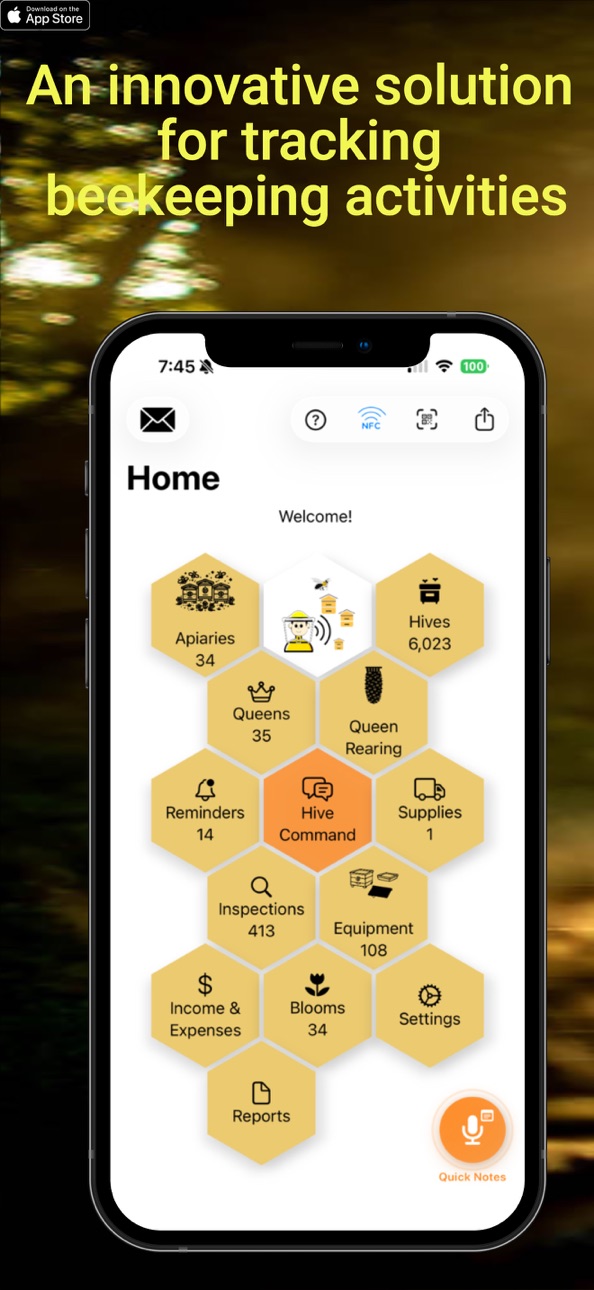
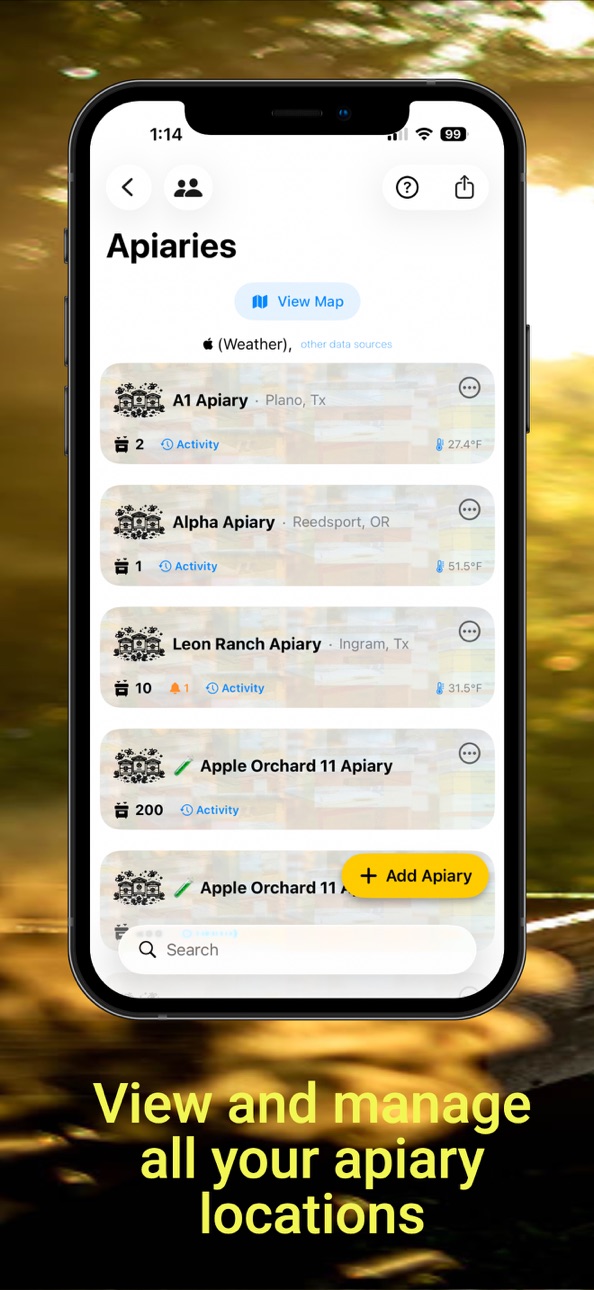

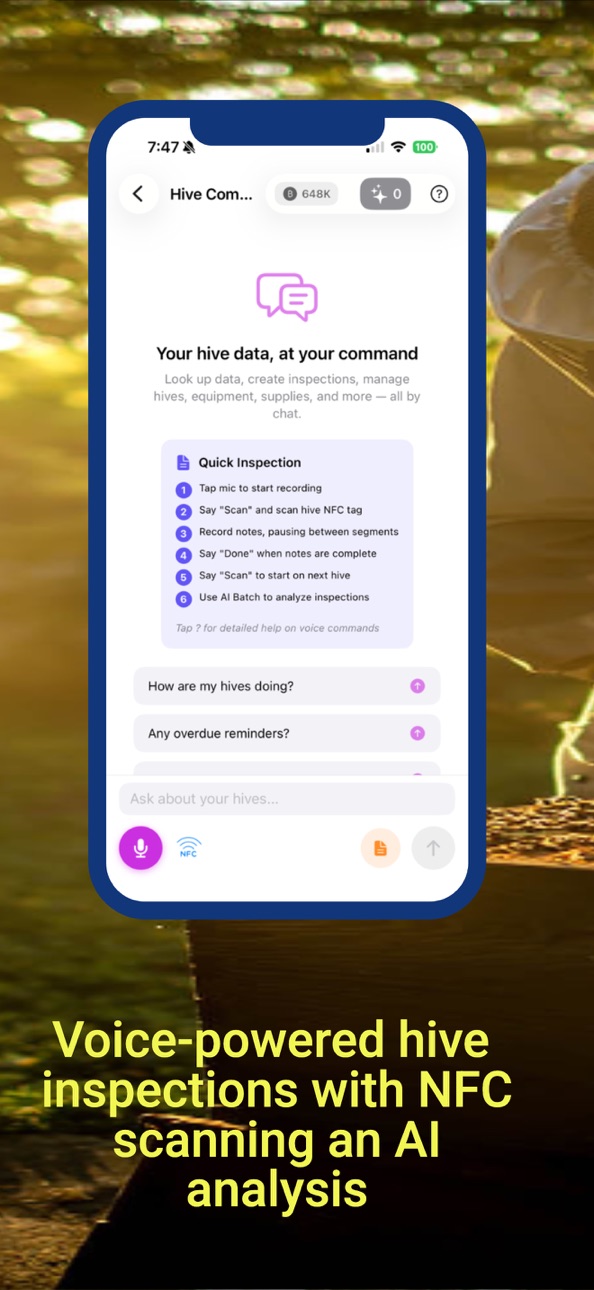

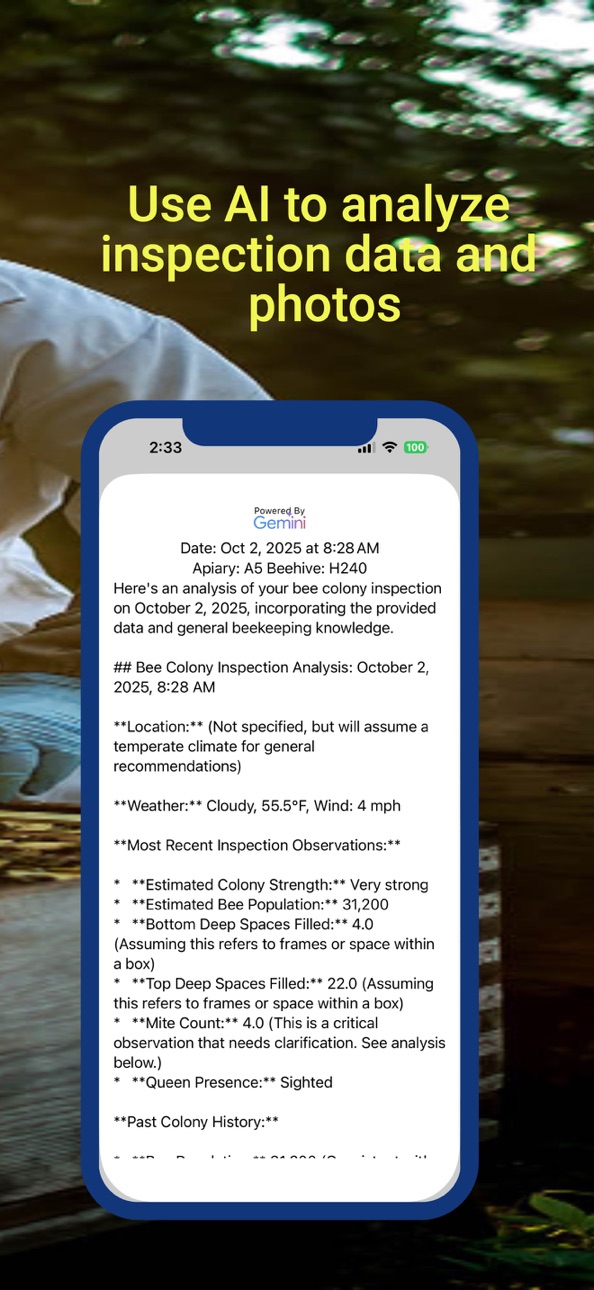


iPad 5 images

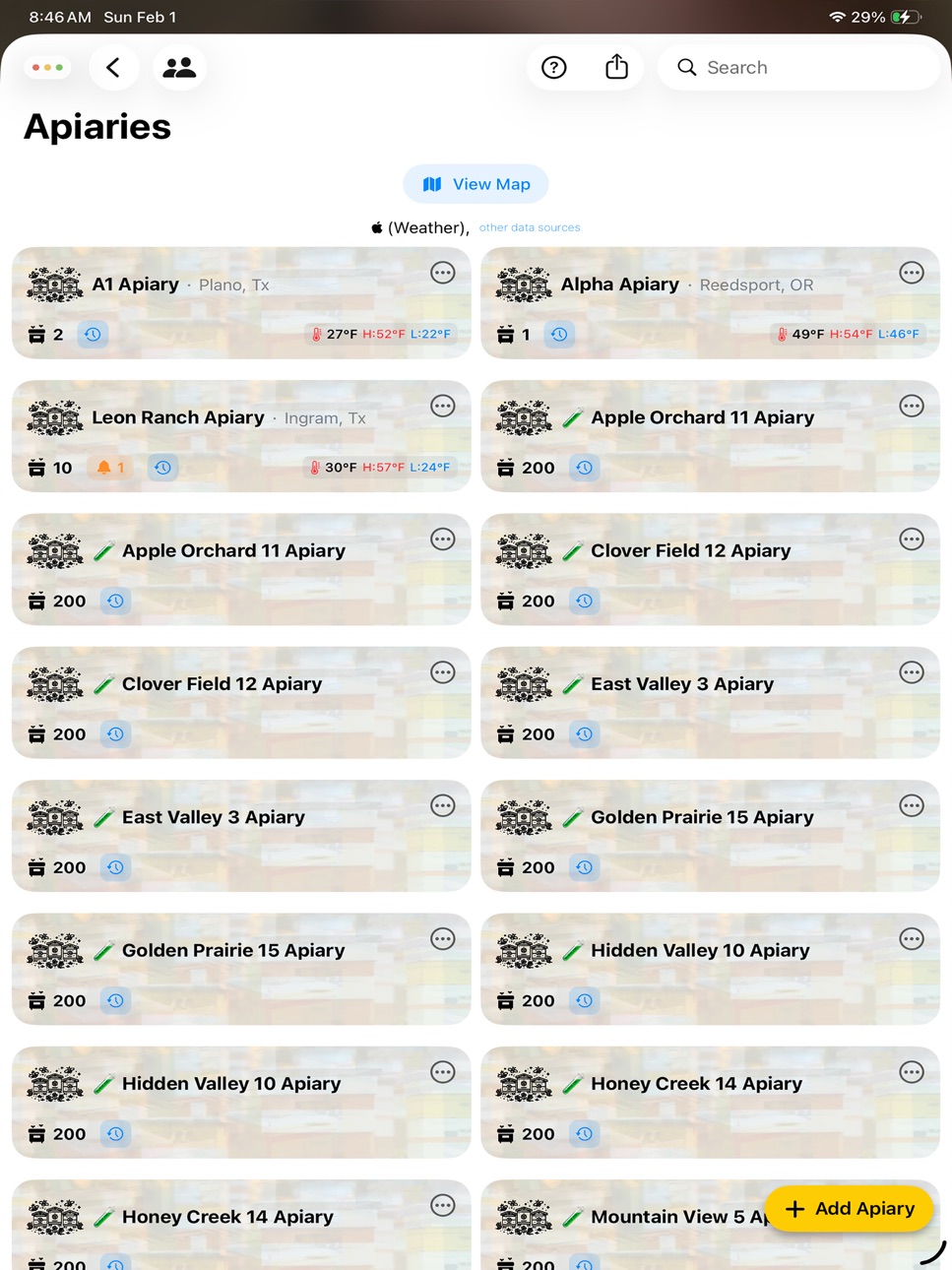


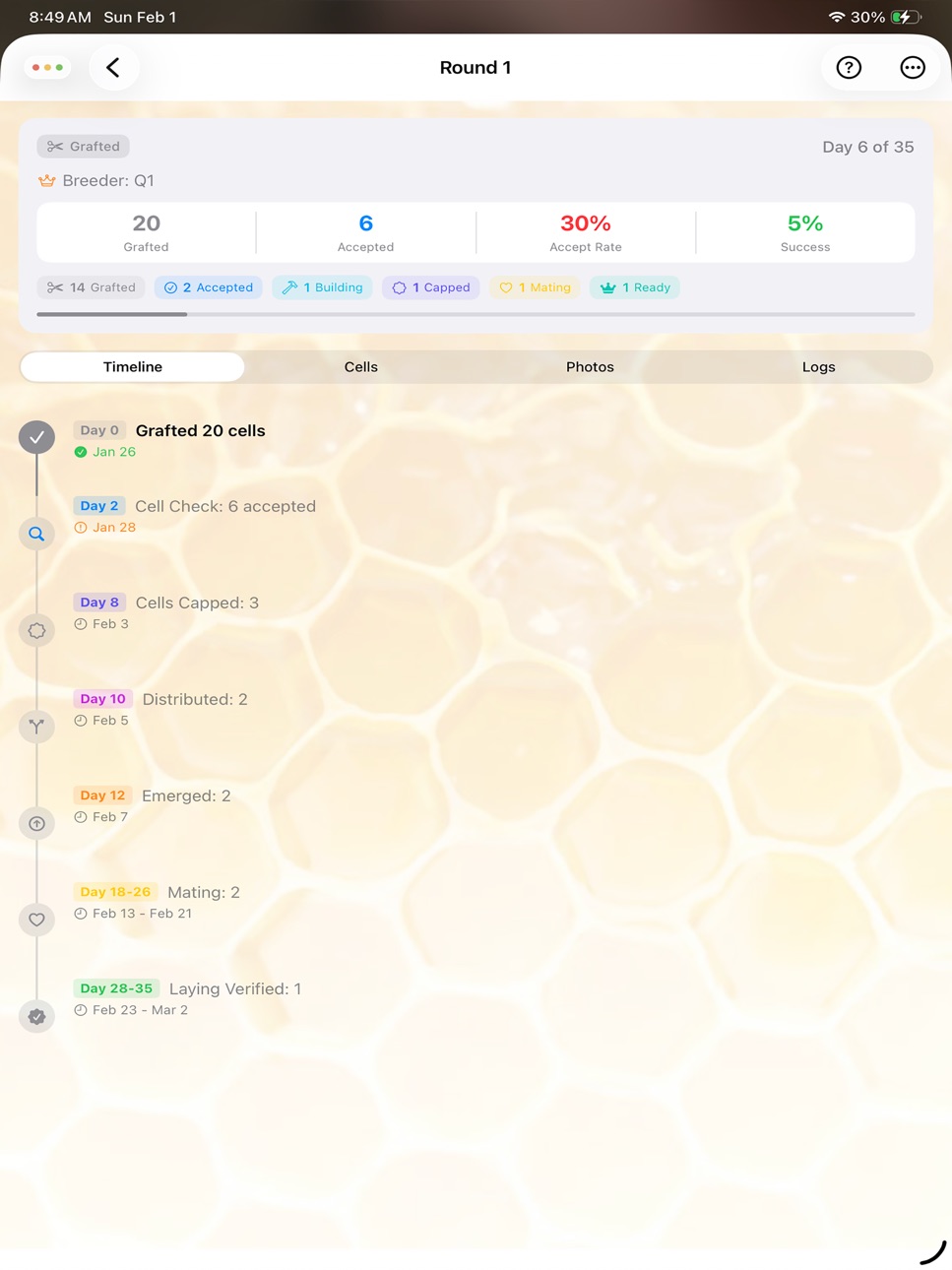
What’s New Version 9.2
New: Apiary Layout
- See your whole bee yard at a glance. Arrange hive stands the way they sit in the field and drag hives onto
them, with an "Unassigned" tray for hives you haven't placed yet.
- Each hive shows a color-coded resource map (brood, honey, pollen, and more) rolled up from your latest
inspection, plus queen and queen-cell indicators.
- Double-tap any hive to jump straight to its details.
New: Start an inspection from the hive
- Open a hive and tap "Start Inspection" to jump straight into Hive Command for that hive, ready to take
notes.
New: Hive activity log
- Every hive now has its own activity feed, showing recent inspections, feedings, treatments, harvests, queen
events, and other updates in one place.
New: Save photos to your library
- Turn on automatic saving of inspection photos to your Photos library, with an optional hive-and-apiary
stamp. You can also save photos from any hive or apiary album.
Improvements
- Hive Command now opens with the keyboard by default and no longer starts the microphone automatically, so
you choose when to talk.
- Frame Resource Map now shows how long ago your latest inspection was, and queen indicators are more
accurate.
- Smoother, faster voice inspections during long sessions.
- Clearer voice-command hints, including "Open Camera."
Fixes
- Fixed a problem where turning the microphone off and back on during an inspection could erase notes you had
already dictated.
- Fixed a layout issue that could leave the Hive Command screen looking stuck.
- Fixed several crashes and stability issues.
Description
Voice-Powered Beekeeping
The ultimate beekeeping companion for modern apiarists. Record inspections hands-free, track your colonies with AI-powered insights, and manage your entire operation from your iPhone.
VOICE-POWERED INSPECTIONS
- Hands-free voice recording while working your hives
- Smart voice recognition with beekeeping terminology
- AI-powered tips improve speech accuracy
- Quick templates for common observations
- Say "done" to save, "delete" to undo
- Inspection timer tracks time per hive
©2026 HIVE COMMAND - AI ASSISTANT
- Natural language queries about your hives
- AI analyzes inspection data and provides recommendations
- Create inspections and add notes by voice
- Ask questions like "Which hives need treatment?"
- Batch analysis for multiple inspections
NFC & QR SCANNING
- Scan NFC tags on hives for instant identification
- QR code support for hive tracking
- Voice command: "scan tag" or "scan QR"
- Automatic hive context switching
COMPLETE HIVE MANAGEMENT
- Track unlimited apiaries and hives
- Record queen information and lineage
- Monitor brood patterns and population
- Track treatments and feeding
- Equipment and supply inventory
- Work log for colony activities
QUEEN REARING
- Grafting batch tracking
- Cell builder and finisher management
- Mating nuc setup and monitoring
- Queen performance metrics
- Lineage and genetics tracking
INSPECTION RECORDS
- Detailed inspection logging
- Photo documentation with AI analysis
- Weather and temperature recording
- Health assessments and observations
- Historical data and trends
AI COLONY ANALYSIS
- Automatic pattern detection
- Health risk identification
- Treatment recommendations
- Seasonal management suggestions
- Population trend analysis
DATA & SYNC
- Cloud sync across devices
- Offline capability
- Export to PDF and CSV
- Backup and restore
- Multi-user support
REPORTS & CHARTS
- Visual colony health dashboards
- Inspection history timelines
- Production tracking
- Customizable reports
Subscription Plans
Monthly Plan – $5.99/month
Full access to all features
4 million AI tokens included to start
Covers hundreds of inspections
Cancel anytime
Annual Plan – $59.99/year
Save 16% compared to monthly
Full access to all features
4 million AI tokens included to start
Covers hundreds of inspections
Best value option
Additional Tokens
4 million tokens – $4.99
Add anytime as needed
Supports hundreds more inspections per pack
Built by beekeepers, for beekeepers. Whether you manage 2 hives or 2000, HiveInspect helps you stay organized and make data-driven decisions for healthier colonies.
Requires iOS 17.0 or later.
Privacy: beekeepervoice.com/Privacy
Terms: beekeepervoice.com/Terms
Capabilities
In-App Purchases
Accessibility
ipadiphonemacrealityDevicetvoswatch
Version history 25 versions
Build 887896142v9.22026-07-08 05:20:19
New: Apiary Layout
- See your whole bee yard at a glance. Arrange hive stands the way they sit in the field and drag hives onto
them, with an "Unassigned" tray for hives you haven't placed yet.
- Each hive shows a color-coded resource map (brood, honey, pollen, and more) rolled up from your latest
inspection, plus queen and queen-cell indicators.
- Double-tap any hive to jump straight to its details.
New: Start an inspection from the hive
- Open a hive and tap "Start Inspection" to jump straight into Hive Command for that hive, ready to take
notes.
New: Hive activity log
- Every hive now has its own activity feed, showing recent inspections, feedings, treatments, harvests, queen
events, and other updates in one place.
New: Save photos to your library
- Turn on automatic saving of inspection photos to your Photos library, with an optional hive-and-apiary
stamp. You can also save photos from any hive or apiary album.
Improvements
- Hive Command now opens with the keyboard by default and no longer starts the microphone automatically, so
you choose when to talk.
- Frame Resource Map now shows how long ago your latest inspection was, and queen indicators are more
accurate.
- Smoother, faster voice inspections during long sessions.
- Clearer voice-command hints, including "Open Camera."
Fixes
- Fixed a problem where turning the microphone off and back on during an inspection could erase notes you had
already dictated.
- Fixed a layout issue that could leave the Hive Command screen looking stuck.
- Fixed several crashes and stability issues.
Build 887601320v9.12026-06-30 22:05:43
This update makes hands-free hive inspections faster and more reliable in the field.
Voice camera improvements
- Photos now capture the instant you say "Capture" — no more waiting for the shutter.
- Box, frame, side, and detail tags stick across shots, so you can set them once and keep capturing. Say "Box
1, Frame 2, left side, detail," then just say "Capture" for each photo.
- Better recognition of "Capture" and frame numbers, even with background noise.
- Fixed an issue that could take two photos from a single command.
- A live voice waveform now appears on the camera so you can see the mic is hearing you.
- If a command isn't understood, you'll hear a tone and see exactly what was heard, so you know to repeat it.
Easier to use in a bee suit
- The microphone button is bigger and centered, making it easier to tap with gloves on.
- New option to reduce background noise (like the buzzing at an apiary) for clearer voice commands.
- A confirmation sound now plays when an NFC tag is scanned.
Photos and analysis
- New setting to automatically save inspection photos to your Photo Library, with an option to stamp them
with the apiary and hive name.
- AI photo analysis now retries automatically, so a photo no longer gets skipped if a single request fails.
Performance and stability
- Smoother voice performance during long, noisy sessions with many photos.
- Fixed a rare crash when saving photos, and various reliability improvements.
Build 887407915v9.02026-06-25 05:46:41
This update sharpens AI frame analysis and smooths out the voice-and-camera workflow.
Better photo analysis
- More reliable brood, honey, and queen-cell detection, with capped vs. uncapped honey shown separately.
- Detected queen cells and cups are circled right on the photo.
- A clear per-frame resource breakdown (Brood, Honey, Pollen, Empty, Bees).
Find — and mark — the queen
- Can't get the AI to spot an unmarked queen? Mark her yourself: turn on "Queen seen on this frame," then tap
her exact location to drop a marker.
- Manually marked queens crown the frame in the Frame Resource Map and survive re-analysis.
Voice and camera
- Faster, smoother voice commands during long photo sessions.
- "Capture Frame 6 Left Side" and other all-in-one capture commands now fire reliably.
- Detail close-ups: say "capture … detail" to tag a zoomed shot — it sharpens queen-cell reads without
skewing the frame's resource numbers.
- Photo tags now keep the right Box and Frame, even when spoken as part of the capture command.
- Detail shots are clearly labeled in the inspection.
Smarter note analysis
- Inspection summaries now reflect what your photos showed, including per-frame resources and brood ratings.
- Lower credit cost for note analysis.
Plus performance and reliability improvements throughout.
Build 887065203v8.92026-06-17 17:51:05
Smarter hive photo analysis and a smoother voice-and-camera experience.
Better frame photo analysis
- More accurate brood and honey detection — including telling capped honey from ripening (uncapped) nectar,
and reading capped-brood patterns more reliably.
- Each analysis now shows a clear resource breakdown (Brood / Honey / Pollen / Empty / Bees), with capped vs.
uncapped honey split out.
- Detected queen cells and cups are now circled right on the photo, and only flagged when the AI is highly
confident.
- Turn on Detailed tile scan in Settings for an even sharper, frame-by-frame read — now focused tightly on
the comb, with an on-photo grid showing exactly what was analyzed.
Note analysis that uses your photos
- Your inspection summary now calls out what each frame showed — e.g. "Frames 1–3 had heavy honey; frame 5
was mostly brood."
- Brood ratings now reflect what your photos actually show, not just your spoken notes.
Voice & camera improvements
- Voice commands stay responsive through long photo sessions.
- The live camera now shows exactly what will be captured — no more surprise edges.
- More reliable shutter sound on every capture.
- New, easy-to-follow guide for tagging photos by box and frame number — just tap "Learn how to tag photos."
Overview & reminders
- Reminders now show which hive they belong to.
- Clearer "swipe to dismiss" hints on Needs Attention and Reminders.
Credits
- When you're out of AI credits, the app takes you straight to your credits screen.
Build 886549019v8.82026-06-05 15:58:29
What's New in BeeKeeper Voice
Tag photos by voice — now with frame & side
Say "Capture frame 1, left side" and BeeKeeper Voice saves the frame number and side right along with the
photo. It's shown when you review the image and included in the AI's colony analysis, so your inspection
records are clearer and more useful.
Smoother, faster Hive Command
Long, hands-free inspections in a noisy apiary now stay fast and responsive. We fixed the slowdowns and
occasional freezes that could build up during extended voice sessions, so commands keep up no matter how long
you're at the hive.
Reliable, instant "Retake"
Reliable, instant "Retake"
Saying "Retake" in the camera now returns you to the live view immediately, every time.
Much smaller photos, faster iCloud sync
Inspection photos now take up a fraction of the space and sync between your devices far faster — with no
change to image quality or AI analysis accuracy. Your existing photos are optimized automatically, freeing up
significant storage.
Cleaner photo thumbnails
Less clutter on your inspection photos for a clearer view at a glance.
Clearer NFC tags
When you scan a blank or unlinked tag, the app now tells you to link it to a colony, cell, or queen first —
instead of a confusing "failed to read."
Stability & fixes
- AI photo analysis now always appears when you open an analyzed photo
- Fixed crashes when exporting data and when viewing inspection, calendar, and work‑log records
- Various reliability improvements throughout
Build 885673093v8.72026-05-14 20:42:06
Hive Command keeps listening through interruptions
If a call or notification cuts you off mid-inspection, the mic now picks right back up where you left off. No more lost notes after a
quick phone call.
Camera holds the right way up
Hold your phone in landscape while you photograph a frame — the live preview and the saved photo now both stay oriented correctly.
Smarter queen reads
The AI now tells the difference between seeing the queen herself and seeing fresh eggs. If you mention eggs in your notes, the hive's
queen status updates to "Queen Signs" — even if you didn't spot her directly. And once a hive is confirmed queenright, old
"queenless" flags get cleared.
Deleted hives stay deleted
Fixed a sync bug where hives, queens, and queen-rearing cells you removed could come back when another device synced. Cleanups now
actually stick.
Apiary Overview that tells the truth
Pick a date range and the trend charts actually update (with a spinner so you know it's loading). Hive rankings no longer show
duplicates, and a hive's strength label now matches its health score.
Restore Purchases works
Switching phones or reinstalling? Tap Restore Purchases on the paywall and your trial / subscription comes back, with a clear
confirmation.
Smoother first-time setup
The welcome flow no longer makes new subscribers wait through a sync delay. After your first inspection, the app walks you through
how the AI reads your voice notes and turns them into structured data.
Build 885520568v8.62026-05-12 17:25:21
Spring inspections are ramping up, so here's a handful of changes to keep setup quick and notifications out of your way:
• Your climate zone now auto-fills from your location during setup. It's what we use to time mite treatments and forecast nectar flow, so getting it right matters (manual override is still there if you'd rather pick it
yourself).
• Beekeepers outside the US no longer see the US-only climate zone map — that screen is skipped for you entirely now. Sorry it took us this long.
• Push reminders are smarter. If you're actively in the app, you won't get pinged with "set up your apiary" messages anymore.
• Hive Command is tidier — the AI usage meter only appears when your balance is running low, not all the time.
• A gentle pulse on the voice mic makes it easier to find during your first inspection.
Questions or seeing something odd? Tap Help inside the app or reach us at beekeepervoice.com/support — we read everything.
Build 885258681v8.52026-05-05 13:22:18
What's New
Redesigned Overview — Needs Attention card merges alerts + recommendations into one ranked list. New Health Summary with
trend deltas, Hive Rankings, and Apiary Roll-up sections.
5 trend charts — Health, Varroa, Weight, Brood, and a new Swarm Risk chart that fires before queen cells appear. Three
views each (Worst + Range, Distribution, Heatmap) with drill-down to any hive.
Per-chart AI analysis — tap "?" on any chart, then "Analyze my data" for a plain-language read.
Sortable hive lists — Worst first, Recent, or A–Z. Per-row trend chips. Total Hives KPI shows active/lifetime so colony
losses stay visible.
Sharper photo AI — auto-macro on Pro iPhones, higher-resolution input. Catches more mites, eggs, and queen cells.
Outdoor readability — opaque tile backgrounds for bright-sun reading.
Stability — voice command fixes (clear notes, close camera, retake, paused Start inspection), audio-engine crash fix,
several smaller crashes resolved.
Stay safe out there.
Build 885033564v8.42026-04-29 21:12:47
• Faster Hive Command camera with smarter AI photo recognition
• "Use photo" voice command now responds reliably right after the shutter
• More reliable paywall loading and several crash fixes
Stay safe out there.
Build 884803472v8.32026-04-22 22:04:11
Easier signup and helpful reminders to get you started.
• New confirmation screen previews exactly what you'll be charged
(and when) before Apple's purchase sheet appears — no surprises.
• Clearer subscribe buttons: "Start Free Trial" and "Subscribe
Annually" replace the old confusing copy.
• Helpful push reminders if you haven't set up an apiary, added
a hive, or logged your first inspection — with one-tap access
to the right screen.
• Improved reliability for scheduled reminders and notifications.
Build 884663952v8.22026-04-19 19:17:42
Smarter photo analysis and smoother voice control
• Photo analysis rebuilt: Hive Command now reads frames in detail,
identifying the queen, brood pattern, queen cells (swarm /
supersedure / emergency), pests, and resources. Findings
automatically update your inspection's queen status and strength.
• New voice commands:
– "Close Inspection" — wraps up and saves (replaces "close hive")
– "Close Notes" — exits notes mode but keeps the hive in context
so you can ask follow-up questions
– "Analyze Photos" — runs vision analysis on every photo in the
current hive
• Exit-inspection prompt: three clear choices now —
Analyze Notes Only, Analyze Notes & Photos, or Skip & Exit.
• Camera opens with a loading indicator so taps feel instant.
• Voice notes fixes: the last few words you were speaking are no
longer lost when you scan the next hive or close an inspection.
"Clear notes" no longer leaves the mic stuck.
• Stability: fixed a crash that could occur when opening a queen's
menu, plus several smaller reliability improvements.
Build 884423635v8.12026-04-13 15:36:42
AI Image Analysis
Tap "Analyze Image" on any hive photo for instant AI-powered analysis — identify brood patterns, pollen stores, queen cells, disease signs, and more.
Photo Filtering
Filter your photo gallery by apiary, hive, or AI-generated tags to quickly find the images you need.
1 Month Free Trial
New users now get a full month free to explore all features before subscribing.
Customizable Queen Rearing Timeline
Adjust day numbers, rename stages, add or hide stages to match your method — Doolittle, Jenter, Nicot, or walk-away splits.
Faster Voice Commands
Commands respond instantly with audio confirmation sounds, even in hands-free mode. New "Start Inspection" voice command jumps straight into recording.
Improved Onboarding
Friendly guided setup for new beekeepers with a practice inspection walkthrough.
Database Optimization
Images stored more efficiently, dramatically reducing app size. New "Optimize Database" option in Backup settings to reclaim space.
Backup Improvements
Backups can now include inspection photos. Improved reliability and date display.
Additional Improvements
- Smoother app launch
- Faster, more reliable cloud sync
- New AI prompts: Hive Status Board, Priority Report, Field Briefing
- Crash fixes and stability improvements
Build 884375349v8.02026-04-11 16:04:15
AI Image Analysis
Tap "Analyze Image" on any hive photo for instant AI-powered analysis — identify brood patterns, pollen stores, queen cells, disease signs, and more.
Photo Filtering
Filter your photo gallery by apiary, hive, or AI-generated tags to quickly find the images you need.
Customizable Queen Rearing Timeline
Adjust day numbers, rename stages, add custom stages, or hide ones you don't use. Tailor the timeline to your method — Doolittle, Jenter, Nicot, or walk-away splits.
Faster Voice Commands
Commands now respond instantly with audio confirmation sounds, even in hands-free mode. New "Start Inspection" command jumps straight into an inspection by voice.
Database Optimization
Images are stored more efficiently, dramatically reducing app storage size. A new "Optimize Database" option in Backup settings lets you reclaim space on demand.
Backup Improvements
Backups can now include your inspection photos. Improved date display and more reliable restore.
Additional Improvements
- "Close camera" voice command
- Smoother launch experience
- Faster, more reliable cloud sync
- New AI prompts: Hive Status Board, Priority Report, Field Briefing, Daily Review
- Getting started guide for new users
Build 884173430v7.92026-04-07 21:42:28
"Start Inspection" Voice Command
Just say "Start Inspection H160" and you're ready to go — instant hive lookup with status, queen info, goals, and active reminders. Works just like scanning an NFC
tag, but with your voice. You can include your apiary name too: "Start Inspection Leon Ranch H160."
Much Faster App
We made big improvements under the hood. The app launches faster, feels snappier during inspections, and uses less storage on your device. If your app had been
getting slower over time, this update should feel like a fresh start.
More Reliable in the Field
- Fixed crashes that could happen when tapping the mic button quickly or scanning tags during hands-free mode
- Hands-free mode is more stable — no more interruptions when scanning NFC tags mid-inspection
- The app no longer freezes or quits unexpectedly on devices with lots of inspection photos
Smarter AI Answers
When you ask questions like "Which hives need attention this week?" or "What should I prioritize today?", the AI now gives you a real analysis with recommendations
— not just a list of data.
Hands-Free Improvements
Voice recognition recovers more smoothly after NFC scans and camera use. Fewer hiccups when the mic restarts between hives.
Automatic Housekeeping
The app now tidies up old activity logs automatically, keeping things running lean so you can focus on your bees, not your phone.
Database Tools
New Database Diagnostics button in Settings > Data Utility lets you check your app's storage usage anytime.
Bug Fixes & Polish
General stability improvements across inspections, sync, and colony management.
Build 884106224v7.82026-04-03 19:09:06
Hands-Free Camera
Say "camera" during an inspection to take photos without removing your gloves. Voice commands control everything — "capture" to
snap, "use photo" to save, "retake" for another shot, and "cancel camera" to close.
Note Templates
Select common observations like "Fed 2:1 syrup" or "Queen spotted" and they're automatically added to every inspection. Tap the
clipboard icon to choose templates — they persist until you clear them.
Faster Hive Reports
Scanning an NFC tag or QR code now shows hive details, goals, and reminders instantly from local data — no AI call needed, no
tokens used, works offline.
"Ask Hive" Voice Command
Switch from notes to query mode without losing your hive context. Say "ask hive" to save notes and ask the AI a question, then
"add note" to continue recording.
Offline Mode
Hive Command now works without internet. Record notes, scan tags, take photos, and use voice commands offline. AI features
resume when you're back online.
Reminders in Notes
Say "add reminder to treat hive in five days" while recording inspection notes and the AI creates it automatically. Say "clear
reminder feed" to complete reminders by voice.
Improved Voice Recognition
Speech appears instantly as you speak. Common misrecognitions like "ski" for "scan" are now caught automatically.
Quick Lookup Improvements
Compact formatting, separate hive vs apiary reminders, completed reminders filtered out, and a distinct icon to distinguish data
lookups from AI analysis.
Save Notes Fix
"Save notes" now reliably saves all spoken segments. Previously, notes spoken across multiple segments could be lost.
Prompt Library
Built-in help text, share instructions on the Community tab, and duplicate prompts cleaned up automatically.
Build 883897900v7.72026-03-30 20:30:46
Here's what's new:
"Ask Hive" Voice Command
New command lets you switch from notes mode to query mode without losing hive context. Say "ask hive" or "ask question" to save
pending notes and ask the AI about the current hive. Say "add note" to return to notes mode afterward. Available in all 13
supported languages.
QR Scanner Voice Control
The QR scanner no longer kills speech recognition. The mic stays active in a command-only listening mode so you can say "cancel
scan" to dismiss. A tap-to-dismiss X button was also added. No more crashes or dead mic after scanning.
Quick Lookup Enhancements
- Reminders automatically included in hive reports after NFC scan
- Hive-level and apiary-level reminders shown in separate sections
- Completed reminders filtered out even if unarchived
- Compact single-line formatting with · separators
- Blue magnifying glass icon distinguishes data lookups from AI analysis
Reminder System Overhaul
- Create in notes mode: Say "add reminder to treat hive in five days" or "remind me to check queen in a week" during inspection
notes — the AI analysis creates the reminder automatically
- Clear by voice: "clear reminder feed", "completed reminder mite treatment", "clear reminders all". Without a subject, nothing
is cleared (must say "all" explicitly)
- Completes all matches: When clearing, all matching reminders are completed — not just the first
- Fresh data: Reminders are fetched directly from Core Data instead of a cached array that could be empty
- Apiary reminders included: Reminders linked to an apiary now appear for all hives in that apiary
- Smarter duplicate prevention: Reanalysis no longer creates duplicates. Common words like "treat" and "hive" are excluded from
matching so "Treat Hive" won't falsely match "Treat Oxalic Acid"
Analysis Improvements
- Unanalyzed inspection count updates immediately after batch analysis — no longer stuck showing the old number
- "Save note" (singular) now works alongside "save notes"
- Quick Lookup defaults to ON, Recognition Tips defaults to OFF (both persist through restarts)
Help Updates
- Voice Corrections section: how to enable and manage speech auto-corrections
- Expanded reminder documentation covering query mode, notes mode, and all clearing phrases
- "Ask Hive" added to voice commands reference
Build 883842296v7.62026-03-27 21:24:19
Hands-Free Voice Fix
Previously, after saying "save notes" in hands-free mode, the speech recognition would silently stop working even though the mic
indicator still showed red. The speech adapter is now properly restarted after each save so you can immediately continue to the
next hive without tapping anything.
Improved AI Mite Analysis
The AI no longer confuses mite wash sample sizes with bee population estimates. Saying "9 mites, 300 bees, 3 per hundred"
correctly records 9 as the mite count — not 3 (the rate) — and ignores the 300 bees as sample size rather than creating a
300-frame coverage estimate.
Inspection List Reliability
Inspections created in Hive Command now appear immediately in the inspections listing when you navigate back. The frame count
filters were also fixed — they previously defaulted to a 0-20 range that silently hid inspections with higher frame counts.
Firestore Sync Performance
Syncing shared apiaries is significantly faster. Hive updates are now batched into a single Firestore write instead of
individual network calls per hive, reducing sync time and database pressure.
Crash Fixes
Fixed crashes in the work log system during AI analysis caused by force-unwrapping nil values on hives without apiaries or
queens. All Core Data relationship operations in addWorkLog now use safe optional handling.
Inspection Timer
Inspection time is now saved in seconds instead of minutes, so quick inspections under 60 seconds are properly recorded instead
of showing zero.
Build 883685635v7.52026-03-24 21:45:04
First Hive in 60 Seconds
New users now get a guided 3-step setup wizard instead of an empty home screen. Name your apiary, set your hive count, and
you're ready to go. The wizard walks you straight into Hive Command with an interactive guide showing exactly how to start your
first voice inspection, add notes, and save.
Batch Hive Creation
Creating multiple hives is now fast. When adding new hives, use the "Number of Hives" stepper to create up to 50 hives at once
with sequential names (e.g., 26-001 through 26-010). All hives share your selected type, box configuration, and status. If you
select a queen, each new hive gets its own queen record using that queen as a template — same marking, breeding method, status,
and breeder lineage.
Apiary to Hives Flow
After creating a new apiary, the app now takes you directly to the Add Hives screen with your new apiary pre-selected and the
title "Add Your Hives." When you're done, you return straight to the apiaries listing — no extra taps to navigate back.
Smarter Voice Recognition for Hive Names
Hive Command now understands spoken numbers and converts them to match your hive names. Say "twenty six dash zero zero one" and
it matches hive 26-001. Compound numbers like "twenty six," single digits like "zero" and "oh," and words like "dash" and
"hyphen" are all recognized. Your existing hive names just work with voice — no renaming needed.
Auto-Created Queen Records
When AI analysis detects queen data — queen sighted, queen status, or queen marking — but the hive has no queen record, one is
automatically created. The new queen is named after the hive (e.g., "26-001 Queen"), linked to the hive, and populated with the
detected status and marking. No more missing queen records after inspections.
Map Location Fixes
Marking a hive or apiary location now immediately refreshes the map data so pins appear right away. Both the hive map and apiary
map update in real time. If GPS is unavailable (e.g., on a simulator or with location services off), you'll now see a "Location
Unavailable" message instead of a silent failure.
Streamlined Onboarding
The subscription screen now includes reassurance that your card won't be charged until after the free trial ends and you can
cancel anytime before the trial is over. The onboarding flow is shorter with one fewer screen to tap through.
Build 883343891v7.42026-03-18 12:41:09
Smarter Voice Commands
- Multi-word voice commands ("Scan Tag", "Save Notes", "Close Hive") replace single-word triggers for more reliable
hands-free inspections
- Phonetic matching catches misrecognized words — say "Close High" and it still triggers "Close Hive"
- Say "Show Commands" or "Hide Commands" to toggle the voice command reference card
- Improved speech recognition accuracy with optimized audio processing
Prompt Library
- Save and organize your favorite AI prompts for Hive Command
- Browse community prompts shared by other beekeepers
- Create, edit, and preview custom prompts
Queen Tracking
- Queen Assignment History — see every hive a queen has been assigned to
- Hive Queen History — track all queens that have been in a colony
- Lifetime performance scores on queen listing cards
Colony Trend Indicators
- Visual trend arrows for Strength, Health, Brood, and Weight
- Automatic trend calculation by comparing recent inspections
- Hive weight tracking extracted from voice notes
Backup & Restore
- On-device or iCloud backup options
- Automatic backup retention (3–30 days)
- One-tap manual backup and restore
Other Improvements
- Available Voice Commands card shows contextual commands while recording
- NFC and QR scanner dialogs show "Cancel Scan" dismissal hint
- Improved hive detail views and queen rearing workflows
Build 882680653v7.32026-03-06 23:35:49
Queen Promotion (Release 7.3)
The queen rearing flow got a "Promote to Queen" feature for cells in the
mating stage:
- Promote to Queen button — When a queen rearing cell reaches the "Mating"
stage and doesn't yet have a resulting queen, a prominent green "Promote to
Queen" button appears. Tapping it opens an apiary picker where you choose
where to place the new queen/hive.
- Crown badge on Laying Verified — The stage timeline now shows a yellow crown
icon on the "Laying Verified" stage to visually indicate it's the stage that
creates queen and hive records.
- Helper text — When a cell is at the mating stage, guidance text reads:
"Queen is mating. When laying is verified, tap 'Promote to Queen' below."
- Custom hive naming — The apiary picker was updated to accept a hive name, so
the promoted queen's hive can be named during promotion.
- Core Data propagation fix — Added a 0.3s delay after promotion before
checking for the created hive, fixing a race condition where Core Data changes
hadn't propagated yet.
- Updated messaging — The confirmation text was improved to: "This will create
a Queen record and assign her to a new hive in your chosen apiary. You can
then re-write the NFC tag to link it to this hive."
---
Voice Recognition Bug Fixes (Release 7.3)
Several fixes for iOS 26 SpeechAnalyzer continuous recognition issues:
- Audio session mode fix — Changed from .measurement/.default to .spokenAudio
mode, which is better suited for voice-based interaction and improves
recognition quality.
- Re-analysis partial suppression — iOS 26's SpeechAnalyzer sometimes
re-analyzes already-finalized segments, sending duplicate partials. Added
time-limited detection (within 0.5s of finalization) that skips partials that
are prefixes of the last finalized segment.
- Command re-trigger prevention — After processing a voice command (delete,
erase, undo, clear, cancel, close), the recognizer now skips re-triggered
command words for 2 seconds, preventing commands from firing twice. Includes
common misrecognitions like "clothes", "claire", "clare" for "close".
- External command tracking — iOS26LastSentText was changed from private to
allow external callers to mark command text as processed via a new
markTextAsProcessed() method. This prevents command words from leaking into
subsequent transcriptions.
- Proper state reset — All new tracking properties (iOS26LastFinalizedSegment,
iOS26LastFinalizationTime, iOS26LastCommandTime) are properly reset when
recognition starts and stops.
Build 882642919v7.22026-02-21 03:16:36
Smarter Frame Counting
- AI now correctly totals frames across multiple boxes. Say "top box 4 frames of bees, bottom
box 3 frames of bees" and get 7 frames total — not just the last number mentioned.
- Works for bee frames, brood frames, and honey frames.
Improved Brood Detection
- Eggs and larvae now count toward your brood frame total. "Frame 4 young larva, frame 5
capped brood" correctly counts as 2 brood frames.
- "Honeybees" recognized alongside "bees" for accurate counts.
Better Mite Count Handling
- Low mite counts (under 3) from alcohol washes or sugar rolls no longer trigger pest
warnings. A count of 0, 1, or 2 is recognized as healthy — your hive health score won't be
penalized for good results!
Bug Fixes & Performance
- Improved voice recognition accuracy
- General stability improvements
Build 882455409v7.12026-02-18 01:30:30
## Changes Since Release 7.0
### Hive Command Enhancements
**Voice Recognition Tips** (ClaudeChatView.swift, ClaudeChatService.swift, OnDeviceAI.swift)
- Per-segment confidence tracking with color-coded markers (red/orange/gray)
- AI-powered tips using cloud AI with beekeeping domain knowledge
- Fallback to on-device AI (iOS 26+) then static tips
- Configurable tip duration and enable/disable in Voice Settings
- Tips suggest context words: "honey bees", "queen cells", "brood pattern", etc.
**Inspection Timer**
- Tracks time spent on each inspection
- Displays in notes mode header
- Saves accumulated time to inspection record
- Fixed time display bug (was showing minutes as seconds)
**Saving Confirmation**
- Green "Saving notes..." progress indicator when done command recognized
**Voice Command Improvements**
- Better partial speech recognition for multi-word commands
- Improved "scan tag", "scan QR", "cancel" detection
- Fixed timer not starting when inspection created via voice command
### Queen Rearing / Grafting Batch UI
- Updated batch detail view and summary display
- Improved cell detail view and cell grid layouts
- Enhanced cell grid item presentation
- Updated grafting batch grid items
- New mating nuc setup view
- Model improvements for queen rearing tracking
### New Features
**Audio Waveform** (AudioWaveformView.swift)
- Visual audio level display component
**Queen Performance** (QueenPerformanceView.swift)
- New queen tracking and performance view
**Beekeeping Corrections** (BeekeepingCorrectionsEditorView.swift)
- Custom speech recognition corrections editor
**Management Actions** (ManagementActionModels.swift, HiveManagementActionsView.swift)
- Structured hive management action tracking
### Bug Fixes
- Fixed inspection time display (minutes shown as seconds)
- Fixed inspection timer not starting from voice-created inspections
- Various NFC and QR scanning reliability improvements
### Help & Documentation
- Updated voice recognition tips help content
- New voice command documentation
Build 881862895v7.02026-02-04 00:29:34
BeeKeeper Voice 7.0 is a major update packed with new features and improvements.
QUICK NOTES
A streamlined voice-notes-only inspection mode for fast yard checks. Speak your observations and the app transcribes them in real-time. Say "Next note" to save and start a new one. Create reminders by saying "add reminder to check in 3 days" and the AI extracts them automatically. Works with NFC tags for hands-free multi-hive workflows — scan, speak, save, scan the next.
QUICK TEMPLATES
Pre-written notes for common observations organized by category — Feeding, Treatment, Queen, Brood, Equipment, and Colony. Tap or say "Templates" to open the picker, select what applies, and add them to your notes instantly. Create custom categories and templates in Settings. Perfect for batch operations like feeding or treating every hive in the yard.
QUEEN REARING TRACKER
Full grafting batch management from graft day through laying verification. Create a batch to record the graft date, breeder queen, cell builder colony, and number of cells grafted. Cells are auto-generated and track through nine stages: Grafted, Accepted, Building, Capped, Distributed, Emerged, Mating, Laying Verified, and Ready. Monitor the 35-day development timeline with expected and actual dates. Record cell check acceptance rates, assign cells to mating nucs, and track outcomes. When a cell reaches Laying Verified, a queen record is automatically created with the batch name, cell number, breeding method inherited from the breeder queen, and full lineage. Compare acceptance and success rates across batches and seasons.
IMPROVED APIARY & COLONY UI
Refreshed apiary and colony listing views with new help guides accessible from the toolbar. The colony view now includes View Mode switching between List and Dashboard, enhanced filtering by apiary, colony status, queen status, strength, mite count, inspection date, and frame counts. CSV export is available directly from the toolbar for both apiaries and colonies. Active filters display as removable chips for quick adjustments.
ACTIVITIES TIMELINE
Work logs now provide a complete activities timeline for each colony. Track feedings, harvests, inspections, mite checks, requeens, and treatments in one place. Work logs are automatically created when tasks are completed during voice inspections, giving you a history of everything done to each colony without extra data entry.
SHARE & COLLABORATE
Share apiaries with other beekeepers to collaborate on hive management. Send an email invitation and choose permission levels for each participant. Accepted participants can view and edit all shared data including apiaries, colonies, inspections, queens, equipment, and queen rearing batches. Changes sync automatically between all participants in real-time using cloud sync. Works offline — edits queue locally and push when you reconnect. The sync status badge in the toolbar shows connection state and pending changes. Manage participants and stop sharing from Settings.
SEARCHABLE HELP
The universal help system now includes full-text search across all help topics. Type a keyword like "mite" or "NFC" and see matching topics grouped by section. Every major screen has a help button in the toolbar for quick access to relevant instructions.
ADDITIONAL IMPROVEMENTS
- Colony assessments track population, brood pattern, temperament, and overall health
- AI Colony Analysis available from the colonies toolbar with filter-aware insights
- Inspection history charts show trends in frame counts, mite levels, and colony strength
- Photo records for colonies, inspections, equipment, and queen rearing batches
- Reminders with push notifications at apiary and colony levels
Build 881296335v6.92026-01-09 04:25:13
Fix: Voice recognition timeout issue. After 60 seconds if no recording app would hang during speech recognition reset. Now stays ready for you - Take all the time you need during inspections. The app will keep listening patiently.
Build 881201650v6.82026-01-07 10:41:29
What's New in This Version
Voice Inspection Improvements
- Say "Stop Treatment" anytime to end a treatment series, even if it's not complete. No more waiting until all treatments are done!
- Fixed an issue where treatment tracking could incorrectly reset mid-series
NFC Scanning
- Added a "Closing..." indicator when dismissing the NFC scanner so you know the app is responding
Visual Fixes
- Timer display now stays centered during inspections
No pricing data captured yet — comparisons appear once the app has paid storefronts or in-app purchases.
Availability 10 of 54 storefronts
| Region | Language | Price | Ratings | Avg | Version |
|---|---|---|---|---|---|
| US | en-US | Free | 19 | 4.4 | 9.2 |
| BB | en-GB | Free | 0 | — | 9.2 |
| BS | en-GB | Free | 0 | — | 9.2 |
| BW | en-GB | Free | 0 | — | 9.2 |
| GH | en-GB | Free | 0 | — | 9.2 |
| GY | en-GB | Free | 0 | — | 9.2 |
| JM | en-GB | Free | 0 | — | 9.2 |
| NG | en-GB | Free | 0 | — | 9.2 |
| TT | en-GB | Free | 0 | — | 9.2 |
| ZW | en-GB | Free | 0 | — | 9.2 |
Not available in: AI, AO, AR, BO, BR, BZ, CI, CL, CR, CV, DM, DO, DZ, EC, GD, GT, GW, HN, KE, KN, KY, LC, MA, MS, MU, MZ, NA, NI, PA, PE, PY, SC, SR, ST, SV, SZ, TC, TZ, UG, UY, VC, VE, VG, ZM
Change log 29 changes · BB
✎
releaseNotes updated
New: Apiary Layout
- See your whole bee yard at a glance. Arrange hive stands the way they sit in the field and drag hives onto
them, with an "Unassigned"
✎
description updated
Voice-Powered Beekeeping
The ultimate beekeeping companion for modern apiarists. Record inspections hands-free, track your colonies with AI-powered insights, a
✎
subtitle updated
Record beehive inspections
✎
name updated
AI BeeKeeper Voice Assistant
◆
Version 9.2 released
New: Apiary Layout
- See your whole bee yard at a glance. Arrange hive stands the way they sit in the field and drag hives onto
them, with an "Unassigned" tray for hives you haven't placed yet.
- Each hive shows a color-coded resour
◆
Version 9.1 released
This update makes hands-free hive inspections faster and more reliable in the field.
Voice camera improvements
- Photos now capture the instant you say "Capture" — no more waiting for the shutter.
- Box, frame, side, and detail tags
◆
Version 9.0 released
This update sharpens AI frame analysis and smooths out the voice-and-camera workflow.
Better photo analysis
- More reliable brood, honey, and queen-cell detection, with capped vs. uncapped honey shown separately.
- Detected queen cel
◆
Version 8.9 released
Smarter hive photo analysis and a smoother voice-and-camera experience.
Better frame photo analysis
- More accurate brood and honey detection — including telling capped honey from ripening (uncapped) nectar,
and reading capped-brood
◆
Version 8.8 released
What's New in BeeKeeper Voice
Tag photos by voice — now with frame & side
Say "Capture frame 1, left side" and BeeKeeper Voice saves the frame number and side right along with the
photo. It's shown when you review the image and inc
◆
Version 8.7 released
Hive Command keeps listening through interruptions
If a call or notification cuts you off mid-inspection, the mic now picks right back up where you left
◆
Version 8.6 released
Spring inspections are ramping up, so here's a handful of changes to keep setup quick and notifications out of your way:
◆
Version 8.5 released
What's New
Redesigned Overview — Needs Attention card merges ale
◆
Version 8.4 released
• Faster Hive Command camera with smarter AI photo recognition
• "Use photo" voice command now responds reliably right after the shutter
• More reliable paywall loading and several c
◆
Version 8.3 released
Easier signup and helpful reminders to get you started.
◆
Version 8.2 released
Smarter photo analysis and smoother voice control
◆
Version 8.1 released
AI Image Analysis
Tap "Analyze Image" on any hive photo for instant AI-powered analysis —
◆
Version 8.0 released
AI Image Analysis
Tap "Analyze Image" on any hive photo for instant AI-p
◆
Version 7.9 released
"Start Inspection" Voice Command
Just say "Start Inspection H160" and you're ready to go — instant hive lo
◆
Version 7.8 released
Hands-Free Camera
Say "camera" during an inspection to take photos without removing your gloves. Voice commands control everything — "capture" to
snap, "use photo" to save, "retake" for another shot, and "cancel camera" to close.
Not
◆
Version 7.7 released
Here's what's new:
"Ask Hive" Voice Command
New command lets you switch from notes mode to query mode without losing hive context. Say "ask hive" or "ask question" to save
pending notes and ask the AI about the current hive. Say "ad
◆
Version 7.6 released
Hands-Free Voice Fix
Previously, after saying "save notes" in hands-free mode, the speech recognition would silently stop working even though the mic
indicator still showed red. The speech adapter is now properly restarted after each s
◆
Version 7.5 released
First Hive in 60 Seconds
New users now get a guided 3-step setup wizard instead of an empty home screen. Name your apiary, set your hive count, and
you're ready to go. The wizard walks you straight into Hive Command with an interactive
◆
Version 7.4 released
Smarter Voice Commands
- Multi-word voice commands ("Scan Tag", "Save Notes", "Close Hive") replace single-word triggers for more reliable
◆
Version 7.3 released
Queen Promotion (Release 7.3)
The queen rearing flow got a "Promote to Queen" feature for cells in the
mating stage:
◆
Version 7.2 released
Smarter Frame Counting
- AI now correctly totals frames across multiple boxes. Say "top box 4 frames of bees, bottom
box 3 frames of bees" and get 7 frames total —
◆
Version 7.1 released
## Changes Since Release 7.0
### Hive Command Enhancements
**Voice Recognition Tips** (ClaudeChatView.swift, ClaudeChatService.swift, OnDeviceAI.swift)
- Per-segment confidence tracking with color-coded markers (red/orange/gray)
- AI-powe
◆
Version 7.0 released
BeeKeeper Voice 7.0 is a major update packed with new features and improvements.
QUICK NOTES
A streamlined voice-notes-only inspection mode for fast yard checks. Speak your observations and the app transcribes them in real-time. Say "Next
◆
Version 6.9 released
Fix: Voice recognition timeout issue. After 60 seconds if no recording app would hang during speech recognition reset. Now stays ready for you - Take all the time you need during inspections. The app will keep listening patiently.
◆
Version 6.8 released
What's New in This Version
Voice Inspection Improvements
- Say "Stop Treatment" anytime to end a treatment series, even if it's not complete. No more waiting until all treatments are done!
- Fixed an issue where treatment tracking co