Home › Business

 MX
MX
 USen-US
 CAen-CA
 PHen-GB
 AEen-GB
 AFen-GB
 AGen-GB
 AIen-GB
 ALen-GB
 AMen-GB
 AOen-GB
 ARes-MX
 ATde-DE
 AUen-AU
 AZen-GB
 BAen-GB
 BBen-GB
 BEen-GB
 BFen-GB
 BGen-GB
 BHen-GB
 BJen-GB
 BMen-GB
 BNen-GB
 BOes-MX
 BRpt-BR
 BSen-GB
 BTen-GB
 BWen-GB
 BYen-GB
 BZen-GB
 CDen-GB
 CGen-GB
 CHde-CH
 CIfr-FR
 CLes-MX
 CMfr-FR
 CNzh-Hans-CN
 COes-MX
 CRes-MX
 CVen-GB
 CYen-GB
 CZen-GB
 DEde-DE
 DKen-GB
 DMen-GB
 DOes-MX
 DZen-GB
 ECes-MX
 EEen-GB
 EGen-GB
 ESes-ES
 FIen-GB
 FJen-GB
 FMen-GB
 FRfr-FR
 GAfr-FR
 GBen-GB
 GDen-GB
 GEen-GB
 GHen-GB
 GMen-GB
 GRen-GB
 GTes-MX
 GWen-GB
 GYen-GB
 HKzh-Hant-HK
 HNes-MX
 HRen-GB
 HUen-GB
 IDen-GB
 IEen-GB
 ILen-GB
 INen-GB
 IQen-GB
 ISen-GB
 ITit
ITit JMen-GB
 JOen-GB
 JPja
JPja KEen-GB
 KGen-GB
 KHen-GB
 KNen-GB
 KRko
KRko KWen-GB
 KYen-GB
 KZen-GB
 LAen-GB
 LBen-GB
 LCen-GB
 LKen-GB
 LRen-GB
 LTen-GB
 LUen-GB
 LVen-GB
 LYen-GB
 MAen-GB
 MDen-GB
 MEen-GB
 MGen-GB
 MKen-GB
 MLen-GB
 MMen-GB
 MNen-GB
 MOzh-Hant-HK
 MRen-GB
 MSen-GB
 MTen-GB
 MUen-GB
 MVen-GB
 MWen-GBMXes-MX
 MYen-GB
 MZen-GB
 NAen-GB
 NEen-GB
 NGen-GB
 NIes-MX
 NLnl
NLnl NOen-GB
 NPen-GB
 NRen-GB
 NZen-AU
 OMen-GB
 PAes-MX
 PEes-MX
 PGen-GB
 PKen-GB
 PLen-GB
 PTpt-PT
 PWen-GB
 PYes-MX
 QAen-GB
 ROen-GB
 RSen-GB
 RUru
RUru RWen-GB
 SAen-GB
 SBen-GB
 SCen-GB
 SEsv
SEsv SGen-GB
 SIen-GB
 SKen-GB
 SLen-GB
 SNen-GB
 SRen-GB
 STen-GB
 SVes-MX
 SZen-GB
 TDen-GB
 THen-GB
 TJen-GB
 TMen-GB
 TNen-GB
 TOen-GB
 TRen-GB
 TTen-GB
 TWzh-Hant-TW
 TZen-GB
 UAen-GB
 UGen-GB
 UYen-GB
 UZen-GB
 VCen-GB
 VEes-MX
 VGen-GB
 VNen-GB
 VUen-GB
 XKen-GB
 YEen-GB
 ZAen-GB
 ZMen-GB
 ZWen-GB
174 of 174 storefronts
Content in en-US
Content in en-US
Information
Preview 2 platforms
iPhone 7 images


iPad 7 images

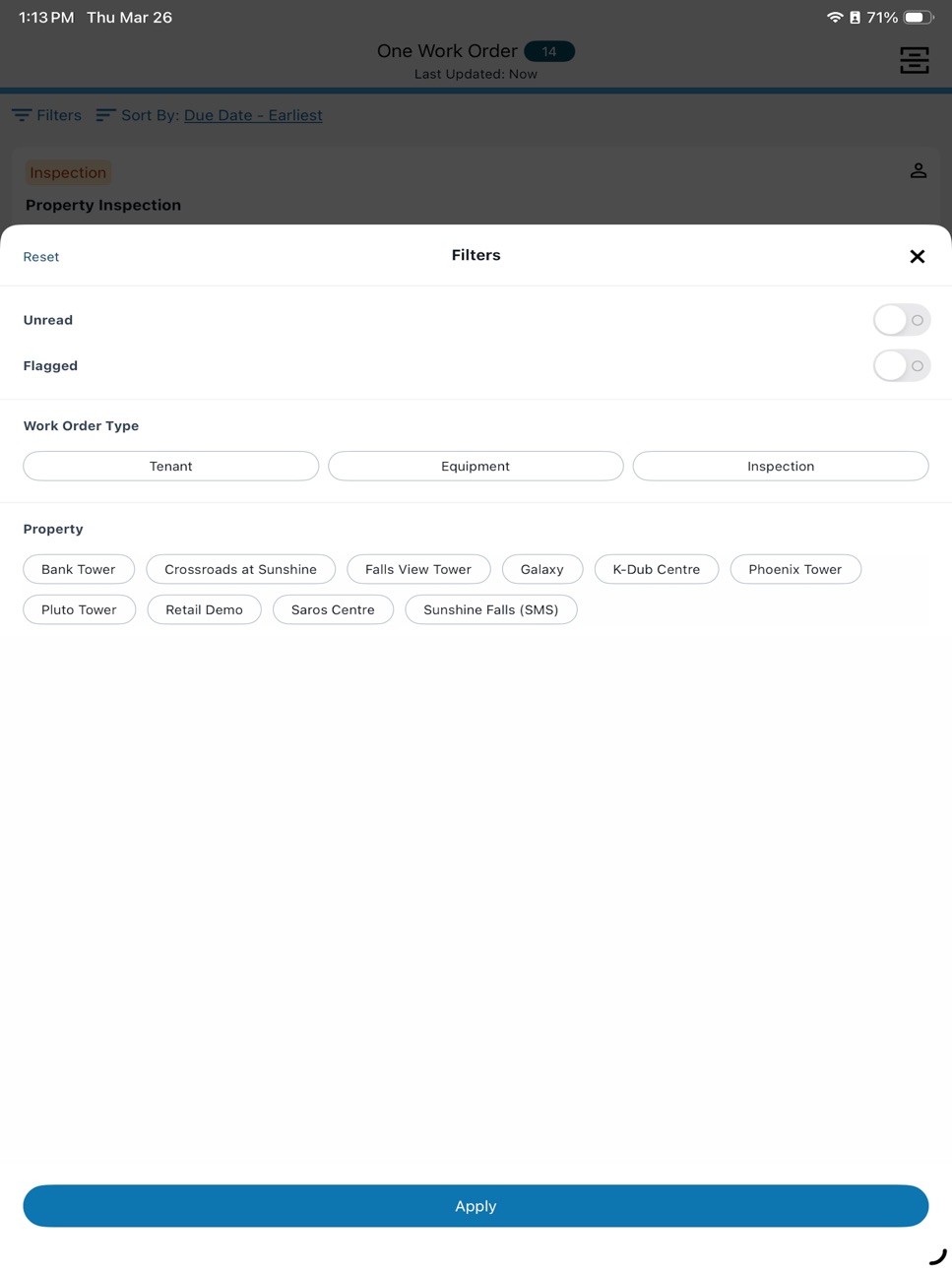
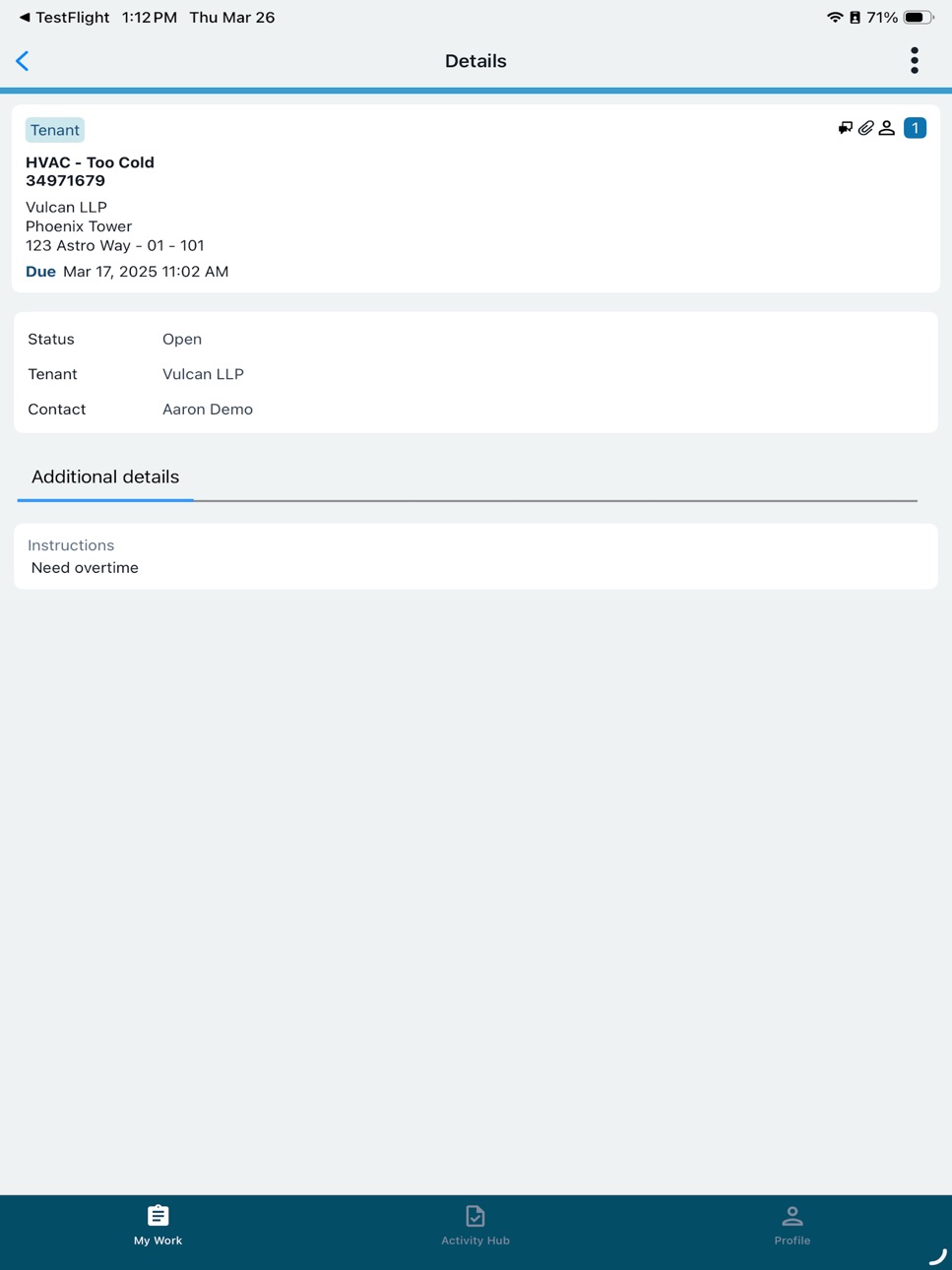


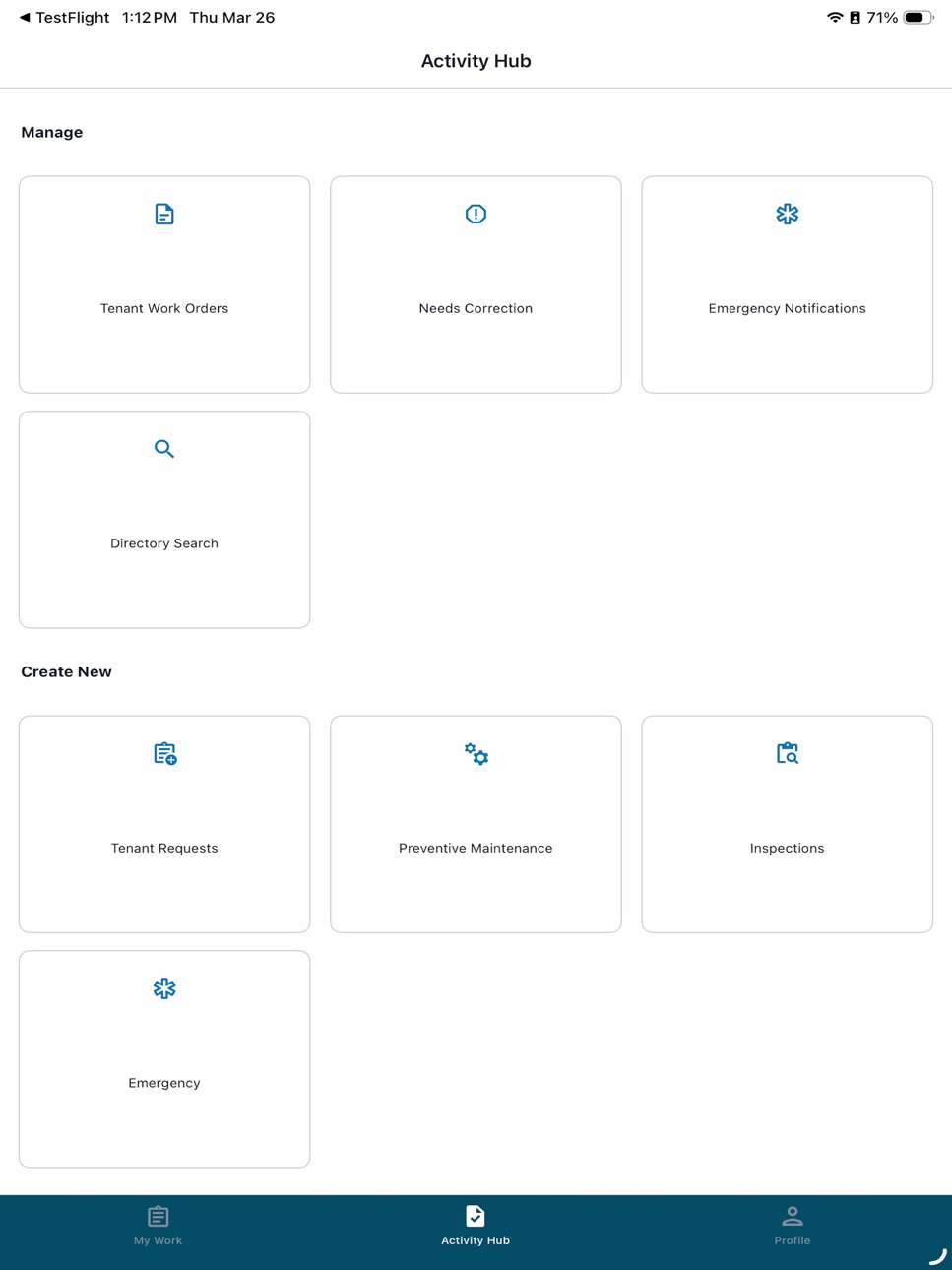
What’s New Version 1.10.1
Minor Bug fixes and Improvements
Description
Simplify property management on the go with the MRI Angus Mobile app. Centralize your operations, receive instant notifications, and manage maintenance work orders with ease. MRI Angus Mobile empowers you and your team to deliver fast, accurate service for tenant requests, equipment maintenance, inspections, and emergencies to ensure smooth operations and greater tenant satisfaction.
Key Features:
Unified Work Order Management
- Access all Tenant, Equipment, and Inspection work orders in a single, streamlined list.
- Filter work orders by type for faster navigation and prioritization.
Real-Time Notifications
- Stay updated with instant alerts for new work orders and status changes, so you never miss a critical task.
Offline Mode
- Continue working without an internet connection; your data syncs automatically when you’re back online-perfect for fieldwork and remote locations.
Fast, Accurate Data Syncing
- Ensure all updates and changes are instantly reflected across your team for reliable, up-to-date information.
Comprehensive Management Tools
- Effortlessly handle tenant requests, schedule and track equipment maintenance, conduct inspections, and manage emergencies from one app.
Advanced Search Capabilities
- Quickly locate work orders using keyword search, saving time and reducing manual scrolling.
User-Friendly Design
- Enjoy smooth navigation and a modern interface built for speed and simplicity-whether you’re in the office or in the field.
Smart Asset and Directory Search
- Instantly pull up equipment records by scanning asset codes and view associated work orders.
- Search your directory for employees, tenants, vendors, and equipment, and access detailed contact information
Enhanced Workflows
- Create, assign, dispatch, and complete work orders directly from your mobile device.
- Attach photos and notes to work orders for comprehensive documentation
Accessibility
ipadiphonemacrealityDevicetvoswatch
Version history 19 versions
Build 886741054v1.10.12026-06-11 12:14:11
Minor Bug fixes and Improvements
Build 886244514v1.10.02026-06-02 06:03:00
We’ve enhanced the Preventive Maintenance experience to make onboarding and managing asset faster and easier for teams in the field.
Create Equipment from Asset Codes
- When scanning a Mobile Asset Code, users can now create a new equipment record if one does not already exist.
Modify Equipment Details
- Users can now edit equipment details directly within an equipment record.
New “Create Equipment” Option in the Activity Hub
- A new Create Equipment option is now available in the Activity Hub.
Bug Fixes
- Resolved a permissions issue where users with Mobile‑only access could view the Activity Hub.
Build 883754523v1.9.02026-03-30 12:29:09
- Navigation has been simplified by combining Manage and Create into one section, making it easier to view, manage, create work orders and search in one place.
- Profile section has been refreshed
Build 883224562v1.8.02026-03-12 13:30:54
What’s New
- Upload up to two videos when creating or viewing Tenant, Equipment, and Inspection work orders.
- Get notified via push notification when a when a Tenant Work Order is escalated.
Build 882313194v1.7.22026-02-10 13:22:49
Minor bug fixes
Build 880529707v1.7.12025-12-11 13:08:36
Minor bug fixes
Build 878465354v1.7.02025-10-01 12:44:40
We’re rolling out enhancements and usability improvements to MRI Angus app to help teams stay organized, informed and efficient in the field.
What’s New:
- Last updated timestamp – See when your work order list was last refreshed so you always have up-to-date information.
- Push notifications – Stay in the loop with new alerts:
- When a new work order message is received.
- Tenant work order sorting – From the Manage section, sort tenant work orders by Date.
- Enhanced Directory Search – Results can now be sorted by name for easier navigation.
- COI compliance visibility – Vendor details now display their Certificate of Insurance (COI) compliance status.
- Extended time entry – The maximum hours that can be entered for each Time Taken entry has increased to 99 hours.
Build 876678416v1.6.02025-07-28 11:18:38
We’re rolling out enhancements and usability improvements to MRI Angus app to help teams stay organized, informed and efficient in the field.
What’s New
Enhanced List Filter and Sort
- Filter and sort have been improved in all lists
- Sort One Work Order list by Due Date and Priority
Flag & Read Status Management
- Users can now flag/unflag and mark work orders as read/unread
- Use the new filter options to easily find flagged or unread work orders
Highlight Newly Assigned Work Orders
- Work orders assigned to you are now clearly highlighted, so you can prioritize new tasks quickly.
Enhanced Directory Search
- The directory search for Vendor record has been improved to display Notes, Phone and Fax
Commenting on Services
- You can now include comments to individual services added to work order, supporting more detailed communication and documentation.
Expanded Photo Upload Capabilities
- The photo upload limit for inspection task lines has been increased from 5 to 20 images.
- Photos taken within the app using the device camera are now automatically saved to your device’s photo gallery, making it easier to access and reuse them.
Build 876326011v1.5.32025-07-14 12:38:21
Minor bug fixes
Build 875176579v1.5.22025-05-30 17:08:58
Minor bug fix
Build 874749605v1.5.12025-05-13 20:14:27
Resolved an issue that prevented users from updating an equipment work order immediately after accepting it
Build 874657881v1.5.02025-05-12 16:29:16
Enhancements:
- Receive in-app notification upon new app version release
- In create work order, Tenant’s location is auto-populated upon selecting Tenant.
- In create work order, added type to search for Property, Tenant and Contact dropdowns
- Directory Search - Access list of Contacts when viewing Tenant record
- Tenant work orders details in One Work Order list now includes Tenant’s name
- Added ability to multi-select when adding photos to work order.
Bug Fixes:
- Resolved bug where users' profile with Mobile-only permission should only have access to My Work
- Resolved discrepancy in readings shown in Gauge Reading History list.
Build 872302759v1.4.02025-02-10 05:15:45
Enhancements
- In One Work Order list, a new work type filter has been added to view work orders by Tenant, Equipment or Inspection.
- A new message has been added to appear when a work order dispatched to a pool has previously been accepted by another employee.
Bug Fixes - Inspections module
- In General Inspection Notes field, resolved issue where notes entered are not displayed as part of Inspection's Details
Bug Fixes - Preventive Maintenance
- In Gauge Reading list, resolved issue where full gauge name was not being displayed.
- In Gauge Reading list, the sorting has been updated to arrange items by gauge name in ascending order.
Build 871043908v1.3.12024-12-11 12:41:35
- Minor user interface enhancements and bug fixes
Build 870732460v1.3.02024-12-02 14:31:04
- Add Lease and Services to a Tenant work order.
- Added the ability to complete and close Tenant work orders that include added Services.
- Minor bug fixes
Build 870377089v1.2.12024-11-17 07:03:42
- Fixed an issue where users were not receiving push notifications when an inspection was assigned.
- Resolved an issue causing the app to crash on iPad when adding attachments to a work order.
- Resolved an issue where work order's attachment cannot be viewed when accessing from Manage section.
Build 869159334v1.2.02024-09-23 13:48:09
- In Manage section, added new Directory Search to search and view details for Employee, Tenant, Contact, Vendor, Equipment
- New app icon
- Minor bug fixes
Build 868820236v1.1.02024-09-07 17:36:09
In this release:
-Added support to recognize Code 93 for Asset Code Scan
-Improved Asset Code Scan functionality by integrating OCR support.
-A sound will now play on the device when a push notification is received for a work order assignment.
-Push notifications are now supported while the app is in use (foreground), and the work order list will automatically refresh.
Build 853796270v1.02024-07-15 20:49:54
No pricing data captured yet — comparisons appear once the app has paid storefronts or in-app purchases.
Availability 174 of 174 storefronts
| Region | Language | Price | Ratings | Avg | Version |
|---|---|---|---|---|---|
| US | en-US | Free | 29 | 2.2 | 1.10.1 |
| CA | en-CA | Free | 16 | 2.4 | 1.10.1 |
| PH | en-GB | Free | 1 | 3.0 | 1.10.1 |
| AE | en-GB | Free | 0 | — | 1.10.1 |
| AF | en-GB | Free | 0 | — | 1.10.1 |
| AG | en-GB | Free | 0 | — | 1.10.1 |
| AI | en-GB | Free | 0 | — | 1.10.1 |
| AL | en-GB | Free | 0 | — | 1.10.1 |
| AM | en-GB | Free | 0 | — | 1.10.1 |
| AO | en-GB | Free | 0 | — | 1.10.1 |
| AR | es-MX | Free | 0 | — | 1.10.1 |
| AT | de-DE | Free | 0 | — | 1.10.1 |
| AU | en-AU | Free | 0 | — | 1.10.1 |
| AZ | en-GB | Free | 0 | — | 1.10.1 |
| BA | en-GB | Free | 0 | — | 1.10.1 |
| BB | en-GB | Free | 0 | — | 1.10.1 |
| BE | en-GB | Free | 0 | — | 1.10.1 |
| BF | en-GB | Free | 0 | — | 1.10.1 |
| BG | en-GB | Free | 0 | — | 1.10.1 |
| BH | en-GB | Free | 0 | — | 1.10.1 |
| BJ | en-GB | Free | 0 | — | 1.10.1 |
| BM | en-GB | Free | 0 | — | 1.10.1 |
| BN | en-GB | Free | 0 | — | 1.10.1 |
| BO | es-MX | Free | 0 | — | 1.10.1 |
| BR | pt-BR | Free | 0 | — | 1.10.1 |
| BS | en-GB | Free | 0 | — | 1.10.1 |
| BT | en-GB | Free | 0 | — | 1.10.1 |
| BW | en-GB | Free | 0 | — | 1.10.1 |
| BY | en-GB | Free | 0 | — | 1.10.1 |
| BZ | en-GB | Free | 0 | — | 1.10.1 |
| CD | en-GB | Free | 0 | — | 1.10.1 |
| CG | en-GB | Free | 0 | — | 1.10.1 |
| CH | de-CH | Free | 0 | — | 1.10.1 |
| CI | fr-FR | Free | 0 | — | 1.10.1 |
| CL | es-MX | Free | 0 | — | 1.10.1 |
| CM | fr-FR | Free | 0 | — | 1.10.1 |
| CN | zh-Hans-CN | Free | 0 | — | 1.10.1 |
| CO | es-MX | Free | 0 | — | 1.10.1 |
| CR | es-MX | Free | 0 | — | 1.10.1 |
| CV | en-GB | Free | 0 | — | 1.10.1 |
| CY | en-GB | Free | 0 | — | 1.10.1 |
| CZ | en-GB | Free | 0 | — | 1.10.1 |
| DE | de-DE | Free | 0 | — | 1.10.1 |
| DK | en-GB | Free | 0 | — | 1.10.1 |
| DM | en-GB | Free | 0 | — | 1.10.1 |
| DO | es-MX | Free | 0 | — | 1.10.1 |
| DZ | en-GB | Free | 0 | — | 1.10.1 |
| EC | es-MX | Free | 0 | — | 1.10.1 |
| EE | en-GB | Free | 0 | — | 1.10.1 |
| EG | en-GB | Free | 0 | — | 1.10.1 |
| ES | es-ES | Free | 0 | — | 1.10.1 |
| FI | en-GB | Free | 0 | — | 1.10.1 |
| FJ | en-GB | Free | 0 | — | 1.10.1 |
| FM | en-GB | Free | 0 | — | 1.10.1 |
| FR | fr-FR | Free | 0 | — | 1.10.1 |
| GA | fr-FR | Free | 0 | — | 1.10.1 |
| GB | en-GB | Free | 0 | — | 1.10.1 |
| GD | en-GB | Free | 0 | — | 1.10.1 |
| GE | en-GB | Free | 0 | — | 1.10.1 |
| GH | en-GB | Free | 0 | — | 1.10.1 |
| GM | en-GB | Free | 0 | — | 1.10.1 |
| GR | en-GB | Free | 0 | — | 1.10.1 |
| GT | es-MX | Free | 0 | — | 1.10.1 |
| GW | en-GB | Free | 0 | — | 1.10.1 |
| GY | en-GB | Free | 0 | — | 1.10.1 |
| HK | zh-Hant-HK | Free | 0 | — | 1.10.1 |
| HN | es-MX | Free | 0 | — | 1.10.1 |
| HR | en-GB | Free | 0 | — | 1.10.1 |
| HU | en-GB | Free | 0 | — | 1.10.1 |
| ID | en-GB | Free | 0 | — | 1.10.1 |
| IE | en-GB | Free | 0 | — | 1.10.1 |
| IL | en-GB | Free | 0 | — | 1.10.1 |
| IN | en-GB | Free | 0 | — | 1.10.1 |
| IQ | en-GB | Free | 0 | — | 1.10.1 |
| IS | en-GB | Free | 0 | — | 1.10.1 |
| IT | it | Free | 0 | — | 1.10.1 |
| JM | en-GB | Free | 0 | — | 1.10.1 |
| JO | en-GB | Free | 0 | — | 1.10.1 |
| JP | ja | Free | 0 | — | 1.10.1 |
| KE | en-GB | Free | 0 | — | 1.10.1 |
| KG | en-GB | Free | 0 | — | 1.10.1 |
| KH | en-GB | Free | 0 | — | 1.10.1 |
| KN | en-GB | Free | 0 | — | 1.10.1 |
| KR | ko | Free | 0 | — | 1.10.1 |
| KW | en-GB | Free | 0 | — | 1.10.1 |
| KY | en-GB | Free | 0 | — | 1.10.1 |
| KZ | en-GB | Free | 0 | — | 1.10.1 |
| LA | en-GB | Free | 0 | — | 1.10.1 |
| LB | en-GB | Free | 0 | — | 1.10.1 |
| LC | en-GB | Free | 0 | — | 1.10.1 |
| LK | en-GB | Free | 0 | — | 1.10.1 |
| LR | en-GB | Free | 0 | — | 1.10.1 |
| LT | en-GB | Free | 0 | — | 1.10.1 |
| LU | en-GB | Free | 0 | — | 1.10.1 |
| LV | en-GB | Free | 0 | — | 1.10.1 |
| LY | en-GB | Free | 0 | — | 1.10.1 |
| MA | en-GB | Free | 0 | — | 1.10.1 |
| MD | en-GB | Free | 0 | — | 1.10.1 |
| ME | en-GB | Free | 0 | — | 1.10.1 |
| MG | en-GB | Free | 0 | — | 1.10.1 |
| MK | en-GB | Free | 0 | — | 1.10.1 |
| ML | en-GB | Free | 0 | — | 1.10.1 |
| MM | en-GB | Free | 0 | — | 1.10.1 |
| MN | en-GB | Free | 0 | — | 1.10.1 |
| MO | zh-Hant-HK | Free | 0 | — | 1.10.1 |
| MR | en-GB | Free | 0 | — | 1.10.1 |
| MS | en-GB | Free | 0 | — | 1.10.1 |
| MT | en-GB | Free | 0 | — | 1.10.1 |
| MU | en-GB | Free | 0 | — | 1.10.1 |
| MV | en-GB | Free | 0 | — | 1.10.1 |
| MW | en-GB | Free | 0 | — | 1.10.1 |
| MX | es-MX | Free | 0 | — | 1.10.1 |
| MY | en-GB | Free | 0 | — | 1.10.1 |
| MZ | en-GB | Free | 0 | — | 1.10.1 |
| NA | en-GB | Free | 0 | — | 1.10.1 |
| NE | en-GB | Free | 0 | — | 1.10.1 |
| NG | en-GB | Free | 0 | — | 1.10.1 |
| NI | es-MX | Free | 0 | — | 1.10.1 |
| NL | nl | Free | 0 | — | 1.10.1 |
| NO | en-GB | Free | 0 | — | 1.10.1 |
| NP | en-GB | Free | 0 | — | 1.10.1 |
| NR | en-GB | Free | 0 | — | 1.10.1 |
| NZ | en-AU | Free | 0 | — | 1.10.1 |
| OM | en-GB | Free | 0 | — | 1.10.1 |
| PA | es-MX | Free | 0 | — | 1.10.1 |
| PE | es-MX | Free | 0 | — | 1.10.1 |
| PG | en-GB | Free | 0 | — | 1.10.1 |
| PK | en-GB | Free | 0 | — | 1.10.1 |
| PL | en-GB | Free | 0 | — | 1.10.1 |
| PT | pt-PT | Free | 0 | — | 1.10.1 |
| PW | en-GB | Free | 0 | — | 1.10.1 |
| PY | es-MX | Free | 0 | — | 1.10.1 |
| QA | en-GB | Free | 0 | — | 1.10.1 |
| RO | en-GB | Free | 0 | — | 1.10.1 |
| RS | en-GB | Free | 0 | — | 1.10.1 |
| RU | ru | Free | 0 | — | 1.10.1 |
| RW | en-GB | Free | 0 | — | 1.10.1 |
| SA | en-GB | Free | 0 | — | 1.10.1 |
| SB | en-GB | Free | 0 | — | 1.10.1 |
| SC | en-GB | Free | 0 | — | 1.10.1 |
| SE | sv | Free | 0 | — | 1.10.1 |
| SG | en-GB | Free | 0 | — | 1.10.1 |
| SI | en-GB | Free | 0 | — | 1.10.1 |
| SK | en-GB | Free | 0 | — | 1.10.1 |
| SL | en-GB | Free | 0 | — | 1.10.1 |
| SN | en-GB | Free | 0 | — | 1.10.1 |
| SR | en-GB | Free | 0 | — | 1.10.1 |
| ST | en-GB | Free | 0 | — | 1.10.1 |
| SV | es-MX | Free | 0 | — | 1.10.1 |
| SZ | en-GB | Free | 0 | — | 1.10.1 |
| TD | en-GB | Free | 0 | — | 1.10.1 |
| TH | en-GB | Free | 0 | — | 1.10.1 |
| TJ | en-GB | Free | 0 | — | 1.10.1 |
| TM | en-GB | Free | 0 | — | 1.10.1 |
| TN | en-GB | Free | 0 | — | 1.10.1 |
| TO | en-GB | Free | 0 | — | 1.10.1 |
| TR | en-GB | Free | 0 | — | 1.10.1 |
| TT | en-GB | Free | 0 | — | 1.10.1 |
| TW | zh-Hant-TW | Free | 0 | — | 1.10.1 |
| TZ | en-GB | Free | 0 | — | 1.10.1 |
| UA | en-GB | Free | 0 | — | 1.10.1 |
| UG | en-GB | Free | 0 | — | 1.10.1 |
| UY | en-GB | Free | 0 | — | 1.10.1 |
| UZ | en-GB | Free | 0 | — | 1.10.1 |
| VC | en-GB | Free | 0 | — | 1.10.1 |
| VE | es-MX | Free | 0 | — | 1.10.1 |
| VG | en-GB | Free | 0 | — | 1.10.1 |
| VN | en-GB | Free | 0 | — | 1.10.1 |
| VU | en-GB | Free | 0 | — | 1.10.1 |
| XK | en-GB | Free | 0 | — | 1.10.1 |
| YE | en-GB | Free | 0 | — | 1.10.1 |
| ZA | en-GB | Free | 0 | — | 1.10.1 |
| ZM | en-GB | Free | 0 | — | 1.10.1 |
| ZW | en-GB | Free | 0 | — | 1.10.1 |
Change log 22 changes · MX
✎
releaseNotes updated
Minor Bug fixes and Improvements
✎
description updated
Simplify property management on the go with the MRI Angus Mobile app. Centralize your operations, receive instant notifications, and manage maintenance work ord
✎
name updated
MRI Angus
◆
Version 1.10.1 released
Minor Bug fixes and Improvements
◆
Version 1.10.0 released
We’ve enhanced the Preventive Maintenance experience to make onboarding and managing asset faster and easier for teams in the field.
Create Equipment from Asset Codes
- When scanning a Mobile Asset Code, users can now create a new equipmen
◆
Version 1.9.0 released
- Navigation has been simplified by combining Manage and Create into one section, making it easier to view, manage, create work orders and search in one place.
- Profile section has been refreshed
◆
Version 1.8.0 released
What’s New
- Upload up to two videos when creating or viewing Tenant, Equipment, and Inspection work orders.
- Get notified via push notification when a when a Tenant Work Order is escalated.
◆
Version 1.7.2 released
Minor bug fixes
◆
Version 1.7.1 released
Minor bug fixes
◆
Version 1.7.0 released
We’re rolling out enhancements and usability improvements to MRI Angus app to help teams stay organized, informed and efficient in the field.
What’s New:
- Last updated timestamp – See when your work order list was last refreshed so you a
◆
Version 1.6.0 released
We’re rolling out enhancements and usability improvements to MRI Angus app to help teams stay organized, informed and efficient in the field.
What’s New
Enhanced List Filter and Sort
- Filter and sort have been improved in all l
◆
Version 1.5.3 released
Minor bug fixes
◆
Version 1.5.2 released
Minor bug fix
◆
Version 1.5.1 released
Resolved an issue that prevented users from updating an equipment work order immediately after accepting it
◆
Version 1.5.0 released
Enhancements:
- Receive in-app notification upon new app version release
- In create work order, Tenant’s location is auto-populated upon selecting Tenant.
- In create work order, added type to search for Property, Tenant and Contact dropdo
◆
Version 1.4.0 released
Enhancements
- In One Work Order list, a new work type filter has been added to view work orders by Tenant, Equipment or Inspection.
- A new message has been added to appear when a work order dispatched to a pool has previously been accepte
◆
Version 1.3.1 released
- Minor user interface enhancements and bug fixes
◆
Version 1.3.0 released
- Add Lease and Services to a Tenant work order.
- Added the ability to complete and close Tenant work orders that include added Services.
- Minor bug fixes
◆
Version 1.2.1 released
- Fixed an issue where users were not receiving push notifications when an inspection was assigned.
- Resolved an issue causing the app to crash on iPad when adding attachments to a work order.
- Resolved an issue where work order's attachm
◆
Version 1.2.0 released
- In Manage section, added new Directory Search to search and view details for Employee, Tenant, Contact, Vendor, Equipment
- New app icon
- Minor bug fixes
◆
Version 1.1.0 released
In this release:
-Added support to recognize Code 93 for Asset Code Scan
-Improved Asset Code Scan functionality by integrating OCR support.
-A sound will now play on the device when a push notification is received for a work order assignme
◆
Version 1.0 released