Home › Business

 PY
PY
 DEde-DE
 GRen-GB
 USen-US
 AEen-GB
 AGen-GB
 AIen-GB
 ALen-GB
 AOen-GB
 ARes-MX
 AUen-AU
 BAen-GB
 BBen-GB
 BEen-GB
 BFen-GB
 BGen-GB
 BJen-GB
 BOes-MX
 BRpt-BR
 BSen-GB
 BWen-GB
 BYen-GB
 BZen-GB
 CAen-CA
 CDen-GB
 CGen-GB
 CHde-CH
 CIfr-FR
 CLes-MX
 CMfr-FR
 COes-MX
 CRes-MX
 CVen-GB
 CYen-GB
 DKen-GB
 DMen-GB
 DOes-MX
 DZen-GB
 ECes-MX
 EEen-GB
 ESes-ES
 FRfr-FR
 GAfr-FR
 GBen-GB
 GDen-GB
 GHen-GB
 GMen-GB
 GTes-MX
 GWen-GB
 GYen-GB
 HNes-MX
 HRen-GB
 HUen-GB
 IEen-GB
 ILen-GB
 ITit
ITit JMen-GB
 KEen-GB
 KNen-GB
 KYen-GB
 LCen-GB
 LRen-GB
 LTen-GB
 LUen-GB
 LVen-GB
 LYen-GB
 MAen-GB
 MDen-GB
 MEen-GB
 MGen-GB
 MKen-GB
 MLen-GB
 MSen-GB
 MTen-GB
 MUen-GB
 MWen-GB
 MXes-MX
 MZen-GB
 NAen-GB
 NEen-GB
 NGen-GB
 NIes-MX
 NLnl
NLnl NZen-AU
 PAes-MX
 PEes-MX
 PTpt-PTPYes-MX
 ROen-GB
 RSen-GB
 RUru
RUru RWen-GB
 SAen-GB
 SCen-GB
 SEsv
SEsv SIen-GB
 SKen-GB
 SLen-GB
 SNen-GB
 SRen-GB
 STen-GB
 SVes-MX
 SZen-GB
 TCen-GB
 TDen-GB
 TNen-GB
 TRen-GB
 TTen-GB
 TZen-GB
 UAen-GB
 UGen-GB
 UYen-GB
 VCen-GB
 VEes-MX
 VGen-GB
 XKen-GB
 ZMen-GB
 ZWen-GB
117 of 117 storefronts
Content in en-US
Content in en-US
Information
Preview 2 platforms
iPhone 10 images




iPad 10 images


What’s New Version 1.26.4
Improved Login Experiences
A clearer, more user-friendly login screen for a faster and smoother sign-in experience.
Fix for Date Format Issue in Schedule
Resolved a bug where the date picker format could unexpectedly change while filling out the form.
Dates now remain consistent throughout the scheduling process.
Archive Improvements
Fixed an issue where some archived appointments wouldn’t display their details.
Description
The Fieldcode FSM solution helps you to plan and perform your Field Service interventions. With a fully automated, Zero-Touch approach work orders are created, scheduled and send to your techs without manual interventions. This empowers your technicians to work more efficiently, whether online or offline.
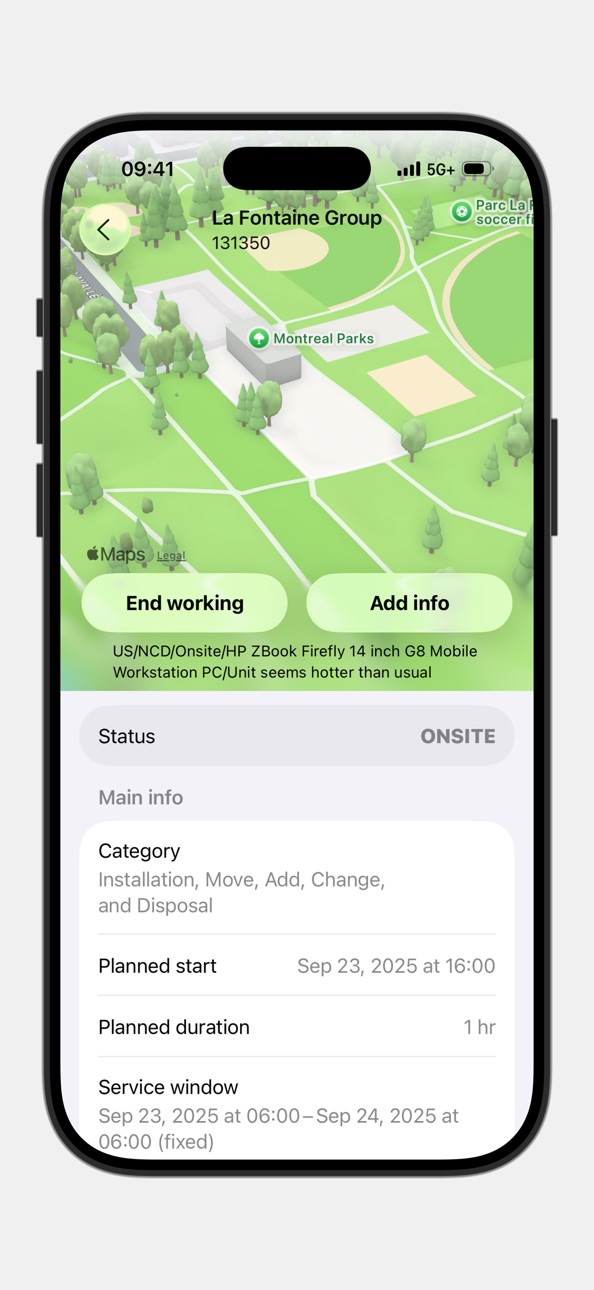
The Fieldcode mobile app offers step-by-step instructions directly to technicians’ devices, ensuring consistent, high-quality service delivery. Technicians stay up-to-date on essential details such as schedule updates, customer information, order status, route navigation, and parts availability, all in one place.
Key features include:
• User-friendly interface: A structured, easy-to-navigate view of tasks for seamless workflow management.
• Real-time job information: Access and update details such as task descriptions, contact information, documents, and more.
• Offline capability: Data is stored locally when offline and automatically synced once the device is connected to the internet.
• Automatic ticket assignment: Tickets are automatically assigned to technicians, eliminating manual assignment and ensuring quicker service delivery.
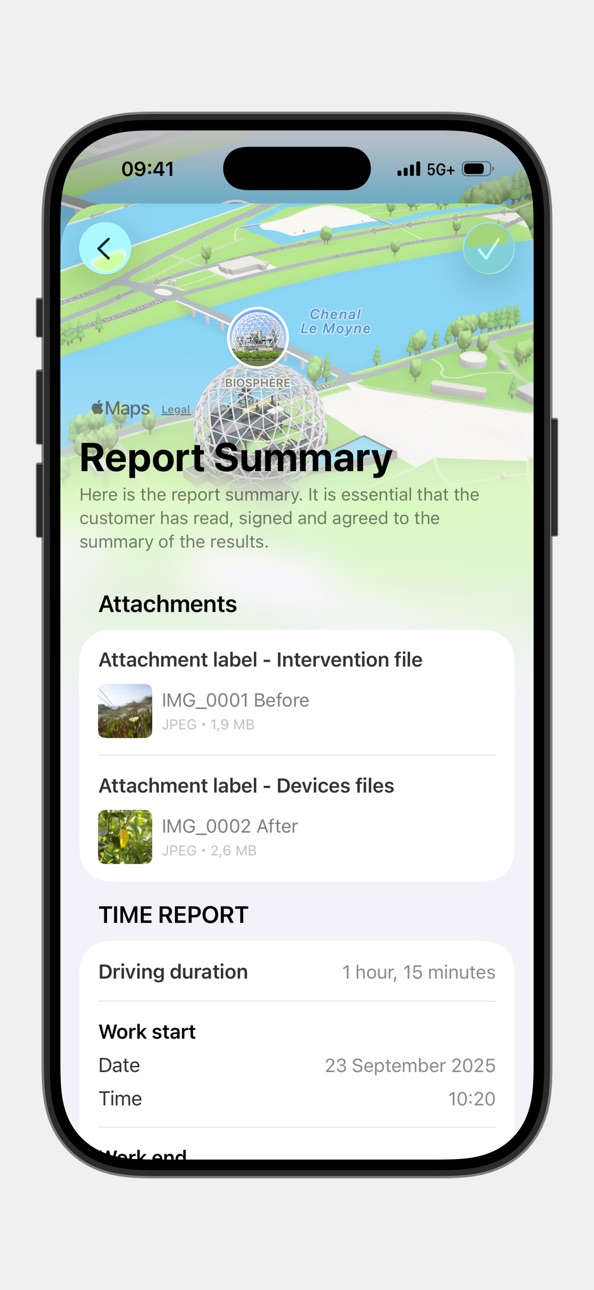
• Efficient task reporting: Technicians can track progress, report time spent on tasks, and submit task completion reports, including relevant documentation.
• Route optimization: On-map route information helps technicians optimize travel time, improving efficiency and service times.
• Spare parts management: Technicians can access parts linked to their tickets, ensuring full traceability with details on pick-up/drop-off locations and easy receipt confirmation.
With easy access to job information, schedule details, real-time updates, and reporting features, your team will never deal with lost data or unhappy customers again.
Accessibility
ipadiphonemacrealityDevicetvoswatch
Version history 25 versions
Build 885025819v1.26.42026-06-08 08:59:41
Improved Login Experiences
A clearer, more user-friendly login screen for a faster and smoother sign-in experience.
Fix for Date Format Issue in Schedule
Resolved a bug where the date picker format could unexpectedly change while filling out the form.
Dates now remain consistent throughout the scheduling process.
Archive Improvements
Fixed an issue where some archived appointments wouldn’t display their details.
Build 884233531v1.25.92026-04-09 09:00:56
Project Visibility in Appointments
Appointment cards now display the associated project name and color. You can also find this information in the appointment details for better context and clarity.
Ticket Scheduling
Engineers can now schedule tickets directly in the FMA app using a simple, fixed-appointment setup. The new “Ticket Scheduling” option will appear in the menu when enabled for your company account.
Login improvement
Resolved a login issue that caused an incorrect alert to be shown if AutoFill Passwords was turned off in system settings.
Improved Stability & Sync
We’ve enhanced overall app stability and improved data synchronization for a more reliable experience.
Improved attachment handling
We’ve enhanced the reliability and performance of downloading and uploading attachments for a smoother experience.
Archive Improvements
We fixed an issue where archived appointment details could sometimes fail to load. Appointment information in the Archive section should now display reliably.
Build 883019318v1.24.92026-03-05 12:33:15
Onboarding intro screens for first-time users
After a fresh installation, users are now guided through static intro screens featuring messages and sample screenshots to improve the app’s initial experience and overall professionalism.
Camera View Fixes on iOS 26
We’ve resolved a small UI issue on iOS 26 where parts of the camera view were being clipped. Everything now displays as intended for a smoother experience.
Enhanced Stability for Reporting and Forms
We’ve improved the performance and reliability of reporting and form features, ensuring smoother operation and fewer disruptions.
Accurate Language Selection
The app now consistently sends the language of the active app interface, preventing unsupported device languages from being passed to the Fieldcode User Settings.
Fixed background crash during scheduled tasks
Resolved an issue where the app would crash when executing a BGTask in the background.
Fixed inability to add attachments after entering the reporting flow
Some technicians were unable to add attachments in the Reporting section. Attachments can now be added reliably during reporting.
Improved database cleanup for unused objects
Optimized the database cleanup logic to more efficiently remove outdated or unnecessary objects.
Build 880108707v1.24.82026-02-26 09:58:10
Onboarding intro screens for first-time users
After a fresh installation, users are now guided through static intro screens featuring messages and sample screenshots to improve the app’s initial experience and overall professionalism.
Camera View Fixes on iOS 26
We’ve resolved a small UI issue on iOS 26 where parts of the camera view were being clipped. Everything now displays as intended for a smoother experience.
Enhanced Stability for Reporting and Forms
We’ve improved the performance and reliability of reporting and form features, ensuring smoother operation and fewer disruptions.
Accurate Language Selection
The app now consistently sends the language of the active app interface, preventing unsupported device languages from being passed to the Fieldcode User Settings.
Fixed background crash during scheduled tasks
Resolved an issue where the app would crash when executing a BGTask in the background.
Fixed inability to add attachments after entering the reporting flow
Some technicians were unable to add attachments in the Reporting section. Attachments can now be added reliably during reporting.
Improved database cleanup for unused objects
Optimized the database cleanup logic to more efficiently remove outdated or unnecessary objects.
Build 878364898v1.23.92025-09-25 09:00:12
Ready for iOS 26
Our app is fully optimized for iOS 26, ensuring performance, stability, and compatibility now and going forward. If you’ve already updated, you’ll also notice enhanced UI elements and improved controls tailored for this new version.
Smarter Form Selection
We’ve added a search option in forms with single or multi-selection. Now, when there are many elements to choose from, you can quickly find what you need without endless scrolling.
Smarter Location Button
The location button on the map now hides automatically when location access is disabled, preventing confusion or unresponsive behavior.
Look Around Button Only When Available
The Look Around feature is now shown only when it’s supported in the selected area, giving you a cleaner and more relevant experience.
Attachments Are Now Safely Preserved
Appointments with pending file uploads are no longer removed during cleanup, so no data gets lost if you’re temporarily offline.
No More Duplicate Uploads
Fixed an issue where some form attachments were being uploaded multiple times in certain cases.
More Reliable Attachment Previews
Attachment thumbnails now load more consistently, making it easier to identify your uploaded files.
Fixed incorrect text color in dark mode for appointment descriptions
We’ve fixed an issue where the appointment description text appeared black in dark mode, making it hard to read. Now the text color adapts automatically, so your descriptions stay clear and easy on the eyes, whether you’re in light or dark mode.
Build 877414012v1.22.92025-09-18 09:01:51
Ready for the Next Major iOS Update
We've proactively prepared our app for the upcoming major iOS release. This ensures you continue to benefit from optimal performance, stability, and full compatibility - now and in the future.
Smarter Location Button
The location button on the map now hides automatically when location access is disabled, preventing confusion or unresponsive behavior.
Look Around Button Only When Available
The Look Around feature is now shown only when it’s supported in the selected area, giving you a cleaner and more relevant experience.
Attachments Are Now Safely Preserved
Appointments with pending file uploads are no longer removed during cleanup, so no data gets lost if you’re temporarily offline.
No More Duplicate Uploads
Fixed an issue where some form attachments were being uploaded multiple times in certain cases.
More Reliable Attachment Previews
Attachment thumbnails now load more consistently, making it easier to identify your uploaded files.
Fixed incorrect text color in dark mode for appointment descriptions
We’ve fixed an issue where the appointment description text appeared black in dark mode, making it hard to read. Now the text color adapts automatically, so your descriptions stay clear and easy on the eyes, whether you’re in light or dark mode.
Build 876709951v1.21.02025-07-31 08:59:50
Smarter Text Selection and Detection
You can now select and copy specific parts of the description text instead of the entire content. The view also detects phone numbers, addresses, and tracking numbers, offering relevant actions like calling, mapping, or tracking with a single tap.
Bug Fixes
This update includes general bug fixes and stability improvements to enhance the overall performance and reliability of the app.
Build 875946349v1.20.22025-06-30 08:59:43
Tracking Code Validation
Return tracking code validation has been added to the parts return process in FMA.
Depending on project configuration, engineers will either see warnings or be blocked from
saving when entering duplicate or improperly formatted tracking codes.
Bug Fixes
This update includes general bug fixes and stability improvements to enhance the
overall performance and reliability of the app.
Build 875754437v1.20.12025-06-26 10:59:52
Tracking Code Validation
Return tracking code validation has been added to the parts return process in FMA.
Depending on project configuration, engineers will either see warnings or be blocked from
saving when entering duplicate or improperly formatted tracking codes.
Bug Fixes
This update includes general bug fixes and stability improvements to enhance the
overall performance and reliability of the app.
Build 874990543v1.19.02025-05-27 09:00:04
Add Parts from Van Stock
Engineers can now add parts from their van stock directly to a ticket during customer visits. This feature is available for tenants with a configured part API and provides a seamless way to manage parts in the field. The Add Part button is now accessible on the Parts screen in Appointment Details. When selected, engineers can choose one or multiple parts, set the requested quantity, and add Entry IDs using a barcode scanner. Parts will appear in the app after the next successful sync.
Attach Files Directly in Forms
You can now upload attachments as part of your form submissions. This new component allows you to capture and include files within the form itself, with support for camera, photo library, or file browsing, just like in the standard attachments tab.
New Fields Added
FMA has been updated to include several previously missing fields. In the part details section, you will now see Entry ID, Stock, and Condition. Additionally, new shipping-related fields have been added under the Shipping Details section, including Address Note, Return Option, Shipping Date and Shipment Condition.
Build 874648248v1.18.42025-05-14 08:59:57
Performance Improvements and Bug Fixes
Our team has improved the app's performance and fixed a number of minor issues,
making it faster and more reliable for you.
Build 874280230v1.18.32025-05-05 09:03:43
Improved Ticket Linking for Parts
We’ve enhanced how parts are linked to their parent tickets, especially after reporting. Even when a ticket is no longer stored locally, its reference will now remain visible on the related part. You can open the ticket directly from the part details via our new online archive functionality.
Bug Fixes
In addition, we have implemented further bug fixes and performance improvements in this version.
Build 874104147v1.18.12025-04-24 08:59:54
Improved Ticket Linking for Parts
We’ve enhanced how parts are linked to their parent tickets, especially after reporting. Even when a ticket is no longer stored locally, its reference will now remain visible on the related part. You can open the ticket directly from the part details via our new online archive functionality.
Bug Fixes
In addition, we have implemented further bug fixes and performance improvements in this version.
Build 874274671v1.18.22025-04-24 13:56:55
Bug Fixes
In addition, we have implemented further bug fixes and performance improvements in this version.
Build 873241642v1.17.02025-03-26 09:59:48
You can now use the scanner for certain fields to fill them in directly instead of typing. To benefit from those new fields, custom forms must first be created within the Admin panel that include these fields with a scanning function.
In addition, we have implemented further bug fixes and performance improvements in this version.
Build 872662741v1.16.02025-02-27 10:04:54
Improved Barcode Scanning Capabilities
We've optimized FedEx barcode detection for accurate tracking number extraction.
The scanner now also has the ability to detect and highlight multiple barcodes at once.
These enhancements provide greater accuracy and efficiency for your scanning operations.
Improved Sync Status Feedback
We've improved the sync experience by providing clear, real-time status updates.
Instead of relying solely on the timestamp of the last successful sync, you'll now see
informative messages when a sync is in progress or encountering a problem.
Performance Improvements and Bug Fixes
Our team has improved the app's performance and fixed a number of minor issues,
making it faster and more reliable for you.
Build 871930408v1.15.02025-01-30 10:02:42
Improved Work Note Reliability
We resolved an issue where unsaved work notes would disappear if a call came in
or the app was sent to the background. Now, your notes will remain intact until
you’re ready to save, ensuring no more retyping is needed.
Diagnose Section
The Appointment Details Screen now includes a Diagnose section. This feature
provides early-stage diagnostic information that might include insightful
comments to support engineers in their work.
Quick Access to User Resources
We’re making it easier than ever to find the information you need. The user manual
and release notes are now just a tap away, directly accessible within the app for your convenience.
Order Details Now Available
The part details screen has been enhanced with Order Number and Order Line Item data.
These additions ensure engineers have the necessary information to accurately pick up
parts from the PUDO, streamlining the process and improving efficiency.
Performance Improvements And Bug Fixes
Our team has optimized the app’s performance and resolved a number of minor issues,
making it faster and more reliable for you.
Build 870726095v1.14.22024-12-12 10:29:45
Thanks for updating the Fieldcode FMA app! To improve your overall experience, we've made some changes and fixed some bugs in our iOS app.
• Finding and copying serial numbers fixed:
You can now copy serial numbers from the device details screen again! We've ensured you can copy values and search your device history by serial number seamlessly and without interruption.
• "My Day" status updates fixed:
My Day status is back on track. Status changes now work correctly and the work time counter displays as expected.
• Multiple account sync issues fixed:
We have fixed a bug that caused sync issues when one of multiple accounts had an expired session. The other accounts will now continue to sync without problems, even if there is an error on one of them.
• Signatures: Orientation glitches, goodbye
No more disappearing signatures. The signature screen now works correctly in both portrait and landscape modes. Changing the orientation preserves your signature, keeps it visible, and ensures the interface looks great in all scenarios.
• Improved Device Details:
Fields with no data are now hidden on the Device Details screen, giving it a cleaner and more focused look. If all fields are empty, the navigation link to the Device Details screen is disabled to avoid a blank view.
Build 869885231v1.13.22024-10-24 09:00:07
Thanks for updating the Fieldcode FMA app! To improve your overall experience, we've made some changes and fixed some bugs in our iOS app.
• Better database management:
We have improved our database management, significantly reducing legacy file accumulation and optimizing application performance. You will notice faster app response times.
• iOS 18 improvements:
We have fixed layout issues inside the Events, Parts, and Attachments screens to accommodate iOS 18.
• Archive improvements:
We have fixed an issue where the archive session expiration warning was unclear. You are now properly informed of session expiration with a clear path to bring your account back online.
• Notification improvements:
We have fixed a problem where the local "User logged out" notification was not saved in the Notification Center, and the navigation to the Account screen failed when interacting with this notification.
• Corrected headers:
We have fixed a bug in parts grouping by status where some parts were displaying incorrect headers.
Build 869111518v1.12.02024-09-26 08:59:29
Thank you for updating the Fieldcode FMA app! We've made significant changes to improve your overall experience and fixed a few bugs in our iOS 18-compatible app.
• iOS 18, here we come:
Love all the new customization options in iOS 18? Well, then we have some good news for you! Instead of blinding you with a white app icon in dark mode, we are providing you with a sleek black icon to assist you on your ongoing iOS 18 customization journey.
• Better parts grouping, just for you:
You asked and we delivered. Now you can group parts by location, and guess what? The app remembers your selections, so it's a smoother transition every time you use it.
• Archive attachments:
Now you can delve into the past like a digital archaeologist. We've added the ability to view attachments in archived tickets and tickets found in your device serial history. Who doesn't love rediscovering that forgotten PNG with before and after fixes from 2017?
• Bug Fixes (aka Bug-Squashing Extravaganza):
Our team went on a big bug-squashing safari. Fixed some minor bugs were slightly annoying, but hey, they had to go. Your application is now 10% less likely to crash when you least expect it. You're welcome.
Build 868780080v1.11.32024-09-06 06:48:32
Thanks for updating the Fieldcode FMA app! To improve the overall experience, we've made some changes and fixed some bugs in our iOS app.
• Bug fixes and performance improvements
Build 868177053v1.11.02024-08-29 08:58:44
Thanks for updating your Fieldcode FMA app! To improve your overall experience, we've made some changes and fixed some bugs in our iOS app.
Enhanced Map Layout Accessibility:
• Navigating between the appointment list and map view is now more intuitive. We’ve moved the switch button to the top bar, making it easier to toggle between views.
Introducing the Online Archive:
• You can now access a complete archive of all your reported appointments. Quickly search and filter by specific months, weeks, or days to find exactly what you need.
Device Serial Number History:
• Stay informed with the new Device Serial Number History feature. Now you can easily view the history of any device you're working on, making it easy to keep track of important information.
Build 866846652v1.10.02024-06-27 08:59:53
Thanks for updating your Fieldcode FMA app! To improve your overall experience, we've made some changes and fixed some bugs in our iOS app.
Reporting enhancements:
• Enhanced UX and UI: Redesigned reporting forms for a more intuitive and visually appealing user experience.
• Faster report completion: Reduced screen transitions for option selection, speeding up the reporting process.
• Improved Visibility: Clearer distinction between completed and incomplete sections.
• Smoother animations: Improved animations for a smoother user experience.
• Haptic Feedback: Added haptic feedback when selecting options and in case of errors during the transition to the report summary.
• Better text input: Improved work note/long text entry fields for easier text entry and editing on the go. There is more space for text, and the keyboard no longer overlaps the text entry area when entering long text.
New date filter in the map view of the Appointments screen:
• New date filter: Users can now filter map annotations based on date filters and the start date of event annotations.
• Improved UI and animations: Improved user interface and animations for a better experience on the Events screen.
Attachments:
• Attachment renaming: Users can now rename attachments when adding them to an appointment and continue to rename them until they are uploaded.
• Improved Stability and UI: Improved stability and user interface for the Attachments feature.
Build 865713295v1.9.02024-05-28 08:59:23
Get ready for some convenience! With this new version of our FMA app, we have made the login easier among other useful improvements and fixes:
• Password AutoFill: Password AutoFill simplifies our application's login and account creation process. With just a few taps, you can save new passwords or log in to an existing account. Users don't even need to know their password; the system does it for them automatically! Saved passwords directly appear in the QuickType bar above the keyboard on the Add Account screen.
• We are now showing or hiding the myDay section based on the current configuration.
• We have fixed some crashes on the Appointment Details screen when using the "large" accessibility font or the "large" dynamic text font option. These fonts, which can be set through the Display & Brightness Text Size settings or the Accessibility Large Text settings, no longer negatively impact the functionality of the Appointment Details screen.
• An issue where Ticket Info notifications did not navigate to the correct screen after clicking on the notification has been resolved. Notifications now reliably navigate you to the appropriate screen as we intended.
• Various small fixes and stability improvements to improve the overall performance and reliability of the app.
• Last, but not least: We now have a beautiful new FMA app icon!
Build 865335767v1.8.52024-04-25 13:06:54
Thank you for updating your Fieldcode FMA app! To improve your overall experience, we've made some changes and fixed some bugs in our iOS app.
• We are introducing a new push notification mechanism that will allow you to receive push notifications even when the app is closed. As part of this, we are removing the ability to configure the notification behavior within the Fieldcode FMA app, instead, you will be able to change the general notification behavior on a system-wide level.
• We have implemented the functionality to keep the current setup (user language and preferred app language) when the 'keep' option is selected. The app now refrains from suggesting a language change until a setup change is detected. Additionally, we resolved an issue where the application would persistently avoid prompting for user language change after selecting the 'keep current' option, even after the user language or application language was changed.
• We have fixed a bug where the label of the report's single selection element was truncated if it exceeds a single line. This fixes a problem where values within the report's single selection element were truncated if they were too long for a single row. This fix also includes the refactoring of other report element types to prevent similar label truncation issues.
• We are constantly improving our translations
No pricing data captured yet — comparisons appear once the app has paid storefronts or in-app purchases.
Availability 117 of 117 storefronts
| Region | Language | Price | Ratings | Avg | Version |
|---|---|---|---|---|---|
| DE | de-DE | Free | 7 | 4.9 | 1.26.4 |
| GR | en-GB | Free | 3 | 5.0 | 1.26.4 |
| US | en-US | Free | 3 | 3.3 | 1.26.4 |
| AE | en-GB | Free | 0 | — | 1.26.4 |
| AG | en-GB | Free | 0 | — | 1.26.4 |
| AI | en-GB | Free | 0 | — | 1.26.4 |
| AL | en-GB | Free | 0 | — | 1.26.4 |
| AO | en-GB | Free | 0 | — | 1.26.4 |
| AR | es-MX | Free | 0 | — | 1.26.4 |
| AU | en-AU | Free | 0 | — | 1.26.4 |
| BA | en-GB | Free | 0 | — | 1.26.4 |
| BB | en-GB | Free | 0 | — | 1.26.4 |
| BE | en-GB | Free | 0 | — | 1.26.4 |
| BF | en-GB | Free | 0 | — | 1.26.4 |
| BG | en-GB | Free | 0 | — | 1.26.4 |
| BJ | en-GB | Free | 0 | — | 1.26.4 |
| BO | es-MX | Free | 0 | — | 1.26.4 |
| BR | pt-BR | Free | 0 | — | 1.26.4 |
| BS | en-GB | Free | 0 | — | 1.26.4 |
| BW | en-GB | Free | 0 | — | 1.26.4 |
| BY | en-GB | Free | 0 | — | 1.26.4 |
| BZ | en-GB | Free | 0 | — | 1.26.4 |
| CA | en-CA | Free | 0 | — | 1.26.4 |
| CD | en-GB | Free | 0 | — | 1.26.4 |
| CG | en-GB | Free | 0 | — | 1.26.4 |
| CH | de-CH | Free | 0 | — | 1.26.4 |
| CI | fr-FR | Free | 0 | — | 1.26.4 |
| CL | es-MX | Free | 0 | — | 1.26.4 |
| CM | fr-FR | Free | 0 | — | 1.26.4 |
| CO | es-MX | Free | 0 | — | 1.26.4 |
| CR | es-MX | Free | 0 | — | 1.26.4 |
| CV | en-GB | Free | 0 | — | 1.26.4 |
| CY | en-GB | Free | 0 | — | 1.26.4 |
| DK | en-GB | Free | 0 | — | 1.26.4 |
| DM | en-GB | Free | 0 | — | 1.26.4 |
| DO | es-MX | Free | 0 | — | 1.26.4 |
| DZ | en-GB | Free | 0 | — | 1.26.4 |
| EC | es-MX | Free | 0 | — | 1.26.4 |
| EE | en-GB | Free | 0 | — | 1.26.4 |
| ES | es-ES | Free | 0 | — | 1.26.4 |
| FR | fr-FR | Free | 0 | — | 1.26.4 |
| GA | fr-FR | Free | 0 | — | 1.26.4 |
| GB | en-GB | Free | 0 | — | 1.26.4 |
| GD | en-GB | Free | 0 | — | 1.26.4 |
| GH | en-GB | Free | 0 | — | 1.26.4 |
| GM | en-GB | Free | 0 | — | 1.26.4 |
| GT | es-MX | Free | 0 | — | 1.26.4 |
| GW | en-GB | Free | 0 | — | 1.26.4 |
| GY | en-GB | Free | 0 | — | 1.26.4 |
| HN | es-MX | Free | 0 | — | 1.26.4 |
| HR | en-GB | Free | 0 | — | 1.26.4 |
| HU | en-GB | Free | 0 | — | 1.26.4 |
| IE | en-GB | Free | 0 | — | 1.26.4 |
| IL | en-GB | Free | 0 | — | 1.26.4 |
| IT | it | Free | 0 | — | 1.26.4 |
| JM | en-GB | Free | 0 | — | 1.26.4 |
| KE | en-GB | Free | 0 | — | 1.26.4 |
| KN | en-GB | Free | 0 | — | 1.26.4 |
| KY | en-GB | Free | 0 | — | 1.26.4 |
| LC | en-GB | Free | 0 | — | 1.26.4 |
| LR | en-GB | Free | 0 | — | 1.26.4 |
| LT | en-GB | Free | 0 | — | 1.26.4 |
| LU | en-GB | Free | 0 | — | 1.26.4 |
| LV | en-GB | Free | 0 | — | 1.26.4 |
| LY | en-GB | Free | 0 | — | 1.26.4 |
| MA | en-GB | Free | 0 | — | 1.26.4 |
| MD | en-GB | Free | 0 | — | 1.26.4 |
| ME | en-GB | Free | 0 | — | 1.26.4 |
| MG | en-GB | Free | 0 | — | 1.26.4 |
| MK | en-GB | Free | 0 | — | 1.26.4 |
| ML | en-GB | Free | 0 | — | 1.26.4 |
| MS | en-GB | Free | 0 | — | 1.26.4 |
| MT | en-GB | Free | 0 | — | 1.26.4 |
| MU | en-GB | Free | 0 | — | 1.26.4 |
| MW | en-GB | Free | 0 | — | 1.26.4 |
| MX | es-MX | Free | 0 | — | 1.26.4 |
| MZ | en-GB | Free | 0 | — | 1.26.4 |
| NA | en-GB | Free | 0 | — | 1.26.4 |
| NE | en-GB | Free | 0 | — | 1.26.4 |
| NG | en-GB | Free | 0 | — | 1.26.4 |
| NI | es-MX | Free | 0 | — | 1.26.4 |
| NL | nl | Free | 0 | — | 1.26.4 |
| NZ | en-AU | Free | 0 | — | 1.26.4 |
| PA | es-MX | Free | 0 | — | 1.26.4 |
| PE | es-MX | Free | 0 | — | 1.26.4 |
| PT | pt-PT | Free | 0 | — | 1.26.4 |
| PY | es-MX | Free | 0 | — | 1.26.4 |
| RO | en-GB | Free | 0 | — | 1.26.4 |
| RS | en-GB | Free | 0 | — | 1.26.4 |
| RU | ru | Free | 0 | — | 1.26.4 |
| RW | en-GB | Free | 0 | — | 1.26.4 |
| SA | en-GB | Free | 0 | — | 1.26.4 |
| SC | en-GB | Free | 0 | — | 1.26.4 |
| SE | sv | Free | 0 | — | 1.26.4 |
| SI | en-GB | Free | 0 | — | 1.26.4 |
| SK | en-GB | Free | 0 | — | 1.26.4 |
| SL | en-GB | Free | 0 | — | 1.26.4 |
| SN | en-GB | Free | 0 | — | 1.26.4 |
| SR | en-GB | Free | 0 | — | 1.26.4 |
| ST | en-GB | Free | 0 | — | 1.26.4 |
| SV | es-MX | Free | 0 | — | 1.26.4 |
| SZ | en-GB | Free | 0 | — | 1.26.4 |
| TC | en-GB | Free | 0 | — | 1.26.4 |
| TD | en-GB | Free | 0 | — | 1.26.4 |
| TN | en-GB | Free | 0 | — | 1.26.4 |
| TR | en-GB | Free | 0 | — | 1.26.4 |
| TT | en-GB | Free | 0 | — | 1.26.4 |
| TZ | en-GB | Free | 0 | — | 1.26.4 |
| UA | en-GB | Free | 0 | — | 1.26.4 |
| UG | en-GB | Free | 0 | — | 1.26.4 |
| UY | en-GB | Free | 0 | — | 1.26.4 |
| VC | en-GB | Free | 0 | — | 1.26.4 |
| VE | es-MX | Free | 0 | — | 1.26.4 |
| VG | en-GB | Free | 0 | — | 1.26.4 |
| XK | en-GB | Free | 0 | — | 1.26.4 |
| ZM | en-GB | Free | 0 | — | 1.26.4 |
| ZW | en-GB | Free | 0 | — | 1.26.4 |
Change log 29 changes · PY
✎
releaseNotes updated
Improved Login Experiences
A clearer, more user-friendly login screen for a faster and smoother sign-in experience.
Fix for Date Format Issue in Schedule
Reso
✎
description updated
The Fieldcode FSM solution helps you to plan and perform your Field Service interventions. With a fully automated, Zero-Touch approach work orders are created,
✎
subtitle updated
Field Service Management
✎
name updated
Fieldcode FMA
◆
Version 1.26.4 released
Improved Login Experiences
A clearer, more user-friendly login screen for a faster and smoother sign-in experience.
Fix for Date Format Issue in Schedule
Resolved a bug where the date picker format could unexpectedly change while filling
◆
Version 1.25.9 released
Project Visibility in Appointments
Appointment cards now display the associated project name and color. You can also find this information in the appointment details for better context and clarity.
Ticket Scheduling
Engineers can now sche
◆
Version 1.24.9 released
Onboarding intro screens for first-time users
After a fresh installation, users are now guided through static intro screens featuring messages and sample screenshots to improve the app’s initial experience and overall professionalism.
Came
◆
Version 1.24.8 released
Onboarding intro screens for first-time users
After a fresh installation, users are now guided through static intro screens featuring messages and sample screenshots to improve the app’s initial experience and overall professionalism.
Came
◆
Version 1.23.9 released
Ready for iOS 26
Our app is fully optimized for iOS 26, ensuring performance, stability, and compatibility now and going forward. If you’ve already updated, you’ll also notice enhanced UI elements and improved controls tailored for this new
◆
Version 1.22.9 released
Ready for the Next Major iOS Update
We've proactively prepared our app for the upcoming major iOS release. This ensures you continue to benefit from optimal performance, stability, and full compatibility - now and in the future.
Smarter L
◆
Version 1.21.0 released
Smarter Text Selection and Detection
You can now select and copy specific parts of the description text instead of the entire content. The view also detects phone numbers, addresses, and tracking numbers, offering relevant actions like call
◆
Version 1.20.2 released
Tracking Code Validation
Return tracking code validation has been added to the parts return process in FMA.
Depending on project configuration, engineers will either see warnings or be blocked from
saving when entering duplicate or imprope
◆
Version 1.20.1 released
Tracking Code Validation
Return tracking code validation has been added to the parts return process in FMA.
Depending on project configuration, engineers will either see warnings or be blocked from
saving when entering duplicate or imprope
◆
Version 1.19.0 released
Add Parts from Van Stock
Engineers can now add parts from their van stock directly to a ticket during customer visits. This feature is available for tenants with a configured part API and provides a seamless way to manage parts in the field
◆
Version 1.18.4 released
Performance Improvements and Bug Fixes
Our team has improved the app's performance and fixed a number of minor issues,
making it faster and more reliable for you.
◆
Version 1.18.3 released
Improved Ticket Linking for Parts
We’ve enhanced how parts are linked to their parent tickets, especially after reporting. Even when a ticket is no longer stored locally, its reference will now remain visible on the related part. You can op
◆
Version 1.18.2 released
Bug Fixes
In addition, we have implemented further bug fixes and performance improvements in this version.
◆
Version 1.18.1 released
Improved Ticket Linking for Parts
We’ve enhanced how parts are linked to their parent tickets, especially after reporting. Even when a ticket is no longer stored locally, its reference will now remain visible on the related part. You can op
◆
Version 1.17.0 released
You can now use the scanner for certain fields to fill them in directly instead of typing. To benefit from those new fields, custom forms must first be created within the Admin panel that include these fields with a scanning function.
In
◆
Version 1.16.0 released
Improved Barcode Scanning Capabilities
We've optimized FedEx barcode detection for accurate tracking number extraction.
The scanner now also has the ability to detect and highlight multiple barcodes at once.
These enhancements provide great
◆
Version 1.15.0 released
Improved Work Note Reliability
We resolved an issue where unsaved work notes would disappear if a call came in
or the app was sent to the background. Now, your notes will remain intact until
you’re ready to save, ensuring no more retyping i
◆
Version 1.14.2 released
Thanks for updating the Fieldcode FMA app! To improve your overall experience, we've made some changes and fixed some bugs in our iOS app.
• Finding and copying serial numbers fixed:
You can now copy serial numbers from the device details
◆
Version 1.13.2 released
Thanks for updating the Fieldcode FMA app! To improve your overall experience, we've made some changes and fixed some bugs in our iOS app.
• Better database management:
We have improved our database management, significantly reducing legac
◆
Version 1.12.0 released
Thank you for updating the Fieldcode FMA app! We've made significant changes to improve your overall experience and fixed a few bugs in our iOS 18-compatible app.
• iOS 18, here we come:
Love all the new customization options in iOS 18? We
◆
Version 1.11.3 released
Thanks for updating the Fieldcode FMA app! To improve the overall experience, we've made some changes and fixed some bugs in our iOS app.
• Bug fixes and performance improvements
◆
Version 1.11.0 released
Thanks for updating your Fieldcode FMA app! To improve your overall experience, we've made some changes and fixed some bugs in our iOS app.
Enhanced Map Layout Accessibility:
• Navigating between the appointment list and map view is now m
◆
Version 1.10.0 released
Thanks for updating your Fieldcode FMA app! To improve your overall experience, we've made some changes and fixed some bugs in our iOS app.
Reporting enhancements:
• Enhanced UX and UI: Redesigned reporting forms for a more intuitive and v
◆
Version 1.9.0 released
Get ready for some convenience! With this new version of our FMA app, we have made the login easier among other useful improvements and fixes:
• Password AutoFill: Password AutoFill simplifies our application's login and account creation p
◆
Version 1.8.5 released
Thank you for updating your Fieldcode FMA app! To improve your overall experience, we've made some changes and fixed some bugs in our iOS app.
• We are introducing a new push notification mechanism that will allow you to receive push notif