Home › Productivity

 US
US
1 of 1 storefronts
Content in en-US
Content in en-US
Information
Preview 1 platform
iPhone 3 images
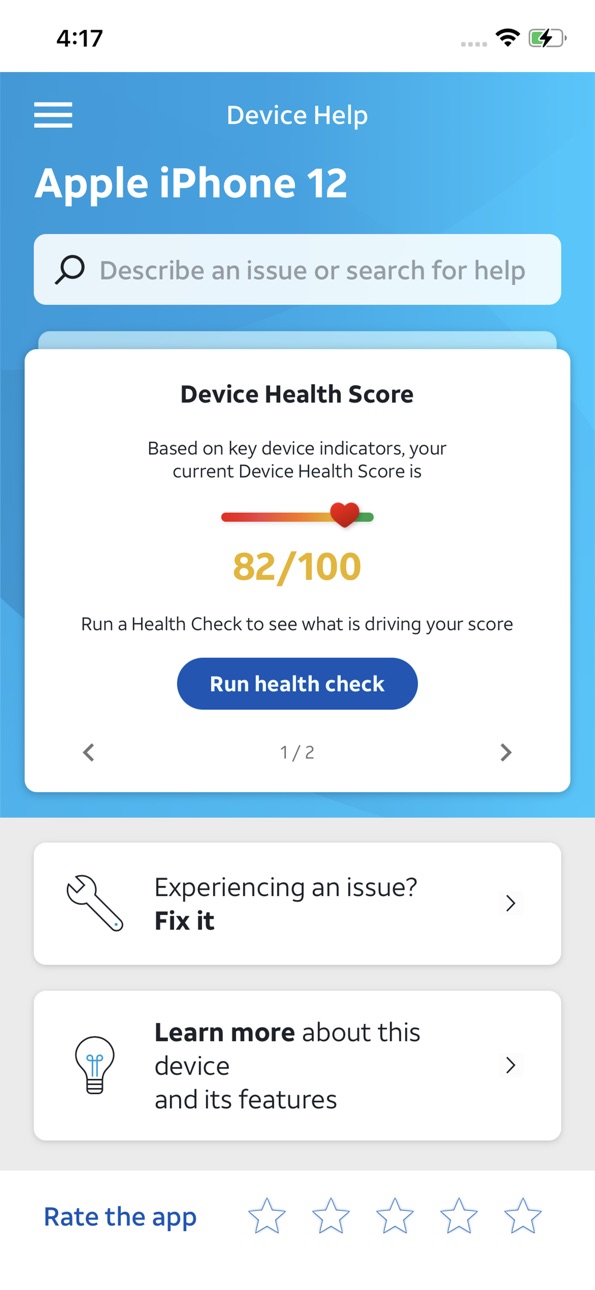


What’s New Version 3.329.4
• Enhanced step-by-step walkthroughs that perfectly match the device make & model in use
• Redesigned interactive tests for touchscreen accuracy, battery health and speaker quality
• Bug Fixes:
• Fixed volume bar appearing during camera test
Description
Get the most out of your smartphone with AT&T Device Help. Whether you’re setting up a new device or solving a problem, Device Help puts guidance and diagnostics right at your fingertips.
• Learn how to use your device with step‑by‑step guides and helpful tips
• Keep your device running smoothly with alerts for important updates
• Quickly identify and troubleshoot common issues with built‑in diagnostics
Accessibility
ipadiphonemacrealityDevicetvoswatch
Version history 24 versions
Build 887409612v3.329.42026-06-26 16:55:03
• Enhanced step-by-step walkthroughs that perfectly match the device make & model in use
• Redesigned interactive tests for touchscreen accuracy, battery health and speaker quality
• Bug Fixes:
• Fixed volume bar appearing during camera test
Build 885448041v3.329.32026-05-10 18:46:59
• Enhanced step-by-step walkthroughs that perfectly match the device make & model in use
• Redesigned interactive tests for touchscreen accuracy, battery health and speaker quality
• Bug Fixes:
• Fixed volume bar appearing during camera test
Build 882312837v3.313.52026-02-11 02:59:34
- Smart Search enhancements and improvements to search accuracy.
- Redesigned 'no connectivity' screen.
Bug fixes include:
- Removed the behavior where the volume bar was being displayed during
camera test (iOS).
- Health Score values bug corrected.
- iOS RAM usage test parameter change.
- Fix to back button not working while in Guide Me feature.
- Fixed “Voice Over” for app version area.
- Landscape screen issue with Emblem device.
- Display Tests behavior and results.
Build 878843050v3.301.32025-10-13 09:14:50
New Health Score and general updates and bug fixes
Build 876878939v3.289.02025-08-01 16:48:08
Streamlined Onboarding screen and various bug fixes
Build 873794303v3.275.12025-04-04 22:10:12
This version is the final of two major releases, which includes updates to:
• Redesigned Diagnostic results screens
• Solutions UI
• Health check journey
• Explore Tutorials & troubleshooting journey
Build 871728608v3.258.32025-01-14 18:37:52
Enhanced home screen and health check, streamlined recommendations, and new troubleshooting flows
Build 869715807v3.251.12024-10-15 16:51:43
Bug fixes and other improvements
Build 867827219v3.238.02024-07-30 19:37:31
Bug fixes and CATO compliance stuff
Build 865105505v3.218.22024-04-12 02:06:28
The new and improved Device Help app goes beyond conventional self-help tools by providing a comprehensive range of features. Through intelligent and dynamic diagnostics, the app can identify device conditions and suggest personalized recommendations and useful troubleshooting and tips specific to your device.
Build 862247592v3.206.92023-12-18 19:18:51
The new and improved Device Help app goes beyond conventional self-help tools by providing a comprehensive range of features. Through intelligent and dynamic diagnostics, the app can identify device conditions and suggest personalized recommendations and useful troubleshooting and tips specific to your device.
Build 858933028v3.187.02023-08-04 20:03:51
In this version we support CATO compliance.
Build 854129076v3.156.42023-01-03 22:18:03
In this version we introduce a new look and feel, as well as an enhanced Troubleshoot section and new Device Health report.
Build 853668946v3.153.32022-12-06 00:07:32
Home screen redesign
Build 852516872v3.138.22022-10-04 21:12:40
User interface enhancements
User experience enhancements
Feedback improvements
Build 850540265v3.130.62022-07-11 15:04:31
User interface enhancements
User experience enhancements
Feedback improvements
Build 847483677v3.115.12022-03-04 16:12:36
User interface enhancements
User experience enhancements
Feedback improvements
Build 845932920v3.105.12021-12-14 22:14:27
Getting started categories
Build 845503539v3.1032021-12-01 19:51:25
Improved UI Enhanced content flow Minor defects fixed
Build 844694999v3.96.42021-10-20 17:28:02
Improvements
.
Build 843908447v3.87.22021-09-02 17:12:14
* Improved look and feel
* Access to AT&T account support
* Same great content
Build 842809382v3.78.12021-06-28 15:04:29
Improvements.
Build 842102515v3.742021-05-10 15:42:08
Improvements.
Build 840426581v3.66.12021-03-03 23:18:41
No pricing data captured yet — comparisons appear once the app has paid storefronts or in-app purchases.
Availability 1 of 1 storefronts
| Region | Language | Price | Ratings | Avg | Version |
|---|---|---|---|---|---|
| US | en-US | Free | 399 | 4.1 | 3.329.4 |
Change log 28 changes · US
✎
releaseNotes updated
• Enhanced step-by-step walkthroughs that perfectly match the device make & model in use
• Redesigned interactive tests for touchscreen accuracy, battery health
✎
description updated
Get the most out of your smartphone with AT&T Device Help. Whether you’re setting up a new device or solving a problem, Device Help puts guidance and diagnostic
✎
subtitle updated
Your Device, Simplified
✎
name updated
Device Help
◆
Version 3.329.4 released
• Enhanced step-by-step walkthroughs that perfectly match the device make & model in use
• Redesigned interactive tests for touchscreen accuracy, battery health and speaker quality
• Bug Fixes:
• Fixed volume bar appearing during camera tes
◆
Version 3.329.3 released
• Enhanced step-by-step walkthroughs that perfectly match the device make & model in use
• Redesigned interactive tests for touchscreen accuracy, battery health and speaker quality
• Bug Fixes:
• Fixed volume bar appearing during camera tes
◆
Version 3.313.5 released
- Smart Search enhancements and improvements to search accuracy.
- Redesigned 'no connectivity' screen.
Bug fixes include:
- Removed the behavior where the volume bar was being displayed during
camera test (iOS).
- Health Score values bug c
◆
Version 3.301.3 released
New Health Score and general updates and bug fixes
◆
Version 3.289.0 released
Streamlined Onboarding screen and various bug fixes
◆
Version 3.275.1 released
This version is the final of two major releases, which includes updates to:
• Redesigned Diagnostic results screens
• Solutions UI
• Health check journey
• Explore Tutorials & troubleshooting journey
◆
Version 3.258.3 released
Enhanced home screen and health check, streamlined recommendations, and new troubleshooting flows
◆
Version 3.251.1 released
Bug fixes and other improvements
◆
Version 3.238.0 released
Bug fixes and CATO compliance stuff
◆
Version 3.218.2 released
The new and improved Device Help app goes beyond conventional self-help tools by providing a comprehensive range of features. Through intelligent and dynamic diagnostics, the app can identify device conditions and suggest personalized recom
◆
Version 3.206.9 released
The new and improved Device Help app goes beyond conventional self-help tools by providing a comprehensive range of features. Through intelligent and dynamic diagnostics, the app can identify device conditions and suggest personalized recom
◆
Version 3.187.0 released
In this version we support CATO compliance.
◆
Version 3.156.4 released
In this version we introduce a new look and feel, as well as an enhanced Troubleshoot section and new Device Health report.
◆
Version 3.153.3 released
Home screen redesign
◆
Version 3.138.2 released
User interface enhancements
User experience enhancements
Feedback improvements
◆
Version 3.130.6 released
User interface enhancements
User experience enhancements
Feedback improvements
◆
Version 3.115.1 released
User interface enhancements
User experience enhancements
Feedback improvements
◆
Version 3.105.1 released
Getting started categories
◆
Version 3.103 released
Improved UI Enhanced content flow Minor defects fixed
◆
Version 3.96.4 released
Improvements
.
◆
Version 3.87.2 released
* Improved look and feel
* Access to AT&T account support
* Same great content
◆
Version 3.78.1 released
Improvements.
◆
Version 3.74 released
Improvements.
◆
Version 3.66.1 released