Home › Productivity

 CL
CL
 USen-US
 AGen-GB
 AIen-GB
 ARes-MX
 BBen-GB
 BOes-MX
 BRpt-BR
 BSen-GB
 BZen-GBCLes-MX
 COes-MX
 CRes-MX
 DMen-GB
 DOes-MX
 ECes-MX
 GDen-GB
 GTes-MX
 GYen-GB
 HNes-MX
 JMen-GB
 KNen-GB
 KYen-GB
 LCen-GB
 MSen-GB
 MXes-MX
 NIes-MX
 PAes-MX
 PEes-MX
 PYes-MX
 SRen-GB
 SVes-MX
 TCen-GB
 TTen-GB
 UYen-GB
 VCen-GB
 VGen-GB
 AONot Available
 BFNot Available
 BJNot Available
 BWNot Available
 CDNot Available
 CGNot Available
 CINot Available
 CMNot Available
 CVNot Available
 DZNot Available
 GANot Available
 GHNot Available
 GMNot Available
 GWNot Available
 KENot Available
 LRNot Available
 LYNot Available
 MANot Available
 MGNot Available
 MLNot Available
 MUNot Available
 MWNot Available
 MZNot Available
 NANot Available
 NENot Available
 NGNot Available
 RWNot Available
 SCNot Available
 SLNot Available
 SNNot Available
 STNot Available
 SZNot Available
 TDNot Available
 TNNot Available
 TZNot Available
 UGNot Available
 VENot Available
 ZMNot Available
 ZWNot Available
36 of 75 storefronts
Content in en-US
Content in en-US
Information
Preview 2 platforms
iPhone 7 images
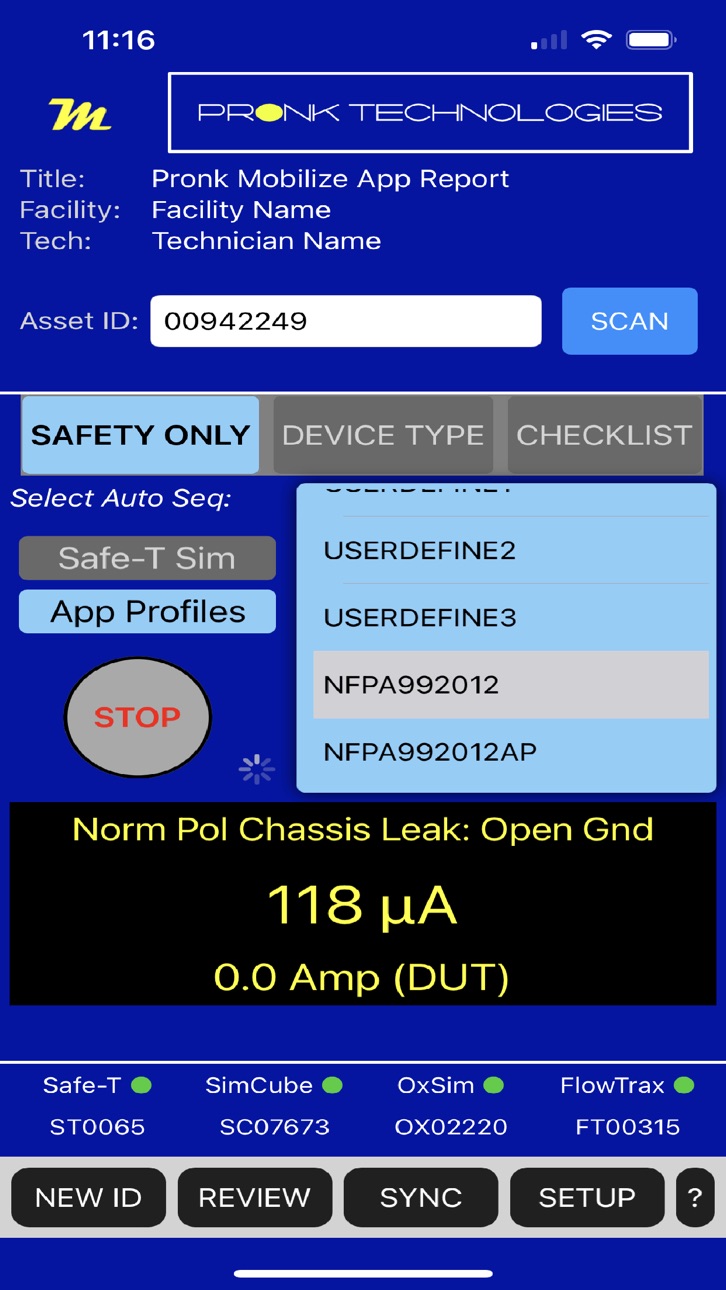


iPad 9 images


What’s New Version 1.3.0
Pronk Mobilize continues to improve your productivity. Version 1.3.0 has bug fixes and improvements, including:
- Fully integrated PressureMAX (PM-1), Pronk’s new pressure meter
- Improved support for 3rd-party test equipment
- Added checklist step types and functions: Headers, Expected vs. Actual, Yes/No, Calculations, Ranges, Variables
- Support for the Direct Equipment Leakage electrical safety test
- Split-screen mode for iPads (used in landscape orientation)
- Easy access to Pronk tutorial videos with the LEARN button
- Vital Signs automation improvements
- Barcode scanner improvements, including support for JSON encoded data
- Bluetooth connectivity improvements
- Various test result and equipment reporting improvements and bug fixes
- Improvements in support of iOS 18
- Expanded and improved API support
Description
Pronk Mobilize is a powerful tool for automating testing of dozens of different Medical Devices including; Vital Signs Monitors, Oximeters, Defibrillators, Infusion Pumps, Forced Air Warmers, SCD Pumps, Fluid Warmers, EKG Carts, Insufflators, Ventilators, Anesthesia Systems and of course any other device requiring electrical safety testing.
Compatibility: This App is compatible with an ever growing list of test devices such as the ST-1-M Safe-T Sim Safety Analyzer, the SC-5-M NIBP Simulator, the Ox-2-M SpO2 Simulator, the FT-2-M IV Pump Analyzer, PM-1-M Pressure MAX, OEM Defibrillator Analyzers and TSI Flow Analyzers.
KEY FEATURES:
A complete wireless automated solution that connects your test equipment to your iPhone or iPad! Run standard “Device Type” testing, set up your own test protocols, upload manufacturer recommended procedures and utilize detailed Checklists or run your CMMS Work Order procedures right from your Apple iOS device. Includes CMMS Direct control/data capture from test equipment depending on CMMS software.
Instantaneous wireless synchronization to Mobilize products, including all simulations, electrical safety testing sequences, Manometer testing - Leak Rate, Accuracy and Over Pressure, full control of all IV pump testing – Rate, Volume, Occlusion Pressure and all Defibrillator Pacer measurements, Shock/discharged energy results. Real-time results and automated record storage via Bluetooth. Easily change simulation values, then enter results and/or simply tap Pass/Fail.
Real-time streaming measurements are displayed directly on your device during automated testing. The finalized test report combines the details you need, e.g., Asset ID, Facility and Technician Name, Test Equipment Model / Serial Number, Last Cal Date and Clinical Enginering ID (CEID) if assigned. Complete testing details including all Pass/Fail, text entry results, measured values and test limits used. Even a picture if you choose.
100% PAPERLESS:
Mobilize App replaces the need to hand write testing data, whether you are documenting pass/fail or writing down each test measurement. It is designed to serve not only small organizations that may not have a computerized maintenance management system (CMMS), but also larger health systems and independent service organizations that already have a CMMS in place.
MOBILIZE DEVICE TYPE TESTING:
User can customize presets with any simulated value you need for Vital Signs Testing with hundreds of values available, run wireless IV Pump testing with user defined preset targets for Volume/Rate testing, Occlusion Testing and more. Users can quickly change simulated/target values with the touch of a button. Capture all results instantly into growing detailed test record via Bluetooth from several test devices, or snap results into the record by touching result boxes or simply tap Pass/Fail. Capture images of medical devices into electronic record. Built-in Barcode Scanner and PM Sticker printing capabilities.
MOBILIZE CHECKLISTS:
Go Mobile by synchronizing all your procedures, work orders, checklists and asset IDs to be tested. Scan the Asset ID barcode of the medical device and the checklist instantly starts on your mobile device linked to all your test devices for automating your testing. No more menus to navigate on your test equipment - control it all from your mobile device and capture all the details of your testing as you work. Incredible training tool for newer technicians, with pop-up instructions to guide users through details of test steps and setup.
Mobilize stores 1000 electronic records that can be Auto-Routed to email or Cloud drives, copied and pasted into a work order, or attached as PDF file. Multiple methods available for synchronizing/capturing those detailed records back into a CMMS Work Order.
© 2022-2024 Pronk Technologies Inc. All rights reserved.
Accessibility
ipadiphonemacrealityDevicetvoswatch
Version history 6 versions
Build 870513882v1.3.02024-11-21 19:01:49
Pronk Mobilize continues to improve your productivity. Version 1.3.0 has bug fixes and improvements, including:
- Fully integrated PressureMAX (PM-1), Pronk’s new pressure meter
- Improved support for 3rd-party test equipment
- Added checklist step types and functions: Headers, Expected vs. Actual, Yes/No, Calculations, Ranges, Variables
- Support for the Direct Equipment Leakage electrical safety test
- Split-screen mode for iPads (used in landscape orientation)
- Easy access to Pronk tutorial videos with the LEARN button
- Vital Signs automation improvements
- Barcode scanner improvements, including support for JSON encoded data
- Bluetooth connectivity improvements
- Various test result and equipment reporting improvements and bug fixes
- Improvements in support of iOS 18
- Expanded and improved API support
Build 865489337v1.2.12024-04-29 16:26:57
Improved Bluetooth connection robustness, other fixes
Build 858163204v1.2.02023-07-13 18:45:07
Checklists now include “Options” for user customization. Also, better handling for failed step with ability to repeat individual tests and/or add note for a step. Checklist Detail info can be displayed before or while running a checklist. Electrical Safety Auto sequences can be added via Setup Menu. PM Sticker choice of tape size, and support for Brother printer model P910BT (up to 36 mm tape). Many additional user experience features also added.
Build 853287382v1.1.22022-11-16 00:02:22
Improved support for iOS/iPadOS 16 plus bugfixes and enhancements
Build 852779970v1.1.12022-10-17 17:00:42
Bug Fixes and Enhancements
Build 839372531v1.1.02022-09-13 21:24:46
No pricing data captured yet — comparisons appear once the app has paid storefronts or in-app purchases.
Availability 36 of 75 storefronts
| Region | Language | Price | Ratings | Avg | Version |
|---|---|---|---|---|---|
| US | en-US | Free | 4 | 5.0 | 1.3.0 |
| AG | en-GB | Free | 0 | — | 1.3.0 |
| AI | en-GB | Free | 0 | — | 1.3.0 |
| AR | es-MX | Free | 0 | — | 1.3.0 |
| BB | en-GB | Free | 0 | — | 1.3.0 |
| BO | es-MX | Free | 0 | — | 1.3.0 |
| BR | pt-BR | Free | 0 | — | 1.3.0 |
| BS | en-GB | Free | 0 | — | 1.3.0 |
| BZ | en-GB | Free | 0 | — | 1.3.0 |
| CL | es-MX | Free | 0 | — | 1.3.0 |
| CO | es-MX | Free | 0 | — | 1.3.0 |
| CR | es-MX | Free | 0 | — | 1.3.0 |
| DM | en-GB | Free | 0 | — | 1.3.0 |
| DO | es-MX | Free | 0 | — | 1.3.0 |
| EC | es-MX | Free | 0 | — | 1.3.0 |
| GD | en-GB | Free | 0 | — | 1.3.0 |
| GT | es-MX | Free | 0 | — | 1.3.0 |
| GY | en-GB | Free | 0 | — | 1.3.0 |
| HN | es-MX | Free | 0 | — | 1.3.0 |
| JM | en-GB | Free | 0 | — | 1.3.0 |
| KN | en-GB | Free | 0 | — | 1.3.0 |
| KY | en-GB | Free | 0 | — | 1.3.0 |
| LC | en-GB | Free | 0 | — | 1.3.0 |
| MS | en-GB | Free | 0 | — | 1.3.0 |
| MX | es-MX | Free | 0 | — | 1.3.0 |
| NI | es-MX | Free | 0 | — | 1.3.0 |
| PA | es-MX | Free | 0 | — | 1.3.0 |
| PE | es-MX | Free | 0 | — | 1.3.0 |
| PY | es-MX | Free | 0 | — | 1.3.0 |
| SR | en-GB | Free | 0 | — | 1.3.0 |
| SV | es-MX | Free | 0 | — | 1.3.0 |
| TC | en-GB | Free | 0 | — | 1.3.0 |
| TT | en-GB | Free | 0 | — | 1.3.0 |
| UY | en-GB | Free | 0 | — | 1.3.0 |
| VC | en-GB | Free | 0 | — | 1.3.0 |
| VG | en-GB | Free | 0 | — | 1.3.0 |
Not available in: AO, BF, BJ, BW, CD, CG, CI, CM, CV, DZ, GA, GH, GM, GW, KE, LR, LY, MA, MG, ML, MU, MW, MZ, NA, NE, NG, RW, SC, SL, SN, ST, SZ, TD, TN, TZ, UG, VE, ZM, ZW
Change log 10 changes · CL
✎
releaseNotes updated
Pronk Mobilize continues to improve your productivity. Version 1.3.0 has bug fixes and improvements, including:
- Fully integrated PressureMAX (PM-1), Pronk
✎
description updated
Pronk Mobilize is a powerful tool for automating testing of dozens of different Medical Devices including; Vital Signs Monitors, Oximeters, Defibrillators, Infu
✎
subtitle updated
For Pronk Mobilize Products
✎
name updated
Pronk Mobilize
◆
Version 1.3.0 released
Pronk Mobilize continues to improve your productivity. Version 1.3.0 has bug fixes and improvements, including:
- Fully integrated PressureMAX (PM-1), Pronk’s new pressure meter
- Improved support for 3rd-party test equipment
- Added
◆
Version 1.2.1 released
Improved Bluetooth connection robustness, other fixes
◆
Version 1.2.0 released
Checklists now include “Options” for user customization. Also, better handling for failed step with ability to repeat individual tests and/or add note for a step. Checklist Detail info can be displayed before or while running a checklist.
◆
Version 1.1.2 released
Improved support for iOS/iPadOS 16 plus bugfixes and enhancements
◆
Version 1.1.1 released
Bug Fixes and Enhancements
◆
Version 1.1.0 released