Home › Productivity

 CA
CA
 JPja
JPja USen-US
 BRpt-BR
 TWzh-Hant-TW
 INen-GB
 GBen-GBCAen-CA
 MYen-GB
 KRko
KRko AUen-AU
 PHen-GB
 ITit
ITit HKzh-Hant-HK
 CNzh-Hans-CN
 VNen-GB
 NZen-AU
 THen-GB
 ARes-MX
 SAen-GB
 IDen-GB
 PKen-GB
 DEde-DE
 COes-MX
 MNen-GB
 AEen-GB
 KHen-GB
 KWen-GB
 LKen-GB
 LTen-GB
 SGen-GB
 TRen-GB
 ZAen-GB
 CHde-CH
 FRfr-FR
 ILen-GB
 ISen-GB
 PTpt-PT
 BEen-GB
 BGen-GB
 BHen-GB
 BYen-GB
 EGen-GB
 IEen-GB
 KZen-GB
 LBen-GB
 LVen-GB
 PEes-MX
 PLen-GB
 QAen-GB
 RSen-GB
 ATde-DE
 AZen-GB
 BOes-MX
 CZen-GB
 ESes-ES
 GTes-MX
 JMen-GB
 NGen-GB
 UAen-GB
 AFen-GB
 ALen-GB
 AMen-GB
 AOen-GB
 BAen-GB
 BBen-GB
 BFen-GB
 BJen-GB
 BMen-GB
 BNen-GB
 BTen-GB
 BZen-GB
 CDen-GB
 CGen-GB
 CIfr-FR
 CLes-MX
 CMfr-FR
 CRes-MX
 CVen-GB
 CYen-GB
 DKen-GB
 DMen-GB
 DOes-MX
 DZen-GB
 EEen-GB
 FIen-GB
 FJen-GB
 FMen-GB
 GAfr-FR
 GDen-GB
 GEen-GB
 GRen-GB
 GYen-GB
 HNes-MX
 HRen-GB
 HUen-GB
 IQen-GB
 JOen-GB
 KEen-GB
 KGen-GB
 LAen-GB
 LCen-GB
 LRen-GB
 LUen-GB
 LYen-GB
 MAen-GB
 MDen-GB
 MEen-GB
 MGen-GB
 MKen-GB
 MLen-GB
 MMen-GB
 MOzh-Hant-HK
 MRen-GB
 MSen-GB
 MTen-GB
 MVen-GB
 MZen-GB
 NAen-GB
 NEen-GB
 NLnl
NLnl NOen-GB
 NPen-GB
 NRen-GB
 OMen-GB
 PAes-MX
 PGen-GB
 PWen-GB
 PYes-MX
 ROen-GB
 RUru
RUru RWen-GB
 SBen-GB
 SEsv
SEsv SIen-GB
 SKen-GB
 SLen-GB
 SNen-GB
 SRen-GB
 SZen-GB
 TDen-GB
 TJen-GB
 TMen-GB
 TNen-GB
 TOen-GB
 TTen-GB
 TZen-GB
 UGen-GB
 UZen-GB
 VCen-GB
 VGen-GB
 VUen-GB
 XKen-GB
 YEen-GB
153 of 153 storefronts
Content in en-US
Content in en-US
Information
Preview 3 platforms
iPhone 9 images





iPad 3 images


Apple Watch 4 images


What’s New Version 3.4.4
・Faster app launch
・Improved in-app performance
・Apple Watch app improvements and faster note syncing
・Added supported languages
Description
StickyNote is a notepad app you can use just like sticky notes.
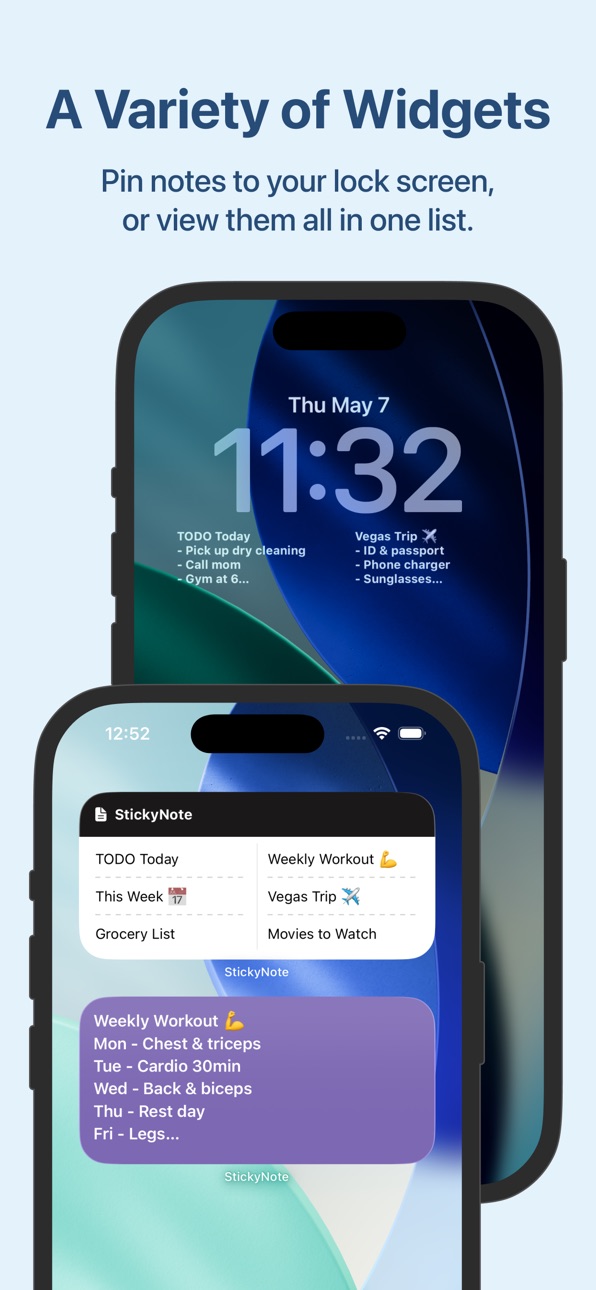
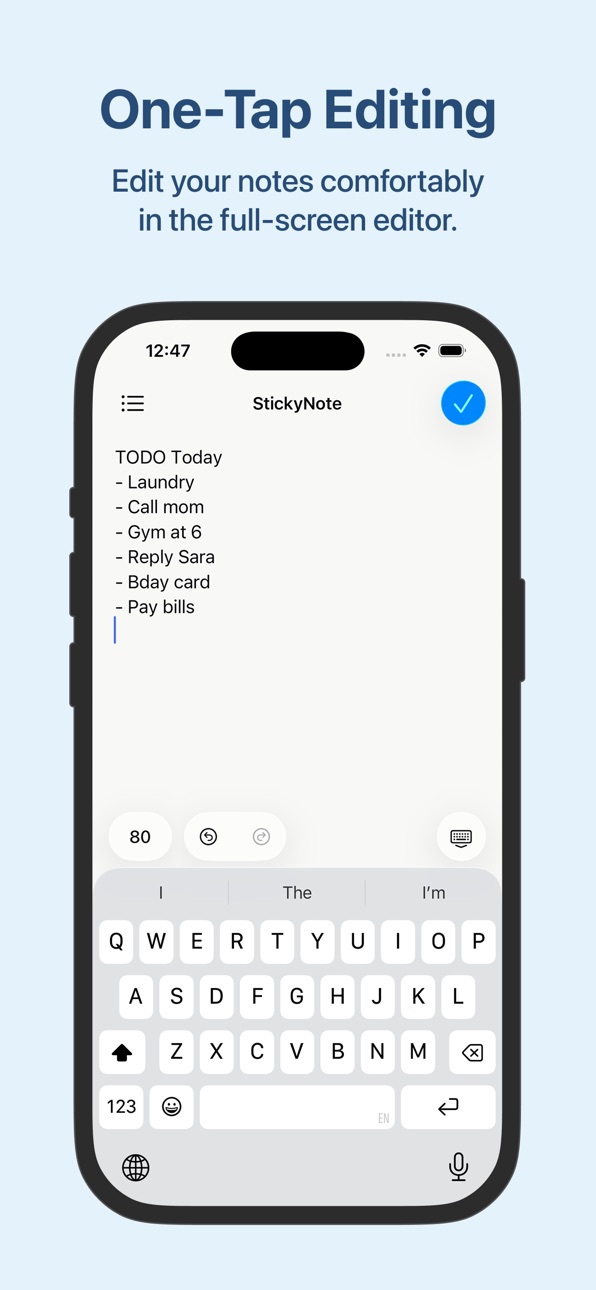
Pin your memos to the Home Screen so you can see them anytime and edit with a single tap.
The simple, easy-to-use design makes it great for task management, to-do lists, and scheduling, too.
We hope you'll give it a try.
■ App highlights
- Pin memos to your Home Screen or Lock Screen for instant access anytime
- Sort memos by purpose to manage to-dos for work or school
- Customize the background with colors or photos to make a notepad that's truly yours
- Choose cute fonts and freely adjust the text size
■ Powerful customization
- Background of your choice (color, pattern, or photo)
- Switch fonts (handwriting-style and cute fonts available)
- Adjust text size, line height, and letter spacing
- Change text color
- Set your own photo as the background
■ Suggested uses
- Keep your schedule, to-dos, and tasks in plain sight on the Home Screen
- Work task management
- As class notes
- Schedule planning
- Goal tracking (pin them to the Home Screen so they stay top of mind)
- Capture ideas the moment they hit you
- Shopping lists
■ Handy memo features
- Character count helps you gauge length for social posts or assists with writing
- Undo or redo your latest input with a single tap
- Open the memo info screen to see character, line, and paragraph counts, plus a list of links, email addresses, and phone numbers — all easy to copy
- Copy the memo's contents with one tap
- Share memos to other apps or run various actions from the share sheet
■ Widget types
- Memo widget
- Memo list widget
- Lock Screen-only widget
- Apple Watch widget
■ Super easy to set up
1. After installing, open the app once
2. Go back to the Home Screen and add a StickyNote widget — that's it.
Customize the background and fonts however you like to design your own notepad.
With this app, you'll never forget a memo or to-do again. Check your notes right from the Home Screen and breeze through task management.
■ Get more with Premium
Upgrade to Premium to keep the simple feel and unlock even handier extras.
Benefit 1. All ads removed
Benefit 2. Set your own photos as memo backgrounds (use wallpapers from your favorite anime or manga, family photos, anything you love)
Benefit 3. The memo list widget becomes available
*The one-time Pro plan supports Family Sharing, so when one family member buys it, everyone in the family can use Premium features.
■ Subscription
Please review the following for subscription terms:
- Privacy Policy: https://rands-app.com/privacy-policy-en/
- Terms of Use: https://rands-app.com/terms-en/
We'll keep updating the app and adding features. If you have an "I wish it could do this" idea, please send your feedback through the App Store rating page — we'll use it as inspiration for future updates.
In-App Purchases CA pricing
Hide ads Subscription
Ad Hiding · Monthly—
Premium Subscription
Yearly Plan · Yearly—
Monthly Plan · Monthly—
One-Time Purchases
Lifetime Plan—
Tip—
Generous Tip—
Greatest Tip—
Capabilities
In-App Purchases
Accessibility
ipadiphonemacrealityDevicetvoswatch
Version history 25 versions
Build 886660809v3.4.42026-06-30 06:17:47
・Faster app launch
・Improved in-app performance
・Apple Watch app improvements and faster note syncing
・Added supported languages
Build 885645334v3.4.32026-05-15 23:53:53
Improved translation accuracy and minor bug fixes
Build 885411631v3.4.22026-05-09 16:43:19
What's new
• Set a default appearance for new memos
• Copy appearance settings from another memo
• Reset button added to restore the default appearance
• Revamped how-to guide and Help, with expanded topics
• Added suggested uses
• Added more supported languages
Bug fixes
• Fixed an error that could occur when selecting a memo in the memo widget settings
Build 885204440v3.4.12026-05-07 20:57:40
What's new
• Set a default appearance for new memos
• Copy appearance settings from another memo
• Reset button added to restore the default appearance
• Revamped how-to guide and Help, with expanded topics
• Added suggested uses
• Added more supported languages
Bug fixes
• Fixed an error that could occur when selecting a memo in the memo widget settings
Build 884320799v3.4.02026-05-01 23:47:26
What's New & Improvements
• Added the option to set default display settings for new notes
• Added the ability to copy display settings from another note
• Added a reset button to restore the default display settings
• Refreshed the in-app guide and Help with expanded content
• Added suggested use cases
• Added support for additional languages
Bug Fixes
• Fixed an issue where an error could occur when selecting note settings in the note widget
Build 883526882v3.3.112026-04-04 03:02:10
Fixed an issue where Pro restore failed on iOS 26.4+, improved the display settings UI, and optimized translations.
Build 882810790v3.3.102026-03-16 17:29:59
Update Text
- The display settings UI has been updated to display text settings in a more visible location.
- Font data has been updated to fix some character issues.
- Some less commonly used fonts have been discontinued and new fonts have been added.
- Fixed an issue where line spacing was too tight when displaying certain fonts in widgets.
- App size has been reduced.
Build 882321861v3.3.92026-02-10 22:36:21
Improved internal processing for better app quality.
Build 882282564v3.3.82026-02-09 18:14:46
Bug fixes
Build 882180689v3.3.72026-02-06 06:49:16
Some less used fonts have been removed.
Build 881881398v3.3.62026-01-29 14:49:54
- Added a memo information feature. (Accessible from the memo screen menu or keyboard menu)
- Added an option to display character count in the keyboard menu.
- Modified the memo list screen to show memo update dates.
- Added the ability to copy memos directly from the memo screen menu.
- Changed the display method when opening links.
- Improved app startup speed.
Build 881728242v3.3.52026-01-24 00:18:04
- Added a memo information feature. (Accessible from the memo screen menu or keyboard menu)
- Added an option to display character count in the keyboard menu.
- Modified the memo list screen to show memo update dates.
- Added the ability to copy memos directly from the memo screen menu.
- Changed the display method when opening links.
- Improved app startup speed.
Build 880601984v3.3.42026-01-20 23:13:21
- Added a memo information feature. (Accessible from the memo screen menu or keyboard menu)
- Added an option to display character count in the keyboard menu.
- Modified the memo list screen to show memo update dates.
- Added the ability to copy memos directly from the memo screen menu.
- Changed the display method when opening links.
- Improved app startup speed.
Build 880466965v3.3.32025-12-11 08:23:41
Fixed some bugs.
Build 880333768v3.3.22025-12-09 03:51:46
Several issues have been fixed.
Build 880026716v3.3.12025-11-24 08:04:57
Minor bug fixes
Build 877769129v3.3.02025-09-15 17:13:05
Compatible with iOS 26. Search functionality has also been added.
Key changes in iOS 26
・Various UI elements now feature the new Liquid Glass design
・Supports the “Clear” display for Home screen customization
・Supports iPad's new window system, allowing you to freely resize apps.
・Photo backgrounds now expand to fill the entire screen
Additionally, a search function has been added to Notes, making it easier to find your notes.
The search function is accessible from the Notes list screen, so please give it a try.
Build 876958151v3.2.192025-08-08 04:40:17
We have added a notice regarding bugs that occurred in the latest version.
Recent updates are as follows:
・You can now set the font size for widgets only.
・Control widgets are now supported.
・Watch app widgets are now supported.
・Some ads on the iPad have been removed.
・Several UI improvements have been made.
Build 876285297v3.2.182025-07-28 20:22:19
・You can now set the font size for widgets only.
・Control widgets are now supported.
・Watch app widgets are now supported.
・Some ads on the iPad have been removed.
・Several UI improvements have been made.
Build 875996404v3.2.172025-07-09 08:34:50
- Changed the app icon.
- After a note is deleted, it can be restored from “Deleted notes” in the settings. This applies to memos deleted after this update.
- Fixed a bug that caused the Watch app to freeze for a few seconds when opening a memo with a large number of contents.
Build 875812579v3.2.162025-06-23 23:01:42
Improved application startup speed.
Build 874831736v3.2.152025-06-01 04:13:30
A new affordable paid plan has been added.
For the price of a small snack, you can make your daily note-taking much more comfortable.
Please take this opportunity to try it out.
Bonuses for paid plans
1. all ads will be hidden
2. use the function to set a photo as a background
3. use the memo list widget 4. create unlimited memos
4. unlimited note creation
Build 873867466v3.2.142025-04-11 16:23:18
We are planning to increase the price of the Pro version of StickyNote by about twice as much as the current price to accommodate future functional enhancements and the introduction of a new subscription function that will start in June.
Current StickyNote users will be able to keep the current price until May 31, 2025, so we hope that those who will continue to use StickyNote in the future will take this opportunity to consider purchasing the Pro version.
Build 873385911v3.2.132025-03-20 10:23:43
Performance improvements, bug fixes, etc.
Build 872369494v3.2.122025-02-10 17:43:44
Minor glitches were corrected.
Price history by region
Currency
Show
Columns
Search
Availability 153 of 153 storefronts
| Region | Language | Price | Ratings | Avg | Version |
|---|---|---|---|---|---|
| JP | ja | Free | 23.4k | 4.5 | 3.4.4 |
| US | en-US | Free | 484 | 4.6 | 3.4.4 |
| BR | pt-BR | Free | 43 | 4.9 | 3.4.4 |
| TW | zh-Hant-TW | Free | 42 | 4.8 | 3.4.4 |
| IN | en-GB | Free | 35 | 4.7 | 3.4.4 |
| GB | en-GB | Free | 34 | 4.2 | 3.4.4 |
| CA | en-CA | Free | 32 | 4.6 | 3.4.4 |
| MY | en-GB | Free | 32 | 4.4 | 3.4.4 |
| KR | ko | Free | 31 | 4.7 | 3.4.4 |
| AU | en-AU | Free | 26 | 4.5 | 3.4.4 |
| PH | en-GB | Free | 26 | 4.7 | 3.4.4 |
| IT | it | Free | 22 | 4.8 | 3.4.4 |
| HK | zh-Hant-HK | Free | 19 | 4.4 | 3.4.4 |
| CN | zh-Hans-CN | Free | 13 | 4.9 | 3.4.4 |
| VN | en-GB | Free | 13 | 4.4 | 3.4.4 |
| NZ | en-AU | Free | 11 | 4.2 | 3.4.4 |
| TH | en-GB | Free | 10 | 4.8 | 3.4.4 |
| AR | es-MX | Free | 9 | 5.0 | 3.4.4 |
| SA | en-GB | Free | 9 | 4.0 | 3.4.4 |
| ID | en-GB | Free | 8 | 4.9 | 3.4.4 |
| PK | en-GB | Free | 8 | 4.3 | 3.4.4 |
| DE | de-DE | Free | 7 | 4.9 | 3.4.4 |
| CO | es-MX | Free | 6 | 3.7 | 3.4.4 |
| MN | en-GB | Free | 5 | 4.2 | 3.4.4 |
| AE | en-GB | Free | 4 | 5.0 | 3.4.4 |
| KH | en-GB | Free | 4 | 5.0 | 3.4.4 |
| KW | en-GB | Free | 4 | 5.0 | 3.4.4 |
| LK | en-GB | Free | 4 | 4.5 | 3.4.4 |
| LT | en-GB | Free | 4 | 5.0 | 3.4.4 |
| SG | en-GB | Free | 4 | 4.8 | 3.4.4 |
| TR | en-GB | Free | 4 | 5.0 | 3.4.4 |
| ZA | en-GB | Free | 4 | 5.0 | 3.4.4 |
| CH | de-CH | Free | 3 | 5.0 | 3.4.4 |
| FR | fr-FR | Free | 3 | 5.0 | 3.4.4 |
| IL | en-GB | Free | 3 | 5.0 | 3.4.4 |
| IS | en-GB | Free | 3 | 3.3 | 3.4.4 |
| PT | pt-PT | Free | 3 | 5.0 | 3.4.4 |
| BE | en-GB | Free | 2 | 5.0 | 3.4.4 |
| BG | en-GB | Free | 2 | 5.0 | 3.4.4 |
| BH | en-GB | Free | 2 | 5.0 | 3.4.4 |
| BY | en-GB | Free | 2 | 3.0 | 3.4.4 |
| EG | en-GB | Free | 2 | 3.0 | 3.4.4 |
| IE | en-GB | Free | 2 | 4.5 | 3.4.4 |
| KZ | en-GB | Free | 2 | 3.0 | 3.4.4 |
| LB | en-GB | Free | 2 | 5.0 | 3.4.4 |
| LV | en-GB | Free | 2 | 4.0 | 3.4.4 |
| PE | es-MX | Free | 2 | 5.0 | 3.4.4 |
| PL | en-GB | Free | 2 | 5.0 | 3.4.4 |
| QA | en-GB | Free | 2 | 5.0 | 3.4.4 |
| RS | en-GB | Free | 2 | 5.0 | 3.4.4 |
| AT | de-DE | Free | 1 | 5.0 | 3.4.4 |
| AZ | en-GB | Free | 1 | 5.0 | 3.4.4 |
| BO | es-MX | Free | 1 | 5.0 | 3.4.4 |
| CZ | en-GB | Free | 1 | 2.0 | 3.4.4 |
| ES | es-ES | Free | 1 | 1.0 | 3.4.4 |
| GT | es-MX | Free | 1 | 5.0 | 3.4.4 |
| JM | en-GB | Free | 1 | 5.0 | 3.4.4 |
| NG | en-GB | Free | 1 | 5.0 | 3.4.4 |
| UA | en-GB | Free | 1 | 5.0 | 3.4.4 |
| AF | en-GB | Free | 0 | — | 3.4.4 |
| AL | en-GB | Free | 0 | — | 3.4.4 |
| AM | en-GB | Free | 0 | — | 3.4.4 |
| AO | en-GB | Free | 0 | — | 3.4.4 |
| BA | en-GB | Free | 0 | — | 3.4.4 |
| BB | en-GB | Free | 0 | — | 3.4.4 |
| BF | en-GB | Free | 0 | — | 3.4.4 |
| BJ | en-GB | Free | 0 | — | 3.4.4 |
| BM | en-GB | Free | 0 | — | 3.4.4 |
| BN | en-GB | Free | 0 | — | 3.4.4 |
| BT | en-GB | Free | 0 | — | 3.4.4 |
| BZ | en-GB | Free | 0 | — | 3.4.4 |
| CD | en-GB | Free | 0 | — | 3.4.4 |
| CG | en-GB | Free | 0 | — | 3.4.4 |
| CI | fr-FR | Free | 0 | — | 3.4.4 |
| CL | es-MX | Free | 0 | — | 3.4.4 |
| CM | fr-FR | Free | 0 | — | 3.4.4 |
| CR | es-MX | Free | 0 | — | 3.4.4 |
| CV | en-GB | Free | 0 | — | 3.4.4 |
| CY | en-GB | Free | 0 | — | 3.4.4 |
| DK | en-GB | Free | 0 | — | 3.4.4 |
| DM | en-GB | Free | 0 | — | 3.4.4 |
| DO | es-MX | Free | 0 | — | 3.4.4 |
| DZ | en-GB | Free | 0 | — | 3.4.4 |
| EE | en-GB | Free | 0 | — | 3.4.4 |
| FI | en-GB | Free | 0 | — | 3.4.4 |
| FJ | en-GB | Free | 0 | — | 3.4.4 |
| FM | en-GB | Free | 0 | — | 3.4.4 |
| GA | fr-FR | Free | 0 | — | 3.4.4 |
| GD | en-GB | Free | 0 | — | 3.4.4 |
| GE | en-GB | Free | 0 | — | 3.4.4 |
| GR | en-GB | Free | 0 | — | 3.4.4 |
| GY | en-GB | Free | 0 | — | 3.4.4 |
| HN | es-MX | Free | 0 | — | 3.4.4 |
| HR | en-GB | Free | 0 | — | 3.4.4 |
| HU | en-GB | Free | 0 | — | 3.4.4 |
| IQ | en-GB | Free | 0 | — | 3.4.4 |
| JO | en-GB | Free | 0 | — | 3.4.4 |
| KE | en-GB | Free | 0 | — | 3.4.4 |
| KG | en-GB | Free | 0 | — | 3.4.4 |
| LA | en-GB | Free | 0 | — | 3.4.4 |
| LC | en-GB | Free | 0 | — | 3.4.4 |
| LR | en-GB | Free | 0 | — | 3.4.4 |
| LU | en-GB | Free | 0 | — | 3.4.4 |
| LY | en-GB | Free | 0 | — | 3.4.4 |
| MA | en-GB | Free | 0 | — | 3.4.4 |
| MD | en-GB | Free | 0 | — | 3.4.4 |
| ME | en-GB | Free | 0 | — | 3.4.4 |
| MG | en-GB | Free | 0 | — | 3.4.4 |
| MK | en-GB | Free | 0 | — | 3.4.4 |
| ML | en-GB | Free | 0 | — | 3.4.4 |
| MM | en-GB | Free | 0 | — | 3.4.4 |
| MO | zh-Hant-HK | Free | 0 | — | 3.4.4 |
| MR | en-GB | Free | 0 | — | 3.4.4 |
| MS | en-GB | Free | 0 | — | 3.4.4 |
| MT | en-GB | Free | 0 | — | 3.4.4 |
| MV | en-GB | Free | 0 | — | 3.4.4 |
| MZ | en-GB | Free | 0 | — | 3.4.4 |
| NA | en-GB | Free | 0 | — | 3.4.4 |
| NE | en-GB | Free | 0 | — | 3.4.4 |
| NL | nl | Free | 0 | — | 3.4.4 |
| NO | en-GB | Free | 0 | — | 3.4.4 |
| NP | en-GB | Free | 0 | — | 3.4.4 |
| NR | en-GB | Free | 0 | — | 3.4.4 |
| OM | en-GB | Free | 0 | — | 3.4.4 |
| PA | es-MX | Free | 0 | — | 3.4.4 |
| PG | en-GB | Free | 0 | — | 3.4.4 |
| PW | en-GB | Free | 0 | — | 3.4.4 |
| PY | es-MX | Free | 0 | — | 3.4.4 |
| RO | en-GB | Free | 0 | — | 3.4.4 |
| RU | ru | Free | 0 | — | 3.4.4 |
| RW | en-GB | Free | 0 | — | 3.4.4 |
| SB | en-GB | Free | 0 | — | 3.4.4 |
| SE | sv | Free | 0 | — | 3.4.4 |
| SI | en-GB | Free | 0 | — | 3.4.4 |
| SK | en-GB | Free | 0 | — | 3.4.4 |
| SL | en-GB | Free | 0 | — | 3.4.4 |
| SN | en-GB | Free | 0 | — | 3.4.4 |
| SR | en-GB | Free | 0 | — | 3.4.4 |
| SZ | en-GB | Free | 0 | — | 3.4.4 |
| TD | en-GB | Free | 0 | — | 3.4.4 |
| TJ | en-GB | Free | 0 | — | 3.4.4 |
| TM | en-GB | Free | 0 | — | 3.4.4 |
| TN | en-GB | Free | 0 | — | 3.4.4 |
| TO | en-GB | Free | 0 | — | 3.4.4 |
| TT | en-GB | Free | 0 | — | 3.4.4 |
| TZ | en-GB | Free | 0 | — | 3.4.4 |
| UG | en-GB | Free | 0 | — | 3.4.4 |
| UZ | en-GB | Free | 0 | — | 3.4.4 |
| VC | en-GB | Free | 0 | — | 3.4.4 |
| VG | en-GB | Free | 0 | — | 3.4.4 |
| VU | en-GB | Free | 0 | — | 3.4.4 |
| XK | en-GB | Free | 0 | — | 3.4.4 |
| YE | en-GB | Free | 0 | — | 3.4.4 |
Change log 29 changes · CA
✎
releaseNotes updated
・Faster app launch
・Improved in-app performance
・Apple Watch app improvements and faster note syncing
・Added supported languages
✎
description updated
StickyNote is a notepad app you can use just like sticky notes.
Pin your memos to the Home Screen so you can see them anytime and edit with a single tap.
The si
✎
subtitle updated
Memo widget for to-do & lists
✎
name updated
StickyNote: Home Screen Notes
◆
Version 3.4.4 released
・Faster app launch
・Improved in-app performance
・Apple Watch app improvements and faster note syncing
・Added supported languages
◆
Version 3.4.3 released
Improved translation accuracy and minor bug fixes
◆
Version 3.4.2 released
What's new
• Set a default appearance for new memos
• Copy appearance settings from another memo
• Reset button added to restore the default appearance
• Revamped how-to guide and Help, with expanded topics
• Added suggested uses
• Added mo
◆
Version 3.4.1 released
What's new
• Set a default appearance for new memos
• Copy appearance settings from another memo
• Reset button added to restore the default appearance
• Revamped how-to guide and Help, with expanded topics
• Added suggested uses
• Added mo
◆
Version 3.4.0 released
What's New & Improvements
• Added the option to set default display settings for new notes
• Added the ability to copy display settings from another note
• Added a reset button to restore the default display settings
• Refreshed the in-app
◆
Version 3.3.11 released
Fixed an issue where Pro restore failed on iOS 26.4+, improved the display settings UI, and optimized translations.
◆
Version 3.3.10 released
Update Text
- The display settings UI has been updated to display text settings in a more visible location.
- Font data has been updated to fix some character issues.
- Some less commonly used fonts have been discontinued and new fonts have
◆
Version 3.3.9 released
Improved internal processing for better app quality.
◆
Version 3.3.8 released
Bug fixes
◆
Version 3.3.7 released
Some less used fonts have been removed.
◆
Version 3.3.6 released
- Added a memo information feature. (Accessible from the memo screen menu or keyboard menu)
- Added an option to display character count in the keyboard menu.
- Modified the memo list screen to show memo update dates.
- Added the ability to
◆
Version 3.3.5 released
- Added a memo information feature. (Accessible from the memo screen menu or keyboard menu)
- Added an option to display character count in the keyboard menu.
- Modified the memo list screen to show memo update dates.
- Added the ability to
◆
Version 3.3.4 released
- Added a memo information feature. (Accessible from the memo screen menu or keyboard menu)
- Added an option to display character count in the keyboard menu.
- Modified the memo list screen to show memo update dates.
- Added the ability to
◆
Version 3.3.3 released
Fixed some bugs.
◆
Version 3.3.2 released
Several issues have been fixed.
◆
Version 3.3.1 released
Minor bug fixes
◆
Version 3.3.0 released
Compatible with iOS 26. Search functionality has also been added.
Key changes in iOS 26
・Various UI elements now feature the new Liquid Glass design
・Supports the “Clear” display for Home screen customization
・Supports iPad's new window sys
◆
Version 3.2.19 released
We have added a notice regarding bugs that occurred in the latest version.
Recent updates are as follows:
・You can now set the font size for widgets only.
・Control widgets are now supported.
・Watch app widgets are now supported.
・Some ads
◆
Version 3.2.18 released
・You can now set the font size for widgets only.
・Control widgets are now supported.
・Watch app widgets are now supported.
・Some ads on the iPad have been removed.
・Several UI improvements have been made.
◆
Version 3.2.17 released
- Changed the app icon.
- After a note is deleted, it can be restored from “Deleted notes” in the settings. This applies to memos deleted after this update.
- Fixed a bug that caused the Watch app to freeze for a few seconds when opening a
◆
Version 3.2.16 released
Improved application startup speed.
◆
Version 3.2.15 released
A new affordable paid plan has been added.
For the price of a small snack, you can make your daily note-taking much more comfortable.
Please take this opportunity to try it out.
Bonuses for paid plans
1. all ads will be hidden
2. use the f
◆
Version 3.2.14 released
We are planning to increase the price of the Pro version of StickyNote by about twice as much as the current price to accommodate future functional enhancements and the introduction of a new subscription function that will start in June.
Cu
◆
Version 3.2.13 released
Performance improvements, bug fixes, etc.
◆
Version 3.2.12 released
Minor glitches were corrected.