Home › Business

 CA
CA
 USen-USCAen-CA
 DEde-DE
 ITit
ITit GBen-GB
 THen-GB
 ATde-DE
 AUen-AU
 BEen-GB
 CZen-GB
 EGen-GB
 ESes-ES
 HKzh-Hant-HK
 KRko
KRko KWen-GB
 LUen-GB
 NGen-GB
 PEes-MX
 SEsv
SEsv AEen-GB
 AFen-GB
 AGen-GB
 AIen-GB
 ALen-GB
 AMen-GB
 AOen-GB
 ARes-MX
 AZen-GB
 BAen-GB
 BBen-GB
 BFen-GB
 BGen-GB
 BHen-GB
 BJen-GB
 BMen-GB
 BNen-GB
 BOes-MX
 BRpt-BR
 BSen-GB
 BTen-GB
 BWen-GB
 BYen-GB
 BZen-GB
 CDen-GB
 CGen-GB
 CHde-CH
 CIfr-FR
 CLes-MX
 CMfr-FR
 CNzh-Hans-CN
 COes-MX
 CRes-MX
 CVen-GB
 CYen-GB
 DKen-GB
 DMen-GB
 DOes-MX
 DZen-GB
 ECes-MX
 EEen-GB
 FIen-GB
 FJen-GB
 FMen-GB
 FRfr-FR
 GAfr-FR
 GDen-GB
 GEen-GB
 GHen-GB
 GMen-GB
 GRen-GB
 GTes-MX
 GWen-GB
 GYen-GB
 HNes-MX
 HRen-GB
 HUen-GB
 IDen-GB
 IEen-GB
 ILen-GB
 INen-GB
 IQen-GB
 ISen-GB
 JMen-GB
 JOen-GB
 JPja
JPja KEen-GB
 KGen-GB
 KHen-GB
 KNen-GB
 KYen-GB
 KZen-GB
 LAen-GB
 LBen-GB
 LCen-GB
 LKen-GB
 LRen-GB
 LTen-GB
 LVen-GB
 LYen-GB
 MAen-GB
 MDen-GB
 MEen-GB
 MGen-GB
 MKen-GB
 MLen-GB
 MMen-GB
 MNen-GB
 MOzh-Hant-HK
 MRen-GB
 MSen-GB
 MTen-GB
 MUen-GB
 MVen-GB
 MWen-GB
 MXes-MX
 MYen-GB
 MZen-GB
 NAen-GB
 NEen-GB
 NIes-MX
 NLnl
NLnl NOen-GB
 NPen-GB
 NRen-GB
 NZen-AU
 OMen-GB
 PAes-MX
 PGen-GB
 PHen-GB
 PKen-GB
 PLen-GB
 PTpt-PT
 PWen-GB
 PYes-MX
 QAen-GB
 ROen-GB
 RSen-GB
 RUru
RUru RWen-GB
 SAen-GB
 SBen-GB
 SCen-GB
 SGen-GB
 SIen-GB
 SKen-GB
 SLen-GB
 SNen-GB
 SRen-GB
 STen-GB
 SVes-MX
 SZen-GB
 TCen-GB
 TDen-GB
 TJen-GB
 TMen-GB
 TNen-GB
 TOen-GB
 TRen-GB
 TTen-GB
 TWzh-Hant-TW
 TZen-GB
 UAen-GB
 UGen-GB
 UYen-GB
 UZen-GB
 VCen-GB
 VEes-MX
 VGen-GB
 VNen-GB
 VUen-GB
 XKen-GB
 YEen-GB
 ZAen-GB
 ZMen-GB
 ZWen-GB
175 of 175 storefronts
Content in en-US
Content in en-US
Information
Apple ID1509598900
Bundle IDCOM.GILBERT.FAX
SellerSeller
Min iOS17.0
Device familiesmac, iphone, ipad
Released2020-05-31
Copyright© FuturaApp, Inc.
Privacy policyLink ↗
Icon history 2 versions
Current←
 Previous
Preview 3 platforms
iPhone 5 images


iPad 5 images



Mac 4 images


What’s New Version 3.0
NEW
• Fax Word documents — .docx and .doc files are turned into clean fax pages automatically.
• Type into PDF forms — if your document has fillable fields, just tap and type. No more handwriting.
• Send Again — open any past fax and resend it to the same number. Everything is filled in for you — just confirm.
• Tap Send and switch apps — your fax keeps going in the background.
• No more sign-in wall — look around the app first. You're only asked to sign in when you send.
CLEARER
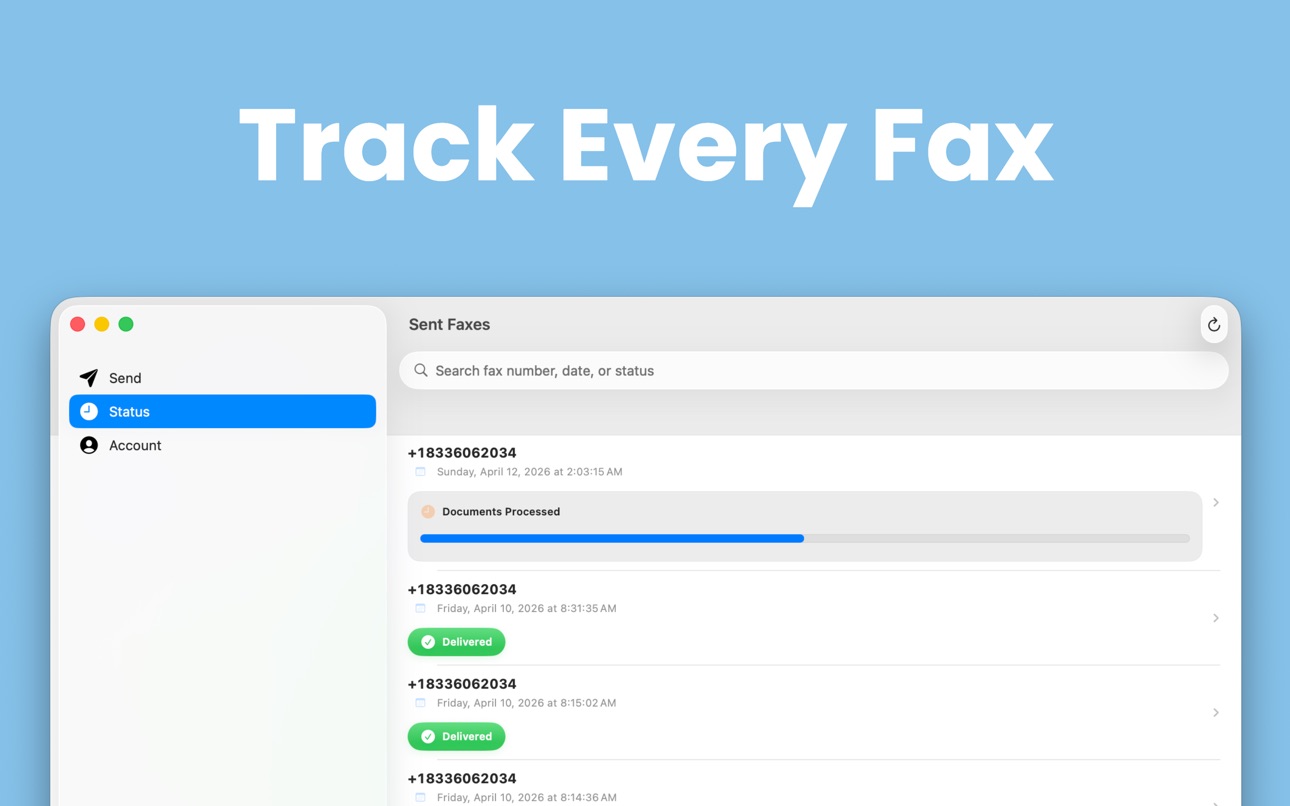
• The Status screen now updates by itself — watch "Sending" turn into "Delivered" without refreshing.
• Tap the sending progress on your Lock Screen or Dynamic Island to jump straight to that fax.
• Fax numbers are easier to read everywhere: +1 833-606-2034 instead of +18336062034.
• Big "Next" buttons guide you through every step.
• If a fax fails, a "Try Sending Again" button appears right where you need it.
FIXED & IMPROVED
• Photos and scans now fit neatly on standard letter-size pages.
• Cover pages and receipts always come out crisp and readable — in light or dark mode.
• Picking a contact now lets you choose their fax number, not just their first phone number.
• The app asks before closing a fax you're still working on, so scans are never lost by accident.
• Contact Support, Privacy Policy, and Terms are now easy to find in the Account tab.
• A fresh look with our new brand color, plus many small fixes on iPhone and iPad.
Description
A doctor's office, an insurance company, or a government agency just asked you to fax something — and you don't have a fax machine. Faxeau turns your iPhone or iPad into one. Scan it, sign it, send it, and watch it arrive. Done in about a minute.
No subscription. No monthly fees. You buy fax pages, they never expire, and you always see exactly how many pages a fax will use before you send it.
GET YOUR DOCUMENT IN — FROM ANYWHERE
• Scan paper with your camera — crisp, straight pages every time.
• Send PDFs, Word files (.docx and .doc), and photos from the Files app, your photo library, or any cloud app on your phone.
• On iPad, drag a file straight in from Files, Safari, or Mail.
• Combine scans, photos, and files into one fax, and reorder pages however you like.
MAKE IT LOOK PROFESSIONAL
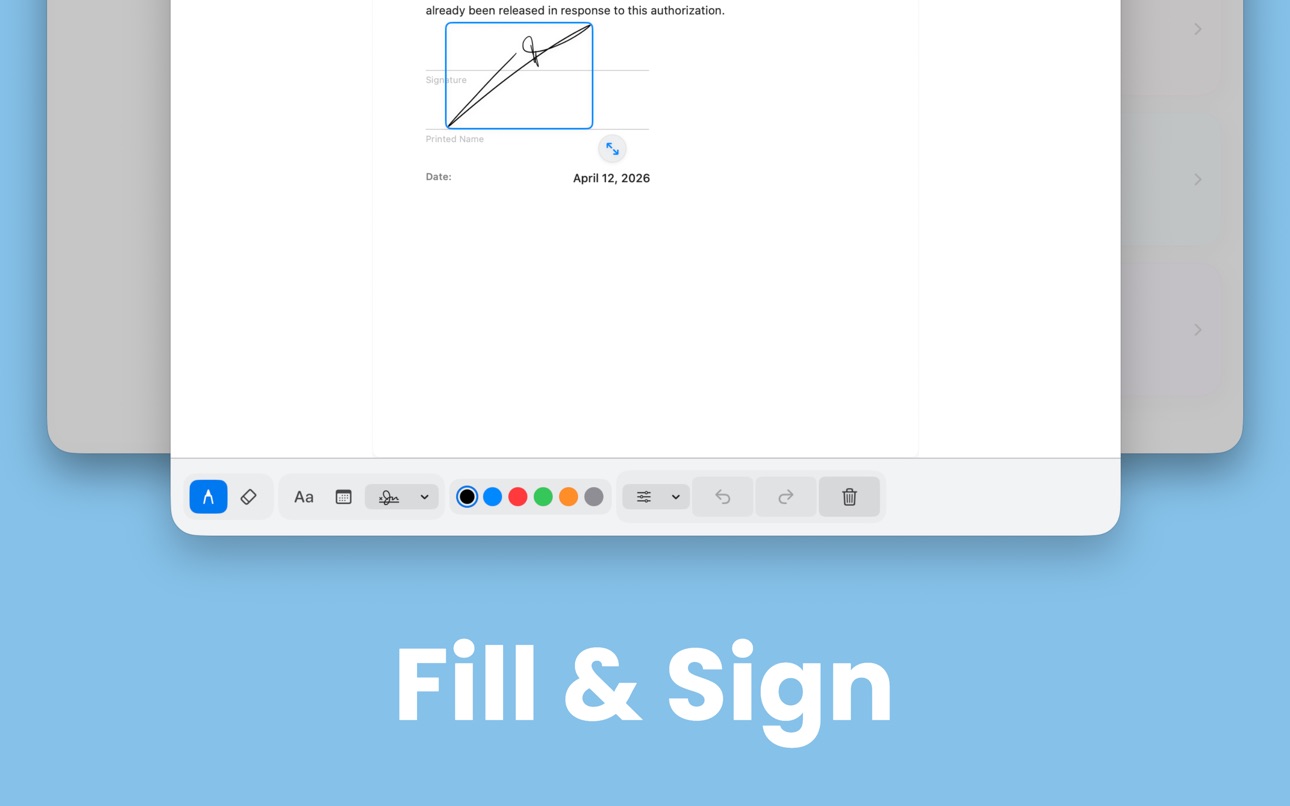
• Fill out forms right on your phone: if a PDF has fillable fields, just tap and type.
• No fillable fields? Write or type anywhere on the page, just like a pen on paper.
• Sign with your finger and save your signature to reuse anytime.
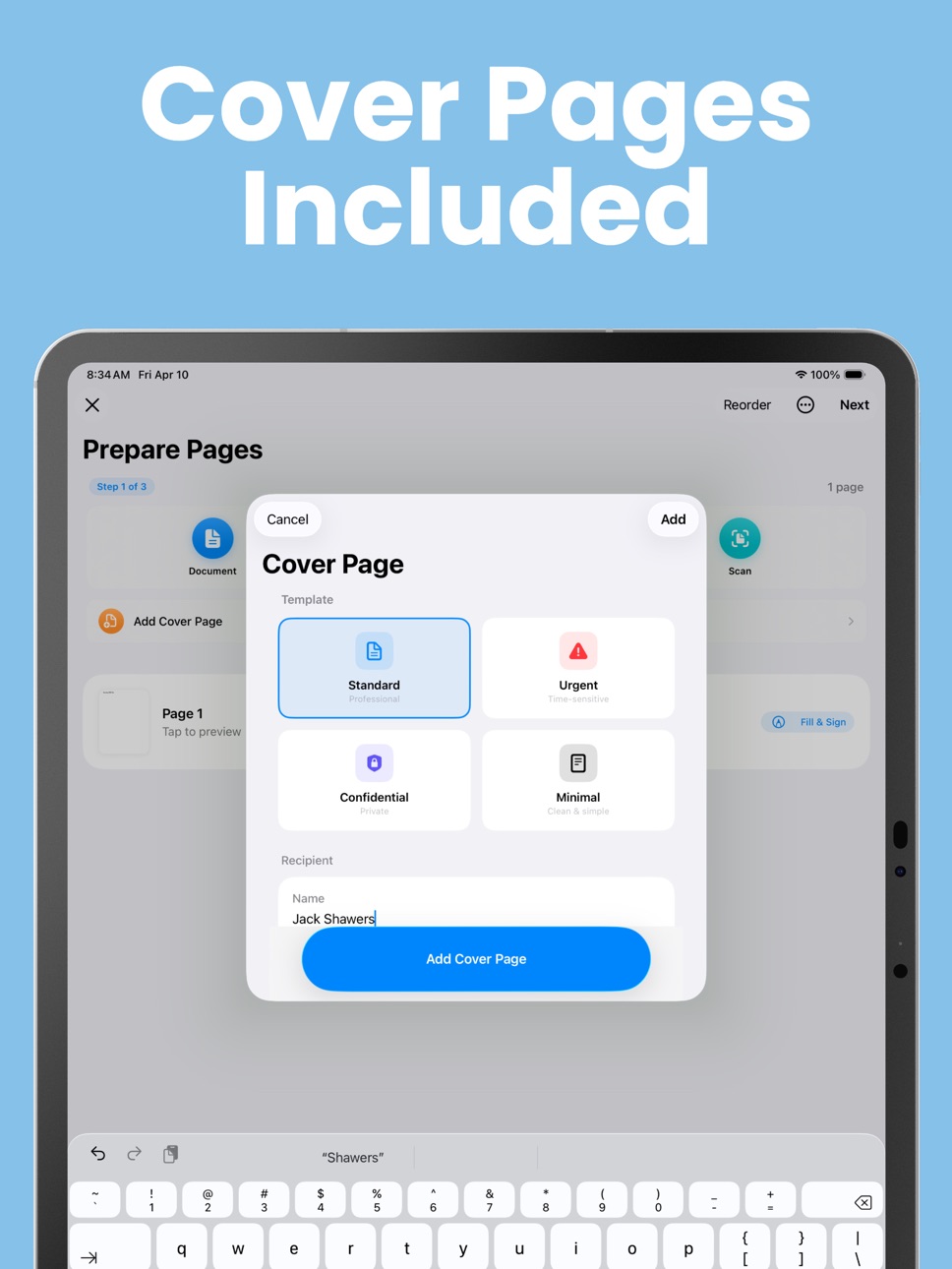
• Add a professional cover page in seconds — on iOS 26 with Apple Intelligence, it can even draft the cover note for you.
• Ready-made templates for the faxes people actually send: medical records requests, authorization forms, and letters.
• Scans, photos, and Word files come out on clean, standard letter-size paper.
KNOW IT ARRIVED
• Watch your fax go from Sending to Delivered — the status updates by itself.
• Follow the progress right on your Lock Screen and Dynamic Island.
• Get a notification the moment it's delivered.
• Download a confirmation receipt for your records.
• If a fax fails, a Try Sending Again button is right there.
PAY ONLY FOR WHAT YOU SEND
• Buy pages once — they never expire.
• See the exact page count before every send. No surprises.
• Sending to several numbers at once? You'll see the full cost up front.
FAX THE SAME THING AGAIN IN SECONDS
• Send Again: open any past fax and resend it — everything is filled in for you.
• Your saved numbers show by name, like "Dr. Miller's Office."
• Favorites, recent numbers, signatures, and your sender info sync across your devices with iCloud.
Faxeau is built for sending faxes — simple, fast, and reliable. Look around the app freely; you only sign in when you're ready to send, with one tap using Sign in with Apple — no forms, no passwords.
Privacy Policy & Terms: https://fierce-inlet-63133.herokuapp.com/fax-privacy-and-term
In-App Purchases CA pricing
One-Time Purchases
20 Fax Pages—
100 Fax Pages—
1 Fax Page—
50 Fax Pages—
200 Fax Pages—
Capabilities
In-App Purchases
Accessibility
ipadiphonemacrealityDevicetvoswatch
Version history 22 versions
Build 887977159v3.12026-07-11 23:14:54
NEW
• Fax Word documents — .docx and .doc files are turned into clean fax pages automatically.
• Type into PDF forms — if your document has fillable fields, just tap and type. No more handwriting.
• Send Again — open any past fax and resend it to the same number. Everything is filled in for you — just confirm.
• Tap Send and switch apps — your fax keeps going in the background.
• No more sign-in wall — look around the app first. You're only asked to sign in when you send.
CLEARER
• The Status screen now updates by itself — watch "Sending" turn into "Delivered" without refreshing.
• Tap the sending progress on your Lock Screen or Dynamic Island to jump straight to that fax.
• Fax numbers are easier to read everywhere: +1 833-606-2034 instead of +18336062034.
• Big "Next" buttons guide you through every step.
• If a fax fails, a "Try Sending Again" button appears right where you need it.
FIXED & IMPROVED
• Photos and scans now fit neatly on standard letter-size pages.
• Cover pages and receipts always come out crisp and readable — in light or dark mode.
• Picking a contact now lets you choose their fax number, not just their first phone number.
• The app asks before closing a fax you're still working on, so scans are never lost by accident.
• Contact Support, Privacy Policy, and Terms are now easy to find in the Account tab.
• A fresh look with our new brand color, plus many small fixes on iPhone and iPad.
Build 887319546v3.02026-06-23 16:58:29
• Easier sending — review your document, then tap one big "Send Fax" button
• Fill & Sign is better — a clear signing area, Undo for anything you add
(drawing, text, or signature), and a reminder before you discard your work
• On iPad, see your sent faxes and their preview side by side
• Lots of small fixes
Build 885482920v2.92026-05-16 22:31:00
• Draft a full cover letter with AI — describe your fax in one sentence and we'll write the subject and notes for you.
• The Send screen now shows how many pages your fax will use and how many you'll have left.
• Small polish and fixes throughout.
Build 884822081v2.82026-04-23 17:06:18
• Your signatures and cover page details now sync across your iPhone and iPad
through iCloud — set them up once, and they follow you everywhere.
• Smarter cover pages with Apple Intelligence (iOS 26 on supported devices):
tap "Draft with AI" to write a polished note for you, or "Suggest" to pick the
best template.
• On iPad, you can now drag PDFs and photos straight from Files, Safari, or
Mail onto the Send screen.
Build 884368558v2.72026-04-14 00:10:41
- New guided fax flow — Clear step-by-step process so you always know where
you are
- Fill & Sign in one tap — Sign your documents directly from the page list
- Better status tracking — See exactly where your fax is at a glance
- Live Activity improvements — Real-time progress percentage on your Lock
Screen
- New Account tab — Manage your account, pages, and sign-in all in one place
- iPad sidebar — Proper sidebar navigation for a true iPad experience
Build 883861088v2.62026-03-28 18:49:45
- Cover Pages — Add a professional cover sheet to your fax. Choose from
Standard, Urgent, Confidential, or Minimal templates.
- Document Templates — Create an Authorization Form, Letter, or Records
Request right in the app. Fill in the fields, tap Create, and fax it.
- Send to Multiple Recipients — Add several fax numbers and send the same
document to all of them at once.
- Favorites & Recents — Your frequently used fax numbers are saved and synced
across your devices with iCloud.
- Fax Receipts — Generate a PDF confirmation receipt for any sent fax. Save it
or share it for your records.
Build 883383960v2.52026-03-15 19:41:45
Updated design for iOS 26 and iPadOS 26
Build 877327912v2.42025-08-18 15:00:55
You can now add signatures and text/date annotations before faxing! On the combined pages screen, simply tap the document you want to fill and sign, then click the pen button to add your details.
Build 877300516v2.32025-08-16 19:36:50
Cleaner UI, smoother animations, improved Live Activities, and page-combining be
fore sending.
Build 877124717v2.22025-08-10 20:18:44
Bug Fix: We squashed the pesky infinite reload bug in the Status tab — things should load smoothly now!
Build 872182409v2.12025-02-02 17:53:36
• Live Fax Tracking:
Experience real-time tracking of your faxes! Watch your fax progress live and receive notifications as soon as it’s delivered.
• Design Refresh:
Enjoy a modern, streamlined interface that makes managing your faxes easier and more intuitive than ever.
• Improvements:
We’ve made performance enhancements to provide you with a smoother experience.
Thank you for using Fax App by FuturaApp! We’re always working to improve your experience—please share your feedback with us.
Build 870391582v2.02024-11-17 13:42:58
Product Page Updated! We've refreshed our product page
Build 862565225v1.92023-12-30 00:08:44
New Feature: You now have the ability to delete your account, providing you with more control over your personal data and privacy.
Fixed: The issue with the phone number field has been resolved
Build 842054990v1.82022-03-01 16:48:20
This version contains bug fixes
Build 841796073v1.72021-04-25 10:26:59
Hello everyone,
We added the ability to select multiple pdf documents and send them as one fax.
CLICK ON PDF DOCUMENT
CLICK ON SELECT
CLICK OPEN
Build 841310796v1.62021-04-12 13:16:38
Hello Everyone,
you can now use the new powerful search to find any
of your sent faxes in a matter of seconds.
You can search using date, fax number, or status
for example, for the date, you can type "am" or "pm" or "monday."
any date or time that comes to your mind, and the app will find your fax sent at that date.
Same for fax number or status.
The search gives you results for every word you type, even if you don't remember the exact date or fax number... start typing something to see the result.
Build 840180112v1.52021-01-25 16:21:00
Hello Everyone,
-In this new update, you can select multiple
images in your photo library and turn it into a document to fax.
-As we turn this app into a paid app, you will receive 10 extra pages for free as a special thanks for being an early user.
- to receive your 10 pages, open the app, make sure you have an internet connection, and the app will automatically add it to the pages you already purchased
Build 837079866v1.42020-07-30 19:37:33
Scrolling bug after a scan in the preview document page fixed.
Build 836910603v1.32020-07-19 19:07:47
Status tab, document fit inside the view
Build 836344146v1.22020-06-10 12:30:58
App previews screenshot updated
Build 836305675v1.12020-06-07 17:07:11
One fax page plan has been added
Build 835659661v1.02020-05-29 18:10:42
Price history by region
Currency
Show
Columns
Search
Availability 175 of 175 storefronts
| Region | Language | Price | Ratings | Avg | Version |
|---|---|---|---|---|---|
| US | en-US | Free | 116 | 4.5 | 3.1 |
| CA | en-CA | Free | 4 | 4.0 | 3.0 |
| DE | de-DE | Free | 3 | 2.7 | 3.0 |
| IT | it | Free | 3 | 4.3 | 3.0 |
| GB | en-GB | Free | 2 | 5.0 | 3.0 |
| TH | en-GB | Free | 2 | 5.0 | 3.0 |
| AT | de-DE | Free | 1 | 1.0 | 3.0 |
| AU | en-AU | Free | 1 | 5.0 | 3.0 |
| BE | en-GB | Free | 1 | 2.0 | 3.0 |
| CZ | en-GB | Free | 1 | 1.0 | 3.0 |
| EG | en-GB | Free | 1 | 5.0 | 3.0 |
| ES | es-ES | Free | 1 | 1.0 | 3.0 |
| HK | zh-Hant-HK | Free | 1 | 5.0 | 3.0 |
| KR | ko | Free | 1 | 5.0 | 3.0 |
| KW | en-GB | Free | 1 | 5.0 | 3.0 |
| LU | en-GB | Free | 1 | 5.0 | 3.0 |
| NG | en-GB | Free | 1 | 5.0 | 3.0 |
| PE | es-MX | Free | 1 | 5.0 | 3.0 |
| SE | sv | Free | 1 | 5.0 | 3.0 |
| AE | en-GB | Free | 0 | — | 3.0 |
| AF | en-GB | Free | 0 | — | 3.0 |
| AG | en-GB | Free | 0 | — | 3.0 |
| AI | en-GB | Free | 0 | — | 3.0 |
| AL | en-GB | Free | 0 | — | 3.0 |
| AM | en-GB | Free | 0 | — | 3.0 |
| AO | en-GB | Free | 0 | — | 3.0 |
| AR | es-MX | Free | 0 | — | 3.0 |
| AZ | en-GB | Free | 0 | — | 3.0 |
| BA | en-GB | Free | 0 | — | 3.0 |
| BB | en-GB | Free | 0 | — | 3.0 |
| BF | en-GB | Free | 0 | — | 3.0 |
| BG | en-GB | Free | 0 | — | 3.0 |
| BH | en-GB | Free | 0 | — | 3.0 |
| BJ | en-GB | Free | 0 | — | 3.0 |
| BM | en-GB | Free | 0 | — | 3.0 |
| BN | en-GB | Free | 0 | — | 3.0 |
| BO | es-MX | Free | 0 | — | 3.0 |
| BR | pt-BR | Free | 0 | — | 3.0 |
| BS | en-GB | Free | 0 | — | 3.0 |
| BT | en-GB | Free | 0 | — | 3.0 |
| BW | en-GB | Free | 0 | — | 3.0 |
| BY | en-GB | Free | 0 | — | 3.0 |
| BZ | en-GB | Free | 0 | — | 3.0 |
| CD | en-GB | Free | 0 | — | 3.0 |
| CG | en-GB | Free | 0 | — | 3.0 |
| CH | de-CH | Free | 0 | — | 3.0 |
| CI | fr-FR | Free | 0 | — | 3.0 |
| CL | es-MX | Free | 0 | — | 3.0 |
| CM | fr-FR | Free | 0 | — | 3.0 |
| CN | zh-Hans-CN | Free | 0 | — | 3.0 |
| CO | es-MX | Free | 0 | — | 3.0 |
| CR | es-MX | Free | 0 | — | 3.0 |
| CV | en-GB | Free | 0 | — | 3.0 |
| CY | en-GB | Free | 0 | — | 3.0 |
| DK | en-GB | Free | 0 | — | 3.0 |
| DM | en-GB | Free | 0 | — | 3.0 |
| DO | es-MX | Free | 0 | — | 3.0 |
| DZ | en-GB | Free | 0 | — | 3.0 |
| EC | es-MX | Free | 0 | — | 3.0 |
| EE | en-GB | Free | 0 | — | 3.0 |
| FI | en-GB | Free | 0 | — | 3.0 |
| FJ | en-GB | Free | 0 | — | 3.1 |
| FM | en-GB | Free | 0 | — | 3.0 |
| FR | fr-FR | Free | 0 | — | 3.0 |
| GA | fr-FR | Free | 0 | — | 3.0 |
| GD | en-GB | Free | 0 | — | 3.0 |
| GE | en-GB | Free | 0 | — | 3.0 |
| GH | en-GB | Free | 0 | — | 3.0 |
| GM | en-GB | Free | 0 | — | 3.0 |
| GR | en-GB | Free | 0 | — | 3.0 |
| GT | es-MX | Free | 0 | — | 3.0 |
| GW | en-GB | Free | 0 | — | 3.0 |
| GY | en-GB | Free | 0 | — | 3.0 |
| HN | es-MX | Free | 0 | — | 3.0 |
| HR | en-GB | Free | 0 | — | 3.0 |
| HU | en-GB | Free | 0 | — | 3.0 |
| ID | en-GB | Free | 0 | — | 3.0 |
| IE | en-GB | Free | 0 | — | 3.0 |
| IL | en-GB | Free | 0 | — | 3.0 |
| IN | en-GB | Free | 0 | — | 3.0 |
| IQ | en-GB | Free | 0 | — | 3.0 |
| IS | en-GB | Free | 0 | — | 3.0 |
| JM | en-GB | Free | 0 | — | 3.0 |
| JO | en-GB | Free | 0 | — | 3.0 |
| JP | ja | Free | 0 | — | 3.0 |
| KE | en-GB | Free | 0 | — | 3.0 |
| KG | en-GB | Free | 0 | — | 3.0 |
| KH | en-GB | Free | 0 | — | 3.0 |
| KN | en-GB | Free | 0 | — | 3.0 |
| KY | en-GB | Free | 0 | — | 3.0 |
| KZ | en-GB | Free | 0 | — | 3.0 |
| LA | en-GB | Free | 0 | — | 3.0 |
| LB | en-GB | Free | 0 | — | 3.0 |
| LC | en-GB | Free | 0 | — | 3.0 |
| LK | en-GB | Free | 0 | — | 3.0 |
| LR | en-GB | Free | 0 | — | 3.0 |
| LT | en-GB | Free | 0 | — | 3.0 |
| LV | en-GB | Free | 0 | — | 3.0 |
| LY | en-GB | Free | 0 | — | 3.0 |
| MA | en-GB | Free | 0 | — | 3.0 |
| MD | en-GB | Free | 0 | — | 3.0 |
| ME | en-GB | Free | 0 | — | 3.0 |
| MG | en-GB | Free | 0 | — | 3.0 |
| MK | en-GB | Free | 0 | — | 3.0 |
| ML | en-GB | Free | 0 | — | 3.0 |
| MM | en-GB | Free | 0 | — | 3.0 |
| MN | en-GB | Free | 0 | — | 3.0 |
| MO | zh-Hant-HK | Free | 0 | — | 3.0 |
| MR | en-GB | Free | 0 | — | 3.0 |
| MS | en-GB | Free | 0 | — | 3.0 |
| MT | en-GB | Free | 0 | — | 3.0 |
| MU | en-GB | Free | 0 | — | 3.0 |
| MV | en-GB | Free | 0 | — | 3.0 |
| MW | en-GB | Free | 0 | — | 3.0 |
| MX | es-MX | Free | 0 | — | 3.0 |
| MY | en-GB | Free | 0 | — | 3.0 |
| MZ | en-GB | Free | 0 | — | 3.0 |
| NA | en-GB | Free | 0 | — | 3.0 |
| NE | en-GB | Free | 0 | — | 3.0 |
| NI | es-MX | Free | 0 | — | 3.0 |
| NL | nl | Free | 0 | — | 3.0 |
| NO | en-GB | Free | 0 | — | 3.0 |
| NP | en-GB | Free | 0 | — | 3.0 |
| NR | en-GB | Free | 0 | — | 3.0 |
| NZ | en-AU | Free | 0 | — | 3.1 |
| OM | en-GB | Free | 0 | — | 3.0 |
| PA | es-MX | Free | 0 | — | 3.0 |
| PG | en-GB | Free | 0 | — | 3.0 |
| PH | en-GB | Free | 0 | — | 3.0 |
| PK | en-GB | Free | 0 | — | 3.0 |
| PL | en-GB | Free | 0 | — | 3.0 |
| PT | pt-PT | Free | 0 | — | 3.0 |
| PW | en-GB | Free | 0 | — | 3.0 |
| PY | es-MX | Free | 0 | — | 3.0 |
| QA | en-GB | Free | 0 | — | 3.0 |
| RO | en-GB | Free | 0 | — | 3.0 |
| RS | en-GB | Free | 0 | — | 3.0 |
| RU | ru | Free | 0 | — | 3.0 |
| RW | en-GB | Free | 0 | — | 3.0 |
| SA | en-GB | Free | 0 | — | 3.0 |
| SB | en-GB | Free | 0 | — | 3.0 |
| SC | en-GB | Free | 0 | — | 3.0 |
| SG | en-GB | Free | 0 | — | 3.0 |
| SI | en-GB | Free | 0 | — | 3.0 |
| SK | en-GB | Free | 0 | — | 3.0 |
| SL | en-GB | Free | 0 | — | 3.0 |
| SN | en-GB | Free | 0 | — | 3.0 |
| SR | en-GB | Free | 0 | — | 3.0 |
| ST | en-GB | Free | 0 | — | 3.0 |
| SV | es-MX | Free | 0 | — | 3.0 |
| SZ | en-GB | Free | 0 | — | 3.0 |
| TC | en-GB | Free | 0 | — | 3.0 |
| TD | en-GB | Free | 0 | — | 3.0 |
| TJ | en-GB | Free | 0 | — | 3.0 |
| TM | en-GB | Free | 0 | — | 3.0 |
| TN | en-GB | Free | 0 | — | 3.0 |
| TO | en-GB | Free | 0 | — | 3.0 |
| TR | en-GB | Free | 0 | — | 3.0 |
| TT | en-GB | Free | 0 | — | 3.0 |
| TW | zh-Hant-TW | Free | 0 | — | 3.0 |
| TZ | en-GB | Free | 0 | — | 3.0 |
| UA | en-GB | Free | 0 | — | 3.0 |
| UG | en-GB | Free | 0 | — | 3.0 |
| UY | en-GB | Free | 0 | — | 3.0 |
| UZ | en-GB | Free | 0 | — | 3.0 |
| VC | en-GB | Free | 0 | — | 3.0 |
| VE | es-MX | Free | 0 | — | 3.0 |
| VG | en-GB | Free | 0 | — | 3.0 |
| VN | en-GB | Free | 0 | — | 3.0 |
| VU | en-GB | Free | 0 | — | 3.0 |
| XK | en-GB | Free | 0 | — | 3.0 |
| YE | en-GB | Free | 0 | — | 3.0 |
| ZA | en-GB | Free | 0 | — | 3.0 |
| ZM | en-GB | Free | 0 | — | 3.0 |
| ZW | en-GB | Free | 0 | — | 3.0 |
Change log 36 changes · CA
✎
releaseNotes updated
NEW
• Fax Word documents — .docx and .doc files are turned into clean fax pages automatically.
• Type into PDF forms — if your document has fillable fields, jus
✎
description updated
A doctor's office, an insurance company, or a government agency just asked you to fax something — and you don't have a fax machine. Faxeau turns your iPhone or
▣
App icon changed
◆
Version changed
3.0 → 3.1
✎
Privacy labels 0 → 1 categories
✎
Added: In App Purchases
◆
Version changed
3.0 → 3.1
◆
Version changed
3.0 → 3.1
◆
Version 3.1 released
NEW
• Fax Word documents — .docx and .doc files are turned into clean fax pages automatically.
• Type into PDF forms — if your document has fillable fields, just tap and type. No more handwriting.
• Send Again — open any past fax and resend
✎
Privacy labels 1 → 0 categories
✎
Removed: In App Purchases
✎
releaseNotes updated
• Easier sending — review your document, then tap one big "Send Fax" button
• Fill & Sign is better — a clear signing area, Undo for anything you add
(drawing
✎
description updated
Faxeau makes sending a fax as simple as sending a text. The app leverages the full capabilities of your iPhone or iPad, allowing you to access any type of docum
✎
subtitle updated
Scan, Sign PDF & Documents
✎
name updated
Faxeau: Send Fax from Phone
◆
Version 3.0 released
• Easier sending — review your document, then tap one big "Send Fax" button
• Fill & Sign is better — a clear signing area, Undo for anything you add
(drawing, text, or signature), and a reminder before you discard your work
• On iPad, se
◆
Version 2.9 released
• Draft a full cover letter with AI — describe your fax in one sentence and we'll write the subject and notes for you.
• The Send screen now shows how many pages your fax will use and how many you'll have left.
• Small polish and fixes thro
◆
Version 2.8 released
• Your signatures and cover page details now sync across your iPhone and iPad
through iCloud — set them up once, and they follow you everywhere.
• Smarter cover pages with Apple Intelligence (iOS 26 on supported device
◆
Version 2.7 released
- New guided fax flow — Clear step-by-step process so you always know where
you are
- Fill & Sign in one tap — Sign your documents directly from the page list
- Better status tracking — See exactly where your fax is at a glance
-
◆
Version 2.6 released
- Cover Pages — Add a professional cover sheet to your fax. Choose from
Standard, Urgent, Confidential, or Minimal templates.
- Document Templates — Create an Authorization Form, Letter, or Records
Request ri
◆
Version 2.5 released
Updated design for iOS 26 and iPadOS 26
◆
Version 2.4 released
You can now add signatures and text/date annotations before faxing! On the combined pages screen, simply tap the document you want to fill and sign, then click the pen button to add your details.
◆
Version 2.3 released
Cleaner UI, smoother animations, improved Live Activities, and page-combining be
fore sending.
◆
Version 2.2 released
Bug Fix: We squashed the pesky infinite reload bug in the Status tab — things should load smoothly now!
◆
Version 2.1 released
• Live Fax Tracking:
Experience real-time tracking of your faxes! Watch your fax progress live and receive notifications as soon as it’s delivered.
• Design Refresh:
Enjoy a modern, streamlined interface that makes managing your faxes ea
◆
Version 2.0 released
Product Page Updated! We've refreshed our product page
◆
Version 1.9 released
New Feature: You now have the ability to delete your account, providing you with more control over your personal data and privacy.
Fixed: The issue with the phone number field has been resolved
◆
Version 1.8 released
This version contains bug fixes
◆
Version 1.7 released
Hello everyone,
We added the ability to select multiple pdf documents and send them as one fax.
CLICK ON PDF DOCUMENT
CLICK ON SELECT
CLICK OPEN
◆
Version 1.6 released
Hello Everyone,
you can now use the new powerful search to find any
of your sent faxes in a matter of seconds.
You can search using date, fax number, or status
for example, for the date, you can type "am" or "pm" or "monday."
any date or
◆
Version 1.5 released
Hello Everyone,
-In this new update, you can select multiple
images in your photo library and turn it into a document to fax.
-As we turn this app into a paid app, you will receive 10 extra pages for free as a special thanks for being an
◆
Version 1.4 released
Scrolling bug after a scan in the preview document page fixed.
◆
Version 1.3 released
Status tab, document fit inside the view
◆
Version 1.2 released
App previews screenshot updated
◆
Version 1.1 released
One fax page plan has been added
◆
Version 1.0 released