Home › Utilities

 BB
BB
 USen-US
 AFen-GB
 AIen-GB
 ALen-GB
 AMen-GB
 AOen-GB
 ATde-DE
 AUen-AU
 AZen-GB
 BAen-GBBBen-GB
 BEen-GB
 BFen-GB
 BGen-GB
 BJen-GB
 BMen-GB
 BOes-MX
 BRpt-BR
 BSen-GB
 BTen-GB
 BWen-GB
 BYen-GB
 BZen-GB
 CAen-CA
 CDen-GB
 CGen-GB
 CHde-CH
 CIfr-FR
 CMfr-FR
 CNzh-Hans-CN
 COes-MX
 CRes-MX
 CVen-GB
 CYen-GB
 DEde-DE
 DKen-GB
 DOes-MX
 DZen-GB
 ECes-MX
 EEen-GB
 EGen-GB
 ESes-ES
 FIen-GB
 FJen-GB
 FMen-GB
 FRfr-FR
 GAfr-FR
 GBen-GB
 GEen-GB
 GHen-GB
 GMen-GB
 GRen-GB
 GTes-MX
 GWen-GB
 HKzh-Hant-HK
 HNes-MX
 HRen-GB
 IDen-GB
 IEen-GB
 ILen-GB
 INen-GB
 IQen-GB
 ISen-GB
 ITit
ITit JMen-GB
 JOen-GB
 JPja
JPja KEen-GB
 KRko
KRko KYen-GB
 KZen-GB
 LBen-GB
 LCen-GB
 LKen-GB
 LRen-GB
 LTen-GB
 LUen-GB
 LVen-GB
 LYen-GB
 MAen-GB
 MDen-GB
 MEen-GB
 MGen-GB
 MKen-GB
 MLen-GB
 MOzh-Hant-HK
 MRen-GB
 MSen-GB
 MTen-GB
 MUen-GB
 MVen-GB
 MWen-GB
 MXes-MX
 MYen-GB
 MZen-GB
 NAen-GB
 NEen-GB
 NGen-GB
 NIes-MX
 NLnl
NLnl NRen-GB
 NZen-AU
 OMen-GB
 PAes-MX
 PEes-MX
 PGen-GB
 PHen-GB
 PKen-GB
 PTpt-PT
 PWen-GB
 PYes-MX
 RSen-GB
 RUru
RUru RWen-GB
 SBen-GB
 SCen-GB
 SEsv
SEsv SGen-GB
 SIen-GB
 SLen-GB
 SNen-GB
 SRen-GB
 STen-GB
 SVes-MX
 SZen-GB
 TCen-GB
 TDen-GB
 THen-GB
 TJen-GB
 TMen-GB
 TNen-GB
 TOen-GB
 TRen-GB
 TTen-GB
 TWzh-Hant-TW
 TZen-GB
 UAen-GB
 UGen-GB
 UYen-GB
 UZen-GB
 VCen-GB
 VEes-MX
 VGen-GB
 VNen-GB
 VUen-GB
 XKen-GB
 YEen-GB
 ZAen-GB
 ZMen-GB
 ZWen-GB
150 of 150 storefronts
Content in en-US
Content in en-US
Information
Preview 2 platforms
iPhone 10 images




iPad 10 images


What’s New Version 1.15
Added new fields for Illinois compliance.
Description
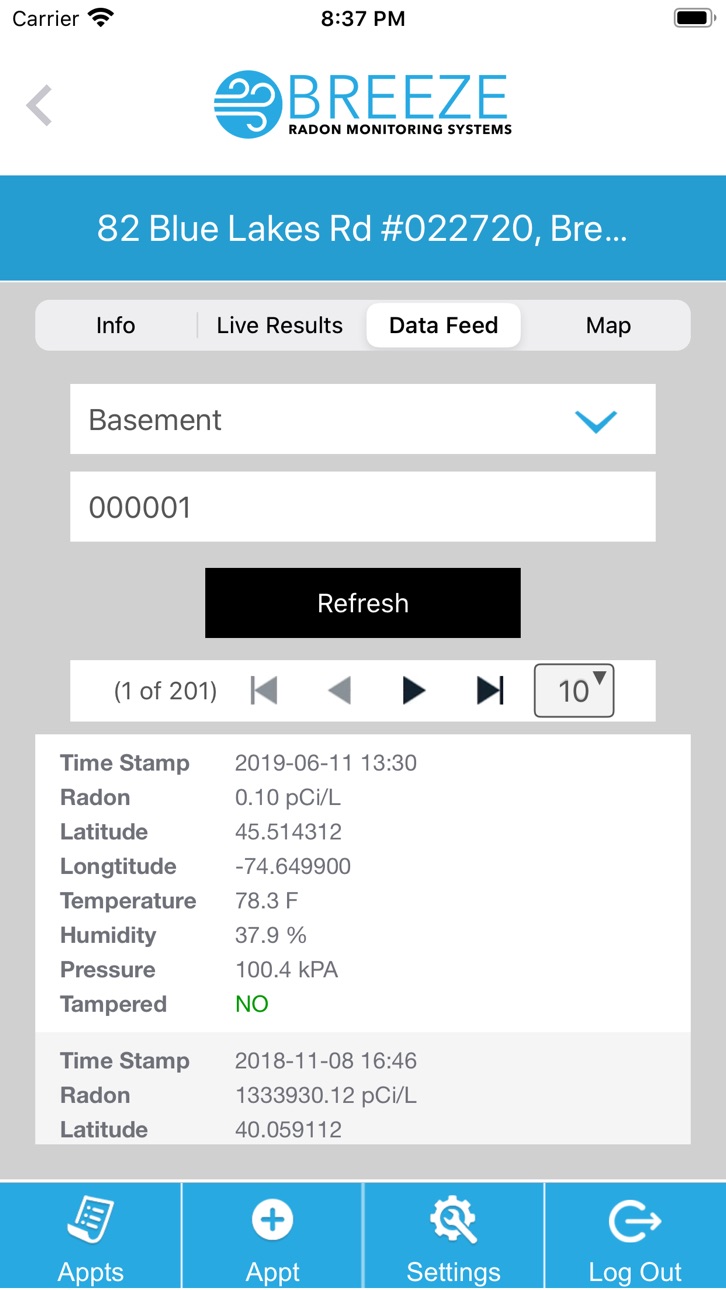
The Breeze Radon mobile app gives you the ability to manage your Breeze Radon CRM from your smart phone or tablet. The smart phone app gives you the ability to start tests, view live results, get a look at the raw data stream being reported from your device as well as the gps coordinates on a satellite map. You can also control all your report, unit, and user settings through the app.
Accessibility
ipadiphonemacrealityDevicetvoswatch
Version history 14 versions
Build 886852532v1.152026-06-12 16:14:59
Added new fields for Illinois compliance.
Build 884516081v1.142026-04-14 21:48:50
General App Updates
Build 881977934v1.132026-03-10 01:38:52
Country specific state and zip/postal code fields depending on the user's select country under their account.
Build 871243182v1.112024-12-30 13:42:44
Our Room Diagram Builder has been added to the app. If your state requires you to submit a diagram of the room where you've placed your Breeze Radon CRM for testing, you can now build the diagram from the app for automatic inclusion in your report. Diagrams can be added to any test once they've been started. Pull up the test and go to the Diagram tab to create a diagram. Specify the size of the grid which will provide you with a starting canvas to draw on. Use the pencil icon to select the item you would like to draw. Drag across the grid lines to draw line based items like walls, windows and doors. For other objects like the CRM you can just tab in a grid space to place the object.
Build 869328970v1.102024-09-28 18:18:19
The My Devices page has been updated to display the battery life of your Breeze Radon III device as a percentage giving you a more accurate reading.
Build 864120818v1.92024-03-27 01:41:09
Additional Fields were added for compliance reasons to the Start/Edit Test Screen when performing a test on a location in Minnesota and Pennsylvania
Build 860901896v1.72023-10-23 23:32:26
Updates to the selection of a test's start and end time were changed to allow for start date selection and input of duration of test in hours and minutes to automatically determine the end date/time. Additional fields for tests performed in the states of FL, MN, and KS were added to the start/edit test interfaces to account for additional data points needed for state compliance reasons.
Build 859311413v1.62023-08-21 20:24:40
A bug has been fixed in the My Devices page while displaying info from a device that does not have a nick name set.
Build 857691142v1.52023-07-18 17:54:18
Check out our new menu in the top right corner of the app. You will also see a new menu option of Manage Devices where you can view the status of all your Breeze CRMs in one place.
Build 854485323v1.42023-04-06 13:07:15
Our new Export feature allows you to connect directly with your Breeze 3 device via BlueTooth and transmit your data records to the cloud using your phone's wifi connection or wireless service.
Build 847266456v1.32022-03-03 13:00:53
Update Urls on API calls
Build 840338329v1.22021-02-04 16:56:01
Improvements to Dark Mode compatibility
Build 835417498v1.12020-04-05 23:12:48
Addition test fields for Test Type, Mitigation System Present, and Atmospheric Conditions. Additional Settings for Show Data Readings and Show Calibration Certificate on Report. Additional appointments page option for Pending Pickup so the devices at a location can be marked as picked up and tracked by user.
Build 834914849v1.02020-03-09 23:44:40
No pricing data captured yet — comparisons appear once the app has paid storefronts or in-app purchases.
Availability 150 of 150 storefronts
| Region | Language | Price | Ratings | Avg | Version |
|---|---|---|---|---|---|
| US | en-US | Free | 1 | 4.0 | 1.15 |
| AF | en-GB | Free | 0 | — | 1.15 |
| AI | en-GB | Free | 0 | — | 1.15 |
| AL | en-GB | Free | 0 | — | 1.15 |
| AM | en-GB | Free | 0 | — | 1.15 |
| AO | en-GB | Free | 0 | — | 1.15 |
| AT | de-DE | Free | 0 | — | 1.15 |
| AU | en-AU | Free | 0 | — | 1.15 |
| AZ | en-GB | Free | 0 | — | 1.15 |
| BA | en-GB | Free | 0 | — | 1.15 |
| BB | en-GB | Free | 0 | — | 1.15 |
| BE | en-GB | Free | 0 | — | 1.15 |
| BF | en-GB | Free | 0 | — | 1.15 |
| BG | en-GB | Free | 0 | — | 1.15 |
| BJ | en-GB | Free | 0 | — | 1.15 |
| BM | en-GB | Free | 0 | — | 1.15 |
| BO | es-MX | Free | 0 | — | 1.15 |
| BR | pt-BR | Free | 0 | — | 1.15 |
| BS | en-GB | Free | 0 | — | 1.15 |
| BT | en-GB | Free | 0 | — | 1.15 |
| BW | en-GB | Free | 0 | — | 1.15 |
| BY | en-GB | Free | 0 | — | 1.15 |
| BZ | en-GB | Free | 0 | — | 1.15 |
| CA | en-CA | Free | 0 | — | 1.15 |
| CD | en-GB | Free | 0 | — | 1.15 |
| CG | en-GB | Free | 0 | — | 1.15 |
| CH | de-CH | Free | 0 | — | 1.15 |
| CI | fr-FR | Free | 0 | — | 1.15 |
| CM | fr-FR | Free | 0 | — | 1.15 |
| CN | zh-Hans-CN | Free | 0 | — | 1.15 |
| CO | es-MX | Free | 0 | — | 1.15 |
| CR | es-MX | Free | 0 | — | 1.15 |
| CV | en-GB | Free | 0 | — | 1.15 |
| CY | en-GB | Free | 0 | — | 1.15 |
| DE | de-DE | Free | 0 | — | 1.15 |
| DK | en-GB | Free | 0 | — | 1.15 |
| DO | es-MX | Free | 0 | — | 1.15 |
| DZ | en-GB | Free | 0 | — | 1.15 |
| EC | es-MX | Free | 0 | — | 1.15 |
| EE | en-GB | Free | 0 | — | 1.15 |
| EG | en-GB | Free | 0 | — | 1.15 |
| ES | es-ES | Free | 0 | — | 1.15 |
| FI | en-GB | Free | 0 | — | 1.15 |
| FJ | en-GB | Free | 0 | — | 1.15 |
| FM | en-GB | Free | 0 | — | 1.15 |
| FR | fr-FR | Free | 0 | — | 1.15 |
| GA | fr-FR | Free | 0 | — | 1.15 |
| GB | en-GB | Free | 0 | — | 1.15 |
| GE | en-GB | Free | 0 | — | 1.15 |
| GH | en-GB | Free | 0 | — | 1.15 |
| GM | en-GB | Free | 0 | — | 1.15 |
| GR | en-GB | Free | 0 | — | 1.15 |
| GT | es-MX | Free | 0 | — | 1.15 |
| GW | en-GB | Free | 0 | — | 1.15 |
| HK | zh-Hant-HK | Free | 0 | — | 1.15 |
| HN | es-MX | Free | 0 | — | 1.15 |
| HR | en-GB | Free | 0 | — | 1.15 |
| ID | en-GB | Free | 0 | — | 1.15 |
| IE | en-GB | Free | 0 | — | 1.15 |
| IL | en-GB | Free | 0 | — | 1.15 |
| IN | en-GB | Free | 0 | — | 1.15 |
| IQ | en-GB | Free | 0 | — | 1.15 |
| IS | en-GB | Free | 0 | — | 1.15 |
| IT | it | Free | 0 | — | 1.15 |
| JM | en-GB | Free | 0 | — | 1.15 |
| JO | en-GB | Free | 0 | — | 1.15 |
| JP | ja | Free | 0 | — | 1.15 |
| KE | en-GB | Free | 0 | — | 1.15 |
| KR | ko | Free | 0 | — | 1.15 |
| KY | en-GB | Free | 0 | — | 1.15 |
| KZ | en-GB | Free | 0 | — | 1.15 |
| LB | en-GB | Free | 0 | — | 1.15 |
| LC | en-GB | Free | 0 | — | 1.15 |
| LK | en-GB | Free | 0 | — | 1.15 |
| LR | en-GB | Free | 0 | — | 1.15 |
| LT | en-GB | Free | 0 | — | 1.15 |
| LU | en-GB | Free | 0 | — | 1.15 |
| LV | en-GB | Free | 0 | — | 1.15 |
| LY | en-GB | Free | 0 | — | 1.15 |
| MA | en-GB | Free | 0 | — | 1.15 |
| MD | en-GB | Free | 0 | — | 1.15 |
| ME | en-GB | Free | 0 | — | 1.15 |
| MG | en-GB | Free | 0 | — | 1.15 |
| MK | en-GB | Free | 0 | — | 1.15 |
| ML | en-GB | Free | 0 | — | 1.15 |
| MO | zh-Hant-HK | Free | 0 | — | 1.15 |
| MR | en-GB | Free | 0 | — | 1.15 |
| MS | en-GB | Free | 0 | — | 1.15 |
| MT | en-GB | Free | 0 | — | 1.15 |
| MU | en-GB | Free | 0 | — | 1.15 |
| MV | en-GB | Free | 0 | — | 1.15 |
| MW | en-GB | Free | 0 | — | 1.15 |
| MX | es-MX | Free | 0 | — | 1.15 |
| MY | en-GB | Free | 0 | — | 1.15 |
| MZ | en-GB | Free | 0 | — | 1.15 |
| NA | en-GB | Free | 0 | — | 1.15 |
| NE | en-GB | Free | 0 | — | 1.15 |
| NG | en-GB | Free | 0 | — | 1.15 |
| NI | es-MX | Free | 0 | — | 1.15 |
| NL | nl | Free | 0 | — | 1.15 |
| NR | en-GB | Free | 0 | — | 1.15 |
| NZ | en-AU | Free | 0 | — | 1.15 |
| OM | en-GB | Free | 0 | — | 1.15 |
| PA | es-MX | Free | 0 | — | 1.15 |
| PE | es-MX | Free | 0 | — | 1.15 |
| PG | en-GB | Free | 0 | — | 1.15 |
| PH | en-GB | Free | 0 | — | 1.15 |
| PK | en-GB | Free | 0 | — | 1.15 |
| PT | pt-PT | Free | 0 | — | 1.15 |
| PW | en-GB | Free | 0 | — | 1.15 |
| PY | es-MX | Free | 0 | — | 1.15 |
| RS | en-GB | Free | 0 | — | 1.15 |
| RU | ru | Free | 0 | — | 1.15 |
| RW | en-GB | Free | 0 | — | 1.15 |
| SB | en-GB | Free | 0 | — | 1.15 |
| SC | en-GB | Free | 0 | — | 1.15 |
| SE | sv | Free | 0 | — | 1.15 |
| SG | en-GB | Free | 0 | — | 1.15 |
| SI | en-GB | Free | 0 | — | 1.15 |
| SL | en-GB | Free | 0 | — | 1.15 |
| SN | en-GB | Free | 0 | — | 1.15 |
| SR | en-GB | Free | 0 | — | 1.15 |
| ST | en-GB | Free | 0 | — | 1.15 |
| SV | es-MX | Free | 0 | — | 1.15 |
| SZ | en-GB | Free | 0 | — | 1.15 |
| TC | en-GB | Free | 0 | — | 1.15 |
| TD | en-GB | Free | 0 | — | 1.15 |
| TH | en-GB | Free | 0 | — | 1.15 |
| TJ | en-GB | Free | 0 | — | 1.15 |
| TM | en-GB | Free | 0 | — | 1.15 |
| TN | en-GB | Free | 0 | — | 1.15 |
| TO | en-GB | Free | 0 | — | 1.15 |
| TR | en-GB | Free | 0 | — | 1.15 |
| TT | en-GB | Free | 0 | — | 1.15 |
| TW | zh-Hant-TW | Free | 0 | — | 1.15 |
| TZ | en-GB | Free | 0 | — | 1.15 |
| UA | en-GB | Free | 0 | — | 1.15 |
| UG | en-GB | Free | 0 | — | 1.15 |
| UY | en-GB | Free | 0 | — | 1.15 |
| UZ | en-GB | Free | 0 | — | 1.15 |
| VC | en-GB | Free | 0 | — | 1.15 |
| VE | es-MX | Free | 0 | — | 1.15 |
| VG | en-GB | Free | 0 | — | 1.15 |
| VN | en-GB | Free | 0 | — | 1.15 |
| VU | en-GB | Free | 0 | — | 1.15 |
| XK | en-GB | Free | 0 | — | 1.15 |
| YE | en-GB | Free | 0 | — | 1.15 |
| ZA | en-GB | Free | 0 | — | 1.15 |
| ZM | en-GB | Free | 0 | — | 1.15 |
| ZW | en-GB | Free | 0 | — | 1.15 |
Change log 17 changes · BB
✎
releaseNotes updated
Added new fields for Illinois compliance.
✎
description updated
The Breeze Radon mobile app gives you the ability to manage your Breeze Radon CRM from your smart phone or tablet. The smart phone app gives you the ability to
✎
name updated
Breeze Radon
◆
Version 1.15 released
Added new fields for Illinois compliance.
◆
Version 1.14 released
General App Updates
◆
Version 1.13 released
Country specific state and zip/postal code fields depending on the user's select country under their account.
◆
Version 1.11 released
Our Room Diagram Builder has been added to the app. If your state requires you to submit a diagram of the room where you've placed your Breeze Radon CRM for testing, you can now build the diagram from the app for automatic inclusion in your
◆
Version 1.10 released
The My Devices page has been updated to display the battery life of your Breeze Radon III device as a percentage giving you a more accurate reading.
◆
Version 1.9 released
Additional Fields were added for compliance reasons to the Start/Edit Test Screen when performing a test on a location in Minnesota and Pennsylvania
◆
Version 1.7 released
Updates to the selection of a test's start and end time were changed to allow for start date selection and input of duration of test in hours and minutes to automatically determine the end date/time. Additional fields for tests performed in
◆
Version 1.6 released
A bug has been fixed in the My Devices page while displaying info from a device that does not have a nick name set.
◆
Version 1.5 released
Check out our new menu in the top right corner of the app. You will also see a new menu option of Manage Devices where you can view the status of all your Breeze CRMs in one place.
◆
Version 1.4 released
Our new Export feature allows you to connect directly with your Breeze 3 device via BlueTooth and transmit your data records to the cloud using your phone's wifi connection or wireless service.
◆
Version 1.3 released
Update Urls on API calls
◆
Version 1.2 released
Improvements to Dark Mode compatibility
◆
Version 1.1 released
Addition test fields for Test Type, Mitigation System Present, and Atmospheric Conditions. Additional Settings for Show Data Readings and Show Calibration Certificate on Report. Additional appointments page option for Pending Pickup so the
◆
Version 1.0 released