Home › Business

 CD
CD
 AGen-GB
 AIen-GB
 AOen-GB
 ARes-MX
 ATde-DE
 AUen-AU
 BBen-GB
 BEen-GB
 BFen-GB
 BJen-GB
 BOes-MX
 BRpt-BR
 BSen-GB
 BWen-GB
 BZen-GB
 CAen-CACDen-GB
 CGen-GB
 CHde-CH
 CIfr-FR
 CLes-MX
 CMfr-FR
 CRes-MX
 CVen-GB
 DEde-DE
 DKen-GB
 DMen-GB
 DOes-MX
 DZen-GB
 ECes-MX
 ESes-ES
 FIen-GB
 FRfr-FR
 GAfr-FR
 GBen-GB
 GDen-GB
 GHen-GB
 GMen-GB
 GTes-MX
 GWen-GB
 GYen-GB
 HNes-MX
 IEen-GB
 ITit
ITit JMen-GB
 KEen-GB
 KNen-GB
 KYen-GB
 LCen-GB
 LRen-GB
 LUen-GB
 LYen-GB
 MAen-GB
 MGen-GB
 MLen-GB
 MSen-GB
 MUen-GB
 MWen-GB
 MXes-MX
 MZen-GB
 NAen-GB
 NEen-GB
 NGen-GB
 NIes-MX
 NLnl
NLnl NOen-GB
 NZen-AU
 PAes-MX
 PEes-MX
 PTpt-PT
 PYes-MX
 RWen-GB
 SCen-GB
 SEsv
SEsv SNen-GB
 SRen-GB
 STen-GB
 SVes-MX
 SZen-GB
 TCen-GB
 TDen-GB
 TNen-GB
 TTen-GB
 TZen-GB
 UGen-GB
 USen-US
 UYen-GB
 VCen-GB
 VEes-MX
 VGen-GB
 ZMen-GB
 ZWen-GB
92 of 92 storefronts
Content in en-US
Content in en-US
Information
Apple ID1489079227
Bundle IDcom.irsalaya
SellerSeller
Min iOS12.2
Min macOS11.0
Device familiesiphone, ipod
Released2019-11-25
Copyright© IRS Apps Solution (M) Sdn Bhd
Privacy policyLink ↗
Preview 1 platform
iPhone 6 images



What’s New Version 2.2.0
Fix access right issues on Summary and Sales Details reports
Fix Customer Outstanding report may not generate
Description
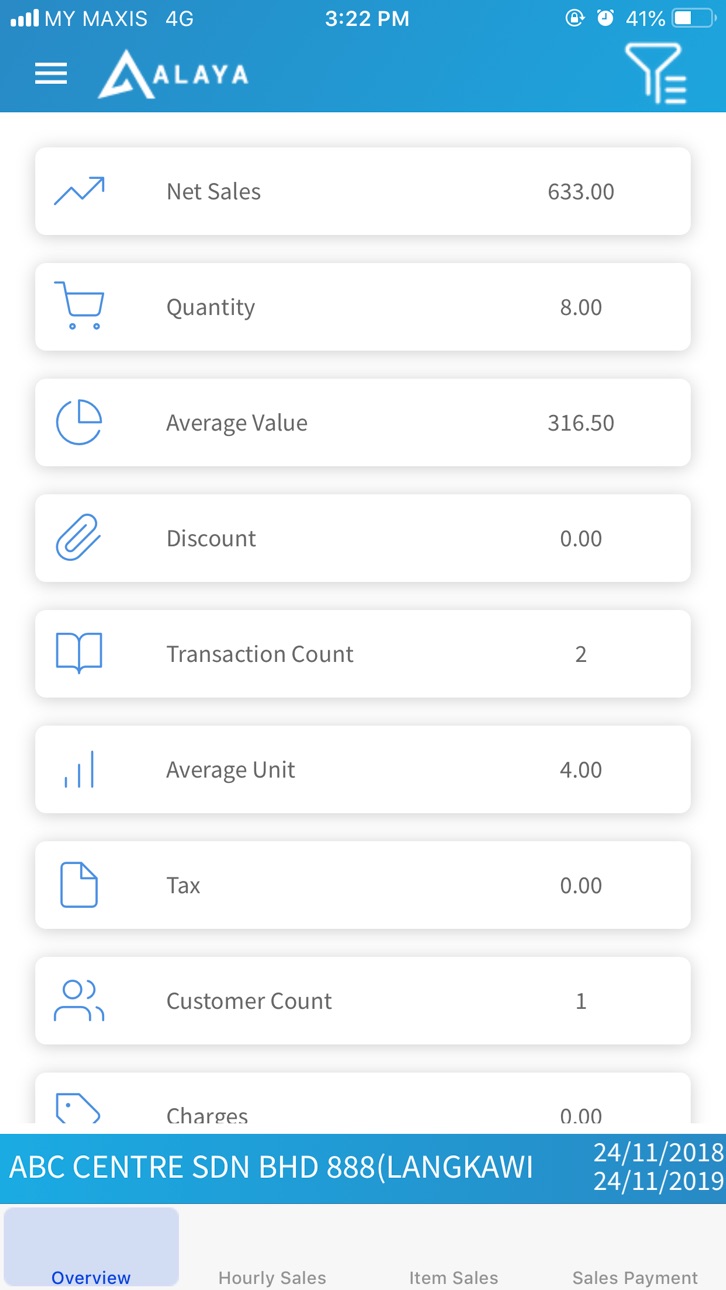
IRS Alaya brings you the convenience to see your business sales in a glance.
Some of the reports that you will be able to access are:
- Overview
- Hourly Sales
- Daily Sales
- Item Sales
- Sales Payment
Accessibility
ipadiphonemacrealityDevicetvoswatch
Version history 18 versions
Build 887030035v2.2.02026-06-16 18:46:13
Fix access right issues on Summary and Sales Details reports
Fix Customer Outstanding report may not generate
Build 879011582v2.1.02025-10-18 00:39:33
Add a new summary report - Sales Profit
Fix donut chart may crash on some reports
Improve overall system stability
Build 878617778v2.0.02025-10-03 20:20:33
Add support to latest devices
Improve overall system stability
Added features:
View image in Item Lookup
Build 866624947v1.5.52024-06-21 12:23:14
Updated icons
Fix large amount value may cause app to crash
Build 852023520v1.5.42022-09-10 15:32:32
Updated icon
Build 847865576v1.5.32022-03-23 13:38:53
1. Fix date picker on iOS 13.2 and above not showing as expected
2. Fix report dashboard showing vertical scroll on iOS 15 and above
Build 847827084v1.5.22022-03-21 13:43:10
- Remove Trans Count in Sales Detail due to data not compatible for sales details
- Enhanced user session control
Build 839702020v1.5.12020-12-17 18:51:44
1. Improved overall app stability
2. Fixed Overview report error when there is no sales transaction but has cancelled transaction
3. Remember last logged in client
4. Restore Item Sales report as new menu (Report > Sales Detail)
Build 838491310v1.5.02020-11-06 17:47:27
1. Enhanced new design for home screen
2. Multi-language for English, Chinese and Bahasa Melayu
3. Alternative option to display sales data by line chart
4. Replace item sales report by sales by branch data
5. Allow user to view their subscription expiry date
6. Limit report filter date range to maximum 366 days
7. Temporarily removed sales report grouping other than Sales By Branch, it will come back soon, we promise!
Build 835544555v1.4.22020-04-15 09:07:32
1. Enhance the design of the application in item lookup screen
2. Change wording in item lookup price and stock balance screen
Build 835453795v1.4.12020-04-13 14:38:14
1. Add new field "Item Count" in overview screen
2. Add a new menu called "ItemLookup" where user can search and view their item price and stock balance
3. Enhance the design in overview screen
4. Breakdown sales into sales or cash sales
5. Change the position of display company or branch details in hourly and daily sales screen from top to bottom
6. Display branch code and name instead of just showing branch code only
Build 835144049v1.4.02020-03-19 16:42:47
1. Change wording "Payment Collection" to "Payment"
2. Add option to group by branch, by company or no group
3. Change wording "Charges" to "Service Charge"
4. Date filter's Quick Selection should only be saved after press OK
5. Setting to hide 0 value data (Report)
6. Disable back button when loading
7. Add "Cancelled Transaction Amount"
8. Add new option "Outgoing Payment"
9. Add new option "Profit"
10. Add user access
Build 834780194v1.3.22020-02-20 08:50:47
1. Add option to show branch and company code in listing
2. Fix status bar missing when changing from landscape mode to portrait
3. Other minor changes
Build 834438911v1.3.12020-01-21 19:02:57
1. Fix average value and average unit calculation on overview screen
2. Rename "Discount" as "Footer Discount" in overview screen
3. Rename "Average Value" as "Trans Average Value" in overview screen
4. Rename "Average Unit" as "Trans Average Qty" in overview screen
5. Rearrange overview screen listing
Build 834398543v1.3.02020-01-18 11:01:23
1. Updated interface for easier navigation.
2. A lot of under the hood fixes for stability.
Build 834197010v1.2.02020-01-02 17:57:04
- New settings for reports output (sorting and max listing)
- Renamed some report tabs title (Item Sales to Sales and Sales Payment to Collection)
- Default Sales grouping to Sales Branch
- Disabled rotation to circumvent app from behaving incorrectly when looking at report charts
- Many under-the-hood improvements to support future features
Build 833846729v1.1.02019-12-05 15:36:11
1. Group Sales Payment report by the Payment Mode
2. Added new grouping for Item Sales report - By Item, By Sales Agent, By Sales Branch
3. Added new analytical report - Daily Sales
Build 833735256v1.02019-11-25 19:07:38
No pricing data captured yet — comparisons appear once the app has paid storefronts or in-app purchases.
Availability 92 of 92 storefronts
| Region | Language | Price | Ratings | Avg | Version |
|---|---|---|---|---|---|
| AG | en-GB | Free | 0 | — | 2.2.0 |
| AI | en-GB | Free | 0 | — | 2.2.0 |
| AO | en-GB | Free | 0 | — | 2.2.0 |
| AR | es-MX | Free | 0 | — | 2.2.0 |
| AT | de-DE | Free | 0 | — | 2.2.0 |
| AU | en-AU | Free | 0 | — | 2.2.0 |
| BB | en-GB | Free | 0 | — | 2.2.0 |
| BE | en-GB | Free | 0 | — | 2.2.0 |
| BF | en-GB | Free | 0 | — | 2.2.0 |
| BJ | en-GB | Free | 0 | — | 2.2.0 |
| BO | es-MX | Free | 0 | — | 2.2.0 |
| BR | pt-BR | Free | 0 | — | 2.2.0 |
| BS | en-GB | Free | 0 | — | 2.2.0 |
| BW | en-GB | Free | 0 | — | 2.2.0 |
| BZ | en-GB | Free | 0 | — | 2.2.0 |
| CA | en-CA | Free | 0 | — | 2.2.0 |
| CD | en-GB | Free | 0 | — | 2.2.0 |
| CG | en-GB | Free | 0 | — | 2.2.0 |
| CH | de-CH | Free | 0 | — | 2.2.0 |
| CI | fr-FR | Free | 0 | — | 2.2.0 |
| CL | es-MX | Free | 0 | — | 2.2.0 |
| CM | fr-FR | Free | 0 | — | 2.2.0 |
| CR | es-MX | Free | 0 | — | 2.2.0 |
| CV | en-GB | Free | 0 | — | 2.2.0 |
| DE | de-DE | Free | 0 | — | 2.2.0 |
| DK | en-GB | Free | 0 | — | 2.2.0 |
| DM | en-GB | Free | 0 | — | 2.2.0 |
| DO | es-MX | Free | 0 | — | 2.2.0 |
| DZ | en-GB | Free | 0 | — | 2.2.0 |
| EC | es-MX | Free | 0 | — | 2.2.0 |
| ES | es-ES | Free | 0 | — | 2.2.0 |
| FI | en-GB | Free | 0 | — | 2.2.0 |
| FR | fr-FR | Free | 0 | — | 2.2.0 |
| GA | fr-FR | Free | 0 | — | 2.2.0 |
| GB | en-GB | Free | 0 | — | 2.2.0 |
| GD | en-GB | Free | 0 | — | 2.2.0 |
| GH | en-GB | Free | 0 | — | 2.2.0 |
| GM | en-GB | Free | 0 | — | 2.2.0 |
| GT | es-MX | Free | 0 | — | 2.2.0 |
| GW | en-GB | Free | 0 | — | 2.2.0 |
| GY | en-GB | Free | 0 | — | 2.2.0 |
| HN | es-MX | Free | 0 | — | 2.2.0 |
| IE | en-GB | Free | 0 | — | 2.2.0 |
| IT | it | Free | 0 | — | 2.2.0 |
| JM | en-GB | Free | 0 | — | 2.2.0 |
| KE | en-GB | Free | 0 | — | 2.2.0 |
| KN | en-GB | Free | 0 | — | 2.2.0 |
| KY | en-GB | Free | 0 | — | 2.2.0 |
| LC | en-GB | Free | 0 | — | 2.2.0 |
| LR | en-GB | Free | 0 | — | 2.2.0 |
| LU | en-GB | Free | 0 | — | 2.2.0 |
| LY | en-GB | Free | 0 | — | 2.2.0 |
| MA | en-GB | Free | 0 | — | 2.2.0 |
| MG | en-GB | Free | 0 | — | 2.2.0 |
| ML | en-GB | Free | 0 | — | 2.2.0 |
| MS | en-GB | Free | 0 | — | 2.2.0 |
| MU | en-GB | Free | 0 | — | 2.2.0 |
| MW | en-GB | Free | 0 | — | 2.2.0 |
| MX | es-MX | Free | 0 | — | 2.2.0 |
| MZ | en-GB | Free | 0 | — | 2.2.0 |
| NA | en-GB | Free | 0 | — | 2.2.0 |
| NE | en-GB | Free | 0 | — | 2.2.0 |
| NG | en-GB | Free | 0 | — | 2.2.0 |
| NI | es-MX | Free | 0 | — | 2.2.0 |
| NL | nl | Free | 0 | — | 2.2.0 |
| NO | en-GB | Free | 0 | — | 2.2.0 |
| NZ | en-AU | Free | 0 | — | 2.2.0 |
| PA | es-MX | Free | 0 | — | 2.2.0 |
| PE | es-MX | Free | 0 | — | 2.2.0 |
| PT | pt-PT | Free | 0 | — | 2.2.0 |
| PY | es-MX | Free | 0 | — | 2.2.0 |
| RW | en-GB | Free | 0 | — | 2.2.0 |
| SC | en-GB | Free | 0 | — | 2.2.0 |
| SE | sv | Free | 0 | — | 2.2.0 |
| SN | en-GB | Free | 0 | — | 2.2.0 |
| SR | en-GB | Free | 0 | — | 2.2.0 |
| ST | en-GB | Free | 0 | — | 2.2.0 |
| SV | es-MX | Free | 0 | — | 2.2.0 |
| SZ | en-GB | Free | 0 | — | 2.2.0 |
| TC | en-GB | Free | 0 | — | 2.2.0 |
| TD | en-GB | Free | 0 | — | 2.2.0 |
| TN | en-GB | Free | 0 | — | 2.2.0 |
| TT | en-GB | Free | 0 | — | 2.2.0 |
| TZ | en-GB | Free | 0 | — | 2.2.0 |
| UG | en-GB | Free | 0 | — | 2.2.0 |
| US | en-US | Free | 0 | — | 2.2.0 |
| UY | en-GB | Free | 0 | — | 2.2.0 |
| VC | en-GB | Free | 0 | — | 2.2.0 |
| VE | es-MX | Free | 0 | — | 2.2.0 |
| VG | en-GB | Free | 0 | — | 2.2.0 |
| ZM | en-GB | Free | 0 | — | 2.2.0 |
| ZW | en-GB | Free | 0 | — | 2.2.0 |
Change log 22 changes · CD
✎
releaseNotes updated
Fix access right issues on Summary and Sales Details reports
Fix Customer Outstanding report may not generate
✎
description updated
IRS Alaya brings you the convenience to see your business sales in a glance.
Some of the reports that you will be able to access are:
- Overview
- Hourly Sales
✎
subtitle updated
Alaya mobile app
✎
name updated
IRS Alaya
◆
Version 2.2.0 released
Fix access right issues on Summary and Sales Details reports
Fix Customer Outstanding report may not generate
◆
Version 2.1.0 released
Add a new summary report - Sales Profit
Fix donut chart may crash on some reports
Improve overall system stability
◆
Version 2.0.0 released
Add support to latest devices
Improve overall system stability
Added features:
View image in Item Lookup
◆
Version 1.5.5 released
Updated icons
Fix large amount value may cause app to crash
◆
Version 1.5.4 released
Updated icon
◆
Version 1.5.3 released
1. Fix date picker on iOS 13.2 and above not showing as expected
2. Fix report dashboard showing vertical scroll on iOS 15 and above
◆
Version 1.5.2 released
- Remove Trans Count in Sales Detail due to data not compatible for sales details
- Enhanced user session control
◆
Version 1.5.1 released
1. Improved overall app stability
2. Fixed Overview report error when there is no sales transaction but has cancelled transaction
3. Remember last logged in client
4. Restore Item Sales report as new menu (Report > Sales Detail)
◆
Version 1.5.0 released
1. Enhanced new design for home screen
2. Multi-language for English, Chinese and Bahasa Melayu
3. Alternative option to display sales data by line chart
4. Replace item sales report by sales by branch data
5. Allow user to view their
◆
Version 1.4.2 released
1. Enhance the design of the application in item lookup screen
2. Change wording in item lookup price and stock balance screen
◆
Version 1.4.1 released
1. Add new field "Item Count" in overview screen
2. Add a new menu called "ItemLookup" where user can search and view their item price and stock balance
3. Enhance the design in overview screen
4. Breakdown sales into sales or cash sales
◆
Version 1.4.0 released
1. Change wording "Payment Collection" to "Payment"
2. Add option to group by branch, by company or no group
3. Change wording "Charges" to "Service Charge"
4. Date filter's Quick Selection should only be saved after press OK
5. Setting to
◆
Version 1.3.2 released
1. Add option to show branch and company code in listing
2. Fix status bar missing when changing from landscape mode to portrait
3. Other minor changes
◆
Version 1.3.1 released
1. Fix average value and average unit calculation on overview screen
2. Rename "Discount" as "Footer Discount" in overview screen
3. Rename "Average Value" as "Trans Average Value" in overview screen
4. Rename "Average Unit" as "Trans Avera
◆
Version 1.3.0 released
1. Updated interface for easier navigation.
2. A lot of under the hood fixes for stability.
◆
Version 1.2.0 released
- New settings for reports output (sorting and max listing)
- Renamed some report tabs title (Item Sales to Sales and Sales Payment to Collection)
- Default Sales grouping to Sales Branch
- Disabled rotation to circumvent app from behaving
◆
Version 1.1.0 released
1. Group Sales Payment report by the Payment Mode
2. Added new grouping for Item Sales report - By Item, By Sales Agent, By Sales Branch
3. Added new analytical report - Daily Sales
◆
Version 1.0 released