Home › Lifestyle

 US
US
1 of 1 storefronts
Content in en-US
Content in en-US
Information
Preview 2 platforms
iPhone 8 images


Apple Watch 1 image

What’s New Version 1.243.0
Fix:
- Fixed an issue where the device’s lock status could become stuck after a failed lock or unlock operation.
More details http://bit.ly/tedee-release-notes
Description
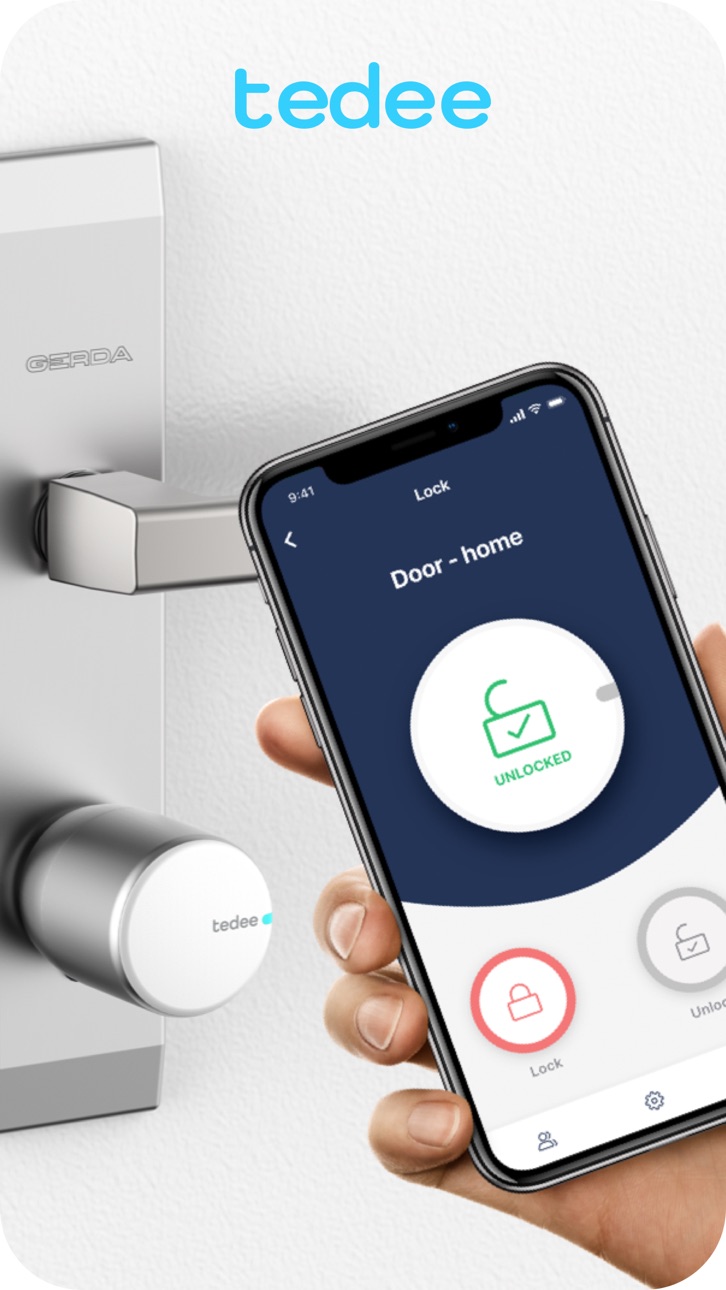
How many times have you wondered: "Did I lock the door?", or tried to take the keys out of your pocket with hands full of shopping bags? With tedee smart lock you can forget about it. The app will lock the door when you leave and can unlock it automatically when you get back home!
tedee is much more than a key:
• unlock and lock your door from anywhere using just your smartphone and tedee bridge
• share access to the lock with your family and friends
• enjoy auto-unlock feature: the door can be unlocked automatically when you come back home
• do not worry about leaving the door unlocked: the app will detect you’re out and lock it for you
• browse the logs anytime on your smartphone
• get notifications in real time when somebody unlocks the door using the app or a standard key
• finally, it looks great!
******************
Why tedee?
Convenience
Control your door with a smartphone... wherever you are. Expecting visitors? Share access or unlock the door remotely. Hands full of shopping bags after a shopping spree? The lock will let you in... hands free!
Efficiency
You don't have to buy and replace the batteries! Thanks to an ultra-low energy consumption and a powerfull rechargeable battery you can operate your lock for months... and you can charge it overnight.
Design
The lock is eye catching. We break up with brick-shaped devices! Enjoy the sleek design that suits your apartment and office. It's small yet powerful.
Strong cryptography
The communication with tedee lock is based on the latest TLS 1.3 protocol with a 256-bit security key. The only people who can access the lock are the ones of your choice.
Events log
The log privides you with detailed information about all events, like charging, locking and unlocking (both manually and using the app).
Auto-locking
tedee lock detects if the mechanical lock was left in a semi-locked position and can finish the turn automatically. You may also want to keep it locked and it will do after a predefined time.
******************
Twitter: https://twitter.com/tedee_smartlock
Questions? Suggestions? We'd love to hear them! Contact us at support@tedee.com or visit www.tedee.com
Accessibility
ipadiphonemacrealityDevicetvoswatch
Version history 25 versions
Build 887298319v1.243.02026-06-24 07:07:53
Fix:
- Fixed an issue where the device’s lock status could become stuck after a failed lock or unlock operation.
More details http://bit.ly/tedee-release-notes
Build 886472400v1.242.12026-06-03 18:54:20
Improve app stability
Build 886380652v1.242.02026-06-02 07:05:18
New:
- Bridge Wi-Fi module firmware can now be updated directly from the app — both during the bridge adding process and from the Bridge settings.
Fix:
- Bluetooth-only mode now activates automatically only during major Remote Control Service outages, reducing unnecessary switches during minor incidents.
- Improved app layout for users with large font sizes enabled in iOS Accessibility settings.
More details http://bit.ly/tedee-release-notes
Build 885540337v1.241.02026-05-13 07:04:55
New:
- Faster app launch after cold start—improvements make opening the app faster after it’s been killed and relaunched.
Fix:
- Improved error handling when adding Tedee GO to Apple Home—errors during commissioning are now handled correctly so users know when to try again.
- Updated PIN code lists for lock owners when using keypad over Bridge—pull to refresh now correctly shows the latest PINs.
More details http://bit.ly/tedee-release-notes
Build 884717752v1.240.02026-04-23 07:05:59
New:
- Manage fingerprints from all accessories paired with the lock in one unified list, directly from the lock access tab.
- Added an informational message during firmware update reminding users not to move the lock, as doing so may cause loss of calibration.
Fix:
- Improved app responsiveness after launch — the device list is now immediately interactive, especially for users with many devices.
More details http://bit.ly/tedee-release-notes
Build 883932818v1.239.02026-04-01 07:25:53
New:
- Added a warning bar and updated instructions for fingerprint enrollment on the Tedee Keypad Pro.
- Implemented haptic feedback for lock and unlock button interactions and status updates.
- Redesigned lock and unlock buttons in the device details view with new colors and animations.
- Added a toggle to enable or disable haptic feedback in the main application settings.
- Remote door sensor status monitoring is now available for administrators via the Tedee Bridge.
Fix:
- Improved performance of the sharing access process for users with very long contact lists.
More details http://bit.ly/tedee-release-notes
Build 883347140v1.238.12026-03-14 16:35:14
Improve app stability
Build 883100487v1.238.02026-03-10 07:39:56
New:
- Owners can now transfer device ownership to another user.
Fix:
- Fixed an issue that could delay sending requests under poor network conditions.
- Fixed an issue where the lock accessory’s last known battery level was not displayed.
- Fixed a rare issue that prevented users from starting Matter commissioning.
- Fixed an issue where a cached battery level could block firmware updates.
- Fixed an issue with handling timeouts during remote lock operations.
More details http://bit.ly/tedee-release-notes
Build 881934834v1.237.02026-02-18 07:15:20
New:
- Added Matter support for the tedee locks GO and GO2 (requires firmware 2.1)
- Added support for configuring multiple Wi‑Fi names for Auto‑unlock Wi‑Fi checks
- Improved visibility of the Privacy Policy pop-up when extra‑large font sizes are enabled
Fix:
- Fixed an issue where the “Scroll to Top” button didn’t work on the My Devices page
- Fixed an issue where the lock status could remail stuck when certain errors occurred during lock operations
- Fixed an issue where Auto‑unlock failed to start after leaving and re-entering the Auto‑unlock zone
More details http://bit.ly/tedee-release-notes
Build 881789870v1.236.02026-01-27 08:13:55
Fix:
- Fixed a rare issue that could block BLE communication.
- Fixed an issue when loading long lists of device activities.
- Fixed an issue where the connected Wi‑Fi name was not shown on the Advanced Auto‑unlock settings page.
- Fixed an issue where the loading view was cut off on the My Devices page.
More details http://bit.ly/tedee-release-notes
Build 880619992v1.235.02026-01-05 07:42:20
New:
- The settings page of a disconnected device has a common design across all device types
Fix:
- Issue where a user was able to pair accessories with a lock when the two devices had different owners
- Issue with incorrect labels for start and end times in the daily hours section on the access details page
- Issue with the incorrect time picker used for daily hours in the access details page
More details http://bit.ly/tedee-release-notes
Build 880232002v1.234.02025-12-02 07:50:35
New:
- Swipe to Unlock: You can now unlock your device with a simple swipe directly from the My Device page.
- Privacy Policy Confirmation: On first launch, you’ll be asked to review and confirm our Privacy Policy for improved security.
- Improved Navigation: The Privacy Policy and Terms of Use now open in your default browser for a smoother experience.
Fix:
- Fixed an issue where the last known battery level was displayed when the lock was disconnected.
- Resolved scrolling problems in long device lists and activity logs.
- Corrected a glitch that caused the red dot for new features to reappear.
More details http://bit.ly/tedee-release-notes
Build 879837578v1.233.02025-11-19 07:45:52
New:
- A red dot appears whenever a new preview feature becomes available for preview testers
- After using a preview feature three times, preview testers will be asked to provide feedback
- A red dot appears when a new feature becomes available in the app
Fix:
- Fixed an issue with widgets, when using clear or tinted icons on iPhone
More details http://bit.ly/tedee-release-notes
Build 879454732v1.232.02025-11-04 07:38:33
New:
- Preview: Possibility to enable or disable "Swipe to unlock" on "My devices" page
Fix:
- Fixed rare case where the lock status might not update properly
More details http://bit.ly/tedee-release-notes
Build 879108378v1.231.02025-10-23 07:12:37
New:
- In Preview: Swipe to unlock the lock or gate from the My Devices page.
Fix:
- Stability improvements for Apple Watch
- Fixed an issue with receiving notifications after switching accounts
More details http://bit.ly/tedee-release-notes
Build 878745136v1.230.02025-10-09 06:25:48
Fix:
- Fixed an issue when switching accounts after signing in to the same account
- Fixed an issue where the locking/unlocking state was displayed for too long when there was an internet connectivity problem
More details http://bit.ly/tedee-release-notes
Build 878332304v1.229.02025-09-23 06:31:59
New:
- Display user groups in the device share list
- Show detailed access information for user groups
- Users with group access can view their own access details
Fix:
- Fixed an issue on some iPhones where enabling the torch caused the camera feed to freeze in the activation code scanner
More details http://bit.ly/tedee-release-notes
Build 877908254v1.228.02025-09-09 06:38:00
- General improvements and optimizations.
More details http://bit.ly/tedee-release-notes
Build 877547744v1.227.02025-08-29 06:26:53
- General improvements and optimizations.
More details http://bit.ly/tedee-release-notes
Build 877166392v1.226.02025-08-13 06:15:36
New:
- Added meaningful information when user attempts to log in with an unsupported Microsoft work account
- Added an option to log out from all user devices
Fix:
- Fixed an issue where the lock state was not updating on the "My devices" page for locks connected via BLE
More details http://bit.ly/tedee-release-notes
Build 876759703v1.225.02025-07-29 07:03:26
New:
- Dropped support for iOS 14 and iOS 15
- Added external power information for Keypad Pro
Fix:
- Fixed the order of available devices that can be paired with the lock or accessories
- Fixed missing device icons in the list of devices paired via the bridge
More details http://bit.ly/tedee-release-notes
Build 876325831v1.224.02025-07-15 17:34:07
New
• You can now update the firmware of Keypad PRO even when it’s powered externally without batteries installed.
Fixed
• Lock activity history now loads correctly while scrolling.
• The charging icon for the lock now consistently appears when connected via Bluetooth.
• “Lock left unlocked” notifications now verify the current state before being sent.
• In Lock Settings, labels now correctly display the path to app settings on iOS 18 and above.
Build 875493321v1.223.02025-07-01 12:36:57
New:
- Redesigned accessory pairing process
- Lock accessories can now be paired directly from the lock settings
- Updated description for the "Lock without PIN" feature on Keypad PRO
Fix:
- Prevented Auto-unlock from starting immediately after turning on the iPhone
More details http://bit.ly/tedee-release-notes
Build 875383683v1.222.02025-06-10 07:05:52
New:
- Incident bar added for BleBox service issues
- New activity log entry for Auto-unlock events
- Profile name now shown in sidebar
Fixes:
- Lock operation reliability improved
- More stable Bluetooth connection with devices
- Lock status now updates correctly after app restart and actions
- Norwegian language now displays properly in settings
Build 875207861v1.221.12025-05-30 22:01:21
New:
- Sharing in Quick Config is now available for all users, not just Preview testers
Fix:
- Fixed issue with refreshing the door sensor state on the lock details page
- Hid the "+User" button for users with guest access
- Fixed issue where the unlock widget configured as local showed an error after the first tap
- Improved camera selection for iPhones with triple lenses in the QR code scanner
No pricing data captured yet — comparisons appear once the app has paid storefronts or in-app purchases.
Availability 1 of 1 storefronts
| Region | Language | Price | Ratings | Avg | Version |
|---|---|---|---|---|---|
| US | en-US | Free | 364 | 4.8 | 1.243.0 |
Change log 29 changes · US
✎
releaseNotes updated
Fix:
- Fixed an issue where the device’s lock status could become stuck after a failed lock or unlock operation.
More details http://bit.ly/tedee-release-notes
✎
description updated
How many times have you wondered: "Did I lock the door?", or tried to take the keys out of your pocket with hands full of shopping bags? With tedee smart lock y
✎
subtitle updated
Smarten up your home
✎
name updated
tedee
◆
Version 1.243.0 released
Fix:
- Fixed an issue where the device’s lock status could become stuck after a failed lock or unlock operation.
More details http://bit.ly/tedee-release-notes
◆
Version 1.242.1 released
Improve app stability
◆
Version 1.242.0 released
New:
- Bridge Wi-Fi module firmware can now be updated directly from the app — both during the bridge adding process and from the Bridge settings.
Fix:
- Bluetooth-only mode now activates automatically only during major Remote Control Serv
◆
Version 1.241.0 released
New:
- Faster app launch after cold start—improvements make opening the app faster after it’s been killed and relaunched.
Fix:
- Improved error handling when adding Tedee GO to Apple Home—errors during commissioning are now handled correct
◆
Version 1.240.0 released
New:
- Manage fingerprints from all accessories paired with the lock in one unified list, directly from the lock access tab.
- Added an informational message during firmware update reminding users not to move the lock, as doing so may cause
◆
Version 1.239.0 released
New:
- Added a warning bar and updated instructions for fingerprint enrollment on the Tedee Keypad Pro.
- Implemented haptic feedback for lock and unlock button interactions and status updates.
- Redesigned lock and unlock buttons in the de
◆
Version 1.238.1 released
Improve app stability
◆
Version 1.238.0 released
New:
- Owners can now transfer device ownership to another user.
Fix:
- Fixed an issue that could delay sending requests under poor network conditions.
- Fixed an issue where the lock accessory’s last known battery level was not displayed.
◆
Version 1.237.0 released
New:
- Added Matter support for the tedee locks GO and GO2 (requires firmware 2.1)
- Added support for configuring multiple Wi‑Fi names for Auto‑unlock Wi‑Fi checks
- Improved visibility of the Privacy Policy pop-up when extra‑large font si
◆
Version 1.236.0 released
Fix:
- Fixed a rare issue that could block BLE communication.
- Fixed an issue when loading long lists of device activities.
- Fixed an issue where the connected Wi‑Fi name was not shown on the Advanced Auto‑unlock settings page.
- Fixed an
◆
Version 1.235.0 released
New:
- The settings page of a disconnected device has a common design across all device types
Fix:
- Issue where a user was able to pair accessories with a lock when the two devices had different owners
- Issue with incorrect labels for st
◆
Version 1.234.0 released
New:
- Swipe to Unlock: You can now unlock your device with a simple swipe directly from the My Device page.
- Privacy Policy Confirmation: On first launch, you’ll be asked to review and confirm our Privacy Policy for improved security.
- I
◆
Version 1.233.0 released
New:
- A red dot appears whenever a new preview feature becomes available for preview testers
- After using a preview feature three times, preview testers will be asked to provide feedback
- A red dot appears when a new feature becomes avai
◆
Version 1.232.0 released
New:
- Preview: Possibility to enable or disable "Swipe to unlock" on "My devices" page
Fix:
- Fixed rare case where the lock status might not update properly
More details http://bit.ly/tedee-release-notes
◆
Version 1.231.0 released
New:
- In Preview: Swipe to unlock the lock or gate from the My Devices page.
Fix:
- Stability improvements for Apple Watch
- Fixed an issue with receiving notifications after switching accounts
More details http://bit.ly/tedee-release-no
◆
Version 1.230.0 released
Fix:
- Fixed an issue when switching accounts after signing in to the same account
- Fixed an issue where the locking/unlocking state was displayed for too long when there was an internet connectivity problem
More details http://bit.ly/ted
◆
Version 1.229.0 released
New:
- Display user groups in the device share list
- Show detailed access information for user groups
- Users with group access can view their own access details
Fix:
- Fixed an issue on some iPhones where enabling the torch caused the ca
◆
Version 1.228.0 released
- General improvements and optimizations.
More details http://bit.ly/tedee-release-notes
◆
Version 1.227.0 released
- General improvements and optimizations.
More details http://bit.ly/tedee-release-notes
◆
Version 1.226.0 released
New:
- Added meaningful information when user attempts to log in with an unsupported Microsoft work account
- Added an option to log out from all user devices
Fix:
- Fixed an issue where the lock state was not updating on the "My devices"
◆
Version 1.225.0 released
New:
- Dropped support for iOS 14 and iOS 15
- Added external power information for Keypad Pro
Fix:
- Fixed the order of available devices that can be paired with the lock or accessories
- Fixed missing device icons in the list of devices
◆
Version 1.224.0 released
New
• You can now update the firmware of Keypad PRO even when it’s powered externally without batteries installed.
Fixed
• Lock activity history now loads correctly while scrolling.
• The charging icon for the lock now consistently appears
◆
Version 1.223.0 released
New:
- Redesigned accessory pairing process
- Lock accessories can now be paired directly from the lock settings
- Updated description for the "Lock without PIN" feature on Keypad PRO
Fix:
- Prevented Auto-unlock from starting immediately
◆
Version 1.222.0 released
New:
- Incident bar added for BleBox service issues
- New activity log entry for Auto-unlock events
- Profile name now shown in sidebar
Fixes:
- Lock operation reliability improved
- More stable Bluetooth connection with devices
- Lock sta
◆
Version 1.221.1 released
New:
- Sharing in Quick Config is now available for all users, not just Preview testers
Fix:
- Fixed issue with refreshing the door sensor state on the lock details page
- Hid the "+User" button for users with guest access
- Fixed issue w