Home › Utilities

 DO
DO
 USen-US
 CAen-CA
 RUru
RUru ITit
ITit UAen-GB
 VNen-GB
 AOen-GB
 BSen-GB
 JMen-GB
 JOen-GB
 LTen-GB
 LUen-GB
 MZen-GB
 OMen-GB
 TTen-GB
 AGen-GB
 BBen-GB
 BHen-GB
 BWen-GB
 BZen-GB
 CGen-GB
 CIfr-FR
 CMfr-FR
 CVen-GB
 DMen-GBDOes-MX
 DZen-GB
 FJen-GB
 FMen-GB
 GDen-GB
 GYen-GB
 HNes-MX
 KNen-GB
 KWen-GB
 LVen-GB
 MLen-GB
 MUen-GB
 MVen-GB
 NAen-GB
 NIes-MX
 PGen-GB
 QAen-GB
 SBen-GB
 SNen-GB
 SRen-GB
 SVes-MX
 TOen-GB
 UGen-GB
 VUen-GB
 ZMen-GB
 ZWen-GB
51 of 51 storefronts
Content in en-US
Content in en-US
Information
Apple ID1475736155
Bundle IDcom.torque.obd
SellerSeller
Min iOS9.0
Min macOS11.0
Device familiesiphone, ipad, ipod
Released2019-08-08
Copyright© Fantastic Software, Inc.
Privacy policyLink ↗
Preview 2 platforms
iPhone 4 images


iPad 4 images



Description
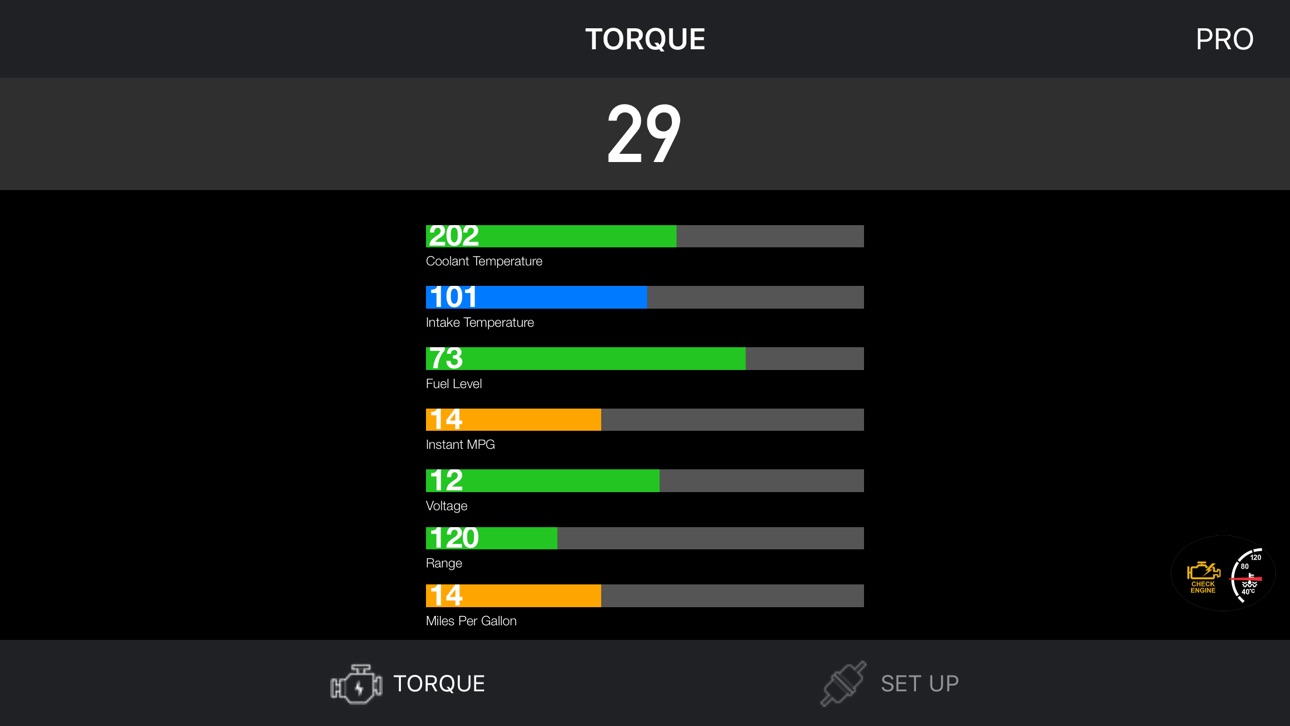
Connect to your car, it will be so easy to communicate with your car and read what's your car doing in real time.
Instructions:
- Locate the OBD 2 port: get to know where the OBD 2 connection port is located. This is usually found somewhere below the drivers’ seat.
- Turn on the car engine: Although the OBDII port is providing power to the scanner, in some cases you will not be able to retrieve any engine data without the engine running.
- Open app: Click "SCAN" to get list OBDII / OBD2 / ELM327 devices list via wifi and select. (Make sure you connect correct device - default is 192.168.0.10 or 192.168.0.123)
Support OBDII protocols: ISO15765-4 (CAN), ISO14230-4 (KWP2000), ISO9141-2, J1850 VPW, J1850 PWM
Accessibility
ipadiphonemacrealityDevicetvoswatch
Version history 1 versions
Build 832289585v1.9.12019-08-07 20:41:21
Price history by region
Currency
Show
Columns
Search
Availability 51 of 51 storefronts
| Region | Language | Price | Ratings | Avg | Version |
|---|---|---|---|---|---|
| US | en-US | USD 9.99 | 87 | 3.0 | 1.9.1 |
| CA | en-CA | CAD 12.99 | 20 | 2.6 | 1.9.1 |
| RU | ru | RUB 899 | 9 | 2.2 | 1.9.1 |
| IT | it | EUR 9.99 | 6 | 2.8 | 1.9.1 |
| UA | en-GB | USD 11.99 | 5 | 3.0 | 1.9.1 |
| VN | en-GB | VND 299000 | 3 | 5.0 | 1.9.1 |
| AO | en-GB | USD 9.99 | 1 | 3.0 | 1.9.1 |
| BS | en-GB | USD 9.99 | 1 | 5.0 | 1.9.1 |
| JM | en-GB | USD 9.99 | 1 | 4.0 | 1.9.1 |
| JO | en-GB | USD 9.99 | 1 | 5.0 | 1.9.1 |
| LT | en-GB | EUR 9.99 | 1 | 5.0 | 1.9.1 |
| LU | en-GB | EUR 9.99 | 1 | 5.0 | 1.9.1 |
| MZ | en-GB | USD 9.99 | 1 | 5.0 | 1.9.1 |
| OM | en-GB | USD 9.99 | 1 | 5.0 | 1.9.1 |
| TT | en-GB | USD 9.99 | 1 | 1.0 | 1.9.1 |
| AG | en-GB | USD 9.99 | 0 | — | 1.9.1 |
| BB | en-GB | USD 11.99 | 0 | — | 1.9.1 |
| BH | en-GB | USD 9.99 | 0 | — | 1.9.1 |
| BW | en-GB | USD 9.99 | 0 | — | 1.9.1 |
| BZ | en-GB | USD 9.99 | 0 | — | 1.9.1 |
| CG | en-GB | USD 9.99 | 0 | — | 1.9.1 |
| CI | fr-FR | USD 11.99 | 0 | — | 1.9.1 |
| CM | fr-FR | USD 11.99 | 0 | — | 1.9.1 |
| CV | en-GB | USD 9.99 | 0 | — | 1.9.1 |
| DM | en-GB | USD 9.99 | 0 | — | 1.9.1 |
| DO | es-MX | USD 9.99 | 0 | — | 1.9.1 |
| DZ | en-GB | USD 9.99 | 0 | — | 1.9.1 |
| FJ | en-GB | USD 9.99 | 0 | — | 1.9.1 |
| FM | en-GB | USD 9.99 | 0 | — | 1.9.1 |
| GD | en-GB | USD 9.99 | 0 | — | 1.9.1 |
| GY | en-GB | USD 9.99 | 0 | — | 1.9.1 |
| HN | es-MX | USD 9.99 | 0 | — | 1.9.1 |
| KN | en-GB | USD 9.99 | 0 | — | 1.9.1 |
| KW | en-GB | USD 9.99 | 0 | — | 1.9.1 |
| LV | en-GB | EUR 9.99 | 0 | — | 1.9.1 |
| ML | en-GB | USD 9.99 | 0 | — | 1.9.1 |
| MU | en-GB | USD 11.99 | 0 | — | 1.9.1 |
| MV | en-GB | USD 9.99 | 0 | — | 1.9.1 |
| NA | en-GB | USD 9.99 | 0 | — | 1.9.1 |
| NI | es-MX | USD 9.99 | 0 | — | 1.9.1 |
| PG | en-GB | USD 9.99 | 0 | — | 1.9.1 |
| QA | en-GB | QAR 39.99 | 0 | — | 1.9.1 |
| SB | en-GB | USD 9.99 | 0 | — | 1.9.1 |
| SN | en-GB | USD 11.99 | 0 | — | 1.9.1 |
| SR | en-GB | USD 9.99 | 0 | — | 1.9.1 |
| SV | es-MX | USD 9.99 | 0 | — | 1.9.1 |
| TO | en-GB | USD 9.99 | 0 | — | 1.9.1 |
| UG | en-GB | USD 11.99 | 0 | — | 1.9.1 |
| VU | en-GB | USD 9.99 | 0 | — | 1.9.1 |
| ZM | en-GB | USD 11.99 | 0 | — | 1.9.1 |
| ZW | en-GB | USD 11.99 | 0 | — | 1.9.1 |
Change log 4 changes · DO
✎
description updated
Connect to your car, it will be so easy to communicate with your car and read what's your car doing in real time.
Instructions:
- Locate the OBD 2 port: get to
✎
subtitle updated
OBD2,OBDII,ELM327 scan tools!
✎
name updated
Torque OBD 2 & Car Pro
◆
Version 1.9.1 released