Home › Utilities

 MS
MS
 USen-US
 JPja
JPja FIen-GB
 BRpt-BR
 DEde-DE
 FRfr-FR
 CAen-CA
 ESes-ES
 GBen-GB
 KRko
KRko ITit
ITit AUen-AU
 CHde-CH
 COes-MX
 MXes-MX
 CRes-MX
 DKen-GB
 NLnl
NLnl ATde-DE
 BEen-GB
 CNzh-Hans-CN
 DOes-MX
 GRen-GB
 HUen-GB
 IDen-GB
 MYen-GB
 NGen-GB
 RUru
RUru SEsv
SEsv SGen-GB
 AEen-GB
 AFen-GB
 AGen-GB
 AIen-GB
 ALen-GB
 AMen-GB
 AOen-GB
 ARes-MX
 AZen-GB
 BAen-GB
 BBen-GB
 BFen-GB
 BGen-GB
 BHen-GB
 BJen-GB
 BMen-GB
 BNen-GB
 BOes-MX
 BSen-GB
 BTen-GB
 BWen-GB
 BYen-GB
 BZen-GB
 CDen-GB
 CGen-GB
 CIfr-FR
 CLes-MX
 CMfr-FR
 CVen-GB
 CYen-GB
 CZen-GB
 DMen-GB
 DZen-GB
 ECes-MX
 EEen-GB
 EGen-GB
 FJen-GB
 FMen-GB
 GAfr-FR
 GDen-GB
 GEen-GB
 GHen-GB
 GMen-GB
 GTes-MX
 GWen-GB
 GYen-GB
 HKzh-Hant-HK
 HNes-MX
 HRen-GB
 IEen-GB
 ILen-GB
 INen-GB
 IQen-GB
 ISen-GB
 JMen-GB
 JOen-GB
 KEen-GB
 KGen-GB
 KHen-GB
 KNen-GB
 KWen-GB
 KYen-GB
 KZen-GB
 LAen-GB
 LBen-GB
 LCen-GB
 LKen-GB
 LRen-GB
 LTen-GB
 LUen-GB
 LVen-GB
 LYen-GB
 MAen-GB
 MDen-GB
 MEen-GB
 MGen-GB
 MKen-GB
 MLen-GB
 MMen-GB
 MNen-GB
 MOzh-Hant-HK
 MRen-GBMSen-GB
 MTen-GB
 MUen-GB
 MVen-GB
 MWen-GB
 MZen-GB
 NAen-GB
 NEen-GB
 NIes-MX
 NOen-GB
 NPen-GB
 NRen-GB
 NZen-AU
 OMen-GB
 PAes-MX
 PEes-MX
 PGen-GB
 PHen-GB
 PKen-GB
 PLen-GB
 PTpt-PT
 PWen-GB
 PYes-MX
 QAen-GB
 ROen-GB
 RSen-GB
 RWen-GB
 SAen-GB
 SBen-GB
 SCen-GB
 SIen-GB
 SKen-GB
 SLen-GB
 SNen-GB
 SRen-GB
 STen-GB
 SVes-MX
 SZen-GB
 TCen-GB
 TDen-GB
 THen-GB
 TJen-GB
 TMen-GB
 TNen-GB
 TOen-GB
 TRen-GB
 TTen-GB
 TWzh-Hant-TW
 TZen-GB
 UAen-GB
 UGen-GB
 UYen-GB
 UZen-GB
 VCen-GB
 VEes-MX
 VGen-GB
 VNen-GB
 VUen-GB
 XKen-GB
 YEen-GB
 ZAen-GB
 ZMen-GB
 ZWen-GB
175 of 175 storefronts
Content in en-US
Content in en-US
Information
Apple ID1466745030
Bundle IDcom.smarternoise.iosapp.pro
SellerSeller
Min iOS12.0
Min macOS11.0
Device familiesiphone, ipod
Released2019-07-27
Copyright© 2019 Agibili
Privacy policyLink ↗
Preview 1 platform
iPhone 9 images




What’s New Version 1.027
Fixed a crash that occurred on some iPhone models when stopping video recording.
Description
SmarterNoise Pro is the most advanced edition of the SmarterNoise recording sound level meters. SmarterNoise Pro edition is developed especially with more advanced measurements in mind, and includes many requested features such as a frequency spectrum display, export of measurement data, A-, C- or no weighting for sound level measurement, and full screen audio mode. SmarterNoise Pro edition does not contain any advertising, and performs accurately and fast.
Features:
• Sound level measurement in video mode
• Sound level measurement in audio mode
• Sound meter snapshot camera
• Record video and audio files (paid function)
• Recording timer
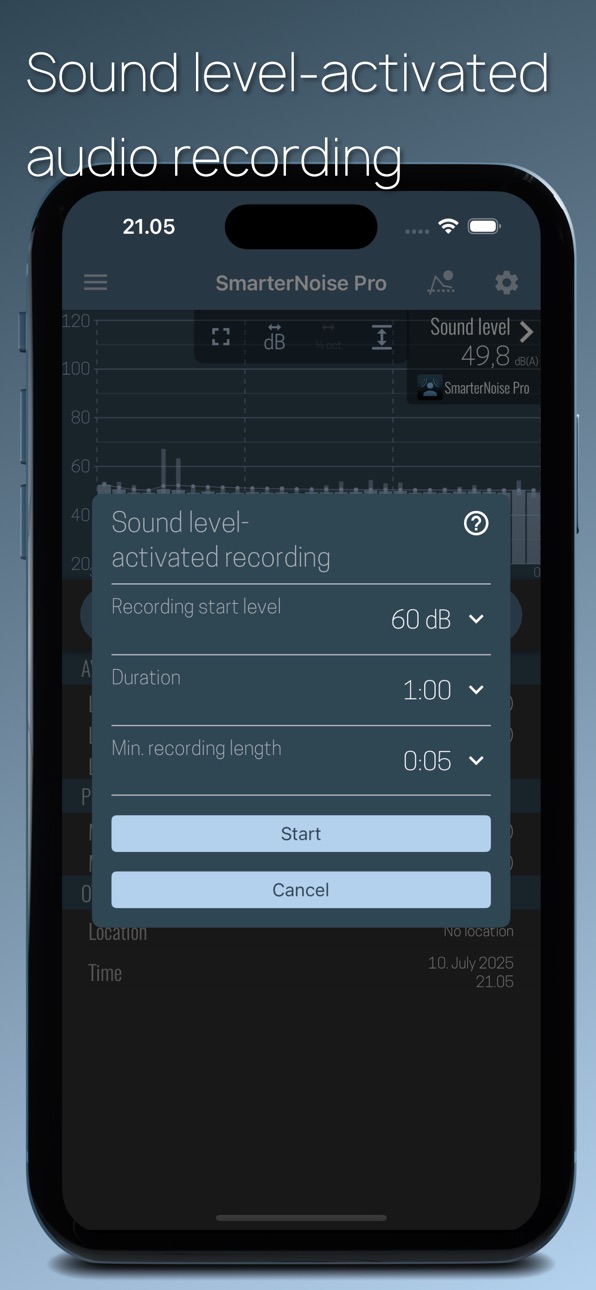
• Sound level activated audio recording
• Frequency spectrum display (paid function)
• Peak frequency detection
• A-, C- or no frequency weighting
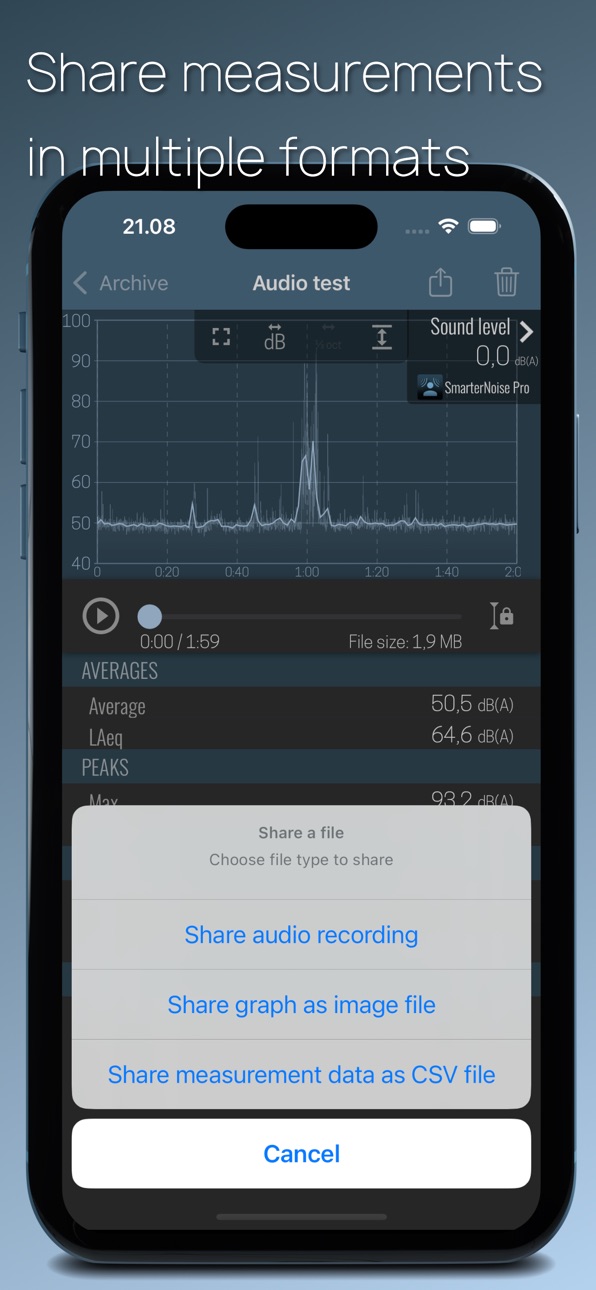
• Export of measurement data in CSV format
• Full HD (paid function), HD and VGA video resolution
• Three video quality settings
• Archive for saved files
• Sharing of saved files
• Calibration
• Save location of measurement (optional)
• Time and date
• Continuous Leq, LAeq, LCeq value
• 10 second sound level average (Leq, LAeq, LCeq)
• 60 second sound level average (Leq, LAeq, LCeq)
• Maximum and minimum decibel level
About decibels and sound level measurement
The unit for measuring sound is called a decibel. Because the decibel scale is logarithmic, a sound with an intensity that is twice that of a reference sound corresponds to an increase of about 3 decibels. The reference point of 0 decibel is set at the intensity of the least perceptible sound, the threshold of hearing. On such a scale a 10-decibel sound is 10 times the intensity of the reference sound. Highlighting this is important as already a few decibels higher or lower makes a noticeable difference in how noise is perceived.
The preferred method to describe sound levels that vary over time, resulting in a single decibel value measuring the total sound energy over the period, is called Leq. It is however common practice to measure sound levels using A-weighting, which attenuates lower and higher frequencies that the average person cannot hear. In this case the value is called LAeq.
A- and C-weighting
The A-weighting is a standard, commonly used filter that attempts to alter the measured sound pressure levels to more closely match the perception of the human ear. A-weighting makes the sound level meter less sensitive to very high (over 8000 Hz) and low frequencies (below 1000 Hz).
C-weighting also attenuates low and high frequencies, but the attenuation of low frequencies is much less severe compared to A-weighting.
Calibrate:
Calibrate the application using the calibration tool found in the settings menu. Phones and their components vary in quality and setup so you need to calibrate the app in order for the results to be relatively comparable. One suggestion is that you close the window and door to your bedroom or bathroom, turn off appliances, and once its very quiet calibrate the app so the reading is about 30 decibel.
In-App Purchases MS pricing
One-Time Purchases
Frequency spectrum indicator—
Video and audio recording—
Camera upgrade—
Spectrogram display—
Capabilities
In-App Purchases
Accessibility
ipadiphonemacrealityDevicetvoswatch
Version history 25 versions
Build 887406504v1.0272026-06-25 05:45:26
Fixed a crash that occurred on some iPhone models when stopping video recording.
Build 886743025v1.0262026-06-15 14:19:15
- On audio recordings, the spectrum display now updates when playback is paused and the playback position is changed.
- The spectrum graph display can now be zoomed by pinching and scrolled by dragging.
- Fixed the seek sliders not working on iOS 26.
- Added Polish translation.
Build 876472521v1.0252025-07-24 01:31:34
- Added Dutch translation.
- Fixed fullscreen mode on iPhone 16 models.
Build 875733395v1.0242025-06-21 07:41:32
- Added a new display type to the live decibel graph: one-second boxes with optional minimum and maximum level display.
- Added a setting for automatically starting measurement, without having to press the 'play'-button.
- Improved synchronization of saved audio and the decibel graph.
Build 868382387v1.0232024-08-21 20:01:19
Fix some crashes related to saved audio measurements.
Build 866712506v1.0222024-06-15 10:17:49
- Improved the handling of devices with no camera.
- Fixed a crash that occasionally happened when stopping or resetting measurement in audio mode.
Build 866283250v1.0212024-05-28 20:27:13
- The decibel graph on saved audio recordings can now be zoomed smoothly by pinching. The decibel graph has also been changed to make it easier to see peaks in sound levels.
- You can now change the video playback position by dragging the video image.
Build 863925847v1.0202024-02-22 16:54:24
- The spectrogram range setting was removed. Instead, zoom the spectrogram by pinching and scroll by dragging. In camera mode, long clicking on the spectrogram enables you to interact with the spectrogram, instead of zooming the camera.
- You can now apply the selected weighting mode to the spectrum analyzer input.
Build 863186424v1.0192024-01-25 23:14:12
- Scrolling of the live decibel curve was made smoother. Smooth scrolling can be disabled from the settings.
- The leq curve on the live decibel graph can now be hidden.
- Added medium speed decibel value update setting.
- Added an option to set the live decibel graph display duration to 15, 30 or 60 seconds.
- Added an icon to new measurements in the archive that haven't been opened yet.
- Fixed a crash that occasionally happened when opening long measurements.
Build 855755475v1.0182023-03-22 20:36:44
Improved the animation of switching to dual view mode.
Build 855459027v1.0172023-03-11 01:03:31
- You can now add text notes to measurements.
- You can now view the decibel graph and spectrum analyzer at the same time in audio mode.
- The recording timer is now started by a long press of the record button.
Build 852986225v1.0162022-10-26 16:12:49
- For audio recordings, added the option to sync the decibel graph view to the playback when zoomed in.
Build 851815889v1.0152022-08-26 18:42:35
-Added sound level activated recording. When in audio mode, tap the icon in the title bar to start.
-Deleting multiple measurements was made more convenient
Build 851344681v1.0142022-08-05 13:45:16
Measurement now continues when the app goes to the background if the background measurement setting is enabled.
Build 848676679v1.0132022-04-28 21:40:44
Fixed low volume playback after automatic save.
Build 848385658v1.0122022-04-16 19:39:45
Added adaptive decibel range setting for the live decibel graph.
Build 847764523v1.0112022-03-17 20:22:24
-Added option to set the opacity of the background of indicators in video mode.
-Added setting to display time in the decibel graph as clock time.
Build 847051972v1.0102022-02-09 21:34:26
- The archive can now be sorted by name, date, average level or length.
- Improved handling of interruptions during recording or playback of audio.
Build 846541987v1.0092022-01-12 09:06:27
The spectrum analyzer can now also be used to analyze saved audio recordings.
Build 845146312v1.0082021-11-06 00:23:36
-Added audio bit rate settings
-The app now starts in the previously used mode
Build 841496008v1.0072021-04-17 17:13:39
You can now set the audio playback position by doing a long press on the decibel chart.
Build 839953807v1.0062021-01-11 15:06:35
Fixed a memory leak and did some performance improvements related to longer recordings.
Build 839297093v1.0052020-11-22 22:47:05
–The measurement save interval can now be selected from three options
–Decibel graph can be shared as an image
–Other smaller improvements and fixes
Build 835308424v1.0042020-03-29 13:16:08
Fixed a layout issue and enabled deleting of individual measurements in the archive screen.
Build 835166613v1.0032020-03-19 19:38:23
Added a spectrogram display. It can display in either horizontal or vertical mode, and the frequency range and color scheme can be selected.
Price history by region
Currency
Show
Columns
Search
Availability 175 of 175 storefronts
| Region | Language | Price | Ratings | Avg | Version |
|---|---|---|---|---|---|
| US | en-US | Free | 30 | 4.3 | 1.027 |
| JP | ja | Free | 20 | 4.0 | 1.027 |
| FI | en-GB | Free | 18 | 4.4 | 1.027 |
| BR | pt-BR | Free | 14 | 3.8 | 1.027 |
| DE | de-DE | Free | 12 | 4.3 | 1.027 |
| FR | fr-FR | Free | 12 | 4.3 | 1.027 |
| CA | en-CA | Free | 10 | 4.2 | 1.027 |
| ES | es-ES | Free | 6 | 5.0 | 1.027 |
| GB | en-GB | Free | 6 | 4.8 | 1.027 |
| KR | ko | Free | 6 | 3.7 | 1.027 |
| IT | it | Free | 5 | 4.4 | 1.027 |
| AU | en-AU | Free | 4 | 4.5 | 1.027 |
| CH | de-CH | Free | 4 | 4.0 | 1.027 |
| CO | es-MX | Free | 3 | 3.7 | 1.027 |
| MX | es-MX | Free | 3 | 5.0 | 1.027 |
| CR | es-MX | Free | 2 | 4.0 | 1.027 |
| DK | en-GB | Free | 2 | 4.0 | 1.027 |
| NL | nl | Free | 2 | 5.0 | 1.027 |
| AT | de-DE | Free | 1 | 4.0 | 1.027 |
| BE | en-GB | Free | 1 | 5.0 | 1.027 |
| CN | zh-Hans-CN | Free | 1 | 5.0 | 1.027 |
| DO | es-MX | Free | 1 | 5.0 | 1.027 |
| GR | en-GB | Free | 1 | 5.0 | 1.027 |
| HU | en-GB | Free | 1 | 4.0 | 1.027 |
| ID | en-GB | Free | 1 | 5.0 | 1.027 |
| MY | en-GB | Free | 1 | 1.0 | 1.027 |
| NG | en-GB | Free | 1 | 5.0 | 1.027 |
| RU | ru | Free | 1 | 5.0 | 1.027 |
| SE | sv | Free | 1 | 3.0 | 1.027 |
| SG | en-GB | Free | 1 | 1.0 | 1.027 |
| AE | en-GB | Free | 0 | — | 1.027 |
| AF | en-GB | Free | 0 | — | 1.027 |
| AG | en-GB | Free | 0 | — | 1.027 |
| AI | en-GB | Free | 0 | — | 1.027 |
| AL | en-GB | Free | 0 | — | 1.027 |
| AM | en-GB | Free | 0 | — | 1.027 |
| AO | en-GB | Free | 0 | — | 1.027 |
| AR | es-MX | Free | 0 | — | 1.027 |
| AZ | en-GB | Free | 0 | — | 1.027 |
| BA | en-GB | Free | 0 | — | 1.027 |
| BB | en-GB | Free | 0 | — | 1.027 |
| BF | en-GB | Free | 0 | — | 1.027 |
| BG | en-GB | Free | 0 | — | 1.027 |
| BH | en-GB | Free | 0 | — | 1.027 |
| BJ | en-GB | Free | 0 | — | 1.027 |
| BM | en-GB | Free | 0 | — | 1.027 |
| BN | en-GB | Free | 0 | — | 1.027 |
| BO | es-MX | Free | 0 | — | 1.027 |
| BS | en-GB | Free | 0 | — | 1.027 |
| BT | en-GB | Free | 0 | — | 1.027 |
| BW | en-GB | Free | 0 | — | 1.027 |
| BY | en-GB | Free | 0 | — | 1.027 |
| BZ | en-GB | Free | 0 | — | 1.027 |
| CD | en-GB | Free | 0 | — | 1.027 |
| CG | en-GB | Free | 0 | — | 1.027 |
| CI | fr-FR | Free | 0 | — | 1.027 |
| CL | es-MX | Free | 0 | — | 1.027 |
| CM | fr-FR | Free | 0 | — | 1.027 |
| CV | en-GB | Free | 0 | — | 1.027 |
| CY | en-GB | Free | 0 | — | 1.027 |
| CZ | en-GB | Free | 0 | — | 1.027 |
| DM | en-GB | Free | 0 | — | 1.027 |
| DZ | en-GB | Free | 0 | — | 1.027 |
| EC | es-MX | Free | 0 | — | 1.027 |
| EE | en-GB | Free | 0 | — | 1.027 |
| EG | en-GB | Free | 0 | — | 1.027 |
| FJ | en-GB | Free | 0 | — | 1.027 |
| FM | en-GB | Free | 0 | — | 1.027 |
| GA | fr-FR | Free | 0 | — | 1.027 |
| GD | en-GB | Free | 0 | — | 1.027 |
| GE | en-GB | Free | 0 | — | 1.027 |
| GH | en-GB | Free | 0 | — | 1.027 |
| GM | en-GB | Free | 0 | — | 1.027 |
| GT | es-MX | Free | 0 | — | 1.027 |
| GW | en-GB | Free | 0 | — | 1.027 |
| GY | en-GB | Free | 0 | — | 1.027 |
| HK | zh-Hant-HK | Free | 0 | — | 1.027 |
| HN | es-MX | Free | 0 | — | 1.027 |
| HR | en-GB | Free | 0 | — | 1.027 |
| IE | en-GB | Free | 0 | — | 1.027 |
| IL | en-GB | Free | 0 | — | 1.027 |
| IN | en-GB | Free | 0 | — | 1.027 |
| IQ | en-GB | Free | 0 | — | 1.027 |
| IS | en-GB | Free | 0 | — | 1.027 |
| JM | en-GB | Free | 0 | — | 1.027 |
| JO | en-GB | Free | 0 | — | 1.027 |
| KE | en-GB | Free | 0 | — | 1.027 |
| KG | en-GB | Free | 0 | — | 1.027 |
| KH | en-GB | Free | 0 | — | 1.027 |
| KN | en-GB | Free | 0 | — | 1.027 |
| KW | en-GB | Free | 0 | — | 1.027 |
| KY | en-GB | Free | 0 | — | 1.027 |
| KZ | en-GB | Free | 0 | — | 1.027 |
| LA | en-GB | Free | 0 | — | 1.027 |
| LB | en-GB | Free | 0 | — | 1.027 |
| LC | en-GB | Free | 0 | — | 1.027 |
| LK | en-GB | Free | 0 | — | 1.027 |
| LR | en-GB | Free | 0 | — | 1.027 |
| LT | en-GB | Free | 0 | — | 1.027 |
| LU | en-GB | Free | 0 | — | 1.027 |
| LV | en-GB | Free | 0 | — | 1.027 |
| LY | en-GB | Free | 0 | — | 1.027 |
| MA | en-GB | Free | 0 | — | 1.027 |
| MD | en-GB | Free | 0 | — | 1.027 |
| ME | en-GB | Free | 0 | — | 1.027 |
| MG | en-GB | Free | 0 | — | 1.027 |
| MK | en-GB | Free | 0 | — | 1.027 |
| ML | en-GB | Free | 0 | — | 1.027 |
| MM | en-GB | Free | 0 | — | 1.027 |
| MN | en-GB | Free | 0 | — | 1.027 |
| MO | zh-Hant-HK | Free | 0 | — | 1.027 |
| MR | en-GB | Free | 0 | — | 1.027 |
| MS | en-GB | Free | 0 | — | 1.027 |
| MT | en-GB | Free | 0 | — | 1.027 |
| MU | en-GB | Free | 0 | — | 1.027 |
| MV | en-GB | Free | 0 | — | 1.027 |
| MW | en-GB | Free | 0 | — | 1.027 |
| MZ | en-GB | Free | 0 | — | 1.027 |
| NA | en-GB | Free | 0 | — | 1.027 |
| NE | en-GB | Free | 0 | — | 1.027 |
| NI | es-MX | Free | 0 | — | 1.027 |
| NO | en-GB | Free | 0 | — | 1.027 |
| NP | en-GB | Free | 0 | — | 1.027 |
| NR | en-GB | Free | 0 | — | 1.027 |
| NZ | en-AU | Free | 0 | — | 1.027 |
| OM | en-GB | Free | 0 | — | 1.027 |
| PA | es-MX | Free | 0 | — | 1.027 |
| PE | es-MX | Free | 0 | — | 1.027 |
| PG | en-GB | Free | 0 | — | 1.027 |
| PH | en-GB | Free | 0 | — | 1.027 |
| PK | en-GB | Free | 0 | — | 1.027 |
| PL | en-GB | Free | 0 | — | 1.027 |
| PT | pt-PT | Free | 0 | — | 1.027 |
| PW | en-GB | Free | 0 | — | 1.027 |
| PY | es-MX | Free | 0 | — | 1.027 |
| QA | en-GB | Free | 0 | — | 1.027 |
| RO | en-GB | Free | 0 | — | 1.027 |
| RS | en-GB | Free | 0 | — | 1.027 |
| RW | en-GB | Free | 0 | — | 1.027 |
| SA | en-GB | Free | 0 | — | 1.027 |
| SB | en-GB | Free | 0 | — | 1.027 |
| SC | en-GB | Free | 0 | — | 1.027 |
| SI | en-GB | Free | 0 | — | 1.027 |
| SK | en-GB | Free | 0 | — | 1.027 |
| SL | en-GB | Free | 0 | — | 1.027 |
| SN | en-GB | Free | 0 | — | 1.027 |
| SR | en-GB | Free | 0 | — | 1.027 |
| ST | en-GB | Free | 0 | — | 1.027 |
| SV | es-MX | Free | 0 | — | 1.027 |
| SZ | en-GB | Free | 0 | — | 1.027 |
| TC | en-GB | Free | 0 | — | 1.027 |
| TD | en-GB | Free | 0 | — | 1.027 |
| TH | en-GB | Free | 0 | — | 1.027 |
| TJ | en-GB | Free | 0 | — | 1.027 |
| TM | en-GB | Free | 0 | — | 1.027 |
| TN | en-GB | Free | 0 | — | 1.027 |
| TO | en-GB | Free | 0 | — | 1.027 |
| TR | en-GB | Free | 0 | — | 1.027 |
| TT | en-GB | Free | 0 | — | 1.027 |
| TW | zh-Hant-TW | Free | 0 | — | 1.027 |
| TZ | en-GB | Free | 0 | — | 1.027 |
| UA | en-GB | Free | 0 | — | 1.027 |
| UG | en-GB | Free | 0 | — | 1.027 |
| UY | en-GB | Free | 0 | — | 1.027 |
| UZ | en-GB | Free | 0 | — | 1.027 |
| VC | en-GB | Free | 0 | — | 1.027 |
| VE | es-MX | Free | 0 | — | 1.027 |
| VG | en-GB | Free | 0 | — | 1.027 |
| VN | en-GB | Free | 0 | — | 1.027 |
| VU | en-GB | Free | 0 | — | 1.027 |
| XK | en-GB | Free | 0 | — | 1.027 |
| YE | en-GB | Free | 0 | — | 1.027 |
| ZA | en-GB | Free | 0 | — | 1.027 |
| ZM | en-GB | Free | 0 | — | 1.027 |
| ZW | en-GB | Free | 0 | — | 1.027 |
Change log 29 changes · MS
✎
releaseNotes updated
Fixed a crash that occurred on some iPhone models when stopping video recording.
✎
description updated
SmarterNoise Pro is the most advanced edition of the SmarterNoise recording sound level meters. SmarterNoise Pro edition is developed especially with more advan
✎
subtitle updated
Video recording sound analyzer
✎
name updated
SmarterNoise Pro
◆
Version 1.027 released
Fixed a crash that occurred on some iPhone models when stopping video recording.
◆
Version 1.026 released
- On audio recordings, the spectrum display now updates when playback is paused and the playback position is changed.
- The spectrum graph display can now be zoomed by pinching and scrolled by dragging.
- Fixed the seek sliders not working
◆
Version 1.025 released
- Added Dutch translation.
- Fixed fullscreen mode on iPhone 16 models.
◆
Version 1.024 released
- Added a new display type to the live decibel graph: one-second boxes with optional minimum and maximum level display.
- Added a setting for automatically starting measurement, without having to press the 'play'-button.
- Improved synchron
◆
Version 1.023 released
Fix some crashes related to saved audio measurements.
◆
Version 1.022 released
- Improved the handling of devices with no camera.
- Fixed a crash that occasionally happened when stopping or resetting measurement in audio mode.
◆
Version 1.021 released
- The decibel graph on saved audio recordings can now be zoomed smoothly by pinching. The decibel graph has also been changed to make it easier to see peaks in sound levels.
- You can now change the video playback position by dragging the v
◆
Version 1.020 released
- The spectrogram range setting was removed. Instead, zoom the spectrogram by pinching and scroll by dragging. In camera mode, long clicking on the spectrogram enables you to interact with the spectrogram, instead of zooming the camera.
- Y
◆
Version 1.019 released
- Scrolling of the live decibel curve was made smoother. Smooth scrolling can be disabled from the settings.
- The leq curve on the live decibel graph can now be hidden.
- Added medium speed decibel value update setting.
- Added an option t
◆
Version 1.018 released
Improved the animation of switching to dual view mode.
◆
Version 1.017 released
- You can now add text notes to measurements.
- You can now view the decibel graph and spectrum analyzer at the same time in audio mode.
- The recording timer is now started by a long press of the record button.
◆
Version 1.016 released
- For audio recordings, added the option to sync the decibel graph view to the playback when zoomed in.
◆
Version 1.015 released
-Added sound level activated recording. When in audio mode, tap the icon in the title bar to start.
-Deleting multiple measurements was made more convenient
◆
Version 1.014 released
Measurement now continues when the app goes to the background if the background measurement setting is enabled.
◆
Version 1.013 released
Fixed low volume playback after automatic save.
◆
Version 1.012 released
Added adaptive decibel range setting for the live decibel graph.
◆
Version 1.011 released
-Added option to set the opacity of the background of indicators in video mode.
-Added setting to display time in the decibel graph as clock time.
◆
Version 1.010 released
- The archive can now be sorted by name, date, average level or length.
- Improved handling of interruptions during recording or playback of audio.
◆
Version 1.009 released
The spectrum analyzer can now also be used to analyze saved audio recordings.
◆
Version 1.008 released
-Added audio bit rate settings
-The app now starts in the previously used mode
◆
Version 1.007 released
You can now set the audio playback position by doing a long press on the decibel chart.
◆
Version 1.006 released
Fixed a memory leak and did some performance improvements related to longer recordings.
◆
Version 1.005 released
–The measurement save interval can now be selected from three options
–Decibel graph can be shared as an image
–Other smaller improvements and fixes
◆
Version 1.004 released
Fixed a layout issue and enabled deleting of individual measurements in the archive screen.
◆
Version 1.003 released
Added a spectrogram display. It can display in either horizontal or vertical mode, and the frequency range and color scheme can be selected.