Home › Productivity

 ZM
ZM
 USen-US
 BRpt-BR
 COes-MX
 MXes-MX
 CLes-MX
 ARes-MX
 UYen-GB
 DOes-MX
 ECes-MX
 CRes-MX
 PEes-MX
 GTes-MX
 PAes-MX
 GHen-GB
 LCen-GB
 NGen-GB
 SVes-MX
 AGen-GB
 AIen-GB
 AOen-GB
 BBen-GB
 BFen-GB
 BJen-GB
 BOes-MX
 BSen-GB
 BWen-GB
 BZen-GB
 CDen-GB
 CGen-GB
 CIfr-FR
 CMfr-FR
 CVen-GB
 DMen-GB
 DZen-GB
 GAfr-FR
 GDen-GB
 GMen-GB
 GWen-GB
 GYen-GB
 HNes-MX
 JMen-GB
 KEen-GB
 KNen-GB
 KYen-GB
 LRen-GB
 LYen-GB
 MAen-GB
 MGen-GB
 MLen-GB
 MSen-GB
 MUen-GB
 MWen-GB
 MZen-GB
 NAen-GB
 NEen-GB
 NIes-MX
 PYes-MX
 RWen-GB
 SCen-GB
 SLen-GB
 SNen-GB
 SRen-GB
 STen-GB
 SZen-GB
 TCen-GB
 TDen-GB
 TNen-GB
 TTen-GB
 TZen-GB
 UGen-GB
 VEes-MX
 VGen-GBZMen-GB
 ZWen-GB
74 of 74 storefronts
Content in en-US
Content in en-US
Information
Preview 2 platforms
iPhone 4 images


iPad 4 images


What’s New Version 2.1.0
In this major update we’re introducing Describe Image. A state-of-the-art vision-language model is bundled in the app, so it can describe the key features of any image and answer your questions about it. Just tap Describe Image (or use an accessibility magic-tap on the live image).
Because the model runs entirely on your device, it works offline—even without an Internet connection. Plus, your images stay private.
Requirements: iPhone 12 Pro (or newer) running iOS 17 or later.
We’d love your feedback: info@vdscan.app
Description
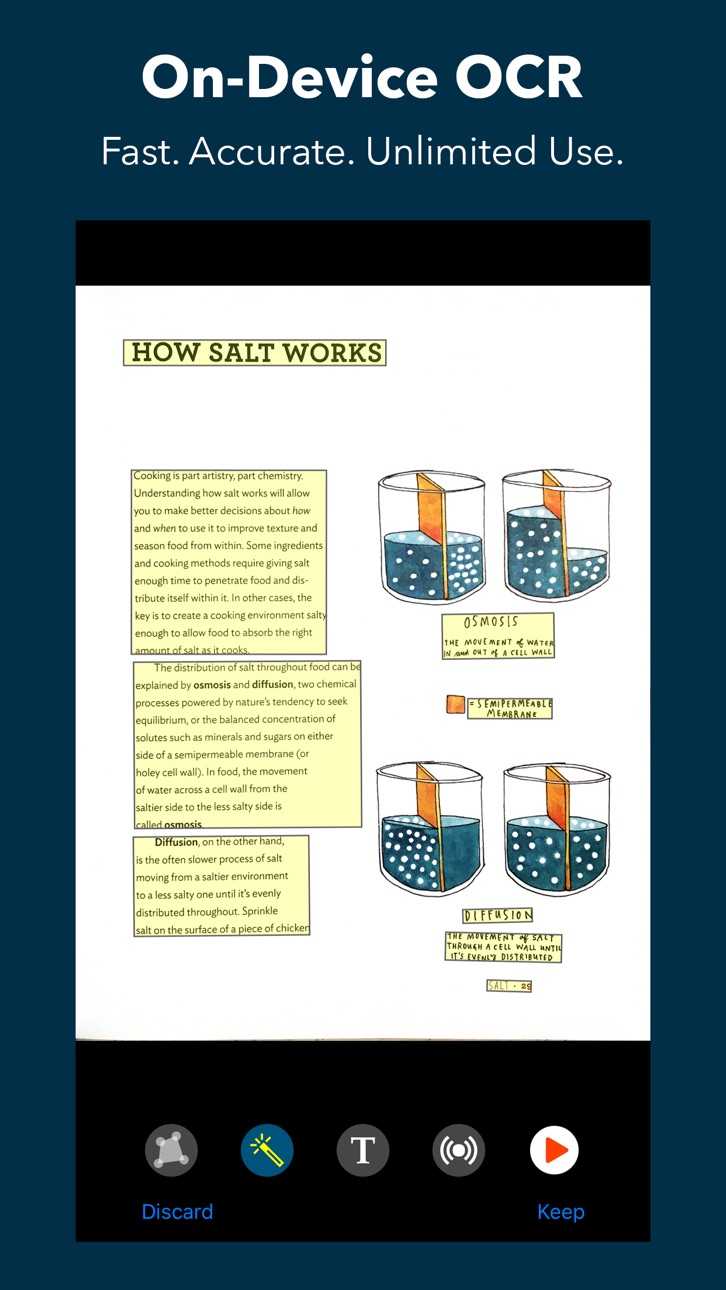
Scan paper documents, labels, signs with the camera and recognize text. Listen using built-in text-to-speech. Save and export. Unlimited use: no subscriptions or additional charges.
State-of-the-art A.I. for OCR and text recognition: Fast and accurate, even in poor lighting conditions. Works entirely on device: No need for internet and your data stays private.
Recognizes text in the following languages: Catalan, Chinese, Croatian, Czech, Danish, Dutch, English, Finnish, French, German, Hindi, Hungarian, Italian, Japanese, Korean, Norwegian, Polish, Portuguese, Romanian, Spanish, Swedish, and Turkish.
ScanTone, a sound that represents the amount of recognizable text in the camera's field of view in real time. It uses artificial intelligence to analyze the live feed from the camera for text, angle, rotation, and document edges.
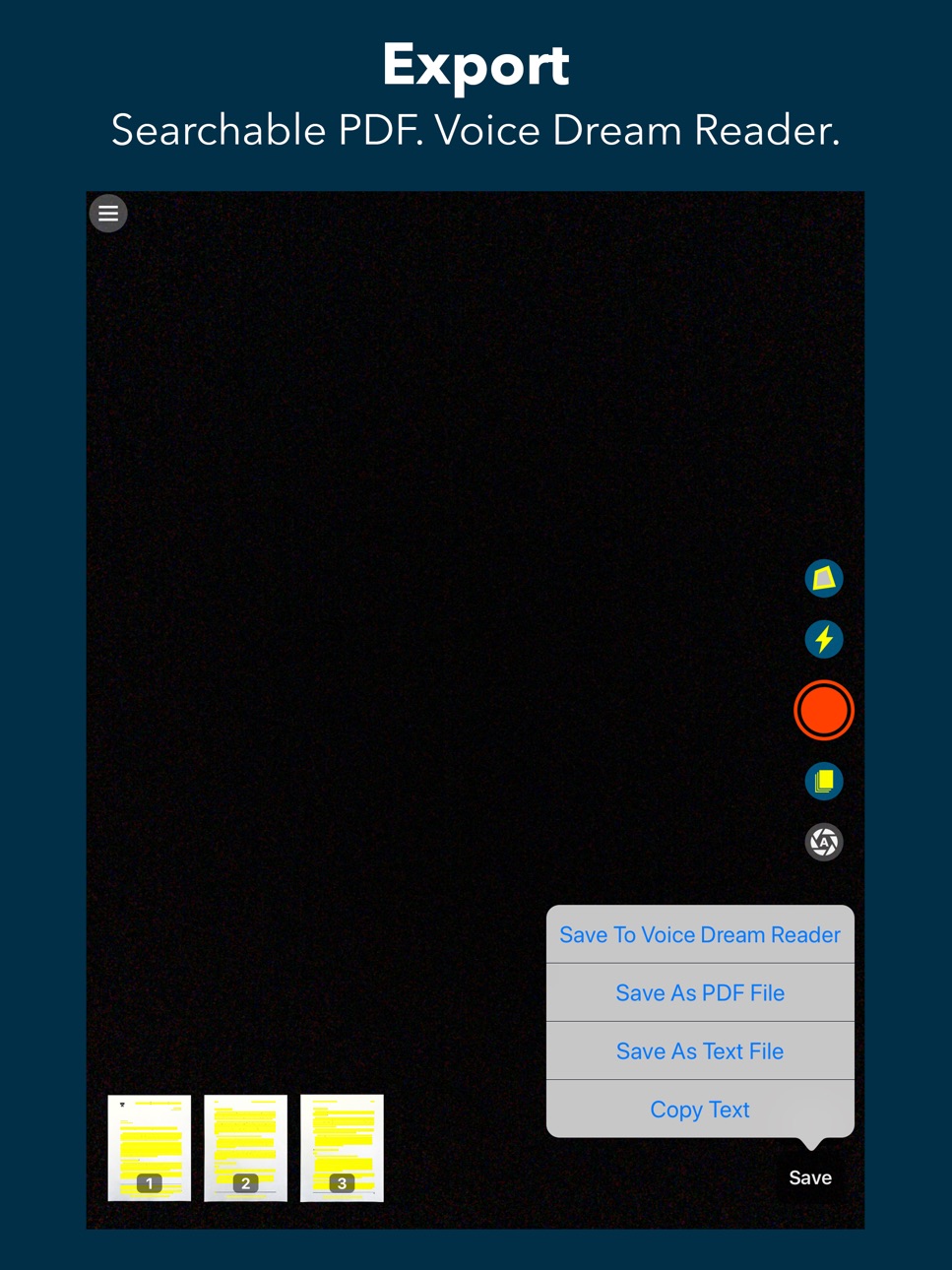
Exports scans as plain text or accessible PDF with embedded text.
Detailed Feature List
Scanning
- ScanTone
- Live edges/crop detection
- Flashlight
- Batch mode for scanning multiple pages quickly
- Intelligent auto capture
Image
- Automatic edge detection for stretching and cropping
- Manually cropping
- Automatic orientation detection and rotation
- Manual image rotation
- Automatic image enhancement
OCR
- Fast: about a second on the latest iPhone
- Offline: does not require Internet connection
- Private: image and text stay on device
- Automatic language detection
- Option to see image or recognized text
Text To Speech
- Choose from 61 voices
- Premium voices in Voice Dream Reader available
- Change speech rate
- Option to start reading as soon as OCR is complete
- Spoken word is highlighted in the text or the image
- Rewind and fast forward by text section (VoiceOver users only)
- Double tap on text to start reading from there
Import and Export
- Load from Photo Library
- Share extension for sending images to Scanner from another app
- Export plain text
- Export PDF with text layer under the image so that it's accessible, searchable and selectable
- Export to Voice Dream Reader
Accessibility
ipadiphonemacrealityDevicetvoswatch
Version history 25 versions
Build 876557196v2.1.02025-07-22 18:42:57
In this major update we’re introducing Describe Image. A state-of-the-art vision-language model is bundled in the app, so it can describe the key features of any image and answer your questions about it. Just tap Describe Image (or use an accessibility magic-tap on the live image).
Because the model runs entirely on your device, it works offline—even without an Internet connection. Plus, your images stay private.
Requirements: iPhone 12 Pro (or newer) running iOS 17 or later.
We’d love your feedback: info@vdscan.app
Build 862333027v2.0.42023-12-20 02:39:32
- Fixed crash upon launch in iOS 17.2 for some users.
Build 860151152v2.0.32023-09-23 23:07:07
- Fixed crash upon launch in iOS 17 for some users.
Build 860131703v2.0.22023-09-22 22:25:34
- Updated for iOS 17.
Build 856350465v2.0.02023-06-20 15:36:29
- Changed app name to VDScan.
Build 857965758v2.0.12023-06-20 18:09:35
- Changed app name to VDScan.
Build 855326684v1.5.12023-03-04 02:41:47
- Improved edge detection.
Build 855016622v1.5.02023-02-18 01:35:39
- Improved VoiceOver user interface when playing back recognized text.
- Some VoiceOver users might want to enable "Show Plain Text After Recognizing" in settings, and VoiceOver will read the text.
Build 852466121v1.4.102022-09-27 17:16:47
- Fix problem with Ivona voices.
Build 852448996v1.4.92022-09-27 04:09:29
- Fixed bug of camera sometimes not starting.
Build 852357527v1.4.82022-09-23 14:04:40
- Added feature to export a single image as image or text.
- Bug fixes and minor enhancements.
Build 852117215v1.4.72022-09-09 22:23:31
- Updated for iOS 16.
Build 851551673v1.4.62022-08-14 13:04:15
Bug fixes and minor enhancements.
Build 851549332v1.4.52022-08-13 23:27:06
Bug fixes and minor enhancements.
Build 849133208v1.4.42022-05-16 08:55:30
- Added Japanese, Korean and Hindi text recognition.
Build 849008464v1.4.32022-05-13 19:56:55
- Added Japanese, Korean and Hindi text recognition.
Build 846011998v1.4.22021-12-17 18:46:44
This update fixes the issue of language auto-detect not working for some languages.
Voice Dream can now recognize multi-column documents and order the text correctly. Also, Chinese is now supported for the built-in OCR Scanner. To recognize Chinese, set it explicitly in settings rather than using “Auto-Detect”.
Build 845858681v1.4.12021-12-13 18:51:48
This update fixes the issue of having wrong video orientation on iPads.
If you started to experience crashes after updating to iOS 15, please disable "Always Enhance Images" in Scanner's settings.
Voice Dream can now recognize multi-column documents and order the text correctly. Also, Chinese is now supported for the built-in OCR Scanner. To recognize Chinese, set it explicitly in settings rather than using “Auto-Detect”.
Build 840111153v1.4.02021-12-05 14:22:36
- Voice Dream can now recognize multi-column documents and order the text correctly. Also, Chinese is now supported for the built-in OCR Scanner. To recognize Chinese, set it explicitly in settings rather than using “Auto-Detect”.
- Minor enhancements and bug fixes.
Build 839945554v1.3.72021-01-07 21:53:35
- The preview video is now correctly sized when using iPhone X or later.
Build 839693919v1.3.62021-01-06 19:42:07
- Able to scan more pages in batch mode on older devices.
- VoiceOver users can no longer use Preview to capture a page.
Build 837962774v1.3.52020-09-28 18:25:04
- Updated for iOS 14.
- Minor bug fixes.
Build 834975589v1.3.42020-03-05 18:54:11
- Handling audio interruptions.
- Support for VoiceOver two-finger double-tap to pause or resume reading.
- Support for Bluetooth and lock screen audio controls.
- Sharing from Message no longer results in duplicate images.
- Stability improvements.
Build 833634053v1.3.32019-11-18 14:22:08
- Added ability to send image to Scanner from some apps, such as Mail.
- Minor performance and stability improvements.
Build 833419655v1.3.22019-10-31 22:10:55
- Minor bug fixes.
Price history by region
Currency
Show
Columns
Search
Availability 74 of 74 storefronts
| Region | Language | Price | Ratings | Avg | Version |
|---|---|---|---|---|---|
| US | en-US | USD 14.99 | 570 | 4.5 | 2.1.0 |
| BR | pt-BR | BRL 99.9 | 28 | 4.4 | 2.1.0 |
| CO | es-MX | COP 69900 | 13 | 4.2 | 2.1.0 |
| MX | es-MX | MXN 299 | 13 | 4.3 | 2.1.0 |
| CL | es-MX | CLP 17990 | 12 | 4.8 | 2.1.0 |
| AR | es-MX | USD 14.99 | 9 | 5.0 | 2.1.0 |
| UY | en-GB | USD 14.99 | 8 | 4.3 | 2.1.0 |
| DO | es-MX | USD 14.99 | 6 | 4.3 | 2.1.0 |
| EC | es-MX | USD 14.99 | 6 | 4.2 | 2.1.0 |
| CR | es-MX | USD 14.99 | 5 | 4.4 | 2.1.0 |
| PE | es-MX | PEN 69.9 | 3 | 4.3 | 2.1.0 |
| GT | es-MX | USD 14.99 | 2 | 4.0 | 2.1.0 |
| PA | es-MX | USD 14.99 | 2 | 4.0 | 2.1.0 |
| GH | en-GB | USD 17.99 | 1 | 5.0 | 2.1.0 |
| LC | en-GB | USD 14.99 | 1 | 4.0 | 2.1.0 |
| NG | en-GB | NGN 24900 | 1 | 5.0 | 2.1.0 |
| SV | es-MX | USD 14.99 | 1 | 4.0 | 2.1.0 |
| AG | en-GB | USD 14.99 | 0 | — | 2.1.0 |
| AI | en-GB | USD 14.99 | 0 | — | 2.1.0 |
| AO | en-GB | USD 14.99 | 0 | — | 2.1.0 |
| BB | en-GB | USD 17.99 | 0 | — | 2.1.0 |
| BF | en-GB | USD 14.99 | 0 | — | 2.1.0 |
| BJ | en-GB | USD 17.99 | 0 | — | 2.1.0 |
| BO | es-MX | USD 14.99 | 0 | — | 2.1.0 |
| BS | en-GB | USD 14.99 | 0 | — | 2.1.0 |
| BW | en-GB | USD 14.99 | 0 | — | 2.1.0 |
| BZ | en-GB | USD 14.99 | 0 | — | 2.1.0 |
| CD | en-GB | USD 14.99 | 0 | — | 2.1.0 |
| CG | en-GB | USD 14.99 | 0 | — | 2.1.0 |
| CI | fr-FR | USD 17.99 | 0 | — | 2.1.0 |
| CM | fr-FR | USD 17.99 | 0 | — | 2.1.0 |
| CV | en-GB | USD 14.99 | 0 | — | 2.1.0 |
| DM | en-GB | USD 14.99 | 0 | — | 2.1.0 |
| DZ | en-GB | USD 14.99 | 0 | — | 2.1.0 |
| GA | fr-FR | USD 14.99 | 0 | — | 2.1.0 |
| GD | en-GB | USD 14.99 | 0 | — | 2.1.0 |
| GM | en-GB | USD 14.99 | 0 | — | 2.1.0 |
| GW | en-GB | USD 14.99 | 0 | — | 2.1.0 |
| GY | en-GB | USD 14.99 | 0 | — | 2.1.0 |
| HN | es-MX | USD 14.99 | 0 | — | 2.1.0 |
| JM | en-GB | USD 14.99 | 0 | — | 2.1.0 |
| KE | en-GB | USD 17.99 | 0 | — | 2.1.0 |
| KN | en-GB | USD 14.99 | 0 | — | 2.1.0 |
| KY | en-GB | USD 14.99 | 0 | — | 2.1.0 |
| LR | en-GB | USD 14.99 | 0 | — | 2.1.0 |
| LY | en-GB | USD 14.99 | 0 | — | 2.1.0 |
| MA | en-GB | USD 14.99 | 0 | — | 2.1.0 |
| MG | en-GB | USD 14.99 | 0 | — | 2.1.0 |
| ML | en-GB | USD 14.99 | 0 | — | 2.1.0 |
| MS | en-GB | USD 14.99 | 0 | — | 2.1.0 |
| MU | en-GB | USD 17.99 | 0 | — | 2.1.0 |
| MW | en-GB | USD 14.99 | 0 | — | 2.1.0 |
| MZ | en-GB | USD 14.99 | 0 | — | 2.1.0 |
| NA | en-GB | USD 14.99 | 0 | — | 2.1.0 |
| NE | en-GB | USD 14.99 | 0 | — | 2.1.0 |
| NI | es-MX | USD 14.99 | 0 | — | 2.1.0 |
| PY | es-MX | USD 14.99 | 0 | — | 2.1.0 |
| RW | en-GB | USD 14.99 | 0 | — | 2.1.0 |
| SC | en-GB | USD 14.99 | 0 | — | 2.1.0 |
| SL | en-GB | USD 14.99 | 0 | — | 2.1.0 |
| SN | en-GB | USD 17.99 | 0 | — | 2.1.0 |
| SR | en-GB | USD 14.99 | 0 | — | 2.1.0 |
| ST | en-GB | USD 14.99 | 0 | — | 2.1.0 |
| SZ | en-GB | USD 14.99 | 0 | — | 2.1.0 |
| TC | en-GB | USD 14.99 | 0 | — | 2.1.0 |
| TD | en-GB | USD 14.99 | 0 | — | 2.1.0 |
| TN | en-GB | USD 14.99 | 0 | — | 2.1.0 |
| TT | en-GB | USD 14.99 | 0 | — | 2.1.0 |
| TZ | en-GB | TZS 39900 | 0 | — | 2.1.0 |
| UG | en-GB | USD 17.99 | 0 | — | 2.1.0 |
| VE | es-MX | USD 14.99 | 0 | — | 2.1.0 |
| VG | en-GB | USD 14.99 | 0 | — | 2.1.0 |
| ZM | en-GB | USD 17.99 | 0 | — | 2.1.0 |
| ZW | en-GB | USD 17.99 | 0 | — | 2.1.0 |
Change log 29 changes · ZM
✎
releaseNotes updated
In this major update we’re introducing Describe Image. A state-of-the-art vision-language model is bundled in the app, so it can describe the key features of an
✎
description updated
Scan paper documents, labels, signs with the camera and recognize text. Listen using built-in text-to-speech. Save and export. Unlimited use: no subscriptions o
✎
subtitle updated
OCR & Text To Speech
✎
name updated
VDScan
◆
Version 2.1.0 released
In this major update we’re introducing Describe Image. A state-of-the-art vision-language model is bundled in the app, so it can describe the key features of any image and answer your questions about it. Just tap Describe Image (or use an a
◆
Version 2.0.4 released
- Fixed crash upon launch in iOS 17.2 for some users.
◆
Version 2.0.3 released
- Fixed crash upon launch in iOS 17 for some users.
◆
Version 2.0.2 released
- Updated for iOS 17.
◆
Version 2.0.1 released
- Changed app name to VDScan.
◆
Version 2.0.0 released
- Changed app name to VDScan.
◆
Version 1.5.1 released
- Improved edge detection.
◆
Version 1.5.0 released
- Improved VoiceOver user interface when playing back recognized text.
- Some VoiceOver users might want to enable "Show Plain Text After Recognizing" in settings, and VoiceOver will read the text.
◆
Version 1.4.10 released
- Fix problem with Ivona voices.
◆
Version 1.4.9 released
- Fixed bug of camera sometimes not starting.
◆
Version 1.4.8 released
- Added feature to export a single image as image or text.
- Bug fixes and minor enhancements.
◆
Version 1.4.7 released
- Updated for iOS 16.
◆
Version 1.4.6 released
Bug fixes and minor enhancements.
◆
Version 1.4.5 released
Bug fixes and minor enhancements.
◆
Version 1.4.4 released
- Added Japanese, Korean and Hindi text recognition.
◆
Version 1.4.3 released
- Added Japanese, Korean and Hindi text recognition.
◆
Version 1.4.2 released
This update fixes the issue of language auto-detect not working for some languages.
Voice Dream can now recognize multi-column documents and order the text correctly. Also, Chinese is now supported for the built-in OCR Scanner. To recogniz
◆
Version 1.4.1 released
This update fixes the issue of having wrong video orientation on iPads.
If you started to experience crashes after updating to iOS 15, please disable "Always Enhance Images" in Scanner's settings.
Voice Dream can now recognize multi-colu
◆
Version 1.4.0 released
- Voice Dream can now recognize multi-column documents and order the text correctly. Also, Chinese is now supported for the built-in OCR Scanner. To recognize Chinese, set it explicitly in settings rather than using “Auto-Detect”.
- Minor e
◆
Version 1.3.7 released
- The preview video is now correctly sized when using iPhone X or later.
◆
Version 1.3.6 released
- Able to scan more pages in batch mode on older devices.
- VoiceOver users can no longer use Preview to capture a page.
◆
Version 1.3.5 released
- Updated for iOS 14.
- Minor bug fixes.
◆
Version 1.3.4 released
- Handling audio interruptions.
- Support for VoiceOver two-finger double-tap to pause or resume reading.
- Support for Bluetooth and lock screen audio controls.
- Sharing from Message no longer results in duplicate images.
- Stability impr
◆
Version 1.3.3 released
- Added ability to send image to Scanner from some apps, such as Mail.
- Minor performance and stability improvements.
◆
Version 1.3.2 released
- Minor bug fixes.