Home › Photo & Video

 BB
BB
 RUru
RUru USen-US
 INen-GB
 TRen-GB
 ITit
ITit UAen-GB
 DEde-DE
 FRfr-FR
 MXes-MX
 AEen-GB
 BEen-GB
 COes-MX
 JPja
JPja MYen-GB
 PHen-GB
 PLen-GB
 PTpt-PT
 SAen-GB
 THen-GB
 VNen-GB
 AGen-GB
 AIen-GB
 ALen-GB
 AMen-GB
 AOen-GB
 ARes-MX
 ATde-DE
 AUen-AU
 AZen-GB
 BAen-GBBBen-GB
 BFen-GB
 BGen-GB
 BHen-GB
 BJen-GB
 BMen-GB
 BNen-GB
 BOes-MX
 BRpt-BR
 BSen-GB
 BTen-GB
 BWen-GB
 BYen-GB
 BZen-GB
 CAen-CA
 CDen-GB
 CGen-GB
 CHde-CH
 CIfr-FR
 CLes-MX
 CMfr-FR
 CNzh-Hans-CN
 CRes-MX
 CVen-GB
 CYen-GB
 CZen-GB
 DKen-GB
 DMen-GB
 DOes-MX
 DZen-GB
 ECes-MX
 EEen-GB
 EGen-GB
 ESes-ES
 FIen-GB
 FJen-GB
 FMen-GB
 GAfr-FR
 GBen-GB
 GDen-GB
 GEen-GB
 GHen-GB
 GMen-GB
 GRen-GB
 GTes-MX
 GWen-GB
 GYen-GB
 HKzh-Hant-HK
 HNes-MX
 HRen-GB
 HUen-GB
 IDen-GB
 IEen-GB
 ILen-GB
 IQen-GB
 ISen-GB
 JMen-GB
 JOen-GB
 KEen-GB
 KGen-GB
 KHen-GB
 KNen-GB
 KRko
KRko KWen-GB
 KYen-GB
 KZen-GB
 LAen-GB
 LBen-GB
 LCen-GB
 LKen-GB
 LRen-GB
 LTen-GB
 LUen-GB
 LVen-GB
 LYen-GB
 MAen-GB
 MDen-GB
 MEen-GB
 MGen-GB
 MKen-GB
 MLen-GB
 MMen-GB
 MNen-GB
 MOzh-Hant-HK
 MRen-GB
 MSen-GB
 MTen-GB
 MUen-GB
 MVen-GB
 MWen-GB
 MZen-GB
 NAen-GB
 NEen-GB
 NGen-GB
 NIes-MX
 NLnl
NLnl NOen-GB
 NPen-GB
 NRen-GB
 NZen-AU
 OMen-GB
 PAes-MX
 PEes-MX
 PGen-GB
 PKen-GB
 PWen-GB
 PYes-MX
 QAen-GB
 ROen-GB
 RSen-GB
 RWen-GB
 SBen-GB
 SCen-GB
 SEsv
SEsv SGen-GB
 SIen-GB
 SKen-GB
 SLen-GB
 SNen-GB
 SRen-GB
 STen-GB
 SVes-MX
 SZen-GB
 TCen-GB
 TDen-GB
 TJen-GB
 TMen-GB
 TNen-GB
 TOen-GB
 TTen-GB
 TWzh-Hant-TW
 TZen-GB
 UGen-GB
 UYen-GB
 UZen-GB
 VCen-GB
 VEes-MX
 VGen-GB
 VUen-GB
 XKen-GB
 YEen-GB
 ZAen-GB
 ZMen-GB
 ZWen-GB
 AFNot Available
174 of 175 storefronts
Content in en-US
Content in en-US
Information
Preview 2 platforms
iPhone 5 images


iPad 5 images



What’s New Version 1.241
With this release, you can give any Pro tool a try before upgrading. Tips & Tutorials section is now accessible through the top menu.
If you encounter any issues or require assistance, please contact us at support@sixhandsapps.com. Thank you for using Shapical X!
Description
Shapical X is an advanced yet easy to use photo editor that lets you add stunning graphics to photos and create brilliant and engaging artistic masterpieces.
Shapical X allows you to turn the ideas in your head into amazing artworks right from your iPhone, without the price tag of complicated software and having to spend time mastering to use it.
Unleash your creativity and start creating extraordinary images.
Layers
• Keep track of every object they add to the project.
• Quickly access and change settings of object effects.
• Edit layer masks or remove objects completely.
• Support Drag & Drop editing.
Object Fills
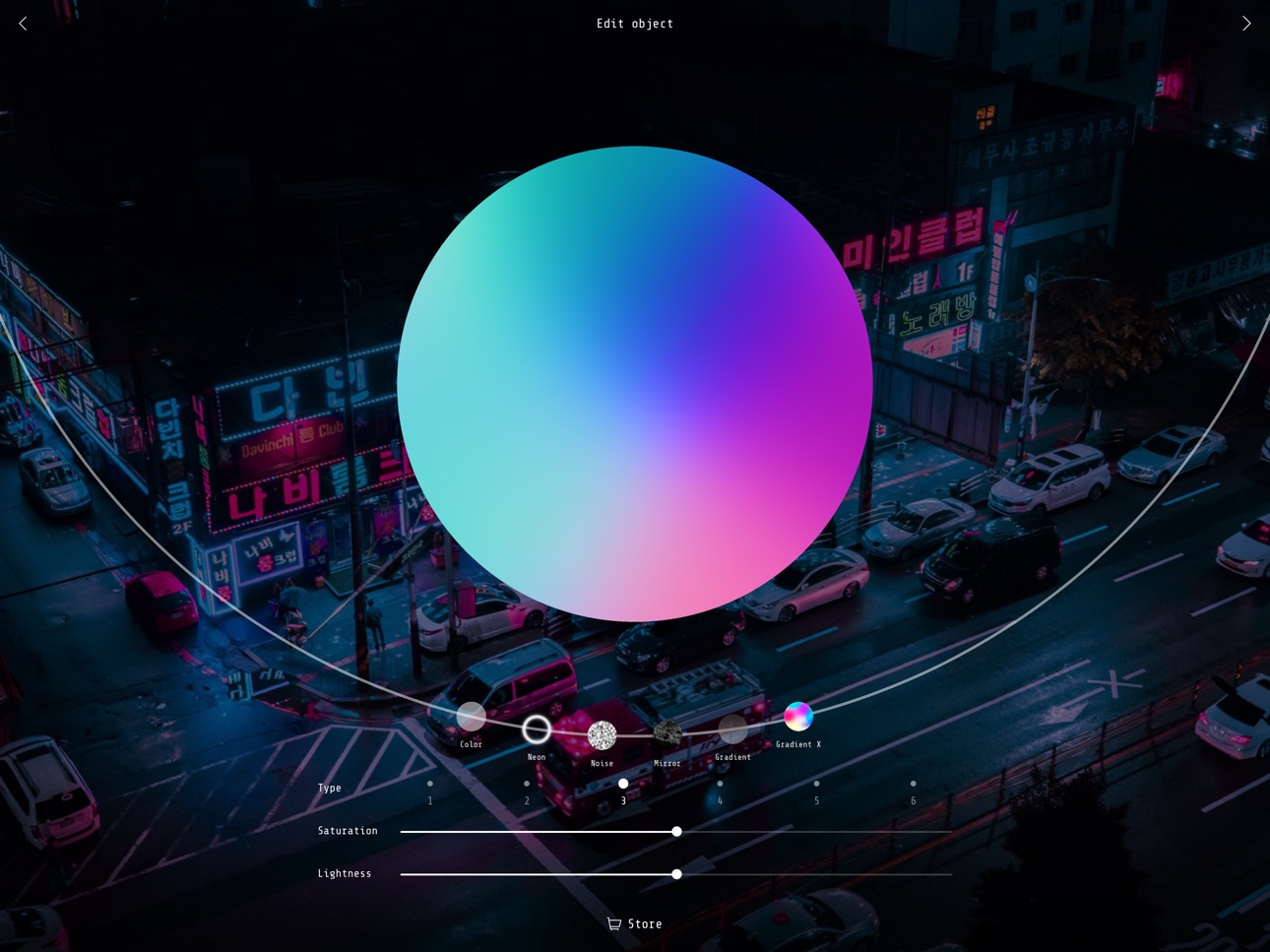
• Try all of the six types of carefully curated artistic effects: Color, Neon, Noise, Mirror, Gradient, Gradient X.
• Gradient X is the state-of-the-art tool with complex dynamic gradients.
Effects & Adjustments
• Enhance your artworks with split color distortion, pixelization, and many other amazing effects,
• Apply classic color adjustment tools, including Curves.
Unsplash Photo Library
• Shapical X comes with unlimited access to the rich collection of free beautiful high-resolution photos.
In-App Purchases BB pricing
One-Time Purchases
Color brush—
Custom graphics—
Extra slots—
Gradient X—
Save in Full HD—
Smudge modes—
Unlock everything—
Unlock everything GREK—
Unlock everything KOMISSAR—
Unlock everything RAIN—
Capabilities
In-App Purchases
Accessibility
ipadiphonemacrealityDevicetvoswatch
Version history 10 versions
Build 830145693v1.2412019-01-31 04:18:24
With this release, you can give any Pro tool a try before upgrading. Tips & Tutorials section is now accessible through the top menu.
If you encounter any issues or require assistance, please contact us at support@sixhandsapps.com. Thank you for using Shapical X!
Build 829996456v1.242019-01-18 09:26:13
With this release, you can give any Pro tool a try before upgrading. Tips & Tutorials section is now accessible through the top menu.
If you encounter any issues or require assistance, please contact us at support@sixhandsapps.com. Thank you for using Shapical X!
Build 829801655v1.212019-01-02 09:06:06
Introducing Tips & Tutorials: the new section is now accessible though the Settings menu.
Have an idea for a tutorial? Run it by us for a chance to get featured.
We've also fixed several bugs and made performance improvements. Thanks for designing with Shapical X!
Build 829441175v1.182018-11-30 00:05:02
Thanks for using Shapical X! The new release brings optimization for larger screens: now you can get the best Shapical X experience on your iPad. You can now also enable iCloud sync in app settings to synchronize shapes across all your devices.
Build 829297937v1.162018-11-15 16:18:25
We keep working hard to improve your experience with Shapical X. This update includes minor bug fixes and performance improvements.
Build 829105066v1.152018-10-30 17:08:16
We've been working hard to improve your experience with Shapical X. Here's what's new:
- Added iCloud support--now you can easily access your objects across all of your iOS devices.
- Improved editing: to drag an object across screen now, you don't have to make the corresponding layer active first (yay!)
- Tap object twice for quick access to options menu.
Build 828952569v1.142018-10-17 17:04:55
We've been working hard to improve your experience with Shapical X. Here's what's new:
- Now you can snap objects to vertical and horizontal axes.
- Hide or duplicate layer by swiping it to the right.
- Improved Mirror fill and Masking tool.
- Your objects will now look smoother on Edit object screen.
- Several other tweaks and enhancements to make editing even more effortless.
Thanks for your feedback and suggestions, keep them coming!
Build 828802563v1.102018-10-03 17:06:03
What's new on Shapical X
— In Layers, press firmly on a layer to hide or duplicate it. You can now also use 3D Touch to preview your artwork on the Choose object screen.
— You can now clear slots on the grid and fill them again with new custom objects.
— We've added snapping to axes feature which makes it easier to align objects when editing.
Thanks to everyone for your feedback and suggestions, keep them coming!
Build 828647519v1.052018-09-20 05:42:16
Bug fixes and stability improvements.
Build 828442594v1.12018-09-18 12:09:51
Price history by region
Currency
Show
Columns
Search
Availability 174 of 175 storefronts
| Region | Language | Price | Ratings | Avg | Version |
|---|---|---|---|---|---|
| RU | ru | Free | 25 | 3.6 | 1.241 |
| US | en-US | Free | 12 | 3.3 | 1.241 |
| IN | en-GB | Free | 5 | 3.8 | 1.241 |
| TR | en-GB | Free | 5 | 4.8 | 1.241 |
| IT | it | Free | 3 | 2.0 | 1.241 |
| UA | en-GB | Free | 3 | 3.3 | 1.241 |
| DE | de-DE | Free | 2 | 3.5 | 1.241 |
| FR | fr-FR | Free | 2 | 3.0 | 1.241 |
| MX | es-MX | Free | 2 | 4.0 | 1.241 |
| AE | en-GB | Free | 1 | 4.0 | 1.241 |
| BE | en-GB | Free | 1 | 1.0 | 1.241 |
| CO | es-MX | Free | 1 | 5.0 | 1.241 |
| JP | ja | Free | 1 | 4.0 | 1.241 |
| MY | en-GB | Free | 1 | 5.0 | 1.241 |
| PH | en-GB | Free | 1 | 3.0 | 1.241 |
| PL | en-GB | Free | 1 | 4.0 | 1.241 |
| PT | pt-PT | Free | 1 | 2.0 | 1.241 |
| SA | en-GB | Free | 1 | 1.0 | 1.241 |
| TH | en-GB | Free | 1 | 3.0 | 1.241 |
| VN | en-GB | Free | 1 | 5.0 | 1.241 |
| AG | en-GB | Free | 0 | — | 1.241 |
| AI | en-GB | Free | 0 | — | 1.241 |
| AL | en-GB | Free | 0 | — | 1.241 |
| AM | en-GB | Free | 0 | — | 1.241 |
| AO | en-GB | Free | 0 | — | 1.241 |
| AR | es-MX | Free | 0 | — | 1.241 |
| AT | de-DE | Free | 0 | — | 1.241 |
| AU | en-AU | Free | 0 | — | 1.241 |
| AZ | en-GB | Free | 0 | — | 1.241 |
| BA | en-GB | Free | 0 | — | 1.241 |
| BB | en-GB | Free | 0 | — | 1.241 |
| BF | en-GB | Free | 0 | — | 1.241 |
| BG | en-GB | Free | 0 | — | 1.241 |
| BH | en-GB | Free | 0 | — | 1.241 |
| BJ | en-GB | Free | 0 | — | 1.241 |
| BM | en-GB | Free | 0 | — | 1.241 |
| BN | en-GB | Free | 0 | — | 1.241 |
| BO | es-MX | Free | 0 | — | 1.241 |
| BR | pt-BR | Free | 0 | — | 1.241 |
| BS | en-GB | Free | 0 | — | 1.241 |
| BT | en-GB | Free | 0 | — | 1.241 |
| BW | en-GB | Free | 0 | — | 1.241 |
| BY | en-GB | Free | 0 | — | 1.241 |
| BZ | en-GB | Free | 0 | — | 1.241 |
| CA | en-CA | Free | 0 | — | 1.241 |
| CD | en-GB | Free | 0 | — | 1.241 |
| CG | en-GB | Free | 0 | — | 1.241 |
| CH | de-CH | Free | 0 | — | 1.241 |
| CI | fr-FR | Free | 0 | — | 1.241 |
| CL | es-MX | Free | 0 | — | 1.241 |
| CM | fr-FR | Free | 0 | — | 1.241 |
| CN | zh-Hans-CN | Free | 0 | — | 1.241 |
| CR | es-MX | Free | 0 | — | 1.241 |
| CV | en-GB | Free | 0 | — | 1.241 |
| CY | en-GB | Free | 0 | — | 1.241 |
| CZ | en-GB | Free | 0 | — | 1.241 |
| DK | en-GB | Free | 0 | — | 1.241 |
| DM | en-GB | Free | 0 | — | 1.241 |
| DO | es-MX | Free | 0 | — | 1.241 |
| DZ | en-GB | Free | 0 | — | 1.241 |
| EC | es-MX | Free | 0 | — | 1.241 |
| EE | en-GB | Free | 0 | — | 1.241 |
| EG | en-GB | Free | 0 | — | 1.241 |
| ES | es-ES | Free | 0 | — | 1.241 |
| FI | en-GB | Free | 0 | — | 1.241 |
| FJ | en-GB | Free | 0 | — | 1.241 |
| FM | en-GB | Free | 0 | — | 1.241 |
| GA | fr-FR | Free | 0 | — | 1.241 |
| GB | en-GB | Free | 0 | — | 1.241 |
| GD | en-GB | Free | 0 | — | 1.241 |
| GE | en-GB | Free | 0 | — | 1.241 |
| GH | en-GB | Free | 0 | — | 1.241 |
| GM | en-GB | Free | 0 | — | 1.241 |
| GR | en-GB | Free | 0 | — | 1.241 |
| GT | es-MX | Free | 0 | — | 1.241 |
| GW | en-GB | Free | 0 | — | 1.241 |
| GY | en-GB | Free | 0 | — | 1.241 |
| HK | zh-Hant-HK | Free | 0 | — | 1.241 |
| HN | es-MX | Free | 0 | — | 1.241 |
| HR | en-GB | Free | 0 | — | 1.241 |
| HU | en-GB | Free | 0 | — | 1.241 |
| ID | en-GB | Free | 0 | — | 1.241 |
| IE | en-GB | Free | 0 | — | 1.241 |
| IL | en-GB | Free | 0 | — | 1.241 |
| IQ | en-GB | Free | 0 | — | 1.241 |
| IS | en-GB | Free | 0 | — | 1.241 |
| JM | en-GB | Free | 0 | — | 1.241 |
| JO | en-GB | Free | 0 | — | 1.241 |
| KE | en-GB | Free | 0 | — | 1.241 |
| KG | en-GB | Free | 0 | — | 1.241 |
| KH | en-GB | Free | 0 | — | 1.241 |
| KN | en-GB | Free | 0 | — | 1.241 |
| KR | ko | Free | 0 | — | 1.241 |
| KW | en-GB | Free | 0 | — | 1.241 |
| KY | en-GB | Free | 0 | — | 1.241 |
| KZ | en-GB | Free | 0 | — | 1.241 |
| LA | en-GB | Free | 0 | — | 1.241 |
| LB | en-GB | Free | 0 | — | 1.241 |
| LC | en-GB | Free | 0 | — | 1.241 |
| LK | en-GB | Free | 0 | — | 1.241 |
| LR | en-GB | Free | 0 | — | 1.241 |
| LT | en-GB | Free | 0 | — | 1.241 |
| LU | en-GB | Free | 0 | — | 1.241 |
| LV | en-GB | Free | 0 | — | 1.241 |
| LY | en-GB | Free | 0 | — | 1.241 |
| MA | en-GB | Free | 0 | — | 1.241 |
| MD | en-GB | Free | 0 | — | 1.241 |
| ME | en-GB | Free | 0 | — | 1.241 |
| MG | en-GB | Free | 0 | — | 1.241 |
| MK | en-GB | Free | 0 | — | 1.241 |
| ML | en-GB | Free | 0 | — | 1.241 |
| MM | en-GB | Free | 0 | — | 1.241 |
| MN | en-GB | Free | 0 | — | 1.241 |
| MO | zh-Hant-HK | Free | 0 | — | 1.241 |
| MR | en-GB | Free | 0 | — | 1.241 |
| MS | en-GB | Free | 0 | — | 1.241 |
| MT | en-GB | Free | 0 | — | 1.241 |
| MU | en-GB | Free | 0 | — | 1.241 |
| MV | en-GB | Free | 0 | — | 1.241 |
| MW | en-GB | Free | 0 | — | 1.241 |
| MZ | en-GB | Free | 0 | — | 1.241 |
| NA | en-GB | Free | 0 | — | 1.241 |
| NE | en-GB | Free | 0 | — | 1.241 |
| NG | en-GB | Free | 0 | — | 1.241 |
| NI | es-MX | Free | 0 | — | 1.241 |
| NL | nl | Free | 0 | — | 1.241 |
| NO | en-GB | Free | 0 | — | 1.241 |
| NP | en-GB | Free | 0 | — | 1.241 |
| NR | en-GB | Free | 0 | — | 1.241 |
| NZ | en-AU | Free | 0 | — | 1.241 |
| OM | en-GB | Free | 0 | — | 1.241 |
| PA | es-MX | Free | 0 | — | 1.241 |
| PE | es-MX | Free | 0 | — | 1.241 |
| PG | en-GB | Free | 0 | — | 1.241 |
| PK | en-GB | Free | 0 | — | 1.241 |
| PW | en-GB | Free | 0 | — | 1.241 |
| PY | es-MX | Free | 0 | — | 1.241 |
| QA | en-GB | Free | 0 | — | 1.241 |
| RO | en-GB | Free | 0 | — | 1.241 |
| RS | en-GB | Free | 0 | — | 1.241 |
| RW | en-GB | Free | 0 | — | 1.241 |
| SB | en-GB | Free | 0 | — | 1.241 |
| SC | en-GB | Free | 0 | — | 1.241 |
| SE | sv | Free | 0 | — | 1.241 |
| SG | en-GB | Free | 0 | — | 1.241 |
| SI | en-GB | Free | 0 | — | 1.241 |
| SK | en-GB | Free | 0 | — | 1.241 |
| SL | en-GB | Free | 0 | — | 1.241 |
| SN | en-GB | Free | 0 | — | 1.241 |
| SR | en-GB | Free | 0 | — | 1.241 |
| ST | en-GB | Free | 0 | — | 1.241 |
| SV | es-MX | Free | 0 | — | 1.241 |
| SZ | en-GB | Free | 0 | — | 1.241 |
| TC | en-GB | Free | 0 | — | 1.241 |
| TD | en-GB | Free | 0 | — | 1.241 |
| TJ | en-GB | Free | 0 | — | 1.241 |
| TM | en-GB | Free | 0 | — | 1.241 |
| TN | en-GB | Free | 0 | — | 1.241 |
| TO | en-GB | Free | 0 | — | 1.241 |
| TT | en-GB | Free | 0 | — | 1.241 |
| TW | zh-Hant-TW | Free | 0 | — | 1.241 |
| TZ | en-GB | Free | 0 | — | 1.241 |
| UG | en-GB | Free | 0 | — | 1.241 |
| UY | en-GB | Free | 0 | — | 1.241 |
| UZ | en-GB | Free | 0 | — | 1.241 |
| VC | en-GB | Free | 0 | — | 1.241 |
| VE | es-MX | Free | 0 | — | 1.241 |
| VG | en-GB | Free | 0 | — | 1.241 |
| VU | en-GB | Free | 0 | — | 1.241 |
| XK | en-GB | Free | 0 | — | 1.241 |
| YE | en-GB | Free | 0 | — | 1.241 |
| ZA | en-GB | Free | 0 | — | 1.241 |
| ZM | en-GB | Free | 0 | — | 1.241 |
| ZW | en-GB | Free | 0 | — | 1.241 |
Not available in: AF
Change log 14 changes · BB
✎
releaseNotes updated
With this release, you can give any Pro tool a try before upgrading. Tips & Tutorials section is now accessible through the top menu.
If you encounter any issue
✎
description updated
Shapical X is an advanced yet easy to use photo editor that lets you add stunning graphics to photos and create brilliant and engaging artistic masterpieces.
S
✎
subtitle updated
Create extraordinary images
✎
name updated
Shapical X
◆
Version 1.241 released
With this release, you can give any Pro tool a try before upgrading. Tips & Tutorials section is now accessible through the top menu.
If you encounter any issues or require assistance, please contact us at support@sixhandsapps.com. Thank yo
◆
Version 1.24 released
With this release, you can give any Pro tool a try before upgrading. Tips & Tutorials section is now accessible through the top menu.
If you encounter any issues or require assistance, please contact us at support@sixhandsapps.com. Thank y
◆
Version 1.21 released
Introducing Tips & Tutorials: the new section is now accessible though the Settings menu.
Have an idea for a tutorial? Run it by us for a chance to get featured.
We've also fixed several bugs and made performance improvements. Thanks for
◆
Version 1.18 released
Thanks for using Shapical X! The new release brings optimization for larger screens: now you can get the best Shapical X experience on your iPad. You can now also enable iCloud sync in app settings to synchronize shapes across all your devi
◆
Version 1.16 released
We keep working hard to improve your experience with Shapical X. This update includes minor bug fixes and performance improvements.
◆
Version 1.15 released
We've been working hard to improve your experience with Shapical X. Here's what's new:
- Added iCloud support--now you can easily access your objects across all of your iOS devices.
- Improved editing: to drag an object across screen now,
◆
Version 1.14 released
We've been working hard to improve your experience with Shapical X. Here's what's new:
- Now you can snap objects to vertical and horizontal axes.
- Hide or duplicate layer by swiping it to the right.
- Improved Mirror fill and Masking tool
◆
Version 1.10 released
What's new on Shapical X
— In Layers, press firmly on a layer to hide or duplicate it. You can now also use 3D Touch to preview your artwork on the Choose object screen.
— You can now clear slots on the grid and fill them again with new cus
◆
Version 1.05 released
Bug fixes and stability improvements.
◆
Version 1.1 released