Home › Photo & Video

 CD
CD
 USen-US
 DEde-DE
 GBen-GB
 ATde-DE
 CNzh-Hans-CN
 FRfr-FR
 AEen-GB
 AUen-AU
 BEen-GB
 CAen-CA
 CZen-GB
 ESes-ES
 HKzh-Hant-HK
 JOen-GB
 MXes-MX
 MYen-GB
 NOen-GB
 SAen-GB
 VNen-GB
 AGen-GB
 AIen-GB
 ALen-GB
 AMen-GB
 AOen-GB
 ARes-MX
 AZen-GB
 BAen-GB
 BBen-GB
 BFen-GB
 BGen-GB
 BHen-GB
 BJen-GB
 BMen-GB
 BNen-GB
 BOes-MX
 BRpt-BR
 BSen-GB
 BTen-GB
 BWen-GB
 BYen-GB
 BZen-GBCDen-GB
 CGen-GB
 CHde-CH
 CIfr-FR
 CLes-MX
 CMfr-FR
 COes-MX
 CRes-MX
 CVen-GB
 CYen-GB
 DKen-GB
 DMen-GB
 DOes-MX
 DZen-GB
 ECes-MX
 EEen-GB
 EGen-GB
 FIen-GB
 FJen-GB
 FMen-GB
 GAfr-FR
 GDen-GB
 GEen-GB
 GHen-GB
 GMen-GB
 GRen-GB
 GTes-MX
 GWen-GB
 GYen-GB
 HNes-MX
 HRen-GB
 HUen-GB
 IDen-GB
 IEen-GB
 ILen-GB
 IQen-GB
 ISen-GB
 ITit
ITit JMen-GB
 JPja
JPja KEen-GB
 KGen-GB
 KHen-GB
 KNen-GB
 KWen-GB
 KYen-GB
 KZen-GB
 LAen-GB
 LBen-GB
 LCen-GB
 LKen-GB
 LRen-GB
 LTen-GB
 LUen-GB
 LVen-GB
 LYen-GB
 MAen-GB
 MDen-GB
 MEen-GB
 MGen-GB
 MKen-GB
 MLen-GB
 MMen-GB
 MNen-GB
 MRen-GB
 MSen-GB
 MTen-GB
 MUen-GB
 MVen-GB
 MWen-GB
 MZen-GB
 NAen-GB
 NEen-GB
 NGen-GB
 NIes-MX
 NLnl
NLnl NPen-GB
 NRen-GB
 NZen-AU
 OMen-GB
 PAes-MX
 PEes-MX
 PGen-GB
 PHen-GB
 PKen-GB
 PLen-GB
 PTpt-PT
 PWen-GB
 PYes-MX
 QAen-GB
 ROen-GB
 RSen-GB
 RUru
RUru RWen-GB
 SBen-GB
 SCen-GB
 SEsv
SEsv SGen-GB
 SIen-GB
 SKen-GB
 SLen-GB
 SNen-GB
 SRen-GB
 STen-GB
 SVes-MX
 SZen-GB
 TCen-GB
 TDen-GB
 THen-GB
 TJen-GB
 TMen-GB
 TNen-GB
 TOen-GB
 TRen-GB
 TTen-GB
 TWzh-Hant-TW
 TZen-GB
 UAen-GB
 UGen-GB
 UYen-GB
 UZen-GB
 VCen-GB
 VEes-MX
 VGen-GB
 VUen-GB
 XKen-GB
 YEen-GB
 ZAen-GB
 ZMen-GB
 ZWen-GB
171 of 171 storefronts
Content in en-US
Content in en-US
Information
Preview 2 platforms
iPhone 5 images


iPad 7 images




What’s New Version 2.1.19
You can now use the 'Deform image' tool on movie channels so that movie corners can be deformed over time. Similarly you can use an image in a movie channel if you want to deform an image over time.
Various other improvements and optimisations
If you are enjoying using MovieMarkup please leave a review - thanks.
Description
MovieMarkup is a great new app which lets you add annotation to your movies. Just import the movie, adjust the timeline and add the annotation - it is that easy. Add one or many annotations, then share the annotated movie.
Features:
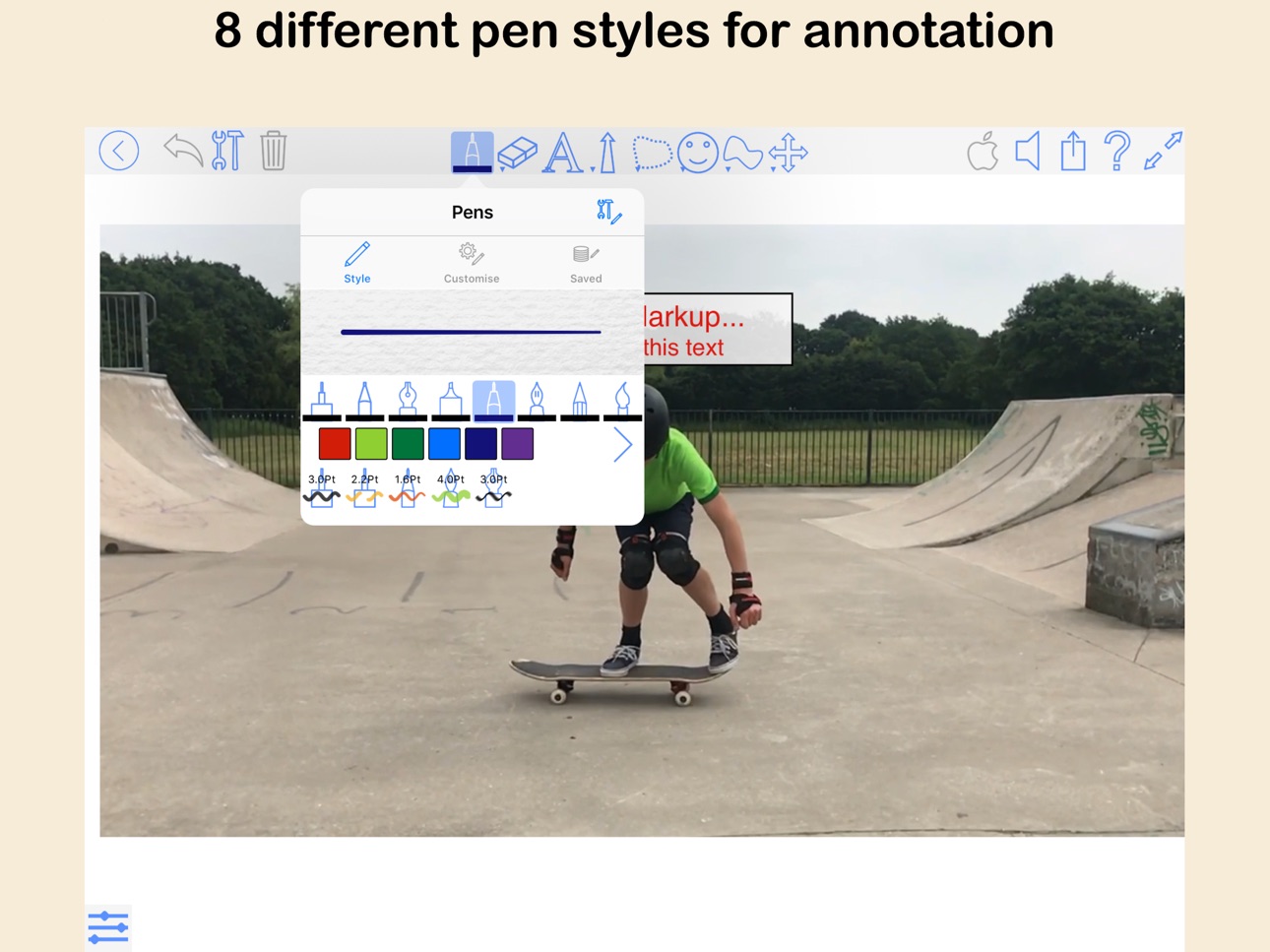
Handwritten annotations - a combination of 8 different pen styles, and a huge range of colours, thicknesses and opacities; (1 for free, 7 more as in-app purchase).
Text annotation(*) - fully attributed text allowing a mixture of fonts, colours and sizes.
Images(*) - import images as annotations and position them over the movie at a size and position of your choosing.
Movies(*) - import other movies and overlay them on the main movie at any scale and rotation. This includes the ability to define a transparent colour in the overlayed movie.
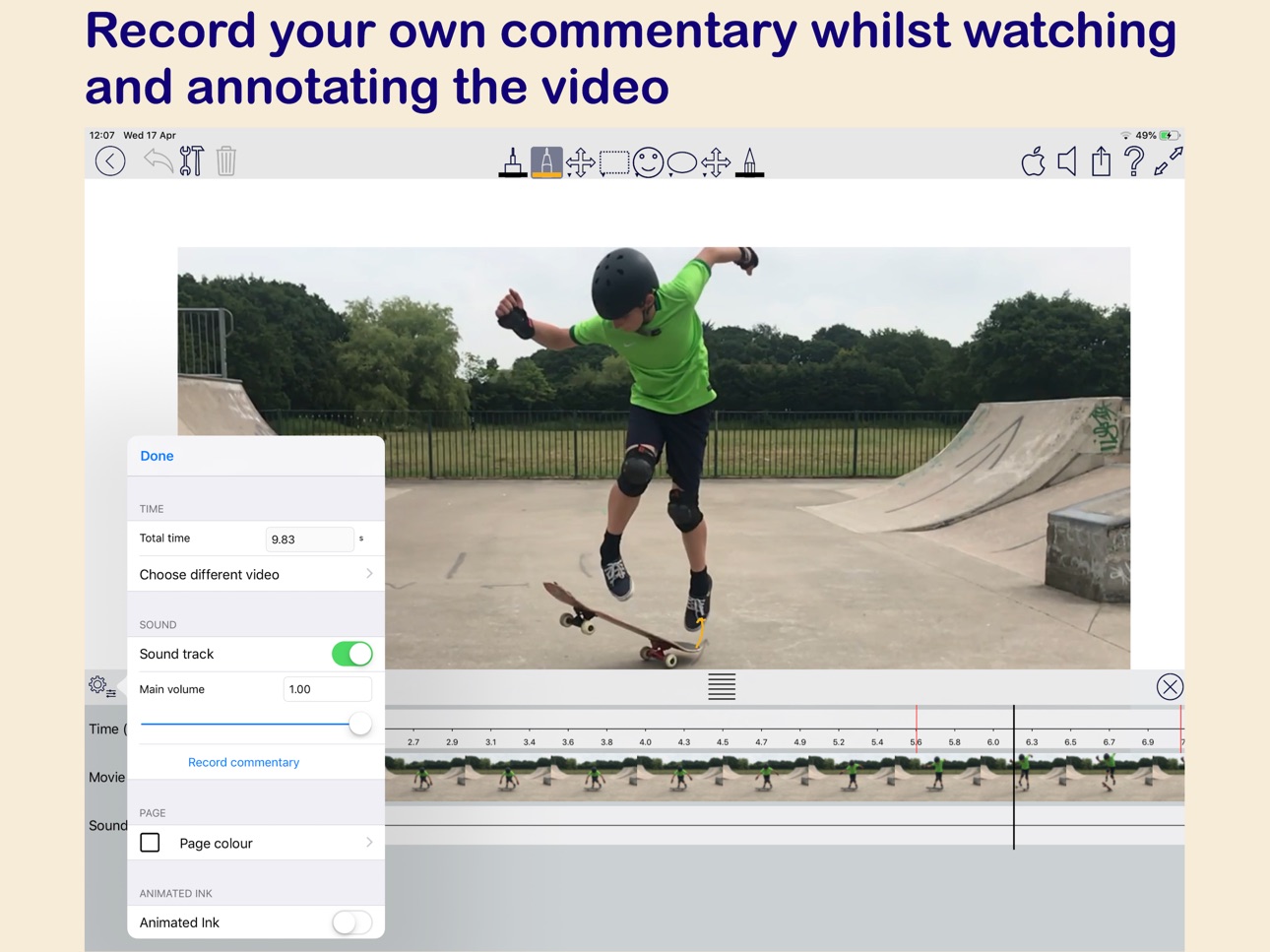
Sounds(*) - record your own sound track which will overlay (or) overwrite the original movie audio.
Shapes - Free-hand or polygonal shapes can be used as annotations, with options to control colour, opacity and border styles.
Magnified areas - Use shapes to magnify specific areas of the movie to highlight important details.
Arrows - options to control colour, arrow styles, taper and labels.
Annotation Options - each annotation has options to control how it is displayed including an 'animated ink' option which makes the annotation appear as if it is being written or typed into the movie in real time.
Timeline - this lets you accurately position annotations at the correct movie frame, and also lets you preview the result in real time.
You can transform an annotation so that it moves, scales or rotates in the annotated movie.
The app has support for many electronic styluses including Apple Pencil, Wacom and Adonit.
(*) In app purchase required to allow these features in an exported annotated movie.
In-App Purchases CD pricing
One-Time Purchases
All features—
All Pens—
Text—
Sounds—
Full Export—
Images—
Capabilities
In-App Purchases
Accessibility
ipadiphonemacrealityDevicetvoswatch
Version history 25 versions
Build 886821697v2.1.192026-06-12 07:03:34
You can now use the 'Deform image' tool on movie channels so that movie corners can be deformed over time. Similarly you can use an image in a movie channel if you want to deform an image over time.
Various other improvements and optimisations
If you are enjoying using MovieMarkup please leave a review - thanks.
Build 883921935v2.0.182026-04-01 16:29:16
Shape tool improvements including support for parallelograms and trapezoids and 4 new 'triangle styles’
Various text drawing improvements including 'Shadow' and ‘Outline’ option to Text double draw mode
Added a 'Transparency' option to Change colour function (in image edit window)
New import option for images - 'Resize images' (In the main app settings, Document editing section.
Changed the image edit window to show transparency more clearly with a checkerboard background
Reduced the flicker effect when you have used the pen tool then scroll or zoom
Improvements to pressure sensitive ink capture and drawing (draft and felt tip)
Various other improvements and optimisations
If you are enjoying using MovieMarkup please leave a review - thanks.
Build 882644256v2.0.172026-03-10 07:05:14
Added new text options for 'Double draw' - Outline (in a different colour) and Shadow
Various other optimisations and enhancements
If you are enjoying using MovieMarkup please leave a review - thanks.
Build 881353062v2.0.162026-01-12 16:43:47
Fix for changing between Dark and Light UI modes
Various other optimisations and enhancements
If you are enjoying using MovieMarkup please leave a review - thanks.
Build 880910032v2.0.152025-12-23 18:57:53
Fixes for changing settings using sliders crashing
Fix for changing between Dark and Light UI modes
If you are enjoying using MovieMarkup please leave a review - thanks.
Build 880698259v2.0.142025-12-16 16:14:26
Fix for illegible menus
Fixes for changing settings using sliders crashing
If you are enjoying using ZoomNotes please leave a review - thanks.
Build 879216936v2.0.122025-10-28 07:48:53
Support for SonarPen 2
Various fixes for iOS 26 compatibility
Access to MS OneDrive is now through iCloudDrive.
If you are enjoying using ZoomNotes please leave a review - thanks.
Build 877814577v2.0.112025-09-05 06:07:30
New option in animated text - 'show typing cursor'. This option makes the animated text appear like it is being typed on a computer.
If you are enjoying using MovieMarkup please leave a review - thanks.
Build 877479521v2.0.102025-08-24 14:04:03
Fix for real-time playback of animated annotation tracks
If you are enjoying using MovieMarkup please leave a review - thanks.
Build 877189894v2.0.92025-08-13 13:16:27
NEW: Shape has a 'Magnify' option which magnifies the region covered by the shape
If you are enjoying using MovieMarkup please leave a review - thanks.
Build 876714759v2.0.82025-07-28 07:49:09
Fix for problem in share video window in which the different sections would not open
If you are enjoying using MovieMarkup please leave a review - thanks.
Build 876472576v2.0.72025-07-18 10:23:30
Export option when using a Zoom channel to show an un-zoomed view in a corner of the output video
If you are enjoying using MovieMarkup please leave a review - thanks.
Build 873188666v2.0.62025-03-13 06:29:33
Improved light mode/ dark mode colours - in some circumstances selection tool menu items could be invisible
Fix for rulers 0 and 90 buttons were not switching to the opposite directions
If you are enjoying using MovieMarkup please leave a review - thanks.
Build 872662790v2.0.52025-02-21 07:15:17
Added a 'Open recycle bin' to the main app settings, General section
Added a 'Toggle edit menu' to the list of functions you can choose for the Apple Pencil tap or squeeze gesture
Fix for the incorrect saved pen being shown in the side settings panel
Fix for a crash when showing/hiding saved pens
If you are enjoying using MovieMarkup please leave a review - thanks.
Build 871154533v2.0.42024-12-16 17:21:41
Improvements to the Chromakey transparency for overlayed videos
If you are enjoying using MovieMarkup please leave a review - thanks.
Build 870891816v2.0.32024-12-05 07:13:43
New: Added movie and image overlay transparency (chromakey)
If you are enjoying using MovieMarkup please leave a review - thanks.
Build 870210704v2.0.22024-11-27 11:23:39
Improvements to the Apple Pencil Squeeze gesture support
If you are enjoying using MovieMarkup please leave a review - thanks.
Build 869332714v2.0.12024-09-30 06:55:15
Added support for Apple Pencil Hover
If you are enjoying using MovieMarkup please leave a review - thanks.
Build 868897007v2.0.02024-09-11 08:32:27
Version 2
New folder/document Split View for document management
New Tool Palette bar including circular configuration
Interactive Line/curve editing with node markers - includes shapes
Many other optimisations and improvements
If you are enjoying using MovieMarkup please leave a review - thanks.
Build 863205065v1.9.12024-01-27 07:24:20
Fixes include:
fix for straight line dashes (dash ends were inverted)
fix for saved symetric shape settings (preview showed no difference between symmetric and non-symmetric shapes)
fix for eraser on straight lines (would remove whole line)
fix for text line height / line spacing calculation
fix for overlapping text option
If you are enjoying using MovieMarkup please leave a review - thanks.
Build 862812195v1.9.02024-01-10 20:39:12
New: Dotted line style for Self-tip and Draft ink. Also as an option for shape perimeter and arrowed lines.
If you are enjoying using MovieMarkup please leave a review - thanks.
Build 861859665v1.8.122023-11-30 15:39:13
New 'Nudge 1 pixel' function
Arrowed straight lines now show the arrow as you drag the line out for the first time
Improved magnification windows in text editor (used for moving caret and selecting text)
Saved settings now indicate which is the currently selected one
If you are enjoying using MovieMarkup please leave a review - thanks.
Build 860855912v1.8.112023-10-22 11:58:43
Various fixes and optimisations for iOS 17
Fixed a crash when exporting to Photo Album
If you are enjoying using MovieMarkup please leave a review - thanks.
Build 860373917v1.8.102023-10-03 10:23:12
Various fixes and optimisations for iOS 17
Fixes include
- text edit cursor size when starting to edit a blank text
If you are enjoying using MovieMarkup please leave a review - thanks.
Build 860002350v1.8.92023-09-19 05:51:12
Support for iOS 17
'Reduce image res' now affects of shapes
Fix for 'jaggy' fill areas when generating a shape
Added a 'To pasteboard' button to shape settings to copy the shape's background image to the pasteboard.
If you are enjoying using MovieMarkup please leave a review - thanks.
Price history by region
Currency
Show
Columns
Search
Availability 171 of 171 storefronts
| Region | Language | Price | Ratings | Avg | Version |
|---|---|---|---|---|---|
| US | en-US | Free | 39 | 2.9 | 2.1.19 |
| DE | de-DE | Free | 7 | 2.7 | 2.1.19 |
| GB | en-GB | Free | 4 | 3.0 | 2.1.19 |
| AT | de-DE | Free | 2 | 5.0 | 2.1.19 |
| CN | zh-Hans-CN | Free | 2 | 3.0 | 2.1.19 |
| FR | fr-FR | Free | 2 | 3.0 | 2.1.19 |
| AE | en-GB | Free | 1 | 1.0 | 2.1.19 |
| AU | en-AU | Free | 1 | 4.0 | 2.1.19 |
| BE | en-GB | Free | 1 | 4.0 | 2.1.19 |
| CA | en-CA | Free | 1 | 5.0 | 2.1.19 |
| CZ | en-GB | Free | 1 | 1.0 | 2.1.19 |
| ES | es-ES | Free | 1 | 5.0 | 2.1.19 |
| HK | zh-Hant-HK | Free | 1 | 2.0 | 2.1.19 |
| JO | en-GB | Free | 1 | 3.0 | 2.1.19 |
| MX | es-MX | Free | 1 | 4.0 | 2.1.19 |
| MY | en-GB | Free | 1 | 5.0 | 2.1.19 |
| NO | en-GB | Free | 1 | 4.0 | 2.1.19 |
| SA | en-GB | Free | 1 | 3.0 | 2.1.19 |
| VN | en-GB | Free | 1 | 4.0 | 2.1.19 |
| AG | en-GB | Free | 0 | — | 2.1.19 |
| AI | en-GB | Free | 0 | — | 2.1.19 |
| AL | en-GB | Free | 0 | — | 2.1.19 |
| AM | en-GB | Free | 0 | — | 2.1.19 |
| AO | en-GB | Free | 0 | — | 2.1.19 |
| AR | es-MX | Free | 0 | — | 2.1.19 |
| AZ | en-GB | Free | 0 | — | 2.1.19 |
| BA | en-GB | Free | 0 | — | 2.1.19 |
| BB | en-GB | Free | 0 | — | 2.1.19 |
| BF | en-GB | Free | 0 | — | 2.1.19 |
| BG | en-GB | Free | 0 | — | 2.1.19 |
| BH | en-GB | Free | 0 | — | 2.1.19 |
| BJ | en-GB | Free | 0 | — | 2.1.19 |
| BM | en-GB | Free | 0 | — | 2.1.19 |
| BN | en-GB | Free | 0 | — | 2.1.19 |
| BO | es-MX | Free | 0 | — | 2.1.19 |
| BR | pt-BR | Free | 0 | — | 2.1.19 |
| BS | en-GB | Free | 0 | — | 2.1.19 |
| BT | en-GB | Free | 0 | — | 2.1.19 |
| BW | en-GB | Free | 0 | — | 2.1.19 |
| BY | en-GB | Free | 0 | — | 2.1.19 |
| BZ | en-GB | Free | 0 | — | 2.1.19 |
| CD | en-GB | Free | 0 | — | 2.1.19 |
| CG | en-GB | Free | 0 | — | 2.1.19 |
| CH | de-CH | Free | 0 | — | 2.1.19 |
| CI | fr-FR | Free | 0 | — | 2.1.19 |
| CL | es-MX | Free | 0 | — | 2.1.19 |
| CM | fr-FR | Free | 0 | — | 2.1.19 |
| CO | es-MX | Free | 0 | — | 2.1.19 |
| CR | es-MX | Free | 0 | — | 2.1.19 |
| CV | en-GB | Free | 0 | — | 2.1.19 |
| CY | en-GB | Free | 0 | — | 2.1.19 |
| DK | en-GB | Free | 0 | — | 2.1.19 |
| DM | en-GB | Free | 0 | — | 2.1.19 |
| DO | es-MX | Free | 0 | — | 2.1.19 |
| DZ | en-GB | Free | 0 | — | 2.1.19 |
| EC | es-MX | Free | 0 | — | 2.1.19 |
| EE | en-GB | Free | 0 | — | 2.1.19 |
| EG | en-GB | Free | 0 | — | 2.1.19 |
| FI | en-GB | Free | 0 | — | 2.1.19 |
| FJ | en-GB | Free | 0 | — | 2.1.19 |
| FM | en-GB | Free | 0 | — | 2.1.19 |
| GA | fr-FR | Free | 0 | — | 2.1.19 |
| GD | en-GB | Free | 0 | — | 2.1.19 |
| GE | en-GB | Free | 0 | — | 2.1.19 |
| GH | en-GB | Free | 0 | — | 2.1.19 |
| GM | en-GB | Free | 0 | — | 2.1.19 |
| GR | en-GB | Free | 0 | — | 2.1.19 |
| GT | es-MX | Free | 0 | — | 2.1.19 |
| GW | en-GB | Free | 0 | — | 2.1.19 |
| GY | en-GB | Free | 0 | — | 2.1.19 |
| HN | es-MX | Free | 0 | — | 2.1.19 |
| HR | en-GB | Free | 0 | — | 2.1.19 |
| HU | en-GB | Free | 0 | — | 2.1.19 |
| ID | en-GB | Free | 0 | — | 2.1.19 |
| IE | en-GB | Free | 0 | — | 2.1.19 |
| IL | en-GB | Free | 0 | — | 2.1.19 |
| IQ | en-GB | Free | 0 | — | 2.1.19 |
| IS | en-GB | Free | 0 | — | 2.1.19 |
| IT | it | Free | 0 | — | 2.1.19 |
| JM | en-GB | Free | 0 | — | 2.1.19 |
| JP | ja | Free | 0 | — | 2.1.19 |
| KE | en-GB | Free | 0 | — | 2.1.19 |
| KG | en-GB | Free | 0 | — | 2.1.19 |
| KH | en-GB | Free | 0 | — | 2.1.19 |
| KN | en-GB | Free | 0 | — | 2.1.19 |
| KW | en-GB | Free | 0 | — | 2.1.19 |
| KY | en-GB | Free | 0 | — | 2.1.19 |
| KZ | en-GB | Free | 0 | — | 2.1.19 |
| LA | en-GB | Free | 0 | — | 2.1.19 |
| LB | en-GB | Free | 0 | — | 2.1.19 |
| LC | en-GB | Free | 0 | — | 2.1.19 |
| LK | en-GB | Free | 0 | — | 2.1.19 |
| LR | en-GB | Free | 0 | — | 2.1.19 |
| LT | en-GB | Free | 0 | — | 2.1.19 |
| LU | en-GB | Free | 0 | — | 2.1.19 |
| LV | en-GB | Free | 0 | — | 2.1.19 |
| LY | en-GB | Free | 0 | — | 2.1.19 |
| MA | en-GB | Free | 0 | — | 2.1.19 |
| MD | en-GB | Free | 0 | — | 2.1.19 |
| ME | en-GB | Free | 0 | — | 2.1.19 |
| MG | en-GB | Free | 0 | — | 2.1.19 |
| MK | en-GB | Free | 0 | — | 2.1.19 |
| ML | en-GB | Free | 0 | — | 2.1.19 |
| MM | en-GB | Free | 0 | — | 2.1.19 |
| MN | en-GB | Free | 0 | — | 2.1.19 |
| MR | en-GB | Free | 0 | — | 2.1.19 |
| MS | en-GB | Free | 0 | — | 2.1.19 |
| MT | en-GB | Free | 0 | — | 2.1.19 |
| MU | en-GB | Free | 0 | — | 2.1.19 |
| MV | en-GB | Free | 0 | — | 2.1.19 |
| MW | en-GB | Free | 0 | — | 2.1.19 |
| MZ | en-GB | Free | 0 | — | 2.1.19 |
| NA | en-GB | Free | 0 | — | 2.1.19 |
| NE | en-GB | Free | 0 | — | 2.1.19 |
| NG | en-GB | Free | 0 | — | 2.1.19 |
| NI | es-MX | Free | 0 | — | 2.1.19 |
| NL | nl | Free | 0 | — | 2.1.19 |
| NP | en-GB | Free | 0 | — | 2.1.19 |
| NR | en-GB | Free | 0 | — | 2.1.19 |
| NZ | en-AU | Free | 0 | — | 2.1.19 |
| OM | en-GB | Free | 0 | — | 2.1.19 |
| PA | es-MX | Free | 0 | — | 2.1.19 |
| PE | es-MX | Free | 0 | — | 2.1.19 |
| PG | en-GB | Free | 0 | — | 2.1.19 |
| PH | en-GB | Free | 0 | — | 2.1.19 |
| PK | en-GB | Free | 0 | — | 2.1.19 |
| PL | en-GB | Free | 0 | — | 2.1.19 |
| PT | pt-PT | Free | 0 | — | 2.1.19 |
| PW | en-GB | Free | 0 | — | 2.1.19 |
| PY | es-MX | Free | 0 | — | 2.1.19 |
| QA | en-GB | Free | 0 | — | 2.1.19 |
| RO | en-GB | Free | 0 | — | 2.1.19 |
| RS | en-GB | Free | 0 | — | 2.1.19 |
| RU | ru | Free | 0 | — | 2.1.19 |
| RW | en-GB | Free | 0 | — | 2.1.19 |
| SB | en-GB | Free | 0 | — | 2.1.19 |
| SC | en-GB | Free | 0 | — | 2.1.19 |
| SE | sv | Free | 0 | — | 2.1.19 |
| SG | en-GB | Free | 0 | — | 2.1.19 |
| SI | en-GB | Free | 0 | — | 2.1.19 |
| SK | en-GB | Free | 0 | — | 2.1.19 |
| SL | en-GB | Free | 0 | — | 2.1.19 |
| SN | en-GB | Free | 0 | — | 2.1.19 |
| SR | en-GB | Free | 0 | — | 2.1.19 |
| ST | en-GB | Free | 0 | — | 2.1.19 |
| SV | es-MX | Free | 0 | — | 2.1.19 |
| SZ | en-GB | Free | 0 | — | 2.1.19 |
| TC | en-GB | Free | 0 | — | 2.1.19 |
| TD | en-GB | Free | 0 | — | 2.1.19 |
| TH | en-GB | Free | 0 | — | 2.1.19 |
| TJ | en-GB | Free | 0 | — | 2.1.19 |
| TM | en-GB | Free | 0 | — | 2.1.19 |
| TN | en-GB | Free | 0 | — | 2.1.19 |
| TO | en-GB | Free | 0 | — | 2.1.19 |
| TR | en-GB | Free | 0 | — | 2.1.19 |
| TT | en-GB | Free | 0 | — | 2.1.19 |
| TW | zh-Hant-TW | Free | 0 | — | 2.1.19 |
| TZ | en-GB | Free | 0 | — | 2.1.19 |
| UA | en-GB | Free | 0 | — | 2.1.19 |
| UG | en-GB | Free | 0 | — | 2.1.19 |
| UY | en-GB | Free | 0 | — | 2.1.19 |
| UZ | en-GB | Free | 0 | — | 2.1.19 |
| VC | en-GB | Free | 0 | — | 2.1.19 |
| VE | es-MX | Free | 0 | — | 2.1.19 |
| VG | en-GB | Free | 0 | — | 2.1.19 |
| VU | en-GB | Free | 0 | — | 2.1.19 |
| XK | en-GB | Free | 0 | — | 2.1.19 |
| YE | en-GB | Free | 0 | — | 2.1.19 |
| ZA | en-GB | Free | 0 | — | 2.1.19 |
| ZM | en-GB | Free | 0 | — | 2.1.19 |
| ZW | en-GB | Free | 0 | — | 2.1.19 |
Change log 29 changes · CD
✎
releaseNotes updated
You can now use the 'Deform image' tool on movie channels so that movie corners can be deformed over time. Similarly you can use an image in a movie channel if
✎
description updated
MovieMarkup is a great new app which lets you add annotation to your movies. Just import the movie, adjust the timeline and add the annotation - it is that easy
✎
subtitle updated
Movie annotation made easy
✎
name updated
MovieMarkup
◆
Version 2.1.19 released
You can now use the 'Deform image' tool on movie channels so that movie corners can be deformed over time. Similarly you can use an image in a movie channel if you want to deform an image over time.
Various other improvements and optimisati
◆
Version 2.0.18 released
Shape tool improvements including support for parallelograms and trapezoids and 4 new 'triangle styles’
Various text drawing improvements including 'Shadow' and ‘Outline’ option to Text double draw mode
Added a 'Transparency' option to Cha
◆
Version 2.0.17 released
Added new text options for 'Double draw' - Outline (in a different colour) and Shadow
Various other optimisations and enhancements
If you are enjoying using MovieMarkup please leave a review - thanks.
◆
Version 2.0.16 released
Fix for changing between Dark and Light UI modes
Various other optimisations and enhancements
If you are enjoying using MovieMarkup please leave a review - thanks.
◆
Version 2.0.15 released
Fixes for changing settings using sliders crashing
Fix for changing between Dark and Light UI modes
If you are enjoying using MovieMarkup please leave a review - thanks.
◆
Version 2.0.14 released
Fix for illegible menus
Fixes for changing settings using sliders crashing
If you are enjoying using ZoomNotes please leave a review - thanks.
◆
Version 2.0.12 released
Support for SonarPen 2
Various fixes for iOS 26 compatibility
Access to MS OneDrive is now through iCloudDrive.
If you are enjoying using ZoomNotes please leave a review - thanks.
◆
Version 2.0.11 released
New option in animated text - 'show typing cursor'. This option makes the animated text appear like it is being typed on a computer.
If you are enjoying using MovieMarkup please leave a review - thanks.
◆
Version 2.0.10 released
Fix for real-time playback of animated annotation tracks
If you are enjoying using MovieMarkup please leave a review - thanks.
◆
Version 2.0.9 released
NEW: Shape has a 'Magnify' option which magnifies the region covered by the shape
If you are enjoying using MovieMarkup please leave a review - thanks.
◆
Version 2.0.8 released
Fix for problem in share video window in which the different sections would not open
If you are enjoying using MovieMarkup please leave a review - thanks.
◆
Version 2.0.7 released
Export option when using a Zoom channel to show an un-zoomed view in a corner of the output video
If you are enjoying using MovieMarkup please leave a review - thanks.
◆
Version 2.0.6 released
Improved light mode/ dark mode colours - in some circumstances selection tool menu items could be invisible
Fix for rulers 0 and 90 buttons were not switching to the opposite directions
If you are enjoying using MovieMarkup please leave a
◆
Version 2.0.5 released
Added a 'Open recycle bin' to the main app settings, General section
Added a 'Toggle edit menu' to the list of functions you can choose for the Apple Pencil tap or squeeze gesture
Fix for the incorrect saved pen being shown in the side set
◆
Version 2.0.4 released
Improvements to the Chromakey transparency for overlayed videos
If you are enjoying using MovieMarkup please leave a review - thanks.
◆
Version 2.0.3 released
New: Added movie and image overlay transparency (chromakey)
If you are enjoying using MovieMarkup please leave a review - thanks.
◆
Version 2.0.2 released
Improvements to the Apple Pencil Squeeze gesture support
If you are enjoying using MovieMarkup please leave a review - thanks.
◆
Version 2.0.1 released
Added support for Apple Pencil Hover
If you are enjoying using MovieMarkup please leave a review - thanks.
◆
Version 2.0.0 released
Version 2
New folder/document Split View for document management
New Tool Palette bar including circular configuration
Interactive Line/curve editing with node markers - includes shapes
Many other optimisations and improvements
If you are
◆
Version 1.9.1 released
Fixes include:
fix for straight line dashes (dash ends were inverted)
fix for saved symetric shape settings (preview showed no difference between symmetric and non-symmetric shapes)
fix for eraser on straight lines (would remove
◆
Version 1.9.0 released
New: Dotted line style for Self-tip and Draft ink. Also as an option for shape perimeter and arrowed lines.
If you are enjoying using MovieMarkup please leave a review - thanks.
◆
Version 1.8.12 released
New 'Nudge 1 pixel' function
Arrowed straight lines now show the arrow as you drag the line out for the first time
Improved magnification windows in text editor (used for moving caret and selecting text)
Saved settings now indicate which is
◆
Version 1.8.11 released
Various fixes and optimisations for iOS 17
Fixed a crash when exporting to Photo Album
If you are enjoying using MovieMarkup please leave a review - thanks.
◆
Version 1.8.10 released
Various fixes and optimisations for iOS 17
Fixes include
- text edit cursor size when starting to edit a blank text
If you are enjoying using MovieMarkup please leave a review - thanks.
◆
Version 1.8.9 released
Support for iOS 17
'Reduce image res' now affects of shapes
Fix for 'jaggy' fill areas when generating a shape
Added a 'To pasteboard' button to shape settings to copy the shape's background image to the pasteboard.
If you are enjoying usi