Home › Sports

 PY
PY
 USen-US
 AEen-GB
 AFen-GB
 AGen-GB
 AIen-GB
 ALen-GB
 AMen-GB
 AOen-GB
 ARes-MX
 ATde-DE
 AUen-AU
 AZen-GB
 BAen-GB
 BBen-GB
 BEen-GB
 BFen-GB
 BGen-GB
 BHen-GB
 BJen-GB
 BMen-GB
 BNen-GB
 BOes-MX
 BRpt-BR
 BSen-GB
 BTen-GB
 BWen-GB
 BYen-GB
 BZen-GB
 CAen-CA
 CDen-GB
 CGen-GB
 CHde-CH
 CIfr-FR
 CLes-MX
 CMfr-FR
 CNzh-Hans-CN
 COes-MX
 CRes-MX
 CVen-GB
 CYen-GB
 CZen-GB
 DEde-DE
 DKen-GB
 DMen-GB
 DOes-MX
 DZen-GB
 ECes-MX
 EEen-GB
 EGen-GB
 ESes-ES
 FIen-GB
 FJen-GB
 FMen-GB
 FRfr-FR
 GAfr-FR
 GBen-GB
 GDen-GB
 GEen-GB
 GHen-GB
 GMen-GB
 GRen-GB
 GTes-MX
 GWen-GB
 GYen-GB
 HKzh-Hant-HK
 HNes-MX
 HRen-GB
 HUen-GB
 IDen-GB
 IEen-GB
 ILen-GB
 INen-GB
 IQen-GB
 ISen-GB
 ITit
ITit JMen-GB
 JOen-GB
 JPja
JPja KEen-GB
 KGen-GB
 KHen-GB
 KNen-GB
 KRko
KRko KWen-GB
 KYen-GB
 KZen-GB
 LAen-GB
 LBen-GB
 LCen-GB
 LKen-GB
 LRen-GB
 LTen-GB
 LUen-GB
 LVen-GB
 LYen-GB
 MAen-GB
 MDen-GB
 MEen-GB
 MGen-GB
 MKen-GB
 MLen-GB
 MMen-GB
 MNen-GB
 MOzh-Hant-HK
 MRen-GB
 MSen-GB
 MTen-GB
 MUen-GB
 MVen-GB
 MWen-GB
 MXes-MX
 MYen-GB
 MZen-GB
 NAen-GB
 NEen-GB
 NGen-GB
 NIes-MX
 NLnl
NLnl NOen-GB
 NPen-GB
 NRen-GB
 NZen-AU
 OMen-GB
 PAes-MX
 PEes-MX
 PGen-GB
 PHen-GB
 PKen-GB
 PLen-GB
 PTpt-PT
 PWen-GBPYes-MX
 QAen-GB
 ROen-GB
 RSen-GB
 RUru
RUru RWen-GB
 SAen-GB
 SBen-GB
 SCen-GB
 SEsv
SEsv SGen-GB
 SIen-GB
 SKen-GB
 SLen-GB
 SNen-GB
 SRen-GB
 STen-GB
 SVes-MX
 SZen-GB
 TCen-GB
 TDen-GB
 THen-GB
 TJen-GB
 TMen-GB
 TNen-GB
 TOen-GB
 TRen-GB
 TTen-GB
 TWzh-Hant-TW
 TZen-GB
 UAen-GB
 UGen-GB
 UYen-GB
 UZen-GB
 VCen-GB
 VEes-MX
 VGen-GB
 VNen-GB
 VUen-GB
 XKen-GB
 YEen-GB
 ZAen-GB
 ZMen-GB
 ZWen-GB
175 of 175 storefronts
Content in en-US
Content in en-US
Information
Apple ID1362110488
Bundle IDcom.daktronics.dakscore
SellerSeller
Min iOS15.0
Min macOS12.0
Device familiesiphone, ipad, ipod
Released2018-03-30
Copyright© 2018 Daktronics, Inc.
Privacy policyLink ↗
Preview 2 platforms
iPhone 7 images


iPad 4 images


What’s New Version 26.07.06
This update adds two highly requested baseball scoring improvements.
What's New
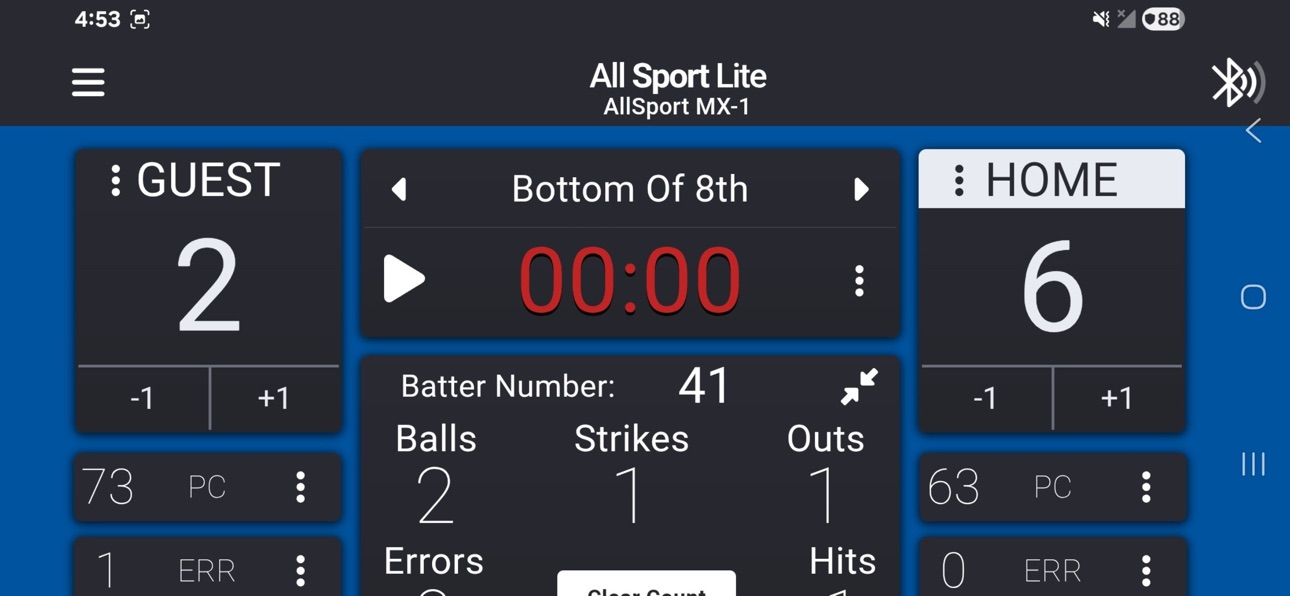
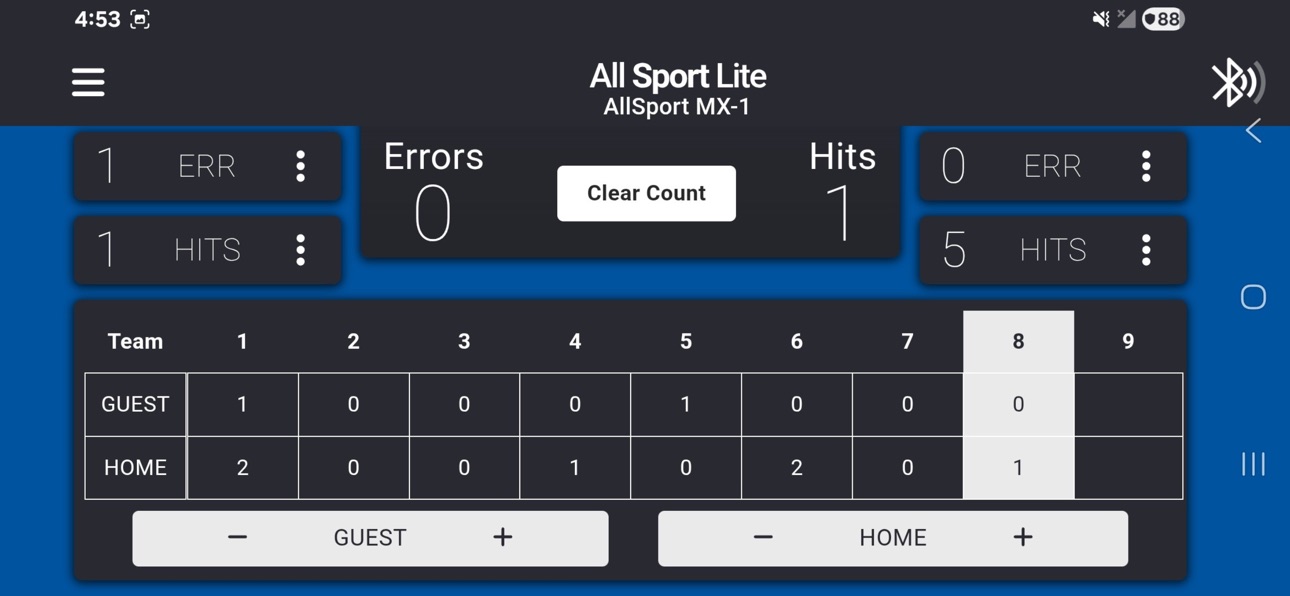
- Added a quick way to clear pitch counts when a new pitcher enters the game.
- Improved inning score display so the active half inning remains blank until completed. A score of 0 is now shown only after the inning is finished with no runs scored.
Important
These baseball scoring improvements require MX‑1 firmware version 4.1 or later.
Description
All Sport Lite (formerly DAK Score) is a straightforward mobile scoring solution from Daktronics. Whether you're a parent volunteer, coach, or recreation center coordinator, All Sport Lite makes it simple for anyone at any age to operate scoreboards with confidence.
Simple. Intuitive. Trusted.
Part of the All Sport family of scoring solutions from Daktronics, All Sport Lite brings scoring capability to your mobile device. Control select Daktronics outdoor scoreboards wirelessly via Bluetooth with the MX-1 interface box (sold separately).
Note: This is a replacement for DAK Score. If you previously used DAK Score, this update brings you All Sport Lite with all the features you rely on, plus improvements for a better experience.
Accessibility
ipadiphonemacrealityDevicetvoswatch
Version history 25 versions
Build 887759413v26.07.062026-07-06 15:02:43
This update adds two highly requested baseball scoring improvements.
What's New
- Added a quick way to clear pitch counts when a new pitcher enters the game.
- Improved inning score display so the active half inning remains blank until completed. A score of 0 is now shown only after the inning is finished with no runs scored.
Important
These baseball scoring improvements require MX‑1 firmware version 4.1 or later.
Build 887301122v26.06.232026-06-24 15:12:58
This update improves Bluetooth connection reliability when your device is locked or enters standby mode.
What's New
- Improved Bluetooth connection handling while devices are locked or asleep
- Reduced unexpected disconnects during gameplay
Build 886741782v26.06.092026-06-09 21:43:42
This update improves input behavior and clock reliability across multiple sports.
What’s New
- Fixed issues where numeric fields required manual clearing before entering new values
- Resolved an issue that could cause the game clock to skip
These updates help provide a smoother and more reliable scoring experience
Build 885725326v26.05.152026-05-15 18:25:51
This update includes behind-the-scenes improvements to keep the app running smoothly.
What’s New
- Updated internal framework and background systems
- General stability and performance improvements
Build 885338976v26.05.062026-05-06 19:32:08
This update improves the firmware update process for better reliability across a wider range of scoreboard configurations.
What’s New
- Improved firmware update handling for older Bluetooth versions
- More reliable update process for MX‑1 and connected scoreboard components
- These improvements help ensure smoother updates and more consistent performance during setup and maintenance.
Build 884515552v26.04.142026-04-14 21:47:09
This update adds support for over‑the‑air firmware updates for compatible scoreboard message displays, along with system stability improvements.
What’s New
- Update Team Name Message Center firmware directly from the app
- Improved reliability and stability when communicating with scoreboard hardware
- Supports Gen 2 Gyrus drivers and Heracles message displays
Build 883433723v26.03.242026-03-25 16:44:47
This update improves clock reliability and synchronization with your scoreboard.
What’s New
- Improved handling of clocks reaching zero to prevent unintended restarts
- More consistent clock behavior between the app and scoreboard
- General stability improvements when starting, stopping, and editing clocks
These updates help ensure more predictable timing during games.
Build 882312976v26.02.092026-02-09 22:27:24
This update improves baseball scoring reliability and alignment with standard scoring rules.
What’s New
- Updated scoring logic so the total score is always calculated from inning scores.
- Improved score subtraction to ensure runs are removed only from valid completed innings.
These changes provide more accurate and predictable baseball scoring throughout the game.
Build 882164953v26.02.042026-02-04 21:03:09
This update improves baseball scoring accuracy and support for extra‑inning games.
What’s New
- Fixed an issue where inning scores of 0 could disappear on the scoreboard as later innings were updated.
- Added support for extra innings in baseball, allowing games to continue beyond 9 innings.
- The app now supports extended inning tracking, and compatible scoreboards can display additional innings correctly.
These improvements help ensure reliable scoring through the full length of the game.
Build 881938096v26.01.282026-01-29 01:59:16
This update adds new diagnostic tools to help verify scoreboard connections and display behavior.
What’s New
- Radio Communication Tests help verify communication between the MX‑1 and the scoreboard to troubleshoot signal and connection issues.
- Scoreboard Digit Tests help confirm that scoreboard digits are wired, addressed, and displaying correctly.
Where to Find Them
Go to Settings → Diagnostics to access these tools. These features are intended for advanced troubleshooting during setup or service.
Build 881576734v26.01.162026-01-18 01:22:55
Firmware Update Reliability & MX‑1 Communication Improvements
This update makes it easier and more reliable to keep your MX‑1 device up to date.
What’s New
- Firmware updates for MX‑1 devices
- Better handling of Bluetooth connection drops during updates
- Clearer feedback if an update can’t complete
- More consistent behavior across iOS and Android
These improvements help ensure your scoreboard stays in sync and performs its best during every game.
How to Update Your MX‑1
Go to Settings → Diagnostics → Check for Updates to install the newest MX‑1 firmware.
If you experience issues, try moving closer to the MX‑1 or restarting the device.
Build 880089473v25.11.252025-11-26 02:20:46
- Fixed a crash that could occur when receiving practice mode segment time updates
Build 880048702v25.11.242025-11-25 02:44:23
Installation Fix for iOS Users
- Fixed app installation failure on iOS 15.8
- Updated minimum iOS requirement to version 15
- Ensures all users can successfully download and install the app
Build 879947310v25.11.202025-11-20 21:20:07
- Improved MX-1 connectivity when switching between multiple devices.
- Enhanced reliability for device connections.
- Ongoing fixes for scoreboard name updates and clock/score synchronization.
- Improvements to settings page user experience
Build 879879171v25.11.182025-11-18 22:34:55
Settings Screen
- Settings now load faster and communicate more reliably with your scoreboard
- Reduced communication issues that could cause Settings to become unresponsive
Demo Mode
- "Demo Mode" replaces "No Device" option - try the app without connecting to hardware
- Makes it easier to explore features or train new operators
Clock Display
- Fixed clock display issues on 2-digit timer scoreboards
- Improved support for 99:59 time format
- Fixed game clock playing not syncing with the scoreboard
Under the Hood
- Optimized how often the app communicates with the MX-1 device
- Better connection stability during Settings changes
- Enabled debug logging to view real-time app logs
Build 879716978v25.11.102025-11-12 23:22:48
Connection Stability: Automatic Bluetooth reconnection when your phone goes to sleep or loses signal
Disconnect Dialog: Cancel button works correctly - keeps you in your active game instead of exiting
Team Names: Display width stays consistent when setting team names
Names reset properly to "HOME" and "GUEST" when starting new games
Build 879343802v25.10.292025-11-03 15:16:14
Rebuilt mobile scoring app from Daktronics. DAK Score is now All Sport Lite—same trusted functionality with a modern interface.
What's New:
- Completely redesigned user interface matching All Sport Pro
- Updated for modern mobile platforms
- Improved button layouts and controls
- Five sports supported: baseball, basketball, football, soccer, and practice timer
Note: This is a replacement for DAK Score.
Build 836480634v2.23.012020-06-26 07:59:02
Added play clock to practice timer. Enabled through the clock menu.
Build 835947910v2.21.012020-05-14 09:15:36
Added practice list and ability to edit segment times.
Build 835541603v2.202020-04-14 23:21:59
Added support for electronic captions for soccer
Build 835093282v2.162020-03-18 16:09:35
Added support for electronic captions for soccer
Build 833343337v2.152019-11-27 15:31:05
Added new button to clear Balls and Strikes in Baseball
Build 833236061v2.132019-10-21 10:17:53
Added manual and auto horn for Basketball, Football, and Soccer.
Build 832502708v2.12.02019-08-24 20:10:58
Version 2.12: Added support for basic basketball scoreboards
Build 831126376v2.102019-04-28 02:32:40
Corrected issue affecting manual-entry of pitch counts.
No pricing data captured yet — comparisons appear once the app has paid storefronts or in-app purchases.
Availability 175 of 175 storefronts
| Region | Language | Price | Ratings | Avg | Version |
|---|---|---|---|---|---|
| US | en-US | Free | 51 | 3.4 | 26.07.06 |
| AE | en-GB | Free | 0 | — | 26.07.06 |
| AF | en-GB | Free | 0 | — | 26.07.06 |
| AG | en-GB | Free | 0 | — | 26.07.06 |
| AI | en-GB | Free | 0 | — | 26.07.06 |
| AL | en-GB | Free | 0 | — | 26.07.06 |
| AM | en-GB | Free | 0 | — | 26.07.06 |
| AO | en-GB | Free | 0 | — | 26.07.06 |
| AR | es-MX | Free | 0 | — | 26.07.06 |
| AT | de-DE | Free | 0 | — | 26.07.06 |
| AU | en-AU | Free | 0 | — | 26.07.06 |
| AZ | en-GB | Free | 0 | — | 26.07.06 |
| BA | en-GB | Free | 0 | — | 26.07.06 |
| BB | en-GB | Free | 0 | — | 26.07.06 |
| BE | en-GB | Free | 0 | — | 26.07.06 |
| BF | en-GB | Free | 0 | — | 26.07.06 |
| BG | en-GB | Free | 0 | — | 26.07.06 |
| BH | en-GB | Free | 0 | — | 26.07.06 |
| BJ | en-GB | Free | 0 | — | 26.07.06 |
| BM | en-GB | Free | 0 | — | 26.07.06 |
| BN | en-GB | Free | 0 | — | 26.07.06 |
| BO | es-MX | Free | 0 | — | 26.07.06 |
| BR | pt-BR | Free | 0 | — | 26.07.06 |
| BS | en-GB | Free | 0 | — | 26.07.06 |
| BT | en-GB | Free | 0 | — | 26.07.06 |
| BW | en-GB | Free | 0 | — | 26.07.06 |
| BY | en-GB | Free | 0 | — | 26.07.06 |
| BZ | en-GB | Free | 0 | — | 26.07.06 |
| CA | en-CA | Free | 0 | — | 26.07.06 |
| CD | en-GB | Free | 0 | — | 26.07.06 |
| CG | en-GB | Free | 0 | — | 26.07.06 |
| CH | de-CH | Free | 0 | — | 26.07.06 |
| CI | fr-FR | Free | 0 | — | 26.07.06 |
| CL | es-MX | Free | 0 | — | 26.07.06 |
| CM | fr-FR | Free | 0 | — | 26.07.06 |
| CN | zh-Hans-CN | Free | 0 | — | 26.07.06 |
| CO | es-MX | Free | 0 | — | 26.07.06 |
| CR | es-MX | Free | 0 | — | 26.07.06 |
| CV | en-GB | Free | 0 | — | 26.07.06 |
| CY | en-GB | Free | 0 | — | 26.07.06 |
| CZ | en-GB | Free | 0 | — | 26.07.06 |
| DE | de-DE | Free | 0 | — | 26.07.06 |
| DK | en-GB | Free | 0 | — | 26.07.06 |
| DM | en-GB | Free | 0 | — | 26.07.06 |
| DO | es-MX | Free | 0 | — | 26.07.06 |
| DZ | en-GB | Free | 0 | — | 26.07.06 |
| EC | es-MX | Free | 0 | — | 26.07.06 |
| EE | en-GB | Free | 0 | — | 26.07.06 |
| EG | en-GB | Free | 0 | — | 26.07.06 |
| ES | es-ES | Free | 0 | — | 26.07.06 |
| FI | en-GB | Free | 0 | — | 26.07.06 |
| FJ | en-GB | Free | 0 | — | 26.07.06 |
| FM | en-GB | Free | 0 | — | 26.07.06 |
| FR | fr-FR | Free | 0 | — | 26.07.06 |
| GA | fr-FR | Free | 0 | — | 26.07.06 |
| GB | en-GB | Free | 0 | — | 26.07.06 |
| GD | en-GB | Free | 0 | — | 26.07.06 |
| GE | en-GB | Free | 0 | — | 26.07.06 |
| GH | en-GB | Free | 0 | — | 26.07.06 |
| GM | en-GB | Free | 0 | — | 26.07.06 |
| GR | en-GB | Free | 0 | — | 26.07.06 |
| GT | es-MX | Free | 0 | — | 26.07.06 |
| GW | en-GB | Free | 0 | — | 26.07.06 |
| GY | en-GB | Free | 0 | — | 26.07.06 |
| HK | zh-Hant-HK | Free | 0 | — | 26.07.06 |
| HN | es-MX | Free | 0 | — | 26.07.06 |
| HR | en-GB | Free | 0 | — | 26.07.06 |
| HU | en-GB | Free | 0 | — | 26.07.06 |
| ID | en-GB | Free | 0 | — | 26.07.06 |
| IE | en-GB | Free | 0 | — | 26.07.06 |
| IL | en-GB | Free | 0 | — | 26.07.06 |
| IN | en-GB | Free | 0 | — | 26.07.06 |
| IQ | en-GB | Free | 0 | — | 26.07.06 |
| IS | en-GB | Free | 0 | — | 26.07.06 |
| IT | it | Free | 0 | — | 26.07.06 |
| JM | en-GB | Free | 0 | — | 26.07.06 |
| JO | en-GB | Free | 0 | — | 26.07.06 |
| JP | ja | Free | 0 | — | 26.07.06 |
| KE | en-GB | Free | 0 | — | 26.07.06 |
| KG | en-GB | Free | 0 | — | 26.07.06 |
| KH | en-GB | Free | 0 | — | 26.07.06 |
| KN | en-GB | Free | 0 | — | 26.07.06 |
| KR | ko | Free | 0 | — | 26.07.06 |
| KW | en-GB | Free | 0 | — | 26.07.06 |
| KY | en-GB | Free | 0 | — | 26.07.06 |
| KZ | en-GB | Free | 0 | — | 26.07.06 |
| LA | en-GB | Free | 0 | — | 26.07.06 |
| LB | en-GB | Free | 0 | — | 26.07.06 |
| LC | en-GB | Free | 0 | — | 26.07.06 |
| LK | en-GB | Free | 0 | — | 26.07.06 |
| LR | en-GB | Free | 0 | — | 26.07.06 |
| LT | en-GB | Free | 0 | — | 26.07.06 |
| LU | en-GB | Free | 0 | — | 26.07.06 |
| LV | en-GB | Free | 0 | — | 26.07.06 |
| LY | en-GB | Free | 0 | — | 26.07.06 |
| MA | en-GB | Free | 0 | — | 26.07.06 |
| MD | en-GB | Free | 0 | — | 26.07.06 |
| ME | en-GB | Free | 0 | — | 26.07.06 |
| MG | en-GB | Free | 0 | — | 26.07.06 |
| MK | en-GB | Free | 0 | — | 26.07.06 |
| ML | en-GB | Free | 0 | — | 26.07.06 |
| MM | en-GB | Free | 0 | — | 26.07.06 |
| MN | en-GB | Free | 0 | — | 26.07.06 |
| MO | zh-Hant-HK | Free | 0 | — | 26.07.06 |
| MR | en-GB | Free | 0 | — | 26.07.06 |
| MS | en-GB | Free | 0 | — | 26.07.06 |
| MT | en-GB | Free | 0 | — | 26.07.06 |
| MU | en-GB | Free | 0 | — | 26.07.06 |
| MV | en-GB | Free | 0 | — | 26.07.06 |
| MW | en-GB | Free | 0 | — | 26.07.06 |
| MX | es-MX | Free | 0 | — | 26.07.06 |
| MY | en-GB | Free | 0 | — | 26.07.06 |
| MZ | en-GB | Free | 0 | — | 26.07.06 |
| NA | en-GB | Free | 0 | — | 26.07.06 |
| NE | en-GB | Free | 0 | — | 26.07.06 |
| NG | en-GB | Free | 0 | — | 26.07.06 |
| NI | es-MX | Free | 0 | — | 26.07.06 |
| NL | nl | Free | 0 | — | 26.07.06 |
| NO | en-GB | Free | 0 | — | 26.07.06 |
| NP | en-GB | Free | 0 | — | 26.07.06 |
| NR | en-GB | Free | 0 | — | 26.07.06 |
| NZ | en-AU | Free | 0 | — | 26.07.06 |
| OM | en-GB | Free | 0 | — | 26.07.06 |
| PA | es-MX | Free | 0 | — | 26.07.06 |
| PE | es-MX | Free | 0 | — | 26.07.06 |
| PG | en-GB | Free | 0 | — | 26.07.06 |
| PH | en-GB | Free | 0 | — | 26.07.06 |
| PK | en-GB | Free | 0 | — | 26.07.06 |
| PL | en-GB | Free | 0 | — | 26.07.06 |
| PT | pt-PT | Free | 0 | — | 26.07.06 |
| PW | en-GB | Free | 0 | — | 26.07.06 |
| PY | es-MX | Free | 0 | — | 26.07.06 |
| QA | en-GB | Free | 0 | — | 26.07.06 |
| RO | en-GB | Free | 0 | — | 26.07.06 |
| RS | en-GB | Free | 0 | — | 26.07.06 |
| RU | ru | Free | 0 | — | 26.07.06 |
| RW | en-GB | Free | 0 | — | 26.07.06 |
| SA | en-GB | Free | 0 | — | 26.07.06 |
| SB | en-GB | Free | 0 | — | 26.07.06 |
| SC | en-GB | Free | 0 | — | 26.07.06 |
| SE | sv | Free | 0 | — | 26.07.06 |
| SG | en-GB | Free | 0 | — | 26.07.06 |
| SI | en-GB | Free | 0 | — | 26.07.06 |
| SK | en-GB | Free | 0 | — | 26.07.06 |
| SL | en-GB | Free | 0 | — | 26.07.06 |
| SN | en-GB | Free | 0 | — | 26.07.06 |
| SR | en-GB | Free | 0 | — | 26.07.06 |
| ST | en-GB | Free | 0 | — | 26.07.06 |
| SV | es-MX | Free | 0 | — | 26.07.06 |
| SZ | en-GB | Free | 0 | — | 26.07.06 |
| TC | en-GB | Free | 0 | — | 26.07.06 |
| TD | en-GB | Free | 0 | — | 26.07.06 |
| TH | en-GB | Free | 0 | — | 26.07.06 |
| TJ | en-GB | Free | 0 | — | 26.07.06 |
| TM | en-GB | Free | 0 | — | 26.07.06 |
| TN | en-GB | Free | 0 | — | 26.07.06 |
| TO | en-GB | Free | 0 | — | 26.07.06 |
| TR | en-GB | Free | 0 | — | 26.07.06 |
| TT | en-GB | Free | 0 | — | 26.07.06 |
| TW | zh-Hant-TW | Free | 0 | — | 26.07.06 |
| TZ | en-GB | Free | 0 | — | 26.07.06 |
| UA | en-GB | Free | 0 | — | 26.07.06 |
| UG | en-GB | Free | 0 | — | 26.07.06 |
| UY | en-GB | Free | 0 | — | 26.07.06 |
| UZ | en-GB | Free | 0 | — | 26.07.06 |
| VC | en-GB | Free | 0 | — | 26.07.06 |
| VE | es-MX | Free | 0 | — | 26.07.06 |
| VG | en-GB | Free | 0 | — | 26.07.06 |
| VN | en-GB | Free | 0 | — | 26.07.06 |
| VU | en-GB | Free | 0 | — | 26.07.06 |
| XK | en-GB | Free | 0 | — | 26.07.06 |
| YE | en-GB | Free | 0 | — | 26.07.06 |
| ZA | en-GB | Free | 0 | — | 26.07.06 |
| ZM | en-GB | Free | 0 | — | 26.07.06 |
| ZW | en-GB | Free | 0 | — | 26.07.06 |
Change log 29 changes · PY
✎
releaseNotes updated
This update adds two highly requested baseball scoring improvements.
What's New
- Added a quick way to clear pitch counts when a new pitcher enters the game.
-
✎
description updated
All Sport Lite (formerly DAK Score) is a straightforward mobile scoring solution from Daktronics. Whether you're a parent volunteer, coach, or recreation center
✎
subtitle updated
Daktronics scoring
✎
name updated
All Sport Lite
◆
Version 26.07.06 released
This update adds two highly requested baseball scoring improvements.
What's New
- Added a quick way to clear pitch counts when a new pitcher enters the game.
- Improved inning score display so the active half inning remains blank until com
◆
Version 26.06.23 released
This update improves Bluetooth connection reliability when your device is locked or enters standby mode.
What's New
- Improved Bluetooth connection handling while devices are locked or asleep
- Reduced unexpected disconnects during gamepla
◆
Version 26.06.09 released
This update improves input behavior and clock reliability across multiple sports.
What’s New
- Fixed issues where numeric fields required manual clearing before entering new values
- Resolved an issue that could cause the game clock to sk
◆
Version 26.05.15 released
This update includes behind-the-scenes improvements to keep the app running smoothly.
What’s New
- Updated internal framework and background systems
- General stability and performance improvements
◆
Version 26.05.06 released
This update improves the firmware update process for better reliability across a wider range of scoreboard configurations.
What’s New
- Improved firmware update handling for older Bluetooth versions
- More reliable update process for MX‑1
◆
Version 26.04.14 released
This update adds support for over‑the‑air firmware updates for compatible scoreboard message displays, along with system stability improvements.
What’s New
- Update Team Name Message Center firmware directly from the app
- Improved reliab
◆
Version 26.03.24 released
This update improves clock reliability and synchronization with your scoreboard.
What’s New
- Improved handling of clocks reaching zero to prevent unintended restarts
- More consistent clock behavior between the app and scoreboard
- Gener
◆
Version 26.02.09 released
This update improves baseball scoring reliability and alignment with standard scoring rules.
What’s New
- Updated scoring logic so the total score is always calculated from inning scores.
- Improved score subtraction to ensure runs are re
◆
Version 26.02.04 released
This update improves baseball scoring accuracy and support for extra‑inning games.
What’s New
- Fixed an issue where inning scores of 0 could disappear on the scoreboard as later innings were updated.
- Added support for extra innings in b
◆
Version 26.01.28 released
This update adds new diagnostic tools to help verify scoreboard connections and display behavior.
What’s New
- Radio Communication Tests help verify communication between the MX‑1 and the scoreboard to troubleshoot signal and connection is
◆
Version 26.01.16 released
Firmware Update Reliability & MX‑1 Communication Improvements
This update makes it easier and more reliable to keep your MX‑1 device up to date.
What’s New
- Firmware updates for MX‑1 devices
- Better handling of Bluetooth connection drop
◆
Version 25.11.25 released
- Fixed a crash that could occur when receiving practice mode segment time updates
◆
Version 25.11.24 released
Installation Fix for iOS Users
- Fixed app installation failure on iOS 15.8
- Updated minimum iOS requirement to version 15
- Ensures all users can successfully download and install the app
◆
Version 25.11.20 released
- Improved MX-1 connectivity when switching between multiple devices.
- Enhanced reliability for device connections.
- Ongoing fixes for scoreboard name updates and clock/score synchronization.
- Improvements to settings page user experienc
◆
Version 25.11.18 released
Settings Screen
- Settings now load faster and communicate more reliably with your scoreboard
- Reduced communication issues that could cause Settings to become unresponsive
Demo Mode
- "Demo Mode" replaces "No Device" option - try the app
◆
Version 25.11.10 released
Connection Stability: Automatic Bluetooth reconnection when your phone goes to sleep or loses signal
Disconnect Dialog: Cancel button works correctly - keeps you in your active game instead of exiting
Team Names: Display width stays consis
◆
Version 25.10.29 released
Rebuilt mobile scoring app from Daktronics. DAK Score is now All Sport Lite—same trusted functionality with a modern interface.
What's New:
- Completely redesigned user interface matching All Sport Pro
- Updated for modern mobile platforms
◆
Version 2.23.01 released
Added play clock to practice timer. Enabled through the clock menu.
◆
Version 2.21.01 released
Added practice list and ability to edit segment times.
◆
Version 2.20 released
Added support for electronic captions for soccer
◆
Version 2.16 released
Added support for electronic captions for soccer
◆
Version 2.15 released
Added new button to clear Balls and Strikes in Baseball
◆
Version 2.13 released
Added manual and auto horn for Basketball, Football, and Soccer.
◆
Version 2.12.0 released
Version 2.12: Added support for basic basketball scoreboards
◆
Version 2.10 released
Corrected issue affecting manual-entry of pitch counts.