Home › Photo & Video

 ZM
ZM
 USen-US
 TWzh-Hant-TW
 DEde-DE
 CAen-CA
 HKzh-Hant-HK
 GBen-GB
 CNzh-Hans-CN
 NLnl
NLnl AUen-AU
 CHde-CH
 INen-GB
 VNen-GB
 ITit
ITit FRfr-FR
 MYen-GB
 SAen-GB
 THen-GB
 DKen-GB
 NOen-GB
 PHen-GB
 PLen-GB
 SGen-GB
 BRpt-BR
 IDen-GB
 KWen-GB
 MXes-MX
 NZen-AU
 SEsv
SEsv ZAen-GB
 AEen-GB
 BEen-GB
 BGen-GB
 DOes-MX
 ECes-MX
 ESes-ES
 GRen-GB
 IEen-GB
 KHen-GB
 KRko
KRko KYen-GB
 LUen-GB
 NPen-GB
 OMen-GB
 ROen-GB
 RUru
RUru SIen-GB
 SKen-GB
 TRen-GB
 TTen-GB
 UAen-GB
 AFen-GB
 AGen-GB
 AIen-GB
 ALen-GB
 AMen-GB
 AOen-GB
 ARes-MX
 ATde-DE
 AZen-GB
 BAen-GB
 BBen-GB
 BFen-GB
 BHen-GB
 BJen-GB
 BMen-GB
 BNen-GB
 BOes-MX
 BSen-GB
 BTen-GB
 BWen-GB
 BYen-GB
 BZen-GB
 CDen-GB
 CGen-GB
 CIfr-FR
 CLes-MX
 CMfr-FR
 COes-MX
 CRes-MX
 CVen-GB
 CYen-GB
 CZen-GB
 DMen-GB
 DZen-GB
 EEen-GB
 EGen-GB
 FIen-GB
 FJen-GB
 FMen-GB
 GAfr-FR
 GDen-GB
 GEen-GB
 GHen-GB
 GMen-GB
 GTes-MX
 GWen-GB
 GYen-GB
 HNes-MX
 HRen-GB
 HUen-GB
 ILen-GB
 IQen-GB
 ISen-GB
 JMen-GB
 JOen-GB
 JPja
JPja KEen-GB
 KGen-GB
 KNen-GB
 KZen-GB
 LAen-GB
 LBen-GB
 LCen-GB
 LKen-GB
 LRen-GB
 LTen-GB
 LVen-GB
 LYen-GB
 MAen-GB
 MDen-GB
 MEen-GB
 MGen-GB
 MKen-GB
 MLen-GB
 MMen-GB
 MNen-GB
 MOzh-Hant-HK
 MRen-GB
 MSen-GB
 MTen-GB
 MUen-GB
 MVen-GB
 MWen-GB
 MZen-GB
 NAen-GB
 NEen-GB
 NGen-GB
 NIes-MX
 NRen-GB
 PAes-MX
 PEes-MX
 PGen-GB
 PKen-GB
 PTpt-PT
 PWen-GB
 PYes-MX
 QAen-GB
 RSen-GB
 RWen-GB
 SBen-GB
 SCen-GB
 SLen-GB
 SNen-GB
 SRen-GB
 STen-GB
 SVes-MX
 SZen-GB
 TCen-GB
 TDen-GB
 TJen-GB
 TMen-GB
 TNen-GB
 TOen-GB
 TZen-GB
 UGen-GB
 UYen-GB
 UZen-GB
 VCen-GB
 VEes-MX
 VGen-GB
 VUen-GB
 XKen-GB
 YEen-GBZMen-GB
 ZWen-GB
175 of 175 storefronts
Content in en-US
Content in en-US
Information
Preview 3 platforms
iPhone 10 images




iPad 10 images




Mac 10 images





What’s New Version 3.8.6
This update refines the "Zoom on Faces" and "Zoom Out from Faces" animations. They now avoid excessive zooming and follow a smoother, more natural movement path.
In addition, we’ve made several minor user interface improvements and enhanced overall stability.
Description
Enjoy Your Photos and Videos Like Never Before!
With SlideFlow, turn your favorite moments into stunning, animated slideshows — on your iPhone, iPad, Mac, or even TV. Create breathtaking slideshows in seconds, with no hassle.
Customize Your Slideshow with Ease:
• Add music to set the perfect mood. Choose from a wide selection of built-in tracks across various genres, or add your own.
• Use seamless transitions between photos for a polished, professional look.
• Bring your photos to life with smart animations:
• show full image, then zoom in on faces.
• or vice versa: show faces, then zoom out to reveal the full scene.
• Apply stylish filters to enjoy your photos and videos in new ways.
• Add overlays with text or images.
• Shuffle photos & videos for a fresh slideshow each time.
• Loop slideshows to keep enjoying them endlessly.
• Define media settings both on the slideshow and individual media levels.
Instant Slideshow Playback
SlideFlow generates slideshows instantly — start enjoying your memories in seconds, no long waiting for video generation.
Watch Slideshows, Photos, and Videos on Your TV
Cast slideshows or individual photos & videos to your TV. Just connect your iPhone, iPad, or Mac to the same Wi-Fi or Ethernet network. Works with many DLNA-compatible TVs.
Export and share your creations as videos
Export your slideshows in horizontal, vertical, or square format, then share with friends or social media. Choose the resolution and format that best suits your needs (quality vs. smaller file size).
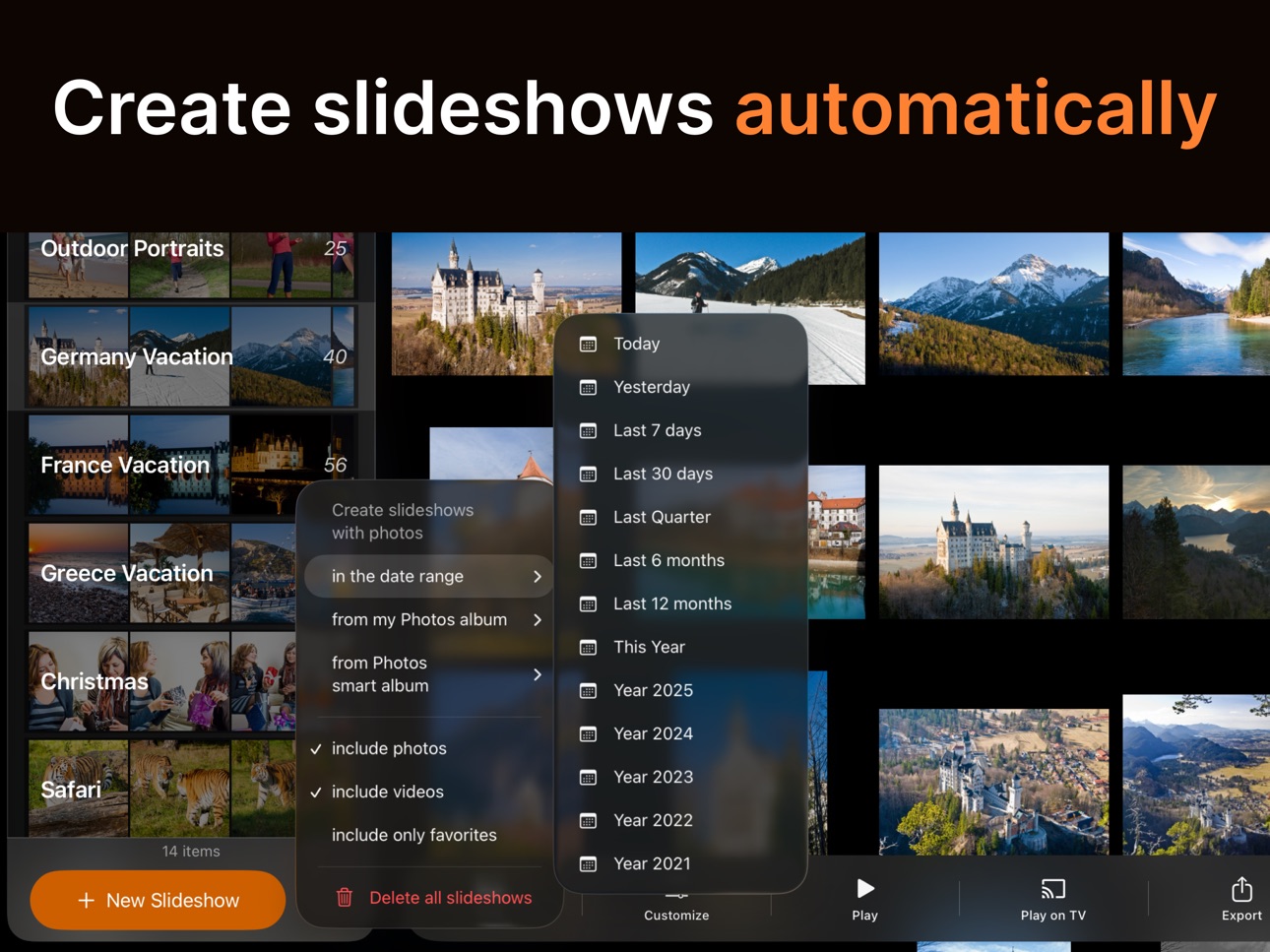
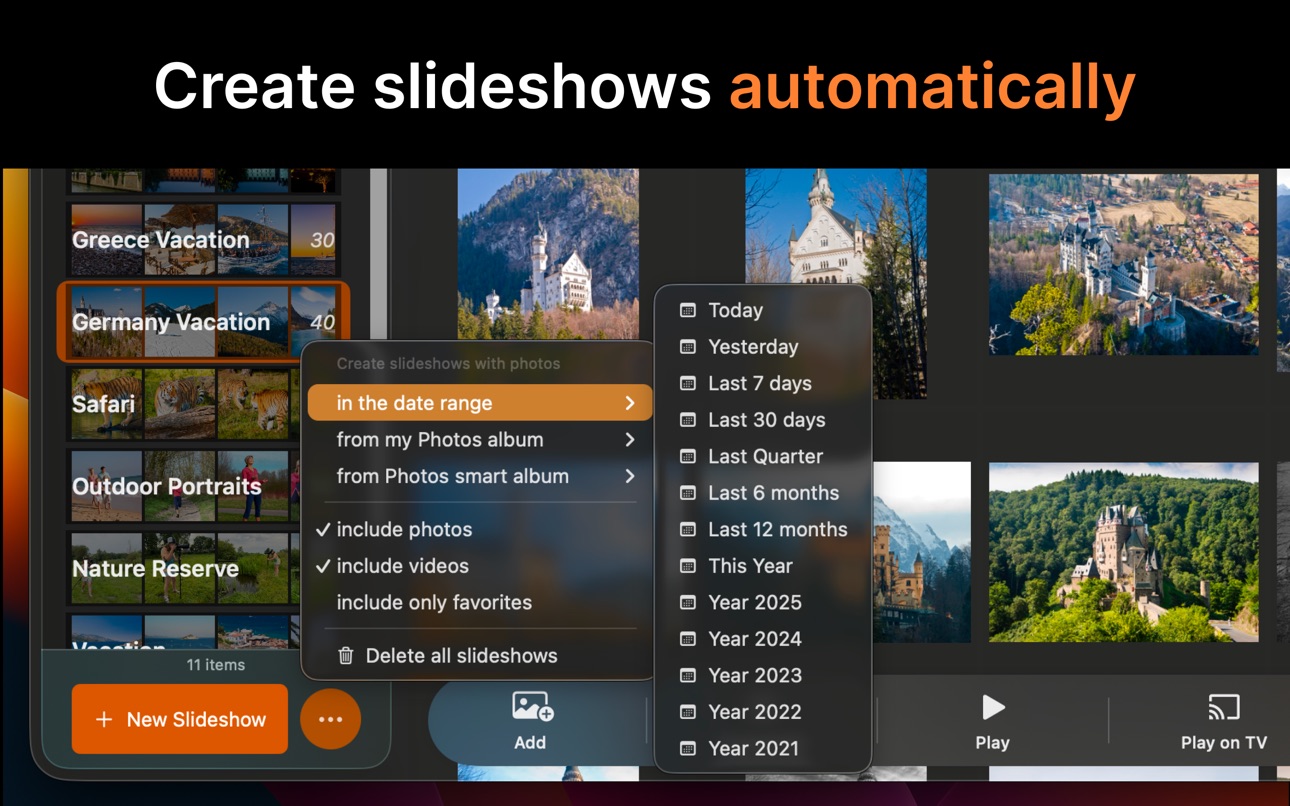
Create Slideshows Automatically
SlideFlow automatically creates slideshows with photos and videos from your Photos Library in the given date range. Either saved & synced slideshows, or Moments - temporary slideshows intended to explore your memories without the slideshow management.
Create Slideshows from Photos Albums
Easily create a slideshow from any Photos Library album with a few clicks.
Seamless Sync Across Devices
With iCloud sync enabled, your slideshows are effortlessly synced across all your devices—iPhones, iPads, and Macs. (Note: Works with photos synced via iCloud Photo Library.)
Define Your Slideshow Preferences
Define default slideshow settings once, and they will apply to all newly created slideshows and Moments.
Photos Library and Files Support
Enjoy photos and videos both from the Photos Library and Files.
--
Terms of Use: https://veprit.com/eula.html
Privacy Policy: https://veprit.com/VeprIT-PrivacyPolicy.pdf
In-App Purchases ZM pricing
SlideFlow Subscriptions Subscription
SlideFlow Yearly · Yearly—
SlideFlow Monthly · Monthly—
SlideFlow Weekly · 7 days—
One-Time Purchases
SlideFlow Forever—
Capabilities
In-App Purchases
Accessibility
ipadiphonemacrealityDevicetvoswatch
Version history 25 versions
Build 887521527v3.8.62026-06-27 20:57:24
This update refines the "Zoom on Faces" and "Zoom Out from Faces" animations. They now avoid excessive zooming and follow a smoother, more natural movement path.
In addition, we’ve made several minor user interface improvements and enhanced overall stability.
Build 887096393v3.8.52026-06-23 18:28:27
This update delivers major performance improvements, including faster loading of large slideshows and smoother playback.
Build 886516267v3.8.42026-06-04 18:03:50
This update fixes a potential crash that could occur when deleting selected media from a slideshow.
Build 886284803v3.8.32026-06-02 22:26:40
This update brings many user interface improvements, including:
• Multiple media selection in Slideshows and Moments. You can now reorder, delete, and manage multiple items at once to save time.
• Improved connectivity with some TVs.
Build 885629322v3.8.22026-05-14 22:41:46
Improved automatic slideshow generation for selected date ranges:
• Better-balanced media distribution between generated slideshows.
• Media capture locations are now considered when possible and included in slideshow names.
These improvements apply to both slideshows and Moments (temporary slideshows).
Build 884726713v3.8.12026-04-22 01:49:48
• Easily reorder slideshows by dragging them.
• Create faster, more dynamic slideshows with durations as short as 1 sec.
• Minor UI improvements
Build 884142435v3.82026-04-08 17:10:04
This major update introduces:
• Media Filters
Apply stylish filters (creative effects) to your slideshow photos and videos.
• Individual Media Settings
Customize each photo or video individually. Set transition, duration, animation, and background style for photos, or apply filters to both photos and videos—with instant preview.
Individual settings override the slideshow’s global settings.
• Multiple Transitions Selection
Select multiple transitions for a slideshow. They’ll be applied in random order for more dynamic results.
• Transitions Preview
Preview transitions directly in the slideshow settings to see how they look before applying them.
• Extended Default Settings
Choose your favorite transitions and filters as defaults for all newly created slideshows and moments.
• Smoother Built-In Music
Built-in music tracks now include fade-in and fade-out effects for seamless playback.
Plus: various UI improvements across the app.
Build 883577275v3.72026-03-24 17:41:07
This update takes slideshow export to the next level with new options:
• 4K (Ultra HD) resolution
Delivers the highest video quality, but increases file size.
Use this option only if your original media is high quality.
• Video codec selection: H.264 or HEVC (H.265)
H.264 offers better compatibility and works on most (especially older) devices, but results in larger files.
HEVC (H.265) produces smaller files, but may not play on older devices.
The Export screen now includes improved progress indication.
This update also enhances the drag & drop experience for slideshow media. Reordering and file import are now more reliable, with clearer feedback showing where items will be placed.
Build 883456130v3.6.22026-03-17 20:20:02
You can now import music tracks from the Music app.
Please note the following limitations:
• Apple Music streaming content is not supported due to copyright restrictions.
• Imported tracks are only available on the iPhone or iPad where they were added. They won’t sync to your other iPhones, iPads, or Macs. To sync music across devices, import audio files or use the built-in tracks.
This update also improves accessibility. Many screens now work better with larger text sizes.
Build 883374579v3.6.12026-03-15 00:46:54
SlideFlow is now available in 10 new languages: German, French, Spanish, Russian, Italian, Portuguese, Japanese, Chinese (Simplified and Traditional), and Korean.
This update also includes several UI improvements.
Build 882290584v3.62026-02-20 00:12:03
This major update significantly improves real-time slideshow playback on iPhone and iPad:
• Video playback now shows progress and supports seeking
• Media is displayed instantly, without delay
• Faster switching between selected media
• Smoother, generally faster playback start
• Improved preloading of offline media when starting playback
Real-time slideshow and video playback on TV is also improved:
• More reliable player controls
• You can now pause and resume playback on TV
• Video playback now shows progress and supports seeking
• Improved preloading of offline media when starting slideshow or video playback
• Note: due to TV buffering, playback on TV may still be slightly delayed
Plus: multiple UI and UX improvements, including more flexible filtering in the “Play on TV” browser.
Build 881456543v3.52026-01-20 07:19:11
This update brings multiple major and minor user interface improvements, including:
• Sorting and filtering in Play on TV, making it easier to find photos and videos to play on your TV
• Zoomable slideshow media thumbnails
• Improved manual reordering of slideshow media
• Updated design adapted to the new iOS 26 interface style
• Support for using the app with Files only, without requiring Photos Library access
• Better use of screen space on iPhone in the slideshow view
• Slideshow view now works faster and smoother with large slideshows, as well as with limited Photo Library access
• Many additional UI refinements and improvements
Build 878927546v3.42025-10-28 11:47:13
You can now add overlays with titles and images to your slideshows!
Go to slideshow settings to add up to five overlays and customize each one exactly how you like. Overlays work everywhere — when playing slideshows on your Mac, iPhone, or iPad, casting them to a TV, or exporting them as videos.
Build 878522228v3.3.12025-10-01 00:48:02
This update makes the live slideshow player on iPhone & iPad smoother and more responsive, especially at startup. It also improves the accuracy of the playing media indicator and includes several minor user interface refinements.
Build 877831750v3.32025-09-04 12:53:47
You can now play any photo or video file directly on your TV — not just items from your Library!
Build 876070786v3.22025-07-12 09:45:46
Introducing a new photo animation: “Zoom Out from Faces”.
If a photo contains faces, it starts by showing them zoomed in — then zooms out to reveal the full image. While “Zoom on Faces” first introduces the environment (the full photo) and then focuses on people, “Zoom Out from Faces” does the opposite: it begins with the people, then reveals the environment they’re in.
To use both animations in random order, just select “Random”.
Build 875234295v3.12025-06-01 19:54:10
New in this update: Adaptive Photo Background
We’ve added a highly requested feature! The new “Adaptive Photo Background” setting adds a blurred background behind your photos to better fill the screen and avoid black bars. Prefer the classic look? Just turn it off to keep the traditional black background.
As always, you can set your default preference in Default Slideshow Settings.
Build 874731331v3.0.12025-05-15 00:37:46
• You can now export square videos — perfect for Instagram or Facebook posts!
• Want smaller file sizes? Try the new "Reduce Size" option to export low-res, low-bitrate videos.
• Plus, we’ve made some small UI tweaks to keep things running smoothly.
Build 874475403v3.02025-05-03 17:16:11
Big Upgrade — Version 3.0 is Here!
Get ready for a better slideshow experience with exciting new features and improvements:
• Beam any photo or video to your TV — not just slideshows! Instantly share favorite moments in stunning fullscreen, right from your Photos Library.
• Expanded TV support — many TVs that previously didn’t work (including popular LG models) now play slideshows and media beautifully.
• Improved image quality when playing slideshows on iPhone, iPad, and Mac.
• Better “Zoom on Faces” animation quality across all platforms — including exported videos.
• Plus: Various UI and experience improvements throughout the app.
Enjoy the upgrade!
Build 873716797v2.82025-04-06 02:22:19
This update brings a highly requested feature! You can now add photos and videos to your slideshows not only from your Photos library but also from files, giving you more flexibility in creating your perfect slideshow.
Build 873052135v2.7.22025-03-07 22:34:19
This update adds the option to shuffle photos and videos in your slideshows, allowing them to play in a random order each time. It also includes improvements to connection reliability with certain TVs.
Build 872817459v2.7.12025-02-26 23:30:23
This update brings several improvements to automatic slideshow and Moments generation, along with enhancements to adding media to existing slideshows.
When adding media from date ranges or Photos albums, you can now:
• Add only photos
• Add only videos
• Add only favorites
This update also includes various UI improvements.
Additionally, a new slide transition, “Fade In,” has been introduced. It works similarly to “Cross Dissolve” but offers a more pronounced “additive” effect, which some users prefer.
Build 872353819v2.72025-02-11 22:17:37
This major update makes creating and customizing slideshows even easier!
You can now:
• Create slideshows from a selected date range or album.
• Add photos and videos to existing slideshows from a date range or album.
Plus, this update introduces:
• Customizable default slideshow settings for new slideshows and Moments. You can now set the default photo duration, animation, transition, enable or disable background music, and more.
• Improved photo selection by date range.
• Better sorting in automatically created slideshows.
• Various UI enhancements for a smoother experience.
Build 872186847v2.6.52025-02-03 18:50:35
This update brings several user interface enhancements and bug fixes, ensuring a smoother experience—especially on older iOS versions.
Build 871937799v2.6.42025-01-31 08:04:17
This update includes user experience improvements and fixes an occasional issue that could cause a slight color shift in the slideshow player.
Price history by region
Currency
Show
Columns
Search
Availability 175 of 175 storefronts
| Region | Language | Price | Ratings | Avg | Version |
|---|---|---|---|---|---|
| US | en-US | Free | 184 | 4.4 | 3.8.6 |
| TW | zh-Hant-TW | Free | 80 | 4.8 | 3.8.6 |
| DE | de-DE | Free | 55 | 4.1 | 3.8.6 |
| CA | en-CA | Free | 33 | 4.5 | 3.8.6 |
| HK | zh-Hant-HK | Free | 25 | 4.1 | 3.8.6 |
| GB | en-GB | Free | 18 | 4.1 | 3.8.6 |
| CN | zh-Hans-CN | Free | 13 | 4.8 | 3.8.6 |
| NL | nl | Free | 13 | 4.5 | 3.8.6 |
| AU | en-AU | Free | 12 | 4.5 | 3.8.6 |
| CH | de-CH | Free | 12 | 4.3 | 3.8.6 |
| IN | en-GB | Free | 9 | 4.8 | 3.8.6 |
| VN | en-GB | Free | 7 | 4.3 | 3.8.6 |
| IT | it | Free | 6 | 4.2 | 3.8.6 |
| FR | fr-FR | Free | 4 | 4.0 | 3.8.6 |
| MY | en-GB | Free | 4 | 4.5 | 3.8.6 |
| SA | en-GB | Free | 4 | 5.0 | 3.8.6 |
| TH | en-GB | Free | 4 | 4.8 | 3.8.6 |
| DK | en-GB | Free | 3 | 3.3 | 3.8.6 |
| NO | en-GB | Free | 3 | 3.7 | 3.8.6 |
| PH | en-GB | Free | 3 | 5.0 | 3.8.6 |
| PL | en-GB | Free | 3 | 5.0 | 3.8.6 |
| SG | en-GB | Free | 3 | 4.7 | 3.8.6 |
| BR | pt-BR | Free | 2 | 5.0 | 3.8.6 |
| ID | en-GB | Free | 2 | 5.0 | 3.8.6 |
| KW | en-GB | Free | 2 | 4.5 | 3.8.6 |
| MX | es-MX | Free | 2 | 5.0 | 3.8.6 |
| NZ | en-AU | Free | 2 | 3.0 | 3.8.6 |
| SE | sv | Free | 2 | 3.0 | 3.8.6 |
| ZA | en-GB | Free | 2 | 5.0 | 3.8.6 |
| AE | en-GB | Free | 1 | 5.0 | 3.8.6 |
| BE | en-GB | Free | 1 | 5.0 | 3.8.6 |
| BG | en-GB | Free | 1 | 5.0 | 3.8.6 |
| DO | es-MX | Free | 1 | 1.0 | 3.8.6 |
| EC | es-MX | Free | 1 | 5.0 | 3.8.6 |
| ES | es-ES | Free | 1 | 1.0 | 3.8.6 |
| GR | en-GB | Free | 1 | 5.0 | 3.8.6 |
| IE | en-GB | Free | 1 | 5.0 | 3.8.6 |
| KH | en-GB | Free | 1 | 5.0 | 3.8.6 |
| KR | ko | Free | 1 | 4.0 | 3.8.6 |
| KY | en-GB | Free | 1 | 5.0 | 3.8.6 |
| LU | en-GB | Free | 1 | 4.0 | 3.8.6 |
| NP | en-GB | Free | 1 | 5.0 | 3.8.6 |
| OM | en-GB | Free | 1 | 5.0 | 3.8.6 |
| RO | en-GB | Free | 1 | 5.0 | 3.8.6 |
| RU | ru | Free | 1 | 5.0 | 3.8.6 |
| SI | en-GB | Free | 1 | 5.0 | 3.8.6 |
| SK | en-GB | Free | 1 | 5.0 | 3.8.6 |
| TR | en-GB | Free | 1 | 5.0 | 3.8.6 |
| TT | en-GB | Free | 1 | 5.0 | 3.8.6 |
| UA | en-GB | Free | 1 | 5.0 | 3.8.6 |
| AF | en-GB | Free | 0 | — | 3.8.6 |
| AG | en-GB | Free | 0 | — | 3.8.6 |
| AI | en-GB | Free | 0 | — | 3.8.6 |
| AL | en-GB | Free | 0 | — | 3.8.6 |
| AM | en-GB | Free | 0 | — | 3.8.6 |
| AO | en-GB | Free | 0 | — | 3.8.6 |
| AR | es-MX | Free | 0 | — | 3.8.6 |
| AT | de-DE | Free | 0 | — | 3.8.6 |
| AZ | en-GB | Free | 0 | — | 3.8.6 |
| BA | en-GB | Free | 0 | — | 3.8.6 |
| BB | en-GB | Free | 0 | — | 3.8.6 |
| BF | en-GB | Free | 0 | — | 3.8.6 |
| BH | en-GB | Free | 0 | — | 3.8.6 |
| BJ | en-GB | Free | 0 | — | 3.8.6 |
| BM | en-GB | Free | 0 | — | 3.8.6 |
| BN | en-GB | Free | 0 | — | 3.8.6 |
| BO | es-MX | Free | 0 | — | 3.8.6 |
| BS | en-GB | Free | 0 | — | 3.8.6 |
| BT | en-GB | Free | 0 | — | 3.8.6 |
| BW | en-GB | Free | 0 | — | 3.8.6 |
| BY | en-GB | Free | 0 | — | 3.8.6 |
| BZ | en-GB | Free | 0 | — | 3.8.6 |
| CD | en-GB | Free | 0 | — | 3.8.6 |
| CG | en-GB | Free | 0 | — | 3.8.6 |
| CI | fr-FR | Free | 0 | — | 3.8.6 |
| CL | es-MX | Free | 0 | — | 3.8.6 |
| CM | fr-FR | Free | 0 | — | 3.8.6 |
| CO | es-MX | Free | 0 | — | 3.8.6 |
| CR | es-MX | Free | 0 | — | 3.8.6 |
| CV | en-GB | Free | 0 | — | 3.8.6 |
| CY | en-GB | Free | 0 | — | 3.8.6 |
| CZ | en-GB | Free | 0 | — | 3.8.6 |
| DM | en-GB | Free | 0 | — | 3.8.6 |
| DZ | en-GB | Free | 0 | — | 3.8.6 |
| EE | en-GB | Free | 0 | — | 3.8.6 |
| EG | en-GB | Free | 0 | — | 3.8.6 |
| FI | en-GB | Free | 0 | — | 3.8.6 |
| FJ | en-GB | Free | 0 | — | 3.8.6 |
| FM | en-GB | Free | 0 | — | 3.8.6 |
| GA | fr-FR | Free | 0 | — | 3.8.6 |
| GD | en-GB | Free | 0 | — | 3.8.6 |
| GE | en-GB | Free | 0 | — | 3.8.6 |
| GH | en-GB | Free | 0 | — | 3.8.6 |
| GM | en-GB | Free | 0 | — | 3.8.6 |
| GT | es-MX | Free | 0 | — | 3.8.6 |
| GW | en-GB | Free | 0 | — | 3.8.6 |
| GY | en-GB | Free | 0 | — | 3.8.6 |
| HN | es-MX | Free | 0 | — | 3.8.6 |
| HR | en-GB | Free | 0 | — | 3.8.6 |
| HU | en-GB | Free | 0 | — | 3.8.6 |
| IL | en-GB | Free | 0 | — | 3.8.6 |
| IQ | en-GB | Free | 0 | — | 3.8.6 |
| IS | en-GB | Free | 0 | — | 3.8.6 |
| JM | en-GB | Free | 0 | — | 3.8.6 |
| JO | en-GB | Free | 0 | — | 3.8.6 |
| JP | ja | Free | 0 | — | 3.8.6 |
| KE | en-GB | Free | 0 | — | 3.8.6 |
| KG | en-GB | Free | 0 | — | 3.8.6 |
| KN | en-GB | Free | 0 | — | 3.8.6 |
| KZ | en-GB | Free | 0 | — | 3.8.6 |
| LA | en-GB | Free | 0 | — | 3.8.6 |
| LB | en-GB | Free | 0 | — | 3.8.6 |
| LC | en-GB | Free | 0 | — | 3.8.6 |
| LK | en-GB | Free | 0 | — | 3.8.6 |
| LR | en-GB | Free | 0 | — | 3.8.6 |
| LT | en-GB | Free | 0 | — | 3.8.6 |
| LV | en-GB | Free | 0 | — | 3.8.6 |
| LY | en-GB | Free | 0 | — | 3.8.6 |
| MA | en-GB | Free | 0 | — | 3.8.6 |
| MD | en-GB | Free | 0 | — | 3.8.6 |
| ME | en-GB | Free | 0 | — | 3.8.6 |
| MG | en-GB | Free | 0 | — | 3.8.6 |
| MK | en-GB | Free | 0 | — | 3.8.6 |
| ML | en-GB | Free | 0 | — | 3.8.6 |
| MM | en-GB | Free | 0 | — | 3.8.6 |
| MN | en-GB | Free | 0 | — | 3.8.6 |
| MO | zh-Hant-HK | Free | 0 | — | 3.8.6 |
| MR | en-GB | Free | 0 | — | 3.8.6 |
| MS | en-GB | Free | 0 | — | 3.8.6 |
| MT | en-GB | Free | 0 | — | 3.8.6 |
| MU | en-GB | Free | 0 | — | 3.8.6 |
| MV | en-GB | Free | 0 | — | 3.8.6 |
| MW | en-GB | Free | 0 | — | 3.8.6 |
| MZ | en-GB | Free | 0 | — | 3.8.6 |
| NA | en-GB | Free | 0 | — | 3.8.6 |
| NE | en-GB | Free | 0 | — | 3.8.6 |
| NG | en-GB | Free | 0 | — | 3.8.6 |
| NI | es-MX | Free | 0 | — | 3.8.6 |
| NR | en-GB | Free | 0 | — | 3.8.6 |
| PA | es-MX | Free | 0 | — | 3.8.6 |
| PE | es-MX | Free | 0 | — | 3.8.6 |
| PG | en-GB | Free | 0 | — | 3.8.6 |
| PK | en-GB | Free | 0 | — | 3.8.6 |
| PT | pt-PT | Free | 0 | — | 3.8.6 |
| PW | en-GB | Free | 0 | — | 3.8.6 |
| PY | es-MX | Free | 0 | — | 3.8.6 |
| QA | en-GB | Free | 0 | — | 3.8.6 |
| RS | en-GB | Free | 0 | — | 3.8.6 |
| RW | en-GB | Free | 0 | — | 3.8.6 |
| SB | en-GB | Free | 0 | — | 3.8.6 |
| SC | en-GB | Free | 0 | — | 3.8.6 |
| SL | en-GB | Free | 0 | — | 3.8.6 |
| SN | en-GB | Free | 0 | — | 3.8.6 |
| SR | en-GB | Free | 0 | — | 3.8.6 |
| ST | en-GB | Free | 0 | — | 3.8.6 |
| SV | es-MX | Free | 0 | — | 3.8.6 |
| SZ | en-GB | Free | 0 | — | 3.8.6 |
| TC | en-GB | Free | 0 | — | 3.8.6 |
| TD | en-GB | Free | 0 | — | 3.8.6 |
| TJ | en-GB | Free | 0 | — | 3.8.6 |
| TM | en-GB | Free | 0 | — | 3.8.6 |
| TN | en-GB | Free | 0 | — | 3.8.6 |
| TO | en-GB | Free | 0 | — | 3.8.6 |
| TZ | en-GB | Free | 0 | — | 3.8.6 |
| UG | en-GB | Free | 0 | — | 3.8.6 |
| UY | en-GB | Free | 0 | — | 3.8.6 |
| UZ | en-GB | Free | 0 | — | 3.8.6 |
| VC | en-GB | Free | 0 | — | 3.8.6 |
| VE | es-MX | Free | 0 | — | 3.8.6 |
| VG | en-GB | Free | 0 | — | 3.8.6 |
| VU | en-GB | Free | 0 | — | 3.8.6 |
| XK | en-GB | Free | 0 | — | 3.8.6 |
| YE | en-GB | Free | 0 | — | 3.8.6 |
| ZM | en-GB | Free | 0 | — | 3.8.6 |
| ZW | en-GB | Free | 0 | — | 3.8.6 |
Change log 29 changes · ZM
✎
releaseNotes updated
This update refines the "Zoom on Faces" and "Zoom Out from Faces" animations. They now avoid excessive zooming and follow a smoother, more natural movement path
✎
description updated
Enjoy Your Photos and Videos Like Never Before!
With SlideFlow, turn your favorite moments into stunning, animated slideshows — on your iPhone, iPad, Mac, or e
✎
subtitle updated
Photos, Videos & Music + TV
✎
name updated
Slideshow Maker・SlideFlow
◆
Version 3.8.6 released
This update refines the "Zoom on Faces" and "Zoom Out from Faces" animations. They now avoid excessive zooming and follow a smoother, more natural movement path.
In addition, we’ve made several minor user interface improvements and enhance
◆
Version 3.8.5 released
This update delivers major performance improvements, including faster loading of large slideshows and smoother playback.
◆
Version 3.8.4 released
This update fixes a potential crash that could occur when deleting selected media from a slideshow.
◆
Version 3.8.3 released
This update brings many user interface improvements, including:
• Multiple media selection in Slideshows and Moments. You can now reorder, delete, and manage multiple items at once to save time.
• Improved connectivity with some TVs.
◆
Version 3.8.2 released
Improved automatic slideshow generation for selected date ranges:
• Better-balanced media distribution between generated slideshows.
• Media capture locations are now considered when possible and included in slideshow names.
These impro
◆
Version 3.8.1 released
• Easily reorder slideshows by dragging them.
• Create faster, more dynamic slideshows with durations as short as 1 sec.
• Minor UI improvements
◆
Version 3.8 released
This major update introduces:
• Media Filters
Apply stylish filters (creative effects) to your slideshow photos and videos.
• Individual Media Settings
Customize each photo or video individually. Set transition, duration, animation, and b
◆
Version 3.7 released
This update takes slideshow export to the next level with new options:
• 4K (Ultra HD) resolution
Delivers the highest video quality, but increases file size.
Use this option only if your original media is high quality.
• Video codec sele
◆
Version 3.6.2 released
You can now import music tracks from the Music app.
Please note the following limitations:
• Apple Music streaming content is not supported due to copyright restrictions.
• Imported tracks are only available on the iPhone or iPad where the
◆
Version 3.6.1 released
SlideFlow is now available in 10 new languages: German, French, Spanish, Russian, Italian, Portuguese, Japanese, Chinese (Simplified and Traditional), and Korean.
This update also includes several UI improvements.
◆
Version 3.6 released
This major update significantly improves real-time slideshow playback on iPhone and iPad:
• Video playback now shows progress and supports seeking
• Media is displayed instantly, without delay
• Faster switching between selected media
• Smo
◆
Version 3.5 released
This update brings multiple major and minor user interface improvements, including:
• Sorting and filtering in Play on TV, making it easier to find photos and videos to play on your TV
• Zoomable slideshow media thumbnails
• Improved manua
◆
Version 3.4 released
You can now add overlays with titles and images to your slideshows!
Go to slideshow settings to add up to five overlays and customize each one exactly how you like. Overlays work everywhere — when playing slideshows on your Mac, iPhone, or
◆
Version 3.3.1 released
This update makes the live slideshow player on iPhone & iPad smoother and more responsive, especially at startup. It also improves the accuracy of the playing media indicator and includes several minor user interface refinements.
◆
Version 3.3 released
You can now play any photo or video file directly on your TV — not just items from your Library!
◆
Version 3.2 released
Introducing a new photo animation: “Zoom Out from Faces”.
If a photo contains faces, it starts by showing them zoomed in — then zooms out to reveal the full image. While “Zoom on Faces” first introduces the environment (the full photo) and
◆
Version 3.1 released
New in this update: Adaptive Photo Background
We’ve added a highly requested feature! The new “Adaptive Photo Background” setting adds a blurred background behind your photos to better fill the screen and avoid black bars. Prefer the class
◆
Version 3.0.1 released
• You can now export square videos — perfect for Instagram or Facebook posts!
• Want smaller file sizes? Try the new "Reduce Size" option to export low-res, low-bitrate videos.
• Plus, we’ve made some small UI tweaks to keep things running
◆
Version 3.0 released
Big Upgrade — Version 3.0 is Here!
Get ready for a better slideshow experience with exciting new features and improvements:
• Beam any photo or video to your TV — not just slideshows! Instantly share favorite moments in stunning fullscree
◆
Version 2.8 released
This update brings a highly requested feature! You can now add photos and videos to your slideshows not only from your Photos library but also from files, giving you more flexibility in creating your perfect slideshow.
◆
Version 2.7.2 released
This update adds the option to shuffle photos and videos in your slideshows, allowing them to play in a random order each time. It also includes improvements to connection reliability with certain TVs.
◆
Version 2.7.1 released
This update brings several improvements to automatic slideshow and Moments generation, along with enhancements to adding media to existing slideshows.
When adding media from date ranges or Photos albums, you can now:
• Add only photos
• Add
◆
Version 2.7 released
This major update makes creating and customizing slideshows even easier!
You can now:
• Create slideshows from a selected date range or album.
• Add photos and videos to existing slideshows from a date range or album.
Plus, this update int
◆
Version 2.6.5 released
This update brings several user interface enhancements and bug fixes, ensuring a smoother experience—especially on older iOS versions.
◆
Version 2.6.4 released
This update includes user experience improvements and fixes an occasional issue that could cause a slight color shift in the slideshow player.