Home › Business

 CD
CD
 DEde-DE
 CHde-CH
 ATde-DE
 BEen-GB
 DKen-GB
 ESes-ES
 FRfr-FR
 PLen-GB
 USen-US
 AEen-GB
 AFen-GB
 AGen-GB
 AIen-GB
 ALen-GB
 AMen-GB
 AOen-GB
 ARes-MX
 AUen-AU
 AZen-GB
 BAen-GB
 BBen-GB
 BFen-GB
 BGen-GB
 BHen-GB
 BJen-GB
 BMen-GB
 BNen-GB
 BOes-MX
 BRpt-BR
 BSen-GB
 BTen-GB
 BYen-GB
 BZen-GB
 CAen-CACDen-GB
 CGen-GB
 CIfr-FR
 CLes-MX
 CNzh-Hans-CN
 COes-MX
 CRes-MX
 CVen-GB
 CYen-GB
 CZen-GB
 DMen-GB
 DOes-MX
 DZen-GB
 ECes-MX
 EEen-GB
 EGen-GB
 FIen-GB
 FMen-GB
 GAfr-FR
 GBen-GB
 GDen-GB
 GEen-GB
 GHen-GB
 GMen-GB
 GRen-GB
 GTes-MX
 GWen-GB
 GYen-GB
 HKzh-Hant-HK
 HNes-MX
 HRen-GB
 HUen-GB
 IDen-GB
 IEen-GB
 ILen-GB
 INen-GB
 IQen-GB
 ISen-GB
 ITit
ITit JMen-GB
 JOen-GB
 JPja
JPja KEen-GB
 KGen-GB
 KHen-GB
 KNen-GB
 KRko
KRko KWen-GB
 KYen-GB
 KZen-GB
 LAen-GB
 LBen-GB
 LCen-GB
 LKen-GB
 LRen-GB
 LTen-GB
 LUen-GB
 LVen-GB
 LYen-GB
 MAen-GB
 MDen-GB
 MEen-GB
 MGen-GB
 MKen-GB
 MLen-GB
 MMen-GB
 MNen-GB
 MOzh-Hant-HK
 MRen-GB
 MTen-GB
 MUen-GB
 MVen-GB
 MWen-GB
 MXes-MX
 MYen-GB
 NEen-GB
 NIes-MX
 NLnl
NLnl NOen-GB
 NPen-GB
 NRen-GB
 NZen-AU
 OMen-GB
 PAes-MX
 PEes-MX
 PGen-GB
 PHen-GB
 PKen-GB
 PTpt-PT
 PWen-GB
 PYes-MX
 QAen-GB
 ROen-GB
 RSen-GB
 RUru
RUru RWen-GB
 SAen-GB
 SBen-GB
 SCen-GB
 SEsv
SEsv SGen-GB
 SIen-GB
 SKen-GB
 SLen-GB
 SNen-GB
 SRen-GB
 STen-GB
 SVes-MX
 SZen-GB
 TCen-GB
 TDen-GB
 THen-GB
 TJen-GB
 TMen-GB
 TNen-GB
 TOen-GB
 TRen-GB
 TTen-GB
 TWzh-Hant-TW
 TZen-GB
 UAen-GB
 UYen-GB
 UZen-GB
 VCen-GB
 VEes-MX
 VGen-GB
 VNen-GB
 VUen-GB
 XKen-GB
 YEen-GB
 ZAen-GB
 ZWen-GB
166 of 166 storefronts
Content in en-US
Content in en-US
Information
Preview 2 platforms
iPhone 8 images




iPad 8 images


What’s New Version 2.0.23
Internal improvements.
Description
The simplest time tracking solution ever designed.
No more end-of-week guesstimates—save hours per person every week and increase billable hours by up to 20% with timeBuzzer.
THE OLD WAY TO TRACK TIME
Time tracking used to be a struggle. Spreadsheets and clunky tools made it too complicated, so people avoided it altogether. Managers were left chasing incomplete timesheets, struggling to keep projects on track. In the end, time tracking became a guessing game—and up to 20% of billable hours were lost.
While your clients might appreciate the extra time, we believe you should be paid for all the work you do.
That’s why we created timeBuzzer — a time tracking solution built for service-based businesses, teams, and freelancers.
THE NEW WAY TO TRACK TIME
With timeBuzzer, time tracking becomes simple and intuitive for your entire team. Stay in control of your projects and never lose another billable hour.
EFFORTLESSLY TRACK TIME FROM ANYWHERE
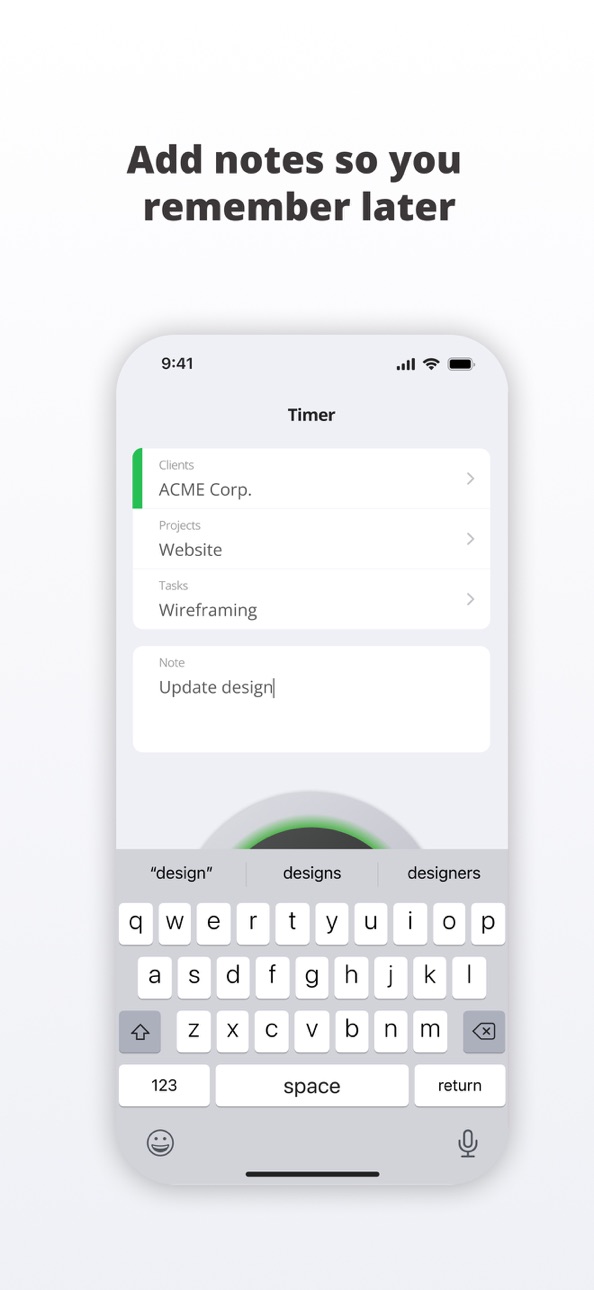
Whether you're on the move with the mobile app or at your desk with the desktop app and intuitive hardware buzzer, tracking time is just one click away. Add notes to your entries, organize your work with customizable layers, and stay focused wherever you are.
SEE WHERE TIME ACTUALLY GOES
Gain clear insights into how your team spends time and how long projects really take. Generate detailed reports in just a few clicks—for internal clarity or external transparency.
KEEP YOUR TEAM IN SYNC
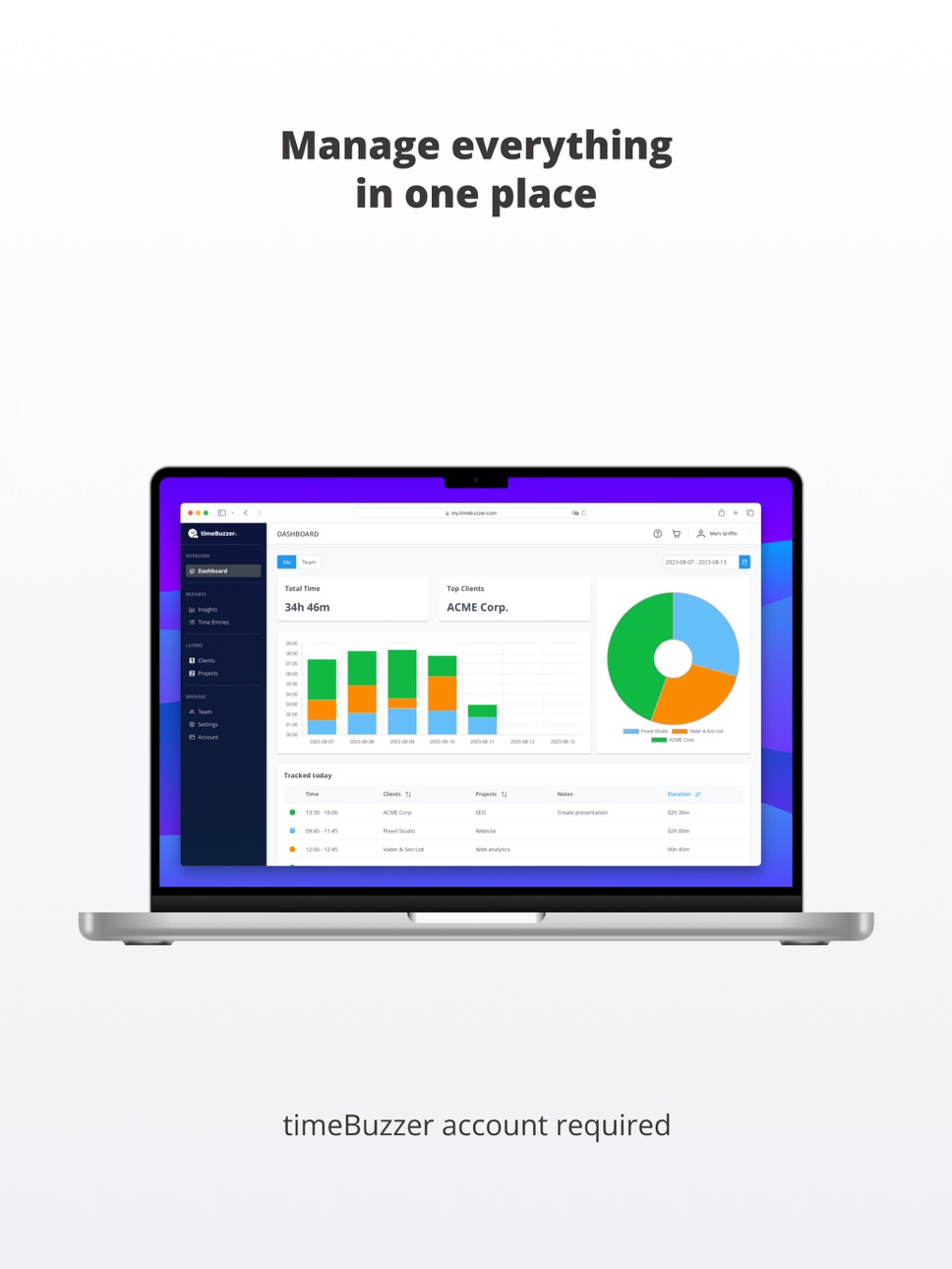
Manage projects, tasks, and clients in the web console. Everything syncs with your team’s apps, and roles let you control who sees and does what—all in one place.
Download timeBuzzer for mobile now and make time tracking on the go effortless.
This app requires an existing timeBuzzer account.
Accessibility
ipadiphonemacrealityDevicetvoswatch
Version history 25 versions
Build 887588383v2.0.232026-06-29 16:45:10
Internal improvements.
Build 887132823v2.0.222026-06-19 08:20:05
Fixed: When editing a time entry, the note is now displayed in full again.
Build 886852229v2.0.212026-06-15 06:36:38
- The running timer is now shown as a Live Activity on the lock screen, so you can keep track of your time even when the app is in the background. The timer status is also visible on your Apple Watch.
- The virtual buzzer inside the app now provides haptic feedback, making it feel more like the real buzzer.
Build 884818389v2.0.192026-04-24 15:34:56
Improved time selection for time entries.
Build 883316522v2.0.182026-03-16 09:16:54
- Team settings for adding and editing time entries for past days are now respected.
- Bug fixes.
Build 882450344v2.0.172026-02-16 10:00:16
Internal improvements.
Build 881714233v2.0.162026-01-22 08:46:20
Internal improvements.
Build 881126018v2.0.152026-01-02 11:05:06
- The timer now clearly displays full hours as well.
- New iOS 26 app icon with Liquid Glass support.
Build 879230340v2.0.142025-10-27 07:39:52
Time tracking now works without an internet connection. Offline entries are automatically synced once you're back online.
Build 878525480v2.0.132025-09-30 19:19:28
Design refinements and internal improvements.
Build 877912226v2.0.112025-09-10 10:56:58
Bug fixes and layout improvements.
Build 877846613v2.0.102025-09-05 06:19:27
Fixed: The buttons to edit date & time in time entries show up again.
Build 877770278v2.0.92025-09-03 07:36:30
Internal improvements
Build 877445538v2.0.82025-08-22 07:44:44
Fixed an issue that impaired scrolling in long lists of customers or projects.
Build 876703834v2.0.72025-07-28 06:58:52
Fixed: Toggling the favorite status via swipe (on clients, projects, or tasks) could accidentally remove user/group assignments and cause the item to disappear from the list. This has been resolved.
Build 876405009v2.0.62025-07-16 06:51:42
- You can now long press any client, project, or task in the list to edit it. While editing, you can also easily archive the item instead.
- It’s now easier to manage favorites. Just swipe left on a client, project, or task to mark it as a favorite — or remove it from favorites.
Build 875464413v2.0.52025-06-11 06:50:55
Fixes an issue that caused the creation of global projects or tasks to fail.
Build 874652735v2.0.42025-05-11 08:40:55
Bug fixes and style improvements
Build 873931081v2.0.32025-04-22 05:58:31
More intuitive and transparent display/editing of tracked time (especially regarding seconds).
Entering a note is now also possible before starting the timer.
New settings page.
Build 872992176v2.0.22025-04-01 22:37:36
– Admins and managers can now create and edit customers/projects/tasks directly in the app
– General improvements and bug fixes for better app experience
Build 871674192v2.0.12025-01-15 19:50:41
Minor bug fixes, improvements and style changes.
Build 870901898v2.02024-12-31 10:43:21
- New design to improve your overall mobile experience
- New app icons
Build 868561738v1.7.52024-08-29 06:06:51
Bug fixes
Build 868053062v1.7.42024-08-08 07:04:20
Projects can now be assigned to individual users and groups
Build 864488132v1.7.32024-03-18 19:39:04
Bugfixes
No pricing data captured yet — comparisons appear once the app has paid storefronts or in-app purchases.
Availability 166 of 166 storefronts
| Region | Language | Price | Ratings | Avg | Version |
|---|---|---|---|---|---|
| DE | de-DE | Free | 47 | 4.7 | 2.0.23 |
| CH | de-CH | Free | 9 | 5.0 | 2.0.23 |
| AT | de-DE | Free | 4 | 4.8 | 2.0.23 |
| BE | en-GB | Free | 4 | 4.8 | 2.0.23 |
| DK | en-GB | Free | 1 | 5.0 | 2.0.23 |
| ES | es-ES | Free | 1 | 5.0 | 2.0.23 |
| FR | fr-FR | Free | 1 | 2.0 | 2.0.23 |
| PL | en-GB | Free | 1 | 5.0 | 2.0.23 |
| US | en-US | Free | 1 | 5.0 | 2.0.23 |
| AE | en-GB | Free | 0 | — | 2.0.23 |
| AF | en-GB | Free | 0 | — | 2.0.23 |
| AG | en-GB | Free | 0 | — | 2.0.23 |
| AI | en-GB | Free | 0 | — | 2.0.23 |
| AL | en-GB | Free | 0 | — | 2.0.23 |
| AM | en-GB | Free | 0 | — | 2.0.23 |
| AO | en-GB | Free | 0 | — | 2.0.23 |
| AR | es-MX | Free | 0 | — | 2.0.23 |
| AU | en-AU | Free | 0 | — | 2.0.23 |
| AZ | en-GB | Free | 0 | — | 2.0.23 |
| BA | en-GB | Free | 0 | — | 2.0.23 |
| BB | en-GB | Free | 0 | — | 2.0.23 |
| BF | en-GB | Free | 0 | — | 2.0.23 |
| BG | en-GB | Free | 0 | — | 2.0.23 |
| BH | en-GB | Free | 0 | — | 2.0.23 |
| BJ | en-GB | Free | 0 | — | 2.0.23 |
| BM | en-GB | Free | 0 | — | 2.0.23 |
| BN | en-GB | Free | 0 | — | 2.0.23 |
| BO | es-MX | Free | 0 | — | 2.0.23 |
| BR | pt-BR | Free | 0 | — | 2.0.23 |
| BS | en-GB | Free | 0 | — | 2.0.23 |
| BT | en-GB | Free | 0 | — | 2.0.23 |
| BY | en-GB | Free | 0 | — | 2.0.23 |
| BZ | en-GB | Free | 0 | — | 2.0.23 |
| CA | en-CA | Free | 0 | — | 2.0.23 |
| CD | en-GB | Free | 0 | — | 2.0.23 |
| CG | en-GB | Free | 0 | — | 2.0.23 |
| CI | fr-FR | Free | 0 | — | 2.0.23 |
| CL | es-MX | Free | 0 | — | 2.0.23 |
| CN | zh-Hans-CN | Free | 0 | — | 2.0.23 |
| CO | es-MX | Free | 0 | — | 2.0.23 |
| CR | es-MX | Free | 0 | — | 2.0.23 |
| CV | en-GB | Free | 0 | — | 2.0.23 |
| CY | en-GB | Free | 0 | — | 2.0.23 |
| CZ | en-GB | Free | 0 | — | 2.0.23 |
| DM | en-GB | Free | 0 | — | 2.0.23 |
| DO | es-MX | Free | 0 | — | 2.0.23 |
| DZ | en-GB | Free | 0 | — | 2.0.23 |
| EC | es-MX | Free | 0 | — | 2.0.23 |
| EE | en-GB | Free | 0 | — | 2.0.23 |
| EG | en-GB | Free | 0 | — | 2.0.23 |
| FI | en-GB | Free | 0 | — | 2.0.23 |
| FM | en-GB | Free | 0 | — | 2.0.23 |
| GA | fr-FR | Free | 0 | — | 2.0.23 |
| GB | en-GB | Free | 0 | — | 2.0.23 |
| GD | en-GB | Free | 0 | — | 2.0.23 |
| GE | en-GB | Free | 0 | — | 2.0.23 |
| GH | en-GB | Free | 0 | — | 2.0.23 |
| GM | en-GB | Free | 0 | — | 2.0.23 |
| GR | en-GB | Free | 0 | — | 2.0.23 |
| GT | es-MX | Free | 0 | — | 2.0.23 |
| GW | en-GB | Free | 0 | — | 2.0.23 |
| GY | en-GB | Free | 0 | — | 2.0.23 |
| HK | zh-Hant-HK | Free | 0 | — | 2.0.23 |
| HN | es-MX | Free | 0 | — | 2.0.23 |
| HR | en-GB | Free | 0 | — | 2.0.23 |
| HU | en-GB | Free | 0 | — | 2.0.23 |
| ID | en-GB | Free | 0 | — | 2.0.23 |
| IE | en-GB | Free | 0 | — | 2.0.23 |
| IL | en-GB | Free | 0 | — | 2.0.23 |
| IN | en-GB | Free | 0 | — | 2.0.23 |
| IQ | en-GB | Free | 0 | — | 2.0.23 |
| IS | en-GB | Free | 0 | — | 2.0.23 |
| IT | it | Free | 0 | — | 2.0.23 |
| JM | en-GB | Free | 0 | — | 2.0.23 |
| JO | en-GB | Free | 0 | — | 2.0.23 |
| JP | ja | Free | 0 | — | 2.0.23 |
| KE | en-GB | Free | 0 | — | 2.0.23 |
| KG | en-GB | Free | 0 | — | 2.0.23 |
| KH | en-GB | Free | 0 | — | 2.0.23 |
| KN | en-GB | Free | 0 | — | 2.0.23 |
| KR | ko | Free | 0 | — | 2.0.23 |
| KW | en-GB | Free | 0 | — | 2.0.23 |
| KY | en-GB | Free | 0 | — | 2.0.23 |
| KZ | en-GB | Free | 0 | — | 2.0.23 |
| LA | en-GB | Free | 0 | — | 2.0.23 |
| LB | en-GB | Free | 0 | — | 2.0.23 |
| LC | en-GB | Free | 0 | — | 2.0.23 |
| LK | en-GB | Free | 0 | — | 2.0.23 |
| LR | en-GB | Free | 0 | — | 2.0.23 |
| LT | en-GB | Free | 0 | — | 2.0.23 |
| LU | en-GB | Free | 0 | — | 2.0.23 |
| LV | en-GB | Free | 0 | — | 2.0.23 |
| LY | en-GB | Free | 0 | — | 2.0.23 |
| MA | en-GB | Free | 0 | — | 2.0.23 |
| MD | en-GB | Free | 0 | — | 2.0.23 |
| ME | en-GB | Free | 0 | — | 2.0.23 |
| MG | en-GB | Free | 0 | — | 2.0.23 |
| MK | en-GB | Free | 0 | — | 2.0.23 |
| ML | en-GB | Free | 0 | — | 2.0.23 |
| MM | en-GB | Free | 0 | — | 2.0.23 |
| MN | en-GB | Free | 0 | — | 2.0.23 |
| MO | zh-Hant-HK | Free | 0 | — | 2.0.23 |
| MR | en-GB | Free | 0 | — | 2.0.23 |
| MT | en-GB | Free | 0 | — | 2.0.23 |
| MU | en-GB | Free | 0 | — | 2.0.23 |
| MV | en-GB | Free | 0 | — | 2.0.23 |
| MW | en-GB | Free | 0 | — | 2.0.23 |
| MX | es-MX | Free | 0 | — | 2.0.23 |
| MY | en-GB | Free | 0 | — | 2.0.23 |
| NE | en-GB | Free | 0 | — | 2.0.23 |
| NI | es-MX | Free | 0 | — | 2.0.23 |
| NL | nl | Free | 0 | — | 2.0.23 |
| NO | en-GB | Free | 0 | — | 2.0.23 |
| NP | en-GB | Free | 0 | — | 2.0.23 |
| NR | en-GB | Free | 0 | — | 2.0.23 |
| NZ | en-AU | Free | 0 | — | 2.0.23 |
| OM | en-GB | Free | 0 | — | 2.0.23 |
| PA | es-MX | Free | 0 | — | 2.0.23 |
| PE | es-MX | Free | 0 | — | 2.0.23 |
| PG | en-GB | Free | 0 | — | 2.0.23 |
| PH | en-GB | Free | 0 | — | 2.0.23 |
| PK | en-GB | Free | 0 | — | 2.0.23 |
| PT | pt-PT | Free | 0 | — | 2.0.23 |
| PW | en-GB | Free | 0 | — | 2.0.23 |
| PY | es-MX | Free | 0 | — | 2.0.23 |
| QA | en-GB | Free | 0 | — | 2.0.23 |
| RO | en-GB | Free | 0 | — | 2.0.23 |
| RS | en-GB | Free | 0 | — | 2.0.23 |
| RU | ru | Free | 0 | — | 2.0.23 |
| RW | en-GB | Free | 0 | — | 2.0.23 |
| SA | en-GB | Free | 0 | — | 2.0.23 |
| SB | en-GB | Free | 0 | — | 2.0.23 |
| SC | en-GB | Free | 0 | — | 2.0.23 |
| SE | sv | Free | 0 | — | 2.0.23 |
| SG | en-GB | Free | 0 | — | 2.0.23 |
| SI | en-GB | Free | 0 | — | 2.0.23 |
| SK | en-GB | Free | 0 | — | 2.0.23 |
| SL | en-GB | Free | 0 | — | 2.0.23 |
| SN | en-GB | Free | 0 | — | 2.0.23 |
| SR | en-GB | Free | 0 | — | 2.0.23 |
| ST | en-GB | Free | 0 | — | 2.0.23 |
| SV | es-MX | Free | 0 | — | 2.0.23 |
| SZ | en-GB | Free | 0 | — | 2.0.23 |
| TC | en-GB | Free | 0 | — | 2.0.23 |
| TD | en-GB | Free | 0 | — | 2.0.23 |
| TH | en-GB | Free | 0 | — | 2.0.23 |
| TJ | en-GB | Free | 0 | — | 2.0.23 |
| TM | en-GB | Free | 0 | — | 2.0.23 |
| TN | en-GB | Free | 0 | — | 2.0.23 |
| TO | en-GB | Free | 0 | — | 2.0.23 |
| TR | en-GB | Free | 0 | — | 2.0.23 |
| TT | en-GB | Free | 0 | — | 2.0.23 |
| TW | zh-Hant-TW | Free | 0 | — | 2.0.23 |
| TZ | en-GB | Free | 0 | — | 2.0.23 |
| UA | en-GB | Free | 0 | — | 2.0.23 |
| UY | en-GB | Free | 0 | — | 2.0.23 |
| UZ | en-GB | Free | 0 | — | 2.0.23 |
| VC | en-GB | Free | 0 | — | 2.0.23 |
| VE | es-MX | Free | 0 | — | 2.0.23 |
| VG | en-GB | Free | 0 | — | 2.0.23 |
| VN | en-GB | Free | 0 | — | 2.0.23 |
| VU | en-GB | Free | 0 | — | 2.0.23 |
| XK | en-GB | Free | 0 | — | 2.0.23 |
| YE | en-GB | Free | 0 | — | 2.0.23 |
| ZA | en-GB | Free | 0 | — | 2.0.23 |
| ZW | en-GB | Free | 0 | — | 2.0.23 |
Change log 29 changes · CD
✎
releaseNotes updated
Internal improvements.
✎
description updated
The simplest time tracking solution ever designed.
No more end-of-week guesstimates—save hours per person every week and increase billable hours by up to 20% w
✎
subtitle updated
A new way to track time
✎
name updated
timeBuzzer – Time Tracking
◆
Version 2.0.23 released
Internal improvements.
◆
Version 2.0.22 released
Fixed: When editing a time entry, the note is now displayed in full again.
◆
Version 2.0.21 released
- The running timer is now shown as a Live Activity on the lock screen, so you can keep track of your time even when the app is in the background. The timer status is also visible on your Apple Watch.
- The virtual buzzer inside the app now
◆
Version 2.0.19 released
Improved time selection for time entries.
◆
Version 2.0.18 released
- Team settings for adding and editing time entries for past days are now respected.
- Bug fixes.
◆
Version 2.0.17 released
Internal improvements.
◆
Version 2.0.16 released
Internal improvements.
◆
Version 2.0.15 released
- The timer now clearly displays full hours as well.
- New iOS 26 app icon with Liquid Glass support.
◆
Version 2.0.14 released
Time tracking now works without an internet connection. Offline entries are automatically synced once you're back online.
◆
Version 2.0.13 released
Design refinements and internal improvements.
◆
Version 2.0.11 released
Bug fixes and layout improvements.
◆
Version 2.0.10 released
Fixed: The buttons to edit date & time in time entries show up again.
◆
Version 2.0.9 released
Internal improvements
◆
Version 2.0.8 released
Fixed an issue that impaired scrolling in long lists of customers or projects.
◆
Version 2.0.7 released
Fixed: Toggling the favorite status via swipe (on clients, projects, or tasks) could accidentally remove user/group assignments and cause the item to disappear from the list. This has been resolved.
◆
Version 2.0.6 released
- You can now long press any client, project, or task in the list to edit it. While editing, you can also easily archive the item instead.
- It’s now easier to manage favorites. Just swipe left on a client, project, or task to mark it as a
◆
Version 2.0.5 released
Fixes an issue that caused the creation of global projects or tasks to fail.
◆
Version 2.0.4 released
Bug fixes and style improvements
◆
Version 2.0.3 released
More intuitive and transparent display/editing of tracked time (especially regarding seconds).
Entering a note is now also possible before starting the timer.
New settings page.
◆
Version 2.0.2 released
– Admins and managers can now create and edit customers/projects/tasks directly in the app
– General improvements and bug fixes for better app experience
◆
Version 2.0.1 released
Minor bug fixes, improvements and style changes.
◆
Version 2.0 released
- New design to improve your overall mobile experience
- New app icons
◆
Version 1.7.5 released
Bug fixes
◆
Version 1.7.4 released
Projects can now be assigned to individual users and groups
◆
Version 1.7.3 released
Bugfixes