Home › Photo & Video

 CD
CD
 USen-US
 AUen-AU
 GBen-GB
 CAen-CA
 ITit
ITit NLnl
NLnl CNzh-Hans-CN
 CZen-GB
 DEde-DE
 FRfr-FR
 INen-GB
 JPja
JPja SKen-GB
 AEen-GB
 AFen-GB
 AGen-GB
 AIen-GB
 AMen-GB
 AOen-GB
 ARes-MX
 ATde-DE
 AZen-GB
 BAen-GB
 BBen-GB
 BEen-GB
 BFen-GB
 BGen-GB
 BHen-GB
 BJen-GB
 BMen-GB
 BNen-GB
 BOes-MX
 BRpt-BR
 BSen-GB
 BTen-GB
 BWen-GB
 BYen-GB
 BZen-GBCDen-GB
 CGen-GB
 CHde-CH
 CIfr-FR
 CLes-MX
 CMfr-FR
 COes-MX
 CRes-MX
 CVen-GB
 CYen-GB
 DKen-GB
 DMen-GB
 DOes-MX
 DZen-GB
 ECes-MX
 EEen-GB
 EGen-GB
 ESes-ES
 FIen-GB
 FJen-GB
 FMen-GB
 GAfr-FR
 GDen-GB
 GEen-GB
 GHen-GB
 GMen-GB
 GRen-GB
 GTes-MX
 GWen-GB
 GYen-GB
 HKzh-Hant-HK
 HNes-MX
 HRen-GB
 HUen-GB
 IDen-GB
 IEen-GB
 ILen-GB
 IQen-GB
 ISen-GB
 JMen-GB
 JOen-GB
 KEen-GB
 KGen-GB
 KHen-GB
 KNen-GB
 KRko
KRko KWen-GB
 KYen-GB
 KZen-GB
 LAen-GB
 LBen-GB
 LCen-GB
 LKen-GB
 LRen-GB
 LTen-GB
 LUen-GB
 LVen-GB
 LYen-GB
 MAen-GB
 MDen-GB
 MEen-GB
 MGen-GB
 MKen-GB
 MLen-GB
 MMen-GB
 MNen-GB
 MOzh-Hant-HK
 MRen-GB
 MSen-GB
 MTen-GB
 MUen-GB
 MVen-GB
 MWen-GB
 MXes-MX
 MYen-GB
 MZen-GB
 NAen-GB
 NEen-GB
 NGen-GB
 NIes-MX
 NOen-GB
 NPen-GB
 NRen-GB
 NZen-AU
 OMen-GB
 PAes-MX
 PEes-MX
 PGen-GB
 PHen-GB
 PKen-GB
 PLen-GB
 PTpt-PT
 PWen-GB
 PYes-MX
 QAen-GB
 ROen-GB
 RSen-GB
 RUru
RUru RWen-GB
 SAen-GB
 SBen-GB
 SCen-GB
 SEsv
SEsv SGen-GB
 SIen-GB
 SLen-GB
 SNen-GB
 SRen-GB
 STen-GB
 SVes-MX
 SZen-GB
 TCen-GB
 TDen-GB
 TJen-GB
 TMen-GB
 TNen-GB
 TOen-GB
 TRen-GB
 TTen-GB
 TWzh-Hant-TW
 TZen-GB
 UAen-GB
 UGen-GB
 UYen-GB
 UZen-GB
 VCen-GB
 VEes-MX
 VGen-GB
 VNen-GB
 VUen-GB
 XKen-GB
 YEen-GB
 ZAen-GB
 ZMen-GB
 ZWen-GB
173 of 173 storefronts
Content in en-US
Content in en-US
Information
Icon history 2 versions
Current←
 Previous
Preview 2 platforms
iPhone 7 images



iPad 7 images




What’s New Version 5.5.1
5.5.1 makes markers easier to create and squashes a batch of bugs:
• Capture a Marker with Your Camera (Pro): No printed marker handy? Open the Anchors page, frame any flat object such as a card, label or sticker, and PreviewAR measures its real-world size and adds it to your Anchors library, ready to lock a scene to.
• Tidier Settings: A refreshed Settings screen with quicker Close and Add buttons and a cleaner camera and import layout. Frame Rate and Ultra-Wide Angle now sit together in Recording Settings.
• USDZ model fixes when Y is Up would sometimes be ignored.
• Various other fixes, polish and performance improvements.
Questions or ideas? support@previewar.app
Description
Trusted by Frankenstein, Foundation, Wicked and many more, PreviewAR accelerates previsualization on your next show.
Made for independent studios and used by world-renowned production companies, PreviewAR is the easiest way to view your 3D characters and objects in the real world using technology you already have. Use it for accurate location scouts or to test animated pre-viz in pre-production, or on the day to check set extensions, animated characters and realistic scene previews you can share with clients, cast and crew.
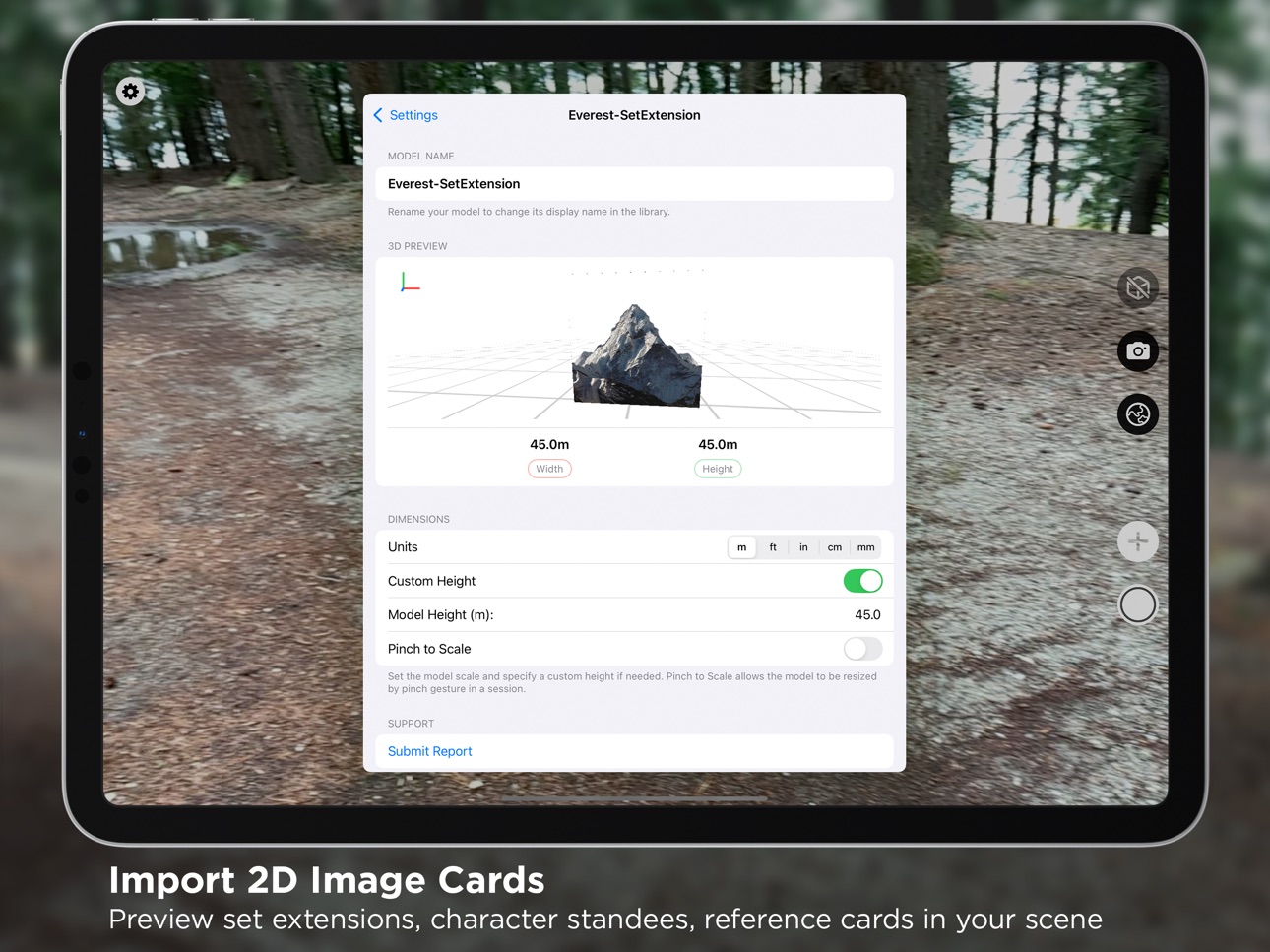
PreviewAR supports most major 3D file formats (including OBJ, USDZ, USD, DAE and FBX) or drop in 2D image cards to block out set extensions and reference frames. Download now and see your animated, textured characters and objects live on set.
--------------------------------
"PreviewAR provides a wonderful shortcut to viewing a 3D asset and sharing that experience with others in the room, without need for a headset. Its application on a sound stage is quite amazing - it's allowed us to quickly see a potential set build without harming the budget."
Art Director, Painting Practice
--------------------------------
IMMERSIVE & ACCURATE
PreviewAR uses real-world scale to show your models as accurately as possible. With people and environment occlusion, your models are deeply incorporated into the scene, and the full-screen AR display means your set can come alive right before your eyes. Simulate a lens wider than your device's camera and your 3D scene now extends beyond the live feed for true ultra-wide framing.
CLEAN & INTUITIVE
The on-screen controls let you adjust every aspect of the scene without getting in the way. Change lighting angles, scale models, set a model's origin point for precise pivots, and fine-tune positions with the Adjustment Wheel. Live on-screen readouts show focal length, camera tilt, height, frame rate and aspect ratio as you move. The interface can be hidden entirely for a completely immersive experience by tapping any empty area of the scene.
SECURE & PRIVATE
There are no external servers or processing involved with PreviewAR, every model you import stays on your device and isn't uploaded or downloaded anywhere else. Perfect for NDA-restricted or sensitive assets that can't be uploaded to other cloud-based products.
PreviewAR offers a Pro subscription for advanced features tailor-made for those on-set, including:
- Camera & Lens Simulation: Choose from 500+ cinema camera formats with spherical & anamorphic lens options, or add your own custom setup.
- Image Anchors: Lock an entire scene to a real-world marker and reload it in exactly the same place, every time, ideal for resuming a setup on a stage or location. Capture a marker with your camera, or use the ready-to-print markers included.
- Multiple Models: Build a full scene from several textured, animated models at once.
- Collaborative Sessions: Multiple devices share one AR scene in real time. Give your Directors, DOPs and clients a device to view and frame the scene through while you make edits. Updated instantly across up to 4 devices, no internet connection required.
- Scene Saving & GPS Anchors: Save an entire scene and reload it in the same spot, or anchor it to a real-world GPS location and recall it on the day.
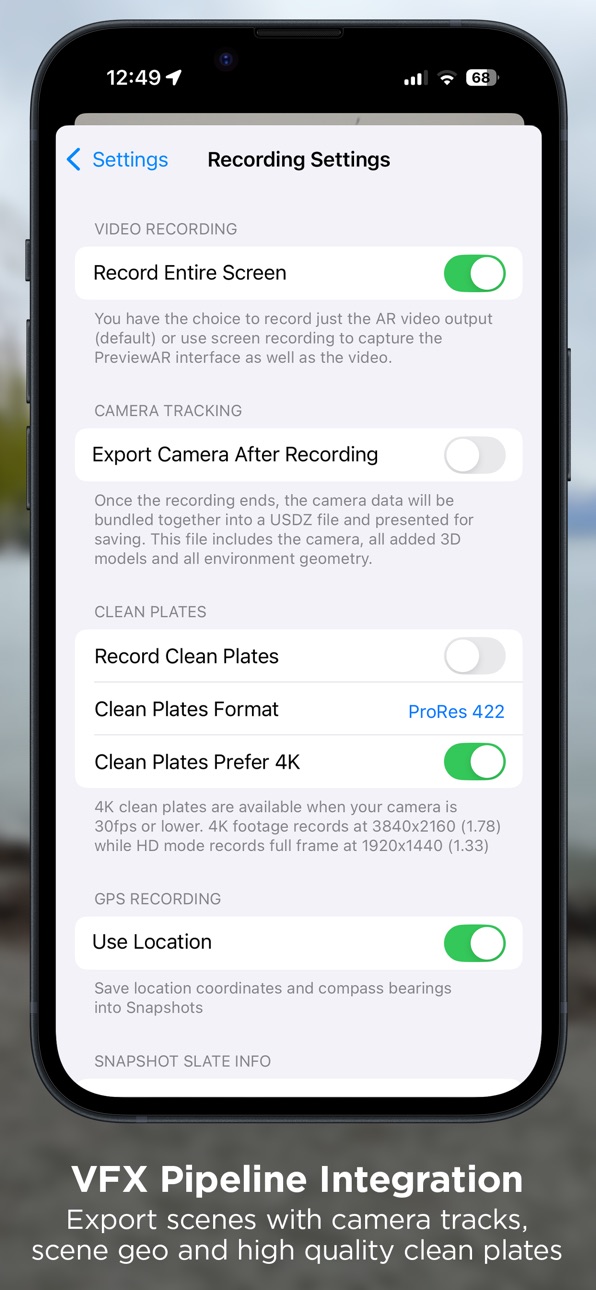
- Clean Plates & Camera Track: Capture ProRes clean plates and export scene + environment geometry and a camera track for later reference and pipeline integration.
- and many more!
Questions or suggestions? Feel free to contact me:
support@previewar.app
In-App Purchases CD pricing
PreviewAR Pro Subscription
Monthly · Monthly—
Yearly · Yearly—
Capabilities
In-App PurchasesGame controller
Accessibility
ipadiphonemacrealityDevicetvoswatch
Version history 25 versions
Build 887636037v5.5.12026-07-02 06:56:47
5.5.1 makes markers easier to create and squashes a batch of bugs:
• Capture a Marker with Your Camera (Pro): No printed marker handy? Open the Anchors page, frame any flat object such as a card, label or sticker, and PreviewAR measures its real-world size and adds it to your Anchors library, ready to lock a scene to.
• Tidier Settings: A refreshed Settings screen with quicker Close and Add buttons and a cleaner camera and import layout. Frame Rate and Ultra-Wide Angle now sit together in Recording Settings.
• USDZ model fixes when Y is Up would sometimes be ignored.
• Various other fixes, polish and performance improvements.
Questions or ideas? support@previewar.app
Build 886905761v5.5.02026-06-27 11:26:45
This update adds powerful new ways to load and frame your scenes:
• Image Anchors: Save and reload a whole scene from a printed marker. A new Anchors page in Settings comes with ready-to-print PreviewAR markers (or import your own). Choose Snap Once to lock placement and remove the marker, or Keep Tracking to have the scene follow it as it moves.
• Ultra-Wide Framing: Simulate a lens wider than your device camera and your 3D scene now extends past the live feed instead of clipping for true ultra-wide composition. Plus experimental ultra-wide snapshots (switch on in Advanced Settings).
• Edit Model Origin: Set a model's origin point so it rotates and scales around the exact area you want.
• More Cinema Cameras
• Various bug fixes + performance improvements
Questions or ideas? support@previewar.app
Build 886712431v5.4.92026-06-09 22:59:28
Lots of bug fixes:
- Improved GPS location accuracy when placing a scene
- Improved video timecode accuracy
- Fixed layout issues when rotating some devices
- Fixed black screen when dismissing initial tutorial
- Fixed a broken permission prompt when tapping the snapshot button
Build 885937863v5.4.82026-05-27 23:05:16
- New 3D axis arrows overlay when translating models
- New Sony & RED cameras added to the library
- Improved texture, colour and surface handling for DAE, FBX, OBJ and USDZ files.
- Lots of stability & bug fixes, thanks to your reports!
Thank you for reporting your issues!
Email support@previewar.app with any issues or feedback.
Build 883526238v5.4.72026-03-19 18:55:40
- Added imperial measurement toggle
- Added option to disable back-face culling
Thank you for reporting your issues!
Email support@previewar.app with any issues or feedback.
Build 880500261v5.4.52025-12-10 17:22:04
- Fixed an issue with GPS scene saving/loading affecting some users
Thank you for reporting your issues!
Email support@previewar.app with any issues or feedback.
Build 880412817v5.4.42025-12-07 22:16:03
- Bug fixes
Thank you for reporting your issues!
Email support@previewar.app with any issues or feedback.
Build 880053748v5.4.32025-11-29 06:42:11
- Multiple bug fixes and performance improvements
- Fixes for several rare crashes
Thank you for reporting your issues!
Email support@previewar.app with any issues or feedback.
Build 878152288v5.4.22025-09-19 09:49:53
- Fix for snapshots not being saved in certain situations
- Crash fixes
Thank you for reporting your issues!
Email support@previewar.app with any issues or feedback.
Build 878029175v5.4.12025-09-12 02:52:01
- Layout improvements on smaller screens
- Bug fixes
Thank you for reporting your issues!
Email support@previewar.app with any issues or feedback.
Build 877270362v5.42025-08-27 20:55:19
New in this version of PreviewAR:
- 2D Image Cards! Load in texture files and put them into your 3D space as image cards.
- Animation control gives you the ability to start and stop animations in your scene
- Improved USDZ processing with a choice between two processing modes
- Bug fixes and model processing improvements
Build 875242952v5.3.12025-06-04 18:47:17
New in this version of PreviewAR:
- See a 3D preview of your model in the model settings page before trying it out in your scene
- Get warnings about files that might crash or slow down the scene
- Better crash handling and error handling from model files
- Improved USD model loading
Build 869356775v5.32025-05-23 00:30:07
NEW: PIPELINE INTEGRATION
- Clean Plates: Save high quality clean plates when you record an AR scene. Records in H264 or ProRes formats up to 4K.
- 3D Scene Export: Save your scene and camera animation to a USDZ file after recording and load it into your 3D software of choice.
Check out these new features in the settings page! Performance and app stability has also been improved.
Got feedback? Email me at support@previewar.app
Build 868485531v5.2.32024-09-28 00:07:28
- Added a search bar on the camera selection screen
- Fixed the legibility of snapshot model details when using light mode
- UI improvements
- Performance improvements
Got feedback? Email Toby via support@previewar.app
Build 868220973v5.2.22024-08-21 12:05:18
- Fixed a bug where model isn't visible after being added
- Fixed some crashes with multiple models in a scene
- Better crash handling for models that throw errors on import
- Performance improvements
Got feedback? Email Toby via support@previewar.app
Build 867708048v5.2.12024-07-25 06:13:44
- Added Alexa 35 camera data
- Performance improvements
- Improvements to collaborative sessions
Got feedback? Email Toby via support@previewar.app
Build 855741265v5.22024-06-16 23:19:34
- New toggle for environmental occlusion
- New Advanced Settings page for scene reconstruction and FPS control
- New Snapshot configuration page to add slate details to your snapshots
- New Location information added to Snapshots
- Improvements to performance with large models
- Improvements to app layout on smaller screens
Got feedback? Email Toby via support@previewar.app
Build 855496511v5.1.12023-03-16 04:06:11
v5.1.1 updates:
- Better handling of large scale models
- Fixed video recording not saving in some cases
- All models in a scene can now be manually translated together
- Snapshot images have been improved
- UI/UX improvements
Build 854879748v5.12023-02-27 14:41:55
v5.1 introduces:
- Redesigned cinema mode
- New frameline functionality
- Improvements to collaborative sessions
- Improvements when working with large models
- UI tweaks and bug fixes
Build 854703926v5.0.12023-02-09 20:21:04
Some small improvements and bug fixes!
Build 846650709v5.02023-01-25 18:08:00
Some fantastic new features to bring in the New Year!
- Environment Occlusion: Automatically obscure your models behind real-world objects in your scene
- Collaborative Sessions: Multiple devices can now share an AR scene in real-time
- Scene Saving: Save your whole scene using the new button under the 'Global' menu, and load in scenes using the new area in the 'Add' model list
- Anamorphic Lens Support: Now get even more accurate viewfinder results thanks to new support for lenses with a range of anamorphic squeeze factors
- Scene Selection: Highlight your whole scene by tapping on an object twice. Once your whole scene is highlighted, you can move & rotate the scene as a group
- New Camera Formats: A completely rebuilt viewfinder simulation system, with 200+ new camera models and formats - including information like sensor size, recording resolution and aspect ratios. Don't see your camera? Send me an email to get it added!
- UI/UX tweaks
- Lots of performance improvements and bug fixes
Found a bug? Get in touch: support@previewar.app
Build 843088855v4.02021-08-15 16:50:27
Welcome to the rebuilt, redesigned PreviewAR! This version transforms the user experience, making it even easier and quicker to do what you need. Hit me up at support@previewar.app if you're having any issues with the new version.
The biggest new changes:
- Controls are now separated into Model, Camera and Scene menus
- More precise control and feedback over translation, scale and rotation with the new Adjustment Wheel
- New shadow and lighting environment
- New Blue Screen default model available
Build 842509119v3.52021-06-04 18:41:47
Another update with a mix of additions, fixes and improvements!
- NEW: Reflective, adaptive texturing and lighting based on your environment! See your assets interact with your scene like never before
- PRO: Improved burn-in information displays: now include frame rate, aspect ratio and have a new look and feel!
- Tweaked the asset preprocessing that happens when you load the file (you can toggle this in the asset details)
- Fixed automatic masking of people sometimes not working
- Fixed some OBJ textures that wouldn't load when manually added
- Fixed a rare crash when opening certain model types
Build 841210628v3.4.32021-04-05 15:41:45
- New "Anchor Mode" for VR and virtual set productions
- Improved handling of large (20m+) assets
- Improved compatibility for DAE format
- Fixed inverted normals getting removed, can now be textured
Build 839317815v3.4.22020-12-06 16:52:26
- Performance and stability improvements
- Enhanced file type support
- Minor UI bug fixes
Price history by region
Currency
Show
Columns
Search
Availability 173 of 173 storefronts
| Region | Language | Price | Ratings | Avg | Version |
|---|---|---|---|---|---|
| US | en-US | Free | 9 | 3.9 | 5.5.1 |
| AU | en-AU | Free | 8 | 4.8 | 5.5.1 |
| GB | en-GB | Free | 5 | 4.2 | 5.5.1 |
| CA | en-CA | Free | 2 | 3.0 | 5.5.1 |
| IT | it | Free | 2 | 2.0 | 5.5.1 |
| NL | nl | Free | 2 | 4.5 | 5.5.1 |
| CN | zh-Hans-CN | Free | 1 | 1.0 | 5.5.1 |
| CZ | en-GB | Free | 1 | 1.0 | 5.5.1 |
| DE | de-DE | Free | 1 | 5.0 | 5.5.1 |
| FR | fr-FR | Free | 1 | 4.0 | 5.5.1 |
| IN | en-GB | Free | 1 | 5.0 | 5.5.1 |
| JP | ja | Free | 1 | 5.0 | 5.5.1 |
| SK | en-GB | Free | 1 | 1.0 | 5.5.1 |
| AE | en-GB | Free | 0 | — | 5.5.1 |
| AF | en-GB | Free | 0 | — | 5.5.1 |
| AG | en-GB | Free | 0 | — | 5.5.1 |
| AI | en-GB | Free | 0 | — | 5.5.1 |
| AM | en-GB | Free | 0 | — | 5.5.1 |
| AO | en-GB | Free | 0 | — | 5.5.1 |
| AR | es-MX | Free | 0 | — | 5.5.1 |
| AT | de-DE | Free | 0 | — | 5.5.1 |
| AZ | en-GB | Free | 0 | — | 5.5.1 |
| BA | en-GB | Free | 0 | — | 5.5.1 |
| BB | en-GB | Free | 0 | — | 5.5.1 |
| BE | en-GB | Free | 0 | — | 5.5.1 |
| BF | en-GB | Free | 0 | — | 5.5.1 |
| BG | en-GB | Free | 0 | — | 5.5.1 |
| BH | en-GB | Free | 0 | — | 5.5.1 |
| BJ | en-GB | Free | 0 | — | 5.5.1 |
| BM | en-GB | Free | 0 | — | 5.5.1 |
| BN | en-GB | Free | 0 | — | 5.5.1 |
| BO | es-MX | Free | 0 | — | 5.5.1 |
| BR | pt-BR | Free | 0 | — | 5.5.1 |
| BS | en-GB | Free | 0 | — | 5.5.1 |
| BT | en-GB | Free | 0 | — | 5.5.1 |
| BW | en-GB | Free | 0 | — | 5.5.1 |
| BY | en-GB | Free | 0 | — | 5.5.1 |
| BZ | en-GB | Free | 0 | — | 5.5.1 |
| CD | en-GB | Free | 0 | — | 5.5.1 |
| CG | en-GB | Free | 0 | — | 5.5.1 |
| CH | de-CH | Free | 0 | — | 5.5.1 |
| CI | fr-FR | Free | 0 | — | 5.5.1 |
| CL | es-MX | Free | 0 | — | 5.5.1 |
| CM | fr-FR | Free | 0 | — | 5.5.1 |
| CO | es-MX | Free | 0 | — | 5.5.1 |
| CR | es-MX | Free | 0 | — | 5.5.1 |
| CV | en-GB | Free | 0 | — | 5.5.1 |
| CY | en-GB | Free | 0 | — | 5.5.1 |
| DK | en-GB | Free | 0 | — | 5.5.1 |
| DM | en-GB | Free | 0 | — | 5.5.1 |
| DO | es-MX | Free | 0 | — | 5.5.1 |
| DZ | en-GB | Free | 0 | — | 5.5.1 |
| EC | es-MX | Free | 0 | — | 5.5.1 |
| EE | en-GB | Free | 0 | — | 5.5.1 |
| EG | en-GB | Free | 0 | — | 5.5.1 |
| ES | es-ES | Free | 0 | — | 5.5.1 |
| FI | en-GB | Free | 0 | — | 5.5.1 |
| FJ | en-GB | Free | 0 | — | 5.5.1 |
| FM | en-GB | Free | 0 | — | 5.5.1 |
| GA | fr-FR | Free | 0 | — | 5.5.1 |
| GD | en-GB | Free | 0 | — | 5.5.1 |
| GE | en-GB | Free | 0 | — | 5.5.1 |
| GH | en-GB | Free | 0 | — | 5.5.1 |
| GM | en-GB | Free | 0 | — | 5.5.1 |
| GR | en-GB | Free | 0 | — | 5.5.1 |
| GT | es-MX | Free | 0 | — | 5.5.1 |
| GW | en-GB | Free | 0 | — | 5.5.1 |
| GY | en-GB | Free | 0 | — | 5.5.1 |
| HK | zh-Hant-HK | Free | 0 | — | 5.5.1 |
| HN | es-MX | Free | 0 | — | 5.5.1 |
| HR | en-GB | Free | 0 | — | 5.5.1 |
| HU | en-GB | Free | 0 | — | 5.5.1 |
| ID | en-GB | Free | 0 | — | 5.5.1 |
| IE | en-GB | Free | 0 | — | 5.5.1 |
| IL | en-GB | Free | 0 | — | 5.5.1 |
| IQ | en-GB | Free | 0 | — | 5.5.1 |
| IS | en-GB | Free | 0 | — | 5.5.1 |
| JM | en-GB | Free | 0 | — | 5.5.1 |
| JO | en-GB | Free | 0 | — | 5.5.1 |
| KE | en-GB | Free | 0 | — | 5.5.1 |
| KG | en-GB | Free | 0 | — | 5.5.1 |
| KH | en-GB | Free | 0 | — | 5.5.1 |
| KN | en-GB | Free | 0 | — | 5.5.1 |
| KR | ko | Free | 0 | — | 5.5.1 |
| KW | en-GB | Free | 0 | — | 5.5.1 |
| KY | en-GB | Free | 0 | — | 5.5.1 |
| KZ | en-GB | Free | 0 | — | 5.5.1 |
| LA | en-GB | Free | 0 | — | 5.5.1 |
| LB | en-GB | Free | 0 | — | 5.5.1 |
| LC | en-GB | Free | 0 | — | 5.5.1 |
| LK | en-GB | Free | 0 | — | 5.5.1 |
| LR | en-GB | Free | 0 | — | 5.5.1 |
| LT | en-GB | Free | 0 | — | 5.5.1 |
| LU | en-GB | Free | 0 | — | 5.5.1 |
| LV | en-GB | Free | 0 | — | 5.5.1 |
| LY | en-GB | Free | 0 | — | 5.5.1 |
| MA | en-GB | Free | 0 | — | 5.5.1 |
| MD | en-GB | Free | 0 | — | 5.5.1 |
| ME | en-GB | Free | 0 | — | 5.5.1 |
| MG | en-GB | Free | 0 | — | 5.5.1 |
| MK | en-GB | Free | 0 | — | 5.5.1 |
| ML | en-GB | Free | 0 | — | 5.5.1 |
| MM | en-GB | Free | 0 | — | 5.5.1 |
| MN | en-GB | Free | 0 | — | 5.5.1 |
| MO | zh-Hant-HK | Free | 0 | — | 5.5.1 |
| MR | en-GB | Free | 0 | — | 5.5.1 |
| MS | en-GB | Free | 0 | — | 5.5.1 |
| MT | en-GB | Free | 0 | — | 5.5.1 |
| MU | en-GB | Free | 0 | — | 5.5.1 |
| MV | en-GB | Free | 0 | — | 5.5.1 |
| MW | en-GB | Free | 0 | — | 5.5.1 |
| MX | es-MX | Free | 0 | — | 5.5.1 |
| MY | en-GB | Free | 0 | — | 5.5.1 |
| MZ | en-GB | Free | 0 | — | 5.5.1 |
| NA | en-GB | Free | 0 | — | 5.5.1 |
| NE | en-GB | Free | 0 | — | 5.5.1 |
| NG | en-GB | Free | 0 | — | 5.5.1 |
| NI | es-MX | Free | 0 | — | 5.5.1 |
| NO | en-GB | Free | 0 | — | 5.5.1 |
| NP | en-GB | Free | 0 | — | 5.5.1 |
| NR | en-GB | Free | 0 | — | 5.5.1 |
| NZ | en-AU | Free | 0 | — | 5.5.1 |
| OM | en-GB | Free | 0 | — | 5.5.1 |
| PA | es-MX | Free | 0 | — | 5.5.1 |
| PE | es-MX | Free | 0 | — | 5.5.1 |
| PG | en-GB | Free | 0 | — | 5.5.1 |
| PH | en-GB | Free | 0 | — | 5.5.1 |
| PK | en-GB | Free | 0 | — | 5.5.1 |
| PL | en-GB | Free | 0 | — | 5.5.1 |
| PT | pt-PT | Free | 0 | — | 5.5.1 |
| PW | en-GB | Free | 0 | — | 5.5.1 |
| PY | es-MX | Free | 0 | — | 5.5.1 |
| QA | en-GB | Free | 0 | — | 5.5.1 |
| RO | en-GB | Free | 0 | — | 5.5.1 |
| RS | en-GB | Free | 0 | — | 5.5.1 |
| RU | ru | Free | 0 | — | 5.5.1 |
| RW | en-GB | Free | 0 | — | 5.5.1 |
| SA | en-GB | Free | 0 | — | 5.5.1 |
| SB | en-GB | Free | 0 | — | 5.5.1 |
| SC | en-GB | Free | 0 | — | 5.5.1 |
| SE | sv | Free | 0 | — | 5.5.1 |
| SG | en-GB | Free | 0 | — | 5.5.1 |
| SI | en-GB | Free | 0 | — | 5.5.1 |
| SL | en-GB | Free | 0 | — | 5.5.1 |
| SN | en-GB | Free | 0 | — | 5.5.1 |
| SR | en-GB | Free | 0 | — | 5.5.1 |
| ST | en-GB | Free | 0 | — | 5.5.1 |
| SV | es-MX | Free | 0 | — | 5.5.1 |
| SZ | en-GB | Free | 0 | — | 5.5.1 |
| TC | en-GB | Free | 0 | — | 5.5.1 |
| TD | en-GB | Free | 0 | — | 5.5.1 |
| TJ | en-GB | Free | 0 | — | 5.5.1 |
| TM | en-GB | Free | 0 | — | 5.5.1 |
| TN | en-GB | Free | 0 | — | 5.5.1 |
| TO | en-GB | Free | 0 | — | 5.5.1 |
| TR | en-GB | Free | 0 | — | 5.5.1 |
| TT | en-GB | Free | 0 | — | 5.5.1 |
| TW | zh-Hant-TW | Free | 0 | — | 5.5.1 |
| TZ | en-GB | Free | 0 | — | 5.5.1 |
| UA | en-GB | Free | 0 | — | 5.5.1 |
| UG | en-GB | Free | 0 | — | 5.5.1 |
| UY | en-GB | Free | 0 | — | 5.5.1 |
| UZ | en-GB | Free | 0 | — | 5.5.1 |
| VC | en-GB | Free | 0 | — | 5.5.1 |
| VE | es-MX | Free | 0 | — | 5.5.1 |
| VG | en-GB | Free | 0 | — | 5.5.1 |
| VN | en-GB | Free | 0 | — | 5.5.1 |
| VU | en-GB | Free | 0 | — | 5.5.1 |
| XK | en-GB | Free | 0 | — | 5.5.1 |
| YE | en-GB | Free | 0 | — | 5.5.1 |
| ZA | en-GB | Free | 0 | — | 5.5.1 |
| ZM | en-GB | Free | 0 | — | 5.5.1 |
| ZW | en-GB | Free | 0 | — | 5.5.1 |
Change log 32 changes · CD
✎
releaseNotes updated
5.5.1 makes markers easier to create and squashes a batch of bugs:
• Capture a Marker with Your Camera (Pro): No printed marker handy? Open the Anchors page, fr
✎
description updated
Trusted by Frankenstein, Foundation, Wicked and many more, PreviewAR accelerates previsualization on your next show.
Made for independent studios and used by w
✎
subtitle updated
Your On-Set VFX Viewfinder
✎
name updated
PreviewAR - Film & TV Toolkit
▣
App icon changed
✎
Privacy labels 0 → 1 categories
✎
Added: In App Purchases
◆
Version 5.5.1 released
5.5.1 makes markers easier to create and squashes a batch of bugs:
• Capture a Marker with Your Camera (Pro): No printed marker handy? Open the Anchors page, frame any flat object such as a card, label or sticker, and PreviewAR measures its
◆
Version 5.5.0 released
This update adds powerful new ways to load and frame your scenes:
• Image Anchors: Save and reload a whole scene from a printed marker. A new Anchors page in Settings comes with ready-to-print PreviewAR markers (or import your own). Choose
◆
Version 5.4.9 released
Lots of bug fixes:
- Improved GPS location accuracy when placing a scene
- Improved video timecode accuracy
- Fixed layout issues when rotating some devices
- Fixed black screen when dismissing initial tutorial
- Fixed a broken permission p
◆
Version 5.4.8 released
- New 3D axis arrows overlay when translating models
- New Sony & RED cameras added to the library
- Improved texture, colour and surface handling for DAE, FBX, OBJ and USDZ files.
- Lots of stability & bug fixes, thanks to your reports!
T
◆
Version 5.4.7 released
- Added imperial measurement toggle
- Added option to disable back-face culling
Thank you for reporting your issues!
Email support@previewar.app with any issues or feedback.
◆
Version 5.4.5 released
- Fixed an issue with GPS scene saving/loading affecting some users
Thank you for reporting your issues!
Email support@previewar.app with any issues or feedback.
◆
Version 5.4.4 released
- Bug fixes
Thank you for reporting your issues!
Email support@previewar.app with any issues or feedback.
◆
Version 5.4.3 released
- Multiple bug fixes and performance improvements
- Fixes for several rare crashes
Thank you for reporting your issues!
Email support@previewar.app with any issues or feedback.
◆
Version 5.4.2 released
- Fix for snapshots not being saved in certain situations
- Crash fixes
Thank you for reporting your issues!
Email support@previewar.app with any issues or feedback.
◆
Version 5.4.1 released
- Layout improvements on smaller screens
- Bug fixes
Thank you for reporting your issues!
Email support@previewar.app with any issues or feedback.
◆
Version 5.4 released
New in this version of PreviewAR:
- 2D Image Cards! Load in texture files and put them into your 3D space as image cards.
- Animation control gives you the ability to start and stop animations in your scene
- Improved USDZ processing with a
◆
Version 5.3.1 released
New in this version of PreviewAR:
- See a 3D preview of your model in the model settings page before trying it out in your scene
- Get warnings about files that might crash or slow down the scene
- Better crash handling and error handling f
◆
Version 5.3 released
NEW: PIPELINE INTEGRATION
- Clean Plates: Save high quality clean plates when you record an AR scene. Records in H264 or ProRes formats up to 4K.
- 3D Scene Export: Save your scene and camera animation to a USDZ file after recording and loa
◆
Version 5.2.3 released
- Added a search bar on the camera selection screen
- Fixed the legibility of snapshot model details when using light mode
- UI improvements
- Performance improvements
Got feedback? Email Toby via support@previewar.app
◆
Version 5.2.2 released
- Fixed a bug where model isn't visible after being added
- Fixed some crashes with multiple models in a scene
- Better crash handling for models that throw errors on import
- Performance improvements
Got feedback? Email Toby via support@p
◆
Version 5.2.1 released
- Added Alexa 35 camera data
- Performance improvements
- Improvements to collaborative sessions
Got feedback? Email Toby via support@previewar.app
◆
Version 5.2 released
- New toggle for environmental occlusion
- New Advanced Settings page for scene reconstruction and FPS control
- New Snapshot configuration page to add slate details to your snapshots
- New Location information added to Snapshots
- Impr
◆
Version 5.1.1 released
v5.1.1 updates:
- Better handling of large scale models
- Fixed video recording not saving in some cases
- All models in a scene can now be manually translated together
- Snapshot images have been improved
- UI/UX improvements
◆
Version 5.1 released
v5.1 introduces:
- Redesigned cinema mode
- New frameline functionality
- Improvements to collaborative sessions
- Improvements when working with large models
- UI tweaks and bug fixes
◆
Version 5.0.1 released
Some small improvements and bug fixes!
◆
Version 5.0 released
Some fantastic new features to bring in the New Year!
- Environment Occlusion: Automatically obscure your models behind real-world objects in your scene
- Collaborative Sessions: Multiple devices can now share an AR scene in real-time
- Sce
◆
Version 4.0 released
Welcome to the rebuilt, redesigned PreviewAR! This version transforms the user experience, making it even easier and quicker to do what you need. Hit me up at support@previewar.app if you're having any issues with the new version.
The bigg
◆
Version 3.5 released
Another update with a mix of additions, fixes and improvements!
- NEW: Reflective, adaptive texturing and lighting based on your environment! See your assets interact with your scene like never before
- PRO: Improved burn-in information dis
◆
Version 3.4.3 released
- New "Anchor Mode" for VR and virtual set productions
- Improved handling of large (20m+) assets
- Improved compatibility for DAE format
- Fixed inverted normals getting removed, can now be textured
◆
Version 3.4.2 released
- Performance and stability improvements
- Enhanced file type support
- Minor UI bug fixes