Home › Productivity

 BF
BF
 USen-US
 MXes-MX
 BRpt-BR
 COes-MX
 CLes-MX
 PEes-MX
 ARes-MX
 ECes-MX
 GHen-GB
 TTen-GB
 GTes-MX
 PAes-MX
 BOes-MX
 DOes-MX
 CRes-MX
 JMen-GB
 VEes-MXBFen-GB
 BSen-GB
 DZen-GB
 GDen-GB
 HNes-MX
 NAen-GB
 NGen-GB
 PYes-MX
 SNen-GB
 SRen-GB
 SVes-MX
 TNen-GB
 UYen-GB
 AGen-GB
 AIen-GB
 BBen-GB
 BJen-GB
 BWen-GB
 BZen-GB
 CDen-GB
 CGen-GB
 DMen-GB
 GAfr-FR
 GMen-GB
 GWen-GB
 GYen-GB
 KEen-GB
 KNen-GB
 KYen-GB
 LCen-GB
 LRen-GB
 LYen-GB
 MAen-GB
 MGen-GB
 MSen-GB
 MUen-GB
 MWen-GB
 NEen-GB
 NIes-MX
 RWen-GB
 SCen-GB
 SLen-GB
 STen-GB
 SZen-GB
 TCen-GB
 TDen-GB
 TZen-GB
 UGen-GB
 VCen-GB
 VGen-GB
 ZMen-GB
 ZWen-GB
69 of 69 storefronts
Content in en-US
Content in en-US
Information
Preview 2 platforms

iPhone 3 images


iPad 6 images




What’s New Version 3.6
You know how sometimes you start drawing a line, then want it to be straight, but need it to point a slightly different direction? Now you can begin drawing a line, hold for a sec and let it straighten, and then pull it in any direction or length you want. It even snaps to 45 degree angle suggestions. Enjoy!
*:・゚*:・゚ ~~~~ May-Li and Bridger ~~~ *:・゚*:・゚
Description
Draw together in real time, from anywhere! In seconds, anyone can follow along with your drawing or draw with you from the app or on the web. Use Scribble alongside a call; talk with FaceTime or any other app you like.
DRAW ON ANYTHING
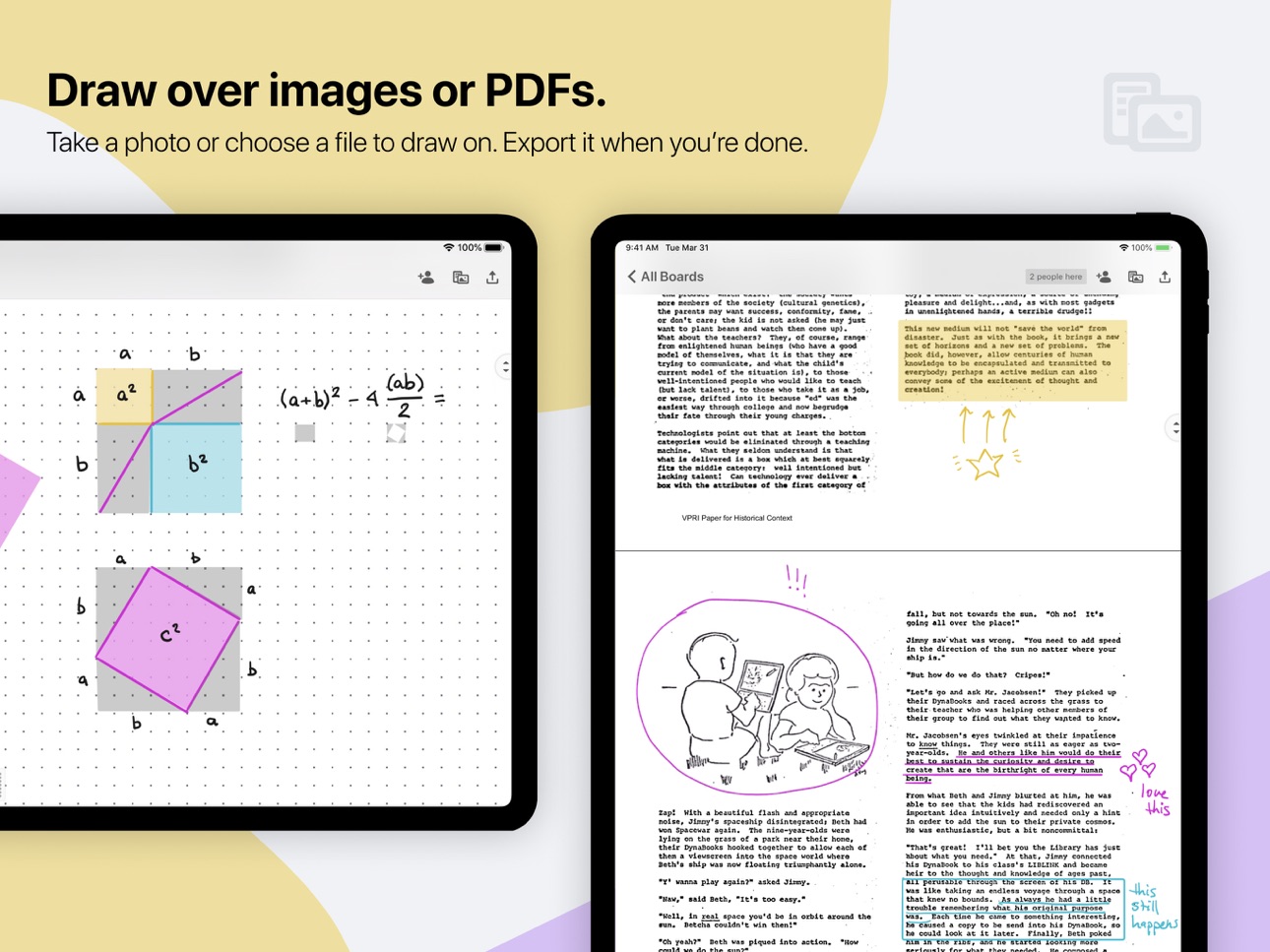
Draw over pdfs and images. Snap a picture of homework and draw on it, or review a pdf together. Once you are finished, you can save out a new pdf with your annotations.
WEB OR APP
Work with anyone, even your guests who don’t have an iPad or iPhone. The web app can be used to draw using a tablet, touch screen computer, or stylus. Display your live drawing on a big screen in a classroom or conference room using any browser and a convenient link.
SET UP IN A SNAP
Get on the same whiteboard together in seconds. No registering for an account or adding contacts in yet another app. Once you’ve connected in FaceTime or by phone you can tell your guests to join you using a link or a code, for free, with no messy sign ups.
INFINITE SPACE, UNLIMITED BOARDS
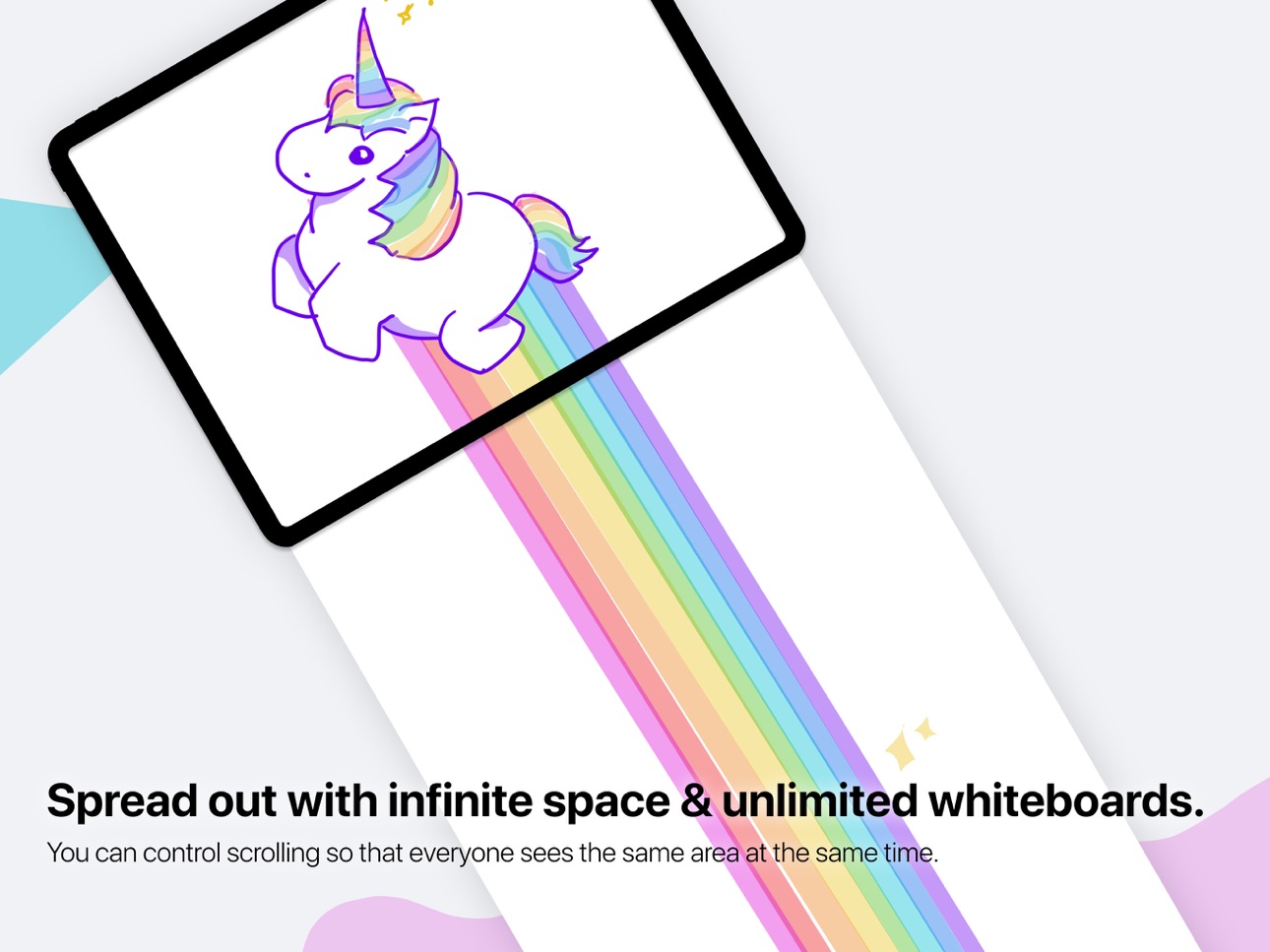
Control scrolling of the infinite drawing space so that everyone sees the same area at the same time. Whiteboards are unlimited, so you can start fresh for each topic. Unlike a real whiteboard, many people can draw in the same space at the same time!
POINT AND GESTURE
Point things out as you’re speaking with Scribble’s virtual laser pointer. No more clumsy describing of which part of a picture you're referring to – just use the magical disappearing laser ink. Designate different colors if you and your guests both need to point.
PENCIL SUPPORT
If you’ve got an iPad Pro and Apple Pencil, drawing feels especially great in Scribble. It’s like using paper, but you can draw with anyone, anywhere in the world. You can also use Settings to decide what you’d like your finger to do while you have the Pencil in hand.
NEAT SHAPES, STRAIGHT LINES
Can’t draw in a straight line? Neither can we! Scribble helps you draw perfect lines and shapes. Draw and pause without lifting your marker: you’ll see your shape pop magically into a rectangle, circle, ellipse, parallelogram, trapezoid, triangle or straight line.
FREE FOR GUESTS
Inviting people requires Scribble membership, but your guests join you for free. The membership subscription comes free for 2 weeks per monthly subscription, or 1 month per annual subscription. Drawing on your own is also free, and you can keep your whiteboards if you decide you don’t want to invite others anymore.
Payment will be charged to your iTunes account at confirmation of purchase. The subscription auto-renews at the same price unless disabled in iTunes Account Settings 24 hours before the end of the period each month. You can go to scribble.cool/cancel for instructions to cancel your subscription and turn auto-renew off.
Terms of Service: https://scribbletogether.com/terms
In-App Purchases BF pricing
Unlimited Use Subscription Subscription
Collaborate Live With Anyone · Monthly—
Collaborate Live With Anyone · Yearly—
Capabilities
In-App PurchasesSharePlay
Accessibility
ipadiphonemacrealityDevicetvoswatch
Version history 25 versions
Build 869272757v3.62025-01-26 08:10:52
You know how sometimes you start drawing a line, then want it to be straight, but need it to point a slightly different direction? Now you can begin drawing a line, hold for a sec and let it straighten, and then pull it in any direction or length you want. It even snaps to 45 degree angle suggestions. Enjoy!
*:・゚*:・゚ ~~~~ May-Li and Bridger ~~~ *:・゚*:・゚
Build 868365756v3.5.12024-08-21 11:28:42
Now you can duplicate boards. And lock images onto a board, making it easier to edit your scribbles overtop. To duplicate a board, tap […] on the All Boards screen and select Duplicate. To lock an image onto your board, select it with the Lasso tool, then tap Lock in the menu: you’ll then be able to select any scribbles overtop of the image and move them without moving the Image. To unlock it, Lasso to select it again and tap Unlock.
*:・゚*:・゚ ~~~~ May-Li and Bridger ~~~ *:・゚*:・゚
Build 868302765v3.52024-08-19 07:45:22
Now you can duplicate boards. And lock images onto a board, making it easier to edit your scribbles overtop. To duplicate a board, tap […] on the All Boards screen and select Duplicate. To lock an image onto your board, select it with the Lasso tool, then tap Lock in the menu: you’ll then be able to select any scribbles overtop of the image and move them without moving the Image. To unlock it, Lasso to select it again and tap Unlock.
*:・゚*:・゚ ~~~~ May-Li and Bridger ~~~ *:・゚*:・゚
Build 868272011v3.4.12024-08-17 15:52:39
Dear Scribblers ~ you requested folders, so we’ve built them for you. Just in time for the new school year. Now you can tuck your class boards into neat class folders. Enjoy, and happy scribbling!
*:・゚*:・゚ ~~~~ May-Li and Bridger ~~~ *:・゚*:・゚
Build 868221448v3.42024-08-15 18:02:36
Dear Scribblers ~ you requested folders, so we’ve built them for you. Just in time for the new school year. Now, you can tuck your class boards into neat class folders. Enjoy, and happy scribbling!
*:・゚*:・゚ ~~~~ May-Li and Bridger ~~~ *:・゚*:・゚
Build 861346981v3.3.12023-11-08 21:27:38
As requested, we’ve adjusted Scribble’s ink to be less variable in width. Thanks to everyone who reached out!
*:・゚*:・゚ ~~~~ May-Li and Bridger ~~~ *:・゚*:・゚
Build 860530873v3.32023-10-25 20:41:03
We’ve made even more improvements to Scribble’s ink. This release also fixes bugs that popped up on iOS 17.
*:・゚*:・゚ ~~~~ May-Li and Bridger ~~~ *:・゚*:・゚
Build 853422602v3.22023-03-02 19:23:15
We’ve improved the quality of Scribble’s ink, so now drawing is even more buttery-smooth. We’ve also added upload progress for PDFs to the sheets menu; now you can see your PDF’s size and how much is left to load before others can see it too.
*:・゚*:・゚ ~~~~ May-Li and Bridger ~~~ *:・゚*:・゚
Build 852549452v3.12022-10-01 22:31:37
This is a maintenance update to fix a bug with duplicated labels and a crash.
*:・゚*:・゚ ~~~~ May-Li and Bridger ~~~ *:・゚*:・゚
Build 851664518v3.02022-08-31 12:08:09
Since launching 2.0 we've added a text tool, an image tool, grid paper, syncing across devices, shape correction, the lasso tool, multiple windows on iPad, and more. We’re celebrating our progress with a refreshed look for 3.0, including a new dynamic vaporwavy-poolside blobby background, a new tool tray, and… a new app icon that pays homage to the age-old tradition of doodling that S on our notebooks! Your collaborators on the web also have new tools to draw, type, move, scale, and rotate.
*:・゚*:・゚ ~~~~ May-Li and Bridger ~~~ *:・゚*:・゚
Build 849336627v2.312022-05-31 21:16:45
Now you can type on the whiteboard!
*:・゚*:・゚ ~~~~ May-Li and Bridger ~~~ *:・゚*:・゚
Build 846936236v2.30.12022-02-07 14:09:02
New: place images directly onto your board. Tap the new image icon in the toolbar, then take a photo or select from your photo library. Move the image to where you want it, or use two fingers to rotate or scale. Tap outside the image once you’re done. Draw overtop to label a diagram, or add eyeballs, moustaches and pipes.
The tool tray is also adjusted to a more efficient layout, with a separate color for each tool and updated icons.
*:・゚*:・゚ ~~~~ May-Li and Bridger ~~~ *:・゚*:・゚
Build 846799699v2.302022-01-22 19:41:17
New: place images directly onto your board. Tap the new image icon in the toolbar, then take a photo or select from your photo library. Move the image to where you want it, or use two fingers to rotate or scale. Tap outside the image once you’re done. Draw overtop to label a diagram, or add eyeballs, moustaches and pipes.
The tool tray is also adjusted to a more efficient layout, with a separate color for each tool and updated icons.
*:・゚*:・゚ ~~~~ May-Li and Bridger ~~~ *:・゚*:・゚
Build 844923465v2.292021-10-25 21:30:03
Now you can use SharePlay to quickly and securely invite everyone on a FaceTime call to whiteboard together.
*:・゚*:・゚ ~~~~ May-Li and Bridger ~~~ *:・゚*:・゚
Build 842426399v2.28.12021-05-31 15:46:26
New: grid paper! Choose from quad, dot grid, isometric, isometric dot, music staff, lined, and engineering options. Customize color, spacing, and paper size, in case you need to print later (we know some of you do). There are viewable page breaks, too.
You can control your sheets by renaming, deleting, and exporting specific sheets to PDF. Enjoy getting gridiculous!
*:・゚*:・゚ ~~~~ May-Li and Bridger ~~~ *:・゚*:・゚
Build 841798219v2.282021-04-23 13:44:35
New: grid paper! Choose from quad, dot grid, isometric, isometric dot, music staff, lined, and engineering options. Customize color, spacing, and paper size, in case you need to print later (we know some of you do). There are viewable page breaks, too.
You can control your sheets by renaming, deleting, and exporting specific sheets to PDF. Enjoy getting gridiculous!
*:・゚*:・゚ ~~~~ May-Li and Bridger ~~~ *:・゚*:・゚
Build 840090460v2.272021-01-19 14:18:36
We’ve moved the tool tray to a spot that’s a little more out of the way. You can drag back to the bottom left or right of your screen if you’d like.
*:・゚*:・゚ ~~~~ May-Li and Bridger ~~~ *:・゚*:・゚
Build 838578072v2.262020-12-19 23:23:48
You can now link multiple devices from Settings and sync whiteboards across them. We’ve also built better permissions controls, snappier shape correction, and faster collaboration across the world thanks to changes on our server side.
*:・゚*:・゚ ~~~~ May-Li and Bridger ~~~ *:・゚*:・゚
Build 838219462v2.25.12020-10-15 13:03:43
Pull down on the All Boards screen and find the board you’re looking for using our all new search and sort functionality. Once you’ve chosen to sort by Date Edited, Date Created, or Title, the order will stick.
Once you’re inside a board, switching colors now only affects your selected tool – each color is chosen on a per tool basis.
You might also notice smoother scrolling on the All Boards screen thanks to performance Improvements.
*:・゚*:・゚ ~~~~ May-Li and Bridger ~~~ *:・゚*:・゚
Build 838073107v2.252020-10-05 01:47:02
Pull down on the All Boards screen and find the board you’re looking for using our all new search and sort functionality. Once you’ve chosen to sort by Date Edited, Date Created, or Title, the order will stick.
Once you’re inside a board, switching colors now only affects your selected tool – each color is chosen on a per tool basis.
You might also notice smoother scrolling on the All Boards screen thanks to performance Improvements.
*:・゚*:・゚ ~~~~ May-Li and Bridger ~~~ *:・゚*:・゚
Build 837759529v2.242020-09-16 17:22:03
Renaming a whiteboard is now easier on iPad. When you have a board open, rename it by tapping on the board name and choosing Rename.
*:・゚*:・゚ ~~~~ May-Li and Bridger ~~~ *:・゚*:・゚
Build 837572002v2.23.12020-09-01 06:12:00
We’ve added keyboard shortcuts for cut, copy and paste; PDF-export related bug fixes (thanks to y’all who reported this!); and a sparkly little surprise for customizing your All Boards screen background.
Enjoy!
:・゚:・゚ ~~~~ May-Li, Bridger, and our guest engineer Raheel ~~~ :・゚:・゚
Build 837381856v2.232020-08-30 00:10:17
We’ve added keyboard shortcuts for cut, copy and paste; PDF-export related bug fixes (thanks to y’all who reported this!); and a sparkly little surprise for customizing your All Boards screen background.
Enjoy!
:・゚:・゚ ~~~~ May-Li, Bridger, and our guest engineer Raheel ~~~ :・゚:・゚
Build 835911672v2.222020-06-30 18:40:47
This release is a tasty mélange of bug fixes and improvements just for you. Copy and paste! Better control over “dark mode”! Also: a revised settings layout, clearer settings for scroll control, fixes to PDF alignment, and export of PDFs with the same name as your board.
Enjoy!
*:・゚*:・゚ ~~~~ May-Li and Bridger ~~~ *:・゚*:・゚
Build 835609337v2.212020-05-04 17:32:16
You asked, we answered! Now you can name the boards you own. Just tap the board information on the glitter homescreen.
We’ve also fixed bugs related to link sharing for non-subscribers and PDF rotation. Thanks for for letting us know!
*:・゚*:・゚ ~~~~ May-Li and Bridger ~~~ *:・゚*:・゚
Price history by region
Currency
Show
Columns
Search
Availability 69 of 69 storefronts
| Region | Language | Price | Ratings | Avg | Version |
|---|---|---|---|---|---|
| US | en-US | Free | 2.2k | 4.6 | 3.6 |
| MX | es-MX | Free | 58 | 4.7 | 3.6 |
| BR | pt-BR | Free | 39 | 4.5 | 3.6 |
| CO | es-MX | Free | 24 | 4.8 | 3.6 |
| CL | es-MX | Free | 19 | 4.4 | 3.6 |
| PE | es-MX | Free | 14 | 4.4 | 3.6 |
| AR | es-MX | Free | 7 | 3.9 | 3.6 |
| EC | es-MX | Free | 6 | 4.7 | 3.6 |
| GH | en-GB | Free | 5 | 4.6 | 3.6 |
| TT | en-GB | Free | 5 | 4.2 | 3.6 |
| GT | es-MX | Free | 4 | 4.3 | 3.6 |
| PA | es-MX | Free | 4 | 4.0 | 3.6 |
| BO | es-MX | Free | 3 | 5.0 | 3.6 |
| DO | es-MX | Free | 3 | 5.0 | 3.6 |
| CR | es-MX | Free | 2 | 5.0 | 3.6 |
| JM | en-GB | Free | 2 | 5.0 | 3.6 |
| VE | es-MX | Free | 2 | 2.5 | 3.6 |
| BF | en-GB | Free | 1 | 5.0 | 3.6 |
| BS | en-GB | Free | 1 | 5.0 | 3.6 |
| DZ | en-GB | Free | 1 | 3.0 | 3.6 |
| GD | en-GB | Free | 1 | 5.0 | 3.6 |
| HN | es-MX | Free | 1 | 5.0 | 3.6 |
| NA | en-GB | Free | 1 | 3.0 | 3.6 |
| NG | en-GB | Free | 1 | 5.0 | 3.6 |
| PY | es-MX | Free | 1 | 4.0 | 3.6 |
| SN | en-GB | Free | 1 | 5.0 | 3.6 |
| SR | en-GB | Free | 1 | 5.0 | 3.6 |
| SV | es-MX | Free | 1 | 5.0 | 3.6 |
| TN | en-GB | Free | 1 | 5.0 | 3.6 |
| UY | en-GB | Free | 1 | 3.0 | 3.6 |
| AG | en-GB | Free | 0 | — | 3.6 |
| AI | en-GB | Free | 0 | — | 3.6 |
| BB | en-GB | Free | 0 | — | 3.6 |
| BJ | en-GB | Free | 0 | — | 3.6 |
| BW | en-GB | Free | 0 | — | 3.6 |
| BZ | en-GB | Free | 0 | — | 3.6 |
| CD | en-GB | Free | 0 | — | 3.6 |
| CG | en-GB | Free | 0 | — | 3.6 |
| DM | en-GB | Free | 0 | — | 3.6 |
| GA | fr-FR | Free | 0 | — | 3.6 |
| GM | en-GB | Free | 0 | — | 3.6 |
| GW | en-GB | Free | 0 | — | 3.6 |
| GY | en-GB | Free | 0 | — | 3.6 |
| KE | en-GB | Free | 0 | — | 3.6 |
| KN | en-GB | Free | 0 | — | 3.6 |
| KY | en-GB | Free | 0 | — | 3.6 |
| LC | en-GB | Free | 0 | — | 3.6 |
| LR | en-GB | Free | 0 | — | 3.6 |
| LY | en-GB | Free | 0 | — | 3.6 |
| MA | en-GB | Free | 0 | — | 3.6 |
| MG | en-GB | Free | 0 | — | 3.6 |
| MS | en-GB | Free | 0 | — | 3.6 |
| MU | en-GB | Free | 0 | — | 3.6 |
| MW | en-GB | Free | 0 | — | 3.6 |
| NE | en-GB | Free | 0 | — | 3.6 |
| NI | es-MX | Free | 0 | — | 3.6 |
| RW | en-GB | Free | 0 | — | 3.6 |
| SC | en-GB | Free | 0 | — | 3.6 |
| SL | en-GB | Free | 0 | — | 3.6 |
| ST | en-GB | Free | 0 | — | 3.6 |
| SZ | en-GB | Free | 0 | — | 3.6 |
| TC | en-GB | Free | 0 | — | 3.6 |
| TD | en-GB | Free | 0 | — | 3.6 |
| TZ | en-GB | Free | 0 | — | 3.6 |
| UG | en-GB | Free | 0 | — | 3.6 |
| VC | en-GB | Free | 0 | — | 3.6 |
| VG | en-GB | Free | 0 | — | 3.6 |
| ZM | en-GB | Free | 0 | — | 3.6 |
| ZW | en-GB | Free | 0 | — | 3.6 |
Change log 29 changes · BF
✎
releaseNotes updated
You know how sometimes you start drawing a line, then want it to be straight, but need it to point a slightly different direction? Now you can begin drawing a l
✎
description updated
Draw together in real time, from anywhere! In seconds, anyone can follow along with your drawing or draw with you from the app or on the web. Use Scribble
✎
subtitle updated
Whiteboard online with anyone
✎
name updated
Scribble Together Whiteboard
◆
Version 3.6 released
You know how sometimes you start drawing a line, then want it to be straight, but need it to point a slightly different direction? Now you can begin drawing a line, hold for a sec and let it straighten, and then pull it in any direction or
◆
Version 3.5.1 released
Now you can duplicate boards. And lock images onto a board, making it easier to edit your scribbles overtop. To duplicate a board, tap […] on the All Boards screen and select Duplicate. To lock an image onto your board, select it with the L
◆
Version 3.5 released
Now you can duplicate boards. And lock images onto a board, making it easier to edit your scribbles overtop. To duplicate a board, tap […] on the All Boards screen and select Duplicate. To lock an image onto your board, select it with the L
◆
Version 3.4.1 released
Dear Scribblers ~ you requested folders, so we’ve built them for you. Just in time for the new school year. Now you can tuck your class boards into neat class folders. Enjoy, and happy scribbling!
*:・゚*:・゚ ~~~~ May-Li and Bridger ~~~ *:・゚*:
◆
Version 3.4 released
Dear Scribblers ~ you requested folders, so we’ve built them for you. Just in time for the new school year. Now, you can tuck your class boards into neat class folders. Enjoy, and happy scribbling!
*:・゚*:・゚ ~~~~ May-Li and Bridger ~~~ *:・゚
◆
Version 3.3.1 released
As requested, we’ve adjusted Scribble’s ink to be less variable in width. Thanks to everyone who reached out!
*:・゚*:・゚ ~~~~ May-Li and Bridger ~~~ *:・゚*:・゚
◆
Version 3.3 released
We’ve made even more improvements to Scribble’s ink. This release also fixes bugs that popped up on iOS 17.
*:・゚*:・゚ ~~~~ May-Li and Bridger ~~~ *:・゚*:・゚
◆
Version 3.2 released
We’ve improved the quality of Scribble’s ink, so now drawing is even more buttery-smooth. We’ve also added upload progress for PDFs to the sheets menu; now you can see your PDF’s size and how much is left to load before others can see it to
◆
Version 3.1 released
This is a maintenance update to fix a bug with duplicated labels and a crash.
*:・゚*:・゚ ~~~~ May-Li and Bridger ~~~ *:・゚*:・゚
◆
Version 3.0 released
Since launching 2.0 we've added a text tool, an image tool, grid paper, syncing across devices, shape correction, the lasso tool, multiple windows on iPad, and more. We’re celebrating our progress with a refreshed look for 3.0, including a
◆
Version 2.31 released
Now you can type on the whiteboard!
*:・゚*:・゚ ~~~~ May-Li and Bridger ~~~ *:・゚*:・゚
◆
Version 2.30.1 released
New: place images directly onto your board. Tap the new image icon in the toolbar, then take a photo or select from your photo library. Move the image to where you want it, or use two fingers to rotate or scale. Tap outside the image once y
◆
Version 2.30 released
New: place images directly onto your board. Tap the new image icon in the toolbar, then take a photo or select from your photo library. Move the image to where you want it, or use two fingers to rotate or scale. Tap outside the image once y
◆
Version 2.29 released
Now you can use SharePlay to quickly and securely invite everyone on a FaceTime call to whiteboard together.
*:・゚*:・゚ ~~~~ May-Li and Bridger ~~~ *:・゚*:・゚
◆
Version 2.28.1 released
New: grid paper! Choose from quad, dot grid, isometric, isometric dot, music staff, lined, and engineering options. Customize color, spacing, and paper size, in case you need to print later (we know some of you do). There are viewable page
◆
Version 2.28 released
New: grid paper! Choose from quad, dot grid, isometric, isometric dot, music staff, lined, and engineering options. Customize color, spacing, and paper size, in case you need to print later (we know some of you do). There are viewable page
◆
Version 2.27 released
We’ve moved the tool tray to a spot that’s a little more out of the way. You can drag back to the bottom left or right of your screen if you’d like.
*:・゚*:・゚ ~~~~ May-Li and Bridger ~~~ *:・゚*:・゚
◆
Version 2.26 released
You can now link multiple devices from Settings and sync whiteboards across them. We’ve also built better permissions controls, snappier shape correction, and faster collaboration across the world thanks to changes on our server side.
*:・゚*
◆
Version 2.25.1 released
Pull down on the All Boards screen and find the board you’re looking for using our all new search and sort functionality. Once you’ve chosen to sort by Date Edited, Date Created, or Title, the order will stick.
Once you’re inside a board,
◆
Version 2.25 released
Pull down on the All Boards screen and find the board you’re looking for using our all new search and sort functionality. Once you’ve chosen to sort by Date Edited, Date Created, or Title, the order will stick.
Once you’re inside a board,
◆
Version 2.24 released
Renaming a whiteboard is now easier on iPad. When you have a board open, rename it by tapping on the board name and choosing Rename.
*:・゚*:・゚ ~~~~ May-Li and Bridger ~~~ *:・゚*:・゚
◆
Version 2.23.1 released
We’ve added keyboard shortcuts for cut, copy and paste; PDF-export related bug fixes (thanks to y’all who reported this!); and a sparkly little surprise for customizing your All Boards screen background.
Enjoy!
:・゚:・゚ ~~~~ May-Li, Bridger,
◆
Version 2.23 released
We’ve added keyboard shortcuts for cut, copy and paste; PDF-export related bug fixes (thanks to y’all who reported this!); and a sparkly little surprise for customizing your All Boards screen background.
Enjoy!
:・゚:・゚ ~~~~ May-Li, Bridger,
◆
Version 2.22 released
This release is a tasty mélange of bug fixes and improvements just for you. Copy and paste! Better control over “dark mode”! Also: a revised settings layout, clearer settings for scroll control, fixes to PDF alignment, and export of PDFs wi
◆
Version 2.21 released
You asked, we answered! Now you can name the boards you own. Just tap the board information on the glitter homescreen.
We’ve also fixed bugs related to link sharing for non-subscribers and PDF rotation. Thanks for for letting us know!
*:・