Home › Business

 BB
BB
 USen-US
 DEde-DE
 ESes-ES
 INen-GB
 ITit
ITit MXes-MX
 PLen-GB
 SGen-GB
 TRen-GB
 UAen-GB
 AEen-GB
 AFen-GB
 AGen-GB
 AIen-GB
 ALen-GB
 AMen-GB
 AOen-GB
 ARes-MX
 ATde-DE
 AUen-AU
 AZen-GB
 BAen-GBBBen-GB
 BEen-GB
 BFen-GB
 BGen-GB
 BHen-GB
 BJen-GB
 BMen-GB
 BNen-GB
 BOes-MX
 BRpt-BR
 BSen-GB
 BTen-GB
 BWen-GB
 BYen-GB
 BZen-GB
 CAen-CA
 CDen-GB
 CGen-GB
 CHde-CH
 CIfr-FR
 CLes-MX
 CMfr-FR
 COes-MX
 CRes-MX
 CVen-GB
 CYen-GB
 CZen-GB
 DKen-GB
 DMen-GB
 DOes-MX
 DZen-GB
 ECes-MX
 EEen-GB
 EGen-GB
 FIen-GB
 FJen-GB
 FMen-GB
 FRfr-FR
 GAfr-FR
 GBen-GB
 GDen-GB
 GEen-GB
 GHen-GB
 GMen-GB
 GRen-GB
 GTes-MX
 GWen-GB
 GYen-GB
 HKzh-Hant-HK
 HRen-GB
 HUen-GB
 IDen-GB
 IEen-GB
 ILen-GB
 IQen-GB
 ISen-GB
 JMen-GB
 JOen-GB
 JPja
JPja KEen-GB
 KGen-GB
 KHen-GB
 KNen-GB
 KRko
KRko KWen-GB
 KYen-GB
 KZen-GB
 LAen-GB
 LBen-GB
 LCen-GB
 LKen-GB
 LRen-GB
 LTen-GB
 LUen-GB
 LVen-GB
 LYen-GB
 MAen-GB
 MDen-GB
 MEen-GB
 MGen-GB
 MKen-GB
 MLen-GB
 MMen-GB
 MNen-GB
 MOzh-Hant-HK
 MRen-GB
 MSen-GB
 MTen-GB
 MUen-GB
 MVen-GB
 MWen-GB
 MYen-GB
 MZen-GB
 NAen-GB
 NEen-GB
 NGen-GB
 NIes-MX
 NLnl
NLnl NOen-GB
 NPen-GB
 NRen-GB
 NZen-AU
 OMen-GB
 PAes-MX
 PEes-MX
 PGen-GB
 PHen-GB
 PKen-GB
 PTpt-PT
 PWen-GB
 PYes-MX
 QAen-GB
 ROen-GB
 RSen-GB
 RUru
RUru RWen-GB
 SAen-GB
 SBen-GB
 SCen-GB
 SEsv
SEsv SIen-GB
 SKen-GB
 SLen-GB
 SNen-GB
 SRen-GB
 STen-GB
 SVes-MX
 SZen-GB
 TCen-GB
 TDen-GB
 THen-GB
 TJen-GB
 TMen-GB
 TNen-GB
 TOen-GB
 TTen-GB
 TWzh-Hant-TW
 TZen-GB
 UGen-GB
 UYen-GB
 UZen-GB
 VCen-GB
 VEes-MX
 VGen-GB
 VNen-GB
 VUen-GB
 XKen-GB
 YEen-GB
 ZAen-GB
 ZMen-GB
 ZWen-GB
 CNNot Available
173 of 174 storefronts
Content in en-US
Content in en-US
Information
Preview 3 platforms
iPhone 6 images


iPad 6 images



Mac 6 images


What’s New Version 0.6.0
Bug Fix.
Description
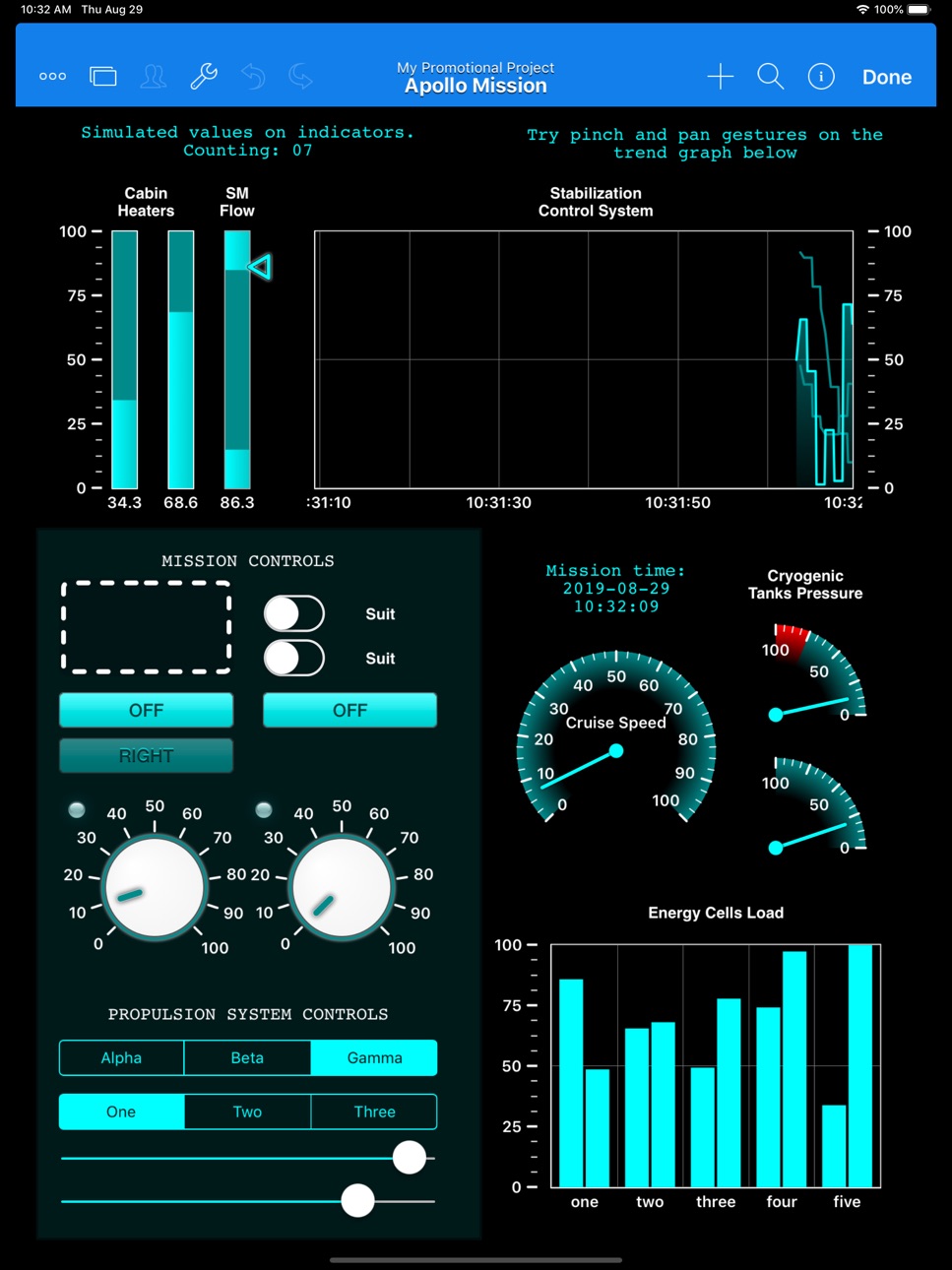
HMI Editor is a *native* iOS application for creating Human Machine Interfaces for real-time monitoring and control of industrial PLC based systems and processes. Data is presented in highly customizable page layouts much like a presentations app.
Who's this for.
The app is aimed at automation engineers or industrial machine manufacturers on many sectors including but not limited to building automation, industrial processing, power plants, water plants, industrial equipment, transportation and so on, who want to provide instant, reliable access to real-time data right from iOS devices.
What you'll get for the price of the app.
HMI Editor allows you to create efficient, advanced, highly responsive "Human Machine Interfaces" right on your iPad screen with unprecedented ease of use and fun. The HMI Editor app is fully native and supports all major Programmable Logic Controller (PLC) brands. For the price of the app (FREE) you can *fully* develop and test projects of any complexity. No restrictions on number of pages, tags or PLCs are applied at this stage. You only pay for project activations when you are ready to deploy to end users.
HMI Editor essential Features.
- Very fast, launches and connects immediately regardless of project size.
- All data types including Strings, Arrays and Dictionaries fully supported.
- HMI Projects are edited on-screen as you run and monitor your process.
- You can export and edit your project files as text on your PC or Mac.
- Export/import asset files such as images, pdfs or audio files from HMI Editor to your PC or Mac.
- Optional project storage in the cloud and easy deployment to end users devices.
- Native PLC communication protocols. Connections are performed with no intermediate servers or boxes.
- Major PLC brands supported, including: Allen Bradley, Mitsubishi, Omron, Opto 22, Schneider Electric, Siemens, Wago.
- TCP/IP based security.
Getting Started: creating a HMI Editor project.
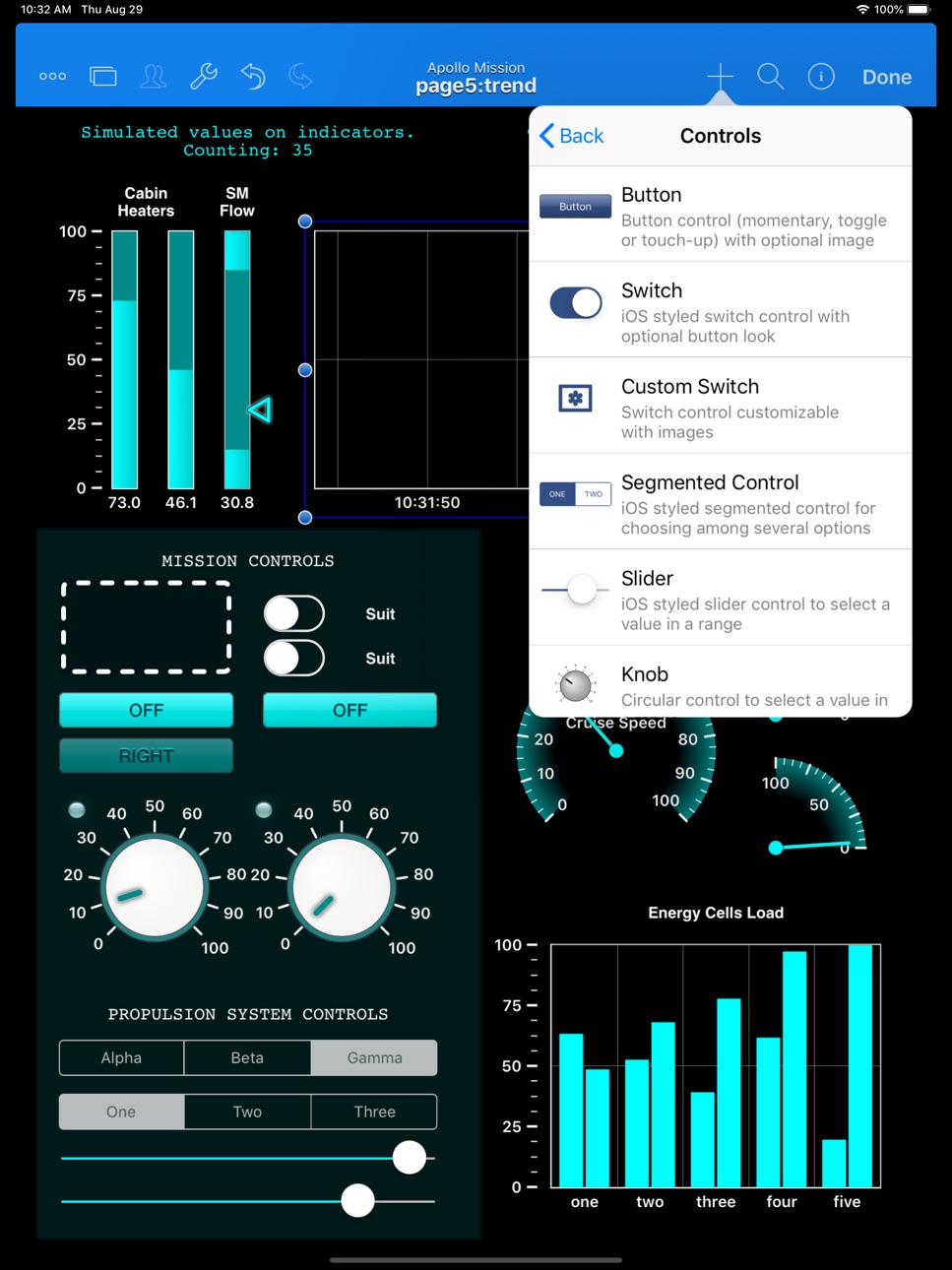
Projects are created like a mix of PowerPoint and Excel. The concept is quite simple. You lay out elements such as Sliders, Switches, Buttons, Images, Text Fields, Knobs, Trends, Gauges, Bar Indicators, Web browser, Array pickers, even Gesture Recognizers and much more onto pages. You connect on-screen objects with iPad sensors and PLC tags through simple links or powerful expressions. That's it !!. The result is a stunning, dynamic, real-time presentation of your PLC controlled process as you'd never imagined.
Examples Ready for You.
Explore the examples and take the liberty to make changes on them. Create your own test projects from scratch or based on the examples. HMI Editor will comprehensively tell you what inconsistencies or problems there may be in your project as you build them. New examples are being added on a regular basis or by user request.
What's Next.
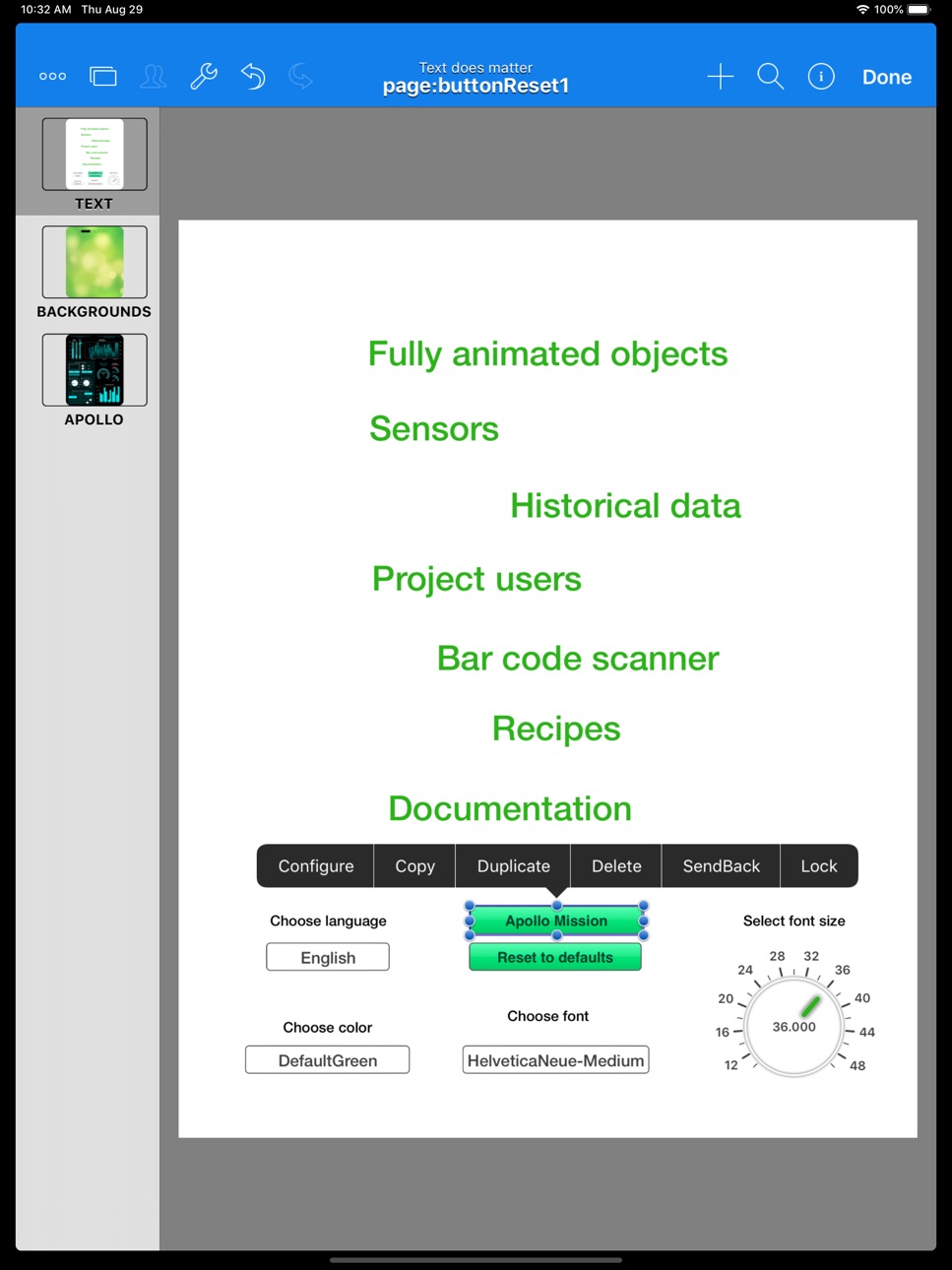
There’s a lot more that we haven’t mentioned here, such as the page navigation interface, the embedded file server, the model browser, the model seeker, the automatic expression completer, the inspector viewer, alarm notifications, iPad sensors, barcode scanner, user access levels, password on launch, PLC validation codes, individual tag diagnostics, background processing, automatic network switching, and much much more. You surely will identify some of these features by just exploring the app, but the single source where everything is covered is the HMI Editor Reference Manual. Feel free to download it from our site and look at the full possibilities, you’ll love the product.
Technical Support.
We provide a free online support service based on public forums on our website:
http://www.sweetwilliamsl.com/support/forums
Or through direct email:
support@ritecontrol.com.
We also hold a public YouTube channel at:
http://www.youtube.com/hmipad.
Feel free to direct your questions, suggestions or feedback to any of the above. We'll be happy to hear from you.
In-App Purchases BB pricing
One-Time Purchases
Activation for One Use—
Activation for Five Uses—
Activation for Ten Uses—
Capabilities
In-App Purchases
Accessibility
ipadiphonemacrealityDevicetvoswatch
Version history 25 versions
Build 886122580v0.6.02026-05-30 04:44:57
Bug Fix.
Build 885882964v0.5.82026-05-19 22:32:53
This release improves the Inspector, Model Browser, REST API, VPN, and Alarm workflows with better search, layout polish, and navigation refinements.
It also adds more flexible color start point options for Chart, Trend, and BarLevel items, improves stepped and haptic feedback behavior for controls, and fixes multiple stability, layout, and compatibility issues across iPad, iPhone, and Mac.
Build 885357522v0.5.72026-05-07 19:08:02
What's New in 0.5.7
New connectors
• MQTT Connector — publish and subscribe to topics on any MQTT broker. Supports username/password and TLS, automatic JSON parsing of received payloads, and a last-message viewer with syntax-highlighted JSON.
Editor
• Frame properties (framePortrait, frameLandscape, framePortraitPhone, frameLandscapePhone, frameMac) now use four separate fields — X, Y, Width, Height — instead of a single SM.rect text box. Each field accepts an expression, and your expressions are preserved across project close and reopen.
• The top toolbar turns blue when you enter Edit mode, so it's clear at a glance whether you're editing or running.
• New "Move Items to Another Page" action that preserves item names and expression bindings.
• New "Default Start Page" setting under Current Project — pick the page that should open first.
• The Pages list opens automatically after a copy, so you can pick a destination immediately.
Items
• Slider: new stepValue property — when set to a positive value the slider snaps to multiples of that step (set to 0 for the previous continuous behavior).
• Inspector connectors (PLC, REST, MQTT, VPN) now share a unified header: connector name, endpoint or broker, and a live-status dot.
Fixes
• Fixed the Model Browser flying off-screen when the search bar was tapped.
• Fixed several Model Browser search bugs — crashes on rapid input, missing VPN and Background results, and stale state on reopen.
• Fixed sub-pixel position drift when moving, resizing, grouping, and ungrouping items.
• Fixed a crash when loading older projects that contain TapRecognizer items.
• Fixed copy of REST connectors whose response property contains an array value.
• In SM.rect editors, expressions like pageWidth - 20 are no longer replaced by their evaluated number after editing.
Build 885056801v0.5.62026-04-29 20:18:34
What's new in 0.5.6
UI:
New SF Symbols icon picker
Alignment & distribution controls in the page editor
Mac Catalyst autocomplete keys
Refined toolbars, menus, and alarms layout
iPad page size and iPhone rear-panel text adjustments
REST API connectors:
Per-connector Polling Interval
Enable/Disable switch for individual connectors
Poll Now on-demand refresh
Updated Information panel
Fixes:
Correct initial orientation when opening a project
Editor orientation selection now persists on Mac
Selection-menu popover no longer clipped
Faster, more reliable networking layer
Build 883551065v0.5.52026-03-19 19:20:18
Updated app for iOS 26. Fixed a bug that prevented app access local networks in iOS 26.
Build 874983807v0.5.42025-05-23 08:03:41
This build fixes a bug on verification alert prompts in iPadOS, showing now the cancel button, and fixes the paste action of items within the model browser.
Build 868038271v0.5.32024-08-08 07:12:32
This build fixes a bug that make certain projects crash upon opening, specially if contains plots and trend items.
Build 867064784v0.5.22024-07-01 21:25:09
Bug fixes and general stability improvements.
Build 862828376v0.5.12024-03-28 16:13:02
Fixing issue on Chart item that may cause a crash in certain projects in both viewer and editor apps.
Build 862180606v0.5.02024-01-03 14:58:43
Updated the app to iOS 17 and macOS 14 Sonoma, added support for automatic resizing of the canvas to match the native device resolution, and applied bug fixes and stability improvements.
Build 859799056v0.4.12023-09-12 07:10:51
Fixing a bug that prevented the model browser from being displayed on the iPhone. Minor fixes and stability improvements.
Build 858332851v0.4.02023-07-17 07:27:53
The whole HMI suite is getting a major internal update, now with full support for iOS 13.0 and macOS 13.0 onwards for both HMI Editor and HMI Viewer.
Build 856933269v0.3.22023-05-08 20:19:09
Fixing an issue when importing files from the file system (like CSV or others).
Build 855744684v0.3.12023-03-23 14:14:56
Added support for integrating VPN connections.
Build 854959700v0.3.02023-03-02 09:18:18
Version 0.3.0 is bringing macOS support for the HMI suite. You can now download HMI Editor for macOS to create and edit your projects and open them in HMI View for both iOS and macOS!
Important: Version 0.3.0 of HMI Viewer and HMI Editor is a required update in order to use projects built with this version (it is not possible to open a project built with HMI Editor 0.3.0 with a version of HMI Viewer or HMI Editor smaller than 0.3.0).
Build 853235601v0.2.62022-11-08 20:41:47
- Bug fix
Build 851963738v0.2.52022-09-03 21:36:32
Bug fix
Build 851890423v0.2.42022-08-30 23:09:47
- Bug fix
- Improved performance
Build 845309718v0.2.22021-11-20 23:52:47
1. App performance improvement
2. Bug fixes
Build 843216707v0.2.12021-11-03 11:04:24
1. UI fixes and improvements
2. Added ability to Dynamically move and resize elements with expressions.
3. Added time remaining property to DelayOnTimer.
4. Bug fixes.
Build 842655056v0.2.02021-07-20 23:16:33
Big Fixes and Performance improvements.
Build 838366403v0.1.92021-06-10 21:48:52
Big Fixes and Performance improvements.
As well as Added properties to Gauge.
Build 837825589v0.1.82020-09-17 21:52:12
Bug fixes and Performance improvements.
Build 834485519v0.1.62020-01-24 20:45:13
Fixed User Login Issue
Fixed crash on iPhone 8 and others.
Build 834125099v0.1.52019-12-28 18:42:03
- Added Support for iOS 13.
- Added the Ability to switch projects with a button, linkToProject property has been added
- Added ability to email alarms
- CSV file can be imported into Databases section of the app to add the file to recipes
- Many Bug Fixes
Price history by region
Currency
Show
Columns
Search
Availability 173 of 174 storefronts
| Region | Language | Price | Ratings | Avg | Version |
|---|---|---|---|---|---|
| US | en-US | Free | 10 | 4.7 | 0.6.0 |
| DE | de-DE | Free | 1 | 5.0 | 0.6.0 |
| ES | es-ES | Free | 1 | 5.0 | 0.6.0 |
| IN | en-GB | Free | 1 | 5.0 | 0.6.0 |
| IT | it | Free | 1 | 2.0 | 0.6.0 |
| MX | es-MX | Free | 1 | 5.0 | 0.6.0 |
| PL | en-GB | Free | 1 | 5.0 | 0.6.0 |
| SG | en-GB | Free | 1 | 4.0 | 0.6.0 |
| TR | en-GB | Free | 1 | 5.0 | 0.6.0 |
| UA | en-GB | Free | 1 | 5.0 | 0.6.0 |
| AE | en-GB | Free | 0 | — | 0.6.0 |
| AF | en-GB | Free | 0 | — | 0.6.0 |
| AG | en-GB | Free | 0 | — | 0.6.0 |
| AI | en-GB | Free | 0 | — | 0.6.0 |
| AL | en-GB | Free | 0 | — | 0.6.0 |
| AM | en-GB | Free | 0 | — | 0.6.0 |
| AO | en-GB | Free | 0 | — | 0.6.0 |
| AR | es-MX | Free | 0 | — | 0.6.0 |
| AT | de-DE | Free | 0 | — | 0.6.0 |
| AU | en-AU | Free | 0 | — | 0.6.0 |
| AZ | en-GB | Free | 0 | — | 0.6.0 |
| BA | en-GB | Free | 0 | — | 0.6.0 |
| BB | en-GB | Free | 0 | — | 0.6.0 |
| BE | en-GB | Free | 0 | — | 0.6.0 |
| BF | en-GB | Free | 0 | — | 0.6.0 |
| BG | en-GB | Free | 0 | — | 0.6.0 |
| BH | en-GB | Free | 0 | — | 0.6.0 |
| BJ | en-GB | Free | 0 | — | 0.6.0 |
| BM | en-GB | Free | 0 | — | 0.6.0 |
| BN | en-GB | Free | 0 | — | 0.6.0 |
| BO | es-MX | Free | 0 | — | 0.6.0 |
| BR | pt-BR | Free | 0 | — | 0.6.0 |
| BS | en-GB | Free | 0 | — | 0.6.0 |
| BT | en-GB | Free | 0 | — | 0.6.0 |
| BW | en-GB | Free | 0 | — | 0.6.0 |
| BY | en-GB | Free | 0 | — | 0.6.0 |
| BZ | en-GB | Free | 0 | — | 0.6.0 |
| CA | en-CA | Free | 0 | — | 0.6.0 |
| CD | en-GB | Free | 0 | — | 0.6.0 |
| CG | en-GB | Free | 0 | — | 0.6.0 |
| CH | de-CH | Free | 0 | — | 0.6.0 |
| CI | fr-FR | Free | 0 | — | 0.6.0 |
| CL | es-MX | Free | 0 | — | 0.6.0 |
| CM | fr-FR | Free | 0 | — | 0.6.0 |
| CO | es-MX | Free | 0 | — | 0.6.0 |
| CR | es-MX | Free | 0 | — | 0.6.0 |
| CV | en-GB | Free | 0 | — | 0.6.0 |
| CY | en-GB | Free | 0 | — | 0.6.0 |
| CZ | en-GB | Free | 0 | — | 0.6.0 |
| DK | en-GB | Free | 0 | — | 0.6.0 |
| DM | en-GB | Free | 0 | — | 0.6.0 |
| DO | es-MX | Free | 0 | — | 0.6.0 |
| DZ | en-GB | Free | 0 | — | 0.6.0 |
| EC | es-MX | Free | 0 | — | 0.6.0 |
| EE | en-GB | Free | 0 | — | 0.6.0 |
| EG | en-GB | Free | 0 | — | 0.6.0 |
| FI | en-GB | Free | 0 | — | 0.6.0 |
| FJ | en-GB | Free | 0 | — | 0.6.0 |
| FM | en-GB | Free | 0 | — | 0.6.0 |
| FR | fr-FR | Free | 0 | — | 0.6.0 |
| GA | fr-FR | Free | 0 | — | 0.6.0 |
| GB | en-GB | Free | 0 | — | 0.6.0 |
| GD | en-GB | Free | 0 | — | 0.6.0 |
| GE | en-GB | Free | 0 | — | 0.6.0 |
| GH | en-GB | Free | 0 | — | 0.6.0 |
| GM | en-GB | Free | 0 | — | 0.6.0 |
| GR | en-GB | Free | 0 | — | 0.6.0 |
| GT | es-MX | Free | 0 | — | 0.6.0 |
| GW | en-GB | Free | 0 | — | 0.6.0 |
| GY | en-GB | Free | 0 | — | 0.6.0 |
| HK | zh-Hant-HK | Free | 0 | — | 0.6.0 |
| HR | en-GB | Free | 0 | — | 0.6.0 |
| HU | en-GB | Free | 0 | — | 0.6.0 |
| ID | en-GB | Free | 0 | — | 0.6.0 |
| IE | en-GB | Free | 0 | — | 0.6.0 |
| IL | en-GB | Free | 0 | — | 0.6.0 |
| IQ | en-GB | Free | 0 | — | 0.6.0 |
| IS | en-GB | Free | 0 | — | 0.6.0 |
| JM | en-GB | Free | 0 | — | 0.6.0 |
| JO | en-GB | Free | 0 | — | 0.6.0 |
| JP | ja | Free | 0 | — | 0.6.0 |
| KE | en-GB | Free | 0 | — | 0.6.0 |
| KG | en-GB | Free | 0 | — | 0.6.0 |
| KH | en-GB | Free | 0 | — | 0.6.0 |
| KN | en-GB | Free | 0 | — | 0.6.0 |
| KR | ko | Free | 0 | — | 0.6.0 |
| KW | en-GB | Free | 0 | — | 0.6.0 |
| KY | en-GB | Free | 0 | — | 0.6.0 |
| KZ | en-GB | Free | 0 | — | 0.6.0 |
| LA | en-GB | Free | 0 | — | 0.6.0 |
| LB | en-GB | Free | 0 | — | 0.6.0 |
| LC | en-GB | Free | 0 | — | 0.6.0 |
| LK | en-GB | Free | 0 | — | 0.6.0 |
| LR | en-GB | Free | 0 | — | 0.6.0 |
| LT | en-GB | Free | 0 | — | 0.6.0 |
| LU | en-GB | Free | 0 | — | 0.6.0 |
| LV | en-GB | Free | 0 | — | 0.6.0 |
| LY | en-GB | Free | 0 | — | 0.6.0 |
| MA | en-GB | Free | 0 | — | 0.6.0 |
| MD | en-GB | Free | 0 | — | 0.6.0 |
| ME | en-GB | Free | 0 | — | 0.6.0 |
| MG | en-GB | Free | 0 | — | 0.6.0 |
| MK | en-GB | Free | 0 | — | 0.6.0 |
| ML | en-GB | Free | 0 | — | 0.6.0 |
| MM | en-GB | Free | 0 | — | 0.6.0 |
| MN | en-GB | Free | 0 | — | 0.6.0 |
| MO | zh-Hant-HK | Free | 0 | — | 0.6.0 |
| MR | en-GB | Free | 0 | — | 0.6.0 |
| MS | en-GB | Free | 0 | — | 0.6.0 |
| MT | en-GB | Free | 0 | — | 0.6.0 |
| MU | en-GB | Free | 0 | — | 0.6.0 |
| MV | en-GB | Free | 0 | — | 0.6.0 |
| MW | en-GB | Free | 0 | — | 0.6.0 |
| MY | en-GB | Free | 0 | — | 0.6.0 |
| MZ | en-GB | Free | 0 | — | 0.6.0 |
| NA | en-GB | Free | 0 | — | 0.6.0 |
| NE | en-GB | Free | 0 | — | 0.6.0 |
| NG | en-GB | Free | 0 | — | 0.6.0 |
| NI | es-MX | Free | 0 | — | 0.6.0 |
| NL | nl | Free | 0 | — | 0.6.0 |
| NO | en-GB | Free | 0 | — | 0.6.0 |
| NP | en-GB | Free | 0 | — | 0.6.0 |
| NR | en-GB | Free | 0 | — | 0.6.0 |
| NZ | en-AU | Free | 0 | — | 0.6.0 |
| OM | en-GB | Free | 0 | — | 0.6.0 |
| PA | es-MX | Free | 0 | — | 0.6.0 |
| PE | es-MX | Free | 0 | — | 0.6.0 |
| PG | en-GB | Free | 0 | — | 0.6.0 |
| PH | en-GB | Free | 0 | — | 0.6.0 |
| PK | en-GB | Free | 0 | — | 0.6.0 |
| PT | pt-PT | Free | 0 | — | 0.6.0 |
| PW | en-GB | Free | 0 | — | 0.6.0 |
| PY | es-MX | Free | 0 | — | 0.6.0 |
| QA | en-GB | Free | 0 | — | 0.6.0 |
| RO | en-GB | Free | 0 | — | 0.6.0 |
| RS | en-GB | Free | 0 | — | 0.6.0 |
| RU | ru | Free | 0 | — | 0.6.0 |
| RW | en-GB | Free | 0 | — | 0.6.0 |
| SA | en-GB | Free | 0 | — | 0.6.0 |
| SB | en-GB | Free | 0 | — | 0.6.0 |
| SC | en-GB | Free | 0 | — | 0.6.0 |
| SE | sv | Free | 0 | — | 0.6.0 |
| SI | en-GB | Free | 0 | — | 0.6.0 |
| SK | en-GB | Free | 0 | — | 0.6.0 |
| SL | en-GB | Free | 0 | — | 0.6.0 |
| SN | en-GB | Free | 0 | — | 0.6.0 |
| SR | en-GB | Free | 0 | — | 0.6.0 |
| ST | en-GB | Free | 0 | — | 0.6.0 |
| SV | es-MX | Free | 0 | — | 0.6.0 |
| SZ | en-GB | Free | 0 | — | 0.6.0 |
| TC | en-GB | Free | 0 | — | 0.6.0 |
| TD | en-GB | Free | 0 | — | 0.6.0 |
| TH | en-GB | Free | 0 | — | 0.6.0 |
| TJ | en-GB | Free | 0 | — | 0.6.0 |
| TM | en-GB | Free | 0 | — | 0.6.0 |
| TN | en-GB | Free | 0 | — | 0.6.0 |
| TO | en-GB | Free | 0 | — | 0.6.0 |
| TT | en-GB | Free | 0 | — | 0.6.0 |
| TW | zh-Hant-TW | Free | 0 | — | 0.6.0 |
| TZ | en-GB | Free | 0 | — | 0.6.0 |
| UG | en-GB | Free | 0 | — | 0.6.0 |
| UY | en-GB | Free | 0 | — | 0.6.0 |
| UZ | en-GB | Free | 0 | — | 0.6.0 |
| VC | en-GB | Free | 0 | — | 0.6.0 |
| VE | es-MX | Free | 0 | — | 0.6.0 |
| VG | en-GB | Free | 0 | — | 0.6.0 |
| VN | en-GB | Free | 0 | — | 0.6.0 |
| VU | en-GB | Free | 0 | — | 0.6.0 |
| XK | en-GB | Free | 0 | — | 0.6.0 |
| YE | en-GB | Free | 0 | — | 0.6.0 |
| ZA | en-GB | Free | 0 | — | 0.6.0 |
| ZM | en-GB | Free | 0 | — | 0.6.0 |
| ZW | en-GB | Free | 0 | — | 0.6.0 |
Not available in: CN
Change log 28 changes · BB
✎
releaseNotes updated
Bug Fix.
✎
description updated
HMI Editor is a *native* iOS application for creating Human Machine Interfaces for real-time monitoring and control of industrial PLC based systems and processe
✎
name updated
HMI Editor
◆
Version 0.6.0 released
Bug Fix.
◆
Version 0.5.8 released
This release improves the Inspector, Model Browser, REST API, VPN, and Alarm workflows with better search, layout polish, and navigation refinements.
It also adds more flexible color start point options for Chart, Trend, and BarLevel items
◆
Version 0.5.7 released
What's New in 0.5.7
New connectors
• MQTT Connector — publish and subscribe to topics on any MQTT broker. Supports username/password and TLS, automatic JSON parsing of received payloads, and a last-message viewer with syntax-highlighted JS
◆
Version 0.5.6 released
What's new in 0.5.6
UI:
New SF Symbols icon picker
Alignment & distribution controls in the page editor
Mac Catalyst autocomplete keys
Refined toolbars, menus, and alarms layout
iPad page size and iPhone rear-panel text adjustments
REST A
◆
Version 0.5.5 released
Updated app for iOS 26. Fixed a bug that prevented app access local networks in iOS 26.
◆
Version 0.5.4 released
This build fixes a bug on verification alert prompts in iPadOS, showing now the cancel button, and fixes the paste action of items within the model browser.
◆
Version 0.5.3 released
This build fixes a bug that make certain projects crash upon opening, specially if contains plots and trend items.
◆
Version 0.5.2 released
Bug fixes and general stability improvements.
◆
Version 0.5.1 released
Fixing issue on Chart item that may cause a crash in certain projects in both viewer and editor apps.
◆
Version 0.5.0 released
Updated the app to iOS 17 and macOS 14 Sonoma, added support for automatic resizing of the canvas to match the native device resolution, and applied bug fixes and stability improvements.
◆
Version 0.4.1 released
Fixing a bug that prevented the model browser from being displayed on the iPhone. Minor fixes and stability improvements.
◆
Version 0.4.0 released
The whole HMI suite is getting a major internal update, now with full support for iOS 13.0 and macOS 13.0 onwards for both HMI Editor and HMI Viewer.
◆
Version 0.3.2 released
Fixing an issue when importing files from the file system (like CSV or others).
◆
Version 0.3.1 released
Added support for integrating VPN connections.
◆
Version 0.3.0 released
Version 0.3.0 is bringing macOS support for the HMI suite. You can now download HMI Editor for macOS to create and edit your projects and open them in HMI View for both iOS and macOS!
Important: Version 0.3.0 of HMI Viewer and HMI Editor i
◆
Version 0.2.6 released
- Bug fix
◆
Version 0.2.5 released
Bug fix
◆
Version 0.2.4 released
- Bug fix
- Improved performance
◆
Version 0.2.2 released
1. App performance improvement
2. Bug fixes
◆
Version 0.2.1 released
1. UI fixes and improvements
2. Added ability to Dynamically move and resize elements with expressions.
3. Added time remaining property to DelayOnTimer.
4. Bug fixes.
◆
Version 0.2.0 released
Big Fixes and Performance improvements.
◆
Version 0.1.9 released
Big Fixes and Performance improvements.
As well as Added properties to Gauge.
◆
Version 0.1.8 released
Bug fixes and Performance improvements.
◆
Version 0.1.6 released
Fixed User Login Issue
Fixed crash on iPhone 8 and others.
◆
Version 0.1.5 released
- Added Support for iOS 13.
- Added the Ability to switch projects with a button, linkToProject property has been added
- Added ability to email alarms
- CSV file can be imported into Databases section of the app to add the file to recipes