Home › Photo & Video

 US
US
USen-US DEde-DE
 GBen-GB
 CNzh-Hans-CN
 CAen-CA
 AUen-AU
 FRfr-FR
 ITit
ITit CHde-CH
 NLnl
NLnl KRko
KRko RUru
RUru PLen-GB
 ESes-ES
 SEsv
SEsv ATde-DE
 TWzh-Hant-TW
 JPja
JPja BEen-GB
 HKzh-Hant-HK
 VNen-GB
 CZen-GB
 FIen-GB
 NOen-GB
 THen-GB
 INen-GB
 NZen-AU
 PTpt-PT
 MYen-GB
 SGen-GB
 GRen-GB
 IDen-GB
 UAen-GB
 TRen-GB
 DKen-GB
 IEen-GB
 PHen-GB
 SKen-GB
 HUen-GB
 ROen-GB
 ILen-GB
 SAen-GB
 AEen-GB
 BGen-GB
 EGen-GB
 HRen-GB
 ZAen-GB
 LUen-GB
 PKen-GB
 ALen-GB
 EEen-GB
 KHen-GB
 LKen-GB
 LTen-GB
 MDen-GB
 SIen-GB
 AMen-GB
 CYen-GB
 ISen-GB
 JOen-GB
 KWen-GB
 MTen-GB
 OMen-GB
 QAen-GB
 AFen-GB
 AZen-GB
 BAen-GB
 BHen-GB
 BMen-GB
 BNen-GB
 BTen-GB
 BYen-GB
 FJen-GB
 FMen-GB
 GEen-GB
 IQen-GB
 KGen-GB
 KZen-GB
 LAen-GB
 LBen-GB
 LVen-GB
 MEen-GB
 MKen-GB
 MMen-GB
 MNen-GB
 MOzh-Hant-HK
 MRen-GB
 MVen-GB
 NPen-GB
 NRen-GB
 PGen-GB
 PWen-GB
 RSen-GB
 SBen-GB
 TJen-GB
 TMen-GB
 TOen-GB
 UZen-GB
 VUen-GB
 XKen-GB
 YEen-GB
101 of 101 storefronts
Content in en-US
Content in en-US
Information
Preview 2 platforms
iPhone 10 images





iPad 10 images




What’s New Version 3.5.5
(iOS 16+) Support for Sony A7 V (uncompressed and lossless compressed RAW), Fujifilm M-RAW format and Samsung Lossy Compressed RAW.
Description
OVERVIEW
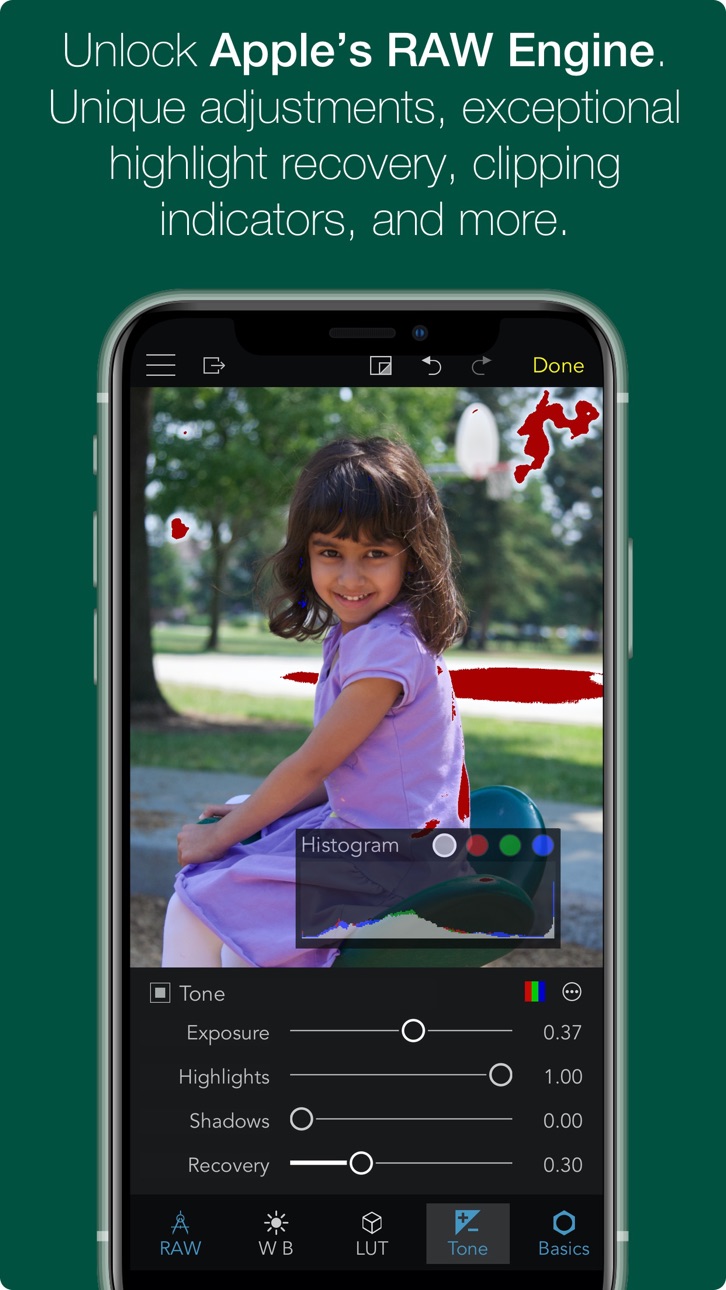
— ADVANCED RAW: Unlock the power of Apple's RAW engine with easy-to-use controls. Develop images with the same outstanding RAW processing in Apple’s Aperture professional photo app. Unique adjustments let you improve your images in ways that can't be done in any other app.
— ORGANIZE: RAW Power is a complete photo app to organize and manage your photo library. Fully compatible with iCloud Photo Library, so all changes are synced. Every image and every change is available to every app on your iPhone or iPad.
— RATE & FILTER: Filter albums by file type, rating, flag, and edit state. Ratings and Flags sync over iCloud Photo Library!
— FILES.APP: Store images in the Photos library or Files.app. Use our new Share extension to import from other apps directly into RAW Power’s Files container. Same non-destructive editing, rating, and filtering features! (iCloud syncing is not supported).
— NOT JUST RAWs: RAW Power is great with JPEGs, with many tools missing from the Photos app. Plus an innovative Depth Effect for photos shot on iPhones with a dual camera system.
— EDIT CROSS-PLATFORM: Edit on iOS and continue on the Mac (or vice-versa) using RAW Power 3 for macOS.
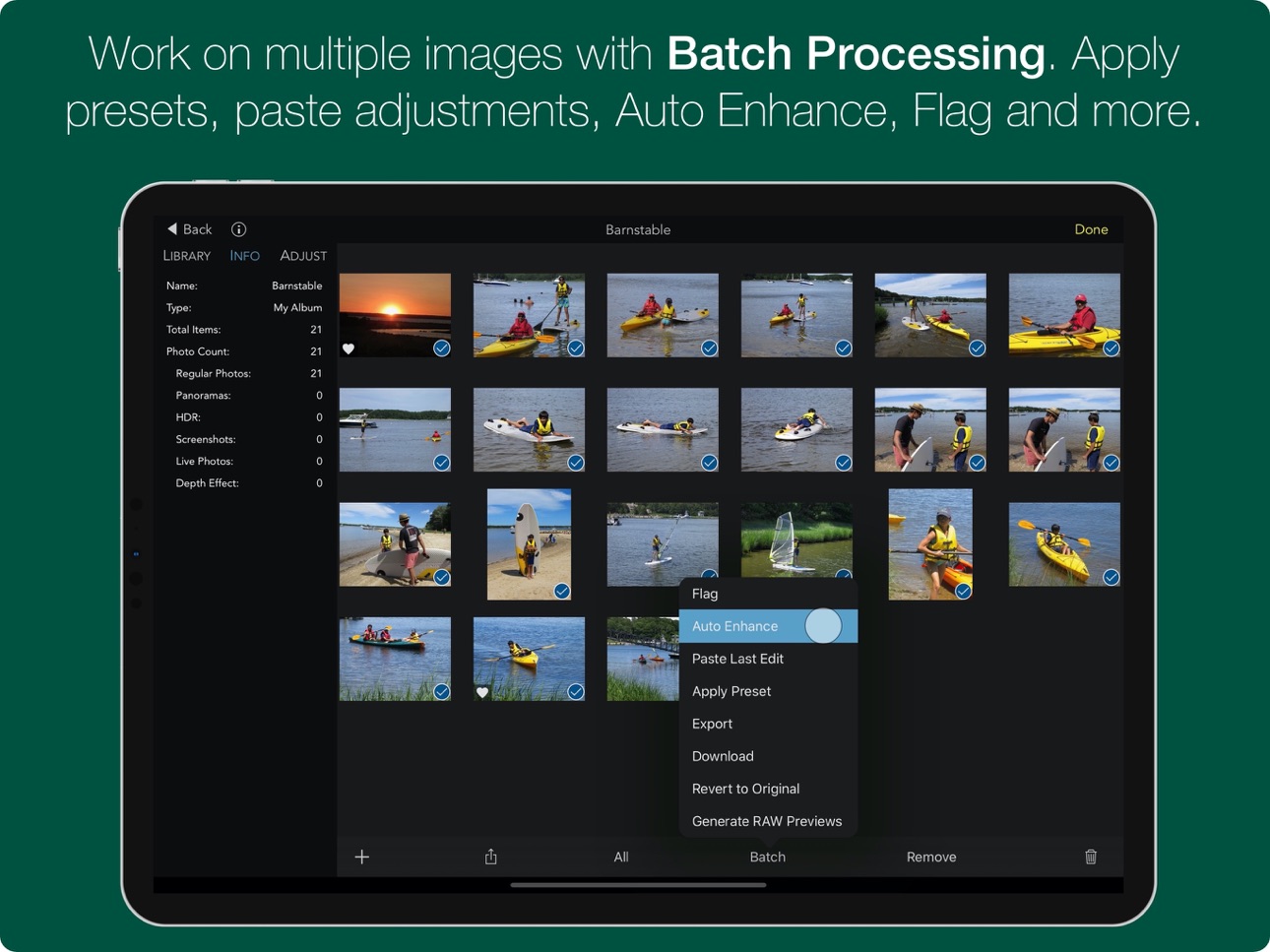
— BATCH PROCESSING: Apply presets, paste adjustments, and export multiple images. Export to the photo library or to Files.app.
Using iOS 16 or later? You may be interested in Nitro Photo. It includes masking, XMP support, synchronized Pan and Zoom and many other features. Search for 'Nitro Photo' on the App Store.
ORGANIZATION AND DISPLAY
— Zoom up to 800% for extremely precise adjustments.
— Create and rename albums, delete images from albums and the library, and move images into albums. Full access to your folder hierarchy.
— Display file name, exposure information, flash status, and location with a map.
REAL-TIME EDITING
— Full non-destructive editing. All changes stored in the iOS Photo Library and iCloud Photo Library, so you can edit on one device and continue on another, without loss of quality. Even between Mac and iOS!
— Optimized for small screens. Choose which adjustments to show by default and in what order
— Unparalleled highlight recovery with Boost and Recovery sliders. Real-time control of Apple's RAW engine, including Noise Reduction, Black Point, Gamut Mapping and more
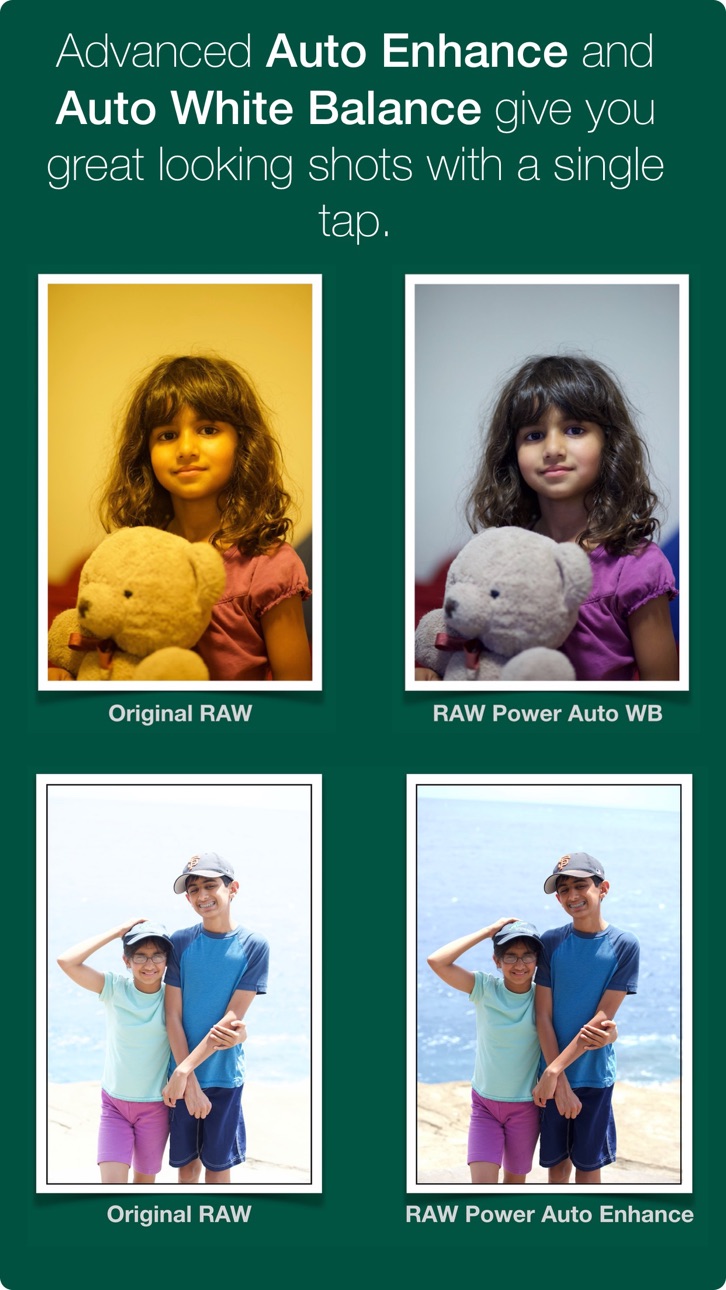
— Auto Enhance, Auto White Balance, Auto Levels and Auto Curves. Apply them to multiple images at once!
— Apply presets, and Copy / Paste Adjustments to one image or many
— Histogram with Clipping Indicators and Hot Pixels Overlay
— LUTs (Look up tables) with built-in looks and film simulations. Add your own!
— Crop and Straighten, Rotate and Flip, White Balance with sampler and auto
— Highlights, Shadows, Vibrancy, Local Contrast and incredible Lighten and Darken sliders
— Curves and Levels. Curves has Linear and Lab modes, and samplers
— Depth Effect to enhance photos shot with the dual camera system
— Chromatic Aberration to correct lens artifacts, Perspective, Black & White, Vignette with a controllable center point
— All sliders are real-time and GPU accelerated
— High-precision, deep color imaging engine
— Export JPEG, PNG, and TIFFs (8- and 16-bit) to Files.app or Photos.app
COMPATIBILITY
— Compatible with hundreds of cameras, including iPhone RAW images. (EXTENDED SUPPORT REQUIRES iOS 14. Full List at https://www.gentlemencoders.com/extended-raw/index.html) RAW support is downloaded in the background by Apple. Your device must be on WiFi and plugged in to get updates.
— Great with JPEGs, TIFFs, PNGs, and most DNGs
— Video Tutorials (https://www.youtube.com/channel/UC7l78rOzFxaHG-e5AT-MGWQ)
RAW POWER for MAC
RAW Power is also available on the Mac App Store as a Photos Extension and standalone app with Photos Library support. Rated 4.5 stars worldwide!
ABOUT GENTLEMEN CODERS
Gentlemen Coders was founded by a former Senior Director of Engineering at Apple. For more information, visit www.gentlemencoders.com.
Accessibility
ipadiphonemacrealityDevicetvoswatch
Version history 25 versions
Build 880952700v3.5.52026-01-15 17:28:31
(iOS 16+) Support for Sony A7 V (uncompressed and lossless compressed RAW), Fujifilm M-RAW format and Samsung Lossy Compressed RAW.
Build 880829263v3.5.42025-12-23 17:28:30
Localization Fixes.
Build 878549529v3.5.32025-10-01 16:10:20
* Bug fixes for Nikon and Fujifilm cameras.
Build 878080560v3.5.12025-09-15 18:36:15
* (iOS 16+) Support for Panasonic TZ-99 and Sony ZV-1A. https://www.gentlemencoders.com/extended-raw
* Fix bug exporting Fujifilm X-E5 images.
Build 877202008v3.52025-08-20 16:37:39
* (iOS 16+) Improved RAW Decode and Lens Correction for Fujifilm Compressed and Nikon HE/HE* files.
* (iOS 16+) Dynamic Range in Fujifilm Compressed is now supported. Note: You may need to reset exposure or curves for any Fujifilm images with Dynamic Range you have previously edited.
* (iOS 16+) Olympus OM-5 Mark II, Sony RX1R III, Nikon Z5 Mark II and Z50 Mark II. Tap for camera list: https://www.gentlemencoders.com/extended-raw
* (iOS 16+) Support for 14-bit Olympus RAW images.
* Fix issue with color shifts sometimes appearing in images edited in the Photo Library.
* Improve usability of RAW Processing adjustment.
* Fix orientation of OM-3 images.
* Various other improvements.
Build 875032801v3.4.302025-06-02 16:11:01
* (iOS 16+) Support for Pentax KF, Sony Alpha-1 Mark II, Panasonic S1R Mark II, and Fujifilm GFX100RF: https://www.gentlemencoders.com/extended-raw
* Fix bugs with Watermark Font Picker.
* Various other improvements.
Build 873157497v3.4.292025-03-12 17:35:11
* (iOS 16+) Support for Fujifilm X-M5, Nikon Z50 II, OM Digital OM-3, Panasonic DC-GX880 and DC-S5D: https://www.gentlemencoders.com/extended-raw
* Fix bug with full screen not restoring thumbnails.
* Fix a crash with the Batch button.
* Various other improvements.
Build 870055901v3.4.282024-10-30 17:13:30
* Fixes for iOS 18 compatibility.
* Fix crashes and important bugs.
* Improve diagnostics.
* (iOS 16+) Add support for Canon R1, Canon R5 Mark II, Panasonic GH7 and Nikon Z 6 III. Camera List: https://www.gentlemencoders.com/extended-raw
Build 870032496v3.4.272024-10-29 07:33:14
Fix for crash with iPhones on iOS 18. The shipping version crashes immediately if you go into Edit mode, in portrait screen orientation, on an iPhone running iOS 18.
Build 869960623v3.4.262024-10-28 16:35:28
* Fix crashes and important bugs.
* Improve diagnostics.
* (iOS 16+) Add support for Canon R1, Canon R5 Mark II, Panasonic GH7 and Nikon Z 6 III. Camera List: https://www.gentlemencoders.com/extended-raw
Build 868757184v3.4.252024-09-09 16:40:14
* Fix important issues rendering non-RAW images.
* Fix bugs with the Share extensions.
* When showing the Photo Library, display albums in the same order as shown in Photos.
Build 867417642v3.4.242024-07-16 15:45:15
* (iOS16+) Add support for Fujifilm X-T50 and GFX100S II. https://www.gentlemencoders.com/extended-raw
* (iOS14+) Hasselblad X2D 100C (FFF format), Nikon Z 30, Panasonic G9 Mark II and G100D, and Pentax K1 Mark II.
* Performance improvements and general fixes.
Build 866808999v3.4.232024-06-19 17:10:48
* (iOS 16+) Add support for OM Digital TG-7 and Samsung NX-1. href="https://www.gentlemencoders.com/extended-raw
* Improve decode quality of Fujifilm GFX 100 II.
* Performance improvements and general fixes.
Build 865903916v3.4.222024-06-03 17:15:42
* Add export of XMP Sidecars to use with the new Nitro app. Learn more at https://nitrophoto.app.
* Performance improvements and general fixes.
Build 864596502v3.4.212024-03-21 20:17:19
(iOS 14+) Support for Nikon Z 8 and Z 9 advanced compression modes (HE and HE*). https://www.gentlemencoders.com/extended-raw
(iOS 14+) Support for OM-1 Mark II, Fujifilm X100VI and Nikon Z f.
Improve quality of HSL adjustment when applying certain types of luminance or saturation changes.
Fix crash on iPhone when saving edits to new images (rather than non-destructively).
Performance improvements and general fixes.
Build 862637998v3.4.202024-01-03 17:55:25
* (iOS 14+) Add support for Fujifilm GFX100 II and Sony A7C II, A7C R, and ZV-E1. (https://www.gentlemencoders.com/extended-raw)
* Clipping overlays on iOS 17 / Sonoma sometimes caused the image to appear washed out.
* Fix crash on iOS when scrolling through a large number of RAW images.
* Export Original to Photo Library dialog would sometimes have the wrong export options.
* Performance improvements and general fixes.
Build 860917672v3.4.192023-10-25 16:59:27
• Fix two crashes.
• Fix incorrect message in dialog.
Build 860013424v3.4.172023-09-28 16:37:17
• (iOS 14+) Add support for Fujifilm X-S20.
• (iOS 16+) Add support for Sony A6700.
• Fix for crash when batch exporting 16-bit images.
• Fixes for ProRAW rendering and cropping.
• Fix for Leica Monochrom cameras sometimes producing low-resolution images.
• Add Rec.2020 as a color profile for export. For best results, export at 16-bit.
• Performance improvements and general fixes.
Build 857701710v3.4.162023-08-01 17:11:49
* (iOS 14+) Add support for Panasonic DC-ZS80D, and GoPro Hero 11 Black. (https://www.gentlemencoders.com/extended-raw)
* (iOS 16+) Add support for Nikon Z 8 (lossless RAW only).
* Fixes for the top three crashes.
* Performance improvements and general fixes.
Build 857562022v3.4.152023-06-04 15:50:05
Fix for thumbnails not appearing in the filmstrip sometimes, and fix another crash with filtered collections.
Build 857507064v3.4.142023-06-01 13:10:22
Fix for crash when viewing collections that have been filtered.
Build 857477196v3.4.132023-05-31 16:25:58
• (iOS 14+) Add support for OM Digital OM-5, Sony FX30, and Samsung NX500. (https://www.gentlemencoders.com/extended-raw)
• (iOS 16+) Add support for Canon R6 II.
• Fixes for top crashes.
• Larger histogram in portrait orientation on iPads.
• Files.app: Fixes for filtering and option to sort by file name (in Settings).
• Performance improvements and general fixes.
Build 854390291v3.4.122023-01-17 18:03:12
• Add support for Sony A7 R5 (https://www.gentlemencoders.com/extended-raw)
• New: Add keywords and description while exporting
• Add troubleshooting and support information when using external storage
• Fix: two crashes
• Fix: externally edited images were exported as unadjusted images
• Fix: when rotating screen while in crop, the crop interface became unresponsive.
• Add localized help text for unsupported images
Build 853420677v3.4.112022-11-21 17:24:00
(iOS 16) Add Fujifilm X-H2 and X-T5 to supported camera list. https://www.gentlemencoders.com/extended-raw
(iOS 14+) Add Olympus SH-3 to supported camera list.
Fix bug detecting lens model for automatic lens correction.
Fix bug with export and straightened images.
Other fixes and improvements.
Build 851763957v3.4.102022-08-24 16:43:27
* (iOS 14+) Add Fujifilm X-H2S and Canon R7 to supported camera list. https://www.gentlemencoders.com/extended-raw
* Provide more metadata for RAW images when using the Files app.
* Other fixes and improvements.
Price history by region
Currency
Show
Columns
Search
Availability 101 of 101 storefronts
| Region | Language | Price | Ratings | Avg | Version |
|---|---|---|---|---|---|
| US | en-US | USD 12.99 | 869 | 4.6 | 3.5.5 |
| DE | de-DE | EUR 14.99 | 518 | 4.5 | 3.5.5 |
| GB | en-GB | GBP 12.99 | 206 | 4.6 | 3.5.5 |
| CN | zh-Hans-CN | CNY 88 | 181 | 4.5 | 3.5.5 |
| CA | en-CA | CAD 17.99 | 114 | 4.4 | 3.5.5 |
| AU | en-AU | AUD 19.99 | 108 | 4.4 | 3.5.5 |
| FR | fr-FR | EUR 14.99 | 88 | 4.4 | 3.5.5 |
| IT | it | EUR 14.99 | 85 | 4.4 | 3.5.5 |
| CH | de-CH | CHF 10 | 76 | 4.4 | 3.5.5 |
| NL | nl | EUR 14.99 | 72 | 4.6 | 3.5.5 |
| KR | ko | KRW 22000 | 67 | 4.7 | 3.5.5 |
| RU | ru | RUB 999 | 61 | 4.2 | 3.5.5 |
| PL | en-GB | PLN 59.99 | 49 | 4.4 | 3.5.5 |
| ES | es-ES | EUR 14.99 | 35 | 4.5 | 3.5.5 |
| SE | sv | SEK 179 | 35 | 4.7 | 3.5.5 |
| AT | de-DE | EUR 14.99 | 32 | 4.3 | 3.5.5 |
| TW | zh-Hant-TW | TWD 390 | 31 | 4.5 | 3.5.5 |
| JP | ja | JPY 2000 | 30 | 4.3 | 3.5.5 |
| BE | en-GB | EUR 14.99 | 26 | 4.8 | 3.5.5 |
| HK | zh-Hant-HK | HKD 98 | 26 | 4.4 | 3.5.5 |
| VN | en-GB | VND 399000 | 25 | 4.5 | 3.5.5 |
| CZ | en-GB | CZK 349 | 23 | 4.3 | 3.5.5 |
| FI | en-GB | EUR 14.99 | 20 | 4.2 | 3.5.5 |
| NO | en-GB | NOK 179 | 19 | 4.5 | 3.5.5 |
| TH | en-GB | THB 499 | 18 | 4.8 | 3.5.5 |
| IN | en-GB | INR 1299 | 16 | 4.5 | 3.5.5 |
| NZ | en-AU | NZD 22.99 | 16 | 4.7 | 3.5.5 |
| PT | pt-PT | EUR 14.99 | 16 | 4.5 | 3.5.5 |
| MY | en-GB | MYR 59.9 | 15 | 4.5 | 3.5.5 |
| SG | en-GB | SGD 19.98 | 15 | 3.8 | 3.5.5 |
| GR | en-GB | EUR 14.99 | 13 | 4.8 | 3.5.5 |
| ID | en-GB | IDR 229000 | 12 | 4.6 | 3.5.5 |
| UA | en-GB | USD 14.99 | 12 | 4.8 | 3.5.5 |
| TR | en-GB | TRY 699.99 | 11 | 4.1 | 3.5.5 |
| DK | en-GB | DKK 99 | 10 | 3.7 | 3.5.5 |
| IE | en-GB | EUR 14.99 | 9 | 4.9 | 3.5.5 |
| PH | en-GB | PHP 799 | 9 | 3.9 | 3.5.5 |
| SK | en-GB | EUR 14.99 | 8 | 4.5 | 3.5.5 |
| HU | en-GB | HUF 5990 | 7 | 4.4 | 3.5.5 |
| RO | en-GB | RON 69.99 | 7 | 4.4 | 3.5.5 |
| IL | en-GB | ILS 49.9 | 6 | 3.8 | 3.5.5 |
| SA | en-GB | SAR 59.99 | 6 | 3.7 | 3.5.5 |
| AE | en-GB | AED 49.99 | 5 | 3.2 | 3.5.5 |
| BG | en-GB | EUR 14.99 | 5 | 4.2 | 3.5.5 |
| EG | en-GB | EGP 699.99 | 4 | 3.8 | 3.5.5 |
| HR | en-GB | EUR 14.99 | 4 | 2.8 | 3.5.5 |
| ZA | en-GB | ZAR 249.99 | 4 | 4.0 | 3.5.5 |
| LU | en-GB | EUR 14.99 | 3 | 4.0 | 3.5.5 |
| PK | en-GB | PKR 3500 | 3 | 2.7 | 3.5.5 |
| AL | en-GB | USD 14.99 | 2 | 5.0 | 3.5.5 |
| EE | en-GB | EUR 14.99 | 2 | 4.5 | 3.5.5 |
| KH | en-GB | USD 14.99 | 2 | 5.0 | 3.5.5 |
| LK | en-GB | USD 12.99 | 2 | 3.0 | 3.5.5 |
| LT | en-GB | EUR 14.99 | 2 | 5.0 | 3.5.5 |
| MD | en-GB | USD 14.99 | 2 | 1.0 | 3.5.5 |
| SI | en-GB | EUR 14.99 | 2 | 5.0 | 3.5.5 |
| AM | en-GB | USD 14.99 | 1 | 5.0 | 3.5.5 |
| CY | en-GB | EUR 14.99 | 1 | 1.0 | 3.5.5 |
| IS | en-GB | USD 14.99 | 1 | 5.0 | 3.5.5 |
| JO | en-GB | USD 12.99 | 1 | 4.0 | 3.5.5 |
| KW | en-GB | USD 12.99 | 1 | 5.0 | 3.5.5 |
| MT | en-GB | EUR 14.99 | 1 | 5.0 | 3.5.5 |
| OM | en-GB | USD 12.99 | 1 | 5.0 | 3.5.5 |
| QA | en-GB | QAR 49.99 | 1 | 4.0 | 3.5.5 |
| AF | en-GB | USD 12.99 | 0 | — | 3.5.5 |
| AZ | en-GB | USD 14.99 | 0 | — | 3.5.5 |
| BA | en-GB | EUR 14.99 | 0 | — | 3.5.5 |
| BH | en-GB | USD 14.99 | 0 | — | 3.5.5 |
| BM | en-GB | USD 12.99 | 0 | — | 3.5.5 |
| BN | en-GB | USD 12.99 | 0 | — | 3.5.5 |
| BT | en-GB | USD 12.99 | 0 | — | 3.5.5 |
| BY | en-GB | USD 14.99 | 0 | — | 3.5.5 |
| FJ | en-GB | USD 12.99 | 0 | — | 3.5.5 |
| FM | en-GB | USD 12.99 | 0 | — | 3.5.5 |
| GE | en-GB | USD 14.99 | 0 | — | 3.5.5 |
| IQ | en-GB | USD 12.99 | 0 | — | 3.5.5 |
| KG | en-GB | USD 14.99 | 0 | — | 3.5.5 |
| KZ | en-GB | KZT 7990 | 0 | — | 3.5.5 |
| LA | en-GB | USD 14.99 | 0 | — | 3.5.5 |
| LB | en-GB | USD 12.99 | 0 | — | 3.5.5 |
| LV | en-GB | EUR 14.99 | 0 | — | 3.5.5 |
| ME | en-GB | EUR 11.99 | 0 | — | 3.5.5 |
| MK | en-GB | USD 12.99 | 0 | — | 3.5.5 |
| MM | en-GB | USD 12.99 | 0 | — | 3.5.5 |
| MN | en-GB | USD 12.99 | 0 | — | 3.5.5 |
| MO | zh-Hant-HK | USD 12.99 | 0 | — | 3.5.5 |
| MR | en-GB | USD 12.99 | 0 | — | 3.5.5 |
| MV | en-GB | USD 12.99 | 0 | — | 3.5.5 |
| NP | en-GB | USD 14.99 | 0 | — | 3.5.5 |
| NR | en-GB | USD 12.99 | 0 | — | 3.5.5 |
| PG | en-GB | USD 12.99 | 0 | — | 3.5.5 |
| PW | en-GB | USD 12.99 | 0 | — | 3.5.5 |
| RS | en-GB | EUR 14.99 | 0 | — | 3.5.5 |
| SB | en-GB | USD 12.99 | 0 | — | 3.5.5 |
| TJ | en-GB | USD 14.99 | 0 | — | 3.5.5 |
| TM | en-GB | USD 12.99 | 0 | — | 3.5.5 |
| TO | en-GB | USD 12.99 | 0 | — | 3.5.5 |
| UZ | en-GB | USD 14.99 | 0 | — | 3.5.5 |
| VU | en-GB | USD 12.99 | 0 | — | 3.5.5 |
| XK | en-GB | EUR 14.99 | 0 | — | 3.5.5 |
| YE | en-GB | USD 12.99 | 0 | — | 3.5.5 |
Reviews 30 reviews · US
★★★★★
Regressions
Dev wants you to move to the new app, and sadly this one has started to have regressions. If you don’t give full photos library access, the app works fine with file system + export. But every launch, the app forces you to the settings menu to adjust permissions. Similarly, after editing a photo and exporting and then saving, some options such as luminance / equal rgb in levels and gamma in curves disappear from the UI. Still better than Nitro though.
Seimenev2025-06-07
★★★★★
Not Saving Ratings
I was looking for an app to use for culling. Unfortunately, this one doesn’t reliably save flags or ratings. Some, yes. But I don’t want to “some” of my ratings saved. In some cases, immediately after rating an image, I swipe to another one and then go back to check the rating on the first image, but no rating is shown.
ampullae2025-03-16
★★★★★
Good, but has some issues
A good peice of software, but needs the ability to save raw files and to remove red eye
A. Ost2025-02-03
★★★★★
This has the makings of a great photo review and edit app
This app seems to have a lot of potential. It says it will import images from a folder on the iPad but I can’t seem to get that to work. I think I’m following the steps but after going to the folder in files with the image files, selecting them all hitting done nothing seems to have been imported or connected to RAW Power.
May 22, 2024
I have learned how to access image files in folders on my iPad and also external drives plugged into the iPad. That makes Raw power a very versatile photo viewing and editing system for RAW files.
waldhaus12024-05-23
★★★★★
Underrated
In the world of subscription based services, for people that does photography here and there, a $10/month lightroom subscription seems excessive. I just want to make some few tweaks on pictures I occasionally take. I’m just surprised that this app doesn’t get the recognition it deserves
Ruf452024-04-07
★★★★★
Great range of adjustments
I have used this app for a few years and find the range of adjustments and ease of use perfect for my needs.
Hoping for future versions to have masks and repair functionality.
Wbeach252023-11-08
★★★★★
Masks PLEASE
Awesome app, just needs masks to make it my everything image app.
dreamfx2023-05-26
★★★★★
Can’t read LUT file names and overall bad UI
I bought this app to apply custom LUTs. I imported them, they have long filenames (necessary to properly categorize them) but they are all indistinguishable because their filenames are cropped. In order to use this app I have to rename all LUTs with short names, which is inconvenient. Overall this app UI feels very unpolished on iPhones, everything feels too unoptimized and unfamiliar for the platform.
ancient_buho2023-04-01
★★★★★
Not even launch in iPadOS 16.3.1
Crash every time in my iPad Air 4th running iPadOS 16.3.1. please fix it
AlexisTecnico2023-03-26
★★★★★
Super Buggy…but has potential
I am no pro by any means. I’m mainly commenting because of some general issues the app displays:
1. Zoom in on an image, and it jumps to some other part of the photo. It is impossible to zoom in on any part of the image without it moving to some other part.
2. After the application of 2 or more changes, the app quits and no changes have been saved, causing a complete start-over of the editing process. This is just frustrating. If the answer is to have to do a manual save every 5 seconds in order to not lose your work…the app should be pulled and re-worked.
3. Some combination of slides cause t
idhawkdrvr2023-02-05
★★★★★
SD Card Support
The one thing I was hoping this app would do is not supported. I would love to be able to view ratings of images on an sd card before importing, unfortunately it took me spending $10 to find out that this is not possible.
elit10293847562022-11-17
★★★★★
Best RAW photo editor for iOS!
Update: Still working great! Since I've traded in my old iPhone for the newest iPhone Pro 13 with RAW-capture ability, I'm now getting into RAW photography and editing. This app does it all! It's especially handy for sharpening photos. No user manual needed (like many photo editor apps); UI is simple to use and efficient. Highly recommended!
BAR1122022-11-10
★★★★★
Fantastic App
Love this app. Super fast, and very flexible.
//August 25, 2022 update: still an excellent app. I use it every week as a part of my photo editing work flow.
KeithShepard2022-08-25
★★★★★
Good for culling external files
I bought this app after so many folks notes how well it works with images in the files app. You can add these folders under the External Storage tab for viewing and culling.
tundracamper2022-08-11
★★★★★
Winner Winner Chicken Dinner
Big compliments on RAW Power. It's better than Darkroom, better than Pixelmator Photo, and more user-friendly and more intuitive than Affinity Photo for developing RAW files. Very well done!
JeffBDVS2022-08-03
★★★★★
I tried Presets-and it acted very weird-Probably they freeze
I tried Presets-and it acted very weird-Probably they freeze sometimes
My device: iPad Pro 12.9” (3rd generation, 2018)
OS: iPadOS 15.5 or later
Note: I regularly update my review/rating for this application.
Sherap62022-07-12
★★★★★
No SD support
Not useful for reviewing RAW from camera, since it requires copying files over.
ralreadytaken2022-06-09
★★★★★
Fantastic app
I have an iPad Pro M1 a canon 5D Mark four, canon EOSR, canon EOSR6, any 6D Mark two, I edit all my photos on this app and it’s amazing
KLWprime52022-06-02
★★★★★
Pretend it’s Aperture for iPad
If the UI would have done some refinements, I could pretend it is Aperture for iPad
S.till2022-05-28
★★★★★
Excellent App
Raw Power is an excellent App. It reminds me of the Aperture App that used to be available for Mac OS.
idonotwanttohaveanickname2022-04-30
★★★★★
RAW POWER
I have been using RAW POWER on my Desktop for almost 2 years (McBook Pro). I like it a lot. I have also used PhotoShop (liked it a lot). Tried Lightroom but gave it up. Raw Power was my solution because I gave up trying to XFR my Adobe Photoshop license from my 10 yr old computer to my MacBook Pro.
I rescently purchased an iPhone 15 Pro Max and found out that Raw Power on my new iPhone was delightful to use to edit my Raw iPhone photos in place on my new iPhone.
FearAndLoathingABC2021-11-18
★★★★★
Almost
Pros:
You can view, rate and cull your images before import using an SD card reader. Which means my client can go through their photos on location, and pick their favorites. The raw processor is also great. The price is very reasonable as of this writing.
Cons:
The magic keyboard doesn’t seem to be well supported. The only key that works for me is the \ for flagging. There is no focus peaking view. You will have to zoom into every photo to verify that it is in focus.
I am still going to purchase, as it hits the mark toward my niche needs better than any other app I have tried.
bknutty752021-10-29
★★★★★
Simply the best!
If you shoot with your iPhone on RAW, than this app is a must. It is one of those apps that make the iOS so great. I am always amazed with the power that it provides and the results that I get. All this for a very reasonable price from an amazing developer.
Agon D.2021-09-03
★★★★★
Just amazing
Using iCloud photos to sync and store while providing an excellent editor features for RAW it’s just 6 stars. Can’t wait to see what is ahead. Congrats !
dimasphotographer2021-09-03
★★★★★
Great Application
I have used Photoshop, Capture 1, Lightroom and other apps, everyone has their pros and cons but once you get to play with Raw Power and the ability to play directly with RAW images and with the Apple foundation, I have to say it is a solid photo editing tool, lof us some profiles and away you go. I shoot with a Leica Q2, created my setups and off the to races I go. My recommendation to people questioning what is the best, pick one, learn it, use it and get to know the power and work around the limits.
Every tool out there has many things going for them but this is efficient, effective and d
Pdmao22021-07-26
★★★★★
Bug fixed.
Update: per the dev response, they fixed the bug! Purchase restore now works.
Looks like this is becoming free to recharge people to remove water mark. What about people who got it before this change?
Slushy_purr72021-06-03
★★★★★
The best that’s out there.
This is my favorite photo editor on the App Store, and I have bought a lot of them over the years. It isn’t flashy, but it does everything it’s supposed to do, and it does it very well.
byronbulb2021-06-03
★★★★★
With great power comes a great new update
Version 3.3.1 takes this app to another level.
It’s now the only photo processing app I work on.
A lot of terrific new additions to this.
- Work with Files app or iCloud (this alone is worth the price of admission)
- Lens correction
- Raw Processing (gets even better and now with Apple ProRaw support and so many more cameras)
- Split Tone (yay!)
- HSL color
- Look Up Tables (LUT) (really great Fuji simulations)
And all this on the macOS app too.
Bonus: Great support from the developer.
Bonus 2: He worked on Aperture ❣️
Dev Benegal2021-06-02
Change log 29 changes · US
✎
releaseNotes updated
(iOS 16+) Support for Sony A7 V (uncompressed and lossless compressed RAW), Fujifilm M-RAW format and Samsung Lossy Compressed RAW.
✎
description updated
OVERVIEW
— ADVANCED RAW: Unlock the power of Apple's RAW engine with easy-to-use controls. Develop images with the same outstanding RAW processing in Apple’s
✎
subtitle updated
JPEG / RAW Editor & Manager
✎
name updated
RAW Power
◆
Version 3.5.5 released
(iOS 16+) Support for Sony A7 V (uncompressed and lossless compressed RAW), Fujifilm M-RAW format and Samsung Lossy Compressed RAW.
◆
Version 3.5.4 released
Localization Fixes.
◆
Version 3.5.3 released
* Bug fixes for Nikon and Fujifilm cameras.
◆
Version 3.5.1 released
* (iOS 16+) Support for Panasonic TZ-99 and Sony ZV-1A. https://www.gentlemencoders.com/extended-raw
* Fix bug exporting Fujifilm X-E5 images.
◆
Version 3.5 released
* (iOS 16+) Improved RAW Decode and Lens Correction for Fujifilm Compressed and Nikon HE/HE* files.
* (iOS 16+) Dynamic Range in Fujifilm Compressed is now supported. Note: You may need to reset exposure or curves for any Fujifilm images wi
◆
Version 3.4.30 released
* (iOS 16+) Support for Pentax KF, Sony Alpha-1 Mark II, Panasonic S1R Mark II, and Fujifilm GFX100RF: https://www.gentlemencoders.com/extended-raw
* Fix bugs with Watermark Font Picker.
* Various other improvements.
◆
Version 3.4.29 released
* (iOS 16+) Support for Fujifilm X-M5, Nikon Z50 II, OM Digital OM-3, Panasonic DC-GX880 and DC-S5D: https://www.gentlemencoders.com/extended-raw
* Fix bug with full screen not restoring thumbnails.
* Fix a crash with the Batch button.
* Va
◆
Version 3.4.28 released
* Fixes for iOS 18 compatibility.
* Fix crashes and important bugs.
* Improve diagnostics.
* (iOS 16+) Add support for Canon R1, Canon R5 Mark II, Panasonic GH7 and Nikon Z 6 III. Camera List: https://www.gentlemencoders.com/extended-raw
◆
Version 3.4.27 released
Fix for crash with iPhones on iOS 18. The shipping version crashes immediately if you go into Edit mode, in portrait screen orientation, on an iPhone running iOS 18.
◆
Version 3.4.26 released
* Fix crashes and important bugs.
* Improve diagnostics.
* (iOS 16+) Add support for Canon R1, Canon R5 Mark II, Panasonic GH7 and Nikon Z 6 III. Camera List: https://www.gentlemencoders.com/extended-raw
◆
Version 3.4.25 released
* Fix important issues rendering non-RAW images.
* Fix bugs with the Share extensions.
* When showing the Photo Library, display albums in the same order as shown in Photos.
◆
Version 3.4.24 released
* (iOS16+) Add support for Fujifilm X-T50 and GFX100S II. https://www.gentlemencoders.com/extended-raw
* (iOS14+) Hasselblad X2D 100C (FFF format), Nikon Z 30, Panasonic G9 Mark II and G100D, and Pentax K1 Mark II.
* Performance improvement
◆
Version 3.4.23 released
* (iOS 16+) Add support for OM Digital TG-7 and Samsung NX-1. href="https://www.gentlemencoders.com/extended-raw
* Improve decode quality of Fujifilm GFX 100 II.
* Performance improvements and general fixes.
◆
Version 3.4.22 released
* Add export of XMP Sidecars to use with the new Nitro app. Learn more at https://nitrophoto.app.
* Performance improvements and general fixes.
◆
Version 3.4.21 released
(iOS 14+) Support for Nikon Z 8 and Z 9 advanced compression modes (HE and HE*). https://www.gentlemencoders.com/extended-raw
(iOS 14+) Support for OM-1 Mark II, Fujifilm X100VI and Nikon Z f.
Improve quality of HSL adjustment when applyin
◆
Version 3.4.20 released
* (iOS 14+) Add support for Fujifilm GFX100 II and Sony A7C II, A7C R, and ZV-E1. (https://www.gentlemencoders.com/extended-raw)
* Clipping overlays on iOS 17 / Sonoma sometimes caused the image to appear washed out.
* Fix crash on iOS when
◆
Version 3.4.19 released
• Fix two crashes.
• Fix incorrect message in dialog.
◆
Version 3.4.17 released
• (iOS 14+) Add support for Fujifilm X-S20.
• (iOS 16+) Add support for Sony A6700.
• Fix for crash when batch exporting 16-bit images.
• Fixes for ProRAW rendering and cropping.
• Fix for Leica Monochrom cameras sometimes producing low-re
◆
Version 3.4.16 released
* (iOS 14+) Add support for Panasonic DC-ZS80D, and GoPro Hero 11 Black. (https://www.gentlemencoders.com/extended-raw)
* (iOS 16+) Add support for Nikon Z 8 (lossless RAW only).
* Fixes for the top three crashes.
* Performance improvements
◆
Version 3.4.15 released
Fix for thumbnails not appearing in the filmstrip sometimes, and fix another crash with filtered collections.
◆
Version 3.4.14 released
Fix for crash when viewing collections that have been filtered.
◆
Version 3.4.13 released
• (iOS 14+) Add support for OM Digital OM-5, Sony FX30, and Samsung NX500. (https://www.gentlemencoders.com/extended-raw)
• (iOS 16+) Add support for Canon R6 II.
• Fixes for top crashes.
• Larger histogram in portrait orientation on
◆
Version 3.4.12 released
• Add support for Sony A7 R5 (https://www.gentlemencoders.com/extended-raw)
• New: Add keywords and description while exporting
• Add troubleshooting and support information when using external storage
• Fix: two crashes
• Fix: externa
◆
Version 3.4.11 released
(iOS 16) Add Fujifilm X-H2 and X-T5 to supported camera list. https://www.gentlemencoders.com/extended-raw
(iOS 14+) Add Olympus SH-3 to supported camera list.
Fix bug detecting lens model for automatic lens correction.
Fix bug with export
◆
Version 3.4.10 released
* (iOS 14+) Add Fujifilm X-H2S and Canon R7 to supported camera list. https://www.gentlemencoders.com/extended-raw
* Provide more metadata for RAW images when using the Files app.
* Other fixes and improvements.