Home › Medical

 BR
BR
 USen-US
 MXes-MX
 AGen-GB
 AIen-GB
 AOen-GB
 ARes-MX
 BBen-GB
 BFen-GB
 BJen-GB
 BOes-MXBRpt-BR
 BSen-GB
 BWen-GB
 BZen-GB
 CDen-GB
 CGen-GB
 CIfr-FR
 CLes-MX
 CMfr-FR
 COes-MX
 CRes-MX
 CVen-GB
 DMen-GB
 DOes-MX
 DZen-GB
 ECes-MX
 GAfr-FR
 GDen-GB
 GHen-GB
 GMen-GB
 GTes-MX
 GWen-GB
 GYen-GB
 HNes-MX
 JMen-GB
 KNen-GB
 KYen-GB
 LCen-GB
 LRen-GB
 LYen-GB
 MAen-GB
 MGen-GB
 MLen-GB
 MSen-GB
 MUen-GB
 MWen-GB
 NEen-GB
 NIes-MX
 PAes-MX
 PEes-MX
 PYes-MX
 RWen-GB
 SCen-GB
 SLen-GB
 SNen-GB
 SRen-GB
 STen-GB
 SVes-MX
 SZen-GB
 TCen-GB
 TDen-GB
 TNen-GB
 TTen-GB
 TZen-GB
 UGen-GB
 UYen-GB
 VCen-GB
 VEes-MX
 VGen-GB
 ZWen-GB
70 of 70 storefronts
Content in en-US
Content in en-US
Information
Preview 1 platform
iPhone 3 images


What’s New Version 4.3.2
Performance improvements for users with many sessions saved
Description
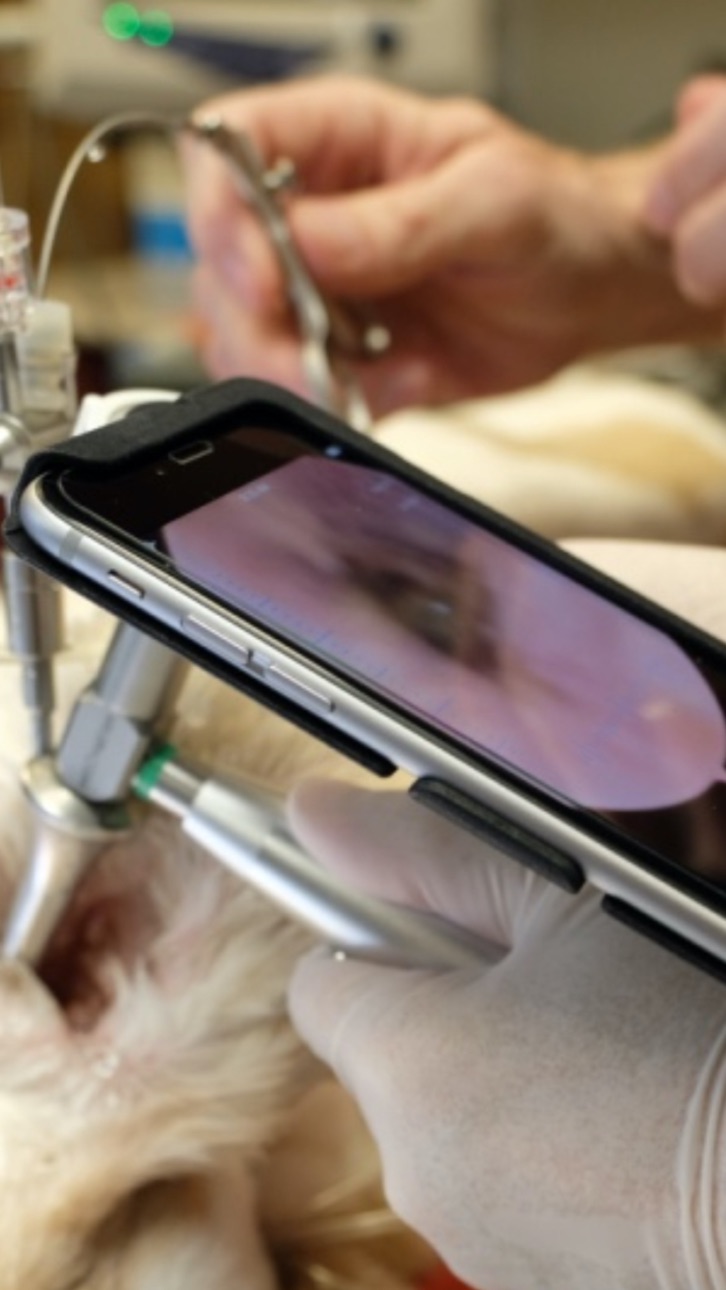
Attach any standard surgical endoscope to an iPhone or iPod Touch for viewing anatomy inside a patient's ear, nose or mouth. The VetOvation adaptor is designed to hold a scope over the iPhone or iPod touch camera. The VetOvation VideoScope App enables the user to take pictures and record video with audio. This easy to use, intuitive system enables the user to focus on specific areas of the patient. Still images and videos are easily shared via email with the patient or client.
Adaptors are available for iPhone XR, XS, 11, 10+, 10, 7/7s & 8/8s, 7+, 6/6s, 6+, 5/5s, 4s, and iPod Touch. The app enables focusing the scope to your device camera.
Video Scope Features:
- Full screen viewing
- Automatic focus
- Image capture of still pictures
- Video capture with audio
- Image and video storage and sharing via email
- Compatible with email, AirDrop and photo library
- 24/7 customer support via phone and email
- Voice control support: click the microphone and say "Focus Image", "Take Photo", or "Record Video"
Accessibility
ipadiphonemacrealityDevicetvoswatch
Version history 15 versions
Build 873847041v4.3.22025-04-30 21:54:21
Performance improvements for users with many sessions saved
Build 871840330v4.3.12025-01-18 18:50:52
Better spacing for camera view buttons while using the case
Build 871431461v4.32024-12-30 00:49:42
More bug fixes for new versions of iOS
Build 871401932v4.22024-12-28 05:41:45
Bug fixes and enhancements for new versions of iOS
Build 859235454v4.12023-08-17 18:49:43
Video playback bug fix
Build 859161387v4.02023-08-15 00:39:01
This version has various bug fixes to work better with new versions of iOS.
Build 836949909v2.22020-07-22 20:41:33
updated automatic focus/exposure control
added support for re-enabling auto-focus by tapping a spot on the screen
Build 836528554v2.12020-06-23 13:42:25
Added support for manual focus and brightness
Build 835735942v2.02020-06-05 12:33:52
This update provides support for devices running iOS 13 and above
Build 829257884v1.62018-11-15 10:22:24
Updates to support newer phones.
Saving to camera roll now prompts for access.
Fixed some bugs...
Build 826279149v1.52018-03-13 21:32:52
- Fixed issues where special characters caused crashes when renaming saved photos/videos
- Added support for taking photos while recording video
Build 823429757v1.42017-09-22 09:19:11
Added support for renaming recorded sessions (photos/videos.)
Build 823292208v1.22017-08-14 21:02:14
Support for speech commands on iOS 10 devices. Click the microphone and say "Focus Image", "Take Photo" or "Record Video".
Build 823085254v1.12017-08-08 16:53:41
Now with support to delete saved images and videos
Build 822419279v1.02017-07-21 15:47:19
No pricing data captured yet — comparisons appear once the app has paid storefronts or in-app purchases.
Availability 70 of 70 storefronts
| Region | Language | Price | Ratings | Avg | Version |
|---|---|---|---|---|---|
| US | en-US | Free | 7 | 4.7 | 4.3.2 |
| MX | es-MX | Free | 1 | 2.0 | 4.3.2 |
| AG | en-GB | Free | 0 | — | 4.3.2 |
| AI | en-GB | Free | 0 | — | 4.3.2 |
| AO | en-GB | Free | 0 | — | 4.3.2 |
| AR | es-MX | Free | 0 | — | 4.3.2 |
| BB | en-GB | Free | 0 | — | 4.3.2 |
| BF | en-GB | Free | 0 | — | 4.3.2 |
| BJ | en-GB | Free | 0 | — | 4.3.2 |
| BO | es-MX | Free | 0 | — | 4.3.2 |
| BR | pt-BR | Free | 0 | — | 4.3.2 |
| BS | en-GB | Free | 0 | — | 4.3.2 |
| BW | en-GB | Free | 0 | — | 4.3.2 |
| BZ | en-GB | Free | 0 | — | 4.3.2 |
| CD | en-GB | Free | 0 | — | 4.3.2 |
| CG | en-GB | Free | 0 | — | 4.3.2 |
| CI | fr-FR | Free | 0 | — | 4.3.2 |
| CL | es-MX | Free | 0 | — | 4.3.2 |
| CM | fr-FR | Free | 0 | — | 4.3.2 |
| CO | es-MX | Free | 0 | — | 4.3.2 |
| CR | es-MX | Free | 0 | — | 4.3.2 |
| CV | en-GB | Free | 0 | — | 4.3.2 |
| DM | en-GB | Free | 0 | — | 4.3.2 |
| DO | es-MX | Free | 0 | — | 4.3.2 |
| DZ | en-GB | Free | 0 | — | 4.3.2 |
| EC | es-MX | Free | 0 | — | 4.3.2 |
| GA | fr-FR | Free | 0 | — | 4.3.2 |
| GD | en-GB | Free | 0 | — | 4.3.2 |
| GH | en-GB | Free | 0 | — | 4.3.2 |
| GM | en-GB | Free | 0 | — | 4.3.2 |
| GT | es-MX | Free | 0 | — | 4.3.2 |
| GW | en-GB | Free | 0 | — | 4.3.2 |
| GY | en-GB | Free | 0 | — | 4.3.2 |
| HN | es-MX | Free | 0 | — | 4.3.2 |
| JM | en-GB | Free | 0 | — | 4.3.2 |
| KN | en-GB | Free | 0 | — | 4.3.2 |
| KY | en-GB | Free | 0 | — | 4.3.2 |
| LC | en-GB | Free | 0 | — | 4.3.2 |
| LR | en-GB | Free | 0 | — | 4.3.2 |
| LY | en-GB | Free | 0 | — | 4.3.2 |
| MA | en-GB | Free | 0 | — | 4.3.2 |
| MG | en-GB | Free | 0 | — | 4.3.2 |
| ML | en-GB | Free | 0 | — | 4.3.2 |
| MS | en-GB | Free | 0 | — | 4.3.2 |
| MU | en-GB | Free | 0 | — | 4.3.2 |
| MW | en-GB | Free | 0 | — | 4.3.2 |
| NE | en-GB | Free | 0 | — | 4.3.2 |
| NI | es-MX | Free | 0 | — | 4.3.2 |
| PA | es-MX | Free | 0 | — | 4.3.2 |
| PE | es-MX | Free | 0 | — | 4.3.2 |
| PY | es-MX | Free | 0 | — | 4.3.2 |
| RW | en-GB | Free | 0 | — | 4.3.2 |
| SC | en-GB | Free | 0 | — | 4.3.2 |
| SL | en-GB | Free | 0 | — | 4.3.2 |
| SN | en-GB | Free | 0 | — | 4.3.2 |
| SR | en-GB | Free | 0 | — | 4.3.2 |
| ST | en-GB | Free | 0 | — | 4.3.2 |
| SV | es-MX | Free | 0 | — | 4.3.2 |
| SZ | en-GB | Free | 0 | — | 4.3.2 |
| TC | en-GB | Free | 0 | — | 4.3.2 |
| TD | en-GB | Free | 0 | — | 4.3.2 |
| TN | en-GB | Free | 0 | — | 4.3.2 |
| TT | en-GB | Free | 0 | — | 4.3.2 |
| TZ | en-GB | Free | 0 | — | 4.3.2 |
| UG | en-GB | Free | 0 | — | 4.3.2 |
| UY | en-GB | Free | 0 | — | 4.3.2 |
| VC | en-GB | Free | 0 | — | 4.3.2 |
| VE | es-MX | Free | 0 | — | 4.3.2 |
| VG | en-GB | Free | 0 | — | 4.3.2 |
| ZW | en-GB | Free | 0 | — | 4.3.2 |
Change log 18 changes · BR
✎
releaseNotes updated
Performance improvements for users with many sessions saved
✎
description updated
Attach any standard surgical endoscope to an iPhone or iPod Touch for viewing anatomy inside a patient's ear, nose or mouth. The VetOvation adaptor is designed
✎
name updated
vetOvation - VideoScope
◆
Version 4.3.2 released
Performance improvements for users with many sessions saved
◆
Version 4.3.1 released
Better spacing for camera view buttons while using the case
◆
Version 4.3 released
More bug fixes for new versions of iOS
◆
Version 4.2 released
Bug fixes and enhancements for new versions of iOS
◆
Version 4.1 released
Video playback bug fix
◆
Version 4.0 released
This version has various bug fixes to work better with new versions of iOS.
◆
Version 2.2 released
updated automatic focus/exposure control
added support for re-enabling auto-focus by tapping a spot on the screen
◆
Version 2.1 released
Added support for manual focus and brightness
◆
Version 2.0 released
This update provides support for devices running iOS 13 and above
◆
Version 1.6 released
Updates to support newer phones.
Saving to camera roll now prompts for access.
Fixed some bugs...
◆
Version 1.5 released
- Fixed issues where special characters caused crashes when renaming saved photos/videos
- Added support for taking photos while recording video
◆
Version 1.4 released
Added support for renaming recorded sessions (photos/videos.)
◆
Version 1.2 released
Support for speech commands on iOS 10 devices. Click the microphone and say "Focus Image", "Take Photo" or "Record Video".
◆
Version 1.1 released
Now with support to delete saved images and videos
◆
Version 1.0 released