Home › Health & Fitness

 CD
CD
 USen-US
 DEde-DE
 FRfr-FR
 GBen-GB
 ESes-ES
 ITit
ITit NLnl
NLnl CAen-CA
 CNzh-Hans-CN
 BRpt-BR
 AUen-AU
 CHde-CH
 RUru
RUru CZen-GB
 PLen-GB
 BEen-GB
 SEsv
SEsv ATde-DE
 NOen-GB
 HUen-GB
 TWzh-Hant-TW
 DKen-GB
 FIen-GB
 PTpt-PT
 SKen-GB
 HKzh-Hant-HK
 ILen-GB
 TRen-GB
 GRen-GB
 UAen-GB
 ROen-GB
 KRko
KRko NZen-AU
 IEen-GB
 INen-GB
 SIen-GB
 SGen-GB
 MXes-MX
 MYen-GB
 BGen-GB
 JPja
JPja CLes-MX
 ARes-MX
 THen-GB
 ZAen-GB
 LTen-GB
 COes-MX
 LUen-GB
 HRen-GB
 PHen-GB
 IDen-GB
 VNen-GB
 EEen-GB
 LVen-GB
 GEen-GB
 CYen-GB
 ECes-MX
 KZen-GB
 CRes-MX
 GTes-MX
 AEen-GB
 BYen-GB
 DOes-MX
 MTen-GB
 RSen-GB
 PEes-MX
 AMen-GB
 BNen-GB
 HNes-MX
 KGen-GB
 KHen-GB
 MAen-GB
 MDen-GB
 MKen-GB
 OMen-GB
 PAes-MX
 SAen-GB
 BAen-GB
 BHen-GB
 CIfr-FR
 ISen-GB
 LRen-GB
 MOzh-Hant-HK
 NIes-MX
 PYes-MX
 QAen-GB
 UYen-GB
 UZen-GB
 ZWen-GB
 AFen-GB
 AGen-GB
 AIen-GB
 ALen-GB
 AOen-GB
 AZen-GB
 BBen-GB
 BFen-GB
 BJen-GB
 BMen-GB
 BOes-MX
 BSen-GB
 BTen-GB
 BWen-GB
 BZen-GBCDen-GB
 CGen-GB
 CMfr-FR
 CVen-GB
 DMen-GB
 DZen-GB
 EGen-GB
 FJen-GB
 FMen-GB
 GAfr-FR
 GDen-GB
 GHen-GB
 GMen-GB
 GWen-GB
 GYen-GB
 IQen-GB
 JMen-GB
 JOen-GB
 KEen-GB
 KNen-GB
 KWen-GB
 KYen-GB
 LAen-GB
 LBen-GB
 LCen-GB
 LKen-GB
 LYen-GB
 MEen-GB
 MGen-GB
 MLen-GB
 MMen-GB
 MNen-GB
 MRen-GB
 MSen-GB
 MUen-GB
 MVen-GB
 MWen-GB
 MZen-GB
 NAen-GB
 NEen-GB
 NGen-GB
 NPen-GB
 NRen-GB
 PGen-GB
 PKen-GB
 PWen-GB
 RWen-GB
 SBen-GB
 SCen-GB
 SLen-GB
 SNen-GB
 SRen-GB
 STen-GB
 SVes-MX
 SZen-GB
 TCen-GB
 TDen-GB
 TJen-GB
 TMen-GB
 TNen-GB
 TOen-GB
 TTen-GB
 TZen-GB
 UGen-GB
 VCen-GB
 VEes-MX
 VGen-GB
 VUen-GB
 XKen-GB
 YEen-GB
 ZMen-GB
175 of 175 storefronts
Content in en-US
Content in en-US
Information
Apple ID1241909999
Bundle IDnet.workoutdoors.workoutdoors
SellerSeller
Min iOS12.0
Device familieswatch, iphone, ipod
Released2017-07-13
Copyright© 2026 Computer Client Services Ltd
Privacy policyLink ↗
Preview 2 platforms

iPhone 10 images



Apple Watch 10 images




What’s New Version 6.4
This is a bug fix version which addresses a few issues in the last version. Most notably the inability to set up a connection with Strava is now fixed.
If you are having problems with the action button on the Ultra then please reboot the watch because that often fixes any issues with it.
Note: this version requires watchOS 9.2, which means that it will no longer run on the old series 3 watches which were released back in 2017. Sorry about that. It was a necessary restriction in order to work around an issue in recent versions of watchOS.
Description
WorkOutDoors is the most advanced and most configurable workout app for the Apple Watch. It's perfect for running, cycling, hiking and any other indoor or outdoor activity.
Note: WorkOutDoors requires an Apple Watch Series 4 or later. It is not necessary to have your iPhone with you during a workout.
The app uses Apple’s workout system, so all workouts are saved to the Health system. However it also provides many extra features over Apple's app, such as:
- a super-smooth vector map that can be shown during a workout;
- multiple configurable screens with metrics and graphs from a pool of 800+ data fields;
- route files can be imported and used for navigation (including turn by turn directions);
- dozens of configurable alerts (e.g. every mile; high heart rate; low pace; off-route etc);
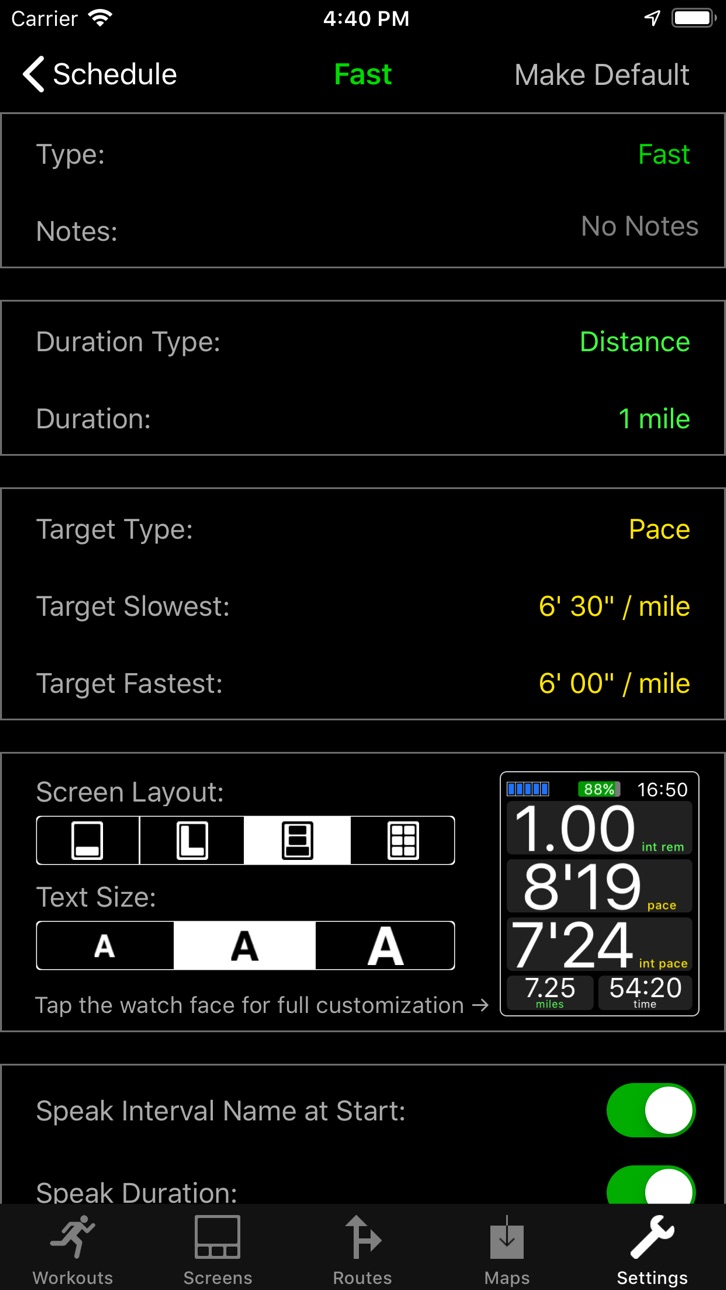
- interval schedules can be created using the larger screen of the phone app;
- climbs and descents are supported with notifications and on-screen data and graphs;
- waypoints can be created, navigated to, and exported;
- use shortcuts to associate operations with gestures (e.g. double tap to hear configurable metrics);
- compare pace against a target or a previous workout (using metrics and a dot on the map);
- show zones for pace and power as well as heart rate (with optional coloured backgrounds);
- auto-pause is available for all outdoor activities;
- shows GPS and heart rate before starting a workout, so that you can wait for good signals;
- configure distance and pace for running / walking to come from Apple’s pedometer or from GPS;
- workouts can be exported in FIT / TCX / GPX files, or automatically sent to Strava;
- workouts created by the app can be analysed in great depth in the iPhone app.
The app also has many more features. The map is a particular highlight. It uses OpenStreetMap, which provides worldwide coverage and includes the trails necessary for outdoor workouts. It also has several features that help you navigate during a workout:
- maps can be smoothly panned and zoomed, and can rotate according to the compass;
- a breadcrumb trail of your whole route is displayed on the map during the workout;
- topographic data can be shown, with configurable contour colours and hill shading;
- map-only mode is provided for when you don't want to start a workout and just need a map;
- a circular scale is shown when you zoom, making it easy to see the distance to features;
- maps can be stored on the watch for use when offline (they are downloaded as required if online);
- a red compass points north and a green compass points to the start;
- choose a waypoint to see a compass and distance to it in the corner of the map;
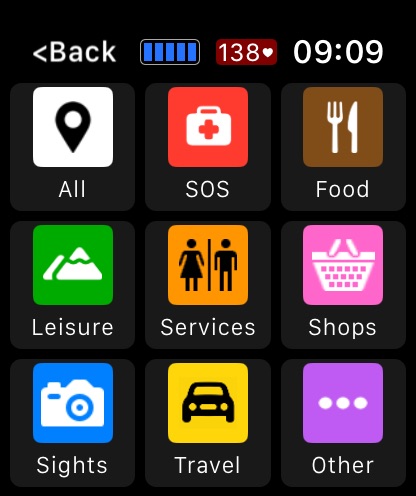
- you can also navigate to waypoints on the map, such as hospitals, sights, cafes etc.
If you load a route from a GPX / TCX / FIT file then navigation is even easier:
- your position is shown on an elevation profile of the route;
- the remaining distance, time and ascent can also be displayed;
- you can get alerted when you go off-route;
- when off-route then a compass is shown which points to the nearest part of the route;
- if the route contains turn by turn directions then these can be used like a sat nav;
- if there are no directions then the app can use “bend detection” to generate them;
- the next direction is shown as an icon and distance in the corner of the map;
- the map can automatically zoom in when you are approaching a turn;
- you can use shake gestures to hear the distance to the next turn or the end of the route;
- routes are coloured by gradient: from red for steep uphill to blue for steep downhill;
- you can configure what information is displayed during a climb or descent.
All this is included for a single one-off payment. No extra in-app purchases or subscriptions are required (although there is a completely optional in-app tip jar which was requested by long-term users).
If you own an Apple Watch and do any form of exercise, then WorkOutDoors is the app for you. Give it a go!
In-App Purchases CD pricing
One-Time Purchases
Tip—
Generous Tip—
Very Generous Tip—
Massive Tip—
Fanatical Tip—
Capabilities
In-App Purchases
Accessibility
ipadiphonemacrealityDevicetvoswatch
Version history 25 versions
Build 887039992v6.42026-06-26 06:30:38
This is a bug fix version which addresses a few issues in the last version. Most notably the inability to set up a connection with Strava is now fixed.
If you are having problems with the action button on the Ultra then please reboot the watch because that often fixes any issues with it.
Note: this version requires watchOS 9.2, which means that it will no longer run on the old series 3 watches which were released back in 2017. Sorry about that. It was a necessary restriction in order to work around an issue in recent versions of watchOS.
Build 878756971v6.32026-06-16 05:42:51
- New "Possibly Resumed” alert to warn if you move whilst paused
- New “Current Elevation Pace (VAM)” and “Climb Average Elevation Pace" metrics
- New “Time in Current Zone” metrics (for heart rate, pace and power)
- Option of a black background for metrics on the watch instead of dark grey rectangles
- More "custom" screen profiles available
- Ability to cancel stalled file transfers
- Now using appropriate haptics for left and right turns
- New advanced options for interaction with audio apps
- Structural modernisation of the code for compatibility with future versions of iOS
- Forward compatibility with major changes in the next version of the app
Plus the usual minor improvements and bug fixes, including a workaround for an issue with the action button that appeared in watchOS 26.5.
Build 878168591v6.22025-10-08 07:17:19
A few tweaks for iOS 26 and the new Ultra 3, series 11 and SE 3 watches.
Plus the usual minor improvements and bug fixes
Build 877390325v6.12025-09-16 08:58:15
This version supports watchOS 26 and iOS 26, as well as having the usual bug fixes and minor improvements.
Note: If the app does not start on the watch with watchOS 26, then please reboot the watch and it should be fine after that.
Build 869233157v6.02025-08-18 19:43:15
This version includes many new features and as ever they are free to existing users, just as they have been for over 8 years. When you buy WorkOutDoors you pay once for the lifetime of the app, and yet you still get free updates like this with loads of powerful new features.
- Turn by Turn Navigation (if navigation waypoints in route file)
- Bend Detection (if no navigation waypoints in file)
- Waypoint Creation and Navigation
- Climb and Descent detection
- Load routes from TCX and FIT files as well as GPX files
- Compare performance against a previous workout by using it as a target
- Hundreds of new screen layouts possible by merging adjacent fields
- Ability to search for metrics by name (from over 800 now available)
- New heart /pace / power metrics with zone-coloured backgrounds
- many, many other changes
Build 866382031v5.52024-09-19 05:44:52
Support for the latest Apple technology.
Build 861127216v5.42024-05-26 11:21:14
This is a minor version to address an issue with map transfer since iOS 17.5. Maps are successfully being transferred to the watch but iOS no longer informs the iPhone app of the transfer, so it looks like they are not on the watch even though they are. This version addresses that issue.
There are also several other bug fixes and a few minor improvements:
- map POIs can now be made larger
- you can now zoom further into maps.
- you can now choose a single colour complication even for multi-coloured watch faces
- alert messages can be configured to stay on the screen for longer
Note that a major version is on the way with lots of new features. This version is mainly to workaround the issues with iOS 17.5
Build 860044163v5.32023-10-24 12:08:40
- supports the new Smart Stack in watchOS 10
- saves new watchOS 10 cycling sensor metrics to Apple's Health system
- fixes missing time when using latest version of watchOS
- the usual bug fixes and small improvements
Build 859700917v5.22023-09-19 09:41:03
- New activity: Table Tennis
- It's now possible to change road text size as well as POI size on maps
- Bug fixes
Note: This version does not work on the Apple Watch Series 1 and 2 models.
Build 856652493v5.02023-09-05 10:20:52
This version of the app supports the Always on Display, which means that the metrics are visible even when your wrist is lowered (if your watch supports it).
Supporting the always on display required a large part of the app to be rewritten using Apple's latest coding language. This was a lot of work and took a long time, so apologies for the delay between releases.
This version also includes a tip jar to allow you to show appreciation for the app and to support future development. Tips are completely optional and will not unlock any extra features. The one-off price for the app still lasts forever and all future updates are included, just as they always have been.
Other improvements include:
- Precision start screen where you can wait for a heart rate before starting a workout
- Redesigned summary screens on the watch with larger text and more graphs
- Action button can display the Start screen, and then press again to start a workout
- Automatic Water Lock when starting a workout is now available for all activities
- Auto-Pause is now available for all outdoor activities
Build 859671502v5.12023-09-05 11:55:02
Bug fixes.
Build 854030803v4.92022-12-23 10:45:22
This version fixes the missing complications for some watch faces on 40mm and 41mm watches.
Build 853885602v4.82022-12-14 08:21:13
- Support for Action Button on the Ultra
- New activity types: Jump Rope, Martial Arts, Pickleball & Squash.
- New intensity targets for intervals: heart, pace and power
- Options to automatically engage water lock at start for surfing, sailing and rowing
- Now showing lock icon when screen is locked
- Loads of other changes and fixes.
Build 852283668v4.72022-09-19 05:20:31
Workaround for a bug in iOS 16 on the iPhone 14 Pro that makes maps on the iPhone app completely purple!
Build 851593864v4.62022-09-18 15:42:03
- new running metrics: power, vertical oscillation and ground contact time (require watchOS 9)
- power and pace zones (like the existing HR zones)
- optional new zone graphic at the bottom of the screen (series 4 and newer)
- improved configurability for what appears at the bottom of the screen (series 4 and newer)
- over 200 new metrics, making over 600 in total
Build 849494048v4.52022-08-09 09:11:49
New Badminton and Tai Chi activities
Peaks now show elevation information
Bug fixes
Build 846291123v4.42022-05-19 12:30:36
- Support for Bluetooth sensors: Power, Cadence, Pace, Distance & Heart Rate
- Supports new 41mm and 45mm Apple Watch Series 7 devices
- New Thunderforest maps option, with contours & hill shading
- 4 new screen layout options with very large fonts
- New "Back to Start" alert with option to automatically end workout
- New "Possibly Travelling Home" alert with option to end workout
- Many new metrics (now over 400 in total)
- New shake and crown rotation gestures to be associated with commands
- Many other new features and bug fixes
Build 837849498v4.32021-02-02 08:34:04
- All settings now available in the iPhone app as well as the watch app;
- Map can now be customised with dozens of different styles;
- New activity types: weight training, mixed cardio, cross training, pilates and more;
- Workouts now regularly saved so they can be recovered if required (e.g. battery runs out);
- Ability to control interaction with other audio sources (mix/duck/pause);
- Ability to request confirmation when ending a workout;
- Ability to configure all 4 options on touch menu;
- Redesign of user interface to be cleaner and more modern looking;
- New buttons for functions that were previously only available via the touch menu;
- Improved logging of data transfers to help diagnose watchOS/iOS comms issues.
- Totals by interval type now added to iPhone analysis;
- Energy can now be displayed in joules instead of calories;
- Stride length can now be displayed in feet instead of metres;
- Keeping GPS on for a minute after app's use is now optional;
- Lots of other improvements and fixes!
Build 833702828v4.22020-07-28 06:28:40
- Strava uploading can now be made automatic, direct from the watch;
- Extended profile graphs now available in iPhone analysis;
- Now includes Dance and Open Water Swimming workouts;
- Auto-pause available for more activities;
- Ability to configure repeated alerts whilst a limit is exceeded;
- New "Time in Zone" heart rate metrics;
- Improved skiing functionality;
- Minor cosmetic improvements to maps, graphs etc;
- Loads of other improvements, and a few bug fixes.
Build 833113921v4.12019-11-06 15:37:50
- Supports the compass in the Apple Watch series 5 (with several new settings and metrics).
- Compatible with iOS 13 and watchOS 6
- Enhanced auto-pause configurability for running, cycling, walking and hiking
- New command to exit the current repeat loop during an interval schedule
- New configurable activity menus
- Ability to control the length of time that messages appear on the watch screen
- Ability to control the amount of smoothing applied to the current pace
- Improved Screen and Profile file manipulation functions
- lots of other improvements and bug fixes.
Build 831694991v4.02019-09-20 03:32:31
This is a major new version with dozens of new features and improvements:
Ability to create Interval Schedules:
- Multiple interval types: warm-up, fast, steady, slow, recover, cool-down etc;
- Can create groups of intervals with a configurable number of repeats;
- Set interval durations using time, distance, heart rate, steps, calories etc;
- Set interval targets such as heart rate, pace, cadence etc;
- Configure what metrics are displayed on the screen during an interval;
- Configure what metrics are spoken at the start/end of each interval;
- Configure regular notifications during an interval;
- Control the metrics displayed and spoken for each notification.
New activities:
- Many new indoor activities
- includes running, cycling, rowing, walking, elliptical, yoga, stair climbing etc
- New "Other Indoor" and "Other Outdoor" activities.
Auto-Pause
- now available for cycling, hiking and walking as well as running;
- ability to control the sensitivity of the auto-pause
Previous Workouts on the watch
- Displays the same summary screen that was shown at workout end;
- Analyse metrics, maps, profiles, lap splits and interval splits.
Exporting has been improved:
- Can now export TCX files as well as GPX;
- Strava export now defaults to using TCX for data consistency;
- Can now create a route directly from a workout;
- Now possible to export a GPX file from a route.
Alerts have been improved:
- Can now configure which metrics are displayed for each alert;
- Can now configure which metrics are spoken for each alert;
- New alert for "off route" and "back on route" notifications;
- New alert for HR zone changes (with configurable intervals);
- New alert for low battery (with configurable levels);
- New alert for drink reminders (with configurable intervals);
- New alert for eat reminders (with configurable intervals).
Commands and Shortcuts have been improved:
- New "Commands" screen to invoke them directly instead of via a shortcut.
- New shortcuts for single tap and double tap;
- Ability to configure the options shown on the force press menu;
- New Water Lock command;
- New "Status" commands so metrics can be displayed and/or spoken on demand.
Starting Workouts has been improved:
- Added extra "..." button to menu options (like Apple's Workout app);
- Offers ability to set a fixed distance or time for a workout;
- Also offers any interval schedules defined for that activity;
- Also offers standard "Open Workout" as before;
- When choosing open workout then it shows a big Start button.
iPhone app has been improved:
- Ability to filter workouts by activity type or name
- Ability to sort workouts by one of several metrics
- Ability to group workouts (e.g. to see monthly totals and averages)
- Can now analyse workout intervals (as well as laps)
- Separate settings screens for heart rate zones, export options etc
- Ability to define heart zones as bpm as well as intensities.
- Showing time of day in title when swiping through workout in iPhone app.
Over 100 new metrics including:
- "Distance to Route"
- "Direct Distance to Start"
- "Course" (bearings)
- "Sunset", "Sunrise", "Time to Sunset", "Time to Sunrise"
- "Time of Day" (with or without seconds)
- "Elapsed Time" (ignores pauses)
- "Time Remaining", "Distance Remaining", "End Time"
- Dozens of new interval-related fields
- Over 300 metrics now available in total.
- Tapping a metric now shows the latest metric value as well as the description.
Theme Improvements:
- Optional dark mode for main menu on watch;
- Ability to make metrics and units either white or in colour;
Voice Improvements:
- Can set volume;
- Can choose nationality and gender of voice;
- Can create shortcuts to mute and unmute voice.
These are just some of the many improvements in this version. Update now to see them all!
Build 829164975v3.22018-11-13 18:38:42
This version includes a few bug fixes and a great new icon!
Build 828785711v3.12018-10-28 21:07:30
This version is fully compatible with Apple Watch Series 4; watchOS 5; iOS 12; and the latest iPhones. It makes full use of the new screens on the Apple Watch Series 4 models and provides complications for the new watch faces.
Other new features include direct uploading to Strava, and access to the Now Playing music controls from within the app.
Build 825680076v3.02018-08-22 06:55:27
This is a major new version with loads of great new features including:
- Several new screen layouts (with and without maps);
- Ability to cycle through data screens during the workout by triple-tapping display;
- Complete control of which metrics appear on each screen;
- Over 160 available metrics, including mini-graphs and buttons;
- Configurable alerts when values exceed user defined limits (e.g. heartrate, pace, speed, cadence);
- Configurable interval notifications (e.g. distance, time, steps, calories, ascent, descent etc);
- Limits and notifications can use haptics and/or voice feedback;
- Enhanced workout analysis on both the iPhone and watch;
- Automatic and Manual laps;
- Analysis of lap splits on Watch available during and after a workout;
- Lap Splits available for multiple metrics: time, distance, pace, speed, heart, cadence, calories, elevation etc;
- Improved maps on the iPhone to match the dark theme of the app;
- Configurable heart rate zones;
- Target Pace metrics: distance and/or time ahead or behind target;
- Target Pace icon shown on map;
- Rolling Pace fields with configurable intervals (e.g. 1 mile or 1 minute);
- Completely restructured Settings screen on the watch, with loads of new parameters;
- Geocaching "groundspeak" information now displayed (including type, size, difficulty, descriptions, hint & log);
- New screen showing nearest waypoints in GPX file (useful for Geocaching);
- App now remembers if "auto-rotate" was on before and switches it on when possible for next workout;
- Ability to configure what operations are invoked by the side buttons and screen taps;
- Several new activity types: Paddle Sports, Surfing, XC Skiing, Golf and Skating;
- Sailing workouts now use nautical miles and knots;
- Ability to lock screen to avoid accidental use;
- New on-screen battery level indicator;
Build 825359133v2.22018-01-16 19:43:51
URGENT: Please update to this version! The company providing the maps for previous versions is shutting down at the end of January, so they will cease to work properly.
This version has been updated to use maps from Mapbox instead, which come with several improvements:
The data is more concise, meaning faster download, transfer and drawing times;
The maps can now be zoomed out further to enable easier panning of long distances;
Buildings are shown in 3D when zoomed in far enough;
Price history by region
Currency
Show
Columns
Search
Availability 175 of 175 storefronts
| Region | Language | Price | Ratings | Avg | Version |
|---|---|---|---|---|---|
| US | en-US | USD 8.99 | 1.7k | 4.7 | 6.4 |
| DE | de-DE | EUR 9.99 | 1.2k | 4.8 | 6.4 |
| FR | fr-FR | EUR 9.99 | 790 | 4.6 | 6.4 |
| GB | en-GB | GBP 8.99 | 629 | 4.8 | 6.4 |
| ES | es-ES | EUR 9.99 | 621 | 4.2 | 6.4 |
| IT | it | EUR 9.99 | 366 | 4.6 | 6.4 |
| NL | nl | EUR 9.99 | 321 | 4.8 | 6.4 |
| CA | en-CA | CAD 11.99 | 300 | 4.8 | 6.4 |
| CN | zh-Hans-CN | CNY 58 | 211 | 4.5 | 6.4 |
| BR | pt-BR | BRL 59.9 | 204 | 4.4 | 6.4 |
| AU | en-AU | AUD 14.99 | 193 | 4.8 | 6.4 |
| CH | de-CH | CHF 8 | 165 | 4.8 | 6.4 |
| RU | ru | RUB 799 | 163 | 4.6 | 6.4 |
| CZ | en-GB | CZK 249 | 147 | 4.9 | 6.4 |
| PL | en-GB | PLN 39.99 | 144 | 4.9 | 6.4 |
| BE | en-GB | EUR 9.99 | 137 | 4.8 | 6.4 |
| SE | sv | SEK 119 | 124 | 4.8 | 6.4 |
| AT | de-DE | EUR 9.99 | 117 | 4.7 | 6.4 |
| NO | en-GB | NOK 99 | 90 | 4.9 | 6.4 |
| HU | en-GB | HUF 3990 | 61 | 4.7 | 6.4 |
| TW | zh-Hant-TW | TWD 290 | 56 | 4.5 | 6.4 |
| DK | en-GB | DKK 79 | 53 | 4.8 | 6.4 |
| FI | en-GB | EUR 9.99 | 52 | 4.5 | 6.4 |
| PT | pt-PT | EUR 9.99 | 49 | 4.8 | 6.4 |
| SK | en-GB | EUR 9.99 | 46 | 4.8 | 6.4 |
| HK | zh-Hant-HK | HKD 68 | 43 | 4.9 | 6.4 |
| IL | en-GB | ILS 29.9 | 42 | 4.5 | 6.4 |
| TR | en-GB | TRY 499.99 | 42 | 4.6 | 6.4 |
| GR | en-GB | EUR 9.99 | 40 | 4.9 | 6.4 |
| UA | en-GB | USD 9.99 | 39 | 4.7 | 6.4 |
| RO | en-GB | RON 49.99 | 38 | 4.7 | 6.4 |
| KR | ko | KRW 15000 | 33 | 4.7 | 6.4 |
| NZ | en-AU | NZD 14.99 | 31 | 4.6 | 6.4 |
| IE | en-GB | EUR 9.99 | 30 | 4.7 | 6.4 |
| IN | en-GB | INR 999 | 30 | 4.6 | 6.4 |
| SI | en-GB | EUR 9.99 | 30 | 4.9 | 6.4 |
| SG | en-GB | SGD 12.98 | 29 | 4.7 | 6.4 |
| MX | es-MX | MXN 199 | 28 | 4.4 | 6.4 |
| MY | en-GB | MYR 39.9 | 27 | 4.6 | 6.4 |
| BG | en-GB | EUR 9.99 | 25 | 4.8 | 6.4 |
| JP | ja | JPY 1500 | 25 | 4.6 | 6.4 |
| CL | es-MX | CLP 9990 | 21 | 4.7 | 6.4 |
| AR | es-MX | USD 8.99 | 19 | 4.7 | 6.4 |
| TH | en-GB | THB 299 | 18 | 4.4 | 6.4 |
| ZA | en-GB | ZAR 199.99 | 17 | 4.4 | 6.4 |
| LT | en-GB | EUR 9.99 | 16 | 4.9 | 6.4 |
| CO | es-MX | COP 39900 | 15 | 4.6 | 6.4 |
| LU | en-GB | EUR 9.99 | 15 | 4.9 | 6.4 |
| HR | en-GB | EUR 9.99 | 14 | 4.7 | 6.4 |
| PH | en-GB | PHP 599 | 14 | 4.4 | 6.4 |
| ID | en-GB | IDR 149000 | 10 | 4.4 | 6.4 |
| VN | en-GB | VND 299000 | 10 | 4.6 | 6.4 |
| EE | en-GB | EUR 9.99 | 9 | 4.9 | 6.4 |
| LV | en-GB | EUR 9.99 | 8 | 5.0 | 6.4 |
| GE | en-GB | USD 9.99 | 7 | 4.7 | 6.4 |
| CY | en-GB | EUR 9.99 | 6 | 4.2 | 6.4 |
| EC | es-MX | USD 8.99 | 6 | 4.5 | 6.4 |
| KZ | en-GB | KZT 4990 | 6 | 4.7 | 6.4 |
| CR | es-MX | USD 8.99 | 5 | 5.0 | 6.4 |
| GT | es-MX | USD 8.99 | 5 | 4.8 | 6.4 |
| AE | en-GB | AED 34.99 | 4 | 3.3 | 6.4 |
| BY | en-GB | USD 9.99 | 4 | 4.3 | 6.4 |
| DO | es-MX | USD 8.99 | 4 | 4.8 | 6.4 |
| MT | en-GB | EUR 9.99 | 4 | 4.3 | 6.4 |
| RS | en-GB | EUR 9.99 | 4 | 4.0 | 6.4 |
| PE | es-MX | PEN 39.9 | 3 | 4.3 | 6.4 |
| AM | en-GB | USD 9.99 | 2 | 5.0 | 6.4 |
| BN | en-GB | USD 8.99 | 2 | 3.0 | 6.4 |
| HN | es-MX | USD 8.99 | 2 | 2.0 | 6.4 |
| KG | en-GB | USD 9.99 | 2 | 5.0 | 6.4 |
| KH | en-GB | USD 9.99 | 2 | 4.5 | 6.4 |
| MA | en-GB | USD 8.99 | 2 | 4.0 | 6.4 |
| MD | en-GB | USD 9.99 | 2 | 4.5 | 6.4 |
| MK | en-GB | USD 8.99 | 2 | 3.0 | 6.4 |
| OM | en-GB | USD 8.99 | 2 | 5.0 | 6.4 |
| PA | es-MX | USD 8.99 | 2 | 5.0 | 6.4 |
| SA | en-GB | SAR 39.99 | 2 | 5.0 | 6.4 |
| BA | en-GB | EUR 9.99 | 1 | 5.0 | 6.4 |
| BH | en-GB | USD 9.99 | 1 | 1.0 | 6.4 |
| CI | fr-FR | USD 9.99 | 1 | 4.0 | 6.4 |
| IS | en-GB | USD 9.99 | 1 | 5.0 | 6.4 |
| LR | en-GB | USD 8.99 | 1 | 4.0 | 6.4 |
| MO | zh-Hant-HK | USD 8.99 | 1 | 5.0 | 6.4 |
| NI | es-MX | USD 8.99 | 1 | 5.0 | 6.4 |
| PY | es-MX | USD 8.99 | 1 | 2.0 | 6.4 |
| QA | en-GB | QAR 29.99 | 1 | 1.0 | 6.4 |
| UY | en-GB | USD 8.99 | 1 | 5.0 | 6.4 |
| UZ | en-GB | USD 9.99 | 1 | 5.0 | 6.4 |
| ZW | en-GB | USD 9.99 | 1 | 5.0 | 6.4 |
| AF | en-GB | USD 8.99 | 0 | — | 6.4 |
| AG | en-GB | USD 8.99 | 0 | — | 6.4 |
| AI | en-GB | USD 8.99 | 0 | — | 6.4 |
| AL | en-GB | USD 9.99 | 0 | — | 6.4 |
| AO | en-GB | USD 8.99 | 0 | — | 6.4 |
| AZ | en-GB | USD 9.99 | 0 | — | 6.4 |
| BB | en-GB | USD 9.99 | 0 | — | 6.4 |
| BF | en-GB | USD 8.99 | 0 | — | 6.4 |
| BJ | en-GB | USD 9.99 | 0 | — | 6.4 |
| BM | en-GB | USD 8.99 | 0 | — | 6.4 |
| BO | es-MX | USD 8.99 | 0 | — | 6.4 |
| BS | en-GB | USD 9.99 | 0 | — | 6.4 |
| BT | en-GB | USD 8.99 | 0 | — | 6.4 |
| BW | en-GB | USD 8.99 | 0 | — | 6.4 |
| BZ | en-GB | USD 8.99 | 0 | — | 6.4 |
| CD | en-GB | USD 8.99 | 0 | — | 6.4 |
| CG | en-GB | USD 8.99 | 0 | — | 6.4 |
| CM | fr-FR | USD 9.99 | 0 | — | 6.4 |
| CV | en-GB | USD 8.99 | 0 | — | 6.4 |
| DM | en-GB | USD 8.99 | 0 | — | 6.4 |
| DZ | en-GB | USD 8.99 | 0 | — | 6.4 |
| EG | en-GB | EGP 499.99 | 0 | — | 6.4 |
| FJ | en-GB | USD 8.99 | 0 | — | 6.4 |
| FM | en-GB | USD 8.99 | 0 | — | 6.4 |
| GA | fr-FR | USD 8.99 | 0 | — | 6.4 |
| GD | en-GB | USD 8.99 | 0 | — | 6.4 |
| GH | en-GB | USD 9.99 | 0 | — | 6.4 |
| GM | en-GB | USD 8.99 | 0 | — | 6.4 |
| GW | en-GB | USD 8.99 | 0 | — | 6.4 |
| GY | en-GB | USD 8.99 | 0 | — | 6.4 |
| IQ | en-GB | USD 8.99 | 0 | — | 6.4 |
| JM | en-GB | USD 8.99 | 0 | — | 6.4 |
| JO | en-GB | USD 8.99 | 0 | — | 6.4 |
| KE | en-GB | USD 9.99 | 0 | — | 6.4 |
| KN | en-GB | USD 8.99 | 0 | — | 6.4 |
| KW | en-GB | USD 8.99 | 0 | — | 6.4 |
| KY | en-GB | USD 8.99 | 0 | — | 6.4 |
| LA | en-GB | USD 9.99 | 0 | — | 6.4 |
| LB | en-GB | USD 8.99 | 0 | — | 6.4 |
| LC | en-GB | USD 8.99 | 0 | — | 6.4 |
| LK | en-GB | USD 8.99 | 0 | — | 6.4 |
| LY | en-GB | USD 8.99 | 0 | — | 6.4 |
| ME | en-GB | EUR 7.99 | 0 | — | 6.4 |
| MG | en-GB | USD 8.99 | 0 | — | 6.4 |
| ML | en-GB | USD 8.99 | 0 | — | 6.4 |
| MM | en-GB | USD 8.99 | 0 | — | 6.4 |
| MN | en-GB | USD 8.99 | 0 | — | 6.4 |
| MR | en-GB | USD 8.99 | 0 | — | 6.4 |
| MS | en-GB | USD 8.99 | 0 | — | 6.4 |
| MU | en-GB | USD 9.99 | 0 | — | 6.4 |
| MV | en-GB | USD 8.99 | 0 | — | 6.4 |
| MW | en-GB | USD 8.99 | 0 | — | 6.4 |
| MZ | en-GB | USD 8.99 | 0 | — | 6.4 |
| NA | en-GB | USD 8.99 | 0 | — | 6.4 |
| NE | en-GB | USD 8.99 | 0 | — | 6.4 |
| NG | en-GB | NGN 14900 | 0 | — | 6.4 |
| NP | en-GB | USD 9.99 | 0 | — | 6.4 |
| NR | en-GB | USD 8.99 | 0 | — | 6.4 |
| PG | en-GB | USD 8.99 | 0 | — | 6.4 |
| PK | en-GB | PKR 2500 | 0 | — | 6.4 |
| PW | en-GB | USD 8.99 | 0 | — | 6.4 |
| RW | en-GB | USD 8.99 | 0 | — | 6.4 |
| SB | en-GB | USD 8.99 | 0 | — | 6.4 |
| SC | en-GB | USD 8.99 | 0 | — | 6.4 |
| SL | en-GB | USD 8.99 | 0 | — | 6.4 |
| SN | en-GB | USD 9.99 | 0 | — | 6.4 |
| SR | en-GB | USD 9.99 | 0 | — | 6.4 |
| ST | en-GB | USD 8.99 | 0 | — | 6.4 |
| SV | es-MX | USD 8.99 | 0 | — | 6.4 |
| SZ | en-GB | USD 8.99 | 0 | — | 6.4 |
| TC | en-GB | USD 8.99 | 0 | — | 6.4 |
| TD | en-GB | USD 8.99 | 0 | — | 6.4 |
| TJ | en-GB | USD 9.99 | 0 | — | 6.4 |
| TM | en-GB | USD 8.99 | 0 | — | 6.4 |
| TN | en-GB | USD 8.99 | 0 | — | 6.4 |
| TO | en-GB | USD 8.99 | 0 | — | 6.4 |
| TT | en-GB | USD 8.99 | 0 | — | 6.4 |
| TZ | en-GB | TZS 24900 | 0 | — | 6.4 |
| UG | en-GB | USD 9.99 | 0 | — | 6.4 |
| VC | en-GB | USD 8.99 | 0 | — | 6.4 |
| VE | es-MX | USD 8.99 | 0 | — | 6.4 |
| VG | en-GB | USD 8.99 | 0 | — | 6.4 |
| VU | en-GB | USD 8.99 | 0 | — | 6.4 |
| XK | en-GB | EUR 9.99 | 0 | — | 6.4 |
| YE | en-GB | USD 8.99 | 0 | — | 6.4 |
| ZM | en-GB | USD 9.99 | 0 | — | 6.4 |
Change log 29 changes · CD
✎
releaseNotes updated
This is a bug fix version which addresses a few issues in the last version. Most notably the inability to set up a connection with Strava is now fixed.
If you
✎
description updated
WorkOutDoors is the most advanced and most configurable workout app for the Apple Watch. It's perfect for running, cycling, hiking and any other indoor or outdo
✎
subtitle updated
Advanced Workout App with Maps
✎
name updated
WorkOutDoors
◆
Version 6.4 released
This is a bug fix version which addresses a few issues in the last version. Most notably the inability to set up a connection with Strava is now fixed.
If you are having problems with the action button on the Ultra then please reboot the
◆
Version 6.3 released
- New "Possibly Resumed” alert to warn if you move whilst paused
- New “Current Elevation Pace (VAM)” and “Climb Average Elevation Pace" metrics
- New “Time in Current Zone” metrics (for heart rate, pace and power)
- Option of a black backg
◆
Version 6.2 released
A few tweaks for iOS 26 and the new Ultra 3, series 11 and SE 3 watches.
Plus the usual minor improvements and bug fixes
◆
Version 6.1 released
This version supports watchOS 26 and iOS 26, as well as having the usual bug fixes and minor improvements.
Note: If the app does not start on the watch with watchOS 26, then please reboot the watch and it should be fine after that.
◆
Version 6.0 released
This version includes many new features and as ever they are free to existing users, just as they have been for over 8 years. When you buy WorkOutDoors you pay once for the lifetime of the app, and yet you still get free updates like this
◆
Version 5.5 released
Support for the latest Apple technology.
◆
Version 5.4 released
This is a minor version to address an issue with map transfer since iOS 17.5. Maps are successfully being transferred to the watch but iOS no longer informs the iPhone app of the transfer, so it looks like they are not on the watch even th
◆
Version 5.3 released
- supports the new Smart Stack in watchOS 10
- saves new watchOS 10 cycling sensor metrics to Apple's Health system
- fixes missing time when using latest version of watchOS
- the usual bug fixes and small improvements
◆
Version 5.2 released
- New activity: Table Tennis
- It's now possible to change road text size as well as POI size on maps
- Bug fixes
Note: This version does not work on the Apple Watch Series 1 and 2 models.
◆
Version 5.1 released
Bug fixes.
◆
Version 5.0 released
This version of the app supports the Always on Display, which means that the metrics are visible even when your wrist is lowered (if your watch supports it).
Supporting the always on display required a large part of the app to be rewritt
◆
Version 4.9 released
This version fixes the missing complications for some watch faces on 40mm and 41mm watches.
◆
Version 4.8 released
- Support for Action Button on the Ultra
- New activity types: Jump Rope, Martial Arts, Pickleball & Squash.
- New intensity targets for intervals: heart, pace and power
- Options to automatically engage water lock at start for surfing, sai
◆
Version 4.7 released
Workaround for a bug in iOS 16 on the iPhone 14 Pro that makes maps on the iPhone app completely purple!
◆
Version 4.6 released
- new running metrics: power, vertical oscillation and ground contact time (require watchOS 9)
- power and pace zones (like the existing HR zones)
- optional new zone graphic at the bottom of the screen (series 4 and newer)
- improved confi
◆
Version 4.5 released
New Badminton and Tai Chi activities
Peaks now show elevation information
Bug fixes
◆
Version 4.4 released
- Support for Bluetooth sensors: Power, Cadence, Pace, Distance & Heart Rate
- Supports new 41mm and 45mm Apple Watch Series 7 devices
- New Thunderforest maps option, with contours & hill shading
- 4 new screen layout options with very lar
◆
Version 4.3 released
- All settings now available in the iPhone app as well as the watch app;
- Map can now be customised with dozens of different styles;
- New activity types: weight training, mixed cardio, cross training, pilates and more;
- Workouts now regu
◆
Version 4.2 released
- Strava uploading can now be made automatic, direct from the watch;
- Extended profile graphs now available in iPhone analysis;
- Now includes Dance and Open Water Swimming workouts;
- Auto-pause available for more activities;
- Ability to
◆
Version 4.1 released
- Supports the compass in the Apple Watch series 5 (with several new settings and metrics).
- Compatible with iOS 13 and watchOS 6
- Enhanced auto-pause configurability for running, cycling, walking and hiking
- New command to exit the curr
◆
Version 4.0 released
This is a major new version with dozens of new features and improvements:
Ability to create Interval Schedules:
- Multiple interval types: warm-up, fast, steady, slow, recover, cool-down etc;
- Can create groups of intervals with a config
◆
Version 3.2 released
This version includes a few bug fixes and a great new icon!
◆
Version 3.1 released
This version is fully compatible with Apple Watch Series 4; watchOS 5; iOS 12; and the latest iPhones. It makes full use of the new screens on the Apple Watch Series 4 models and provides complications for the new watch faces.
Other new f
◆
Version 3.0 released
This is a major new version with loads of great new features including:
- Several new screen layouts (with and without maps);
- Ability to cycle through data screens during the workout by triple-tapping display;
- Complete control of which
◆
Version 2.2 released
URGENT: Please update to this version! The company providing the maps for previous versions is shutting down at the end of January, so they will cease to work properly.
This version has been updated to use maps from Mapbox instead, which